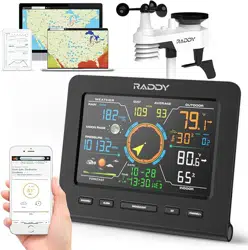
PROFESSIONAL WEATHER STATION
User Manual
Thank you for your purchase.
Please read this operation guide carefully and keep it properly before use.
VP7
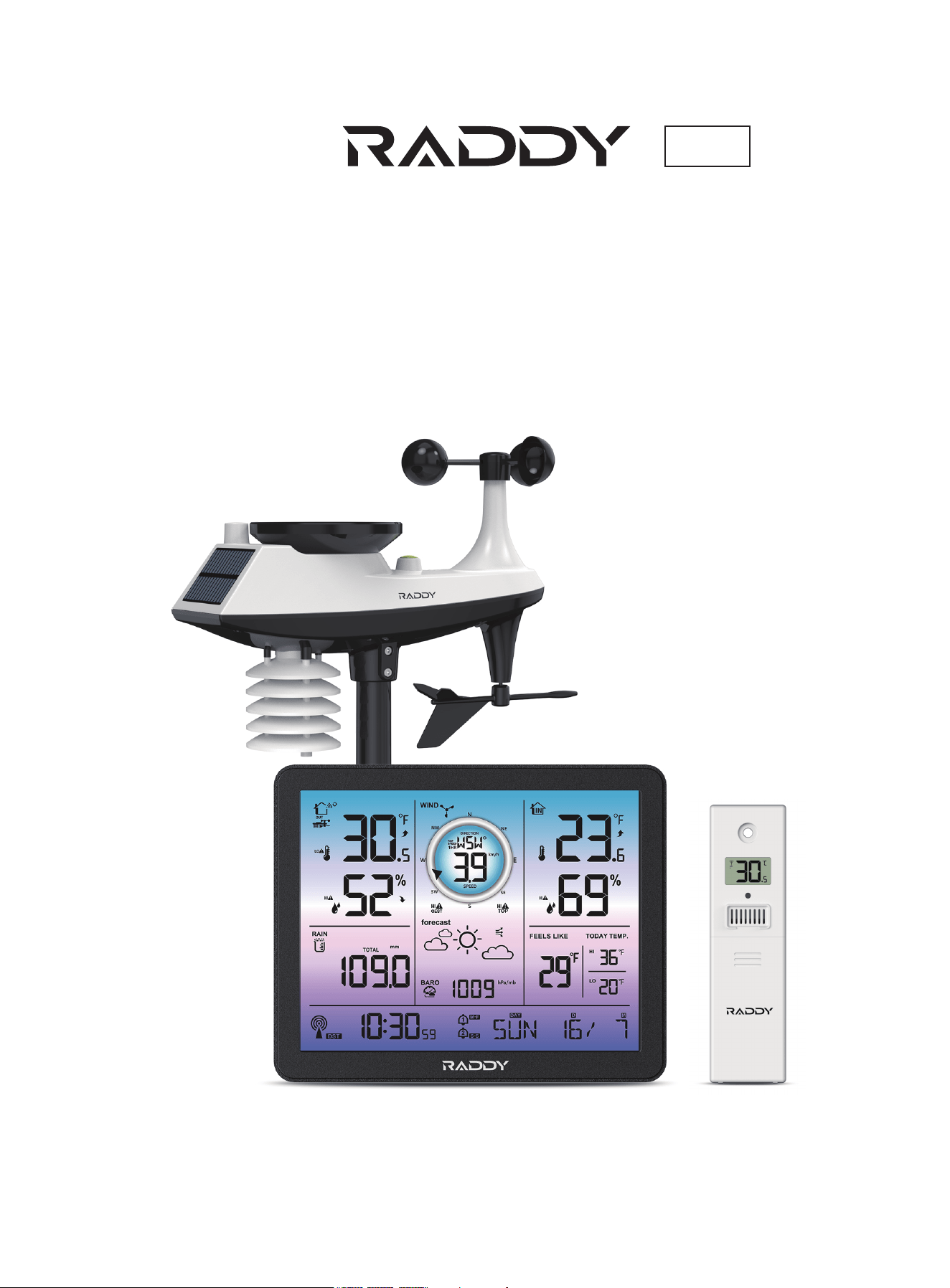
VP7 Weather Station
01
Features
Weather Station Appearance
Multi-combination Wireless Remote Sensor Appearance
Temperature | Humidity Wireless Remote Sensor Appearance (Optional sensor)
Setup Preparation
Quick Setup
Time and unit settings
Radio control clock (Abbreviation: RCC) timing
Alarm function control
Alarm and Snooze settings
Temperature | Humidity Readings | History | Trend
Wind Readings | History
Rain Readings | History
Wireless sensor connection
Weather alerts viewing and setting
Weather alert trigger
Weather forecast
Background lighting
Mounting Instructions (wireless sensor)
Specification
2
3
5
6
7
7
7
8
9
9
10
10
11
11
12
13
13
14
15
16
Contents
------------------------------------------------------------------------------------------------------------
-------------------------------------------------------------------------------------
------------------------------------------------------
--------------------------
-------------------------------------------------------------------------------------------------
--------------------------------------------------------------------------------------------------------
--------------------------------------------------------------------------------------------
----------------------------------------------------------------
--------------------------------------------------------------------------------------------
---------------------------------------------------------------------------------------
----------------------------------------------------------
-----------------------------------------------------------------------------------------
------------------------------------------------------------------------------------------
--------------------------------------------------------------------------------------
------------------------------------------------------------------------------
----------------------------------------------------------------------------------------------
-----------------------------------------------------------------------------------------------
--------------------------------------------------------------------------------------------------
------------------------------------------------------------------------
------------------------------------------------------------------------------------------------------
02
VP7 Weather Station
Features
WWVB Radio control time function
Perpetual Calendar Up to Year 2099
Day of week in 7 languages user selectable: English, German, Italian, French, Spanish, Netherlands and Danish
Two daily alarms
Automatic snooze function (OFF or 5~60min)
Temperature:
- Indoor temperature measurement ranges: 0°C (32°F) to 50°C (122°F)
- Outdoor temperature measurement ranges: -40°C (-40°F) to70°C (158°F)
Humidity:
- Indoor and outdoor humidity measurement ranges: 20% to 95%
Air pressure:
- Air pressure range: 600 to 1100 hPa (17.72 to 32.48 inHg or 450 to 825.1 mmHg)
Rain
- Rain range: 0 to 9999mm (0-393.6 inches)
Wind
- Wind speed range: 0 to 180 km/h (0 to 111 mph)
- Wind direction range: 0 to 359 degrees
Wireless Outdoor Sensor.
- 433.92MHz RF transmitting frequency
- 100 meters (300 feet) transmission range in an open area, not including walls or floors
Record of temperature, humidity, wind speed and rainfall
Alert of temperature, humidity, wind speed, rainfall
Display of feels like temperature, wind chill temperature, heat index, dew point temperature
The weather forecasting function
Level 3 display backlight
USB charging function
Power Supply:
- Weather station:
Power Adapter: DC5V 1.2A
Battery: 2 x LR3 AAA 1.5V
- Multi-combination Wireless Remote Sensor:
Battery: 3 x LR6 AA 1.5V
- Temperature | Humidity Wireless Remote Sensor
Battery: 2 x LR6 AA 1.5V
F.Y.l.:
The wireless remote sensor can work at -30°C to +70°C. Please choose the right battery according to the limittemperature of the
wireless sensor:
Alkaline zinc manganese battery can work at -20°C to +60°C
Polymer lithium ion rechargeable battery can work at -40°C to +70°C
03
VP7 Weather Station
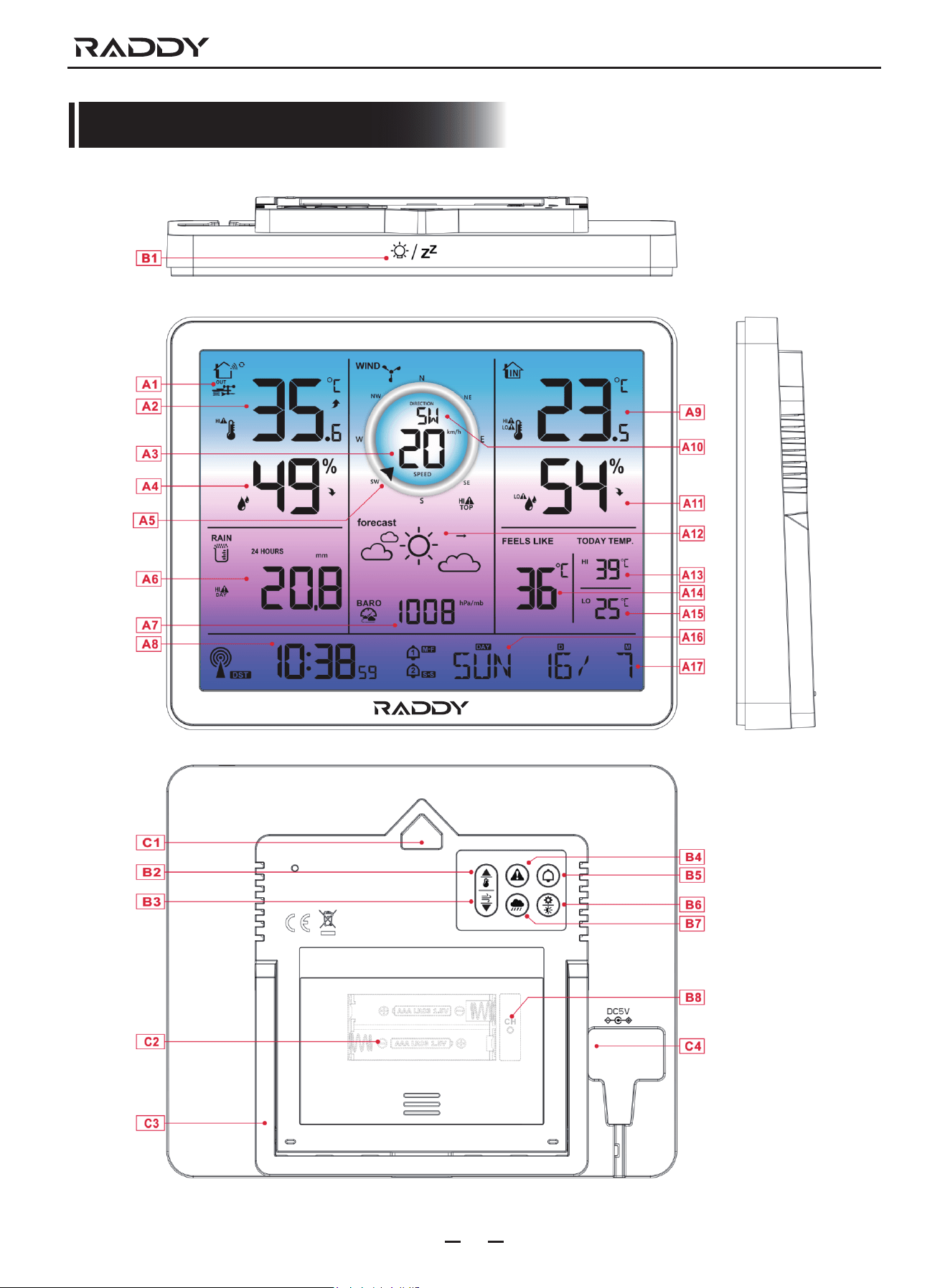
Weather Station Appearance
B5: " " button
B6: " " button
B7: " " button
B8: " CH " button
B1: " " touch location
B2: " " button
B3: " " button
B4: " " button
04
VP7 Weather Station
Part A - Positive LCD
A1: Outdoor wireless channel: OUT | CH1 | CH2 | CH3
A3: Value of wind speed
A5: Wind direction steering wheel
A7: Air pressure
A9: Indoor temperature
A11: Indoor humidity
A13: Today's highest temperature record
A15: Today's lowest temperature record
A17: Calendar
A2: Outdoor temperature
A4: Outdoor humidity
A6: Rainfall
A8: Time
A10: Wind direction or wind top speed of 1Hr
A12: Weather forecast
A14: Feels like temperature
A16: Day of the week
C2: Battery compartment
C4: Power supply socket
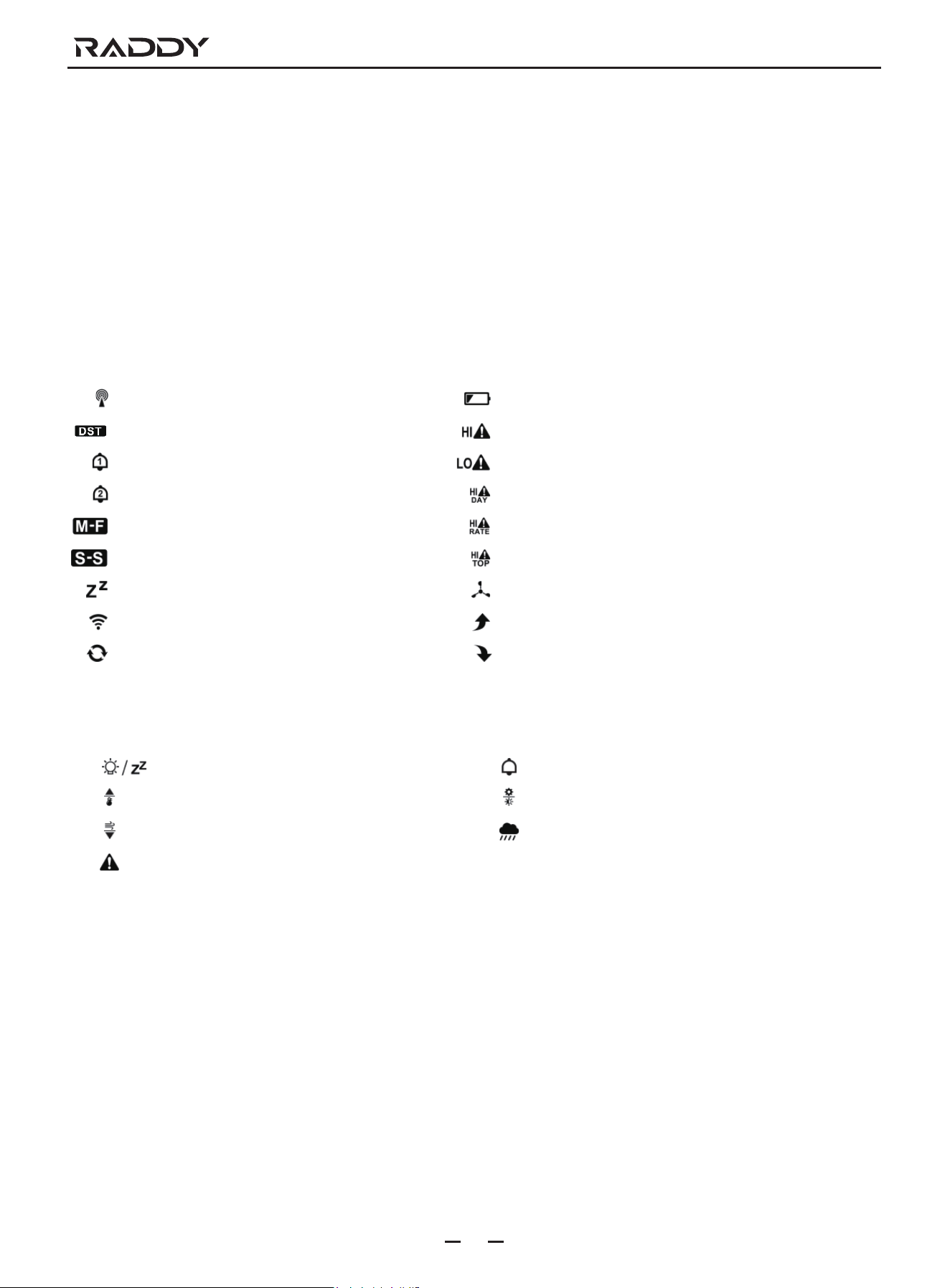
RCC Signal Icon
Summer time icon
Alarm 1 icon
Alamm 2 icon
Monday-Friday repeat alarm icon
Saturday-Sunday repeat alarm icon
Alarm snooze icon
Wireless receiving icon
Wireless channel loop icon
Battery low pressure icon
High temperature alert icon
Low temperature alert icon
24-hour rainfall alert icon
Rainfall intensity alert icon
Top wind speed alert icon
Wind icon
Temperature | humidity up trend arrow
Temperature | humidity down trend arrow
Part B - Buttons
Part C - Exterior
C1: Hanging hole
C3: Support frame
05
VP7 Weather Station
Multi-combination Wireless Remote Sensor Appearance
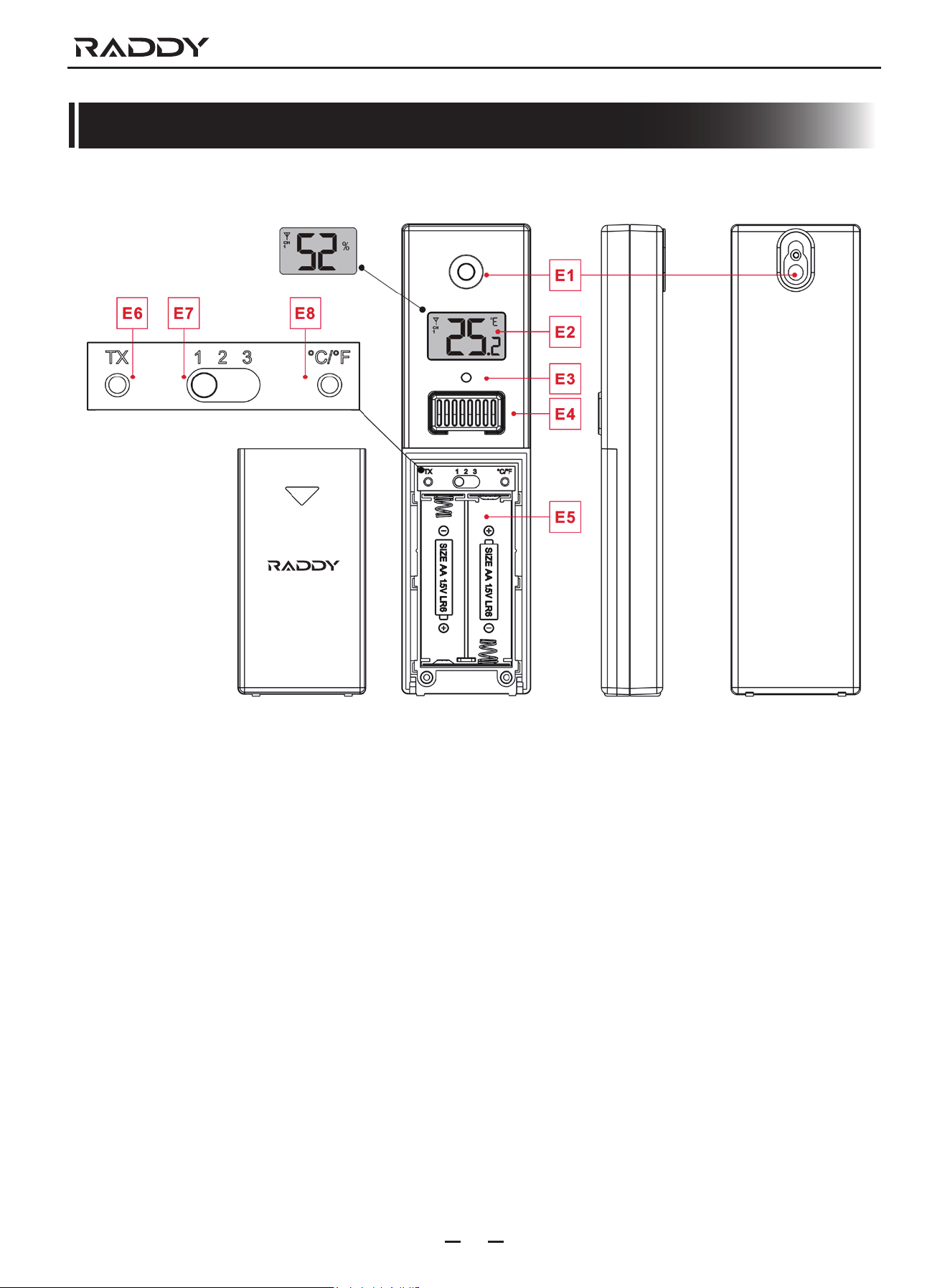
Part D - Exterior
D1: Solar panel
D3: Wind cups
D5: Temperature | humidity induction box
D7: Reset button
D9: Manual transmit signal button
D11: Support rod
D13: Socket head cap screws
D15: North direction mark
D17: Large nut for fixing the support rod and the base
D2: Rain funnel
D4: Bubble level
D6: Wind Directional Vane
D8: LED indicator
D10: Battery compartment
D12: Fixed base
D14: Drain vents For rain sensor D16: Rain funnel rotation mark
06
VP7 Weather Station
Temperature | Humidity Wireless Remote Sensor Appearance (Optional sensor)
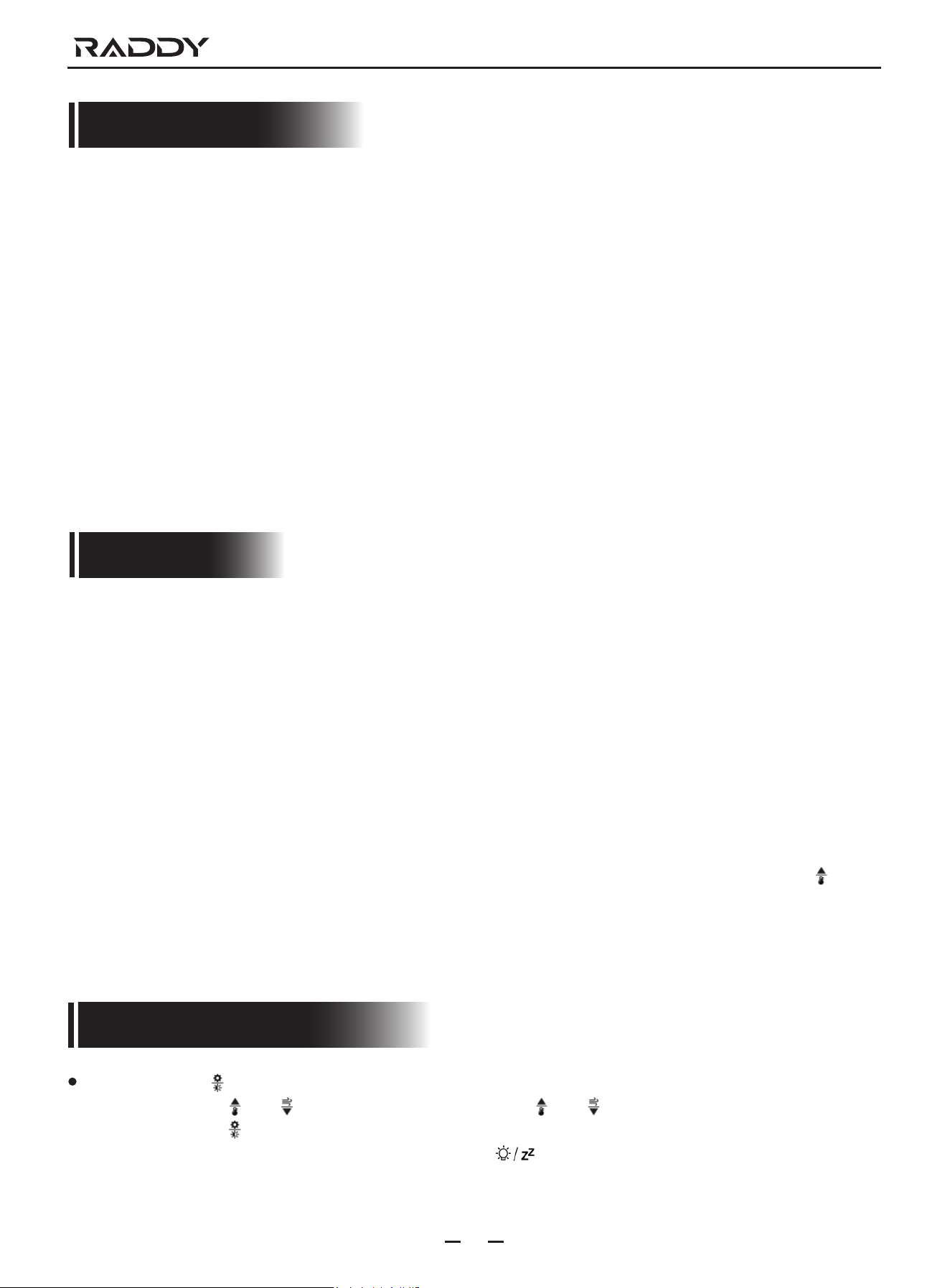
Part E - Exterior
E1: Hanging hole
E3: LED indicator
E5: Battery compartment
E7: “CHANNEL 1 or 2 or 3” switch
E2: LCD display
E4: Temperature | Humidity sensing louver
E6: Manual transmit signal button “TX”
E8: Reset button
07
VP7 Weather Station
Setup Preparation
ltems you will need to setup your station (not included):
1. Crosshead screwdriver and hex driver for assembly.
2. Fresh Batteries:
2 (two) AAA alkaline or lithium batteries for the weather station.
3 (three) AA alkaline or lithium batteries for the multi-combination sensor.
2 (two) AA alkaline or lithium batteries for the temperature | humidity sensor (Optional)
For best results:
- Remove weather station and sensors from the package and place together on a table or bench, within easy reach.
- Place batteries and screwdriver within reach of setup location.
- Keep sensors and weather station 0.15-0.3 meter or 5-10 feet for at least 15 minutes after installing batteries, to allow the
sensors and station to connect repeatedly.
Quick Setup
1. Insert 3 AA batteries into the multi-combination wireless remote sensor
2. 3-AA battery entry temperature humidity wireless remote sensor
3. Then plug the power cord into the weather station
4. Configure basic settings. Set time, date, unit, etc.
5. Insert 2 AAA batteries into the weather station (when the power adapter is unexpectedly powered off, the settings will not be lost)
6. Move the remote sensor to outdoor or other location after 5 minutes
7. Move the weather station to the appropriate location, with a minimum distance of 2.5 meters from all sources ofinterference,
such as a television or computer monitor, radio reception is weaker in rooms with concrete walls (e.g..in cellars) and in offices.
In such extreme circumstances, place the weather station close to the window.
Note: The weather station has a radio control clock calibration time function. After power-on, after searching thewireless sensor
for 3 minutes or all channels successfully search for the wireless sensor, the weatherstation will automatically enter the
radio control clock timing mode. lf you need to set the time and unitmanually, you need to press and hold the " " button
to exit the radio time mode, and then continue to the next step.
Time and unit settings
Press and hold the " " button for 3 seconds to enter the time setting mode.
Press and release the " " or " " button to adjust the value. Hold the " " or " " button to adjust quickly.
Press and release the " " button to confirm and move to the next item.
Note: After 20 seconds without pressing any button or touch the " " location button at any time to exit thesettings.
VP7 Weather Station
08
Radio control clock (Abbreviation: RCC) timing
After the weather staton searches for the wireless sensor after power-on, (up to 3 minutes) will automatically enter the RCC
timing mode. The weather station will automatically search for the RCC signal for 7 minutes, the RCC signal icon will flash
and the backlight will automatically turn off.
Note: Enter the RCC signal search mode. Since the RCC signal search requires the device to be in a static working state as much
as possible, the backlight is automatically turned of to prevent signal interference. Please try not to control the weather
station within seven minutes. lf you need to exit the search mode of the RCC signal, press and hold the " " button for
3 seconds to exit.
Settings order:
1. BEEP ON/OFF
2. Temperature unit: °C | °F
3. Pressure unit: hPa | inHg | mmHg
4. Wind speed unit: KM/H | MPH
5. Wind degree (angle) or direction (letter) selection
6. Rainfall unit: MM | inch
7. Radio control clock function: ON | OFF
8. Time zone: -1 to 2 hr
9. Hour format: 24Hr | 12Hr
10. Hour
11. minutes
12. Calendar display format Month/Date | Date/Month
13. Year
14. Month
15. Date
16. Week display language: a total of seven countries
17. Initialize weather settings
Note: When the weather station is in the same area as
Germany, the time zone is set to 00, one hour slower
than German time, the time zone is set to -01, one hour
faster than German time, the time zone is set to 01,
2 hours faster than Geran time, time zone Set to 02
Note: Exceeding the Geran signal tower diameter of
1500KM or more, the signal received by the radio
cock signal is very poor. lt is recommended to set
the RCC to OFF
Note: In the set time, the number of minutes of the
change, automatically from the zero second forward
Note: There are 8 languages of Weekday. English, Deutsch, Francais, ltalian, Espafiol, Nederlands and Dansk.
Week language display
Language
English, ENG
German, GER
French, FRE
Spanish, SPA
Italian, ITA
Dutch, DUT
Danish, DAN
Sunday
SUN
SON
DIM
DOM
DOM
ZON
SON
Monday
MON
MON
LUN
LUN
LUN
MAA
MAN
Tuesday
TUE
DIE
MAR
MAR
MAR
DIN
TIR
Wednesday
WED
MIT
MER
MIE
MER
WOE
ONS
Thursday
THU
DON
JEU
JUE
GIo
DON
TOR
Friday
FRI
FRE
VEN
VIE
VEN
VRI
FRE
Saturday
SAT
SAM
SAM
SAB
SAB
ZAT
LOR
09
VP7 Weather Station
Alarm function control
Press and release the " " button to view the alarm 1 time, press and release the button to view the alarm 2 time, the third
release and release the button to exit the viewing mode.
ln the mode of viewing the alarm 1 time or the alarm 2 time, press and release the " " button to control its alarm function
to be turned on or off.
Note: When the function of Alarm 1 or Alarm 2 is turned on, the symbol " " or " " is displayed. At the same time, the
relevant alarm repeat symbol " " | " " is displayed
Note: After 20 seconds without pressing any button or touch the " " location button at any time to exit the view mode.
Alarm and Snooze settings
Press and hold the " " buton for 3 seconds to enter the alarm and snooze setting mode.
Press and release the " " or " " button to adjust the value. Hold the " " or " " button to adjust quickly.
Press and release the " " button to confirm and move to the next item.
Note: After 20 seconds without pressing any button or touch the " " location button at any time to exit the settings.
The weather station will automafically perform an RCC signal search at 1:00 / 2:00 / 3:00 every day to correct any deviation
from the precise time. lf this sync attempt is unsuccessful (the radio mast icon disappears from the display) the system will
automatically try another sync for the next full hour. This process is automatically repeated up to 5 times a day.
lf you need to manually search for RCC signals, press and hold the " " button for 3 seconds to enter the search mode.
Again, the longest search is 7 minutes.
Note: The flashing radio mast icon indicates that the RCC signal search is in progress. Continuous display of the continuously
displaved radio mast icon indicates that the successful RCC siqnal fiming is completed and the calibration time is successful.
The icon “DST” indicates that the calibration time is the davlight saving time.
Settings order:
1. Alarm 1 hour
2. Alarm 1 minutes
3. Alarm 1 repeat: M-FISS IMS
4. Alarm 1 snooze time: 5 to 60minutes | OFF
5. Alarm 2 hour
6. Alarm 2 minutes
7. Alarm 2 repeat: M-F | S-S | M-S
8. Alarm 2 snooze time: 5 to 60minutes | OFF
Note: The alarm is repeatedly set to M-F, the alarm function will be activated from Monday to Friday, the Saturday and Sunday will
be invalid. The alarm is repeatedly set to S-S, and the alarm function will be activated on Saturday and Sunday, and will expire
from Monday to Friday. When the alarm is repeatedly set to display both M-F and S-S, the alarm function will be activated
throughout the week.
Switching off the alarm signal
The alarm sound when the trigger, press any buttons except the " " touch button or touch and hold the " " button for
more than 3 seconds to stop the alarm signal.
Snooze function
When the time is up to the alarm, touch and release the " " touch button, the alarm sinal stops, and enter the snooze timing
mode. At the end of the snooze timer, it will ring again (can repeat snooze)
In snooze timing mode, press any buttons except the " " touch button or touch hold down the " " touch button for
more than 3 seconds to exit the snooze mode
10
VP7 Weather Station
Temperature | Humidity Readings | History | Trend
Press and release the " " button to view High | Low temperature and humidity and feels like temperature, dew point temperature,
heat index, wind chill index.
In the view High | Low temperature or humidity mode. press and release the "CH" buton to switch to view the recordsof other
channels.
Note: feels like temperature, dew point temperature, heat index and wind chill index is related to the value detected by the multi-
combined wireless remote sensor.
In the mode of viewing temperature | Humidity history, press and hold the " " buton for 3 seconds to clear all history of indoor
| outdoor remote temperature Humidity.
Note: Indoor | outdoor remote temperature | Humidity reading will reset to current value.
Note: After 20 seconds without pressing any button or touch the " " location button at any time to exit the view mode.
Indoor | outdoor remote temperature | humidity will have trend change tips
: Temperature / humidity is rising.
: Temperature/humidity drops.
No display: temperature/humidity remains unchanged.
Wind Readings | History
ln the main display interface, press and hold the " " button for 3 seconds to convert the display to wind direction or display as
1 hour top speed
Note: WIND SPEED: average speed over the past 30 seconds
1HR TOP SPEED: Highest speed in the past hour
WIND DIRECTION: In letters or degrees
Note: The snooze time setting range: 5~60MIN, OFF, when set to OFF, means no snooze function. Snooze fimeunit is minutes.
Note: The alarm will sound for 1 minutes if you do not deactivate it by pressing any button. In this case the alarmwill be repeated
automatically after 24 hours.
Note: Rising alarm sound (crescendo, duration: 2 minutes) changes the volume 4 fimes whilst the alarm signal is heard.
Note: The conversion is displayed as a wind direction display or 1 hour top speed can only be operated under the main display
interface.
View history. Press and release the " " button to view the maximum wind historv values: 1 Hour (default) | 24 Hour | 7 Days |
Month | Year
Note: One Hour: past 60 minute period (default Top Speed record, already shown)
24 hour: Past 24 hour period, from last record
7 Days: Past 7-day period, from last record
Month: Defned by Calendar Month i.e. January 1 - January 31
Year: Defned by Calendar Year i.e. January 1 - December 31
ln the mode of viewing wind speed history, press and hold the " " button for 3 seconds to clear all history of wind speed.
Note: Wind speed reading will reset to current wind speed.
Note: After 20 seconds without pressing any button or touch the " " location button at any time to exit the view mode.
11
VP7 Weather Station
Rain Readings | History
ln the main display interface, press and hold the " " button for 3 seconds to convert the display to cumulative value of rainfall
or rate of rainfall
Note: Rainfal: from current to past (1 hour | 24 hours | day | 7 days | month | year | total) total accumulated rainfall
Rainfall rate: average rainfall over the past 12 hours per hour
Press and release the " " button to view the rain history
Note: NOW: cumulative value over the past 30 minutes
HOUR: cumulative value over the past 60 minutes
24 HOURS: The cumulative value of the past 24 hours
DAY: 24 hr period from 0:00 - 23:59 (12:00am - 11:59pm). Cumulative value with today
7 DAYS: In the past 7 days, the cumulative value of the last record begins
MONTH: The cumulative value defined by the calendar month (ie January 1st - January 31st).
YEAR: The cumulative value is determined by the calendar year, from January 1 to December 31.
TOTAL: The cumulative value of the total run time (no time stamp) since the weather station was started
In the mode of viewing rain history, press and hold the " " button for 3 seconds to clear all history of rain.
Note: The rain reading will reset to 0 mm (in).
Note: After 20 seconds without pressing any button or touch the " " location button at any time to exit the view mode,
The weather station will resume normal time display and display the last rainfall record you viewed. When the rain shows
the rain rate before entering the observation mode. it stil shows the rain rate when returning from the observation mode to
the normal time display.
Wireless sensor connection
The weather station can connect up to 1 Multi-combination wireless sensor and 3 diferent channels of temperature | humidity
wireless sensor.
The weather station automatically searches for all wireless sensors within 3 minutes of power-on and registers the sensor lDs.
Each sensor generates a random ID after power-on to distinguish the sensors.
ln the main display interface, press and release the "CH" button to view the value of the wireless sensor on the different channels.
Note: In view mode, the ID of the wireless sensor can be displayed.
The temperature/humidity data of the additional channel wireless sensor needs to be displayed on the normal time display
interface. After selecting the channel in the viewing mode. touch the " " location button to exit the viewing mode.
Note: The temperature and humidity values shown in the OUTDOOR REMOTE column after exit are the select edchannels.
At the same time, in the channel icon (displaying the position of A15), the number of channels isdisplaved:
OUTDOOR (representing Multi-combination wireless sensor) | 1 or 2 or 3 (representing 3channels of temperature |
humidity wireless sensor)
Note: When the weather station loses sensor signals or the sensor is not connected to the channel, the value of the channel
is displaved as " -- "
lf you need to add a new sensor or replace the sensor. ln channel view mode. press and hold the " " button for more than 3
seconds, the weather station will search for the 3 minute signal again, and the new channel sensor will be added to the weather
station within 3 minutes.
Note: When adding a new sensor or replacing a sensor (old sensor replacement battery), you need to turn on the sensor power
first, then follow the steps above to control the weather station.
Note: When the channel icon (the position of the display A15) displays the low voltage icon " ", the battery of the
corresponding channel wireless sensor is replaced according to the channel number of the channel icon. Then follow the
steps above to re-add the wireless sensor to the weather station.
ln the normal time display interface, press and hold the "CH" button for 3 seconds. the wireless channel in the OUTDOOR REMOTO
column will enter the loop mode, and the channel will be changed every 5 seconds (OUTDOOR | CH1 | CH2 | CH3), and the
automatic conversion display wil be diferent. Channel temperature | humidity value
Note: In the cycle mode, only the values of temperature and humidity are being converted, and the values of wind speed, wind
direction, rainfal, etc. are not converted, and the values are still derived from the Multi-combination wireless sensor.
12
VP7 Weather Station
Weather alerts viewing and setting
Press and release the " " button to view the weather alerts mode. Continue to press and release the " " button to confirm
and move to the next item.
Note: After 20 seconds without pressing any button or touch the " " location button at any time to exit the view mode.
Note: View Outdoor | REMOTE Temperature | Humidity alert, press and release the "CH" button to switch to other channels.
(A total of 4 channels: outdoor | CH1 | CH2 | CH3)
ln each weather alert view item, press and hold the " " button to turn the alert on or off.
Note: The weather alert is initially turned off by default, and the display is OFF.
When the weather alert is turned on, it is displayed as ON.
Press and hold the " " button for 3 seconds to enter the weather alert setting mode.
Press and release the " " or " " button to adiust the value. Hold the " " or " " button to adjust quickly.
Press and release the " " button to confirm and move to the next item.
Note: After 20 seconds without pressing any button or touch the " " location button at any time to exit the settings.
Note: Set Outdoor | REMOTE Temperature | Humidity alert, press and release the "CH" button to switch to other channels.
(A total of 4 channels: outdoor | CH1 | CH2 | CH3)
View and Settings order:
1. Outdoor | remote high temperature
2. Outdoor | remote low temperature
3. Outdoor | remote high humidity
4. Outdoor | remote low humidity
5. Indoor | remote high temperature
6. Indoor | remote low temperature
7. Indoor | remote high humidity
8. Indoor | remote low humidity
9. High wind speed
10. High 24-hours rainfall
11. High rainfall rate
13
VP7 Weather Station
Weather alert trigger
When armed alert value is reached, station will beep 5 times each minute, until Out of alert range.
The flashing alert icon will indicate if is a LOW or High alert.
Press any button to stop the alert sound.
The alert icon will flash while value is in alert range.
Note: lf you want to permanently cancel the alert, enter the weather view mode, switch to the item you want to cancel, press and
release the " " button to set to OFF
Weather forecast
The weather station calculates a weather forecast for about the next 12 hours based on the barometric pressure trend. Of course
this forecast can't compare to that of professional weather services supported by satellites and high performance computers, lt
provides only an approximate indication of the current weather development in a small local area. Please take the weather forecast
from your local weather forecasting service into account as well as the forecast from your weather station. lf there are discrepancies
between the information from your device and from the local weather forecasting service, please take the advice of the latter as
authoritative.
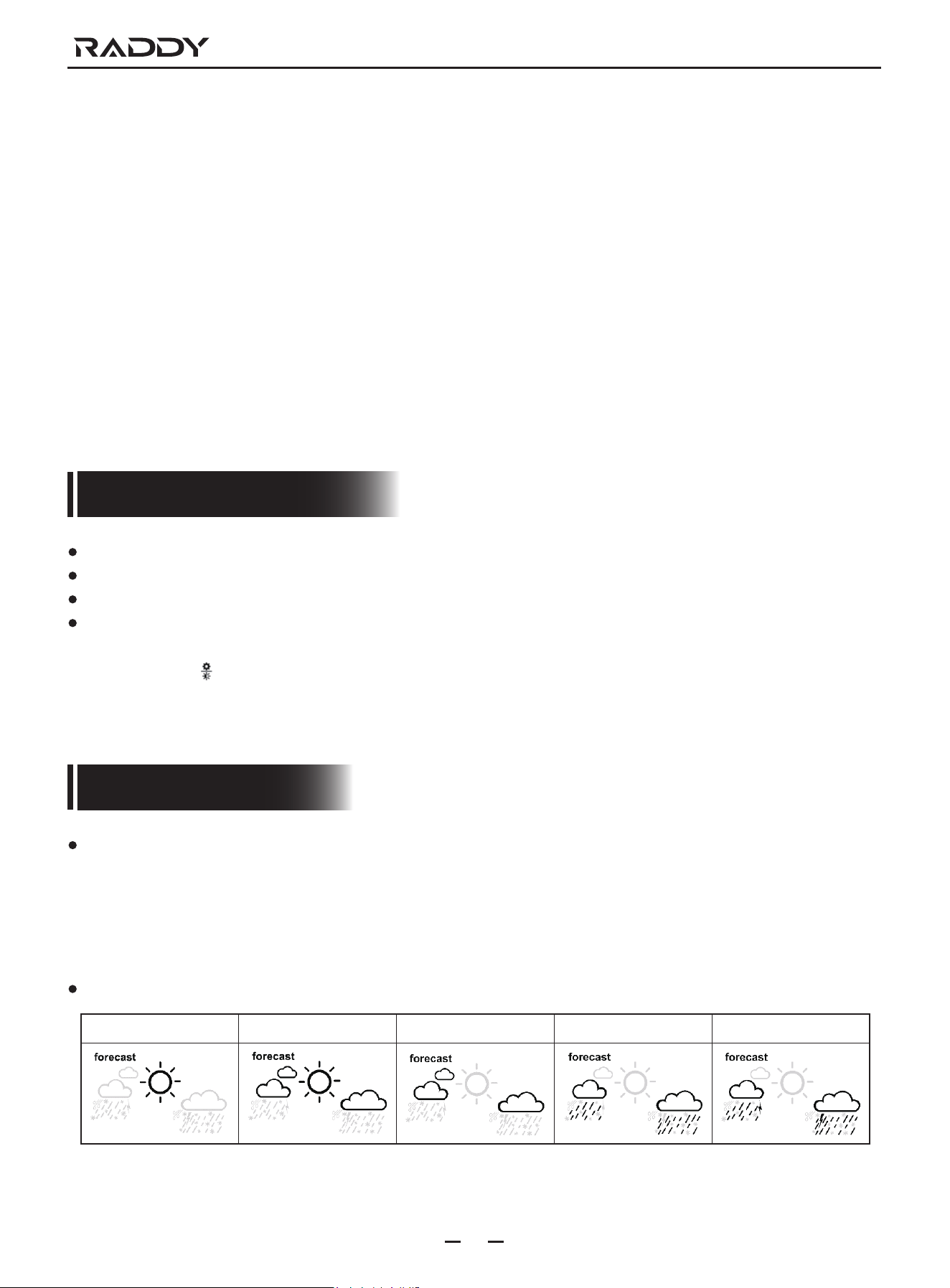
The weather station displays the following weather icon:
Sunny Mostly cloudy Cloudy Rainy Thunder Rainy
14
VP7 Weather Station
Background lighting
If the product is powered by batteries, Touch the " " location button. Backlight lit 15 seconds.
When the power supply of the product is inserted into the power supply adapter, the battery will automatically disconnect the
power supply. and the backlight will always be bright. Press the " " button to adiust the brightness of the backlight, you can
adjust the 4 state: 3 different brightness backlight and close the backlight. When the backlight brightness is not at the maximum
brightness. press the " " button. Backlight tums to maximum brightness of 10 seconds.
Note: During the reception of the time radio wave signal, the backlight will be automatically closed to prevent the interference of
the radio wave.
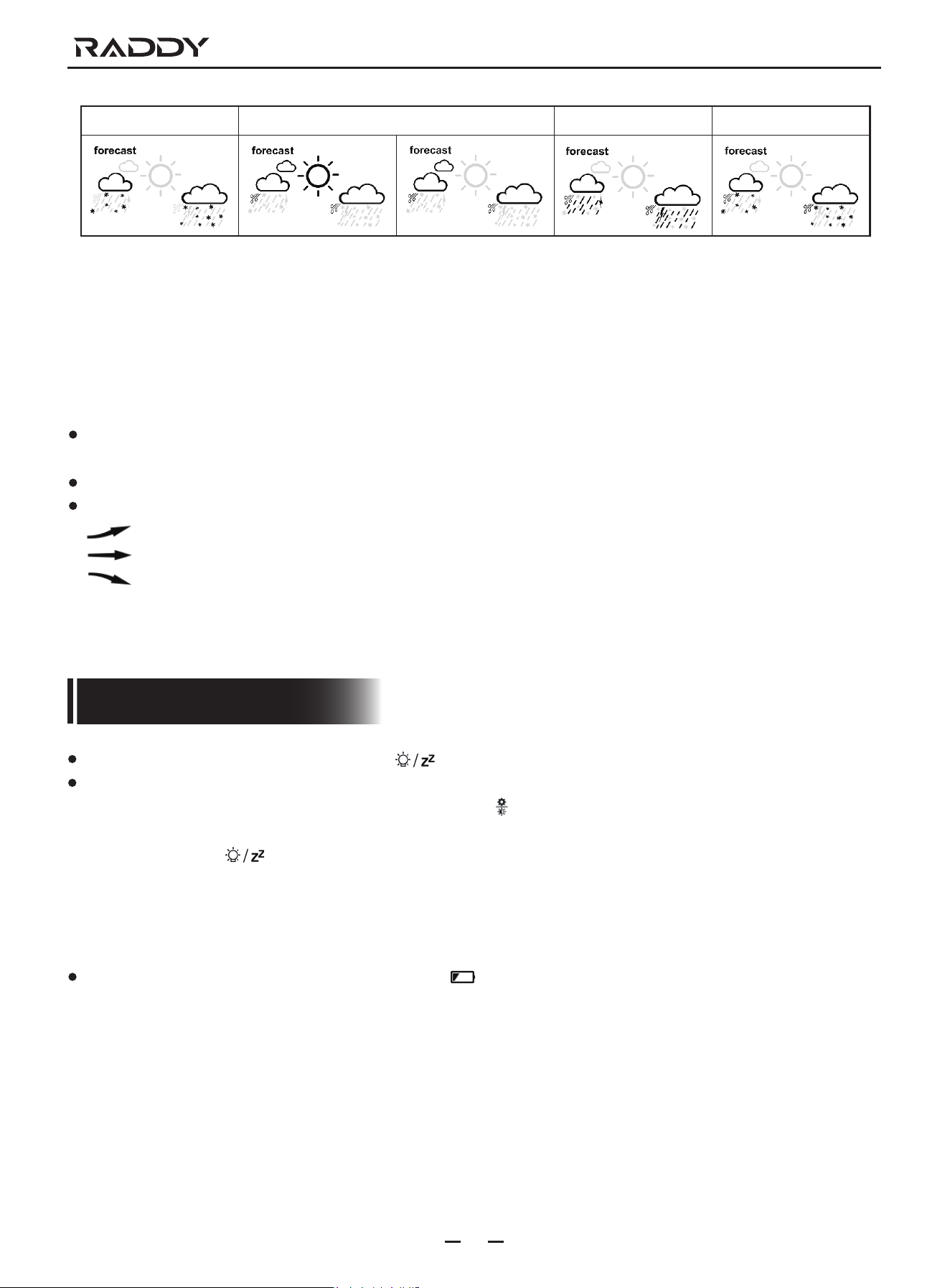
Snow Gale Storm Snowstorm
Note: The Snowy icon will only appear if the outdoor temperature (refers to the temperature detected by multiple combined
sensors) is below -4°C (+25°F) and the forecast would be rainy or Thunder Rainy.
The Gale icon will only appear if the wind speed is above 50KM/H and the forecast would be Sunny or Mostly Cloudy or
Cloudy.
The storm icon will only appear if the wind speed is above 50KM/H and the forecast would be rainy or thunder rain.
The Snowstorm icon will only appear if the outdoor temperature (refers to the temperature detected by multiple combined
sensors) is below -4°C (+25°F) and the wind speed is above 50KM/H and the forecast would be rainy or Thunder Rainy.
After the weather station needs 7-10 days of air pressure calibration, the weather forecast wil tend to be stable withan accuracy
rate of 70%-75%.
The weather station can display the barometric pressure trend.
You may see the following displays.
: The barometric pressure will rise
: The barometric pressure will remain constant.
: The barometric pressure will fall.
Low battery:
If the “indoor sensor” column is display the battery icon " ", you need to replace the weather station's battery as soon as
possible.
15
VP7 Weather Station
Mounting Instructions (wireless sensor)
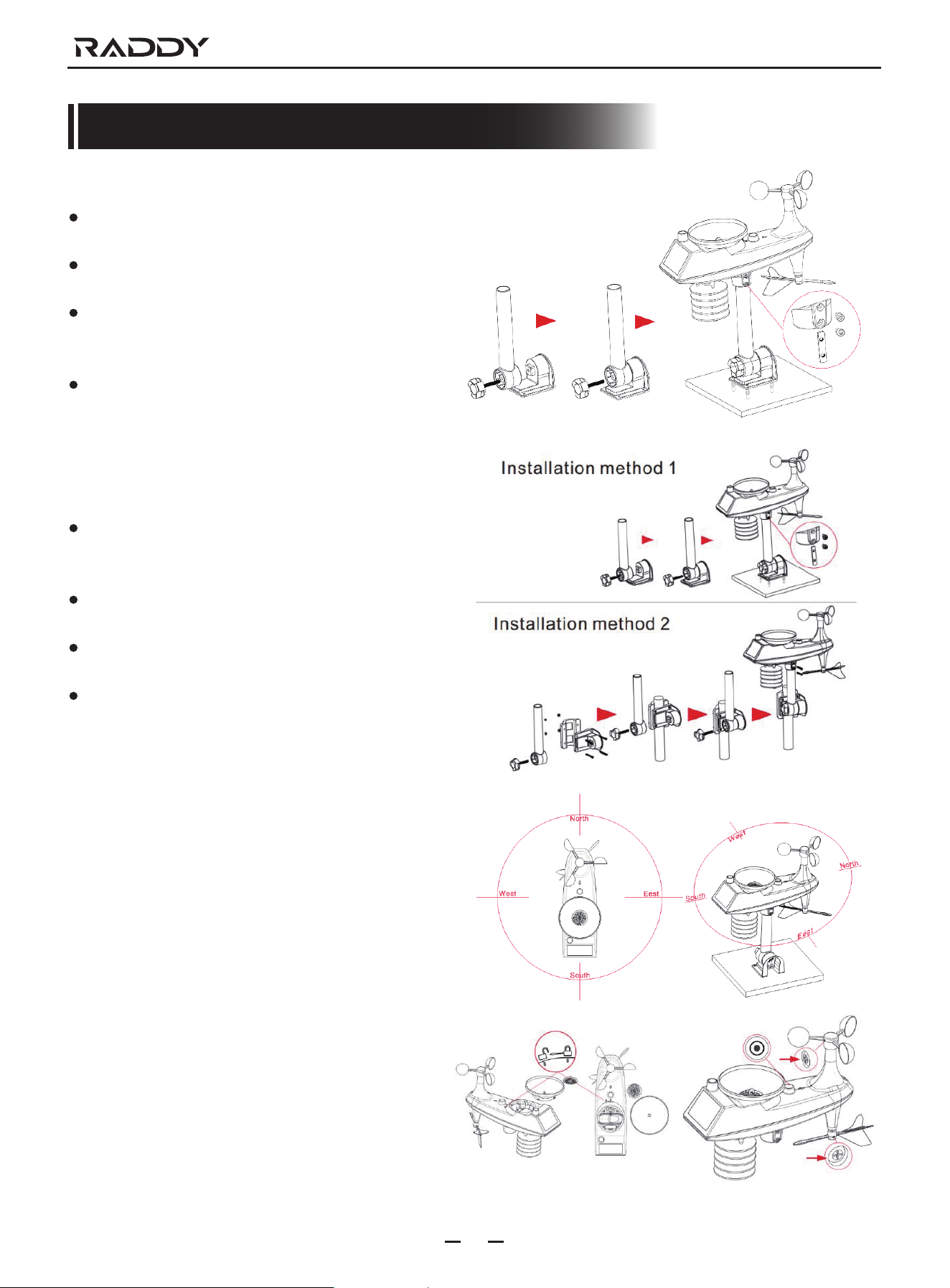
Multi-combination Wireless Remote Sensor
Mount in an open area clear for 15 meters (50 feet) in all
directions.
The sensor needs to be mounted on a sturdy platform
or bracket that is mounted 1.5 m (5 ft) above the ground.
The base of the sensor is screwed to the platform and the
support frame. Tighten the large nut that secures the
support rod to the base.
When installing, adjust the sensor body so that the solar
panel faces south, otherwise the wind direction will be
wrong. Note the “N” North Embossed Mark on the top of
the sensor (requires a compass for proofreading, and the
“N” North Emboss mark is identical to the “N” of the
compass).
When installing the sensor, use the top bubble level to
ensure the sensor level, otherwise the accuracy of the
rainfall reading will be affected。
After completing the above two steps, lock the two hexagon
socket screws on the side of the sensor body.
When installing, the fixing screws of the wind cup and the
wind direction cursor should be tightenedand tightened.
The rainforest structure of the sensor needs to be cleaned
regularly (recommended cycle 1-3 months, depending on
the frequency of rain):
1. Remove the rainwater funnel (turn the rain sand funnel
according to the direction of rotation shown).
2. Gently remove debris or insects from the rainsensor.
3. Remove debris from the rainwater funne itself, especially
debris from the funnel drain.
4. Remove the debris from the drain.
5. Reinstall the rainwater bucket.
6. Note: Do not apply oil to the rain sensor.
Note: Make sure the wireless sensor is installed within 100
meters of the weather station (empty, unobstructed).
According to the thickness of the obstacle between
the wireless sensor and the weather station, the
distance should be shortened as much as possible
(the distance after the wireless signal penetrates
the obstacle will be shortened), otherwise the
data transmission may be disturbed.
VP7 Weather Station
16
Specification
INDOOR's temperature detection range: -20°C ~ +60°C & -4°F ~ +140°F, display resolution: 0.1°C & °F
The detection temperature of INDOOR is lower than -20°C & -4°F, displayed as LL.°C & °F, higher than +60°C & +140°F,
displayed as HH.H°C & °F.
INDOOR humidity display range: 20% RH~95% RH, display resolution: 1% RH
If the detected humidity of INDOOR is lower than 20% RH, it will be displayed at 19% RH, and if it is higher than 95% RH, it will
also be displayed at 96% RH.
The temperature and humidity detection cycle of INDOOR is 60 seconds
Temperature display range of OUTDOOR: -40°C ~ +70°C & -40°F ~ +158°F, display resolution: 0.1°C & °F
The detection temperature of OUTDOOR is lower than -40°C & -40°F, displayed as LL.L°C & °F, higher than +70°C & +158°F,
displayed as HH.H°C & °F
Humidity display range of OUTDOOR: 1% RH ~ 99% RH, display resolution: 1% RH ------- Humidity display range 20 ~ 95%
When the detected humidity of OUTDOOR is lower than 1% RH, it wil be displayed at 1% RH, and if it is higher than 99% RH, it will
also be displayed at 100% RH.
The update period of OUTDOOR's temperature and humidity is the same as the synchronization period of RF (see 5.3 for details).
Wind speed detection range: 0 KM/H ~ 180 KM/H & 0 MPH ~ 111 MPH, display resolution: 0.1KM/H & MPH (display value 0 ~ 99.9)
1 KM/H & MPH (display value above 100)
When the detected value of wind speed is higher than 180 KM/H or 112 MPH, it will be displayed as HH KM/H or HH MPH.
Detection range of rainfall: 0 MM ~ 9999 MM & 0 IN ~ 393.7 IN, display resolution: 0.254 MM or 0.01 IN.
Rain intensity detection range: 0 MM/H ~ 999.9 MM/HR & 0 IN/HR ~ 39.37 IN/HR, display resolution: 0.254 MM/H or 0.01 IN/H
Air pressure detection range: 600 hPa/mb ~ 1100 hPa/mb & 17.72 inHg ~ 32.50 inHg & 450 mmHg ~ 825 mmHg, display
resolution: 1 hPa/mb & 0.01 inHg & 0.1 mmHg
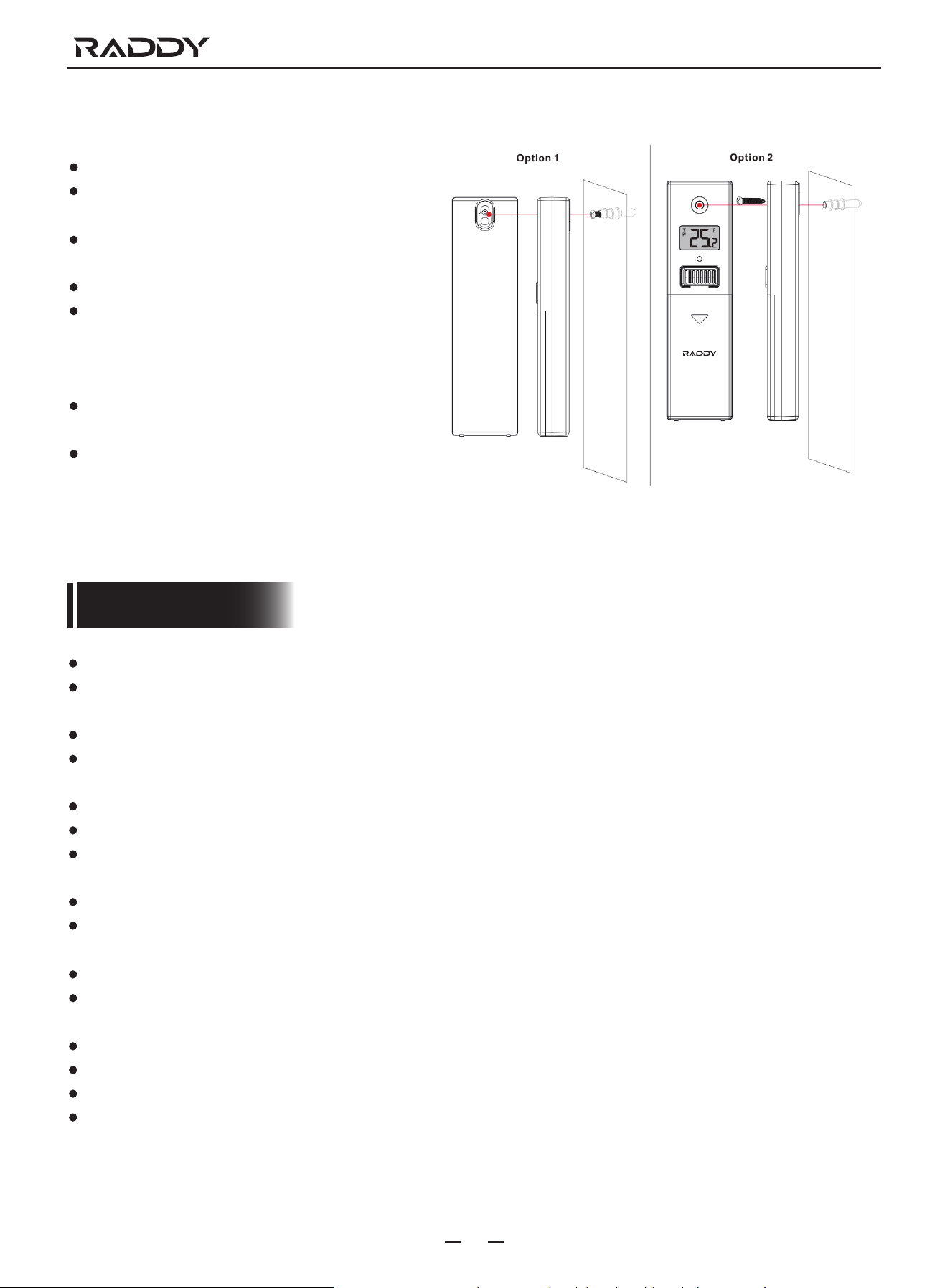
Temperature | Humidity Wireless Remote Sensor (Optional sensor)
Option 1:
Mount the mounting screws to the wall.
Hang the wireless sensor on the screw
Option 2:
Insert the mounting screws through the front of the
wireless sensor into the wall.
Tighten the screws to fit snugly (do not overtighten).
If the wireless sensor is placed outdoors, install the
temperature | humidity wireless sensor on a north
facing wall or any shadow. The sun will make it even
higher.
The quardrail under the eaves or under the deck is
preferred.
Make sure the wireless sensor is installed vertically
to vent moisture.
Made in China
support@iraddy.com
www.iraddy.com