Criterion@hisense.com
888-411-7118
105 Satellite Blvd NW, Suwanee, GA 30024
Contents
2
Safety and warning information .....................................................................................................................
Installing your new appliance............................................................................................................................
Description of the appliance..............................................................................................................................
Display controls...........................................................................................................................................................
Using your appliance..............................................................................................................................................
Cleaning and care....................................................................................................................................................
Helpful hints and tips...............................................................................................................................................
Troubleshooting..........................................................................................................................................................
Disposal of the appliance....................................................................................................................................
3
6
13
14
17
23
25
26
30
For questions or assistance, please contact Customer Service at: 1-888-411-7118 between
9:00 am and 6:00 pm EST or ernail: Criterion@hisense.com
Thank you for choosing Criterion. We are sure you will find your new refrigerator
a pleasure to use. However, before you use the appliance, we recommend that
you carefully read the instructions, which provide details about installing and
using the product. Please keep this manual for future reference.
General safety
When positioning the appliance, ensure
the supply cord is not trapped or
damaged.
Do not locate multiple portable socket-
outlets or portable power supplies at the
rear of the appliance.
This appliance is intended to be used in
household and similar applications such
as
1.staff kitchen areas in shops, offices and
other working environments;
2.farm houses and by clients in hotels,
motels and other residential type
environments;
3.bed and breakfast type environments;
4.catering and similar non-retail
applications.
Do not store explosive substances such
as aerosol cans with a flammable
propellant in this appliance.
If the supply cord is damaged, it must be
replaced by the manufacturer, its service
agent or similarly qualified persons in
order to avoid a hazard.
Keep ventilation openings, in the
appliance enclosure or in the built-in
structure, clear of obstruction.
Do not use mechanical devices or other
means to accelerate the defrosting
process, other than those recommended
by the manufacturer.
Do not damage the refrigerant circuit.
Do not use electrical appliances inside
the food storage compartments of the
appliance, unless they are of the type
recommended by the manufacturer.
The refrigerant and insulation blowing
gas are flammable. When disposing of
the appliance, do so only at an
authorized waste disposal centre. Do not
expose to flame.
The refrigerant isobutane (R600a) is
contained within the refrigerant circuit of
the appliance. During transportation and
installation of the appliance, ensure that
none of the components of the
refrigerant circuit become damaged. The
refrigerant (R600a) is flammable.
Refrigerators contain refrigerant and
gases in the insulation. Refrigerant and
gases must be disposed of professionally
as they may cause eye injuries or ignition.
Ensure that tubing of the refrigerant
circuit is not damage prior to proper
disposal.
Risk of fire / flammable materials If the
refrigerant circuit should be damaged:
1.Avoid opening flames and sources of
ignition.
2.Thoroughly ventilate the room in which
the appliance is situated.
It is dangerous to alter the specifications
or modify this product in any way. Any
damage to the cord may cause a short
circuit, fire, and/or electric shock.
The illumination lamps must not be
replaced by the user! If the illumination
lamps is damaged, contact the customer
helpline for assistance. This warning is
only for refrigerators that contain
illumination lamps.
Replacing the illuminating lamps
Refrigerant
Safety and warning information
3
Electrical safety
The power cord must not be lengthened.
Make sure that the power plug is not
crushed or damaged. A crushed or
damaged power plug may overheat and
cause a fire.
Make sure that you can access the main
plug of the
appliance.
Do not pull the main cable.
If the power plug socket is loose, do not
insert the power plug. There is a risk of
electric shock or fire.
You must not operate the appliance
without the interior lighting lamp cover.
The fridge is only applied with power
supply of single phase alternating current
of 110~115V/60Hz. If fluctuation of voltage in
the district of user is so large that the
voltage exceeds the above scope, for
safety sake, be sure to apply A.C.
Automatic voltage regulator of more
than 350W to the fridge. The fridge must
employ a special power socket instead of
common one with other electric
appliances. Its plug must match the
socket with ground wire.
Daily use
Do not store flammable gases or liquids in
the appliance,There is a risk of an
explosion.
Do not operate any electrical appliances
in the appliance (e.g. electric ice cream
makers, mixers etc.).
When unplugging always pull the plug
from the mains socket, do not pull on the
cable.
Do not place hot items near the plastic
components of this appliance.
This refrigerating appliance is not
intended to be used as a built-in
appliance.
Do not place food products directly
against the air outlet on the rear wall.
Store pre-packed frozen food in
accordance with the frozen food
manufacturers’ instructions.
The appliances manufacturers’ storage
recommendations should be strictly
adhered to. Refer to relevant instructions
for storage.
Do not place carbonated or fizzy drinks in
the freezer compartment as it creates
pressure on the container, which may
cause it to explode, resulting in damage
to the appliance.
In order to sense the temperature and
humidity near the appliance and make
the appliance run better, add
temperature and humidity sensor outside
the box of appliance.
Frozen food can cause frost burns if
consumed straight from the freezer
compartment.
Do not place the appliance in direct
sunlight. Keep burning candles, lamps
and other items with naked flames away
from the appliance so that do not set the
appliance on fire.
The appliance is intended for keeping
food stuff and/or beverages in normal
household as explained in this instruction
booklet. The appliance is heavy. Care
should betaken when moving it.
4
It is advisable to wait at least four hours
before connecting the appliance to allow
the oil to flow back in the compressor.
Adequate air circulation should be
around the appliance, lacking this leads
to overheating. To achieve sufficient
ventilation, follow the instructions relevant
to installation.
Wherever possible the back of the
product should not be too close to a wall
to avoid touching or catching warm parts
(compressor, condenser) to prevent the
risk of fire, follow the instructions relevant
to installation.
The appliance must not be locate close to
radiators or cookers.
Make sure that the mains plug is
accessible after the installation of the
appliance.
Any electrical work required to do the
servicing of the appliance should be
carried out by qualified electrician or
competent person.
This product must be serviced by an
authorized Service Center, and only
genuine spare parts must be used:
1. If the appliance is Frost Free.
2. If the appliance contains freezer
compartment.
Service
5
Do not remove nor touch items from the
freezer compartment if your hands are
damp/wet,as this could cause skin
abrasions or frost/freezer burns.
Never use the base, drawers, doors etc. to
stand on or as supports.
Frozen food must not be refrozen once it
has been thawed out.
Do not consume ice popsicles or ice
cubes straight from the freezer as this can
cause freezer burn to the mouth and lips.
To avoid items falling and causing injury
or damage to the appliance, do not
overload the door racks or put too much
food in the crisper drawers.
Caution! Care and cleaning
Before maintenance, switch off the
appliance and disconnect the mains plug
from the mains socket.
Do not clean the appliance with metal
objects, steam cleaner, ethereal oils,
organic solvents or abrasive cleansers.
Do not use sharp objects to remove frost
from the appliance. Use a plastic scraper.
Installation Important
For electrical connection carefully, follow
the instructions given in this manual.
Unpack the appliance and check if there
are damages on it.
Do not connect the appliance if it is
damaged. Report possible damages
immediately to the place you bought it. In
this case retain packing.
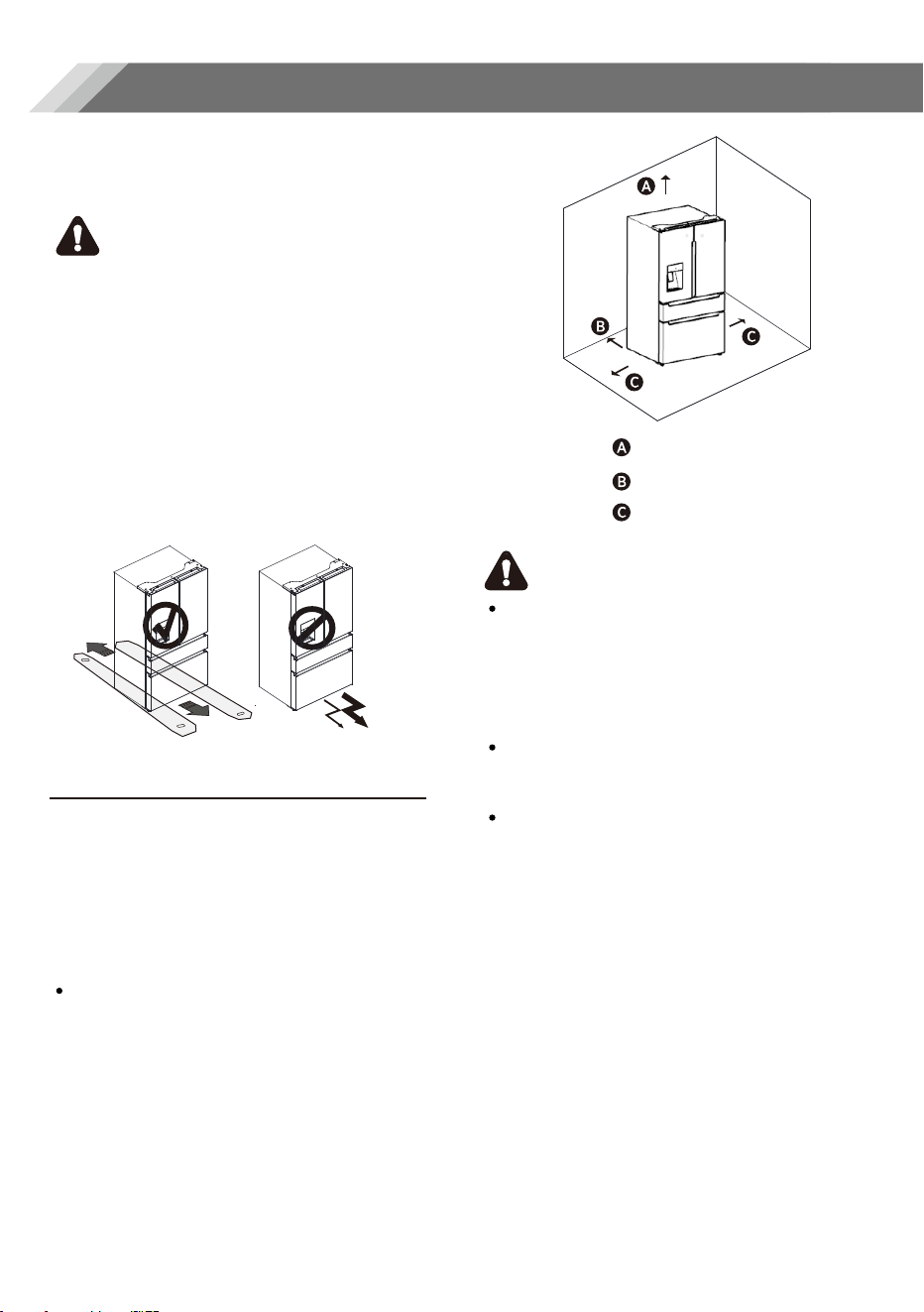
1/2 " Above
2" Behind
1/2" Each Side
Installing your new appliance
Warning
Ventilation of appliance
Before using the appliance for the first
time, you should be aware of the following
tips.
For proper installation, this refrigerator
must be placed on a level surface of hard
material that is the same height as the rest
of the flooring. This surface should be
strong enough to support a fully loaded
refrigerator.
The rollers, which are not casters, should be
only used for forward or backward
movement. Moving the refrigerator
sideways may damage your floor and the
rollers.
In order to improve efficiency of the
cooling system and save energy, it is
necessary to maintain good ventilation
around the appliance for the dissipation of
heat. For this reason, sufficient clear space
should be available around the
refrigerator.
Suggestion
It is advisable for there to be at least
2"(50mm) of clearance from the back of the
fridge to the wall, at least 1/2"(12mm) of
clearance from its top, at least 1/2"(12mm)
from its side to the wall and a clear space in
front to allow the doors to open 125°, as
shown in the following diagram.
Note
6
This appliance performs well with
ambient temperature between 55°F (12.8°
C) to 110°F (43.3° C). The appliance may
not work properly if left at a temperature
above or below the indicated range.
Stand your appliance in a dry place to
avoid high moisture.
Keep the appliance out of direct sunlight.
rain or frost. Stand the appliance away
from heat sources such as stoves, fires or
heaters.
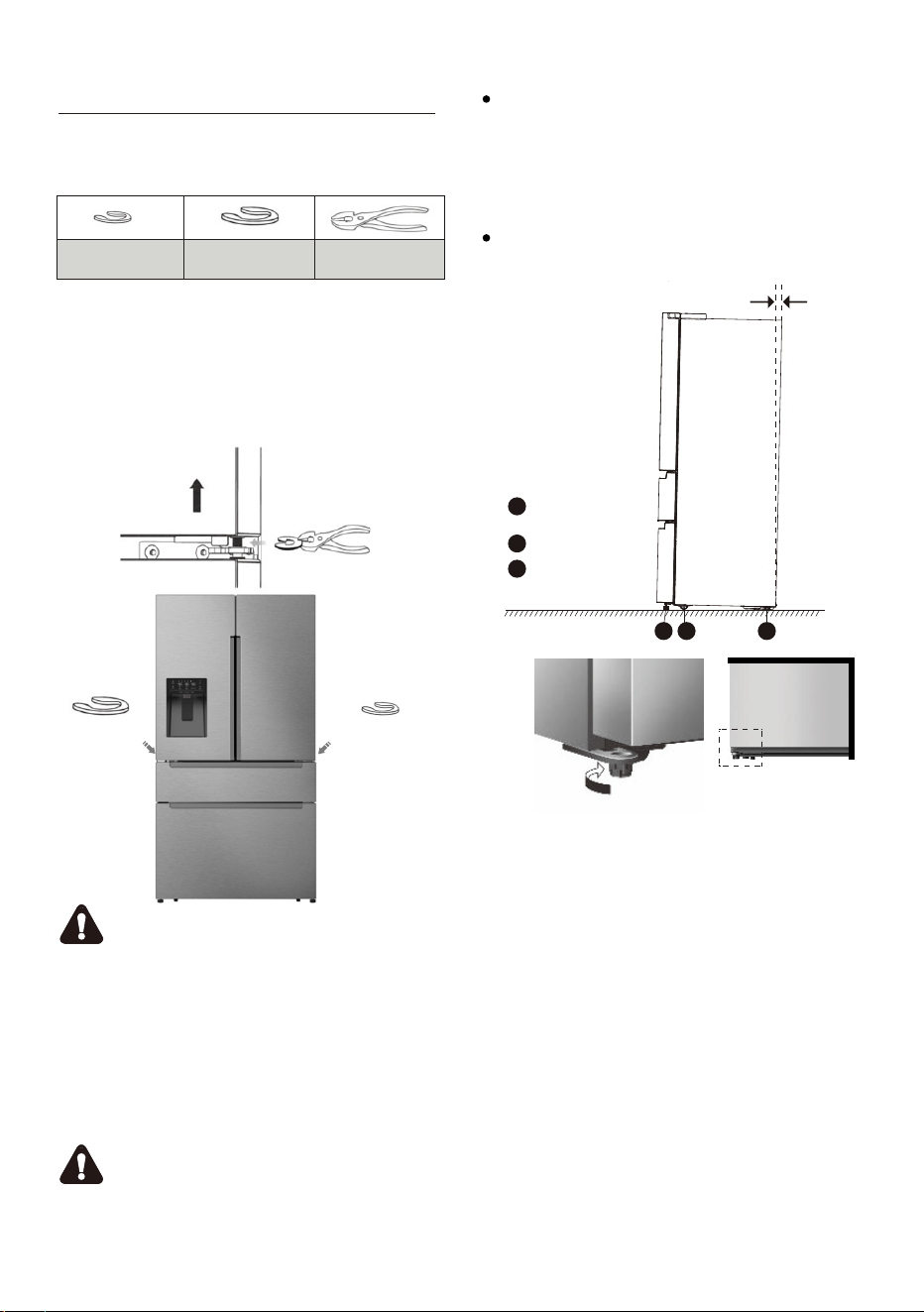
Leveling of appliance
For sufficient leveling and air circulating
in the lower rear section of the
appliance, the bottom feet may need to
be adjusted. You can adjust them
manually by hand or by using a suitable
tool.
To allow the doors to self-close, tilt the
top backwards by 0.4" - 0.6"(10 -15mm).
0.4" - 0.6" (10-15mm)
Adjustable
bottom feet
Front roller
A
B
C
Rear roller
A B C
Adjustable
bottom feet
7
Big Snap Ring
(
2
pcs)
Wrench
(Not provided)
Adjusting Door Height And
Door Gap
1.Check the height difference between the
doors and then lift and hold the lowest
door to be even with the other.
2.Insert a suitably sized Snap Ring between
the Door and the Hinge as shown.
To Adjust The Height Of Door
Important
1.Insert only one Snap Ring. If you insert
two or more Snap Rings, they may slip out
or cause a rubbing noise.
2.Do not raise the door too much.
The door may contact and damage the
top cover.
3.Save remaining Snap Rings for possible
future use.
Warning
Contains Small Parts, Keep the Snap Rings
Away From Babies and Children
The height of a door can be adjusted using
the provided Snap Rings. Tools you will
need:
Small Snap Ring
(2pcs)
Big snap
ring
Small snap
ring
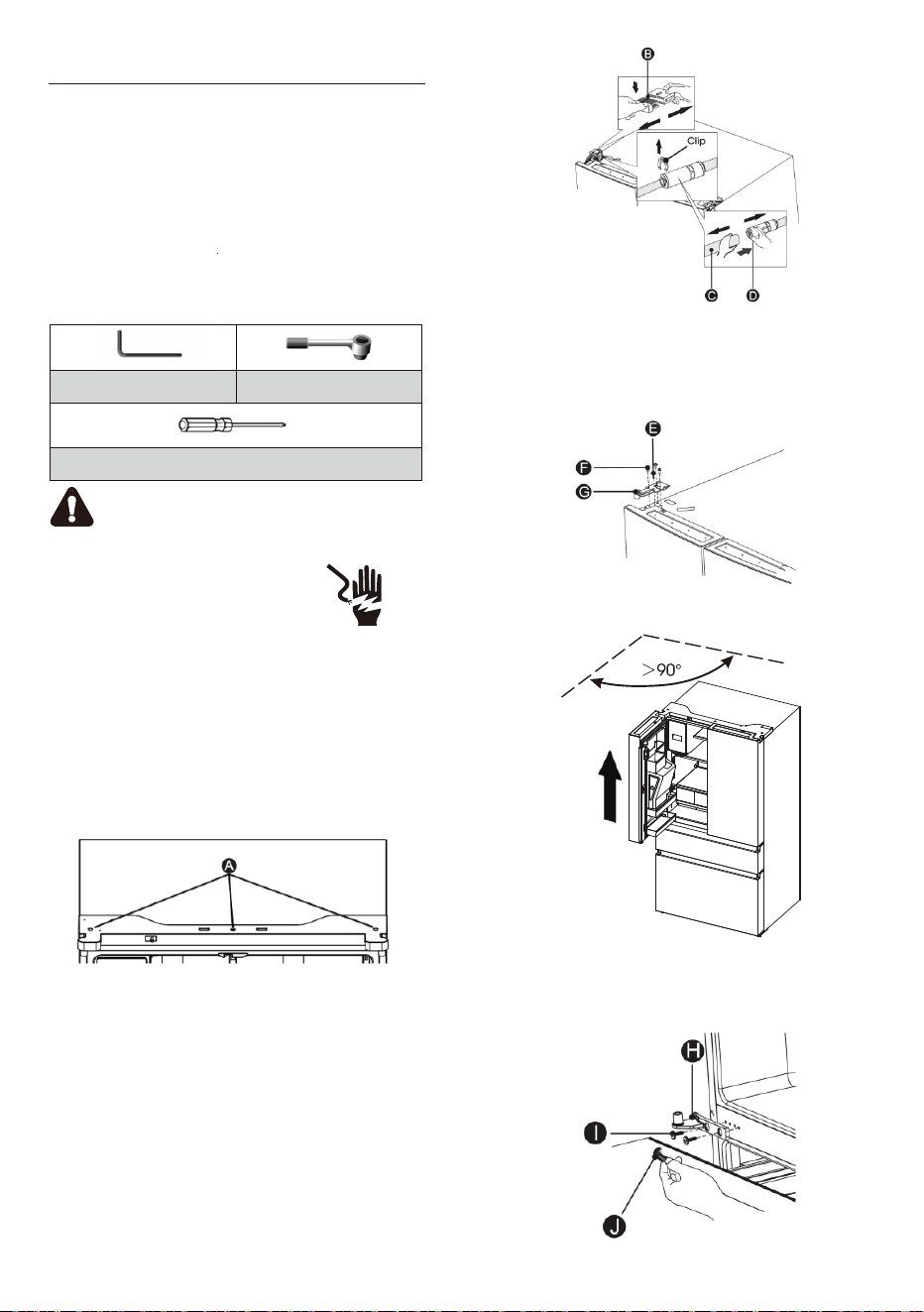
Allen Wrench (5/32", 4mm)
Philips Screwdriver
Wrench (5/16", 8mm)
Warning
Electrical Shock Hazard Disconnect
power before removing doors.
Reconnect ground wire before
operating. Failure to do so could
result in death or electric shock.
Keep the refrigerator doors closed until you
are ready to lift them from the cabinet.
1.Unplug refrigerator or disconnect power.
2.Using a Phillips screwdriver, remove the
three screws(A) attaching the hinge cover,
and then remove the hinge cover with the
entire harnesses attached.
3. Separate the two connectors on the left
side door. To remove the wire connector,
press the top of the connector (B) and
separate it from the other one. To remove
the water coupler from the hinge, twist
and pull the clips from the coupler.
Remove the water line (C) while pressing
the movable part (D) of the water line
coupler.
4. Remove the 3 screws (E) fixed on the
hinges, with a Wrench (8mm) and 1
ground screws (F) attached to the hinge
with Philips (+) screwdriver. Remove the
upper left door hinge (G).
5. Use our both hands to open the door
more than 90°. Lift it up and take it off.
6. If necessary, remove the 2 hex head
bolts hinges (I) with an Allen wrench
(5mm). Remove the lower left door
hinge (H).
8
Door Removal
In case your home access door is too
narrow for the refrigerator to pass
through, remove the refrigerator doors
and drawers. If you do not need to
remove the appliance doors, proceed to
"Installing Water Lines" on page 10. If
you need to remove the doors, continue
below.
Tools you will need(Not provided)
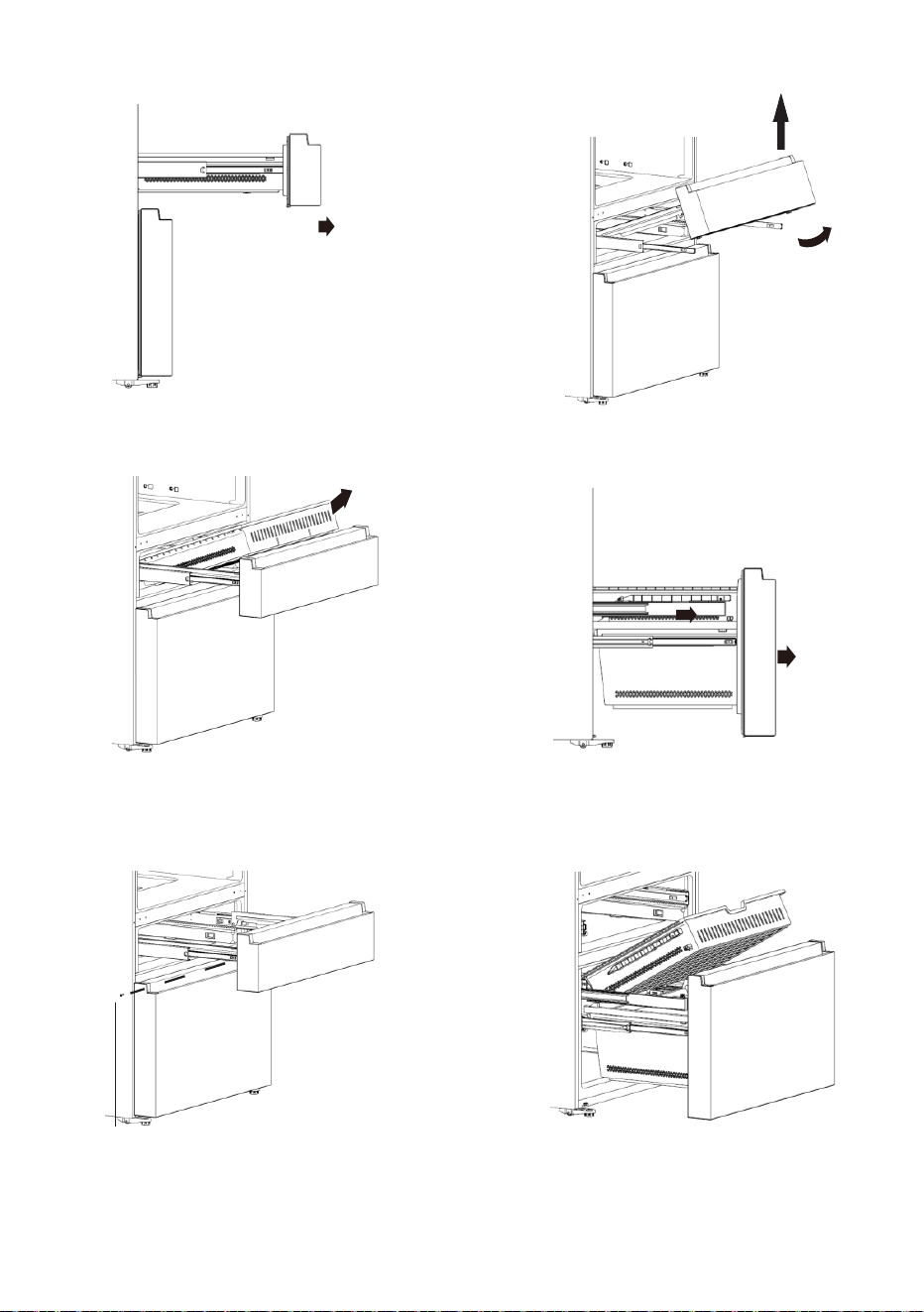
Screws
7 . Pull the middle door fully open.
8 . Take out upper drawer.
9.Remove the two screws that secure
the support frame.
10 . Take out the middle door.
11 . Pull the freezer door and the freezer
drawer fully open.
12 . Take out the middle drawer.
9
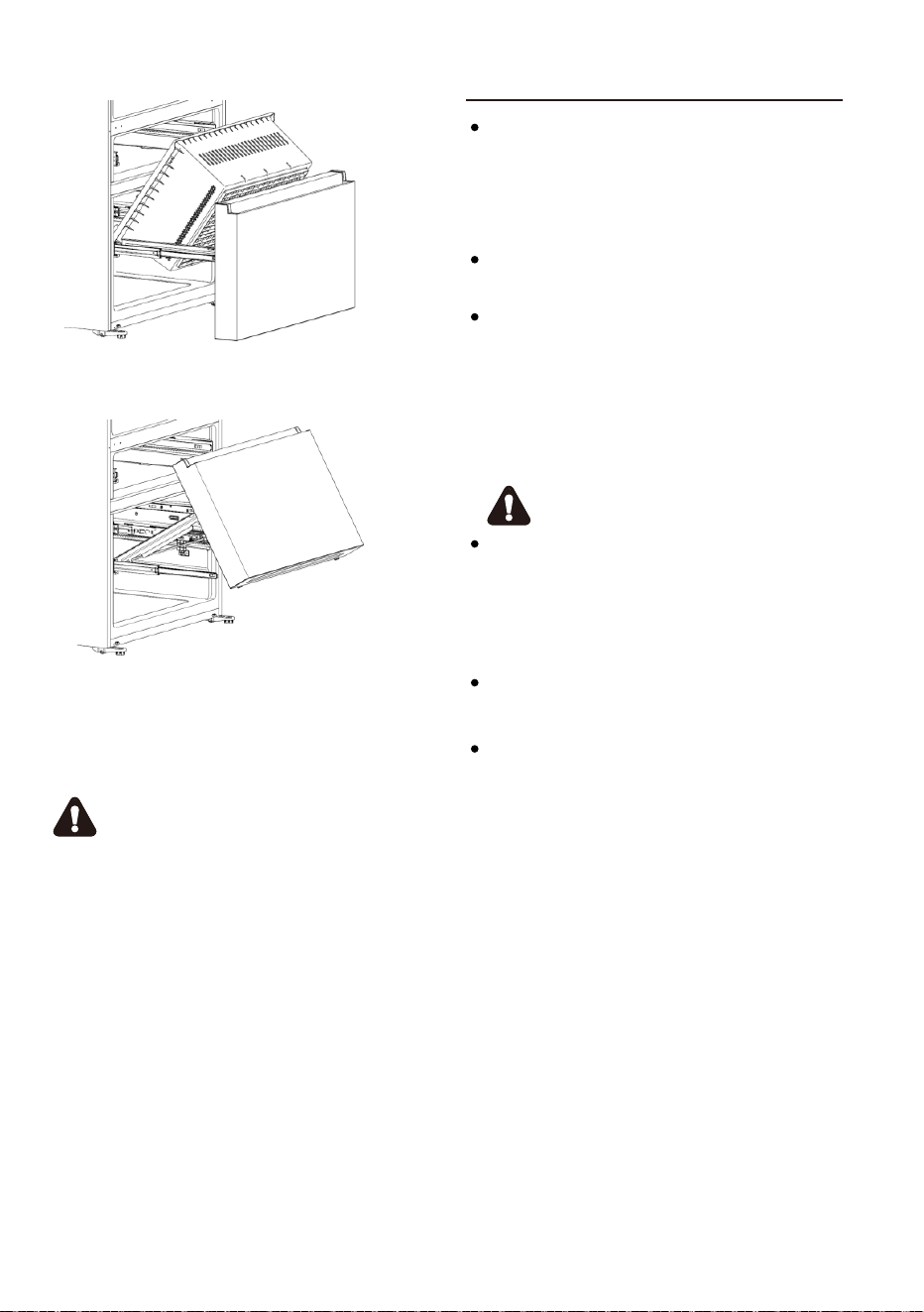
13 . Take out the lower drawer.
14 . Take out the freezer door.
15 . Move your refrigerator into its final
position, then re-install the drawers and
doors by reversing these steps.
Warning
In order to ensure the self-close
mechanism works correctly, please make
sure the doors are opened more than 90
degrees when you remove or reattaching
them.
Ice & water dispenser with a filter is one
of the helpful features on your new
appliance. To help promote better
health, the water filter removes
unwanted particles from your water.
Please follow the below instructions
carefully for correct installation.
In order for the ice & water dispenser to
operate properly, a water line is
required.
-
the maximum inlet water pressure is
700kPa;
-
the minimum inlet water pressure is
207kPa.
Warning
The water connection must be made by
a qualified plumber. Operation outside
the water pressure range may cause
malfunction, or severe and damaging
water leaks.
Under normal conditions, a200cc (5.75
oz.) cup can be filled in about 10 seconds.
If the refrigerator is installed in an area
with low water pressure (below 30psi),
you can install a booster pump to
compensate for the low pressure.
Installing the water lines
10
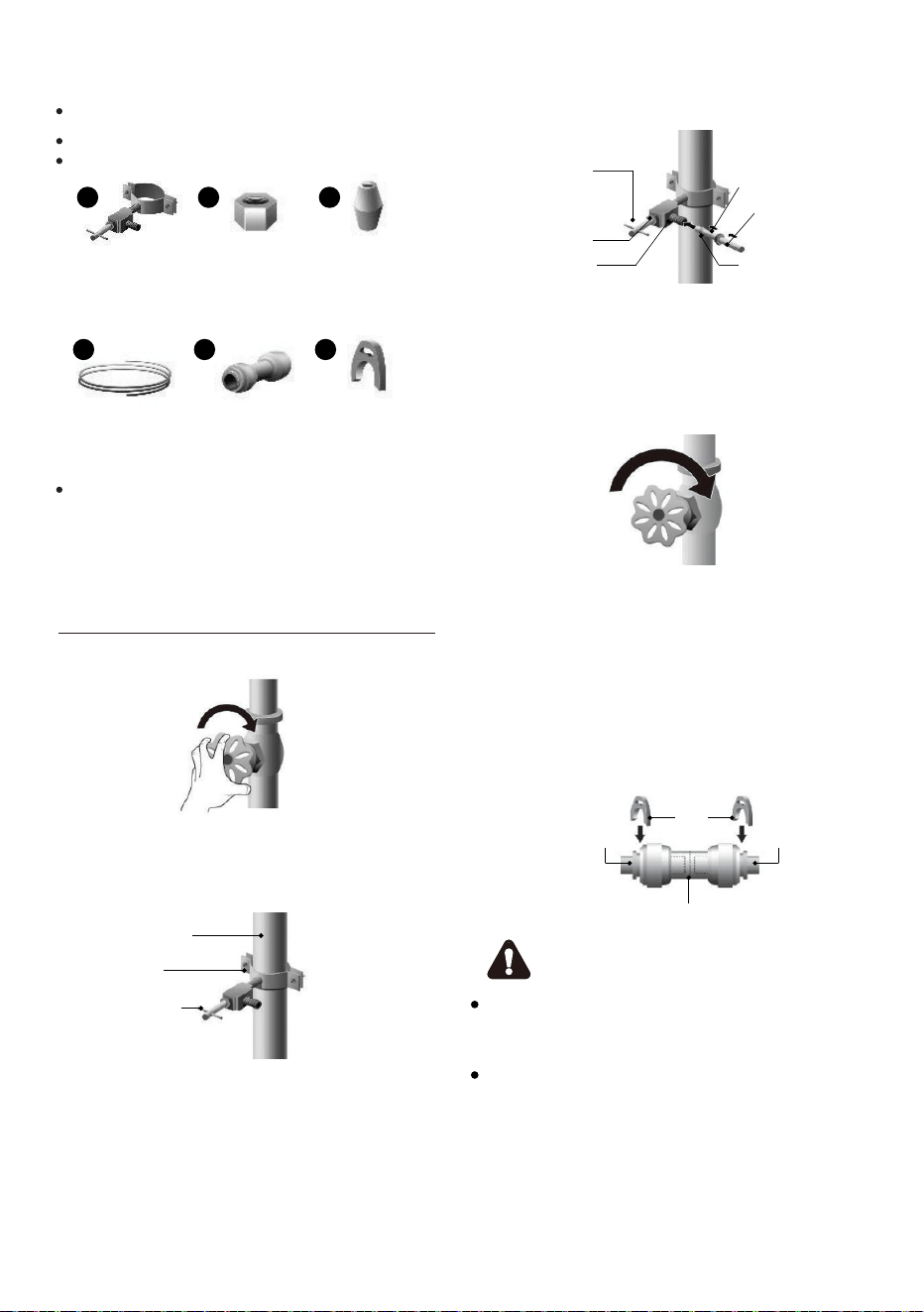
What you need to have before you begin
1. First, shut off the main water supply.
Connecting to the water
supply line
4
5 6
1/4" extension 1 Coupler 2 Clips
tubing
4. You may need to purchase No.1, No.2,
and No.3 parts to complete connection.
You may find these items sold as a kit at
a local hardware store.
1. Power drill and 1/4" drill bit.
2. 1/2" or adjustable wrench.
3.lat blade and Philips head screwdrivers.
1 2 3
Saddle-type
Shut Off valve
(1/4" outlet)
one 1/4"
compression
1 ferrule
(sleeve)
2.Using a power drill and a 1/4" drill bit drill
into the cold-water line and connect the
saddle-type shutoff valve.
Cold water line
Pipe clamp
Shut off Valve
3.Connect 1/4" extension tubing to shut off
valve outlet.
Saddle-Type
Clip
Cold water line Cold water line
Coupler
Shutoff Valve
Packing Nut
Outllet Valve
Compression Nut
1/4" Extension
tubing
Ferrule(sleeve)
Note
Ensure that the water line does not get
pinched or bent when installing.
This can result in improper water flow
through the line and will affect the
functionality of the fridge.
4. Flush the tubing. Turn the main water
supply on and flush out the tubing until the
water is clear. Then, shut the water off at
the water valve after about a quart of
water has flushed through the tubing.
5. Connect the extension tubing line with
the line on the back of the fridge via the
coupler. Fully insert the extension tubing
into the coupler, and then insert the clip
onto the coupler to lock in the tubing. Do
the same with the other end. After both
clips are inserted, check the line to make
sure it is held firmly by the clips.
11
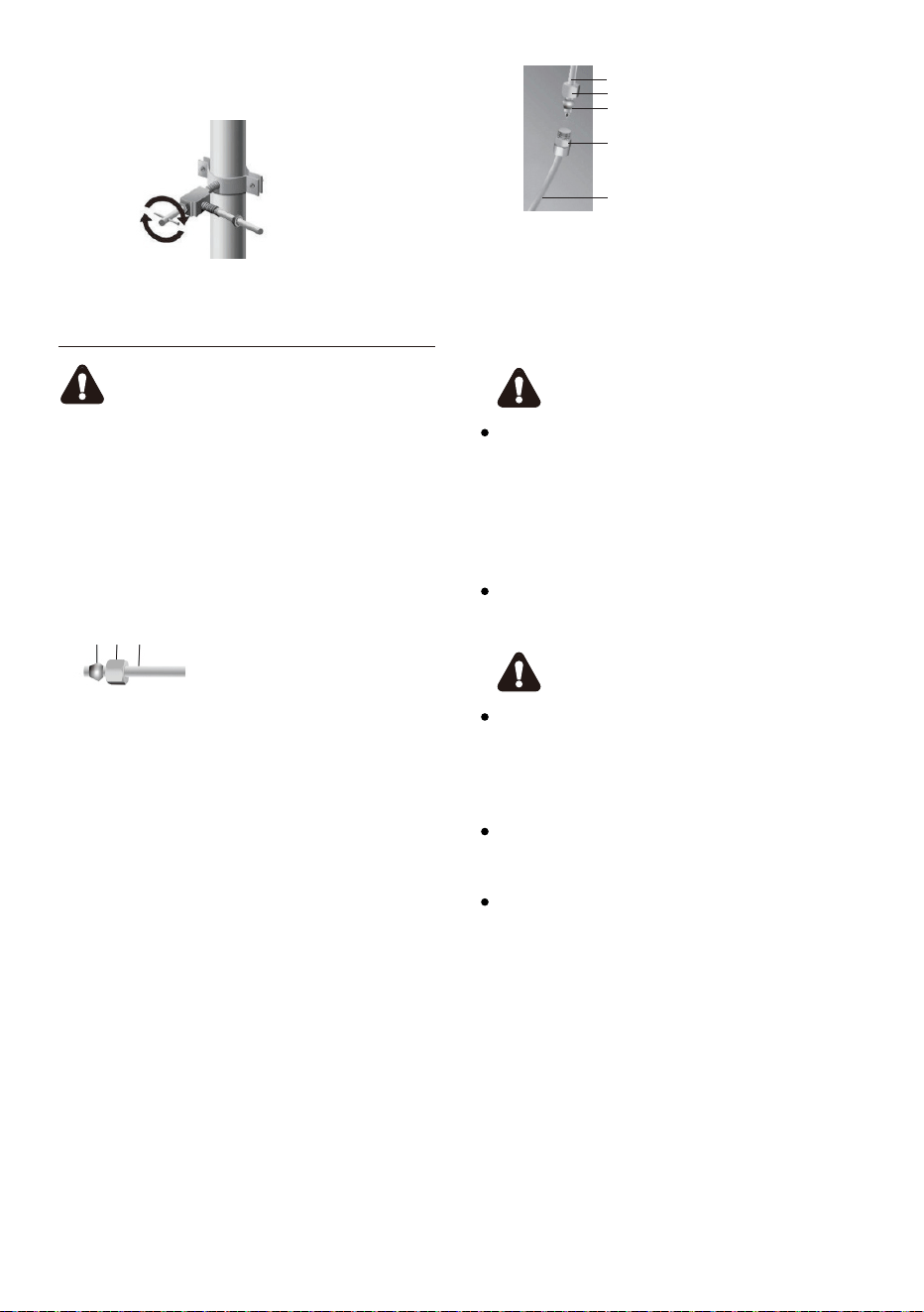
a b c a
b
c
Ferrule (Sleeve) -1 pcs
1/4" Compression Nut - 1 pcs
1/4" Water Line -1 pcs
Connect Water Line
to Refrigerator
Important
If you turn the refrigerator on before the
water is connected, turn off the ice maker.
c
b
a
a
e
b
d
c
1/4" Water Line
1/4" Compression Nut
Ferrule (Sleeve)
Brass Fitting
Water Inlet
d
e
Note
Use
only the new tubing supplied with
the refrigerator. Old tubing should not
be used. After connected to the water
supply line, please open the water
valve to flush the filter for 5 minutes
before use.
The initial dark discoloration of water is
normal.
Warning
The water line must be connected to
the cold water pipe. If it is connected
to the hot water pipe, it may cause the
purifier to malfunction.
Avoid contamination of pipes during
installation.
Connect to potable water supply only.
6. Turn the water on and check for
leakage.
1. You may need to purchase below items
to complete this connection. And you
may find these items sold as a kit at a
local hardware store.
2. Unplug refrigerator or disconnect
power.
3. Close shutoff value.
4. Thread a 1/4 " compression nut and
ferrule (sleeve) onto the free end and of
1/4" water line.
5. Insert the free and of the 1/4" water line
into the brass fitting attached to the
water inlet on the back of the refrigerator.
6. Slide the 1/4" compression nut over the
ferrule (sleeve) and screw the 1/4"
compression nut onto the brass fitting.
7. Comfirm 1/4" water line is secure by
gently pulling on it.
8. Turn on water supply and check for
leaks. Correct any leaks
12
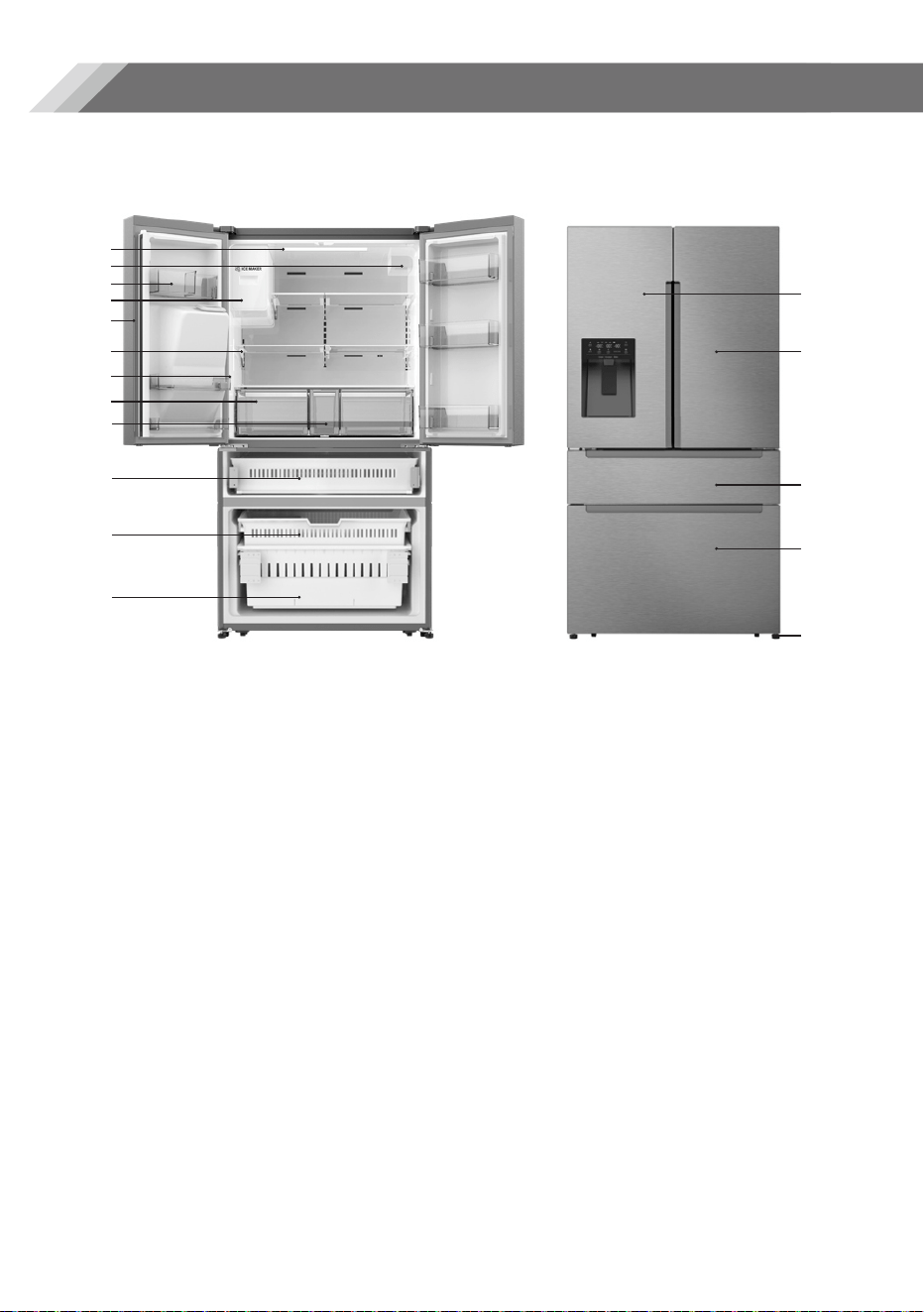
12.Freezer Lower Drawer
13.Fridge Door Left
14.Fridge Door Right
15.TempControl Door
16.Freezer Door
17.
Leveling Leg
Note:Due to constant development of our products, your refrigerator may
be slightly different from this instruction manual, but its functions and usage
remain the same.
Note:To get the best energy efficiency of this product, please place all
shelves, drawers on their original position as the illustration above.
View of the appliance
01
02
04
06
07
08
09
11
13
12
05
06.Glass Shelf
07.Refrigerator Side Light
08.Storage Drawer
09.Middle Storage Drawer
10.T
empControl Drawer
11.Freezer Upper Drawer
14
15
16
17
03
10
Description of the appliance
13
01.Refrigerator LED Light
02.Water Filter
03.
Refrigerator Door Bin
04.Ice-Maker
05.Mullion
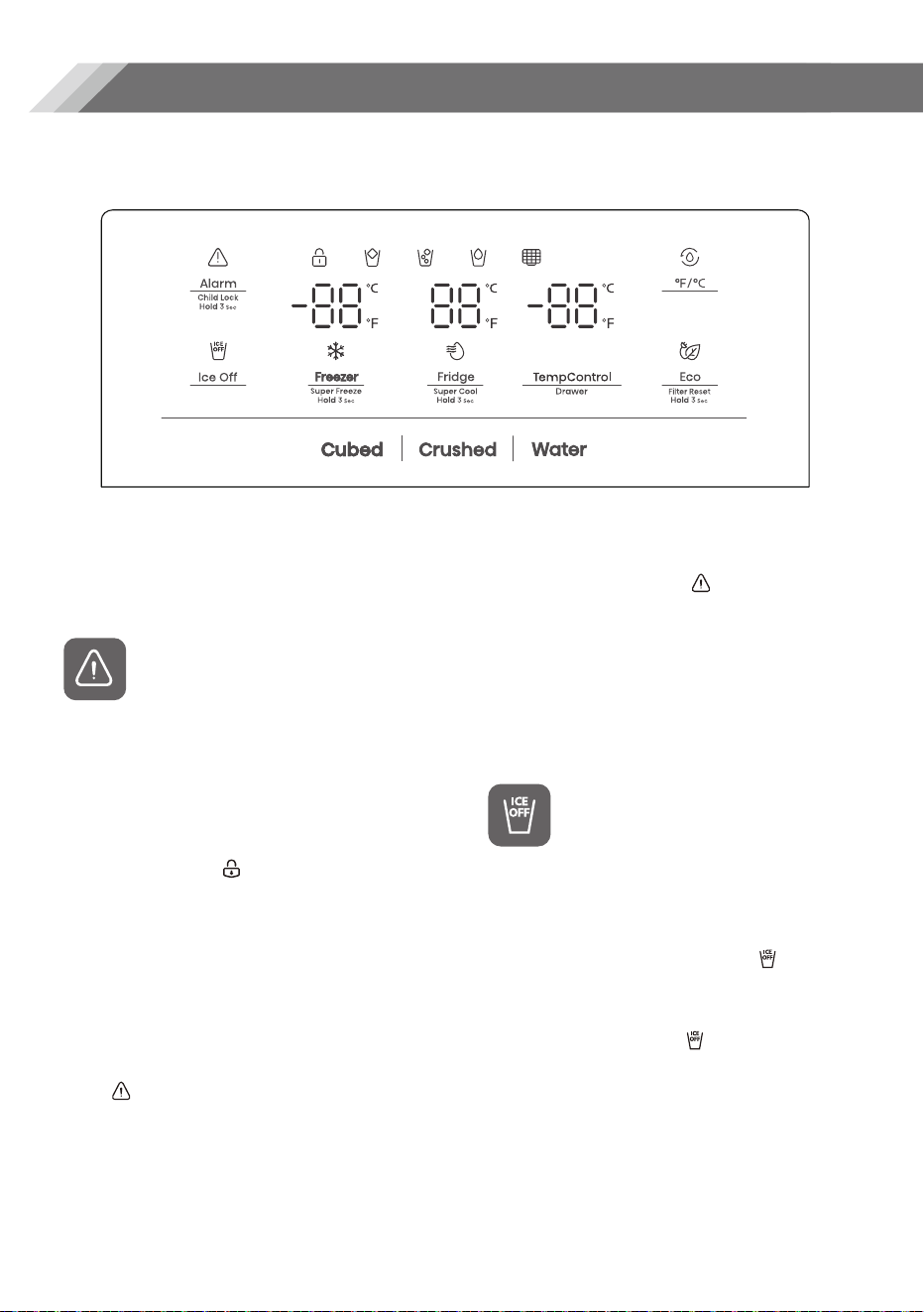
Your product has one control panel which is installed on the refrigerator door. Use
your appliance according to the following control guidelines.
Display controls
14
The display will illuminate when the
refrigerator is first plugged in. However
the lights will automatically turn off
after 60 seconds.
“Child Lock and Door Alarm”
This button serves two purposes:
1. Child Lock
Press and hold "Alarm" for 3 seconds to
lock the whole Control Panel including
dispenser function. If Control panel is
locked, the icon " " will be on, and
none of the buttons on the Control
panel work. To unlock the Control panel,
please press and hold "Alarm" for 3
seconds again.
2. Door Alarm
Leaving any door open for over 2
minutes will activate door alarm. The
icon " " will flicker, the control panel
will display " dr", and you will hear a
buzzer sound. The buzzer will sound 3
times per minute and will stop after
8 minutes. In case of alarm, you can
touch the Alarm button to cancel door
alarm, then the icon " " stops
flickering and keeps on, the buzzer
sound will stop at the same time. Also
door alarm can be stopped by closing
all the doors. To save energy, please
avoid keeping doors open for a long
time when using refrigerator.
“Ice Control”
You can touch "Ice Off" button to control
the ice maker. When the Child Lock is off,
you can touch the "Ice Off" icon to lock
the ice maker, and the icon " " will be
illuminated. If you want to unlock the ice
maker, please touch the "Ice Off" button
again, and the icon " " will be off.
Note:
When the "Ice Off" is on, it only locks the
ice maker not the dispenser.
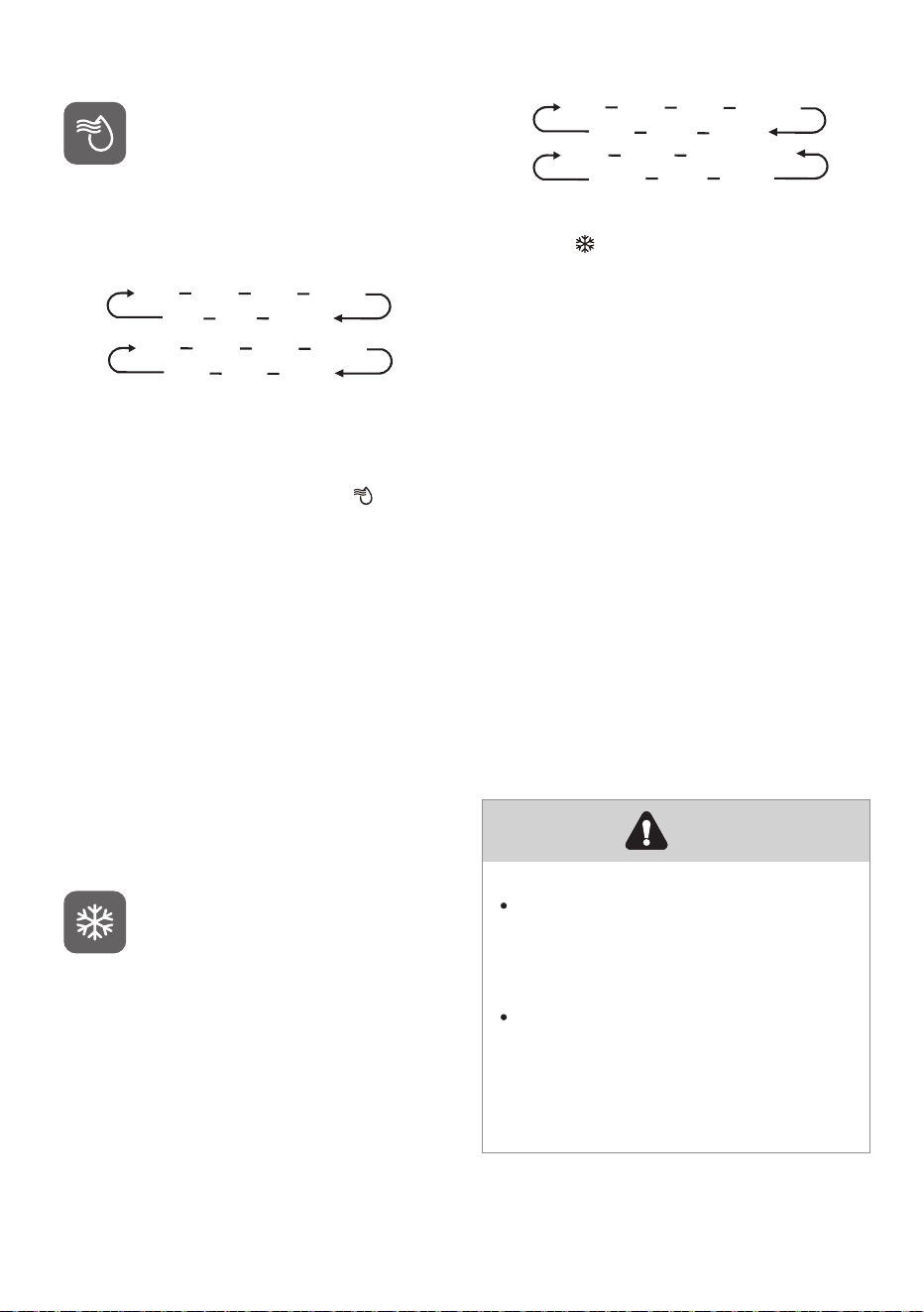
15
Control”
When you touch the button
continuously, the temperature will be
set in the following sequence.
“Fridge Temperature
46°F 45°F 44°F 43°F
36°F 37°F 38°F......
8°C 7°C 6°C 5°C
2°C 3°C
4°C
If you want to decrease the time
needed to cool items in the Fridge,
please touch and hold this button for 3
seconds, the Super Cool icon " " will
be illuminated, the fridge temperature
setting will display 36°F(2°C). Super Cool
automatically switches off after 3 hours,
and the refrigerator temperature
setting will revert back to the previous
setting. When Super Cool function is on,
you can touch the "Fridge" to switch it
off.
Note:
On the Super Cool F
unction, when you
touch the "Eco" button, Eco function will
be activated, and "Super Cool" mode
will be off.
“Freezer Temperature
Control”
You can touch the "Freezer" button to
activate the mode to control the freezer
temperature. When you press the
button continuously, the temperatur
e
will be set in the following sequence.
5°F 6°F
7°F
-24°C -23°C -22°C
......
......
-11°F -10°F -9°F
-14°C -15°C -16°C
Press and hold the button for 3 seconds,
the icon " " will be illuminated, the
freezer temperature setting will display -
11°F(-24°C). Super Freeze can quickly
lower the temperature and freeze your
food faster than usual. This can retain
more of the vitamins and nutrition in
fresh food and keep your
food longer.
Super Freeze automatically switches off
after 52 hours, and the freezer
temperature setting will revert back to
the previous setting. When the Super
Freeze function is on, you can touch
"Freezer" to switch off the Super Freeze
function. The Super Freeze is used to
perform pre-freezing and fast freezing
in sequence of Freezer compartment.
This function accelerates the freezing of
fresh food and, at the same time,
protects foodstuffs already stored from
undesirable warming.
To freeze fresh food activate the
Super Freeze function at least 24
hours before placing the food to
complete pre-freezing.
On the Super Freezer Function,
when you touch the "Eco" button,
Eco function will be activated,
and "Super Freezer" mode will
be off.
Note
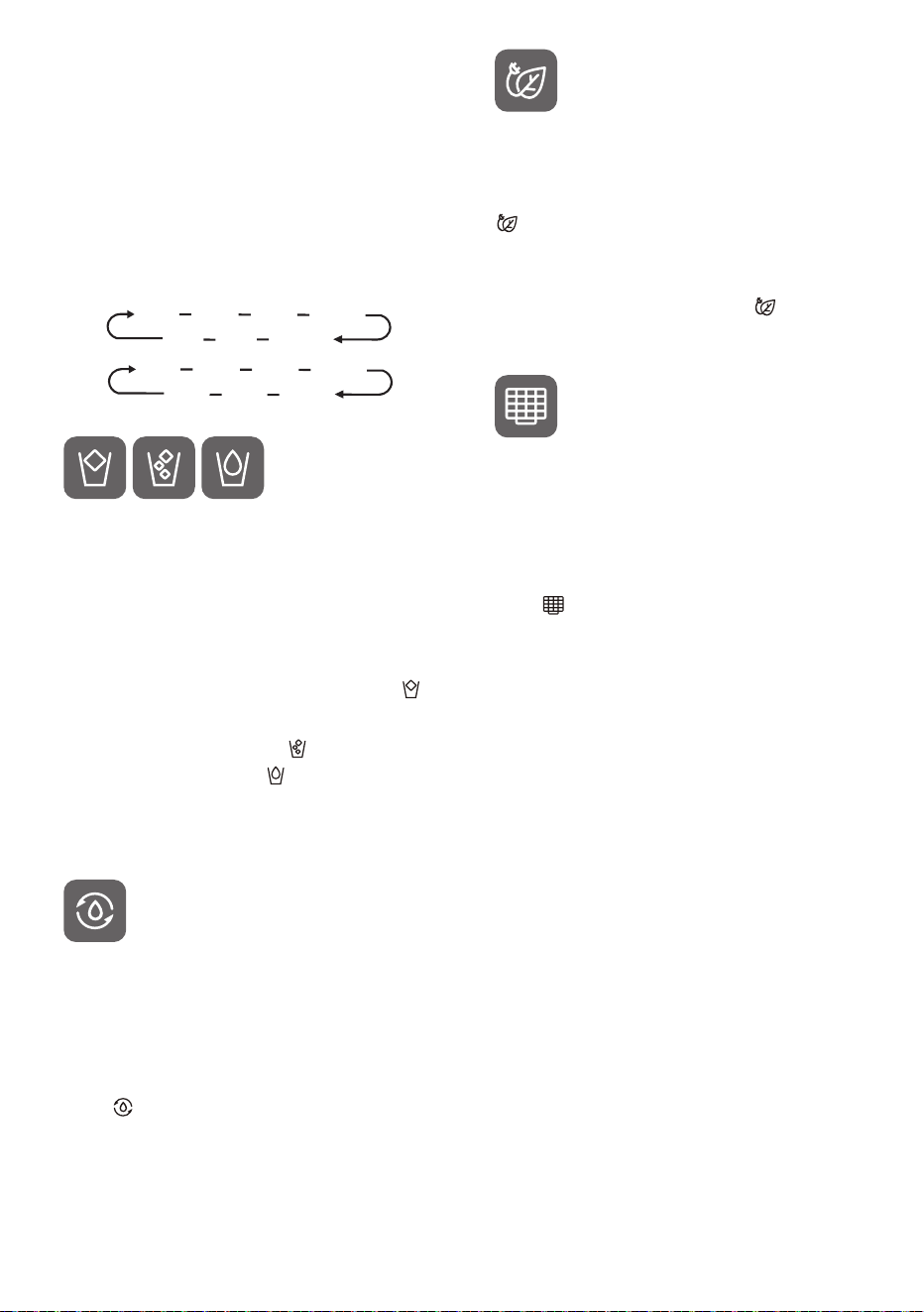
You can touch the "TempControl" button
to activate the mode to control the
convertible compartment temperature.
When you press the butt
on
continuously, the temperature will be
set in the following sequence.
“TempControl”
-1°C
-2°C
-3°C
41°F 40°F 39°F ......
27°F 28°F 29°F
5°C 4°C 3°C ......
When the Child Lock is on, the dispenser
will not work. When the Child Lock is off,
you can press the "Cubed" or "Crushed”
option to choose the type of ice to be
dispensed, and press the "Water" button
will activate the water mode. If you
choose the function of Cubed, the " "
icon will be illuminated, choose the
fuction of Crushed the " " icon will be
illuminated, and the " " icon will be
illuminated when Water function is
chosen.
“Dispenser
Control”
When the Child Lock is off, you can
touch the"°F/°C" button to switch
between Celsius and Fahrenheit units.
The default state is Fahrenheit display.
When it is switched to Fahrenheit, the
icon "
" will be on.
“ °F/°C ”
You can touch this button to turn
Energy Save mode on and off. When
you turn Energy Save on, the Eco icon
" " lights. The temperature of the
fridge is automatically switched to
43°F(
6°C) and the freezer to 1°F(-17°C). If
Energy Save is off, the icon " " will go
off and the temper
ature setting will
revert back to the previous setting.
“ECO/Energy Saving”
“Water Filter”
In general, you should change the
water filter every 6 months to ensure
the highest possible water quality.
After the refrigerator has dispensed
about 200 gallons of water, the filter
icon " " will blink, reminding you to
replace the water filter.
You can purchase the new filter from
the retailer where you purchased your
refrigerator or the MORA after-sales
service system. Make sure that the new
filter is the same filter type that came
with your fridge and can be correctly
used in your refrigerator. After you
change the water filter, touch and hold
the "Eco" buttons for 3 seconds to make
the blinking stop.
“Demo Mode”
Demo mode is for store display, and it
prevents the refrigerator from
generating cool air. In this Demo Mode,
the refrigerator may seem like it is
working but it will not make cool air.
The indicators on the control panel will
show "0F". To cancel this mode, touch
and hold "Alarm" and "°F/°C" buttons at
the same time for 3 seconds until the
buzzer beep a long sound.
16
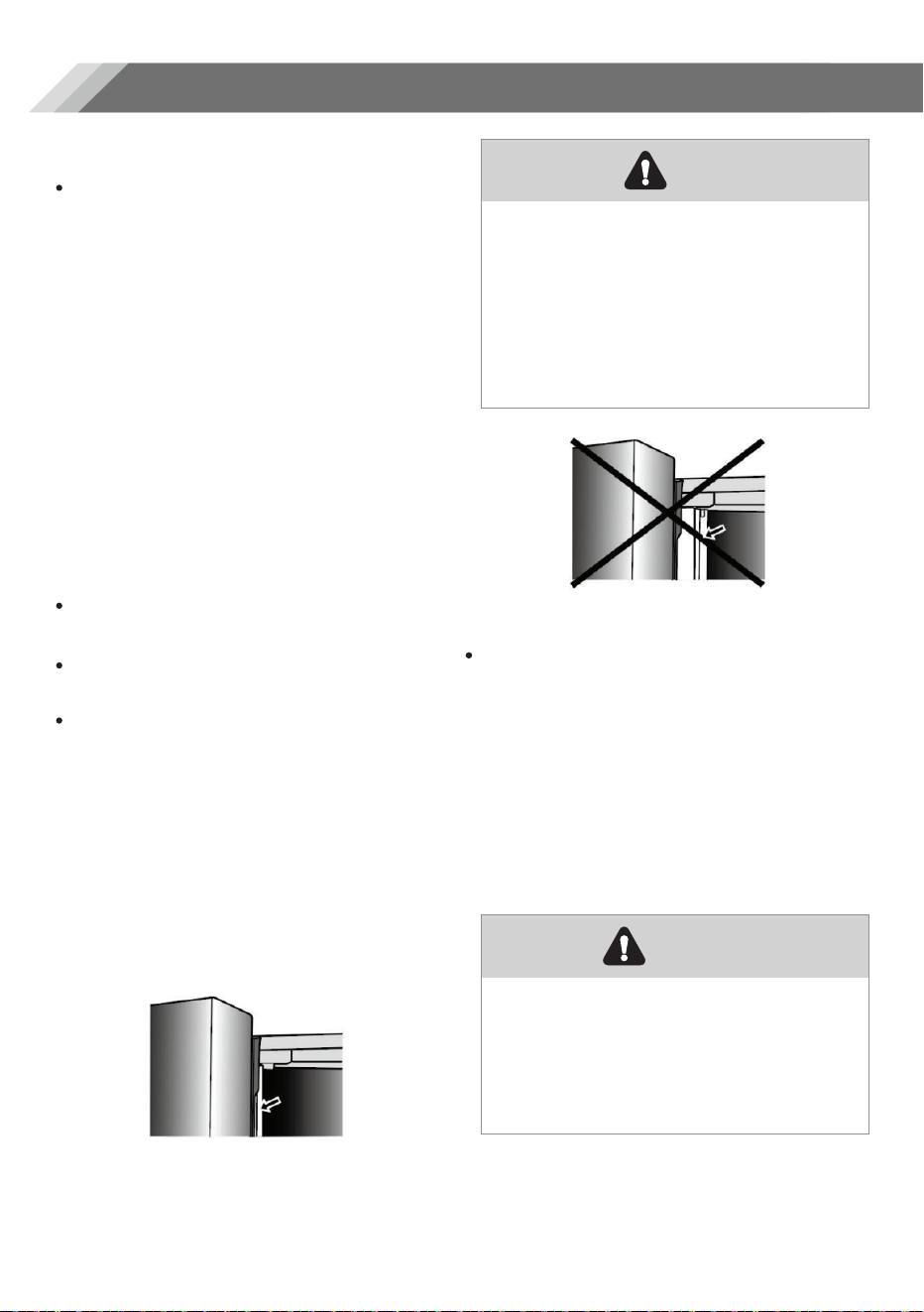
The refrigerator compartment is
suitable for storage of vegetables
and fruit. Food inside should be
sealed for storage in order to avoid
losing moisture or flavor permeating
into other foods.
Caution!
Never close the refrigerator door
while the shelves, crisper
and/or
telescopic slides are extended. It
may damage both them and the
refrigerator.
The four doors can be opened and
closed either separately or together.
There is a mullion on the left-hand
side refrigerator compartment door.
When closing the le
ft-hand door ,the
mullion folds behind the right-hand
door joining the two doors.
The temperature of the door frame is
controlled to help prevent moisture
from developing on the mullion. The
temperature of the surface may be
warm, which is normal, and will not
affect the performance of the
refrigerator.
Using your fridge compartment
The refrigerator compartment is
provided with six door bins, which are
suitable for the storage of canned
liquid, bottled drinks and packaged
food. To remove the door, simply
lift the racks up and pull straight out. To
relocate the door , slide it in above the
desired location and push down until it
stops.
Door Bins
Before closing the left-hand door,
make sure the mullion is folded
inward. If the mullion is pulled
outward it may become
damaged when you try to close
the door.
Do not place too many heavy
things in the baskets. Before you tilt
up the door shelf vertically, please
take the dood out.
Note
Warning
Opening and Closing Doors
Using your appliance
17
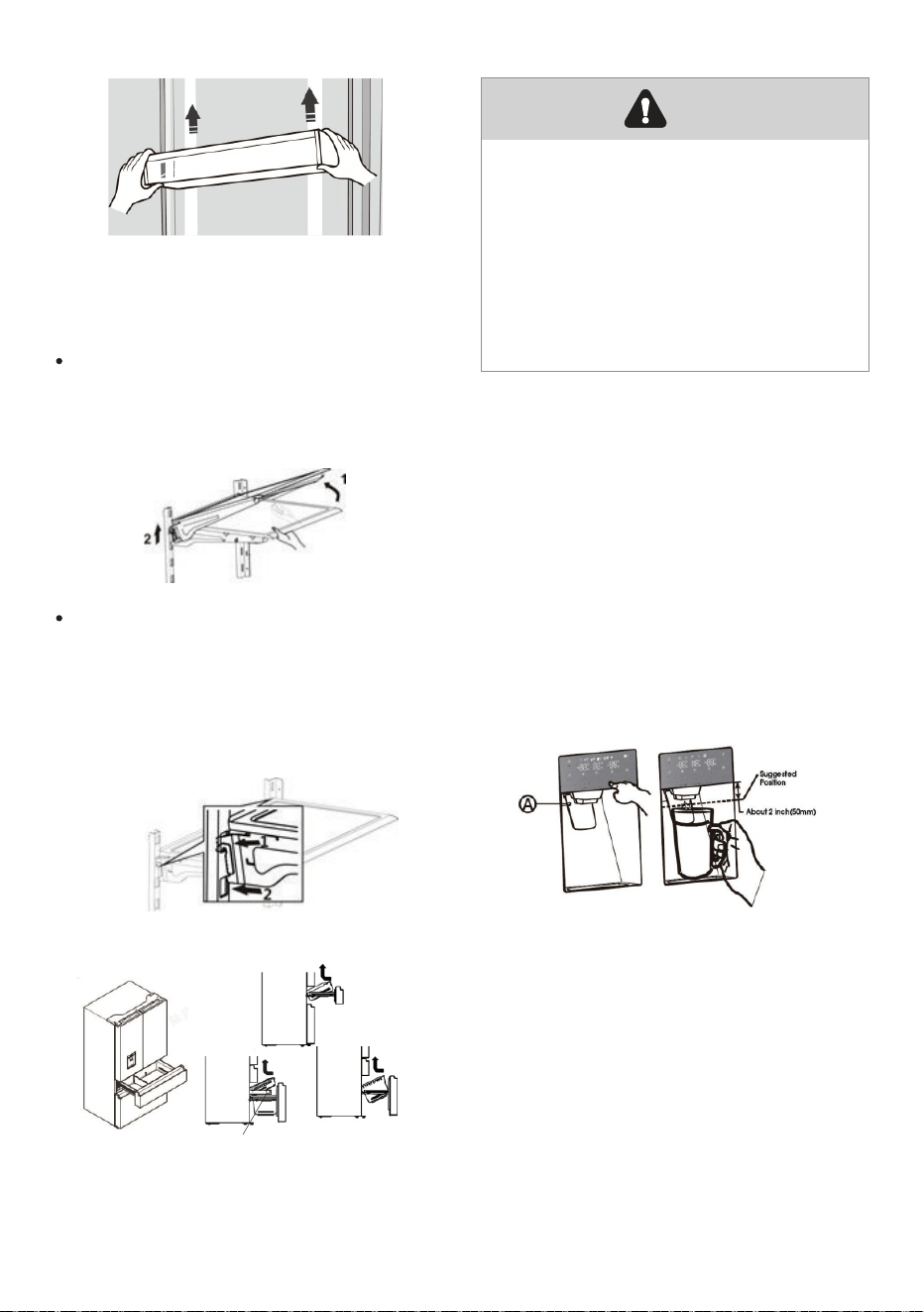
The height of the shelves can be
adjusted to fit your storage needs.
1. To remove the glass shelves. Tilt up
the front of the shelf in the direction
shown (1) and lift it up vertically (2).
Pull the shelf out.
Adjustable Shelves
2. To re-install the glass shelves, tilt
the front of the shelf up and guide
the shelf hooks into the slots at a
desired height(1).Then lower the front
of the shelf so that the hooks can
drop into the slots (2).
Removing/Replacing freezer drawer
Unscrew the drawer before taking
it out.
1. Pull out drawer to maximum
extension.
2.
Lift up to remove the drawer.
3. Reverse steps 1 and 2 to replace
the drawer.
Note
Push the appropriate ice or water
type button to select what you want
to dispense.
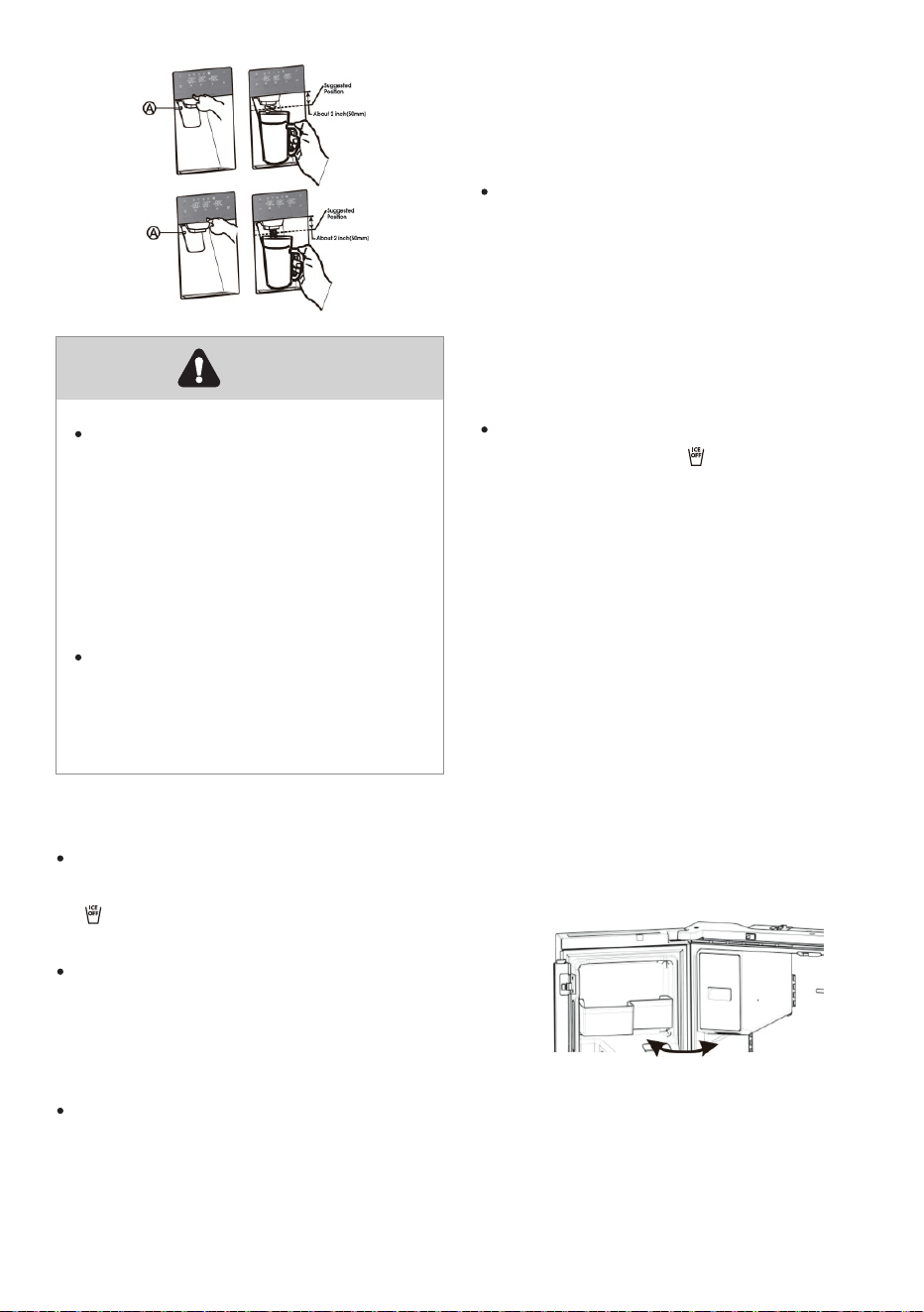
Getting Cold Water and Ice
The water dispenser is located in the
fridge door. To get water, push the
water button. Then move your glass
down to the dispenser lever (A) at
below suggested position and press
it.
Getting Cold Water
To get ice, push the cubed or
crushed ice button as required.
Then move your glass down to the
dispenser lever(A) at below
suggested position and press it.
Getting Cubed & Crushed Ice
18
ice using a plastic utensil and
discard. Do not use a sharp tool to
break up the ice. This can cause
damage to the ice container.
Do not store any items other than ice
in the ice storage container.
If a power failure occurs, ice
cubes may melt and then freeze
logether when the power comes
back on, causing the dispenser to
stop working. To prevent this
problem, after a power failure,
pull out the ice bucket and
residual ice or water.
Don't push the water dispenser
lever forward without a cup
below since it may cause water
spilling.
Warning
Press "Ice Off" Button to turn the ice
maker On and Off. The Ice Off icon
" " is off when the ice maker is
functioning.
Following installation, allow 24 hours
to produce the first batch of ice.
Discard the first three batches of ice
pr
oduced. Allow 2 to 3 days to fill the
ice storage container.
If the ice in the ice container clumps
or sticks to the wall, break up
Ice Maker in Refrigerator
Press the "Ice Off" button to turn off
the ice maker, the " " icon will
light up. And you need to remove
all ice cubes from the ice bucket. If
not, the ice cubes may clump
together, making it difficult to
remove them.
To turn off the Ice Maker
When you select the ice off mode,
remove all ice cubes from the
bucket.
1.
Open the door at the maximum
Angle.
To remove the ice bucket
135°
19
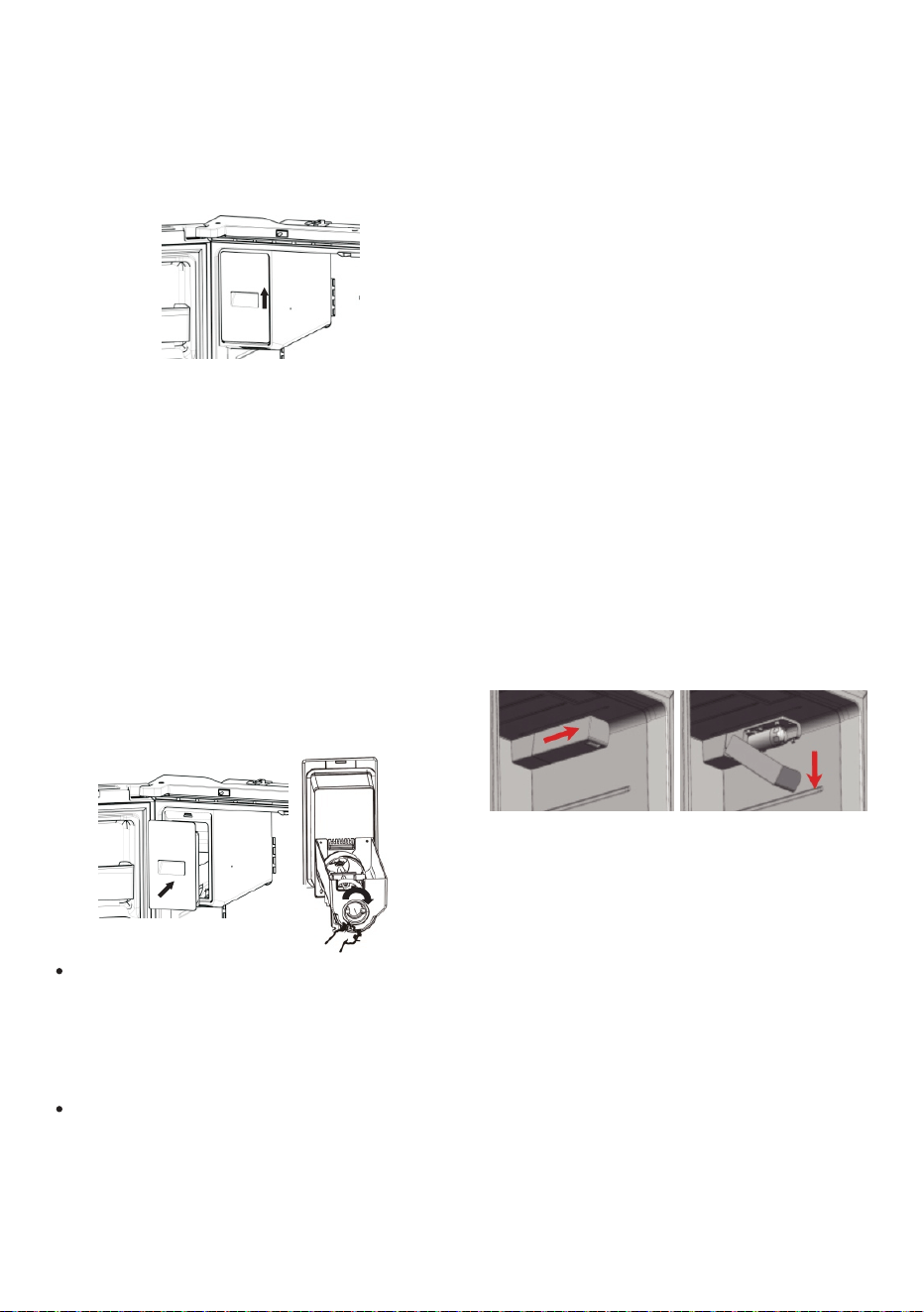
2. Gently lift the ice bucket up, and
then pull it out slowly while holding
the bottom of the bucket with one
hand and the side with the other
hand.
3. Empty the ice bucket.
Note:
If you leave the ice cubes in the
bucket, the ice cubes may clump
together making it difficult to
remove them.
4. When done, put the ice bucket
back into the position, push it
firmly straight back. If the ice
bucket does not fit in, turn the helix
90 degree(see the below
illustration on the right) and try
again.
CAUTION:
Do not apply excessive force to the
bucket cover. The cover may break.
To prevent injury, make sure to clean
up any
ice or water that has fallen
on the floor.
The inside of the ice bucket is
very
cold when the refrigerator is
operating. Don't reach deep inside
the ice bucket. This may cause
physical injury or product damage.
Changing the water filter
Please refer to the owner’s manual
for proper maintenance and
operation. If this device is not
maintained and operated as
specified in the owner’s manual,
there is arisk of exposure t
o
contaminants.
To drink the freshest and cleanest
water from your refrigerator, change
the filter on time.
To change the water filter, follow
below steps:
1. Shut off the water supply. Then pull
the handle under the cover
outwards to open the cover.
2. Pull the water filter down wards
and turn it about 90° counter-
clockwise to take it out. When the
filter is disassembled, pay
attention to keep the filter head
upward tilted to avoid water
leaking from the front filter part
And the dropped water in the
cover should be cleaned
immediately.
20
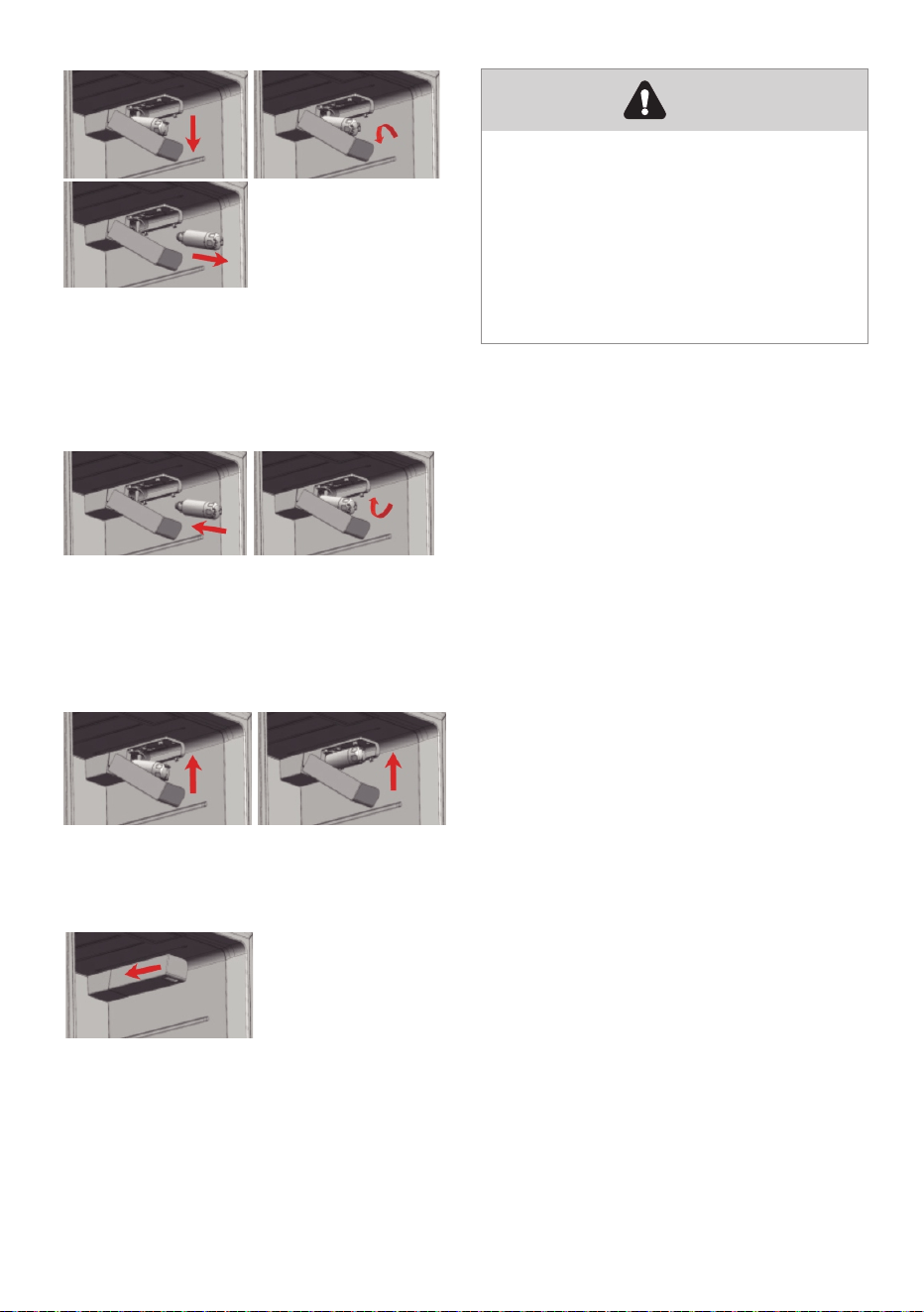
3. Insert the new water filter into the hole,
and at the same time turn it about
90°clockwise until it stops.
4. Push the water filter up, and move the
cover up to horizontal and push it until
it locks.
5. Turn the
water supply back on.
1. Turn on the main water supply and
supply water from water supply line.
2. Let the water flow through the
dispenser until it becomes clear
(flush for approximately 5 minutes).
This will clean the water supply
system and remove the air
from the
lines.
3. Additional flushing may be required
in some households.
4. Open the refrigerator door and
make sure there are no water leaks
coming from the wat
er filler.
6.Flush filter for 5 minutes before use.
Removing any residual matter
inside the water supply line
Note
Turn the water supply back on.
After that, you should check the
leaks. If leaks occur, repeat the
above operation steps 1-5. If leaks
persisit, please stop using it and
call your supporting dealers.
21
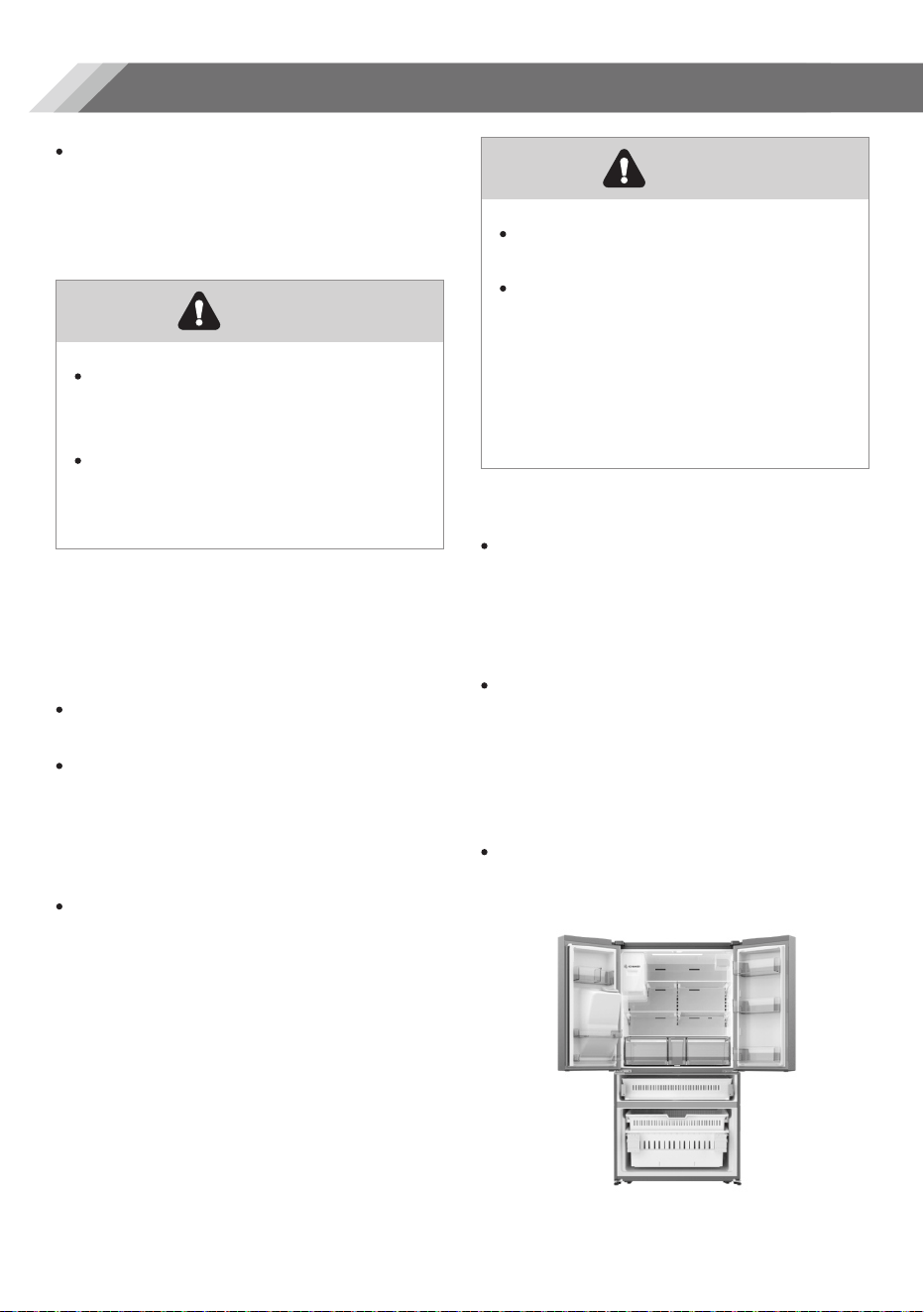
Be sure to flush the dispenser
thoroughly, otherwise water may
drip from the dispenser.
This means that there is still air in
the line. Do not dispense
continuously.
Depress and release the dispenser
pad for cycles of 30 seconds ON
and 60 seconds OFF.
Note
The pressure of the water supply
coming out of a reverse osmosis
system going to the water inlet valve
of the refrigerator needs to be a
minimum of 40 to 60 psi (276 to 414
kpa). If the water pressure to the
reverse osmosis system.
1. Check to see whe
ther the sediment
filter in the reverse osmosis system
is blocked.
Replace the filter if
necessary.
2. Allow the stor
age tank on the
reverse osmosis system to refill
after heavy usage.
3. If your refrigerator has a water
filter, it may further reduce the
water pressure when used in
conjunction with a reverse
osmosis sy
stem. Remove the water
filter. Check to see whether the
sediment filter.
Reverse osmosis water supply
is important
22
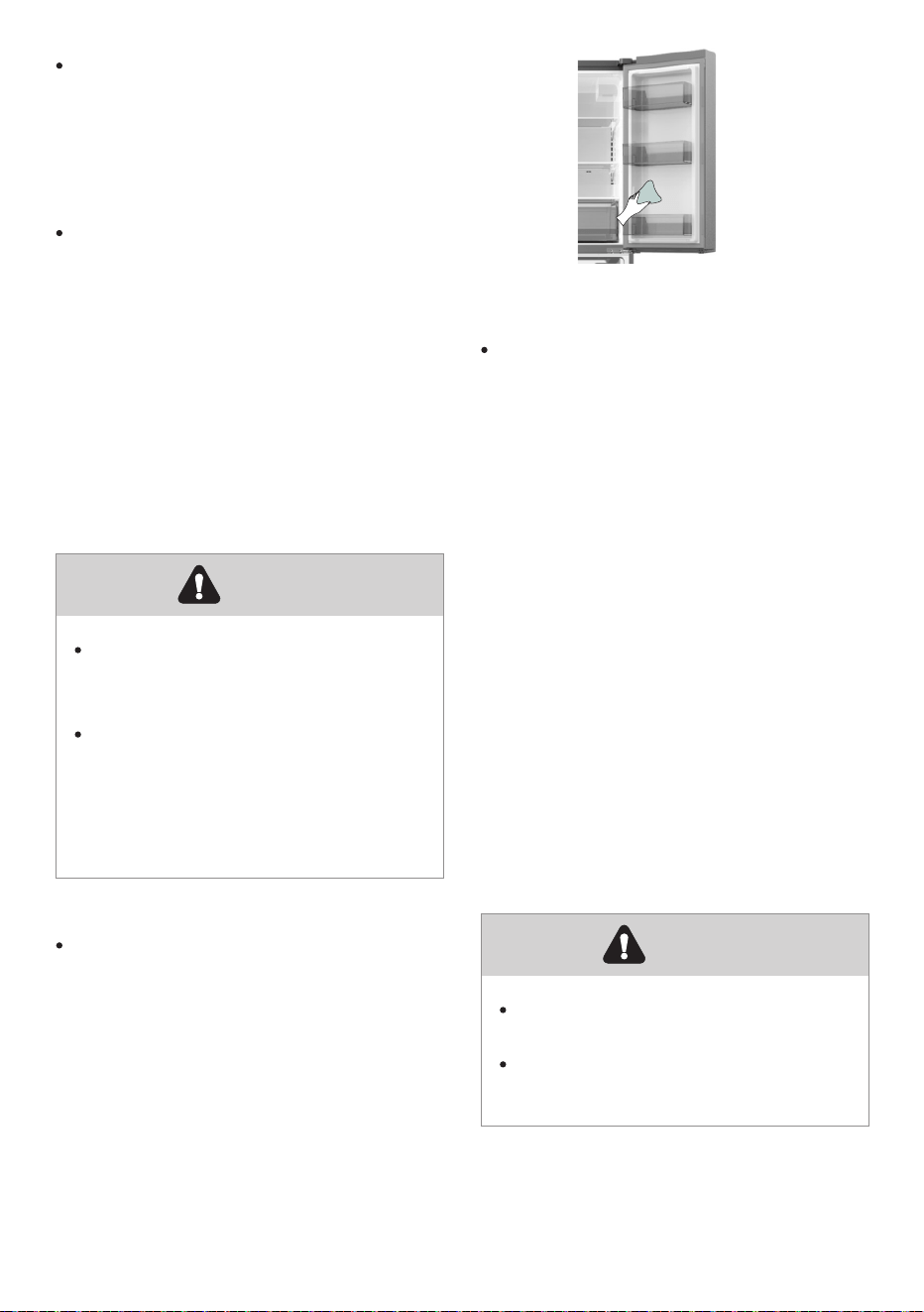
For hygienic reasons the appliance
(including exterior and interior
accessories) should be cleaned
regularly (at least every two months).
Do not use sharp objects as they
are likely to scratch the surface.
Do not use Thinner, Car detergent
Clorox, ethereal oil, abrasive
cleansers or organic solvent such
as Benzene for cleaning. They
may damage the surface of the
appliance and may cause fire.
Warning
The appliance must not be
connected to the mains during
cleaning. Danger of electrical
Shock! Before cleaning switch the
appliance off and remove the
plug from the mains socket.
Warning
To maintain good appearance of
your appliance, you should clean it
regularly.
Wipe the digital panel and display
panel with a clean, soft cloth.
Spray water onto the cleaning cloth
instead of spraying directly on the
surface of the appliance. This helps
ensure an even distribution of
moisture to the surface.
Clean the doors,
handles and
cabinet surfaces with a mild
detergent and then wiped dry with a
soft cloth.
Exterior cleaning
You should clean the appliance
interior regularly. It will be easier to
clean when food stocks are low. You
can remove the drawers and
shelves for a more thorough clean.
Wipe the inside of the freezer with a
weak solution of bicarbonate of
soda, and then rinse with warm
water using a wrung-out sponge or
cloth. Wipe completely dry before
replacing the shelves and baskets.
Thoroughly dry all surfaces and
removable parts before putting
them back into place.
Interior cleaning
Cleaning and care
23
Although this appliance
automatically defrosts, a layer of
frost may occur on the freezer
compartment's interior walls if the
freezer door is opened frequently or
kept open too long.
If the frost is too thick, choose a time
when the freezer is nearly empty and
proceed as follow:
The LED light should be replaced
by a professional. If the LED light is
damaged, contact the customer
helpline for assistance.
Warning
Do not use sharp objects to
remove frost from the freezer
compartment.
Only after the interior is
completely dry should the
appliance be switched back on
and plugged back into the mains
socket.
Warning
To replace the LED light, the below
steps can be followed:
1. Unplug your appliance .
2.
Hold a thin blade, insert it into the
gap at either end of the
lampshade, and tilt one end of the
lampshade.
3.
Move the blade insertion position
to the other end and tilt the
lampshade section by section until
the lampshade falls off.
4. Press the elastic snap of the light
box with a thin-blade screwdriver,
and pull one end of the elastic
snap of the LED light until the LED
light is detached and then pull out
the connecting terminal of the LED
light.
5. Replace the LED light, install it and
lampshade correctly in place.
Replacing the LED light
Take care to keep door seals clean.
Sticky food and drinks can cause
seals to stick to the cabinet and tear
when you open the door. Wash the
seals with a mild detergent and
warm water. Rinse and dry them
thoroughly after cleaning.
Door seals cleaning
24
1. Remove existing food and
accessories baskets, unplug the
appliance from the mains power
and leave the doors open.
Ventilate the room thoroughly to
accelerate the process.
2. When defrosting is completed,
clean your freezer as described
above.
We recommend that you follow the
tips to save energy.
Try to avoid keeping the door open
for long periods in order to conserve
energy.
Ensure the appliance is away from
any sources of heat (Direct sunlight,
electric oven or cooker etc.)
Don't set the temperature colder
than necessary.
Don't store warm food or
evaporating liquid in the appliance.
Place the appliance in a well
ventilated, humidity free room.
Please refer to the installing your
new appliance chapter.
The description of appliance
diagram shows the correct
combination for the drawers, crisper
and shelves, do not adjust the
combination as this is designed to
be the most energy efficient
configuration.
Energy saving tips
Do not place hot food directly into
the refrigerator or freezer, the
internal temperature will increase
resulting in the compressor having
to work harder and will consume
more energy.
Do cover or wrap the food,
particularly if it has a strong flavor.
Place food properly so that air can
circulate freely around it.
Hints for fresh food refrigeration
Meat (AIl Types) Wrap in polythene
food: wrap and place on the glass
shelf above the vegetable drawer.
Always follow food storage times
and use by dates suggested by
manufacturers.
Cooked food, cold dishes, etc:
They should be covered and may be
placed on any shelf.
Fruit and vegetables:
They should be stored in the special
drawer provided.
Butter and cheese:
Should be wrapped in airtight foil or
plastic film wrap.
Milk bottles:
Should have a lid and be stored in
the door racks.
Hints for refrigeration
When first starting-up or after a
period out of use, let the appliance
run at least 2 hours on the higher
settings before putting food in the
compartment.
Prepare food in small portions to
enable it to be rapidly and
completely frozen and make it
possible to subsequently thaw only
the quantity required.
Wrap up the food in aluminum foil or
polyethylene food wraps which are
airtight.
Do not allow fresh, unfrozen food to
touch the food which is already
frozen to avoid patrial defrosting.
Hints for freezing
Helpful hints and tips
25
It is recommended to label and date
each frozen package in order to
keep track of the storage time.
Ensure that frozen food has been
stored correctly by the food retailer .
Once defrosted, food will deteriorate
rapidly and should not be re-frozen.
Do not exceed the storage period
indicated by the food manufacturer.
Hints for fresh food refrigeration
If the appliance needs to be
switched off for an extended period,
the following steps should be taken
to prevent mould on the appliance.
1.
Remove all food.
2. Remove the power plug from the
mains socket.
3. Clean and dry the interior
thoroughly.
4. Ensure that all the doors are
wedged open slightly to allow air to
cir
culate.
Switching off y
our appliance
If you experience a problem with your appliance or are concerned that the
appliance is not functioning correctly, you can carry out some easy checks before
calling for service, please see below.
Don't try to repair the appliance yourself. If the problem persists after you have
made the checks mentioned below, contact a qualified electrician, authorized
service engineer or the shop where you purchased the product.
Warning
Problem
Possible cause & Solution
Appliance is not
working correctly
Check whether the power cord is plugged into the power
outlet properly.
Check the fuse or circuit of your power supply, replace if
necessary.
Troubleshooting
26
Risk of child entrapment. Before you throw away your old refrigerator or
freezer:
- Take off the doors.
- Leave the shelves in place so that children may not easily climb inside.
Warning
Problem
Possible cause & Solution
Appliance is not
working correctly
Odours from the
compartments
The ambient temperature is too low. Try setting the
chamber temperature to a colder level to solve this
problem.
It is normal that the refrigerator is not operating during the
automatic defrost cycle, or for a short time after the
appliance is switched on to protect the compressor.
The interior may need to be cleaned.
Some food, containers or wrapping cause odours.
Noise from the
appliance
The sounds below are quite normal:
Compressor running noises.
Air movement noise from the small fan motor in the
freezer compartment or other compartments.
Gurgling sound similar to water boiling. Popping noise
during automatic defrosting.
Clicking noise before the compressor starts.
Other unusual noises are due to the reasons below and
may need you to check and take action:
The cabinet is not level.
The back of appliance touches the wall.
Bottles or containers knocking against each other.
The motor runs
continuously
It is normal to frequently hear the sound of the motor, it will
need to run more when in following circumstances:
Temperature setting is set colder than necessary.
Large quantity of warm food has recently been stored
within the appliance.
The temperature outside the appliance is too high.
Doors are kept open too long or too often.
After your installing the appliance or it has been switched
off for a long time.
27
A layer of frost
occurs in the
compartment
Temperature
inside is too
warm
Check that the air outlets are not blocked by food and
ensure food is placed within the appliance to allow
sufficient ventilation.
Ensure the door can be fully closed . To remove the frost,
please refer to the cleaning and care chapter.
You may have left the doors open too long or too
frequently;
Or the doors are kept open by some obstacle;
Or the appliance is located with insufficient clearance at
the sides, back and top.
Temperature
inside is too cold
Increase the temperature by following the “Display controls”
chapter.
Check whether the top of the refrigerator is tilted back by
10-15mm to allow the doors to self close, or if something
inside is preventing the doors from closing.
Water drips
on the floor
The light is not
working
The LED light may be damaged. Refer to replace LED
lights in cleaning and care chapter.
The control system has disabled the lights due to the
door being kept open too long, close and reopen the
door to reactivate the lights.
Doors can’t be
closed easily
The water pan (located at the rear bottom of the cabinet)
may not be properly leveled, or the draining spout
underneath the top of the compressor depot may not be
properly positioned to direct water into this pan, or the
water spout is blocked , or the water is not fully inserted into
the connector.
You may need to pull the refrigerator away from the wall
to check the pan, spout and connector.
Check if the refrigerator is power-off for a long time, this
may cause the ice in the bucket to melt into water, and
flow to the floor.
Problem
Possible cause & Solution
28
Ice is not
dispensing
Did you wait for 10 hours after installation of the water
supply line before making ice? if it is not sufficiently cool, it
may take longer to make ice, such as when first installed.
Is the water line connected and the water valve open?
Did you manually stop the ice making function? Make
sure you have set the Cubed or Crushed mode on.
Is there any ice blocked within the ice maker bucket or ice
chute?
Is the freezer temperature too warm? Try setting the
freezer temperature lower.
Water dispenser
is not functioning
You can hear
water bubbling in
the refrigerator
This is normal. The bubbling comes from the refrigerant
coolant liquid circulating through the refrigerator.
Is the water storage box installed accurately? Makesure
there is enough water in the water storage box.
Is water line broke or bent? Make sure the water line is
unblocked and clear of any obstruction.
Is the water storage box frozen for the refrigerator
temperature is too low? Try selecting a warmer setting on
the display panel.
Is the water pump working?
Problem
Possible cause & Solution
29
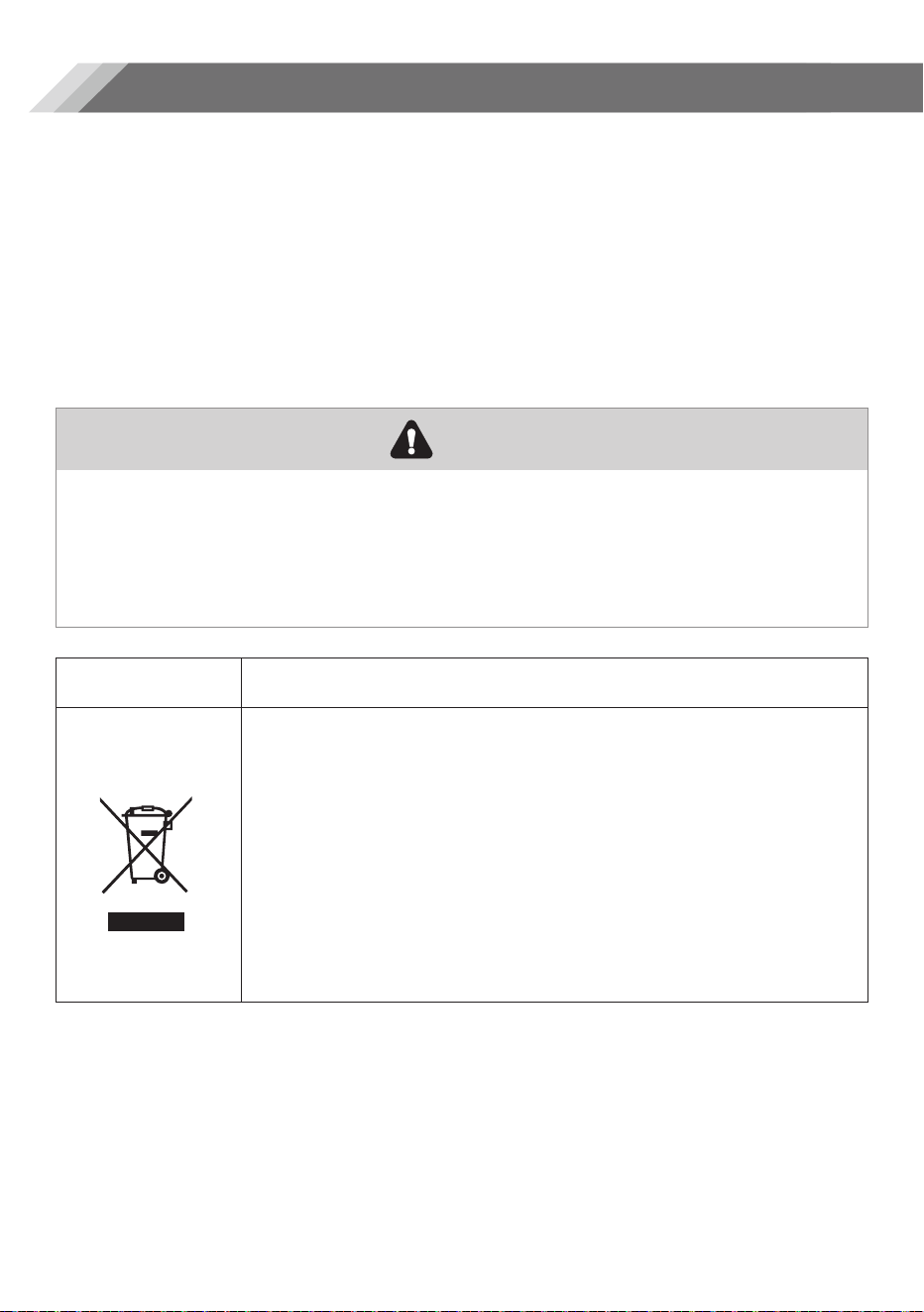
It is prohibited to dispose of this appliance as household waste.
Packaging materials
Packaging materials with the recycle symbol are recyclable. Dispose of the
packaging into a suitable waste collection container to recycle it.
Before disposal of the appliance
1. Pull out the mains plug from the mains socket.
2. Cut off the power cord and discard with the mains plug.
Refrigerators contain refrigerant and gases in the insulation.
Refrigerant and gases must be disposed of professionally as they may cause
eye injuries or ignition. Ensure that tubing of the refrigerant circuit is not damage
prior to proper disposal.
Correct Disposal of this product
This marking indicates that this product should no be
disposed with other household wastes throughout the EU.
To prevent possible harm to the environment or human
health from uncontrolled waste disposal, recycle it
responsibly to promote the sustainable reuse of material
resources. To return your used device, please use the
return and collection systems or contact the retailer where
the product was purchased. They can take this product for
environmental safe recycling.
Warning
Disposal of the appliance
30
Customer Service, (toll free: 888-411-7118) between the hours of 9:00 am and 6:00 pm EST
EMAIL: Criterion@hisense.com
Customer Service, (toll free: 888-411-7118) between the hours of 9:00 am and 6:00 pm EST
A CALIFORNIA RESIDENTS ONLY-WARNING:
Cancer and Reproductive
Harm-www.P65Warnings.ca.gov
20121995