RecDotFAQ
Q1
:
HowdoIconnectRecDotviaBluetoothforthefirsttime?
A
:TopairRecDotwithyourphoneforthefirsttime,pleasefollowthesesteps:
1.
OpentheBluetoothsettingsonyourphoneandmakesureBluetoothisturnedon.
2.
Openthechargingcaselid.
3.
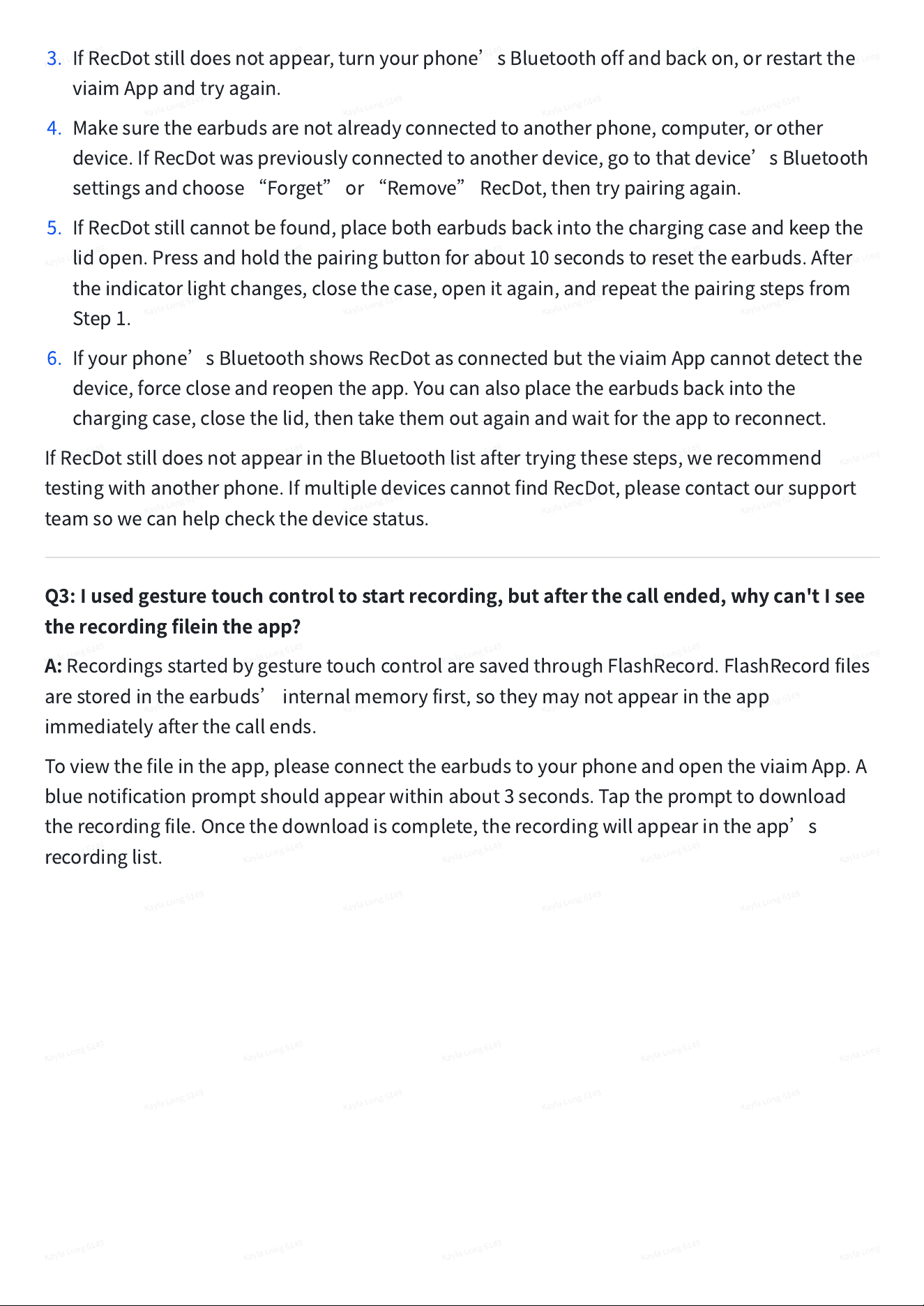
Pressandholdthemulti-functionbuttononthebackofthechargingcasefor3seconds.
4.
Whentheindicatorlightflasheswhite,RecDotisinpairingmode.
5.
SelectRecDotfromtheavailableBluetoothdevicesonyourphone.
AfterBluetoothpairingiscomplete,opentheviaimAppandfollowthein-appinstructionsto
finishdevicesetup.
Q2:WhatshouldIdoifRecDotdoesnotappearinmyphone
’
sBluetoothlist?
A:
IfRecDotdoesnotappearinyourphone
’
sBluetoothdevicelist,pleasetrythefollowing
steps:
1.
Puttheearbudsintopairingmodefirst.Openthechargingcaselid,thenpressandholdthe
buttononthebackofthechargingcaseforabout3seconds.Releasethebuttonwhenthe
indicatorlightflasheswhite.
2.
Keepthechargingcaseopenandplaceitclosetoyourphone.Thengotoyourphone
’
s
Bluetoothsettings,lookforRecDot,andtaptoconnect.
3.
IfRecDotstilldoesnotappear,turnyourphone
’
sBluetoothoffandbackon,orrestartthe
viaimAppandtryagain.
4.
Makesuretheearbudsarenotalreadyconnectedtoanotherphone,computer,orother
device.IfRecDotwaspreviouslyconnectedtoanotherdevice,gotothatdevice
’
sBluetooth
settingsandchoose
“
Forget
”
or
“
Remove
”
RecDot,thentrypairingagain.
5.
IfRecDotstillcannotbefound,placebothearbudsbackintothechargingcaseandkeepthe
lidopen.Pressandholdthepairingbuttonforabout10secondstoresettheearbuds.After
theindicatorlightchanges,closethecase,openitagain,andrepeatthepairingstepsfrom
Step1.
6.
Ifyourphone
’
sBluetoothshowsRecDotasconnectedbuttheviaimAppcannotdetectthe
device,forcecloseandreopentheapp.Youcanalsoplacetheearbudsbackintothe
chargingcase,closethelid,thentakethemoutagainandwaitfortheapptoreconnect.
IfRecDotstilldoesnotappearintheBluetoothlistaftertryingthesesteps,werecommend
testingwithanotherphone.IfmultipledevicescannotfindRecDot,pleasecontactoursupport
teamsowecanhelpcheckthedevicestatus.
Q3:Iusedgesturetouchcontroltostartrecording,butafterthecallended,whycan'tIsee
therecordingfileintheapp?
A:
RecordingsstartedbygesturetouchcontrolaresavedthroughFlashRecord.FlashRecordfiles
arestoredintheearbuds
’
internalmemoryfirst,sotheymaynotappearintheapp
immediatelyafterthecallends.
Toviewthefileintheapp,pleaseconnecttheearbudstoyourphoneandopentheviaimApp.A
bluenotificationpromptshouldappearwithinabout3seconds.Taptheprompttodownload
therecordingfile.Oncethedownloadiscomplete,therecordingwillappearintheapp
’
s
recordinglist.
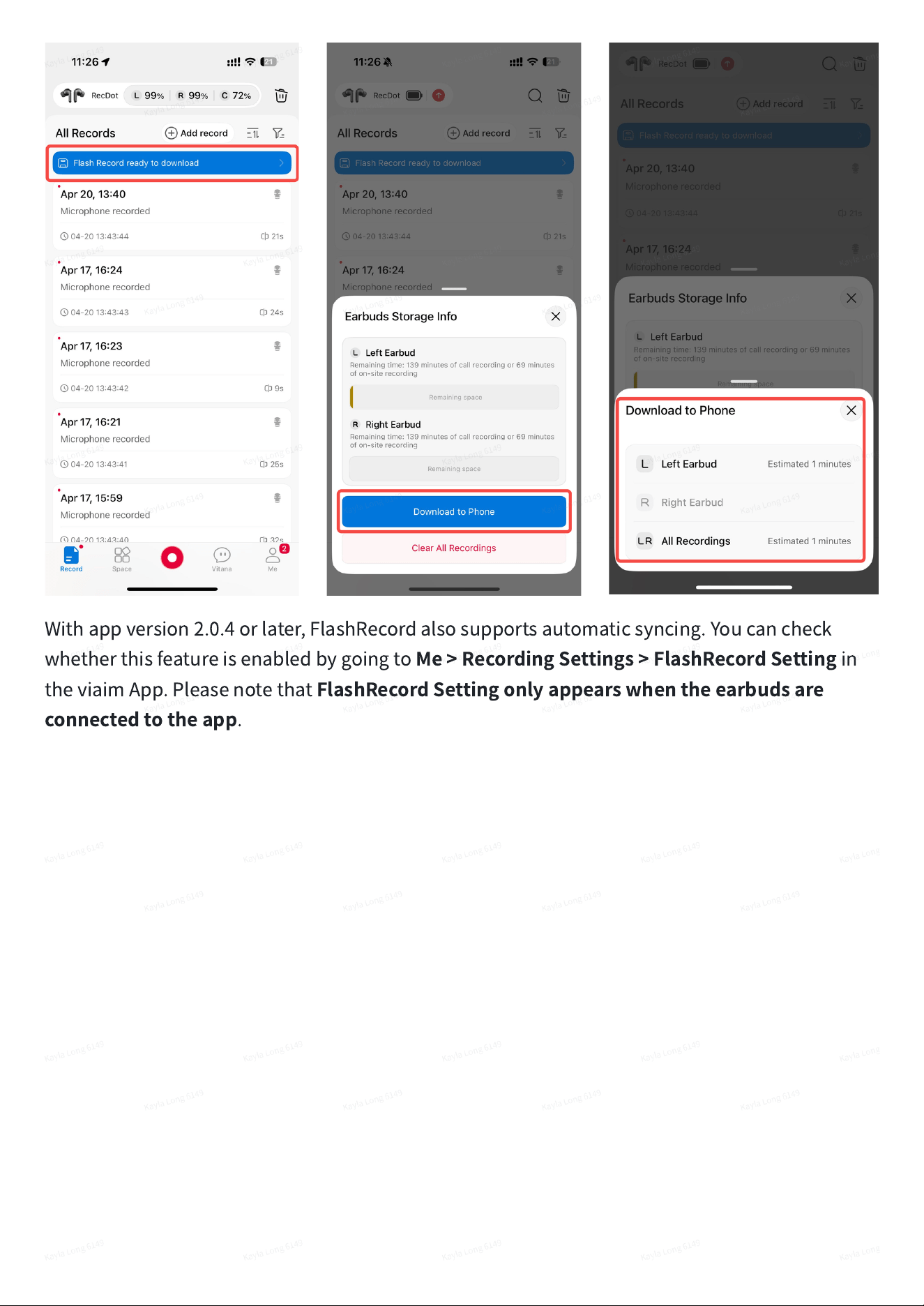
Withappversion2.0.4orlater,FlashRecordalsosupportsautomaticsyncing.Youcancheck
whetherthisfeatureisenabledbygoingto
Me>RecordingSettings>FlashRecordSetting
in
theviaimApp.Pleasenotethat
FlashRecordSettingonlyappearswhentheearbudsare
connectedtotheapp
.
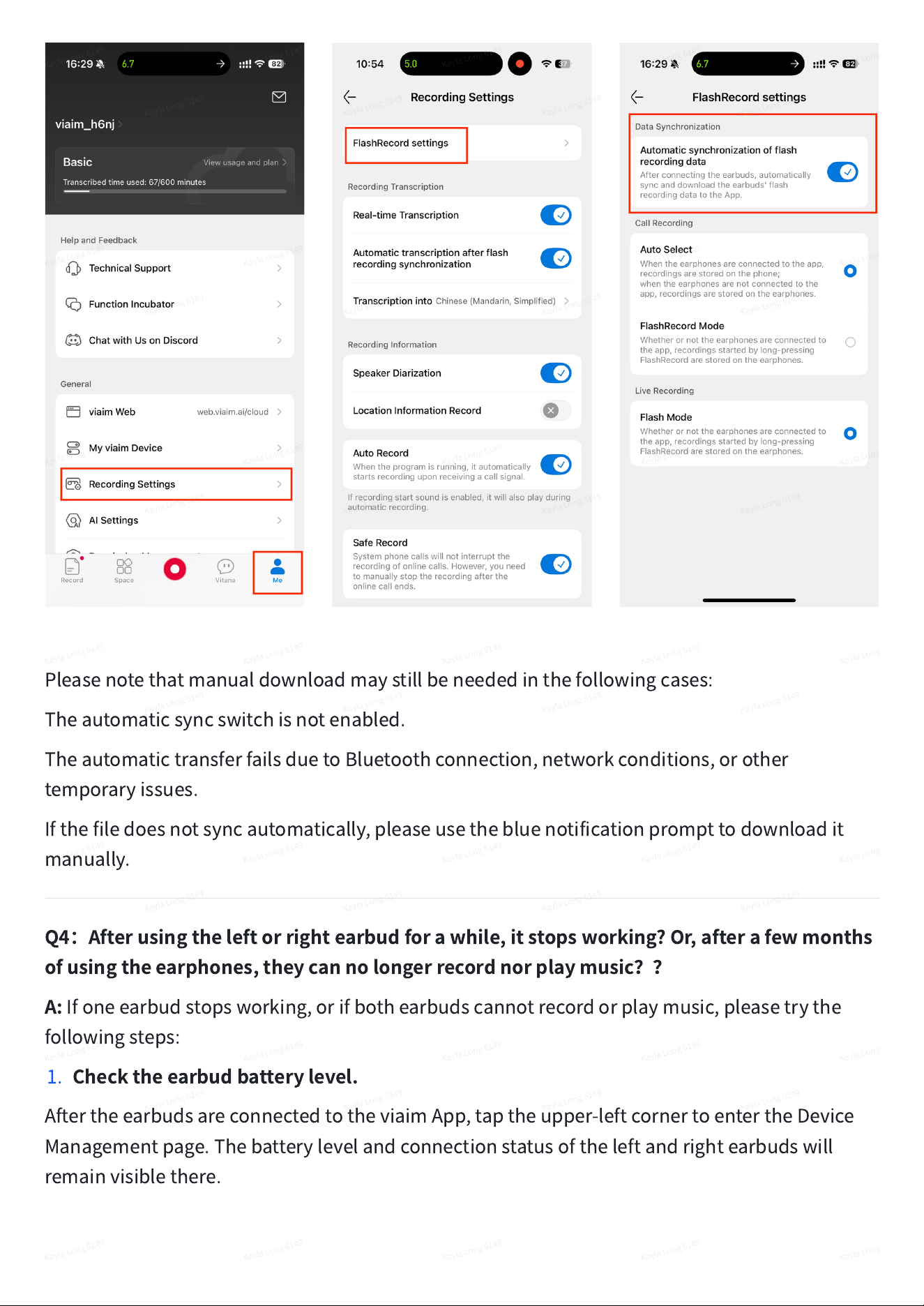
Pleasenotethatmanualdownloadmaystillbeneededinthefollowingcases:
Theautomaticsyncswitchisnotenabled.
TheautomatictransferfailsduetoBluetoothconnection,networkconditions,orother
temporaryissues.
Ifthefiledoesnotsyncautomatically,pleaseusethebluenotificationprompttodownloadit
manually.
Q4
:
Afterusingtheleftorrightearbudforawhile,itstopsworking?Or,afterafewmonths
ofusingtheearphones,theycannolongerrecordnorplaymusic
??
A:
Ifoneearbudstopsworking,orifbothearbudscannotrecordorplaymusic,pleasetrythe
followingsteps:
1.
Checktheearbudbatterylevel.
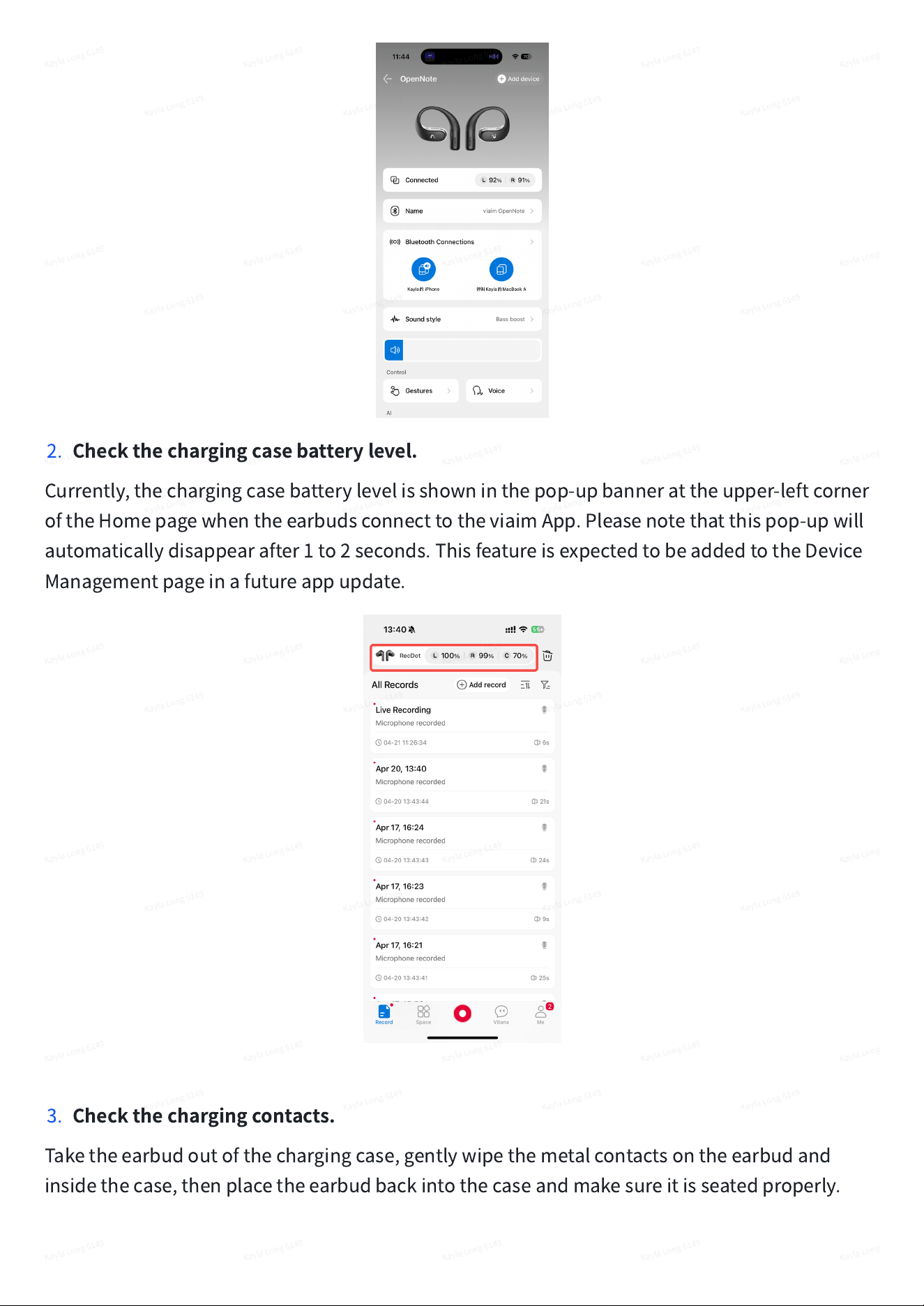
AftertheearbudsareconnectedtotheviaimApp,taptheupper-leftcornertoentertheDevice
Managementpage.Thebatterylevelandconnectionstatusoftheleftandrightearbudswill
remainvisiblethere.
2.
Checkthechargingcasebatterylevel.
Currently,thechargingcasebatterylevelisshowninthepop-upbannerattheupper-leftcorner
oftheHomepagewhentheearbudsconnecttotheviaimApp.Pleasenotethatthispop-upwill
automaticallydisappearafter1to2seconds.ThisfeatureisexpectedtobeaddedtotheDevice
Managementpageinafutureappupdate.
3.
Checkthechargingcontacts.
Taketheearbudoutofthechargingcase,gentlywipethemetalcontactsontheearbudand
insidethecase,thenplacetheearbudbackintothecaseandmakesureitisseatedproperly.
4.
Resettheearbuds.
Placebothearbudsinthechargingcase,thenpressandholdthebuttononthebackofthe
chargingcaseformorethan10seconds.Ifbothearbudsareaffected,werecommendtryingthis
resetstepfirst.
Ifthestepsabovedonotresolvetheissue,oursupportteamcanhelpdiagnoseitfurther.Please
contactus,andwewillmakeitright.
U.S.after-salessupportphone:657-836-2383
,
Phonesupporthours:Monday-Friday,9:30AM-
5:30PMPT
Supportemail:service@viaim.ai
Q5:Whyisthereabeep/tonewhenrecording?Willtheotherpartyknowthatthecallis
beingrecorded?
A:
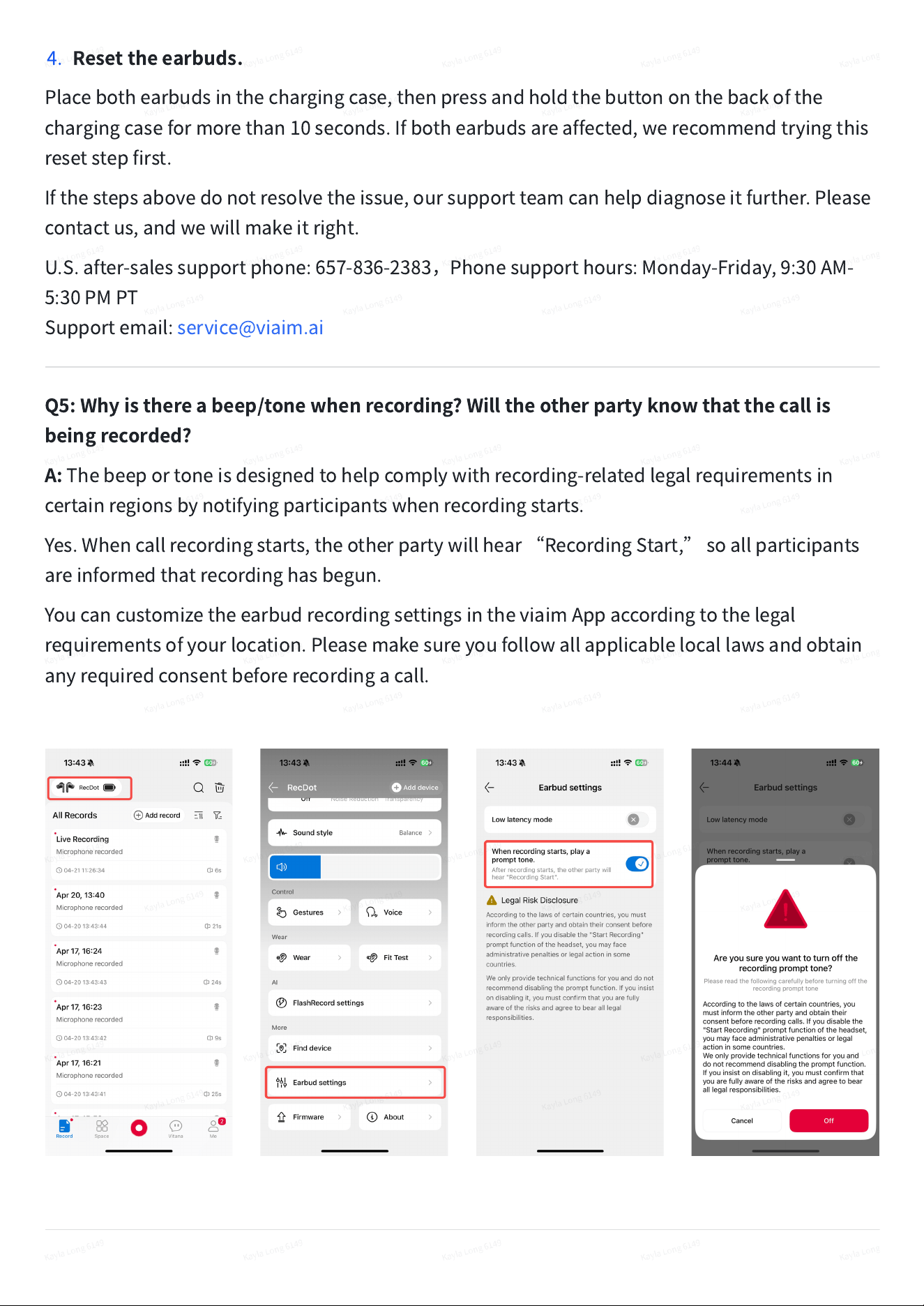
Thebeeportoneisdesignedtohelpcomplywithrecording-relatedlegalrequirementsin
certainregionsbynotifyingparticipantswhenrecordingstarts.
Yes.Whencallrecordingstarts,theotherpartywillhear
“
RecordingStart,
”
soallparticipants
areinformedthatrecordinghasbegun.
YoucancustomizetheearbudrecordingsettingsintheviaimAppaccordingtothelegal
requirementsofyourlocation.Pleasemakesureyoufollowallapplicablelocallawsandobtain
anyrequiredconsentbeforerecordingacall.
Q6:WhatshouldIdoifRecDotusedtoworknormallybutsuddenlywon
’
tconnect?
A:
IfRecDotwasworkingnormallybeforebutsuddenlywon
’
tconnect,pleasetrythefollowing
stepsinorder:
1.
First,checkwhethertheissueiswiththephone
’
sBluetoothconnection,orwhether
BluetoothisconnectedbuttheviaimAppcannotdetecttheearbuds.
2.
IftheviaimAppcannotdetecttheearbuds,forcecloseandreopentheapp.Youcanalso
placetheearbudsbackintothechargingcase,closethelid,thentakethemoutagainand
waitfortheapptoreconnectautomatically.
3.
IfyourphonecannotconnecttoRecDotviaBluetooth,gotoyourphone
’
sBluetooth
settings,findRecDot,andselect
“
ForgetThisDevice
”
or
“
Unpair.
”
Thenpairtheearbuds
again.
4.
Tore-pairRecDot,openthechargingcaselid,thenpressandholdthebuttononthebackof
thechargingcaseforabout3seconds.Releasethebuttonwhentheindicatorlightflashes
white,thensearchforandconnecttoRecDotinyourphone
’
sBluetoothlist.
5.
Ifitstillcannotconnect,placebothearbudsinthechargingcaseandkeepthelidopen.Press
andholdthepairingbuttonforabout10secondstoresettheearbuds.Afterthat,closethe
case,openitagain,andsearchforRecDottoreconnect.
6.
Alsocheckwhethertheearbudsarecurrentlyconnectedtoanotherphone,computer,or
tablet.Ifso,disconnectorforgetRecDotonthatdevicefirst.
7.
Iftheappcannotconfirmthedevicebindingstatusbecauseofanetworkissue,switchtoa
stablenetwork,thenreopentheappandtryagain.
IfRecDotstillcannotbefoundorconnectedafterresettingandtestingwithanotherphone,
pleasecontactoursupportteamsowecanhelpcheckthedevicestatus.
Q7:WhatshouldIdoifRecDotdisconnectsorstopsrecording?
A:
IfRecDotdisconnectsortherecordingstopsunexpectedly,pleasetrythefollowingsteps:
1.
Makesuretheearbudsremainconnectedtobothyourphone
’
sBluetoothandtheviaim
App.Iftheappcannotdetecttheearbuds,forcecloseandreopentheapp,orplacethe
earbudsbackintothechargingcase,closethelid,thentakethemoutandreconnect.
2.
Ifyouarerecordingwhiletheearbudsareinsidethechargingcase,pleasekeepthecaselid
open.Closingthelidduringin-caserecordingmaydisconnecttheearbudsandstopthe
recording.Ifyouarewearingtheearbudswhilerecording,closingthechargingcasewillnot
affecttherecording.
3.
Forrecordingormeetings,werecommendusing5GHzWi-Fi,ortemporarilyswitchingfrom
Wi-Fitomobiledata.Some2.4GHzWi-FienvironmentsmayinterferewithBluetooth,which
canaffectconnectionstability,causelag,orreducerecordingquality.
4.
Ifrecordingisfrequentlyinterrupted,werecommendusingFlashRecord.FlashRecorddoes
notrequiretheapptostayopenduringrecording,andtheaudioissavedlocallyinthe
earbudsfirst.Afterrecording,connecttotheviaimApptodownloadthefiletoyourphone.
5.
BeforeusingFlashRecord,pleasechecktheavailablestoragespaceontheearbuds.Ifthe
storageisfull,recordingcannotcontinue.Aftertherecordingisdownloadedtoyourphone,
theearbudstoragewillbereleasedautomatically.
6.
Pleasealsonotetherecordingtimelimits:asinglerecordingthroughtheconnectedappcan
lastupto4hours.InFlashRecordmode,in-personrecordingcanlastupto69minutes,and
phonecallrecordingcanlastupto139minutes.Recordingwillstopautomaticallyoncethe
limitisreached.
Iftheissuecontinuesaftertryingthesesteps,pleaserestarttheappandresettheearbuds,then
tryagain.Ifitstilldoesnotrecover,pleasecontactoursupportteamsowecanhelpcheckthe
devicestatus.
Q8
:
Canthedevicebeusedoffline?Istranscriptionperformedonthedeviceorinthe
cloud?
A:
TheFlashRecordfeaturesupportsstandalonelocalrecordinganddoesnotrequireaninternet
connectionwhilerecording.Theaudiocanbesavedintheearbuds
’
internalmemoryfirst.For
reference,FlashRecordsupportsupto2hoursofphonecallrecordingorabout1hourofin-
personrecording.
Oncerecordingiscomplete,connectyourearbudstotheviaimApptotransfertheaudio.Inthe
app,youcanuseAItranscription,generatesummariesandto-dolists,thenmanage,playback,
orsharethefile.
Transcriptionrequiresaninternetconnectionandisprocessedinthecloud.Youcanrecordfirst
andtranscribelateronceconnected.
Q9
:
Canthetranscribedtextbeexported?CanitbeviewedonWindows?Canthe
recordingsbedownloadedtoacomputer?
A:
Yes.Youcanexportandshareaudio,transcriptions,summaries,andAI-generatedmindmaps
directlyfromtheviaimApp,withsupportedformatsincludingMP3,TXT,DOCX,PDF,Markdown,
andJPEG.Youcanalsosavefilestoyourlocaldevicedirectlyfromtheapp.
ViewingonWindows:Supported.YoucanviewyourfilesonaWindowscomputerthroughthe
viaimwebportal:https://www.viaim.ai/cloud/cloudspace.Simplyopenthelinkinabrowser
andsignintoyouraccount.
Downloadingrecordingstoacomputer:Recordingfilescanalsobedownloadedtoyour
computerfromthewebportal,makingiteasytobackup,manage,orshareyourrecordingsand
transcripts.
Q10
:
CanIuseRecDottorecordmeetingsonWindowsorMac?
A:
Yes,RecDotcansupportcomputermeetingrecording,butyouneedtodownloadtheviaim
desktopappandsignintoyouraccountfirst.Thedesktopappconnectstoyourearbudsand
startsthecomputermeetingrecording.
Afterrecording,transcriptions,summaries,andrecordingfilescanbeviewedandusedinboth
theviaimmobileappandviaimCloudthroughthewebportal.Thedesktopappalsoincludesa
one-clickshortcuttothewebportal.
Youcandownloadtheviaimdesktopapphere:
https://www.viaim.ai/en/nohead/download/index.
YoucanaccessviaimCloudhere:https://www.viaim.ai/cloud/cloudspace.
Q11
:
DoesRecDotsupportcallrecording?Whataudiodoesitrecord?
A:
Support:RecDotsupportscallrecording.
Duringcallrecording,itrecordsbothsidesofthecall:
1.
Theaudiotheuserhearsfromtheotherparty.
2.
Theuser
’
sownvoice.
Itdoesnotsupportrecordingonlyonesideofthecall.Pleasealsoreminduserstofollowlocal
lawsandobtainconsentwhererequiredbeforerecordingcalls.
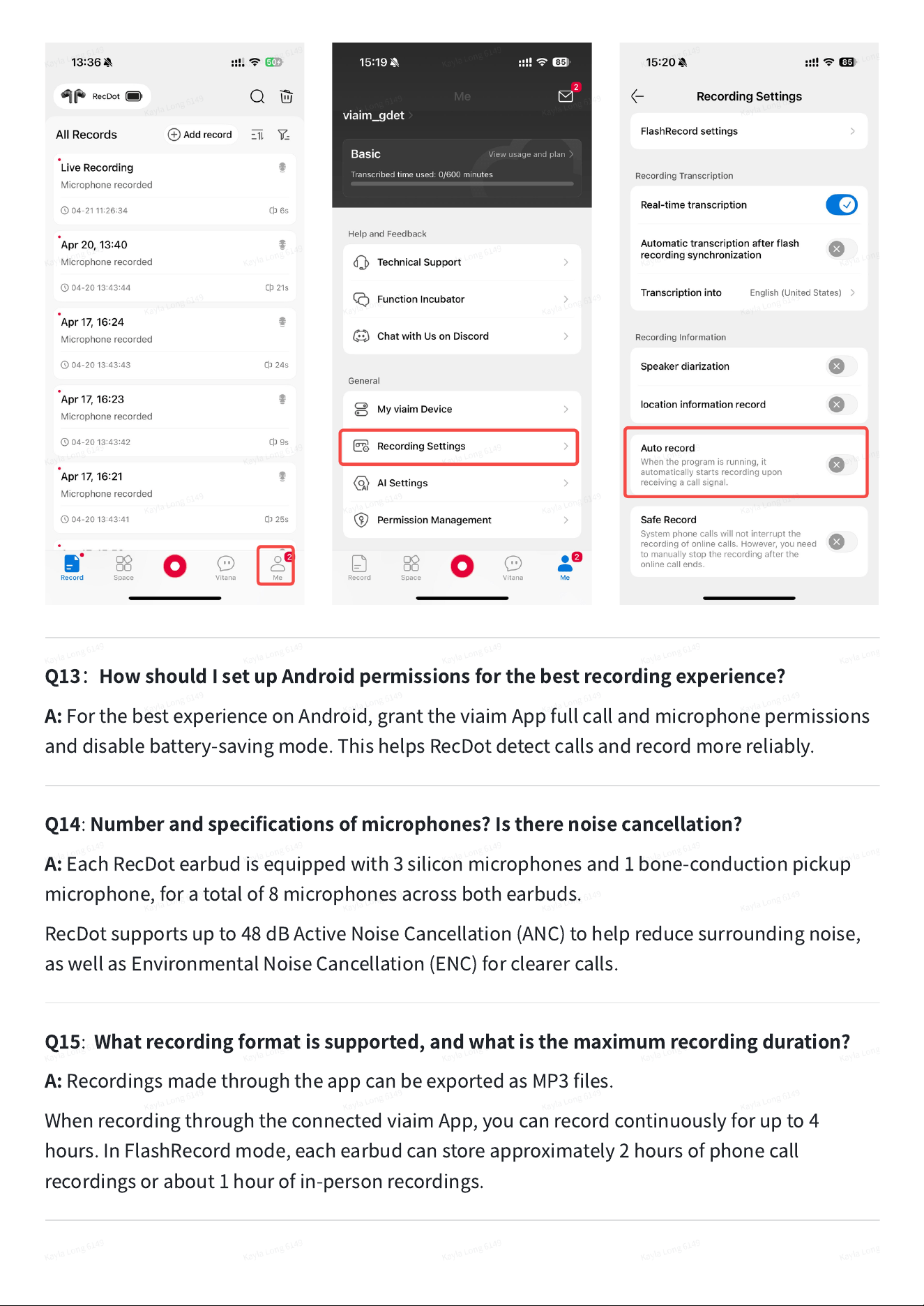
Q12:IsitsupportedonAndroid?Isitautomaticrecording?
A:
Yes.CallrecordingissupportedonbothiOSandAndroid.
Bydefault,recordingisstartedmanually.Ifyouwantautomaticrecording,goto
Me>Recording
Settings>Autorecord
intheviaimAppandenableit.Onceenabled,RecDotwillautomatically
startrecordingwhenacallisdetected,withoutneedingyoutostartitmanually.
Afterthecall,checktheapptoaccessyourrecordingandAItranscription.
Q13
:
HowshouldIsetupAndroidpermissionsforthebestrecordingexperience?
A:
ForthebestexperienceonAndroid,granttheviaimAppfullcallandmicrophonepermissions
anddisablebattery-savingmode.ThishelpsRecDotdetectcallsandrecordmorereliably.
Q14
:
Numberandspecificationsofmicrophones?Istherenoisecancellation?
A:
EachRecDotearbudisequippedwith3siliconmicrophonesand1bone-conductionpickup
microphone,foratotalof8microphonesacrossbothearbuds.
RecDotsupportsupto48dBActiveNoiseCancellation(ANC)tohelpreducesurroundingnoise,
aswellasEnvironmentalNoiseCancellation(ENC)forclearercalls.
Q15
:
Whatrecordingformatissupported,andwhatisthemaximumrecordingduration?
A:
RecordingsmadethroughtheappcanbeexportedasMP3files.
WhenrecordingthroughtheconnectedviaimApp,youcanrecordcontinuouslyforupto4
hours.InFlashRecordmode,eachearbudcanstoreapproximately2hoursofphonecall
recordingsorabout1hourofin-personrecordings.

Q16:Whataffectstranscriptionortranslationaccuracy?
A:
Transcriptionandtranslationaccuracycanbeaffectedbytheselectedlanguage,howclearly
peoplespeak,backgroundnoise,internetconnectionquality,theaudiosource,mixed-language
conversations,andtheaudioroutingsettingsinyourmeetingsoftware.
Forthebestresults,choosethecorrectlanguageintheapp,speakclearly,reducebackground
noisewhenpossible,keepastableinternetconnection,andmakesureyourmeetingsoftwareis
usingthecorrectmicrophoneandaudiooutputsettings.