Garage
Bluetooth
®
Radio
© 2027 Target. The Bullseye Design is a registered trademark of Target Brands, Inc. All rights reserved.
WARNING:
Only at Target.com
USB
MP3
PLAYER
TF
FM
MHz
108 106 102 98 94 90 87
AM
SW 18.0 16.5 13.8 10.5 8.0 5.9
160 150 13011 0 90 70 53
x10
KHz
MHz
M
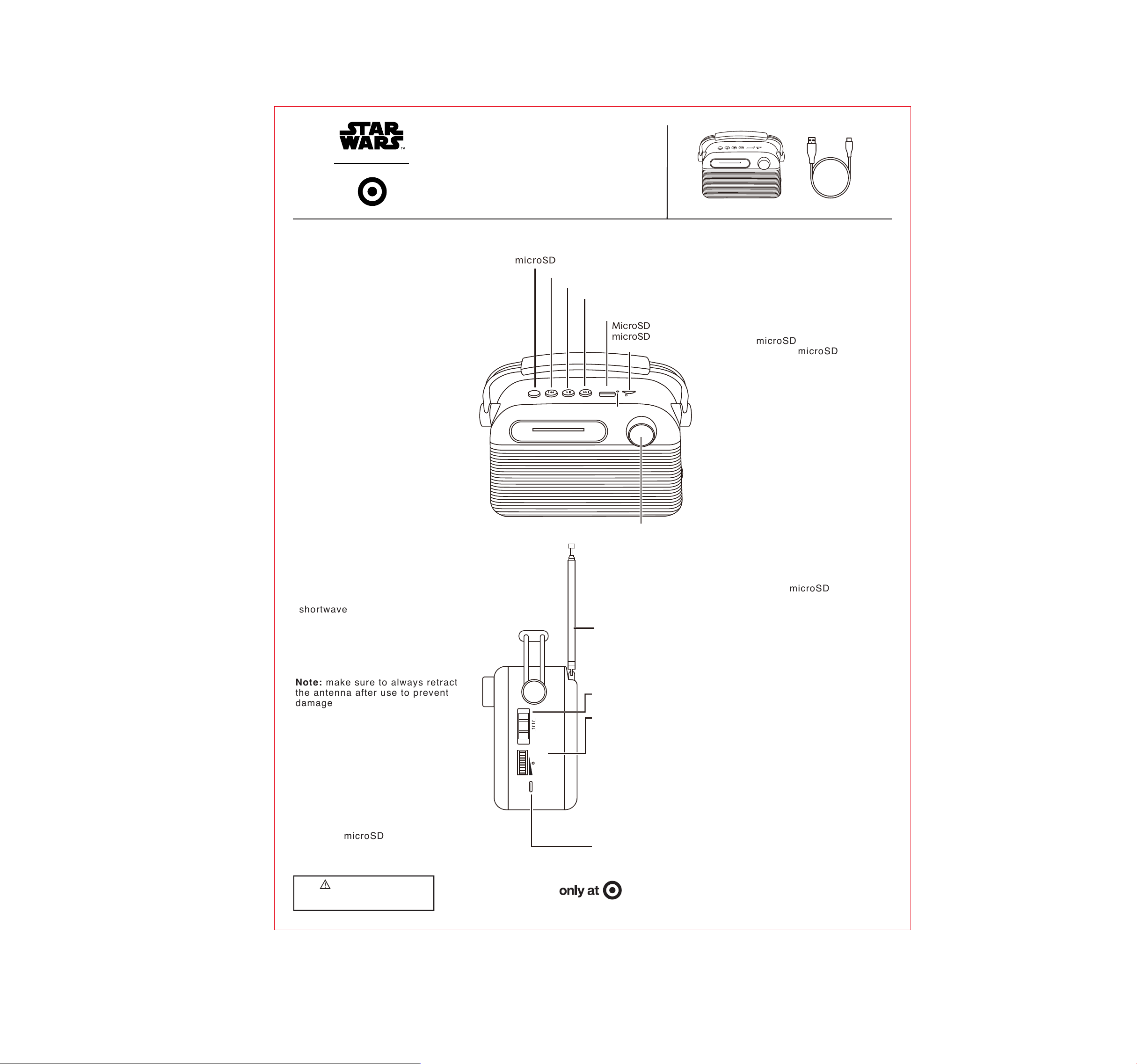
INCLUDED:
1. Garage Bluetooth Radio
2. USB-A to USB-C Charging
Cable
AUDIO INDICATORS:
• Ascending Tones - Pairing
• Single Blaster Sound - Bluetooth
connected
• Water Droplet Tone - Mode
Switch
• Death Star Alarm - Low battery
CHARGING:
1. A full charge requires
approximately 4 hours.
2. Plug the USB-C end of the
charging cable into the charge
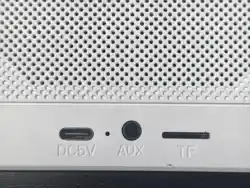
port on the side of the speaker.
3. Plug the opposite end of the
charging cable into a power
supply of at least DC 5V 1A.
4. Charging is complete when the
red light turns off.
WARNING: Please use UL
compliant power supply.
RADIO OPERATION (FM/AM/SW):
1. Rotate the volume dial
downward until you hear a "click"
to turn on the device.
2. Slide the band switch on the
side of the radio to select your
desired band: FM, AM, or SW
(shortwave).
3. Extend the telescopic antenna
and adjust its angle for the best
reception (FM/SW).
Note: AM uses a built-in antenna;
rotate the unit to find the best
signal.
Note: make sure to always retract
the antenna after use to prevent
damage.
4. Rotate the tuning knob on the
front panel slowly to search for
and select your desired radio
station.
5. Adjust the volume dial to your
preferred listening level.
BLUETOOTH & MP3 PLAYBACK:
1. Slide the Band switch to the
MP3/BT position.
2. Press the "M" button to toggle
between Wireless (Bluetooth),
USB, and microSD card modes
(requires USB drive or microSD
card to be inserted).
USB
MP3
PLAYER
TF
FM
MHz
108 106 102 98 94 90 87
AM
SW 18.0 16.5 13.8 10.5 8.0 5.9
160 150 130 110 90 70 53
x10
KHz
MHz
M
Press: Switch modes
(USB/microSD card/Wireless)
Press: Previous track
Press: Play/Pause
Press: Next track
MicroSD port: Insert
microSD card to play
MP3 files
indicator
USB port: Plays MP3
files from a USB drive
Tuning Knob:
Rotate to
search for and
select radio
stations
DC 5V
VOLUME
CHARGE
OFF
MP3/BT
AM
SW
FM
Band switch
High sensitivity
antenna
Power ON/OFF:
Rotate the volume
dial on the side
upward/downward
until you hear a
"click".
Adjust Volume:
Rotate the volume
dial downward to
increase volume, or
upward to decrease
USB-C Charging Port
• Bluetooth Mode: The pairing
indicator flashes white. Search for
"Target × Star Wars Radio" in your
device's Bluetooth settings to
connect. The light turns solid
white when paired. The speaker
will automatically reconnect to the
last paired device.
• USB/microSD Card Mode: Insert
a USB drive or microSD card
(FAT32 formatted with MP3 files)
to play music automatically.
• Controls: Use the Previous/Next
track buttons to skip songs,
Play/Pause button to pause, and
the side volume dial to adjust
volume.
TROUBLESHOOTING:
1. If the device is not working, turn
it OFF and ON to restart.
2. If it won't turn on, recharge it
via the USB-C port.
3. If it won't charge, use a working
5V 1A adapter and cable.
4. If the radio signal is poor, fully
extend the antenna, select the
correct band (FM/AM/SW), and
avoid interference.
5. If Bluetooth fails, set the switch
to MP3/BT and unpair previous
devices.
6. If the USB/microSD card won't
play, format to FAT32 (MP3 files)
and press M to switch mode.
SAFETY:
1. Keep dry; do not expose to
water, rain, or moisture.
2. Do not disassemble, modify, or
repair the device.
3. Clean only with a soft dry cloth;
avoid chemical detergents.
4. Do not expose to fire, high
temperatures, or direct sunlight.
5. Handle telescopic antenna
gently to prevent damage or
injury.
6. Use a standard 5V charger only.
FCC ID: 2AO23-BTSP28 Model: BTSP28 Input: 5V ⎓1A Max Made in China
This device complies with part 15 of the FCC Rules. Operation is subject to the following two conditions: 1) This
device may not cause harmful interference, and 2) this device must accept any interference received,
including interference that may cause undesired operation. WARNING: Changes or
modifications to this unit
not expressly approved by the party responsible for compliance could void the user,s authority to operate the
equipment.
NOTE: This equipment has been tested and found to comply with the limits for a Class B digital device,
pursuant to Part 15 of the FCC Rules. These limits are designed to provide reasonable protection against
harmful interference in a residential installation. T
his equipment generates, uses and can radiate radio
frequency energy and, if not installed and used in accordance with the instructions, may cause harmful
interference to radio communications.
However, there is no guarantee that interference will not occur in a particular installation. If this equipment does
cause harmful interference to radio or television reception, which can be determined by turning the eq
uipment
off and on, the user is encouraged to try to correct the interference by one or more of the following measures: •
Reorient or relocate the receiving antenna. • Increase the separation between the equipment and receiver. •
Connect the equipment into an outlet on a circuit different from that to which the receiver is connected. •
Consult the dealer or an experienced radio/TV technician for help.
The device has been evaluated to meet general RF exposure requirement. The device can be used in portable
exposure condition without restriction.
Ta
rget Corp. Mpls. MN, 55403 Phone: 1-612-304-6073
CHOKING HAZARD—Small part.
Keep away from young children.