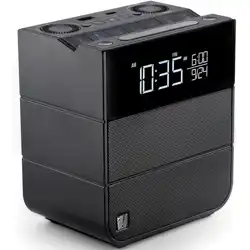
User Guide
Sound Rise II
1
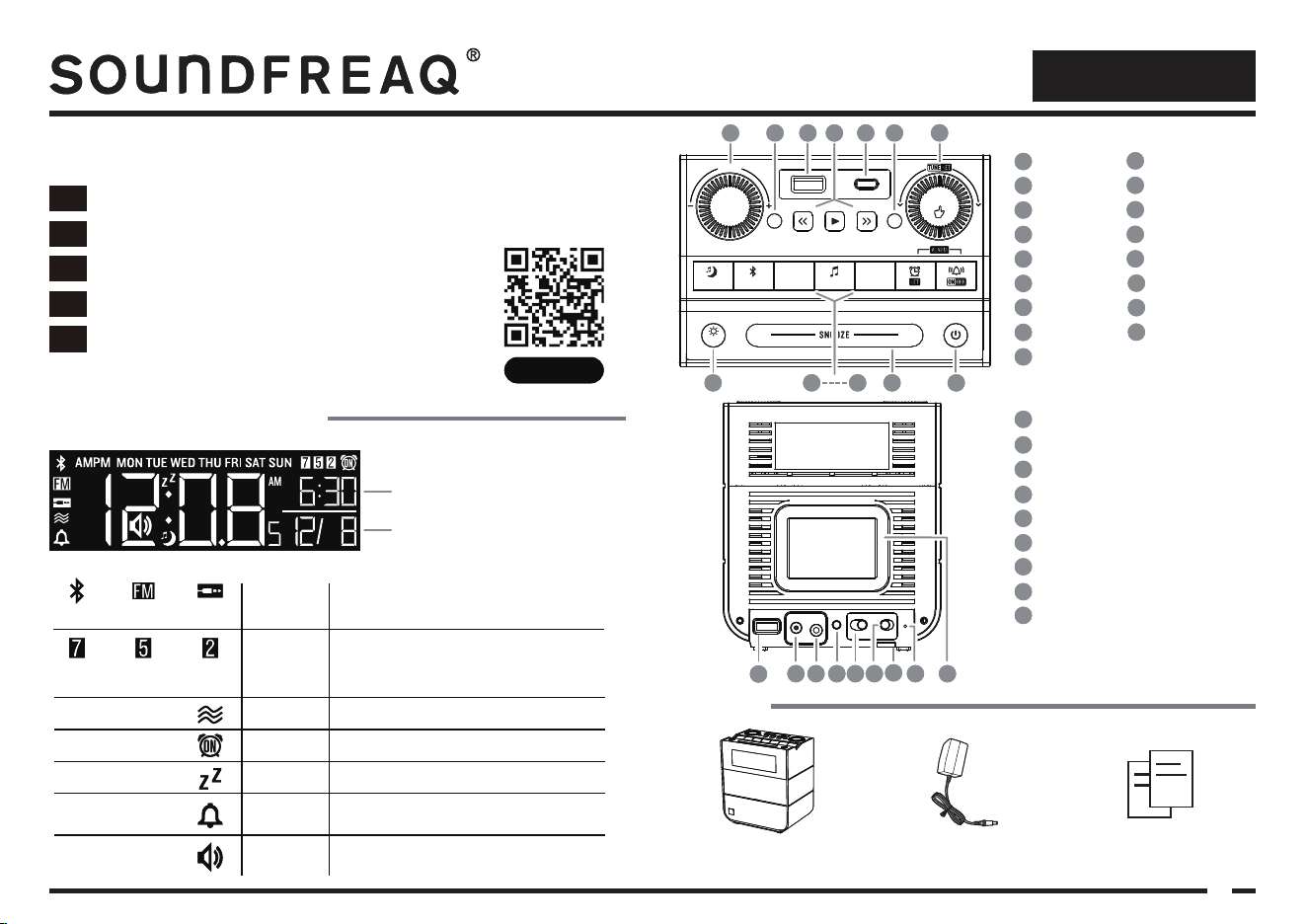
Getting to know Sound Rise II
Indicates music source when speaker is ON.
Bluetooth, Line ln or FM Radio
Displayed when nature sound is playing
Displayed when alarm is set to go off
Displayed when alarm is snoozed
Indicates when alarm wake up sound is the
internal chime
Displayed when volume is being adjusted
Indicates if alarm is set for weekdays, weekends
or everyday. Alarm can also be set for a specific
day of the week.
Bluetooth
Music source
Alarm Time
Nature sound
Alarm ON
Snooze
Chime
Volume
Alarm
frequency
Everyday Weekday Weekend
Radio Line In
Month / Date
4
81 5 92 63 7
Welcome to your new Soundfreaq
Please download the user guide here:
Descargue el manual de usuario de:
Veuillez télécharger le mode d’emploi ici:
Bitte laden Sie die Bedienungsanleitung hier herunter:
Scaricare qui la guida per l’utente:
Download de gebruikershandleiding hier:
userguides.soundfreaq.com
NL
IT
FR
ES
DE
4
15 9
PAIRSLEEP
DIMMER
VOLUME
SOURCE
MODE
PRESET CH
12W 20W
ENTER
NATURE
SOUND
1
3 4 6
7
2 5
8
1
4
Setup
8
FM Antenna
5
DST(Daylight Saving Time) Selector
9
Passive Radiator for Bass Effect
2
DC Power
6
Home /Hotel Selector
3
Line In
USB Type-A(QC 3.0)
7
Lanyard connection(bottom)
Play Control
4
Dimmer
8
Volume
1
USB Type-C
5
Sleep Timer
9
Alarm mode
13
Standby ON/OFF
Radio Preset
2
Radio Channel
6
Pair
10
Alarm Set
14
15
16
17
Snooze
Music Source
12
USB Type-A
3
Alarm ON/OFF
Nature Sound
11
Set / Enter
7
Power adaptor and AC plugsSound Rise II
User guide
and Safety leaflet
Contents
16 17
USERGUIDE
User Guide
Sound Rise II
1
Getting to know Sound Rise II
Indicates music source when speaker is ON.
Bluetooth, Line ln or FM Radio
Displayed when nature sound is playing
Displayed when alarm is set to go off
Displayed when alarm is snoozed
Indicates when alarm wake up sound is the
internal chime
Displayed when volume is being adjusted
Indicates if alarm is set for weekdays, weekends
or everyday. Alarm can also be set for a specific
day of the week.
Bluetooth
Music source
Alarm Time
Nature sound
Alarm ON
Snooze
Chime
Volume
Alarm
frequency
Everyday Weekday Weekend
Radio Line In
Month / Date
4
81 5 92 63 7
Welcome to your new Soundfreaq
Please download the user guide here:
Descargue el manual de usuario de:
Veuillez télécharger le mode d’emploi ici:
Bitte laden Sie die Bedienungsanleitung hier herunter:
Scaricare qui la guida per l’utente:
Download de gebruikershandleiding hier:
userguides.soundfreaq.com
NL
IT
FR
ES
DE
4
15 9
PAIRSLEEP
DIMMER
VOLUME
SOURCE
MODE
PRESET CH
12W 20W
ENTER
NATURE
SOUND
1
3 4 6
7
2 5
8
1
4
Setup
8
FM Antenna
5
DST(Daylight Saving Time) Selector
9
Passive Radiator for Bass Effect
2
DC Power
6
Home /Hotel Selector
3
Line In
USB Type-A(QC 3.0)
7
Lanyard connection(bottom)
Play Control
4
Dimmer
8
Volume
1
USB Type-C
5
Sleep Timer
9
Alarm mode
13
Standby ON/OFF
Radio Preset
2
Radio Channel
6
Pair
10
Alarm Set
14
15
16
17
Snooze
Music Source
12
USB Type-A
3
Alarm ON/OFF
Nature Sound
11
Set / Enter
7
Power adaptor and AC plugsSound Rise II
User guide
and Safety leaflet
Contents
16 17
USERGUIDE
User Guide
Sound Rise II
2
4
5
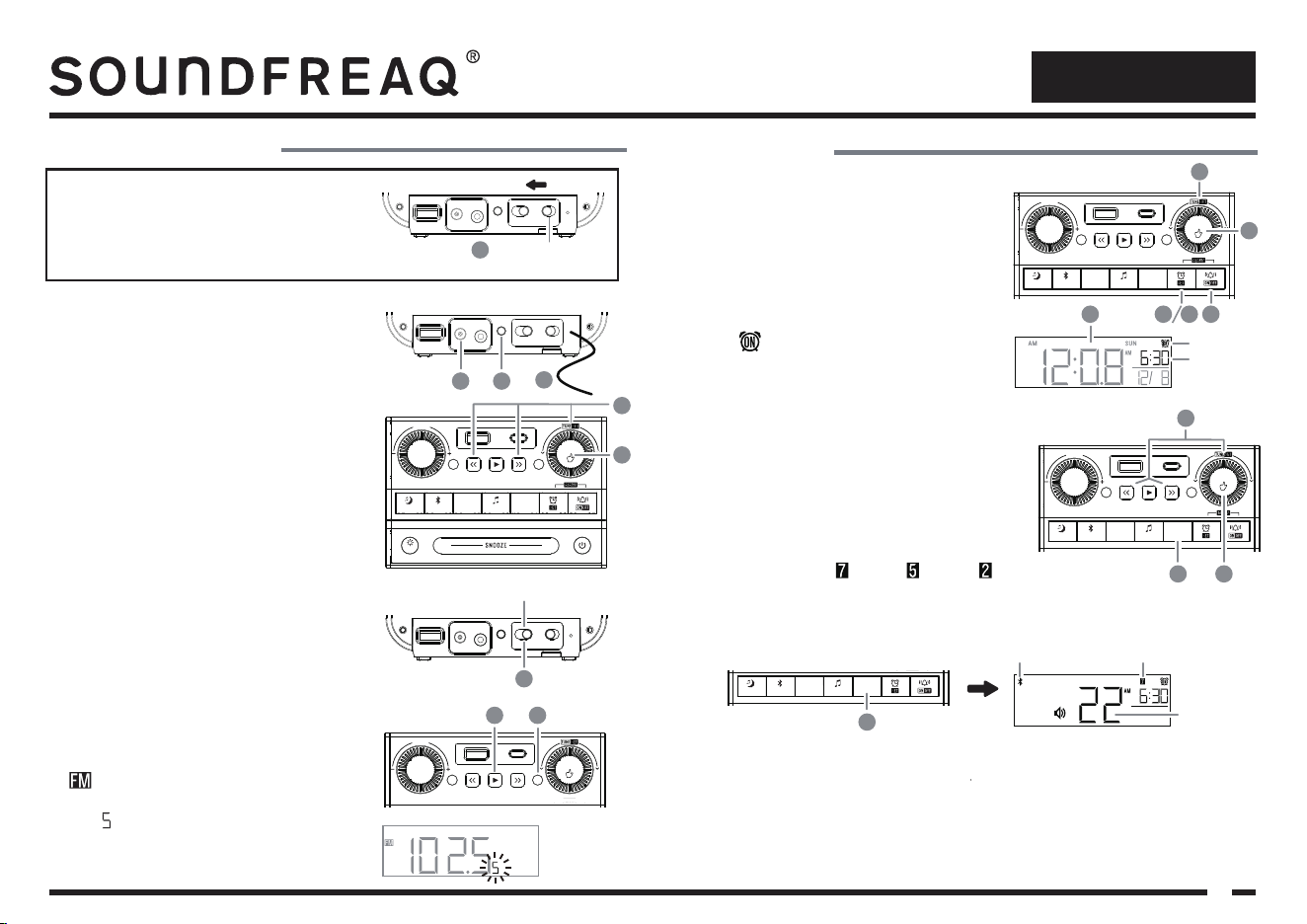
1 The Sound Rise II is designed to suit for HOME or
HOTEL use. On the default setting, the HOME mode
has been selected.
2 Plug into the supplied power adaptor. Extend the wire
antenna fully for the best reception.
(Do not use other power adaptor to avoid damages)
Setting up Sound Rise II
Selecting Home/Hotel mode
First Time Setup
PAIRSLEEP
DIMMER
VOLUME
SOURCE
MODE
PRESET CH
12W 20W
ENTER
NATURE
SOUND
2 3
8
9 After the setup, if you want to display the current year,
press the PLAY button in the standby mode.
PAIRSLEEP
DIMMER
VOLUME
SOURCE
MODE
PRESET CH
12W 20W
ENTER
NATURE
SOUND
9
Setting Alarm Wake-up mode
1 Press and hold the MODE button for 2 seconds button to
enter the alarm mode setting.
2 Turn the rotary SET knob or the
<< / >> buttons to select
music sources to wake to (Bluetooth, Radio or Chime)
3 Press down the rotary SET knob to confirm.
PAIRSLEEP
DIMMER
VOLUME
SOURCE
MODE
PRESET
CH
12W 20W
ENTER
NATURE
SOUND
3
2
Note: a) To wake up to music from your phone or other devices, you must pair the Sound Rise II first
and make sure the sound volume is set at an audible level on your device.
b) When waking up to Bluetooth, Sound Rise II will play the current song on your connected
device. If your device is not available when the alarm goes off, Sound Rise II will wake you
with its built-in chime.
c) When waking up to radio, Sound Rise II will play the current radio station. Please tune to your
desired radio station first.
HM(Home mode)
Home
HTL(Hotel mode)
1
PAIRSLEEP
DIMMER
VOLUME
SOURCE
MODE
PRESET CH
12W 20W
ENTER
NATURE
SOUND
5
5 After setting, short press the MODE button again to show
the alarm mode settings.
•
•
4 Repeat 2 and 3 above to complete the alarm mode options:
Day of Week (Everyday , Weekday , Weekend or a
specific day of the week).
Wake up volume.
3 Press and hold the SETUP button to enter SETUP mode.
5 When the desired YEAR is displaying, press down the
rotary SET knob to confirm.
4 Turn the rotary SET knob or press the
<< / >> buttons
to set the current YEAR.
6 Repeat 4 & 5 above to set MONTH, DATE, HOUR,
MINUTE and 12/24.
Note: If you want to change the above settings, simply
press and hold the SETUP button again and repeat the
above setup steps.
7 Slide the DST(Daylight Saving Time) selector to select
the DST options:
– Enable automatic DST adjustment (For US only)
– Disable DST manually
– Enable DST manually to add 1 hour to the display
time.
1
A
0
Using the Alarm
Setting Alarm Time
1 Press the ALARM SET button, the default alarm time of
6:00am will be shown.
2 Turn the rotary SET knob to the desired alarm time.
3 Press down the rotary SET knob / ALARM SET button
to confirm.
5 Press ALARM ON/OFF button to toggle alarm ON or OFF.
4 The alarm will be ON for the next day and the ALARM
ON icon will be shown.
Alarm On Icon
Alarm Time
PAIRSLEEP
DIMMER
VOLUME
SOURCE
MODE
PRESET CH
12W 20W
ENTER
NATURE
SOUND
314
2
5
3
A-0-1
8 The default radio frequency step is 100kHz for majority
of countries. To change the frequency step to 50kHz,
press the SOURCE button repeatedly until the FM icon
appears on the display. Press and hold the CH
button for 5 seconds to toggle between 100kHz/50kHz.
The “ ” digit will display when 50kHz is selected.
7
1
2
Alarm Volume
EverydayWake to Bluetooth
DST(Daylight Saving Time) Selector
DST(Daylight Saving Time) Selector
User Guide
Sound Rise II
3
•
•
•
Using the Sound Rise II and Selecting the Audio Source
1
2
3
4
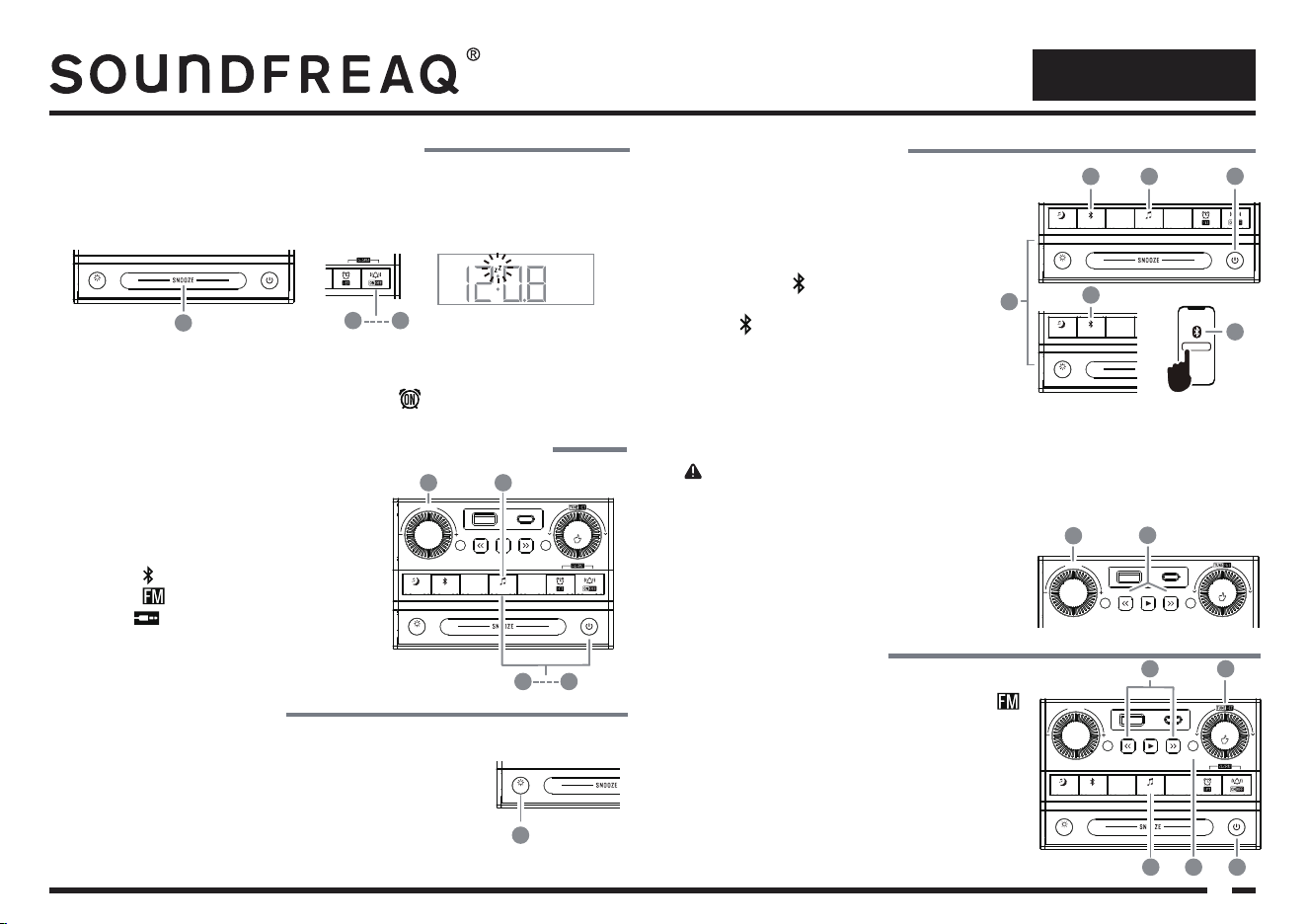
Press the STANDBY button or the SOURCE button to
turn the system on.
Press the SOURCE button to select the audio source.
The icons of audio source will display on the screen.
Bluetooth “ ”
FM Radio “ ”
AUX IN “ ”
Turn the rotary VOLUME knob to set audio volume level.
Press the STANDBY button to turn the audio off.
Setting Screen Brightness
1
2
3
Press DIMMER button repeatedly to change the screen brightness.
When the screen brightness is at the lowest level or OFF, press any button
to momentarily turn the display on to see the time to operate any functions.
When the alarm goes off and the screen brightness is off, the display will
automatically turn on. If SNOOZE is pressed, the display will turn off again
until the alarm goes off again.
1
PAIRSLEEP
DIMMER
VOLUME
SOURCE
MODE
PRESET CH
12W 20W
ENTER
NATURE
SOUND
2
To cancel the snoozing or shut off alarm permanently after the alarm goes off , press the ALARM ON/OFF
button once.
3
The alarm will be ON for the next day and the ALARM ON icon will be shown.
PAIRSLEEP
DIMMER
VOLUME
SOURCE
MODE
PRESET CH
12W 20W
ENTER
NATURE
SOUND
Using Snooze and Shutting off the alarm
1 If you prefer to get some more sleep after the alarm goes off, press the SNOOZE button and the alarm
will go off. The Z icon will be shown on the display. The default snooze time is 10 minutes and will
repeat 12 times.
z
1
PAIRSLEEP
DIMMER
VOLUME
SOURCE
MODE
PRESET CH
12W 20W
ENTER
NATURE
SOUND
2 3
PAIRSLEEP
DIMMER
VOLUME
SOURCE
MODE
PRESET CH
12W 20W
ENTER
NATURE
SOUND
Bluetooth Pairing
Listening with Bluetooth
1 You can pair your mobile device in TWO ways:
Method 1:
a) Press the STANDBY button to turn on audio
b) Press the SOURCE button to select Bluetooth. The
Bluetooth icon will flash slowly.
c) Press the PAIR button to start pairing. The Bluetooth
icon will flash rapidly.
Method 2:
d) Simply press the PAIR button directly in the standby
mode, the system will turn on automatically and start
the pairing mode. The Bluetooth icon will flash rapidly.
2 On your device, open your Bluetooth setting menu to detect available devices. Once the Sound Rise II is
detected, select it from the list of available devices to connect.
1
PAIRSLEEP
DIMMER
VOLUME
SOURCE
MODE
PRESET CH
12W 20W
ENTER
NATURE
SOUND
a
b
c
d
2
Sound Rise II
Playing Music via Bluetooth
1
2
After pairing, either use the PLAY CONTROL buttons on the
Sound Rise II or your device to control playback.
You can change the volume by tuning the VOLUME knob on
the Sound Rise II or adjusting volume on your paired device. For
the max sound volume, turn both volumes to the maximum.
Note: To pair another new device, press and hold the PAIR button for 2 seconds to disconnect the currently
paired device. The Bluetooth icon will flash rapidly again for paring a new device.
1
2
3
4
5
Press the STANDBY button to turn on the Sound Rise II.
Press the SOURCE button repeatedly until the FM icon
appears on the display.
Press and hold the
<< / >> buttons for 2 seconds to
search a desired station for listening.
You can also turn the rotary SET knob to tune into your
desired station for listening.
Press the CH button to show the frequency of the current
station.
Listening to the Radio
PAIRSLEEP
DIMMER
VOLUME
SOURCE
MODE
PRESET CH
12W 20W
ENTER
NATURE
SOUND
12
PAIRSLEEP
DIMMER
VOLUME
SOURCE
MODE
PRESET CH
12W 20W
ENTER
NATURE
SOUND
3
2 5 1
4
PAIRSLEEP
DIMMER
VOLUME
SOURCE
MODE
PRESET CH
12W 20W
ENTER
NATURE
SOUND
4 1
23
Sound Rise II
User Guide
4
FM
Frequency Range: FM 87.5-108 MHz
DECLARATION OF CONFORMITY
Betrue Technology Co Ltd. hereby declares that this product is in compliance with the essential
requirements and other relevant provisions of Directive 2014/53/EU at the time of its being placed
on the market.
The full text of the EU declaration of conformity is available at the following internet address:
http://userguides.soundfreaq.com/
Bluetooth (Version: V 5.1)
Range: max 10m (in open spaces)
Frequency band: 2.402 GHz to 2.483 GHz
Maximum Transmission Power: 2.5mW
Note: The rear USB port is QC3.0 compatible. You can connect any QC3.0 certified device to this port. For
example, wireless charging pad(not included).
1
2
Listening with AUX IN
PAIRSLEEP
DIMMER
VOLUME
SOURCE
MODE
PRESET CH
12W 20W
ENTER
NATURE
SOUND
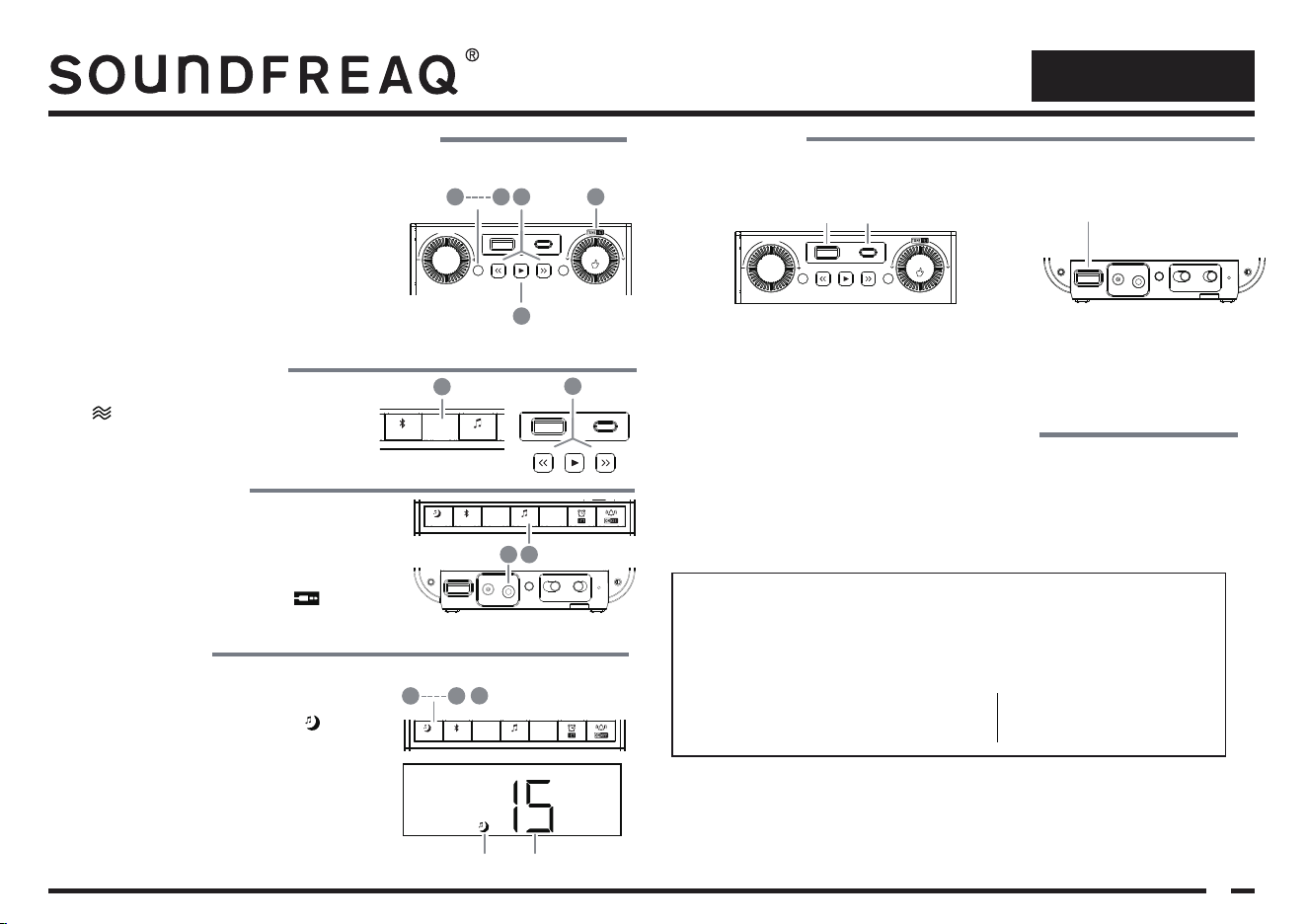
Connect your device with a standard headphone jack using
a line-in cable(not included) to the AUX IN jack at the back
of the Sound Rise II.
Turn on the system and then press the SOURCE button
repeatedly to enter the AUX IN mode. The icon will
be shown.
2
1
There are 10 radio presets to save your favorite FM stations.
1
2
3
4
5
Programming and Recalling Radio Presets
3
5
4 2
PAIRSLEEP
DIMMER
VOLUME
SOURCE
MODE
PRESET CH
12W 20W
ENTER
NATURE
SOUND
1
Tune to your preferred radio station.
Press the PRESET button. The present number “P: 01” will
display.
Press the
<< / >> buttons to change preset number.
Press the PRESET button again to save the current station to
the preset number selected.
To recall the preset station to listen, press the PLAY button to
toggle through the preset stations.
1
2
3
4
To set a timer to listen to music while falling asleep.
Using Sleep Timer
3
1
4
PAIRSLEEP
DIMMER
VOLUME
SOURCE
MODE
PRESET CH
12W 20W
ENTER
NATURE
SOUND
Sleep icon Duration
Press the SLEEP button repeatedly to select the timer duration
(15 -> 30, 60, 90, 120, OFF). The sleep icon will display.
To select OFF to cancel the sleep timer.
After selecting the duration, wait for 5 seconds and the sleep
timer will start automatically.
When the timer is running, press the SLEEP button again to
show the remaining time.
To cancel the sleep timer, press and hold the SLEEP button for
3 seconds.
1
USB Charging
(Rear)
18W
(Top)
12W 20W
PAIRSLEEP
DIMMER
VOLUME
SOURCE
MODE
PRESET CH
12W 20W
ENTER
NATURE
SOUND
There are 3 smart USB charging ports on the Sound Rise II. Simply connect your device to the USB ports for
charging .
Type A -12W (max) & Type C -20W (max) Type A – 18W (max)
Sound Rise II has battery-free clock backup in case of power outage up to 1 week.
Clock Backup & Out of Power Indication
Note: If the unit has been disconnected from the AC power for more than 1 week, once the power is resumed,
it will be reset to the first time use condition. The “--:--” will display and please follow the first time setup to
setup again.
1
2
Listening to Nature Sound
1 2
PAIRSLEEP
DIMMER
VOLUME
SOURCE
MODE
12W 20W
ENTER
NATURE
SOUND
PAIR
SLEEP
DIMMER
VOLUME
SOURCE
MODE
PRESET CH
12W 20W
ENTER
NATURE
SOUND
Turn on the unit and press the NATURE SOUND button.
The icon will be shown.
Press the
<< / >> buttons to select your desired nature
sound effects.