SUNRISE MELODY XR6000 EWI
Shenzhen Shengyang Musical Instruments Technology Co., Ltd.
XR6000 EWI Manual
SUNRISE MELODY XR6000 EWI
1
XR6000 EWI Manual
English
Detailed introduction of functions
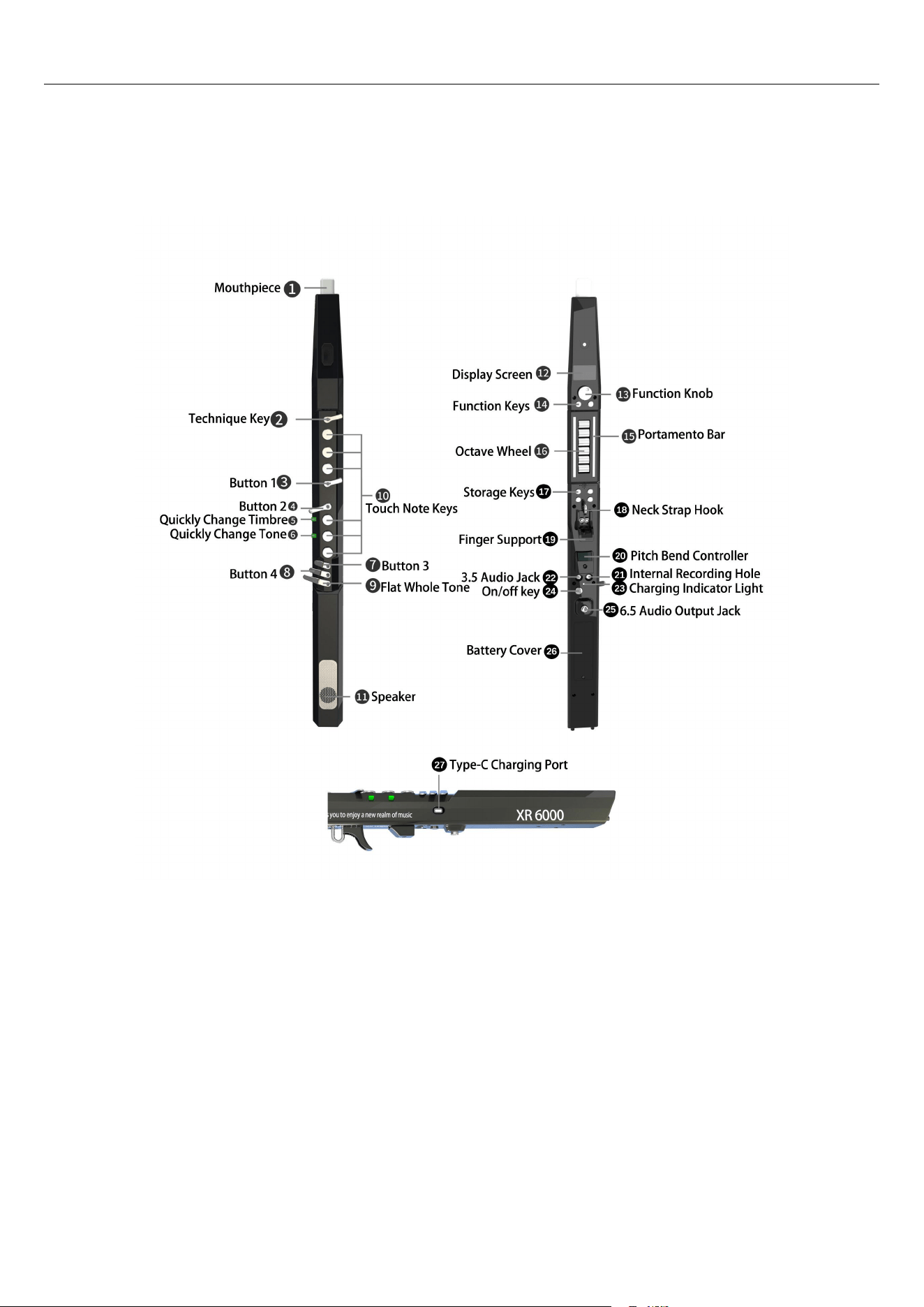
1. Mouthpiece
Made of silica gel, it is hygienic and safe, and convenient to replace and clean. There is a vibrato sensor inside
the mouthpiece. Select semi-automatic vibrato. When playing, bite down on the mouthpiece with a little force
and do not let go, and there will be a uniform vibrato. Select emotional bite vibrato. When playing, bite and
release repeatedly and there will be corresponding vibrato.
2. Technique key (Technique
\
Vibrato
\
Sharp semitone
\
Flat semitone
\
High octave
\
Off).
The following functions can be adjusted and switched by entering the technique key through the function
rotation key.
A. Technique: When switching to the technique function, you can achieve one-key wheel fingering and one-key
flutter tongue.
B. Vibrato: When switching to the vibrato function, manual vibrato can be achieved (this can only be achieved
by adjusting the biting vibrato mode)
C. Sharp semitone: When switching to the semitone sharp function, the semitone sharp function can be
realized.
D. Flat semitone: When switching to the flat semitone function, the flat semitone function can be realized.
E. High octave: When switching to the high octave function, touching this key can achieve a high octave.

SUNRISE MELODY XR6000 EWI
2
F. When this function is switched on, nothing happens when you touch this key.
3. Button 1 (Technique\Vibrato\Sharp semitone\ Flat semitone\High octave\Off) see technique key
(technique key, button 1, and button 2 can be used in combination).
4. Button 2 (Technique\Vibrato\Sharp semitone\ Flat semitone\High octave\Off) see technique key
(technique key, button 1, and button 2 can be used in combination).
5. Quickly change timbre
Press to quickly switch to the timbre stored in advance (Instant timbre change)
The timbre stored through the storage key can be quickly switched by pressing this key to realize the storage of
timbres.
6. Quickly change tone
Press to quickly switch to the tone stored in advance (Instant tone change)
The tone stored through the storage key can be quickly switched by pressing this key to realize the storage of
tones.
7. Button 3 (Sharp semitone\Flat semitone \ Off)
The following functions can be switched and adjusted by entering button 3 through the function rotation key.
A. Sharp semitone: When switched to the sharp function, the sharp function can be realized.
B. Flat semitone: When switched to the flat function, the flat function can be realized.
C. Off: When switched to this function, touching this key will have no reaction.
8. Button 4 (Sharp semitone\Flat semitone \ Off)
See button 3. (Button 3 and button 4 can be set for sharp, flat or off according to your own preference.)
9. Flat whole tone
Touching this key will flat the whole tone, for example: 3 tone becomes 2 by touching this key.
10. Touch note keys
The touch-type note keys are responsive. When you touch the corresponding note keys, you can make the
corresponding sound.
11. Speaker
Built-in 5W speaker, suitable for practicing indoors.
12. Display screen
Displays the battery power and the parameters, timbre, tonality, etc. during adjustment, making it easy to view
during adjustment.
13. Function knob
The function knob needs to be used in combination with the function keys. Press the function key to select, and
rotate the function knob to find the function you need and set it.
14. Function keys
By default, the screen is for timbre switching (switching by rotating left and right). Press key A once, and you
can rotate left and right to switch timbre, transposition, blowing force, fingering, high-frequency setting,
low-frequency setting, octave speed, note speed, volume and other parameter settings. After selection, press
key A again to enter parameter adjustment. If you want to return to the previous level menu, press the knob
briefly. Press key B once, and you can rotate left and right to switch vibrato rate, vibrato amplitude, vibrato
setting, portamento rate, portamento setting, reverb adjustment, left and right hand setting, flutter-tongue rate,
beat setting, rhythm switch, rhythm track, rhythm volume, rhythm tempo, pitch bend sensitivity, technique key,
button 1, button 2, button 3, button 4, Bluetooth activation and other parameter settings. After selection, press
key B again to enter parameter adjustment. If you want to return to the previous level menu, press the knob
briefly.
Timbre adjustment: Rotating left and right allows you to freely select your favorite timbre. There are a total of
68 kinds.
Transposition adjustment: Rotation can be used to select and adjust the required tonality. 12 tonalities can be
switched by rotating. There are a total of 7 octaves.
Blowing force adjustment: 01-100. The larger the number, the less force is needed for blowing. When the
number exceeds 60, a self-chirping will appear.
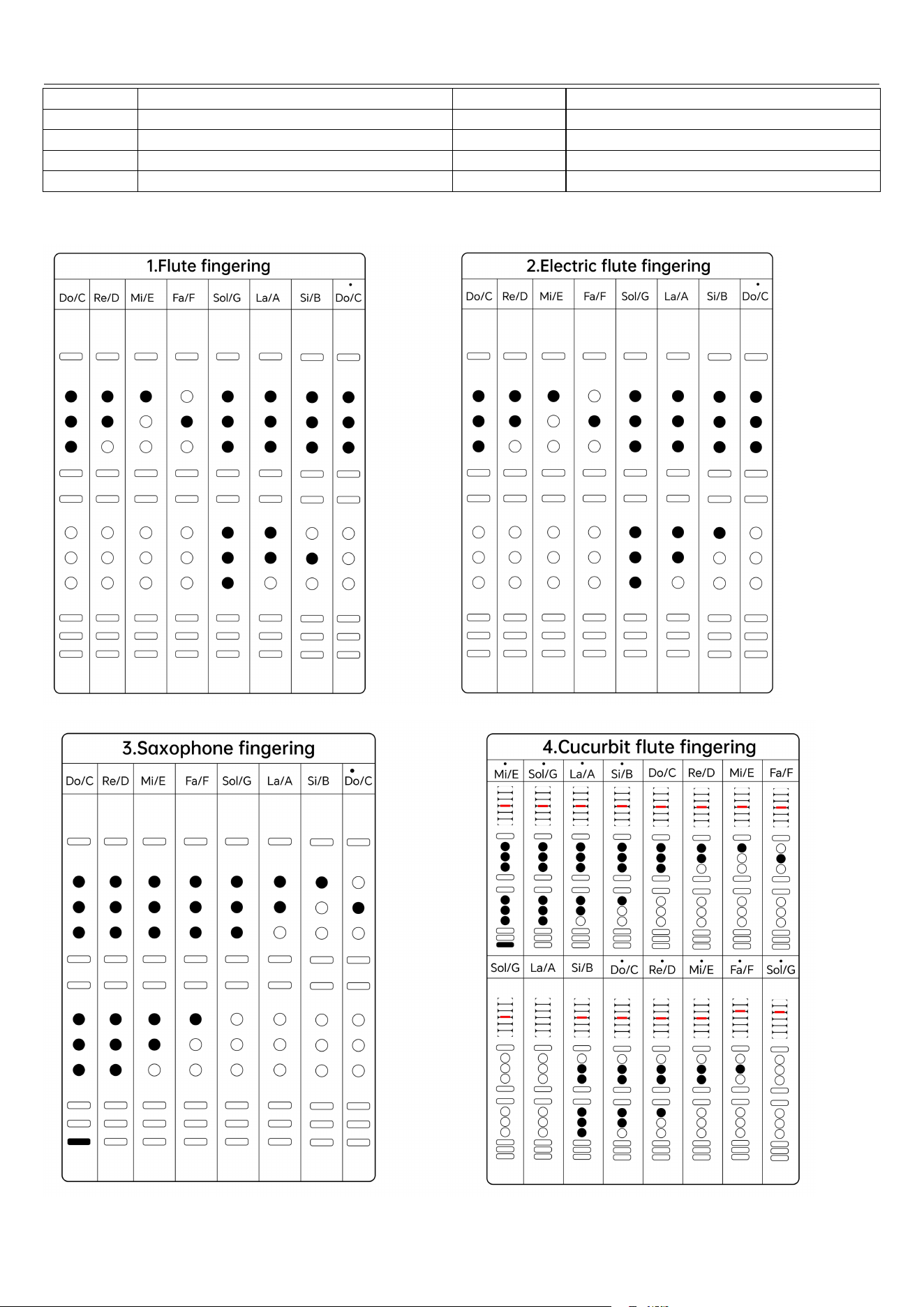
Fingering adjustment: Freely switch among four fingering methods: electric flute fingering, flute fingering,
electric sax fingering, and cucurbit flute fingering.
High-frequency setting: -12 - 12: The larger the number, the more obvious the high frequency.
Low-frequency setting: -12 - 12: The larger the number, the more obvious the low frequency.
Octave speed: 01-100 The larger the number, the more sensitive the button will be, and vice versa, the less
obvious it will be.

SUNRISE MELODY XR6000 EWI
3
Note speed: 01-100. The larger the number, the more sensitive the key will be, and vice versa, the less obvious
it will be.
Volume adjustment: volume range 01-100, the larger the number, the greater the volume.
Vibrato rate: 01-100. The larger the number, the faster the vibrato speed, and vice versa.
Vibrato amplitude: 01-100. The larger the number, the more obvious the vibrato will be, and vice versa, the
less obvious it will be.
Vibrato setting: Adjustable automatic vibrate, free vibrato, manual vibrato, and semi-automatic vibrato (If you
bite still will produce the set vibrato rate). There are a total of four vibrato modes.
Portamento rate: 01-100. The smaller the number, the faster the portamento, and vice versa.
Portamento setting: equal velocity, equal time, rotate the function key left or right to switch.
Reverb adjustment: The larger the number 01-100, the greater the reverberation, and vice versa, the less
obvious the reverberation will be.
Left and right hand adjustment: left hand on top, right hand on top, rotate and switch freely.
Flutter tongue speed: 01-100. The larger the number, the faster the flutter tongue speed is, and vice versa.
Beat setting: Including off, 1/4 beat, 2/4 beat, 3/4 beat, and 4/4 beat. Rotate the function knob left and right to
select.
Rhythm switch: Rotate to on, and the rhythm function is turned on at this time. Rotate to off, and the rhythm
function is turned off at this time.
Rhythm tracks: There are a total of 26 tracks to choose from. Select your favorite rhythm track through the
knob for performance.
Rhythm volume: The rhythm volume range is 01-100. The larger the number, the louder the volume.
Rhythm tempo: The rhythm tempo range is 30-250. The larger the number, the faster the rhythm tempo.
Conversely, the slower it is.
Pitch bend sensitivity: The range is 01-127. The smaller the number, the more sensitive it is. Conversely, the
slower it is.
Technique key: By rotating the function key, set and switch Technique\Vibrato\Sharp semitone\ Flat
semitone
\
High octave
\
Off.
Button 1: By rotating the function key, set and switch Technique\Vibrato\Sharp semitone\ Flat semitone\
High octave\Off.
Button 2: By rotating the function key, set and switch Technique
\
Vibrato
\
Sharp semitone
\
Flat semitone
\
High octave\Off.
Button 3: By rotating the function key, set and switch Sharp semitone\ Flat semitone\Off.
Button 4: By rotating the function key, set and switch Sharp semitone
\
Flat semitone
\
Off.
Bluetooth: Bluetooth on, Bluetooth off. Switch by rotating. When Bluetooth is turned on, mobile phones or
tablets can search for the Bluetooth name XR6000_BT. Click to connect the device and it can be used.
Restore factory settings: Press and hold the function knob + key 1.
Calibration: Press and hold the function knob + key 3 (do not touch any touch keys).
15. Portamento bar
Touching the portamento bar while playing will produce a portamento effect.
16.Octave wheel
Realize high and low pitch conversion through the rollers. Place the thumb between the two rollers to switch
octaves (a total of seven octaves)
17. Storage keys
First, select the corresponding timbre or tone. Press and hold any of the four keys to display the saved timbre or
tone. Short press to call the stored timbre or tone.
18. Neck strap hook
If it feels too heavy, you can use the neck strap. Hang the neck strap hook at the hook, and the other end on the
neck, and adjust it to the tightness that suits you.
19. Finger support
Put your thumb here to balance and support. You can adjust it up and down according to your own situation,
and adjust it to the position that suits the size of your fingers.
20. Pitch bend controller
Touch-type pitch bend. Press down with the thumb to produce pitch bend. The amplitude of the pitch bend
depends on the touch surface of the finger. The larger the touch, the more obvious the pitch bend. Conversely,
the less obvious it is. The speed of pressing and releasing determines the speed of the pitch bend.
21. Internal recording hole

SUNRISE MELODY XR6000 EWI
4
An internal recording cable can be inserted through this hole, and the other end is inserted into the mobile
phone. If there is no round head jack, it can be inserted through an adapter that supports internal recording.
Internal recording can be achieved by recording videos or audios through mobile phones.
22. 3.5 audio jack
A headset can be inserted through this output jack. It can also be connected to audio equipment or tuning
devices. After this jack is connected, the speaker is automatically turned off.
23. Charging indicator light
It shows a red light during charging and turns green when fully charged.
24. On/off key
Press and hold for 2 seconds to turn on/off the device.
25. 6.5 audio output jack
External devices such as speakers can be connected through this jack.
26. Battery cover
When opening this cover, you can see the built-in high-capacity lithium battery.
27. Type-C charging port
Through direct current, it can be charged with an ordinary mobile phone charging cable or USB port. Do not use
a fast charging adapters to charge it, otherwise the main board will be burned. Damage caused by this situation
is not covered by free warranty.
Bluetooth connection
First, turn on the Bluetooth function of the EWI. Turn on Bluetooth on your mobile phone or tablet, search for the
Bluetooth name XR6000_BT, and click to pair.
Timbre table
Serial
number
Timbre
Serial
number
Timbre
1
Electronic music 1
35
Trumpet
2
Electronic music 2
36
Popular trumpet
3
Electronic music 3
37
Tuba
4
Electronic music 4
38
Clarinet
5
Electronic music 5
39
Oboe
6
Electronic music 6
40
Piccolo
7
Sawtooth wave
41
Trombone
8
Electronic flute
42
Wind unison
9
Miao Yin 1
43
Brass
10
Miao Yin 2
44
Harmonica
11
Classic solo
45
Piano
12
Electronic solo
46
Sanxian
13
Soft alto saxophone
47
Morin khuur 1
14
Bamboo flute
48
Morin khuur 2
15
Vibrato flute
49
Pan flute
16
Cucurbit flute
50
Xun
17
Bawu
51
Dongxiao
18
Suona
52
Sheng
19
Pipa
53
Guqin
20
Erhu 1
54
Dulcimer
21
Erhu 2
55
Gaohu
22
Chinese zither
56
Xiao
23
Popular flute
57
Jinghu
24
Violin 1
58
Banhu
25
Violin 2
59
Pastoral flute
26
Viola
60
Accordion
27
Cello
61
Melodica
28
Bright alto saxophone
62
Chinese percussion
29
Tenor saxophone 1
63
Contrabass
SUNRISE MELODY XR6000 EWI
5
30
Tenor saxophone 2
64
Strings 1
31
Soprano saxophone
65
Strings 2
32
High medium saxophone
66
Guitar
33
Alto saxophone
67
Drum set
34
French horn
68
DJ percussion
Four fingering charts

SUNRISE MELODY XR6000 EWI
6
Must read for users
1. Keep it dry: If saliva, sweat or other liquids flow outside the tube and please cleaned in time.
2 .If the equipment fails, please do not disassemble or modify it without permission, otherwise you will not be
entitled to the warranty service during the warranty period.
3. Avoid dropping or bumping. The EWI is an electronic product with a plastic shell, which is not drop-resistant.
After use, place the EWI in a bag or stand upright to avoid dropping or damaging it.
4. Avoid dropping the instrument into water or other liquids. If dropped into liquids, turn it off immediately.
Damage caused by human factors is not covered by the warranty.
5. Avoid shaking the electric blowpipe with force, which may cause the water inlet of the sensor and the heavy
parts inside to loosen.
6. If you don't use it for a long time, you can charge it frequently to prevent the battery from being unusable due
to power loss.
7. Do not wait until the battery is completely exhausted before charging. Frequent battery exhaustion will
affect the battery life. Do not use a mobile phone fast charger to charge the battery.
8. High temperature protection: Do not place this product in high temperature, fire, sunlight or electromagnetic
interference environment.
9. Note: Fast charging is prohibited.
10. This product is not equipped with an adapter.
Troubleshooting
1. Can’t turn on the EWI
You can try to Reinstall the battery and plug it in again. If it still can't turn on, please contact customer service.
2. Out of tune
You can try calibration first (press and hold the function key and storage key No. 3 at the same time). During
calibration, do not touch any metal keys with your fingers. You can also turn it off and restart. If it is still
inaccurate after restarting, please pay attention to observing whether the half-tone keys are touching each other.
If there is no problem with any of these, generally there is a problem with the fingering selection.
3. Self-chirping
Turn function key A to find the blowing force adjustment, and the value should not exceed 60. If the number is
lower than 60 and it still self-chirping, please leave it for a while and wait for the saliva to dry.
4. The method to deal with the instrument that does not sound or the sound is small is as follows:
(1) Rotate function key A to find the volume setting and increase the volume.
(2) Rotate the function key A knob to find the blowing force adjustment, and increase the blowing force, but not
beyond 60.
(3) Check if there are plugs inserted into the 6.5mm jack and the 3.5mm jack, if so, remove them.
(4) Check whether the external speaker is connected well and whether the speaker volume is adjusted to the
optimal position.
(5) If there is a problem with the settings, please calibrate or restore the factory settings (Press and hold the
function knob and the No. 1 storage key at the same time).
Product parameters
Model: XR6000 Timbre: 68 types Mouthpiece: silicone material Tonality; 12
Speaker:5W Material: plastic Battery: 3.7V 2600mAh Weight:560g Display:LCD display
Size:570*40*38mm, Interface: 3.5 headphone audio port, 6.5 audio output port, TYPE-C charging hole

SUNRISE MELODY XR6000 EWI
7
FCC WARNING: This equipment may generate or use radio frequency energy. Changes or modifications to this
equipment may cause harmful interference unless the modifications are expressly approved in the instruction
manual. The user could lose the authority to operate this equipment if an unauthorized change or modification
is made.
This device complies with part 15 of the FCC Rules. Operation is subject to the following two conditions: (1)
This device may not cause harmful interference, and (2) this device must accept any interference received,
including interference that may cause undesired operation.
The device has been evaluated to meet general RF exposure requirement.
The device can be used in portable exposure condition without restriction.
NOTE: This equipment has been tested and found to comply with the limits for a Class B digital device,
pursuant to part 15 of the FCC Rules. These limits are designed to provide reasonable protection against
harmful interference in a residential installation. This equipment generates, uses and can radiate radio
frequency energy and, if not installed and used in accordance with the instructions, may cause harmful
interference to radio communications. However, there is no guarantee that interference will not occur in a
particular installation. If this equipment does cause harmful interference to radio or television reception, which
can be determined by turning the equipment off and on, the user is encouraged to try to correct the interference
by one or more of the following measures:
• Reorient or relocate the receiving antenna.
• Increase the separation between the equipment and receiver.
• Connect the equipment into an outlet on a circuit different from that to which the receiver is connected.
• Consult the dealer or an experienced radio/TV technician for help.
• The rating information is located at the bottom of the unit.
*RF warning for Portable device:
The device has been evaluated to meet general RF exposure requirement. The device can be used in portable
exposure condition without restriction.