FN20说明书
User Manual
Wake-Up Light & White Noise Sleep
Sound Machine
Model:
FN20
V1.0
1. Package Contents .................... 2
2. Product Overview .....................3
3. Getting Started ........................ 4
4. Light Functions ........................ 5
5. Sleep Music ............................. 6
6. Bluetooth Music ....................... 7
7. Alarm & Sunrise ....................... 8
8. Display Brightness .................. 9
9. Time Settings .......................... 9
10. Snooze .................................. 10
11. Countdown Timer .................. 11
12. Scene Modes ......................... 12
13. Memory Function .................. 13
14. Specifications ........................ 14
15. Troubleshooting .................... 14
16. Safety & Warranty .................. 15
1 2
Package Contents
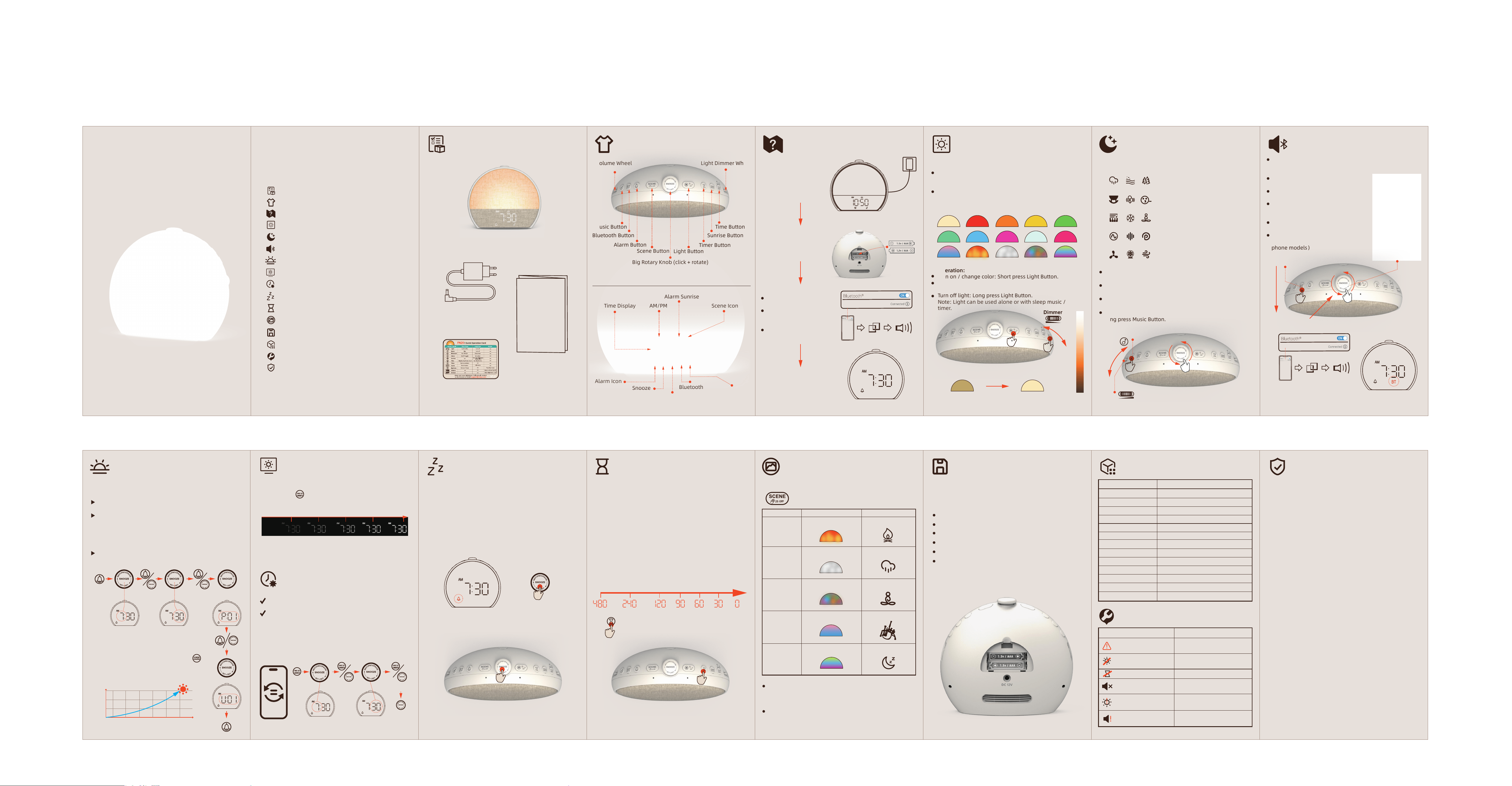
FN20 Sunrise Alarm Clock
User Manual
User Manual
Power adapter (with cable)
(12V 1A)
Quick start guide
3
Product Overview
Light Button
Timer Button
Volume Wheel
Sunrise Button
Time Button
Volume Wheel Light Dimmer Wheel
Music Button
Bluetooth Button
Alarm Button
Scene Button
Big Rotary Knob (click + rotate)
AM/PM
Alarm Icon
Snooze
Sleep Timer
Bluetooth
Sleep Sound
Scene Icon
Alarm Sunrise
Time Display
4
Getting Started
6
Sleep Music
7
Bluetooth Music
10
Snooze
11
Countdown Timer
12
Scene Modes
13
Memory Function Specifications
1514
Safety & Warranty
Troubleshooting
1. Connect power: Plug
the 12V 1A adapter into
the rear DC port and a
wall outlet.
2. (Optional) Insert two
AAA batteries into the
bottom compartment for
memory backup.
3. Bluetooth time sync:
Press the Bluetooth button.
The indicator flashes.
On your phone, go to
Bluetooth settings and pair
with "FN20".
The clock automatically sets
to your phone’s time.
4. Default alarm is 7:30 AM
with sunrise enabled. You
can change it later.
FN20
FN20
FN20
FN20
5
Light Functions
15 Colors + 30 Brightness Levels 33 Tracks (32 Volume Levels)Track order (organized groups):
1. Nature sounds (rain, ocean, forest)
2. Baby lullabies
3. Soft piano / ambient
4. Noise masking (white noise, brown noise, pink noise)
5. Fan / wind sounds
Operation:
Play / switch track:
Short press Music Button.
Adjust volume:
Rotate Volume Wheel (V1 – V32).
Next / previous track:
Rotate Big Rotary Knob (easier than Music Button).
Turn off music:
Long press Music Button.
Play from Your Phone Enable Bluetooth:
Short press Bluetooth Button. Display shows
"BT".Pair with "FN20" on your phone.
Play / pause:
Click the Big Rotary Knob.
Skip track:
Rotate Big Rotary Knob.
Volume control:
Use Volume Wheel (independent from
phone volume).
Disconnect / exit:
Long press Bluetooth Button.
Note: Once connected, the clock time is
automatically synchronized.(Most cell
phone models)
Available colors-10 solid:
Warm White, Red, Orange, Yellow, Green, Cyan, Blue,
Purple, White.
Pink- 5 dynamic effects:
Ocean Sunrise, Campfire, Rain, Fantastic Journey,
Up-Down Gradient.
Snooze – 9 Minutes, Unlimited Times
- When alarm rings, click Big Rotary Knob once.
Alarm stops and rings again after 9 minutes.
- You can snooze any number of times.
Without snooze:
alarm automatically stops after 20 minutes (light and sound
off). Next day's alarm unaffected.
Countdown Timer (30–480 min)Available durations:
30 / 60 / 90 / 120 / 240 / 480 minutes and OFF.
How to use:
1. Turn on light or music (timer requires at least one to be
active).
2. Short press Timer Button repeatedly to select duration.
After 3 seconds, countdown starts.
3. To check remaining time: short press Timer Button once.
4. While counting down, you can change light or music freely,
or switch to a Scene Mode.
Backup Batteries- Install two AAA batteries (not included)
into the bottom compartment.
During power loss, all settings are preserved:
Alarm time, ringtone, volume
Sunrise max brightness and lead time
Last used light color & brightness
Last used sleep music track & volume
Display brightness preference
12/24H format
When power is restored, the device resumes with saved
settings.
Safety Information
Use only the supplied 12V 1A adapter.
Keep away from water and moisture. Clean with dry soft cloth.
Remove AAA batteries if storing for long periods.
Do not block speaker grille or light diffuser.
Warranty: One-year limited warranty.
Contact support at [www.vivlux.com or support@vivlux.com].
FCC Statement
This device complies with part 15 of the FCC Rules. Operation is
subject to the following two conditions: ( 1) This device may not
cause harmful interference, and (2) this device must
accept any interference received, including interference that may
cause undesired operation.
This equipment has been tested and found to comply with the
limits for a Class B digital device, pursuant to Part 15 of the FCC
Rules. These limits are designed to provide reasonable
protection against harmful interference in a residential installa-
tion. This equipment generates uses and can radiate radio
frequency energy and, if not installed and used in accordance
with the instructions, may cause harmful interference to radio
communications. However, there is no guarantee that interfer-
ence will not occur in a particular installation. If this equipment
does cause harmful interference to radio or television reception,
which can be determined by turning the equipment off and on,
the user is encouraged to try to correct the interference by one or
more of the following measures:
-- Reorient or relocate the receiving antenna.
-- Increase the separation between the equipment and receiver.
-- Connect the equipment into an outlet on a circuit different from
that to which the receiver is connected.
-- Consult the dealer or an experienced radio/TV technician for
help.
Any Changes or modifications not expressly approved by the
party responsible for compliance could void the user's authority
to operate the equipment.
This equipment should be installed and operated with a
minimum distance of 20cm between the radiator and your body.
This equipment complies with the FCC radiation exposure limits
set forth for an uncontrolled environment, This transmitter must
not be co-located or operating in conjunction with any other
antenna or transmitter.
Scene Modes – 5 Fixed Sound+Light Combinations
Operation:
Turn on / change color: Short press Light Button.
Adjust brightness: Rotate Light Dimmer Wheel (L1 =
dimmest, L30 = brightest).
Turn off light: Long press Light Button.
Note: Light can be used alone or with sleep music /
timer.
L1
L1
L10
L20
L30
L30
1、Music Button
3.Click/Rotate
1.Short press Bluetooth Button.
2.Pair with "FN20" on your phone.
Enable Bluetooth to access phone
info for auto time sync.
Auto time sync
Countdown Timer
8
Alarm & Sunrise
9
Display Brightness
Display Brightness
Enable / disable alarm: Short press Alarm Button. Alarm
icon appears/disappears.
Set alarm time, ringtone, volume:
1. Long press Alarm Button (2 sec). Hour flashes.
2. Rotate Big Rotary Knob to set hour → click to confirm.
3. Rotate Big Rotary Knob to set minutes → click.
4. Select ringtone (S01–S09 or OFF) → click.
5. Set max volume (V1–V32) → click. Settings saved.
Sunrise Wake-Up Light (gradual light before alarm):
Default: ON, brightness L15, starts 30 min before alarm.
Customize: Long press Sunrise Button.
1. Set max brightness (OFF / L1–L30) → click.
2. Set lead time (5–60 min) → click.
Display Brightness Control
Short press“ ”repeatedly to cycle: L0 (off) → L1 →
L2 → L3 → L4 (default) → L5 (max) → back to L0.
When display is L0 (off), pressing any button temporarily
lights the display at L4 for 5 seconds.
After the alarm rings, display returns to default L4.
Time Setting – Manual & Bluetooth Auto Sync
Auto sync (recommended): Once Bluetooth connected,
time updates automatically.
( Most cell phone models )
Manual setting:
1. Long press Time Button (2 sec).
2. Rotate Big Rotary Knob to select 12H or 24H format →
click.
3. Set hour → click.
4. Set minute → click.
Alarm Clock & Sunrise Wake-Up Light Single alarm with 9
ringtones (S01–S09). Volume adjustable V1–V32.
(Hold 2s)(Rotate) (Rotate)(click) (click)
(click)
Time Auto Sync
(Rotate)
(Rotate)
(Rotate)
L0(OFF) L1 L2 L1 L2 L5
(Rotate)
(Rotate
12/24h)
(click) (click)
+9 min
Activate / switch:
Short press Scene Button or rotate Big Rotary Knob.
Adjust brightness & volume normally with dimmer and
volume wheels.
Exit scene:
Long press Scene Button.
Scene Mode
Scene Mode
Flickering orange
Rain light
Ocean Sunrise
Up-Down
Gradient
Fantastic
Journey
Light Effect Sound Effect
Crackling fire sound
Rain gradient Rain shower sound
Fantastic Color Changing Calming Sound
Slow Sunrise Ocean English bagpipes sound
Vertical color Sleep ambient sound
+
+
-
-
Feature Specification
Sound levels 32 steps (V1–V32)
Light levels 30 steps (L1–L30) + OFF
Sleep music tracks 33
Light colors 15 (10 solid + 5 chase)
Alarm ringtones 9 (S01–S09)
Display brightness L0 (off), L1–L5
Speaker 5W with full cavity + diaphragm
Time format 12/24H selectable, default 12H
Bluetooth Latest version, name "FN20"
Countdown timer 30/60/90/120/240/480min and OFF
Snooze 9 min, unlimited; alarm max 20 min
Memory backup 2 x AAA batteries (not included)
Input power 12V 1A DC adapter
Issue Solution
Time not auto-syncing
Ensure Bluetooth connected.
Or set manually.
Sunrise light doesn't
Countdown won't start
No Bluetooth sound
Display too bright
at night
Alarm volume too
low/high
Turn on light or music first.
Press Bluetooth button to
pair. Check volume.
Press Time Button to lower
brightness to L1/L0.
Long press Alarm → adjust
volume step (V1–V32).
Check alarm is ON and
sunrise brightness not OFF.
L30
L20
L10
0
5 10 20 30 40 50 60 (MIN)
(Brightness)
20260626
Music Button
Table of Contents