- 02 -
Chapter 2 POWERING ON
1. Install 1pcs CR2032 coin cell batteries to the proper terminals in the
battery compartment to memorize the time and alarm setting .
NOTE: Batteries(not included) don't support time display but can back up
time & alarm setting.
2. Connect the adapter line to DC jack , then plug into a 100~240V AC wall
power outlet.
- 01 -
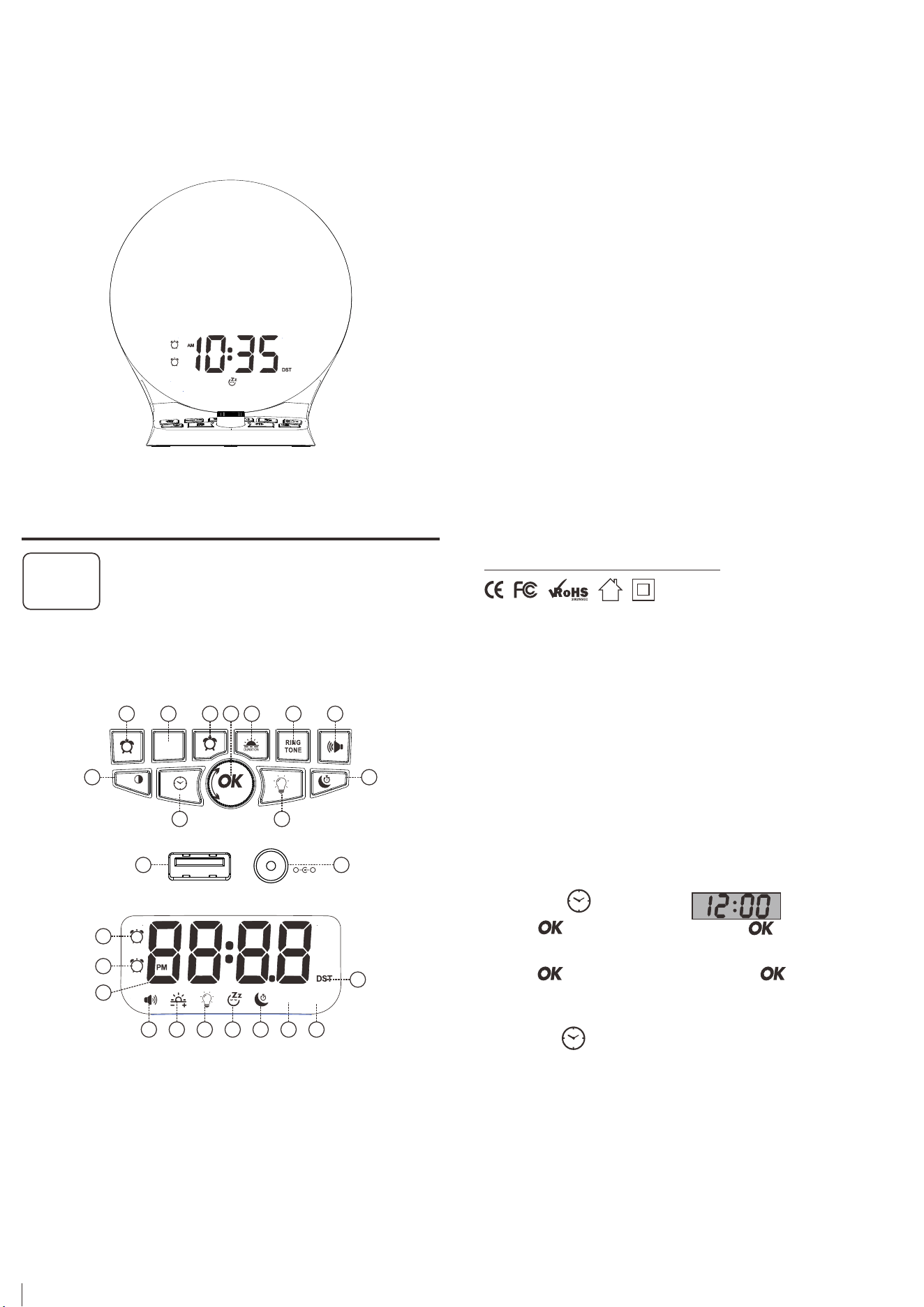
Chapter 1 LOCATION OF CONTROLS
1. Alarm 1 Button 2. Alarm OFF Button 3. Alarm 2 Button
4. Sunrise Duration Button 5. Ring Tone Button 6. Volume Button
7. Time Digits Dimmer& DST Button
8. Set Time & 12/24H Button
9. Light Button 10. Sleep Button 11. OK & SNOOZE Button
12. USB Charging Port 13. DC IN Port 14. Alarm 1 Indicator
15. Alarm 2 Indicator 16. Time Display 17. Volume Indicator
18. Sunrise Indicator 19. Light Indicator 20. SNOOZE Indicator
21. Sleep Indicator 22. Sunrise Indicator 23. Ringer Indicator
24. DST Indicator
1 2 3 4 5 6
7
11
10
8 9
Chapter 3 TIME SETTING
1. Press once button, display starts flashing.
2. Rotate button to adjust the hour, Press button
to confirm hour setting.
3. Rotate button to adjust the minute, press button to
confirm minute setting or wait for another 10 seconds to confirm
automatically.
4. Hold press button to change 12/24H time format.
12/24H
12/24H
+
-
1
2
12 /24 H
DST
ALARM
OFF
SNOOZE
12 13
DC I N
+
-
USB CHARGING
5V 1 A
1
2
14
15
16
17 18 19 20 21 22 23
24
RINGER
OFF
SUNRISE
OFF
CR1013
Wakeup Alarm Clock
CREATE YOUR PERFECT SLEEP ENVIRONMENT
1
2
Contact our experts
Mad e in China
Http://www.wismco.com
Version 1.1
ROXICOSLY
RINGTONE
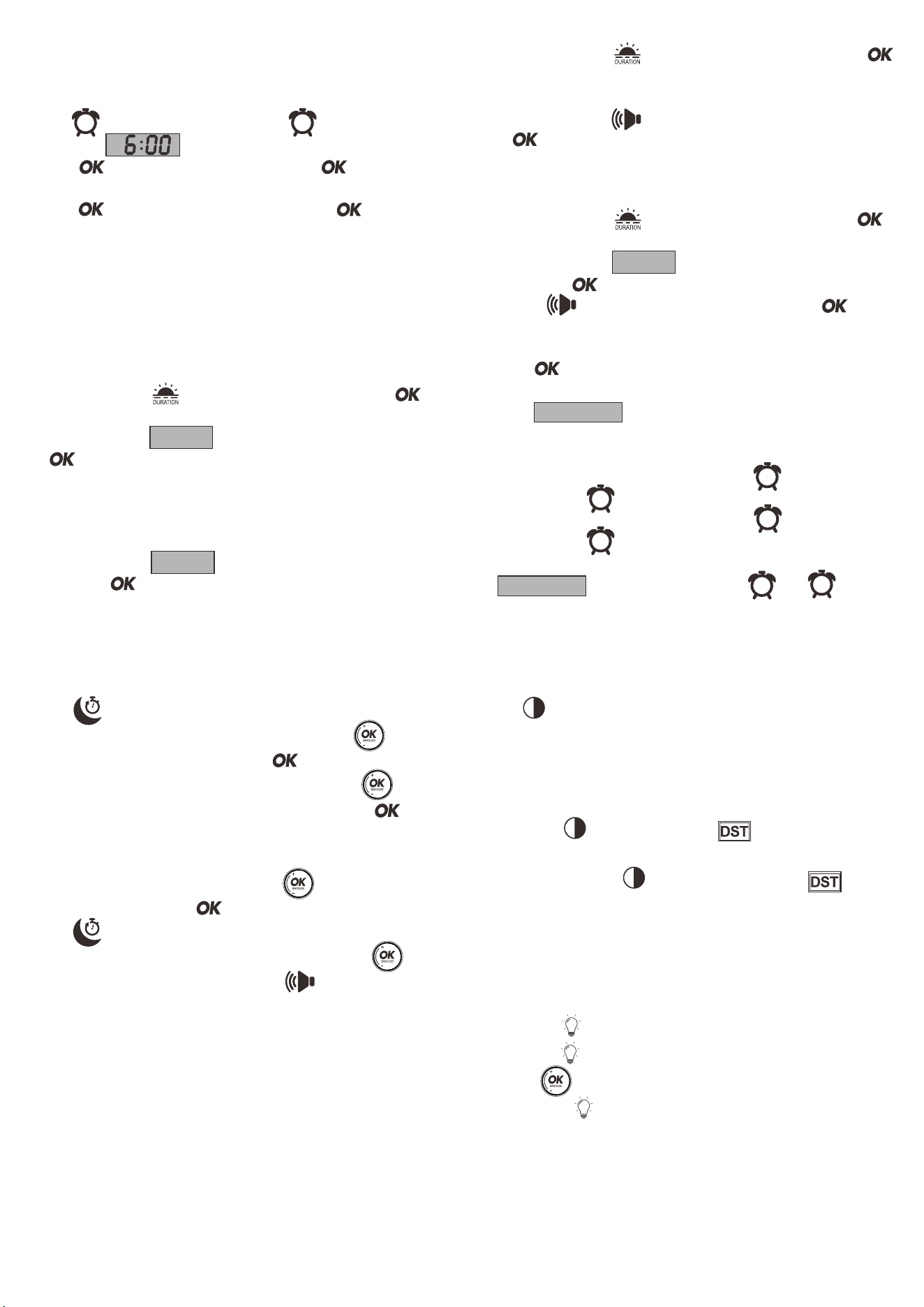
Three Optional Alarm Modes Setting
A. Wake up by Sunrise Light Only
The sunrise duration (OFF-5Min-10Min-15Min-30Min- 60Min) is the
time that light will start gradually increase before alarm goes off.
OFF means sunrise is disactived.
1. Repeatedly press button to set sunrise duration ,press
button or wait for another 5 seconds to confirm.
2. Repeatedly press button until display shows “ OFF”,press
button or wait for another 5 seconds to confirm. while the
“Ringer OFF” icon will light up.
NOTE: the “RINGER OFF” means turning off the ringtone, and the ringtone will not
sound when the alarm goes off.
B. Wake up by Sound Only
1. Repeatedly press button to select which ringtone you
like, press button or wait for another 5 seconds to confirm.
RINGTONE
- 03 -
Chapter 9 Light Control
This wake up light is both a wake up light and an ordinary luminous light.
1. Press once button to turn on light
2. Hold press button to turn off light directly.
3. Rotate button to adjust the brightness of light.
4. Repeat press button to switch the light color.
- 06 -- 05 -
- 04 -
ALARM OFF
Turn off Alarm When alarm goes off:
1. Press button to temporarily turn off alarm for 9 minutes.
Alarm will ring every next 9 minutes.
2. Press button to turn off light for 24 hours, the alarm
indicator will be still on, and alarm will be activated again after 24
hours.
3. To completely turn off the alarm 1, hold press button until the
alarm indicator disappear from the display.
To completely turn off the alarm 2, hold press button until the
alarm indicator disappear from the display.
To completely turn off both the alarm 1 and the alarm 2, hold press
button, the alarm indicator and will
disappear from the display.
1
ALARM OFF
2
Chapter 8 Sleep Mode Setting
1
2
2
1
Set Alarm Time
This Clock Features two alarms, alarm 2 setting is same as alarm 1.
1. Press button once, the alarm indicator will light up,
the display starts flickering.
2. Rotate button to adjust the hour, Then press button or wait
for another 8 seconds to confirm hour setting.
3. Rotate button to adjust the minute, Then press button
to confirm minute setting or wait for another 8 seconds to confirm
automatically.
Chapter 4 ALARM SETTING
1 1
2. Repeatedly press button until display shows”OFF”, press
button to confirm. while “SUNRISE OFF “ icon will light up on the
display.
3. Repeatedly press button to set alarm volume anytime, press
button to confirm.
NOTE: the “SUNRISE OFF” means sunrise is disactivated, and will not light up when
the alarm goes off.
C. Wake up by both Sunrise and Sound
1. Repeatedly press button to set sunrise duration, press
button or wait for another 5 seconds to confirm.
2. Repeatedly press button to select which ringtone you
like, press button or wait for another 5 seconds to confirm.
3. Press button to set alarm volume anytime, press button
or wait for another 5 seconds to confirm.
RINGTONE
1. Press button to enter the sleep mode setting.
2. Display shows the default sleep time 30 minutes, rotate button
to adjust the time which you desire, press button to confirm.
3. Display shows the default light brightness 18 level, rotate
button to adjust the light brightness which you desire, press
button to confirm.
4. Display shows the number of sleep sound(include 5 sleep sounds) and
speaker will play corresponding ring, rotate button to select the
ring which you desire, press button to confirm.
5. Press button again to log out sleep mode setting.
After you finished 1-2-3-4 setting, at any time, you can rotate
button to change the brightness of light, press button to change the
sleep sound volume.
DST
Press button to adjust the brightness of the time digits to your
preferrence.
Chapter 7 DIMMER
Chapter 6 USB CHARGING
Ensure this clock is outlet powered,connect the charging cable with the
usb port of the clock to charge your cellphone or tablet.
The Maximum charge currect is 1 Ampere
Chapter 7 DST SWITCH
1. Hold press button to light up the indicator .
An hour will be added to the current time on the display.
3. To turn off DST, press button again, the Indicator will
disappear from the display.
DST
DST