
Introduction
Dear user, thank you for your choice. This is a product we have carefully developed
to surf freely on the Internet. Before using the tablet, please read this user manual
carefully in order to use the machine functions correctly!
Disclaimer:
1 . Please make sure to use a five-volt two-amp power charger for charging.
2 . Users can use the music video pictures and software provided in the
third part, but we do not assume any responsibility for copyright issues or software
failures.
3 . If the product fails, we will strictly abide by the warranty terms, but we will not be
responsible for any property damage or economic losses that may be caused during
use.
4 . The equipment comes with built in factory software. If you remove or don't
remove the software while looking for compatibility or other issues, it won't have any
impact on your machine. Please note that this is not a product quality issue.
5 . The company reserves the right to improve products. Product specifications and
designs are subject to change without prior notice! Please refer to the actual product.
Precautions:
· The tablet is a precision electronic instrument, please do not disassemble it
yourself.
. Avoid dropping, hitting or any collisions with the product.
· Avoid using the device in high temperature, low temperature, moisture, dust, in
strong magnetic fields and/or prolonged exposure to sunlight.
·Wipe the device gently with a rung-out damp cotton cloth to avoid contact with
other chemicals.
· This device is not designed to withstand dripping and splashing water, nor should
it be placed next to, for example, a full glass of liquid.
· Please use an appropriate volume to avoid damaging your hearing.
· Please use original batteries and other accessories. Use of any other type of
accessory will void the warranty and may cause device failure.
· Do not disconnect the device during formatting or ongoing upload and download
processes, otherwise application errors may result in occurring.
· Dispose of discarded machinery and accessories in accordance with local
environmental regulations
· lf you have any questions while using the device, please contact the seller..The
company reserves the right to improve products. Product specifications and designs
are subject to change without prior notice! Please refer to the actual product.
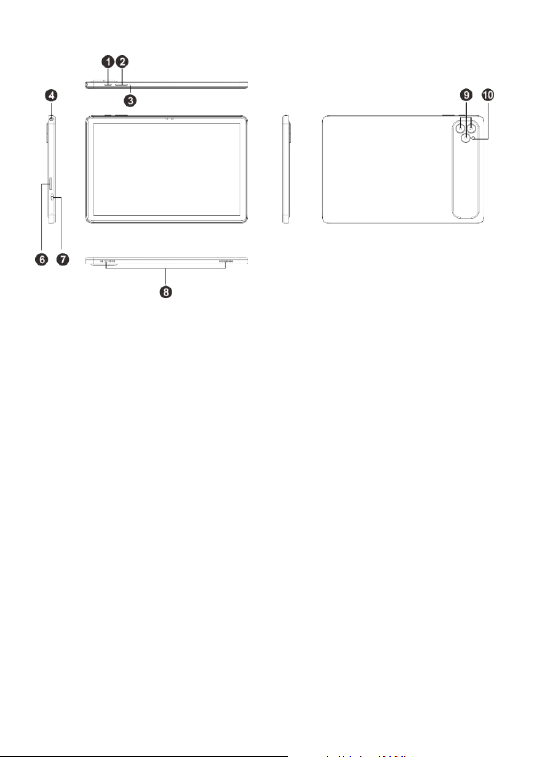
1. Operation Guide
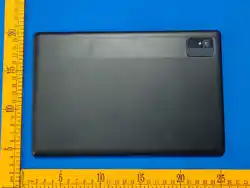
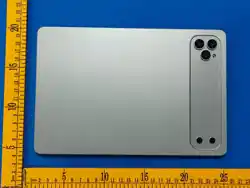
1. Power on/off 2. Volume keys
3. Reset hole 4. Earphone jack
5. Front camera 6. TF/SIM card interface
7. Type-C interface 8. Speaker
9. Rear camera 10. Flash light
Kind reminder: lt is recommended that you fully charge your tabletfirst, so that you
can explore freely on the first startup!
The way to turn on the tablet is by pressing the power button to turn it on. To turn off
the tablet, click the "Power off" button in the operating system. In special
circumstances, the power button can be used to force the tablet to turn off.
Customers need to be aware that frequent forced shutdowns may result in system file
loss or may result in the tablet crashing.

2. Solutions to common problems
(1). Tablet cannot start
a . Check whether the battery is fully charged.
b. Before starting the tablet again, please check the power adapter.
c. If it still cannot start after charging, please contact the seller.
(2). Wi-Fi is not working properly
Make sure the distance between the tablet and the router is within 8 meters. If the
tablet is connected to Wi-Fi but there is no network, please restart the router.
(3). When the battery power is lower than 20%, please charge the device;
when is the tablet has not been used for a long time, please charge it for more than 2
hours.

FCC Statement
This device complies with part 15 of the FCC rules. Operation is subject to the following two
conditions: (1) this device may not cause harmful interference, and (2) this device must
accept any interference received, including interference that may cause undesired operation.
Changes or modifications not expressly approved by the party responsible for compliance
could void the user's authority to operate the equipment.
NOTE: This equipment has been tested and found to comply with the limits for a Class B
digital device, pursuant to part 15 of the FCC Rules. These limits are designed to provide
reasonable protection against harmful interference in a residential installation. This equipment
generates uses and can radiate radio frequency energy and, if not installed and used in
accordance with the instructions, may cause harmful interference to radio communications.
However, there is no guarantee that interference will not occur in a particular installation. If
this equipment does cause harmful interference to radio or television reception, which can be
determined by turning the equipment off and on, the user is encouraged to try to correct the
interference by one or more of the following measures:
• Reorient or relocate the receiving antenna.
• Increase the separation between the equipment and receiver.
• Connect the equipment into an outlet on a circuit different from that to which
the receiver is connected.
• Consult the dealer or an experienced radio/TV technician for help.
The device has been evaluated to meet general RF exposure requirement. The device can be
used in portable exposure condition without restriction.
The device has been evaluated to meet general RF exposure requirement.
The device can be used in an uncontrolled environment without restriction.
This device meets the government's requirements for exposure to radio waves. The
guidelines are based on standards that were developed by independent scientific
organizations through periodic and thorough evaluation of scientific studies. The standards
include a substantial safety margin designed to assure the safety of all persons regardless of
age or health. The SAR limit of USA (FCC) is 1.6 W/kg averaged. Device types: Tablet PC
(FCC ID: 2BCQA-T12) has also been tested against this SAR limit. SAR information can be
viewed on‐line at http://www.fcc.gov/oet/ea/fccid/. Please use the device FCC ID number for
search. This device was tested simulation typical 0mm to body. To maintain compliance with
FCC RF exposure requirements, use accessories should maintain a separation distance
between the user's bodies mentioned above, use accessories should not contain metallic
components in its assembly, the use of accessories that do not satisfy these requirements
may not comply with FCC RF exposure requirements, and should be avoided.
Thank you for choosing CloverTek