Tension de fonctionnement: DC 3V (2 piles AAA)
Courant en veille: < 15 µA
Courant d’alarme: < 100 mA
Durée de vie de la batterie: Jusqu’à 3 ans
Type d’alarme: Alarme déclenchée par bouton
Voyant: LED tricolore (Vert/Rouge/Jaune)
Communication: Wi-Fi (IEEE 802.11b/g/n)
Température de fonctionnement: -10℃ ~ 55℃
Humidité de fonctionnement: ≤ 95%RH
Deutsch
Français
Italiano
Español
Schnellstartanleitung für
Wi-Fi-Notfalltaste
01 Außenansicht
Guide de démarrage rapide
pour bouton d'urgence Wi-Fi
01 Schéma d'apparence
Manuale di avvio rapido per
pulsante di emergenza Wi-Fi
01 Schema dell’aspetto
Manual de inicio rápido para
botón de emergencia Wi-Fi
01 Diagrama de apariencia
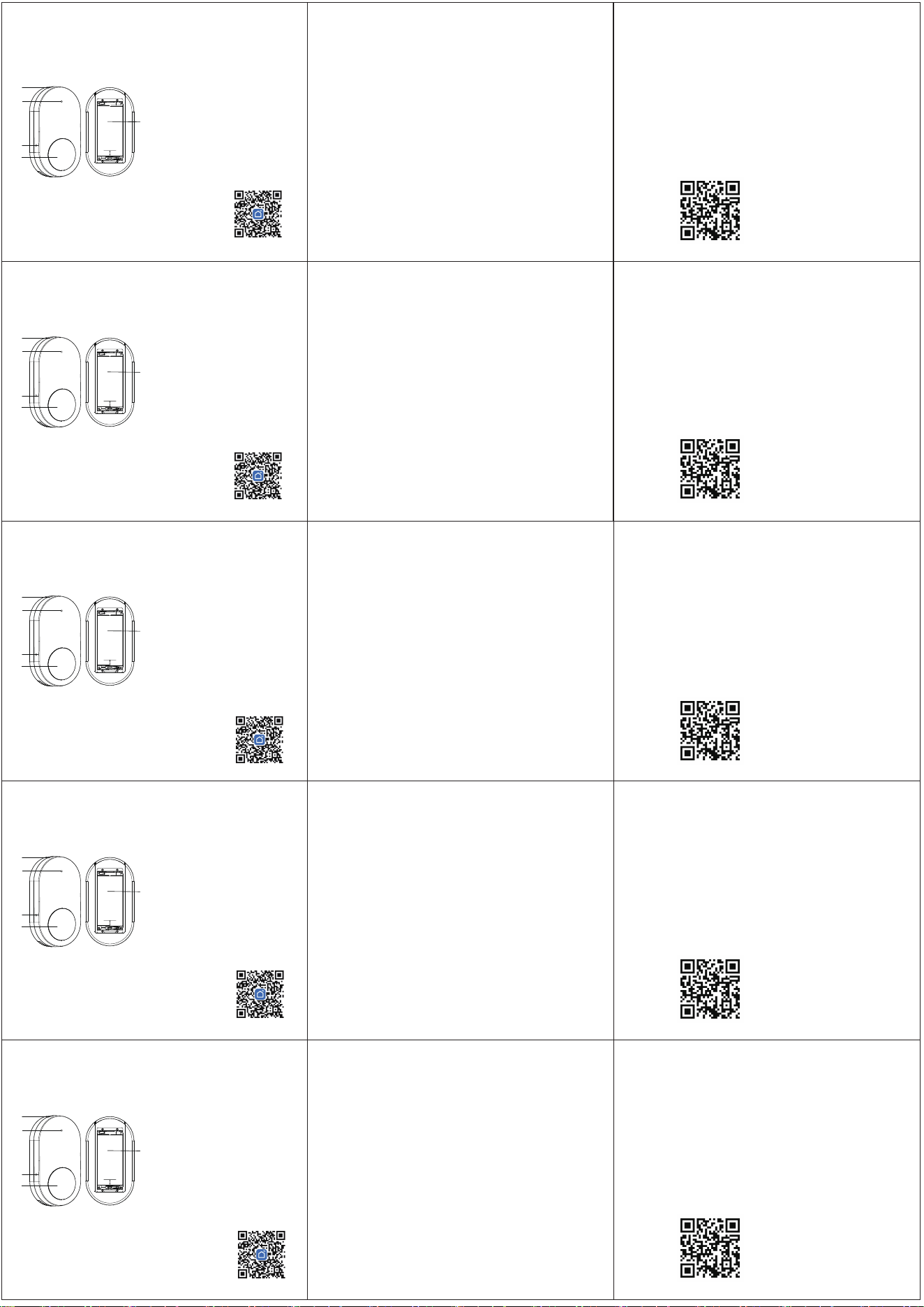
01 Appearance Diagram
02 App Download and Connection
05 Technical Specifications
06 More Help & Support
English
Quick Start Manual for
Wi-Fi Emergency Button
(1).Scan QR code with phone to
download and install the App.
Then register as prompted.
Operating Voltage:DC 3V (2 AAA batteries)
Standby Current:< 15 µA
Alarm Current:< 100 mA
Battery Life:Up to 3 years
Alarm Method:Button-triggered alarm
Indicator Light:Tri-color LED (Green/Red/Yellow)
Communication:Wi-Fi (IEEE 802.11b/g/n)
Operating Temperature:-10℃ ~ 55℃
Operating Humidity:≤95%RH
05 Technische Daten
Betriebsspannung: DC 3V (2 AAA-Batterien)
Standby-Strom: < 15 µA
Alarmstrom: < 100 mA
Batterielebensdauer: Bis zu 3 Jahre
Alarmart: Tastenaktivierter Alarm
Anzeigeleuchte: Dreifarbige LED (Grün/Rot/Gelb)
Kommunikation: Wi-Fi (IEEE 802.11b/g/n)
Betriebstemperatur: -10℃ ~ 55℃
Betriebsfeuchtigkeit: ≤ 95%RH
05 Caractéristiques techniques
05 Caratteristiche tecniche
Tensione di funzionamento: DC 3V (2 batterie AAA)
Corrente in standby: < 15 µA
Corrente di allarme: < 100 mA
Durata della batteria: Fino a 3 anni
Tipo di allarme: Allarme attivato da pulsante
Segnale luminoso: LED tricolore (Verde/Rosso/Giallo)
Comunicazione: Wi-Fi (IEEE 802.11b/g/n)
Temperatura di funzionamento: -10℃ ~ 55℃
Umidità di funzionamento: ≤ 95%RH
05 Especificaciones técnicas
Voltaje de funcionamiento: DC 3V (2 pilas AAA)
Corriente en reposo: < 15 µA
Corriente de alarma: < 100 mA
Duración de la batería: Hasta 3 años
Tipo de alarma: Alarma activada por botón
Indicador luminoso: LED tricolor (Verde/Rojo/Amarillo)
Comunicación: Wi-Fi (IEEE 802.11b/g/n)
Temperatura de funcionamiento: -10℃ ~ 55℃
Humedad de funcionamiento: ≤ 95%RH
Scan QR code for detailed manual and videos.
06 Weitere Hilfe & Support
QR-Code scannen für detaillierte Anleitung und Videos.
06 Plus d’Aide & Support
Scanner le QR-Code pour le manuel détaillé et les
vidéos.
06 Ulteriore Aiuto & Supporto
Scansiona il QR-Code per il manuale dettagliato e i
video.
06 Más Ayuda & Soporte
Escanear el QR-Code para el manual detallado y
videos.
Smart Life
1.Lanyard Hole
2.Indicator Light
3.SET Button
4.SOS Button
5.Battery Compartment
02 App-Herunterladen und Verbindung
(1) Scannen Sie den QR-Code mit dem
Telefon, um die App herunterzuladen
und zu installieren. Registrieren Sie
sich dann gemäß den Anweisungen.
Smart Life
1. Halsbandloch
2. Anzeigelampe
3. SET-Taste
4. SOS-Taste
5. Batteriefach
02 Téléchargement et connexion de l’app
(1) Scannez le code QR avec votre
téléphone pour télécharger et installer
l’app. Ensuite, inscrivez-vous selon les
instructions.
Smart Life
1. Trou pour lanière
2. Lumière indicateur
3. Bouton SET
4. Bouton SOS
5. Logement de batterie
02 Download e connessione dell’app
(1) Scansiona il codice QR con il
telefono per scaricare e installare l’app.
Quindi registrati secondo le istruzioni.
Smart Life
1. Foro per cordino
2. Luce indicatrice
3. Pulsante SET
4. Pulsante SOS
5. Compartimento batteria
02 Descarga y conexión de la app
(1) Escanea el código QR con el
teléfono para descargar e instalar la
app. Luego, regístrate según las
instrucciones.
Smart Life
1. Hueco para cordón
2. Luz indicadora
3. Botón SET
4. Botón SOS
5. Compartimento de
batería
2
1
5
4
3
2
1
5
4
3
2
1
5
4
3
2
1
5
4
3
2
1
5
4
3
(2).Wi-Fi Connection
①Phone: connect to 2.4GHz Wi‑Fi.
②Device: Press and hold the SET button for 5 seconds
using the provided pin until the indicator flashes, then
release.
③App: Tap "+" to scan, select "Emergency Button", enter
Wi-Fi password, and follow prompts to finish setup.
(1) SOS Alarm: Press the SOS button. Function is
normal if the APP receives an alert.
(2) Low Battery Alert: Yellow light flashes every 15
seconds when battery is low; APP receives a low
battery notification.
03 Function Test
Peel off the 3M adhesive backing and stick the SOS
button on the wall. Install in an area with stable Wi-Fi
for reliable alarm notifications to your phone.
04 Installation
(2) Wi-Fi-Verbindung
① Telefon: mit einem 2,4-GHz-Wi-Fi verbinden.
② Gerät: Mit dem mitgelieferten Stift die SET-Taste 5
Sekunden lang gedrückt halten, bis die LED blinkt, dann
loslassen.
③ App: „+“ zum Scannen tippen, „Notfalltaste“
auswählen, das Wi-Fi-Passwort eingeben und die
Anweisungen befolgen.
(1) SOS-Alarm: Drücken Sie die SOS-Taste. Die Funktion
ist normal, wenn die App eine Alarmmeldung empfängt.
(2) Batterielow-Meldung: Die gelbe Leuchte blinkt alle
15 Sekunden bei niedrigem Batteriestand; die App
empfängt eine Batterielow-Benachrichtigung.
03 Funktionsprüfung
Peelen Sie das 3M-Klebeetikett ab und kleben Sie die
SOS-Taste an die Wand. Installieren Sie das Gerät in
einem Bereich mit stabiler Wi-Fi-Verbindung, um
zuverlässige Alarmbenachrichtigungen auf Ihrem
Telefon zu erhalten.
04 Installation
(2) Connexion Wi-Fi
① Téléphone: connecter à un Wi-Fi 2,4 GHz.
② Appareil: Maintenir le bouton SET enfoncé 5
secondes avec la pointe fournie jusqu’à ce que le
voyant clignote, puis relâcher.
③ App: Taper sur „+“ pour scanner, sélectionner
„Bouton d’urgence“, entrer le mot de passe Wi-Fi et
suivre les instructions.
(1) Alarme SOS: Appuyez sur le bouton SOS. La
fonction est normale si l’app reçoit une alerte.
(2) Avertissement de batterie faible: Le voyant jaune
clignote toutes les 15 secondes en cas de batterie
faible; l’app reçoit une notification de batterie faible.
03 Test de fonctionnalité
Détachez le film adhésif 3M et fixez le bouton SOS au
mur. Installez-le dans une zone avec une connexion
Wi-Fi stable pour recevoir des notifications d'alarme
fiables sur votre téléphone.
04 Installation
(2) Connessione Wi-Fi
① Telefono: connettersi a una rete Wi-Fi a 2,4 GHz.
② Dispositivo: Tenere premuto il tasto SET per 5
secondi con la puntina fornita fino a quando
l’indicatore lampeggia, poi rilasciarlo.
③ App: Toccare „+“ per scansionare, selezionare
„Pulsante di emergenza“, inserire la password Wi-Fi e
seguire le istruzioni.
(1) Allarme SOS: Premi il pulsante SOS. La funzione è
normale se l’app riceve un’allerta.
(2) Avviso di batteria scarica: La luce gialla lampeggia
ogni 15 secondi quando la batteria è bassa; l’app
riceve una notifica di batteria scarica.
03 Test delle funzionalità
Rimuovere il supporto adesivo 3M e incollare il pulsante
SOS al muro. Installarlo in una zona con connessione
Wi-Fi stabile per ricevere notifiche di allarme affidabili
sul telefono.
04 Installazione
(2) Conexión Wi-Fi
① Teléfono: conectarse a un Wi-Fi de 2,4 GHz.
② Dispositivo: Mantener pulsado el botón SET durante
5 segundos con la punta incluida hasta que el
indicador parpadee, luego soltar.
③ App: Tocar „+“ para escanear, seleccionar „Botón
de emergencia“, introducir la contraseña Wi-Fi y
seguir las instrucciones.
(1) Alarma SOS: Pulsa el botón SOS. La función es
normal si la app recibe una alerta.
(2) Alerta de batería baja: La luz amarilla parpadea
cada 15 segundos cuando la batería está baja; la app
recibe una notificación de batería baja.
03 Prueba de funcionamiento
Retire el respaldo adhesivo 3M y pegue el botón SOS en
la pared. Instálelo en una zona con conexión Wi-Fi
estable para recibir notificaciones de alarma fiables en
su teléfono.
04 Instalación
§ 15.19 Labelling requirements.
This device complies with part 15 of the FCC Rules. Operation is subject to the following two conditions:(1) This device may not
cause harmful interference, and (2) this device must accept any interference received, including interference that may cause
undesired operation.
§ 15.21 Information to user.
Any Changes or modifications not expressly approved by the party responsible for compliance could void the user's authority to
operate the equipment.
§ 15.105 Information to the user.
Note: This equipment has been tested and found to comply with the limits for a Class B digital device, pursuant to part 15 of the
FCC Rules. These limits are designed to provide reasonable protection against harmful interference in a residential installation.
This equipment generates uses and can radiate radio frequency energy and, if not installed and used in accordance with the
instructions, may cause harmful interference to radio communications. However, there is no guarantee that interference will
not occur in a particular installation. If this equipment does cause harmful interference to radio or television reception, which
can be determined by turning the equipment off and on, the user is encouraged to try to correct the interference by one or
more of the following measures:
-Reorient or relocate the receiving antenna.
-Increase the separation between the equipment and receiver.
-Connect the equipment into an outlet on a circuit different from that to which the receiver is
connected. -Consult the dealer or an experienced radio/TV technician for help.
* RF warning for Portable device:
The device has been evaluated to meet general RF exposure requirement. The device can be used in portable exposure condition without restriction.

