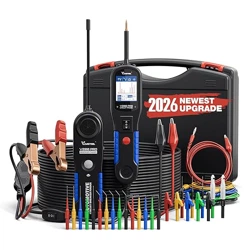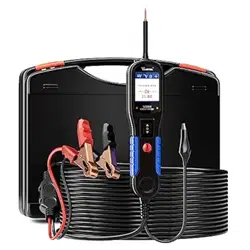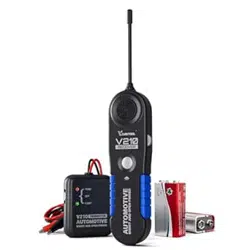
Automotive Circuit Probe &
Breaker Finder Kit
V200 PRO

Table of Contents
2.1 SPECIFICATIONS.....................................................................................................................................1
2.2 TOOL KIT DESCRIPTION.......................................................................................................................2
2.3 PARTS LIST.................................................................................................................................................3
2.4 GENERAL DESCRIPTION......................................................................................................................3
2.5 POWER.......................................................................................................................................................4
2.6 QUICK SELF-TEST..................................................................................................................................4
2.7 AUTO CIRCUIT BREAKER.....................................................................................................................5
2.8 WORK MODE...........................................................................................................................................5
2.4.1 CIRCUIT PROBE............................................................................................................................3
2.4.2 CIRCUIT BREAKER FINDER......................................................................................................4
1. IMPORTANT SAFETY INFORMATION...............................................1
2. USING THE CIRCUIT PROBE..............................................................1
3.1 VOLTAGE & POLARITY TESTING........................................................................................................7
3.2 CONTINUITY TESTING..........................................................................................................................9
3.3 SIGNAL CIRCUIT TESTING.................................................................................................................10
3.4 ACTIVATING COMPONENTS IN YOUR HAND............................................................................10
3.5 ACTIVATING COMPONENTS IN THE VEHICLE..........................................................................11
3.6 TESTING TRAILER LIGHTS AND CONNECTIONS......................................................................12
3.7 ACTIVATING COMPONENTS W/GROUND...................................................................................13
3.8 RED/GREEN POLARITY LED.............................................................................................................14
3.9 FOLLOWING & LOCATING SHORT CIRCUITS............................................................................15
3.10 CHECKING FOR BAD GROUND CONTACTS............................................................................15
3. OPERATIONG INSTRUCTIONS..........................................................7
6.1 HOW TO USE THE CIRCUIT BREAKER FINDER.........................................................................16
6.2 SETTING SENSITIVITY LEVEL..........................................................................................................16
6.3 BREAKER FINDER OPERATION GUIDE........................................................................................17
6. LOCATING OPEN CIRCUIT...............................................................16
7.1 LIMITED ONE YEAR WARRANTY....................................................................................................18
7.2 SERVICE PROCEDURES.....................................................................................................................18
7. WARRANTY AND SERVICE..............................................................18
4. TEST TOOL SPECIFICATIONS..........................................................15
5. CIRCUIT BREAKER FINDER KNOWLEDGE...................................16
1
Automotive Circuit Probe & Breaker Finder Kit
To prevent personal inju or damage to vehicles and/or the circuit probe,read this
instruction manual rst and obsee the following safety precautions whenever working
on a vehicle:
◆ Always peorm automotive testing in a safe environment.
◆ Wear eye protection that meets ANSI standards.
◆ Keep clothing, hair, hands, tools, test equipment, etc away from all moving or hot
engine pas.
◆ Operate the vehicle in a well ventilated work area: Exhaust gas are poisonous.
◆ Put blocks in front of the drive wheels and never leave the vehicle unattended while
running tests.
Use extreme caution when working around the ignition coil, distributor cap, ignition wires
and spark plugs. These component create hazardous voltage when engine is running.
◆ Put the transmission in PARK (for automatic transmission) or NEUTRAL (for manual
transmission) and make sure the parking brake is engaged.
◆ Keep a re extinguisher suitable for gasoling/chemical/electrical res nearby.
◆ Don’t connect or disconnect the circuit probe while the ignition is on or the engine
is running.
◆ Keep the tool d, clean, free from oil/water or grease. Use a mild detergent on a clean
cloth to clean the outside of the circuit probe, when necessa.
◆ When the power switch is depressed, batte current/voltage is conducted directly to
the tip which may cause sparks when contactiong ground or ceain circuits. Therefore
the tool should NOT be used around ammables such as gasoline or its vapors. The
spark of an energized tool could ignite these vapors. Use the same caution as you
would when using an arc welder.
1. Impoant safety information
2. Using the Circuit Probe
2.1 Specications
V200PRO Circuit Probe
Display TFT Color Display (168×128 dpi)
Operating Temperature 0 to 60°C (32 to 140°F)
Storage Temperature -40 to 70°C (-40 to 185°F)
External Power 12.0 or 24.0V Powered by Connecting to Vehicle Batte
Dimensions (L × W × H)
188 × 48 × 25mm(7.24 × 1.88 × 0.98 In)
(Cable Length 174mm/6.85 in)
Material Plastic Case
V200PRO Breaker Finder
Operating Voltage 9V (Powered by Internal 9V Batte)
Material Plastic Case + Bendable Metal Probe
2
Automotive Circuit Probe & Breaker Finder Kit
Operating Temperature 0 to 60°C (32 to 140°F)
Storage Temperature -40 to 70°C (-40 to 185°F)
184 × 48 × 24mm/7.24 X 1.88 X 0.94 In
(Probe Length 72mm/2.83 In)
Dimensions (L × W × H)
2.2 Tool Kit Description
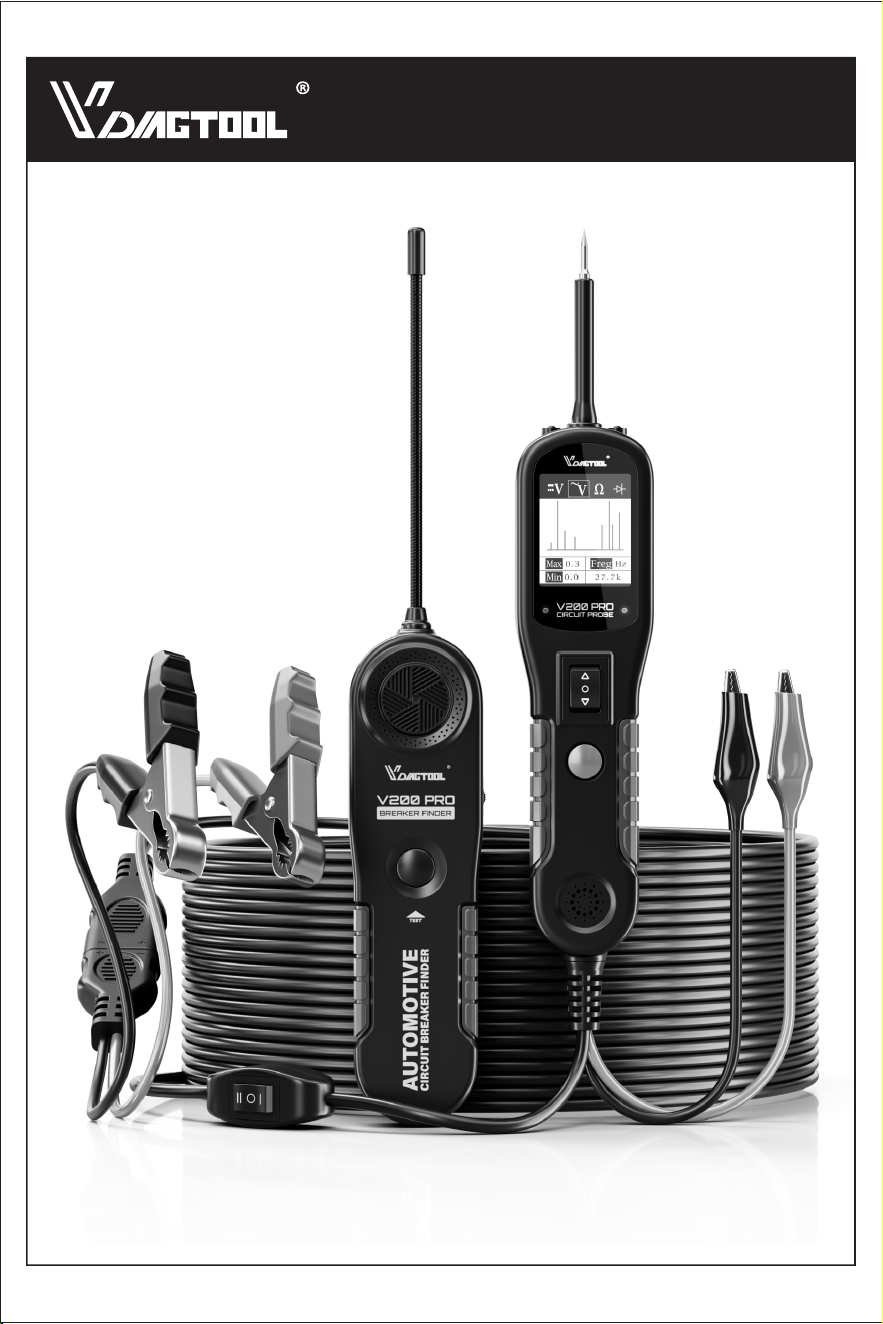
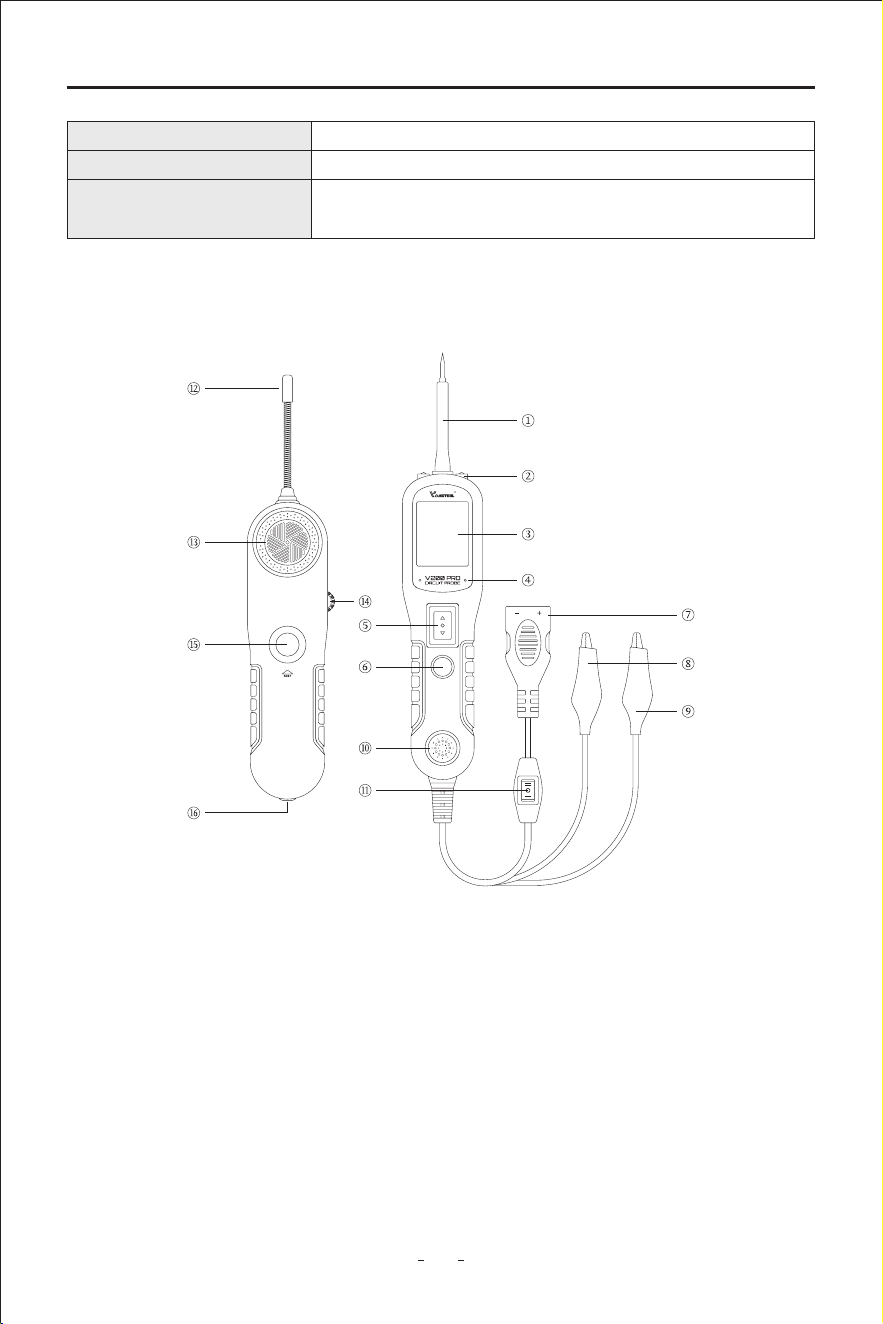
① Probe Tip - Contacts the circuit or component to be tested.
② Head Lights - lluminates dark work areas or work areas at night.
③ LCD Display - Indicates test results.
④ Red/Green Polarity Indicator - Identies positive, negative or open circuits. The RED
indicator lights up when the Probe Tip is contacting a positive circuit. The GREEN
indicator lights up when the Probe Tip is contacting a negative circuit.
⑤ Power Switch - Allows you to conduct a positive or negative batte current to the tip
for activating and testing the function of electrical components.
⑥ Mode Button - Selects the work mode: AC Voltage, DC Voltage, Resistance, Diode.
⑦ Adaptor - Connects to the batte.
⑧ Auxilia Ground Lead - Assists test as a ground lead.
3
Automotive Circuit Probe & Breaker Finder Kit
⑨ Red Positive Wire - Used to deliver current.
⑩ Loudspeaker - Ale prompt.
⑪ Tool Kit Working Mode Switch - Switch between Circuit Probe(I) and Breaker Finder(II)
working modes.
⑫ Antenna - Receive Data.
⑬ Buzzer - Sound prompt.
⑭ Sensitivity Controller - Control sensitivity.
⑮ Test Button- Press the test button to sta testing.
⑯ Headphone Po - Po for external headphone.
The circuit probe is the best electrical tester for reducing diagnostic time in all 6 to 30-volt
vehicle electrical systems. After a simple hook-up of the tool to the vehicle's batte, you
can:
◆ Determine at a glance if a circuit is positive, negative, or open without having to
reconnect clips from one batte pole to another.
◆ Test for continuity with its built-in auxilia ground lead.
◆ By depressing the power switch, conduct a positive or negative batte current to the
probe tip for testing the function of an electrical component without the use of jumper
wires.
◆ Test for poor ground contacts instantly without peorming voltage drop tests. The tool
is also sho circuit protected; its internal circuit breaker will trip if it becomes overloaded.
◆ Follow and locate sho circuits without wasting fuses. The tool's long cable allows you
to test along the entire length of the vehicle without constantly searching for suitable
vehicle grounds.
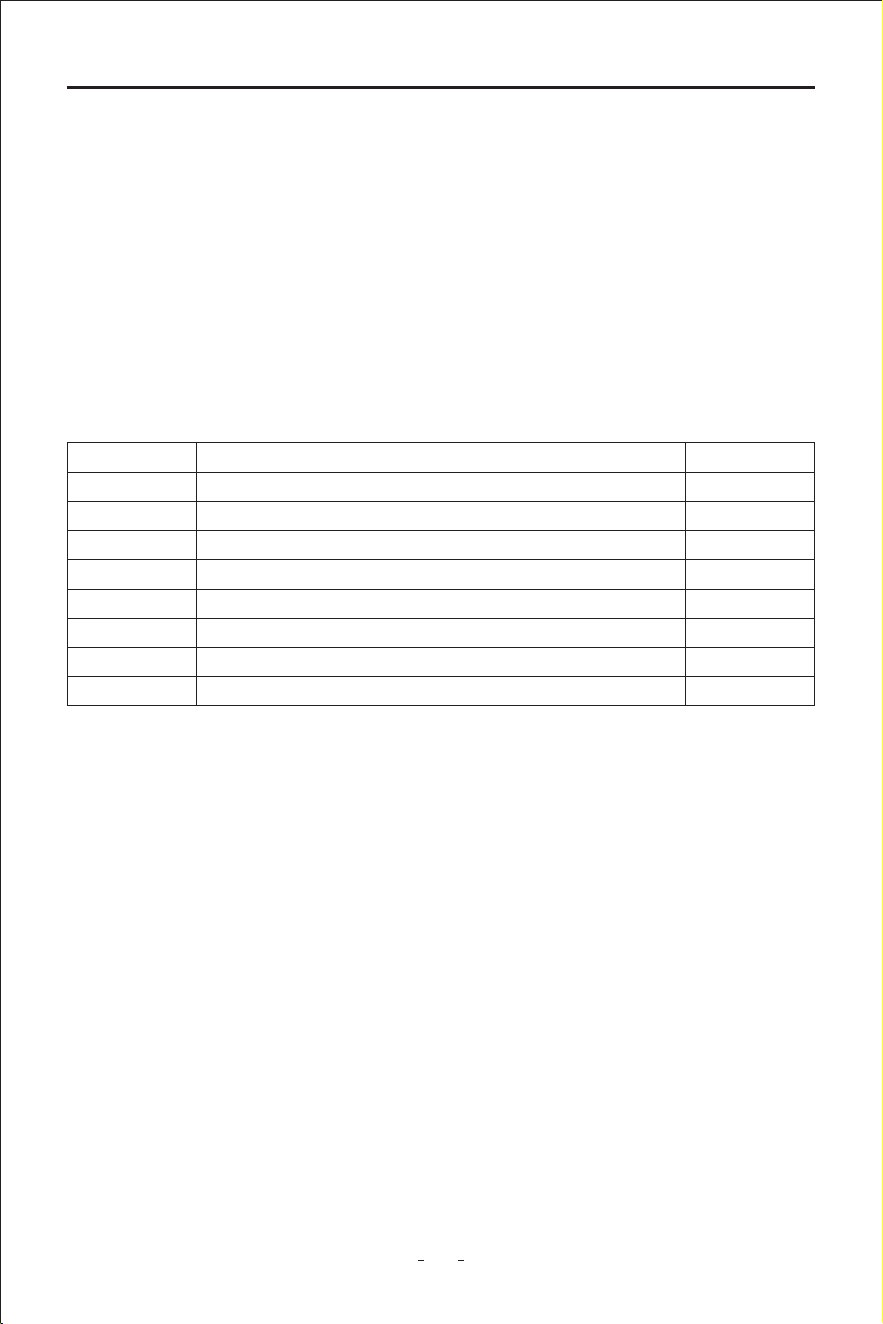
2.3 Pas List
2.4 General Description
2.4.1 Circuit Probe
DescriptionPa Qty
User’s Manual1 1
Cigarette lighter adapter2 1
Batte hookup clips3 1
Probe tip4 1
Extension cable(20ft.)5 1
Rugged blow molded case6 1
Power assist cable7 1
Breaker Finder8 1

4
Automotive Circuit Probe & Breaker Finder Kit
◆ The Circuit Breaker Finder detects and ales you immediately where a circuit is open.
◆ You can quickly and easily locate open circuits, open connections, broken wires, current
leaks, and even trace wires.
◆ Additionally, you can nd intermittent circuit problems by exing wires or connectors
and listening for a change in the receiver tone, allowing you to either peorm general
tracing or pinpoint the problem location.
◆ This professional circuit breaker nder tool will work on all kinds of circuits with
voltages between 6 and 42 volts DC, such as those found in automobiles, trucks,
tractors, boats, RVs, etc., thanks to its wide working voltage range.
2.4.2 Circuit Breaker Finder
2.5 Power
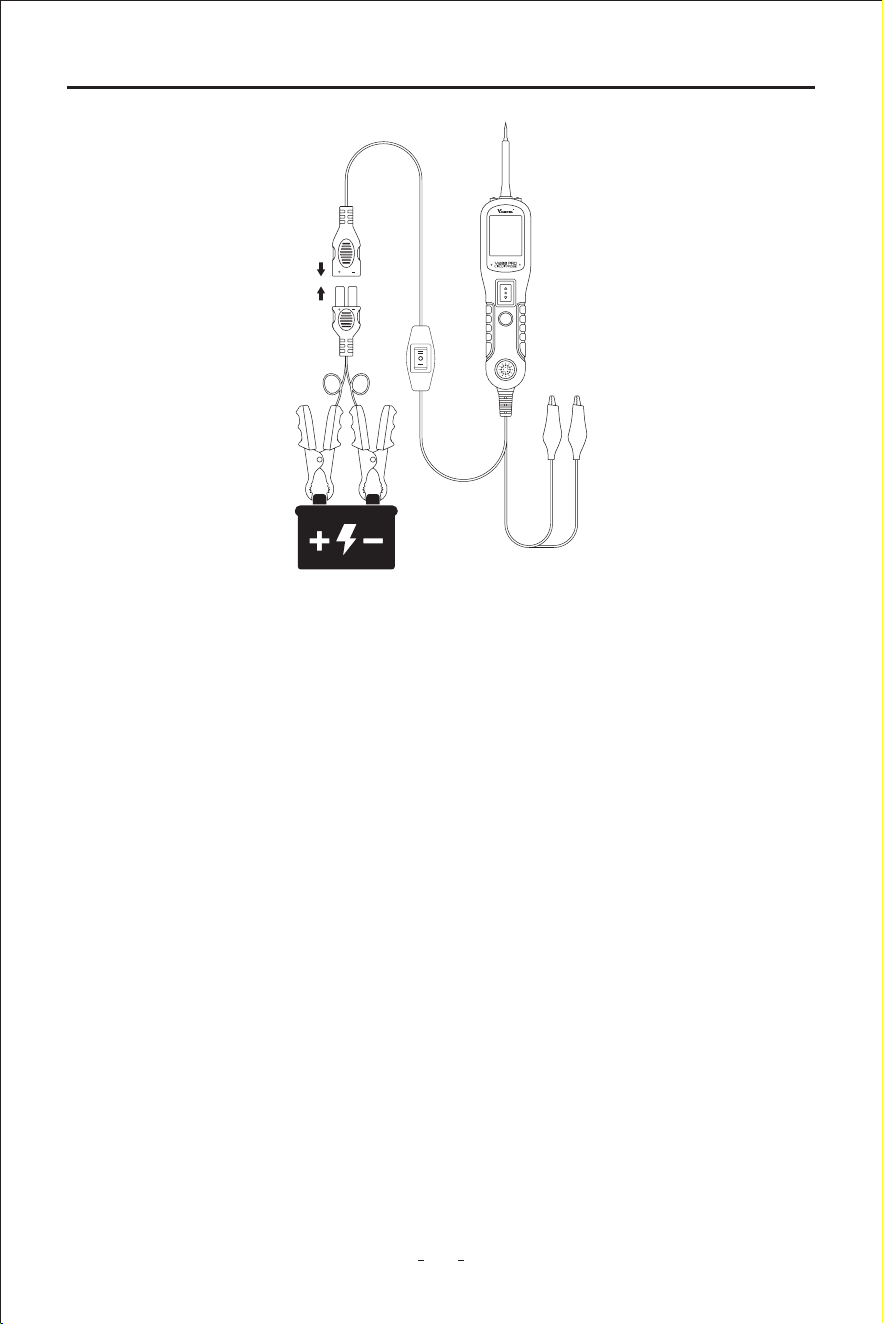
The tool kit is powered by connecting to the vehicle batte. Connect the RED batte
clamp to the POSITIVE terminal of the vehicle's batte, and the BLACK clamp to the
NEGATIVE terminal. When the tool is rst connected to a batte (power source), it will
sound a beep and the Head Lights will be on to illuminate the test area of the probe tip.
2.6 Quick Self-Test
Before you test a circuit or component, be sure your tool kit is in good order by doing a
quick self-test.
With the tool kit connected, select Mode I on the tool kit mode switch button,peorm a
quick self-test. The power switch is a momenta rocker switch located on the tool's body.
Flanking the switch are positive and negative markings.
Press the Power Switch forward to activate the tip with a positive voltage. The Red LED
should light up and LCD display will read the batte voltage. A beep tone will sound. Let
go of the power switch and the LED will turn o and the tone will cease. Press the Power
Switch backward to activate the tip with a negative voltage. The green LED should light up
and the LCD display will read 0.0V (ground). A beep tone will sound. Let go of the power
switch and the LED will turn o and the tone will cease. Your tool is working correctly and
is now ready for use. (Figure 1)
Note: If you accidentally pressed the power switch forward and released it sholy after, it
will show voltage changing from around 12volt to zero volt which is normal as it
indicates testing result of the batte voltage and then the voltage of the
components that’s not connected yet respectively.
5
Automotive Circuit Probe & Breaker Finder Kit
Figure 1
DC voltage
2.7 Auto Circuit Breaker
The tool is sho-circuit protected. Its internal circuit breaker will trip if it becomes
overloaded.
The circuit breaker is a valuable test tool as well as a safety measure to protect the tool
from overload.
When circuit breaker tripped, all other functions of the tool are still active, which means you
can still probe a circuit and obsee the voltage reading. When the circuit breaker is tripped,
the tool will NOT be able to conduct batte current test to the tip even when the power
switch is pressed. Intentionally tripping the breaker and using the tool to probe can be
considered an added precaution against accidental pressing of the power switch.
2.8 Work Mode
There are four modes to diagnose the electrical systems, which can be accessed by
depressing the Mode Button and cycling through each one.
IMPORTANT: When powering-up components, you can increase the life of power switch in the tool if you
rst press the switch, then contact the tip to the component. The arcing will take place at the
tip instead of the contacts of the switch.
6
Automotive Circuit Probe & Breaker Finder Kit
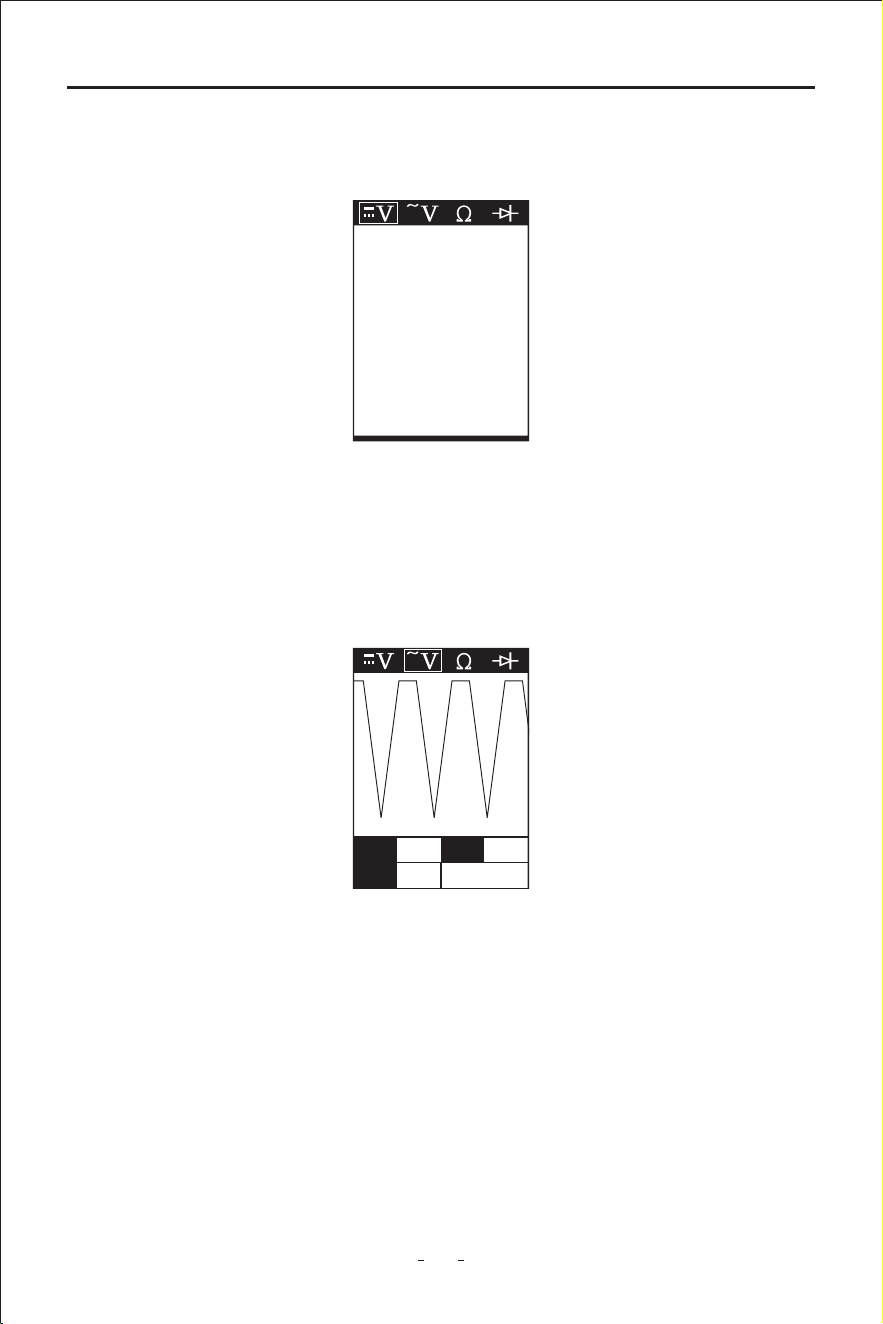
While the circuit probein this mode, contact the probe tip to a circuit, then the LCD display
will read the DC voltage with a resolution of 0.1 volt. (Figure 2)
While the circuit probe in this mode, contact the probe tip to a circuit, then the LCD
display will read the Max. Voltage, the Min. Voltage and frequency.(Figure 3)
AC voltage
Figure 2
12.1V
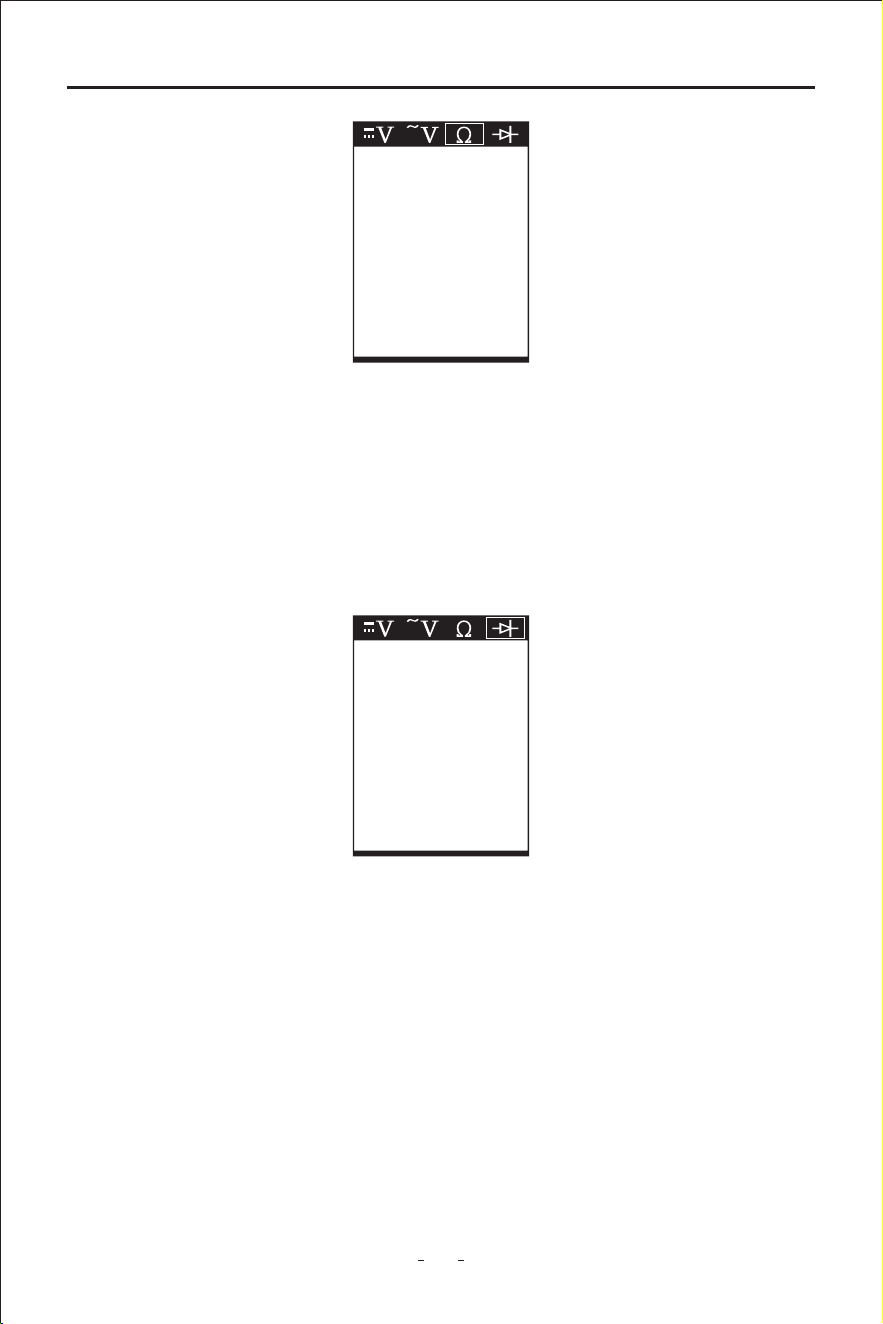
While the circuit probe in this mode, contact the probe tip to a circuit, then the LCD display
will read the resistance between the tip and auxilia ground lead. (Figure 4)
Resistance
Figure 3
Max 17.9 Freq Hz
Min 0.3 50
7
Automotive Circuit Probe & Breaker Finder Kit
In this mode, the probe tip contact the positive terminal of the diode, connect the auxilia
ground lead to the negative terminal of the diode, the screen will display the forward
voltage drop, indicates the forward bias. If switch the probe tip and auxilia ground lead,
the screen will not display the voltage, indicates the reverse bias. (Figure 5)
Diode
Figure 4
1.2K
Figure 5
1.2K
3. Operating Instructions
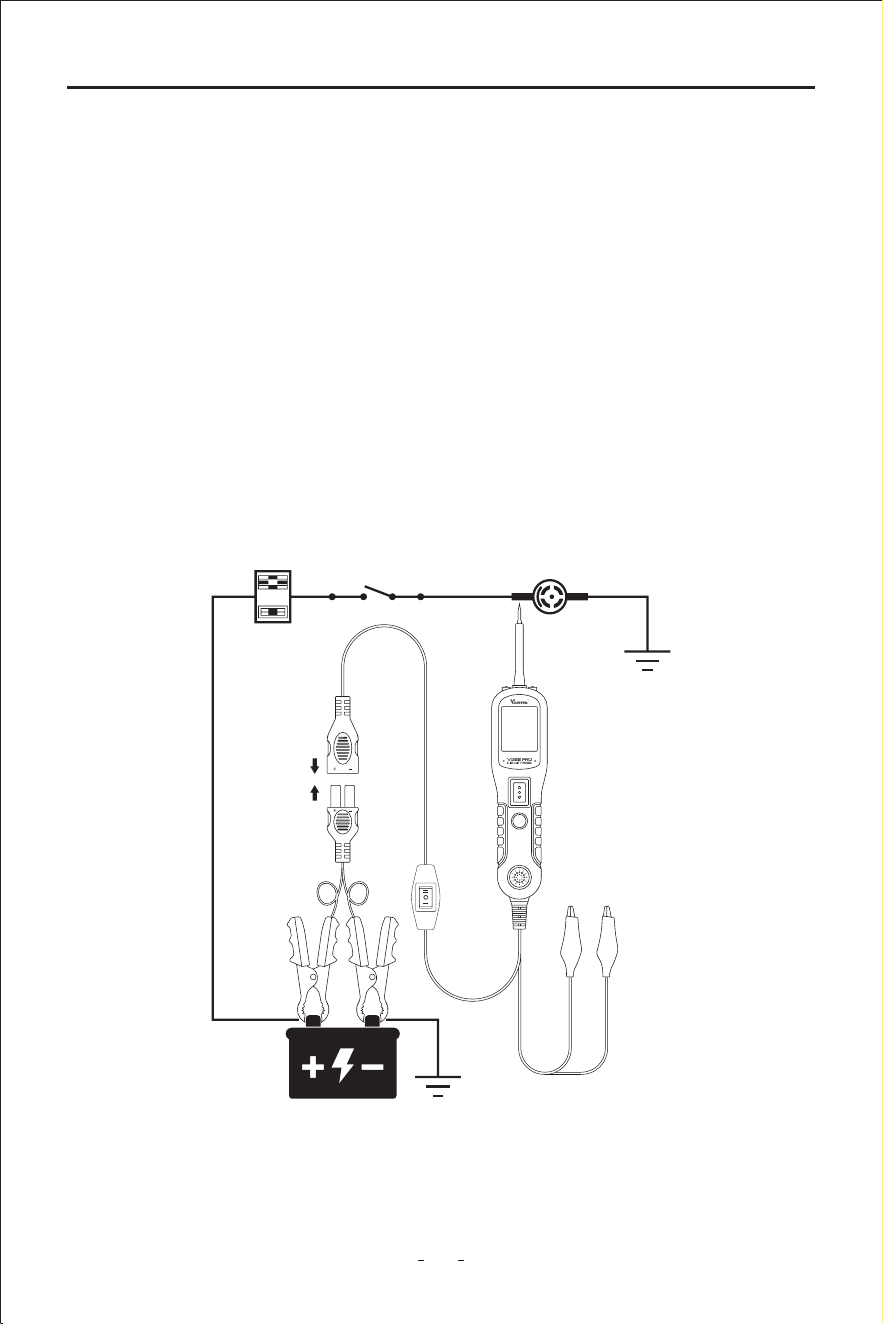
3.1 Voltage & Polarity Testing
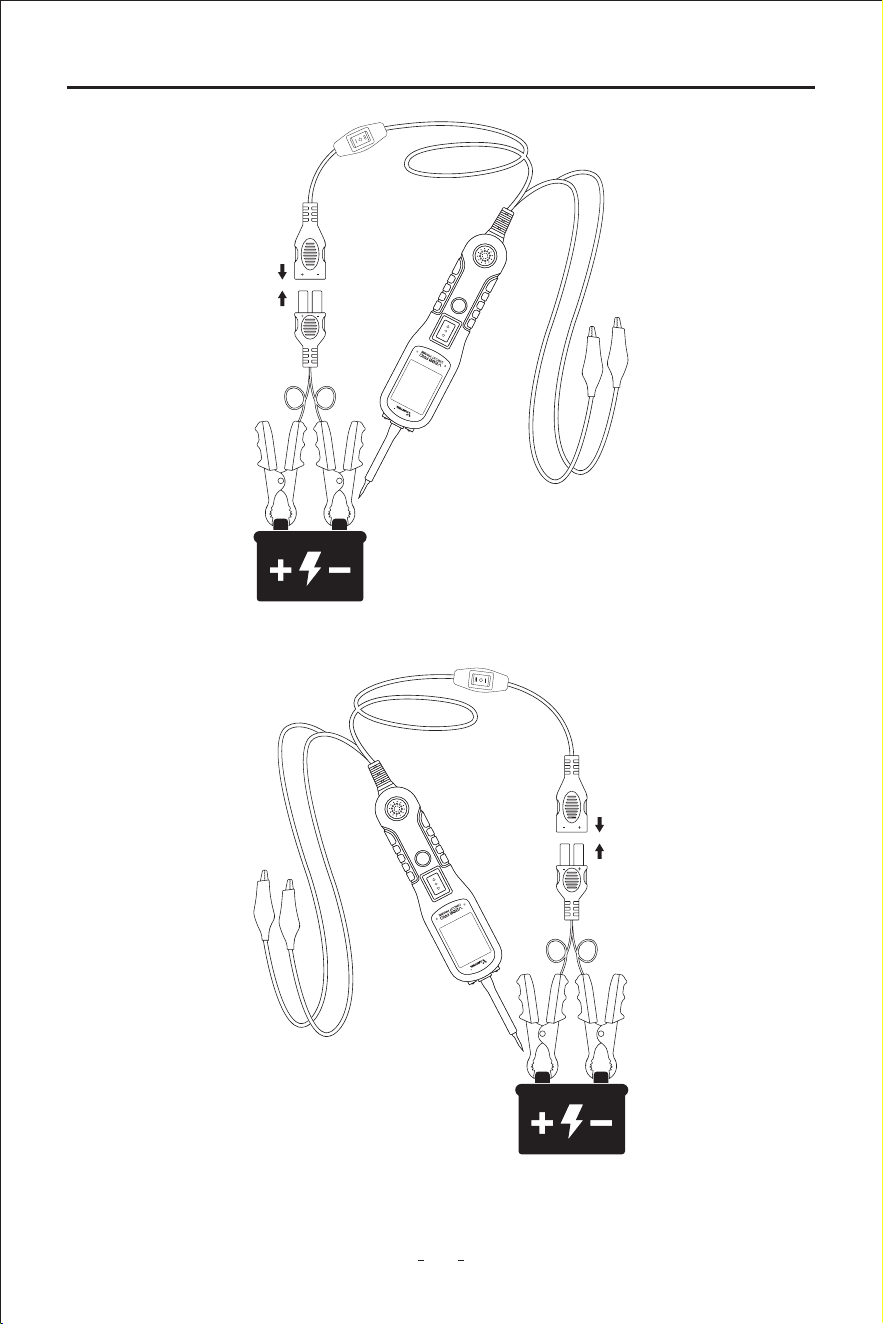
While the tool is in DC Voltage mode, contact the probe tip to a POSITIVE circuit. The red
LED will light up and the LCD displays the voltage with a resolution of 0.1V. A beep tone will
sound.
If contact the probe tip to a NEGATIVE circuit, the green LED will light up and the LCD
displays the voltage with a resolution of 0.1V. A beep tone will sound.
If contact the probe tip to an OPEN circuit. Neither of the LED will light up. (Figure 6 / 7)
8
Automotive Circuit Probe & Breaker Finder Kit
Figure 6
Figure 7
9
Automotive Circuit Probe & Breaker Finder Kit
3.2 Continuity Testing
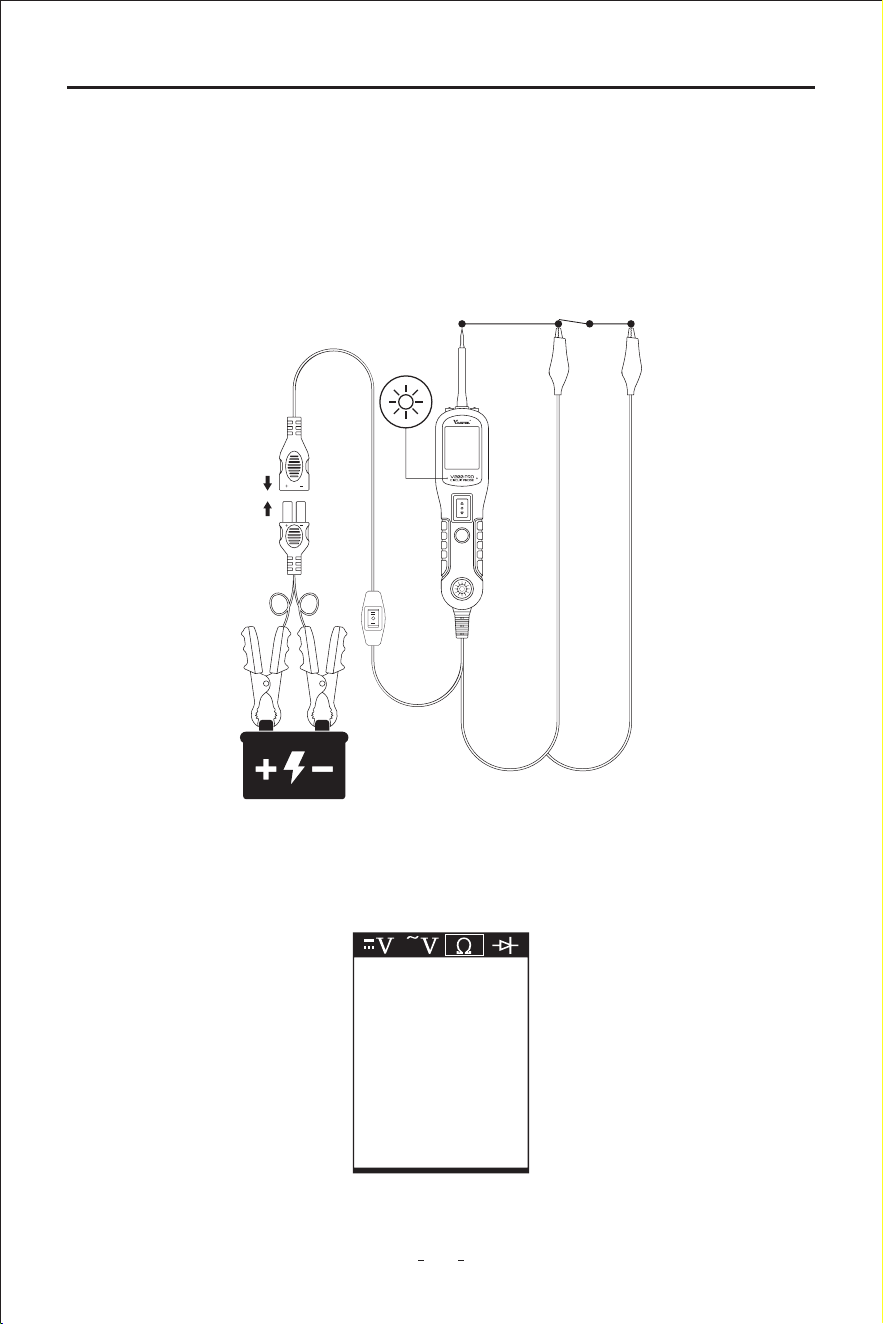
While the circuit probeis in Resistance mode, using the probe tip and the auxilia ground
lead, continuity can be tested on wires and components attached or disconnected from
the vehide's electrical system.
When the probe tip is contacting a good ground, the LCD will indicate “0.0Ω” and green
LED will be on. A beep tone will sound (Figure 8)
Figure 8
In other cases, the LCD only indicates the resistance value, (Figure 9)
Figure 9
1.2K
10
Automotive Circuit Probe & Breaker Finder Kit
If the resistance value is greater than 100KΩ, the LCD will show “0L”.
There is also another way to prove continuity of connections to ground or batte.Power up
the connection using the power switch. If the circuit breaker trips, you have a good solid low
resistance connection.
Note: You can use the probe tip to pierce the plastic insulation on a wire. This means that
you can test the circuit without disconnecting anything.
Figure 10
If the LCD readings are abnormal, there is a problem with this sensor.
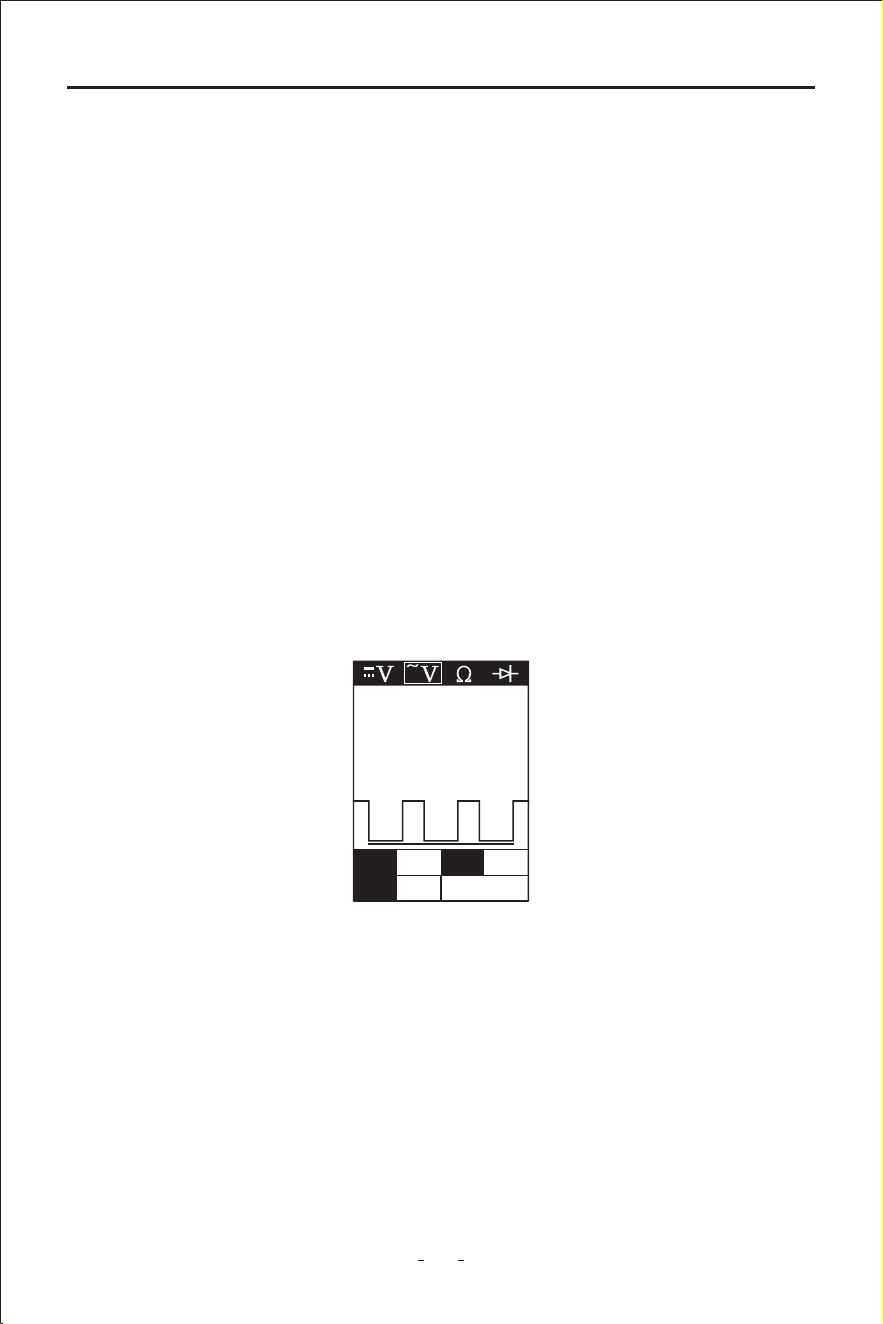
3.3 Signal Circuit Testing
Once you extract a DTC from the vehicle and realize that troubleshooting begins with some
kind of sensor circuit, there is a quick test you can peorm to verify the code. Testing your
sensor is easy while using the tool.
For example, you suspect there is a problem with your M.A.P. sensor circuit, then follow the
procedure below to test this sensor:
◆ Set the tool in AC Voltage mode, using the probe tip and the auxilia ground lead.
◆ Connect vacuum pump to MAP sensor.
◆ Contact the probe tip to the MAP sensor positive terminal and obsee the LCD readings
which should be a sine wave in normal condition.
◆ Apply vacuum.
◆ Release vacuum and obsee the LCD readings. (Figure 10)
3.4 Activating Components in Your Hand
While the circuit probe is in DC voltage mode, by using the probe tip in connection with
the auxilia ground lead, components can be activated right in your hand, thereby
testing their functions.
Connect the auxilia ground lead to the negative terminal or ground side of the compo-
nent being tested. Then contact the probe tip to the positive terminal of the component,
Max 12.4 Freq Hz
Min 0.2 43.0K
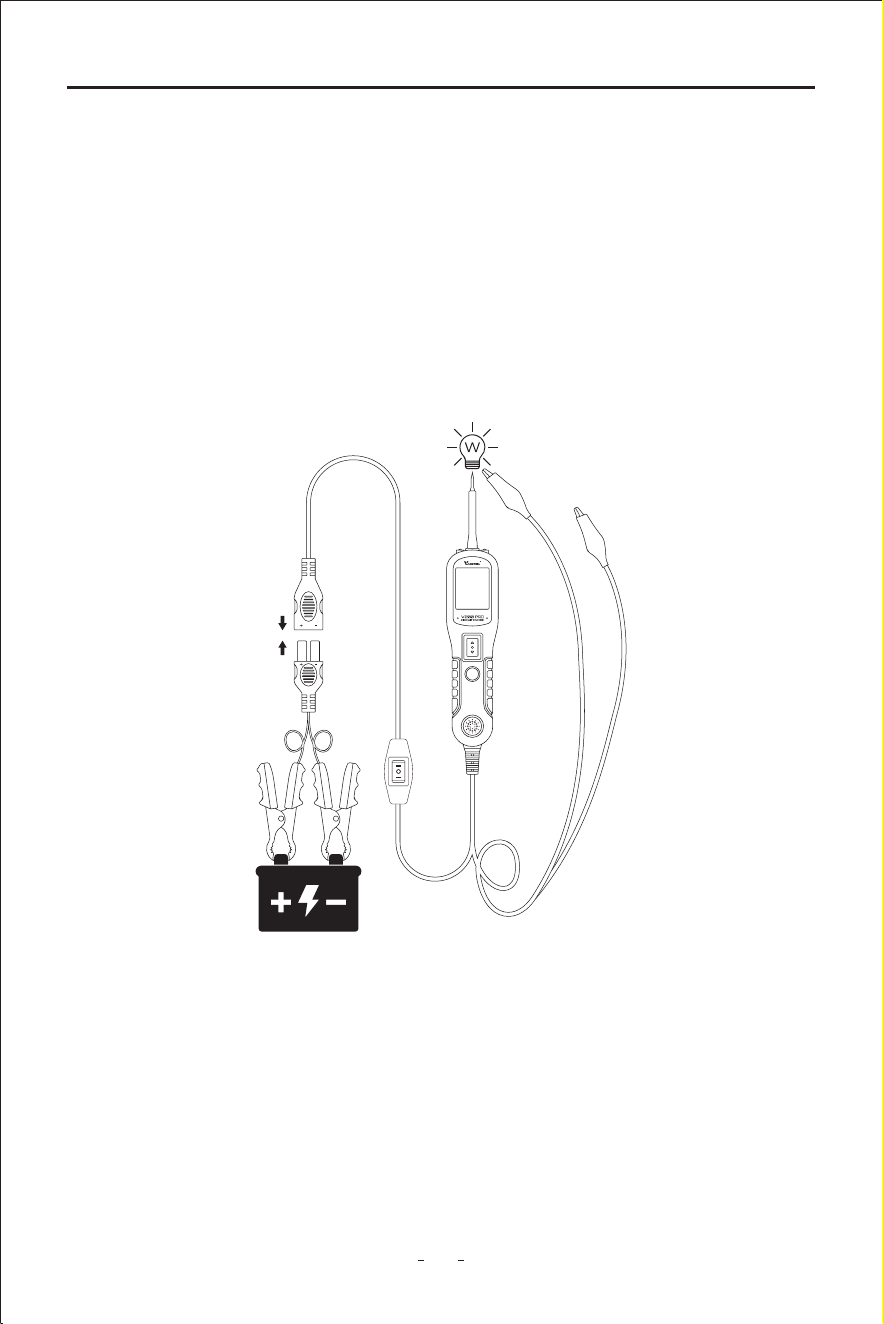
11
Automotive Circuit Probe & Breaker Finder Kit
Figure 11
If the green LED went o at that instant or if the circuit breaker tripped, the circuit probe
has been overloaded. This could happen for the following reasons:
◆ The contact you are probing is direct ground or negative voltage.
◆ The component you are testing is sho-circuited.
◆ The component is a ve high current component (i.e., staer motor).
If the circuit breaker is tripped, reset it by waiting for it to cool down (15 sec.)
3.5 Activating Components in The Vehicle
the green LED should light up, indicating continuity through the component. While
keeping an eye on the green LED, quickly press and release the power switch forward. If the
green LED went out and the red LED came on, you may proceed with fuher activation.
Push the power switch forward and hold it down to provide power to your component. With
the power switch pushed forward, power will ow from the positive lead on the batte to
the probe tip, then to the component’s positive terminal, through the component, through
the auxilia ground lead, then back to the tool, and all the way back to the vehicle’s
batte’s ground. (Figure 11)
(1) Press the power switch forward to activate the bulb.
(2) Contact the tip to the positive terminal of the bulb.
(3) Connect the negative auxilia clip.
12
Automotive Circuit Probe & Breaker Finder Kit
Figure 12
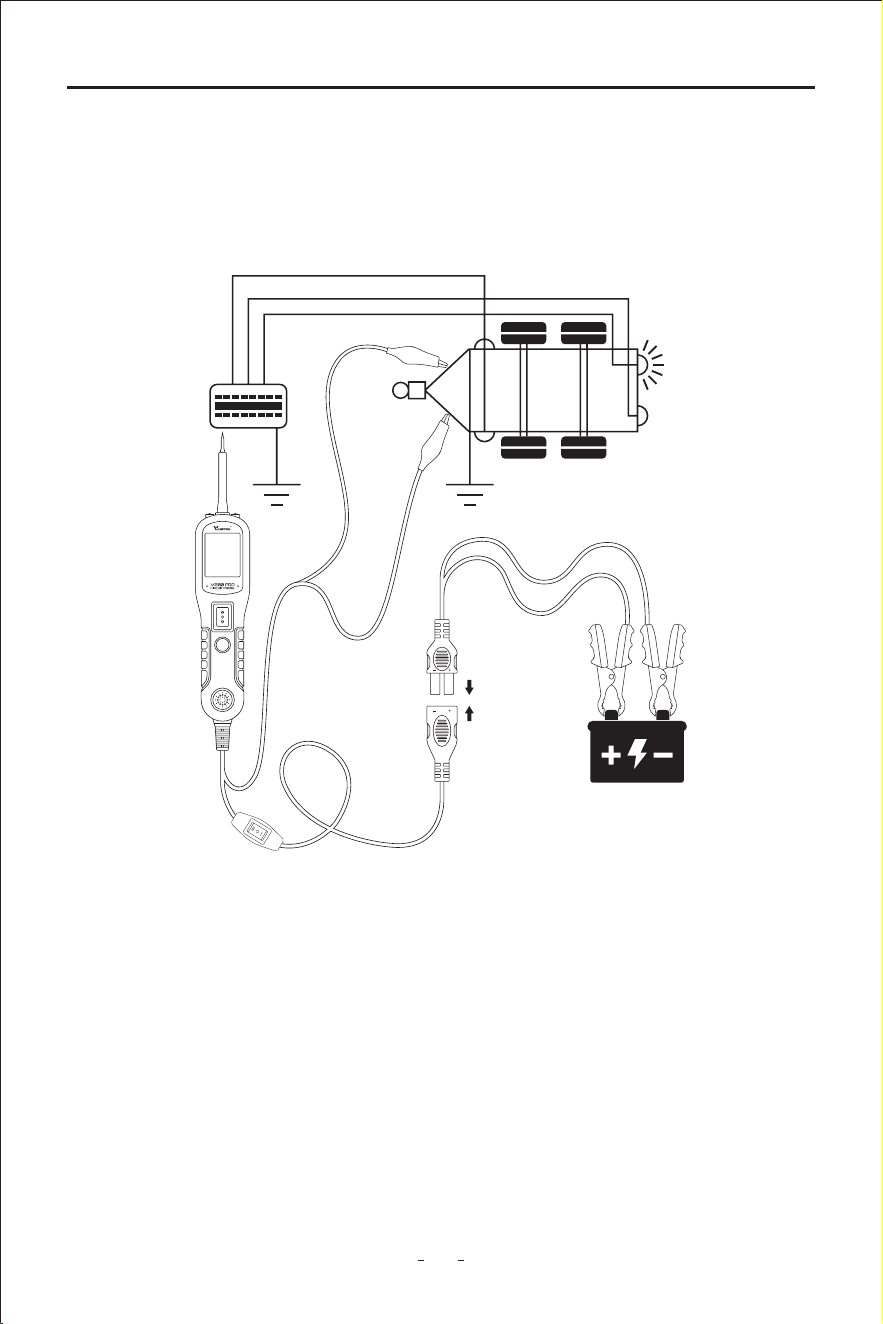
3.6 Testing Trailer Lights and Connections
While the circuit probe in DC Voltage mode, contact the probe tip to the positive terminal
of the component, the green LED should light up, indicating continuity to ground. While
obseing the green LED. Quickly press the power switch button forward and release, if the
green LED went out and the red LED comes on, you may proceed with fuher
activation. (Figure12) If the green LED went o at that instant or if the circuit breaker
tripped, the circuit probe has been overloaded. This could happen for the following
reasons:
(1) The contact you are probing is a direct ground
(2) The component you are testing is sho-circuited
(3) The component is a ve high current component (i.e., staer motor).
If the circuit breaker is tripped, reset it by waiting for it to cool down (15 sec.)
WARNING: Haphazardly applying voltage to ceain circuits can cause damage to a
vehicle's electronic components. Therefore, it is strongly advised to use the
vehicle manufacturer's diagram and diagnosing procedure while testing.
NOTE: When powering up components, you can increase the life of power switch if you rst
press the switch, then contact the tip to the component. The arcing will take place
at the tip instead of the contacts of the switch.
13
Automotive Circuit Probe & Breaker Finder Kit
When the tool in DC Voltage mode, clip the auxilia ground lead to the trailer ground,
probe the contacts at the jack and then apply voltage to the probe tip. This allows you
check the function and orientation of the connector and trailer lights. (Figure 13)
If the circuit breaker tripped, that contact is likely a ground. Reset the circuit breaker by
letting it cool down for 15 seconds.
Figure 13
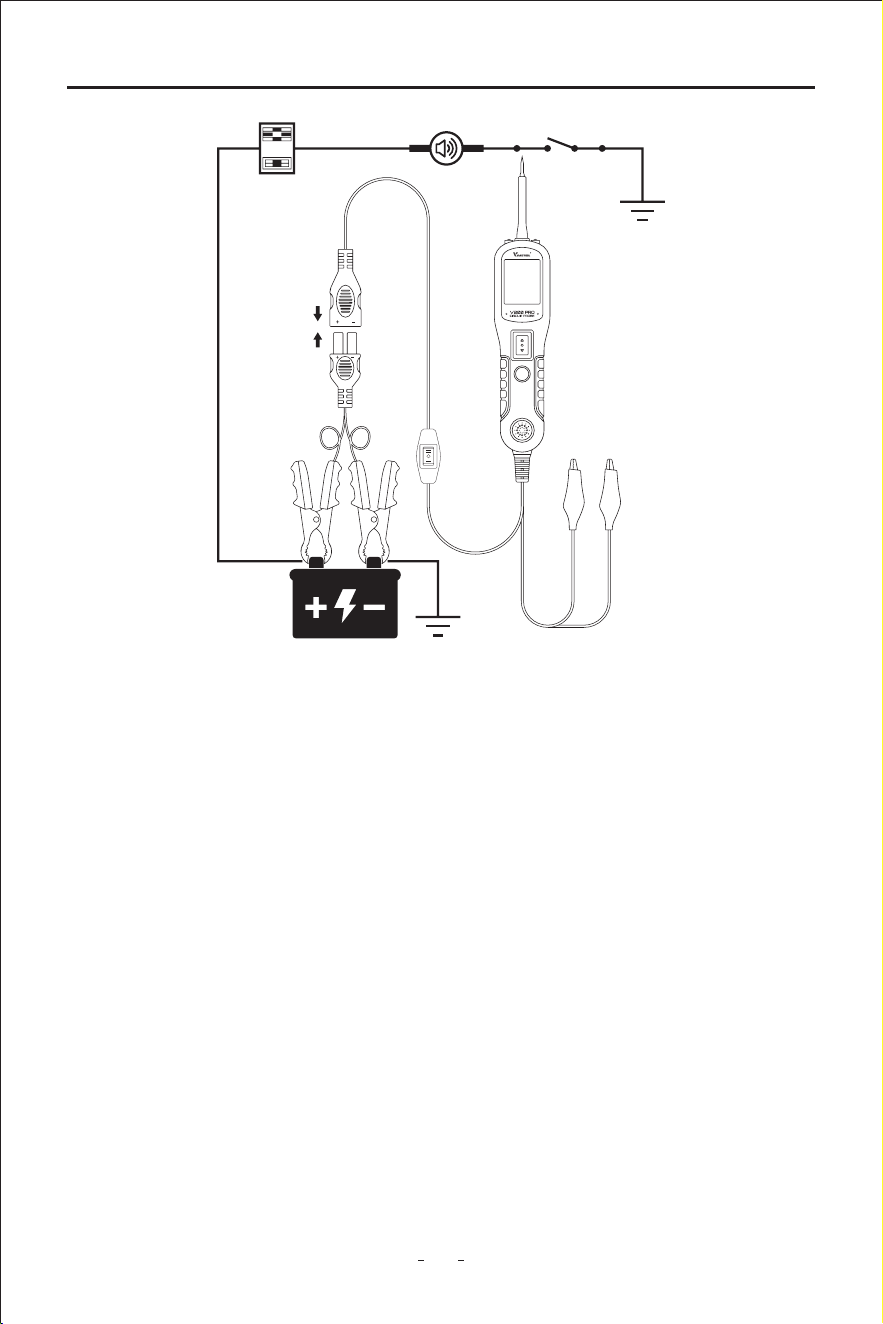
3.7 Activating Components W/Ground
While the circuit probe in DC Voltage mode, contact the probe tip to the negative termina
of the component, the red LED should light up. While obseing the red LED, quickly press
the power switch backward and release the button. If the red LED went out and the green
LED came on, you may proceed with fuher activation. (Figure 14) If the green LED went
o at that instant or if the circuit breaker tripped, the circuit probe has been overloaded.
This could happen for the following reasons:
(1) The contact you are probing is a direct positive voltage.
(2) The component you are testing is sho-circuited.
(3) The component is a ve high current component(i.e., staer motor).
If the circuit breaker is tripped, reset it by waiting for it to cool down (15 sec.)
14
Automotive Circuit Probe & Breaker Finder Kit
Figure 14
3.8 Red/Green Polarity LED
The Red/Green Polarity LED lights up when the probe tip voltage matches the batte
within ±0.4 volts. It is added information that could be valuable to the technician.
If the circuit you are testing is not within a 0.4 volt (plus or minus) of supply voltage, you will
see the voltage reading on the LCD but you will not hear a tone or see a red or green LED.
This tells you either you have a voltage drop in excess of 0.8 volt from batte voltage or you
are probing a circuit that has an increase of a 0.8 volt or more over batte voltage. To
determine batte voltage, simply remove the tip from the circuit and press the power
switch forward. Batte voltage will then be displayed on the LCD. The dierence between
the batte voltage and what is read on the circuit is either voltage drop or voltage
increase.This allows you to determine a voltage drop without running back to check the
batte. It’s just another one of time saving feature the circuit probe has.
WARNING: With this function, if you are contacting a protected circuit, a vehicle’s fuse can
be blown or tripped if you apply ground to it.

15
Automotive Circuit Probe & Breaker Finder Kit
◆ Circuit Probe:
DC voltage range: 0-65V + 1 digit
Resistance range: 0-100 kΩ
Frequency response of tone pass through 0Hz to 10Khz
Circuit Breaker
Rating current: 1-10 Amp
◆ Breaker Finder:
DC voltage range: 6-24V
Special features: sho cable nder
3.9 Following & Locating Sho Circuits
In most cases a sho circuit wil appear by a fuse or a fusible link blowing or an electrical
protection device tripping (i.e., a circuit breaker). This is the best place to begin the search.
Remove the blown fuse from the fuse box.
Use the probe tip to activate and energize each of the fuse contacts. The contact which
trips the circuit breaker is the shoed circuit. Take note of this wire's identication code or
color. Follow the wire as far as you can along the wiring harness.
Here is an example of this application.
If you are following a sho in the brake light circuit, you may know that the wire must pass
through the wiring harness at the door sill. Locate the color-coded wire in the harness and
expose it.
Probe through the insulation with the probe tip, and depress the power switch forward to
activate and energize the wire.
If the circuit breaker tripped, you have veried the shoed wire. Cut the wire and energize
each end with the probe tip. The wire end which trips the circuit breaker again is the shoed
circuit and it will lead you to the shoed area.
Follow the wire in the shoed direction and repeat this process until the sho is located.
3.10 Checking for Bad Ground Contacts
4. Test Tool Specications
Probe the suspected ground wire or contact with the probe tip.
Obsee the green LED. Depress the power switch forward then release. If the green LED
went out and the red LED came on, a beep will sound, this is not a true ground. If the circuit
breaker tripped, this circuit is more than likely a good ground: Keep in mind that high
current components such as staer motors will also trip the circuit breaker.
16
Automotive Circuit Probe & Breaker Finder Kit
Is circuit breaker nder computer and air bag safe?
The circuit breaker nder LED and LCD pull no more than 1 millamp of current, therefore
when using it as a test light or multimeter it is computer and airbag safe. However, pressing
the power switch is a dierent sto. When you press the switch forward, you are
conducting full batte current to the tip of the probe. There is a nice safety feature built
into the tool. Simply connect the extra ground lead to the circuit breaker nder and press
the power switch forward until it trips the circuit breaker. This will prevent power from
going to the tip but still allow you to use the tool as a multimeter. When you are away
from computer components, simply press the reset button and you are ready to power up
again.
5. Circuit Breaker Finder Knowledge
Figure 15
6. Locating Open Circuit
6.1 How To Use The Circuit Breaker Finder
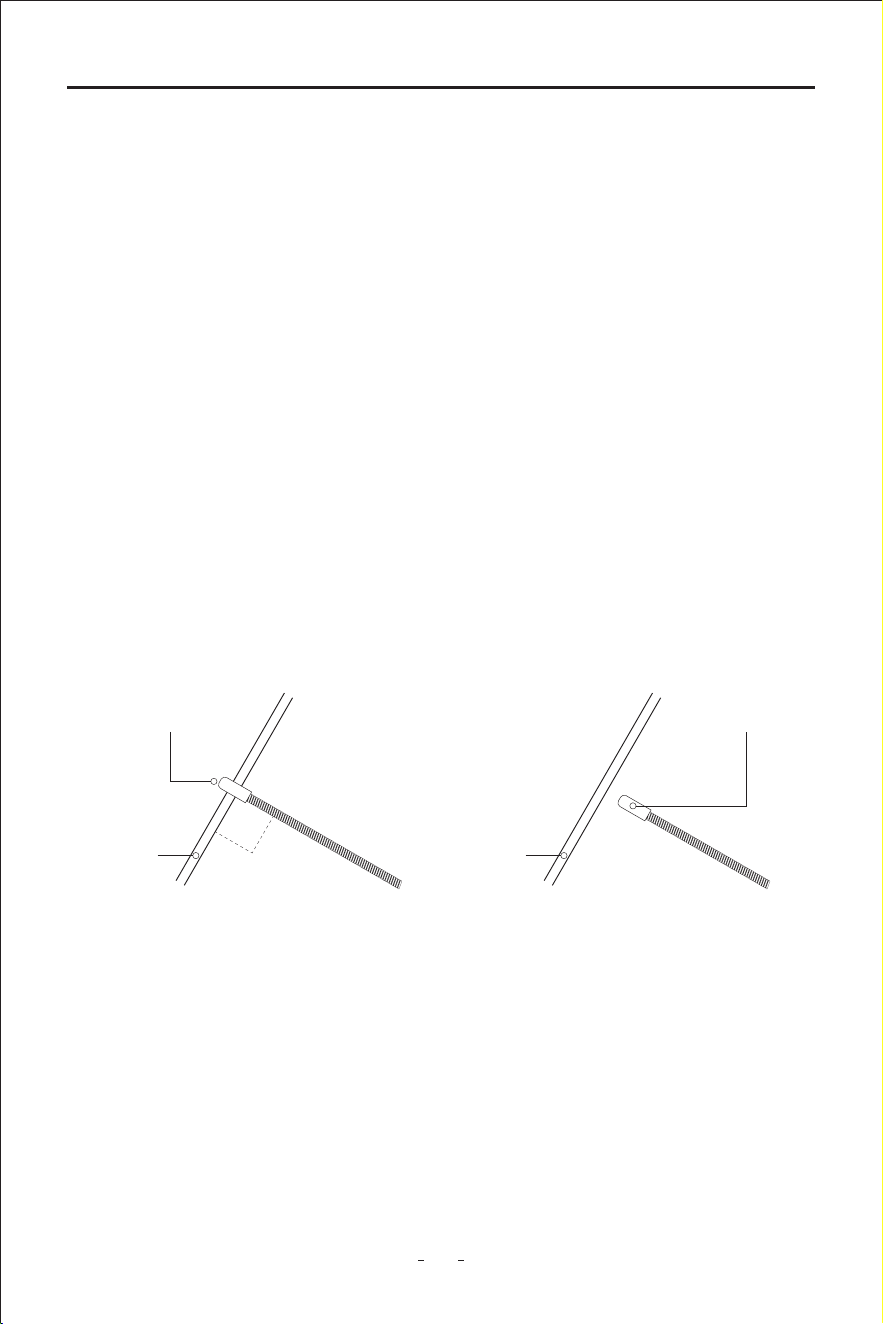
The probe of the breaker nder is built of coiled steel and may be bent as needed. In order
to reach wires in congested or dicult areas. Depending on the circuit characteristic and
sensitivity settings, the probe will pick up the signal from the wire in a range of positions.
However, for the best possible range, the Breaker Finder’s probe tip (black cap) should be
positioned perpendicular(at 90°)to the wire being traced and either above or below it.
6.2 Setting Sensitivity Level
To increase sensitivity, turn the rota switch of the circuit breaker nder clockwise. To
decrease sensitivity, turn the rota switch anticlockwise.
CORRECT
Sensor
Cable
90°
INCORRECT
Sensor
Cable

17
Automotive Circuit Probe & Breaker Finder Kit
6.3 Breaker Finder Operation Guide
With the probe kit connected to power, select Mode II on the tool kit working mode switch
button.
Switch on the breaker nder and set the rota switch to the middle position. Press and hold
the TEST button, and move the black probe tip along the wire you want to test. The breaker
nder detects the signal and sound the loudspeaker which means the unit is working
correctly.
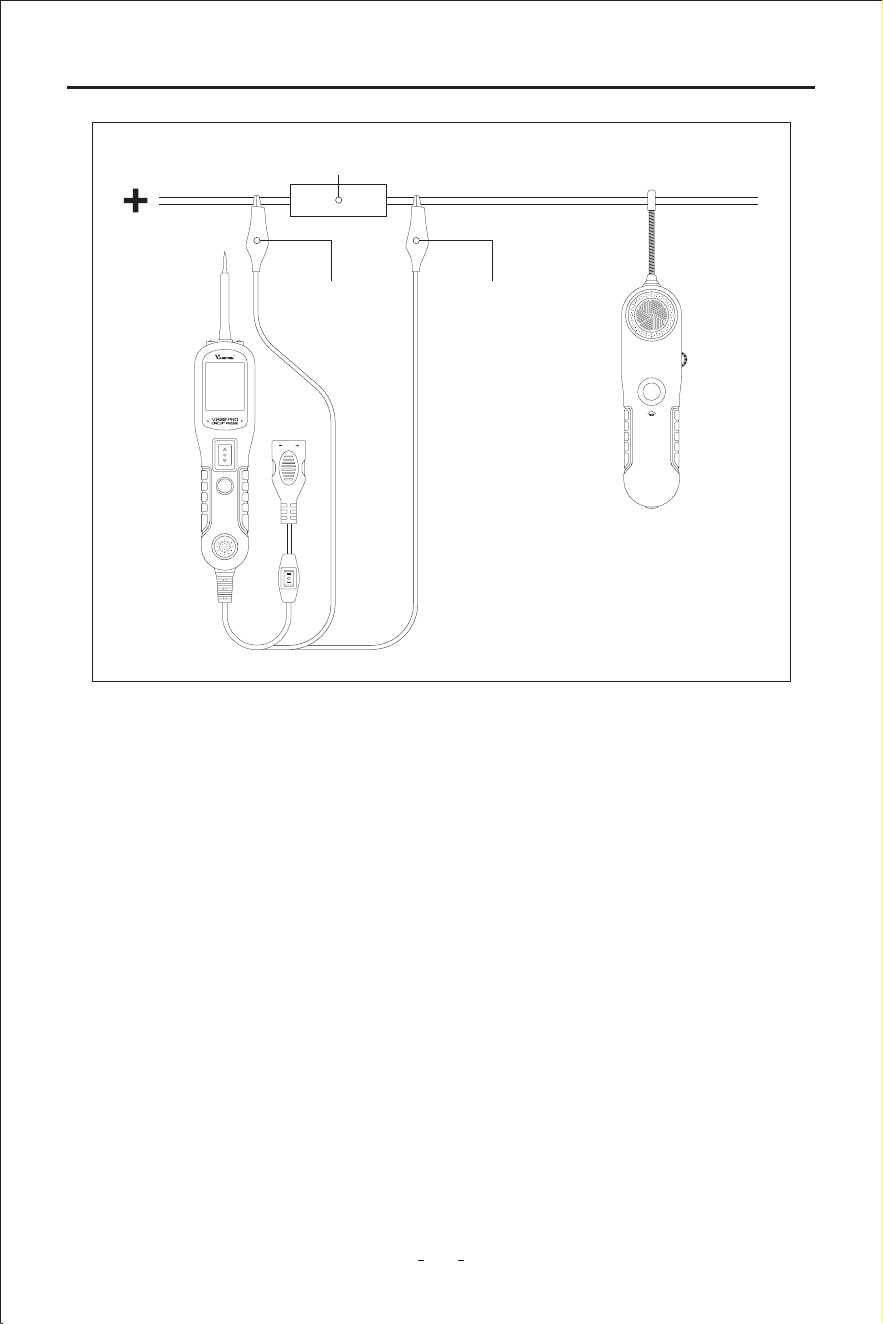
Connect the black test lead to the negative supply(ground) and red test lead to the positive
supply(or a fuse socket, connector for more convenient connection). Switch on the breaker
nder probe and set its rota switch to the middle position, press and hold the TEST button
and slowly sweep the wire with the probe point above or below perpendicularly and as
close as possible. Check at dierent points of the wire to narrow it down rst or tracing the
wire all along, moving towards the end with load.
Obsee the tone signal. Where the tone signal stops, it’s the location of the open, break or
bad connection of the circuit.
If it’s dicult or impossible for the breaker nder to pick up any tone signal, please t
increase the sensitivity by turning the rota switch of the breaker nder clockwise and test
again.
When you have nished locating open circuit, disconnect the test leads and let go of the
TEST button.
18
Automotive Circuit Probe & Breaker Finder Kit
7. Warranty and Seice
7.1 Limited One Year Warranty
This warranty is expressly limited to buyer who purchase VDIAGTOOL V200 Pro product
for purposes of resale or use in the ordina course of the buyer’s bussiness.
VDIAGTOOL V200 Pro is warranted against defects in materials and workmanship for one
year (12 months) from date of delive to the buyer. This warranty does not cover any pa
that has been abused, altered, used for a purpose other than for which it was intended, or
used in a manner inconsistent with instructions regarding use. The exclusive remedy for any
tool found to be defective is repair or replacement, and it shall not be liable for any conse-
quential or incidental damages.
7.2 Seice Procedures
Trademaks
VDIAGTOOL is the trademark of Shenzhen vdiagtool Technology Co., Ltd
All other marks are trademarks or registered trademarks of the respective holder.
Fuse Socket or Connector
Circuit Probe
Breaker Finder
Black Negative Wire Red Positive Wire
19
Automotive Circuit Probe & Breaker Finder Kit
Copyright Information
©2017 Shenzhen vdiagtool Technology Co., Ltd
All rights reseed
Disclaimer
The information, specications and illustrations in this user manual are based on the latest
information available at the time of printing.
VDIAGTOOL resees the right to make changes at any time without prior notice.
Warranty & Suppo
E-Mail: suppo@vdiagtool.com
Website: www.vdiagtool.com
For wholesale business or become our distributors:
E-Mail: sales@vdiagtool.com
Share us with your friends, join our community to get tutorials, suppo and more.
Scan QR code below to subscribe to our social media:
Facebook Page:
https://www.facebook.com/prole.php?id=61550760872613
Facebook User Group:
https://www.facebook.com/groups/1278852129665315
Instagram:
https://www.instagram.com/vdiagtool_ocial
Twitter:
https://twitter.com/VdiagTool
TikTok:
https://www.tiktok.com/@vdiagtool_ocial
20
Automotive Circuit Probe & Breaker Finder Kit
YouTube:
https://www.youtube.com/@VdiagTool12
Reddit:
https://www.reddit.com/r/vdiagtool/
Invent with us, test products before they hit market, help us make better products
for eveone:
E-Mail: inventers@vdiagtool.com
Create social media content, post online and help our community:
E-Mail: marketing@vdiagtool.com