Verbinden
封面157g双铜 四色 亚胶 内页105g双铜 单黑 共52P 起码钉
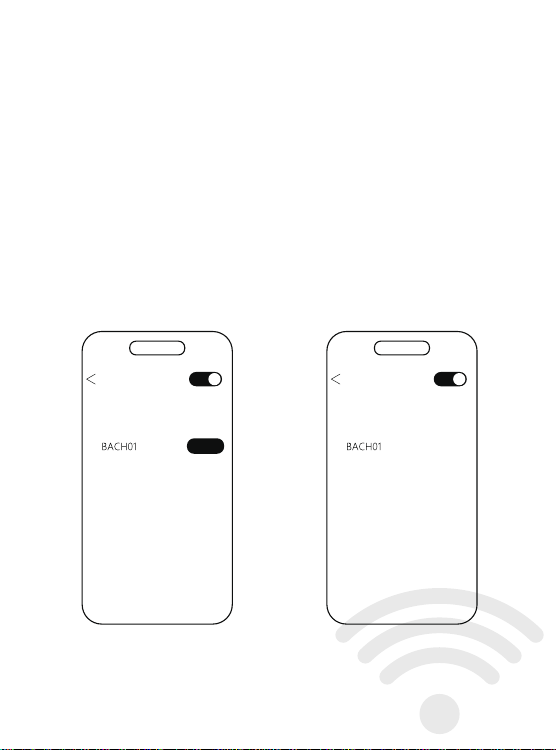
蓝牙设置
搜到设备
确保手机蓝牙打开
搜索设备BACH01,点击配对
蓝牙设置
我的设备
配对蓝牙成功
已连接
配对
Bluetooth Settings
Found device
pairing
操作说明
功能操作
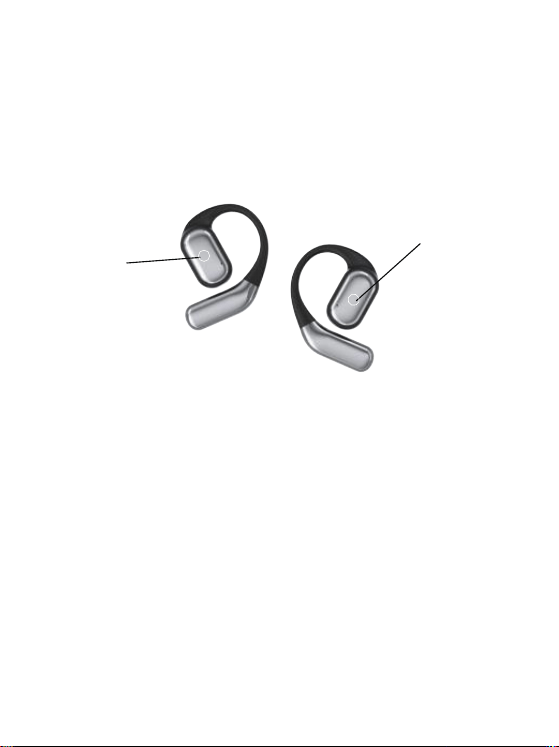
触控处
触控处
连接说明
开机说明
首次使用时先将耳机放入充电仓,
插上充电线,将耳机和充电仓充满。
连接设备
打开充电仓取出耳机,自动开机并配对手机打开蓝牙设备,
搜索配对名:(BACH01)
Connection instructions
Power-on Instructions
When using for the first time, put the earphones into the
charging compartment,
Plug in the charging cable and fully charge the
earphones and charging case.
connected device
Open the charging case, take out the earphones, automatically
turn on the phone and pair it with a Bluetooth device,
Search for pairing name: (BACH01)
Ensure that the phone's
Bluetooth is turned on for search
Search for device BACH01, click on pairing
Bluetooth pairing successful
Bluetooth Settings
Found device
Connected
1.长按2秒音量加减 左加右减单耳使用都是音量加
2.双击左耳打开SIRI双击右耳播放/暂停
单耳使用双击播放/暂停/接听/挂断
3.三击上下曲 左上右下 单耳使用都是下一曲
4.五击切换游戏模式/音乐模式(只在与手机连接后才有效)
5.来电双击接听/挂断,长按两秒拒接来电
6.开盖后未取出耳机,长按充电仓按键8秒,
左右耳会恢复出厂设置后重新配对.
Operation Manual
Functional Operations
Touch location
Touch location
1. Long press for 2 seconds to increase or decrease the volume.
Left+right+decrease. For single ear use,
the volume will increase or decrease
2. Double click on the left ear to open SIRI.
Double click on the right ear to play/pause
Double click to play/pause/answer/hang up on one ear
3. Three clicks on the up and down tracks, left, top, right,
and single ear use all indicate the next track
4. Five click switch between game mode/music mode
(only effective when connected to the phone)
5. Double click to answer/hang up a call,
long press for two seconds to reject the call
6. If the earphones are not removed after opening the lid,
press and hold the charging compartment button for 8 seconds,
The left and right ears will be reset to factory settings and re paired
更改配对,关机,充电
1、打开充电仓盖取出耳机自动开机,会自动连接最近一次配对过的手机。
2、如需配对其它手机,请关闭原手机的蓝牙,在蓝牙耳机开机状态下,
其他于机打开蓝牙即可搜索设备名BACH01。
3、不使用耳机时,将耳机放入充电盒,耳机会自动关机并补充电量,
如果未带充电盒,手机断开蓝牙大约30分钟后耳机会自动关机。
Change pairing, turn off, charge
1. Open the charging compartment cover and take out the earphones,
which will automatically turn on and connect to the
phone that has been paired last time.
2. If you need to pair with other phones, please turn off the
Bluetooth of the original phone. When the Bluetooth
earphones are turned on, turn on the Bluetooth of the other
phones to search for the device name BACH01.
3. When not in use, put the earphones into the charging case,
and the earphones will automatically shut down and recharge.
If the charging case is not included, the earphones
will automatically shut down after disconnecting
Bluetooth from the phone for about 30 minutes.
产品特点
分离式机身设计,享受真无线立体声效
可充电式收纳盒收纳即可为耳机充电
无感佩戴,久戴不痛.
Product Features
Separated body design, enjoy true wireless stereo sound effect
Rechargeable storage box for charging headphones
Wearing it without feeling uncomfortable for a long time without pain
Functional Definition
-Power on
Open the charging compartment cover, and the earphones will
automatically turn on and pair; After the battery replacement is
completed, the earphones automatically turn on and pair.
-Shut down
Put it into the charging compartment and close the lid, the earphones
will automatically turn off; Not connected after 30 minutes of startup
The device and headphones automatically shut down.
-Single ear use
Turn on the charging case and start automatic pairing. Once the
Bluetooth connection is successful, it can be used.
-Automatic reconnection
The phone has not deleted the historical pairing name of the earphones,
and can automatically connect by opening the cover.
功能定义
-开机
充电仓开盖,耳机自动开机并配对;换电完成后,耳机自动开机并配对。
-关机
放入充电仓合盖,耳机自动关机;开机30分钟后未连接
设备,耳机自动关机。
-单耳使用
打开充电仓开机自动配对,连接蓝牙成功,即可使用。
-自动回连
手机未删除过耳机历史配对名,开盖即可自动连接。
指示灯说明
耳机配对
打开充电仓,左右耳自动配对,配对成功后白灯慢闪。
耳机放入充电仓
充电充电时,耳机橙灯长亮,电仓充电白灯亮5秒
耳机装上电池
白灯会亮2秒,同时语音会提示设备已开机。
耳机低电量
橙灯每隔1分钟会闪1次,同时语音会提示低电量
用充电器给充电仓充电
充电中时橙色灯常亮,充满电白灯常8秒熄灭。
用充电器给充电仓、耳机充电
耳机充满电橙灯熄灭,仓充满电白色亮8秒熄灭。
Indicator Light Instructions
Earphone pairing
Open the charging compartment, and the left and right ears will
automatically pair. After successful pairing, the white light will flash slowly.
Put the earphones into the charging compartment
When charging, the orange light on the earphones stays on, and the
white light on the charging compartment stays on for 5 seconds
Installing batteries on headphones
The white light will light up for 2 seconds, and the voice will prompt
that the device has been turned on.
Headphones low battery
The orange light flashes once every minute, and the voice
prompts low battery
Charge the charging compartment with a charger
The orange light stays on while charging, and the fully charged white
light goes off for 8 seconds.
Charge the charging case and earphones with a charger
The orange light turns off when the earphones are fully charged,
and the white light turns on for 8 seconds when the case is fully
charged and turns off.
This device complies with part 15 of the FCC Rules. Operation is subject to the following two
conditions:
(1) This device may not cause harmful interference, and (2) this device must accept any
interference
received, including interference that may cause undesired operation.
NOTE: This equipment has been tested and found to comply with the limits for a Class B digital
device,
pursuant to Part 15 of the FCC Rules. These limits are designed to provide reasonable
protection
against harmful interference in a residential installation. This equipment generates, uses and
can radiate
radio frequency energy and, if not installed and used in accordance with the instructions, may
cause
harmful interference to radio communications. However, there is no guarantee that interference
will not
occur in a particular installation. If this equipment does cause harmful interference to radio or
television
reception, which can be determined by turning the equipment off and on, the user is
encouraged to try to
correct the interference by one or more of the following measures:
-- Reorient or relocate the receiving antenna.
-- Increase the separation between the equipment and receiver.
-- Connect the equipment into an outlet on a circuit different from that to which the receiver is
connected.
-- Consult the dealer or an experienced radio/TV technician for help.
Changes or modifications not expressly approved by the party responsible for compliance
could void the
user's authority to operate the equipment.
The device has been evaluated to meet general RF exposure requirement. The device can be
used in portable exposure condition without restriction.
Verbinden
封面157g双铜 四色 亚胶 内页105g双铜 单黑 共52P 起码钉
蓝牙设置
搜到设备
确保手机蓝牙打开
搜索设备BACH01,点击配对
蓝牙设置
我的设备
配对蓝牙成功
已连接
配对
Bluetooth Settings
Found device
pairing
操作说明
功能操作
触控处
触控处
连接说明
开机说明
首次使用时先将耳机放入充电仓,
插上充电线,将耳机和充电仓充满。
连接设备
打开充电仓取出耳机,自动开机并配对手机打开蓝牙设备,
搜索配对名:(BACH01)
Connection instructions
Power-on Instructions
When using for the first time, put the earphones into the
charging compartment,
Plug in the charging cable and fully charge the
earphones and charging case.
connected device
Open the charging case, take out the earphones, automatically
turn on the phone and pair it with a Bluetooth device,
Search for pairing name: (BACH01)
Ensure that the phone's
Bluetooth is turned on for search
Search for device BACH01, click on pairing
Bluetooth pairing successful
Bluetooth Settings
Found device
Connected
1.长按2秒音量加减 左加右减单耳使用都是音量加
2.双击左耳打开SIRI双击右耳播放/暂停
单耳使用双击播放/暂停/接听/挂断
3.三击上下曲 左上右下 单耳使用都是下一曲
4.五击切换游戏模式/音乐模式(只在与手机连接后才有效)
5.来电双击接听/挂断,长按两秒拒接来电
6.开盖后未取出耳机,长按充电仓按键8秒,
左右耳会恢复出厂设置后重新配对.
Operation Manual
Functional Operations
Touch location
Touch location
1. Long press for 2 seconds to increase or decrease the volume.
Left+right+decrease. For single ear use,
the volume will increase or decrease
2. Double click on the left ear to open SIRI.
Double click on the right ear to play/pause
Double click to play/pause/answer/hang up on one ear
3. Three clicks on the up and down tracks, left, top, right,
and single ear use all indicate the next track
4. Five click switch between game mode/music mode
(only effective when connected to the phone)
5. Double click to answer/hang up a call,
long press for two seconds to reject the call
6. If the earphones are not removed after opening the lid,
press and hold the charging compartment button for 8 seconds,
The left and right ears will be reset to factory settings and re paired
更改配对,关机,充电
1、打开充电仓盖取出耳机自动开机,会自动连接最近一次配对过的手机。
2、如需配对其它手机,请关闭原手机的蓝牙,在蓝牙耳机开机状态下,
其他于机打开蓝牙即可搜索设备名BACH01。
3、不使用耳机时,将耳机放入充电盒,耳机会自动关机并补充电量,
如果未带充电盒,手机断开蓝牙大约30分钟后耳机会自动关机。
Change pairing, turn off, charge
1. Open the charging compartment cover and take out the earphones,
which will automatically turn on and connect to the
phone that has been paired last time.
2. If you need to pair with other phones, please turn off the
Bluetooth of the original phone. When the Bluetooth
earphones are turned on, turn on the Bluetooth of the other
phones to search for the device name BACH01.
3. When not in use, put the earphones into the charging case,
and the earphones will automatically shut down and recharge.
If the charging case is not included, the earphones
will automatically shut down after disconnecting
Bluetooth from the phone for about 30 minutes.
产品特点
分离式机身设计,享受真无线立体声效
可充电式收纳盒收纳即可为耳机充电
无感佩戴,久戴不痛.
Product Features
Separated body design, enjoy true wireless stereo sound effect
Rechargeable storage box for charging headphones
Wearing it without feeling uncomfortable for a long time without pain
Functional Definition
-Power on
Open the charging compartment cover, and the earphones will
automatically turn on and pair; After the battery replacement is
completed, the earphones automatically turn on and pair.
-Shut down
Put it into the charging compartment and close the lid, the earphones
will automatically turn off; Not connected after 30 minutes of startup
The device and headphones automatically shut down.
-Single ear use
Turn on the charging case and start automatic pairing. Once the
Bluetooth connection is successful, it can be used.
-Automatic reconnection
The phone has not deleted the historical pairing name of the earphones,
and can automatically connect by opening the cover.
功能定义
-开机
充电仓开盖,耳机自动开机并配对;换电完成后,耳机自动开机并配对。
-关机
放入充电仓合盖,耳机自动关机;开机30分钟后未连接
设备,耳机自动关机。
-单耳使用
打开充电仓开机自动配对,连接蓝牙成功,即可使用。
-自动回连
手机未删除过耳机历史配对名,开盖即可自动连接。
指示灯说明
耳机配对
打开充电仓,左右耳自动配对,配对成功后白灯慢闪。
耳机放入充电仓
充电充电时,耳机橙灯长亮,电仓充电白灯亮5秒
耳机装上电池
白灯会亮2秒,同时语音会提示设备已开机。
耳机低电量
橙灯每隔1分钟会闪1次,同时语音会提示低电量
用充电器给充电仓充电
充电中时橙色灯常亮,充满电白灯常8秒熄灭。
用充电器给充电仓、耳机充电
耳机充满电橙灯熄灭,仓充满电白色亮8秒熄灭。
Indicator Light Instructions
Earphone pairing
Open the charging compartment, and the left and right ears will
automatically pair. After successful pairing, the white light will flash slowly.
Put the earphones into the charging compartment
When charging, the orange light on the earphones stays on, and the
white light on the charging compartment stays on for 5 seconds
Installing batteries on headphones
The white light will light up for 2 seconds, and the voice will prompt
that the device has been turned on.
Headphones low battery
The orange light flashes once every minute, and the voice
prompts low battery
Charge the charging compartment with a charger
The orange light stays on while charging, and the fully charged white
light goes off for 8 seconds.
Charge the charging case and earphones with a charger
The orange light turns off when the earphones are fully charged,
and the white light turns on for 8 seconds when the case is fully
charged and turns off.
This device complies with part 15 of the FCC Rules. Operation is subject to the following two
conditions:
(1) This device may not cause harmful interference, and (2) this device must accept any
interference
received, including interference that may cause undesired operation.
NOTE: This equipment has been tested and found to comply with the limits for a Class B digital
device,
pursuant to Part 15 of the FCC Rules. These limits are designed to provide reasonable
protection
against harmful interference in a residential installation. This equipment generates, uses and
can radiate
radio frequency energy and, if not installed and used in accordance with the instructions, may
cause
harmful interference to radio communications. However, there is no guarantee that interference
will not
occur in a particular installation. If this equipment does cause harmful interference to radio or
television
reception, which can be determined by turning the equipment off and on, the user is
encouraged to try to
correct the interference by one or more of the following measures:
-- Reorient or relocate the receiving antenna.
-- Increase the separation between the equipment and receiver.
-- Connect the equipment into an outlet on a circuit different from that to which the receiver is
connected.
-- Consult the dealer or an experienced radio/TV technician for help.
Changes or modifications not expressly approved by the party responsible for compliance
could void the
user's authority to operate the equipment.
The device has been evaluated to meet general RF exposure requirement. The device can be
used in portable exposure condition without restriction.
Verbinden
封面157g双铜 四色 亚胶 内页105g双铜 单黑 共52P 起码钉
蓝牙设置
搜到设备
确保手机蓝牙打开
搜索设备BACH01,点击配对
蓝牙设置
我的设备
配对蓝牙成功
已连接
配对
Bluetooth Settings
Found device
pairing
操作说明
功能操作
触控处
触控处
连接说明
开机说明
首次使用时先将耳机放入充电仓,
插上充电线,将耳机和充电仓充满。
连接设备
打开充电仓取出耳机,自动开机并配对手机打开蓝牙设备,
搜索配对名:(BACH01)
Connection instructions
Power-on Instructions
When using for the first time, put the earphones into the
charging compartment,
Plug in the charging cable and fully charge the
earphones and charging case.
connected device
Open the charging case, take out the earphones, automatically
turn on the phone and pair it with a Bluetooth device,
Search for pairing name: (BACH01)
Ensure that the phone's
Bluetooth is turned on for search
Search for device BACH01, click on pairing
Bluetooth pairing successful
Bluetooth Settings
Found device
Connected
1.长按2秒音量加减 左加右减单耳使用都是音量加
2.双击左耳打开SIRI双击右耳播放/暂停
单耳使用双击播放/暂停/接听/挂断
3.三击上下曲 左上右下 单耳使用都是下一曲
4.五击切换游戏模式/音乐模式(只在与手机连接后才有效)
5.来电双击接听/挂断,长按两秒拒接来电
6.开盖后未取出耳机,长按充电仓按键8秒,
左右耳会恢复出厂设置后重新配对.
Operation Manual
Functional Operations
Touch location
Touch location
1. Long press for 2 seconds to increase or decrease the volume.
Left+right+decrease. For single ear use,
the volume will increase or decrease
2. Double click on the left ear to open SIRI.
Double click on the right ear to play/pause
Double click to play/pause/answer/hang up on one ear
3. Three clicks on the up and down tracks, left, top, right,
and single ear use all indicate the next track
4. Five click switch between game mode/music mode
(only effective when connected to the phone)
5. Double click to answer/hang up a call,
long press for two seconds to reject the call
6. If the earphones are not removed after opening the lid,
press and hold the charging compartment button for 8 seconds,
The left and right ears will be reset to factory settings and re paired
更改配对,关机,充电
1、打开充电仓盖取出耳机自动开机,会自动连接最近一次配对过的手机。
2、如需配对其它手机,请关闭原手机的蓝牙,在蓝牙耳机开机状态下,
其他于机打开蓝牙即可搜索设备名BACH01。
3、不使用耳机时,将耳机放入充电盒,耳机会自动关机并补充电量,
如果未带充电盒,手机断开蓝牙大约30分钟后耳机会自动关机。
Change pairing, turn off, charge
1. Open the charging compartment cover and take out the earphones,
which will automatically turn on and connect to the
phone that has been paired last time.
2. If you need to pair with other phones, please turn off the
Bluetooth of the original phone. When the Bluetooth
earphones are turned on, turn on the Bluetooth of the other
phones to search for the device name BACH01.
3. When not in use, put the earphones into the charging case,
and the earphones will automatically shut down and recharge.
If the charging case is not included, the earphones
will automatically shut down after disconnecting
Bluetooth from the phone for about 30 minutes.
产品特点
分离式机身设计,享受真无线立体声效
可充电式收纳盒收纳即可为耳机充电
无感佩戴,久戴不痛.
Product Features
Separated body design, enjoy true wireless stereo sound effect
Rechargeable storage box for charging headphones
Wearing it without feeling uncomfortable for a long time without pain
Functional Definition
-Power on
Open the charging compartment cover, and the earphones will
automatically turn on and pair; After the battery replacement is
completed, the earphones automatically turn on and pair.
-Shut down
Put it into the charging compartment and close the lid, the earphones
will automatically turn off; Not connected after 30 minutes of startup
The device and headphones automatically shut down.
-Single ear use
Turn on the charging case and start automatic pairing. Once the
Bluetooth connection is successful, it can be used.
-Automatic reconnection
The phone has not deleted the historical pairing name of the earphones,
and can automatically connect by opening the cover.
功能定义
-开机
充电仓开盖,耳机自动开机并配对;换电完成后,耳机自动开机并配对。
-关机
放入充电仓合盖,耳机自动关机;开机30分钟后未连接
设备,耳机自动关机。
-单耳使用
打开充电仓开机自动配对,连接蓝牙成功,即可使用。
-自动回连
手机未删除过耳机历史配对名,开盖即可自动连接。
指示灯说明
耳机配对
打开充电仓,左右耳自动配对,配对成功后白灯慢闪。
耳机放入充电仓
充电充电时,耳机橙灯长亮,电仓充电白灯亮5秒
耳机装上电池
白灯会亮2秒,同时语音会提示设备已开机。
耳机低电量
橙灯每隔1分钟会闪1次,同时语音会提示低电量
用充电器给充电仓充电
充电中时橙色灯常亮,充满电白灯常8秒熄灭。
用充电器给充电仓、耳机充电
耳机充满电橙灯熄灭,仓充满电白色亮8秒熄灭。
Indicator Light Instructions
Earphone pairing
Open the charging compartment, and the left and right ears will
automatically pair. After successful pairing, the white light will flash slowly.
Put the earphones into the charging compartment
When charging, the orange light on the earphones stays on, and the
white light on the charging compartment stays on for 5 seconds
Installing batteries on headphones
The white light will light up for 2 seconds, and the voice will prompt
that the device has been turned on.
Headphones low battery
The orange light flashes once every minute, and the voice
prompts low battery
Charge the charging compartment with a charger
The orange light stays on while charging, and the fully charged white
light goes off for 8 seconds.
Charge the charging case and earphones with a charger
The orange light turns off when the earphones are fully charged,
and the white light turns on for 8 seconds when the case is fully
charged and turns off.
This device complies with part 15 of the FCC Rules. Operation is subject to the following two
conditions:
(1) This device may not cause harmful interference, and (2) this device must accept any
interference
received, including interference that may cause undesired operation.
NOTE: This equipment has been tested and found to comply with the limits for a Class B digital
device,
pursuant to Part 15 of the FCC Rules. These limits are designed to provide reasonable
protection
against harmful interference in a residential installation. This equipment generates, uses and
can radiate
radio frequency energy and, if not installed and used in accordance with the instructions, may
cause
harmful interference to radio communications. However, there is no guarantee that interference
will not
occur in a particular installation. If this equipment does cause harmful interference to radio or
television
reception, which can be determined by turning the equipment off and on, the user is
encouraged to try to
correct the interference by one or more of the following measures:
-- Reorient or relocate the receiving antenna.
-- Increase the separation between the equipment and receiver.
-- Connect the equipment into an outlet on a circuit different from that to which the receiver is
connected.
-- Consult the dealer or an experienced radio/TV technician for help.
Changes or modifications not expressly approved by the party responsible for compliance
could void the
user's authority to operate the equipment.
The device has been evaluated to meet general RF exposure requirement. The device can be
used in portable exposure condition without restriction.
Verbinden
封面157g双铜 四色 亚胶 内页105g双铜 单黑 共52P 起码钉
蓝牙设置
搜到设备
确保手机蓝牙打开
搜索设备BACH01,点击配对
蓝牙设置
我的设备
配对蓝牙成功
已连接
配对
Bluetooth Settings
Found device
pairing
操作说明
功能操作
触控处
触控处
连接说明
开机说明
首次使用时先将耳机放入充电仓,
插上充电线,将耳机和充电仓充满。
连接设备
打开充电仓取出耳机,自动开机并配对手机打开蓝牙设备,
搜索配对名:(BACH01)
Connection instructions
Power-on Instructions
When using for the first time, put the earphones into the
charging compartment,
Plug in the charging cable and fully charge the
earphones and charging case.
connected device
Open the charging case, take out the earphones, automatically
turn on the phone and pair it with a Bluetooth device,
Search for pairing name: (BACH01)
Ensure that the phone's
Bluetooth is turned on for search
Search for device BACH01, click on pairing
Bluetooth pairing successful
Bluetooth Settings
Found device
Connected
1.长按2秒音量加减 左加右减单耳使用都是音量加
2.双击左耳打开SIRI双击右耳播放/暂停
单耳使用双击播放/暂停/接听/挂断
3.三击上下曲 左上右下 单耳使用都是下一曲
4.五击切换游戏模式/音乐模式(只在与手机连接后才有效)
5.来电双击接听/挂断,长按两秒拒接来电
6.开盖后未取出耳机,长按充电仓按键8秒,
左右耳会恢复出厂设置后重新配对.
Operation Manual
Functional Operations
Touch location
Touch location
1. Long press for 2 seconds to increase or decrease the volume.
Left+right+decrease. For single ear use,
the volume will increase or decrease
2. Double click on the left ear to open SIRI.
Double click on the right ear to play/pause
Double click to play/pause/answer/hang up on one ear
3. Three clicks on the up and down tracks, left, top, right,
and single ear use all indicate the next track
4. Five click switch between game mode/music mode
(only effective when connected to the phone)
5. Double click to answer/hang up a call,
long press for two seconds to reject the call
6. If the earphones are not removed after opening the lid,
press and hold the charging compartment button for 8 seconds,
The left and right ears will be reset to factory settings and re paired
更改配对,关机,充电
1、打开充电仓盖取出耳机自动开机,会自动连接最近一次配对过的手机。
2、如需配对其它手机,请关闭原手机的蓝牙,在蓝牙耳机开机状态下,
其他于机打开蓝牙即可搜索设备名BACH01。
3、不使用耳机时,将耳机放入充电盒,耳机会自动关机并补充电量,
如果未带充电盒,手机断开蓝牙大约30分钟后耳机会自动关机。
Change pairing, turn off, charge
1. Open the charging compartment cover and take out the earphones,
which will automatically turn on and connect to the
phone that has been paired last time.
2. If you need to pair with other phones, please turn off the
Bluetooth of the original phone. When the Bluetooth
earphones are turned on, turn on the Bluetooth of the other
phones to search for the device name BACH01.
3. When not in use, put the earphones into the charging case,
and the earphones will automatically shut down and recharge.
If the charging case is not included, the earphones
will automatically shut down after disconnecting
Bluetooth from the phone for about 30 minutes.
产品特点
分离式机身设计,享受真无线立体声效
可充电式收纳盒收纳即可为耳机充电
无感佩戴,久戴不痛.
Product Features
Separated body design, enjoy true wireless stereo sound effect
Rechargeable storage box for charging headphones
Wearing it without feeling uncomfortable for a long time without pain
Functional Definition
-Power on
Open the charging compartment cover, and the earphones will
automatically turn on and pair; After the battery replacement is
completed, the earphones automatically turn on and pair.
-Shut down
Put it into the charging compartment and close the lid, the earphones
will automatically turn off; Not connected after 30 minutes of startup
The device and headphones automatically shut down.
-Single ear use
Turn on the charging case and start automatic pairing. Once the
Bluetooth connection is successful, it can be used.
-Automatic reconnection
The phone has not deleted the historical pairing name of the earphones,
and can automatically connect by opening the cover.
功能定义
-开机
充电仓开盖,耳机自动开机并配对;换电完成后,耳机自动开机并配对。
-关机
放入充电仓合盖,耳机自动关机;开机30分钟后未连接
设备,耳机自动关机。
-单耳使用
打开充电仓开机自动配对,连接蓝牙成功,即可使用。
-自动回连
手机未删除过耳机历史配对名,开盖即可自动连接。
指示灯说明
耳机配对
打开充电仓,左右耳自动配对,配对成功后白灯慢闪。
耳机放入充电仓
充电充电时,耳机橙灯长亮,电仓充电白灯亮5秒
耳机装上电池
白灯会亮2秒,同时语音会提示设备已开机。
耳机低电量
橙灯每隔1分钟会闪1次,同时语音会提示低电量
用充电器给充电仓充电
充电中时橙色灯常亮,充满电白灯常8秒熄灭。
用充电器给充电仓、耳机充电
耳机充满电橙灯熄灭,仓充满电白色亮8秒熄灭。
Indicator Light Instructions
Earphone pairing
Open the charging compartment, and the left and right ears will
automatically pair. After successful pairing, the white light will flash slowly.
Put the earphones into the charging compartment
When charging, the orange light on the earphones stays on, and the
white light on the charging compartment stays on for 5 seconds
Installing batteries on headphones
The white light will light up for 2 seconds, and the voice will prompt
that the device has been turned on.
Headphones low battery
The orange light flashes once every minute, and the voice
prompts low battery
Charge the charging compartment with a charger
The orange light stays on while charging, and the fully charged white
light goes off for 8 seconds.
Charge the charging case and earphones with a charger
The orange light turns off when the earphones are fully charged,
and the white light turns on for 8 seconds when the case is fully
charged and turns off.
This device complies with part 15 of the FCC Rules. Operation is subject to the following two
conditions:
(1) This device may not cause harmful interference, and (2) this device must accept any
interference
received, including interference that may cause undesired operation.
NOTE: This equipment has been tested and found to comply with the limits for a Class B digital
device,
pursuant to Part 15 of the FCC Rules. These limits are designed to provide reasonable
protection
against harmful interference in a residential installation. This equipment generates, uses and
can radiate
radio frequency energy and, if not installed and used in accordance with the instructions, may
cause
harmful interference to radio communications. However, there is no guarantee that interference
will not
occur in a particular installation. If this equipment does cause harmful interference to radio or
television
reception, which can be determined by turning the equipment off and on, the user is
encouraged to try to
correct the interference by one or more of the following measures:
-- Reorient or relocate the receiving antenna.
-- Increase the separation between the equipment and receiver.
-- Connect the equipment into an outlet on a circuit different from that to which the receiver is
connected.
-- Consult the dealer or an experienced radio/TV technician for help.
Changes or modifications not expressly approved by the party responsible for compliance
could void the
user's authority to operate the equipment.
The device has been evaluated to meet general RF exposure requirement. The device can be
used in portable exposure condition without restriction.
Verbinden
封面157g双铜 四色 亚胶 内页105g双铜 单黑 共52P 起码钉
蓝牙设置
搜到设备
确保手机蓝牙打开
搜索设备BACH01,点击配对
蓝牙设置
我的设备
配对蓝牙成功
已连接
配对
Bluetooth Settings
Found device
pairing
操作说明
功能操作
触控处
触控处
连接说明
开机说明
首次使用时先将耳机放入充电仓,
插上充电线,将耳机和充电仓充满。
连接设备
打开充电仓取出耳机,自动开机并配对手机打开蓝牙设备,
搜索配对名:(BACH01)
Connection instructions
Power-on Instructions
When using for the first time, put the earphones into the
charging compartment,
Plug in the charging cable and fully charge the
earphones and charging case.
connected device
Open the charging case, take out the earphones, automatically
turn on the phone and pair it with a Bluetooth device,
Search for pairing name: (BACH01)
Ensure that the phone's
Bluetooth is turned on for search
Search for device BACH01, click on pairing
Bluetooth pairing successful
Bluetooth Settings
Found device
Connected
1.长按2秒音量加减 左加右减单耳使用都是音量加
2.双击左耳打开SIRI双击右耳播放/暂停
单耳使用双击播放/暂停/接听/挂断
3.三击上下曲 左上右下 单耳使用都是下一曲
4.五击切换游戏模式/音乐模式(只在与手机连接后才有效)
5.来电双击接听/挂断,长按两秒拒接来电
6.开盖后未取出耳机,长按充电仓按键8秒,
左右耳会恢复出厂设置后重新配对.
Operation Manual
Functional Operations
Touch location
Touch location
1. Long press for 2 seconds to increase or decrease the volume.
Left+right+decrease. For single ear use,
the volume will increase or decrease
2. Double click on the left ear to open SIRI.
Double click on the right ear to play/pause
Double click to play/pause/answer/hang up on one ear
3. Three clicks on the up and down tracks, left, top, right,
and single ear use all indicate the next track
4. Five click switch between game mode/music mode
(only effective when connected to the phone)
5. Double click to answer/hang up a call,
long press for two seconds to reject the call
6. If the earphones are not removed after opening the lid,
press and hold the charging compartment button for 8 seconds,
The left and right ears will be reset to factory settings and re paired
更改配对,关机,充电
1、打开充电仓盖取出耳机自动开机,会自动连接最近一次配对过的手机。
2、如需配对其它手机,请关闭原手机的蓝牙,在蓝牙耳机开机状态下,
其他于机打开蓝牙即可搜索设备名BACH01。
3、不使用耳机时,将耳机放入充电盒,耳机会自动关机并补充电量,
如果未带充电盒,手机断开蓝牙大约30分钟后耳机会自动关机。
Change pairing, turn off, charge
1. Open the charging compartment cover and take out the earphones,
which will automatically turn on and connect to the
phone that has been paired last time.
2. If you need to pair with other phones, please turn off the
Bluetooth of the original phone. When the Bluetooth
earphones are turned on, turn on the Bluetooth of the other
phones to search for the device name BACH01.
3. When not in use, put the earphones into the charging case,
and the earphones will automatically shut down and recharge.
If the charging case is not included, the earphones
will automatically shut down after disconnecting
Bluetooth from the phone for about 30 minutes.
产品特点
分离式机身设计,享受真无线立体声效
可充电式收纳盒收纳即可为耳机充电
无感佩戴,久戴不痛.
Product Features
Separated body design, enjoy true wireless stereo sound effect
Rechargeable storage box for charging headphones
Wearing it without feeling uncomfortable for a long time without pain
Functional Definition
-Power on
Open the charging compartment cover, and the earphones will
automatically turn on and pair; After the battery replacement is
completed, the earphones automatically turn on and pair.
-Shut down
Put it into the charging compartment and close the lid, the earphones
will automatically turn off; Not connected after 30 minutes of startup
The device and headphones automatically shut down.
-Single ear use
Turn on the charging case and start automatic pairing. Once the
Bluetooth connection is successful, it can be used.
-Automatic reconnection
The phone has not deleted the historical pairing name of the earphones,
and can automatically connect by opening the cover.
功能定义
-开机
充电仓开盖,耳机自动开机并配对;换电完成后,耳机自动开机并配对。
-关机
放入充电仓合盖,耳机自动关机;开机30分钟后未连接
设备,耳机自动关机。
-单耳使用
打开充电仓开机自动配对,连接蓝牙成功,即可使用。
-自动回连
手机未删除过耳机历史配对名,开盖即可自动连接。
指示灯说明
耳机配对
打开充电仓,左右耳自动配对,配对成功后白灯慢闪。
耳机放入充电仓
充电充电时,耳机橙灯长亮,电仓充电白灯亮5秒
耳机装上电池
白灯会亮2秒,同时语音会提示设备已开机。
耳机低电量
橙灯每隔1分钟会闪1次,同时语音会提示低电量
用充电器给充电仓充电
充电中时橙色灯常亮,充满电白灯常8秒熄灭。
用充电器给充电仓、耳机充电
耳机充满电橙灯熄灭,仓充满电白色亮8秒熄灭。
Indicator Light Instructions
Earphone pairing
Open the charging compartment, and the left and right ears will
automatically pair. After successful pairing, the white light will flash slowly.
Put the earphones into the charging compartment
When charging, the orange light on the earphones stays on, and the
white light on the charging compartment stays on for 5 seconds
Installing batteries on headphones
The white light will light up for 2 seconds, and the voice will prompt
that the device has been turned on.
Headphones low battery
The orange light flashes once every minute, and the voice
prompts low battery
Charge the charging compartment with a charger
The orange light stays on while charging, and the fully charged white
light goes off for 8 seconds.
Charge the charging case and earphones with a charger
The orange light turns off when the earphones are fully charged,
and the white light turns on for 8 seconds when the case is fully
charged and turns off.
This device complies with part 15 of the FCC Rules. Operation is subject to the following two
conditions:
(1) This device may not cause harmful interference, and (2) this device must accept any
interference
received, including interference that may cause undesired operation.
NOTE: This equipment has been tested and found to comply with the limits for a Class B digital
device,
pursuant to Part 15 of the FCC Rules. These limits are designed to provide reasonable
protection
against harmful interference in a residential installation. This equipment generates, uses and
can radiate
radio frequency energy and, if not installed and used in accordance with the instructions, may
cause
harmful interference to radio communications. However, there is no guarantee that interference
will not
occur in a particular installation. If this equipment does cause harmful interference to radio or
television
reception, which can be determined by turning the equipment off and on, the user is
encouraged to try to
correct the interference by one or more of the following measures:
-- Reorient or relocate the receiving antenna.
-- Increase the separation between the equipment and receiver.
-- Connect the equipment into an outlet on a circuit different from that to which the receiver is
connected.
-- Consult the dealer or an experienced radio/TV technician for help.
Changes or modifications not expressly approved by the party responsible for compliance
could void the
user's authority to operate the equipment.
The device has been evaluated to meet general RF exposure requirement. The device can be
used in portable exposure condition without restriction.

Verbinden
封面157g双铜 四色 亚胶 内页105g双铜 单黑 共52P 起码钉
蓝牙设置
搜到设备
确保手机蓝牙打开
搜索设备BACH01,点击配对
蓝牙设置
我的设备
配对蓝牙成功
已连接
配对
Bluetooth Settings
Found device
pairing
操作说明
功能操作
触控处
触控处
连接说明
开机说明
首次使用时先将耳机放入充电仓,
插上充电线,将耳机和充电仓充满。
连接设备
打开充电仓取出耳机,自动开机并配对手机打开蓝牙设备,
搜索配对名:(BACH01)
Connection instructions
Power-on Instructions
When using for the first time, put the earphones into the
charging compartment,
Plug in the charging cable and fully charge the
earphones and charging case.
connected device
Open the charging case, take out the earphones, automatically
turn on the phone and pair it with a Bluetooth device,
Search for pairing name: (BACH01)
Ensure that the phone's
Bluetooth is turned on for search
Search for device BACH01, click on pairing
Bluetooth pairing successful
Bluetooth Settings
Found device
Connected
1.长按2秒音量加减 左加右减单耳使用都是音量加
2.双击左耳打开SIRI双击右耳播放/暂停
单耳使用双击播放/暂停/接听/挂断
3.三击上下曲 左上右下 单耳使用都是下一曲
4.五击切换游戏模式/音乐模式(只在与手机连接后才有效)
5.来电双击接听/挂断,长按两秒拒接来电
6.开盖后未取出耳机,长按充电仓按键8秒,
左右耳会恢复出厂设置后重新配对.
Operation Manual
Functional Operations
Touch location
Touch location
1. Long press for 2 seconds to increase or decrease the volume.
Left+right+decrease. For single ear use,
the volume will increase or decrease
2. Double click on the left ear to open SIRI.
Double click on the right ear to play/pause
Double click to play/pause/answer/hang up on one ear
3. Three clicks on the up and down tracks, left, top, right,
and single ear use all indicate the next track
4. Five click switch between game mode/music mode
(only effective when connected to the phone)
5. Double click to answer/hang up a call,
long press for two seconds to reject the call
6. If the earphones are not removed after opening the lid,
press and hold the charging compartment button for 8 seconds,
The left and right ears will be reset to factory settings and re paired
更改配对,关机,充电
1、打开充电仓盖取出耳机自动开机,会自动连接最近一次配对过的手机。
2、如需配对其它手机,请关闭原手机的蓝牙,在蓝牙耳机开机状态下,
其他于机打开蓝牙即可搜索设备名BACH01。
3、不使用耳机时,将耳机放入充电盒,耳机会自动关机并补充电量,
如果未带充电盒,手机断开蓝牙大约30分钟后耳机会自动关机。
Change pairing, turn off, charge
1. Open the charging compartment cover and take out the earphones,
which will automatically turn on and connect to the
phone that has been paired last time.
2. If you need to pair with other phones, please turn off the
Bluetooth of the original phone. When the Bluetooth
earphones are turned on, turn on the Bluetooth of the other
phones to search for the device name BACH01.
3. When not in use, put the earphones into the charging case,
and the earphones will automatically shut down and recharge.
If the charging case is not included, the earphones
will automatically shut down after disconnecting
Bluetooth from the phone for about 30 minutes.
产品特点
分离式机身设计,享受真无线立体声效
可充电式收纳盒收纳即可为耳机充电
无感佩戴,久戴不痛.
Product Features
Separated body design, enjoy true wireless stereo sound effect
Rechargeable storage box for charging headphones
Wearing it without feeling uncomfortable for a long time without pain
Functional Definition
-Power on
Open the charging compartment cover, and the earphones will
automatically turn on and pair; After the battery replacement is
completed, the earphones automatically turn on and pair.
-Shut down
Put it into the charging compartment and close the lid, the earphones
will automatically turn off; Not connected after 30 minutes of startup
The device and headphones automatically shut down.
-Single ear use
Turn on the charging case and start automatic pairing. Once the
Bluetooth connection is successful, it can be used.
-Automatic reconnection
The phone has not deleted the historical pairing name of the earphones,
and can automatically connect by opening the cover.
功能定义
-开机
充电仓开盖,耳机自动开机并配对;换电完成后,耳机自动开机并配对。
-关机
放入充电仓合盖,耳机自动关机;开机30分钟后未连接
设备,耳机自动关机。
-单耳使用
打开充电仓开机自动配对,连接蓝牙成功,即可使用。
-自动回连
手机未删除过耳机历史配对名,开盖即可自动连接。
指示灯说明
耳机配对
打开充电仓,左右耳自动配对,配对成功后白灯慢闪。
耳机放入充电仓
充电充电时,耳机橙灯长亮,电仓充电白灯亮5秒
耳机装上电池
白灯会亮2秒,同时语音会提示设备已开机。
耳机低电量
橙灯每隔1分钟会闪1次,同时语音会提示低电量
用充电器给充电仓充电
充电中时橙色灯常亮,充满电白灯常8秒熄灭。
用充电器给充电仓、耳机充电
耳机充满电橙灯熄灭,仓充满电白色亮8秒熄灭。
Indicator Light Instructions
Earphone pairing
Open the charging compartment, and the left and right ears will
automatically pair. After successful pairing, the white light will flash slowly.
Put the earphones into the charging compartment
When charging, the orange light on the earphones stays on, and the
white light on the charging compartment stays on for 5 seconds
Installing batteries on headphones
The white light will light up for 2 seconds, and the voice will prompt
that the device has been turned on.
Headphones low battery
The orange light flashes once every minute, and the voice
prompts low battery
Charge the charging compartment with a charger
The orange light stays on while charging, and the fully charged white
light goes off for 8 seconds.
Charge the charging case and earphones with a charger
The orange light turns off when the earphones are fully charged,
and the white light turns on for 8 seconds when the case is fully
charged and turns off.
This device complies with part 15 of the FCC Rules. Operation is subject to the following two
conditions:
(1) This device may not cause harmful interference, and (2) this device must accept any
interference
received, including interference that may cause undesired operation.
NOTE: This equipment has been tested and found to comply with the limits for a Class B digital
device,
pursuant to Part 15 of the FCC Rules. These limits are designed to provide reasonable
protection
against harmful interference in a residential installation. This equipment generates, uses and
can radiate
radio frequency energy and, if not installed and used in accordance with the instructions, may
cause
harmful interference to radio communications. However, there is no guarantee that interference
will not
occur in a particular installation. If this equipment does cause harmful interference to radio or
television
reception, which can be determined by turning the equipment off and on, the user is
encouraged to try to
correct the interference by one or more of the following measures:
-- Reorient or relocate the receiving antenna.
-- Increase the separation between the equipment and receiver.
-- Connect the equipment into an outlet on a circuit different from that to which the receiver is
connected.
-- Consult the dealer or an experienced radio/TV technician for help.
Changes or modifications not expressly approved by the party responsible for compliance
could void the
user's authority to operate the equipment.
The device has been evaluated to meet general RF exposure requirement. The device can be
used in portable exposure condition without restriction.

Verbinden
封面157g双铜 四色 亚胶 内页105g双铜 单黑 共52P 起码钉
蓝牙设置
搜到设备
确保手机蓝牙打开
搜索设备BACH01,点击配对
蓝牙设置
我的设备
配对蓝牙成功
已连接
配对
Bluetooth Settings
Found device
pairing
操作说明
功能操作
触控处
触控处
连接说明
开机说明
首次使用时先将耳机放入充电仓,
插上充电线,将耳机和充电仓充满。
连接设备
打开充电仓取出耳机,自动开机并配对手机打开蓝牙设备,
搜索配对名:(BACH01)
Connection instructions
Power-on Instructions
When using for the first time, put the earphones into the
charging compartment,
Plug in the charging cable and fully charge the
earphones and charging case.
connected device
Open the charging case, take out the earphones, automatically
turn on the phone and pair it with a Bluetooth device,
Search for pairing name: (BACH01)
Ensure that the phone's
Bluetooth is turned on for search
Search for device BACH01, click on pairing
Bluetooth pairing successful
Bluetooth Settings
Found device
Connected
1.长按2秒音量加减 左加右减单耳使用都是音量加
2.双击左耳打开SIRI双击右耳播放/暂停
单耳使用双击播放/暂停/接听/挂断
3.三击上下曲 左上右下 单耳使用都是下一曲
4.五击切换游戏模式/音乐模式(只在与手机连接后才有效)
5.来电双击接听/挂断,长按两秒拒接来电
6.开盖后未取出耳机,长按充电仓按键8秒,
左右耳会恢复出厂设置后重新配对.
Operation Manual
Functional Operations
Touch location
Touch location
1. Long press for 2 seconds to increase or decrease the volume.
Left+right+decrease. For single ear use,
the volume will increase or decrease
2. Double click on the left ear to open SIRI.
Double click on the right ear to play/pause
Double click to play/pause/answer/hang up on one ear
3. Three clicks on the up and down tracks, left, top, right,
and single ear use all indicate the next track
4. Five click switch between game mode/music mode
(only effective when connected to the phone)
5. Double click to answer/hang up a call,
long press for two seconds to reject the call
6. If the earphones are not removed after opening the lid,
press and hold the charging compartment button for 8 seconds,
The left and right ears will be reset to factory settings and re paired
更改配对,关机,充电
1、打开充电仓盖取出耳机自动开机,会自动连接最近一次配对过的手机。
2、如需配对其它手机,请关闭原手机的蓝牙,在蓝牙耳机开机状态下,
其他于机打开蓝牙即可搜索设备名BACH01。
3、不使用耳机时,将耳机放入充电盒,耳机会自动关机并补充电量,
如果未带充电盒,手机断开蓝牙大约30分钟后耳机会自动关机。
Change pairing, turn off, charge
1. Open the charging compartment cover and take out the earphones,
which will automatically turn on and connect to the
phone that has been paired last time.
2. If you need to pair with other phones, please turn off the
Bluetooth of the original phone. When the Bluetooth
earphones are turned on, turn on the Bluetooth of the other
phones to search for the device name BACH01.
3. When not in use, put the earphones into the charging case,
and the earphones will automatically shut down and recharge.
If the charging case is not included, the earphones
will automatically shut down after disconnecting
Bluetooth from the phone for about 30 minutes.
产品特点
分离式机身设计,享受真无线立体声效
可充电式收纳盒收纳即可为耳机充电
无感佩戴,久戴不痛.
Product Features
Separated body design, enjoy true wireless stereo sound effect
Rechargeable storage box for charging headphones
Wearing it without feeling uncomfortable for a long time without pain
Functional Definition
-Power on
Open the charging compartment cover, and the earphones will
automatically turn on and pair; After the battery replacement is
completed, the earphones automatically turn on and pair.
-Shut down
Put it into the charging compartment and close the lid, the earphones
will automatically turn off; Not connected after 30 minutes of startup
The device and headphones automatically shut down.
-Single ear use
Turn on the charging case and start automatic pairing. Once the
Bluetooth connection is successful, it can be used.
-Automatic reconnection
The phone has not deleted the historical pairing name of the earphones,
and can automatically connect by opening the cover.
功能定义
-开机
充电仓开盖,耳机自动开机并配对;换电完成后,耳机自动开机并配对。
-关机
放入充电仓合盖,耳机自动关机;开机30分钟后未连接
设备,耳机自动关机。
-单耳使用
打开充电仓开机自动配对,连接蓝牙成功,即可使用。
-自动回连
手机未删除过耳机历史配对名,开盖即可自动连接。
指示灯说明
耳机配对
打开充电仓,左右耳自动配对,配对成功后白灯慢闪。
耳机放入充电仓
充电充电时,耳机橙灯长亮,电仓充电白灯亮5秒
耳机装上电池
白灯会亮2秒,同时语音会提示设备已开机。
耳机低电量
橙灯每隔1分钟会闪1次,同时语音会提示低电量
用充电器给充电仓充电
充电中时橙色灯常亮,充满电白灯常8秒熄灭。
用充电器给充电仓、耳机充电
耳机充满电橙灯熄灭,仓充满电白色亮8秒熄灭。
Indicator Light Instructions
Earphone pairing
Open the charging compartment, and the left and right ears will
automatically pair. After successful pairing, the white light will flash slowly.
Put the earphones into the charging compartment
When charging, the orange light on the earphones stays on, and the
white light on the charging compartment stays on for 5 seconds
Installing batteries on headphones
The white light will light up for 2 seconds, and the voice will prompt
that the device has been turned on.
Headphones low battery
The orange light flashes once every minute, and the voice
prompts low battery
Charge the charging compartment with a charger
The orange light stays on while charging, and the fully charged white
light goes off for 8 seconds.
Charge the charging case and earphones with a charger
The orange light turns off when the earphones are fully charged,
and the white light turns on for 8 seconds when the case is fully
charged and turns off.
This device complies with part 15 of the FCC Rules. Operation is subject to the following two
conditions:
(1) This device may not cause harmful interference, and (2) this device must accept any
interference
received, including interference that may cause undesired operation.
NOTE: This equipment has been tested and found to comply with the limits for a Class B digital
device,
pursuant to Part 15 of the FCC Rules. These limits are designed to provide reasonable
protection
against harmful interference in a residential installation. This equipment generates, uses and
can radiate
radio frequency energy and, if not installed and used in accordance with the instructions, may
cause
harmful interference to radio communications. However, there is no guarantee that interference
will not
occur in a particular installation. If this equipment does cause harmful interference to radio or
television
reception, which can be determined by turning the equipment off and on, the user is
encouraged to try to
correct the interference by one or more of the following measures:
-- Reorient or relocate the receiving antenna.
-- Increase the separation between the equipment and receiver.
-- Connect the equipment into an outlet on a circuit different from that to which the receiver is
connected.
-- Consult the dealer or an experienced radio/TV technician for help.
Changes or modifications not expressly approved by the party responsible for compliance
could void the
user's authority to operate the equipment.
The device has been evaluated to meet general RF exposure requirement. The device can be
used in portable exposure condition without restriction.

Verbinden
封面157g双铜 四色 亚胶 内页105g双铜 单黑 共52P 起码钉
蓝牙设置
搜到设备
确保手机蓝牙打开
搜索设备BACH01,点击配对
蓝牙设置
我的设备
配对蓝牙成功
已连接
配对
Bluetooth Settings
Found device
pairing
操作说明
功能操作
触控处
触控处
连接说明
开机说明
首次使用时先将耳机放入充电仓,
插上充电线,将耳机和充电仓充满。
连接设备
打开充电仓取出耳机,自动开机并配对手机打开蓝牙设备,
搜索配对名:(BACH01)
Connection instructions
Power-on Instructions
When using for the first time, put the earphones into the
charging compartment,
Plug in the charging cable and fully charge the
earphones and charging case.
connected device
Open the charging case, take out the earphones, automatically
turn on the phone and pair it with a Bluetooth device,
Search for pairing name: (BACH01)
Ensure that the phone's
Bluetooth is turned on for search
Search for device BACH01, click on pairing
Bluetooth pairing successful
Bluetooth Settings
Found device
Connected
1.长按2秒音量加减 左加右减单耳使用都是音量加
2.双击左耳打开SIRI双击右耳播放/暂停
单耳使用双击播放/暂停/接听/挂断
3.三击上下曲 左上右下 单耳使用都是下一曲
4.五击切换游戏模式/音乐模式(只在与手机连接后才有效)
5.来电双击接听/挂断,长按两秒拒接来电
6.开盖后未取出耳机,长按充电仓按键8秒,
左右耳会恢复出厂设置后重新配对.
Operation Manual
Functional Operations
Touch location
Touch location
1. Long press for 2 seconds to increase or decrease the volume.
Left+right+decrease. For single ear use,
the volume will increase or decrease
2. Double click on the left ear to open SIRI.
Double click on the right ear to play/pause
Double click to play/pause/answer/hang up on one ear
3. Three clicks on the up and down tracks, left, top, right,
and single ear use all indicate the next track
4. Five click switch between game mode/music mode
(only effective when connected to the phone)
5. Double click to answer/hang up a call,
long press for two seconds to reject the call
6. If the earphones are not removed after opening the lid,
press and hold the charging compartment button for 8 seconds,
The left and right ears will be reset to factory settings and re paired
更改配对,关机,充电
1、打开充电仓盖取出耳机自动开机,会自动连接最近一次配对过的手机。
2、如需配对其它手机,请关闭原手机的蓝牙,在蓝牙耳机开机状态下,
其他于机打开蓝牙即可搜索设备名BACH01。
3、不使用耳机时,将耳机放入充电盒,耳机会自动关机并补充电量,
如果未带充电盒,手机断开蓝牙大约30分钟后耳机会自动关机。
Change pairing, turn off, charge
1. Open the charging compartment cover and take out the earphones,
which will automatically turn on and connect to the
phone that has been paired last time.
2. If you need to pair with other phones, please turn off the
Bluetooth of the original phone. When the Bluetooth
earphones are turned on, turn on the Bluetooth of the other
phones to search for the device name BACH01.
3. When not in use, put the earphones into the charging case,
and the earphones will automatically shut down and recharge.
If the charging case is not included, the earphones
will automatically shut down after disconnecting
Bluetooth from the phone for about 30 minutes.
产品特点
分离式机身设计,享受真无线立体声效
可充电式收纳盒收纳即可为耳机充电
无感佩戴,久戴不痛.
Product Features
Separated body design, enjoy true wireless stereo sound effect
Rechargeable storage box for charging headphones
Wearing it without feeling uncomfortable for a long time without pain
Functional Definition
-Power on
Open the charging compartment cover, and the earphones will
automatically turn on and pair; After the battery replacement is
completed, the earphones automatically turn on and pair.
-Shut down
Put it into the charging compartment and close the lid, the earphones
will automatically turn off; Not connected after 30 minutes of startup
The device and headphones automatically shut down.
-Single ear use
Turn on the charging case and start automatic pairing. Once the
Bluetooth connection is successful, it can be used.
-Automatic reconnection
The phone has not deleted the historical pairing name of the earphones,
and can automatically connect by opening the cover.
功能定义
-开机
充电仓开盖,耳机自动开机并配对;换电完成后,耳机自动开机并配对。
-关机
放入充电仓合盖,耳机自动关机;开机30分钟后未连接
设备,耳机自动关机。
-单耳使用
打开充电仓开机自动配对,连接蓝牙成功,即可使用。
-自动回连
手机未删除过耳机历史配对名,开盖即可自动连接。
指示灯说明
耳机配对
打开充电仓,左右耳自动配对,配对成功后白灯慢闪。
耳机放入充电仓
充电充电时,耳机橙灯长亮,电仓充电白灯亮5秒
耳机装上电池
白灯会亮2秒,同时语音会提示设备已开机。
耳机低电量
橙灯每隔1分钟会闪1次,同时语音会提示低电量
用充电器给充电仓充电
充电中时橙色灯常亮,充满电白灯常8秒熄灭。
用充电器给充电仓、耳机充电
耳机充满电橙灯熄灭,仓充满电白色亮8秒熄灭。
Indicator Light Instructions
Earphone pairing
Open the charging compartment, and the left and right ears will
automatically pair. After successful pairing, the white light will flash slowly.
Put the earphones into the charging compartment
When charging, the orange light on the earphones stays on, and the
white light on the charging compartment stays on for 5 seconds
Installing batteries on headphones
The white light will light up for 2 seconds, and the voice will prompt
that the device has been turned on.
Headphones low battery
The orange light flashes once every minute, and the voice
prompts low battery
Charge the charging compartment with a charger
The orange light stays on while charging, and the fully charged white
light goes off for 8 seconds.
Charge the charging case and earphones with a charger
The orange light turns off when the earphones are fully charged,
and the white light turns on for 8 seconds when the case is fully
charged and turns off.
This device complies with part 15 of the FCC Rules. Operation is subject to the following two
conditions:
(1) This device may not cause harmful interference, and (2) this device must accept any
interference
received, including interference that may cause undesired operation.
NOTE: This equipment has been tested and found to comply with the limits for a Class B digital
device,
pursuant to Part 15 of the FCC Rules. These limits are designed to provide reasonable
protection
against harmful interference in a residential installation. This equipment generates, uses and
can radiate
radio frequency energy and, if not installed and used in accordance with the instructions, may
cause
harmful interference to radio communications. However, there is no guarantee that interference
will not
occur in a particular installation. If this equipment does cause harmful interference to radio or
television
reception, which can be determined by turning the equipment off and on, the user is
encouraged to try to
correct the interference by one or more of the following measures:
-- Reorient or relocate the receiving antenna.
-- Increase the separation between the equipment and receiver.
-- Connect the equipment into an outlet on a circuit different from that to which the receiver is
connected.
-- Consult the dealer or an experienced radio/TV technician for help.
Changes or modifications not expressly approved by the party responsible for compliance
could void the
user's authority to operate the equipment.
The device has been evaluated to meet general RF exposure requirement. The device can be
used in portable exposure condition without restriction.
Verbinden
封面157g双铜 四色 亚胶 内页105g双铜 单黑 共52P 起码钉
蓝牙设置
搜到设备
确保手机蓝牙打开
搜索设备BACH01,点击配对
蓝牙设置
我的设备
配对蓝牙成功
已连接
配对
Bluetooth Settings
Found device
pairing
操作说明
功能操作
触控处
触控处
连接说明
开机说明
首次使用时先将耳机放入充电仓,
插上充电线,将耳机和充电仓充满。
连接设备
打开充电仓取出耳机,自动开机并配对手机打开蓝牙设备,
搜索配对名:(BACH01)
Connection instructions
Power-on Instructions
When using for the first time, put the earphones into the
charging compartment,
Plug in the charging cable and fully charge the
earphones and charging case.
connected device
Open the charging case, take out the earphones, automatically
turn on the phone and pair it with a Bluetooth device,
Search for pairing name: (BACH01)
Ensure that the phone's
Bluetooth is turned on for search
Search for device BACH01, click on pairing
Bluetooth pairing successful
Bluetooth Settings
Found device
Connected
1.长按2秒音量加减 左加右减单耳使用都是音量加
2.双击左耳打开SIRI双击右耳播放/暂停
单耳使用双击播放/暂停/接听/挂断
3.三击上下曲 左上右下 单耳使用都是下一曲
4.五击切换游戏模式/音乐模式(只在与手机连接后才有效)
5.来电双击接听/挂断,长按两秒拒接来电
6.开盖后未取出耳机,长按充电仓按键8秒,
左右耳会恢复出厂设置后重新配对.
Operation Manual
Functional Operations
Touch location
Touch location
1. Long press for 2 seconds to increase or decrease the volume.
Left+right+decrease. For single ear use,
the volume will increase or decrease
2. Double click on the left ear to open SIRI.
Double click on the right ear to play/pause
Double click to play/pause/answer/hang up on one ear
3. Three clicks on the up and down tracks, left, top, right,
and single ear use all indicate the next track
4. Five click switch between game mode/music mode
(only effective when connected to the phone)
5. Double click to answer/hang up a call,
long press for two seconds to reject the call
6. If the earphones are not removed after opening the lid,
press and hold the charging compartment button for 8 seconds,
The left and right ears will be reset to factory settings and re paired
更改配对,关机,充电
1、打开充电仓盖取出耳机自动开机,会自动连接最近一次配对过的手机。
2、如需配对其它手机,请关闭原手机的蓝牙,在蓝牙耳机开机状态下,
其他于机打开蓝牙即可搜索设备名BACH01。
3、不使用耳机时,将耳机放入充电盒,耳机会自动关机并补充电量,
如果未带充电盒,手机断开蓝牙大约30分钟后耳机会自动关机。
Change pairing, turn off, charge
1. Open the charging compartment cover and take out the earphones,
which will automatically turn on and connect to the
phone that has been paired last time.
2. If you need to pair with other phones, please turn off the
Bluetooth of the original phone. When the Bluetooth
earphones are turned on, turn on the Bluetooth of the other
phones to search for the device name BACH01.
3. When not in use, put the earphones into the charging case,
and the earphones will automatically shut down and recharge.
If the charging case is not included, the earphones
will automatically shut down after disconnecting
Bluetooth from the phone for about 30 minutes.
产品特点
分离式机身设计,享受真无线立体声效
可充电式收纳盒收纳即可为耳机充电
无感佩戴,久戴不痛.
Product Features
Separated body design, enjoy true wireless stereo sound effect
Rechargeable storage box for charging headphones
Wearing it without feeling uncomfortable for a long time without pain
Functional Definition
-Power on
Open the charging compartment cover, and the earphones will
automatically turn on and pair; After the battery replacement is
completed, the earphones automatically turn on and pair.
-Shut down
Put it into the charging compartment and close the lid, the earphones
will automatically turn off; Not connected after 30 minutes of startup
The device and headphones automatically shut down.
-Single ear use
Turn on the charging case and start automatic pairing. Once the
Bluetooth connection is successful, it can be used.
-Automatic reconnection
The phone has not deleted the historical pairing name of the earphones,
and can automatically connect by opening the cover.
功能定义
-开机
充电仓开盖,耳机自动开机并配对;换电完成后,耳机自动开机并配对。
-关机
放入充电仓合盖,耳机自动关机;开机30分钟后未连接
设备,耳机自动关机。
-单耳使用
打开充电仓开机自动配对,连接蓝牙成功,即可使用。
-自动回连
手机未删除过耳机历史配对名,开盖即可自动连接。
指示灯说明
耳机配对
打开充电仓,左右耳自动配对,配对成功后白灯慢闪。
耳机放入充电仓
充电充电时,耳机橙灯长亮,电仓充电白灯亮5秒
耳机装上电池
白灯会亮2秒,同时语音会提示设备已开机。
耳机低电量
橙灯每隔1分钟会闪1次,同时语音会提示低电量
用充电器给充电仓充电
充电中时橙色灯常亮,充满电白灯常8秒熄灭。
用充电器给充电仓、耳机充电
耳机充满电橙灯熄灭,仓充满电白色亮8秒熄灭。
Indicator Light Instructions
Earphone pairing
Open the charging compartment, and the left and right ears will
automatically pair. After successful pairing, the white light will flash slowly.
Put the earphones into the charging compartment
When charging, the orange light on the earphones stays on, and the
white light on the charging compartment stays on for 5 seconds
Installing batteries on headphones
The white light will light up for 2 seconds, and the voice will prompt
that the device has been turned on.
Headphones low battery
The orange light flashes once every minute, and the voice
prompts low battery
Charge the charging compartment with a charger
The orange light stays on while charging, and the fully charged white
light goes off for 8 seconds.
Charge the charging case and earphones with a charger
The orange light turns off when the earphones are fully charged,
and the white light turns on for 8 seconds when the case is fully
charged and turns off.
This device complies with part 15 of the FCC Rules. Operation is subject to the following two
conditions:
(1) This device may not cause harmful interference, and (2) this device must accept any
interference
received, including interference that may cause undesired operation.
NOTE: This equipment has been tested and found to comply with the limits for a Class B digital
device,
pursuant to Part 15 of the FCC Rules. These limits are designed to provide reasonable
protection
against harmful interference in a residential installation. This equipment generates, uses and
can radiate
radio frequency energy and, if not installed and used in accordance with the instructions, may
cause
harmful interference to radio communications. However, there is no guarantee that interference
will not
occur in a particular installation. If this equipment does cause harmful interference to radio or
television
reception, which can be determined by turning the equipment off and on, the user is
encouraged to try to
correct the interference by one or more of the following measures:
-- Reorient or relocate the receiving antenna.
-- Increase the separation between the equipment and receiver.
-- Connect the equipment into an outlet on a circuit different from that to which the receiver is
connected.
-- Consult the dealer or an experienced radio/TV technician for help.
Changes or modifications not expressly approved by the party responsible for compliance
could void the
user's authority to operate the equipment.
The device has been evaluated to meet general RF exposure requirement. The device can be
used in portable exposure condition without restriction.
Verbinden
封面157g双铜 四色 亚胶 内页105g双铜 单黑 共52P 起码钉
蓝牙设置
搜到设备
确保手机蓝牙打开
搜索设备BACH01,点击配对
蓝牙设置
我的设备
配对蓝牙成功
已连接
配对
Bluetooth Settings
Found device
pairing
操作说明
功能操作
触控处
触控处
连接说明
开机说明
首次使用时先将耳机放入充电仓,
插上充电线,将耳机和充电仓充满。
连接设备
打开充电仓取出耳机,自动开机并配对手机打开蓝牙设备,
搜索配对名:(BACH01)
Connection instructions
Power-on Instructions
When using for the first time, put the earphones into the
charging compartment,
Plug in the charging cable and fully charge the
earphones and charging case.
connected device
Open the charging case, take out the earphones, automatically
turn on the phone and pair it with a Bluetooth device,
Search for pairing name: (BACH01)
Ensure that the phone's
Bluetooth is turned on for search
Search for device BACH01, click on pairing
Bluetooth pairing successful
Bluetooth Settings
Found device
Connected
1.长按2秒音量加减 左加右减单耳使用都是音量加
2.双击左耳打开SIRI双击右耳播放/暂停
单耳使用双击播放/暂停/接听/挂断
3.三击上下曲 左上右下 单耳使用都是下一曲
4.五击切换游戏模式/音乐模式(只在与手机连接后才有效)
5.来电双击接听/挂断,长按两秒拒接来电
6.开盖后未取出耳机,长按充电仓按键8秒,
左右耳会恢复出厂设置后重新配对.
Operation Manual
Functional Operations
Touch location
Touch location
1. Long press for 2 seconds to increase or decrease the volume.
Left+right+decrease. For single ear use,
the volume will increase or decrease
2. Double click on the left ear to open SIRI.
Double click on the right ear to play/pause
Double click to play/pause/answer/hang up on one ear
3. Three clicks on the up and down tracks, left, top, right,
and single ear use all indicate the next track
4. Five click switch between game mode/music mode
(only effective when connected to the phone)
5. Double click to answer/hang up a call,
long press for two seconds to reject the call
6. If the earphones are not removed after opening the lid,
press and hold the charging compartment button for 8 seconds,
The left and right ears will be reset to factory settings and re paired
更改配对,关机,充电
1、打开充电仓盖取出耳机自动开机,会自动连接最近一次配对过的手机。
2、如需配对其它手机,请关闭原手机的蓝牙,在蓝牙耳机开机状态下,
其他于机打开蓝牙即可搜索设备名BACH01。
3、不使用耳机时,将耳机放入充电盒,耳机会自动关机并补充电量,
如果未带充电盒,手机断开蓝牙大约30分钟后耳机会自动关机。
Change pairing, turn off, charge
1. Open the charging compartment cover and take out the earphones,
which will automatically turn on and connect to the
phone that has been paired last time.
2. If you need to pair with other phones, please turn off the
Bluetooth of the original phone. When the Bluetooth
earphones are turned on, turn on the Bluetooth of the other
phones to search for the device name BACH01.
3. When not in use, put the earphones into the charging case,
and the earphones will automatically shut down and recharge.
If the charging case is not included, the earphones
will automatically shut down after disconnecting
Bluetooth from the phone for about 30 minutes.
产品特点
分离式机身设计,享受真无线立体声效
可充电式收纳盒收纳即可为耳机充电
无感佩戴,久戴不痛.
Product Features
Separated body design, enjoy true wireless stereo sound effect
Rechargeable storage box for charging headphones
Wearing it without feeling uncomfortable for a long time without pain
Functional Definition
-Power on
Open the charging compartment cover, and the earphones will
automatically turn on and pair; After the battery replacement is
completed, the earphones automatically turn on and pair.
-Shut down
Put it into the charging compartment and close the lid, the earphones
will automatically turn off; Not connected after 30 minutes of startup
The device and headphones automatically shut down.
-Single ear use
Turn on the charging case and start automatic pairing. Once the
Bluetooth connection is successful, it can be used.
-Automatic reconnection
The phone has not deleted the historical pairing name of the earphones,
and can automatically connect by opening the cover.
功能定义
-开机
充电仓开盖,耳机自动开机并配对;换电完成后,耳机自动开机并配对。
-关机
放入充电仓合盖,耳机自动关机;开机30分钟后未连接
设备,耳机自动关机。
-单耳使用
打开充电仓开机自动配对,连接蓝牙成功,即可使用。
-自动回连
手机未删除过耳机历史配对名,开盖即可自动连接。
指示灯说明
耳机配对
打开充电仓,左右耳自动配对,配对成功后白灯慢闪。
耳机放入充电仓
充电充电时,耳机橙灯长亮,电仓充电白灯亮5秒
耳机装上电池
白灯会亮2秒,同时语音会提示设备已开机。
耳机低电量
橙灯每隔1分钟会闪1次,同时语音会提示低电量
用充电器给充电仓充电
充电中时橙色灯常亮,充满电白灯常8秒熄灭。
用充电器给充电仓、耳机充电
耳机充满电橙灯熄灭,仓充满电白色亮8秒熄灭。
Indicator Light Instructions
Earphone pairing
Open the charging compartment, and the left and right ears will
automatically pair. After successful pairing, the white light will flash slowly.
Put the earphones into the charging compartment
When charging, the orange light on the earphones stays on, and the
white light on the charging compartment stays on for 5 seconds
Installing batteries on headphones
The white light will light up for 2 seconds, and the voice will prompt
that the device has been turned on.
Headphones low battery
The orange light flashes once every minute, and the voice
prompts low battery
Charge the charging compartment with a charger
The orange light stays on while charging, and the fully charged white
light goes off for 8 seconds.
Charge the charging case and earphones with a charger
The orange light turns off when the earphones are fully charged,
and the white light turns on for 8 seconds when the case is fully
charged and turns off.
This device complies with part 15 of the FCC Rules. Operation is subject to the following two
conditions:
(1) This device may not cause harmful interference, and (2) this device must accept any
interference
received, including interference that may cause undesired operation.
NOTE: This equipment has been tested and found to comply with the limits for a Class B digital
device,
pursuant to Part 15 of the FCC Rules. These limits are designed to provide reasonable
protection
against harmful interference in a residential installation. This equipment generates, uses and
can radiate
radio frequency energy and, if not installed and used in accordance with the instructions, may
cause
harmful interference to radio communications. However, there is no guarantee that interference
will not
occur in a particular installation. If this equipment does cause harmful interference to radio or
television
reception, which can be determined by turning the equipment off and on, the user is
encouraged to try to
correct the interference by one or more of the following measures:
-- Reorient or relocate the receiving antenna.
-- Increase the separation between the equipment and receiver.
-- Connect the equipment into an outlet on a circuit different from that to which the receiver is
connected.
-- Consult the dealer or an experienced radio/TV technician for help.
Changes or modifications not expressly approved by the party responsible for compliance
could void the
user's authority to operate the equipment.
The device has been evaluated to meet general RF exposure requirement. The device can be
used in portable exposure condition without restriction.
Verbinden
封面157g双铜 四色 亚胶 内页105g双铜 单黑 共52P 起码钉
蓝牙设置
搜到设备
确保手机蓝牙打开
搜索设备BACH01,点击配对
蓝牙设置
我的设备
配对蓝牙成功
已连接
配对
Bluetooth Settings
Found device
pairing
操作说明
功能操作
触控处
触控处
连接说明
开机说明
首次使用时先将耳机放入充电仓,
插上充电线,将耳机和充电仓充满。
连接设备
打开充电仓取出耳机,自动开机并配对手机打开蓝牙设备,
搜索配对名:(BACH01)
Connection instructions
Power-on Instructions
When using for the first time, put the earphones into the
charging compartment,
Plug in the charging cable and fully charge the
earphones and charging case.
connected device
Open the charging case, take out the earphones, automatically
turn on the phone and pair it with a Bluetooth device,
Search for pairing name: (BACH01)
Ensure that the phone's
Bluetooth is turned on for search
Search for device BACH01, click on pairing
Bluetooth pairing successful
Bluetooth Settings
Found device
Connected
1.长按2秒音量加减 左加右减单耳使用都是音量加
2.双击左耳打开SIRI双击右耳播放/暂停
单耳使用双击播放/暂停/接听/挂断
3.三击上下曲 左上右下 单耳使用都是下一曲
4.五击切换游戏模式/音乐模式(只在与手机连接后才有效)
5.来电双击接听/挂断,长按两秒拒接来电
6.开盖后未取出耳机,长按充电仓按键8秒,
左右耳会恢复出厂设置后重新配对.
Operation Manual
Functional Operations
Touch location
Touch location
1. Long press for 2 seconds to increase or decrease the volume.
Left+right+decrease. For single ear use,
the volume will increase or decrease
2. Double click on the left ear to open SIRI.
Double click on the right ear to play/pause
Double click to play/pause/answer/hang up on one ear
3. Three clicks on the up and down tracks, left, top, right,
and single ear use all indicate the next track
4. Five click switch between game mode/music mode
(only effective when connected to the phone)
5. Double click to answer/hang up a call,
long press for two seconds to reject the call
6. If the earphones are not removed after opening the lid,
press and hold the charging compartment button for 8 seconds,
The left and right ears will be reset to factory settings and re paired
更改配对,关机,充电
1、打开充电仓盖取出耳机自动开机,会自动连接最近一次配对过的手机。
2、如需配对其它手机,请关闭原手机的蓝牙,在蓝牙耳机开机状态下,
其他于机打开蓝牙即可搜索设备名BACH01。
3、不使用耳机时,将耳机放入充电盒,耳机会自动关机并补充电量,
如果未带充电盒,手机断开蓝牙大约30分钟后耳机会自动关机。
Change pairing, turn off, charge
1. Open the charging compartment cover and take out the earphones,
which will automatically turn on and connect to the
phone that has been paired last time.
2. If you need to pair with other phones, please turn off the
Bluetooth of the original phone. When the Bluetooth
earphones are turned on, turn on the Bluetooth of the other
phones to search for the device name BACH01.
3. When not in use, put the earphones into the charging case,
and the earphones will automatically shut down and recharge.
If the charging case is not included, the earphones
will automatically shut down after disconnecting
Bluetooth from the phone for about 30 minutes.
产品特点
分离式机身设计,享受真无线立体声效
可充电式收纳盒收纳即可为耳机充电
无感佩戴,久戴不痛.
Product Features
Separated body design, enjoy true wireless stereo sound effect
Rechargeable storage box for charging headphones
Wearing it without feeling uncomfortable for a long time without pain
Functional Definition
-Power on
Open the charging compartment cover, and the earphones will
automatically turn on and pair; After the battery replacement is
completed, the earphones automatically turn on and pair.
-Shut down
Put it into the charging compartment and close the lid, the earphones
will automatically turn off; Not connected after 30 minutes of startup
The device and headphones automatically shut down.
-Single ear use
Turn on the charging case and start automatic pairing. Once the
Bluetooth connection is successful, it can be used.
-Automatic reconnection
The phone has not deleted the historical pairing name of the earphones,
and can automatically connect by opening the cover.
功能定义
-开机
充电仓开盖,耳机自动开机并配对;换电完成后,耳机自动开机并配对。
-关机
放入充电仓合盖,耳机自动关机;开机30分钟后未连接
设备,耳机自动关机。
-单耳使用
打开充电仓开机自动配对,连接蓝牙成功,即可使用。
-自动回连
手机未删除过耳机历史配对名,开盖即可自动连接。
指示灯说明
耳机配对
打开充电仓,左右耳自动配对,配对成功后白灯慢闪。
耳机放入充电仓
充电充电时,耳机橙灯长亮,电仓充电白灯亮5秒
耳机装上电池
白灯会亮2秒,同时语音会提示设备已开机。
耳机低电量
橙灯每隔1分钟会闪1次,同时语音会提示低电量
用充电器给充电仓充电
充电中时橙色灯常亮,充满电白灯常8秒熄灭。
用充电器给充电仓、耳机充电
耳机充满电橙灯熄灭,仓充满电白色亮8秒熄灭。
Indicator Light Instructions
Earphone pairing
Open the charging compartment, and the left and right ears will
automatically pair. After successful pairing, the white light will flash slowly.
Put the earphones into the charging compartment
When charging, the orange light on the earphones stays on, and the
white light on the charging compartment stays on for 5 seconds
Installing batteries on headphones
The white light will light up for 2 seconds, and the voice will prompt
that the device has been turned on.
Headphones low battery
The orange light flashes once every minute, and the voice
prompts low battery
Charge the charging compartment with a charger
The orange light stays on while charging, and the fully charged white
light goes off for 8 seconds.
Charge the charging case and earphones with a charger
The orange light turns off when the earphones are fully charged,
and the white light turns on for 8 seconds when the case is fully
charged and turns off.
This device complies with part 15 of the FCC Rules. Operation is subject to the following two
conditions:
(1) This device may not cause harmful interference, and (2) this device must accept any
interference
received, including interference that may cause undesired operation.
NOTE: This equipment has been tested and found to comply with the limits for a Class B digital
device,
pursuant to Part 15 of the FCC Rules. These limits are designed to provide reasonable
protection
against harmful interference in a residential installation. This equipment generates, uses and
can radiate
radio frequency energy and, if not installed and used in accordance with the instructions, may
cause
harmful interference to radio communications. However, there is no guarantee that interference
will not
occur in a particular installation. If this equipment does cause harmful interference to radio or
television
reception, which can be determined by turning the equipment off and on, the user is
encouraged to try to
correct the interference by one or more of the following measures:
-- Reorient or relocate the receiving antenna.
-- Increase the separation between the equipment and receiver.
-- Connect the equipment into an outlet on a circuit different from that to which the receiver is
connected.
-- Consult the dealer or an experienced radio/TV technician for help.
Changes or modifications not expressly approved by the party responsible for compliance
could void the
user's authority to operate the equipment.
The device has been evaluated to meet general RF exposure requirement. The device can be
used in portable exposure condition without restriction.
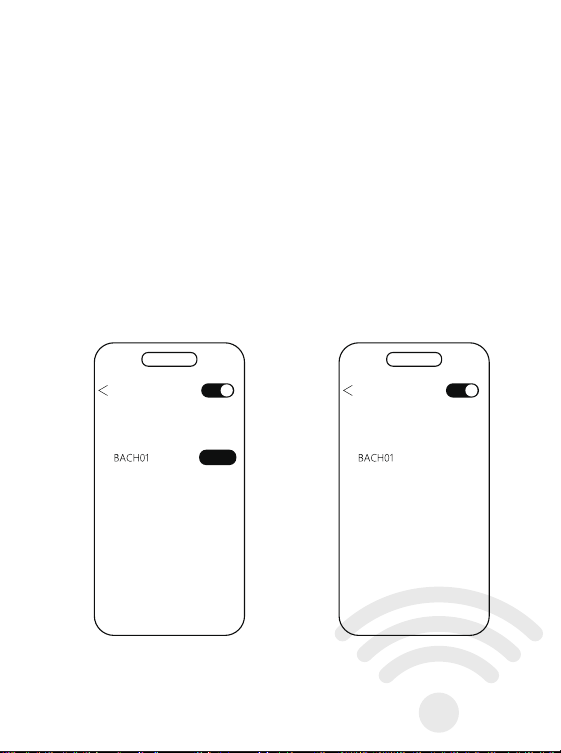
Verbinden
封面157g双铜 四色 亚胶 内页105g双铜 单黑 共52P 起码钉
蓝牙设置
搜到设备
确保手机蓝牙打开
搜索设备BACH01,点击配对
蓝牙设置
我的设备
配对蓝牙成功
已连接
配对
Bluetooth Settings
Found device
pairing
操作说明
功能操作
触控处
触控处
连接说明
开机说明
首次使用时先将耳机放入充电仓,
插上充电线,将耳机和充电仓充满。
连接设备
打开充电仓取出耳机,自动开机并配对手机打开蓝牙设备,
搜索配对名:(BACH01)
Connection instructions
Power-on Instructions
When using for the first time, put the earphones into the
charging compartment,
Plug in the charging cable and fully charge the
earphones and charging case.
connected device
Open the charging case, take out the earphones, automatically
turn on the phone and pair it with a Bluetooth device,
Search for pairing name: (BACH01)
Ensure that the phone's
Bluetooth is turned on for search
Search for device BACH01, click on pairing
Bluetooth pairing successful
Bluetooth Settings
Found device
Connected
1.长按2秒音量加减 左加右减单耳使用都是音量加
2.双击左耳打开SIRI双击右耳播放/暂停
单耳使用双击播放/暂停/接听/挂断
3.三击上下曲 左上右下 单耳使用都是下一曲
4.五击切换游戏模式/音乐模式(只在与手机连接后才有效)
5.来电双击接听/挂断,长按两秒拒接来电
6.开盖后未取出耳机,长按充电仓按键8秒,
左右耳会恢复出厂设置后重新配对.
Operation Manual
Functional Operations
Touch location
Touch location
1. Long press for 2 seconds to increase or decrease the volume.
Left+right+decrease. For single ear use,
the volume will increase or decrease
2. Double click on the left ear to open SIRI.
Double click on the right ear to play/pause
Double click to play/pause/answer/hang up on one ear
3. Three clicks on the up and down tracks, left, top, right,
and single ear use all indicate the next track
4. Five click switch between game mode/music mode
(only effective when connected to the phone)
5. Double click to answer/hang up a call,
long press for two seconds to reject the call
6. If the earphones are not removed after opening the lid,
press and hold the charging compartment button for 8 seconds,
The left and right ears will be reset to factory settings and re paired
更改配对,关机,充电
1、打开充电仓盖取出耳机自动开机,会自动连接最近一次配对过的手机。
2、如需配对其它手机,请关闭原手机的蓝牙,在蓝牙耳机开机状态下,
其他于机打开蓝牙即可搜索设备名BACH01。
3、不使用耳机时,将耳机放入充电盒,耳机会自动关机并补充电量,
如果未带充电盒,手机断开蓝牙大约30分钟后耳机会自动关机。
Change pairing, turn off, charge
1. Open the charging compartment cover and take out the earphones,
which will automatically turn on and connect to the
phone that has been paired last time.
2. If you need to pair with other phones, please turn off the
Bluetooth of the original phone. When the Bluetooth
earphones are turned on, turn on the Bluetooth of the other
phones to search for the device name BACH01.
3. When not in use, put the earphones into the charging case,
and the earphones will automatically shut down and recharge.
If the charging case is not included, the earphones
will automatically shut down after disconnecting
Bluetooth from the phone for about 30 minutes.
产品特点
分离式机身设计,享受真无线立体声效
可充电式收纳盒收纳即可为耳机充电
无感佩戴,久戴不痛.
Product Features
Separated body design, enjoy true wireless stereo sound effect
Rechargeable storage box for charging headphones
Wearing it without feeling uncomfortable for a long time without pain
Functional Definition
-Power on
Open the charging compartment cover, and the earphones will
automatically turn on and pair; After the battery replacement is
completed, the earphones automatically turn on and pair.
-Shut down
Put it into the charging compartment and close the lid, the earphones
will automatically turn off; Not connected after 30 minutes of startup
The device and headphones automatically shut down.
-Single ear use
Turn on the charging case and start automatic pairing. Once the
Bluetooth connection is successful, it can be used.
-Automatic reconnection
The phone has not deleted the historical pairing name of the earphones,
and can automatically connect by opening the cover.
功能定义
-开机
充电仓开盖,耳机自动开机并配对;换电完成后,耳机自动开机并配对。
-关机
放入充电仓合盖,耳机自动关机;开机30分钟后未连接
设备,耳机自动关机。
-单耳使用
打开充电仓开机自动配对,连接蓝牙成功,即可使用。
-自动回连
手机未删除过耳机历史配对名,开盖即可自动连接。
指示灯说明
耳机配对
打开充电仓,左右耳自动配对,配对成功后白灯慢闪。
耳机放入充电仓
充电充电时,耳机橙灯长亮,电仓充电白灯亮5秒
耳机装上电池
白灯会亮2秒,同时语音会提示设备已开机。
耳机低电量
橙灯每隔1分钟会闪1次,同时语音会提示低电量
用充电器给充电仓充电
充电中时橙色灯常亮,充满电白灯常8秒熄灭。
用充电器给充电仓、耳机充电
耳机充满电橙灯熄灭,仓充满电白色亮8秒熄灭。
Indicator Light Instructions
Earphone pairing
Open the charging compartment, and the left and right ears will
automatically pair. After successful pairing, the white light will flash slowly.
Put the earphones into the charging compartment
When charging, the orange light on the earphones stays on, and the
white light on the charging compartment stays on for 5 seconds
Installing batteries on headphones
The white light will light up for 2 seconds, and the voice will prompt
that the device has been turned on.
Headphones low battery
The orange light flashes once every minute, and the voice
prompts low battery
Charge the charging compartment with a charger
The orange light stays on while charging, and the fully charged white
light goes off for 8 seconds.
Charge the charging case and earphones with a charger
The orange light turns off when the earphones are fully charged,
and the white light turns on for 8 seconds when the case is fully
charged and turns off.
This device complies with part 15 of the FCC Rules. Operation is subject to the following two
conditions:
(1) This device may not cause harmful interference, and (2) this device must accept any
interference
received, including interference that may cause undesired operation.
NOTE: This equipment has been tested and found to comply with the limits for a Class B digital
device,
pursuant to Part 15 of the FCC Rules. These limits are designed to provide reasonable
protection
against harmful interference in a residential installation. This equipment generates, uses and
can radiate
radio frequency energy and, if not installed and used in accordance with the instructions, may
cause
harmful interference to radio communications. However, there is no guarantee that interference
will not
occur in a particular installation. If this equipment does cause harmful interference to radio or
television
reception, which can be determined by turning the equipment off and on, the user is
encouraged to try to
correct the interference by one or more of the following measures:
-- Reorient or relocate the receiving antenna.
-- Increase the separation between the equipment and receiver.
-- Connect the equipment into an outlet on a circuit different from that to which the receiver is
connected.
-- Consult the dealer or an experienced radio/TV technician for help.
Changes or modifications not expressly approved by the party responsible for compliance
could void the
user's authority to operate the equipment.
The device has been evaluated to meet general RF exposure requirement. The device can be
used in portable exposure condition without restriction.
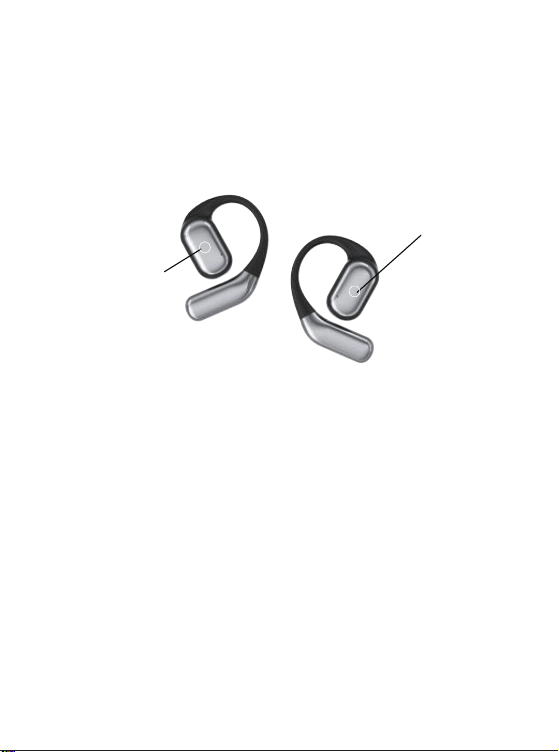
Verbinden
封面157g双铜 四色 亚胶 内页105g双铜 单黑 共52P 起码钉
蓝牙设置
搜到设备
确保手机蓝牙打开
搜索设备BACH01,点击配对
蓝牙设置
我的设备
配对蓝牙成功
已连接
配对
Bluetooth Settings
Found device
pairing
操作说明
功能操作
触控处
触控处
连接说明
开机说明
首次使用时先将耳机放入充电仓,
插上充电线,将耳机和充电仓充满。
连接设备
打开充电仓取出耳机,自动开机并配对手机打开蓝牙设备,
搜索配对名:(BACH01)
Connection instructions
Power-on Instructions
When using for the first time, put the earphones into the
charging compartment,
Plug in the charging cable and fully charge the
earphones and charging case.
connected device
Open the charging case, take out the earphones, automatically
turn on the phone and pair it with a Bluetooth device,
Search for pairing name: (BACH01)
Ensure that the phone's
Bluetooth is turned on for search
Search for device BACH01, click on pairing
Bluetooth pairing successful
Bluetooth Settings
Found device
Connected
1.长按2秒音量加减 左加右减单耳使用都是音量加
2.双击左耳打开SIRI双击右耳播放/暂停
单耳使用双击播放/暂停/接听/挂断
3.三击上下曲 左上右下 单耳使用都是下一曲
4.五击切换游戏模式/音乐模式(只在与手机连接后才有效)
5.来电双击接听/挂断,长按两秒拒接来电
6.开盖后未取出耳机,长按充电仓按键8秒,
左右耳会恢复出厂设置后重新配对.
Operation Manual
Functional Operations
Touch location
Touch location
1. Long press for 2 seconds to increase or decrease the volume.
Left+right+decrease. For single ear use,
the volume will increase or decrease
2. Double click on the left ear to open SIRI.
Double click on the right ear to play/pause
Double click to play/pause/answer/hang up on one ear
3. Three clicks on the up and down tracks, left, top, right,
and single ear use all indicate the next track
4. Five click switch between game mode/music mode
(only effective when connected to the phone)
5. Double click to answer/hang up a call,
long press for two seconds to reject the call
6. If the earphones are not removed after opening the lid,
press and hold the charging compartment button for 8 seconds,
The left and right ears will be reset to factory settings and re paired
更改配对,关机,充电
1、打开充电仓盖取出耳机自动开机,会自动连接最近一次配对过的手机。
2、如需配对其它手机,请关闭原手机的蓝牙,在蓝牙耳机开机状态下,
其他于机打开蓝牙即可搜索设备名BACH01。
3、不使用耳机时,将耳机放入充电盒,耳机会自动关机并补充电量,
如果未带充电盒,手机断开蓝牙大约30分钟后耳机会自动关机。
Change pairing, turn off, charge
1. Open the charging compartment cover and take out the earphones,
which will automatically turn on and connect to the
phone that has been paired last time.
2. If you need to pair with other phones, please turn off the
Bluetooth of the original phone. When the Bluetooth
earphones are turned on, turn on the Bluetooth of the other
phones to search for the device name BACH01.
3. When not in use, put the earphones into the charging case,
and the earphones will automatically shut down and recharge.
If the charging case is not included, the earphones
will automatically shut down after disconnecting
Bluetooth from the phone for about 30 minutes.
产品特点
分离式机身设计,享受真无线立体声效
可充电式收纳盒收纳即可为耳机充电
无感佩戴,久戴不痛.
Product Features
Separated body design, enjoy true wireless stereo sound effect
Rechargeable storage box for charging headphones
Wearing it without feeling uncomfortable for a long time without pain
Functional Definition
-Power on
Open the charging compartment cover, and the earphones will
automatically turn on and pair; After the battery replacement is
completed, the earphones automatically turn on and pair.
-Shut down
Put it into the charging compartment and close the lid, the earphones
will automatically turn off; Not connected after 30 minutes of startup
The device and headphones automatically shut down.
-Single ear use
Turn on the charging case and start automatic pairing. Once the
Bluetooth connection is successful, it can be used.
-Automatic reconnection
The phone has not deleted the historical pairing name of the earphones,
and can automatically connect by opening the cover.
功能定义
-开机
充电仓开盖,耳机自动开机并配对;换电完成后,耳机自动开机并配对。
-关机
放入充电仓合盖,耳机自动关机;开机30分钟后未连接
设备,耳机自动关机。
-单耳使用
打开充电仓开机自动配对,连接蓝牙成功,即可使用。
-自动回连
手机未删除过耳机历史配对名,开盖即可自动连接。
指示灯说明
耳机配对
打开充电仓,左右耳自动配对,配对成功后白灯慢闪。
耳机放入充电仓
充电充电时,耳机橙灯长亮,电仓充电白灯亮5秒
耳机装上电池
白灯会亮2秒,同时语音会提示设备已开机。
耳机低电量
橙灯每隔1分钟会闪1次,同时语音会提示低电量
用充电器给充电仓充电
充电中时橙色灯常亮,充满电白灯常8秒熄灭。
用充电器给充电仓、耳机充电
耳机充满电橙灯熄灭,仓充满电白色亮8秒熄灭。
Indicator Light Instructions
Earphone pairing
Open the charging compartment, and the left and right ears will
automatically pair. After successful pairing, the white light will flash slowly.
Put the earphones into the charging compartment
When charging, the orange light on the earphones stays on, and the
white light on the charging compartment stays on for 5 seconds
Installing batteries on headphones
The white light will light up for 2 seconds, and the voice will prompt
that the device has been turned on.
Headphones low battery
The orange light flashes once every minute, and the voice
prompts low battery
Charge the charging compartment with a charger
The orange light stays on while charging, and the fully charged white
light goes off for 8 seconds.
Charge the charging case and earphones with a charger
The orange light turns off when the earphones are fully charged,
and the white light turns on for 8 seconds when the case is fully
charged and turns off.
This device complies with part 15 of the FCC Rules. Operation is subject to the following two
conditions:
(1) This device may not cause harmful interference, and (2) this device must accept any
interference
received, including interference that may cause undesired operation.
NOTE: This equipment has been tested and found to comply with the limits for a Class B digital
device,
pursuant to Part 15 of the FCC Rules. These limits are designed to provide reasonable
protection
against harmful interference in a residential installation. This equipment generates, uses and
can radiate
radio frequency energy and, if not installed and used in accordance with the instructions, may
cause
harmful interference to radio communications. However, there is no guarantee that interference
will not
occur in a particular installation. If this equipment does cause harmful interference to radio or
television
reception, which can be determined by turning the equipment off and on, the user is
encouraged to try to
correct the interference by one or more of the following measures:
-- Reorient or relocate the receiving antenna.
-- Increase the separation between the equipment and receiver.
-- Connect the equipment into an outlet on a circuit different from that to which the receiver is
connected.
-- Consult the dealer or an experienced radio/TV technician for help.
Changes or modifications not expressly approved by the party responsible for compliance
could void the
user's authority to operate the equipment.
The device has been evaluated to meet general RF exposure requirement. The device can be
used in portable exposure condition without restriction.

Verbinden
封面157g双铜 四色 亚胶 内页105g双铜 单黑 共52P 起码钉
蓝牙设置
搜到设备
确保手机蓝牙打开
搜索设备BACH01,点击配对
蓝牙设置
我的设备
配对蓝牙成功
已连接
配对
Bluetooth Settings
Found device
pairing
操作说明
功能操作
触控处
触控处
连接说明
开机说明
首次使用时先将耳机放入充电仓,
插上充电线,将耳机和充电仓充满。
连接设备
打开充电仓取出耳机,自动开机并配对手机打开蓝牙设备,
搜索配对名:(BACH01)
Connection instructions
Power-on Instructions
When using for the first time, put the earphones into the
charging compartment,
Plug in the charging cable and fully charge the
earphones and charging case.
connected device
Open the charging case, take out the earphones, automatically
turn on the phone and pair it with a Bluetooth device,
Search for pairing name: (BACH01)
Ensure that the phone's
Bluetooth is turned on for search
Search for device BACH01, click on pairing
Bluetooth pairing successful
Bluetooth Settings
Found device
Connected
1.长按2秒音量加减 左加右减单耳使用都是音量加
2.双击左耳打开SIRI双击右耳播放/暂停
单耳使用双击播放/暂停/接听/挂断
3.三击上下曲 左上右下 单耳使用都是下一曲
4.五击切换游戏模式/音乐模式(只在与手机连接后才有效)
5.来电双击接听/挂断,长按两秒拒接来电
6.开盖后未取出耳机,长按充电仓按键8秒,
左右耳会恢复出厂设置后重新配对.
Operation Manual
Functional Operations
Touch location
Touch location
1. Long press for 2 seconds to increase or decrease the volume.
Left+right+decrease. For single ear use,
the volume will increase or decrease
2. Double click on the left ear to open SIRI.
Double click on the right ear to play/pause
Double click to play/pause/answer/hang up on one ear
3. Three clicks on the up and down tracks, left, top, right,
and single ear use all indicate the next track
4. Five click switch between game mode/music mode
(only effective when connected to the phone)
5. Double click to answer/hang up a call,
long press for two seconds to reject the call
6. If the earphones are not removed after opening the lid,
press and hold the charging compartment button for 8 seconds,
The left and right ears will be reset to factory settings and re paired
更改配对,关机,充电
1、打开充电仓盖取出耳机自动开机,会自动连接最近一次配对过的手机。
2、如需配对其它手机,请关闭原手机的蓝牙,在蓝牙耳机开机状态下,
其他于机打开蓝牙即可搜索设备名BACH01。
3、不使用耳机时,将耳机放入充电盒,耳机会自动关机并补充电量,
如果未带充电盒,手机断开蓝牙大约30分钟后耳机会自动关机。
Change pairing, turn off, charge
1. Open the charging compartment cover and take out the earphones,
which will automatically turn on and connect to the
phone that has been paired last time.
2. If you need to pair with other phones, please turn off the
Bluetooth of the original phone. When the Bluetooth
earphones are turned on, turn on the Bluetooth of the other
phones to search for the device name BACH01.
3. When not in use, put the earphones into the charging case,
and the earphones will automatically shut down and recharge.
If the charging case is not included, the earphones
will automatically shut down after disconnecting
Bluetooth from the phone for about 30 minutes.
产品特点
分离式机身设计,享受真无线立体声效
可充电式收纳盒收纳即可为耳机充电
无感佩戴,久戴不痛.
Product Features
Separated body design, enjoy true wireless stereo sound effect
Rechargeable storage box for charging headphones
Wearing it without feeling uncomfortable for a long time without pain
Functional Definition
-Power on
Open the charging compartment cover, and the earphones will
automatically turn on and pair; After the battery replacement is
completed, the earphones automatically turn on and pair.
-Shut down
Put it into the charging compartment and close the lid, the earphones
will automatically turn off; Not connected after 30 minutes of startup
The device and headphones automatically shut down.
-Single ear use
Turn on the charging case and start automatic pairing. Once the
Bluetooth connection is successful, it can be used.
-Automatic reconnection
The phone has not deleted the historical pairing name of the earphones,
and can automatically connect by opening the cover.
功能定义
-开机
充电仓开盖,耳机自动开机并配对;换电完成后,耳机自动开机并配对。
-关机
放入充电仓合盖,耳机自动关机;开机30分钟后未连接
设备,耳机自动关机。
-单耳使用
打开充电仓开机自动配对,连接蓝牙成功,即可使用。
-自动回连
手机未删除过耳机历史配对名,开盖即可自动连接。
指示灯说明
耳机配对
打开充电仓,左右耳自动配对,配对成功后白灯慢闪。
耳机放入充电仓
充电充电时,耳机橙灯长亮,电仓充电白灯亮5秒
耳机装上电池
白灯会亮2秒,同时语音会提示设备已开机。
耳机低电量
橙灯每隔1分钟会闪1次,同时语音会提示低电量
用充电器给充电仓充电
充电中时橙色灯常亮,充满电白灯常8秒熄灭。
用充电器给充电仓、耳机充电
耳机充满电橙灯熄灭,仓充满电白色亮8秒熄灭。
Indicator Light Instructions
Earphone pairing
Open the charging compartment, and the left and right ears will
automatically pair. After successful pairing, the white light will flash slowly.
Put the earphones into the charging compartment
When charging, the orange light on the earphones stays on, and the
white light on the charging compartment stays on for 5 seconds
Installing batteries on headphones
The white light will light up for 2 seconds, and the voice will prompt
that the device has been turned on.
Headphones low battery
The orange light flashes once every minute, and the voice
prompts low battery
Charge the charging compartment with a charger
The orange light stays on while charging, and the fully charged white
light goes off for 8 seconds.
Charge the charging case and earphones with a charger
The orange light turns off when the earphones are fully charged,
and the white light turns on for 8 seconds when the case is fully
charged and turns off.
This device complies with part 15 of the FCC Rules. Operation is subject to the following two
conditions:
(1) This device may not cause harmful interference, and (2) this device must accept any
interference
received, including interference that may cause undesired operation.
NOTE: This equipment has been tested and found to comply with the limits for a Class B digital
device,
pursuant to Part 15 of the FCC Rules. These limits are designed to provide reasonable
protection
against harmful interference in a residential installation. This equipment generates, uses and
can radiate
radio frequency energy and, if not installed and used in accordance with the instructions, may
cause
harmful interference to radio communications. However, there is no guarantee that interference
will not
occur in a particular installation. If this equipment does cause harmful interference to radio or
television
reception, which can be determined by turning the equipment off and on, the user is
encouraged to try to
correct the interference by one or more of the following measures:
-- Reorient or relocate the receiving antenna.
-- Increase the separation between the equipment and receiver.
-- Connect the equipment into an outlet on a circuit different from that to which the receiver is
connected.
-- Consult the dealer or an experienced radio/TV technician for help.
Changes or modifications not expressly approved by the party responsible for compliance
could void the
user's authority to operate the equipment.
The device has been evaluated to meet general RF exposure requirement. The device can be
used in portable exposure condition without restriction.

Verbinden
封面157g双铜 四色 亚胶 内页105g双铜 单黑 共52P 起码钉
蓝牙设置
搜到设备
确保手机蓝牙打开
搜索设备BACH01,点击配对
蓝牙设置
我的设备
配对蓝牙成功
已连接
配对
Bluetooth Settings
Found device
pairing
操作说明
功能操作
触控处
触控处
连接说明
开机说明
首次使用时先将耳机放入充电仓,
插上充电线,将耳机和充电仓充满。
连接设备
打开充电仓取出耳机,自动开机并配对手机打开蓝牙设备,
搜索配对名:(BACH01)
Connection instructions
Power-on Instructions
When using for the first time, put the earphones into the
charging compartment,
Plug in the charging cable and fully charge the
earphones and charging case.
connected device
Open the charging case, take out the earphones, automatically
turn on the phone and pair it with a Bluetooth device,
Search for pairing name: (BACH01)
Ensure that the phone's
Bluetooth is turned on for search
Search for device BACH01, click on pairing
Bluetooth pairing successful
Bluetooth Settings
Found device
Connected
1.长按2秒音量加减 左加右减单耳使用都是音量加
2.双击左耳打开SIRI双击右耳播放/暂停
单耳使用双击播放/暂停/接听/挂断
3.三击上下曲 左上右下 单耳使用都是下一曲
4.五击切换游戏模式/音乐模式(只在与手机连接后才有效)
5.来电双击接听/挂断,长按两秒拒接来电
6.开盖后未取出耳机,长按充电仓按键8秒,
左右耳会恢复出厂设置后重新配对.
Operation Manual
Functional Operations
Touch location
Touch location
1. Long press for 2 seconds to increase or decrease the volume.
Left+right+decrease. For single ear use,
the volume will increase or decrease
2. Double click on the left ear to open SIRI.
Double click on the right ear to play/pause
Double click to play/pause/answer/hang up on one ear
3. Three clicks on the up and down tracks, left, top, right,
and single ear use all indicate the next track
4. Five click switch between game mode/music mode
(only effective when connected to the phone)
5. Double click to answer/hang up a call,
long press for two seconds to reject the call
6. If the earphones are not removed after opening the lid,
press and hold the charging compartment button for 8 seconds,
The left and right ears will be reset to factory settings and re paired
更改配对,关机,充电
1、打开充电仓盖取出耳机自动开机,会自动连接最近一次配对过的手机。
2、如需配对其它手机,请关闭原手机的蓝牙,在蓝牙耳机开机状态下,
其他于机打开蓝牙即可搜索设备名BACH01。
3、不使用耳机时,将耳机放入充电盒,耳机会自动关机并补充电量,
如果未带充电盒,手机断开蓝牙大约30分钟后耳机会自动关机。
Change pairing, turn off, charge
1. Open the charging compartment cover and take out the earphones,
which will automatically turn on and connect to the
phone that has been paired last time.
2. If you need to pair with other phones, please turn off the
Bluetooth of the original phone. When the Bluetooth
earphones are turned on, turn on the Bluetooth of the other
phones to search for the device name BACH01.
3. When not in use, put the earphones into the charging case,
and the earphones will automatically shut down and recharge.
If the charging case is not included, the earphones
will automatically shut down after disconnecting
Bluetooth from the phone for about 30 minutes.
产品特点
分离式机身设计,享受真无线立体声效
可充电式收纳盒收纳即可为耳机充电
无感佩戴,久戴不痛.
Product Features
Separated body design, enjoy true wireless stereo sound effect
Rechargeable storage box for charging headphones
Wearing it without feeling uncomfortable for a long time without pain
Functional Definition
-Power on
Open the charging compartment cover, and the earphones will
automatically turn on and pair; After the battery replacement is
completed, the earphones automatically turn on and pair.
-Shut down
Put it into the charging compartment and close the lid, the earphones
will automatically turn off; Not connected after 30 minutes of startup
The device and headphones automatically shut down.
-Single ear use
Turn on the charging case and start automatic pairing. Once the
Bluetooth connection is successful, it can be used.
-Automatic reconnection
The phone has not deleted the historical pairing name of the earphones,
and can automatically connect by opening the cover.
功能定义
-开机
充电仓开盖,耳机自动开机并配对;换电完成后,耳机自动开机并配对。
-关机
放入充电仓合盖,耳机自动关机;开机30分钟后未连接
设备,耳机自动关机。
-单耳使用
打开充电仓开机自动配对,连接蓝牙成功,即可使用。
-自动回连
手机未删除过耳机历史配对名,开盖即可自动连接。
指示灯说明
耳机配对
打开充电仓,左右耳自动配对,配对成功后白灯慢闪。
耳机放入充电仓
充电充电时,耳机橙灯长亮,电仓充电白灯亮5秒
耳机装上电池
白灯会亮2秒,同时语音会提示设备已开机。
耳机低电量
橙灯每隔1分钟会闪1次,同时语音会提示低电量
用充电器给充电仓充电
充电中时橙色灯常亮,充满电白灯常8秒熄灭。
用充电器给充电仓、耳机充电
耳机充满电橙灯熄灭,仓充满电白色亮8秒熄灭。
Indicator Light Instructions
Earphone pairing
Open the charging compartment, and the left and right ears will
automatically pair. After successful pairing, the white light will flash slowly.
Put the earphones into the charging compartment
When charging, the orange light on the earphones stays on, and the
white light on the charging compartment stays on for 5 seconds
Installing batteries on headphones
The white light will light up for 2 seconds, and the voice will prompt
that the device has been turned on.
Headphones low battery
The orange light flashes once every minute, and the voice
prompts low battery
Charge the charging compartment with a charger
The orange light stays on while charging, and the fully charged white
light goes off for 8 seconds.
Charge the charging case and earphones with a charger
The orange light turns off when the earphones are fully charged,
and the white light turns on for 8 seconds when the case is fully
charged and turns off.
This device complies with part 15 of the FCC Rules. Operation is subject to the following two
conditions:
(1) This device may not cause harmful interference, and (2) this device must accept any
interference
received, including interference that may cause undesired operation.
NOTE: This equipment has been tested and found to comply with the limits for a Class B digital
device,
pursuant to Part 15 of the FCC Rules. These limits are designed to provide reasonable
protection
against harmful interference in a residential installation. This equipment generates, uses and
can radiate
radio frequency energy and, if not installed and used in accordance with the instructions, may
cause
harmful interference to radio communications. However, there is no guarantee that interference
will not
occur in a particular installation. If this equipment does cause harmful interference to radio or
television
reception, which can be determined by turning the equipment off and on, the user is
encouraged to try to
correct the interference by one or more of the following measures:
-- Reorient or relocate the receiving antenna.
-- Increase the separation between the equipment and receiver.
-- Connect the equipment into an outlet on a circuit different from that to which the receiver is
connected.
-- Consult the dealer or an experienced radio/TV technician for help.
Changes or modifications not expressly approved by the party responsible for compliance
could void the
user's authority to operate the equipment.
The device has been evaluated to meet general RF exposure requirement. The device can be
used in portable exposure condition without restriction.

Verbinden
封面157g双铜 四色 亚胶 内页105g双铜 单黑 共52P 起码钉
蓝牙设置
搜到设备
确保手机蓝牙打开
搜索设备BACH01,点击配对
蓝牙设置
我的设备
配对蓝牙成功
已连接
配对
Bluetooth Settings
Found device
pairing
操作说明
功能操作
触控处
触控处
连接说明
开机说明
首次使用时先将耳机放入充电仓,
插上充电线,将耳机和充电仓充满。
连接设备
打开充电仓取出耳机,自动开机并配对手机打开蓝牙设备,
搜索配对名:(BACH01)
Connection instructions
Power-on Instructions
When using for the first time, put the earphones into the
charging compartment,
Plug in the charging cable and fully charge the
earphones and charging case.
connected device
Open the charging case, take out the earphones, automatically
turn on the phone and pair it with a Bluetooth device,
Search for pairing name: (BACH01)
Ensure that the phone's
Bluetooth is turned on for search
Search for device BACH01, click on pairing
Bluetooth pairing successful
Bluetooth Settings
Found device
Connected
1.长按2秒音量加减 左加右减单耳使用都是音量加
2.双击左耳打开SIRI双击右耳播放/暂停
单耳使用双击播放/暂停/接听/挂断
3.三击上下曲 左上右下 单耳使用都是下一曲
4.五击切换游戏模式/音乐模式(只在与手机连接后才有效)
5.来电双击接听/挂断,长按两秒拒接来电
6.开盖后未取出耳机,长按充电仓按键8秒,
左右耳会恢复出厂设置后重新配对.
Operation Manual
Functional Operations
Touch location
Touch location
1. Long press for 2 seconds to increase or decrease the volume.
Left+right+decrease. For single ear use,
the volume will increase or decrease
2. Double click on the left ear to open SIRI.
Double click on the right ear to play/pause
Double click to play/pause/answer/hang up on one ear
3. Three clicks on the up and down tracks, left, top, right,
and single ear use all indicate the next track
4. Five click switch between game mode/music mode
(only effective when connected to the phone)
5. Double click to answer/hang up a call,
long press for two seconds to reject the call
6. If the earphones are not removed after opening the lid,
press and hold the charging compartment button for 8 seconds,
The left and right ears will be reset to factory settings and re paired
更改配对,关机,充电
1、打开充电仓盖取出耳机自动开机,会自动连接最近一次配对过的手机。
2、如需配对其它手机,请关闭原手机的蓝牙,在蓝牙耳机开机状态下,
其他于机打开蓝牙即可搜索设备名BACH01。
3、不使用耳机时,将耳机放入充电盒,耳机会自动关机并补充电量,
如果未带充电盒,手机断开蓝牙大约30分钟后耳机会自动关机。
Change pairing, turn off, charge
1. Open the charging compartment cover and take out the earphones,
which will automatically turn on and connect to the
phone that has been paired last time.
2. If you need to pair with other phones, please turn off the
Bluetooth of the original phone. When the Bluetooth
earphones are turned on, turn on the Bluetooth of the other
phones to search for the device name BACH01.
3. When not in use, put the earphones into the charging case,
and the earphones will automatically shut down and recharge.
If the charging case is not included, the earphones
will automatically shut down after disconnecting
Bluetooth from the phone for about 30 minutes.
产品特点
分离式机身设计,享受真无线立体声效
可充电式收纳盒收纳即可为耳机充电
无感佩戴,久戴不痛.
Product Features
Separated body design, enjoy true wireless stereo sound effect
Rechargeable storage box for charging headphones
Wearing it without feeling uncomfortable for a long time without pain
Functional Definition
-Power on
Open the charging compartment cover, and the earphones will
automatically turn on and pair; After the battery replacement is
completed, the earphones automatically turn on and pair.
-Shut down
Put it into the charging compartment and close the lid, the earphones
will automatically turn off; Not connected after 30 minutes of startup
The device and headphones automatically shut down.
-Single ear use
Turn on the charging case and start automatic pairing. Once the
Bluetooth connection is successful, it can be used.
-Automatic reconnection
The phone has not deleted the historical pairing name of the earphones,
and can automatically connect by opening the cover.
功能定义
-开机
充电仓开盖,耳机自动开机并配对;换电完成后,耳机自动开机并配对。
-关机
放入充电仓合盖,耳机自动关机;开机30分钟后未连接
设备,耳机自动关机。
-单耳使用
打开充电仓开机自动配对,连接蓝牙成功,即可使用。
-自动回连
手机未删除过耳机历史配对名,开盖即可自动连接。
指示灯说明
耳机配对
打开充电仓,左右耳自动配对,配对成功后白灯慢闪。
耳机放入充电仓
充电充电时,耳机橙灯长亮,电仓充电白灯亮5秒
耳机装上电池
白灯会亮2秒,同时语音会提示设备已开机。
耳机低电量
橙灯每隔1分钟会闪1次,同时语音会提示低电量
用充电器给充电仓充电
充电中时橙色灯常亮,充满电白灯常8秒熄灭。
用充电器给充电仓、耳机充电
耳机充满电橙灯熄灭,仓充满电白色亮8秒熄灭。
Indicator Light Instructions
Earphone pairing
Open the charging compartment, and the left and right ears will
automatically pair. After successful pairing, the white light will flash slowly.
Put the earphones into the charging compartment
When charging, the orange light on the earphones stays on, and the
white light on the charging compartment stays on for 5 seconds
Installing batteries on headphones
The white light will light up for 2 seconds, and the voice will prompt
that the device has been turned on.
Headphones low battery
The orange light flashes once every minute, and the voice
prompts low battery
Charge the charging compartment with a charger
The orange light stays on while charging, and the fully charged white
light goes off for 8 seconds.
Charge the charging case and earphones with a charger
The orange light turns off when the earphones are fully charged,
and the white light turns on for 8 seconds when the case is fully
charged and turns off.
This device complies with part 15 of the FCC Rules. Operation is subject to the following two
conditions:
(1) This device may not cause harmful interference, and (2) this device must accept any
interference
received, including interference that may cause undesired operation.
NOTE: This equipment has been tested and found to comply with the limits for a Class B digital
device,
pursuant to Part 15 of the FCC Rules. These limits are designed to provide reasonable
protection
against harmful interference in a residential installation. This equipment generates, uses and
can radiate
radio frequency energy and, if not installed and used in accordance with the instructions, may
cause
harmful interference to radio communications. However, there is no guarantee that interference
will not
occur in a particular installation. If this equipment does cause harmful interference to radio or
television
reception, which can be determined by turning the equipment off and on, the user is
encouraged to try to
correct the interference by one or more of the following measures:
-- Reorient or relocate the receiving antenna.
-- Increase the separation between the equipment and receiver.
-- Connect the equipment into an outlet on a circuit different from that to which the receiver is
connected.
-- Consult the dealer or an experienced radio/TV technician for help.
Changes or modifications not expressly approved by the party responsible for compliance
could void the
user's authority to operate the equipment.
The device has been evaluated to meet general RF exposure requirement. The device can be
used in portable exposure condition without restriction.
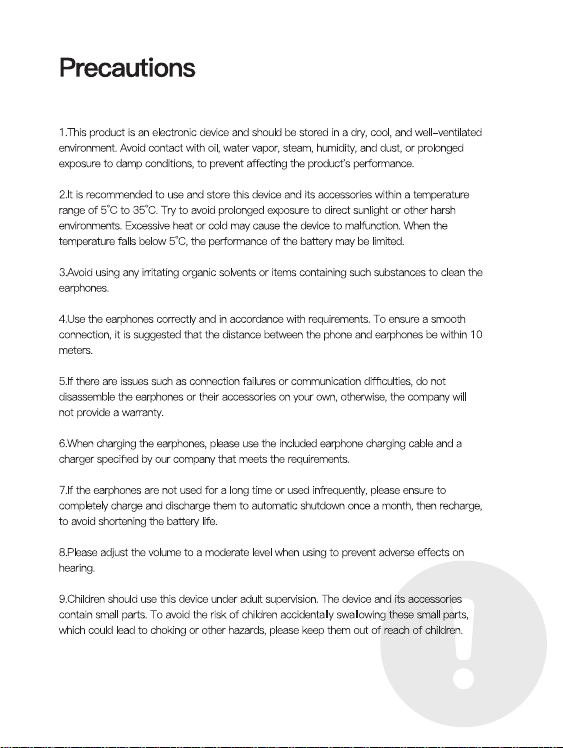
Verbinden
封面157g双铜 四色 亚胶 内页105g双铜 单黑 共52P 起码钉
蓝牙设置
搜到设备
确保手机蓝牙打开
搜索设备BACH01,点击配对
蓝牙设置
我的设备
配对蓝牙成功
已连接
配对
Bluetooth Settings
Found device
pairing
操作说明
功能操作
触控处
触控处
连接说明
开机说明
首次使用时先将耳机放入充电仓,
插上充电线,将耳机和充电仓充满。
连接设备
打开充电仓取出耳机,自动开机并配对手机打开蓝牙设备,
搜索配对名:(BACH01)
Connection instructions
Power-on Instructions
When using for the first time, put the earphones into the
charging compartment,
Plug in the charging cable and fully charge the
earphones and charging case.
connected device
Open the charging case, take out the earphones, automatically
turn on the phone and pair it with a Bluetooth device,
Search for pairing name: (BACH01)
Ensure that the phone's
Bluetooth is turned on for search
Search for device BACH01, click on pairing
Bluetooth pairing successful
Bluetooth Settings
Found device
Connected
1.长按2秒音量加减 左加右减单耳使用都是音量加
2.双击左耳打开SIRI双击右耳播放/暂停
单耳使用双击播放/暂停/接听/挂断
3.三击上下曲 左上右下 单耳使用都是下一曲
4.五击切换游戏模式/音乐模式(只在与手机连接后才有效)
5.来电双击接听/挂断,长按两秒拒接来电
6.开盖后未取出耳机,长按充电仓按键8秒,
左右耳会恢复出厂设置后重新配对.
Operation Manual
Functional Operations
Touch location
Touch location
1. Long press for 2 seconds to increase or decrease the volume.
Left+right+decrease. For single ear use,
the volume will increase or decrease
2. Double click on the left ear to open SIRI.
Double click on the right ear to play/pause
Double click to play/pause/answer/hang up on one ear
3. Three clicks on the up and down tracks, left, top, right,
and single ear use all indicate the next track
4. Five click switch between game mode/music mode
(only effective when connected to the phone)
5. Double click to answer/hang up a call,
long press for two seconds to reject the call
6. If the earphones are not removed after opening the lid,
press and hold the charging compartment button for 8 seconds,
The left and right ears will be reset to factory settings and re paired
更改配对,关机,充电
1、打开充电仓盖取出耳机自动开机,会自动连接最近一次配对过的手机。
2、如需配对其它手机,请关闭原手机的蓝牙,在蓝牙耳机开机状态下,
其他于机打开蓝牙即可搜索设备名BACH01。
3、不使用耳机时,将耳机放入充电盒,耳机会自动关机并补充电量,
如果未带充电盒,手机断开蓝牙大约30分钟后耳机会自动关机。
Change pairing, turn off, charge
1. Open the charging compartment cover and take out the earphones,
which will automatically turn on and connect to the
phone that has been paired last time.
2. If you need to pair with other phones, please turn off the
Bluetooth of the original phone. When the Bluetooth
earphones are turned on, turn on the Bluetooth of the other
phones to search for the device name BACH01.
3. When not in use, put the earphones into the charging case,
and the earphones will automatically shut down and recharge.
If the charging case is not included, the earphones
will automatically shut down after disconnecting
Bluetooth from the phone for about 30 minutes.
产品特点
分离式机身设计,享受真无线立体声效
可充电式收纳盒收纳即可为耳机充电
无感佩戴,久戴不痛.
Product Features
Separated body design, enjoy true wireless stereo sound effect
Rechargeable storage box for charging headphones
Wearing it without feeling uncomfortable for a long time without pain
Functional Definition
-Power on
Open the charging compartment cover, and the earphones will
automatically turn on and pair; After the battery replacement is
completed, the earphones automatically turn on and pair.
-Shut down
Put it into the charging compartment and close the lid, the earphones
will automatically turn off; Not connected after 30 minutes of startup
The device and headphones automatically shut down.
-Single ear use
Turn on the charging case and start automatic pairing. Once the
Bluetooth connection is successful, it can be used.
-Automatic reconnection
The phone has not deleted the historical pairing name of the earphones,
and can automatically connect by opening the cover.
功能定义
-开机
充电仓开盖,耳机自动开机并配对;换电完成后,耳机自动开机并配对。
-关机
放入充电仓合盖,耳机自动关机;开机30分钟后未连接
设备,耳机自动关机。
-单耳使用
打开充电仓开机自动配对,连接蓝牙成功,即可使用。
-自动回连
手机未删除过耳机历史配对名,开盖即可自动连接。
指示灯说明
耳机配对
打开充电仓,左右耳自动配对,配对成功后白灯慢闪。
耳机放入充电仓
充电充电时,耳机橙灯长亮,电仓充电白灯亮5秒
耳机装上电池
白灯会亮2秒,同时语音会提示设备已开机。
耳机低电量
橙灯每隔1分钟会闪1次,同时语音会提示低电量
用充电器给充电仓充电
充电中时橙色灯常亮,充满电白灯常8秒熄灭。
用充电器给充电仓、耳机充电
耳机充满电橙灯熄灭,仓充满电白色亮8秒熄灭。
Indicator Light Instructions
Earphone pairing
Open the charging compartment, and the left and right ears will
automatically pair. After successful pairing, the white light will flash slowly.
Put the earphones into the charging compartment
When charging, the orange light on the earphones stays on, and the
white light on the charging compartment stays on for 5 seconds
Installing batteries on headphones
The white light will light up for 2 seconds, and the voice will prompt
that the device has been turned on.
Headphones low battery
The orange light flashes once every minute, and the voice
prompts low battery
Charge the charging compartment with a charger
The orange light stays on while charging, and the fully charged white
light goes off for 8 seconds.
Charge the charging case and earphones with a charger
The orange light turns off when the earphones are fully charged,
and the white light turns on for 8 seconds when the case is fully
charged and turns off.
This device complies with part 15 of the FCC Rules. Operation is subject to the following two
conditions:
(1) This device may not cause harmful interference, and (2) this device must accept any
interference
received, including interference that may cause undesired operation.
NOTE: This equipment has been tested and found to comply with the limits for a Class B digital
device,
pursuant to Part 15 of the FCC Rules. These limits are designed to provide reasonable
protection
against harmful interference in a residential installation. This equipment generates, uses and
can radiate
radio frequency energy and, if not installed and used in accordance with the instructions, may
cause
harmful interference to radio communications. However, there is no guarantee that interference
will not
occur in a particular installation. If this equipment does cause harmful interference to radio or
television
reception, which can be determined by turning the equipment off and on, the user is
encouraged to try to
correct the interference by one or more of the following measures:
-- Reorient or relocate the receiving antenna.
-- Increase the separation between the equipment and receiver.
-- Connect the equipment into an outlet on a circuit different from that to which the receiver is
connected.
-- Consult the dealer or an experienced radio/TV technician for help.
Changes or modifications not expressly approved by the party responsible for compliance
could void the
user's authority to operate the equipment.
The device has been evaluated to meet general RF exposure requirement. The device can be
used in portable exposure condition without restriction.
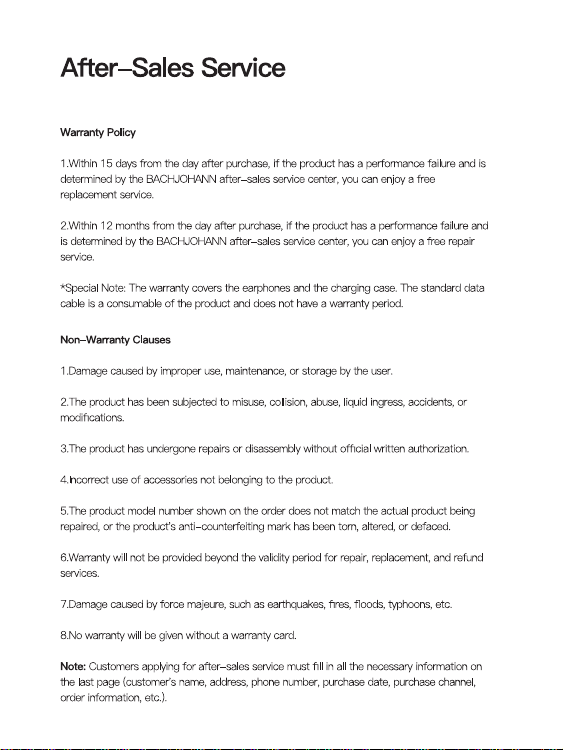
Verbinden
封面157g双铜 四色 亚胶 内页105g双铜 单黑 共52P 起码钉
蓝牙设置
搜到设备
确保手机蓝牙打开
搜索设备BACH01,点击配对
蓝牙设置
我的设备
配对蓝牙成功
已连接
配对
Bluetooth Settings
Found device
pairing
操作说明
功能操作
触控处
触控处
连接说明
开机说明
首次使用时先将耳机放入充电仓,
插上充电线,将耳机和充电仓充满。
连接设备
打开充电仓取出耳机,自动开机并配对手机打开蓝牙设备,
搜索配对名:(BACH01)
Connection instructions
Power-on Instructions
When using for the first time, put the earphones into the
charging compartment,
Plug in the charging cable and fully charge the
earphones and charging case.
connected device
Open the charging case, take out the earphones, automatically
turn on the phone and pair it with a Bluetooth device,
Search for pairing name: (BACH01)
Ensure that the phone's
Bluetooth is turned on for search
Search for device BACH01, click on pairing
Bluetooth pairing successful
Bluetooth Settings
Found device
Connected
1.长按2秒音量加减 左加右减单耳使用都是音量加
2.双击左耳打开SIRI双击右耳播放/暂停
单耳使用双击播放/暂停/接听/挂断
3.三击上下曲 左上右下 单耳使用都是下一曲
4.五击切换游戏模式/音乐模式(只在与手机连接后才有效)
5.来电双击接听/挂断,长按两秒拒接来电
6.开盖后未取出耳机,长按充电仓按键8秒,
左右耳会恢复出厂设置后重新配对.
Operation Manual
Functional Operations
Touch location
Touch location
1. Long press for 2 seconds to increase or decrease the volume.
Left+right+decrease. For single ear use,
the volume will increase or decrease
2. Double click on the left ear to open SIRI.
Double click on the right ear to play/pause
Double click to play/pause/answer/hang up on one ear
3. Three clicks on the up and down tracks, left, top, right,
and single ear use all indicate the next track
4. Five click switch between game mode/music mode
(only effective when connected to the phone)
5. Double click to answer/hang up a call,
long press for two seconds to reject the call
6. If the earphones are not removed after opening the lid,
press and hold the charging compartment button for 8 seconds,
The left and right ears will be reset to factory settings and re paired
更改配对,关机,充电
1、打开充电仓盖取出耳机自动开机,会自动连接最近一次配对过的手机。
2、如需配对其它手机,请关闭原手机的蓝牙,在蓝牙耳机开机状态下,
其他于机打开蓝牙即可搜索设备名BACH01。
3、不使用耳机时,将耳机放入充电盒,耳机会自动关机并补充电量,
如果未带充电盒,手机断开蓝牙大约30分钟后耳机会自动关机。
Change pairing, turn off, charge
1. Open the charging compartment cover and take out the earphones,
which will automatically turn on and connect to the
phone that has been paired last time.
2. If you need to pair with other phones, please turn off the
Bluetooth of the original phone. When the Bluetooth
earphones are turned on, turn on the Bluetooth of the other
phones to search for the device name BACH01.
3. When not in use, put the earphones into the charging case,
and the earphones will automatically shut down and recharge.
If the charging case is not included, the earphones
will automatically shut down after disconnecting
Bluetooth from the phone for about 30 minutes.
产品特点
分离式机身设计,享受真无线立体声效
可充电式收纳盒收纳即可为耳机充电
无感佩戴,久戴不痛.
Product Features
Separated body design, enjoy true wireless stereo sound effect
Rechargeable storage box for charging headphones
Wearing it without feeling uncomfortable for a long time without pain
Functional Definition
-Power on
Open the charging compartment cover, and the earphones will
automatically turn on and pair; After the battery replacement is
completed, the earphones automatically turn on and pair.
-Shut down
Put it into the charging compartment and close the lid, the earphones
will automatically turn off; Not connected after 30 minutes of startup
The device and headphones automatically shut down.
-Single ear use
Turn on the charging case and start automatic pairing. Once the
Bluetooth connection is successful, it can be used.
-Automatic reconnection
The phone has not deleted the historical pairing name of the earphones,
and can automatically connect by opening the cover.
功能定义
-开机
充电仓开盖,耳机自动开机并配对;换电完成后,耳机自动开机并配对。
-关机
放入充电仓合盖,耳机自动关机;开机30分钟后未连接
设备,耳机自动关机。
-单耳使用
打开充电仓开机自动配对,连接蓝牙成功,即可使用。
-自动回连
手机未删除过耳机历史配对名,开盖即可自动连接。
指示灯说明
耳机配对
打开充电仓,左右耳自动配对,配对成功后白灯慢闪。
耳机放入充电仓
充电充电时,耳机橙灯长亮,电仓充电白灯亮5秒
耳机装上电池
白灯会亮2秒,同时语音会提示设备已开机。
耳机低电量
橙灯每隔1分钟会闪1次,同时语音会提示低电量
用充电器给充电仓充电
充电中时橙色灯常亮,充满电白灯常8秒熄灭。
用充电器给充电仓、耳机充电
耳机充满电橙灯熄灭,仓充满电白色亮8秒熄灭。
Indicator Light Instructions
Earphone pairing
Open the charging compartment, and the left and right ears will
automatically pair. After successful pairing, the white light will flash slowly.
Put the earphones into the charging compartment
When charging, the orange light on the earphones stays on, and the
white light on the charging compartment stays on for 5 seconds
Installing batteries on headphones
The white light will light up for 2 seconds, and the voice will prompt
that the device has been turned on.
Headphones low battery
The orange light flashes once every minute, and the voice
prompts low battery
Charge the charging compartment with a charger
The orange light stays on while charging, and the fully charged white
light goes off for 8 seconds.
Charge the charging case and earphones with a charger
The orange light turns off when the earphones are fully charged,
and the white light turns on for 8 seconds when the case is fully
charged and turns off.
This device complies with part 15 of the FCC Rules. Operation is subject to the following two
conditions:
(1) This device may not cause harmful interference, and (2) this device must accept any
interference
received, including interference that may cause undesired operation.
NOTE: This equipment has been tested and found to comply with the limits for a Class B digital
device,
pursuant to Part 15 of the FCC Rules. These limits are designed to provide reasonable
protection
against harmful interference in a residential installation. This equipment generates, uses and
can radiate
radio frequency energy and, if not installed and used in accordance with the instructions, may
cause
harmful interference to radio communications. However, there is no guarantee that interference
will not
occur in a particular installation. If this equipment does cause harmful interference to radio or
television
reception, which can be determined by turning the equipment off and on, the user is
encouraged to try to
correct the interference by one or more of the following measures:
-- Reorient or relocate the receiving antenna.
-- Increase the separation between the equipment and receiver.
-- Connect the equipment into an outlet on a circuit different from that to which the receiver is
connected.
-- Consult the dealer or an experienced radio/TV technician for help.
Changes or modifications not expressly approved by the party responsible for compliance
could void the
user's authority to operate the equipment.
The device has been evaluated to meet general RF exposure requirement. The device can be
used in portable exposure condition without restriction.
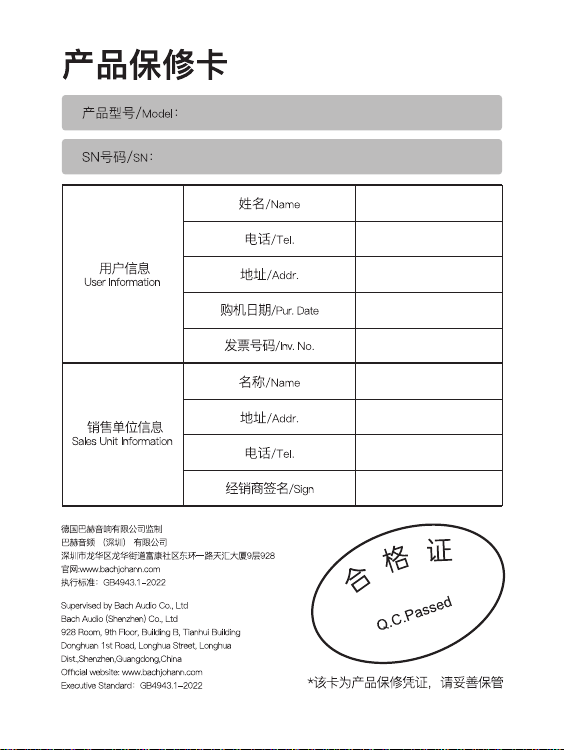
Verbinden
封面157g双铜 四色 亚胶 内页105g双铜 单黑 共52P 起码钉
蓝牙设置
搜到设备
确保手机蓝牙打开
搜索设备BACH01,点击配对
蓝牙设置
我的设备
配对蓝牙成功
已连接
配对
Bluetooth Settings
Found device
pairing
操作说明
功能操作
触控处
触控处
连接说明
开机说明
首次使用时先将耳机放入充电仓,
插上充电线,将耳机和充电仓充满。
连接设备
打开充电仓取出耳机,自动开机并配对手机打开蓝牙设备,
搜索配对名:(BACH01)
Connection instructions
Power-on Instructions
When using for the first time, put the earphones into the
charging compartment,
Plug in the charging cable and fully charge the
earphones and charging case.
connected device
Open the charging case, take out the earphones, automatically
turn on the phone and pair it with a Bluetooth device,
Search for pairing name: (BACH01)
Ensure that the phone's
Bluetooth is turned on for search
Search for device BACH01, click on pairing
Bluetooth pairing successful
Bluetooth Settings
Found device
Connected
1.长按2秒音量加减 左加右减单耳使用都是音量加
2.双击左耳打开SIRI双击右耳播放/暂停
单耳使用双击播放/暂停/接听/挂断
3.三击上下曲 左上右下 单耳使用都是下一曲
4.五击切换游戏模式/音乐模式(只在与手机连接后才有效)
5.来电双击接听/挂断,长按两秒拒接来电
6.开盖后未取出耳机,长按充电仓按键8秒,
左右耳会恢复出厂设置后重新配对.
Operation Manual
Functional Operations
Touch location
Touch location
1. Long press for 2 seconds to increase or decrease the volume.
Left+right+decrease. For single ear use,
the volume will increase or decrease
2. Double click on the left ear to open SIRI.
Double click on the right ear to play/pause
Double click to play/pause/answer/hang up on one ear
3. Three clicks on the up and down tracks, left, top, right,
and single ear use all indicate the next track
4. Five click switch between game mode/music mode
(only effective when connected to the phone)
5. Double click to answer/hang up a call,
long press for two seconds to reject the call
6. If the earphones are not removed after opening the lid,
press and hold the charging compartment button for 8 seconds,
The left and right ears will be reset to factory settings and re paired
更改配对,关机,充电
1、打开充电仓盖取出耳机自动开机,会自动连接最近一次配对过的手机。
2、如需配对其它手机,请关闭原手机的蓝牙,在蓝牙耳机开机状态下,
其他于机打开蓝牙即可搜索设备名BACH01。
3、不使用耳机时,将耳机放入充电盒,耳机会自动关机并补充电量,
如果未带充电盒,手机断开蓝牙大约30分钟后耳机会自动关机。
Change pairing, turn off, charge
1. Open the charging compartment cover and take out the earphones,
which will automatically turn on and connect to the
phone that has been paired last time.
2. If you need to pair with other phones, please turn off the
Bluetooth of the original phone. When the Bluetooth
earphones are turned on, turn on the Bluetooth of the other
phones to search for the device name BACH01.
3. When not in use, put the earphones into the charging case,
and the earphones will automatically shut down and recharge.
If the charging case is not included, the earphones
will automatically shut down after disconnecting
Bluetooth from the phone for about 30 minutes.
产品特点
分离式机身设计,享受真无线立体声效
可充电式收纳盒收纳即可为耳机充电
无感佩戴,久戴不痛.
Product Features
Separated body design, enjoy true wireless stereo sound effect
Rechargeable storage box for charging headphones
Wearing it without feeling uncomfortable for a long time without pain
Functional Definition
-Power on
Open the charging compartment cover, and the earphones will
automatically turn on and pair; After the battery replacement is
completed, the earphones automatically turn on and pair.
-Shut down
Put it into the charging compartment and close the lid, the earphones
will automatically turn off; Not connected after 30 minutes of startup
The device and headphones automatically shut down.
-Single ear use
Turn on the charging case and start automatic pairing. Once the
Bluetooth connection is successful, it can be used.
-Automatic reconnection
The phone has not deleted the historical pairing name of the earphones,
and can automatically connect by opening the cover.
功能定义
-开机
充电仓开盖,耳机自动开机并配对;换电完成后,耳机自动开机并配对。
-关机
放入充电仓合盖,耳机自动关机;开机30分钟后未连接
设备,耳机自动关机。
-单耳使用
打开充电仓开机自动配对,连接蓝牙成功,即可使用。
-自动回连
手机未删除过耳机历史配对名,开盖即可自动连接。
指示灯说明
耳机配对
打开充电仓,左右耳自动配对,配对成功后白灯慢闪。
耳机放入充电仓
充电充电时,耳机橙灯长亮,电仓充电白灯亮5秒
耳机装上电池
白灯会亮2秒,同时语音会提示设备已开机。
耳机低电量
橙灯每隔1分钟会闪1次,同时语音会提示低电量
用充电器给充电仓充电
充电中时橙色灯常亮,充满电白灯常8秒熄灭。
用充电器给充电仓、耳机充电
耳机充满电橙灯熄灭,仓充满电白色亮8秒熄灭。
Indicator Light Instructions
Earphone pairing
Open the charging compartment, and the left and right ears will
automatically pair. After successful pairing, the white light will flash slowly.
Put the earphones into the charging compartment
When charging, the orange light on the earphones stays on, and the
white light on the charging compartment stays on for 5 seconds
Installing batteries on headphones
The white light will light up for 2 seconds, and the voice will prompt
that the device has been turned on.
Headphones low battery
The orange light flashes once every minute, and the voice
prompts low battery
Charge the charging compartment with a charger
The orange light stays on while charging, and the fully charged white
light goes off for 8 seconds.
Charge the charging case and earphones with a charger
The orange light turns off when the earphones are fully charged,
and the white light turns on for 8 seconds when the case is fully
charged and turns off.
This device complies with part 15 of the FCC Rules. Operation is subject to the following two
conditions:
(1) This device may not cause harmful interference, and (2) this device must accept any
interference
received, including interference that may cause undesired operation.
NOTE: This equipment has been tested and found to comply with the limits for a Class B digital
device,
pursuant to Part 15 of the FCC Rules. These limits are designed to provide reasonable
protection
against harmful interference in a residential installation. This equipment generates, uses and
can radiate
radio frequency energy and, if not installed and used in accordance with the instructions, may
cause
harmful interference to radio communications. However, there is no guarantee that interference
will not
occur in a particular installation. If this equipment does cause harmful interference to radio or
television
reception, which can be determined by turning the equipment off and on, the user is
encouraged to try to
correct the interference by one or more of the following measures:
-- Reorient or relocate the receiving antenna.
-- Increase the separation between the equipment and receiver.
-- Connect the equipment into an outlet on a circuit different from that to which the receiver is
connected.
-- Consult the dealer or an experienced radio/TV technician for help.
Changes or modifications not expressly approved by the party responsible for compliance
could void the
user's authority to operate the equipment.
The device has been evaluated to meet general RF exposure requirement. The device can be
used in portable exposure condition without restriction.
Verbinden
封面157g双铜 四色 亚胶 内页105g双铜 单黑 共52P 起码钉
蓝牙设置
搜到设备
确保手机蓝牙打开
搜索设备BACH01,点击配对
蓝牙设置
我的设备
配对蓝牙成功
已连接
配对
Bluetooth Settings
Found device
pairing
操作说明
功能操作
触控处
触控处
连接说明
开机说明
首次使用时先将耳机放入充电仓,
插上充电线,将耳机和充电仓充满。
连接设备
打开充电仓取出耳机,自动开机并配对手机打开蓝牙设备,
搜索配对名:(BACH01)
Connection instructions
Power-on Instructions
When using for the first time, put the earphones into the
charging compartment,
Plug in the charging cable and fully charge the
earphones and charging case.
connected device
Open the charging case, take out the earphones, automatically
turn on the phone and pair it with a Bluetooth device,
Search for pairing name: (BACH01)
Ensure that the phone's
Bluetooth is turned on for search
Search for device BACH01, click on pairing
Bluetooth pairing successful
Bluetooth Settings
Found device
Connected
1.长按2秒音量加减 左加右减单耳使用都是音量加
2.双击左耳打开SIRI双击右耳播放/暂停
单耳使用双击播放/暂停/接听/挂断
3.三击上下曲 左上右下 单耳使用都是下一曲
4.五击切换游戏模式/音乐模式(只在与手机连接后才有效)
5.来电双击接听/挂断,长按两秒拒接来电
6.开盖后未取出耳机,长按充电仓按键8秒,
左右耳会恢复出厂设置后重新配对.
Operation Manual
Functional Operations
Touch location
Touch location
1. Long press for 2 seconds to increase or decrease the volume.
Left+right+decrease. For single ear use,
the volume will increase or decrease
2. Double click on the left ear to open SIRI.
Double click on the right ear to play/pause
Double click to play/pause/answer/hang up on one ear
3. Three clicks on the up and down tracks, left, top, right,
and single ear use all indicate the next track
4. Five click switch between game mode/music mode
(only effective when connected to the phone)
5. Double click to answer/hang up a call,
long press for two seconds to reject the call
6. If the earphones are not removed after opening the lid,
press and hold the charging compartment button for 8 seconds,
The left and right ears will be reset to factory settings and re paired
更改配对,关机,充电
1、打开充电仓盖取出耳机自动开机,会自动连接最近一次配对过的手机。
2、如需配对其它手机,请关闭原手机的蓝牙,在蓝牙耳机开机状态下,
其他于机打开蓝牙即可搜索设备名BACH01。
3、不使用耳机时,将耳机放入充电盒,耳机会自动关机并补充电量,
如果未带充电盒,手机断开蓝牙大约30分钟后耳机会自动关机。
Change pairing, turn off, charge
1. Open the charging compartment cover and take out the earphones,
which will automatically turn on and connect to the
phone that has been paired last time.
2. If you need to pair with other phones, please turn off the
Bluetooth of the original phone. When the Bluetooth
earphones are turned on, turn on the Bluetooth of the other
phones to search for the device name BACH01.
3. When not in use, put the earphones into the charging case,
and the earphones will automatically shut down and recharge.
If the charging case is not included, the earphones
will automatically shut down after disconnecting
Bluetooth from the phone for about 30 minutes.
产品特点
分离式机身设计,享受真无线立体声效
可充电式收纳盒收纳即可为耳机充电
无感佩戴,久戴不痛.
Product Features
Separated body design, enjoy true wireless stereo sound effect
Rechargeable storage box for charging headphones
Wearing it without feeling uncomfortable for a long time without pain
Functional Definition
-Power on
Open the charging compartment cover, and the earphones will
automatically turn on and pair; After the battery replacement is
completed, the earphones automatically turn on and pair.
-Shut down
Put it into the charging compartment and close the lid, the earphones
will automatically turn off; Not connected after 30 minutes of startup
The device and headphones automatically shut down.
-Single ear use
Turn on the charging case and start automatic pairing. Once the
Bluetooth connection is successful, it can be used.
-Automatic reconnection
The phone has not deleted the historical pairing name of the earphones,
and can automatically connect by opening the cover.
功能定义
-开机
充电仓开盖,耳机自动开机并配对;换电完成后,耳机自动开机并配对。
-关机
放入充电仓合盖,耳机自动关机;开机30分钟后未连接
设备,耳机自动关机。
-单耳使用
打开充电仓开机自动配对,连接蓝牙成功,即可使用。
-自动回连
手机未删除过耳机历史配对名,开盖即可自动连接。
指示灯说明
耳机配对
打开充电仓,左右耳自动配对,配对成功后白灯慢闪。
耳机放入充电仓
充电充电时,耳机橙灯长亮,电仓充电白灯亮5秒
耳机装上电池
白灯会亮2秒,同时语音会提示设备已开机。
耳机低电量
橙灯每隔1分钟会闪1次,同时语音会提示低电量
用充电器给充电仓充电
充电中时橙色灯常亮,充满电白灯常8秒熄灭。
用充电器给充电仓、耳机充电
耳机充满电橙灯熄灭,仓充满电白色亮8秒熄灭。
Indicator Light Instructions
Earphone pairing
Open the charging compartment, and the left and right ears will
automatically pair. After successful pairing, the white light will flash slowly.
Put the earphones into the charging compartment
When charging, the orange light on the earphones stays on, and the
white light on the charging compartment stays on for 5 seconds
Installing batteries on headphones
The white light will light up for 2 seconds, and the voice will prompt
that the device has been turned on.
Headphones low battery
The orange light flashes once every minute, and the voice
prompts low battery
Charge the charging compartment with a charger
The orange light stays on while charging, and the fully charged white
light goes off for 8 seconds.
Charge the charging case and earphones with a charger
The orange light turns off when the earphones are fully charged,
and the white light turns on for 8 seconds when the case is fully
charged and turns off.
This device complies with part 15 of the FCC Rules. Operation is subject to the following two
conditions:
(1) This device may not cause harmful interference, and (2) this device must accept any
interference
received, including interference that may cause undesired operation.
NOTE: This equipment has been tested and found to comply with the limits for a Class B digital
device,
pursuant to Part 15 of the FCC Rules. These limits are designed to provide reasonable
protection
against harmful interference in a residential installation. This equipment generates, uses and
can radiate
radio frequency energy and, if not installed and used in accordance with the instructions, may
cause
harmful interference to radio communications. However, there is no guarantee that interference
will not
occur in a particular installation. If this equipment does cause harmful interference to radio or
television
reception, which can be determined by turning the equipment off and on, the user is
encouraged to try to
correct the interference by one or more of the following measures:
-- Reorient or relocate the receiving antenna.
-- Increase the separation between the equipment and receiver.
-- Connect the equipment into an outlet on a circuit different from that to which the receiver is
connected.
-- Consult the dealer or an experienced radio/TV technician for help.
Changes or modifications not expressly approved by the party responsible for compliance
could void the
user's authority to operate the equipment.
The device has been evaluated to meet general RF exposure requirement. The device can be
used in portable exposure condition without restriction.

