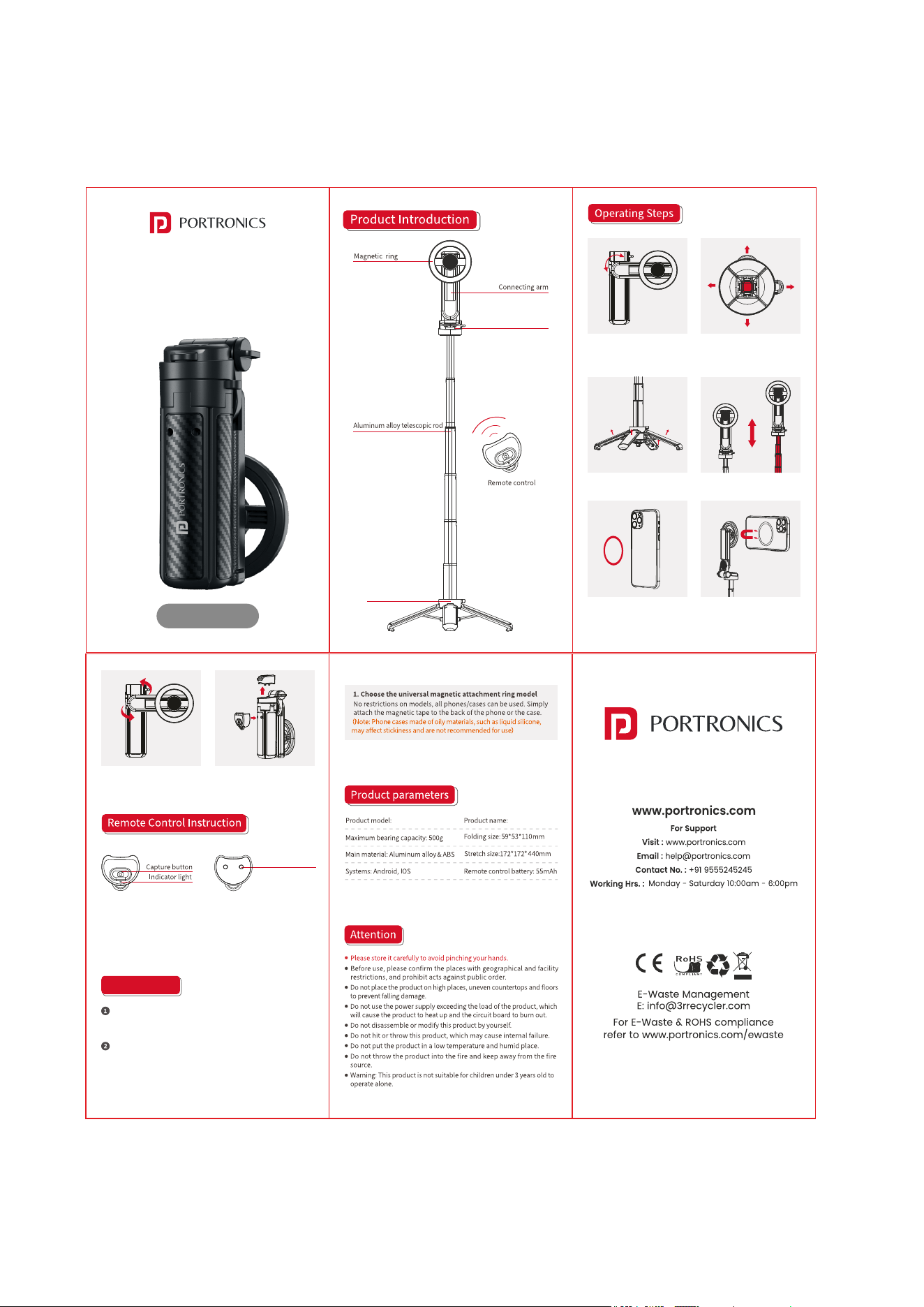
Remote Control
Positioning Column
The quadripod can be
rortated 180°.
Slide the switch on the back of the remote control, and the indicator
light will flash. Open the phone's "Settings - Bluetooth" to turn on Bluetooth
and search for "Lumistick Snap ." Click on the device name to pair.
Once "Connected" is displayed, the indicator light will stop flashing,
indicating a successful connection
Removing the remote control
can be used to take photos.
This quadripod is suitable for and above model (as these iPhone 12
phones have built-in magnetic rings on the back, using a phone case
may affect the magnetic force).
If your phone is listed above, or if you want not one of the models
to use it with a phone case, you can choose from the following two
options.
Press the bottom switch to easily
open the support legs.
Open the support legs outward. Pull the telescopic rod to the
required length.
For phones that don't come with
MagSafe magnets, you'll need to
Attach a magnetizing sheet.
Attach the quadripod's magnetic
ring to the back of the Magsafe
phone or the phone with the
magnetic sheet.
Remote control slot
Adjustable sleeve
Pull up a section to open the
quadripod, then adjust it to a
suitable angle.
User Manual
Lumistick Snap
Adjustable Selifstick
Lumisck Snap
POR 3142
Compatibility