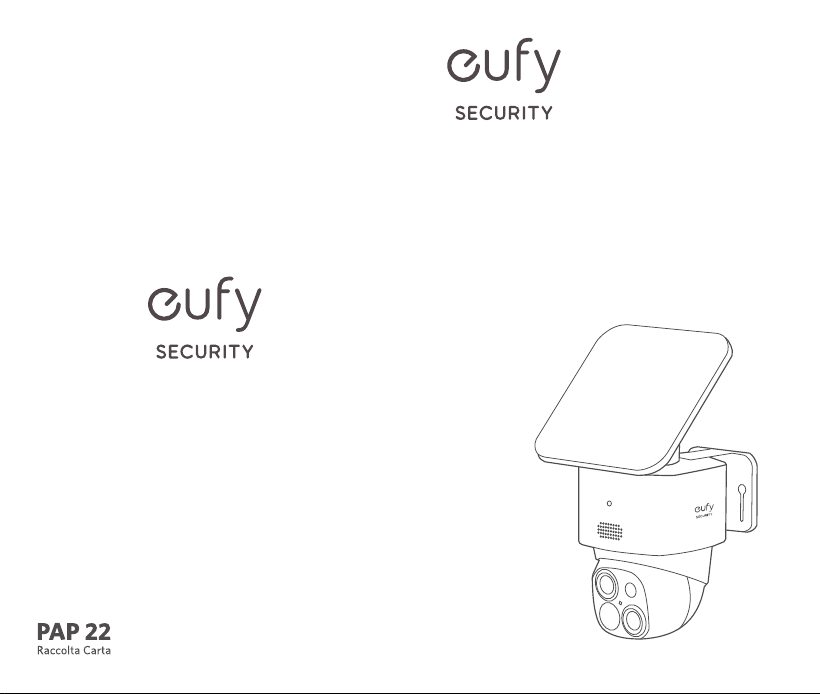
QUICK START
GUIDE
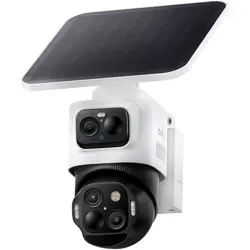
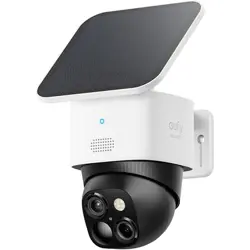
SoloCam S340
Anker Innovations Limited. All rights reserved. eufy Security and
eufy Security Logo are trademarks of Anker Innovations Limited,
registered in the United States and other countries. All other
trademarks are the property of their respective owners.
51005004075 V01
01
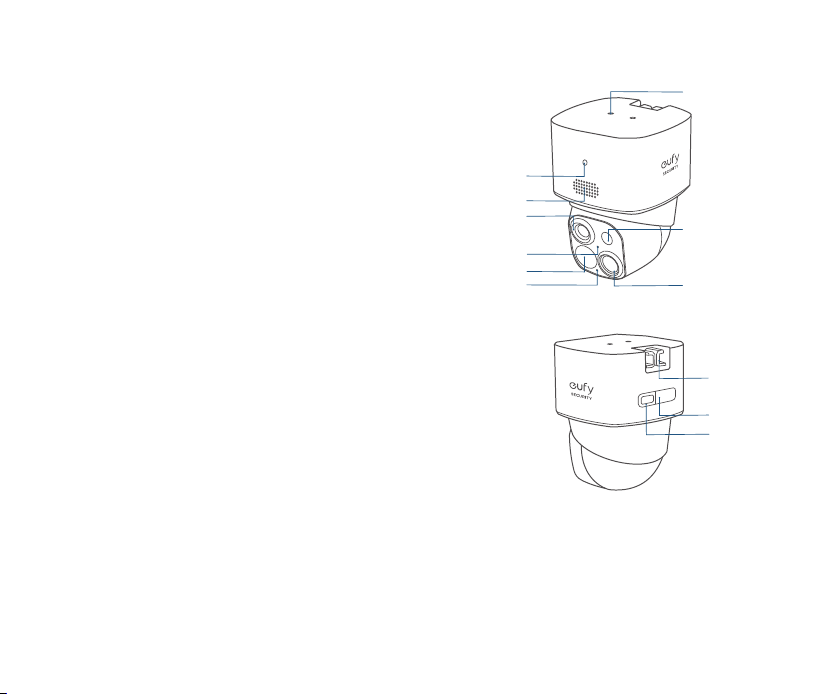
AT A GLANCE
①
⑤
④
⑥
③
②
⑦
⑧
⑨
SYNC
⑩
⑪
⑫
①
LED Indicator
⑦
Wide-Angle Lens
②
Speaker
⑧
LED Light
③
Telephoto Lens
⑨
Solar Panel Mounting Hole
④
Photosensitive Sensor
⑩
Mounting Hook
⑤
PIR Sensor
⑪
USB-C Charging Port
⑥
Microphone
⑫
SYNC Button
SoloCam S340
Model: T8170
0302
SETTING UP THE
SYSTEM
1. Download and install the eufy Security
app, then sign in or create an account.
2. Follow the in-app instructions to add the
camera to the device list.
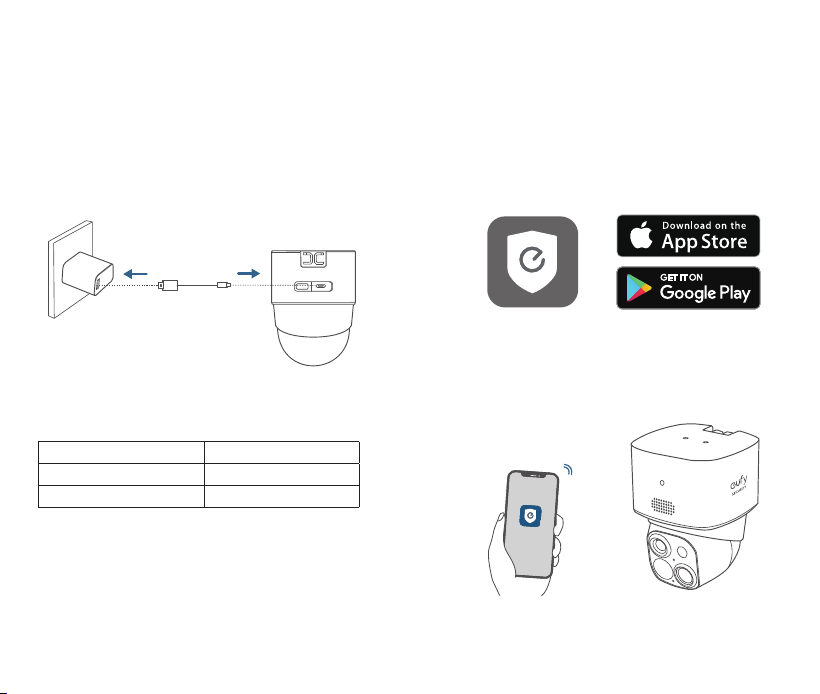
5V/2A
CHARGING YOUR
CAMERA
Fully charge before first use.
SYNC
Solid Blue Charging
Light Off Fully Charged
Charging Time 8 Hours
0504
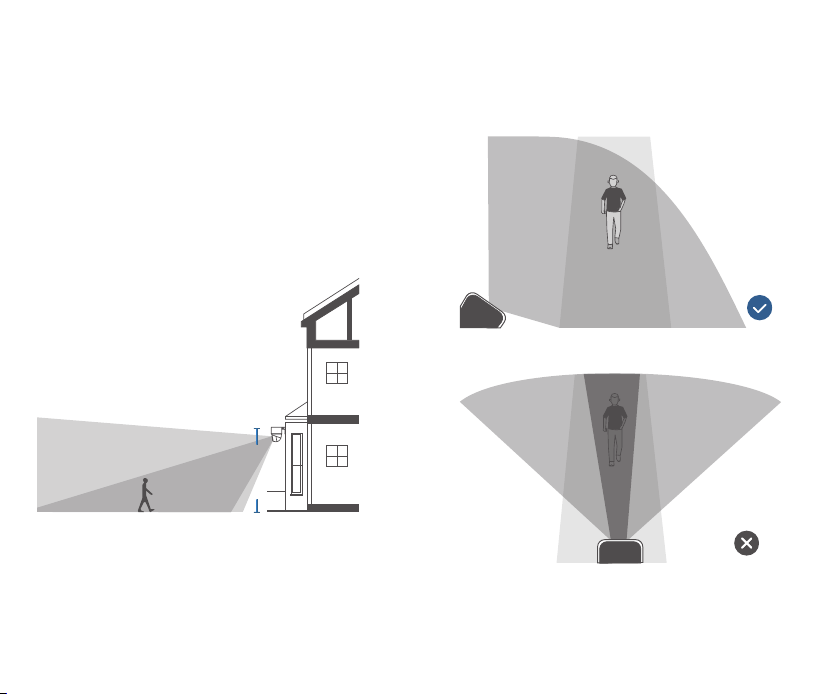
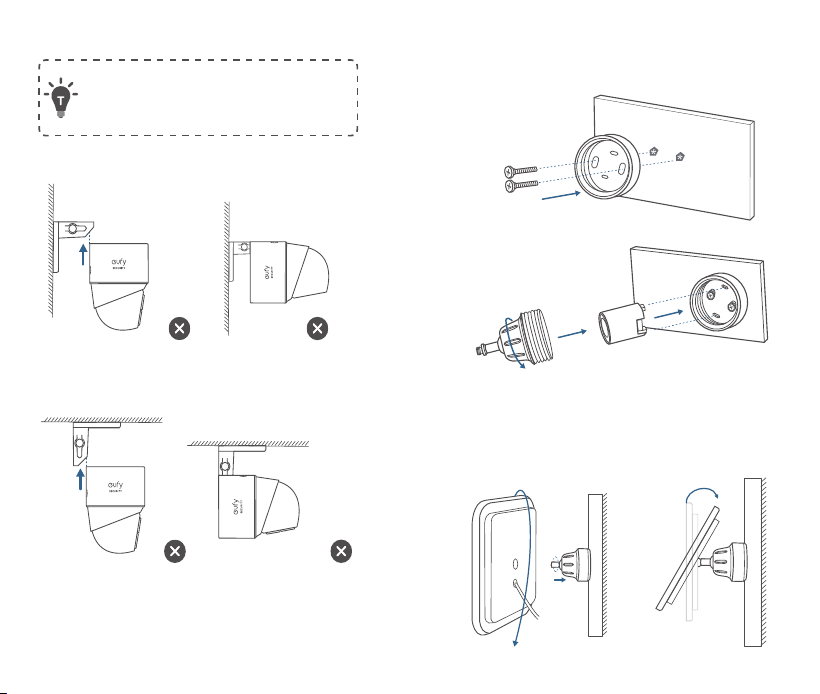
To ensure that no detection is missed, do
not install the camera directly facing the
monitoring area. Instead, maintain an angle
to avoid any potential blind spots.
MOUNTING YOUR
CAMERA
Select a Location and a Height
Select a location where you can get the
desired view. We recommend hanging the
camera 7-10 ft (2-3 m) above the ground.
7-10 ft
(2 - 3 m)
Up to 32 ft (10m)
0706
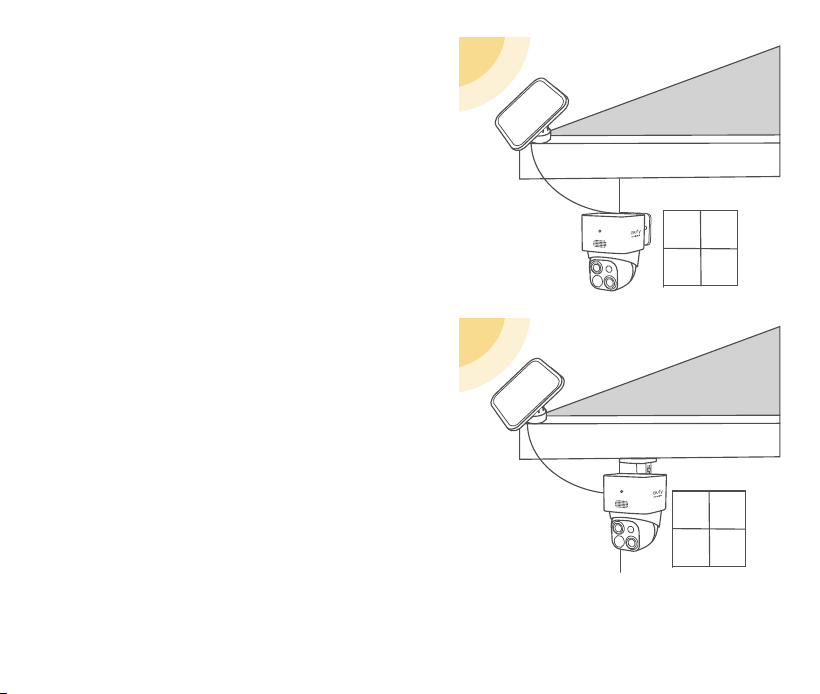
Select a Solar Panel Location
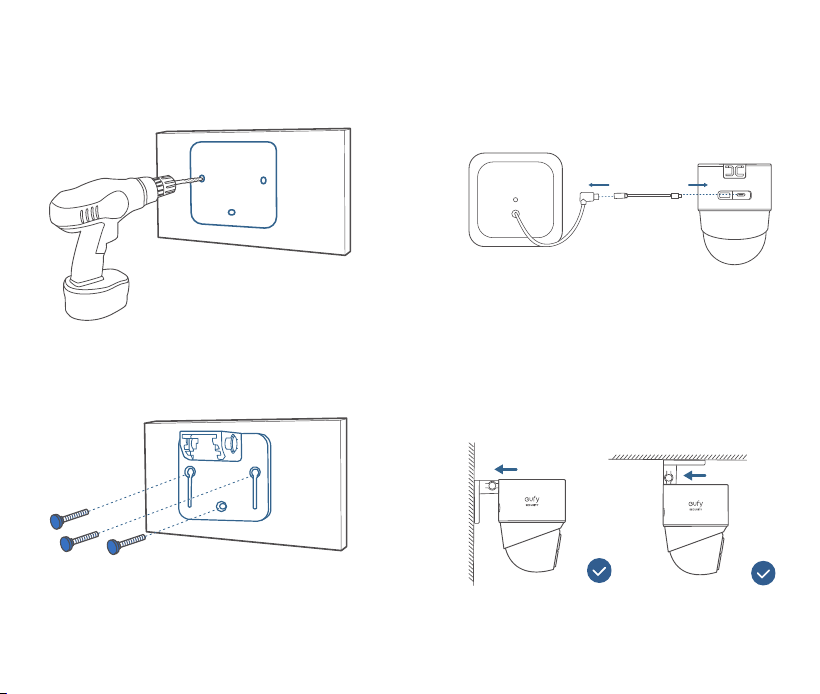
Option 1: Mount the Camera and the Solar
Panel Separately (Best for Strong Solar
Power)
If the camera is blocked, install the solar
panel independently and use the provided
USB-C extension cable to get strong solar
power. The camera can be mounted on a
wall or on the ceiling.
0908
1. Drill holes with a 15/64 inch (5.95 mm)
drill bit with the provided positioning card,
then insert the anchors into the holes.
PUSH
2. Connect the solar panel to the camera
using the provided USB-C extension cable.
SYNC
3. Firmly secure the camera onto the
mounting bracket.
PUSH
PUSH
1110
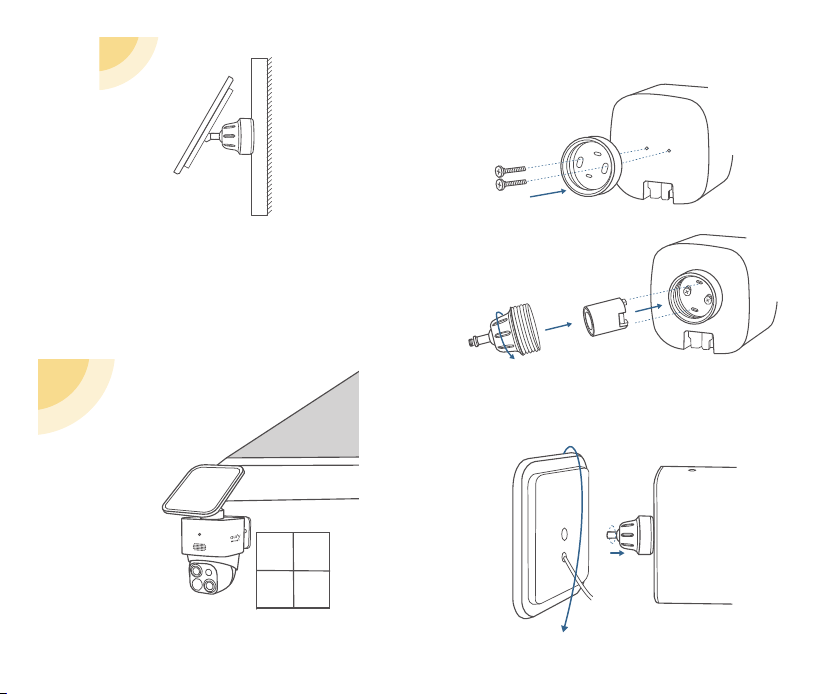
4. Install the mounting bracket of the solar
panel in a suitable position.
5. Install the solar panel onto its mounting
bracket by turning it, then adjust the angle
(20º~30º recommended).
Be careful not to install by mistake.
PUSH
PUSH
PUSH
PUSH
1312
1. Secure the solar panel's mounting bracket
to the top of the camera.
2. Install the solar panel onto the solar
panel's mounting bracket by turning it.
Option 2: Mount the Camera with the Solar
Panel Attached (Less Drilling)
If the camera is not blocked, install the solar
panel directly on the top of the camera.
1514
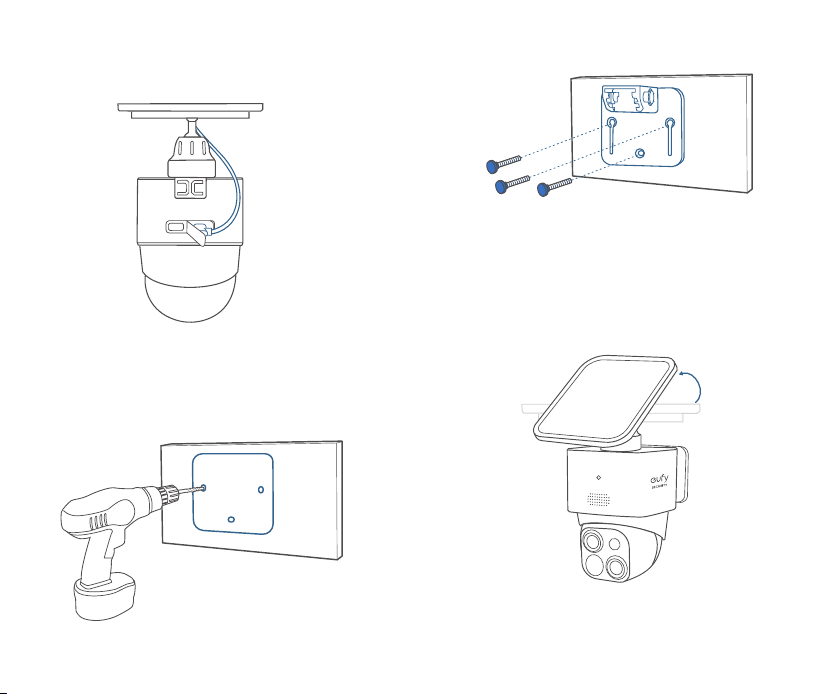
3. Connect the USB-C connector to the
USB-C port of the solar panel.
SYNC
4. Drill holes with a 15/64 inch (5.95 mm)
drill bit with the included positioning card,
then insert the anchors into the holes.
PUSH
5. Firmly secure the camera onto the
mounting bracket and adjust the angle
(20º~30º recommended).

1716
Warning:
• Replacing a battery with an incorrect type may
bypass safeguards and create danger;
• Disposal of a battery in a fire or other source
of significant heat, or by crushing, or cutting,
may result in an explosion as well as leakage of
flammable liquids and gases;
• Leaving a battery in an extremely hot environment
may result in an explosion as well as leakage of
flammable liquids and gases;
• A battery subjected to extremely low air pressure
may result in an explosion as well as leakage of
flammable liquids and gases.
Attention :
• Le remplacement d’une batterie par un type
incorrect peut contourner les protections et créer
un danger ;
• L’élimination d’une pile dans un feu ou une autre
source de chaleur importante, ou par écrasement
ou découpage, peut entraîner une explosion ainsi
qu’une fuite de liquides et de gaz inflammables ;
• Le fait de laisser une batterie dans un
environnement extrêmement chaud peut
entraîner une explosion ainsi qu’une fuite de
liquides et de gaz inflammables ;
• Une batterie soumise à une pression d’air
extrêmement faible peut provoquer une
explosion ainsi qu’une fuite de liquides et de gaz
inflammables.
SAFETY
• The suitable temperature for this device
and accessories is -20°C to 50°C (Charging
temperature is 0°C to 40°C).
• Unless specifically indicated that it is safe to do
so in the user guide or instruction manual, do not
use this device in an environment that exceeds
the recommended low or high temperature.
• Unless specifically indicated that it is safe to
do so in the user guide or instruction manual,
avoid exposing your device to direct sunshine or
excessively wet environments.
• It is recommended to supply the device in an
environment with a temperature that ranges
from 5°C to 25°C.
• When supplying power, place the device in
an environment that has a normal room
temperature and good ventilation.
CAUTION!
THERE IS A RISK OF EXPLOSION IF AN INCORRECT
BATTERY TYPE IS USED. DISPOSE OF USED
BATTERIES ACCORDING TO THEIR INSTRUCTIONS.
ATTENTION!
IL EXISTE UN RISQUE D’EXPLOSION EN CAS
D’UTILISATION D’UN TYPE DE PILE INCORRECT.
ÉLIMINEZ LES PILES USAGÉES CONFORMÉMENT
AUX INSTRUCTIONS.

1918
help. FCC Radio Frequency Exposure Statement
The device has been evaluated to meet general
RF exposure requirements. The device can be
used in fixed/mobile exposure condition. The min
separation distance is 20 cm.
Notice: Shielded cables
All connections to other computing devices must be
made using shielded cables to maintain compliance
with FCC regulations.
The following importer is the responsible party.
Company Name: POWER MOBILE LIFE, LLC
Address: 10900 NE 8TH ST, STE 501, BELLEVUE, WA
98004
Telephone: 1-800-988-7973
IC Statement
This device complies with Industry Canada licence-
exempt RSS standard(s). Operation is subject to the
following two conditions:
(1) this device may not cause interference, and
(2) this device must accept any interference,
including interference that may cause undesired
operation of the device.
Le présent appareil est conforme aux CNR
d'Industrie Canada applicables aux appareils radio
exempts de licence. L'exploitation est autorisée aux
deux conditions suivantes:
(1) l'appareil nedoit pas produire de brouillage, et
(2) l'utilisateur de l'appareil doit accepter tout
brouillage radioélectrique subi, même si le
brouillage est susceptible d'en compromettre le
fonctionnement.
This Class B digital apparatus complies with
Canadian ICES-003.
Cet appareil numérique de la classe B est conforme
à la norme NMB-003 du Canada.
NOTICE
FCC Statement
This device complies with Part 15 of the FCC Rules.
Operation is subject to the following two conditions:
(1) this device may not cause harmful interference,
and (2) this device must accept any interference
received, including interference that may cause
undesired operation.
Warning: Changes or modifications not expressly
approved by the party responsible for compliance
could void the user's authority to operate the
equipment.
Note: This equipment has been tested and found
to comply with the limits for a Class B digital device,
pursuant to Part 15 of the FCC Rules. These limits
are designed to provide reasonable protection
against harmful interference in a residential
installation.
This equipment generates, uses and can radiate
radio frequency energy and, if not installed
and used in accordance with the instructions,
may cause harmful interference to radio
communications. However, there is no guarantee
that interference will not occur in a particular
installation. If this equipment does cause harmful
interference to radio or television reception, which
can be determined by turning the equipment off
and on, the user is encouraged to try to correct
the interference by one or more of the following
measures: (1) Reorient or relocate the receiving
antenna. (2) Increase the separation between the
equipment and receiver. (3) Connect the equipment
into an outlet on a circuit different from that to
which the receiver is connected. (4) Consult the
dealer or an experienced radio/TV technician for
20
CUSTOMER SERVICE
12-month limited warranty
(US) +1 (800) 988-7973
(UK) +44 (0) 1604 936200
(DE) +49 (0) 69 9579 7960
(
中国
) +86 400 0550 036
(
日本
) +81 03 4455 7823
(AU) +61 3 8331 4800
(Egypt) +20 8000000826
(UAE) +971 8000320817
(Kuwait) +965 22069086
(Saudi Arabia) +966 8008500030
Anker Innovations Limited
Room 1318-19, Hollywood Plaza, 610 Nathan
Road, Mongkok, Kowloon, Hong Kong
@EufyOfficial
@EufyOfficial
@EufyOfficial
IC RF Statement
When using the product, maintain a distance of
20cm from the body to ensure compliance with RF
exposure requirements.
Lors de l'utilisation du produit, maintenez une
distance de 20 cm du corps afin de vous conformer
aux exigences en matière d'exposition RF.
Your product is designed and manufactured
with high quality materials and components,
which can be recycled and reused.
This symbol means the product must not be
discarded as household waste, and should
be delivered to an appropriate collection
facility for recycling. Proper disposal and
recycling helps protect natural resources,
human health and the environment.
For more information on disposal and
recycling of this product, contact your local
municipality, disposal service, or the shop
where you bought this product.