fold here fold here fold here fold here fold here fold here
FAMILIARISING YOURSELF WITH THE APPLIANCE
OPERATION
DISPENSING DETERGENT
Damage resulting from incorrect
installation and connection.
Installing and connecting the washing
machine incorrectly will cause serious
damage.
Please follow the instructions in
“Installation” in the operating
instructions.
Damage resulting from failure to
remove the transit bars.
Failure to remove the transit bars can
result in damage to the washing machine
and to adjacent cabinetry or appliances.
Please follow the instructions in
“Installation” in the operating
instructions.
Requirements for networking
Note the following requirements for
networking:
1. A Wi-Fi network is available at the
installation site.
Have the Wi-Fi password ready.
2. The MieleApp is available on a mobile
device.
3. You have a user account in the
MieleApp.
You can also carry out networking at a
later date. Skip the “Networking” menu
option during commissioning.
Carrying out commissioning
Approach the washing machine or press
On/Off.
The display shows the first step for
commissioning.
Follow the steps in the display.
Commissioning is not complete until the
commissioning programme has been
completed. If the process is cancelled
beforehand, the entire commissioning
process must be repeated.
The display can be scratched by pointed
or sharp objects, e.g. pens.
Only touch the display with your
fingertips.
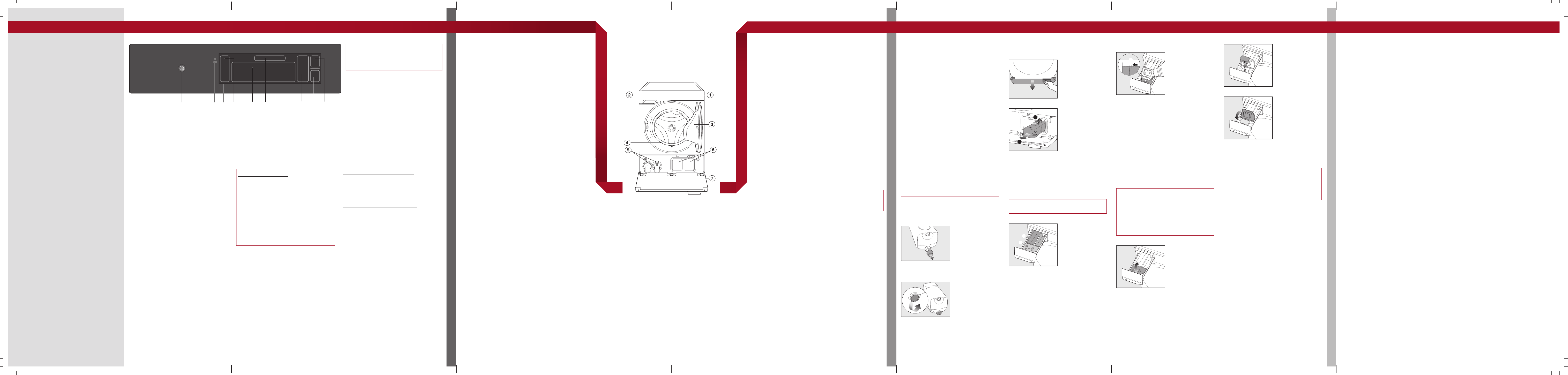
a
On/Offsensor
b
Optical interface
(for Customer Service)
c
Proximity sensor (MotionReact)
d
Display
e
Sidebar
f
Programmes
g
Name of the highlighted
programme
h
Parameters for the programme
i
Start
j
Further parameters
Operating principles
Switching the washing machine on or off
Press On/Off until the washing machine
switches on or off.
Useful tip: With MotionReact, the
washing machine is automatically
switched on when you approach it.
Operating the display
Swipe your finger in the required direction
in the display.
To select a menu option, press the
required menu option or icon. The menu
option is highlighted.
Exiting a menu level
Depending on the menu, select Close
window or Back. The higher-level menu
is displayed.
Selecting a programme
Automatic safety lock
The washing machine has an automatic
safety lock. The washing machine can
only be started within 60seconds of the
last operational step on the control panel.
If the 60seconds are exceeded, the
Startsensor goes dark. The following
question appears in the display: Release
safety lock?. Confirm the question
withOK.
You then have another 60 seconds in
which to start the wash programme.
Swipe your finger across the display until
the required programme is highlighted. If
you want to start the programme with the
parameters displayed, select Start.
Useful tip: If you want to change the
parameters, select the programme symbol
or Further parameters.
Adjusting parameters
Switching parameters on or off
Select the parameter you want to switch
on or off.
Confirm with OK.
The parameter is saved.
Changing parameters on a scale
Select the parameter you want to change.
Move the scale to the left or right until the
required value is highlighted.
Confirm with OK or wait for the change
to be applied automatically.
The value is saved.
Displaying the context menu
To open the context menu, press and hold
a Favourite or select Context menu.
Make the required change.
To close the context menu, select Close
window.
On the washing machine
1. Prepare the laundry
2. Switch on the washing machine
3. Load the laundry
4. Close the door
5. If detergent is to be added via the dispenser drawer,
add the detergent
6. Select a programme
7. Set the programme parameters
8. Start with Start
The washing machine door is locked
9. End of the programme
Via the App
1. Prepare the laundry
2. Switch on the washing machine
3. Load the laundry
4. Close the door
5. Select Remote control on the washing machine
6. Start the washing machine with Start
The washing machine door is locked
7. If detergent is to be added via the dispenser drawer,
add the detergent
8. Select a programme via the App
9. Start the programme via the App
10. End of the programme
Tips on operational steps
Preparing the laundry
Empty pockets and fasten zips and buttons. Sort
laundry by colour and fabric type.
Loading the laundry
Unfold the laundry and load loosely in the drum.
Useful tip: Mixing both large and small items gives
better wash results and helps distribute the load evenly
during spinning.
What to do after removing laundry
Check the door sealing ring for any foreign objects.
Useful tip: Leave the dispenser drawer slightly open to
allow it to dry. For safety reasons, close the door when
the machine is not in use. Otherwise there is a danger of
objects being placed inadvertently in the drum. If these
remain unnoticed and were washed in the next load,
they could damage the laundry. An open door is also a
danger to pets and children.
a
Control panel
b
Dispenser drawer
c
Door
d
Sealing ring
e
Drain filters
f
TwinDos
g
Plinth flap
Delay start
You can use the Delay start to either delay the start of
the wash programme or the end of a wash programme.
The Delay start function is possible within a 24-hour
period.
Further information can be found in the operating
instructions.
Add laundry (AddLoad)
Laundry can be added or removed if the display shows
“Add laundry”.
Touch the display.
Select Add laundry.
The wash programme is interrupted and the door will
open a little.
Open the door fully. Add or remove laundry.
Close the door.
Follow the process for starting a programme again.
The programme will continue.
Programme modifications after starting the
programme
Once the programme has started, neither the
programme nor the parameters can be changed. To
make a change, you must cancel the programme.
Cancelling a programme
Select Stop.
The display will ask whether you want to cancel the
programme.
Select Yes.
The programme is cancelled and the door is opened.
Interrupting a programme
Switch off the washing machine.
Switch the washing machine on again to continue the
programme.
Favourites
You can save up to 12programmes as Favourites. You
can change the programme name and certain
parameters for your Favourite programmes.
Further information can be found in the operating
instructions.
Detergent dispensing options
There are 3 ways of dispensing the
detergent.
1. TwinDos
2. Dispenser drawer
3. CapDosing
Using TwinDos
TwinDos must be set up.
TwinDos is automatically activated for all
programmes in which dispensing is
possible.
The UltraPhase1 and 2 TwinDos
cartridges have a barcode that is read by
the washing machine. Therefore, you do
not need to enter any dispensing
quantities when using UltraPhase1 and
2. You must specify the dispensing
quantities in the following cases:
- The barcode is defective.
- You are using a detergent from
another manufacturer.
Replacing the TwinDos cartridge
Preparing the TwinDos cartridge
Remove the cover cap from the
TwinDos cartridge.
or
Remove the film seal from the cartridge
completely.
Replacing the TwinDos cartridge
Switch on the washing machine.
Open the plinth flap.
2
1
Press the lock to release it.
Pull out the empty TwinDos
cartridge.
Insert a new TwinDos cartridge.
Using the dispenser drawer
Ensure that TwinDos dispensing is
deactivated.
Pull out the dispenser drawer.
a
compartment
Detergent for the main wash and
soaking
b
compartment
Detergent for the pre-wash
c
/compartment
Fabric softener, form conditioner or
capsules
Adding fabric softener
Add fabric softener, form conditioner or
liquid starch to the compartment. Do
not exceed the maximum level mark.
The agent will be automatically dispensed
in the final rinse cycle. At the end of the
programme, a small amount of water
remains in the compartment.
Using detergent tablets or pods
Always put detergent tablets or pods
directly in the drum with the laundry.
CapDosing
Inserting a capsule
Capsules pose a health risk.
The ingredients of capsules can be
hazardous to health if they are
swallowed or come into contact with
skin.
Keep capsules out of the reach of
children.
Pull out the dispenser drawer.
Open the lid of the /
compartment.
Press the capsule in firmly.
Close the lid and press it firmly shut.
Close the dispenser drawer.
The programme will dispense the contents
of the capsule at the correct time.
When using CapDosing, water intake to
the compartment takes place solely
via the capsule. Do not add any
additional fabric softener to the
compartment.
Short
For light soiling with no visible staining.
The programme sequence is reduced.
Mechanical action and energy usage are
increased.
Pre-ironing
The laundry undergoes a smoothing
process with steam at the end of the
programme. For optimal smoothing,
reduce the maximum load by 50%.
Small loads achieve a better result.
The garments must be suitable for drying
in a tumble dryer and suitable for
ironing .
SingleWash
For efficiently washing a very small load
(<1kg) in a normal wash programme.
The wash duration is reduced. Please
note the following advice:
- Use liquid detergent.
- For manual dosing:
Reduce the dosage to a maximum of
50% of the amount quoted for a ½
load.
Stains
For cleaning stained laundry. The
programme sequence is altered with this
wash Extra.
Save energy
The wash temperature is reduced and
the wash duration is increased.
Rinse plus
Activates 1 to 3 extra rinses for excellent
results.
The number of rinse cycles can be set
under SettingsAppliance
functionsRinse plus.
Extra quiet
This option reduces noise levels during
the wash programme. Use this if you
want to wash laundry during quiet
periods (for instance when children are
sleeping). The Rinse hold Extra is
switched on automatically, deactivating
the final spin. The programme running
time is extended.
Hygiene plus
The hygiene requirements for laundry are
increased. The temperature holding time
is extended in the main wash to improve
the rinsing efficiency. This will increase
the water and energy consumption for
the programme.
The laundry must be suitable for drying
in a tumble dryer and suitable for
ironing
Pre-wash
For laundry with large amounts of dirt,
e.g. dust and sand.
Soak
For heavily soiled fabrics with protein
stains. The soak duration can be set to
between 30minutes and 6hours via
SettingsAppliance functions
Soak.
Rinse hold
The laundry is not spun after the final
rinse and remains in the rinse water. This
helps prevent creasing if the laundry is
not going to be removed from the
washing machine immediately after the
end of the programme.
Commissioning Familiarising yourself with the appliance Operating sequence More operating options Extras
fold here fold here fold here fold here fold here fold here
en-AU, NZ
M.-Nr. 12 702 631
WQ 1000 WPS
fold here fold here fold here fold here fold here fold here
PROGRAMME CHART
CLEANING AND CARE
PROBLEM SOLVING GUIDE
Programme chart Detergent Cleaning and care Problem solving guide
This overview includes most of the programmes. A complete programme overview can be found in the operating instructions.
Programme Load (kg) •
Spin (rpm)
Temperature Items Tips
Cottons 9.0 • 1600 Cold to
90°C
Cotton, linen or mixed fibre fabric, e.g. T-shirts,
underwear, table linen
Where particularly high levels of hygiene are
required, please select a temperature of
60°C or higher.
Minimum iron 4.0 • 1200 Cold to
60°C
Synthetic and mixed fibre textiles as well as easy
care cotton e.g. jumpers, dresses, trousers and
socks/tights
Reduce the final spin speed for fabric that
creases easily.
QuickPowerWash 4.0 • 1600 40°C and
60°C
Lightly or moderately soiled cottons, linen or
mixed fibres that are also suitable for the
Cottonsprogramme
Fast and thorough cleaning of laundry with
increased energy and water consumption.
SmartMatic 6.0 • 1400 – Cottons and synthetic fibre or mixed fibre
textiles which can be washed at a temperature
of 30°C and higher
Whether it is used for washing 6x1kg or
1x6kg, the programme offers consistently
high wash results with the same water and
energy consumption per kg.
Woollens 3.0 • 1000 Cold to
40°C
Machine-washable or hand-washable wool or
wool blend fabric e.g. jumpers, cardigans, socks/
tights
Reduce the final spin speed for fabric that
creases easily.
Shirts/Blouses 1.0 • 1000 Cold to
60°C
Shirts and blouses made of cotton and mixed
fibre
- Pre-treat collars and cuffs if necessary.
- The Pre-ironingExtra is activated
automatically.
- Wash silk shirts and blouses in the Silks
programme.
Delicates 3.0 • 1000 Cold to
40°C
Delicate garments made from synthetic fibre,
mixed fibre and viscose e.g. lingerie and
appliquéd garments
For items which crease easily, select the
Pre-ironingExtra.
PowerFresh 1.0 • – Steam Dry and clean cotton, linen or mixed fibre
textiles which are slightly creased
The textiles must be suitable for drying in a
tumble dryer and suitable for
ironing
- Smaller loads give a better result.
- Selecting TwinDos ensures a fresh
fragrance.
- Remove garments as soon as the
programme has finished and hang them
up on a coat hanger.
- The programme is not suitable for
garments made of wool or wool blend
fabric.
Dark garments/
Denim
4.0 • 1200 Cold to
60°C
Black and dark cotton or mixed fibre textiles and
denim e.g. jackets, trousers, shirts, skirts
- Wash inside out.
- Denim often contains excess dye and
may run during the first few washes.
Therefore, wash light and coloured
denim items separately.
Express 20 3.0 • 1200 Cold to
40°C
Cotton garments that have hardly been worn or
are only very lightly soiled
The ShortExtra is activated automatically.
Pre-ironing only 2.0 • – Steam Damp, freshly washed and spun textiles that are
suitable for drying in a tumble dryer and
suitable for ironing
- Reduces creasing after washing and
minimises the ironing effort.
- 5–6shirts make up a load of approx.
2.0kg.
- Smaller loads give a better result.
- Remove garments as soon as the
programme has finished and hang them
up on a coat hanger.
- Not suitable for garments made of wool
or wool blend fabric
This detergent table only includes some of the programmes. A complete overview can
be found in the operating instructions.
Detergent recommendations
The recommendations apply across the entire temperature range of the wash
programmes.
Miele UltraPhase
1 and 2
Miele capsules
Miele capsules
Miele capsules
Universal
detergent
Colour detergent
Detergent for
delicates and
woollens
Special-purpose
detergent
Cottons
ECO 40-60
Minimum iron
QuickPowerWash
SmartMatic
Woollens
Shirts/Blouses
Delicates
PowerFresh
Dark garments/Denim
Outerwear
Express 20
1
Recommended Special-purpose detergent (e.g. WoolCare)
1
Liquid detergent Fabric care product (e.g. fabric softener)
2
Powder detergent Additive (e.g. Caps Booster)
Cleaning the housing, drum and
control panel
Risk of electric shock!
Mains voltage is present when the
washing machine is switched off.
Disconnect the machine from the
electricity supply before cleaning or
maintenance.
Risk of damage due to ingress of
water.
The pressure of a water jet can cause
water to get into the washing machine,
resulting in damage to components.
Do not spray the washing machine with
a water jet or high pressure hose.
Cleaning recommendation:
As required
Tools required:
Soft cleaning cloth, mild cleaning agent or
soapy water
Further information can be found in the
operating instructions.
Cleaning the dispenser drawer
Cleaning recommendation:
Every 4weeks at the beginning, even if
you only use TwinDos. If there is no heavy
soiling, you can extend the intervals.
Tools required:
Bottle brush
The following parts must be cleaned:
- Dispenser drawer
- Siphon and /compartment
channel
- Dispenser drawer housing
Further information can be found in the
operating instructions.
Cleaning the water intake filter/s
Cleaning recommendation:
Every 6months. Perform this check more
often if there are frequent interruptions to
the external water supply.
Tools required:
Screwdriver, long nose pliers
Further information can be found in the
operating instructions.
Cleaning TwinDos
Cleaning the compartment
Cleaning recommendation:
Each time the cartridges are changed
Tools required:
Damp cloth
Cleaning programme
Cleaning recommendation:
Longer downtime of more than 2months
or when changing the detergent
Tool required:
TwinDosCare cleaning cartridge or refill
container
Further information can be found in the
operating instructions.
Cleaning the drum/Hygiene in
the washing machine
Cleaning the drum
Cleaning recommendation:
As required
Cleaning programme
Cleaning recommendation:
Message in the display
Tools required:
Miele IntenseClean machine cleaner or a
universal powder detergent
Further information can be found in the
operating instructions.
Problem Possible cause and remedy
Washing machine does
not switch on. The display
remains dark.
There is no power to the washing machine.
Check whether the mains plug is plugged in and
switched on.
Check whether the circuit breaker has tripped.
The proximity sensor is switched off. The proximity sensor
does not respond.
Press On/Off and switch on the washing machine.
Check the Proximity sensor setting in Settings.
Check the proximity sensor by approaching the washing
machine from the front.
is dark and cannot be
activated.
The door is not closed properly.
Open the door and close it again.
The washing machine has an automatic safety lock. The
washing machine can only be started within 60seconds
of the last operational step on the control panel.
Confirm the question: Release safety lock? by touching
the OKsensor.
You now have another 60seconds in which to start the
wash programme.
Fault F34 The door is not closed properly. The door lock could not
engage.
Close the door again.
Start the programme again.
If the same fault message appears again, contact Miele
Customer Service.
Fault F35 The door lock has jammed.
Switch the washing machine off and on again.
If the same fault message appears again, contact Miele
Customer Service.
Fault F10 • Water inlet The washing machine could not draw in enough water.
Check whether the tap has been opened or properly
opened.
Check whether the water inlet hose is kinked.
Check that the water connection pressure is sufficient.
The minimum pressure is 100kPa (1bar). If the water
connection pressure is permanently below the minimum
value, the “Low water pressure” setting can be
activated.
Problem Possible cause and remedy
Fault F11 • Water drainage The drain pumps are dirty or blocked.
Clean the drain filters and drain pumps (see “Problem
solving guide – Draining the suds solution in the event
of a fault” in the operating instructions).
The drain hose has been fixed too high.
Observe the maximum delivery head of 1.0m.
Fault F138 The water protection system has reacted.
Turn off the tap.
Contact Miele Customer Service.
Fault F210 • Circulation The drain pumps and the nozzle in the door sealing ring
are dirty.
Clean the drain pumps and the nozzle in the door
sealing ring (see “Problem solving guide – Draining the
suds solution in the event of a fault” in the operating
instructions).
Start a wash programme again after cleaning.
If the same fault message appears again, contact Miele
Customer Service.
Fault F373 • Leak at drain
filter
The washing machine has detected a leak in the drain
filter.
Check the drain filter and tighten it again.
Switch the washing machine off and on again.
If the fault occurs again, contact Miele Customer
Service.
Fault FXXX
Switch the appliance off
and on again. If the fault
persists, call Miele.
The washing machine has detected a fault.
Disconnect the washing machine from the mains
electricity supply. Switch off at the wall and withdraw
the plug from the socket, or switch off the mains circuit
breaker.
Disconnect the washing machine from the mains supply
for at least 2minutes.
Reconnect the washing machine to the electricity
supply.
Then switch the washing machine on again.
Restart the programme.
If the fault occurs again, contact Miele Customer Service.
Quick Start Guide
Washing machine
These short instructions are not a substitute for the operating instructions supplied
with the appliance. It is essential to familiarise yourself with the washing machine
before using it for the first time. Take note of the Warning and Safety Instructions, as
well as the full descriptions on how to use your appliance.
en-AU, NZ
M.-Nr. 12 702 631 / 00
fold here fold here fold here fold here fold here fold here