Air conditioner
User manual
AC***HEH*KG, Ducted split indoor unit
• Thank you for purchasing this Samsung air conditioner.
• Before operating this unit, please read this manual carefully and retain it for future reference.
DB68-13833A-00
2
English
Contents
Safety Information 3
Safety Information 3
At a Glance 8
Indoor Unit Overview 8
Cleaning and Maintenance 9
Periodical checks 9
Internal protections via the unit control system 10
Appendix 11
SmartThings app 11
Troubleshooting 14
Operation Features 20
Operating temperature and humidity 20
DEMAND RESPONSE MODE (DRM 1, 2, 3) 21
Correct Disposal of This Product
(Waste Electrical & Electronic Equipment)
(Applicable in countries with separate collection systems)
This marking on the product, accessories or literature indicates that the product and its electronic accessories
(e.g. charger, headset, USB cable) should not be disposed of with other household waste at the end of
their working life. To prevent possible harm to the environment or human health from uncontrolled waste
disposal, please separate these items from other types of waste and recycle them responsibly to promote the
sustainable reuse of material resources.
Household users should contact either the retailer where they purchased this product, or their local
government office, for details of where and how they can take these items for environmentally safe recycling.
Business users should contact their supplier and check the terms and conditions of the purchase contract.
This product and its electronic accessories should not be mixed with other commercial wastes for disposal.
3
English
Safety Information
Before using your new air conditioner, please read this manual thoroughly to ensure that you know how to safely
and efficiently operate the extensive features and functions of your new appliance.
Because the following operating instructions cover various models, the characteristics of your air conditioner
may differ slightly from those described in this manual. If you have any questions, call your nearest contact
centre or find help and information online at www.samsung.com.
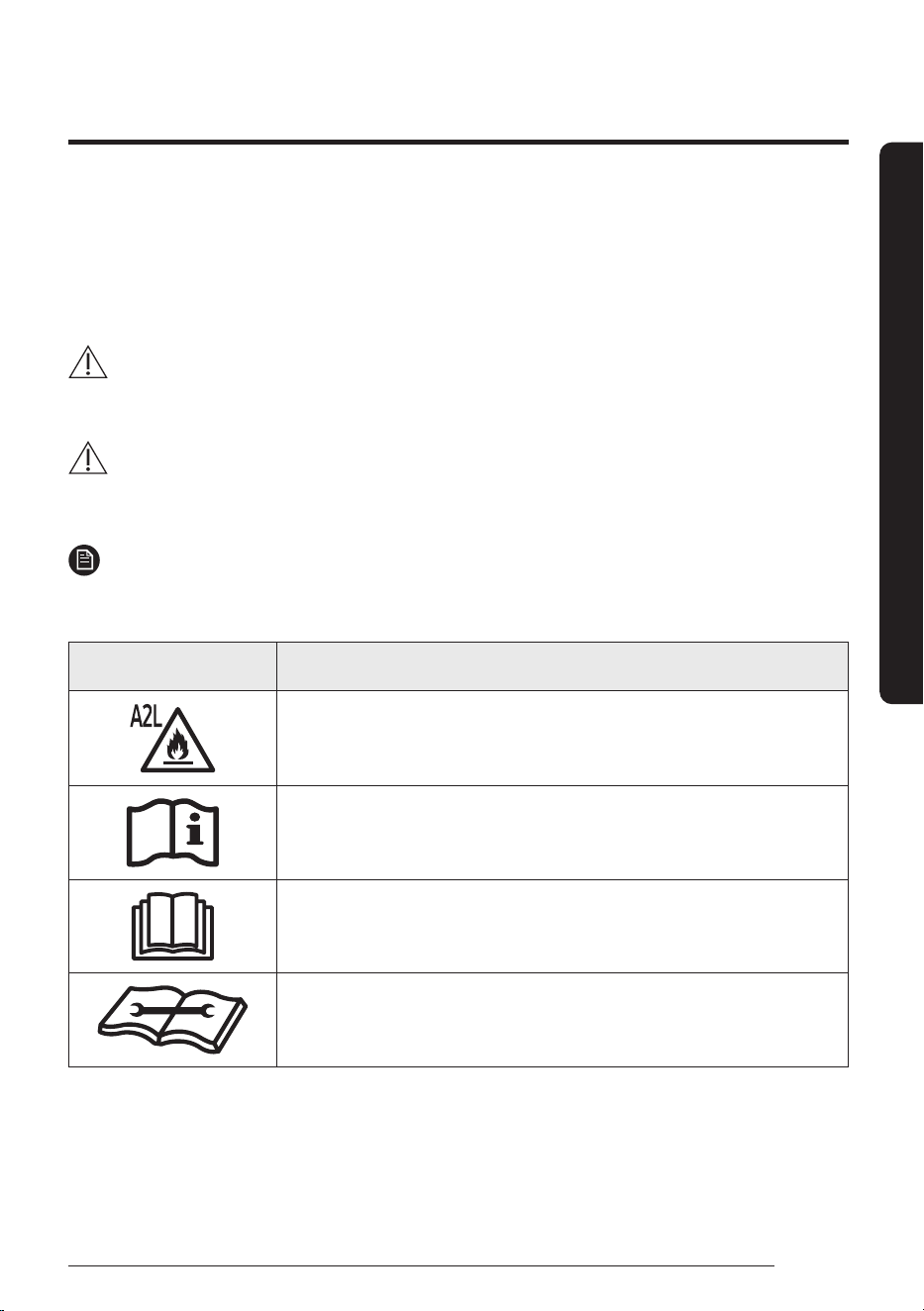
WARNING
Hazards or unsafe practices that may result in severe personal injury or death.
CAUTION
Hazards or unsafe practices that may result in minor personal injury or property damage.
NOTE
Supplementary information that may be useful
Symbol Meaning
WARNING: Low burning velocity material
(This appliance is filled with R-32.)
Refer to operating manual
Read operating manual
Read installation and service manual
Safety Information
Safety Information
4
Safety Information
English
Safety Information
FOR INSTALLATION
WARNING
The installation of this appliance must be performed by a qualified technician or service company.
• Failing to do so may result in electric shock, fire, explosion, problems with the product, or injury.
This product is equipped with a safety device that operates on electricity.
• To ensure normal operation of the safety device, power must be supplied to the product at all times
after installation, except when repairing it.
This product is equipped with a refrigerant leak sensor for the purpose of safety.
• To ensure normal operation of the refrigerant leak sensor, power must be supplied to the product at
all times after installation, except when repairing it.
CAUTION
The product shall be stored in a room with no ignition sources (e.g. open flames, gas appliance, electric
heater, etc.).
• Note that the refrigerant has no odour.
FOR POWER SUPPLY
WARNING
When the circuit breaker is damaged, contact your nearest service centre.
CAUTION
When during a thunder/lightning storm, cut the power at the circuit breaker.
• Failing to do so may result in electric shock or fire.
FOR USING
WARNING
If the appliance is flooded, please contact your nearest service centre.
• Failing to do so may result in electric shock or fire.
5
English
Safety Information
If the appliance generates a strange noise, a burning smell or smoke, cut-off the power supply
immediately and contact the nearest service centre.
• Failing to do so may result in electric shock or fire.
In the event of a gas leak (such as propane gas, LP gas, etc.), ventilate immediately without touching
the power line. Do not touch the appliance or power line.
• Do not use a ventilating fan.
• A spark may result in an explosion or fire.
To reinstall the air conditioner, please contact your nearest service centre.
• Failing to do so may result in problems with the product, water leakage, electric shock, or fire.
• A delivery service for the product is not provided. If you reinstall the product in another location,
additional construction expenses and an installation fee will be charged.
• Especially, when you wish to install the product in an unusual location such as in an industrial area or
near the seaside where it is exposed to salt in the air, please contact your nearest service centre.
Do not touch the circuit breaker with wet hands.
• This may result in electric shock.
Do not turn the air conditioner off with the circuit breaker while it is operating.
• Turning the air conditioner off and then on again with the circuit breaker may cause a spark and result
in electric shock or fire.
Do not touch the front panel with your hands or fingers during the heating operation.
• This may result in electric shock or burns.
Do not insert your fingers or foreign substances into the air inlet/outlet of the air conditioner.
• Take special care that children do not injure themselves by inserting their fingers into the product.
Do not strike or pull the air conditioner with excessive force.
• This may result in fire, injury, or problems with the product.
Do not place an object near the outdoor unit that allows children to climb onto the machine.
• This may result in children seriously injuring themselves.
Do not use this air conditioner for long periods of time in badly ventilated locations or near infirm
people.
• Since this may be dangerous due to a lack of oxygen, open a window at least once an hour.
If any foreign substance such as water has entered the appliance, cut-off the power supply and contact
the nearest service centre.
• Failing to do so may result in electric shock or fire.
Do not attempt to repair, disassemble, or modify the appliance yourself.
• Do not use any fuse (such as copper, steel wire, etc.)other than the standard fuse.
• Failing to do so may result in electric shock, fire, problems with the product, or injury.
6
Safety Information
English
Safety Information
CAUTION
Do not place objects or devices under the indoor unit.
• Water dripping from the indoor unit may result in fire or property damage.
Check that the installation frame of the outdoor unit is not broken at least once a year.
• Failing to do so may result in injury, death or property damage.
Max current is measured according to IEC standard for safety and current is measured according to ISO
standard for energy efficiency.
When the air conditioner does not operate properly for cooling or heating, there is a possibility of
refrigerant leakage. If any leakage, stop operation, ventilate the room, and consult your dealer to
recharge the refrigerant.
The refrigerant is not harmful. However, if it comes in contact with fire, it may generate harmful gases
and there is a risk of fire.
Do not stand on top of the appliance or place objects (such as laundry, lighted candles, lighted
cigarettes, dishes, chemicals, metal objects, etc.) on the appliance.
• This may result in electric shock, fire, problems with the product, or injury.
Do not operate the appliance with wet hands.
• This may result in electric shock.
Do not spray volatile material such as insecticide onto the surface of the appliance.
• As well as being harmful to humans, it may also result in electric shock, fire or problems with the
product.
Do not drink the water from the air conditioner.
• The water may be harmful to humans.
Do not apply a strong impact to the remote controller and do not disassemble the remote controller.
Do not touch the pipes connected with the product.
• This may result in burns or injury.
Do not use this air conditioner to preserve precision equipment, food, animals, plants or cosmetics, or for any
other unusual purposes.
• This may result in property damage.
Avoid directly exposing humans, animals or plants to the air flow from the air conditioner for long
periods of time.
• This may result in harm to humans, animals or plants.
This appliance is not intended for use by persons (including children) with reduced physical, sensory or
mental capabilities, or lack of experience and knowledge, unless they have been given supervision or
instruction concerning use of the appliance by a person responsible for their safety. Children should be
supervised to ensure that they do not play with the appliance.
7
English
Safety Information
FOR CLEANING
WARNING
Do not clean the appliance by spraying water directly onto it. Do not use benzene, thinner, alcohol or
acetone to clean the appliance.
• This may result in discoloration, deformation, damage, electric shock or fire.
Before cleaning or performing maintenance, cut-off the power supply and wait until the fan stops.
• Failing to do so may result in electric shock or fire.
CAUTION
Take care when cleaning the surface of the heat exchanger of the outdoor unit since it has sharp edges.
• To avoid cutting your fingers, wear thick cotton gloves when cleaning it.
• This should be done by a qualified technician please contact your installer or service centre.
Do not clean the inside of the air conditioner by yourself.
• For cleaning inside the appliance, contact your nearest service centre.
• When cleaning the internal filter, refer to the descriptions in the ‘Cleaning and Maintaining’ section.
• Failure to do may result in damage, electric shock or fire.
• Make sure to prevent any injury from sharp edges of the surface when handling the heat exchanger.
8
English
At a Glance
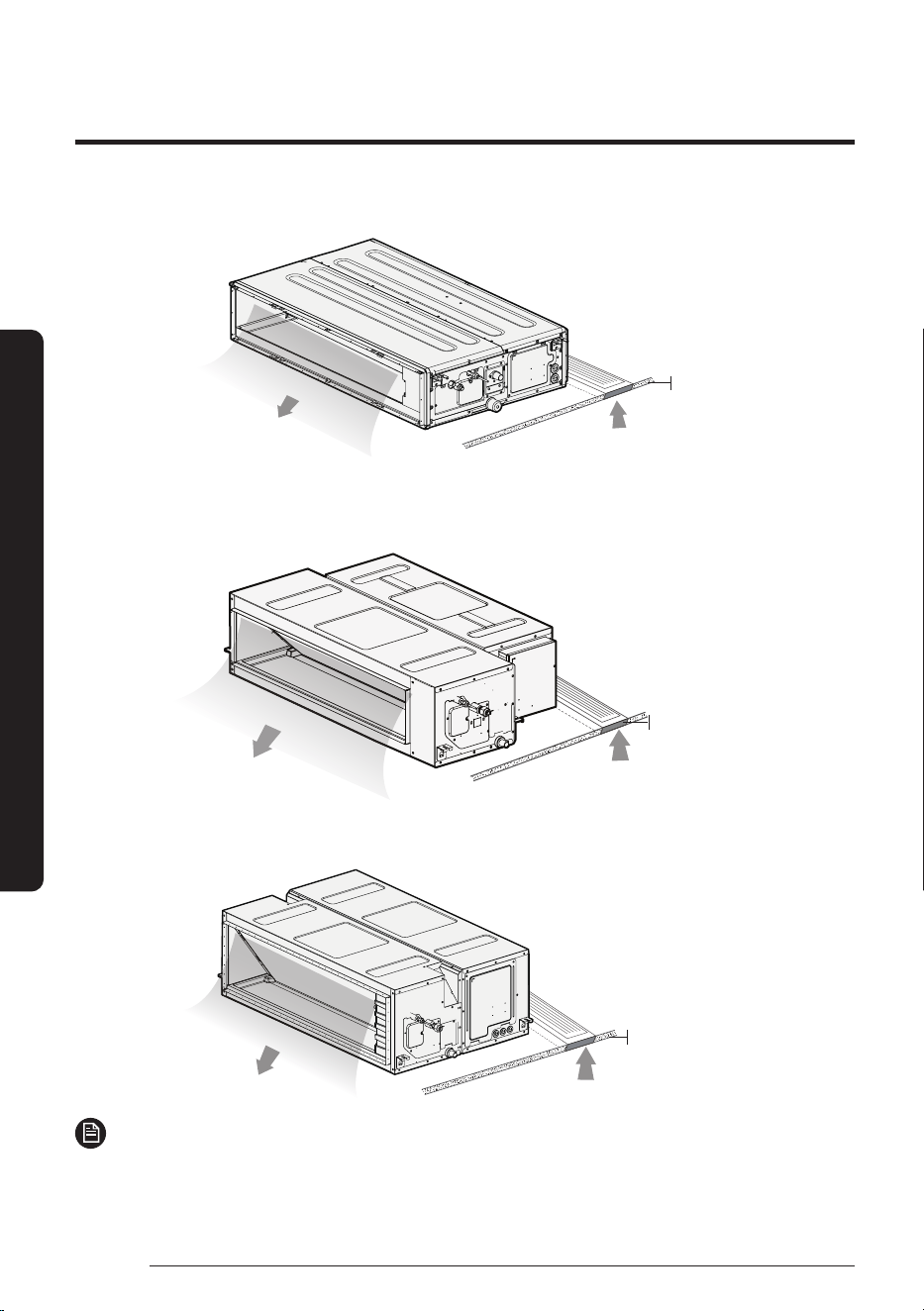
AC071HEHDKG/SA , AC090HEHDKG/SA , AC100HEHDKG/SA , AC120HEHDKG/SA , AC140HEHDKG/SA
Air intake
Air outlet
Ceiling
AC100HEHPKG/SA , AC120HEHPKG/SA , AC140HEHPKG/SA , AC100HEHFKG/SA , AC120HEHFKG/SA
AC140HEHFKG/SA , AC160HEHPKG/SA
Air intake
Air outlet
Ceiling
AC160HEHFKG/SA, AC180HEHPKG/SA (Flare Type)
AC180HEHFKG/SA, AC200HEHPKG/SA (Braze type)
Air intake
Air outlet
Ceiling
NOTE
• Your air conditioner and display may look slightly different from the illustration shown above depending
on your model.
Indoor Unit Overview
At a Glance
9
English
Cleaning and Maintenance
Maintaining the Air Conditioner
If the air conditioner will not be used for an extended period of time, dry the air conditioner to maintain in
best conditions.
1. Dry the air conditioner thoroughly by operating in Fan mode for 3 to 4 hours and disconnect the power
plug. There may be internal damage if moisture is left in components.
2. Before using the air conditioner again, dry the inner components of the air conditioner again by running
in Fan mode for 3 to 4 hours. This helps remove odours that may have generated from dampness.
Periodical checks
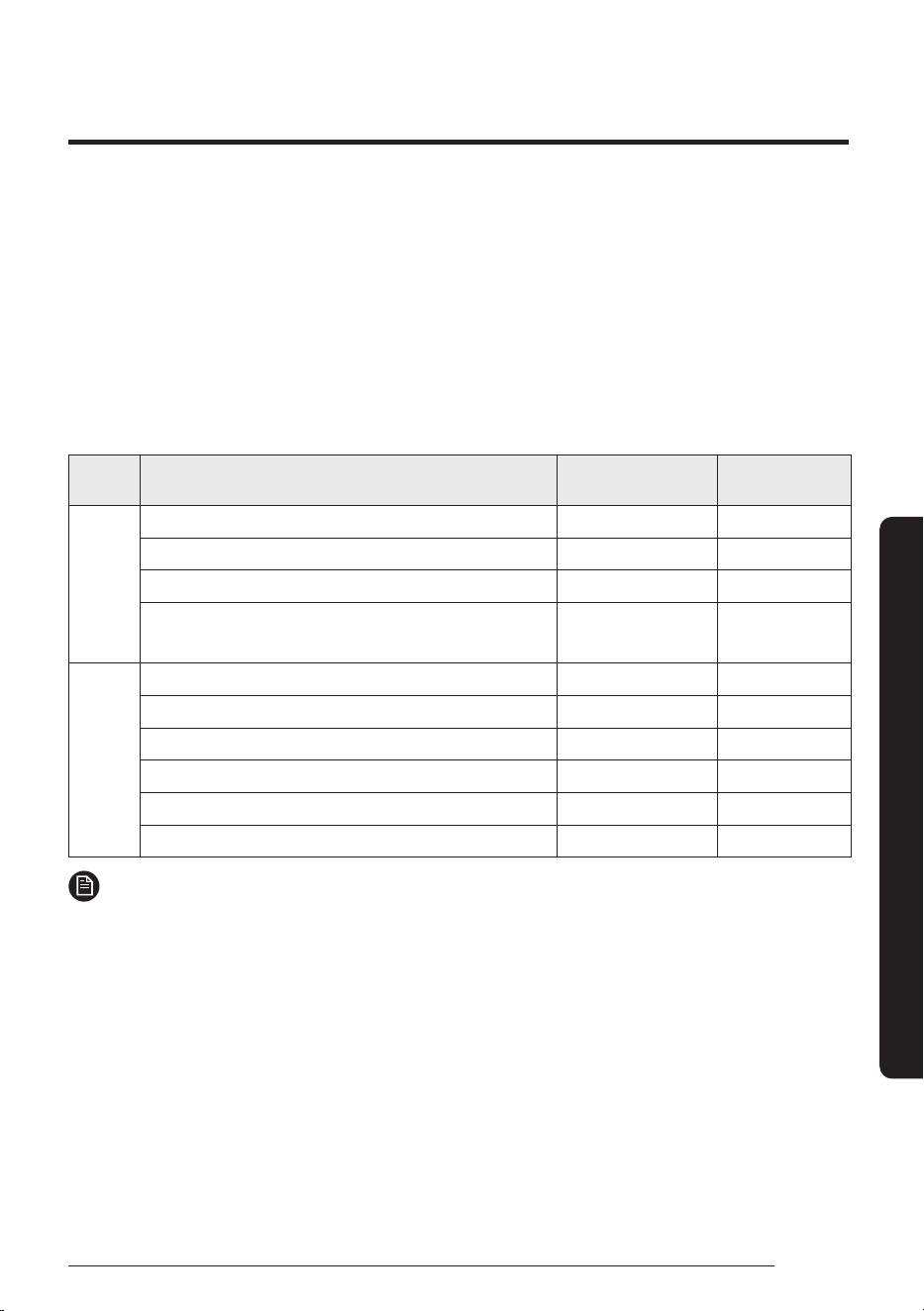
Refer to the following chart to maintain the air conditioner properly.
Unit Maintenance item Interval
Requires qualified
technicians
Indoor
unit
Clean the condensate drain pan. Once a year Required
Clean the heat exchanger. Once a year Required
Clean the condensate drainpipe. Once every 4 months Required
Replace R-32 detecting sensor.
(The R-32 refrigerant detection sensor is an optional product.)
10 years Required
Outdoor
unit
Clean the heat exchanger. Once every 3 months Required
Clean the electric components with jets of air. Once a year Required
Verify that all the electric components are firmly tightened. Once a year Required
Clean the fan. Once a year Required
Verify that the fan assemblies are firmly tightened. Once a year Required
Clean the condensate drain pan. Once a year Required
NOTE
• The checks and maintenance operations described above are essential to guarantee the efficiency of the air
conditioner. The frequency of these operations may vary depending on the characteristics of the area, the
amount of dust, etc.
1. The above mentioned operations should be performed more frequently if the area of installation is very dusty.
2. These operations must always be performed by qualified personnel. For more detailed information, refer to
the Installation Manual.
3. In some cases, if the period of use date exceed 10 years (3650 days), “E699” is displayed on the wired remote
control and the product works normally. If the period of use date exceed 10 years 3 months (3740 days),
“E700” is displayed on the wired remote control and the product does not work. It must be replaced through
Samsung Electronics Service Center before the expiration of the period of use date.
Cleaning and Maintenance
10
Maintaining the Air Conditioner
English
Cleaning and Maintenance
Internal protections via the unit control system
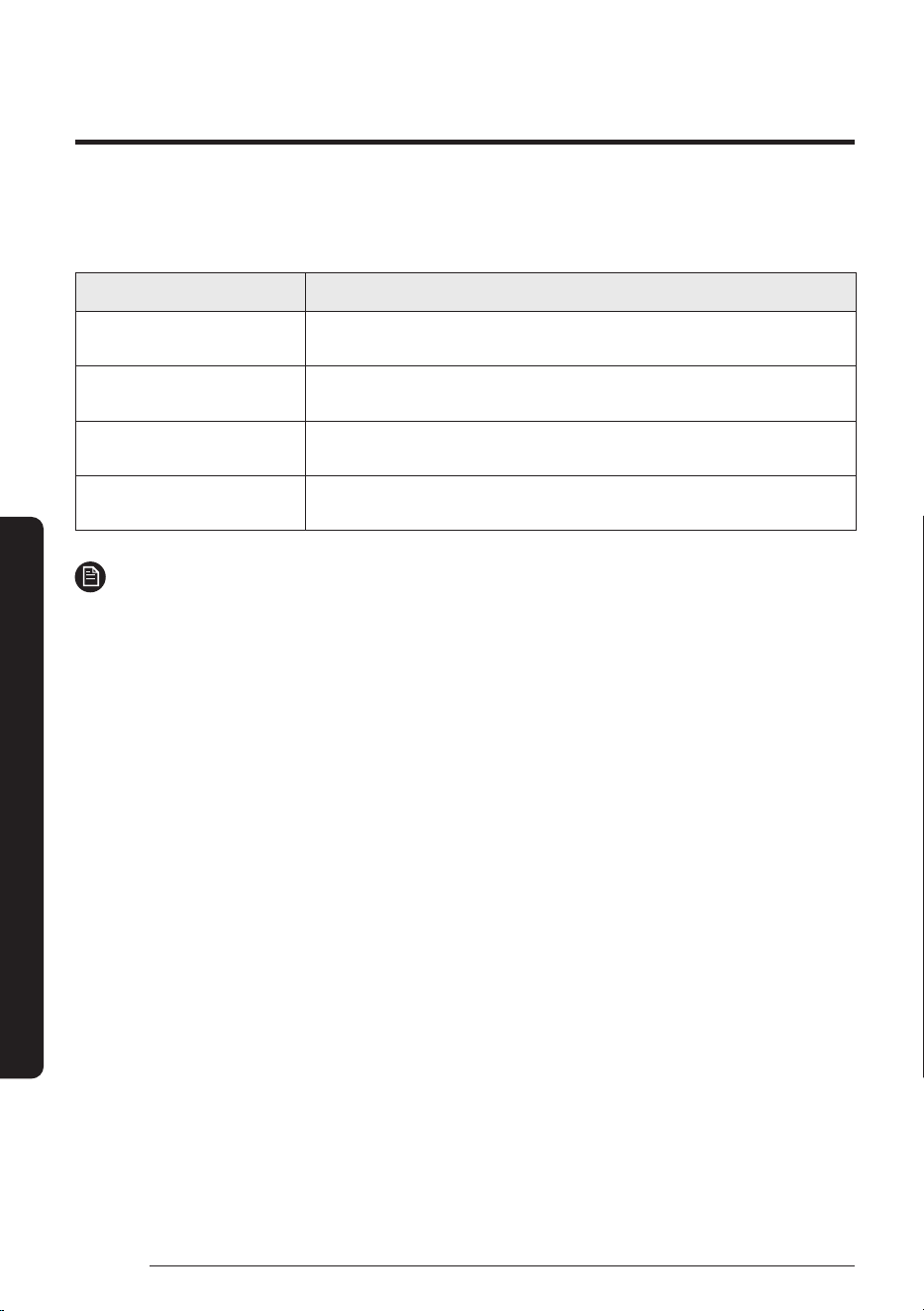
The air conditioner control system has internal protections for user comfort and system faults.
Type Description
Cold air prevention
While in heat mode, the internal fan will not operate while the indoor unit
coil is warming up to prevent circulation of cold air.
De-ice cycle
While the heat pump defrosts, the internal fan will not operate to prevent
circulation of cold air.
Anti-protection of internal
battery
The compressor will be off to protect internal battery when the air
conditioner operates in Cool mode.
Protect compressor
The air conditioner does not start operating immediately to protect the
compressor of the outdoor unit after it has been started.
NOTE
• If the heat pump is operating in Heat mode, the de-ice cycle is actuated to remove frost from an outdoor
unit that may have deposited at low temperatures.
• The internal fan is switched off automatically and restarted only after the de-ice cycle is completed.
• When the de-ice cycle is operating,it may generate strange sound. It is normal operation for product
safety.
11
English
Appendix
SmartThings app
Appendix
To use the SmartThings app, connect the product to the network in the sequence described below.
The images shown may differ depending on your smartphone model, OS version and manufacturer.
You need to set up the Wi-Fi access point only when connecting the product to a Wi-Fi network. Once the
product is connected, you can use the SmartThings app via Wi-Fi, 3G, LTE, 5G or more wireless networks.
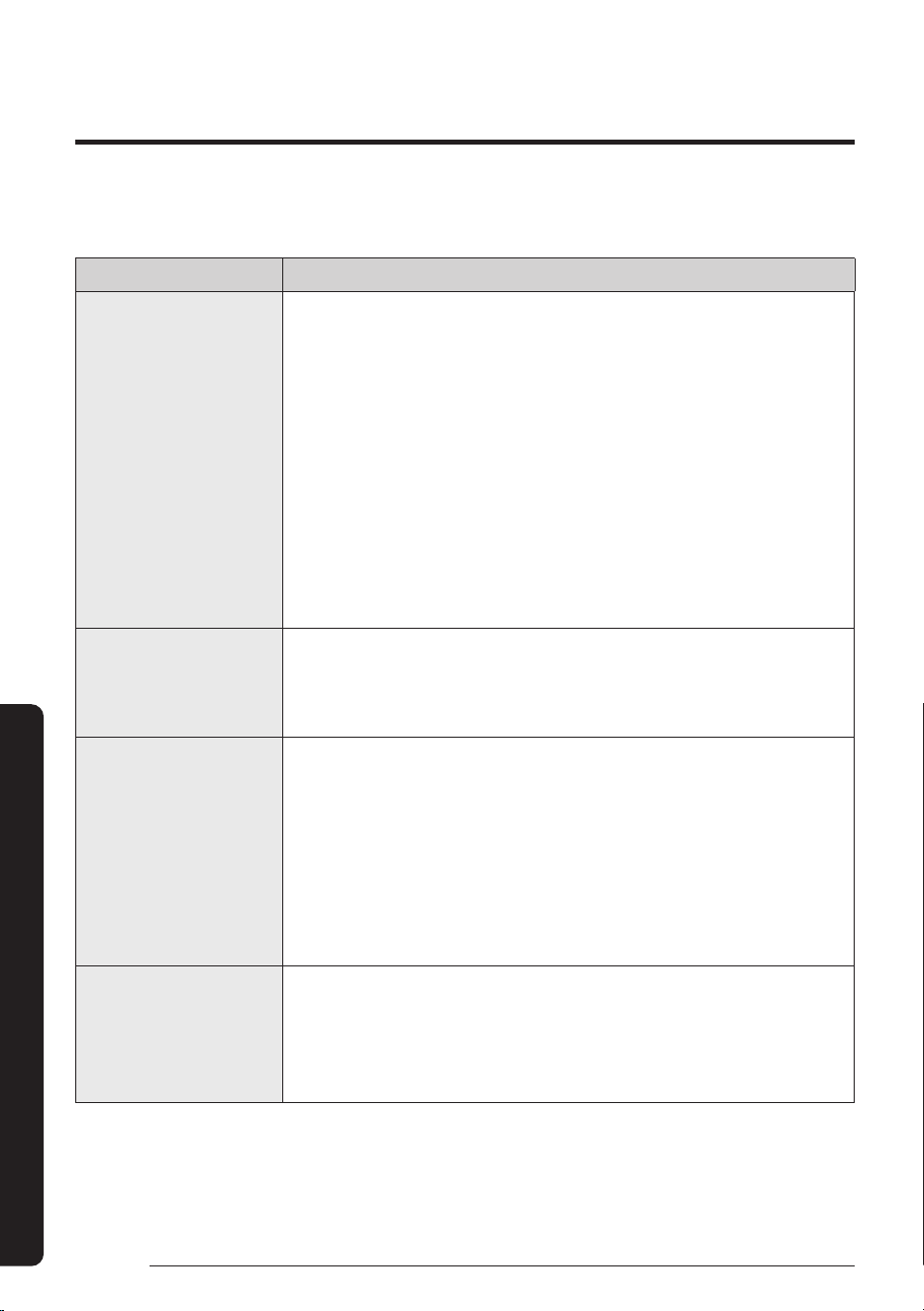
You can easily install the SmartThings app or use the product with your smartphone by scanning the
SmartThings QR code on the label.
1
Checking the power connections
Check if the power is connected to the product and
the access point.
2
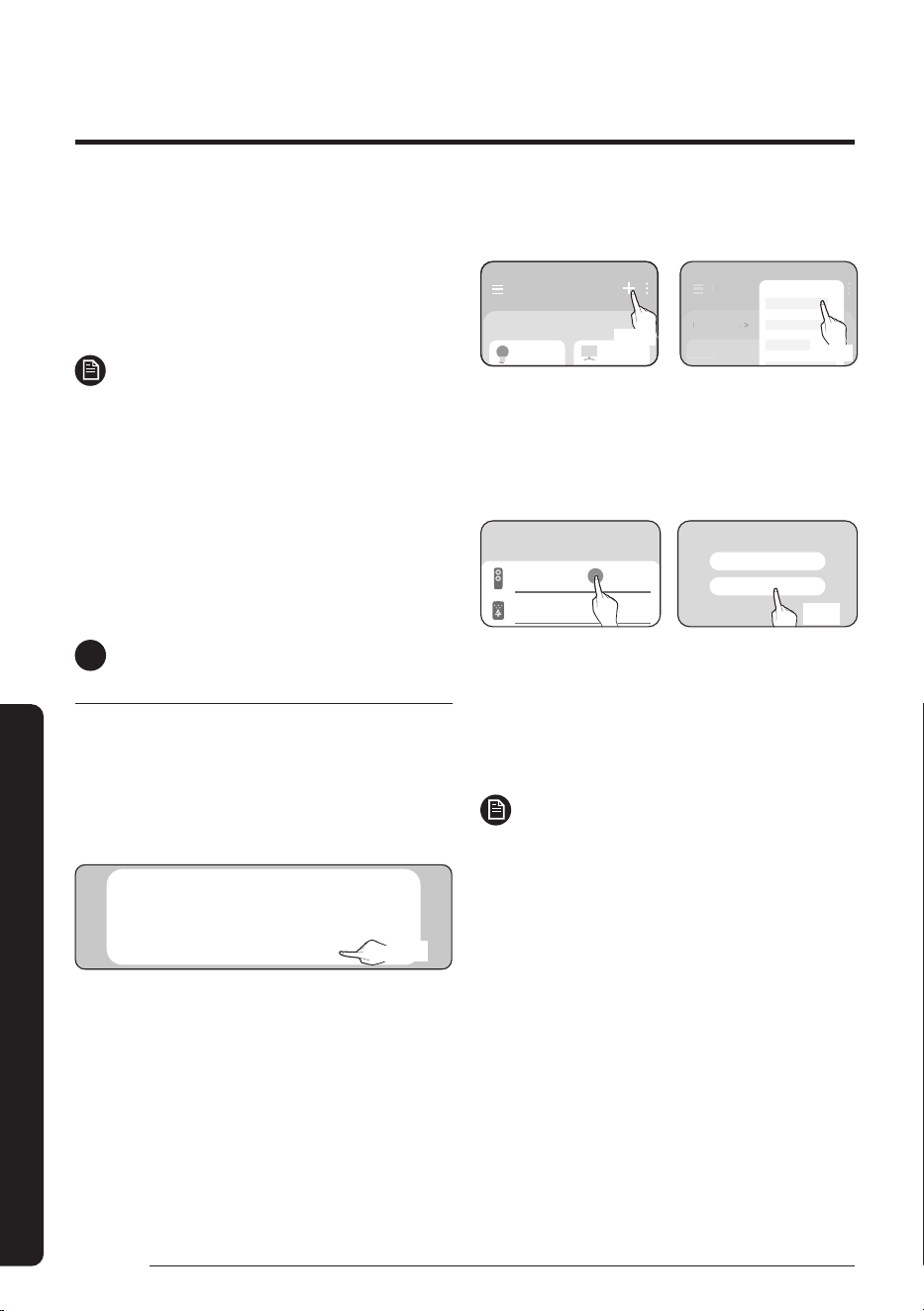
Setting up and connecting to a Wi-Fi
access point using your smartphone
1
To connect the product to a Wi-Fi network,
turn on Wi-Fi at “Settings > Wi-Fi”, and then
select the access point to connect to
• Only alphanumeric characters are supported for
wireless access point names (SSIDs). If an SSID has a
special character, rename it before connecting to it.
• This product supports only Wi-Fi 2.4 GHz.
SAMSUNG_2G
SAMSUNG_5G
On
Select
2
Turning off “Switch to mobile data” at
“Settings > Wi-Fi” on your Smartphone
• If “Switch to mobile data” or “Adaptive Wi-Fi” is
turned on, you cannot connect to the network.
Be sure to turn off these functions before
connecting to the network.
Advanced
Switch to mobile data
Insert SIM card to use mobile data.
Advanced
Off
Off
NOTE
• The setup may differ depending on your
smartphone model, OS version and manufacturer.
3
Checking the Internet connectivity
• After connecting to Wi-Fi, check that your
smartphone is connected to the Internet.
NOTE
• A firewall may prevent your smartphone from
connecting to the Internet. Contact your Internet
service provider for troubleshooting.
3
Downloading the SmartThings app
and registering your Samsung account
1
Downloading the SmartThings app
• Search for “SmartThings” on the Play Store or App
Store and download the SmartThings app to your
smartphone.
• If the SmartThings app is already installed on your
smartphone, update it to the latest version.
NOTE
• The SmartThings app supports Android OS 7.0 or later
(with at least 2 GB RAM) and iOS 12.0 or later. The
app is optimized for iPhone 6s or later and Samsung
smartphones (Galaxy S and Note series).
The updates of the SmartThings app or the functions
supported by it may be discontinued for the previously
supported OS versions due to reasons such as usability
and security.
• The SmartThings app may change without prior notice
to improve product usability and performance.
12
SmartThings app
English
Appendix
2
Registering your Samsung account
• A Samsung account is required to use the
SmartThings app. To create your Samsung account
and log in to your account, follow the instructions
displayed on the SmartThings app. You do not need
to install an additional app.
NOTE
• If you already have a Samsung account, log in
to the account. If you have a smartphone that
is a Samsung device and you have a Samsung
account, your smartphone is automatically
logged in to your account.
• If you log in from a smartphone produced for
another country, you need to log in with its
country code when you create your Samsung
account, and the SmartThings app may not be
used on some smartphones.
4
Connecting the SmartThings app
to your product
1
Selecting the product to connect to
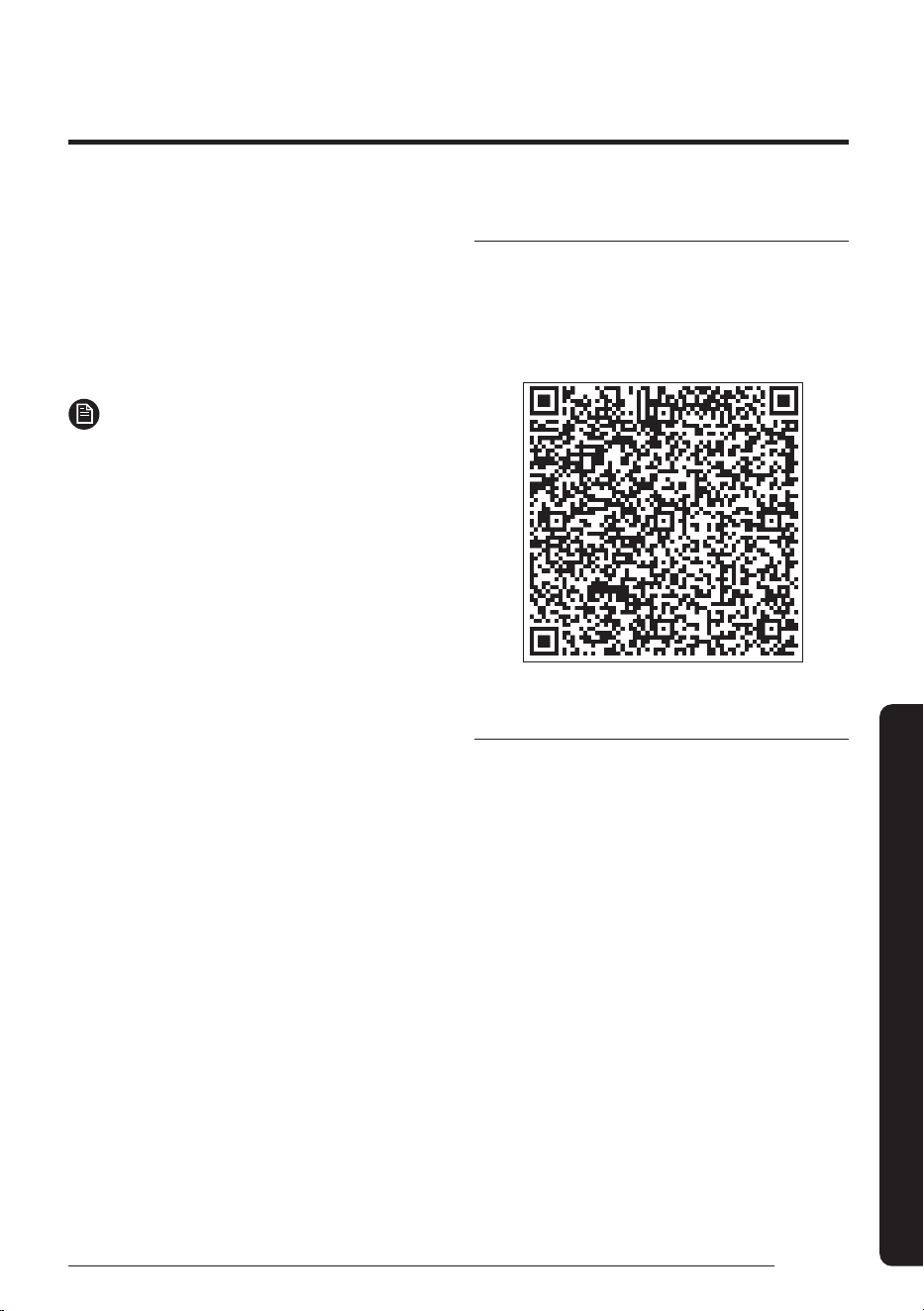
1) Start the SmartThings app about one minute
after turning on the product to connect to.
2) After the SmartThings app is started, select
‘ADD NOW’ when a pop-up window saying that a
product to connect to is found appears.
A new device has been found.
Add this device to SmartThings?
Don’t add Later
Add now
선택
Select
3) If the pop-up window does not appear, select “+”,
and then “Add Device”.
Home
Living room >
Home
Living room
>
Add device
Home
Living room >
Select
Select
You can add a product you want to connect to
by selecting it manually or by selecting “Scan
nearby”.
• Select manually: Samsung devices > Air
conditioner
• Scan: Scan nearby > Air conditioner
Scan QR code
Scan nearby
What kind of device do you
want to add?
Air conditioner
Air purifier
Select
Select
2
Connecting the SmartThings app to your
product
• Follow the instructions displayed on the
SmartThings app to connect to your product.
• For information on how to use the SmartThings
app, select the How To menu on the app.
NOTE
• If any pop-up window appears on the top of the
smartphone while connecting to your product, do
not select it.
• If a pop-up window saying that the device is
already registered appears during connecting
to your product, get permission using “REQUEST
PERMISSION” from a user already connected to the
product, or create a new account using “REGISTER
MY ACCOUNT” to independently connect to the
product.
• If a Samsung account-related country error occurs
while connecting to your product, log out of your
current Samsung account, log in to your previous
Samsung account, and then delete all devices that
have been connected previously. Then, log in to
your current Samsung account again, and then
configure the settings.
13
English
Appendix
• If a failure message appears while adding a device,
see “Setting up and connecting to a Wi-Fi access
point using your smartphone” on page 11.
The connection may fail temporarily due to an
installation location problem of the access point or
other problems.
• If a message appears on the SmartThings app,
follow its instructions.
NOTE
• For the security protocols for wireless/wired
access points, WPA-PSK and WPA2-PSK are
recommended. For the authentication methods,
AES is recommended. New Wi-Fi authentication
specifications and Wi-Fi non-standard
authentication methods are not supported.
• The product supports the IEEE802.11 b/g/n
(2.4 GHz) communication protocol. (Samsung
recommends IEEE802.11n.)
• If your Internet service provider permanently
has registered the MAC address (a unique
identification number) of your PC or modem, you
may not be able to connect your product to the
Internet. Contact your Internet service provider
and ask how to connect devices other than your
PC (such as an air conditioner and an air purifier)
to the Internet.
Open Source Announcement
The software included in this product contains open
source software.
The following URL http://opensource.samsung.com/
opensource/SMART_TP1_0/seq/0 leads to open
source license information as related to this product.
Security updates information
Security updates are provided to strengthen the
security of your device and protect your personal
information. For more information on security
updates, visit https://security.samsungda.com.
* The website supports only some languages.
14
English
Appendix
Troubleshooting
Refer to the following chart if the air conditioner operates abnormally. This may save time and unnecessary
expense.
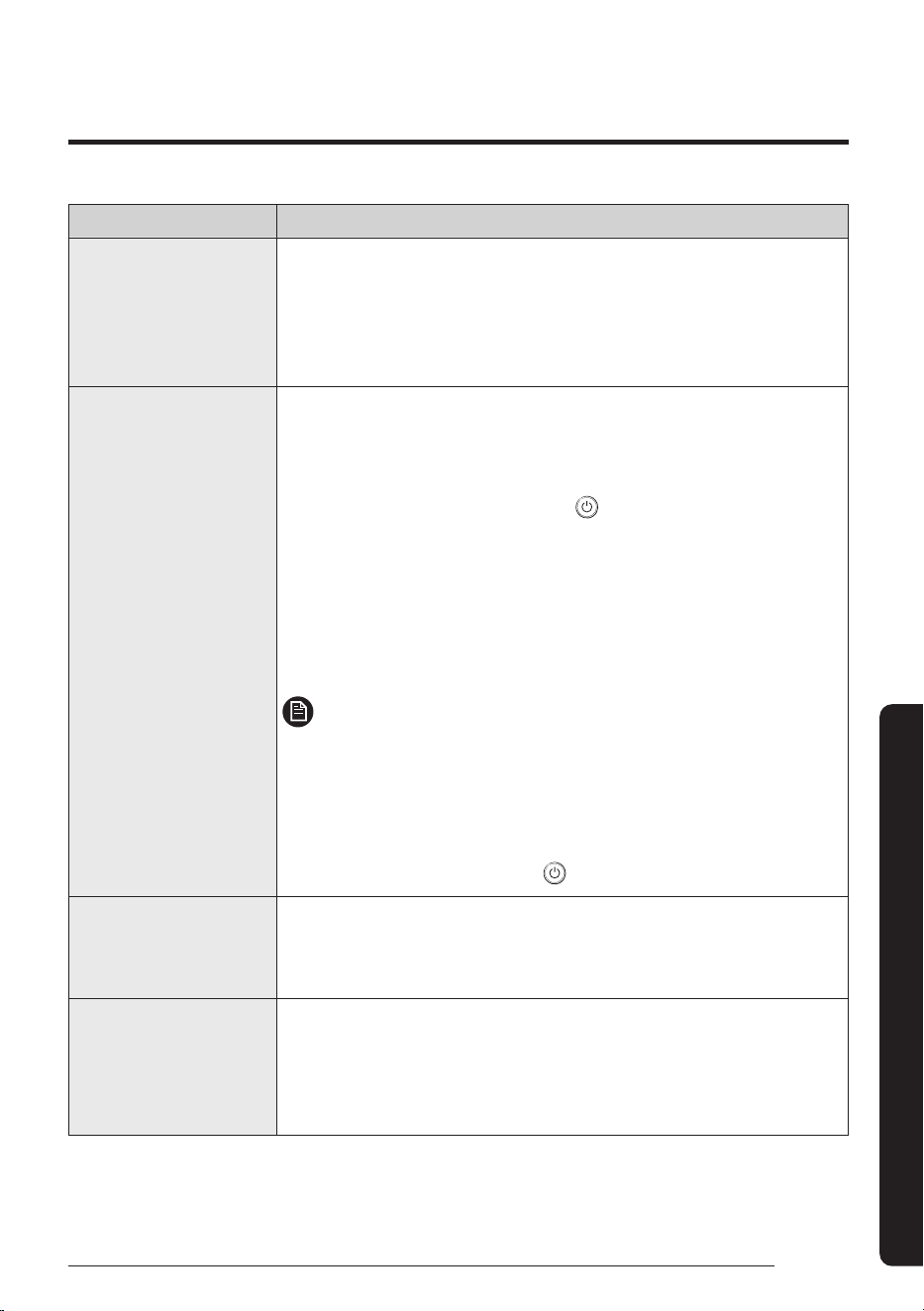
Problem Solution
The product does not
work.
Error E696
• This is intended to determine whether there is a leak or not, as R-32
refrigerant is sensed.
• The indoor unit determines again whether or not there is a refrigerant leak
while operating for 2 minutes using Fan mode (specifically High speed). If
there is no refrigerant leak, the indoor unit stops operating, the error is cleared
and the product can operate normally.
• The R-32 sensor, embedded in the indoor unit, reacts not only to R-32
refrigerant but also to high-concentration chemicals (e.g. organic solvents,
hair spray and paint).
Do not use any high-concentration chemicals in the vicinity of the indoor unit,
as these may cause false operation of the sensor.
The product does not
work.
Error E697
• This error occurs when indoor unit detect R-32 refrigerant leaks.
• Ventilate the room for which the alarm was activated.
• Contact the Samsung Electronics service center for assistance.
The product does not
work.
Error E116, E698, E700
• This error occurs when the R-32 refrigerant sensor has a malfunction or the
sensor’s life has expired.
• Display “E116” or “E698” when a sensor failure occurs.
• The R-32 sensor’s lifespan is 10 years 3 months.
If the period of use date exceed 10 years 3 months (3740 days), “E700” is
displayed on the wired remote control and the product does not work.
• Contact the Samsung Electronics service center for assistance.
The product does not
work.
Error E797
• This error occurs when another indoor unit that shares the outdoor unit
detects the R-32 refrigerant.
• Ventilate the of Room for which the alarm was acticated.
• Contact the Samsung Electronics service center for assistance.
15
English
Appendix
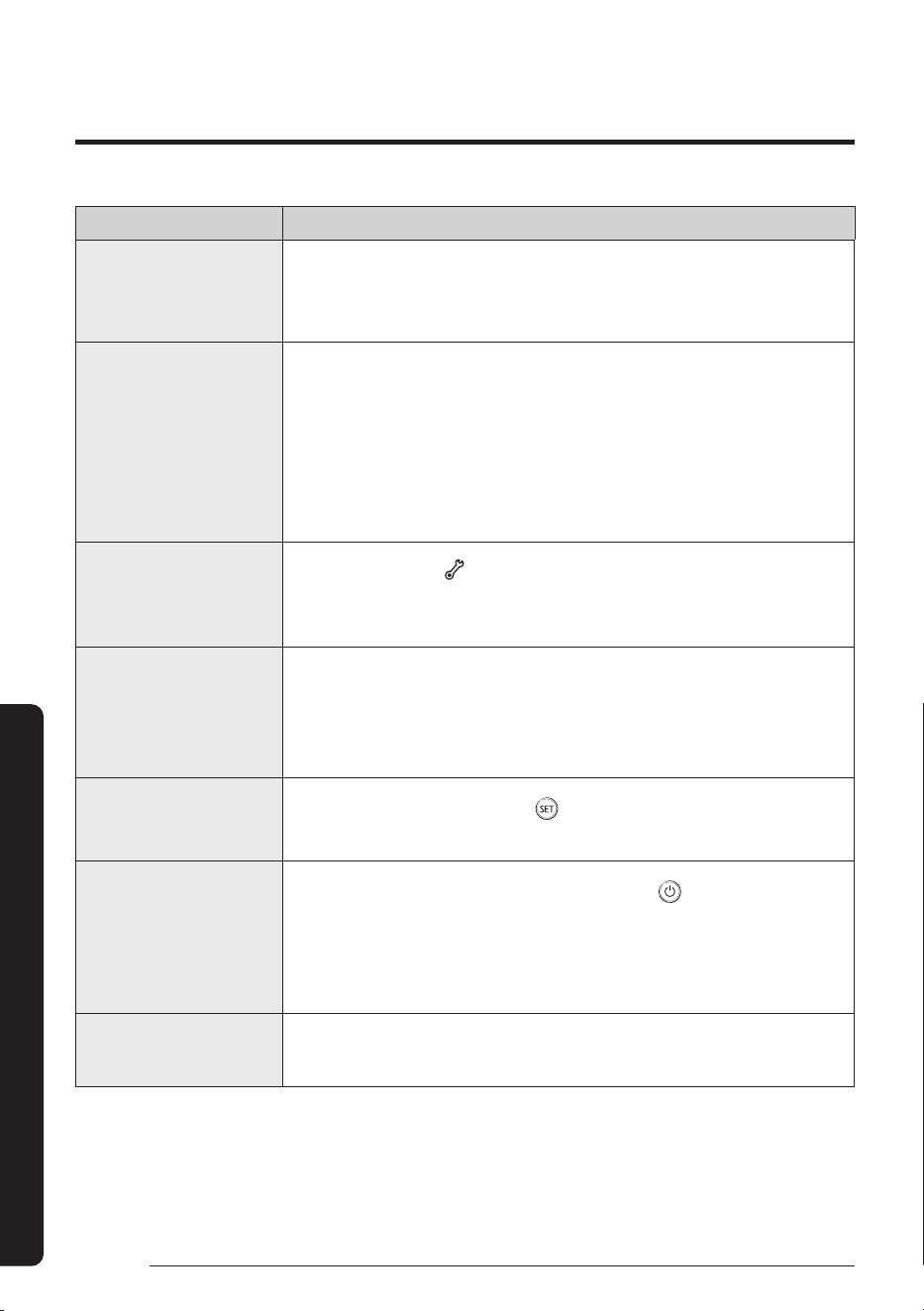
Problem Solution
The air conditioner
does not operate
immediately after it
has been restarted.
• Because of the protective mechanism, the appliance does not start operating
immediately to keep the unit from overloading. The air conditioner will start
in 3 minutes.
The air conditioner does
not operate at all.
• Check if the power plug is properly connected.
• Check whether the auxiliary power switch (MCCB, ELB) is turned on.
• If the auxiliary power switch (MCCB, ELB) is turned off, the air conditioner
does not work although you press the
(Power) button.
• When you clean the air conditioner or do not use it for an extended period
of time, turn off the auxiliary power switch (MCCB, ELB).
• After the air conditioner is not used for an extended period of time, be sure
to turn on the auxiliary power switch (MCCB, ELB) 6 hours before starting
operation.
NOTE
• The auxiliary power switch (MCCB, ELB) is sold separately.
• Make sure that auxiliary power switch (MCCB, ELB) is installed in the
distribution box inside the building.
• If the air conditioner is turned off by the Timed off function, turn on the air
conditioner again by pressing the
(Power) button.
The temperature does not
change.
• Check whether the Fan mode is running. In the Fan mode, the air
conditioner controls the set temperature automatically, and you cannot
change the set temperature.
Warm air does not come
out of the air conditioner.
• Check whether the outdoor unit is designed for cooling only. In this case,
warm air does not come out although you select the Heat mode.
• Check whether the remote control is designed only for cooling only. Use a
remote control that supports both cooling and heating.
16
Troubleshooting
English
Appendix
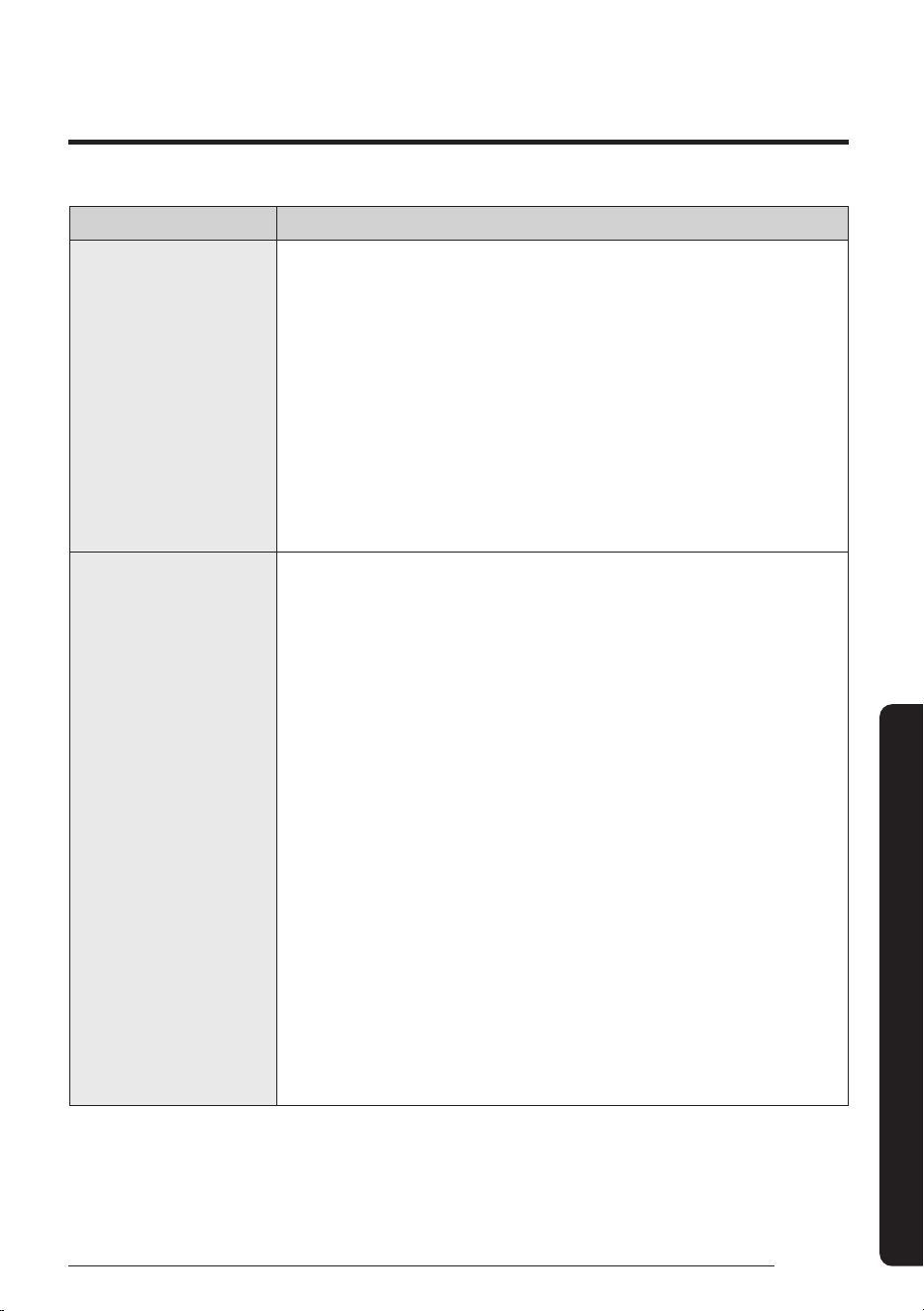
Problem Solution
The fan speed does not
change.
• Check whether the Auto or Dry mode is running. In these modes, the air
conditioner controls the fan speed automatically, and you cannot change
the fan speed.
The wireless remote
control does not operate.
• Check whether the batteries are discharged. Replace the batteries with
new ones.
• Make sure that nothing is blocking the remote control sensor.
• Check whether any strong lighting sources are near the air conditioner.
Strong light which comes from fluorescent bulbs or neon signs may
interfere with the remote control.
The wired remote control
does not operate.
• Check whether the
indicator is displayed at the bottom right of the
remote control display. In this case, turn off both the air conditioner and
the auxiliary power switch, and then contact a service centre.
The air conditioner is
not turned on or off
immediately with the
wired remote control.
• Check whether the wired remote control is set for group control. In this
case, the air conditioners connected to the wired remote control are turned
on or off sequentially. This operation takes up to 32 seconds.
The Timed on/off function
does not operate.
• Check whether you pressed the
(SET) button on the remote control
after setting the on/off time. Set the on/off time.
The indoor unit display
blinks continuously.
• Turn on the air conditioner again by pressing the
(Power) button.
• Turn off and then turn on the auxiliary power switch, and then turn on the
conditioner.
• If the indoor unit display is still blinking, contact a service centre.
I want to get cooler air.
• Operate the air conditioner with a electric fan to save energy and enhance
the cooling efficiency.
17
English
Appendix
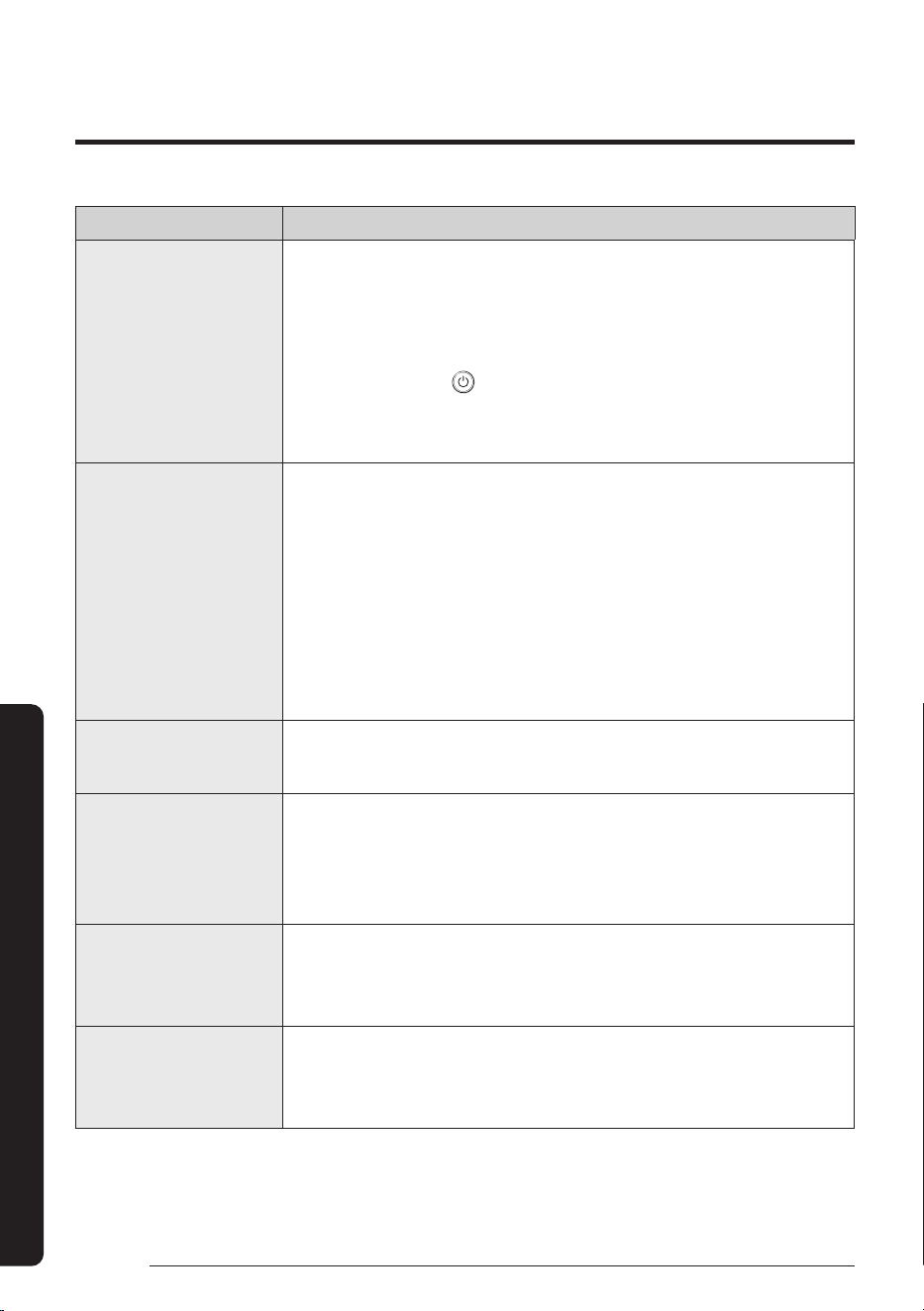
Problem Solution
The air is not cool or warm
enough.
• In the Cool mode, cool air does not come out if the set temperature is
higher than the current temperature.
– Remote control: Press the Temperature button repeatedly until the
set temperature [minimum : 18°C] is set to lower than the current
temperature.
• In the Heat mode, warm air does not come out if the set temperature is
lower than the current temperature.
– Remote control: Press the Temperature button repeatedly until the
set temperature [maximum : 30°C] is set to higher than the current
temperature.
The air is not cool or warm
enough.
• Both cooling and heating do not operate in the Fan mode. Select the Cool,
Heat, Auto, or Dry mode.
• If a cover is on the outdoor unit or any obstacle is present near the outdoor
unit, remove them.
• Install the outdoor unit in a well-ventilated place. Avoiding places exposed
to direct sunlight or close to a heating appliance.
• Place a sunscreen over the outdoor unit to protect it from direct sunlight.
• If the indoor unit is installed in a place exposed to direct sunlight, pull the
curtains on the windows.
• Close the windows and doors to maximize the cooling and heating
efficiencies.
• If the Cool mode is stopped and then started immediately, cool air comes
out after about 3 minutes to protect the compressor of the outdoor unit.
• When the Heat mode is started, warm air does not come out immediately
to prevent cool air from coming out at the beginning.
• If the refrigerant pipe is too long, the cooling and heating efficiencies may
be decreased. Avoid exceeding the maximum pipe length.
18
Troubleshooting
English
Appendix
Problem Solution
The air conditioner makes
strange noises.
• In certain conditions (especially, when the outdoor temperature is lower
than 20°C), a hissing, rumbling, or splashing sound may be heard while
the refrigerant is circulating through the air conditioner. This is a normal
operation.
• When you press the
(Power) button on the remote control, noise may
be heard from the drain pump inside the air conditioner. This noise is a
normal sound.
Unpleasant odours
permeate the room.
• If the air conditioner is running in a smoky area or if there is a smell
entering from outside, ventilate the room properly.
• If both indoor temperature and indoor humidity are high, operate the air
conditioner in the Clean or Fan mode for 1 to 2 hours.
• If the air conditioner has not been operated for an extended period of
time, clean the indoor unit and then operate the air conditioner in the Fan
mode for 3 to 4 hours to dry the inside of the indoor unit for removal of
unpleasant odours.
Steam is produced on the
indoor unit.
• In winter, if the indoor humidity is high, steam may be produced around the
air outlet while the defrost function is running. This is a normal operation.
The outdoor unit fan
continues to operate
when the air conditioner is
turned off.
• When the air conditioner is turned off, the outdoor unit fan may continue
to operate to reduce noise of the refrigerant gas. This is a normal
operation.
Water drops from the
piping connections of the
outdoor unit.
• Condensation may develop due to the difference in temperature. This is a
normal condition.
Steam is produced on the
outdoor unit.
• In winter, when the air conditioner runs in the Heat mode, the frost on
the heat exchanger melts and steam may be produced. This is a normal
operation, neither product malfunction nor a fire.
19
English
Appendix
Problem Solution
The installed SmartThings app cannot access
the air conditioner.
• Make sure you have connected the air conditioner to a
wireless router.
I cannot log in with my Samsung account.
• Try recovering your ID and password from the
Samsung account page.
Adding device(s)
A failure message appears
while adding devices.
• This may fail temporarily due to the distance from the
router or some interferences. Try again later.
I found a failure message
in 0 to 1 percent of device
addition process.
• You cannot add any device without deleting it once
the device has already been added to the SmartThings
app. To add the connected device again, first remove it
and then proceed with the process.
I found a failure message
in 99 percent of device
addition process.
• If you are using a Samsung smartphone, the server
may not be connected temporarily. Restart the
SmartThings app and then try adding the device again.
• If your phone is not a Samsung product, check that
you have entered a wrong Wi-Fi password. Try adding
devices again.
The app displays an
authorization failure
before pressing the user
agreement button.
• Check if a Wi-Fi Kit Single is already connected from
the SmartThings app. When there are devices added,
first remove them and try again.
The app displays an
authorization failure on the
user agreement screen.
• Make sure to press the [Power] button within 2
minutes after the screen appears. Try adding devices
again.
The screen requests to
initialize the user account.
• This happens when the user has already added
devices. Follow the instructions provided in the
SmartThings app.
After adding a device, the SmartThings app
displays the disconnection event.
• This happens when a device is being added to the
server or it is temporarily disconnected from the
router. End the SmartThings app and then launch it
again.
20
English
Appendix
Operation Features
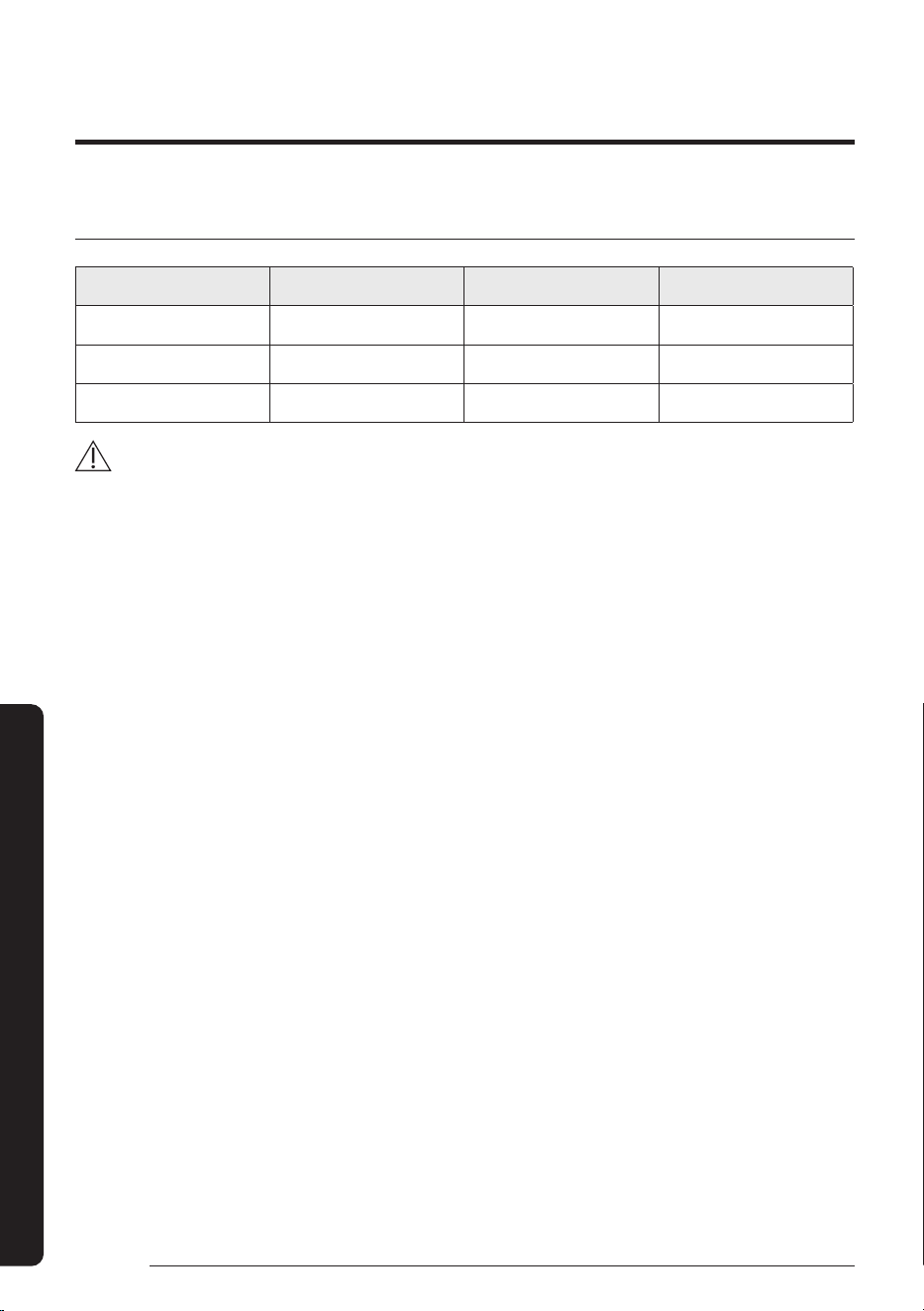
Operating temperature and humidity
Mode Outdoor temperature Indoor temperature Indoor humidity
Cool mode -15°C to 50°C 18°C to 32°C 80% or less
Heat mode -20°C to 24°C 30°C or less -
Dry mode -15°C to 50°C 18°C to 32°C 80% or less
CAUTION
• If you use the air conditioner at a relative humidity above 80%, it may cause a formation of condensation and a
leakage of water on the floor.
• The rated heating capacity is based on an outdoor temperature of 7°C. If the outdoor temperature goes down
below 0°C, heating efficiencies may decrease depending on the temperature conditions.
• If the indoor unit is out of the operating temperature and humidity range, the safery device may operate and the
air conditioner may stop.
21
English
Appendix
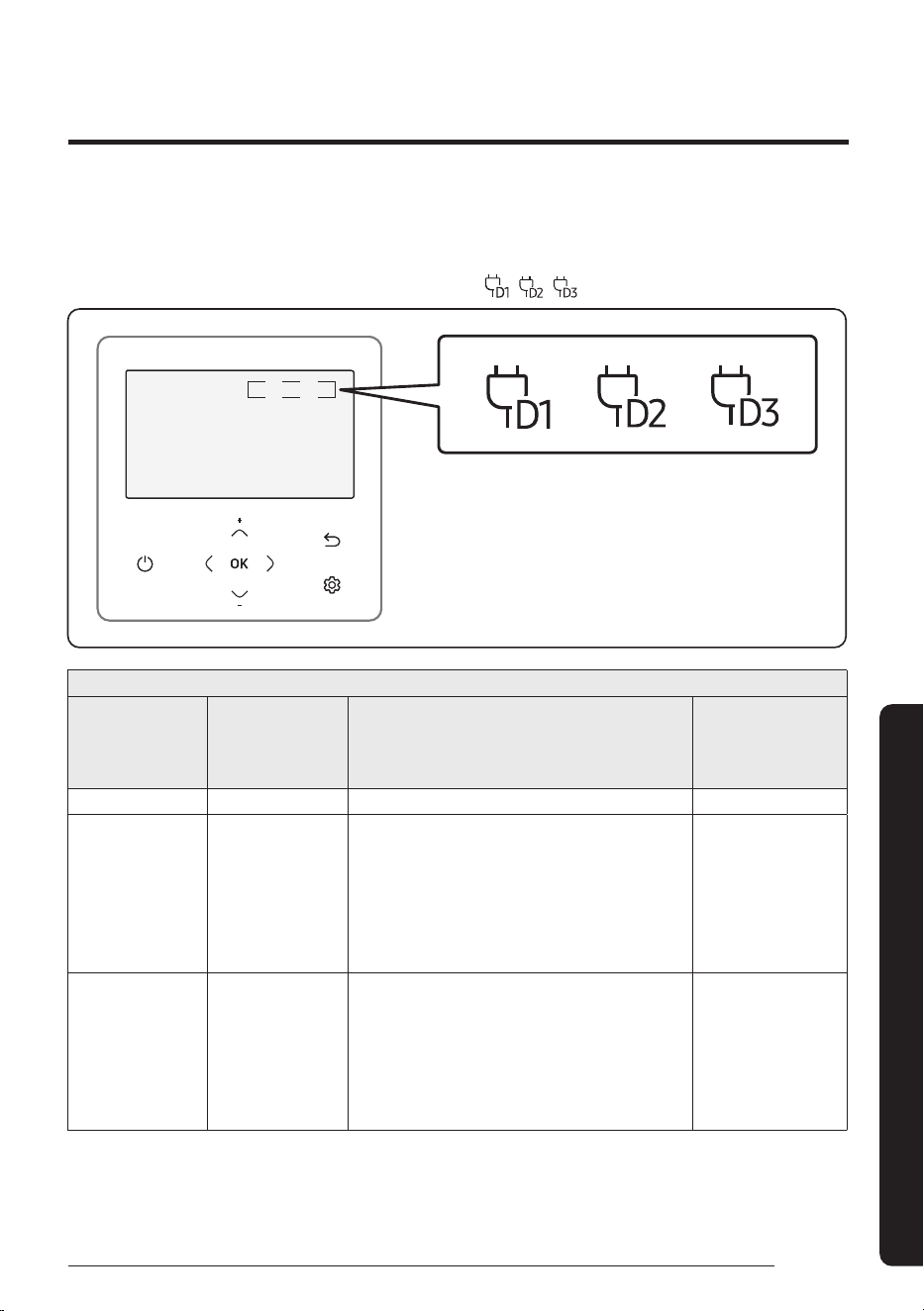
This air conditioner is equipped with a Demand Response unit which will respond to a signal sent by the power
supply utility during emergency conditions.
• During a Demand Response Event, the indoor and outdoor unit will be operated according to DRM
mode(DRM 1, 2, 3) and the remote controller will show “
, , “ on the display.
AIR CONDITIONER DEMAND RESPONSE MODES
Operational
instruction (OI)
Demand
response mode
(DRM)
Description of operation in this mode
Mandatory for
compliance with
this Standard
(AS/NZS 4755.3.1)
OI 1 DRM 1 Compressor off Yes
OI 2 DRM 2
The air conditioner continues to cool or heat
during the demand response event, but
the electrical energy consumed by the air
conditioner in a half hour period is not more
than 50% of the total electrical energy that
would be consumed if operating at the rated
capacity in a half hour period.
No
OI 3 DRM 3
The air conditioner continues to cool or heat
during the demand response event, but
the electrical energy consumed by the air
conditioner in a half hour period is not more
than 75% of the total electrical energy that
would be consumed if operating at the rated
capacity in a half hour period.
No
DEMAND RESPONSE MODE (DRM 1, 2, 3)


QUESTIONS OR COMMENTS?
COUNTRY CALL OR VISIT US ONLINE AT
AUSTRALIA 1300 362 603 www.samsung.com/au/support