Social Safety Wristband--SSW User Manual
P a g e | 1 Copyright©2020 ZKTECO CO., LTD. All rights reserved.
Thank you for choosing our product. Please read the instructions carefully
before operation. Follow these instructions to ensure that the product is
functioning properly. The images shown in this manual are for illustrative
purposes only.
For further details, please visit our Company’s website
www.zkteco.com.

VR30 User Manual
P a g e |
1
Copyright©2025 ZKTECO CO., LTD. All rights reserved.
Copyright © 2025 ZKTECO CO., LTD. All rights reserved.
Without the prior written consent of ZKTeco, no portion of this manual can be copied or forwarded in any
way or form. All parts of this manual belong to ZKTeco and its subsidiaries (hereinafter the "Company" or
"ZKTeco").
Trademark
is a registered trademark of ZKTeco. Other trademarks involved in this manual are owned by
their respective owners.
Disclaimer
This manual contains information on the operation and maintenance of the ZKTeco equipment. The
copyright in all the documents, drawings, etc. in relation to the ZKTeco supplied equipment vests in and is
the property of ZKTeco. The contents hereof should not be used or shared by the receiver with any third
party without express written permission of ZKTeco.
The contents of this manual must be read as a whole before starting the operation and maintenance of the
supplied equipment. If any of the content(s) of the manual seems unclear or incomplete, please contact
ZKTeco before starting the operation and maintenance of the said equipment.
It is an essential pre-requisite for the satisfactory operation and maintenance that the operating and
maintenance personnel are fully familiar with the design and that the said personnel have received
thorough training in operating and maintaining the machine/unit/equipment. It is further essential for the
safe operation of the machine/unit/equipment that personnel has read, understood and followed the
safety instructions contained in the manual.
In case of any conflict between terms and conditions of this manual and the contract specifications,
drawings, instruction sheets or any other contract-related documents, the contract conditions/documents
shall prevail. The contract specific conditions/documents shall apply in priority.
ZKTeco offers no warranty, guarantee or representation regarding the completeness of any information
contained in this manual or any of the amendments made thereto. ZKTeco does not extend the warranty
of any kind, including, without limitation, any warranty of design, merchantability or fitness for a particular
purpose.
ZKTeco does not assume responsibility for any errors or omissions in the information or documents which
are referenced by or linked to this manual. The entire risk as to the results and performance obtained from
using the information is assumed by the user.
ZKTeco in no event shall be liable to the user or any third party for any incidental, consequential, indirect,
special, or exemplary damages, including, without limitation, loss of business, loss of profits, business
interruption, loss of business information or any pecuniary loss, arising out of, in connection with, or

VR30 User Manual
P a g e |
2
Copyright©2025 ZKTECO CO., LTD. All rights reserved.
relating to the use of the information contained in or referenced by this manual, even if ZKTeco has been
advised of the possibility of such damages.
This manual and the information contained therein may include technical, other inaccuracies or
typographical errors. ZKTeco periodically changes the information herein which will be incorporated into
new additions/amendments to the manual. ZKTeco reserves the right to add, delete, amend or modify the
information contained in the manual from time to time in the form of circulars, letters, notes, etc. for better
operation and safety of the machine/unit/equipment. The said additions or amendments are meant for
improvement /better operations of the machine/unit/equipment and such amendments shall not give any
right to claim any compensation or damages under any circumstances.
ZKTeco shall in no way be responsible (i) in case the machine/unit/equipment malfunctions due to any
non-compliance of the instructions contained in this manual (ii) in case of operation of the
machine/unit/equipment beyond the rate limits (iii) in case of operation of the machine and equipment in
conditions different from the prescribed conditions of the manual.
The product will be updated from time to time without prior notice. The latest operation procedures and
relevant documents are available on http://www.zkteco.com.
If there is any issue related to the product, please contact us.
ZKTeco Headquarters
Address ZKTeco Industrial Park, No. 32, Industrial Road,
Tangxia Town, Dongguan, China.
Phone +86 769 - 82109991
Fax +86 755 - 89602394
To know more about our global branches, visit www.zkteco.com.

VR30 User Manual
P a g e |
3
Copyright©2025 ZKTECO CO., LTD. All rights reserved.
About the Company
ZKTeco is one of the world’s largest manufacturer of RFID and Biometric (Fingerprint, Facial, Finger-vein)
readers. Product offerings include Access Control readers and panels, Near & Far-range Facial Recognition
Cameras, Elevator/Floor access controllers, Turnstiles, License Plate Recognition (LPR) gate controllers and
Consumer products including battery-operated fingerprint and face-reader door locks. Our security
solutions are multi-lingual and localized in over 18 different languages. At the ZKTeco state-of-the-art
700,000 square foot ISO9001-certified manufacturing facility, we control manufacturing, product design,
component assembly, and logistics/shipping, all under one roof.
The founders of ZKTeco have been determined for independent research and development of biometric
verification procedures and the productization of biometric verification SDK, which was initially widely
applied in PC security and identity authentication fields. With the continuous enhancement of the
development and plenty of market applications, the team has gradually constructed an identity
authentication ecosystem and smart security ecosystem, which are based on biometric verification
techniques. With years of experience in the industrialization of biometric verifications, ZKTeco was
officially established in 2007 and now has been one of the globally leading enterprises in the biometric
verification industry owning various patents and being selected as the National High-tech Enterprise for 6
consecutive years. Its products are protected by intellectual property rights.
About the Manual
This manual introduces the operations of VR30.
All figures displayed are for illustration purposes only. Figures in this manual may not be exactly consistent
with the actual products.
VR30 User Manual
P a g e |
4
Copyright©2025 ZKTECO CO., LTD. All rights reserved.
Document Conventions
Conventions used in this manual are listed below:
GUI Conventions
For Software
Convention
Description
Bold font
Used to identify software interface names e.g. OK, Confirm, Cancel.
>
Multi-level menus are separated by these brackets. For example, File > Create >
Folder.
For Device
Convention
Description
< >
Button or key names for devices. For example, press <OK>.
[ ]
Window names, menu items, data table, and field names are inside square brackets.
For example, pop up the [New User] window.
/
Multi-level menus are separated by forwarding slashes. For example,
[File/Create/Folder].
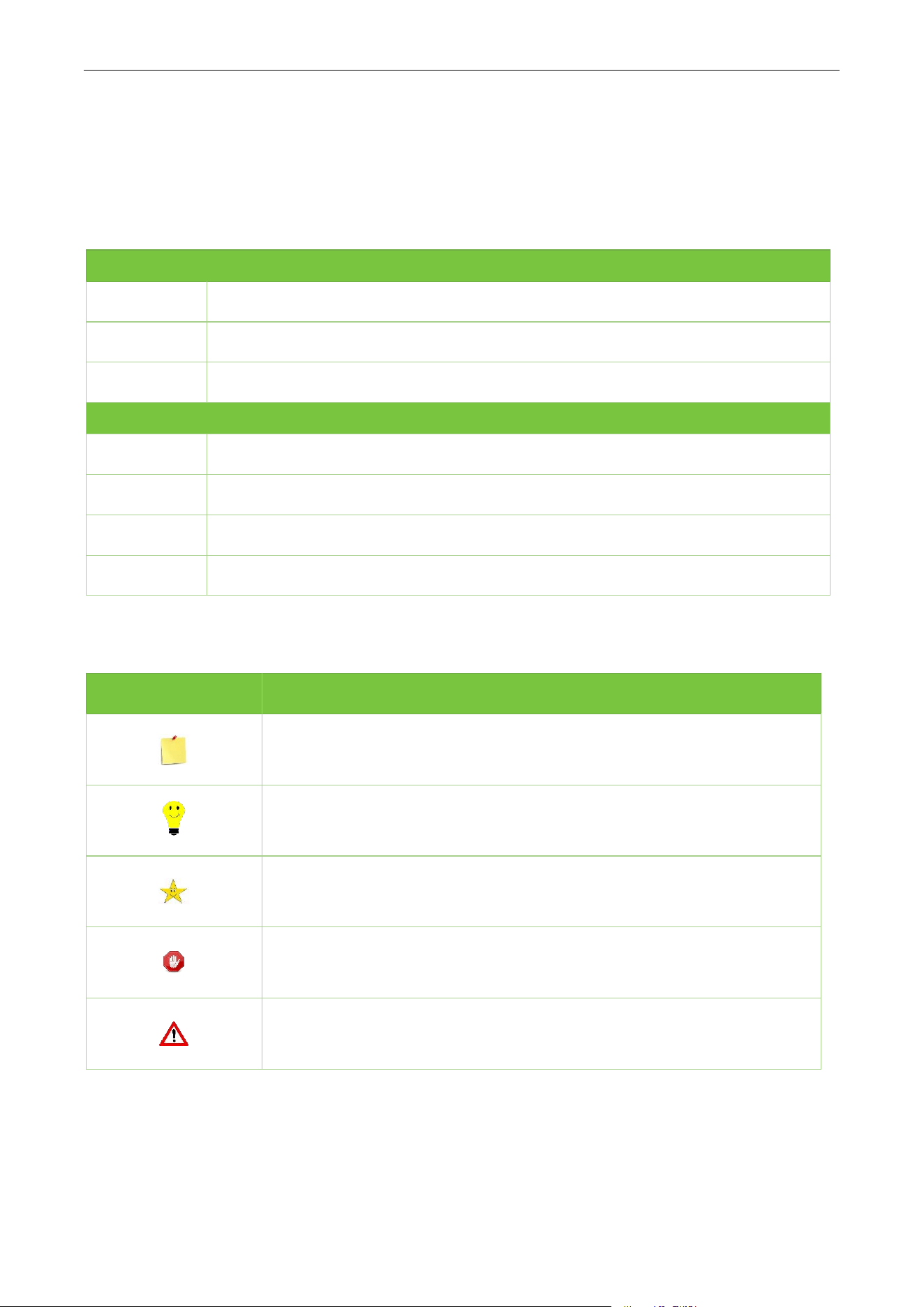
Symbols
Convention
Description
This represents a note that needs to pay more attention to.
The general information which helps in performing the operations faster.
The information which is significant.
Care taken to avoid danger or mistakes.
The statement or event that warns of something or that serves as a
cautionary example.

VR30 User Manual
P a g e |
5
Copyright©2025 ZKTECO CO., LTD. All rights reserved.
Table of Contents
1 PRODUCT INTRODUCTION.......................................................................................................................................6
2 FUNCTIONS................................................................................................................................................................ 6
3 APPEARANCE AND DIMENSIONS............................................................................................................................ 7
4 PARAMETERS............................................................................................................................................................. 7
5 INSTALLATION INSTRUCTION.................................................................................................................................. 9
6 PRODUCT INSTALLATION.......................................................................................................................................10
7 WIRING......................................................................................................................................................................11
8 DEBUG RADAR WITH APP (ZKEASY GO)............................................................................................................... 14
8.1 DOWNLOAD AND INSTALL THE APP TO THE PHONE........................................................................................................................................14
8.2 CONNECT TO BLUETOOTH................................................................................................................................................................................... 15
8.3 SET PARAMETER FOR RADAR...............................................................................................................................................................................17
8.3.1 PARAMETER DESCRIPTION...........................................................................................................................................................................................18
8.4 DISPLAY OF TARGET INFORMATION....................................................................................................................................................................19
9 FAQ........................................................................................................................................................................... 20
10 PACKING LIST.........................................................................................................................................................20

VR30 User Manual
P a g e |
6
Copyright©2025 ZKTECO CO., LTD. All rights reserved.
1 Product Introduction
VR30 is the third generation of ZKTeco radars developed to detect and identify various vehicles
(motorcycle, cars, trucks, etc.) and pedestrians near the barrier gate .It adopts highly integrated radio
frequency chip, which has the characteristics of small size, low cost, 7/24 operation and all-weather
performance, high detection sensitivity, high accuracy, simple commissioning and installation, stability
and reliability.
The VR30 is an anti-smashing barrier radar, deploying 79GHz millimeter-wave for precise vehicle and
pedestrian detection. Through the joint optimization design of software and hardware, this product can
accurately identify and distinguish between pedestrians and vehicles passing through the barrier area,
and prevent the barrier from hitting people and cars. Also, users could set parameters of VR30 with a
mobile app (ZKEasy Go) when connected it to Bluetooth.
2 Functions
Adopts 79GHz FMCW radar technology.
Adjustable detection range(up to 7m).
Broad coverage: 120° azimuth FOV (-60° to +60°) minimizes blind spots for single-lane and adjacent
area coverage.
Precise aiming: ±10° vertical FOV helps focus on the boom/ground zone and reduce distant clutter.
Support Online debugging and upgrade via RS-485, Bluetooth and Relay.
Compatible with multiple ZKTeco's barrier gate.
Cost effective as it eliminates excavation expenses and future pavement repairs.
Compatible with straight boom (default). Adaptable to folding boom, fence boom, and advertising
boom (requires environmental learning/calibration).
VR30 User Manual
P a g e |
7
Copyright©2025 ZKTECO CO., LTD. All rights reserved.
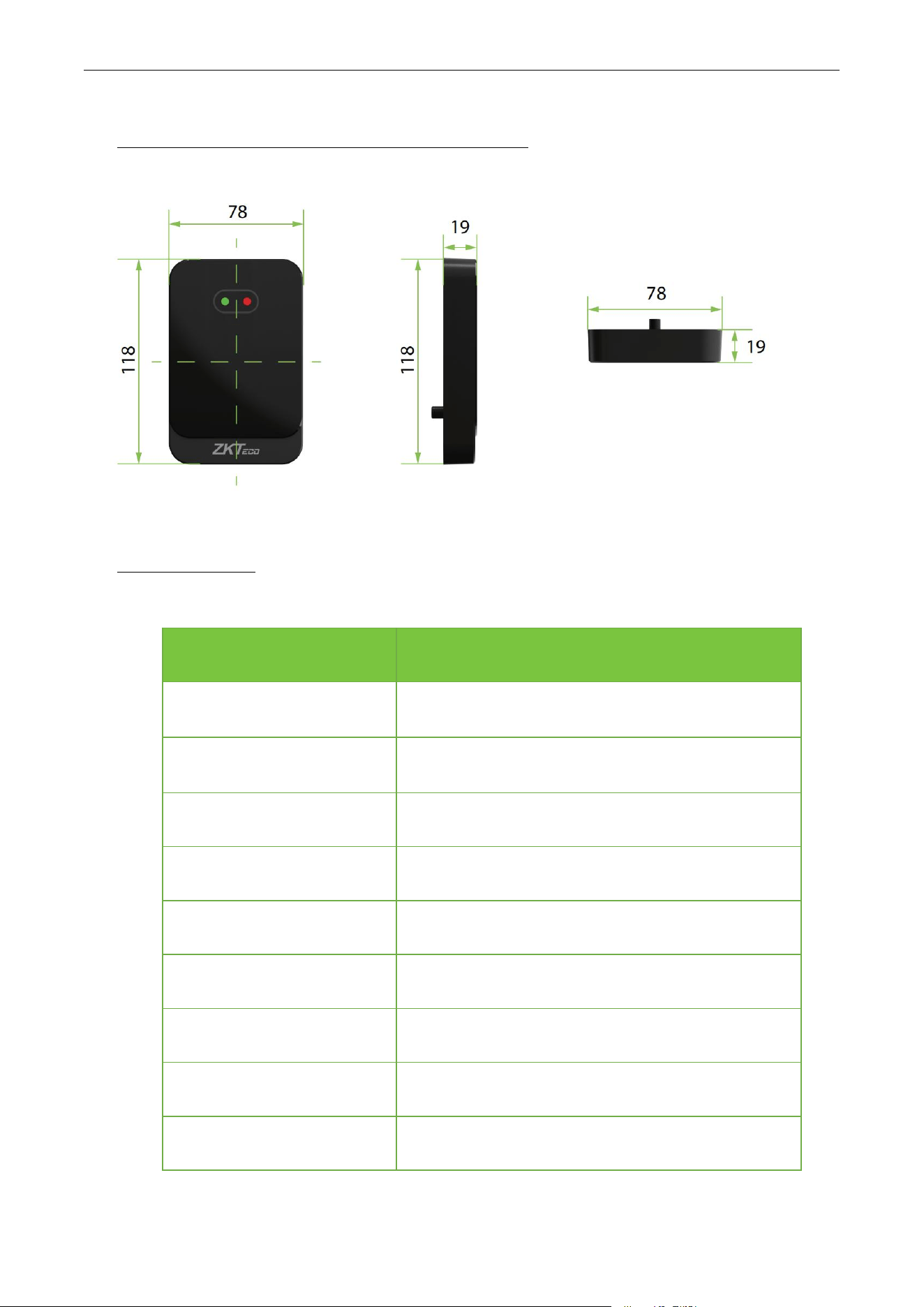
3 Appearance and Dimensions(mm)
4 Parameters
Model
VR30
Operating Frequency
79GHz
Modulation Mode
FMCW
Antenna MIMO
2T3R
Transmitting Power
10dBm
EIRP
24dBm
Antenna Gain
14dbi
Azimuth Field of View
±60° (120° total)
Vertical Field of View
Elevation ±10° (20° total)
Maximum Detection Distance
0-7m Adjustable, same for vehicle and pedestrian

VR30 User Manual
P a g e |
8
Copyright©2025 ZKTECO CO., LTD. All rights reserved.
Operating Temperature
-40°C to 85°C
Operating Voltage
DC 12V
Power Consumption
≤1.3W
Net Weight
197g
Package Dimension(L*W*H)
133*90*37mm
Product Dimension(L*W*H)
118*78*19mm
Online Debugging/Upgrading
Bluetooth,RS485
Supported Software
Apps: ZKEasy Go
OS: iOS 12+; Android 10+
Ingress Protection Rating
IP67
Certification
CE
VR30 User Manual
P a g e |
9
Copyright©2025 ZKTECO CO., LTD. All rights reserved.
5 Installation Instruction
1. According to the actual situation on site, select the corresponding parameters of radar.
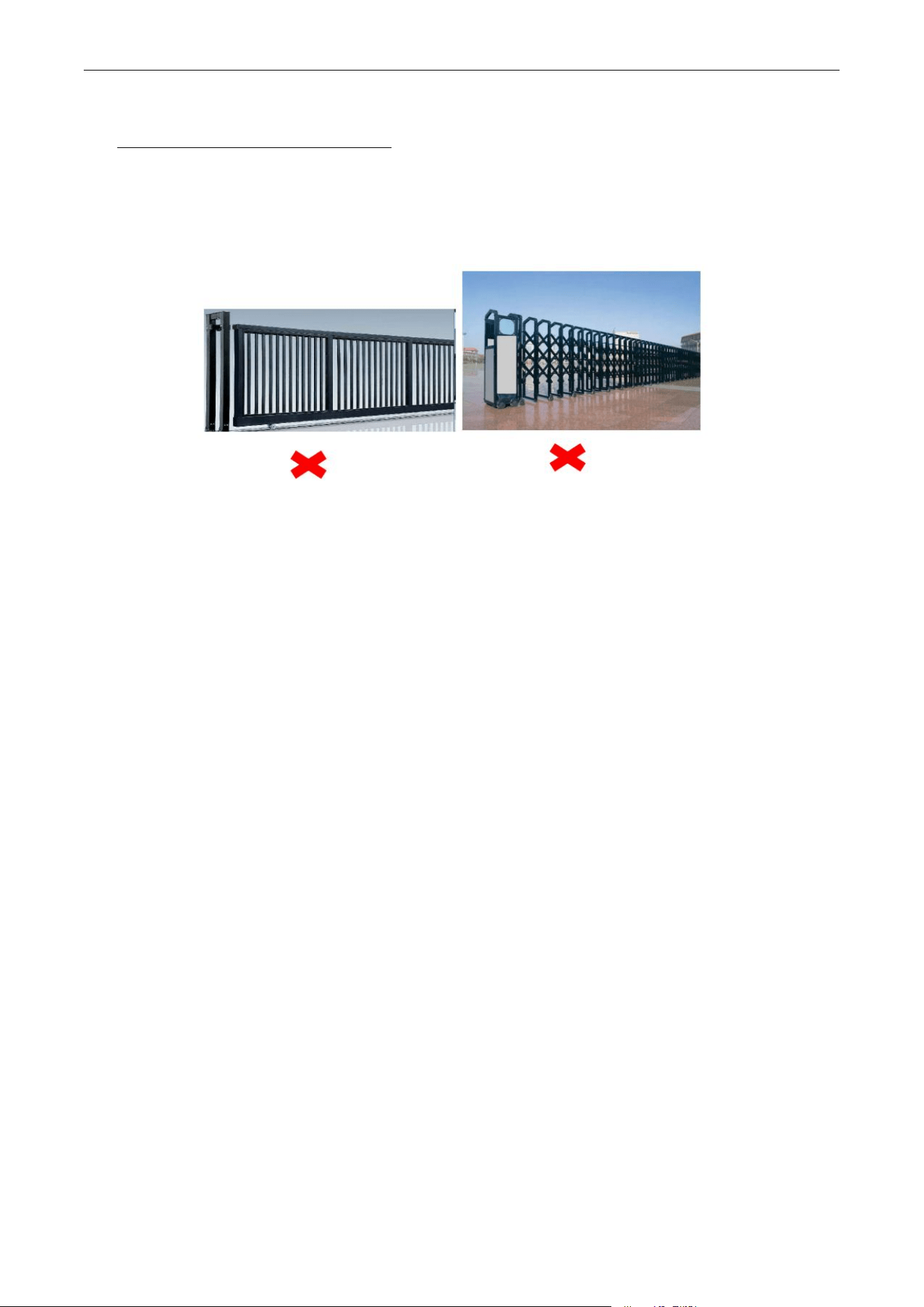
2. Not applicable to sliding gates and telescopic gates.
3. After changing the detection environment (such as installing a deflector, ice cream cone in the
detection area), please recalibrate again by App.
4. Under normal circumstances, please set the detection distance(1~6m) according to the length of the
boom. The detection distance is slightly less than or equal to the length of the boom to prevent
people or objects outside the barrier boom from being detected by the radar.
5. If there is a misrecognition due to radar causing opening the gate or not closing, please recalibrate
and perform environmental learning.
6. The radar antenna is integrated inside. When the radar surface is covered with foreign objects (such as
water drops, rain, snow, dust, etc.), it should be cleaned in time.
7. The detection field of the radar must be clean, and there must be no objects that affect the target
detection (such as metal fences, billboards, license plate recognition cameras, walls, etc.) to prevent
the radar from being triggered by mistake.
8. It is not recommended to use the radar in the fence and advertisement boom type for a single mixed-
in and mixed-out scenario.
9. Dual-radar installation is recommended for semi-trailer, cement tanker, crane.
10. When learning to record the environment, the fence/advertisement boom may shaking after the it
falls to the ground, and then wait for the boom to fully stabilize before performing subsequent
operations.
VR30 User Manual
P a g e |
10
Copyright©2025 ZKTECO CO., LTD. All rights reserved.
6 Product Installation
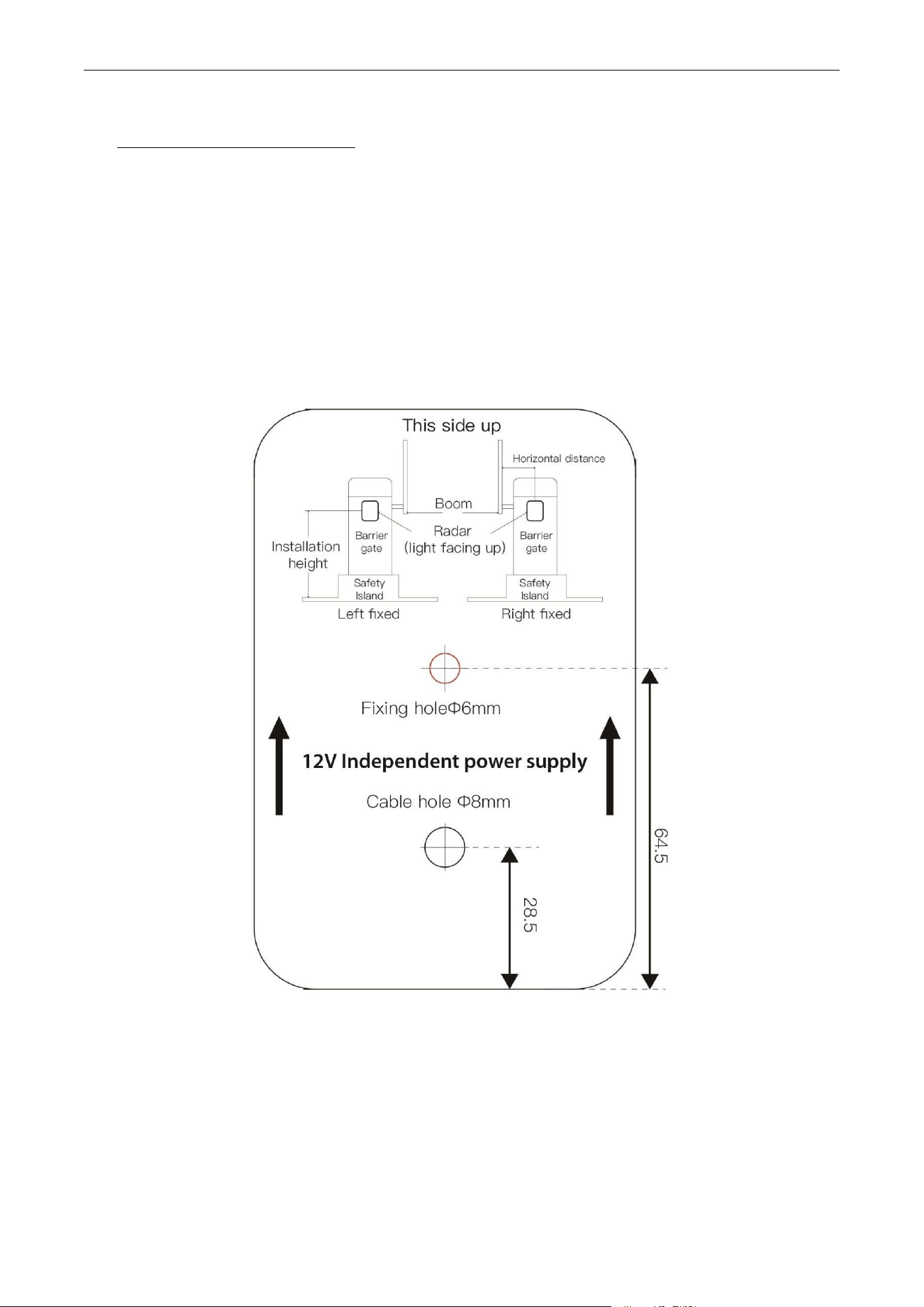
1. Confirm radar mounting holes
The installation hole of the radar is between 100 to 200mm from the inside of the straight boom and
between 200 to 300mm from the inside of the non-straight boom. The installation height of radar is
650 to 700mm from the driveway ground for small car; Two radars are recommended for large car,
with installation height of 650 to 700mm and 1000 to 1100mm. The installation position is shown in
the figure.
2. Drilling
Use an electric drill to drill two holes in the selected position, the fixing hole is Φ6mm , and the cable
hole is Φ8mm. After drilling the cable holes and fixing holes, put the radar cable through the cable
hole and tighten the fixing hole with screw to ensure that the radar does not wobble.
VR30 User Manual
P a g e |
11
Copyright©2025 ZKTECO CO., LTD. All rights reserved.
7 Wiring
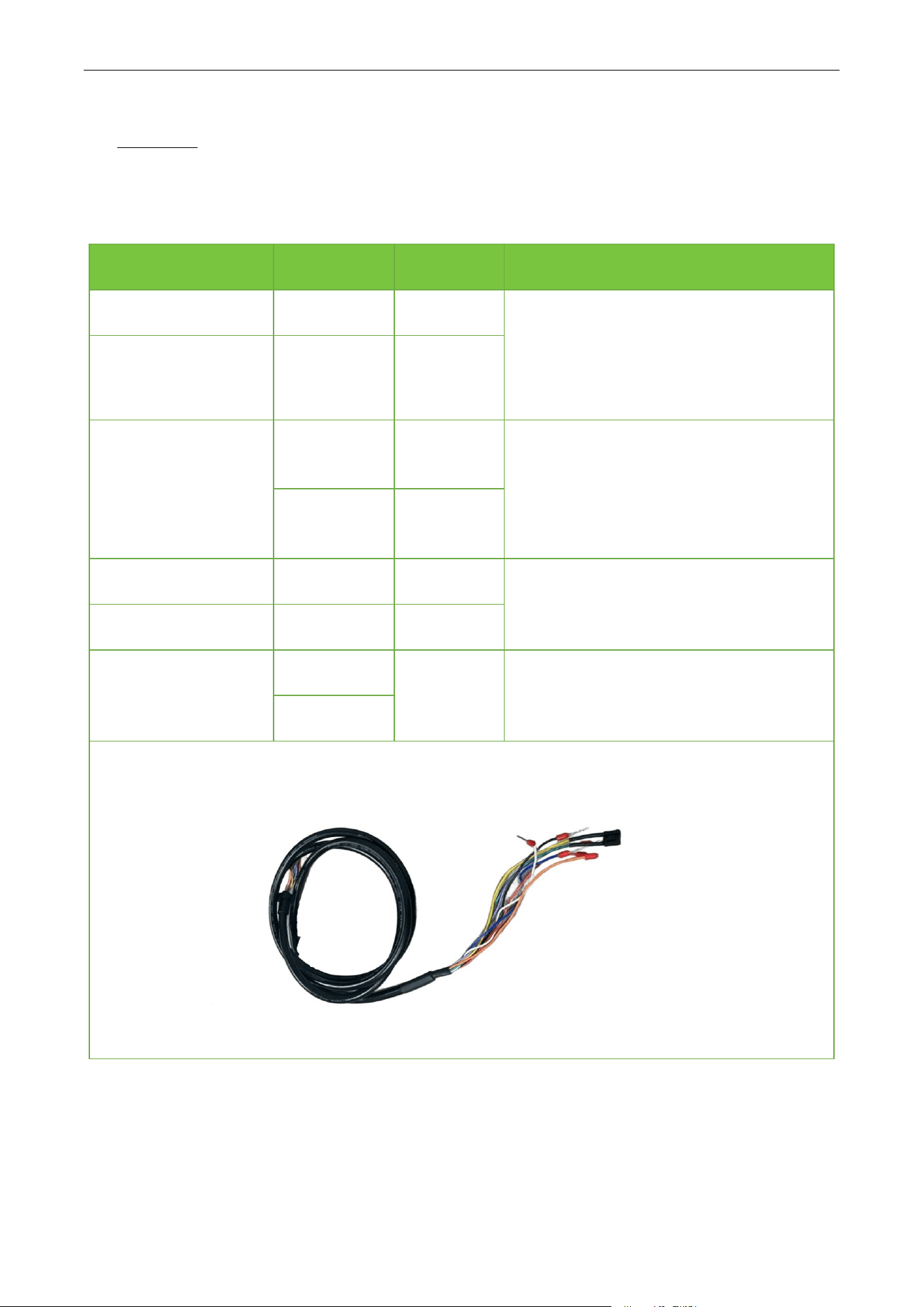
1. Interface cable description
SAFETY WARNING:
Before debugging, wiring, or disconnecting any cables, always disconnect the power supply.
Cable Identification
Cable Color
Description
Wiring
12V
Red
Power
The red wire connected to the 12V power
positive output terminal;
The black wire "GND" is connected to the
negative output terminal of the 12V power
supply.
GND
Black
GND
Normally Open Signal
Wire
Blue
COM
The blue and orange wires are normally
open signals of the relay, connecting the
ground sense coil terminals and the
common terminals of the barrier control
main board (no distinction between
positive and negative).
Orange
NO1
TX
White
485-B/TTL
Connected to T/R+ terminal of 485.(Default
TTL)
RX
Purple
485-A/TTL
Button
Green
Configuratio
n button
Reserve
Yellow
VR30 User Manual
P a g e |
12
Copyright©2025 ZKTECO CO., LTD. All rights reserved.
CRITICAL:
Ensure white and purple wires never contact the positive(+) terminal of the 12V power supply to
prevent damage to the radar.
2. Connected to the barrier gate
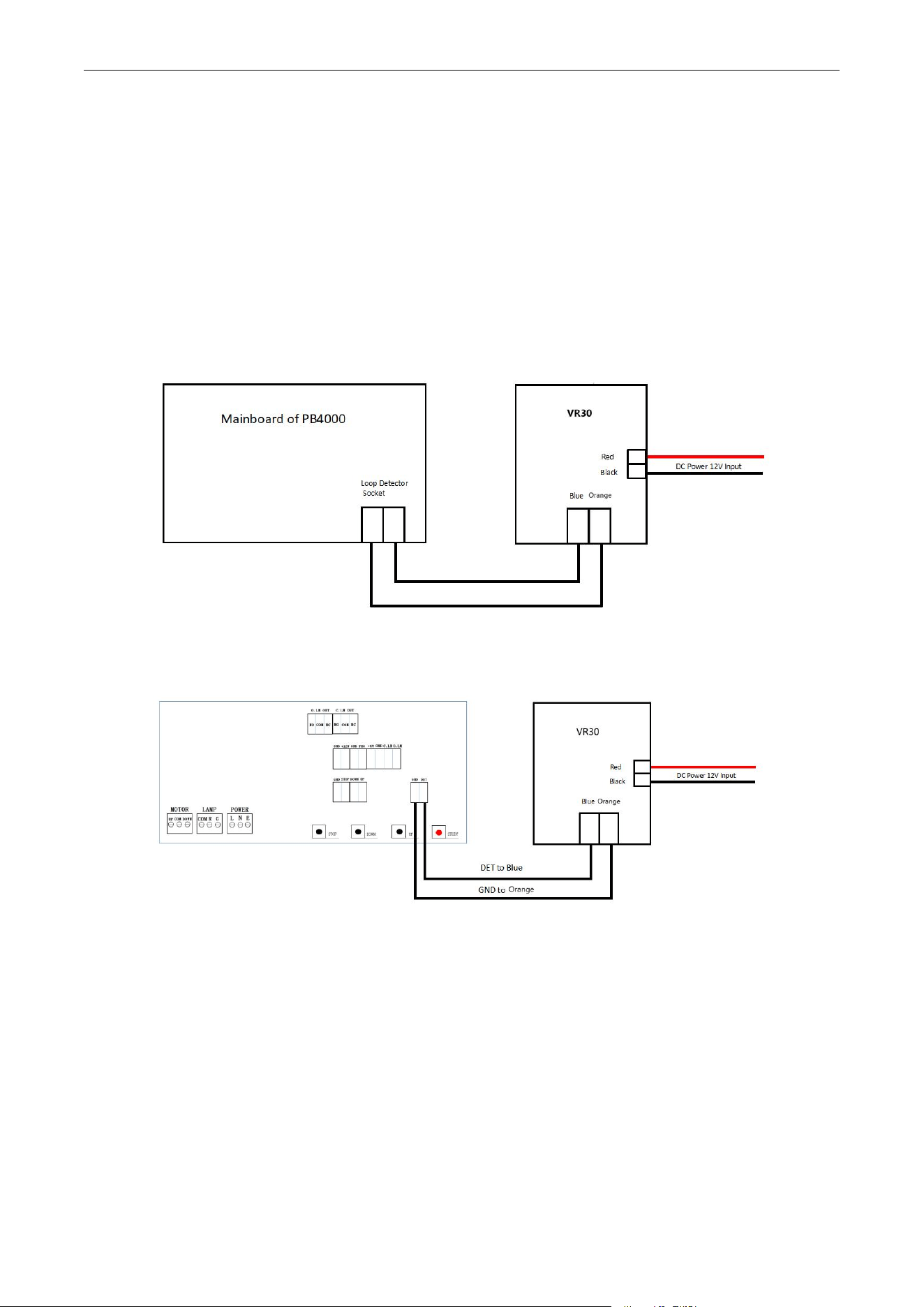
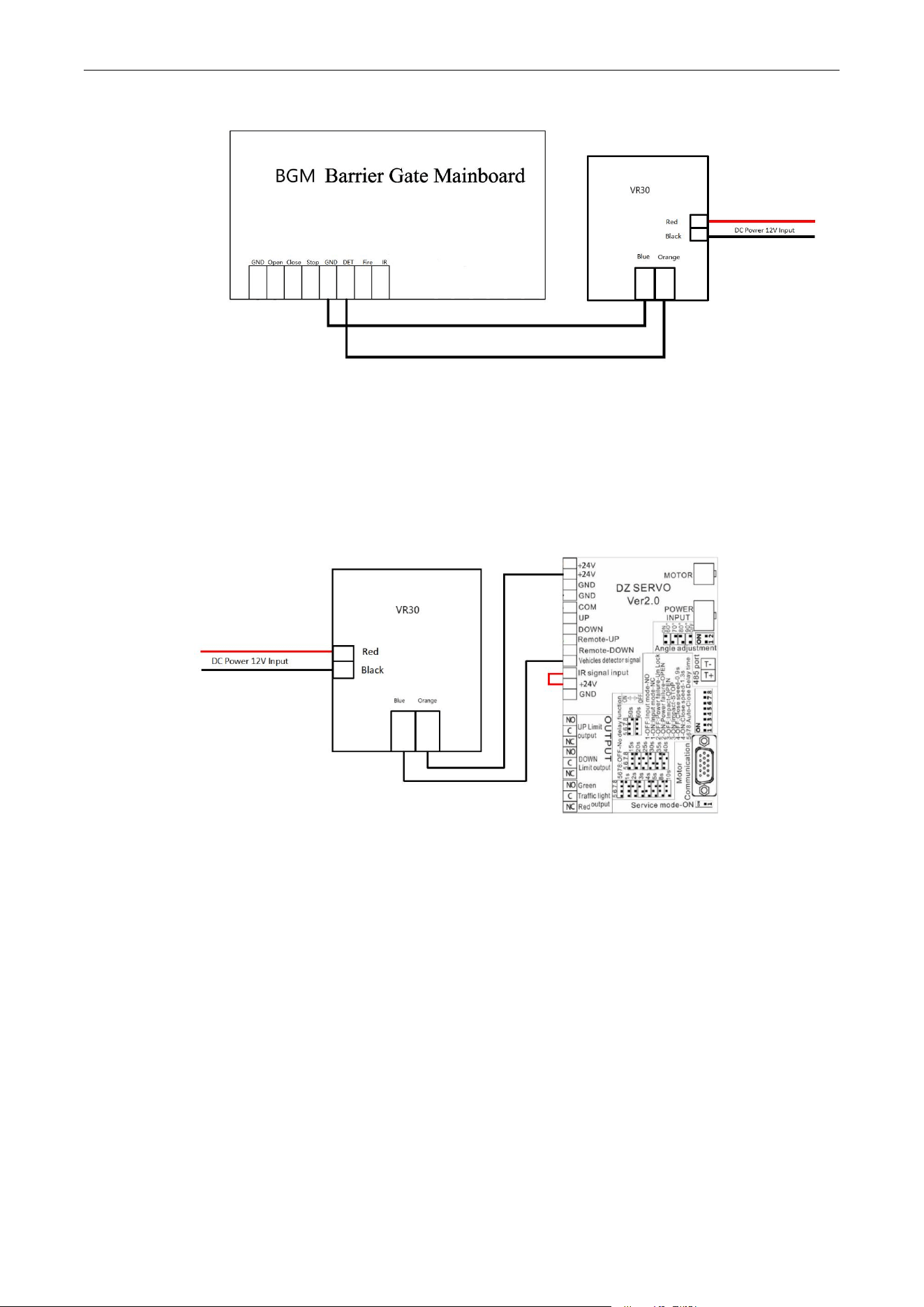
When the radar is connected to the PB4000, CMP200, BGM series barrier gate, the normally open
signal wire of the radar, that is, the blue and orange wires, are connected to the ground sense coil
terminals and common terminals of the barrier control main board (no distinction between positive
and negative).
Radar connected to PB4000 barrier gate
Radar connected to CMP200 barrier gate
VR30 User Manual
P a g e |
13
Copyright©2025 ZKTECO CO., LTD. All rights reserved.
Radar connected to BGM series barrier gate
Note: ProBG (Wiring)
When the radar is connected to the ProBG series barrier gate, the normally close signal wires of the radar,
that is, the brown and purple wires, are connected to the ground sense coil terminals and common
terminals of the barrier control main board (no distinction between positive and negative).
Radar connected to ProBG series barrier gate
VR30 User Manual
P a g e |
14
Copyright©2025 ZKTECO CO., LTD. All rights reserved.
8 Debug Radar with App (ZKEasy Go)
8.1 Download and Install the App to the Phone
1. If the system of phone is android, go to the Google Play and search "ZKEasy Go" for downloading it.
QR code for android phone(Android 10+)
2. If the system of phone is iOS, go to the App Store and search "ZKEasy Go" for downloading it.
QR code for iOS(iOS 12.0+)
VR30 User Manual
P a g e |
15
Copyright©2025 ZKTECO CO., LTD. All rights reserved.
8.2 Connect to Bluetooth
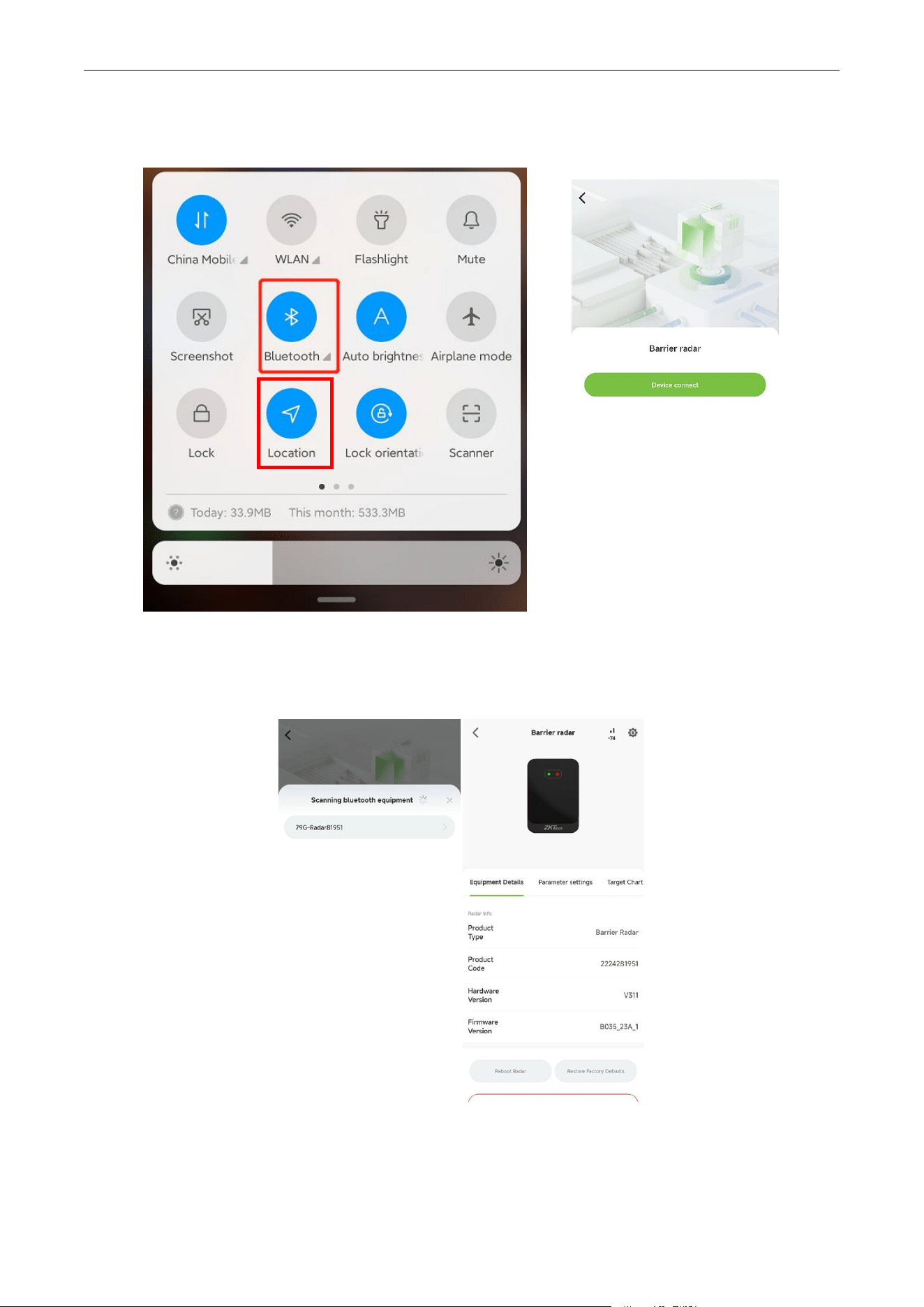
1. Turn on the device's Bluetooth
Bluetooth is automatically turned on by default when the radar device is powered on.
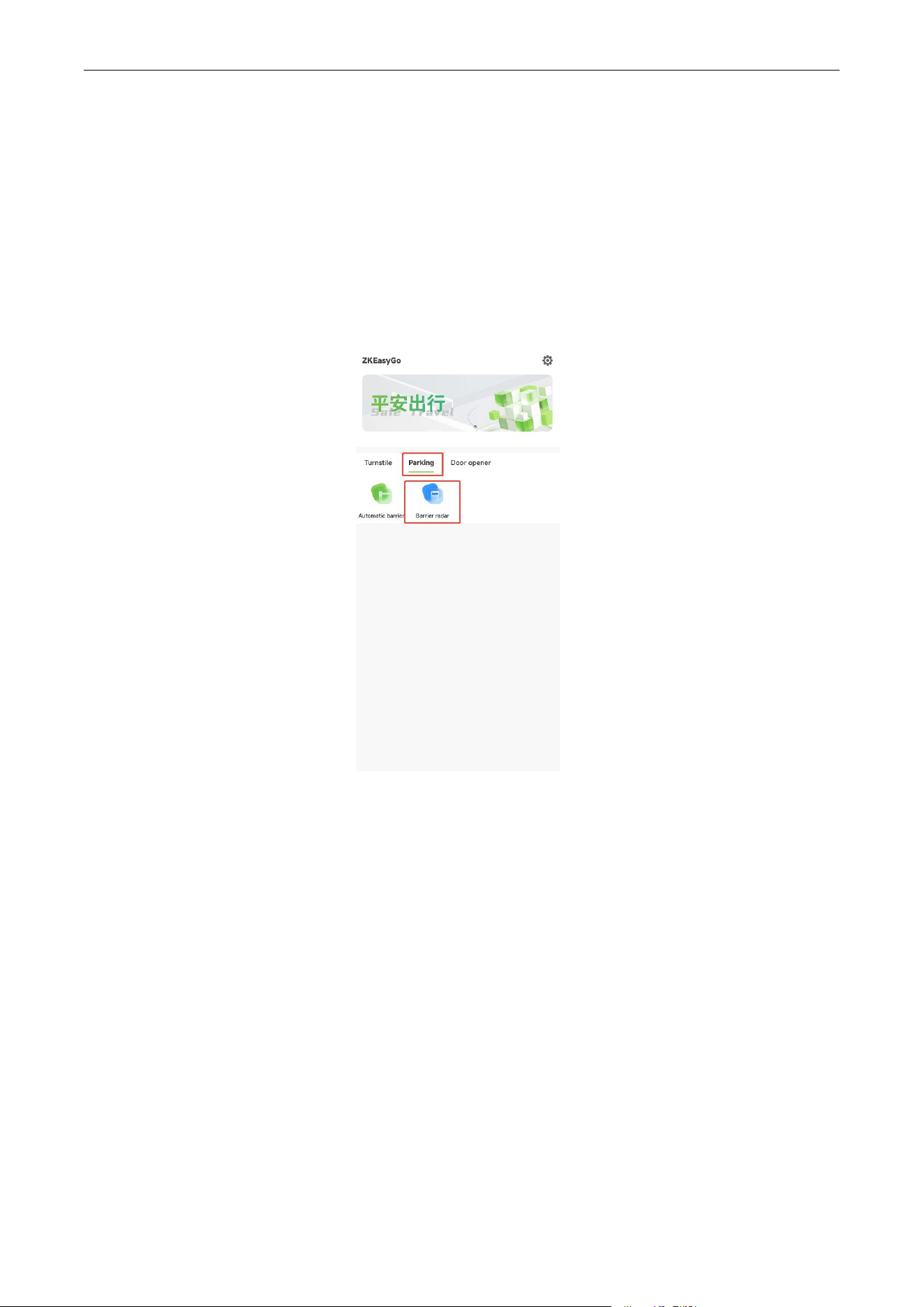
2. Open ZKEasy Go app, select the [Parking] interface and click [Barrier Radar] icon to connect the
device.
VR30 User Manual
P a g e |
16
Copyright©2025 ZKTECO CO., LTD. All rights reserved.
3. Open the Bluetooth and location of the phone, and click [Device connect] to connect the radar.
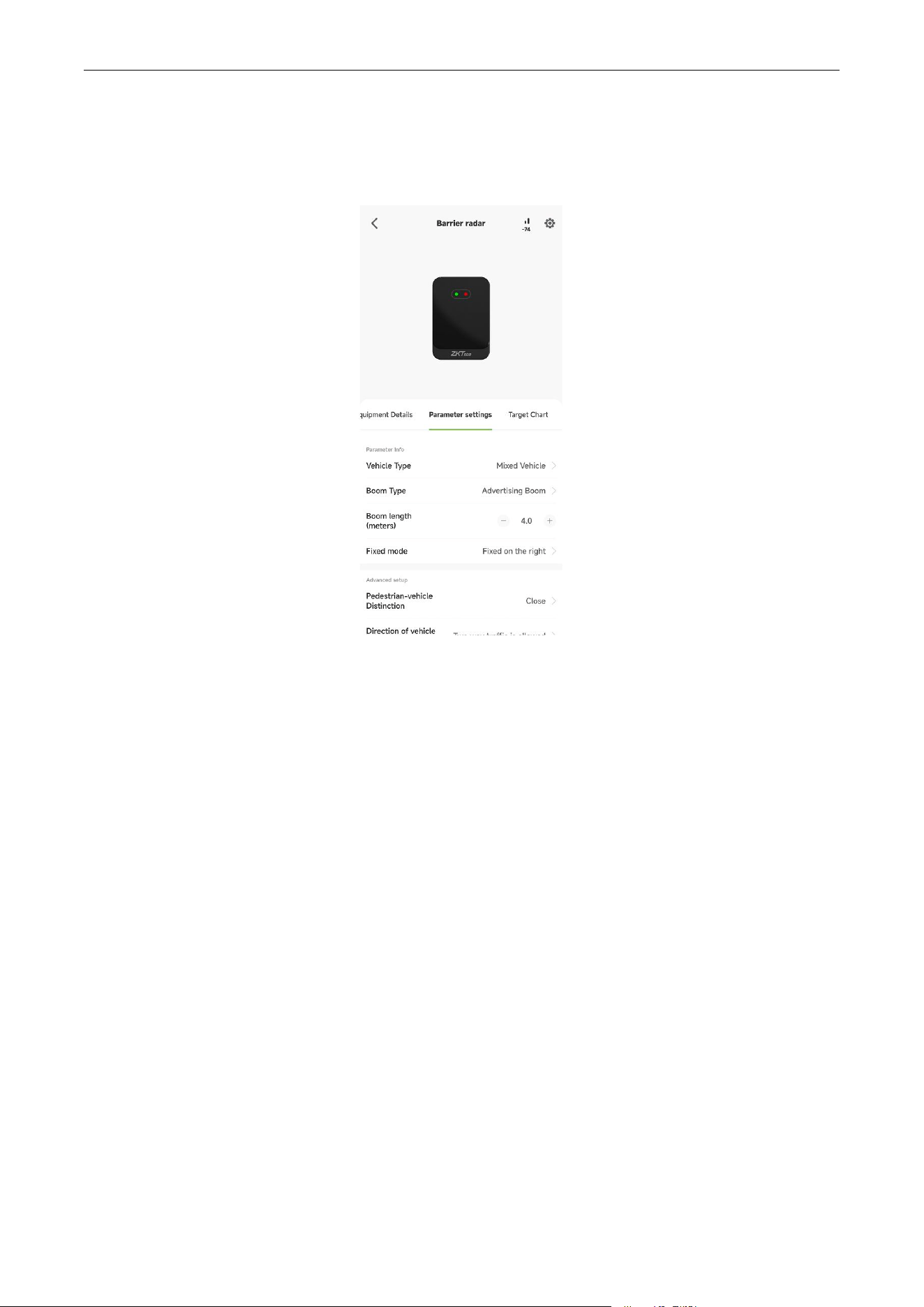
4. Choose the corresponding Bluetooth to connect it. Once the Bluetooth connected, It will
automatically go to the Bluetooth settings screen.
VR30 User Manual
P a g e |
17
Copyright©2025 ZKTECO CO., LTD. All rights reserved.
8.3 Set Parameter for Radar
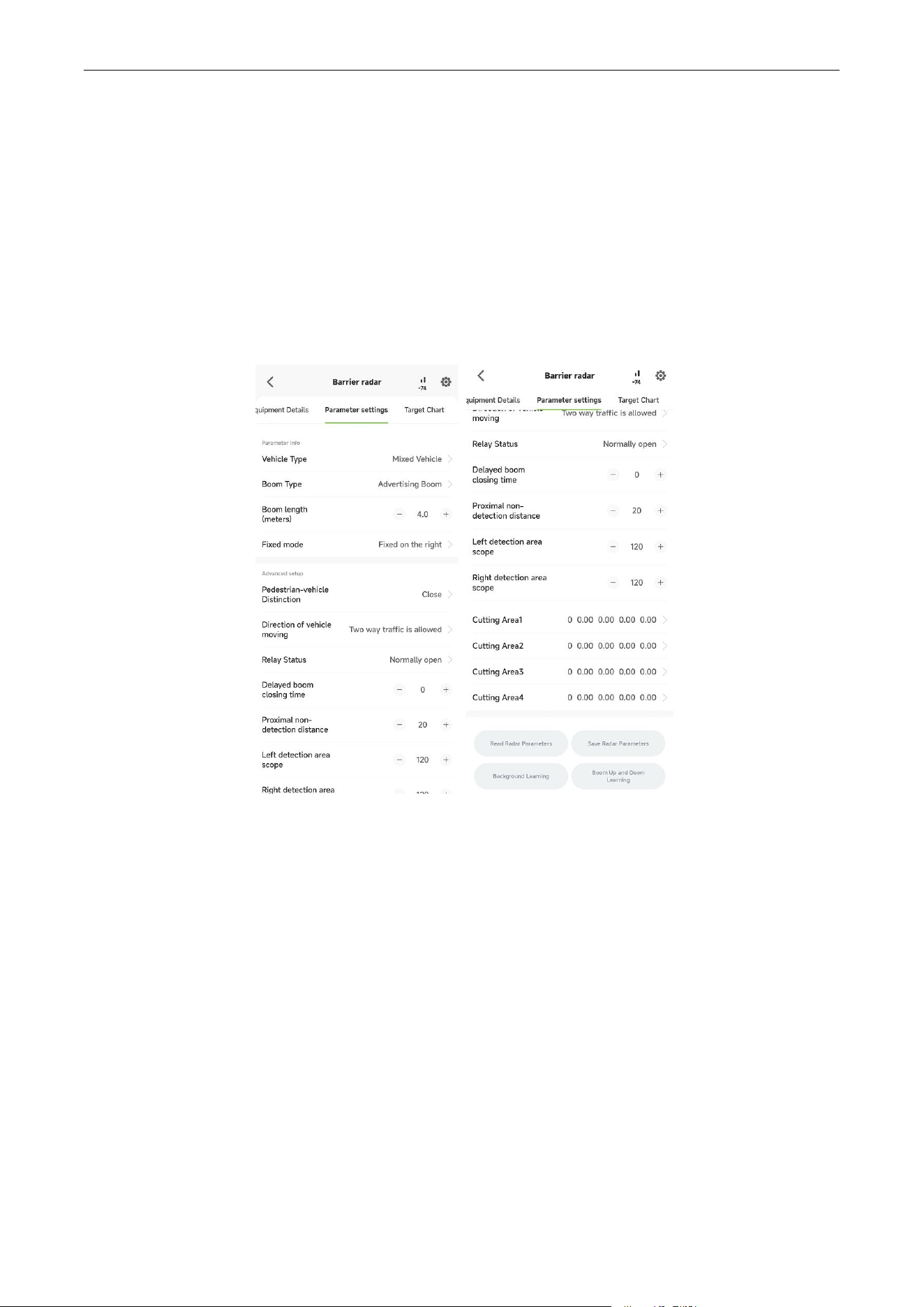
Enter the parameter setting interface as the pictures shown below.
Step 1: According to the actual installation environment, choose the Vehicle Type, Boom Type and
Boom length. On the setting of Boom length is generally recommended to set the length shorter than
the actual length of 50cm.
Step 2: Setting the Fixed mode: if the barrier is on the radar’s left side, select left fixed; If on the right side,
select right fixed.
Step 3: Slide to the bottom of this screen and click [Save Radar Parameters].
Step 4: First keep the barrier boom in a raise state and make sure no one enters within 150cm to the left
and right of the radar, then click [Background Learning] in the app. Follow the prompts until the
learning is complete.
Step 5: Make sure no one enters within 150cm to the left and right of the radar, then click [Boom Up and
Down Learning] in the app. Follow the prompts, using the remote control to keep opening and closing
the barrier boom until the learning is complete.
Step 6: After finish step 5, the barrier boom will close, the radar indicator green light off, the radar into
the self-learning, at this time to make sure no one enters within 150cm to the left and right of the radar
in 30s. After 30s, the radar self-learning is completed and the setting of radar is finished.
VR30 User Manual
P a g e |
18
Copyright©2025 ZKTECO CO., LTD. All rights reserved.
Note:
1. In general scenarios, just follow the above steps to configure, no need to do other
configurations.
2. If you have modified the Boom Type, Boom length or Fixed mode, please reset from step 3,
otherwise will have problems such as smashing the car.
8.3.1 Parameter Description
Pedestrian-vehicle Distinction: This mode means that the radar will distinguish between pedestrian and
vehicle. If turn it on, the indicator light will be yellow when detect a person.
Direction of vehicle moving: Entering from the left ,right side or both side of the radar.
Relay Status: Normally open and normally closed options.
Delayed boom closing time: Delayed closing of the barrier boom after the vehicle leaves.
Proximal non-detection distance: The distance in front of the radar that will not be detected by radar, for
example, if the value is set as 0.4m, object 0.4m from radar will not be detected.
Left detection area scope: The left scope of the radar detection area.
Right detection area scope: The right scope of the radar detection area.
VR30 User Manual
P a g e |
19
Copyright©2025 ZKTECO CO., LTD. All rights reserved.
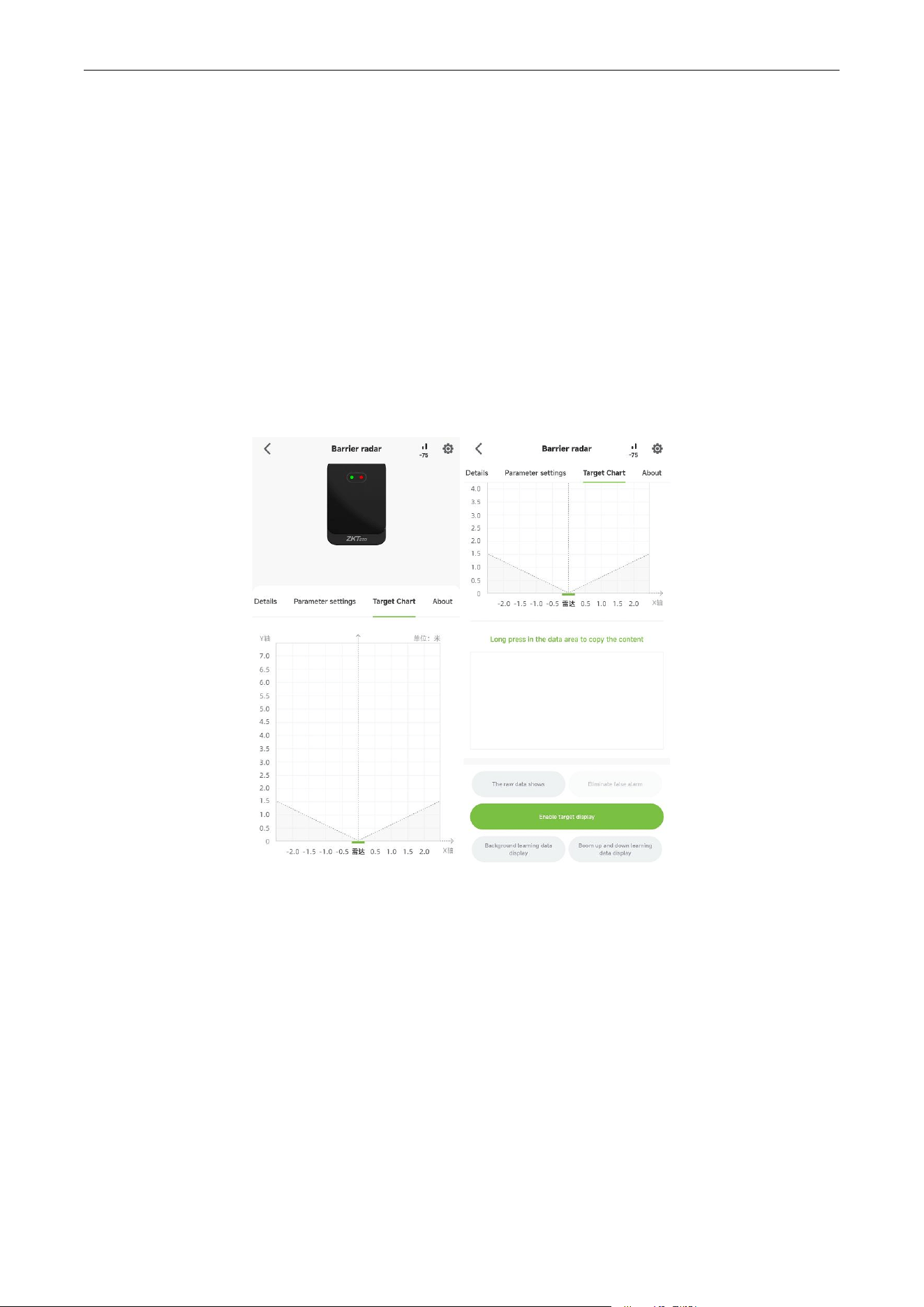
Cutting Area: If the site environment has a small obstacle in the detection area can occasionally be
detected, in this situation you can draw a area according to the coordinate value that check from the
Target Chart, all the point in this area are eliminated which means that the radar will not detect this area.
For example, the obstacle of XY coordinates for (0.4,3), then you can draw a area such as X1 = 0.2, X2 =
0.6, Y1 = 2.8, Y2 = 3.2 cut area.
8.4 Display of Target Information
1. After the background learning is completed, you can click to display the target information. During
this process, please do not perform other operations except stop the display.
2. If there is false alarm on the interface, click [STOP DISPLAY] and then click [ELIMINATE FALSE ALARM].
After Eliminate false alarm, it can be used normally.
VR30 User Manual
P a g e |
20
Copyright©2025 ZKTECO CO., LTD. All rights reserved.
9 FAQ
Problem: After installation, the green light of the radar is always on, and the boom does not fall.
Possible cause: Ensure any newly added reflective surfaces are outside the radar’s detection zone, or
recalibrate for background learning.
Problem: The person is standing in front of the radar but the green indicator does not light.
Possible cause: The radar is configured to activate only after a vehicle trigger; Pedestrian detection is
disabled until a car is detected. Change the trigger mode to “pedestrian enabled” or “always active”
detection.
Problem: The red light of radar flashes when the 12V power supplied by the gate control board is on.
Possible cause: It is recommended to connect an external 12V-1A power adapter.
10 Packing List
Number
Accessories
Quantity
1
VR30 Radar
1
2
Fixed nut
1
3
Installation aid stickers
1

P a g e |
1
Copyright©2025 ZKTECO CO., LTD. All rights reserved.
ZKTeco Industrial Park, No. 32, Industrial Road,
Tangxia Town, Dongguan, China.
Phone : +86 769 - 82109991
Fax : +86 755 - 89602394
www.zkteco.com
Copyright © 2025 ZKTECO CO., LTD. All Rights Reserved.