V5 User Manuals
Features:
Time in op�onal 12/24 hour format
Perpetual Calendar Up to Year 2099
Day of week in 7 languages user selectable: English, German,
Italian, French, Spanish, Netherlands and Danish
Dual Alarm clock can be set on weekdays / weekends and
daily
Snooze �me se�ng (1~30Minute or OFF)
Low ba�ery indicate
Weather forecast
Ice alert
Remote sensor temperature alert range set
Change trend display
Humidity measurable range: 20%RH ~ 95%RH
Temperature:
— Indoor temperature measurement ranges: -9.9°C (14.2°F) ~
50°C (122°F)
— Outdoor temperature measurement ranges: -40°C (-40°F) ~
70°C (158°F)
— Temperature alterna�vely in °C or °F
Maximum /minimum value record of temperature and
humidity
Wireless outdoor
sensor:
—3 channels selectable
— 433.92MHz RF transmi�ng frequency
— 60 meter transmission range in an open area
Power supply:
Weather sta�on:
Ba�ery: 2 x LR03 AAA size 1.5V
Remote sensor:
Ba�ery: 2 x LR6 AA size 1.5V
V5 User Manuals
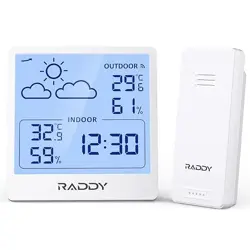
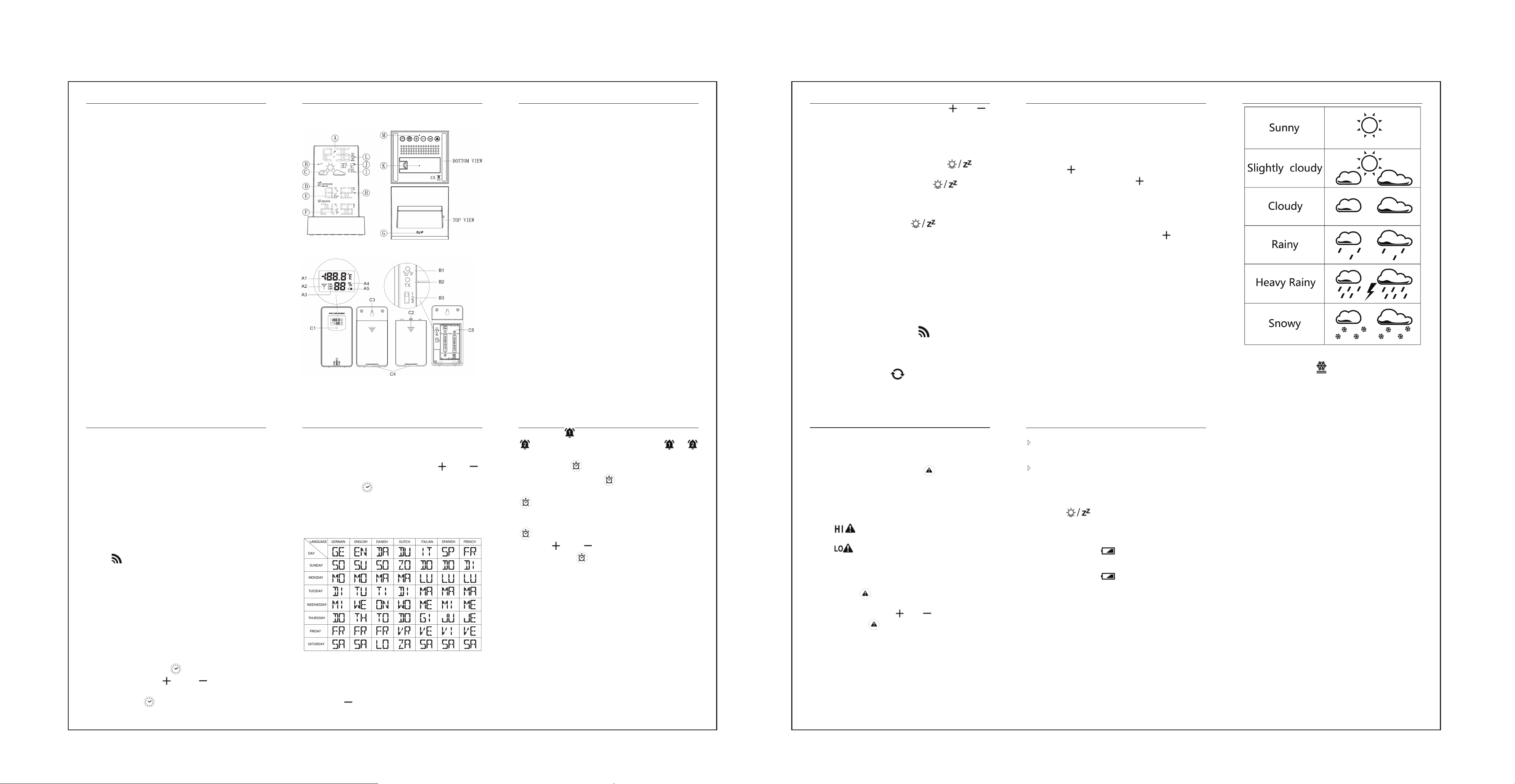
Appearance descrip�on:
V5 User Manuals
RX
A:Time
B:Trend of Air Pressure Changes
C:Weather forecast
D:Remote sensor temperature alert status symbol
E:Remote sensor temperature and humidity value
F:INDOOR temperature and humidity value
G:Light / snooze bu�on (Touch)
H:Trend of Remote sensor humidity varia�on
I: Day of week
J:Date
K:Ba�ery compartment cover
L:
Alarm status indicator
M:Opera�ng bu�ons
TX
A1: Remote sensor temperature
A2: Emission symbols
A3: Channel number
A4: Remote sensor humidity
A5: Remote sensor low ba�ery indicate
B1: °C /°F unit transfer bu�on
B2: Manual transmi�er bu�on
B3: Channel switch
C1: Transmit indica�ng lamp
C2: Ba�ery compartment cover
V5 User Manuals
C3: Wall moun�ng hole
C4: Stand cover
C5: Ba�ery compartment
Ini�a
l opera�on:
Open the main unit ba�ery compartment cover
Insert 2 x 1.5V AAA size ba�eries observing polarity
【Reference “+” and “–” marks】
When you insert the ba�eries, all icons on the LCD will light
up for 3 seconds, and you will hear a beep tone, then detect
indoor temperature & humidity.
The main unit will now start to make a connec�on to the
outdoor remote sensor. This process lasts for
a maximum of 3
minutes and will displayed by a flashing recep�on antenna
symbol
in the upper right corner of the number of
channels.
This moment, Open the remote Sensor ba�ery compartment
cover,
push the channel switch to select the number of channels
to use, Insert 2 x 1.5V AA size ba�eries according to the correct
polarity【Reference “+” and “–” marks】. Press the “℃/°F”
bu�on to select the desired temperature unit, close the ba�ery
cover.
It will create remote sensor connec�ons, press the CH bu�on
to view the re
ceived data of different channels.
Manual �me se�ing:
Press and hold the bu�on for 2 seconds, the “12/24Hr”
starts to flash, and press 【 】 and 【 】 bu�ons to set the
�ming format you want.
Press the bu�on
to confirm the item has been set and
V5 User Manuals
go to the next one, the sequence of se�ng items is as follows:
12/24HR HOUR
MINUTE Format of DATE (D/M or M/D)
YEAR
MONTH DATE Language of WEEK
Temperature Unit (°C/°F) Current weather
When adjus�ng the value, press and hold the【
】 or 【 】
bu�on to adjust quickly.
Press the bu�on
to confirm the last item to end the
se�ng procedures, then it will return to the normal mode.
When the 12-hour format is selected, "PM" before the hour
indicates it is post meridiem.
The 7 languages that show week abbrevia�ons are listed
below:
F.Y.I.:
If there is no valid opera�on within 20 seconds, it will
automa�cally return to normal �me mode from the set mode.
Se�ng the da
ily alarms:
Press the 【 】 bu�on, you can set Alarm1 and Alarm2 ON
V5 User Manuals
or OFF, symbol appear means that ALARM1 is ON, symbol
appear means that ALARM2 is ON, symbol or
disappear means that Corresponding ALARM is OFF.
Press the bu�on
to display the Alarm1 �me on the LCD (5
seconds), press the bu�on
again while Alarm1 �me is
displayed to show the Alarm2 �me(5 seconds), press the bu�on
again once more while Alarm2 �me is displayed to return to
the current �me display
.
When Alarm1 �me is displayed, press and hold the bu�on
for 2 seconds un�l Hour of the Alarm1 �me starts to flash,
press the
【 】 or【 】 bu�ons to set the required Hour.
Press the bu�on
to confirm the item has been set and
go to the next one, the sequence of se�ng items is as follows:
Hour of Alarm1 Minute of Alarm1 repeat period of Alarm1
Snooze �me of Alarm1
When se�ng the repeat period, comply with the following
rules:
M-F: From Monday to Friday
S-S: From Saturday to Sunday
M-F S-S
: From Monday to Sunday
The snooze �me can be set to 1-30 minutes or OFF, if “OFF” is
selected, it means that the snooze func�on is turned off.
The Alarm2
�me can be set according to the same method
above
F.Y.I.:
If there is no valid opera�on within 20 seconds, it will
automa�cally return to normal �me mode from the alarm �me
set mode.
V5 User Manuals
When adjus�ng the value, press and hold the 【 】or 【 】
bu�ons to adjust con�nuously and quickly.
The Alarm will sound for 2 minutes if you do not deac�vate it
by pressing any bu�on.
Turn OFF the alarm sound
When it's ringing, press any bu�on except the【 】 key
to stop the Alarm sound.
When it's ringing, touch and hold the 【
】key for 2
seconds to stop the Alarm sound.
Snooze func�on
When it's ringing, touch the 【 】 key to ac�vate
snooze mode, when the set snooze �me is over, it will ring
again.
RF Transmission Procedure
The main unit automa�cally starts receiving transmission from
remote sensor for outdoor temperature & humidity a�er
ba�eries inserted.
The remote sensor will automa�cally transmit temperature
and humidity data to the main unit a�er ba�eries inserted.
If the main unit failed to receive transmission from remote
sensor (“- -.-”
and “- -” display on the LCD), Press and hold the
【CH】 bu�on for 2 seconds, RF icon
will be flashing,the
main unit will rescan the launch signal of the channel.
The main unit receive remote signals of up to 3 channels,
press the【CH】 bu�on to switch and display data of different
channels, when the symbol
appears, the data of
V5 User Manuals
different channels will be displayed automa�cally every 5
seconds.
Maximum / Minimum numerical value of memory
When the temperature and humidity are shown in the LCD,
the main unit began to record temperature/ humidity maximum
and minimum numerical value.
Press the 【
】 bu�on, the LCD will display maximum value
of temperature/ humidity. Press the 【
】 bu�on again while
the maximum values are displayed to show the minimum
temperature and humidity.
at the same �me, there are “MAX” or “MIN” displayed on the
LCD.
The temperature and humidity maximum/minimum value will
will be recorded again a�er pressing and hold 【
】bu�on for
3 seconds..
The memory value of the day will be automa�cally cleared at
0:00 every night.
Weather forecas�ng fun
c�on
Warning: Please take the weather forecast from your local
weather forecas�ng service into account as well as the forecast
from your weather sta�on. If there are discrepancies between
the informa�on from your device and from the local weather
forecas�ng service, please take the advice of the la�er as
author
ita�ve.
The weather forecast is calculated from evalua�on of
fluctua�ons in the barometric pressure and may deviate from
the actual weather condi�ons.
The weather sta�on displays the following weather symbols:
V5 User Manuals
Ice a
lert
The ice alert symbol appears and flashes when the
remote sensor temperature is between -1.0°C and 2.9°C (30.2°F
V5 User Manuals
to 37.3°F). The ice alert func�on remains ac�ve, but no sound
alarm is issued.
Outdoor temp
erature alert
Ac�vate the Alert Func�on: Press the bu�on to toggle
the outdoor temperature alert func�on ON or OFF. This se�ng
applies only to the currently displayed channel.
Switch Channels: To set the alert func�on for a different channel,
press the 【CH】 bu�on to select the desired channel.
Interpret Alert Symbols:
Symbol
: Appears when the upper limit alert func�on is
ON.
Symbol
: Appears when the lower limit alert func�on is
ON.
No Symbols: Indicates that the outdoor temperature alert
func�on is OFF.
Press and hold
bu�on for 2 seconds, enter the outdoor
temperature upper limit or lower limit value se�ng mode, the
set item will flash, press the
【 】 or【 】 bu�ons to set the
value, then press the
bu�on again to confirm the se�ng
and move to the next one, press the【CH】bu�on to set the value
of other channels.
When the outdoor temperature exceeds the set limit, the
temperature value and corresponding icon will flash. Each �me
the temperature is updated, if it s�ll exceeds the set limit, a
beep reminder will sound.
V5 User Manuals
Trend displaying
The LCD display shows the current temperature, humidity,
and barometric pressure trends. If no arrows are displayed, it
indicates that the current trend is stable.
A�er successfully connec�ng with the remote sensor, the
main unit can display the outdoor temperature/ humidity and
their change trends.
Background ligh�ng
Touch the【 】 key to turn on the backlight for 15
seconds.
Low ba�ery warning
When a flashing symbol appears near “INDOOR”, it
indicates that the weather sta�on's ba�ery is low.
Please
replace it as soon as possible.
When a flashing symbol
appears near the channel
number, it indicates that the remote sensor's ba�ery is low.
Please replace it as soon as possible.