Manual
Model: TypeB M1
The Apple Find My network provides an easy,secure way to
locate item using the Find My app on your iPhone, iPad, Mac,
or the Find Items app on Apple Watch.
To use the Apple Find My app to locate item, the latest
version of iOS, iPadOS, or macOS is recommended. The Find
Items app on Apple Watch requires the latest version of
watchOS.
Use of the Works with Apple badge means that a product has
been designed to work specifically with the technology
identified in the badge and has been certified by the product
manufacturer to meet Apple Find My network product
specifications and requirements. Apple is not responsible for
the operation of this device or use of this product or its
compliance with safety and regulatory standards.
Apple, Apple Find My, Apple Watch, Find My, iPhone, iPad,
iPadOS, Mac, macOS and watchOS are the trademarks of
Apple Inc. IOS is a trademark or registered trademark of
Cisco in the U.S. and other countries and is used under
license.
Open or download the free Find My app or Google 's Find Hub
app from the App Store or on Google Play.
For iOS
1.Press and hold the button for 5 seconds.
2.Open the Find My App.
3.Tap Add item.
4.Tap Other Supported item.
5.MiniTag will appear. Tap Connect.
6.You are now connected.
To Disconnect the Device:
1.Open the app and select the item.
2.Scroll to the bottom of the screen.
3.Tap Remove Item and then tap Remove to confirm.
For Android device
1.Press and hold for 5 seconds.
2.Turn on your Android phone's screen.
3.You will receive a quick pairing notification on your phone
prompting you to set up a new device , along with a picture of
the device.
4.Follow the on-screen instructions to complete the pairing
process.
To Disconnect the Device:
1.Open the app and tap on the item.
2.Tap the settings icon on the right of the item.
3.Tap"Remove from Find Hub" to disconnect.
Confirm Status
1.Double-click the button.
2.If the device emits one beep and the light blinks three
times, the device is connected.
3.If the device emits three beeps and no lights blink, the
device is not connected.
Factory Reset
1.Press the button 4 times.
2.Wait for the beeps, then immediately press & hold the button
for 8 seconds and a short music will sound.
Power off/Disable
Press 5 times, beeps will sound.
Battery Specifications
Replaceable battery capacity: CR2032 3V-220mAh
Google, Android, Google Play, Find Hub and
Fast Pair are trademarks of Google LLC.
This product has been certified by Google to meet Find Hub
network accessory specifications.Google is not responsible
for the operation of this product. Google is also not
responsible for ensuring that the product complies with any
applicable safety standards or other requirements.
Find Hub helps you find and connect to what matters in a single,
secure place. Find your lost phone or other important
belongings quickly. You can also use Find Hub for seamless
location sharing with friends & family for peace of mind.
Pairing with your Android device
1.Make sure that your phone has Bluetooth and Location
turned on.
2.Verify that your phone is connected to a Wi-Fi or mobile
network.
3.Make sure your phone is within 0.5 meters (1.6feet) of the
device.
4.Navigate to Settings > Google > Devices & Sharing > Devices
> check Scan for nearby Device is ON.
Note: If you dismiss the Fast Pair pop up twice or
frequently pair and unpair a tag, you might trigger the
banning logic, which prevents unnecessary Fast Pair pop
ups. To resolve this, you can either wait for five minutes for
the Fast Pair pop up to be re-enabled or reboot your phone.
Some of these steps are applicable only on Android 10 and
above.
Regu latory safety Information
FCC ID:2BXO4-M1
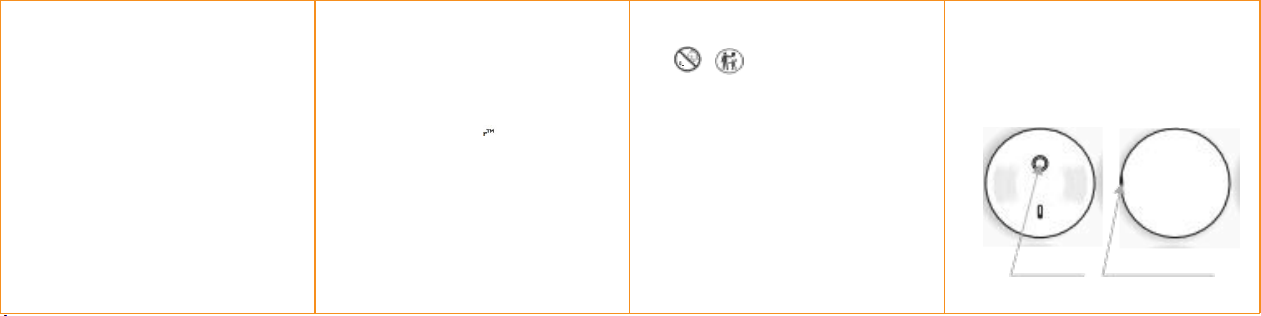
pro d u ct over view
Button Case Opening
3
WARNING: KEEP BATTERIES OUT OF
REACH OF CHILDREN
swallowing may lead to ser ious injury in as little as
2 hou r s o r de a t h
,
du e t o ch em ic a l bur n s an d
potential perforation of the oesophagus.
If you suspect your child has swallowed or inserted
a button battery imme diately call the 24 -hour poison
Informati o n cent r e f or fast expert advice.
Rated vo lt ag e 3v
Rated cur rent ~ 15mA
Immediately dispose of used batteries and
keep away from children.
Do NOT dispose of batteries in household trash.
Even used batteries may cause severe
injury or death .

FCC STATEMENT
NOTE: This equipment has been tested and found to comply
with the limits for a Class B digital device, pursuant to Part 15
of the FCC Rules. These limits are designed to provide
reasonable protection against harmful interference in a
residential installation.
This equipment generates uses and can radiate radio
frequency energy and, if not installed and used in accordance
with the instructions, may cause harmful interference to radio
communications. However, there is no guarantee that
interference will not occur in a particular installation. If this
equipment does cause harmful interference to radio or
television reception, which can be determined by turning the
equipment off and on, the user is encouraged to try to correct
the interference by one or more of the following measures:
Reorient or relocate the receiving antenna.
Increase the separation between the equipment and receiver.
Connect the equipment into an outlet on a circuit different
from that to which the receiver is connected.
Consult the dealer or an experienced radio/TV technician for
help.
RF warning statement:
The device has been evaluated to meet general RF exposure
requirement. The device can be used in portable exposure
condition without restriction.
1. This device complies with Part 15 of the FCC Rules. Operation
is subject to the following two conditions:
(1) This device may not cause harmful interference, and
(2) This device must accept any interference received, including
interference that may cause undesired operation.
2. Changes or modifications not expressly approved by the
party responsible for compliance could void the user's
authority to operate the equipment.