
Production specification
for BT Module
Jiaxing VIRA Display Limited
Bldg.5 #3288 Zhongshan RD(W) Xiuzhou Industrial Park Jiaxing Zhejiang 314000 China
BT Module User Manual
Attention:
This instruction contains the correct use of the product information, in order to avoid
accidents. Please make sure to reading the manual carefully before use the device.
• Do not use alcohol, diluents or any other chemicals to clean the surface,
otherwise, it will be corroded and even damaged.
• Please don’t be in high temperature, moisture or very dust place.
• Please choose the appropriate volume. Use headphones should not be too
big volume, if feel tinnitus, lower the volume or stop using it.
• Please charge the following condition,
A. The battery power ICONS shows have no power.
B. The system automatically shut off, startup after power off soon.
C. Operation buttons no response.
D. The machine that the top right corner show red icons.
• When the device in the format or ongoing upload and download file, please
don’t suddenly disconnect, this could cause application error.
• USB just only be used for data transmission.
• Performance and functionality of the product may be different if the version
of software and hardware is different. Any change will be without notice. Our
company reserves the right to improve the products.
• If you have any questions about the tablet, please contact with us. Attempt
to disassemble the product may damage it and avoid your warranty. Users
will be responsible for all the consequences caused by disassembling.
1. Product Overview
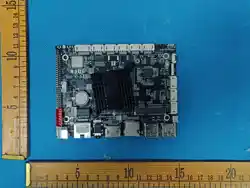
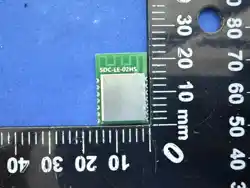
The BT Module is a versatile device designed for a seamless multimedia experience. Powered by
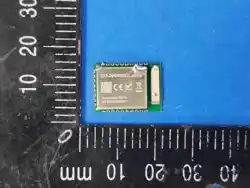
an Allwinner A133 quad-core Cortex™-A53 @1.6GHz Processor and equipped with a BL-
M8761BU2 Bluetooth module, this player offers high-definition video playback, audio streaming,
and smart connectivity features. The product information is as follows:
Product Name: BT MODULE
Model No.:865-014497
FCC ID: 2BVU2-865-014497
IC : 36152-865014497

Production specification
for BT Module
1
Jiaxing VIRA Display Limited
Bldg.5 #3288 Zhongshan RD(W) Xiuzhou Industrial Park Jiaxing Zhejiang 314000 China
HVIN: 865-014497
2. Technical Specifications
- **Processor**: Allwinner quad-core Cortex™-A53 @1.6GHz Processor
- **Graphics Processor**: Imagination PowerVR GE8300 GPU, Supports OpenGL ES 1.1/2.0/3.2,
Vulkan 1.1 , OpenCL 1.2
- **Memory**: DDR3 (1GB/2GB options available)
- **EMMC **: 8GB
- **Operating System**: Android 7.1.1
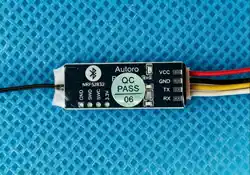
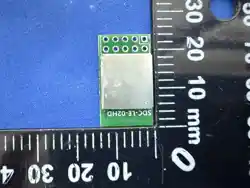
- **Bluetooth Module**: BL-M8761BU2
3. Product Features
- **High-Performance Processing**: The Allwinner A133 processor ensures smooth video
playback and efficient multitasking capabilities.
- **Dynamic Graphics**: T Imagination PowerVR GE8300 GPU delivers high-quality graphics
rendering for an enhanced visual experience.
- **Expandable Storage**: The option to increase memory and storage allows for more
multimedia content and applications.
- **Wireless Connectivity**: The integrated BL-M8761BU2 Bluetooth module enables wireless
audio streaming and data transfer.
4. Getting Started
1. **Power On**: Connect the device to a power source using the provided power adapter.
2. **Initial Setup**: Turn on the device and follow the on-screen instructions to set up the
Android operating system.
3. **Connectivity**: Connect to a Wi-Fi network for internet access and content streaming.
5. Bluetooth Configuration
5.1 Pairing Steps
1. **Enable Bluetooth**: Navigate to the device settings and turn on the Bluetooth function.
2. **Make Discoverable**: Ensure the BL-M8761BU2 module is set to be discoverable.
3. **Search for Devices**: On the device you wish to connect, search for available Bluetooth
devices and select the Android Media Player.
4. **Pairing Confirmation**: Confirm the pairing on both devices. A pairing code may be

Production specification
for BT Module
2
Jiaxing VIRA Display Limited
Bldg.5 #3288 Zhongshan RD(W) Xiuzhou Industrial Park Jiaxing Zhejiang 314000 China
required, which is typically 0000 or 1234, but refer to the device's manual for specifics.
5. **Connection**: Once paired, the devices will establish a connection, and you can begin
wireless audio streaming or data transfer.
5.2 Configuration Parameters
- **TX Power**: Adjust the transmission power to optimize the range and stability of the
Bluetooth connection.
- **Channel Selection**: Select the appropriate Bluetooth channel to avoid interference with
other devices.
- **Security**: Set up a secure connection with a passkey or use the device's built-in security
features to protect data during transfer.
6. Operating the Media Player
- **Content Playback**: Use the device's interface to browse and select media files for playback.
- **Volume Control**: Adjust the volume to your preference using the device's controls or a
connected remote.
- **File Management**: Manage your media files through the device's file system or by
connecting to a computer.
7. Maintenance and Support
- **Regular Updates**: Keep the device's software up to date for optimal performance and
security.
- **Battery Care**: For models with removable batteries, follow proper charging and
discharging practices to extend battery life.
- **Warranty and Service**: The Android Media Player comes with a warranty covering
manufacturing defects. For support, contact the manufacturer or authorized service centers.
---
**Note**: The content of this user manual is based on the provided specifications. Users should
refer to the actual product documentation for precise details and additional instructions. The
Bluetooth configuration may vary depending on the specific model of the BL-M8761BU2 module
and the Android version of the media player.

Production specification
for BT Module
3
Jiaxing VIRA Display Limited
Bldg.5 #3288 Zhongshan RD(W) Xiuzhou Industrial Park Jiaxing Zhejiang 314000 China
• Trouble Shooting
• The tablet cannot be turn on. please reset the tablet. For any other
inquiries, please contact the distributors.
• Files cannot be downloaded.
1. Make sure the tablet connect the computer properly.
2. Check if the memory is full.
3. Please check if the USB cable is damaged.
• Serious noise. Please check if the audio files are damaged. You can
play the other audio files to identify if the file has been damaged.
The damage can cause the serious noise.
• The screen display messy code. Please check if you select the correct
language.

Production specification
for BT Module
4
Jiaxing VIRA Display Limited
Bldg.5 #3288 Zhongshan RD(W) Xiuzhou Industrial Park Jiaxing Zhejiang 314000 China
FCC STATEMENT:
This device complies with part 15 of the FCC Rules. Operation is subject to the following two conditions:
(1) This device may not cause harmful interference, and (2) this device must accept any interference
received, including interference that may cause undesired operation.
Any Changes or modifications not expressly approved by the party responsible for compliance could
void the user's authority to operate the equipment.
Note: This equipment has been tested and found to comply with the limits for a Class B digital device,
pursuant to part 15 of the FCC Rules. These limits are designed to provide reasonable protection
against harmful interference in a residential installation. This equipment generates uses and can radiate
radio frequency energy and, if not installed and used in accordance with the instructions, may cause
harmful interference to radio communications. However, there is no guarantee that interference will not
occur in a particular installation. If this equipment does cause harmful interference to radio or television
reception, which can be determined by turning the equipment off and on, the user is encouraged to try to
correct the interference by one or more of the following measures:
-Reorient or relocate the receiving antenna.
-Increase the separation between the equipment and receiver.
-Connect the equipment into an outlet on a circuit different from that to which the receiver is connected.
-Consult the dealer or an experienced radio/TV technician for help.
This equipment complies with FCC radiation exposure limits set forth for an uncontrolled environment.
This equipment should be installed and operated with minimum distance 20cm between the radiator &
your body.
(IC)INDUSTEY CANADA STATEMENT:
This device complies with Innovation, Science and Economic Development Canada licence-exempt
RSS standard(s). Operation is subject to the following two conditions: (1) This device may not cause
harmful interference, and (2) this device must accept any interference received, including interference
that may cause undesired operation of the device. In additional, this device complies with ICES-003 of
the Innovation, Science and Economic Development Canada (IC) Rules. Any Changes or modifications
not expressly approved by the party responsible for compliance could void the user's authority to
operate the equipment.
Note: This equipment has been tested and found to comply with the limits for a Class B digital device,
pursuant to Innovation, Science and Economic Development Canada licence-exempt RSS standard(s).
These limits are designed to provide reasonable protection against harmful interference in a residential
installation. This equipment generates uses and can radiate radio frequency energy and, if not installed
and used in accordance with the instructions, may cause harmful interference to radio communications.
However, there is no guarantee that interference will not occur in a particular installation. If this

Production specification
for BT Module
5
equipment does cause harmful interference to radio or television reception, which can be determined by
turning the equipment off and on, the user is encouraged to try to correct the interference by one or
more of the following measures: -Reorient or relocate the receiving antenna.
-Increase the separation between the equipment and receiver.
-Connect the equipment into an outlet on a circuit different from that to which the receiver is connected.
-Consult the dealer or an experienced radio/TV technician for help.
This equipment complies with RSS-102 radiation exposure limits set forth for an uncontrolled
environment. This equipment should be installed and operated with minimum distance 20cm between
Jiaxing VIRA Display Limited
Bldg.5 #3288 Zhongshan RD(W) Xiuzhou Industrial Park Jiaxing Zhejiang 314000 China
the radiator & your body.
(IC)INDUSTEY CANADA STATEMENT(French):
Cet appareil est conforme aux normes RSS exemptes de licence Innovation, Science et Dé
veloppement économique Canada. Son fonctionnement est soumis aux deux conditions
suivantes : (1) Cet appareil ne doit pas causer d'interférences nuisibles et (2) cet appareil doit
accepter toute interférence reçue, y compris les interférences susceptibles de provoquer un
fonctionnement indésirable de l' appareil. De plus, cet appareil est conforme à la norme
ICES-003 des règles Innovation, Science et Développement économique Canada
(IC).
Tout changement ou modification non expressément approuvé par la partie responsable de
la
conformité pourrait annuler l'autorité de l'utilisateur à faire fonctionner l'équipement.
Remarque : cet équipement a été testé et déclaré conforme aux limites d'un appareil num
érique
de classe B, conformément aux normes RSS exemptes de licence Innovation, Science et Dé
veloppement économique Canada. Ces limites sont conçues pour fournir une protection
raisonnable contre les interf é rences nuisibles dans une installation r é sidentielle. Cet é
quipement génère des utilisations et peut émettre de l' énergie de radiofréquence et, s'il
n'est pas installé et utilisé conformément aux instructions , peut causer des interférences
nuisibles aux communications radio. Cependant, il n'y a aucune garantie que des interférences
ne se produiront pas dans une installation particulière. Si cet équipement cause des interfé
rences nuisibles à la réception radio ou télévision, ce qui peut être déterminé en éteignant
et en rallumant l'équipement, l'utilisateur est encouragé à essayer de corriger l'interférence
par une ou plusieurs des mesures suivantes :
-Réorientez ou déplacez l'antenne de réception.
-Augmenter la distance entre l'équipement et le récepteur.
-Connectez l'équipement à une prise sur un circuit différent de celui auquel le récepteur est
connecté.
-Consultez le revendeur ou un technicien radio/TV expérimenté pour obtenir de l'aide.

Production specification
for BT Module
6
Jiaxing VIRA Display Limited
Bldg.5 #3288 Zhongshan RD(W) Xiuzhou Industrial Park Jiaxing Zhejiang 314000 China
Cet équipement est conforme aux limites d'exposition aux rayonnements RSS-102 établies
pour
un environnement non contrôlé. Cet équipement doit être installé et utilisé avec une
distance
minimale de 20cm entre le radiateur et votre corps.