
User’s Guide
-RF Module
This handbook contains important security measures and the correct use of the product
information. In order to avoid accident, please make sure to reading the manual carefully
before use the device.

1
Attention:
This instruction contains the correct use of the product information, in order to avoid
accidents. Please make sure to reading the manual carefully before use the device.
• Do not use alcohol, diluents or any other chemicals to clean the surface,
otherwise, it will be corroded and even damaged.
• Please don’t be in high temperature, moisture or very dust place.
• Please choose the appropriate volume. Use headphones should not be too big
volume, if feel tinnitus, lower the volume or stop using it.
• When the device in the format or ongoing upload and download file, please
don’t suddenly disconnect, this could cause application error.
• USB just only be used for data transmission.
• Performance and functionality of the product may be different if the version of
software and hardware is different. Any change will be without notice. Our
company reserves the right to improve the products.
• If you have any questions about the tablet, please contact with us. Attempt to
disassemble the product may damage it and avoid your warranty. Users will be
responsible for all the consequences caused by disassembling.
Main Functions:
• Based on the Android 11 operating system and supports WiFi function.
• Supports MP3/AAC/OGG/WAV for audio.
• Supports automatic browse for picture in JPG/BMP/JPEG/GIF.
• Supports AVI/3GP/MP4/MKV/MOV/TS/FLV and up to 2160P for video.
• Supports OTG function, external mouse and keyboard.
Operational Description:
⚫ Description
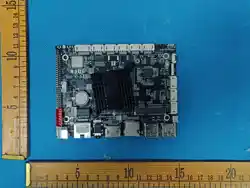
The product is based on Rockchips 3568 processor chipset platform with Android OS
11 The majority of Multi-Function Monitor circuitry consists of fifteen device chipsets,
and these chipsets ate divided into different function sub-system or units.

2
RK3568 is ahigh-performance and low power quad-core application processor designed
for personal mobile internet device and AIoT equipments.
Many embedded powerful hardware engines provide optimized performance for high-
end application. RK3568 supports almost full-format H.264 decoder by 4K@60FPS,
H.265 decoder by 4K@60fps, also support H.264/H.265 encoder by 1080p@60fps, high-
quality JPEG encoder/decoder, and special image preprocessor and postprocessor.
Embedded 3D GPU makes rk3568 completely compatible with OpenGL ES1.1/2.0/3.2,
OpenCL 2.0 and Vulkan 1.1 . Special 2D hardware engine will maximize display
performance and provide very smoothly operation.
The build-in NPU supports INT8/INT16/FP16/BFP16 hybrid operation. In addition, with
its strong compatibility, network models based on a series of frameworks such as
TensorFlow/MXNet/PyTorch/Caffe can be easily converted.
RK3568 has high-performance dual channel external memory interface
(DDR3/DDR3L/DDR4 /LPDDR3/LPDDR4/LPDDR4X) capable of sustaining demanding
memory bandwidth, also provides a complete set of peripheral interface to support very
flexible applications.
For WLAN : CPU send uplink data over USB-bus to AP6256, AP6256 modulate it to
generate RF signals over a frequency range of 2.400 GHz~2.4835GHz and
5.18GHz~5.240GHz, and amplify RF signal is by inter amplifier, then send it to the WIFI
antenna through the FIR filter. In the other way, antenna receiver signals from the air,
send them to the AP6256, AP6256 demodulate signals and transfer useful data back to
the CPU. Use 37.4MHz clock.
⚫ Port function Description
• DC Port: +12V DC Power Socket. 2.5mm barrel type.
• USB Port: You can use it connect to USB Device.
• Audio Port: You can use it connect to 3.5mm socket audio devices.
• HDMI Port: You can use it connect to HD video display.
• USB Port: just only be used for data transmission.
• Micro Card Socket: Adds additional storage to tablet.
• Ethernet Socket: Ethernet network port.
• USB OTG Port: Use it connect to PC debug.
• LVDS Port: You can use it connect to LVDS interface LCD panel.
• EDP Port: You can use it connect to EDP interface LCD panel.
WI-FI CONNECTION AND STORE ID SETTINGS
9
1
3
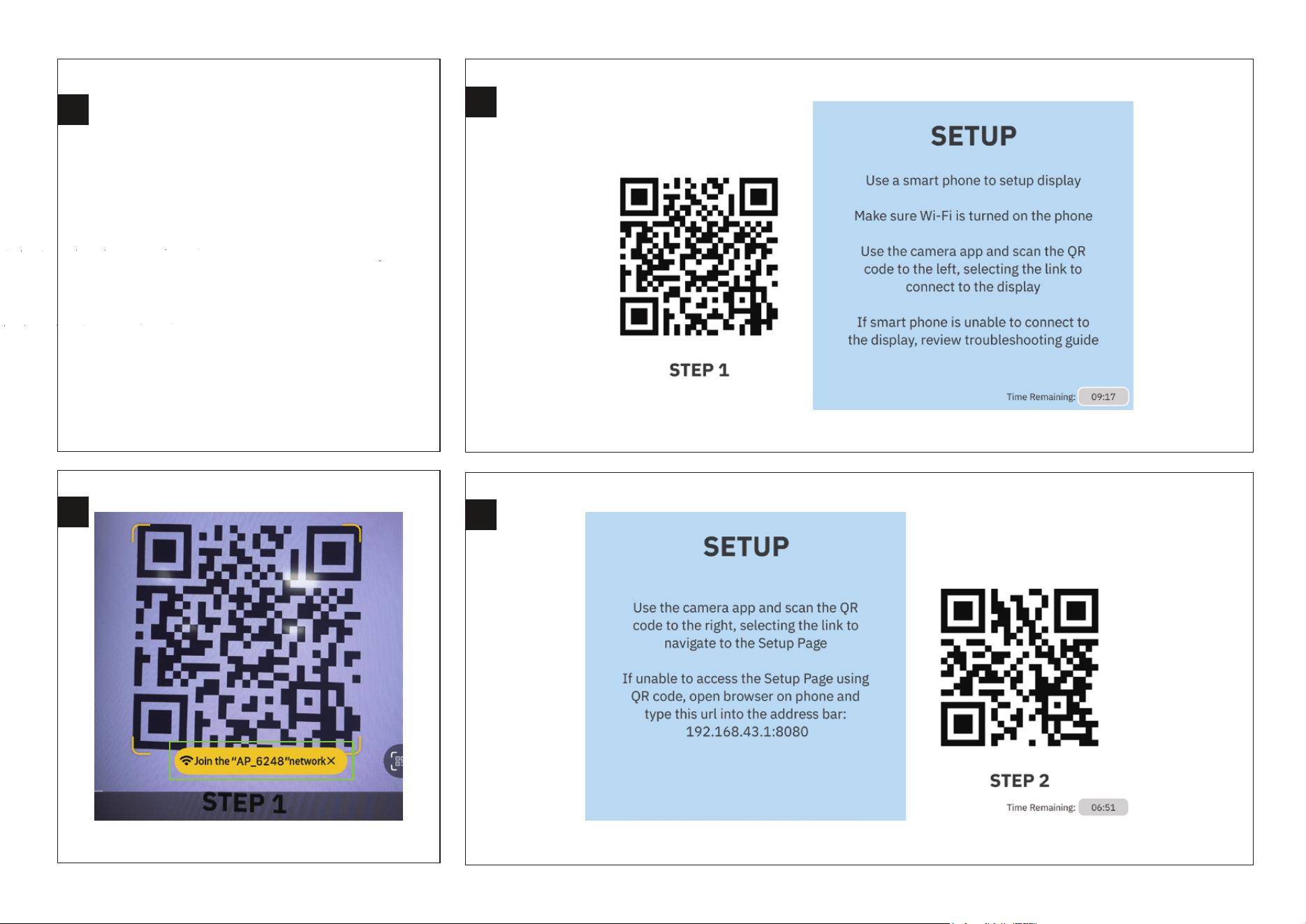
When you connect to a monitor
via the HDMI interface or to a screen
via the LVDS and EDP interfaces,
you will see the following interface
Click on the hot link.
Use your mobile phone to scan this QR code.
4
2
The LCD Monitor displays the interface as shown in the figure.
This Wi-Fi name is for reference only.
Use your mobile phone to scan this QR code.
The LCD Monitor displays the interface as shown in the figure.
10
5
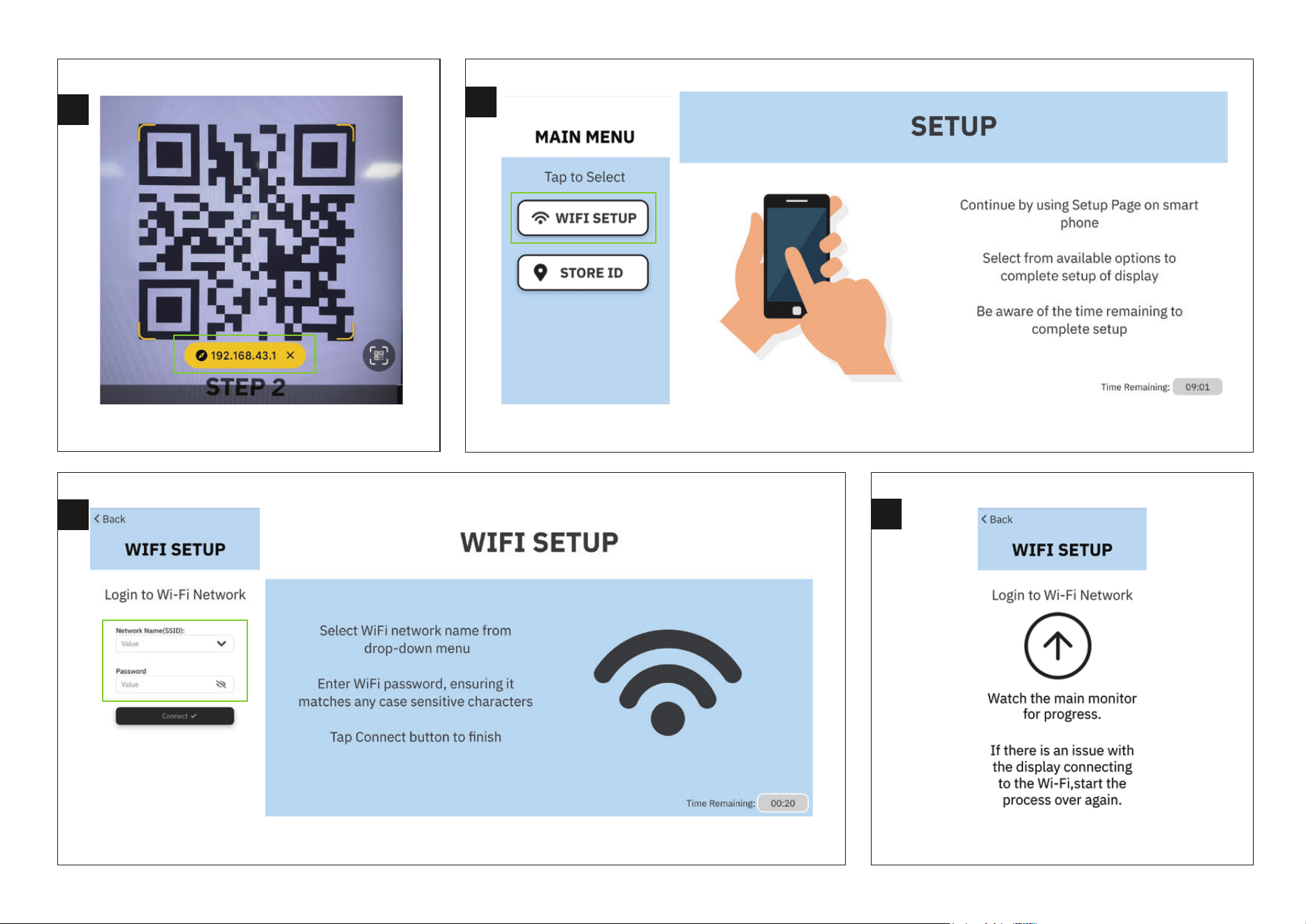
Click on this link.
8
Waiting for Wi-Fi connection.
Click on "WIFI SETUP" on your mobile phone.
7
6
The LCD Monitor displays the interface as shown in the figure.
Enter your network name and password.
The LCD Monitor displays the interface as shown in the figure.
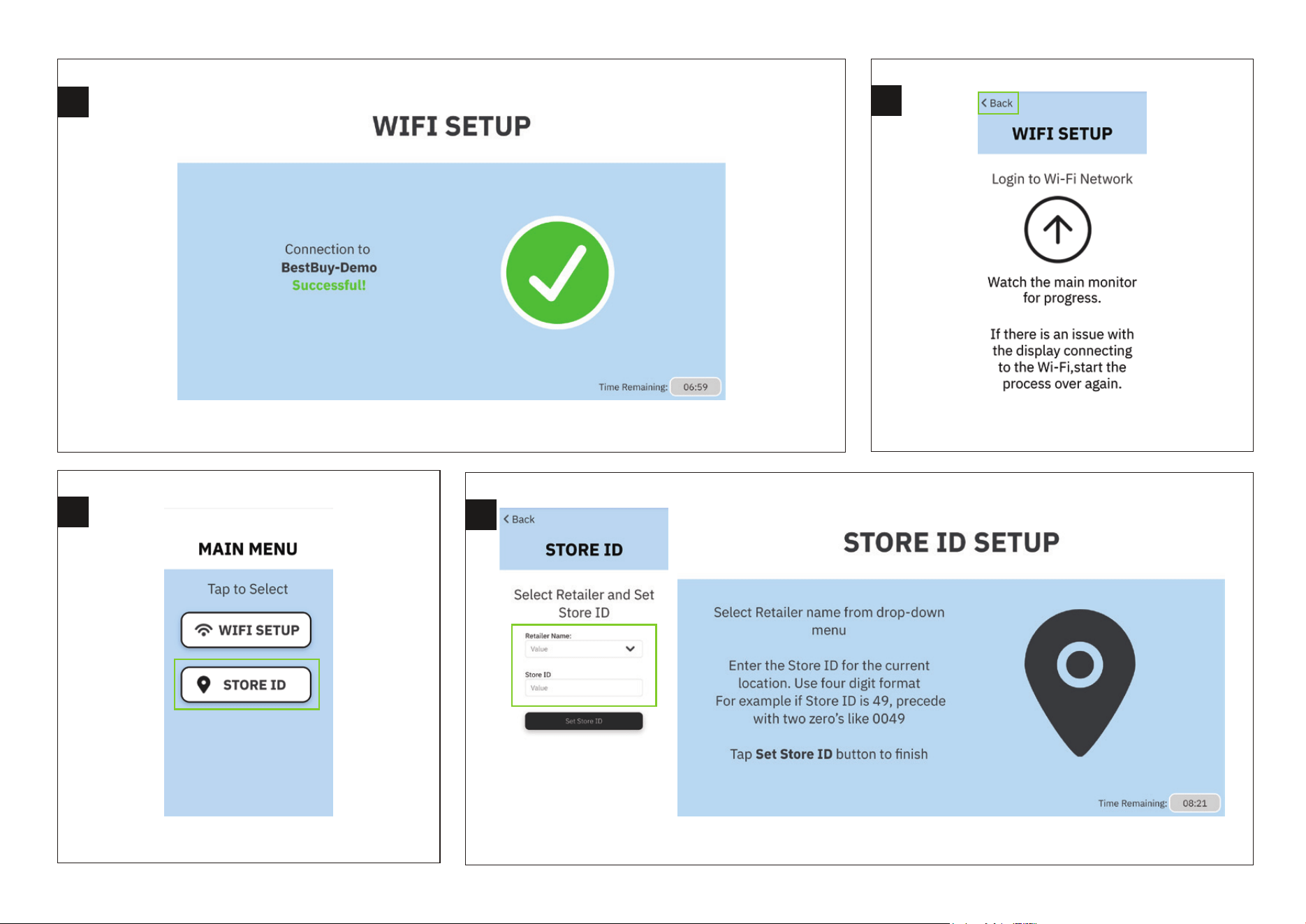
Click on "STORE ID" on your mobile phone.
Enter your Retailer Name and Store ID.
The LCD Monitor displays the interface as shown in the figure.
11
10
Click "back" to return.
9
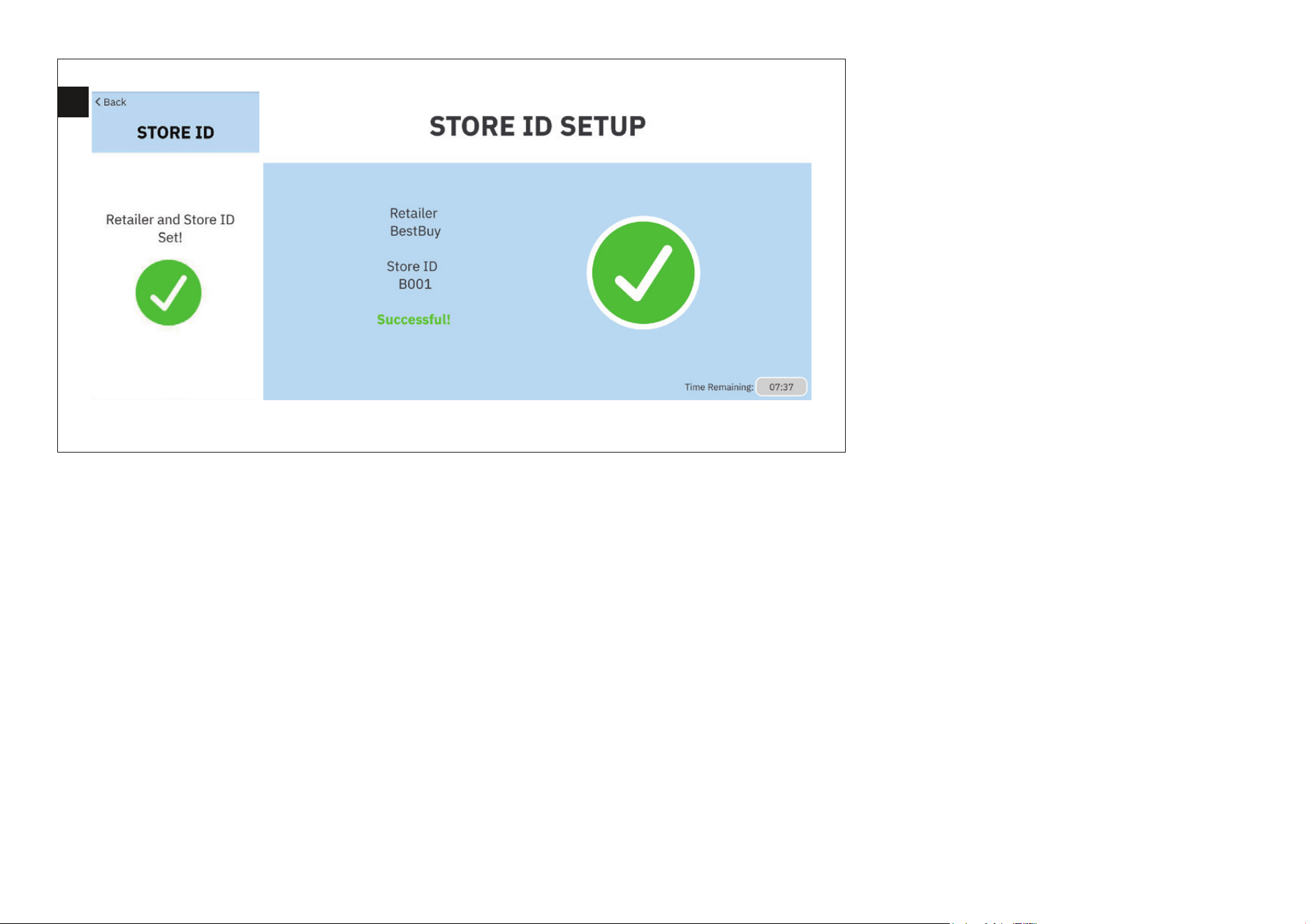
Wi-Fi connection successful.
The LCD Monitor displays the interface as shown in the figure.
11
12
12
13
Retailer and Store ID set up successfully.
The LCD Monitor displays the interface as shown in the figure.
CMS INSTRUCTIONS
13
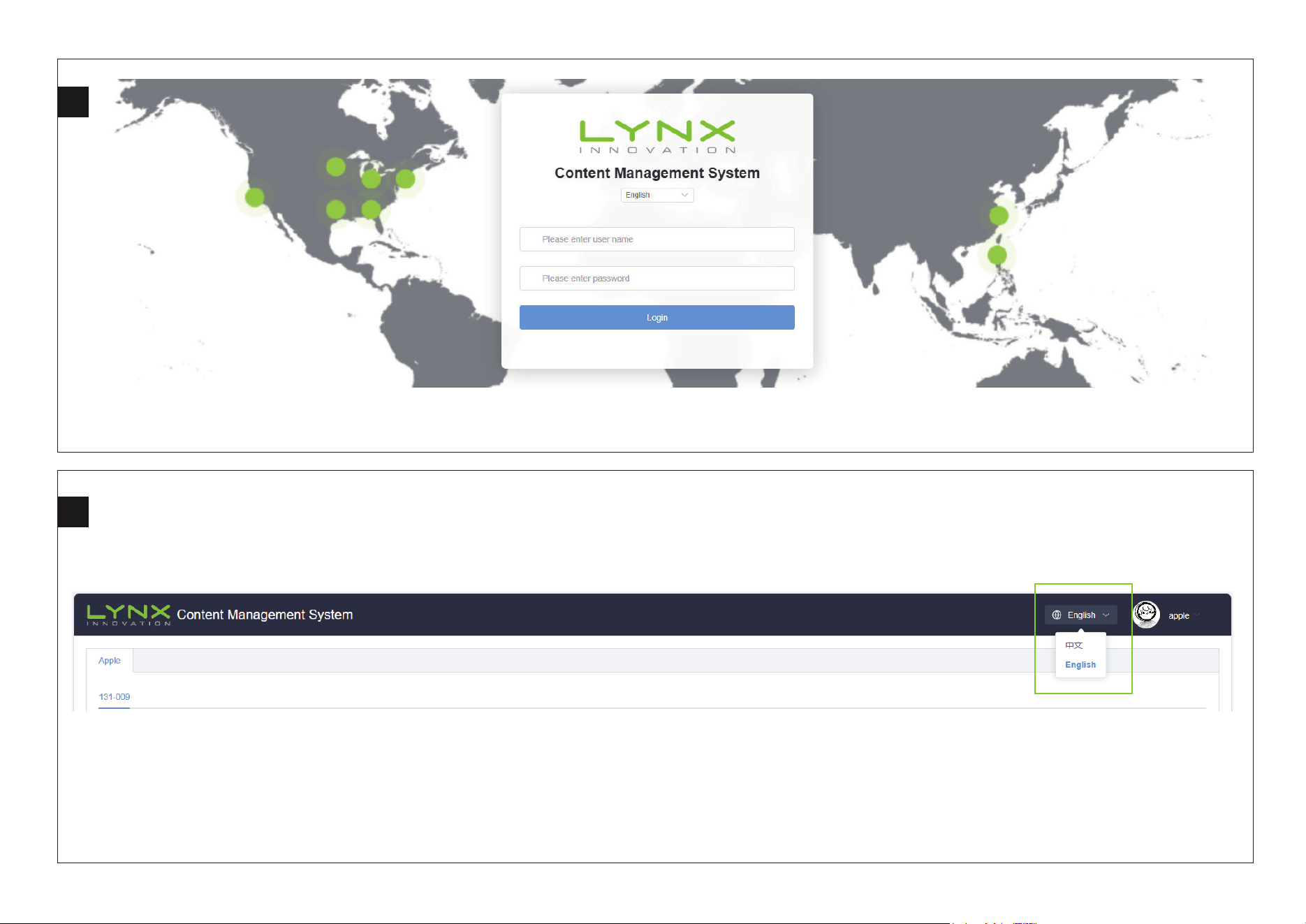
Logging into the Website.
Access URL: http://8.153.72.25:9999/login Username: apple Password: 123456
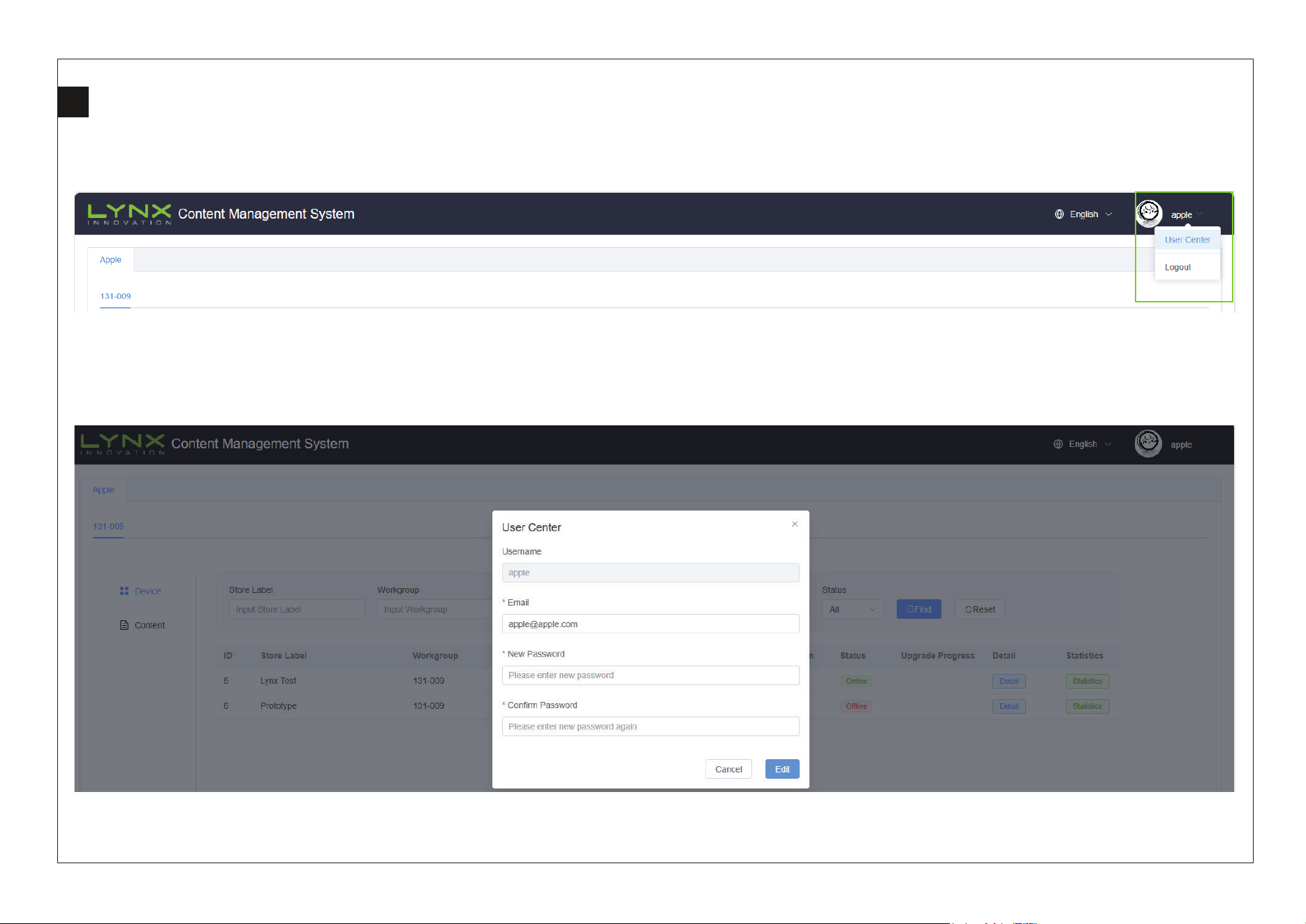
Switch between Chinese and English.
1
2
14
3
Change user password.
Opens the User Center panel, containing Logout.
Enter the new password and repeat to confirm the new password.
15
4
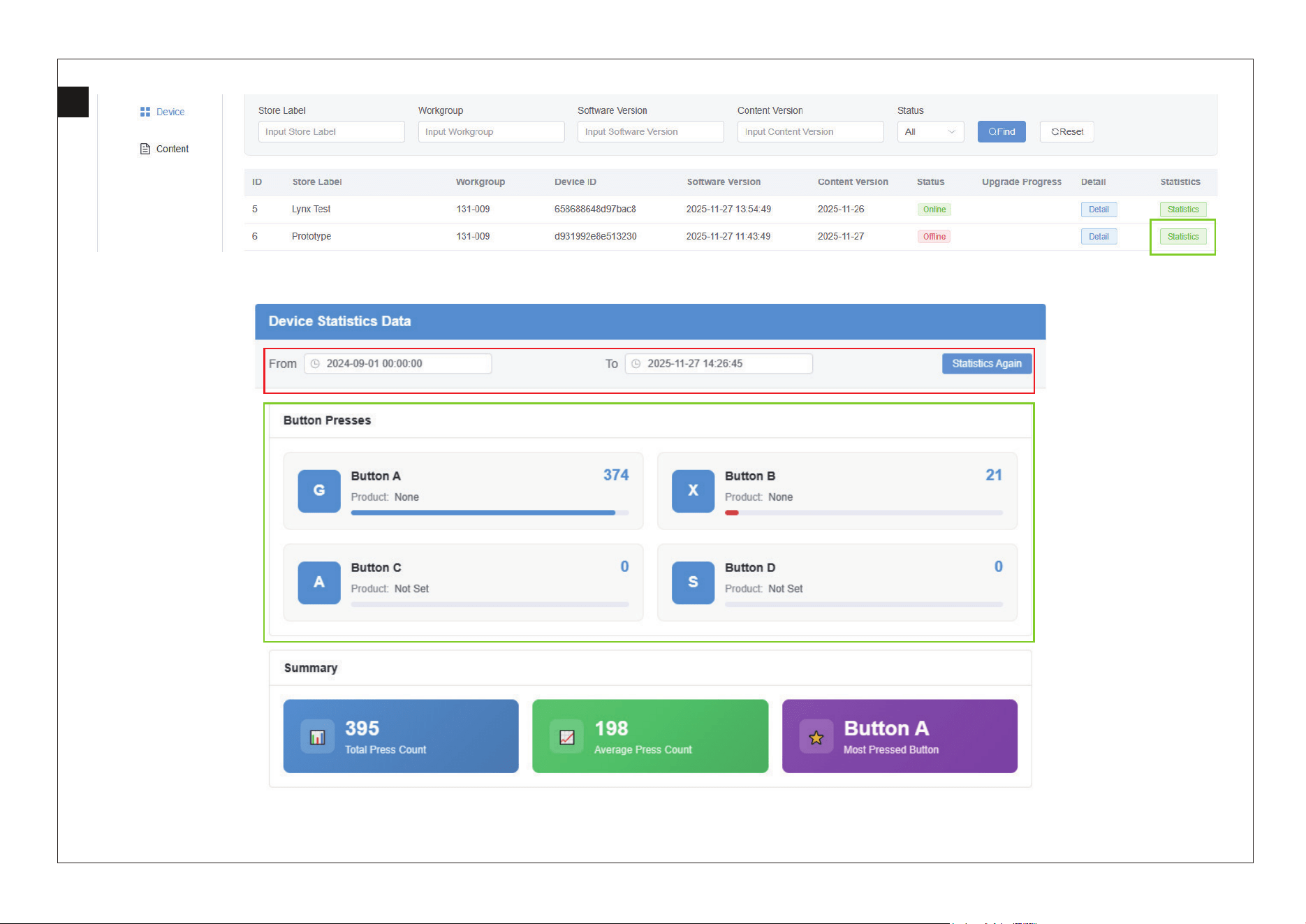
Device Statistics Data Page Introduction
Statistics Again: Re-run statistics. Select a start time and end time, then click "Statistics Again" to generate statistics for that period.
The area within the green box is the statistics data display area.
16
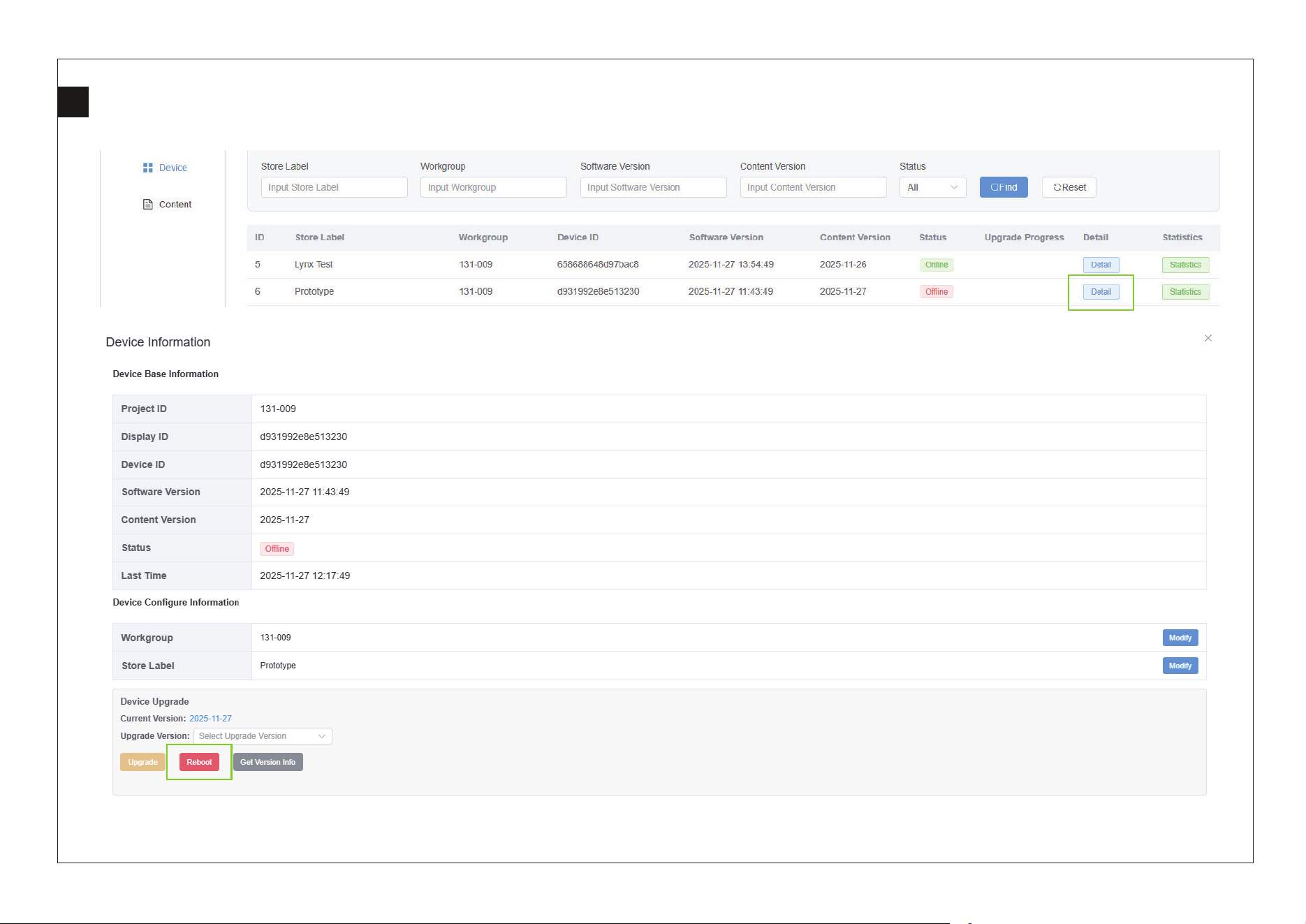
5
Reboot: Sends a restart command to the display.
1
2
17
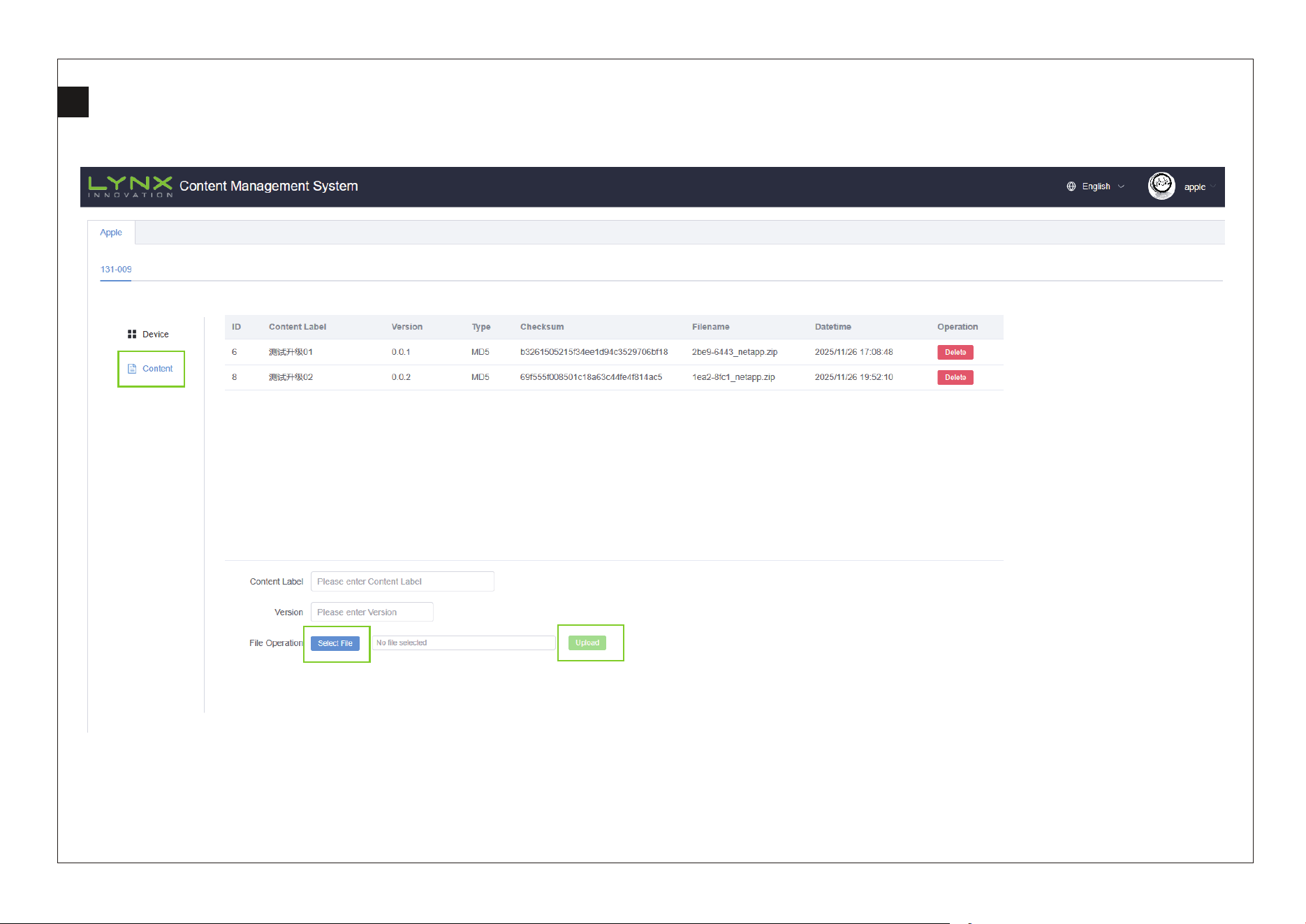
6
Shows all Content versions for this project, as well as the Content upload area.
1
2
3
18
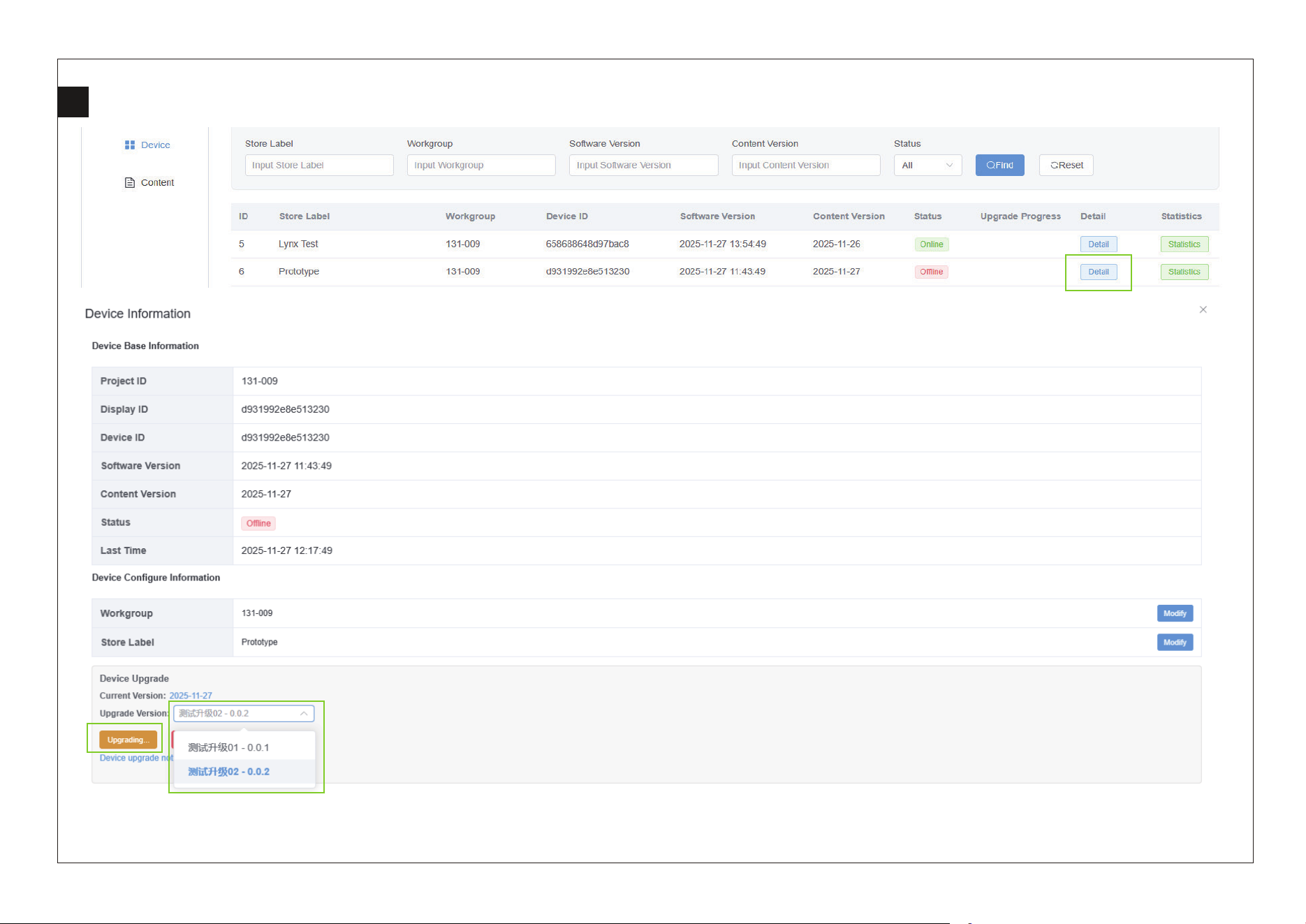
7
1
2
3
Upgrade Version: Select the desired target version from the dropdown menu.
Upgrade: After selecting the desired upgrade version, click this button to start the upgrade.

FCC Statement
This device and its antenna must not be located or operating in conjunction with
any other antenna and transmitter.
This device complies with part 15 of the FCC rules. Operation is subject to the
following two conditions: (1) this device may not cause harmful interference, and
(2) this device must accept any interference received, including interference that
may cause undesired operation.
NOTE: The manufacturer is not responsible for any radio or TV interference caused
by unauthorized modifications to this equipment. Such modifications could void
the user’s authority to operate the equipment.
NOTE: This equipment has been tested and found to comply with the limits for a
Class B digital device, pursuant to part 15 of the FCC Rules. These limits are
designed to provide reasonable protection against harmful interference in a
residential installation. This equipment generates uses and can radiate radio
frequency energy and, if not installed and used in accordance with the instructions,
may cause harmful interference to radio communications. However, there is no
guarantee that interference will not occur in a particular installation. If this
equipment does cause harmful interference to radio or television reception, which
can be determined by turning the equipment off and on, the user is encouraged
to try to correct the interference by one or more of the following measures:
- Reorient or relocate the receiving antenna.
- Increase the separation between the equipment and receiver.

-Connect the equipment into an outlet on a circuit different from that to
which the receiver is connected.
RF exposure information: This equipment complies with FCC radiation
exposure limits set forth for an uncontrolled environment. This
equipment should be installed and operated with minimum distance
20cm between the radiator & your body.
Changes or modifications not expressly approved by the party
responsible for
compliance could void the user’s authority to operate the equipment.
Déclaration de la FCC
Cet équipement a été testé et jugé conforme aux limites pour un appareil
numérique de classe B, conformément à la partie 15 des règles de la FCC.
Ces limites sont conçues pour fournir une protection raisonnable contre
les interférences nuisibles dans une installation résidentielle. Cet
équipement génère, utilise et peut émettre de l’énergie radiofréquence
et, s’il n’est pas installé et utilisé conformément aux instructions, il peut
causer des interférences nuisibles aux communications radio. Cependant,
rien ne garantit que des interférences ne se produiront pas dans une
installation particulière. Si cet équipement provoque des interférences

nuisibles à la réception de la radio ou de la télévision, qui peuvent être
déterminées en éteignant et en allumant l’équipement, l’utilisateur est
encouragé à essayer de corriger l’interférence par une ou plusieurs des
mesures suivantes:
• réorienter ou déplacer l’antenne de réception.
• augmenter la séparation entre l’équipement et le récepteur.
• branchez l’équipement sur une prise sur un circuit différent de celui
auquel le récepteur est connecté.
• consultez le concessionnaire ou un technicien radio/TV expérimenté
pour obtenir de l’aide.
Attention: tout changement ou modification de cet appareil non
explicitement approuvé par le fabricant pourrait annuler votre
autorisation d’utiliser cet équipement.
Cet appareil est conforme à la partie 15 des règles de la FCC. Le
fonctionnement est soumis aux deux conditions suivantes: (1) ce dispositif
ne peut pas causer d’interférences nuisibles, et (2) ce dispositif doit
accepter toute interférence reçue, y compris l’interférence qui peut
causer un fonctionnement indésirable.

Informations sur l’exposition aux RF
L’appareil a été évalué pour répondre aux exigences générales en
matière d’exposition aux RF. L’appareil peut être utilisé en condition
d’exposition portable sans restriction.
Safety Precautions
Read these simple guidelines before using your device. Not following them may
be dangerous or illegal.
Aircraft
Switch off in aircraft and follow any restrictions. Wireless devices can cause
interference in aircraft.
Vehicles
Never use your device while driving. Place it in a safe place. Position your device
within easy reach. Be able to access your device without removing your eyes from
the road.
Electronic devices
In some circumstances your device may cause interference with other devices.
Potentially explosive environments
Switch off your device when in any area with a potentially explosive atmosphere,
and obey all signs and instructions. Sparks in such areas could cause an explosion
or fire resulting in bodily injury or even death.

Pacemakers and other medical devices
Pacemaker manufacturers recommend that a minimum separation of 8 inches be
maintained between a wireless device and a pacemaker to
avoid potential
interference with the pacemaker.
Operation of any radio transmitting equipment, including wireless phones may
interference with the functionality of inadequately protected medical devices.
Consult a physician or the manufacturer of the medical device to 18 determines if
they are adequately shielded from external RF energy or if you have any questions.
Switch off your device in health care facilities when any regulations posted in these
areas instruct you to do so.
Operating environment
When connecting to other device, read its user guide for detailed safety
instructions. Do not connect incompatible products. Do not place your device in
the air bag deployment area. Use the device only in its normal operating positions
as explained in the product documentation. Always switch off your device when
its use is prohibited or when it may cause interference and danger.