
KSSP004 客户使用说明书
Customer User Guide
适用于 KSSP004 条箱 / Applicable to KSSP004
文档用途 / Purpose
供客户了解产品功能、模式说明及日常使用方法。
/ For customer reference on functions, mode
descriptions, and daily operation.
需配套相关主控盒和遥控器使用。
/ It needs to be used in conjunction with the relevant
main control box and remote control.

中文说明
感谢您选择 KSSP004。使用本产品前,请先阅读本说明书并妥善保存,以便日后查阅。
1. 产品概述
KSSP004 为一款带振动按摩功能的音响系统,可通过遥控器进行模式切换与振动强度调节;在音乐按摩模
式下,可通过蓝牙连接手机播放音乐,并使振子随音乐节奏产生震动。
2. 主要功能
• 普通按摩模式:支持头部与脚部两路振动控制,每路均提供三个强度档位。
• 音乐按摩模式:连接蓝牙后可播放手机音频,振子会随音乐律动。
• 多种按摩模式:提供 28Hz、40Hz 以及模式 1、2、3 共五种模式。
• 有线音频:AUX 线接入播放设备后可播放声音。
• 语音提示:支持开机、蓝牙连接/断开、普通模式、音乐模式等语音提示。
• 蓝牙回连:已连接设备在规定条件下可自动回连。
3. 模式介绍
以下模式说明为本产品的核心使用内容,请在使用前熟悉各模式的进入方式与效果。
• 普通模式:产品上电后默认进入普通模式,并播报“Message Mode”。在普通模式下,遥控器可用于控
制按摩功能。
• 音乐模式:长按模式键约 3 秒,指示灯闪烁后常亮,产品播报“Sound Mode”,进入音乐模式。此时可
搜索并连接蓝牙,连接后可播放手机音乐,并通过手机音量和遥控器共同调节震动体验。
• 模式退出:再次长按模式键约 3 秒,指示灯闪烁后熄灭,产品退出音乐模式并返回普通模式,同时播
报“Message Mode”。
• 按摩模式:支持 28Hz、40Hz 以及模式 1、2、3。点按相应按键可切换模式;模式 1、2、3 采用循环切
换方式,第四次按下可关闭。头部按摩与脚部按摩均支持三档强度调节。
模式
进入方式
功能说明
普通按摩模式
产品上电后默认进入
可通过遥控器控制头部与脚部振
动;支持 28Hz、40Hz 及模式
1/2/3;可调节三档强度。

音乐按摩模式
长按模式键约 3 秒,听到“Sound
Mode”
可搜索并连接蓝牙,播放手机音
乐;振子会随音乐节奏振动;遥
控器仍可调节振动强度。
返回普通按摩模式
再次长按模式键约 3 秒,听到
“Message Mode”
退出音乐按摩模式并返回普通按
摩模式。
4. 控制与指示说明
3.1 模式与功能对照表
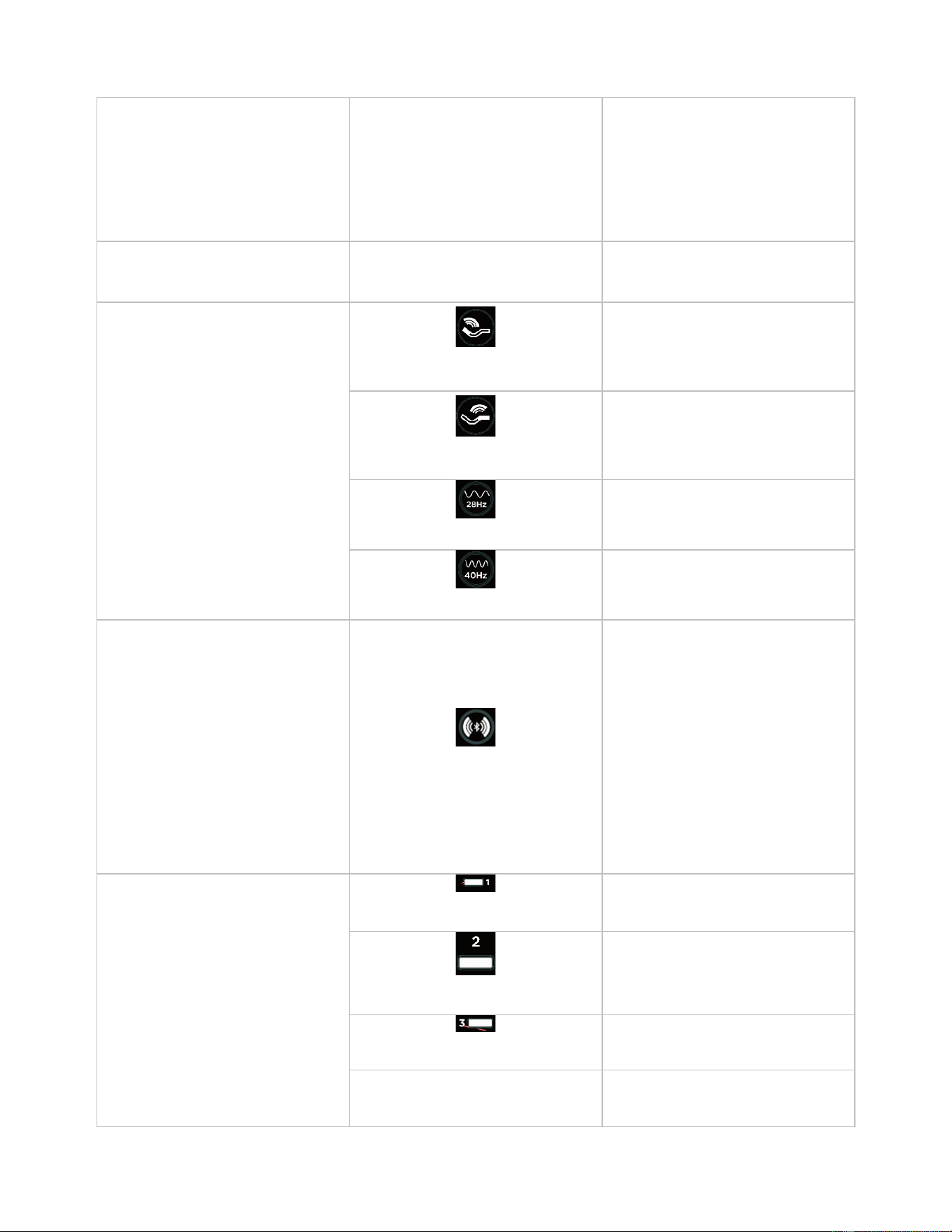
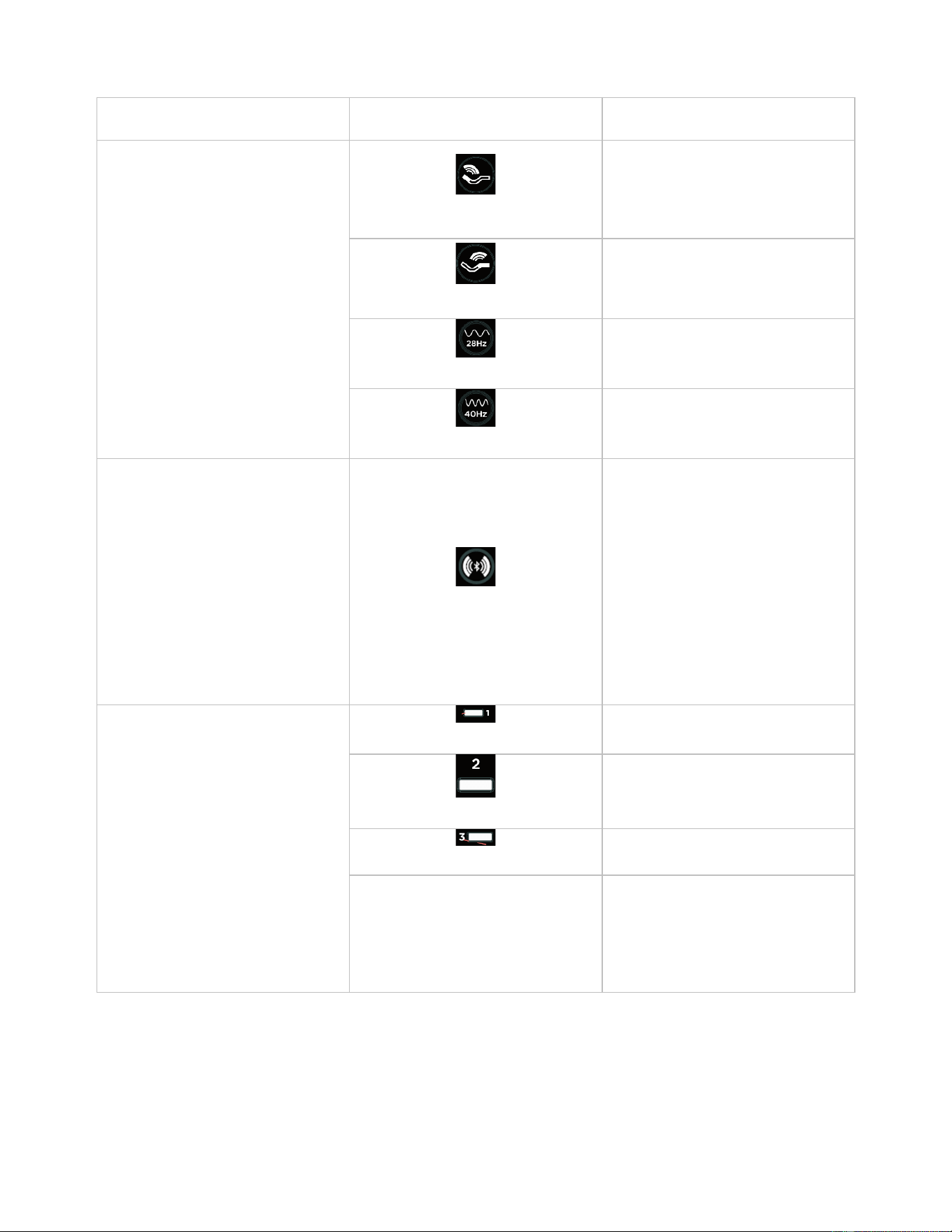
以下表格保留原使用说明书中的模式介绍、图示和对应说明,便于客户快速识别头部按摩、脚部按摩以及遥控器上的
对应模式。
项目
分类 / 图示
描述
1.连接及提示音
上电
音响与控制盒连接上电后发出“Line
mode”提示音,此时默认无法搜索到蓝
牙。
连接蓝牙
蓝牙连接成功后发出“Bluetooth
connected”提示音;连接后其他手机
无法再次搜索到该蓝牙号。
断开蓝牙
蓝牙断开连接后发出“Bluetooth
disconnected”提示音。
普通模式
进入普通模式时播放“Massage Mode /
Message Mode”提示音。
音乐模式
进入音乐模式时播放“Sound Mode”提
示音。
有线模式
AUX 线插入播放设备后可播放声音。
音乐播放优先级
当蓝牙模式与有线模式同时播放音乐
时,只播放蓝牙模式中的音乐。
蓝牙回连
1)音响断电再上电后,约 5 秒会自动
重连。
2)离开蓝牙范围后断开连接;约 120
秒内重新靠近可自动重连,超过 120
秒不再自动重连。
配对窗口 / 隐藏蓝牙版本
上电后发出“Line mode”,默认无法搜
索到蓝牙。
需长按遥控器模式键进入音乐模式,
指示灯闪烁一次后常亮;在约 30 秒内
可搜索并连接蓝牙,搜索名为
“ProSmart *******”。
蓝牙断开后,需重新开启音乐模式才
可再次被搜索到。
2.蓝牙有效范围
在空旷空间内,蓝牙有效连接范围约
10 米。
3.普通模式
头部按摩 / Head
按下对应遥控器按键,LED 灯点亮,
共三个档位;第四次按下关闭头部按
摩。
脚部按摩 / Foot
按下对应遥控器按键,LED 灯点亮,
共三个档位;第四次按下关闭脚部按
摩。
28Hz
开启或关闭全部按摩器;可通过头部
按摩/脚部按摩按键改变强度。
40Hz
开启或关闭全部按摩器;可通过头部
按摩/脚部按摩按键改变强度。
4.模式切换
模式键 / Mode Key
上电后控制盒默认处于普通模式。
长按模式键至 LED 灯闪烁一次后常
亮,音响播报“Sound Mode”,进入音
乐模式;此时声波马达会随音乐震
动,遥控器可调节三档强度,默认定
时 10 小时。
再次长按模式键至 LED 灯闪烁一次后
熄灭,音响播报“Massage Mode /
Message Mode”,返回普通模式。
5.按摩模式
模式一
鼓点波形。
模式二
三角波形。
模式三
葫芦波形。
模式说明
点按模式键可在模式 1 / 2 / 3 之间切
换;对应指示灯点亮。第四次按下关

闭,可通过头部按摩/脚部按摩改变强
度。
• 头部振动与脚部振动为独立控制,每路均有 Low / Med / High 三个档位。
• 强度指示灯显示规则:亮 1 灯为 Low,亮 2 灯为 Med,亮 3 灯为 High。
• 28Hz 与 40Hz 为独立模式按钮;模式 1、2、3 通过模式切换键进行切换。
• 产品开机默认模式为 28Hz。
• 当振子停止振动时,主控盒风扇会停止转动。
5. 快速使用步骤
1. 首次使用时,请先将遥控器与主控盒配对:按住遥控器上的“pair”键,同时打开主控开关电源。
2. 接通电源后,设备会发出提示音。根据当前状态,产品可进入相应模式。
3. 如需进行普通按摩,使用遥控器选择头部/脚部振动,并调节强度和模式。
4. 如需使用音乐按摩,长按模式键约 3 秒;进入音乐按摩模式后,用手机搜索并连接蓝牙设备。
5. 蓝牙连接成功后,设备会发出“Bluetooth connected”提示音;断开时会发出“Bluetooth disconnected”提
示音。
6. 如需退出音乐按摩,再次长按模式键约 3 秒,返回普通按摩模式。
6. 蓝牙与音频使用
• 蓝牙搜索窗口:产品上电后会播报“Line mode”,此时默认不可被蓝牙搜索。只有进入音乐模式后,才
会在约 30 秒内开放蓝牙搜索窗口。
• 蓝牙连接成功后,其他手机无法再次搜索到该设备。
• 当蓝牙模式与 AUX 有线模式同时存在音频输入时,优先播放蓝牙音乐。
• 产品断电重启后,约 5 秒内会自动尝试回连已记忆设备;离开蓝牙有效范围后,如在约 120 秒内重新
靠近,系统可自动回连。
• 蓝牙有效距离:在空旷环境下,蓝牙有效连接范围约为 10 米。
7. 提示音说明
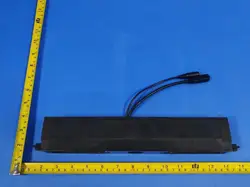
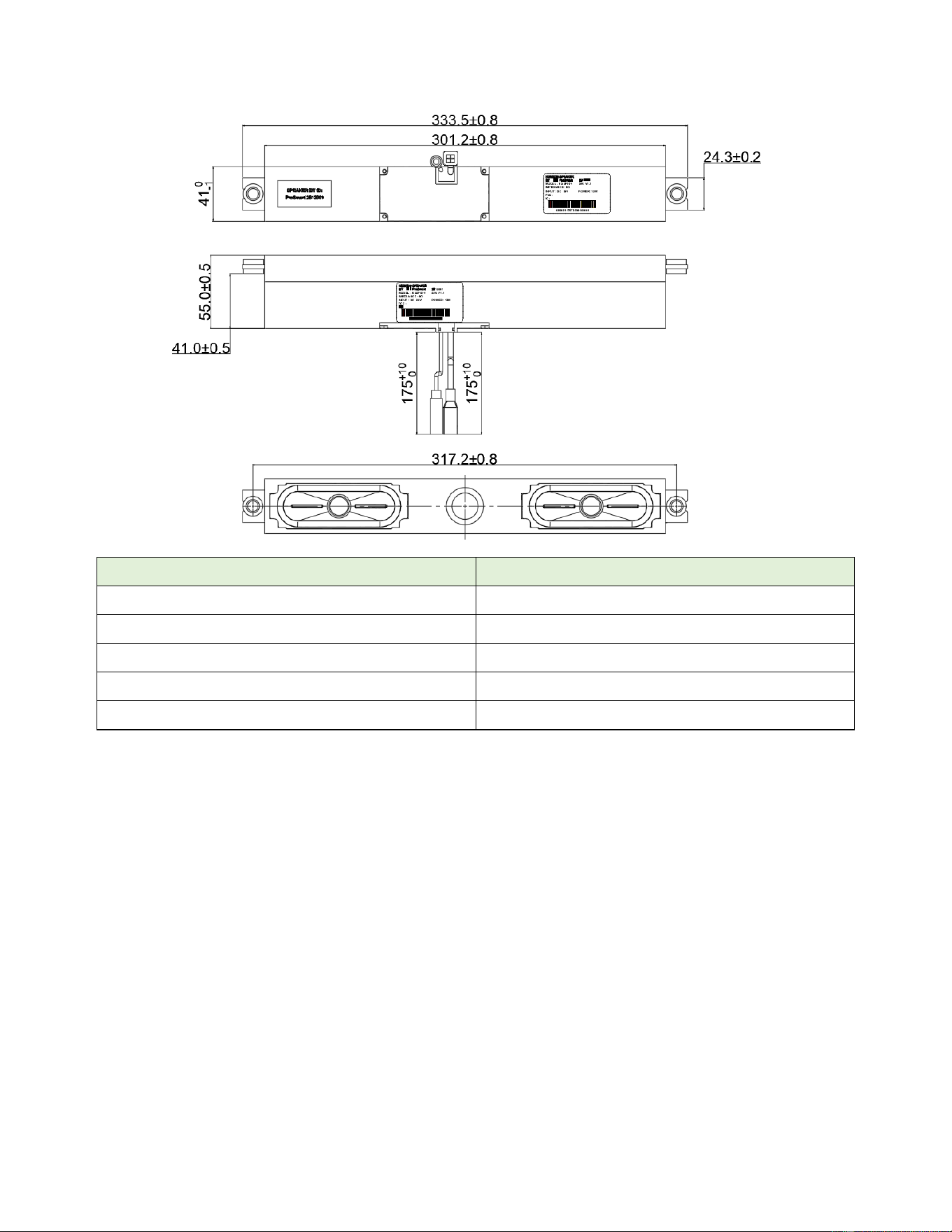
7.1 音响外观尺寸图
以下尺寸图来自原使用说明书,便于客户在安装、开孔或结构预留时进行确认。
提示音
含义
Line mode
上电提示音
Bluetooth connected
蓝牙连接成功
Bluetooth disconnected
蓝牙连接断开
Message Mode
进入普通按摩模式
Sound Mode
进入音乐按摩模式
8. 日常注意事项
• 使用前请确认电源线与 AUX 线连接可靠。
• 请避免过度拉扯电源线和连接线;如发现接触不良或磨损,应及时更换。
• 请勿让包装箱过度堆叠,避免与尖锐物碰撞,搬运时避免用力挤压。
• 若产品在使用过程中出现异常,请停止使用并联系服务人员。

English User Guide
Thank you for choosing KSSP004. Please read this guide before use and keep it for future reference.
1. Product Overview
KSSP004 is an audio system with vibration massage functions. It can be operated by remote control for mode
switching and vibration intensity adjustment. In Sound Mode, the system can connect to a mobile phone via
Bluetooth, play music, and drive the vibrators in sync with the music rhythm.
2. Main Functions
• Massage Mode: supports separate head and foot vibration control, each with three intensity levels.
• Sound Mode: after Bluetooth connection, the system plays music from a mobile phone and the vibrators
move with the audio rhythm.
• Multiple massage options: 28Hz, 40Hz, and modes 1, 2, and 3.
• Wired audio input: music can also be played through the AUX connection.
• Voice prompts: power-on, Bluetooth connected/disconnected, Massage Mode, and Sound Mode prompts are
supported.
• Bluetooth reconnection: previously paired devices may reconnect automatically under specified conditions.
3. Mode Introduction
The following mode descriptions are the key part of product operation and should be understood before use.
• Massage Mode: The product enters Massage Mode by default after power-on and announces "Message
Mode". In this mode, the remote control is used for vibration massage control.
• Sound Mode: Press and hold the mode key for about 3 seconds. After the indicator flashes once and stays on,
the product announces "Sound Mode" and enters Sound Mode. Bluetooth becomes discoverable, the phone
can connect for music playback, and the vibration effect can be adjusted by both phone volume and the
remote control.
• Exit Sound Mode: Press and hold the mode key again for about 3 seconds. After the indicator flashes and
turns off, the product exits Sound Mode, returns to Massage Mode, and announces "Message Mode".
• Massage Options: The system supports 28Hz, 40Hz, and modes 1, 2, and 3. Press the corresponding key to
switch modes. Modes 1, 2, and 3 are cycled by repeated pressing, and the fourth press turns the mode off.
Both head and foot massage channels support three intensity levels.
Mode
How to Enter
Description
Massage Mode
Default after power-on
Remote control can adjust head
and foot vibration. Supports 28Hz,
40Hz, and modes 1/2/3 with three
intensity levels.
Sound Mode
Press and hold the mode key for
about 3 seconds until "Sound
Mode" is heard
Bluetooth becomes available for
search and connection. Music from
the phone can be played, and the
vibrators move with the music
rhythm.

Return to Massage Mode
Press and hold the mode key again
for about 3 seconds until "Message
Mode" is heard
Exits Sound Mode and returns to
Massage Mode.
4. Controls and Indicators
3.1 Mode and Function Reference Table
The following table retains the original mode descriptions and button visuals so customers can clearly identify head
massage, foot massage, and the corresponding remote-control modes.
Item
Category / Icon
Description
1. Connection & Prompts
Power on
After the speaker and control box are
powered on, the system announces
“Line mode”. Bluetooth is not
discoverable at this stage.
Connect Bluetooth
After Bluetooth is connected, the
system announces “Bluetooth
connected”. Other phones cannot
search for this device while it is
connected.
Disconnect Bluetooth
When Bluetooth is disconnected, the
system announces “Bluetooth
disconnected”.
Massage Mode
The speaker announces “Massage
Mode / Message Mode”.
Sound Mode
The speaker announces “Sound
Mode”.
Wired mode
Audio can be played when an AUX
cable is connected to a playback
device.
Audio priority
If Bluetooth audio and AUX audio are
present at the same time, Bluetooth
audio has priority.
Bluetooth reconnection
1) After power cycling, the system will
reconnect automatically in about 5
seconds.
2) If the device moves out of range, it
can reconnect automatically when it
returns within about 120 seconds;
after that, it will not reconnect
automatically.
Pairing window / hidden Bluetooth
version
After power-on, the system
announces “Line mode” and
Bluetooth is hidden.
Press and hold the remote mode key
to enter Sound Mode. When the LED
flashes once and stays on, Bluetooth
becomes searchable for about 30
seconds. The searchable device
name is “ProSmart *******”.
If Bluetooth is disconnected, Sound
Mode must be enabled again before
the device can be searched.
2. Bluetooth Range
Bluetooth works normally within about
10 meters in an open space.
3. Massage Mode
Head massage
Press the corresponding remote
button. The LED turns on and
supports three intensity levels. Press
a fourth time to turn head massage
off.
Foot massage
Press the corresponding remote
button. The LED turns on and
supports three intensity levels. Press
a fourth time to turn foot massage off.
28Hz
Turns all vibrators on or off. Intensity
can be adjusted by the head / foot
massage buttons.
40Hz
Turns all vibrators on or off. Intensity
can be adjusted by the head / foot
massage buttons.
4. Mode Switching
Mode key
The control box enters Massage
Mode by default after power-on.
Press and hold the mode key until the
LED flashes once and stays on. The
speaker announces “Sound Mode”
and enters music-vibration operation.
Vibration follows the music, and the
remote can adjust three intensity
levels. The default timer is 10 hours.
Press and hold the mode key again
until the LED flashes once and turns
off to leave Sound Mode and return to
Massage Mode.
5. Massage Patterns
Mode 1
Drum-beat waveform.
Mode 2
Triangle waveform.
Mode 3
Gourd waveform.
Pattern switching
Press the mode key briefly to cycle
through modes 1 / 2 / 3. The
corresponding indicator lights up.
Press a fourth time to turn the pattern
off. Intensity can still be adjusted by
the head / foot massage buttons.
• Head vibration and foot vibration are controlled independently, and each channel supports Low / Med / High
levels.
• Intensity indicators: one light for Low, two lights for Med, and three lights for High.
• 28Hz and 40Hz are selected by dedicated buttons; modes 1, 2, and 3 are switched by the mode key.
• The default power-on mode is 28Hz.

• When the vibrators stop, the fan in the main control box also stops.
5. Quick Start
1. For first use, pair the remote control with the main control box: press and hold the "pair" key on the remote
while turning on the main control box power.
2. After power is connected, the product will output a voice prompt according to the current state.
3. For massage operation, use the remote control to select head or foot vibration and adjust intensity and
mode.
4. For music massage, press and hold the mode key for about 3 seconds. After entering Sound Mode, search for
and connect the device by Bluetooth from your phone.
5. When Bluetooth is connected successfully, the product announces "Bluetooth connected". When
disconnected, it announces "Bluetooth disconnected".
6. To leave Sound Mode, press and hold the mode key again for about 3 seconds to return to Massage Mode.
6. Bluetooth and Audio Use
• The product announces "Line mode" after power-on and is not discoverable by Bluetooth by default.
Bluetooth search becomes available only after Sound Mode is enabled, and the search window remains open
for about 30 seconds.
• Once connected, the device cannot be searched by other phones at the same time.
• If Bluetooth audio and AUX audio are present at the same time, Bluetooth audio has priority.
• After a power cycle, the system will attempt to reconnect to a remembered device in about 5 seconds. If the
phone leaves the Bluetooth range and returns within about 120 seconds, automatic reconnection is supported.
• In an open environment, the effective Bluetooth range is about 10 meters.
7. Voice Prompt Guide
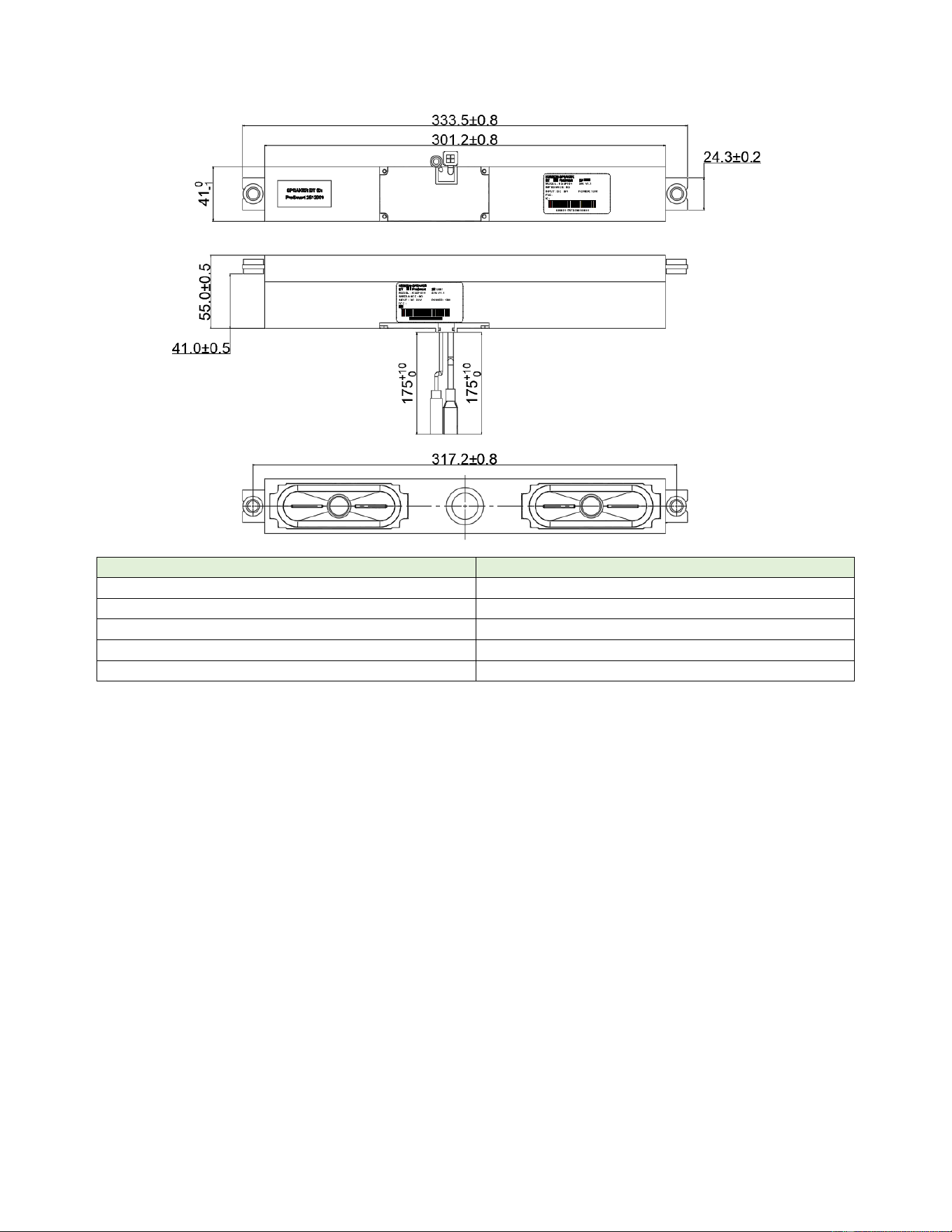
7.1 Speaker Outline Dimensions
The following outline drawing is retained from the original user manual for installation reference.
Prompt
Meaning
Line mode
Power-on prompt
Bluetooth connected
Bluetooth connected successfully
Bluetooth disconnected
Bluetooth connection disconnected
Message Mode
Enter Massage Mode
Sound Mode
Enter Sound Mode
8. Daily Care and Notes
• Before use, make sure the power cable and AUX cable are connected properly.
• Do not pull the power cable or connection cable excessively. Replace the cable if wear or poor contact is
found.
• Avoid excessive stacking of cartons, contact with sharp objects, and strong external force during transport or
storage.
• If any abnormal condition occurs during use, stop using the product and contact service personnel.

FCC Caution
This device complies with part 15 of the FCC Rules. Operation is subject to the following two conditions:
(1) This device may not cause harmful interference, and
(2) this device must accept any interference received, including interference that may cause undesired
operation.
Any Changes or modifications not expressly approved by the party responsible for compliance could void the
user's authority to operate the equipment.
Note: This equipment has been tested and found to comply with the limits for a Class B digital device, pursuant to
part 15 of the FCC Rules. These limits are designed to provide reasonable protection against harmful interference in
a residential installation. This equipment generates uses and can radiate radio frequency energy and, if not installed
and used in accordance with the instructions, may cause harmful interference to radio communications. However,
there is no guarantee that interference will not occur in a particular installation. If this equipment does cause
harmful interference to radio or television reception, which can be determined by turning the equipment off and on,
the user is encouraged to try to correct the interference by one or more of the following measures:
-Reorient or relocate the receiving antenna.
-Increase the separation between the equipment and receiver.
-Connect the equipment into an outlet on a circuit different from that to which the receiver is connected.
-Consult the dealer or an experienced radio/TV technician for help.
The device has been evaluated to meet general RF exposure requirement. The device can be used in portable
exposure condition without restriction.
IC Warning
This device complies with Innovation, Science and Economic Development Canada licence-exempt RSS standard(s).
Operation is subject to the following two conditions:
(1) This device may not cause interference, and (2) This device must accept any interference, including interference
that may cause undesired operation of the device.
Le présent appareil est conforme aux CNR Innovation, Sciences et Développement économique Canada applicables
aux appareils radio exempts de licence. L'exploitation est
autorisée aux deux conditions suivantes: (1) l'appareil ne doit pas produire de brouillage, et (2) l'utilisateur de
l'appareil doit accepter tout brouillage radioélectrique subi, même si
le brouillage est susceptible d'en compromettre le fonctionnement.
The device has been evaluated to meet general RF exposure requirement. The device can be used in portable
exposure condition without restriction.
L’appareil a été évalué pour répondre aux exigences générales en matière d’exposition aux RF. L’appareil peut être
utilisé en condition d’exposition portable sans restriction.