Important Safety Instructions
Before using the product, read through the instruction manual to ensure that you will use the product
correctly.
DANGER
• Do NOT place the product into contact with fire.
• Keep the earbuds and accessories out of the reach of children and pets.
Otherwise, it may lead to accidental swallowing or malfunction.
• Do NOT disassemble the product.
WARNING
• Use the earbuds in an environment in which you can ensure the safety of your surroundings because warning sounds and
other sounds in your surroundings will be hard to hear.
• Do NOT use, store, or leave the product in an environment with excessive humidity, dust, oil fumes, or steam, or in a
high-temperature environment near a source of fire, in direct sunlight, or inside a vehicle.
• Do NOT use the earbuds when operating a motor vehicle, motorcycle, watercra , or bicycle.
Be aware of the surrounding environment when wearing the earbuds.
• Do NOT allow water or foreign matter to get inside the product.
Otherwise, this may result in a fire or electric shock. If water or foreign matter accidentally gets inside the product, stop using it
immediately and contact your distributor.
• Do NOT use the earbuds under a blanket or the like.
• Do NOT insert the USB connector when the earbuds or USB cable is wet.
Inserting a USB connector in a wet state may cause the earbuds to short circuit due to contact with the liquid (tap water, seawater,
cold drinks, etc.), and foreign matter entering into the earbuds may result in abnormal heat generation or product failure.
• Stop using the earbuds if there is battery leakage or a peculiar smell, and keep the product away from flames.
• Use the included USB charging cable to charge your earbuds.
NOTE
• Do NOT use it for a long time at high volume.
Otherwise, your hearing might be damaged. To protect your ears, be careful NOT to turn up the volume too high.
In addition, regardless of the volume, extended use will place a burden on your ears. Please rest your ears every hour.
• Do NOT use the product near medical equipment.
Electromagnetic waves may have an impact on pacemakers and medical electronic devices.
• Do NOT use them if the earbuds cause any abnormal sensation against your skin.
If your skin condition does not return to normal soon, seek medical attention.
• Do NOT touch the earbuds for an extended period during charging.
Otherwise, it may result in a low-temperature burn.
• Please follow the instructions of the flight attendant when using the product onboard an aircra .
Electromagnetic waves may cause the device to malfunction, resulting in an accident.
Discarding rechargeable batteries
The built-in rechargeable battery this device is equipped with is a renewable resource. Dispose of the product according to
local standards and regulations. Do NOT disassemble the product.
For customers in the USA
FCC Notice
You are cautioned that any changes or modifications not expressly approved in this manual could void your authority to operate
this equipment.
This device complies with Part 15 of the FCC Rules. Operation is subject to the following two conditions: (1) This device may not
cause harmful interference, and (2) this device must accept any interference received, including interference that may cause
undesired operation.
Note:
This equipment has been tested and found to comply with the limits for a Class B digital device, pursuant to Part 15 of the FCC
Rules. These limits are designed to provide reasonable protection against harmful interference in a residential installation. This
equipment generates, uses and can radiate radio frequency energy and, if not installed and used in accordance with the instruc-
tions, may cause harmful interference to radio communications. However, there is no guarantee that interference will not occur in a
particular installation. If this equipment does cause harmful interference to radio or television reception, which can be determined
by turning the equipment o and on, the user is encouraged to try to correct the interference by one or more of the following
measures:
• Reorient or relocate the receiving antenna.
• Increase the separation between the equipment and receiver.
• Connect the equipment into an outlet on a circuit di erent from that to which the receiver is connected.
• Consult the dealer or an experienced radio/TV technician for help.
This transmitter must not be co-located or operated in conjunction with any other antenna or transmitter.
This equipment complies with FCC radiation exposure limits set forth for an uncontrolled environment and meets the FCC radio
frequency (RF) Exposure Guidelines. This equipment has very low levels of RF energy that is deemed to comply without testing of
specific absorption rate (SAR).
FCC ID: 2A9B6TE-Y1
Radio interference of Bluetooth® products
• Interference from electromagnetic radiation in the surrounding environment, such as that from wireless LAN equipment,
microwave ovens, and other electromagnetic cooking appliances may result in noise, loss of sound, or communication being
disconnected.
• The e ective communication range of Bluetooth® may vary greatly due to the influence of shields (the human body, metal, walls,
etc.) and the state of electromagnetic radiation in your surroundings.
• The electromagnetic radiation generated by Bluetooth® devices may a ect the operation of other electronic devices.
There is a risk of an accident occurring as a result in some cases, so turn o the power of the earbuds and other Bluetooth®
devices when in the following places:
- Hospitals / near the priority seating on the subway / in the vicinity of gas stations and other places where combustible gas is
generated / near fire alarms
For long-lasting use
• Beware of over-discharge
If the rechargeable battery is not charged for a long time, it may lead to over-discharge and deterioration. If storing for a long time,
please charge the battery once a month to prevent over-discharge.
• Beware of deformation, damage, and impacts
The earbuds and their accessories may be deformed or damaged if they are subject to stress for a long time. Please exercise care
when storing them. In addition, avoid dropping the product or subjecting it to strong impacts, as it contains precise electronic
components.
• Splash-proof specification
The earbuds adopt a splash-proof design but are not completely waterproof. Do NOT intentionally wet the earbuds or put them
in a pocket soaked with sweat or rain, otherwise, it may lead to product failure. Wipe o stains containing water or moisture using
a so dry cloth as soon as possible, and use the product in as dry a state as possible. Note that the charging case is not splash-
proof.
• Cleaning
Do NOT use chemicals such as benzine, thinner, or alcohol when cleaning the earbuds. Otherwise, the earbuds may be deformed
or damaged.
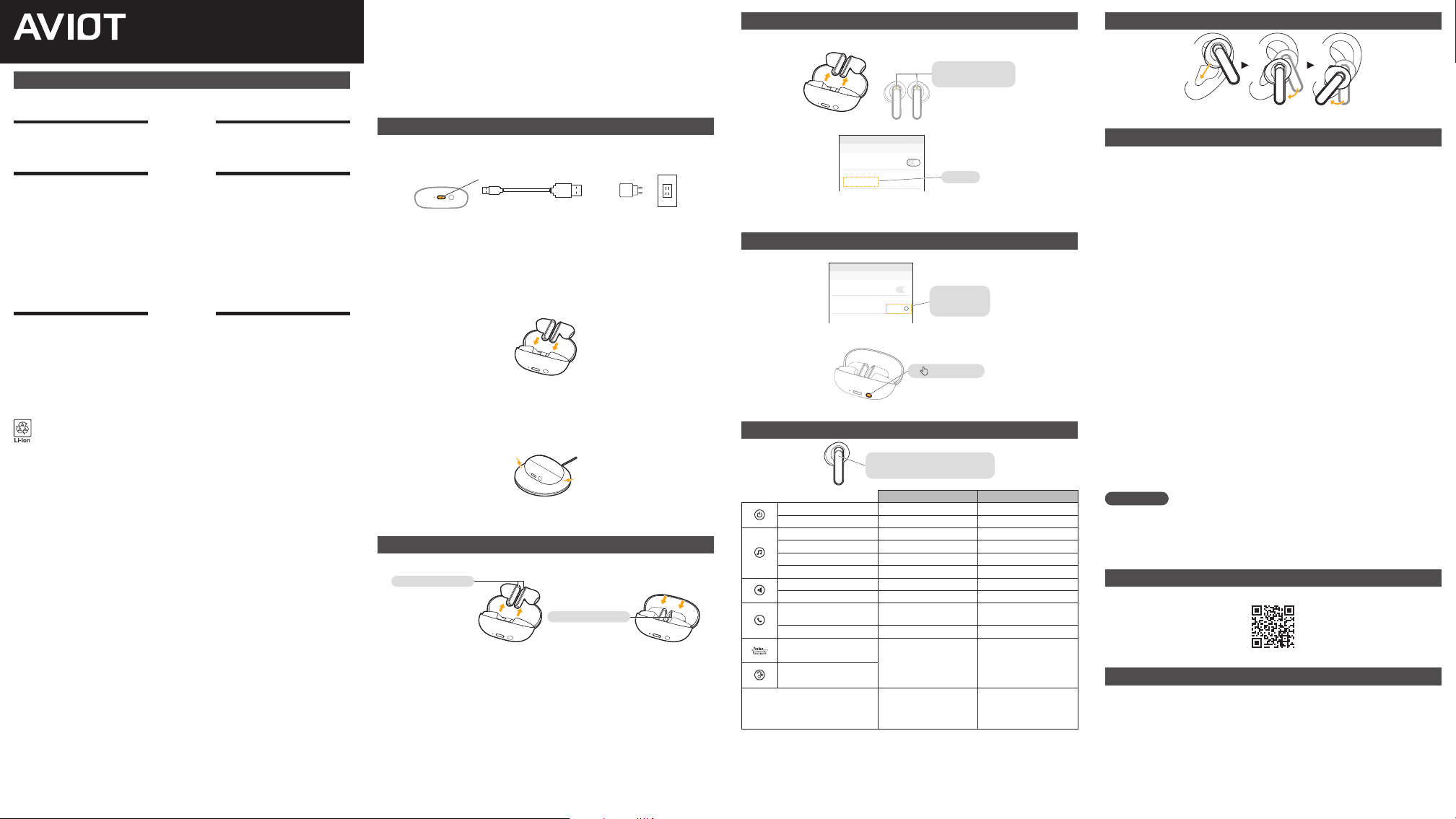
Battery Charging
(Please charge it first before use for the first time)
Charging the charging case
Insert the USB Type-C® connector of the USB charging cable into the charging port for charging.
It takes about 1 hour and 30 minutes to go from 0% to fully charged.
+
Charging port
<Bottom> (Not included) (Not included)
USB (C) USB (A) 5V AC adapter
* The color of the battery indicator changes to white (70-100%), orange (30-69%), or red (0-29%) depending on the remain-
ing battery capacity.
* Charging may not be possible if the voltage becomes higher or lower than the specified voltage.
* If a charger other than a 5V AC adapter is used, the charging may be stopped by the protection function.
* If charging is not successful, confirm that the USB Type-C® cable is in a normal state and try to recharge it again with a 5V
AC adapter.
* Please charge the charging case regularly. (Recommended frequency: at least once a month)
Charging the earbuds
Put the earbuds back in the charging case and they will start charging automatically.
It takes about 1 hour and 30 minutes to go from 0% to fully charged.
* If the charging case has no remaining charge level, the earbuds will not be charged.
* When there is no remaining charge level in the charging case, the power supply to the earbuds will stop, at this time the
earbuds may turn on while in the charging case and connect to your device, but this is not a malfunction.
You simply have to charge the charging case.
* Please charge the earbuds regularly. (Recommended frequency: at least once a month)
Wireless charging
Wireless charging is also supported by using a commercially available wireless charger.
* The time it takes to complete charging is longer than the time it takes when using the USB cable, and this charging time
may vary depending on the wireless charger.
* Charging may be stopped by the protection function depending on the wireless charger or the environment.
Turning the Power ON/OFF
Power ON : The power can be turned on by removing the earbuds from the charging case
Power OFF : The power can be turned o by putting the earbuds into the charging case
Power ON : white LED
Power OFF : orange LED
When storing the earbuds in the charging case, be sure that the orange LED is lit before closing the case.
* If there is no charge remaining in the charging case, the earbud’s power will not be turned o .
* If not connected for 5 minutes, the earbuds will automatically turn o .
* The power can be turned ON/OFF also by pressing and holding the touch sensors. Please refer to the list of operation methods
for details.
Pairing
(during initial setup)
1. Take the earbuds out of the charging case and turn on the power, then confirm that the
earbuds are in pairing mode.
The LED on the le or right
side will blink orange and
white alternately
2. Connect to “AVIOT TE-Y1” from the Bluetooth settings screen of the device to be connected.
OTHER DEVICES
15:35
← Bluetooth
Bluetooth
AVIOT TE-Y1
Select
The illustration shows an example of the settings screen on a device to be connected.
For details, please refer to the instruction manual of the device to be connected.
* If pairing fails, please try the reset operation.
Resetting
(in case of operation failure)
1. Delete the Bluetooth settings of the connected device.
MY DEVICES
15:35
← Bluetooth
Bluetooth
AVIOT TE-Y1
Connected
i
Disconnect
or
Delete device
2. Set both earbuds in the charging case with the case cover open, then press and hold the
physical button on the bottom of the case for 10 seconds.
Press and hold
for 10 seconds
* When the reset is completed, the LEDs on the case and earbuds will blink white, and the earbuds will enter pairing mode.
List of Operation Methods
By pressing the touch sensor, various operations
can be performed while wearing the earbuds
L R
Power ON Press and hold for 3 seconds Press and hold for 3 seconds
Power OFF*1 Press and hold for 7 seconds Press and hold for 7 seconds
Play Tap 1 time Tap 1 time
Stop Tap 1 time Tap 1 time
Next — Tap 2 times
Previous — Tap 3 times
Volume up Tap 3 times —
Volume down Tap 2 times —
Receive call
Tap 1 time when there is an
incoming call
Tap 1 time when there is an
incoming call
End call Tap 1 time during a call Tap 1 time during a call
ANC*2
Press and hold
for 1.5 seconds to switch
between the modes
(ANC / Ambient sound)
—
Ambient sound
Switch tuned mode —
Press and hold
for 1.5 seconds to switch
between the tuned modes
(MUSIC / MOVIE / POWERFUL)
*1 You will hear the voice prompt “ANC Mode / Ambient Sound Mode” or “Switch Tuned Mode” during operation.
*2 ANC = Active Noise Canceling
Wearing the Earbuds
Turning the microphone part of the earbud toward your face stabilizes the earbud.
Warranty
This product will be repaired or replaced free of charge for spontaneous failure that occurs during normal
use. When you contact us, have ready at hand the documentation proving the date of purchase, such as
the receipt, delivery slip, or electronic data from the store you purchased the product.
1 Before using this product, be sure to read the instruction manual to ensure proper use.
The warranty is valid for 12 months, starting from the date of purchase.
This warranty is valid only in country or region of purchase.
Only the earbuds and the charging case are covered by the warranty.
Damage to accessories and outer packaging boxes during verification and replacement is not within
the scope of the warranty.
* The warranty period of products replaced free of charge or with charge is also 12 months from the original date of
purchase. The warranty period will not be extended accordingly a er replacement.
2 This product is subject to change for improvement and the like, without notice.
3 This warranty does not apply to the following situations.
a. The product has not been registered on the company’s dedicated registration platform.
b. If you do not have the documentation or electronic data serving as proof of purchase, such as a receipt or delivery slip
from the distributor.
c. The product has been repaired or modified outside of our service center.
d. The product has fallen into a state of disrepair or been damaged due to misuse (including damage and burnout caused
by excessive input), dropping, shock, or other accidents caused by the customer’s carelessness or improper storage., etc.
Even though the symptoms occurred within the warranty period, if the issue with the product is deemed due to misuse.
e. The product was used with a nonstandard power supply or voltage.
f. The failure is related to consumables.
g. The cause of the failure is another device other than this product, such as a mobile device.
h. Damage to the exterior of the product, such as scratches on the main unit or the plug (which occurred a er purchase).
i. Even though the fault or defect occurred within the warranty period, the date of consultation exceeded the warranty
period.
4 We do not o er warranties for products from other companies.
5 We will not lend out alternative devices during the repair or replacement period.
6 If the issue with the product is deemed not to be covered by the warranty, we may request that you
reimburse us for the round-trip shipping fee.
7 The earbuds come as a set of le and right earbuds, so replacement of only one side is not available.
Depending on production, inventory, or other circumstances, it may not be possible to provide
replacements for the same product.
Disclaimers
We do not guarantee connectivity or operability with all Bluetooth®-enabled devices and applications.
We shall not be responsible for any malfunction, problems, loss of data, or damage to other devices
caused by the use of this product. We shall not bear any responsibility for damage caused by malfunc-
tions, problems, or loss of data in computers, operating systems, other so ware, or devices. Thank you
for your understanding.
FAQ / Inquiries
Please check the support page.
About Trademarks
• The term Bluetooth® and its logo are registered trademarks that belong to Bluetooth SIG, Inc. Preseed
Japan Corporation is using these trademarks and logos with authorization.
• USB Type-C® and USB-C® are registered trademarks of USB Implementers Forum.
• Other trademarks and registered trademarks are trademarks and registered trademarks belonging to
their respective holders.
TE-Y1
True Wireless Earphones
Startup Guide
重要安全须知
使用产品前,请仔细阅读使用说明书,确保正确使用本产品。
危险
· 请勿投入火中。
· 请将主机及其附属品放置于儿童和宠物接触不到的地方。
否则可能导致误吞或故障。
· 请勿拆卸。
警告
· 使用时可能会导致听不清警告音等环境音,因此请在能确保周边安全的环境下使用。
· 请勿在多湿、多尘埃、多油烟、多蒸汽的环境,或靠近火源、阳光直射以及车内等高温环境下使用、保存或放置。
· 请勿在驾驶汽车、摩托车、船舶或骑行自行车等交通工具时使用。
佩戴时请注意周围环境。
· 请避免水或异物进入内部。
水或异物进入可能导致火灾或触电。如不慎进水或有异物进入,请立即停止使用,并咨询销售商。
· 请不要在盖着被褥等容易导致发热的情况下使用本机。
· 请勿在主机或 USB 线潮湿的状态下插入 USB 接口。
潮湿状态下插入 USB 接口可能使附着于主机或 USB 线的液体(自来水、海水、软饮料等)及异物进入,导致短路,
从而导致异常发热或故障。
· 发生电池漏液、有异味等时,请立即远离火源,停止使用。
· 请使用附带的 USB 充电线进行充电。
注意
· 请勿在大音量下长时间使用。
否则可能对听力造成损伤。为保护耳朵,请勿过度调大音量。另外,无论音量大小如何,长时间使用都会给耳朵带来
负担。每使用 1 个小时请让耳朵休息一次。
· 请勿在医疗设备附近使用。
电磁波可能对心脏起搏器或医用电子设备产生影响。
· 若皮肤感到异常请停止使用。
如症状一直未得到缓解,请及时就医。
· 充电时请勿长时间接触主机。
否则可能导致低温烫伤。
· 在飞机机舱内使用时,请遵从空乘人员的指示。
以避免无线电波可能造成的影响。
可充电电池的废弃
主机内置的可充电电池是再生资源。丢弃主机时,切勿自行拆卸,请按照居住地的垃圾丢弃规则进行废弃。
Bluetooth® 产品的无线电干扰
· 在装有无线 LAN 设备、微波炉等电磁烹饪设备的周围,根据周围的电磁波状态可能会导致噪音、声音丢失或通信断开
等情况。
· Bluetooth® 的通信有效范围受遮蔽物(人体、金属、墙壁等)及周围电磁波状态影响可能产生较大变化。
· Bluetooth® 设备产生的电磁波可能对其他电子仪器产生影响。
严重时可能导致事故,因此在以下场所请切断耳机本体及其他 Bluetooth® 设备的电源。
- 医院内 / 地铁的爱心专座附近 / 加油站等产生可燃性气体的场所 / 火灾报警器附近
为了保证产品寿命
· 当心过度放电
可充电电池如长期不充电,可能导致过度放电从而劣化。如果长期存放,请每月给电池充电一次,以防止过度放电。
· 注意变形、损坏及冲击
耳机本体及附件如果长时间受力,可能会变形或损坏。请妥善保管。此外,本产品使用了精密的电子部件,请避免掉
落或碰撞,以免产生强烈冲击。
· 防滴溅规格
耳机本体采用了防滴溅设计,但并非完全防水。请勿故意弄湿耳机或将耳机放入被汗水、雨水濡湿的衣服口袋,否则
可能导致故障。请尽快用柔软的干布擦去含有水分或湿气的污渍,尽量在干燥状态下使用。另外, 充电盒不是防滴溅
规格。
· 保养清洁
清洁时请勿使用苯、稀释剂或酒精等化学品,否则可能会导致产品劣化或故障。
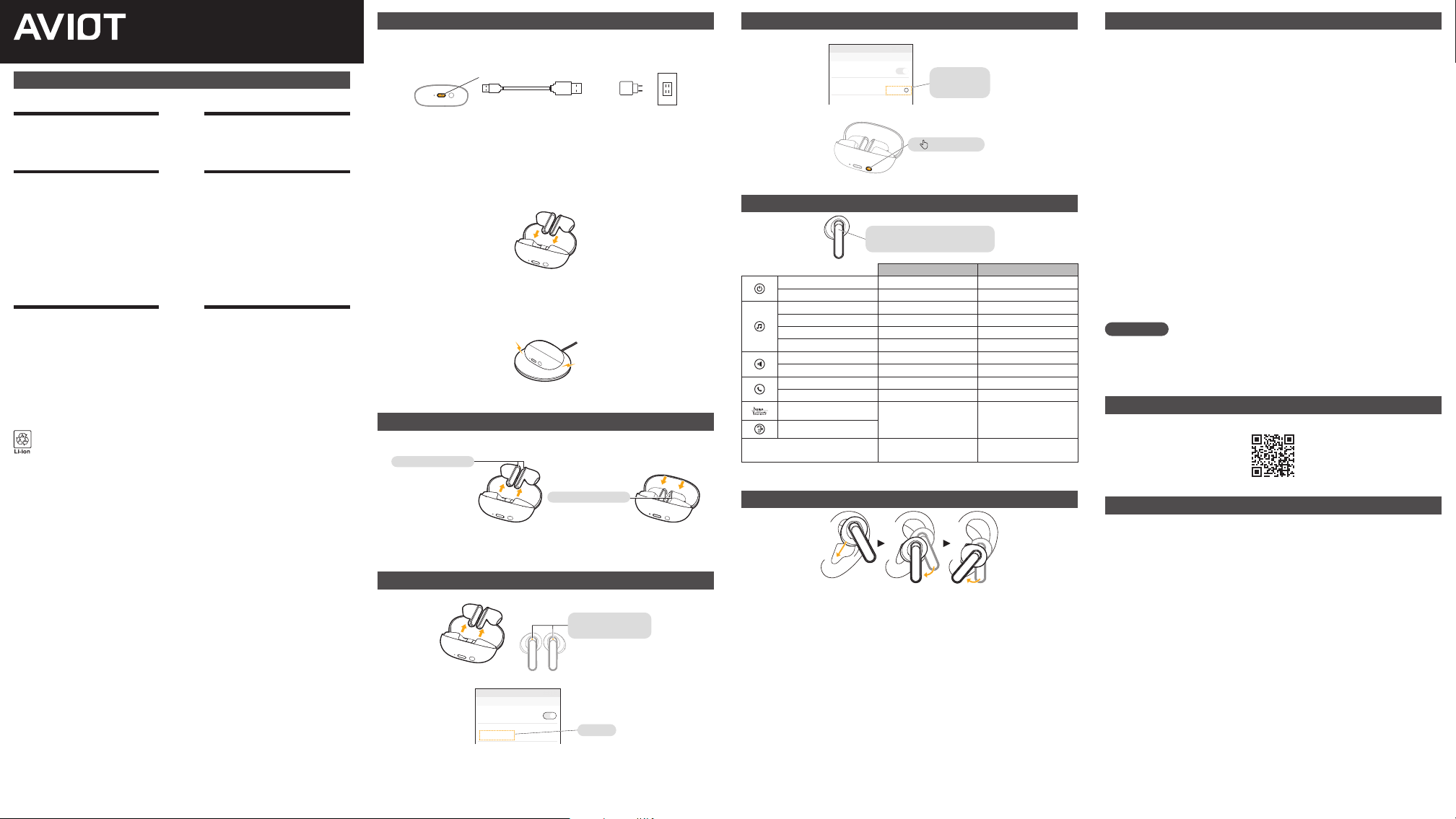
充电
(初次使用时请先充电)
给充电盒充电
将 USB Type-C® 充电线插入充电口进行充电。
从电池电量 0% 到充满电的所需时间约为 1 小时 30 分钟。
+
充电口
<底面>
(非附赠) (非附赠)
USB(C) USB(A) 5V AC 适配器
※ 电池指示灯颜色根据电池余量而变化。余量 70% 至 100% 白灯亮起,余量 30% 至 69% 橙灯亮起,余量 0% 至
29% 红灯亮起。
※ 如果电压高于或低于规定的电压,保护功能可能会阻止充电。
※ 如果使用 5V 的 AC 适配器以外的充电器充电,可能会因为保护功能而停止充电。
※ 如果发生无法充电的情况,请确认 USB Type-C® 充电线无异常,并使用 5V 的 AC 适配器重新充电。
※ 请定期充电。(推荐 :1 个月至少 1 次)
给耳机充电
把耳机放回充电盒即自动开始充电。
从电池电量 0% 到充满电的所需时间约为 1 小时 30 分钟。
※ 如果充电盒无电量则无法对耳机充电。
※ 当充电盒电量为 0 时,对耳机的供电将终止,因此耳机电源在充电盒中可能被打开并连接到连接设备这并非故障。
请对充电盒充电。
※ 请定期充电。(推荐 :1 个月至少 1 次)
无线充电
也可以使用市售的无线充电器进行无线充电。
※ 充满电所需的时间比 USB 充电长,这取决于您使用的无线充电器。
※ 根据使用的无线充电器或环境,可能会因为保护功能而停止充电。
电源 ON/OFF
电源 ON : 从充电盒中取出
电源 OFF : 放回充电盒
电源 ON :LED 白色
电源 OFF :LED 橙色
放回充电盒时,请先确认耳机上的 LED 橙灯常亮后再关闭盒盖。
※ 如果充电盒没有剩余电量,则不会关闭电源。
※ 在没有连接的情况下,5 分钟后电源自动关闭。
※ 长按触控区也可以控制电源 ON/OFF。详情请见操作方法一览。
配对
(首次设置时)
➀ 将耳机从充电盒内取出并打开电源,确认耳机进入配对模式。
左右任意一侧的 LED
橙灯和白灯交替闪烁
➁ 从要使用的连接设备的 Bluetooth 设定画面连接“AVIOT TE-Y1”。
OTHER DEVICES
15:35
← Bluetooth
Bluetooth
AVIOT TE-Y1
选择
插图为要使用的连接设备的设定画面示例。
有关详细信息,请参阅要使用的连接设备的使用说明书。
※ 如果配对失败,请尝试重置操作。
重置的正确方法
(发生操作不良时)
➀ 删除连接设备的 Bluetooth 设定。
MY DEVICES
15:35
← Bluetooth
Bluetooth
AVIOT TE-Y1
Connected
i
解除连接
或
删除
➁ 将两个耳机都放回充电盒,在盒盖打开的状态下,长按 10 秒底面的物理按钮。
长按 10 秒
※ 重置完成后,充电盒和耳机上的 LED 呈白色闪烁,进入配对模式。
操作方法一览
通过按下触控区,
可在佩戴耳机时执行各种操作
L R
电源 ON 长按3秒 长按3秒
电源 OFF※1 长按7秒 长按7秒
播放 单击1次 单击1次
停止 单击1次 单击1次
切换下一首 - 单击2次
切换上一首 - 单击3次
调大音量 单击3次 -
调小音量 单击2次 -
接听电话 来电时单击 1 次 来电时单击 1 次
挂断电话 通话中单击 1 次 通话中单击 1 次
ANC※2
长按 1.5 秒以切换模式
(ANC / 通透模式)
-
通透模式
切换音响效果 -
长按 1.5 秒以切换音响效果
(MUSIC / MOVIE / POWERFUL)
※1 操作过程中会听到“ANC 模式 / 通透模式”或“切换音响效果”的语音提示。
※2 ANC = 主动降噪
佩戴方法
您可以将耳机的麦克风部分转向您的脸部,从而稳定耳机。
保修条款
对于本产品正常使用过程中发生的自然故障,我们提供免费的维修或换新服务。向本公司咨询时,
请提供购买店铺的收据或送货单等,能证明购买及购买日期的纸面文件或电子文件。
➀ 使用本产品前,请仔细阅读使用说明书,确保正确使用。
保证期为自购入日起 12 个月。
仅适用于购买国或地区。
保证对象仅包括耳机和充电盒。
核验、换新时的附件及外包装盒破损不在保证范围内。
※ 保证期内免费、收费换新的产品的保证期也是自购买日起 12 个月。无论免费还是收费,更换后保证期不会相应
延长。
➁ 本产品可能因升级等原因发生变化恕不提前告知。
➂ 以下情形原则上不适用本条款,敬请注意。
a. 未在本公司专用注册平台进行产品注册。
b. 不能提供正规销售店的收据或送货单等证明购买的纸面文件或电子文件的情况。
c. 在本公司服务中心以外的地方进行过修理、改造时。
d. 误用(含过大输入导致的破损、烧损)、掉落、冲击等,由于客户不小心导致的事故、保管不善引起的产品劣化、
损坏等情况。以及无论是否是症状发生时期,发现可能存在对故障耳机的损伤或误用行为时。
e. 在不符合规定的电源及电压条件下使用的情况。
f. 消耗品相关部件。
g. 由于手机等本产品以外的其他设备导致故障的情况。
h. 本体外部或插头的损伤、脏污等外观上的损伤。(购买后发生的)
i. 即使故障或不良发生时间在保证期内,但咨询时已超过保证期时。
➃ 本公司仅对本公司经销的产品提供保证。
➄ 不提供修理、换新期间的代用机。
➅ 假如被判定为非保证对象,我们将向您收取来回寄送的邮费。
➆ 耳机本体为左右一套的产品,不提供单侧换新的服务。
根据生产、库存及或其他情况,可能无法提供相同产品的更换。
免责事项
不保证本产品能与所有支持 Bluetooth® 的设备和应用连接及连接后的正常操作。我们对使用本
产品可能导致的其他设备的故障、问题及数据丢失、损坏等不承担任何责任。另外,我们也不承
担因电脑、操作系统、其他软件、支持设备等的故障、问题及数据丢失、损坏而导致的损害责任。
敬请谅解。
常见问题 / 咨询
请查阅支持页面。
关于商标
· Bluetooth® 字样和图标是注册商标,归属于 Bluetooth SIG, Inc.。Preseed Japan Corporation
在授权下使用这些商标和标志。
· USB Type-C® 和 USB-C® 是 USB 开发者论坛的注册商标。
· 其他商标及注册商标是归属于各自持有者的商标及注册商标。
TE-Y1
真无线蓝牙耳机
入门指南
重要安全須知
使用本產品前,請務必詳閱使用說明書,確保以正確的方式使用本產品。
危險
· 請勿投入火中。
· 請將主機及其附屬品放置於兒童和寵物接觸不到的地方。
否則可能導致誤吞或故障。
· 請勿拆卸。
警告
· 使用時可能會導致聽不清警告聲等環境聲音,因此請在能確保周邊安全的環境下使用。
· 請勿在多濕、多塵埃、多油煙、多蒸氣的環境,或靠近火源、陽光直射以及車內等高溫環境下使用、保存、或放置。
· 請勿在駕駛汽車、機車、船舶或騎腳踏車等交通工具時使用。
佩戴時請注意周圍環境。
· 請避免水或異物進入內部。
水或異物進入可能導致火災或觸電。如不慎進水或有異物進入,請立即停止使用,並諮詢銷售商。
· 請不要在本機蓋有被褥等的情況下使用本機。
· 請勿在主機或 USB 電纜潮濕的狀態下插入 USB 介面。
潮濕狀態下插入 USB 介面可能使附著於主機或 USB 線的液體(自來水、海水、軟飲料等)及異物進入,導致短路,
從而導致異常發熱或故障。
· 發生電池漏液、有異味等時,請立即遠離火源,停止使用。
· 請使用附帶的 USB 充電線進行充電。
注意
· 請勿在大音量下長時間使用。
否則可能對聽力造成損傷。為保護耳朵,請勿過度調大音量。另外,無論音量大小如何,長時間使用都會給耳朵帶來
負擔。每使用 1 個小時請讓耳朵休息一次。
· 請勿在醫療設備附近使用。
電磁波可能對心律調節器及醫用電子設備產生影響。
· 皮膚感到異常時請勿使用。
如果症狀一直未恢復正常,請及時就醫。
· 充電時請勿長時間接觸主機。
否則可能導致低溫燙傷。
· 在飛機機艙內使用時,請遵守空服人員的指示。
電磁波產生影響,可能引起誤動作從而導致事故。
可充電電池的廢棄
主機內置的可充電電池是再生資源。丟棄主機時,切勿自行拆卸,請按照居住地的廢棄物清理法進行廢棄。
Bluetooth® 產品的無線電干擾
· 在裝有無線 LAN 設備、微波爐等電磁烹飪設備的周圍,根據周圍的電磁波狀態可能會導致噪音、聲音丟失或通信斷開
等情況。
· Bluetooth® 的通信有效範圍受遮蔽物(人體、金屬、牆壁等)及周圍電磁波狀態影響可能產生較大變化。
· Bluetooth® 設備產生的電磁波可能對其他電子儀器的動作產生影響。
嚴重時可能導致事故,因此在以下場所請切斷耳機本體及其他 Bluetooth® 設備的電源。
- 醫院內 / 地鐵的博愛座附近 / 加油站等產生可燃性氣體的場所 / 火災報警器附近
為了持久使用
· 當心過度放電
可充電電池如長期不充電,可能導致過度放電從而老化。如果長期存放,請每月給電池充電一次,以防止過度放電。
· 注意變形、損壞及衝擊
耳機本體及附件如果長時間受力,可能會變形或損壞。保存時請注意。此外,本產品使用了精密的電子部件,請避免
掉落或碰撞,以免產生強烈衝擊。
· 防潑濺規格
耳機本體採用了防潑濺設計,但並非完全防水。請勿故意弄濕耳機或將耳機放入被汗水、雨水濡濕的衣服口袋,否則
可能導致故障。請儘快用柔軟的乾布擦去含有水分或濕氣的污漬,儘量在乾燥狀態下使用。另外,充電盒不是防潑濺
規格。
· 保養清潔
保養清潔時請勿使用石油醚、稀釋液及酒精等化學藥劑,否則可能造成產品的劣化或故障。
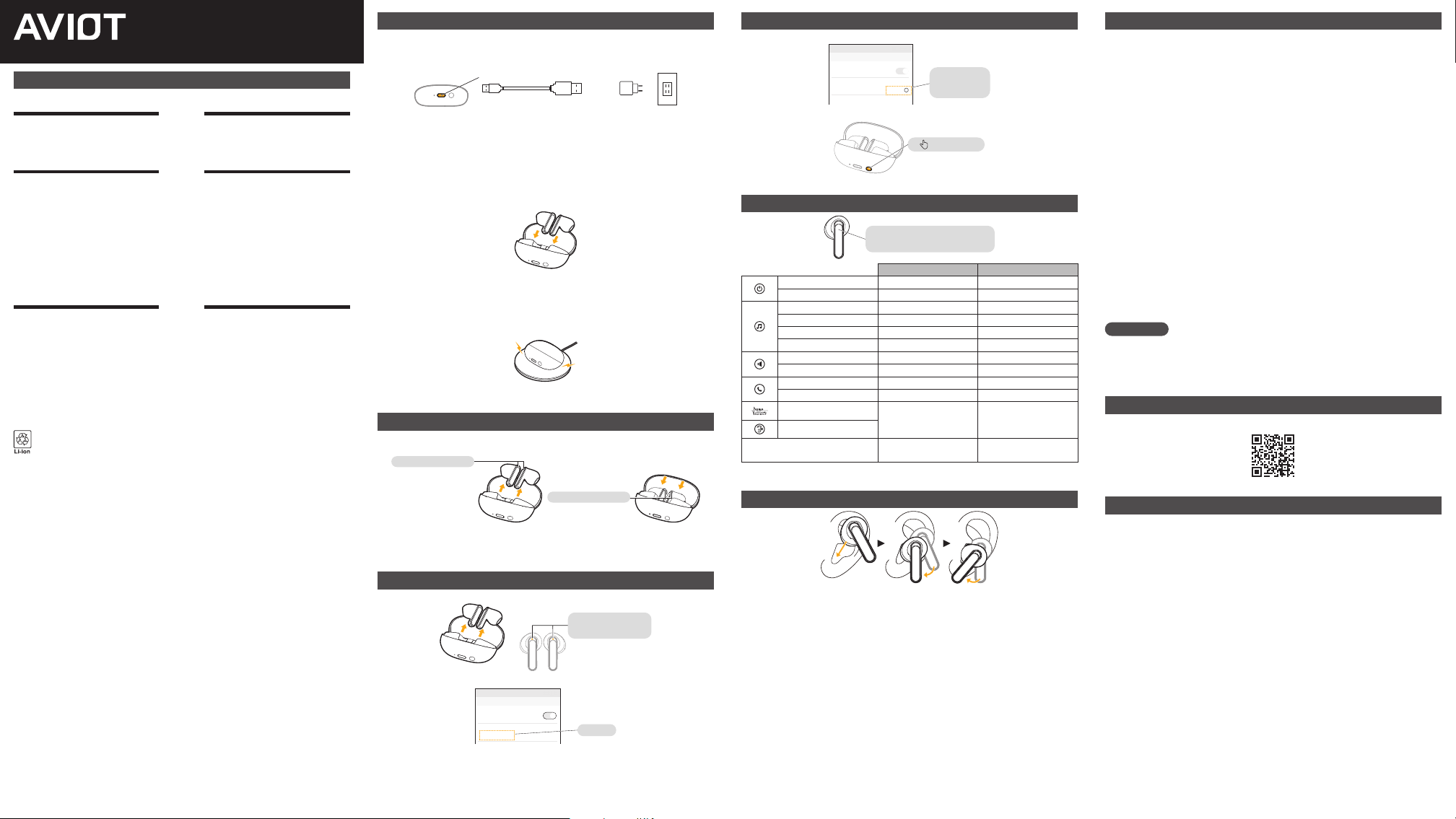
充電
(初次使用時請先充電)
給充電盒充電
將 USB Type-C® 充電線插入充電口進行充電。
從電池電量 0% 到充滿需要約 1 小時 30 分。
+
充電口
<底面> (未配備) (未配備)
USB(C) USB(A) 5V AC 電源線插頭
※ 電池指示燈顏色會根據電池餘量而變化。餘量70%至 100%白燈亮起,餘量30%至69% 橘燈亮起,
餘量 0% 至 29% 紅燈亮起。
※ 如果電壓高於或低於規定的電壓,保護功能可能會阻止充電。
※ 如果使用 5V 的 AC 專用插頭以外的充電器充電,可能會因為保護功能而停止充電。
※ 如果發生無法充電的情況,請確認 USB Type-C® 電源線無異常,並使用 5V 的 AC 專用插頭重新充電。
※ 請 定 期 充 電 。( 推 薦 : 1 個 月 至 少 1 次 )
給耳機充電
把耳機放回充電盒即自動開始充電。
從電池電量 0% 到充滿需要約 1 小時 30 分。
※ 如果充電盒無電量則無法對耳機充電。
※ 當充電盒電量為 0 時,對耳機的供電將終止,因此耳機電源在充電盒中可能被打開並連接到連接設備,這並非
故障。請對充電盒充電。
※ 請 定 期 充 電 。( 推 薦 : 1 個 月 至 少 1 次 )
無線充電
使用市售的無線充電器,即可在無線的狀態下也進行充電。
※ 充滿電所需的時間比 USB 充電長,依據您使用的無線充電器而有所不同。
※ 根據使用的無線充電器或環境,保護功能可能會阻止充電。
電源 ON/OFF
電源 ON :從充電盒中取出
電源 OFF :放回充電盒
電源 ON:LED 白色
電源 OFF:LED 橘色
放回充電盒時,請先確認耳機上的 LED 橘燈長亮後再關上電池盒。
※ 如果充電盒沒有剩餘電量,則不會關閉電源。
※ 在沒有連接的情況下,5 分鐘後電源自動關閉。
※ 長按觸控區也可以控制電源 ON/OFF。細節請參考操作方法列表。
配對
(首次設置時)
➀ 將耳機從充電盒內取出並打開電源,確認耳機進入配對模式。
左右任意一側的 LED
橘燈和白燈交替閃爍
➁ 從您要使用的連接設備的 Bluetooth 設定畫面連接“AVIOT TE-Y1”。
OTHER DEVICES
15:35
← Bluetooth
Bluetooth
AVIOT TE-Y1
選擇
插圖為您要使用的連接設備的設定畫面示例。
詳情請查閱您要使用的連接設備的使用說明書。
※ 如果配對失敗,請嘗試重置操作。
重置的正確方法
(發生操作不良時)
➀ 刪除連接設備的 Bluetooth 設定。
MY DEVICES
15:35
← Bluetooth
Bluetooth
AVIOT TE-Y1
Connected
i
解除連接
或
删除
➁ 將兩個耳機都放回充電盒,在盒蓋打開的狀態下,長按 10 秒底面的按鍵鈕。
長按 10 秒
※ 重置完成時,充電盒與耳機的 LED 白燈閃爍,進入配對模式。
操作方法列表
按下觸控區,
您可以在佩戴時執行各種操作
L R
電源 ON 長按3秒 長按3秒
電源 OFF※1 長按7秒 長按7秒
播放 觸碰1次 觸碰1次
停止 觸碰1次 觸碰1次
下一首 - 觸碰2次
上一首 - 觸碰3次
音量大聲 觸碰3次 -
音量小聲 觸碰2次 -
接聽 來電時觸碰 1 次 來電時觸碰 1 次
結束通話 通話中觸碰 1 次 通話中觸碰 1 次
ANC※2
長按 1.5 秒以切換模式
(ANC / 通透模式)
-
通透模式
切換音響效果 -
長按 1.5 秒以切換音響效果
(MUSIC / MOVIE / POWERFUL)
※1 操作過程中會聽到“ANC 模式 / 通透模式”或“切換音響效果”的語音提示。
※2 ANC = 主動降噪
佩戴方法
您可以將耳機的麥克風部分朝您的臉部轉動,從而穩定耳機。
保固條款
對於本產品正常使用過程中發生的自然故障,我們提供免費的維修或換新服務。向本公司諮詢
時,請提供購買店鋪的收據或送貨單等能證明購買及購買日期的書面檔或電子檔。
➀ 使用本產品前,請仔細閱讀使用說明書,確保正確使用。
保証期自購入日起 12 個月有效。
僅適用於購買國或地區。
保証對象僅包括耳機和充電盒。
核驗、換新時的附件及外包裝盒破損不在保証範圍內。
※ 保証期內免費、收費換新的產品的保証期也是自購買日起 12 個月。無論免費還是收費,更換後保証期不會相
應 延 長。
➁ 本產品可能會因改進而發生變化,恕不提前告知。
➂ 以下情形原則上不適用本條款,敬請注意。
a. 未在本公司專用註冊平臺進行產品註冊。
b. 不能提供正規銷售店的收據或送貨單等證明購買的書面檔或電子檔的情況。
c. 在本公司服務中心以外的地方進行過修理、改造時。
d. 誤用(含過大輸入導致的破損、燒損)、掉落、衝擊等,由於客戶不小心導致的事故、保管不善引起的產品衰劣、
損壞等情況。以及無論是否是症狀發生時期,發現可能存在對故障耳機的損傷或誤用行為時。
e. 在不符合規定的電源及電壓條件下使用的情況。
f. 消耗品相關。
g. 由於手機等本產品以外的其他設備導致故障的情況。
h. 本體外部或插頭的損傷、髒汙等外觀上的損傷。(購買後發生的)
i. 即使故障或不良發生時間在保証期內,但諮詢時已超過保証期時。
➃ 本公司僅對本公司經銷的產品提供保証。
➄ 不提供修理、換新期間的備用機。
➅ 假如被判定為非保証物件,我們將向您收取來回寄送的運費。
➆ 耳機本體為左右一套的產品,不提供單側換新的服務。
根據生產、庫存及或其他情況,可能無法提供相同產品的更換。
免責事項
不保証本產品能與所有支援 Bluetooth® 的設備及應用連接及連接後的正常動作。我們對使用
本產品可能導致的其他設備的故障、問題及資料丟失、損壞等不承擔任何責任。另外,我們也
不承擔由於電腦、作業系統、其他軟體、支援設備等的故障、問題及資料丟失、損壞而導致的
損害 責 任。敬 請 諒 解。
常見問題 / 諮詢
請 查看支 援頁 面。
關於商標
· Bluetooth® 字樣和圖示是注冊商標,歸屬於 Bluetooth SIG, Inc.。Preseed Japan Corporation
在授權下使用這些商標和標誌。
· USB Type-C® 和 USB-C® 是 USB 開發者論壇的註冊商標。
· 其他商標及注冊商標是歸屬於各自持有者的商標及注冊商標。
TE-Y1
真無線藍牙耳機
啟動指南