
Please read this manual before using this product and keep it for future reference.
The final interpretation of this manual belongs to ZKS Mobile IoT Tech Co., Ltd.
This manual does not refer to a specific model of ZKS products. Some of the parts,
appearances or functions mentioned in the manual may differ slightly from the
purchased models.
The contents of this manual are subject to change without prior notice. If you have
any doubts, please call the hotline in the manual for consultation.
Certain parts, appearances or functions mentioned in this manual are subject to
copyright or patent protection and any part of this manual may not be copied or
distributed in any form or by any means (electronic or mechanical) without the
written permission of ZKS Mobile IoT Tech Co., Ltd.
The product names mentioned in this manual may be trademarks or registered
trademarks of respective companies.
ZKS Mobile IoT Tech Co., Ltd. All rights reserved.

Remarks:
* In order to enhance better operation, please read this manual carefully and keep it
for future reference.
*The function descriptions in this manual may vary slightly depending on the model.
* This device is designed for overseas users.
* Please use genuine software, includes but not limited to operating system, database
and controls.
Dear Users:
Thank you for choosing and using ZKS products.
For your convenience in installation and use, please read the instructions
carefully and follow the steps in the instructions.
From beginning to end, ZKS's international star service will accompany
you. If you have any problems during use, please contact us by phone or address on
the warranty certificate, we will be at your service. Thank you again for using ZKS
products.

Table of Contents
Section 1 Product Description .................................................................................... 1
1.1 Product Description ......................................................................................... 1
Section 2 Product Instructions .......................................................................................
1
2.1 Product Sketch .................................................................................................1
2.2 Product Charging .............................................................................................2
2.3 Power On/Off ...................................................................................................
2
2.3.1 Power On .............................................................................................. 2
2.3.2 Power Off ..............................................................................................2
2.4 Screen Activation .............................................................................................
3
2.5 Screen Definition .............................................................................................
3
2.6 Device Information Query ...............................................................................
4
2.7 Alarms ..............................................................................................................
4
2.7.1 Alarms ...................................................................................................
4
2.7.2 Alarm Query .........................................................................................
4
2.8 USB Port ..........................................................................................................
5
2.9 Engineering Mode ...........................................................................................
5
Section 3 Technical Specification .................................................................................
5
Section 4 Packing List ...................................................................................................
6
Section 5 Attentions .......................................................................................................
6
Address:Shenzhen Nanshan District Yuexingsan road HUST(Huazhong University of Science and Technology Shenzhen
Industry-University-research Base TowerB Room:304-305\401-402\405-406
Tel:4000 211 815 E-mail: zks@zksiot.com
第
1
页
Section 1 Product Description
1.1 Product Description
1.1.1 Remote Temperature Recording
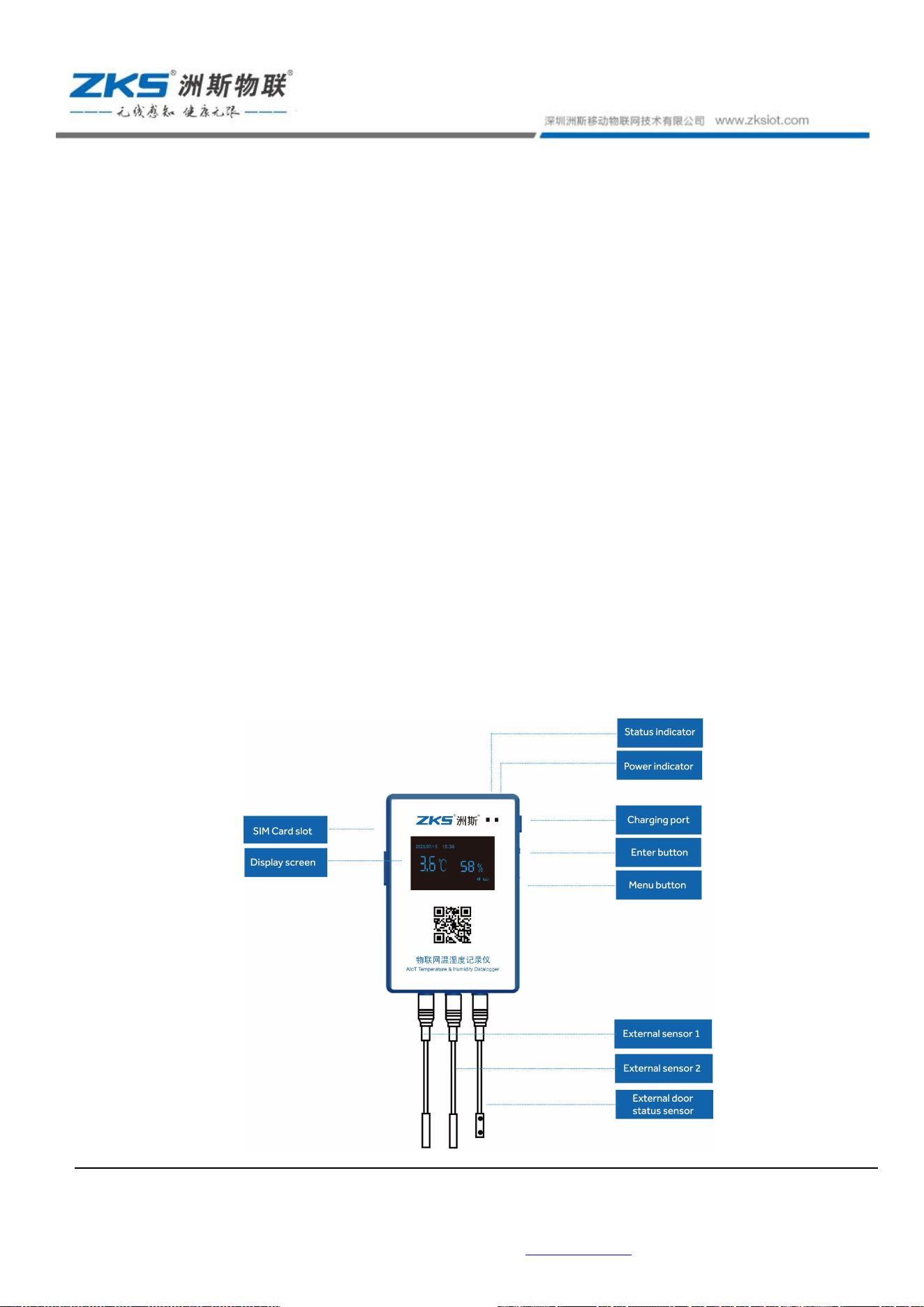
The S20 is an IoT temperature and humidity recorder that integrates temperature and
humidity collection with data upload functions. The S20 can be equipped with an external
temperature and humidity sensor. The collected temperature and humidity data are
uploaded to the cloud platform via 4G or Wi-Fi (for corresponding models), enabling
remote platform monitoring.
1.1.2 Application Scenarios
It can be used for real-time monitoring of warehousing and distribution of food, medicine,
vaccine, blood, reagents, biological products, biological sample tissue and other items. The
application scenarios include refrigerated trucks, incubators, cold rooms, cold packs,
refrigerated cabinets, refrigerators, freezers and so on.
Section 2 Product Instructions
2.1 Product Sketch
Address:Shenzhen Nanshan District Yuexingsan road HUST(Huazhong University of Science and Technology Shenzhen
Industry-University-research Base TowerB Room:304-305\401-402\405-406
Tel:4000 211 815 E-mail: zks@zksiot.com
第
2
页
2.2 Product Charging
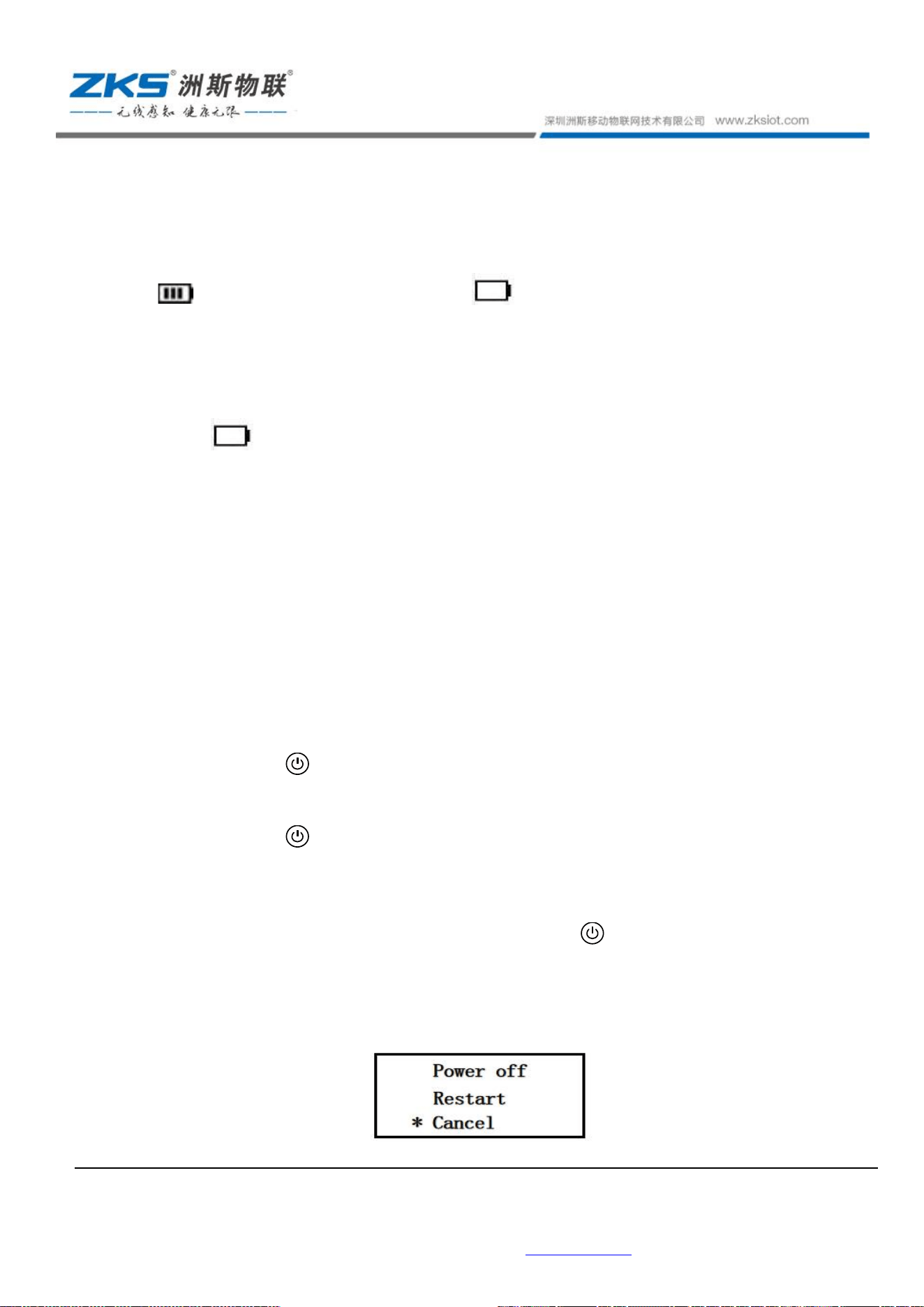
This device uses rechargeable lithium polymer battery and power indicator is in 3
grids . When the battery indicator is empty , the power is less than 20%, the red light
flashes every 5 seconds, and the platform sends message of low battery alarm, indicating that it
needs charging.
Before use: Check the power status of the device. When the battery indicator is
empty , you need to charge it. The charging procedure is as follows:
1) Remove the USB plug on the top of the product;
2) Connect the charger to the product for charging. When charging, the power indicator
(tricolored light) shows red and blue at the same time;
3) After the battery is fully charged, the red light will be off and the blue light is always
on;
Note: Please use the charger supplied with the device to charge.
2.3 Power On/Off
2.3.1 Power On
1) Press button for 4 seconds, the status indicator flashes green for one time; the
screen displays, namely, it is powered on;
2) Press button for 4 seconds, the status indicator flashes red for one time, and there
is no display on the screen, indicating that the battery has low power. It is not allowed to
start, please charge it.
Remark: When the device is restarted, press the button to enter the engineering
mode and refer to clause 2.9 for processing.
2.3.2 Power Off
Address:Shenzhen Nanshan District Yuexingsan road HUST(Huazhong University of Science and Technology Shenzhen
Industry-University-research Base TowerB Room:304-305\401-402\405-406
Tel:4000 211 815 E-mail: zks@zksiot.com
第
3
页
The power-off steps are as follows:
1) Short press any button, after activating the screen, press power button for 4
seconds, the screen displays “Power off”, “Restart” and “Cancel”. The sign”*” points to
the “Cancel” by default;
2) Short press menu button to switch the selection until the sign “*” points to the
“shutdown”;
3) Short press power button to confirm;
4) Power-off does not affect the stored data.
2.4 Screen Activation
The standby time of the device is 15 seconds. After 15 seconds, the screen will
automatically turn off. Screen activation can be realized by the menu button or the power
button, and then the menu can be operated.
2.5 Screen Definition
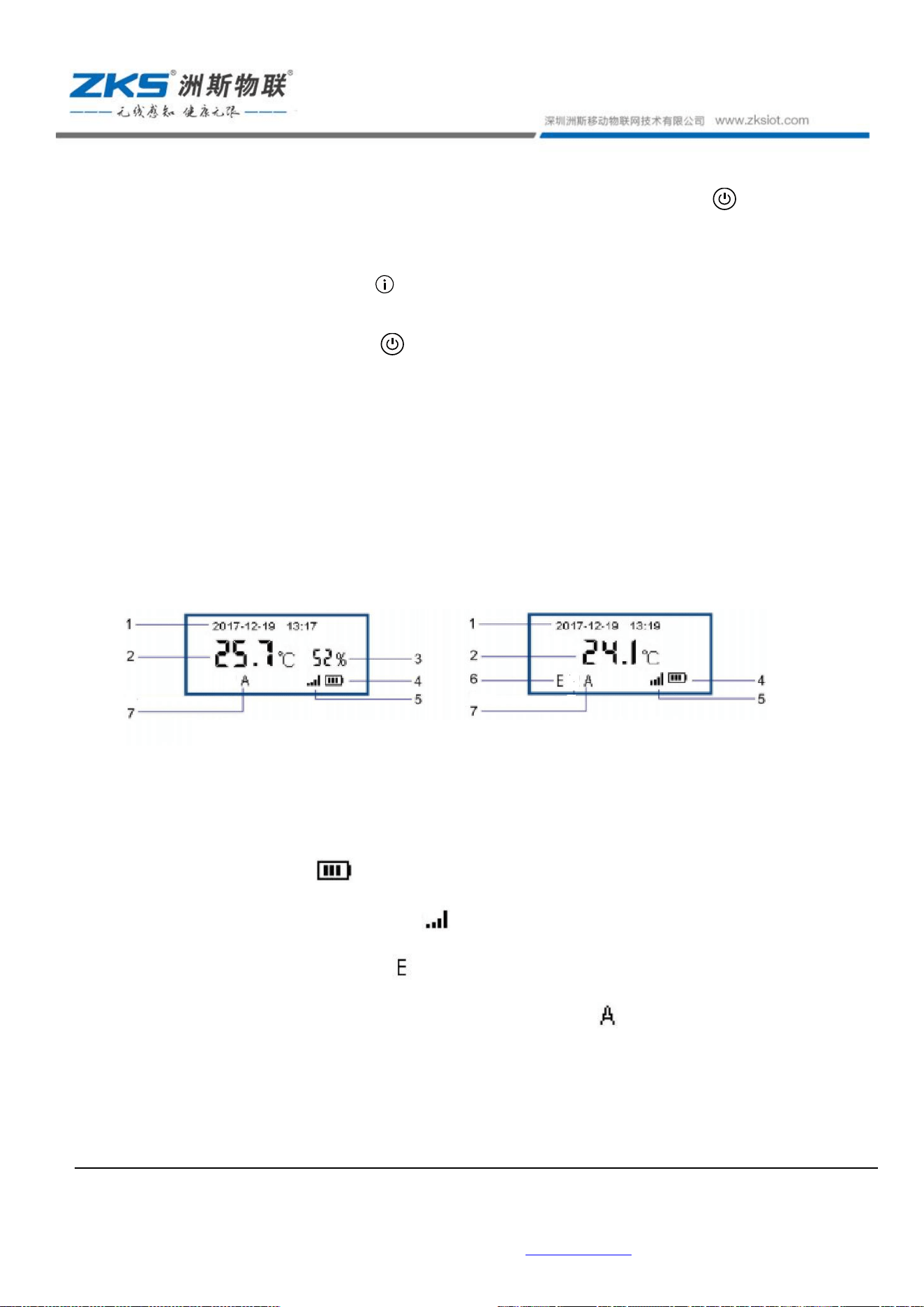
1) Time display area;
2) Temperature display area;
3) Humidity display area;
4) Power display area ;
5) Mobile signal connection display ;
6) Probe: external probe display , built-in probe does not display;
7) Alarm function: The device has sound and light alarms; indicates that the alarm has
been triggered and needs to be processed in time;
Address:Shenzhen Nanshan District Yuexingsan road HUST(Huazhong University of Science and Technology Shenzhen
Industry-University-research Base TowerB Room:304-305\401-402\405-406
Tel:4000 211 815 E-mail: zks@zksiot.com
第
4
页
2.6 Device Information Query
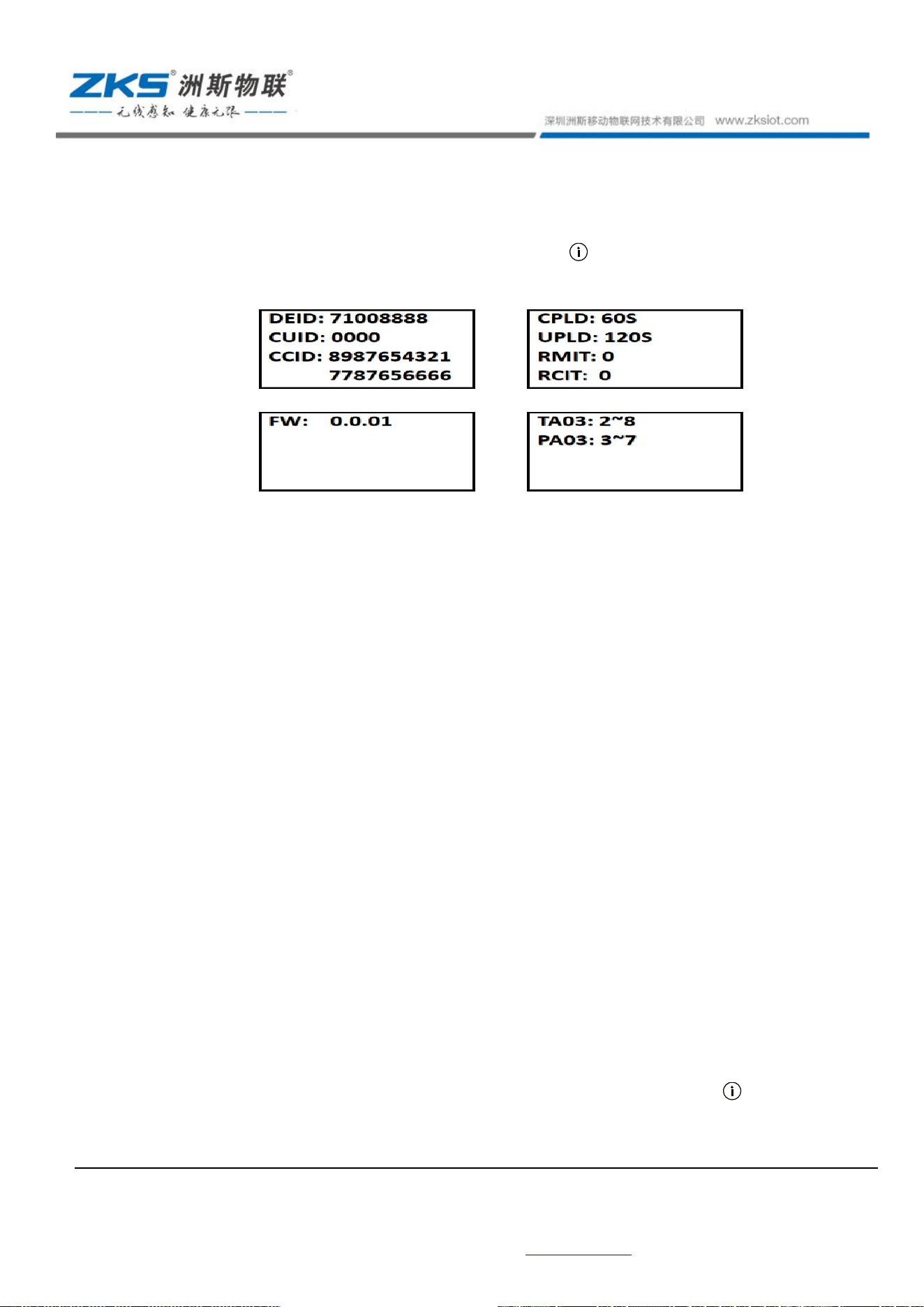
After the screen is activated, short press menu button to query the device's local
configuration information.
1) DEID: device MAC number;
2) CUID: customer code;
3) CCID: SIM card information;
4) CLPD: acquisition interval;
5) ULPD: upload interval;
6) RMIT: stored data, namely, data received by the device and not yet transmitted;
7) RCIT: recorded data, namely, all data generated after the recording function is turned
on;
8) FW: software version;
9) TA00: the upper and lower temperature alarm interval of channel0;
PA00: early warning temperature range;
TA03: the upper and lower temperature alarm intervals of channel 3;
PA03: early warning temperature range.
2.7 Alarms
2.7.1 Alarms
If the device has set high and low temperature alarm values and exceeds the temperature range,
it will send sound and light alarms.
2.7.2 Alarm Query
1) Switch the menu to the “Alarm Query” by long pressing the menu button ;
Address:Shenzhen Nanshan District Yuexingsan road HUST(Huazhong University of Science and Technology Shenzhen
Industry-University-research Base TowerB Room:304-305\401-402\405-406
Tel:4000 211 815 E-mail: zks@zksiot.com
第
5
页
2) Press the power button to confirm the menu selection “Alarm Query”, the screen
will display the historical alarm records; short press the menu button to scroll through
the last 10 history records; short press the power button to exit the query.
2.8 USB Port
This product is designed with a standard micro USB interface in the battery compartment
for charging, upgrading firmware, and exporting PDF files.
2.9 Engineering Mode
When the device is restarting, press the button to enter the engineering mode;
After entering the engineering mode, press the button according to the instructions until the
engineering mode ends and enter “Power-off” state; Power it on and it can work normally.
Section 3 Technical Specification
3.1 Method
WiFi
WLAN standard IEEE 802.11 b/g/n
Working channel
Frequency rang
1-11
e 2.4G
4G
Communication
band
B2/B4/B5/B12/B13/B66
3.2 Measuring range
External temperature and humidity sensor: temperature: -40° C ~ +80 ° C;
Humidity: 0%RH~99%RH
3.3 Measuring accuracy
Temp.: 0
℃
to +65
℃
±0.5
℃, Other
±1
℃
Humidity:±5%RH
3.4 Storage capacity:60,000 sets of data, support resume transmission
3.5 Protection level:IP66
Address:Shenzhen Nanshan District Yuexingsan road HUST(Huazhong University of Science and Technology Shenzhen
Industry-University-research Base TowerB Room:304-305\401-402\405-406
Tel:4000 211 815 E-mail: zks@zksiot.com
第
6
页
3.6 Storage and Transportation Conditions
1) Equipment packaging is suitable for transportation like roads, railways, waterways,
aviation, etc. Avoid severe vibration and shock during handling. It is required to be protected
from rain during transportation and strictly prohibited to mix with other harmful gases or
corrosive substances.
2) The equipment should be placed in a dry, clean warehouse with good air circulation,
no rain or snow intrusion, no sulfides, no silicide and other harmful substances.
Section 4 Packing List
◎
Please confirm that the following items are included in the product package. If
anything is missing, please contact your dealer.
◎
The color and shape of the item may vary by model.
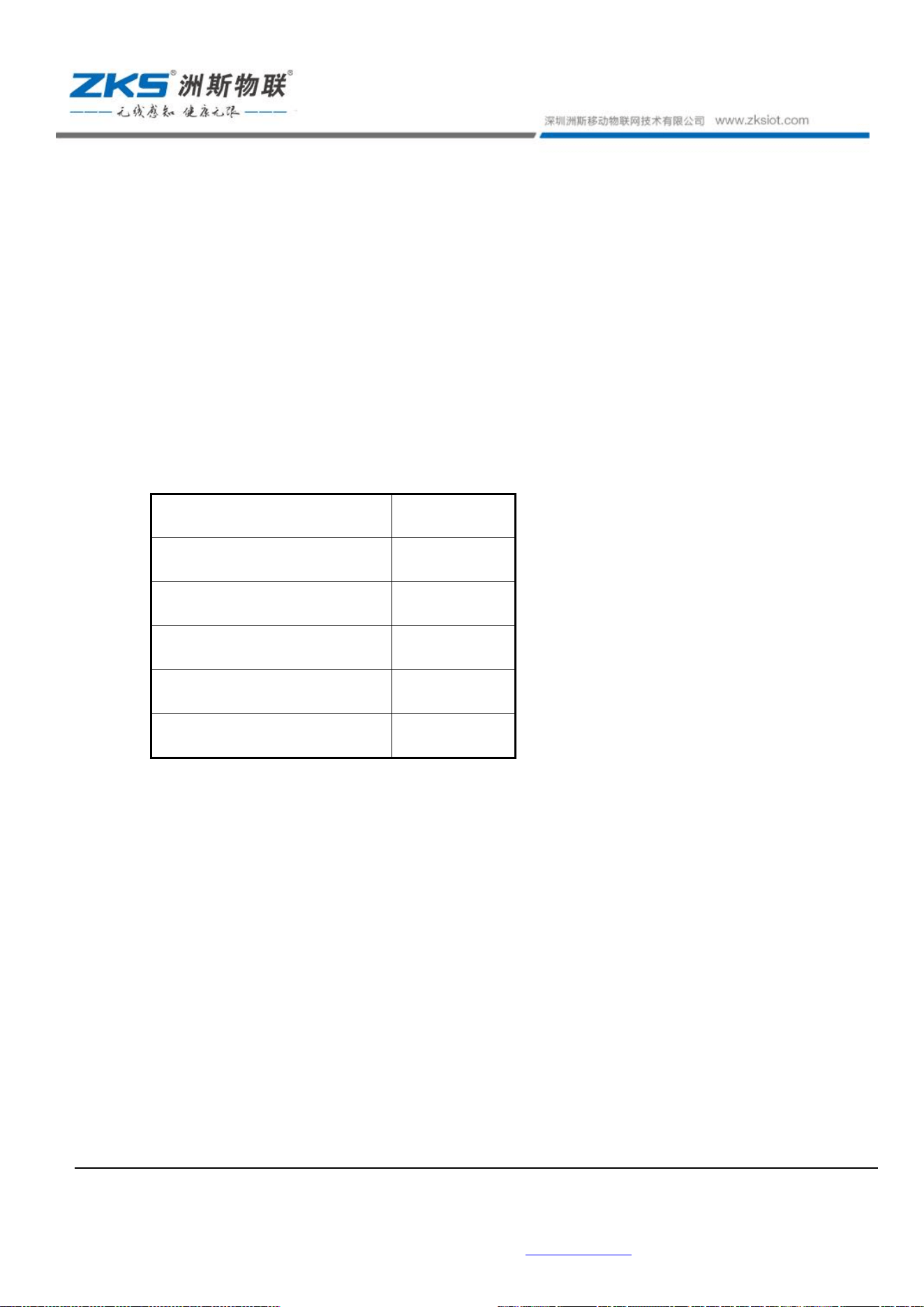
Bare machine
1
Certificate
1
Instruction manual
1
Charger
1
Charging Cable
1
Fixed casing
1
Section 5 Attentions
5.1 Do not soak the temperature and humidity sensors in the water;
5.2 Do not place it in an environment exceeding the operating temperature range;
5.3 Do not dismantle the device privately;
5.4 Do not place the device in the blind area of the mobile signal;
5.5 Charge the device once every three months to ensure battery life;
5.6 Deliver damaged rechargeable and wasted batteries to the designated battery collection
point.
5.7 Return the device to ZKS when the device is scrapped. We will ensure that the product
be disposed in an environmental manner.

FCC Warning
This equipment has been tested and found to comply with the limits for a Class B digital
device, pursuant to Part 15 of the FCC Rules. These limits are designed to provide
reasonable protection against harmful interference in a residential installation. This
equipment generates uses and can radiate radio frequency energy and, if not installed
and used in accordance with the instructions, may cause harmful interference to radio
communications. However, there is no guarantee that interference will not occur in a
particular installation. If this equipment does cause harmful interference to radio or
television reception, which can be determined by turning the equipment off and on, the
user is encouraged to try to correct the interference by one or more of the following
measures:-- Reorient or relocate the receiving antenna.
-- Increase the separation between the equipment and receiver.
-- Connect the equipment into an outlet on a circuit different from that to which the
receiver is connected.
-- Consult the dealer or an experienced radio/TV technician for help.
This device complies with part 15 of the FCC Rules. Operation is subject to the following
two conditions:
(1) This device may not cause harmful interference, and (2) this device must accept any
interference received, including interference that may cause undesired operation.
Changes or modifications not expressly approved by the party responsible for
compliance could void the user's authority to operate the equipment
*RF warning for Mobile device:
This equipment complies with FCC radiation exposure limits set forth for an uncontrolled
environment. This equipment should be installed and operated with minimum distance
20cm between the radiator & your body.