
INSTRUCTION MANUAL

ENGLISH
DEUTSCH
FRANÇAIS
ESPAÑOL
ITALIANO
PORTUGUÊS
中文(繁体字)
中文(簡体字)
1
Thank you for your purchase of this Citizen watch.
Before using the watch, read this instruction manual carefully to ensure correct use.
After reading the manual, store it in a safe place for future reference.
Visit the Citizen website (http://www.citizenwatch-global.com/) to view visual
guides for operation of your watch. Some models may be equipped with external
features (calculation scale, tachymeter, etc.). Visual guides for operation of such
external features can also be found on the website.
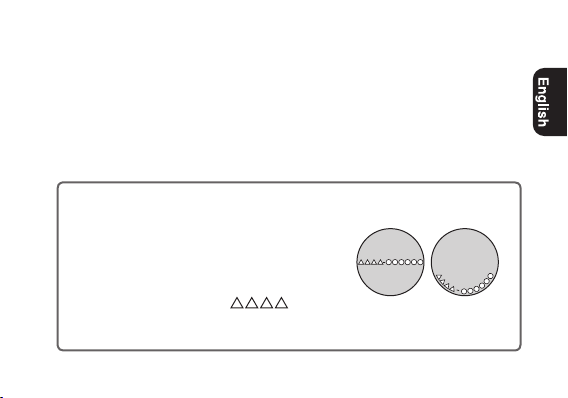
To check the movement number
A case number—4 alphanumeric characters
and 6 or more alphanumeric characters—is
engraved on the case back. (Figure on the right)
The first 4 characters of the case number
represent the movement number of the watch.
In the example on the right, “
” is the
movement number.
Engraving position example
The engraving position may differ
depending on watch model.
2
Safety precautions — IMPORTANT
This manual contains instructions that should be strictly followed at all times
not only for optimal use, but to prevent any injuries to yourself, other persons or
property. We encourage you to read the entire booklet (especially, pages 22 to
35) and understand the meaning of the following symbols:
■ Safety advisories are categorized and depicted in this manual as follows:
DANGER
Highly likely to cause death or serious injury
WARNING
Can cause serious injury or death
CAUTION
Can or will cause minor or moderate injury or damage
■ Important instructions are categorized and depicted in this manual as follows:
Warning (caution) symbol followed by instructions that should be
followed or precautions that should be observed.
Warning (caution) symbol followed by prohibited matters.
3
Before using this watch
After unpacking, the following must be done before using the watch:
• Checkingwhetherthesecondhandmovesnormally
When the second hand moves once every two seconds, charge your watch. (see
page
9
)
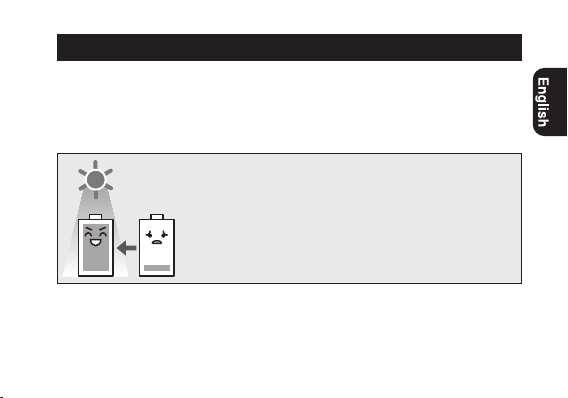
This watch has a rechargeable cell which is
charged by exposing the dial to light.
Expose the dial to direct sunlight regularly to
charge the watch.
For details of charging, see pages
8
to
11
.
Before using this watch Before using this watch
4
Bandadjustment
We recommend seeking the assistance of an experienced watch technician
for sizing of your watch. If adjustment is not done correctly, the bracelet may
unexpectedly become detached leading to loss of your watch or injury.
Consult your nearest authorized Citizen service center.
Protectivestickers
Be sure to remove any protective stickers that may be on your watch (case back,
band, clasp, etc.).Otherwise, perspiration or moisture may enter the gaps between
the protective stickers and the parts, which may result in a skin rash and/or
corrosion of the metal parts.
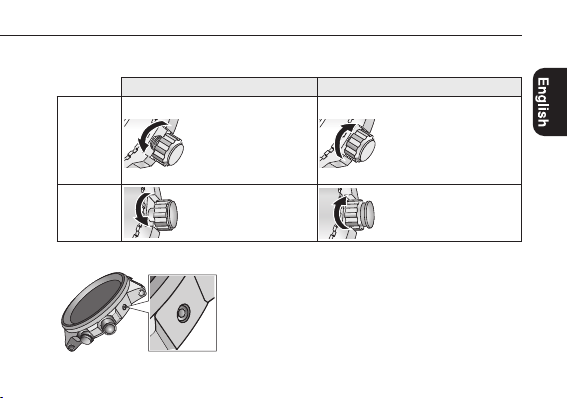
Howtouseaspeciallydesignedcrown/button
Some models are equipped with a specially designed crown and/or push button to
prevent accidental operation.
Before using this watch Before using this watch
5
Screw down crown/button
Unlock the crown/button prior to operate your watch.
Unlock Lock
Screwdown
crown
Rotate the crown
counterclockwise until it
releases from the case.
Push the crown in to the
case. With gentle pressure
towards the case, rotate the
crown clockwise to secure
it to the case. Be sure to
tighten firmly.
Screwdown
pushbutton
Rotate the locking screw
counterclockwise, and
loosen until it stops.
Rotate the locking screw
clockwise, and tighten
firmly.
Recessed buttons
Press the button with a non-marring narrow-tipped
object such as a wooden toothpick.
• Metalobjectsmaycausemarringorscratchingof
the button.
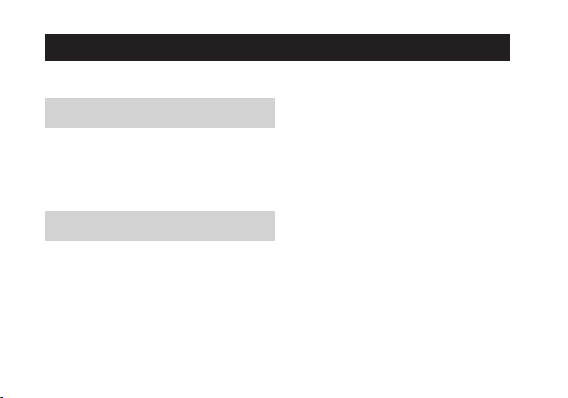
Table of contents
Componentidentification........7
Chargingyourwatch................8
Adjustingthetime............... 12
Adjustingthecalendar.......... 14
Usingthechronograph......... 16
Troubleshooting................... 20
Eco-Drive(solarpowered)watch
handlingprecautions......... 22
Waterresistance................... 26
Precautionaryitemsand
usagelimitations...............29
Specifications....................... 36
6
Component identification
60
120
90
100
110
130
140
150
180
200
500
400
300
250
65
70
75
80
24
12
420
816
60
30
1050
2040
60
45 15
30
7
The illustrations in this instruction manual may differ from the actual appearance of your watch.
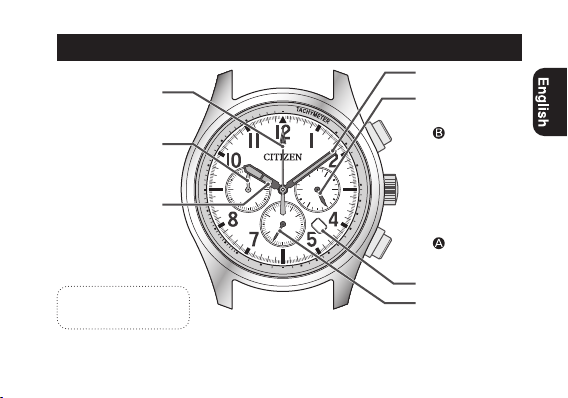
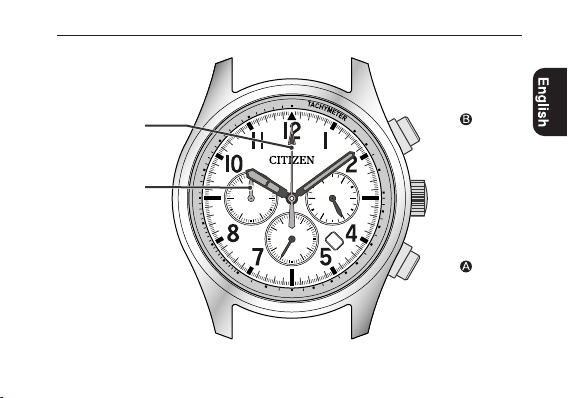
1/5 chronograph
second hand
Chronograph minute
hand
Hour hand
Minute hand
24- hour hand
Button
Button
Crown
Date indicator
Second hand
The solar cell is built in
under the dial.
7
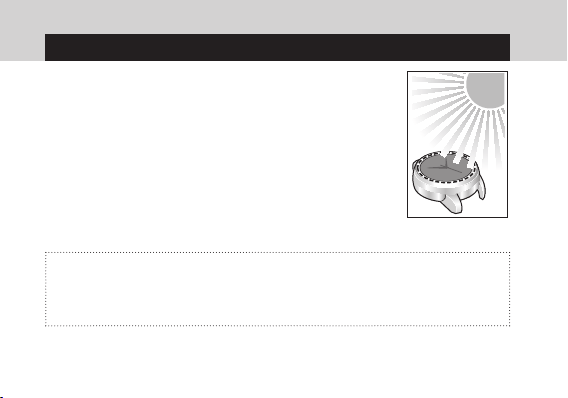
This watch has a rechargeable cell which is charged by
exposing the dial to light, such as direct sunlight or
fluorescent lamps.
After taking off the watch, put it in a location where the
dial is exposed to bright light, such as by a window.
For optimal performance, be sure to:
• Exposethewatchtodirectsunlightforfiveorsixhoursat
least once a month.
• Avoidleavingthewatchindarkplacesforlongperiodsof
time.
Caution
• Donotchargethewatchathightemperature(about60°C(140°F) or higher).
• Ifthewatchisobscuredfromlightbylongsleevesfrequently,supplemental
charging may be needed to ensure continual operation.
Charging your watch
8
Charging your watch
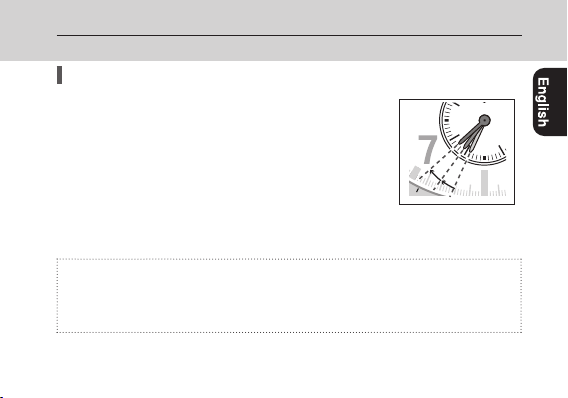
Whenthewatchreachesalowchargestate(insufficientchargewarning
function)
When the power reserve becomes low, the second hand
moves once every two seconds. This is the insufficient
charge warning function. Be sure to fully charge your
watch.
• Whenthewatchissufficientlycharged,thesecond
hand will move normally.
• Ifyoudonotchargethewatchforeightdaysorlonger
after the insufficient charge warning movement has begun, the watch will be
depleted of all power and stop.
Caution
• Evenwhenthesecondhandmovesonceeverytwoseconds,thecurrenttime
and date are indicated. However, other features and functions of the watch will
not be available for use.
110
45
15
30
9
Charging your watch Charging your watch
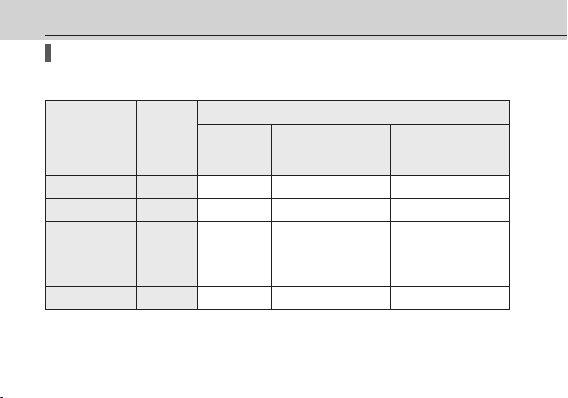
Chargingtimebyenvironment
Below are the approximate times required for charging when exposing the watch
dial to light continuously. Please use this table as a reference only.
Environment
Illuminance
(lx)
Chargingtime(approx.)
Toworkfor
oneday
Tostartworking
normallywhenthecell
isdischarged
Tobecomefully
chargedwhenthecellis
discharged
Outdoors(sunny) 100,000
2 minutes 50minutes 9 hours
Outdoors(cloudy) 10,000
10minutes 7 hours 60hours
20cm(8inches)
awayfroma
fluorescentlamp
(30W)
3,000
35 minutes 25 hours 180hours
Interiorlighting 500
3.5 hours 160hours —
10
Charging your watch Charging your watch
• To charge your watch, it is recommended to expose the dial to direct sunlight.
A fluorescent lamp or interior lighting does not have sufficient illumination to
charge the rechargeable cell efficiently.
Runtime
From fully charged without extra charging: 9 months
• Asfortheruntimeabove,itisassumedthatthechronographbeusedfor60
minutes in a day.
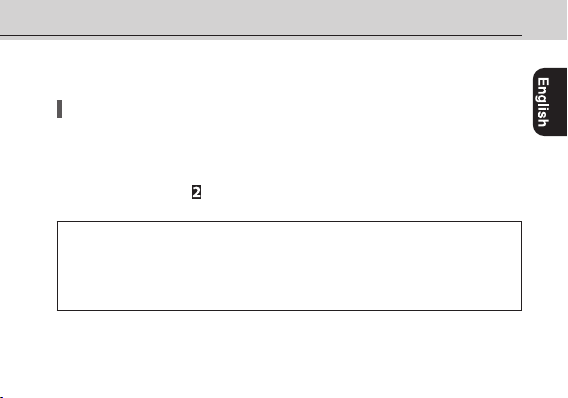
• Whenyoudonotusethewatchforalongtime,itisrecommendedtopullthe
crown out to position
for saving the power.
About Quick Start function
The watch works immediately when the charging starts, even though all the
hands are stopped for lack of the power.
•
Be sure to keep your watch fully charged when utilizing this feature.
• Adjustthetimeandcalendarafterfullycharged.Seepage
12
.
11
Adjusting the time
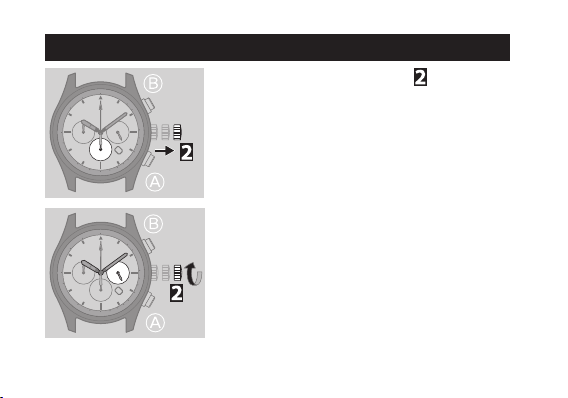
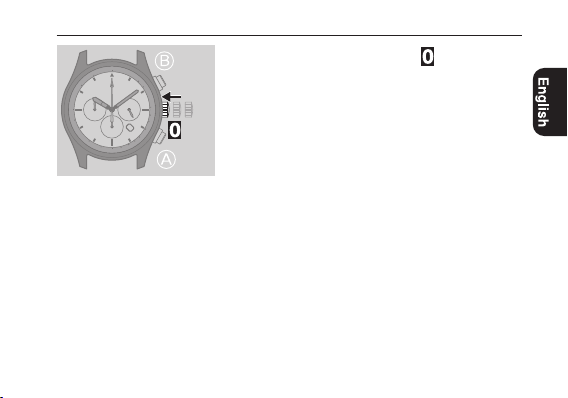
1
Pull the crown out to position when the
second hand points to 0 second.
All the hands stop.
• Whenusingchronograph,thechronographis
reset and 1/5 chronograph second hand returns
to0second.
2
Rotate the crown to adjust the time.
• The24-hourhandalsomoves.Payparticular
attentiontothehandtoensureAMorPMtime
is set properly.
• Whenthewatchshowsaround12:00AM,the
date indicator starts to change.
The date indicator does not change by rotating
the crown counterclockwise.
12
Adjusting the time
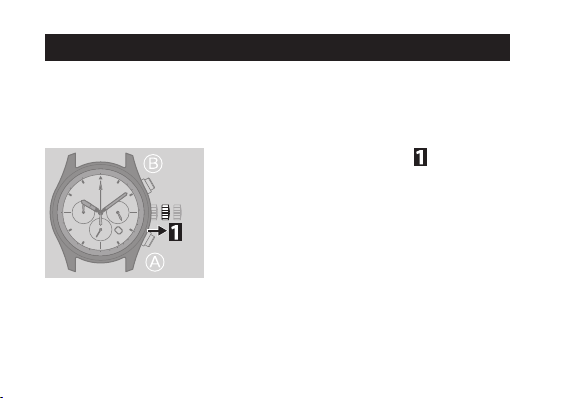
3
Push the crown in to position in accordance
with a reliable time source to finish the
procedure.
13
AdjustthedateindicationonthefirstdaysofMarch,May,July,Octoberand
December.
•Whenthetimeonthewatchisbetween9:00PMand1:00AM,donotexecutethe
adjustment. Otherwise the date indication may change improperly.
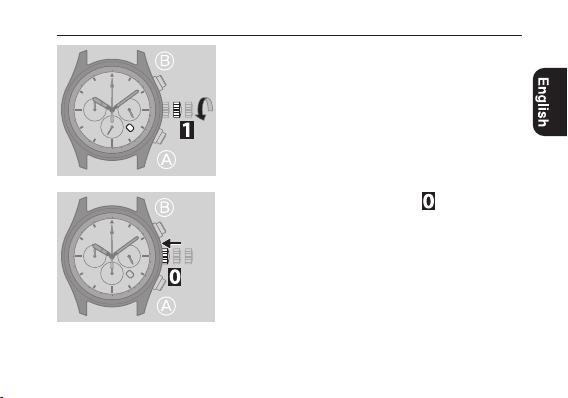
1
Pull the crown out to position .
Adjusting the calendar
14
Adjusting the calendar
2
Rotate the crown counterclockwise to adjust
the date.
3
Push the crown in to position to finish the
procedure.
15

Using the chronograph
The60-minutechronographcanindicateamaximumof59
’
59.8
”
.
• Afteronehourofcontinuouschronographoperation,thechronograph
automatically stops.
• Thecurrenttimeisshownwhilethechronographworks.
• Whilethesecondhandismovingonceeverytwoseconds(theinsufficientcharge
warning function, see page
9
), you can not use the chronograph.
16
Using the chronograph
Button :
Start/Stop
Button
:
Reset
1/5 chronograph
second hand
60
120
90
100
110
130
140
150
180
200
500
400
300
250
65
70
75
80
24
12
420
816
60
30
1050
2040
60
45 15
30
7
Chronograph
minute hand
17
Using the chronograph Using the chronograph
Correctingthereferencepositionof1/5chronographsecondhand
Dothefollowingprocedurewhen1/5chronographsecondhanddoesnotreturnto
0secondbyresettingthechronograph.
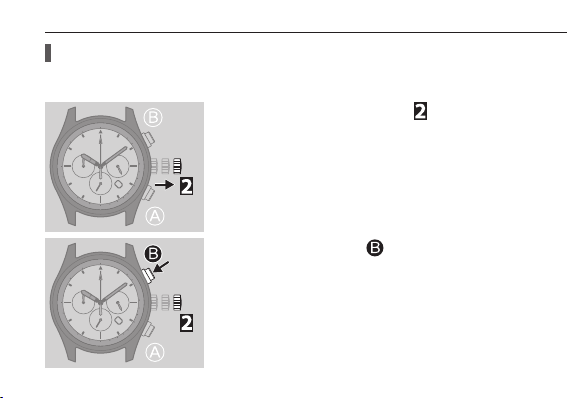
1
Pull the crown out to position .
All the hands stop.
• Adjustthetimeandcalendarafterthis
procedure.
2
Press and hold button for two seconds.
18
Using the chronograph Using the chronograph
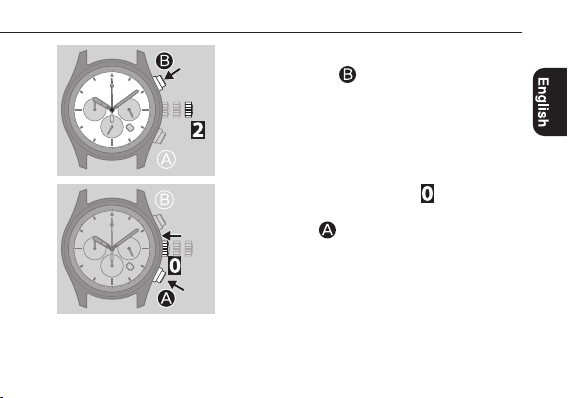
3
Adjust 1/5 chronograph hand to 0 second by
pressing button
repeatedly.
• Eachtimeyoupressthebutton,1/5chronograph
hand moves 1 step each.
• Whileyoupressandholdthebutton,thehand
moves continuously.
4
Push the crown in to position .
5
Press button .
19
Troubleshooting
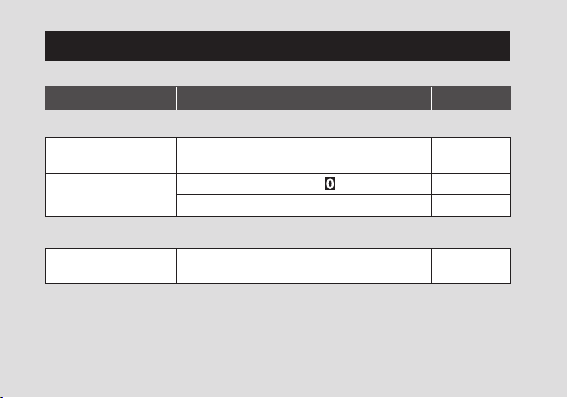
If you have a problem with your watch, check the table below.
Symptoms Remedies Page
Movementofahandseemsstrange
The second hand moves
once every two seconds.
Fully charge the watch.
8
to
11
The second hand does
not move.
Push the crown in to position
.
11
Expose the watch to direct sunlight at least an hour.
8
to
11
The calendar is incorrect
The date indication is
incorrect.
Adjust the calendar.
14
20
Troubleshooting
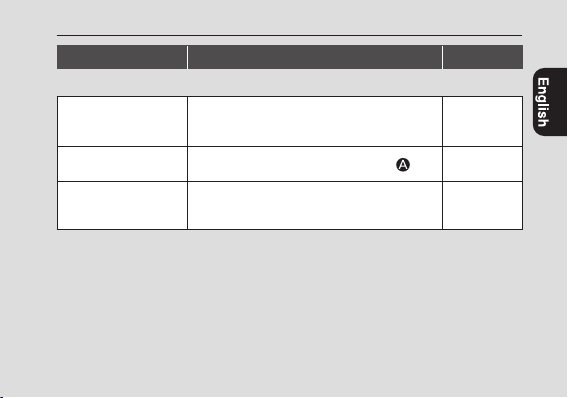
Symptoms Remedies Page
The chronograph is incorrect
Chronograph does not
work.
While the second hand is moving once every two
seconds (the insufficient charge warning function),
you can not use the chronograph.
8
to
11
Chronograph stops
halfway.
Reset the chronograph by pressing button
.
17
1/5 chronograph second
hand does not return to
0secondwhenresetting.
Correct the reference position of 1/5 chronograph
second hand.
18
21
22
Eco-Drive (solar powered) watch handling precautions
<Always Make Sure to Recharge Frequently>
•Foroptimalperformance,yourwatchshouldremainfullycharged.
•Longsleevesmayinhibitlighttransmissiontoyourwatch.
Thismayresultinyourwatchloosingcharge.Inthesecases
supplementalchargingmaybenecessary.
•Whenyoutakeoffthewatch,placeitinabrightlocationtoensure
optimalperformance.
23
CAUTION
Recharging Precautions
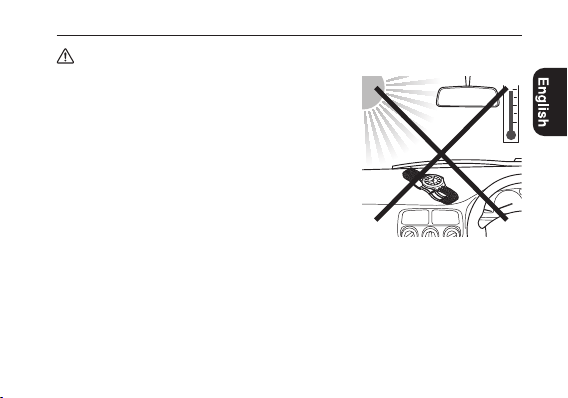
•Donotchargethewatchatahightemperature(about60°C
(140°F) or higher) as doing so may cause the movement to
malfunction.
Examples:
•Chargingthewatchtooclosetoalightsourcewhich
generates a large amount of heat such as an incandescent
lamp or halogen lamp.
* When charging under an incandescent lamp, be sure to
leave50cm(20inches) or more between the lamp and
the watch to avoid exposing the watch to excessive heat.
•Chargingthewatchinalocationwherethetemperature
may become extremely high such as on the dashboard of
a vehicle.
Eco-Drive (solar-powered) watch handling precautions
24
<Replacement of Rechargeable Cell>
•Thiswatchutilizesaspecialrechargeablecellthatdoesnotrequireperiodicalreplacement.
However power consumption may increase after using the watch for a number of years due
to wear of internal components and deterioration of oils. This may cause stored power to be
depleted at a faster rate. For optimal performance, we recommend having your watch inspected
every 2-3 years for proper operation and condition check.
WARNING
Handling of Rechargeable Cell
•Therechargeablecellshouldneverberemovedfromthewatch.
If for any reason it becomes necessary to remove the rechargeable cell from the watch, keep out
of the reach of children to prevent accidental swallowing.
If the rechargeable cell is accidentally swallowed, consult a doctor immediately.
•Donotdisposeoftherechargeablecellwithordinarygarbage.Pleasefollowtheinstructionsof
your municipality regarding collection of batteries to prevent the risk of fire or environmental
contamination.
Eco-Drive (solar-powered) watch handling precautions Eco-Drive (solar-powered) watch handling precautions
25
Eco-Drive (solar-powered) watch handling precautions Eco-Drive (solar-powered) watch handling precautions
WARNING
Use Only the Specified Battery
•Neveruseabatteryotherthantherechargeablecellspecifiedforuseinthiswatch.
Although the watch structure is designed so that it will not operate when another type of
battery is installed, if a conventional watch battery or other type of battery is installed in the
watch and the watch is recharged, there is the risk of overcharging which may cause the battery
to rupture.
This can cause damage to the watch and injury to the wearer.
When replacing the rechargeable cell, always make sure to use the designated rechargeable cell.
26
Water resistance
WARNING
Water Resistance
Water-related use
Minorexposure
to water (washing
face, rain, etc.)
Swimming and
general washing
work
Skin diving,
marine sports
Scuba diving
using an air tank
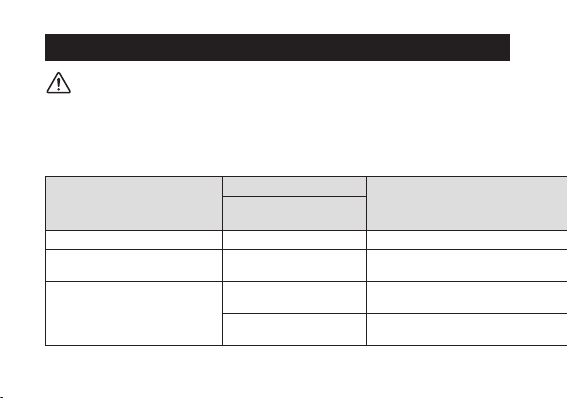
Operate the crown
or button when
the watch is wet
Name
Indication
Specification
Dial or Case back
Non-waterresistant — Non-waterresistant
NO NO NO NO NO
Everyday-use water resistant
watch
WATER RESIST
Water-resistant to 3
atmospheres
OK NO NO NO NO
Upgraded everyday use water-
resistant watch
W. R. 5 bar
Water-resistant to 5
atmospheres
OK OK NO NO NO
W.R.10/20bar
Water-resistantto10or
20atmospheres
OK OK OK NO NO
•Refertothewatchdialand/orthecasebackfortheindicationofthewaterresistanceofyour
watch. The following chart provides examples of use for reference to ensure that your watch is
used properly. (The unit “1 bar” is roughly equal to 1 atmosphere.)
•WATERRESIST(ANT)××barmayalsobeindicatedasW.R.××bar.
27
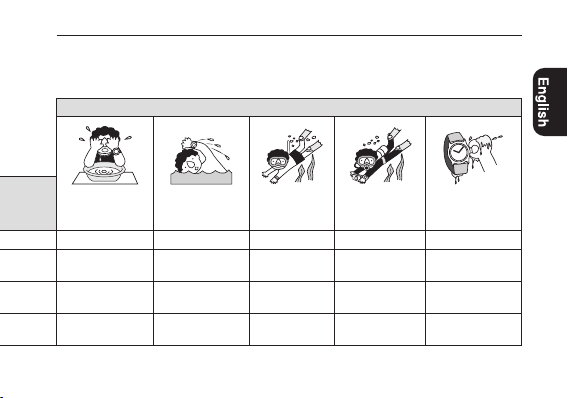
Water-related use
Minorexposure
to water (washing
face, rain, etc.)
Swimming and
general washing
work
Skin diving,
marine sports
Scuba diving
using an air tank
Operate the crown
or button when
the watch is wet
Name
Indication
Specification
Dial or Case back
Non-waterresistant — Non-waterresistant
NO NO NO NO NO
Everyday-use water resistant
watch
WATER RESIST
Water-resistant to 3
atmospheres
OK NO NO NO NO
Upgraded everyday use water-
resistant watch
W. R. 5 bar
Water-resistant to 5
atmospheres
OK OK NO NO NO
W.R.10/20bar
Water-resistantto10or
20atmospheres
OK OK OK NO NO
Water resistance

28
•Non-waterresistantmodelsarenotdesignedtocomeintocontactwithanymoisture.Takecare
not to expose a watch with this rating to any type of moisture.
•Waterresistancefordailyuse(to3atmospheres)meansthewatchiswaterresistantfor
occasional accidental splashing.
•Upgradedwater-resistancefordailyuse(to5atmospheres)meansthatthewatchmaybeworn
while swimming, but is not to worn while skin diving.
•Upgradedwater-resistancefordailyuse(to10/20atmospheres)meansthatthewatchmaybe
worn while skin diving, but not while scuba or saturated diving using helium gas.
Water resistance
29
Precautionary items and usage limitations
CAUTION
To Avoid Injury
•Beparticularlycarefulwhenwearingyourwatchwhileholdingasmallchild,toavoidinjury.
•Beparticularlycarefulwhenengagedinstrenuousexerciseorwork,toavoidinjurytoyourself
and others.
•Donotwearyourwatchwhileinasaunaorotherlocationwhereyourwatchmaybecome
excessively hot, since there is the risk of burns.
•Becarefulwhenputtingonandtakingoffyourwatch,sincethereisariskofdamagingyour
fingernails, depending on the manner in which the band is fastened.
•Takeoffyourwatchbeforegoingtobed.
30
CAUTION
Precautions
•Alwaysusethewatchwiththecrownpushedin(normalposition).Ifthecrownisofthescrew
lock-type, make sure it is securely locked.
•Donotoperatethecrownoranypushbuttonswhenthewatchiswet.Watermayenterthe
watch causing damage to vital components.
•Ifwaterentersthewatchorthewatchfogsupanddoesnotclearupevenafteralongtime,
consult your dealer or authorized service center for inspection and/or repair.
•Evenifyourwatchhasahighlevelofwaterresistance,pleasebecarefulofthefollowing.
•Ifyourwatchisimmersedinseawater,rinsethoroughlywithfreshwaterandwipewitha
dry cloth.
•Donotpourwaterfromatapdirectlyontoyourwatch.
•Takeoffyourwatchbeforetakingabath.
•Ifseawaterentersthewatch,placethewatchinaboxorplasticbagandimmediatelytakeitin
for repair. Otherwise, pressure inside the watch will increase, and parts (crystal, crown, push
button, etc.) may come off.
Precautionary items and usage limitations Precautionary items and usage limitations
31
Precautionary items and usage limitations Precautionary items and usage limitations
CAUTION
When Wearing Your Watch
<Band>
•Leatherbandsandrubber(urethane)bandswilldeteriorateovertimeduetoperspirationdirt.
Because of the natural materials, leather band will be worn, deformed, and discolored over
time. It is recommended to replace the band periodically.
•Thedurabilityofaleatherbandmaybeaffectedwhenwet(fading,peelingofadhesive),owing
tothepropertiesofthematerial.Moreover,wetleathermaycausearash.
•Donotstainaleatherbandwithsubstancescontainingvolatilematerials,bleach,alcohol
(includingcosmetics).Discolorationandprematureagingmaybeoccurred.Ultravioletlight
such as direct sunlight may cause discoloration or deformation.
•Itisrecommendedtotakeoffthewatchifitgetswet,evenifthewatchitselfiswater-resistant.
•Donotwearthebandtootightly.Trytoleaveenoughspacebetweenthebandandyourskinto
allow adequate ventilation.
•Therubber(urethane)bandmaybestainedbydyesorsoilpresentinoronclothingorother
accessories. Since these stains may not be removable, caution is required when wearing your
watch with items that tend to easily transfer color (articles of clothing, purses, etc.). In addition,
the band may be deteriorated by solvents or moisture in the air. Replace with a new one when it
has lost elasticity or become cracked.
32
Precautionary items and usage limitations Precautionary items and usage limitations
CAUTION
When Wearing Your Watch (continued)
•Pleaserequestadjustmentorrepairofthebandinthefollowingcases:
•Younoticeanabnormalitywiththebandduetocorrosion.
•Thepinofthebandisprotruding.
•Werecommendseekingtheassistanceofanexperiencedwatchtechnicianforsizingofyour
watch. If adjustment is not done correctly, the bracelet may unexpectedly become detached
leading to loss of your watch or injury.
Consult your nearest authorized service center.
<Temperature>
•Thewatchmaystoporthefunctionofthewatchmaybeimpairedinextremelyhighorlow
temperature.Donotusethewatchinplaceswherethetemperatureisoutsidetheoperating
temperature range as stated in the specifications.
<Magnetism>
•Analogquartzwatchesarepoweredbyastepmotorthatusesamagnet.Subjectingthewatchto
strong magnetism from the outside can cause the motor to operate improperly and prevent the
watch from keeping time accurately.
Donotallowthewatchtocomeintocloseproximitytomagnetichealthdevices(magnetic
necklaces, magnetic elastic bands, etc.) or the magnets used in the latches of refrigerator doors,
clasps used in handbags, the speaker of a cell phone, electromagnetic cooking devices and so on.
33
Precautionary items and usage limitations Precautionary items and usage limitations
<Strong Shock>
•Avoiddroppingthewatchorsubjectingittootherstrongimpact.Itmaycausemalfunctions
and/or performance deterioration as well as damage to the case and bracelet.
<Static Electricity>
•Theintegratedcircuits(IC)usedinquartzwatchesaresensitivetostaticelectricity.Pleasenote
the watch may operate erratically or not at all if exposed to intense static electricity.
<Chemicals, Corrosive Gasses and Mercury>
•Ifpaintthinner,benzeneorothersolventsorproductscontainingthesesolvents(including
gasoline, nail-polish remover, cresol, bathroom cleaners and adhesives, water repellent, etc.)
are allowed to come into contact with the watch, they may discolor, dissolve or crack the
materials. Be careful when handling these chemicals. Contact with mercury such as that used
in thermometers may also cause discoloration of the band and case.
<Protective Stickers>
•Besuretoremoveanyprotectivestickersthatmaybeonyourwatch(caseback,band,clasp,
etc.). Otherwise, perspiration or moisture may enter the gaps between the protective stickers
and the parts, which may result in a skin rash and/or corrosion of the metal parts.
34
CAUTION
Always Keep Your Watch Clean
•Rotatethecrownwhileitispressedinfullyandpressthebuttonsperiodicallysotheydonot
become stuck due to accumulations of foreign matter.
•Thecaseandbandofthewatchcomeintodirectcontactwiththeskin.Corrosionofthemetal
or accumulated foreign matter may result in black residue coming from the bracelet when
exposed to moisture or perspiration. Be sure to keep your watch clean at all times.
•Besuretoperiodicallycleanthebraceletandcaseofyourwatchtoremoveaccumulateddirt
and foreign matter. In rare circumstances, accumulated dirt, foreign matter may cause irritation
with the skin. If you notice this, discontinue wearing the watch and consult your physician.
•Besuretoperiodicallycleanforeignmatterandaccumulatedmaterialsfromthemetalband,
synthetic rubber strap (polyurethane) and/or metal case using a soft brush and mild soap. Be
careful not to allow moisture on the case if your watch is not water resistant.
•Leatherbandsmaybecomediscoloredbyperspirationordirt.Alwayskeepyourleatherband
clean by wiping with a dry cloth.
Precautionary items and usage limitations Precautionary items and usage limitations
35
Precautionary items and usage limitations Precautionary items and usage limitations
Caring for Your Watch
•Wipeanydirtormoisturesuchasperspirationfromthecaseandcrystalwithasoftcloth.
•Formetallic,plasticorsyntheticrubber(polyurethane)band,cleanitwithsoapandasoft
toothbrush. Be sure to thoroughly rinse the band after cleaning to remove any soap residue.
•Foraleatherband,wipeoffdirtusingadrycloth.
•Ifyouwillnotbeusingyourwatchforanextendedperiodoftime,carefullywipeoffany
perspiration, dirt or moisture and store in a proper location, avoiding locations subject to
excessively high or low temperatures and high humidity.
<When Luminous Paint is used for your watch>
The paint on the dial and hands helps you with reading the time in a dark place. The luminous
paint stores light (daylight or artificial light) and glows in a dark place.
It is free from any radioactive substance or any other material harmful to a human body or
environment.
•Thelightemissionwillappearbrightatfirstandthendiminishastimepasses.
•Thedurationofthelight(“glow”)willvarydependingonthebrightness,typesofand
distance from a light source, exposure time, and the amount of the paint.
•Thepaintmaynotglowand/ormaydissipatequicklyifexposuretolightwasnotsufficient.
36
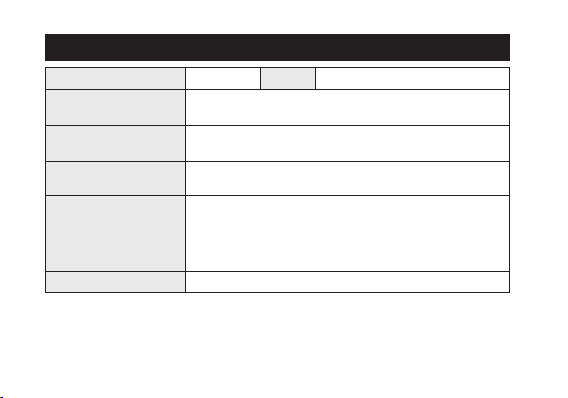
Model
B620
Type
Analog solar-powered watch
Timekeepingaccuracy
(withoutreception)
Within ±15 seconds per month when worn at normal operation
temperatures between +5˚C(41°F) and +35˚C(95°F)
Operatingtemperature
range
–10˚C(14°F)to+60˚C(140°F)
Displayfunctions
• Time:Hours,minutes,seconds,24-hour
• Calendar:Date,
Maximumruntimefromfull
charge
• Fullychargedtofullydischarged:
Approximately 9 months (when using the chronograph for an
hour a day)
• Powerreserveuponinsufficientchargewarningfunction:
Approximately 8 days
Battery
Rechargeable cell (lithium button cell), 1pc.
Specifications
37
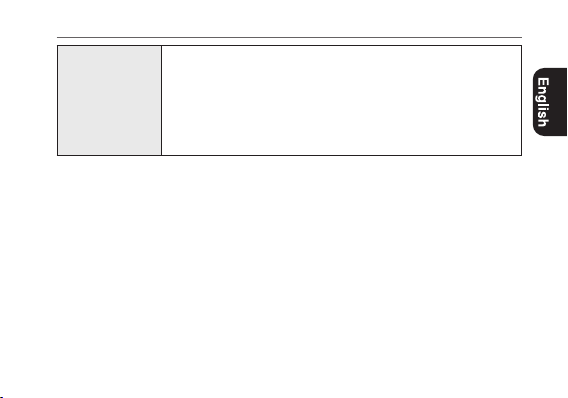
Additional
functions
• Solarpowerfunction
• Overchargingpreventionfunction
• Insufficientchargewarningfunction(two-secondintervalmovement)
• QuickStartfunction
• Chronograph(upto60minutesin0.2-secondincrements)
• Correctingreferencepositionfunctionof1/5chronographsecond
hand
Specifications and contents of this booklet are subject to change without prior
notice.
Specifications

Model No.
CA4*
Cal.B620
CTZ-B8176