User Manual
BP20
Cordless Vacuum Cleaner

Language
English
Deutsch
Français
Español
Italiano
日本語
01~20
21~40
41~60
61~80
81~100
101~120

support@inteture.com
EN
1.
CONTENT
1. WARNING 2
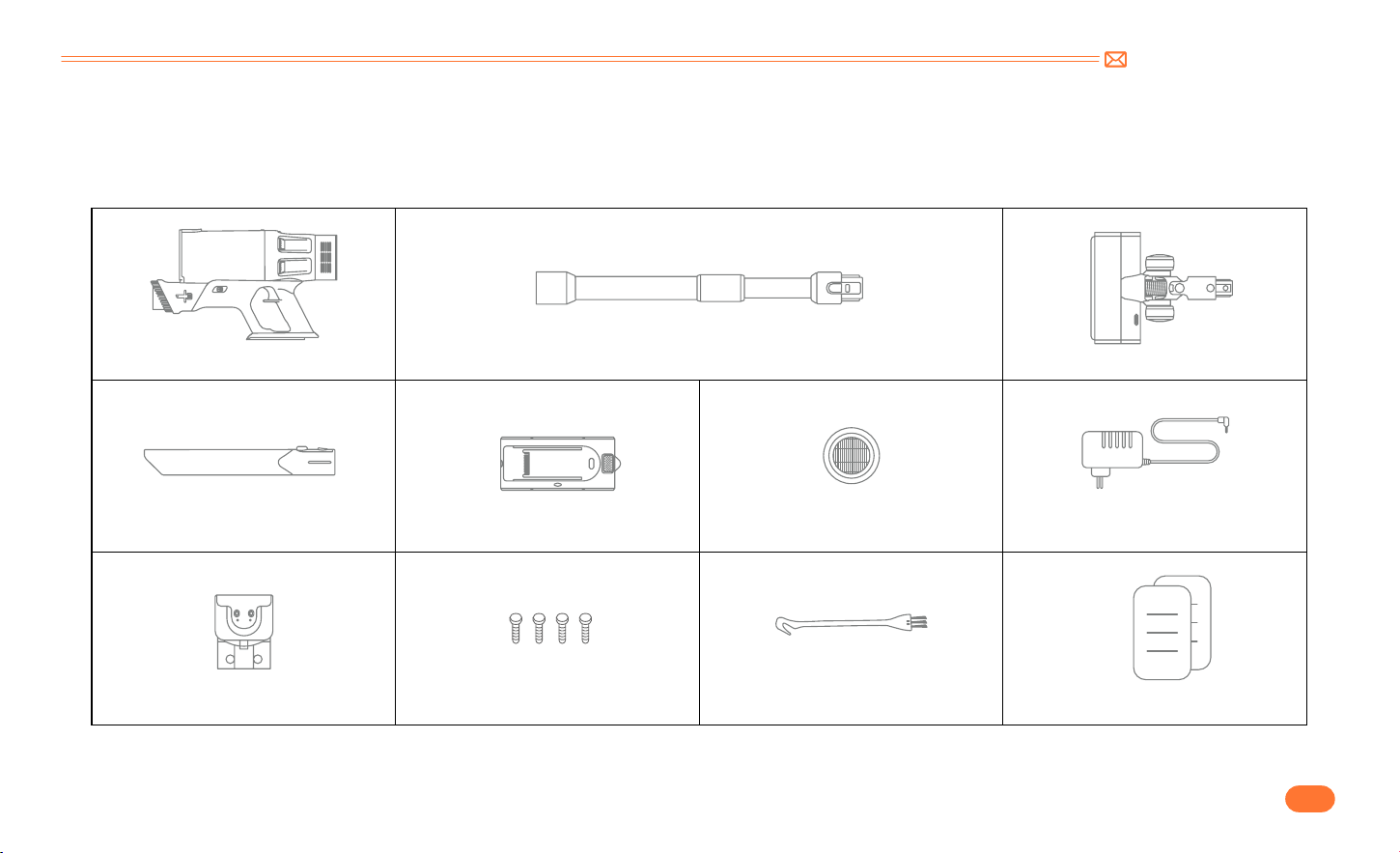
2. PACKAGE LIST 3
3. KNOW THE PRODUCT 4
3.1 Product Details 4
3.2 Digital Touch Screen 5
3.3 Accessories Function 5
4. PRODUCT ASSEMBLY 6
4.1 Install Vacuum Cleaner 6
4.2 Install Wall Mount 7
5. HOW TO USE 8
5.1 Charging 8
5.2 Operating 9
6. MAINTENANCE 13
6.1 Clean the Main Body 13
6.2 Clean the Dust Cup/Filters 14
6.3 Wash Dust Cup and Filters 14
6.4 Brush Roller Cleaning 16
7. SPECIFICATION 18
8. TROUBLESHOOTING 18
9. WARRANTY 19

support@inteture.com
EN
2.
1. WARNING
Thank you for purchasing the INTETURE BP20 cordless vacuum cleaner. Before using this machine, please read the following safety warning first and take
safety protection measures to avoid malfunctions caused by improper operation.
Note: The vacuum cleaner adopted thermal protection technology to prevent overheating, will stop working when the item is over heated.
①
This INTETURE appliance is for domestic use only. Use as described in this instruction booklet.
②
Before using this appliance, check that the mains power voltage corresponds to the voltage shown on the rating plate.
③
Do not use the appliance to vacuum all the latter things:
•
Water and other liquids
•
Lighted stub, hot ashes and other combustible things
•
Sharp matter
•
Wood pieces, gesso, cement, calcimine and other tiny granules
④
Keep the vacuum cleaner away from stoves and heat emitting appliance. Heat can deform and discolor the plastic parts of unit.
⑤
Always remove the plug from the power socket when the appliance is not in charging.
⑥
Never use spirits or other solvents to clean the appliance.
⑦
Never leave the appliance unattended when it is switched on. Keep the appliance out of the reach of children or the infirm.
⑧
Do not use a damaged cable or plug. If the device or charger does not work properly, dropped, damaged, missed or dropped into water, please contact
support@inteture.com, INTETURE after sales team for support.
⑨
The battery must be removed from the appliance before it is scrapped.
⑩
The battery is to be disposed of safely.
⑪
The appliance must be disconnected from the supply when removing the battery.
⑫
Only the adapter provided by the manufacturer can be used.
⑬
This appliance can be used by children aged from 8 years and above and persons with reduced physical, sensory or mental capabilities or lack of
experience and knowledge if they have been given supervision or instruction concerning use of the appliance in a safe way and understand the hazards
involved.
support@inteture.com
EN
3.
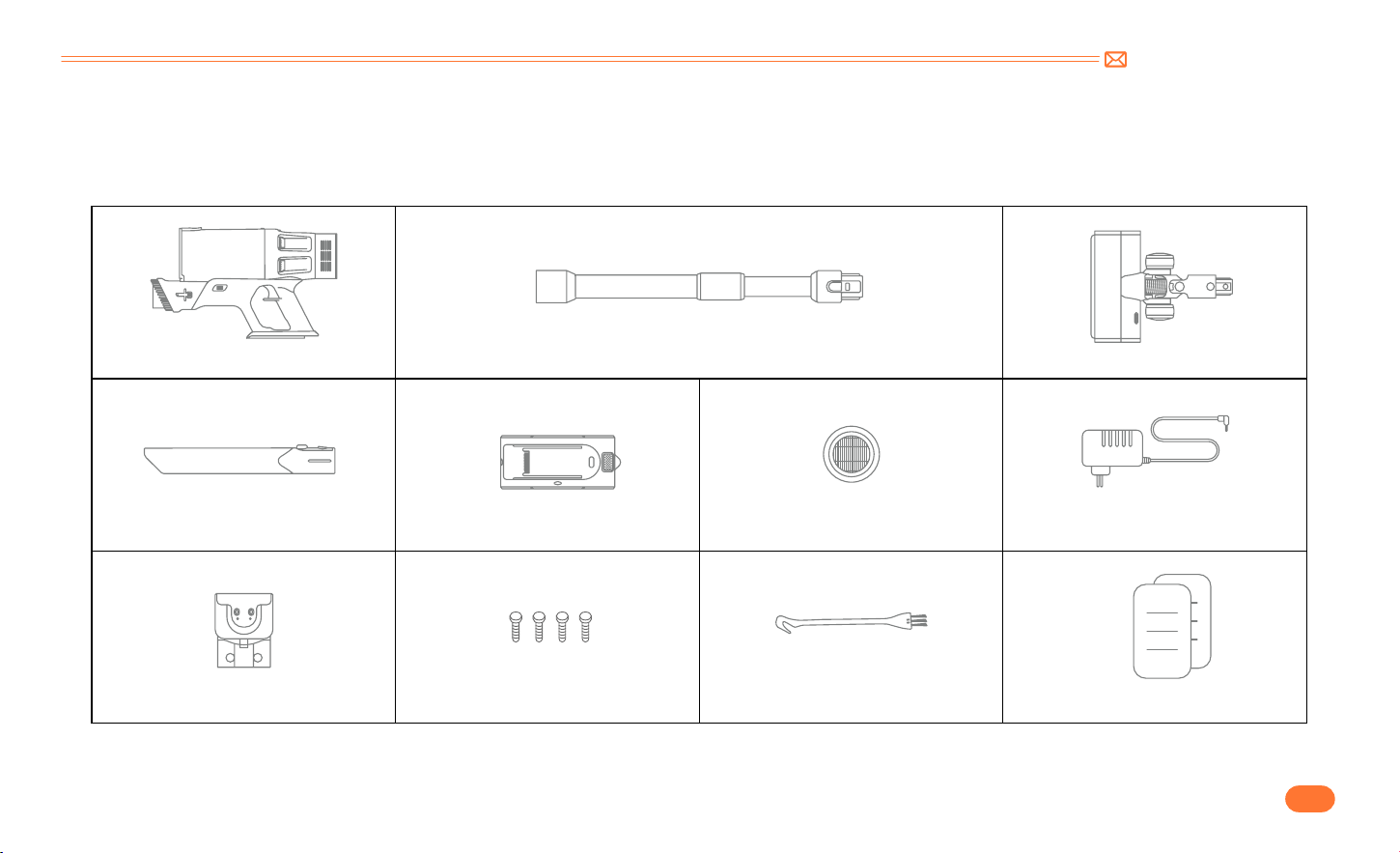
2. PACKAGE LIST
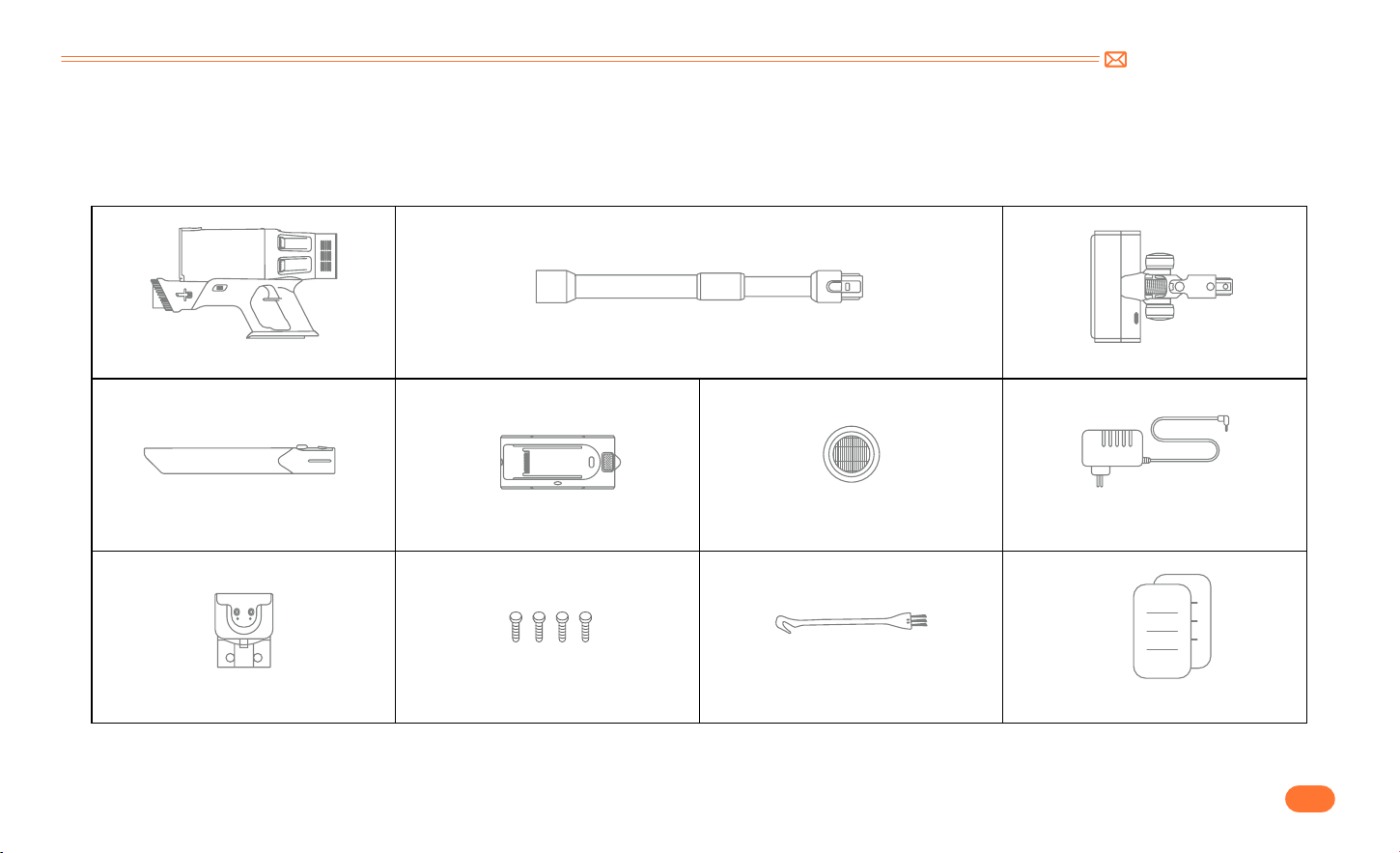
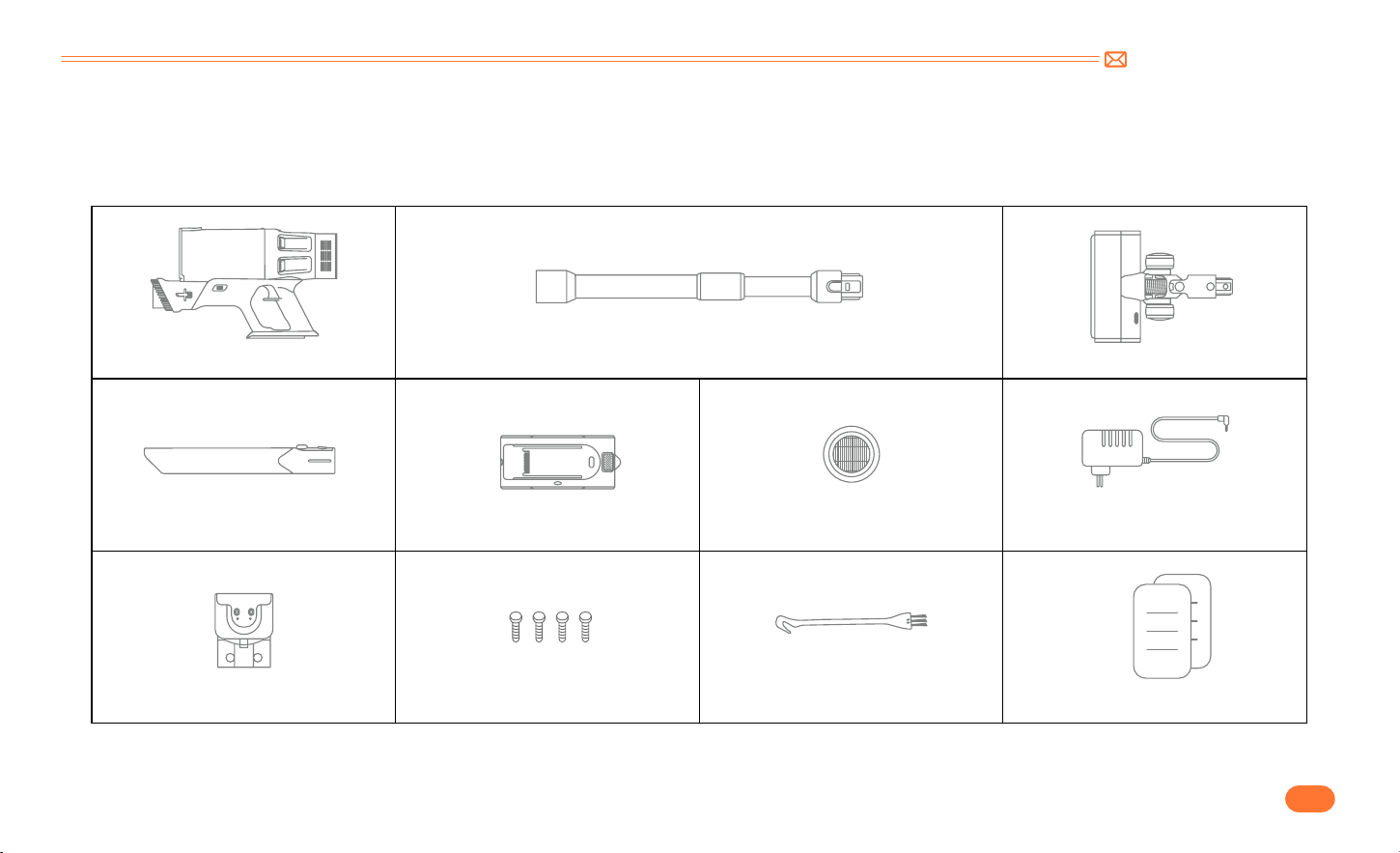
Please check and confirm the accessories and parts according to the following sheet before using.
Main Body & Integrated brush Adjustable Extension Tube Electrical Floor Brush
Long Crevice Nozzle Battery Extra Hepa Filter Charger
Chargable Wall Mount Nail*4 Mini Cleaning Brush Quick User Guide
support@inteture.com
EN
4.
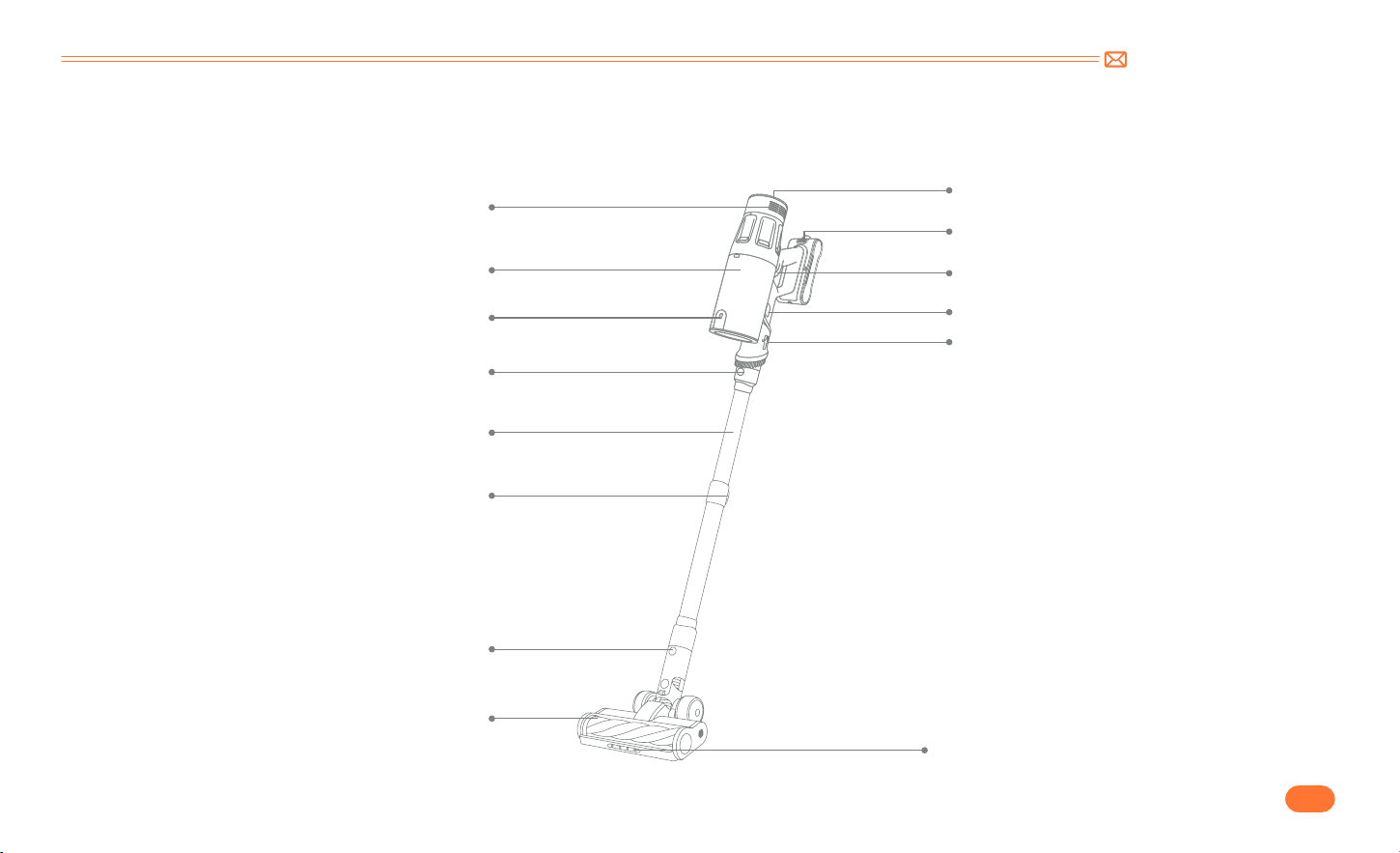
3. KNOW THE PRODUCT
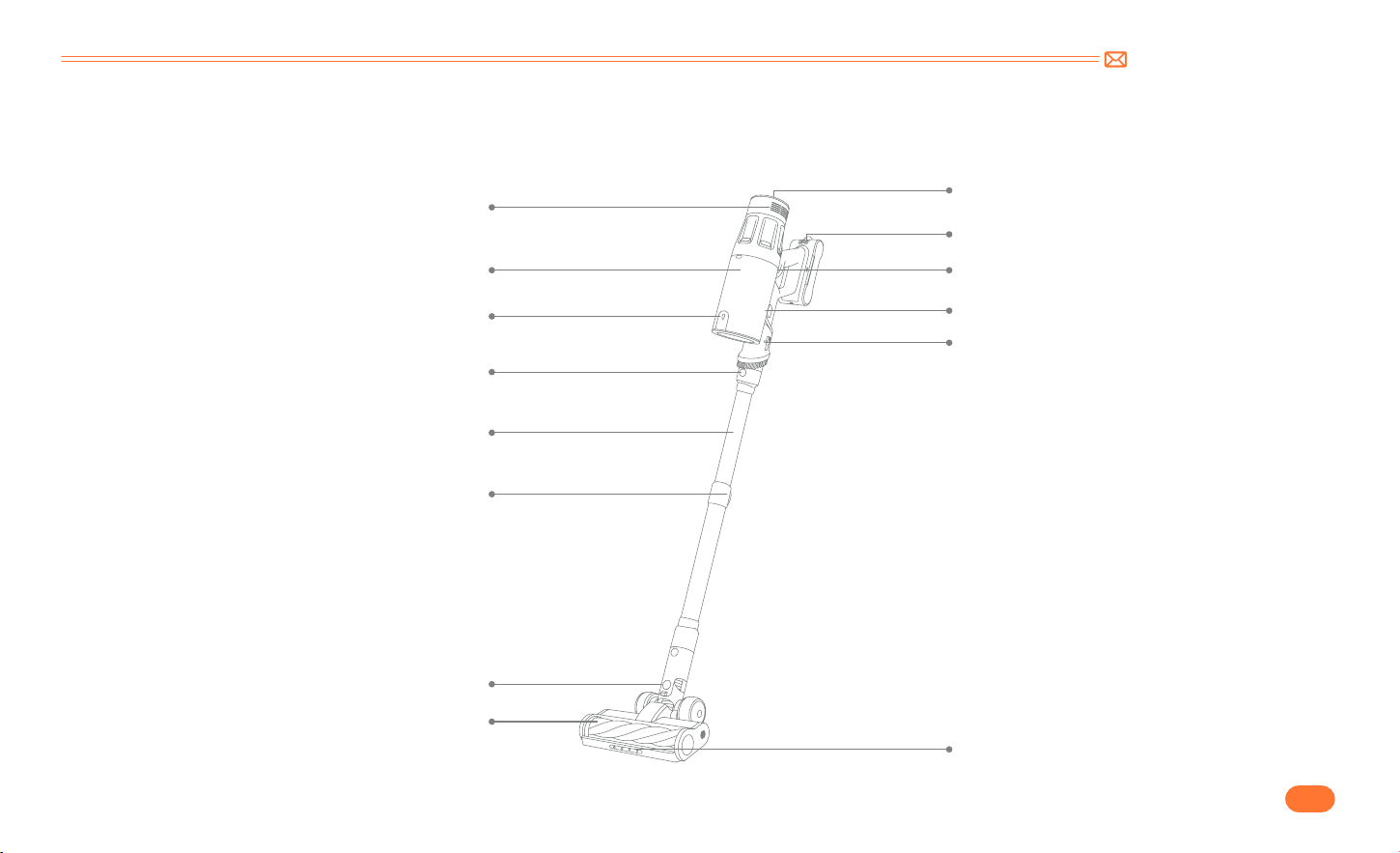
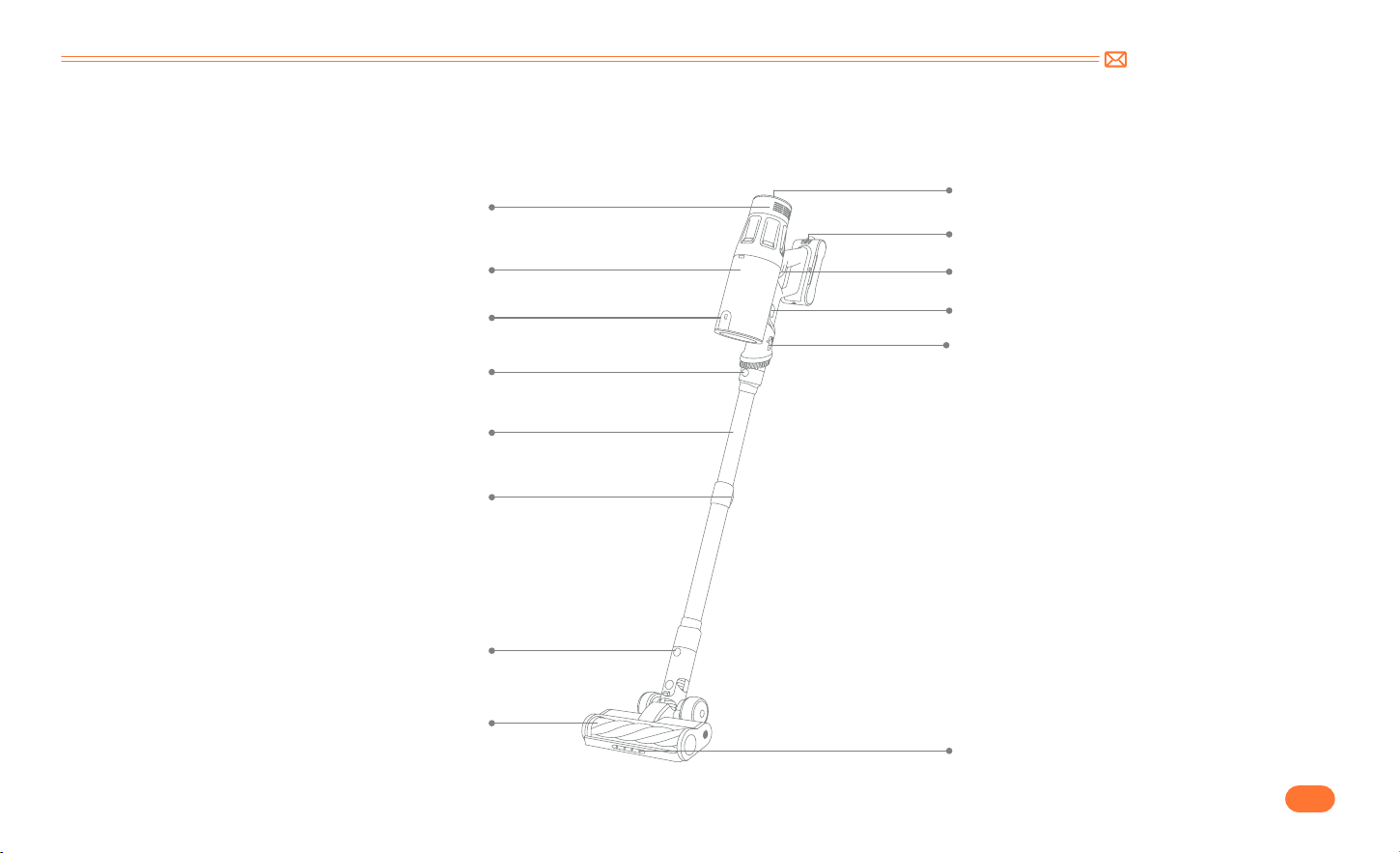
3.1 Product Details
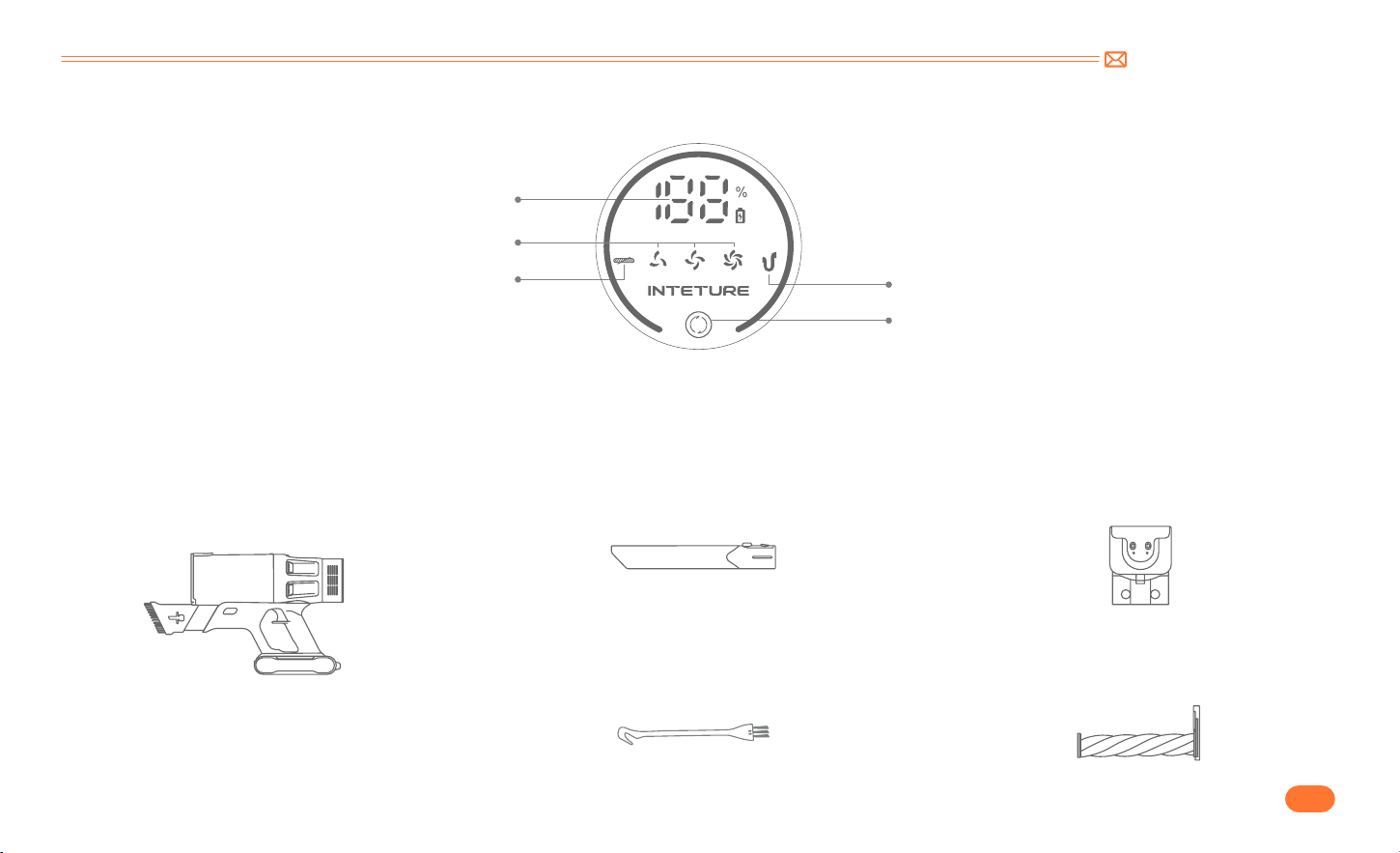
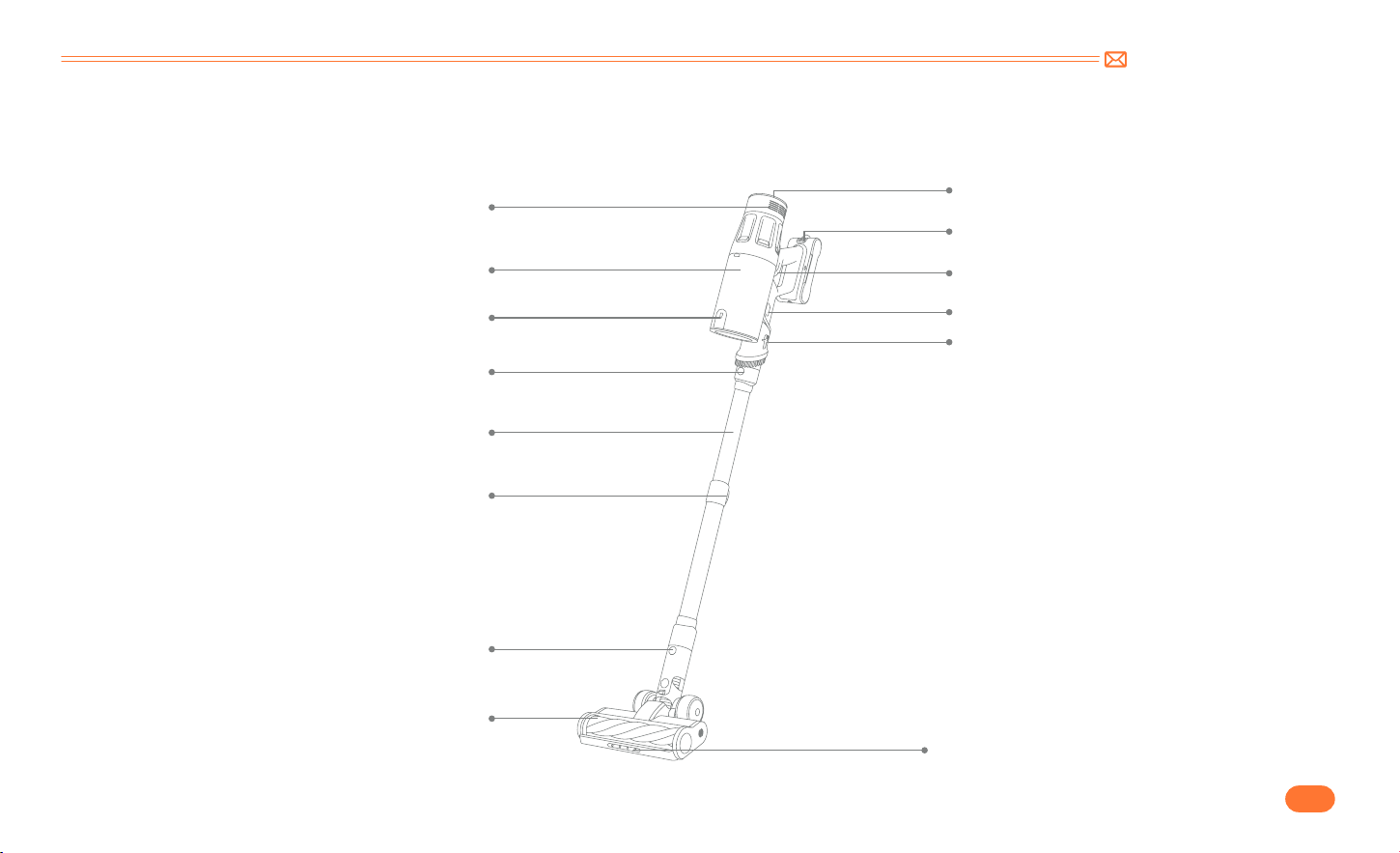
Air Outlet
Digial Touch Screen
Battery Pack Release Button
Switch Button
Dust Cup Release Button
Integrated brush adjustment button
LED Light
Dust Cup
Dust Empty Button
Tube Release Button
Telescopic Tube
Length Adjustment Button
Electrical Floor Brush
Electrical Floor Brush Release Button
support@inteture.com
EN
5.
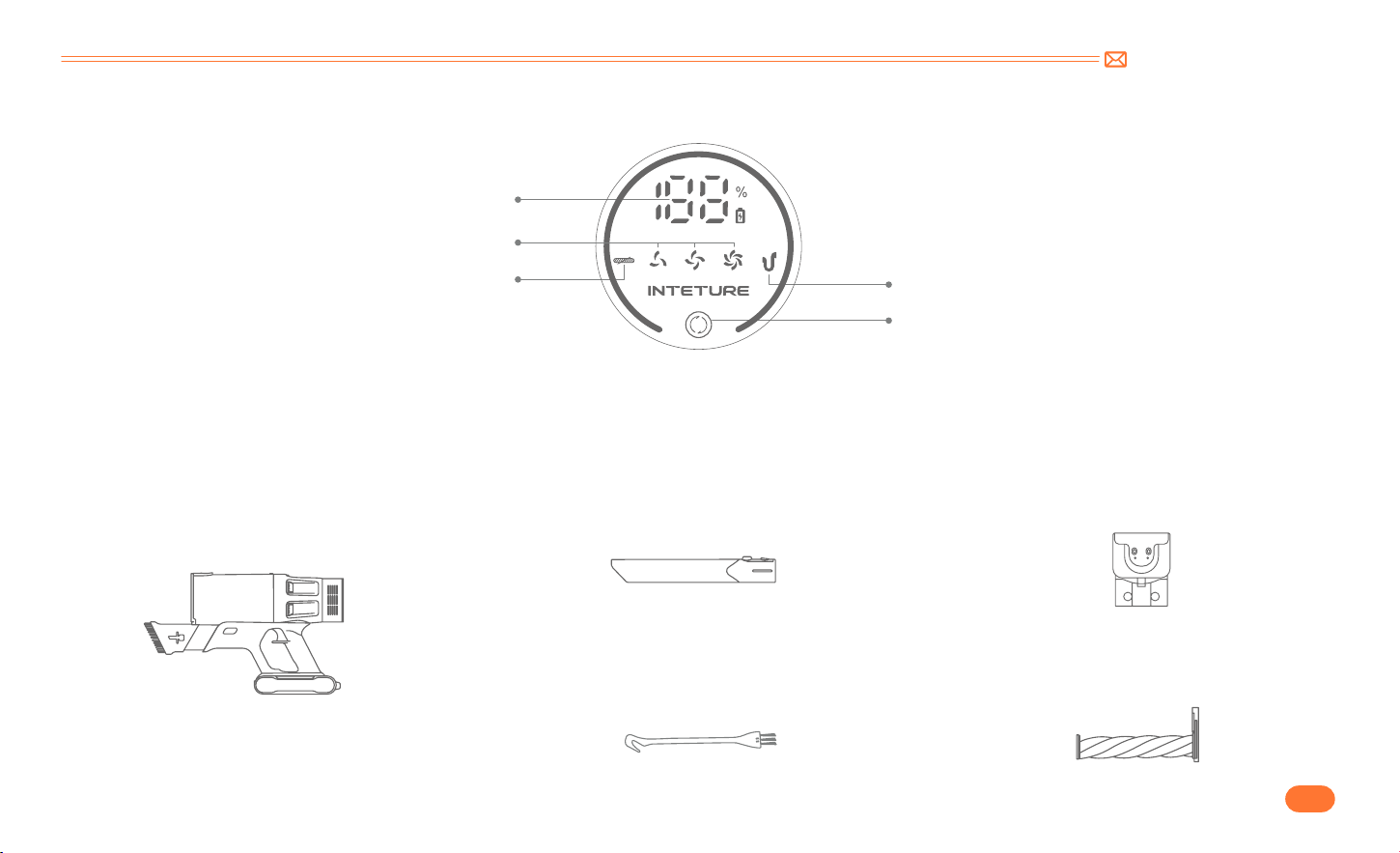
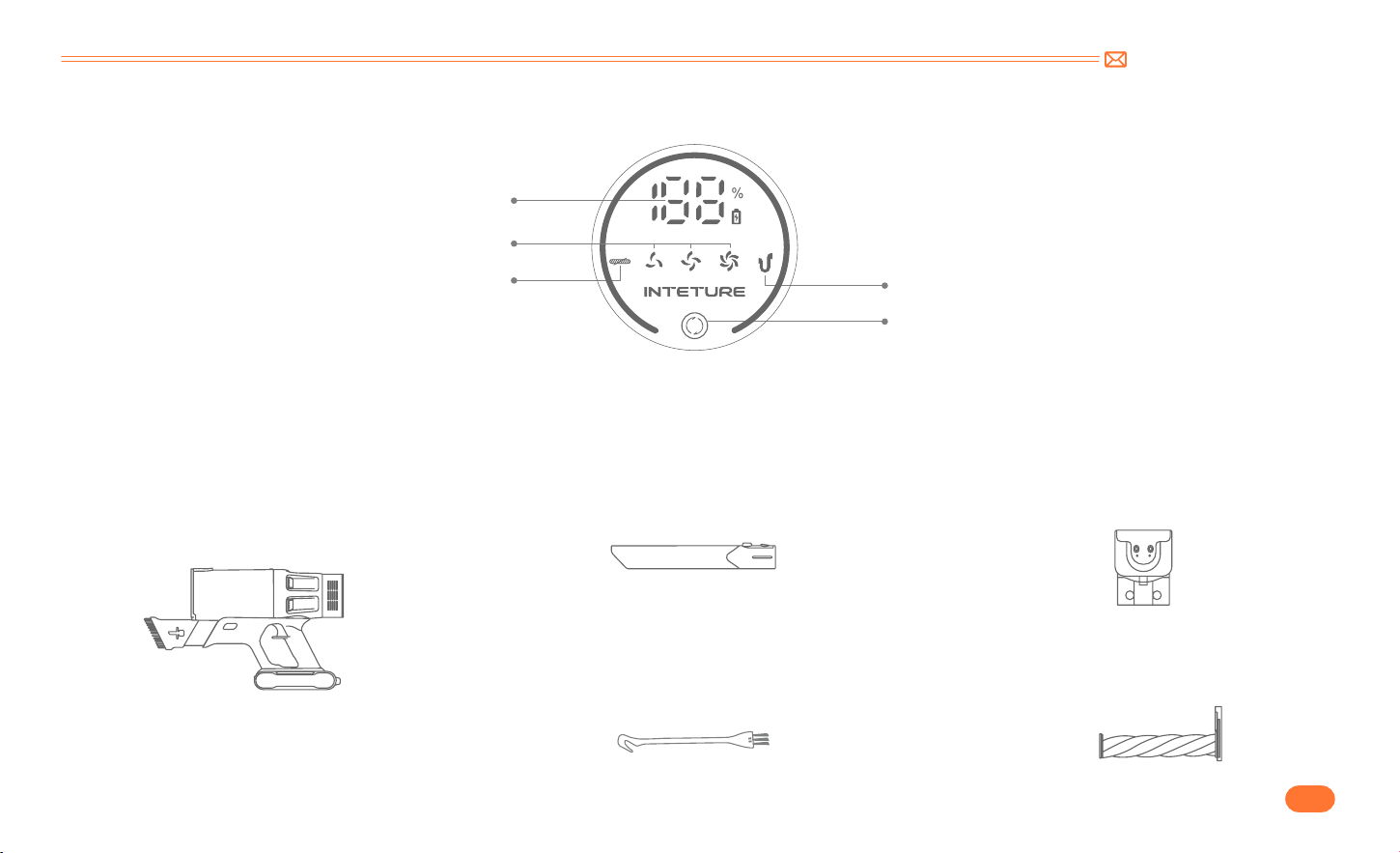
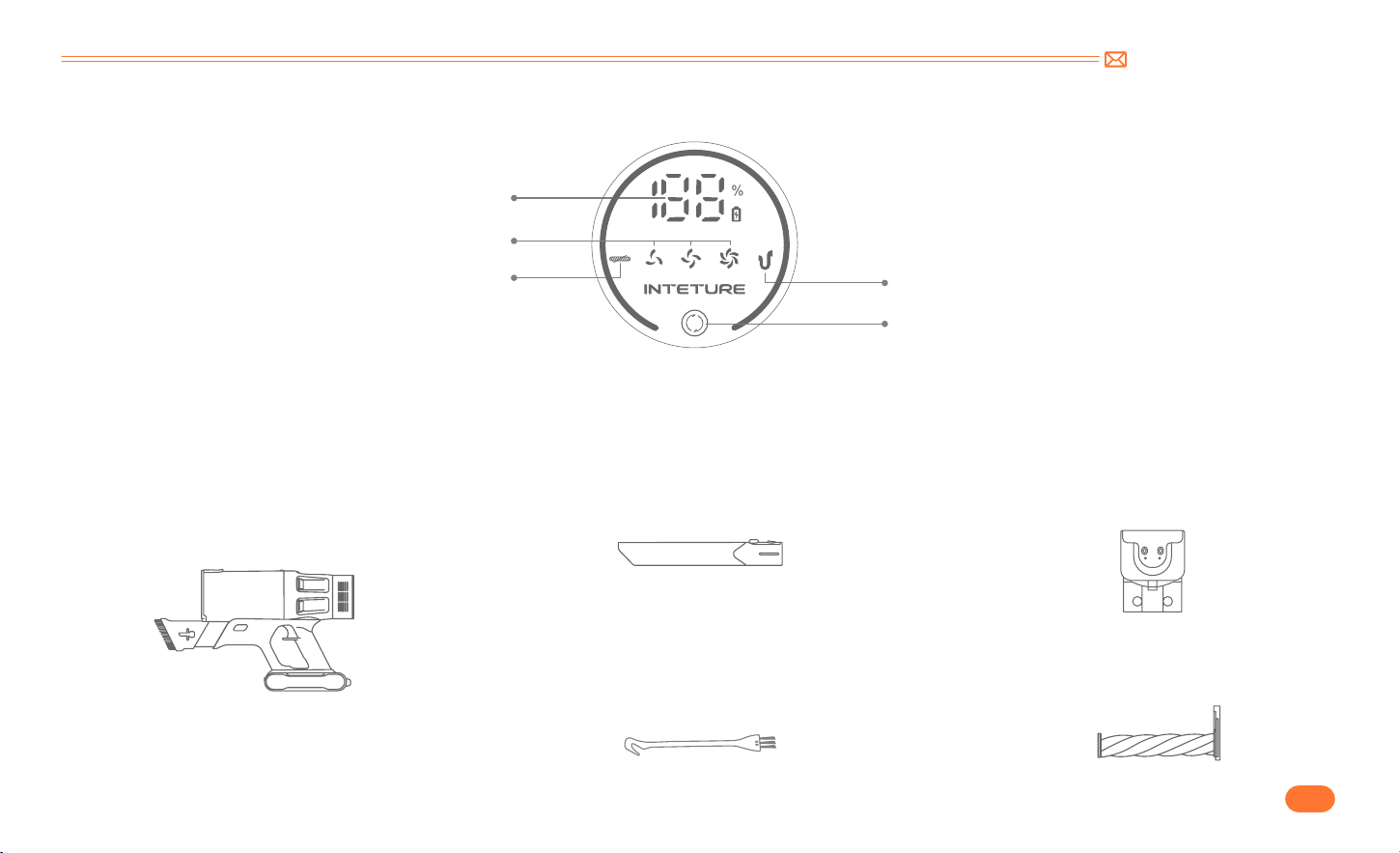
3.2 Digital Touch Screen
3.3 Accessories Function
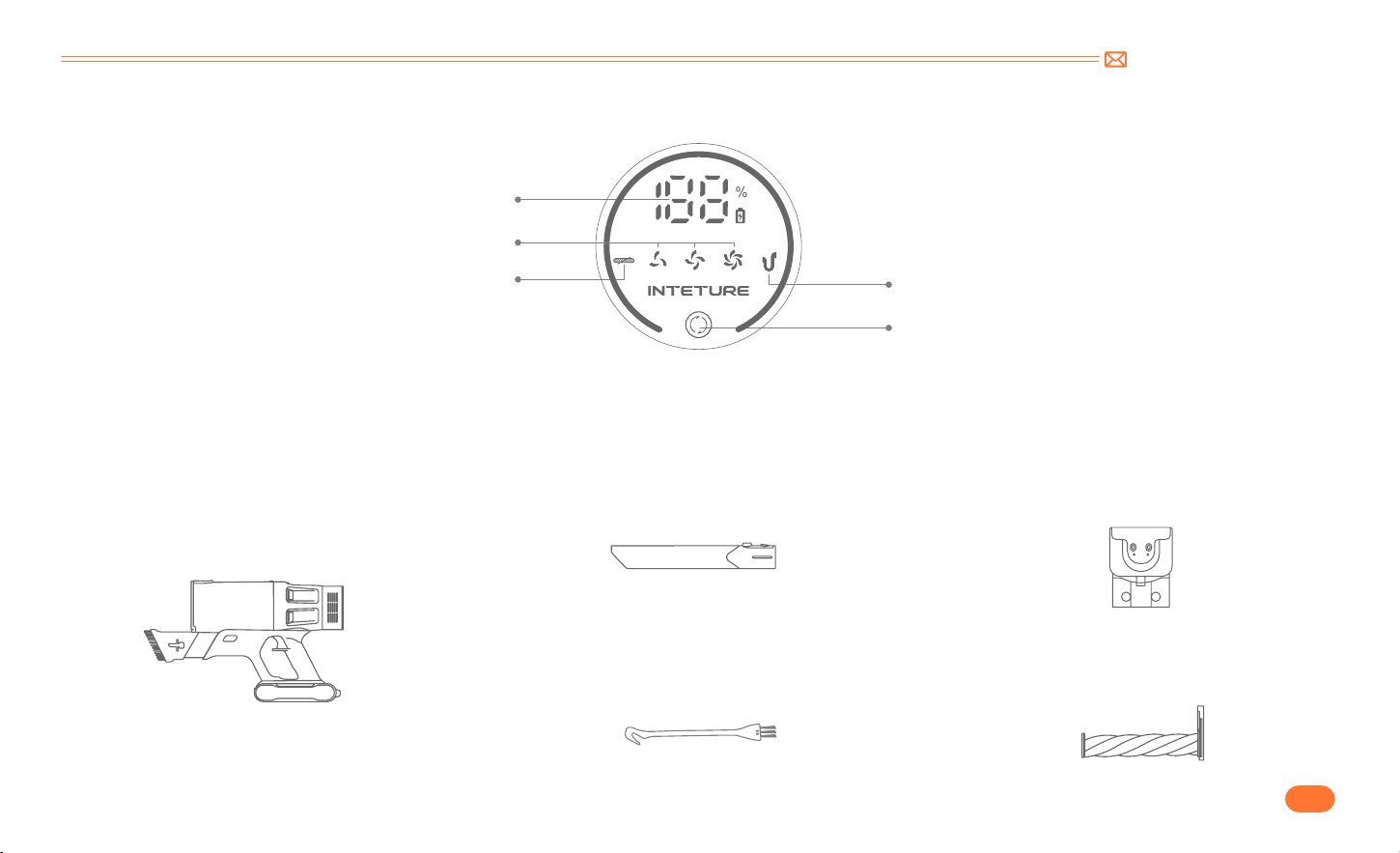
Battery Power Indicator
Clean Dust Cup Indicator
Suction Adjustment Button
Suction Level Indicator Light
Blockage Indicator
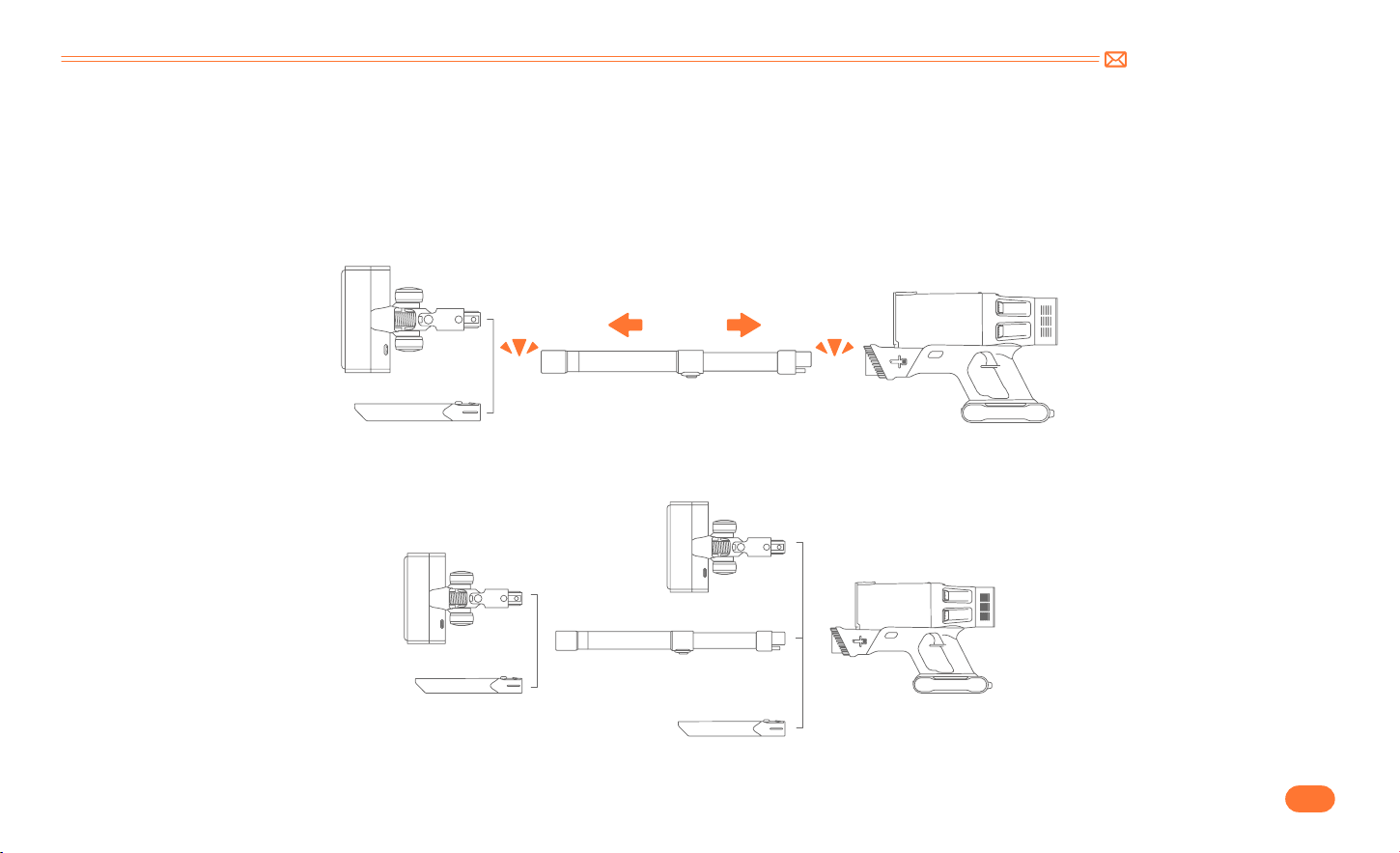
Integrated brush
Chargable Wall MountLong Crevice Nozzle
Press the adjustment button to stretch the
brush head, can help you remove dust and
hair on the Sofa/Desktop.
Fix the vacuum cleaner and accessories
on the wall hanger for easy storage, and it
will charge automatically.
Remove dust on the hard to reach areas
like windows, bed feet, gaps between sofa,
etc.
Multi fuction Rolling Brush
Remove dust, debris, and hair from all
kinds of floors, carpets, and velvet.
Mini Cleaning Brush
Remove dust, debris, and hair from all
kinds of floors, carpets, and velvet.
support@inteture.com
EN
6.
4. PRODUCT ASSEMBLY
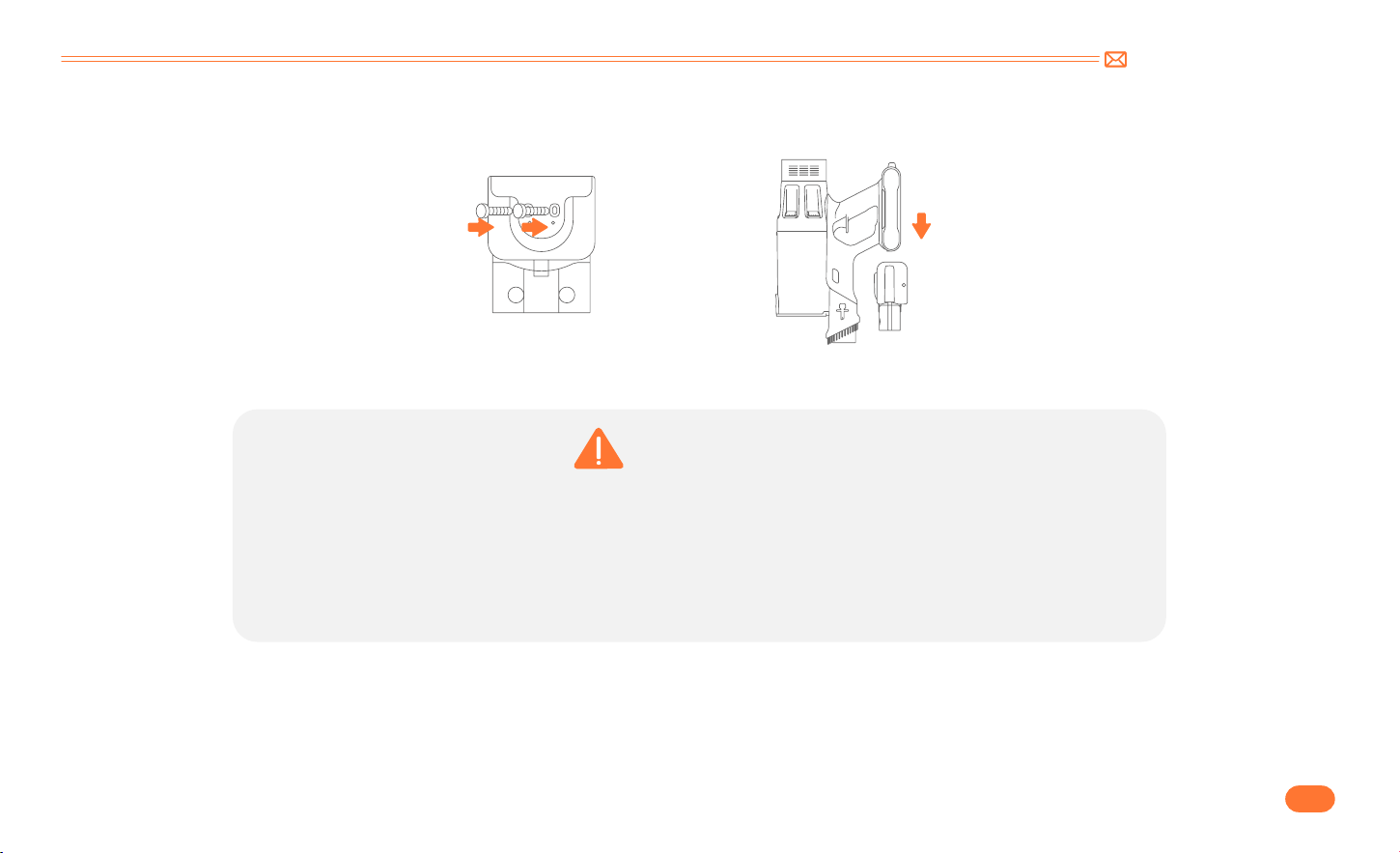
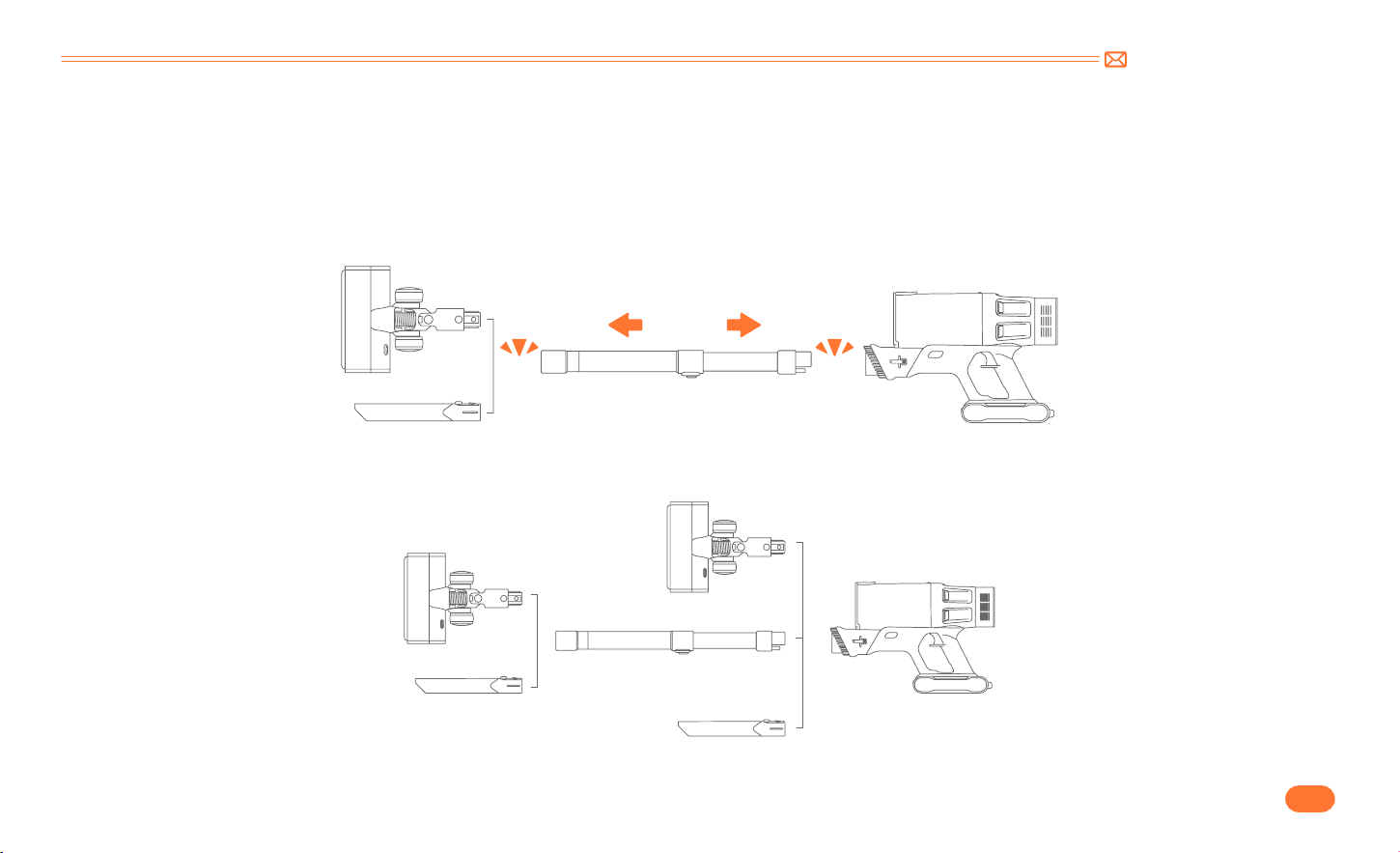
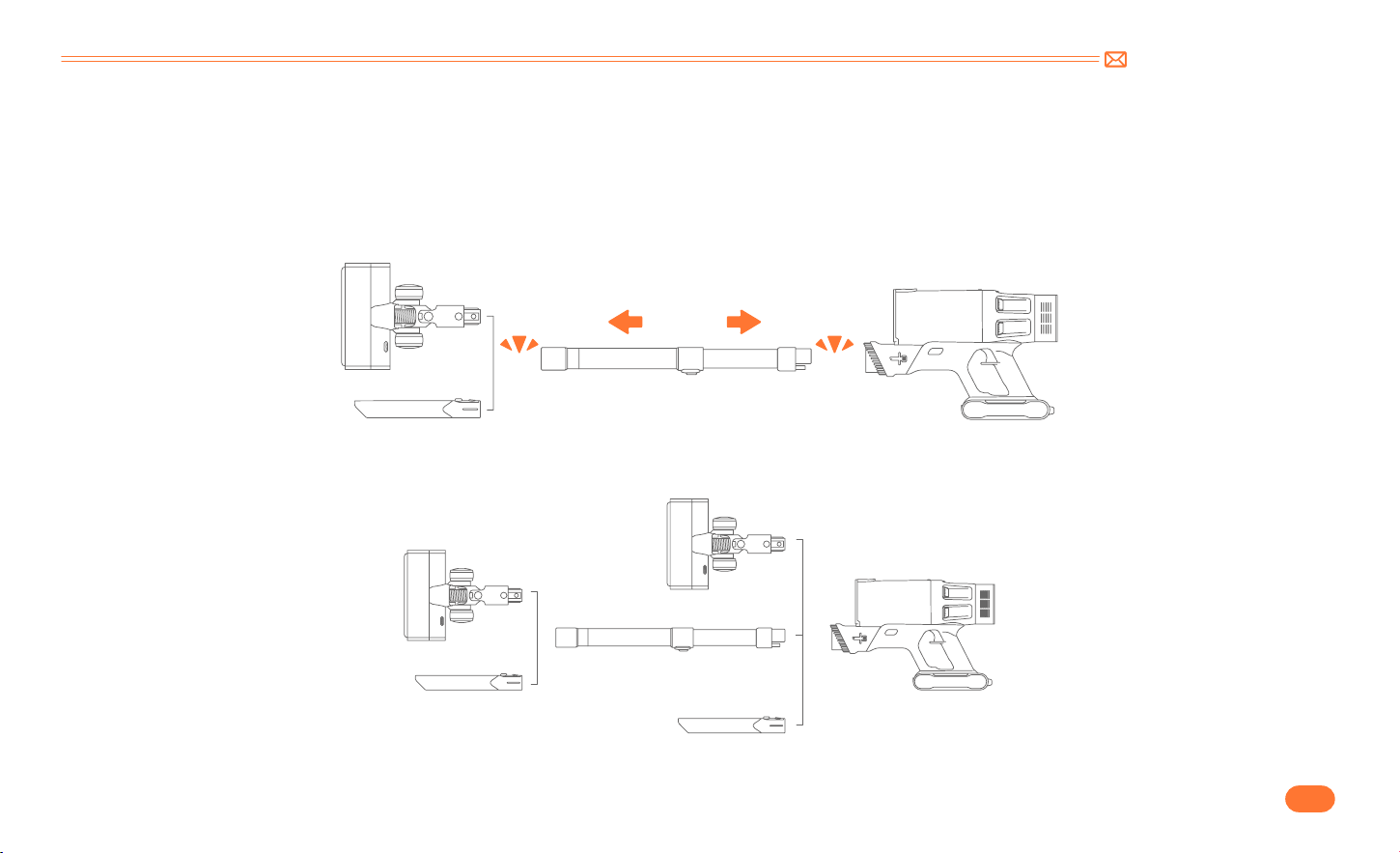
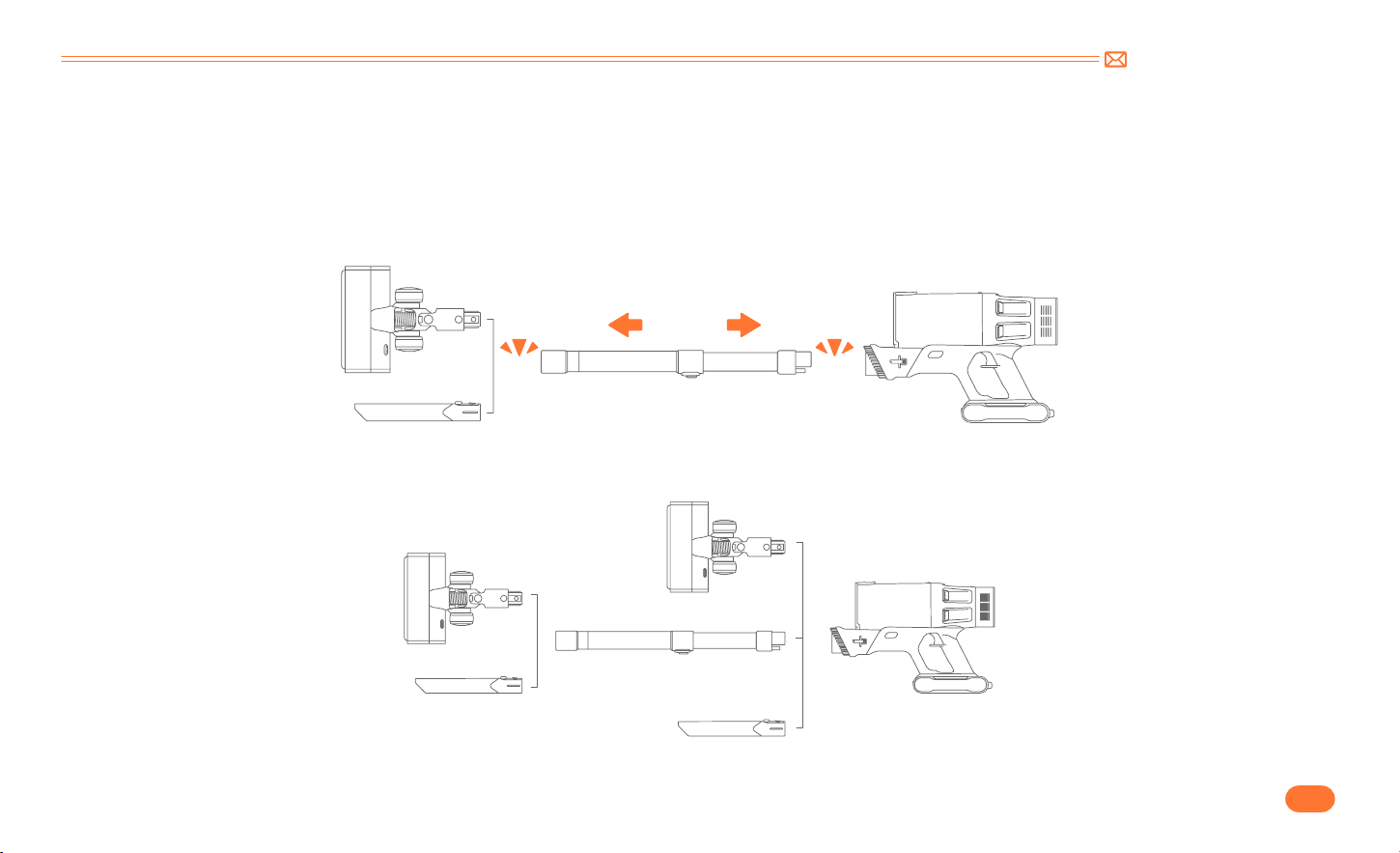
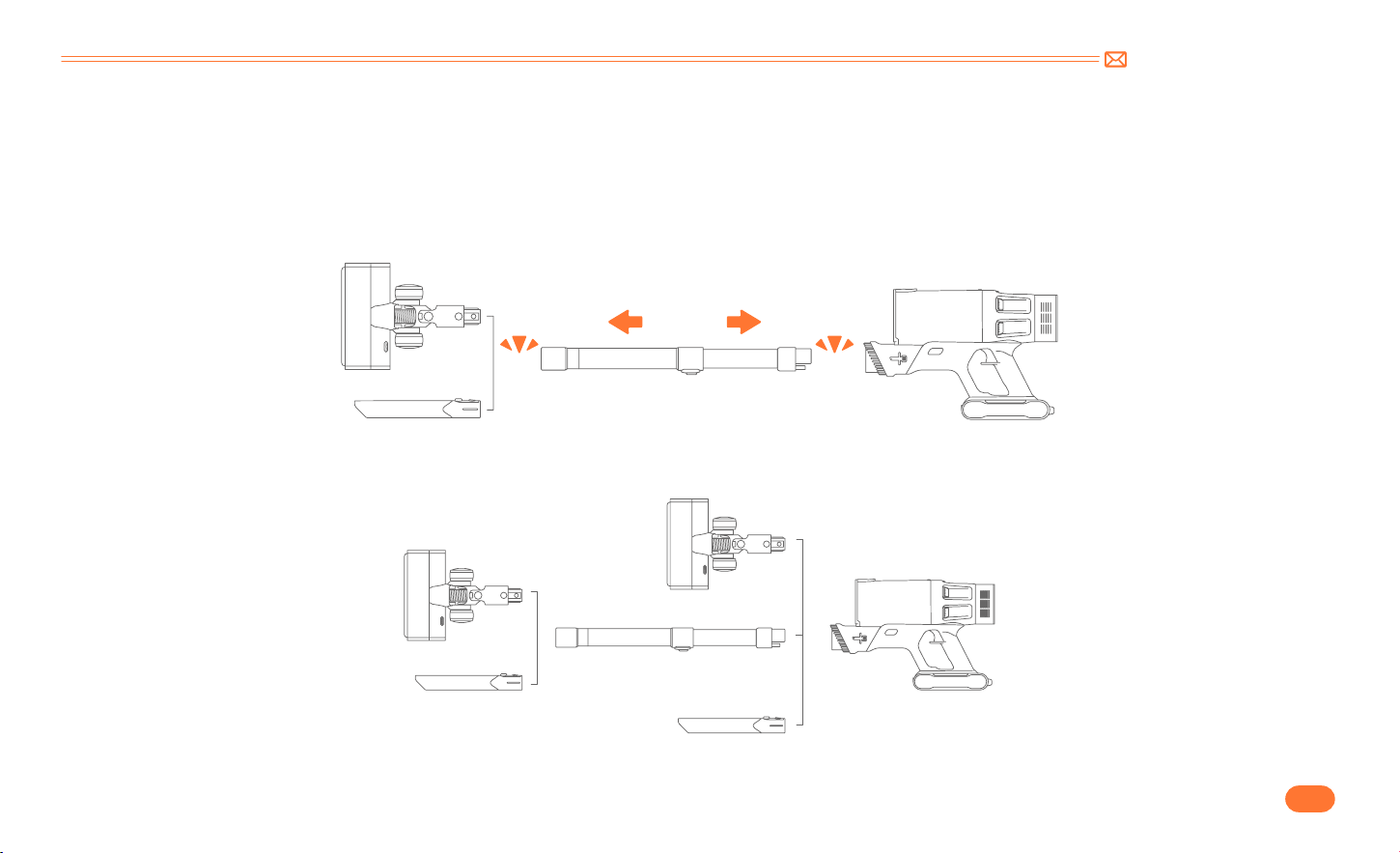
4.1 Install Vacuum Cleaner
•
Directly Install Cleaning Accessories
•
Install Extension Tube & Cleaning Accessories
Click
Click
support@inteture.com
EN
7.
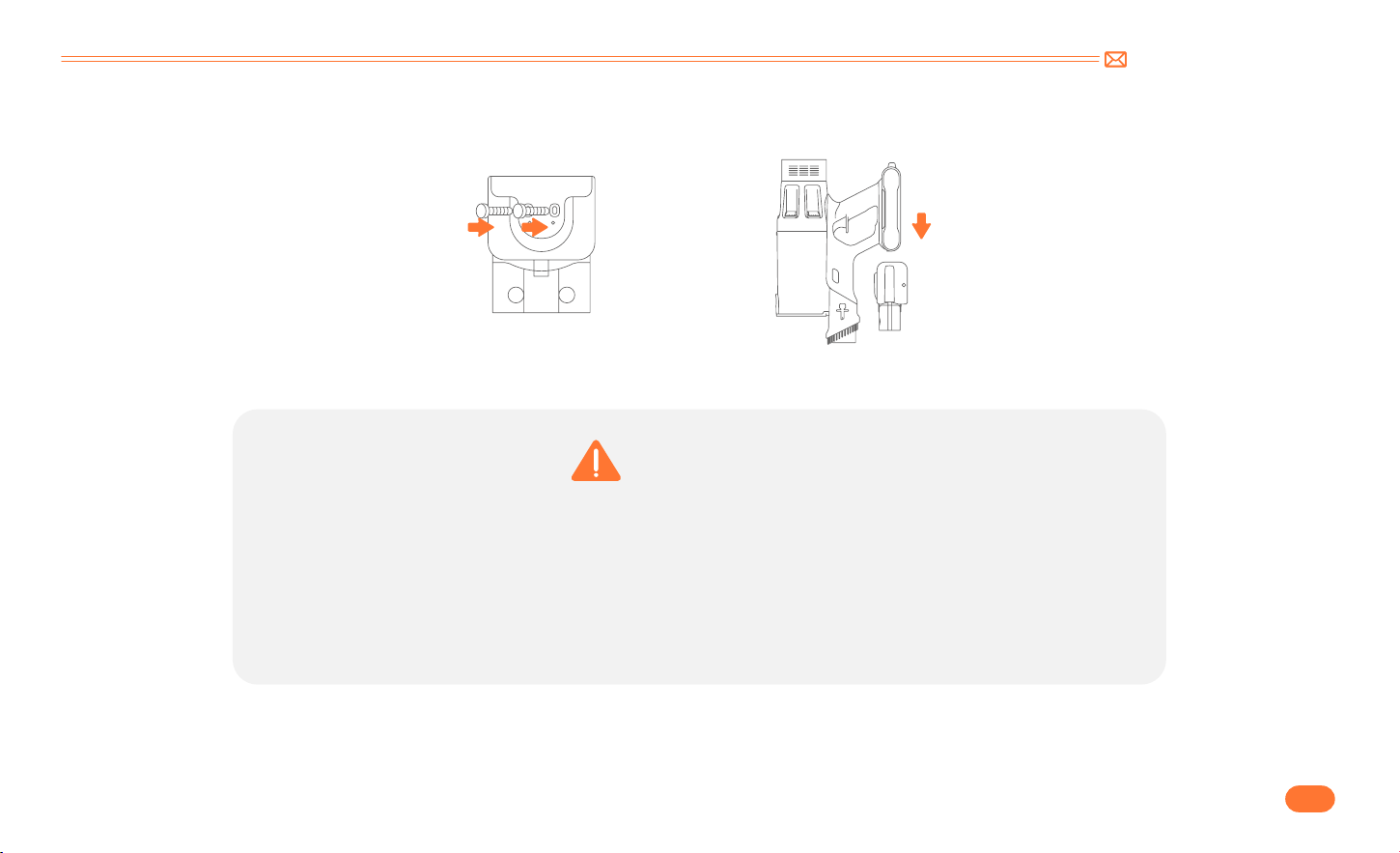
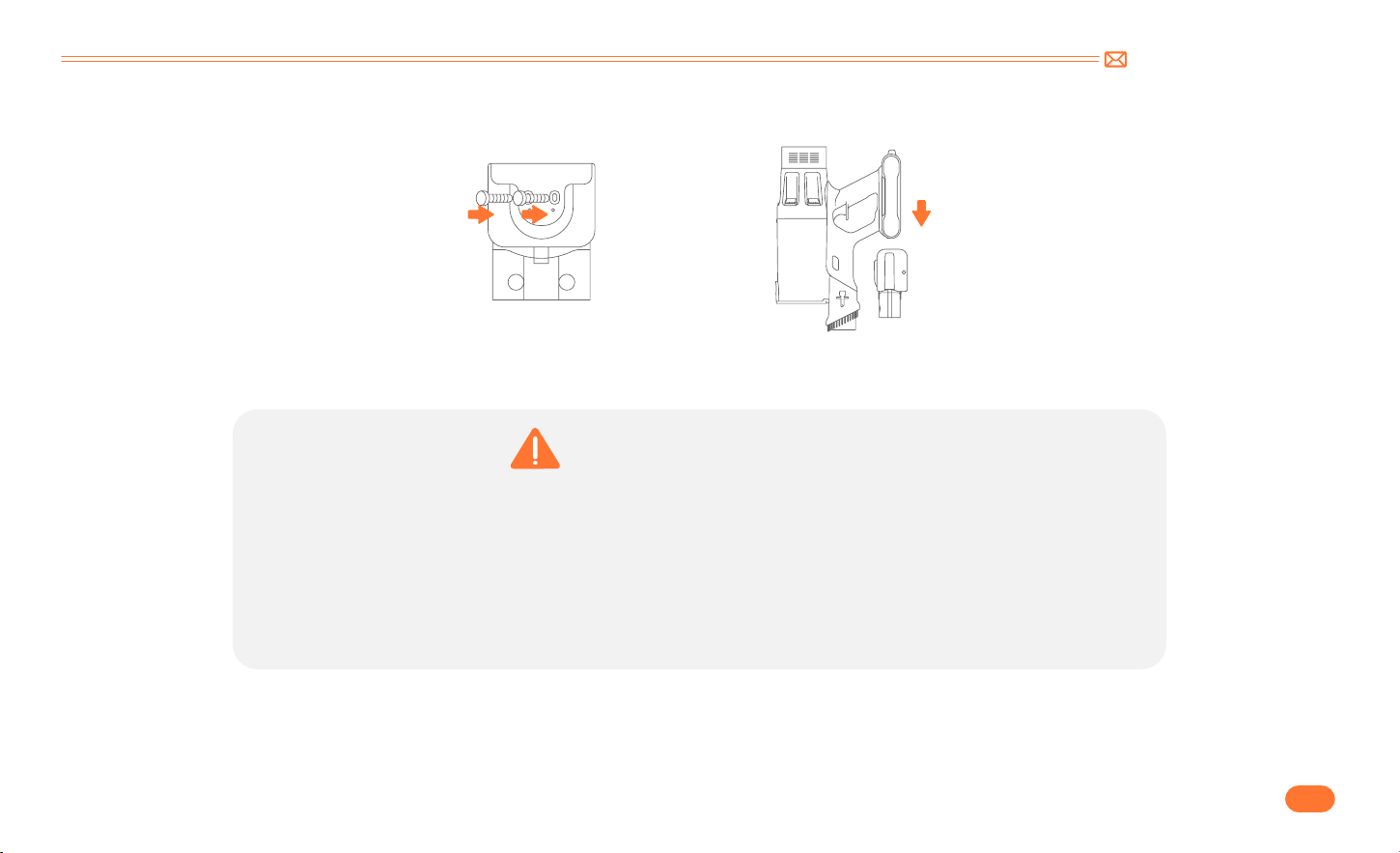
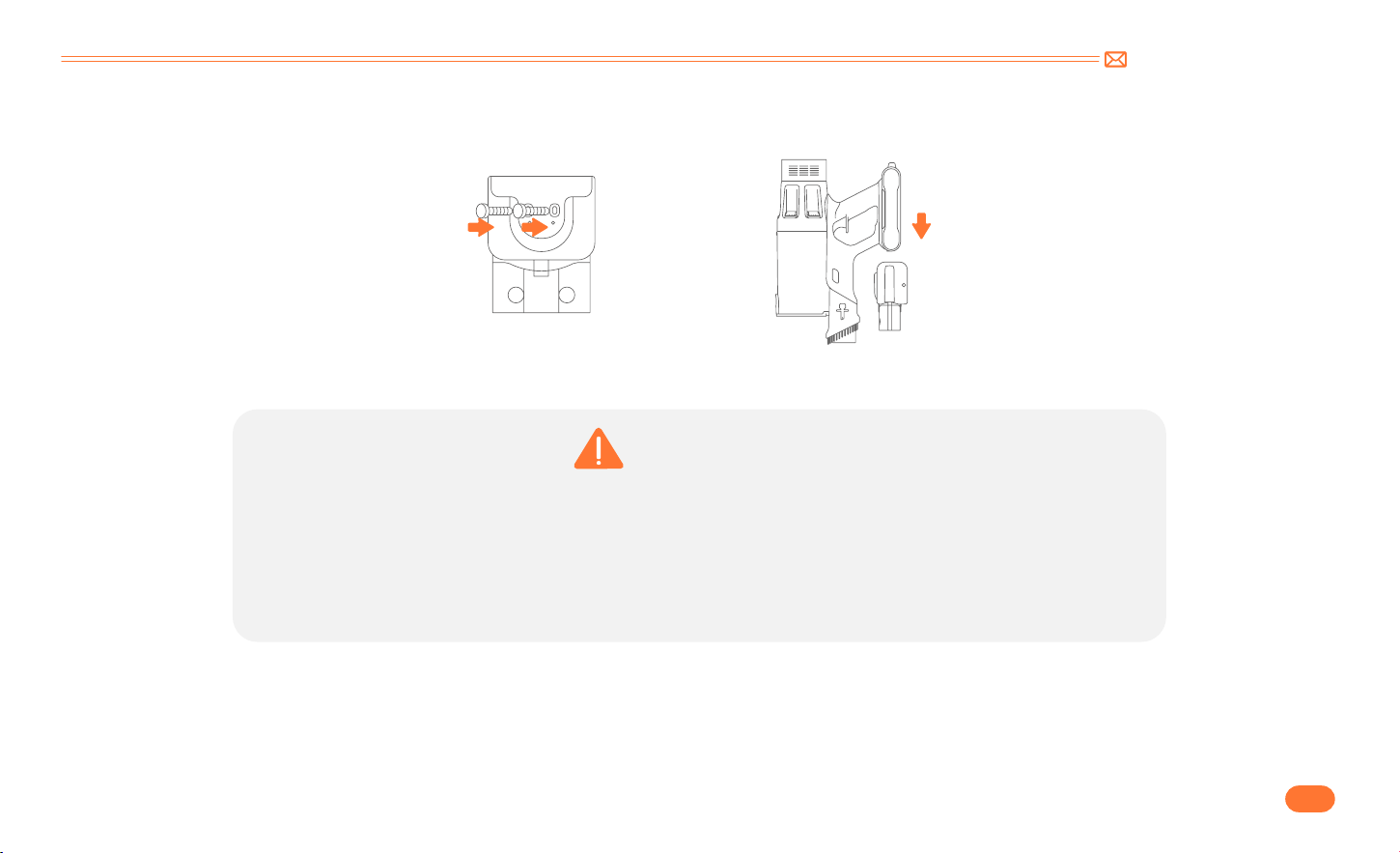
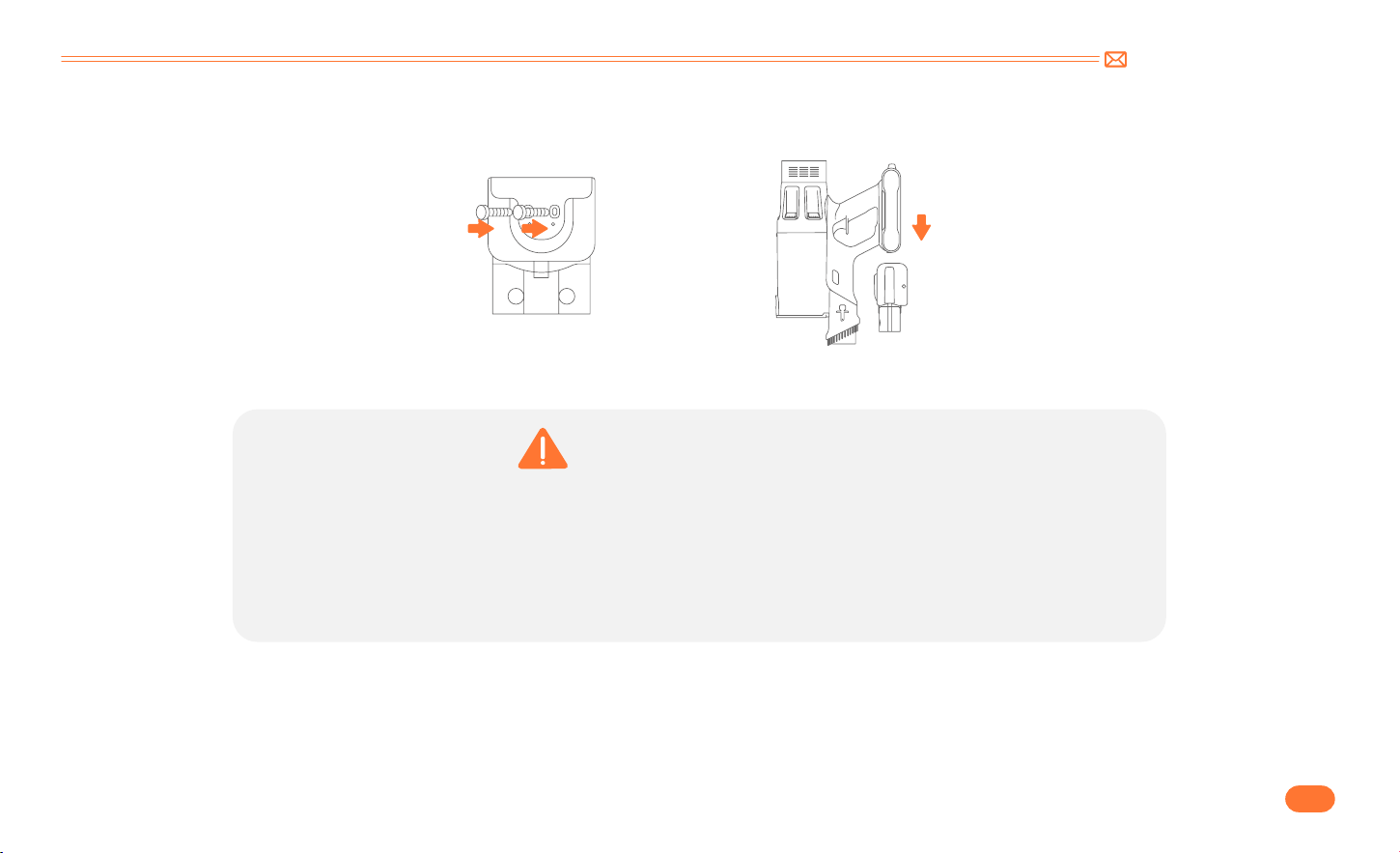
4.2 Install Wall Mount
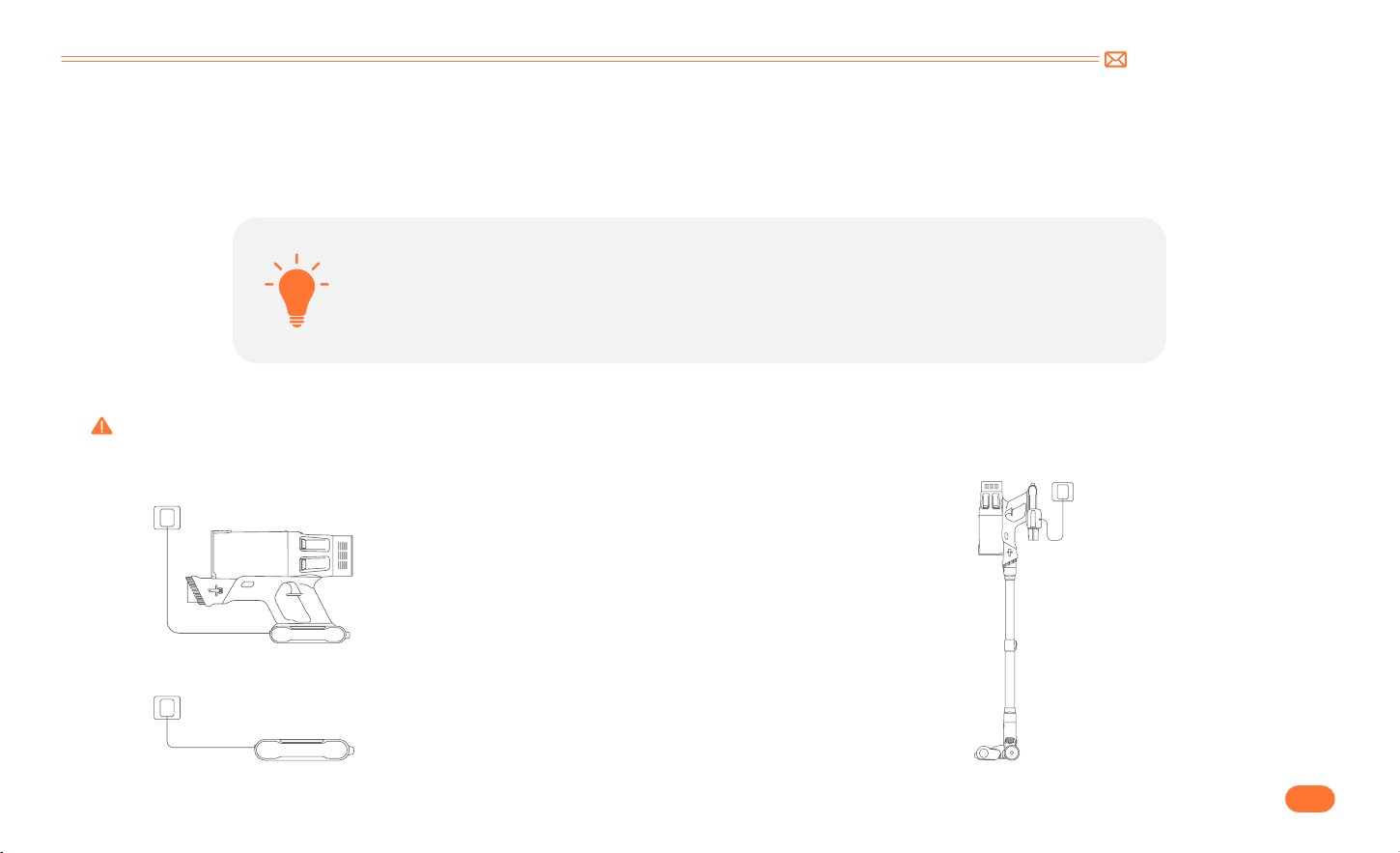
WARNING
•
Please make sure there is no gas, water, or electrical cables and wires behind the mounting area.
•
To avoid the dock dropping down, please make sure it must be installed firmly.
•
Store appropriately indoors in a dry place. Do not expose the machine to sunlight or freezing temperature.
Recommended temperature range: 39.2°F (4°C) 104°F(40°C).
support@inteture.com
EN
8.
5. HOW TO USE
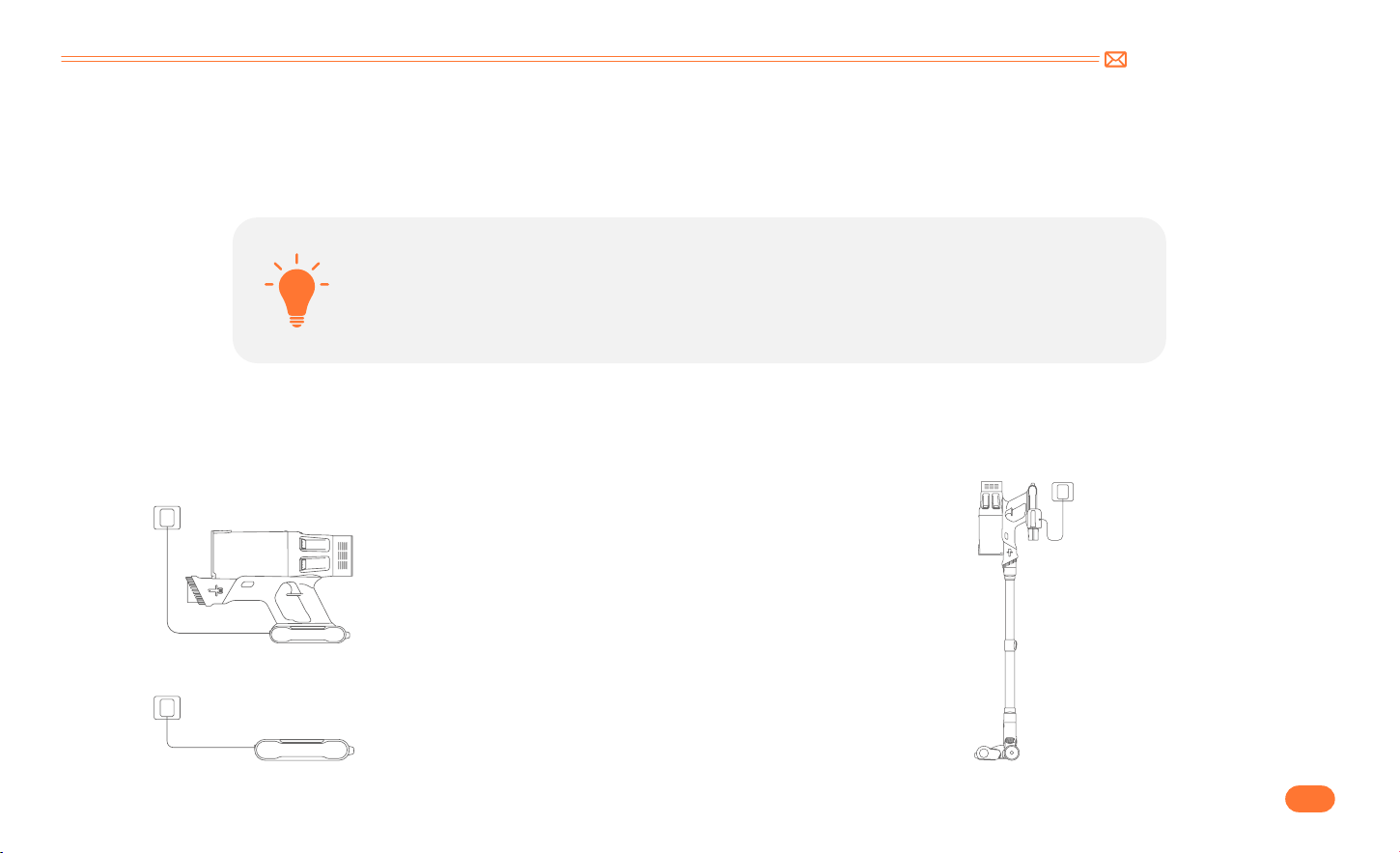
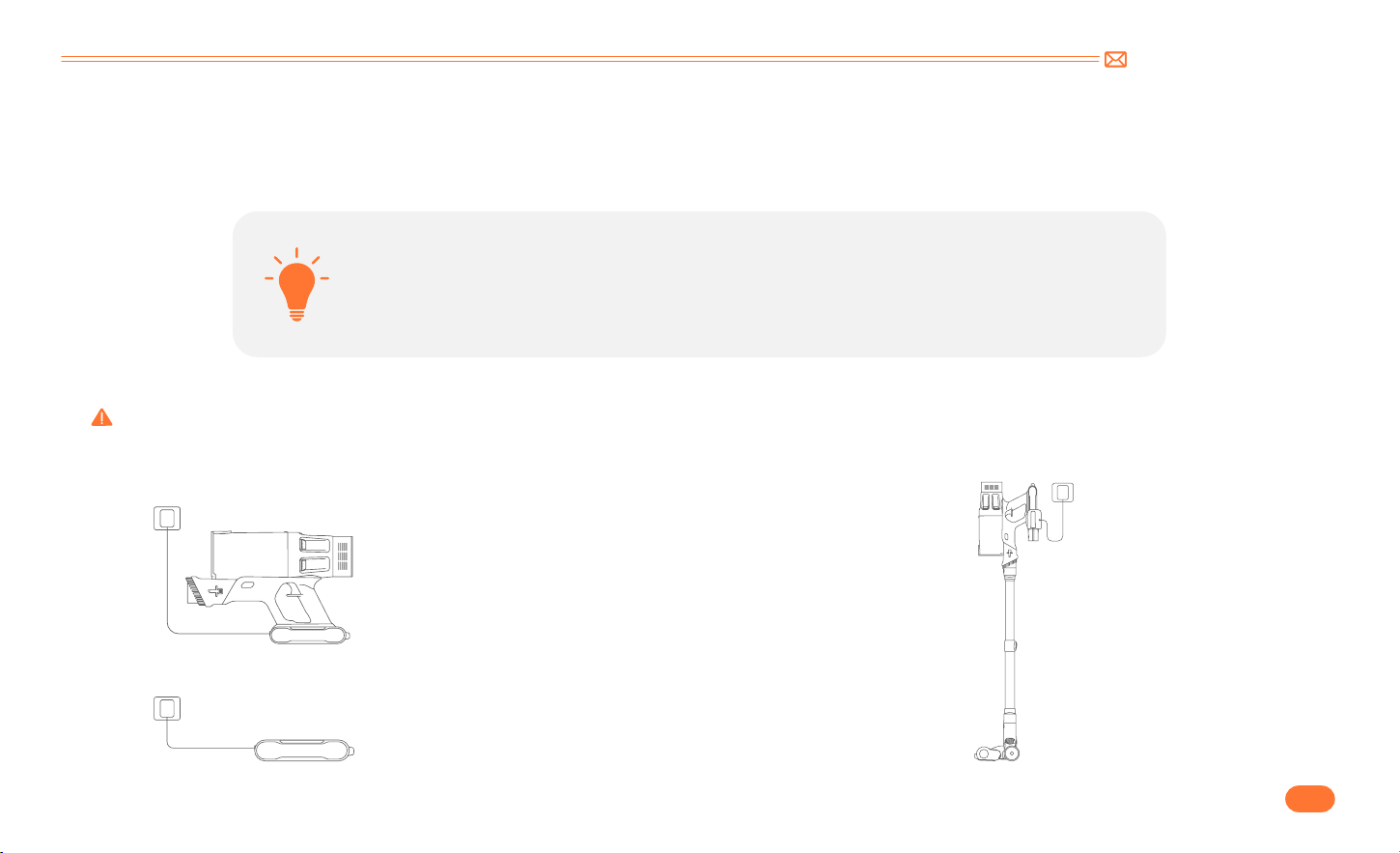
5.1 Charging
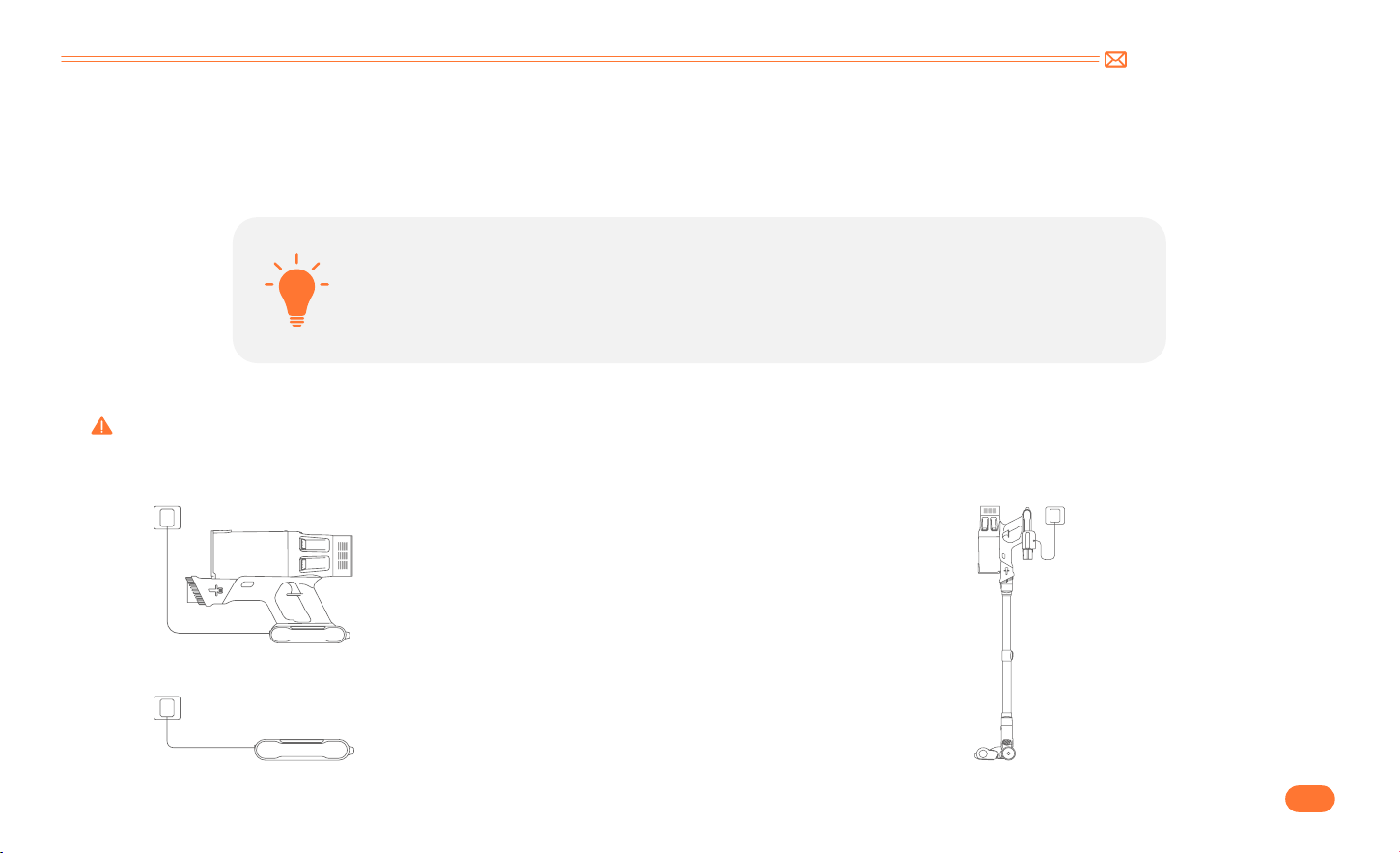
•
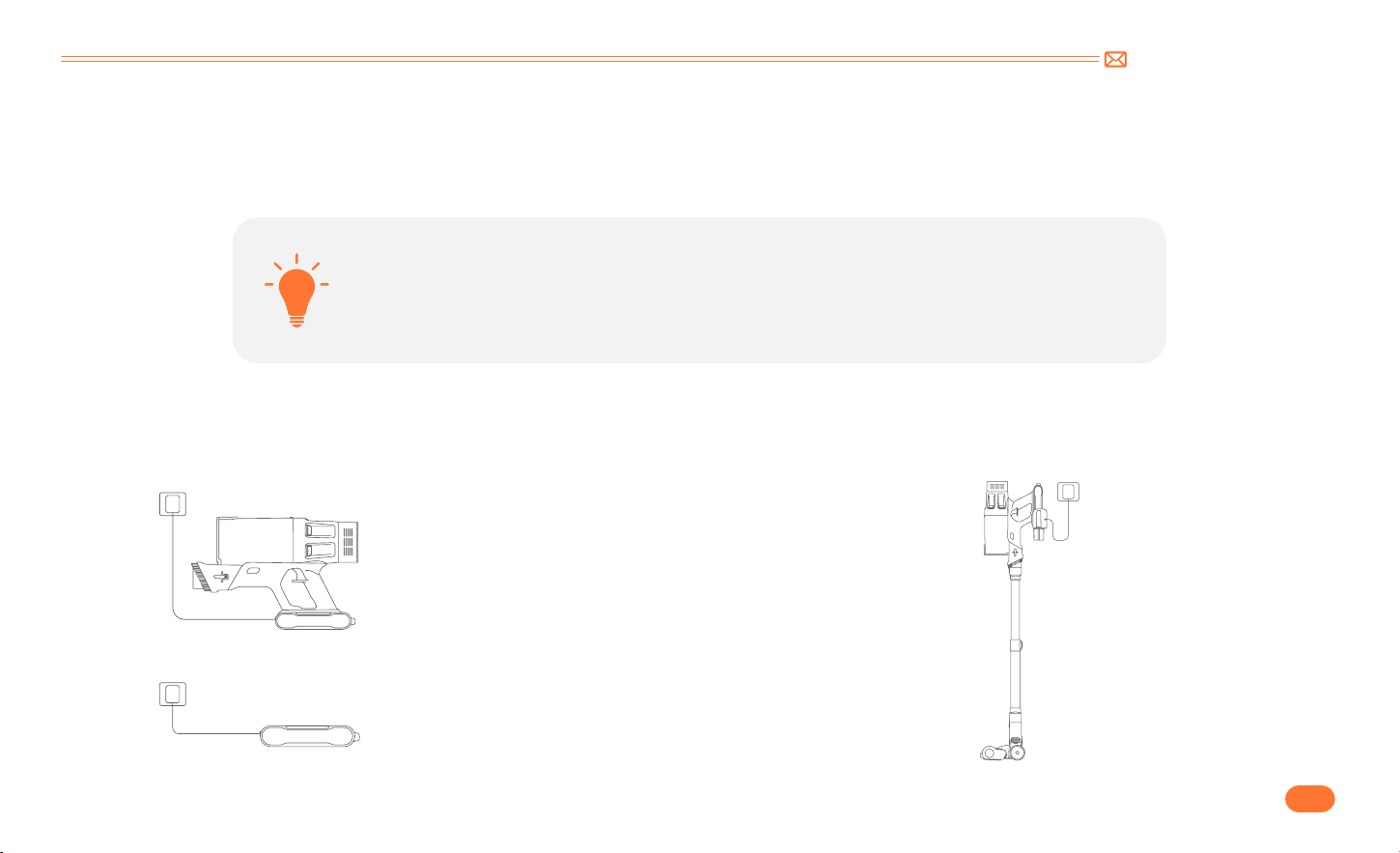
Charging Methods
①
Charge the battery directly.
②
Charging on the stand.
•
When using a new battery or using it for the first time after long term storage, please fully charge
the battery first.
•
When storing and not using the vacuum cleaner for a long time, please ensure that it is charged
and discharged at least once every three months.
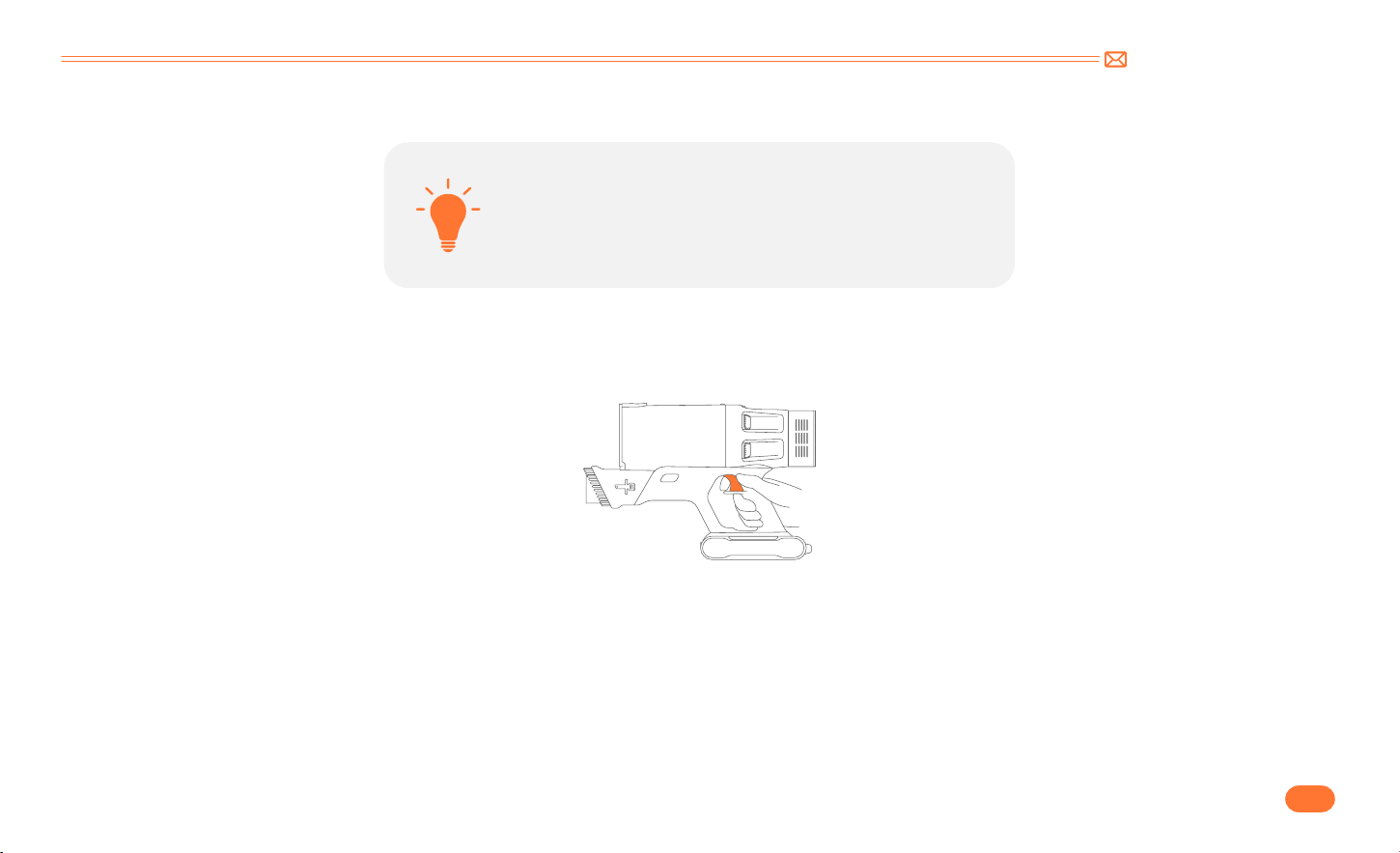
Tip:
Green light flashing: Charging
Green light: Fully Charged Or during Use
Warning: Do not use any mains power adaptor other than that supplied, as using an alternative will increase the risk of injury and/or damage to main product.
support@inteture.com
EN
9.
5.2 Operating
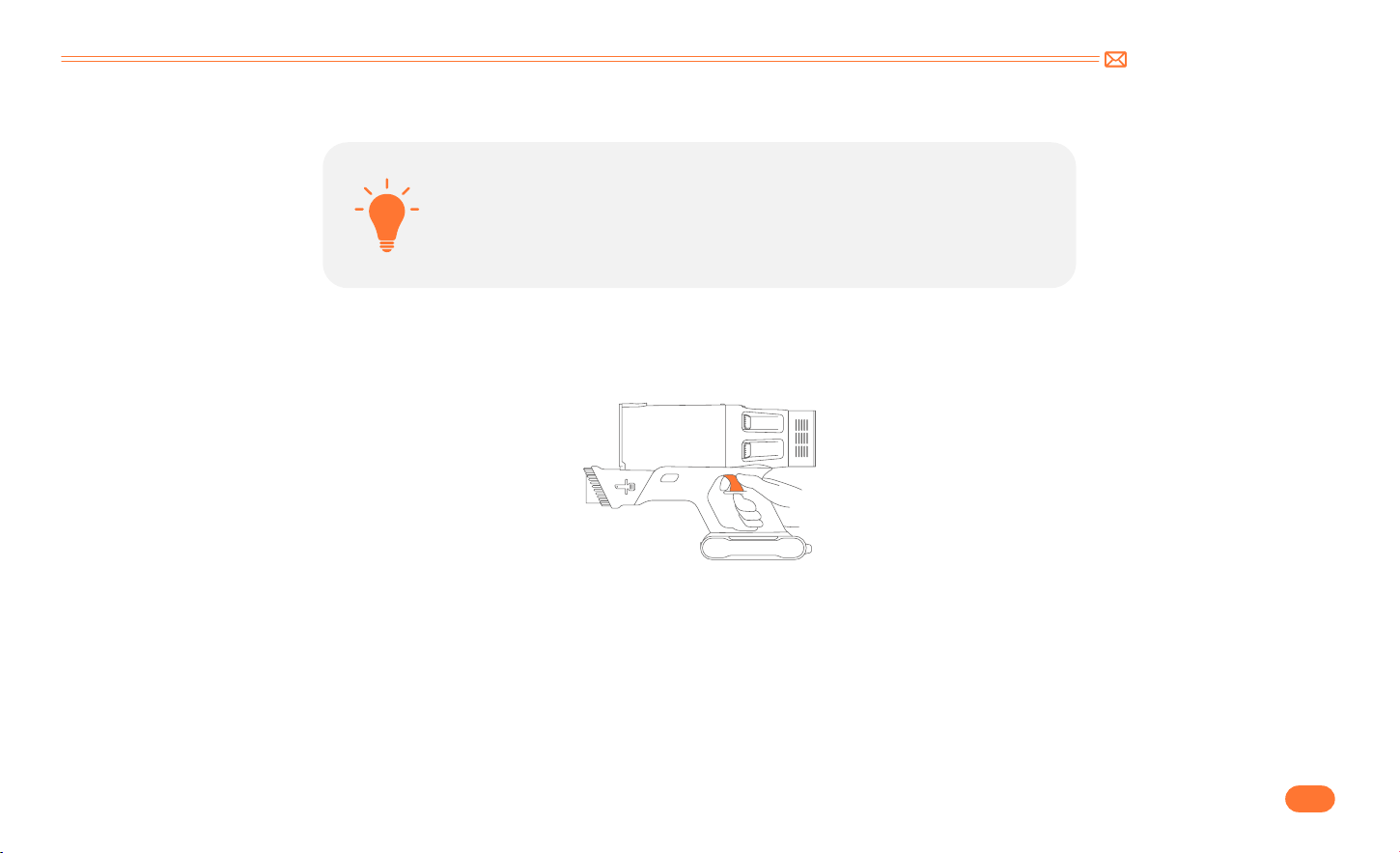
•
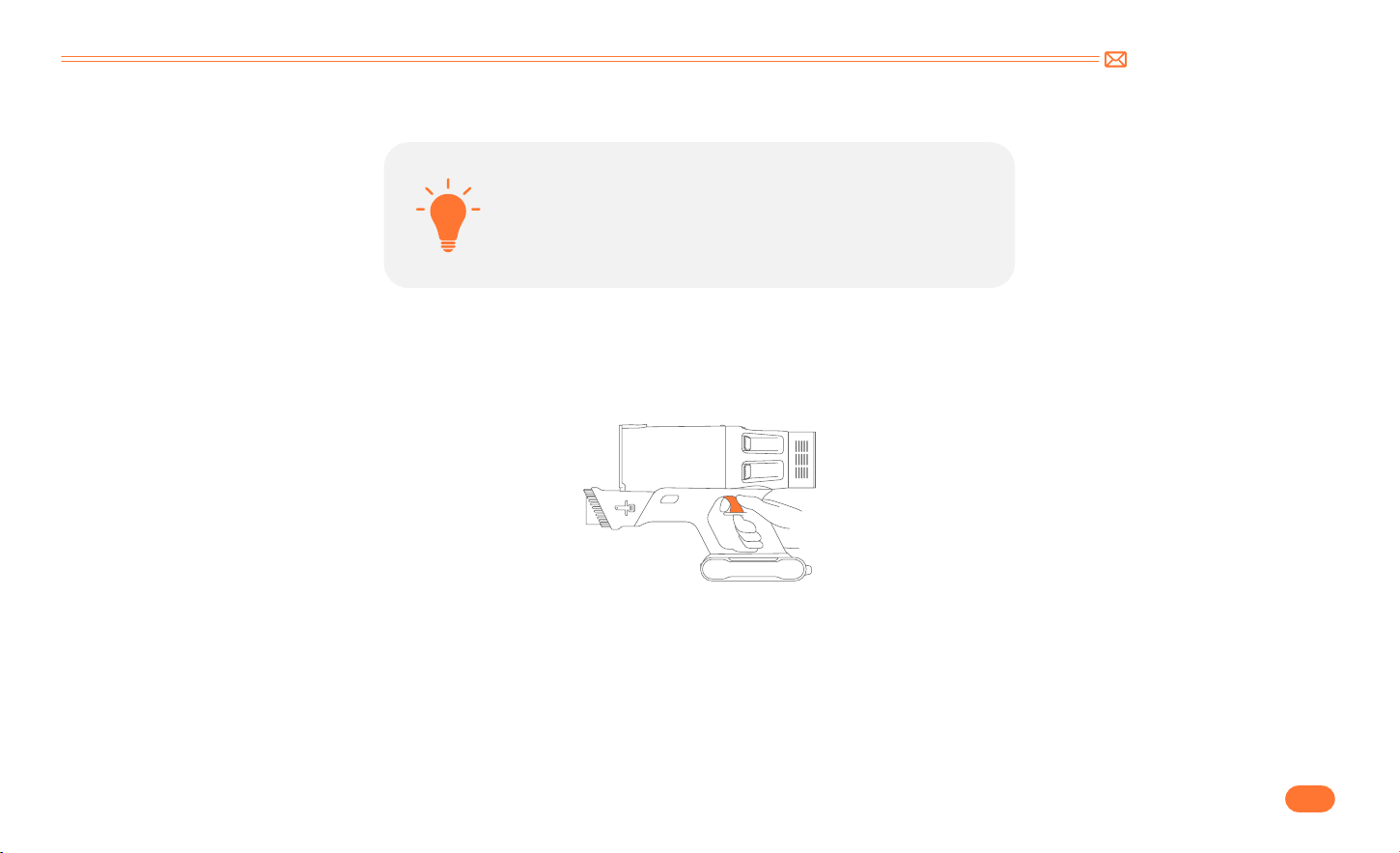
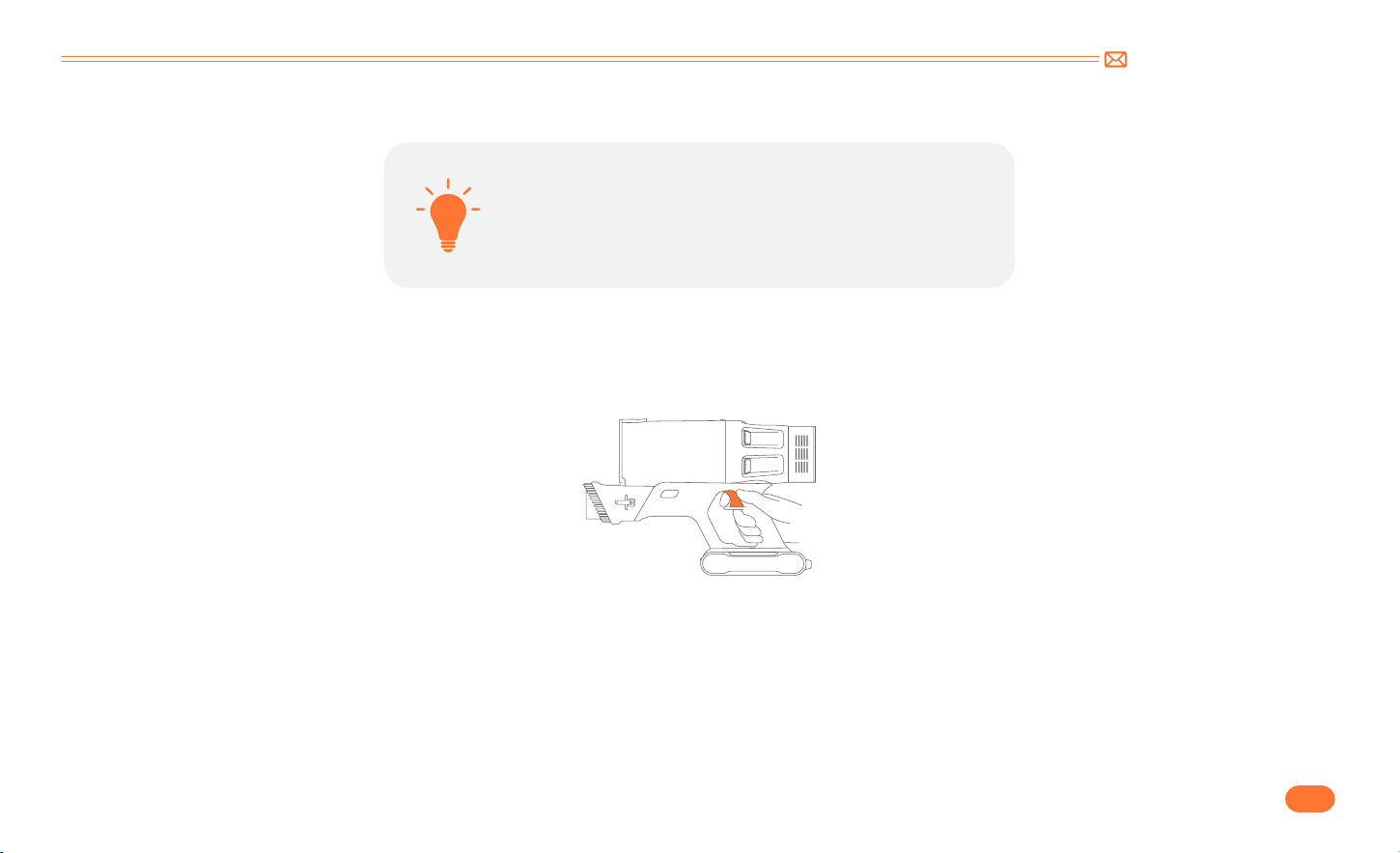
Start To Work
•
Before first time use, ensure the vacuum cleaner has been
charged 4 hours.
•
The dust cup and filters are cleaned, and fixed in place.
Before each use, make sure that
Press the switch button to turn it on, and it will start.
support@inteture.com
EN
10.
•
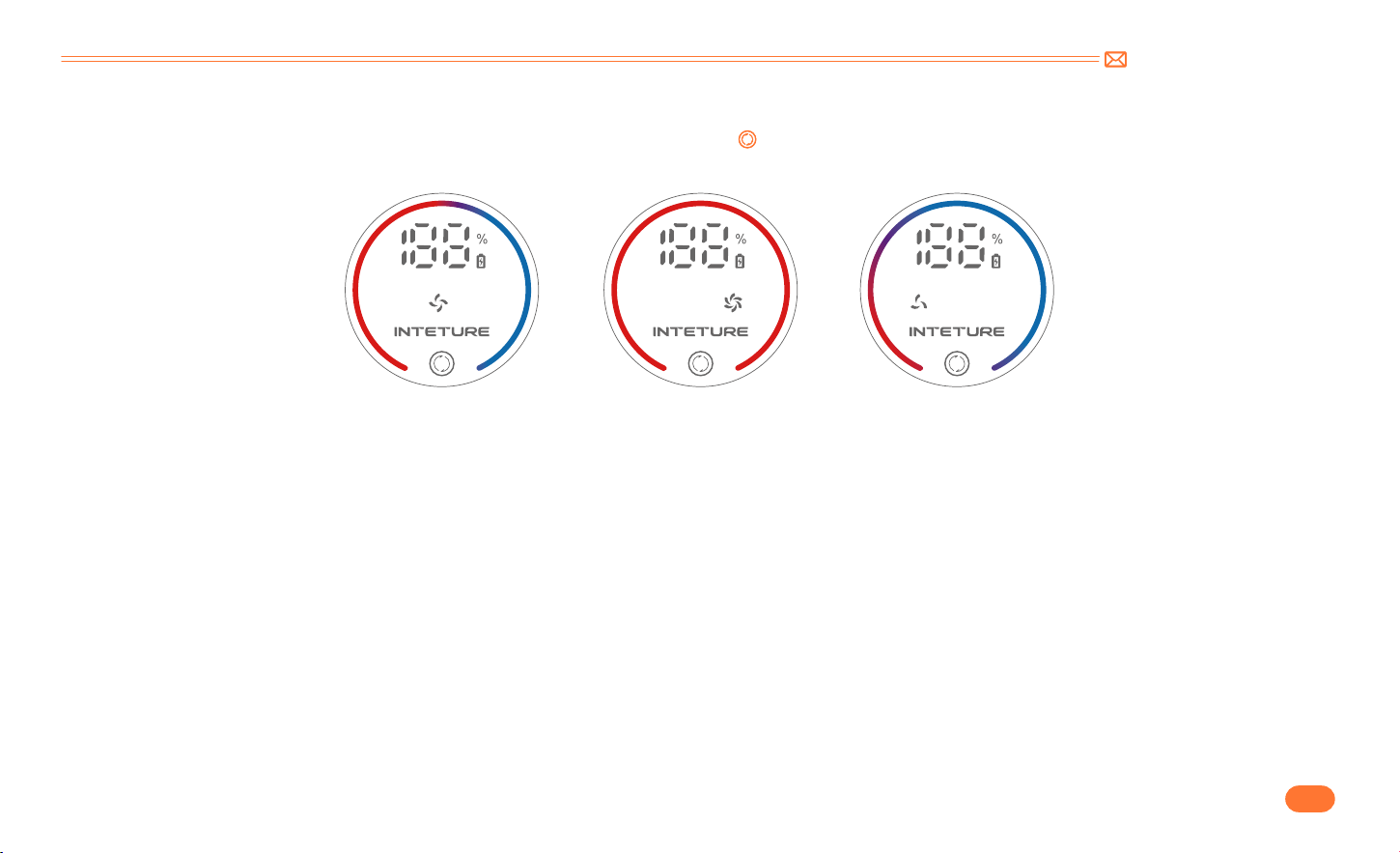
Select Cleaning Mode
•
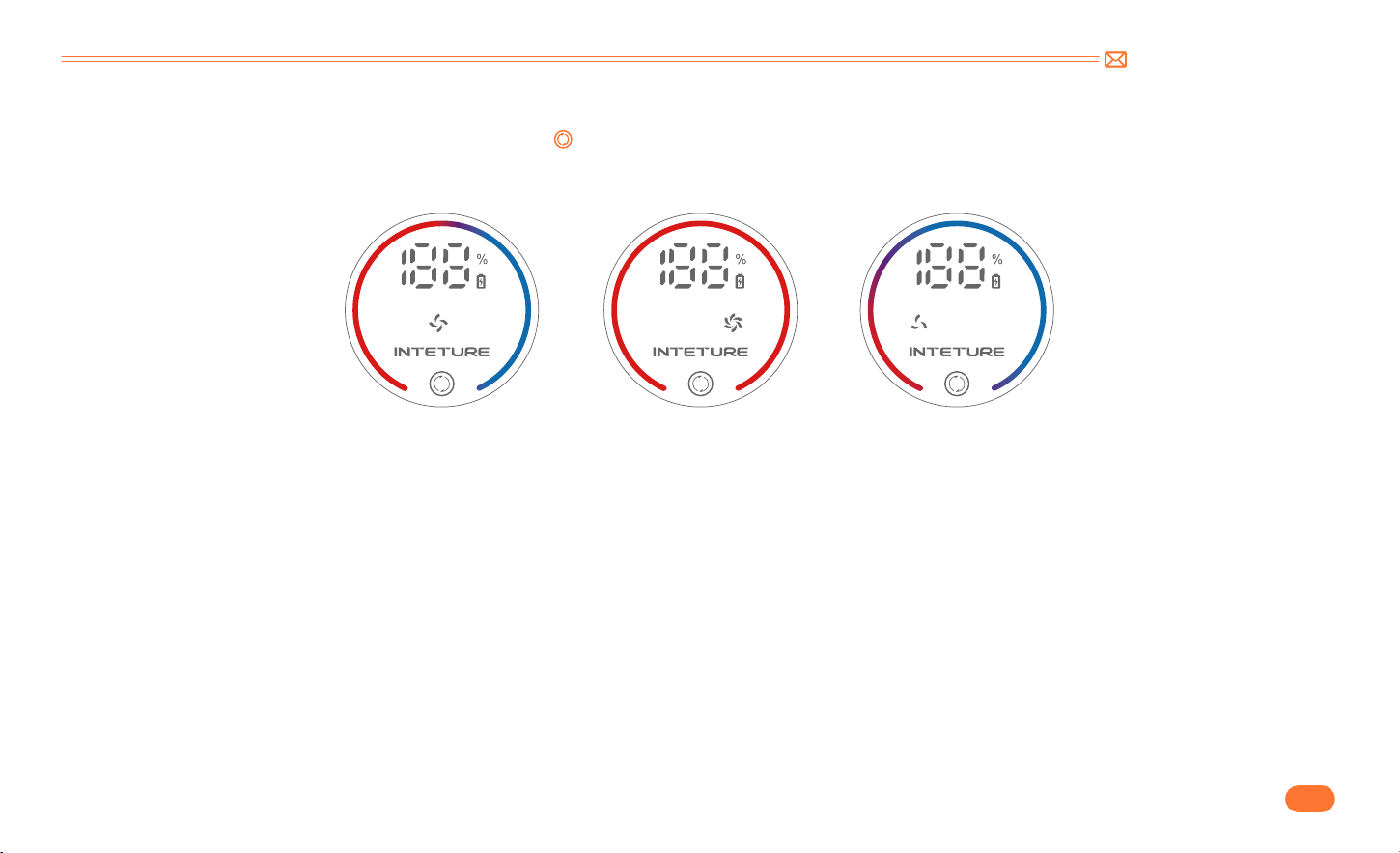
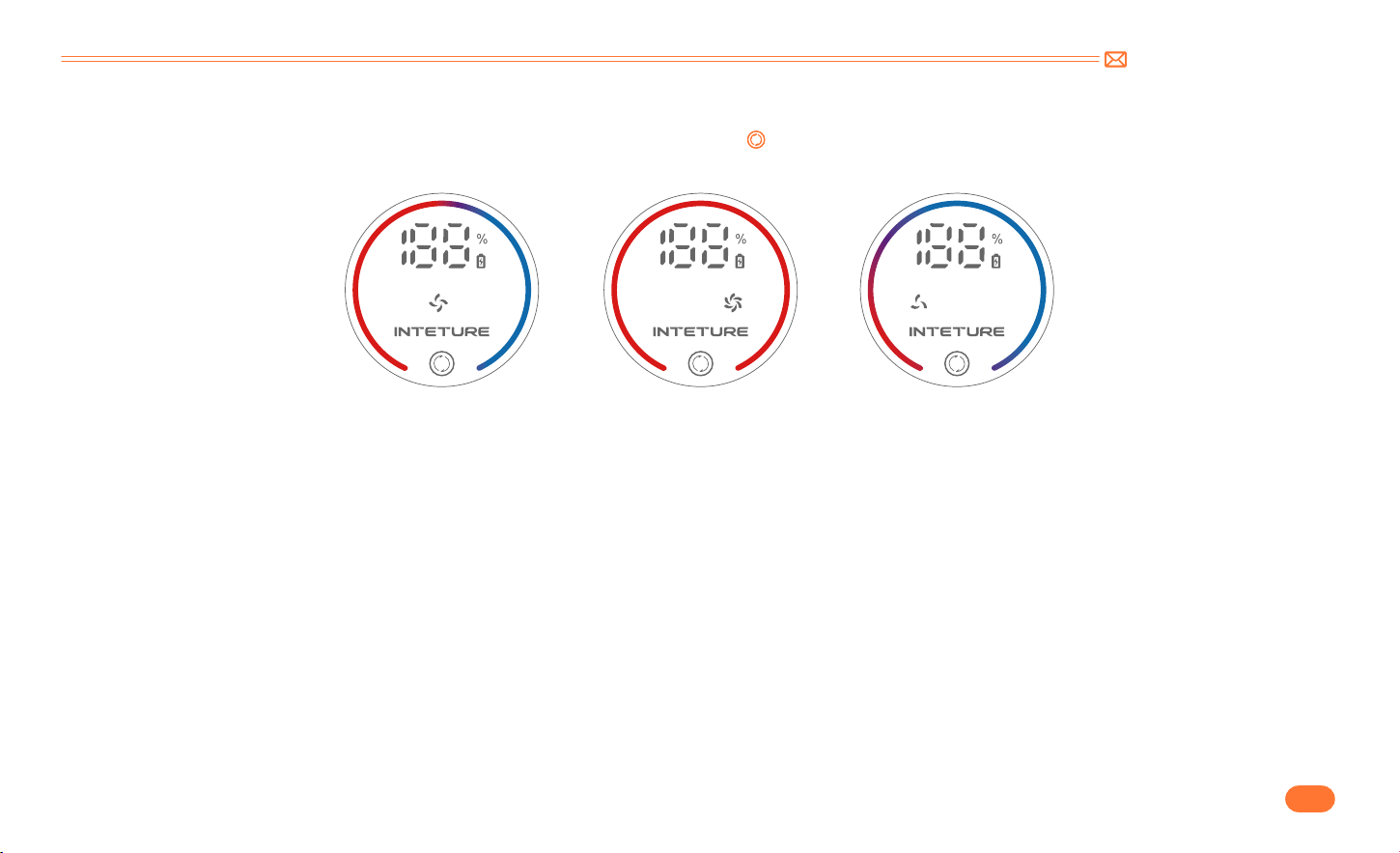
Siphon function
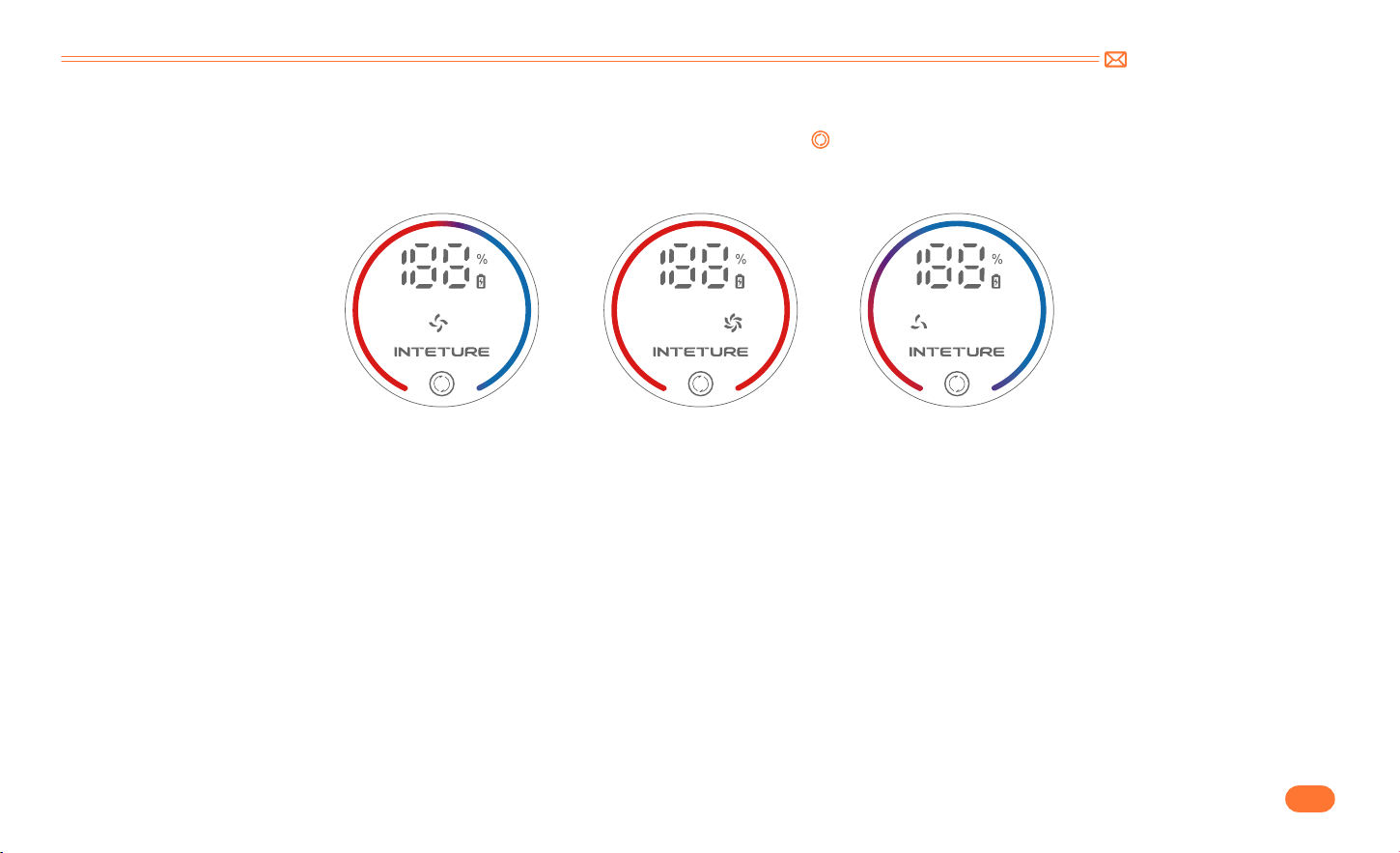
When turned on, the default suction is medium. Touch the " " button to switch the suction level. As the suction mode is adjusted, the red part of the suction
indicator light will change, and the suction gears are MID MAX MIN respectively.
When turning off from the lowest mode, the vacuum surges for 3 seconds, ensuring thorough garbage removal. And then the vacuum turns off
automatically.
MID
MAX
MIN
support@inteture.com
EN
11.
•
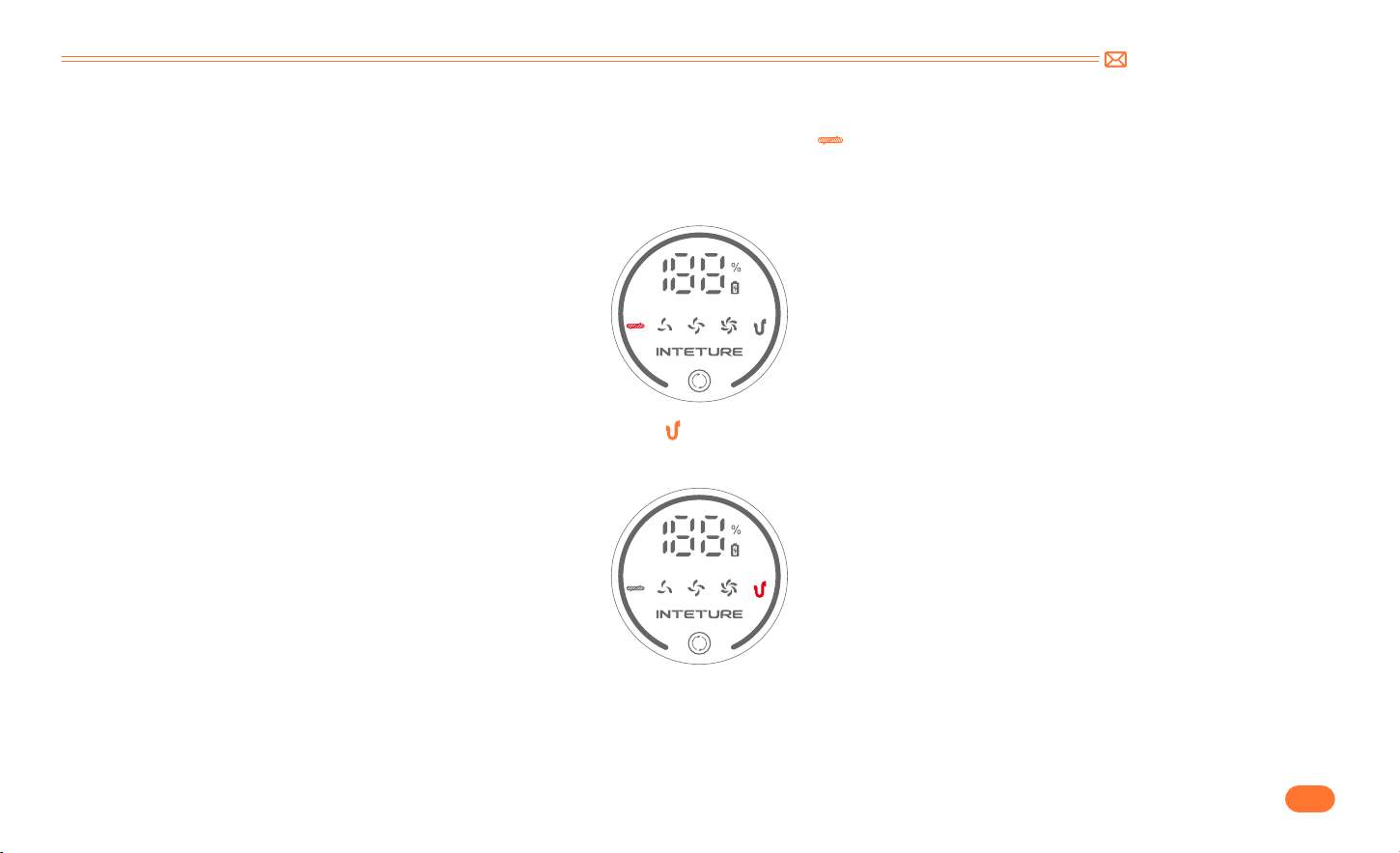
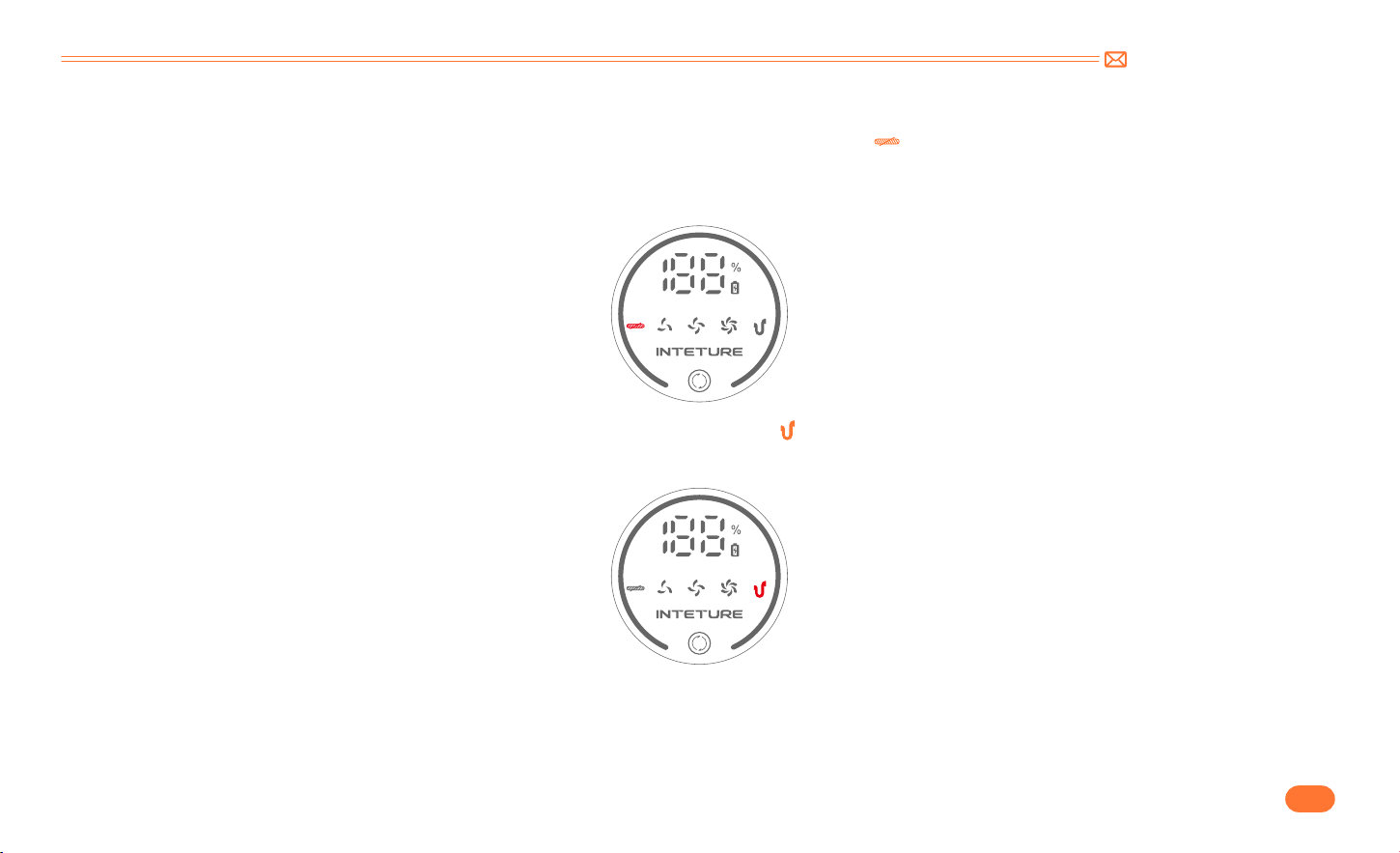
Abnormal Indicator
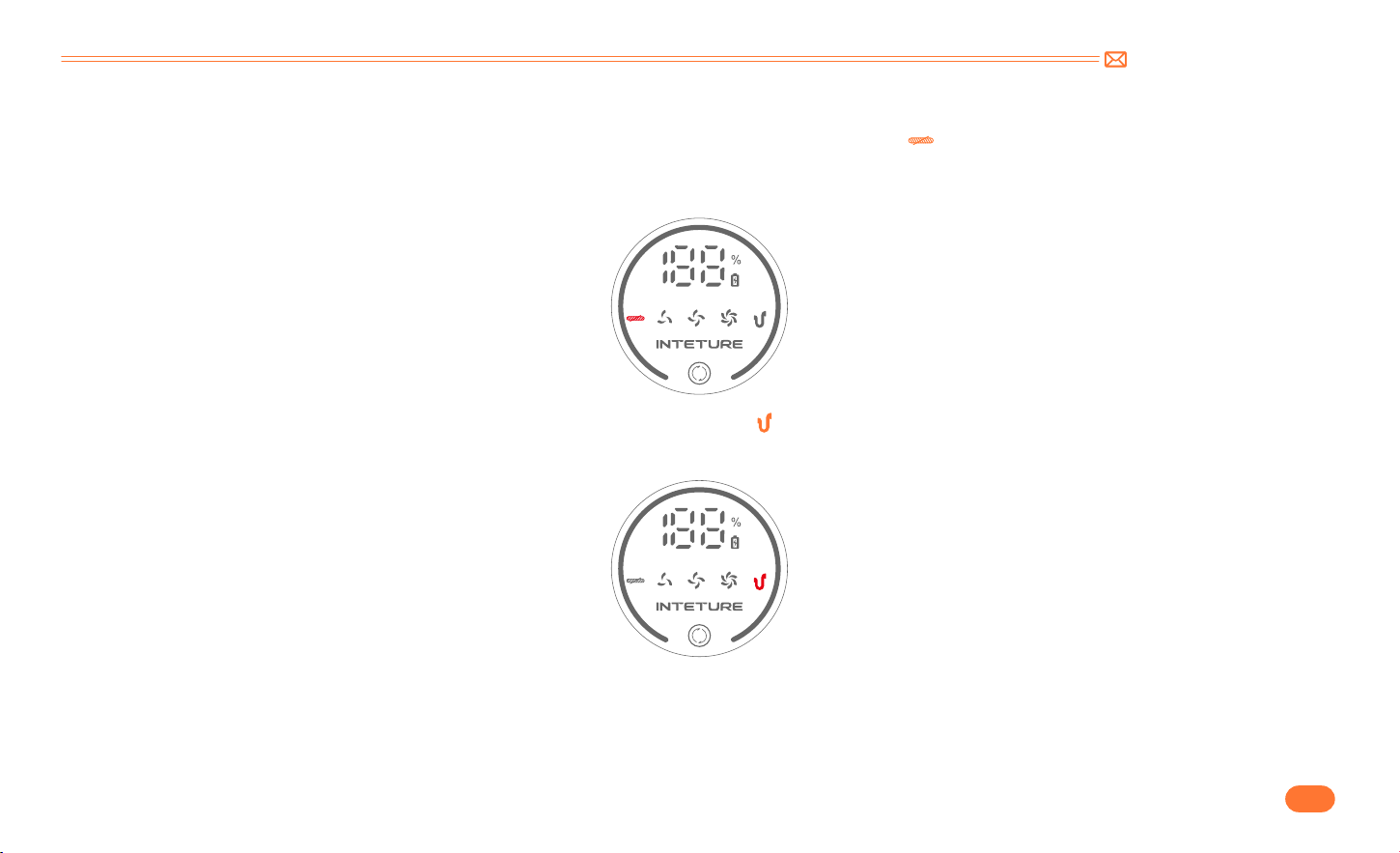
①
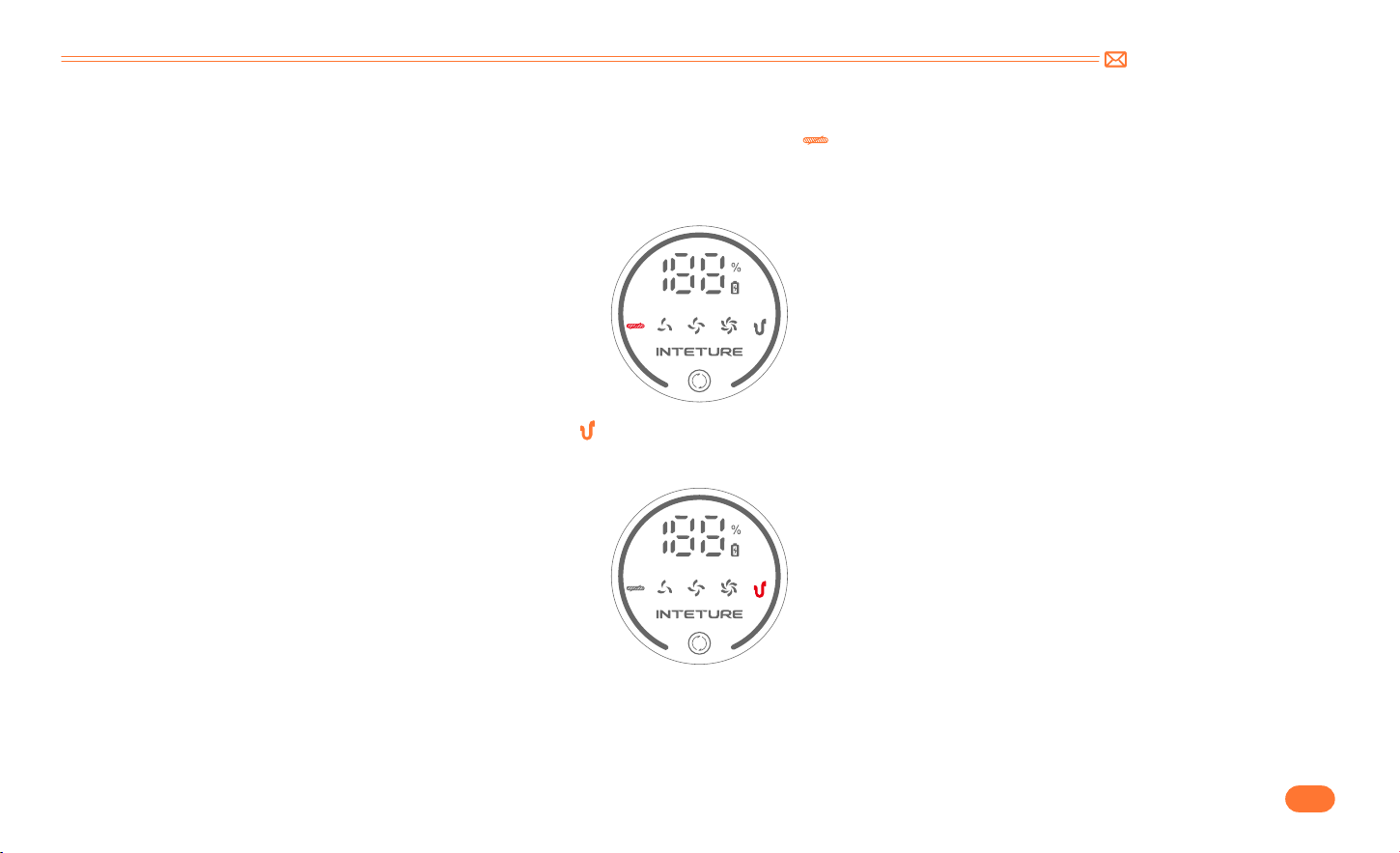
If the floor brush inhales large foreign objects or entangles too much hair, the indicator " " will flash.
•
Remove the floor brush and clean up the foreign matter wrapped around and roller. Please ensure that the brush head has been detached from the main
unit to prevent accidental starting of the machine and cause personal injury.
②
When the air passage or dust cup is blocked, the indicator " " will flash.
•
Clean the aluminum tube and the filters in the dust cup thoroughly.
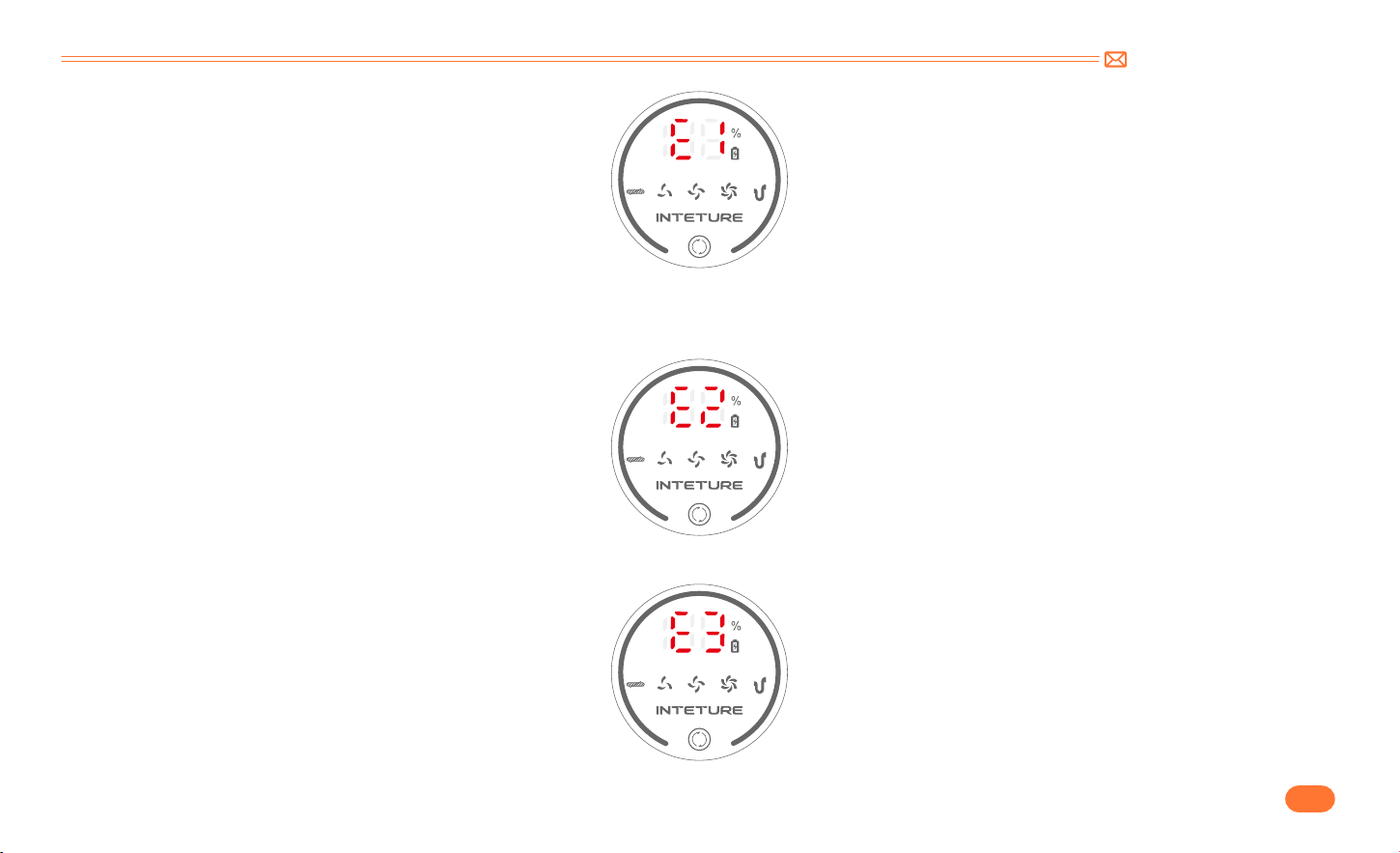
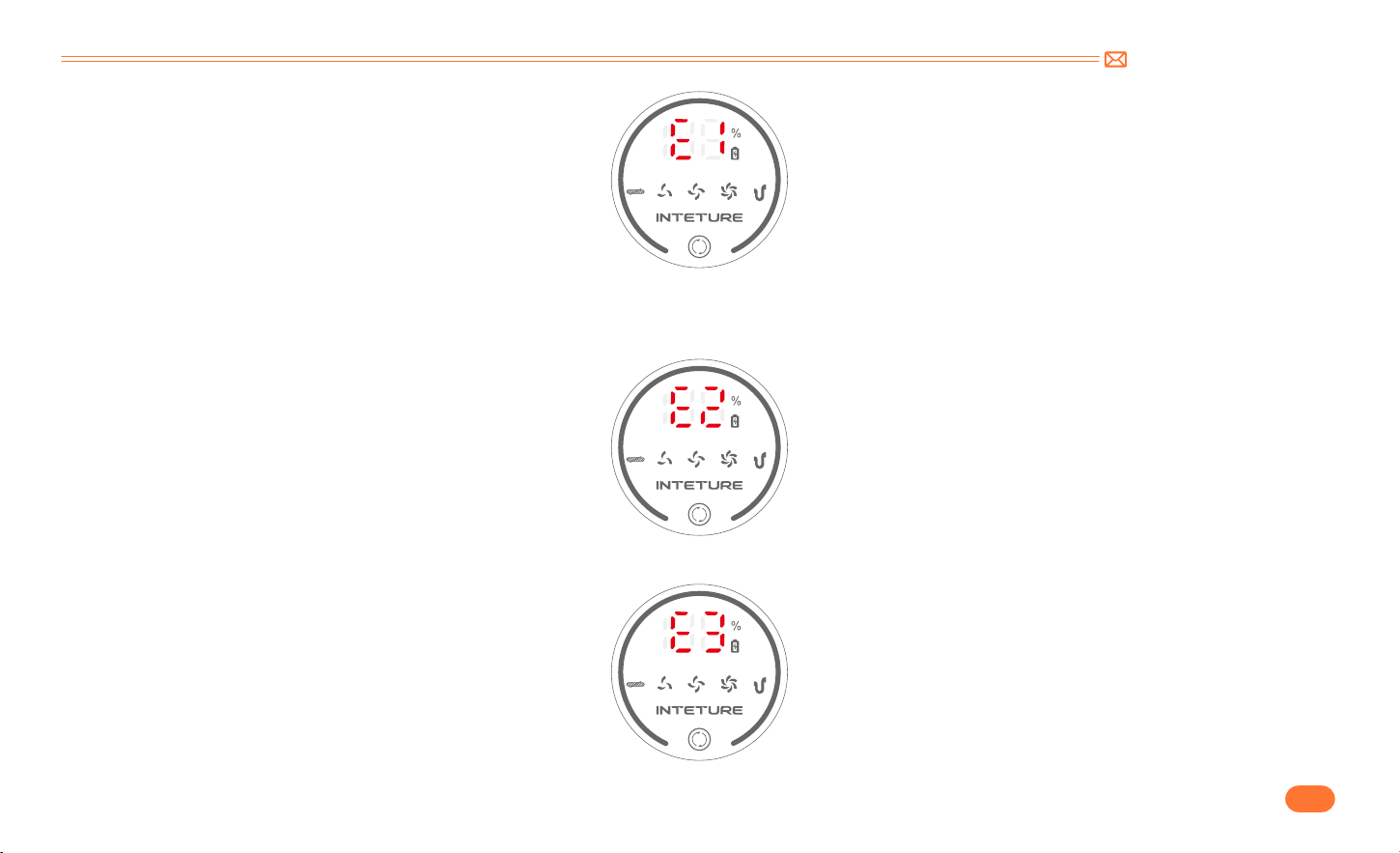
③
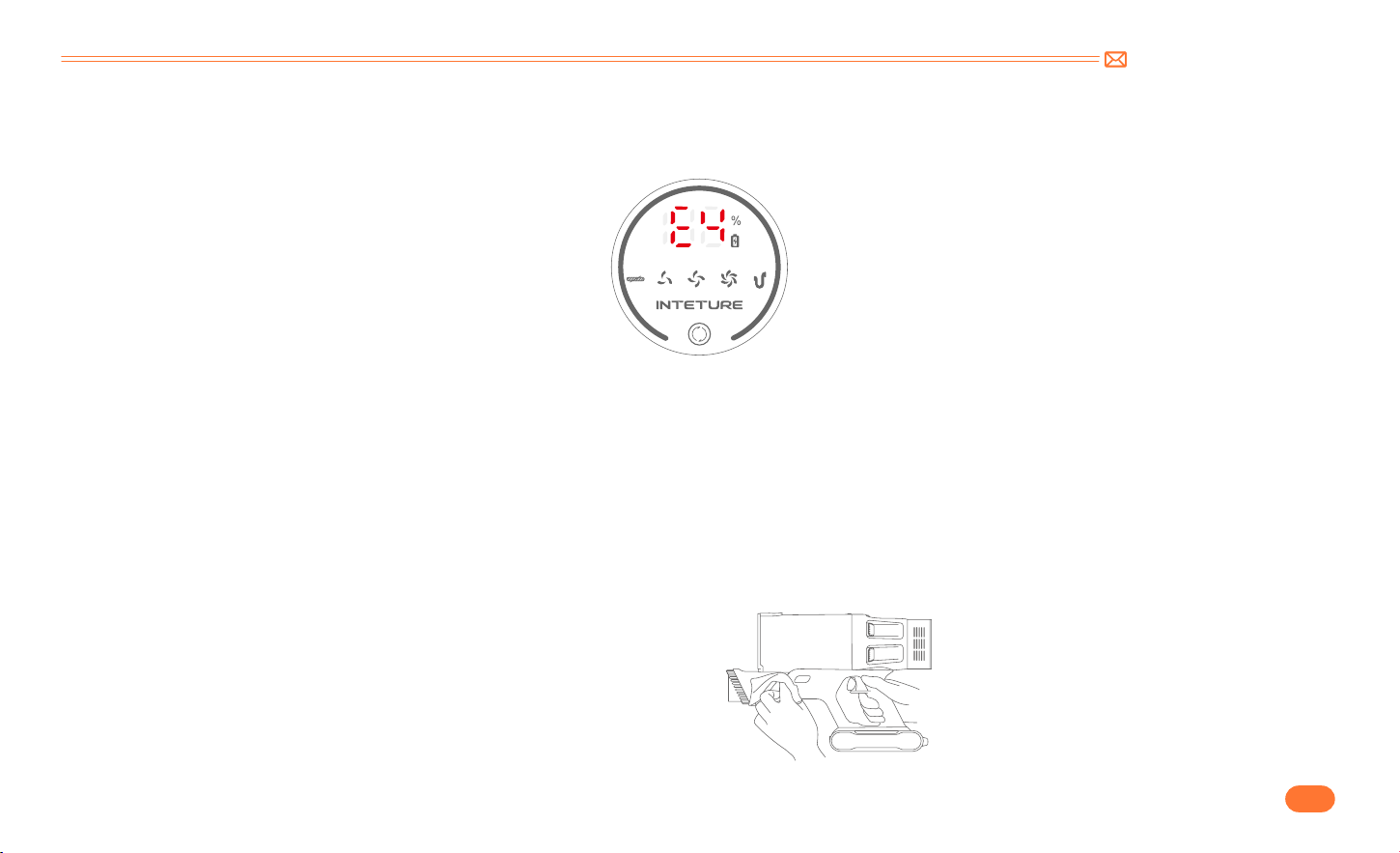
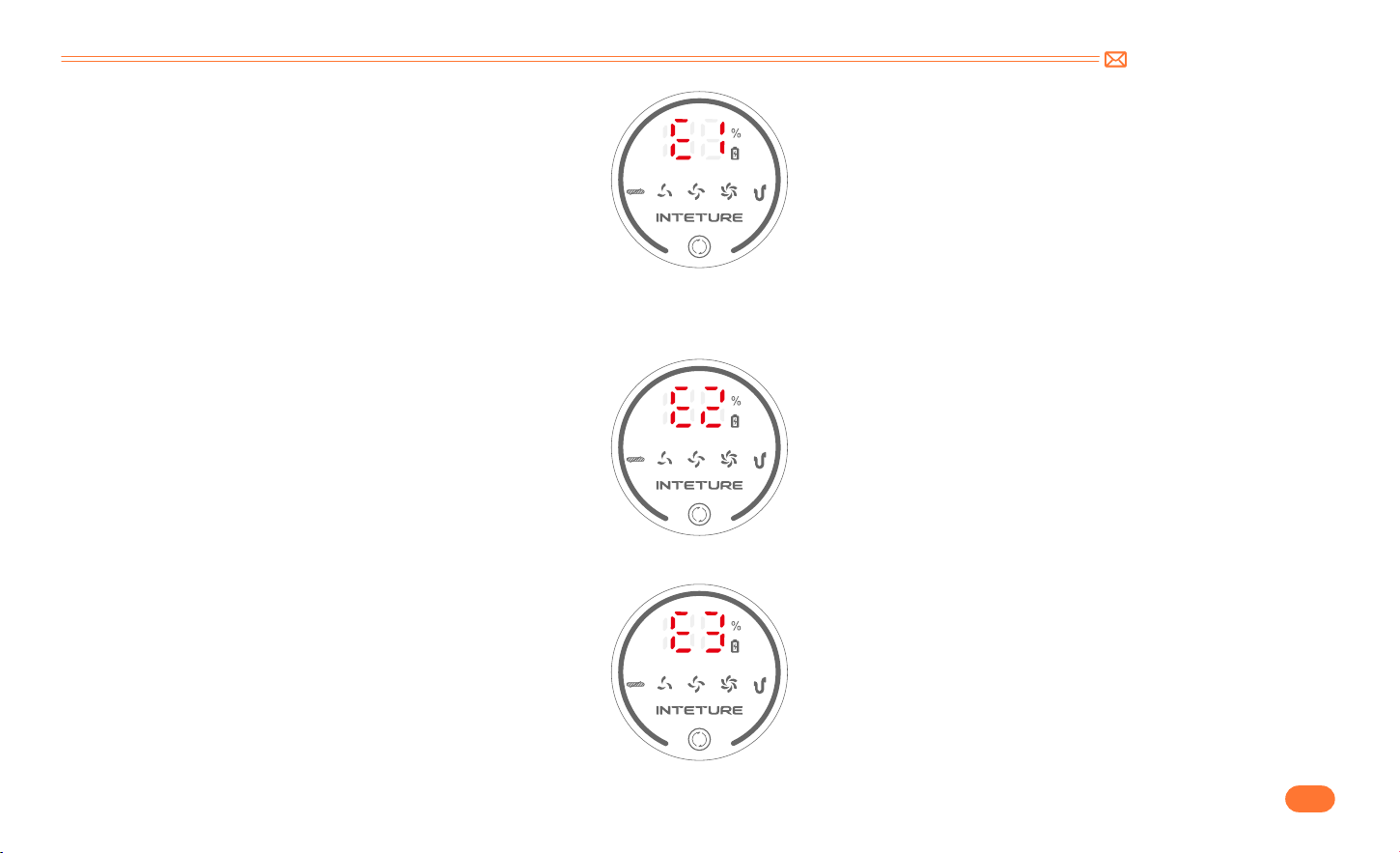
If the screen displays "E1": it Indicates motor malfunction or continuous blockage causing high temperature
.
•
Remove the dust cup and run it on a single host. If the abnormality still persists, contact INTETURE Team to replace the host. If it disappears, clean the
dust cup and floor brush.
support@inteture.com
EN
12.
④
If the screen displays "E2": battery temperature protection.
•
Place the machine at room temperature and let it stand for 10 20 minutes. If the abnormality disappears, it can be restored to normal. If it persists, contact
INTETURE Team to replace the battery pack.
⑤
If the screen displays "E3": Using the wrong adapter.
•
Please use the original adapter. (output specification is 36V)
support@inteture.com
EN
13.
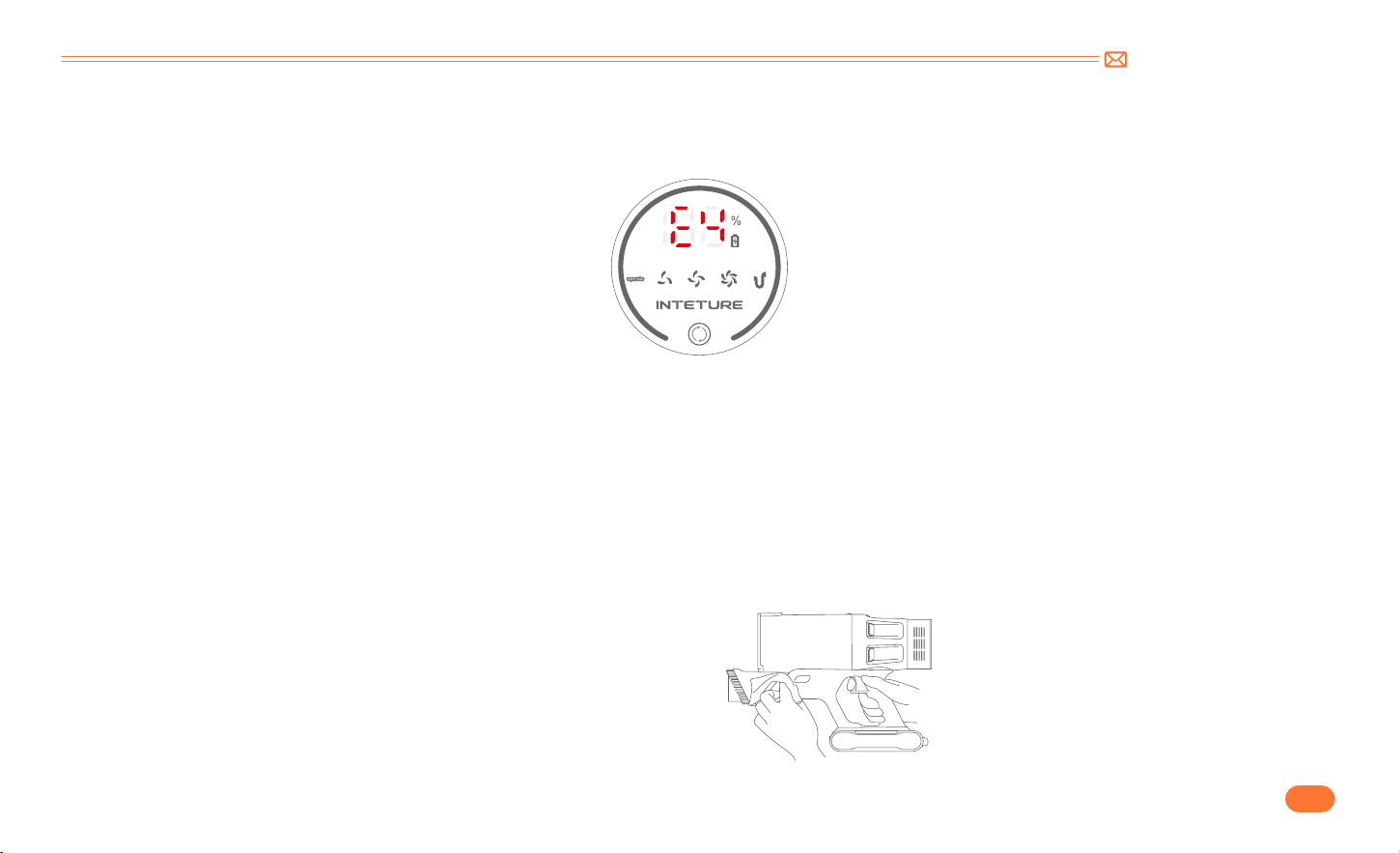
⑥
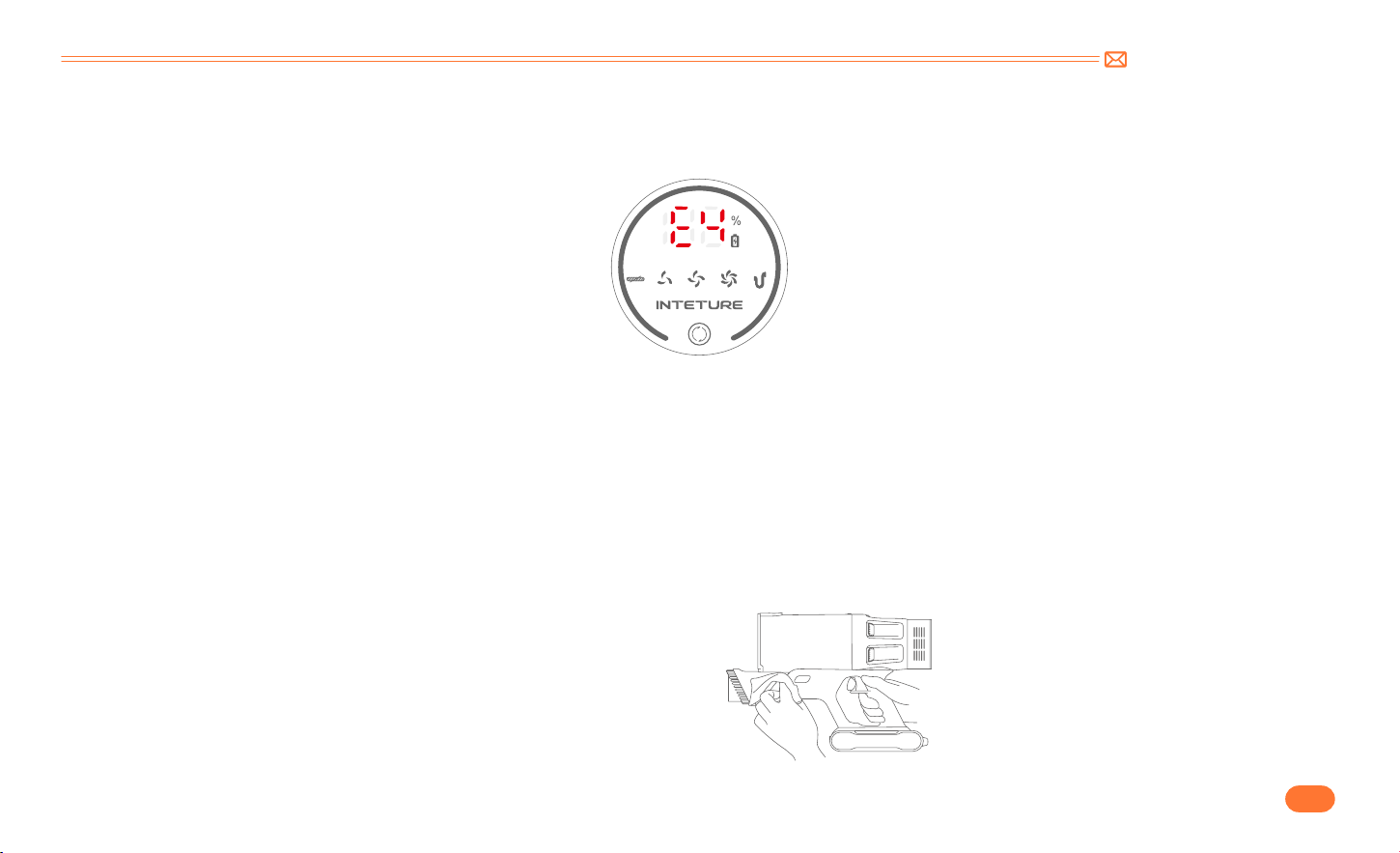
If the screen displays "E4": Floor brush short circuit and Tube short circuit protection.
•
Remove the telescopic tube and run it directly using the floor brush and the host. If the abnormality disappears, contact INTETURE Team to replace the
tube, If there is still abnormality, the floor brush needs to be replaced.
6. MAINTENANCE
Tip: Please clean the vacuum cleaner regularly to extend its lifespan.
•
Turn off the power before cleaning the body.
•
Please use a neutral detergent, wipe the body with half wet cloth.
•
Please avoid sun exposure and store in a cool and dry place.
6.1 Clean the Main Body
support@inteture.com
EN
14.
6.2 Clean the Dust Cup/Filters
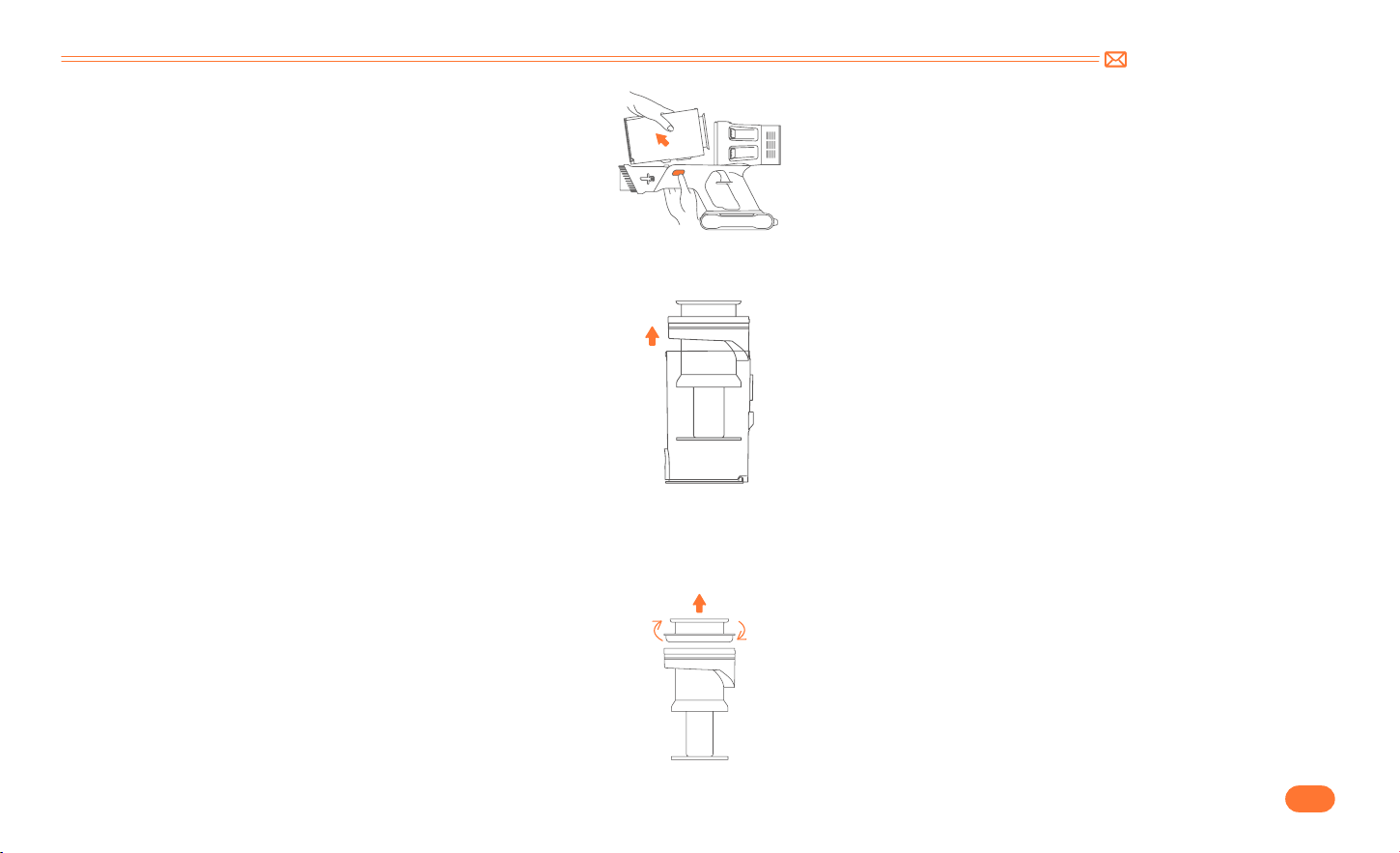
•
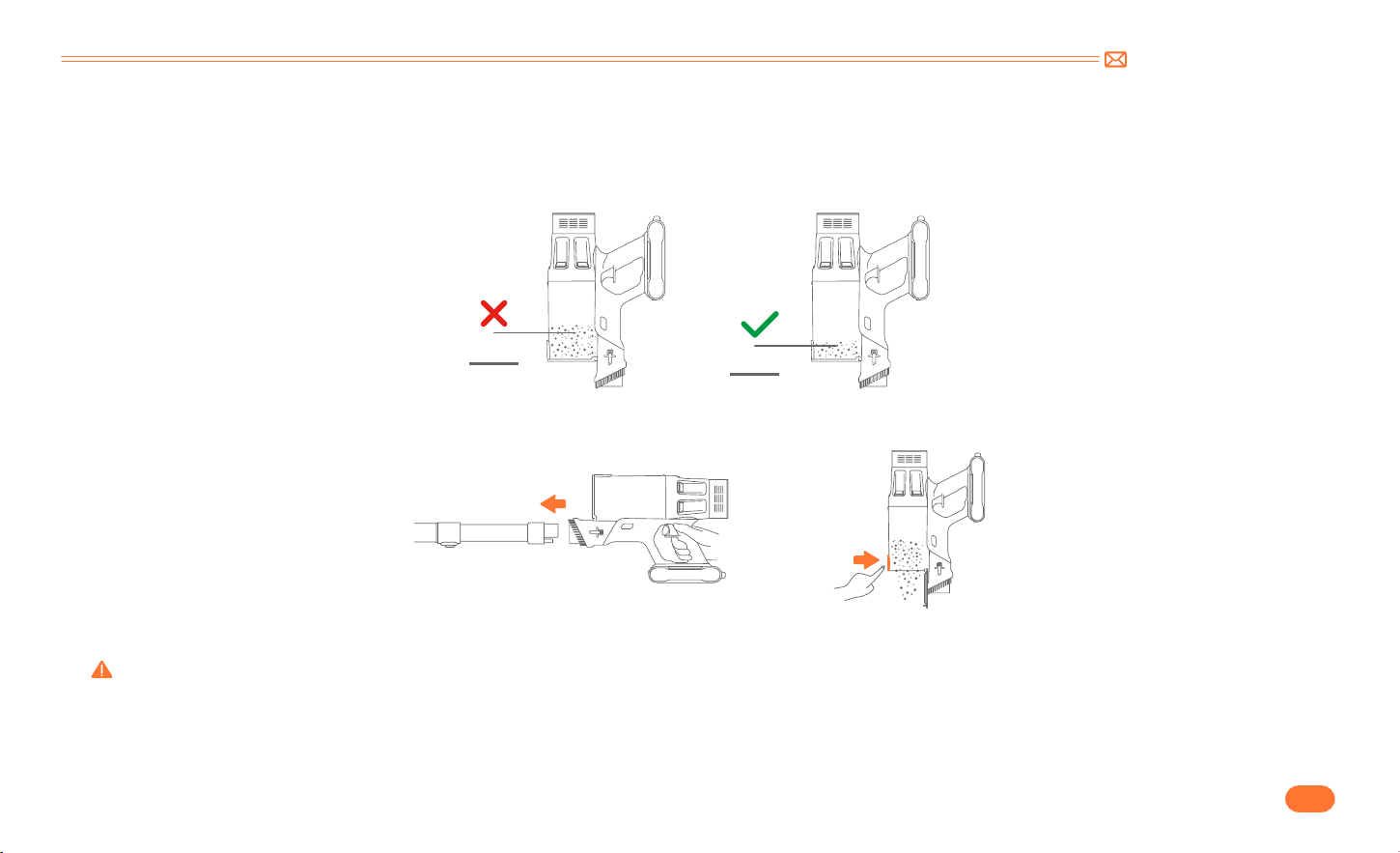
Empty Dust Cup
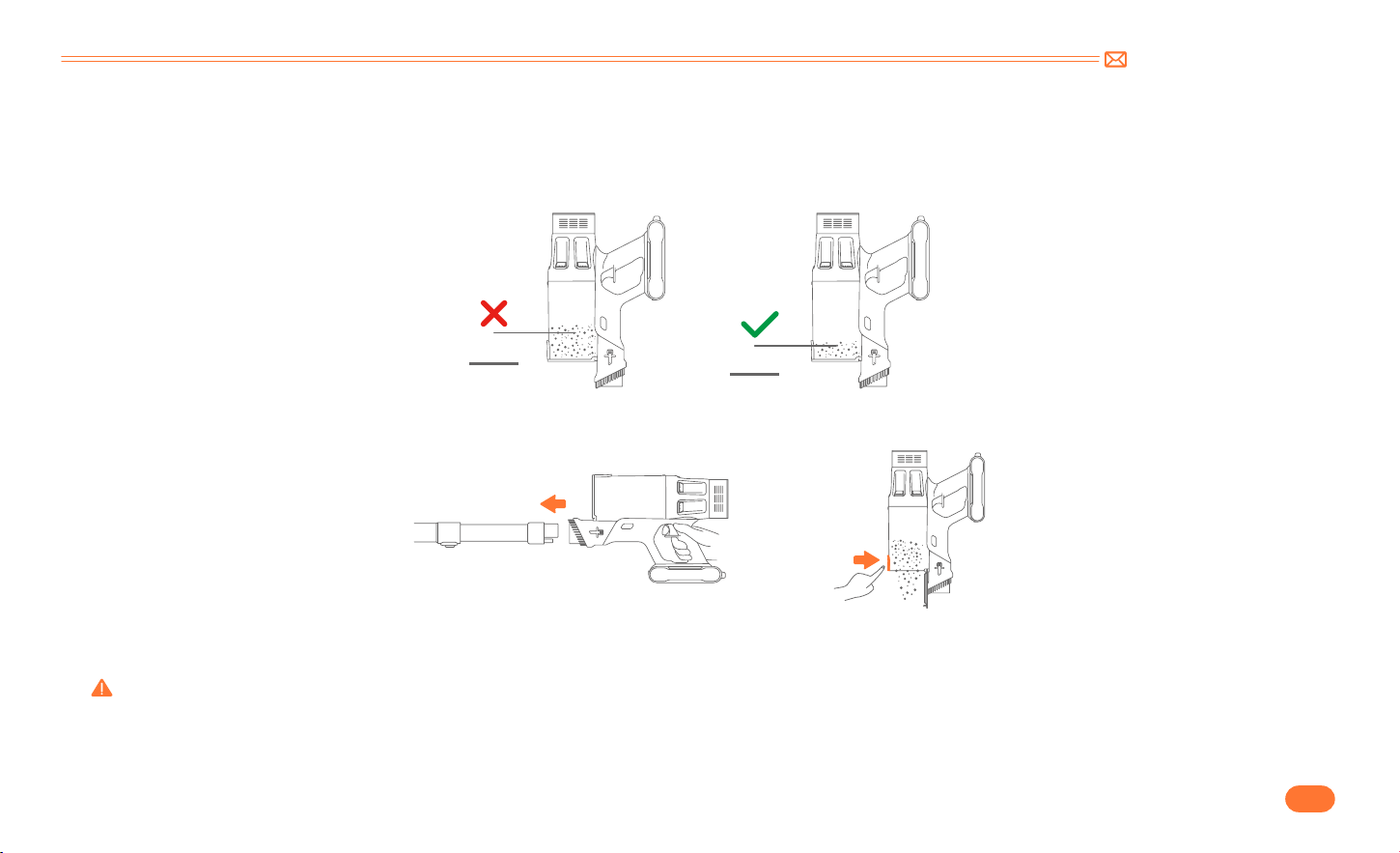
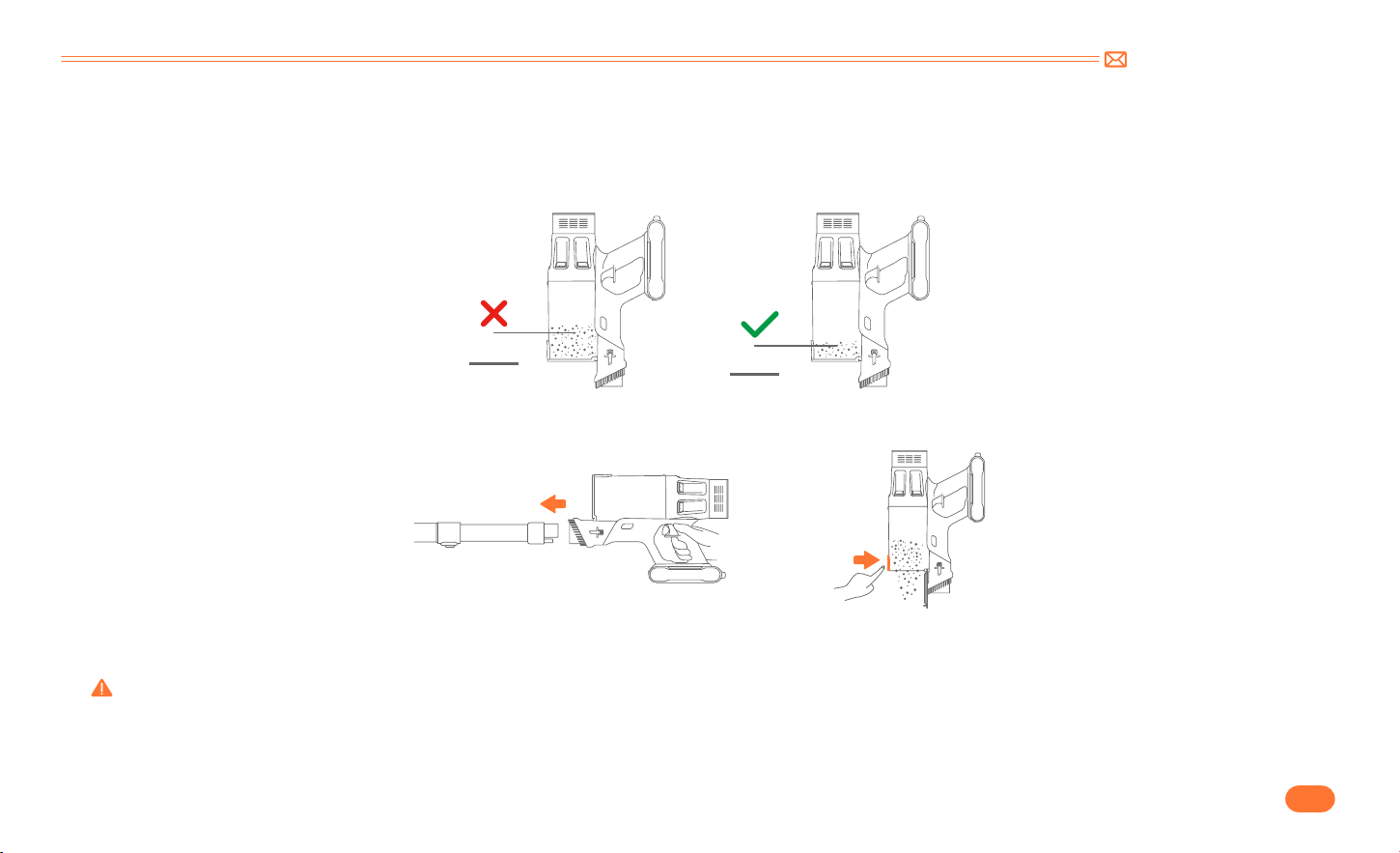
When using, if the garbage in the dust cup exceeds MAX Line, please empty it in time.
•
Press the dust empty button to empty the dust.
•
Remove dust cup from main body.
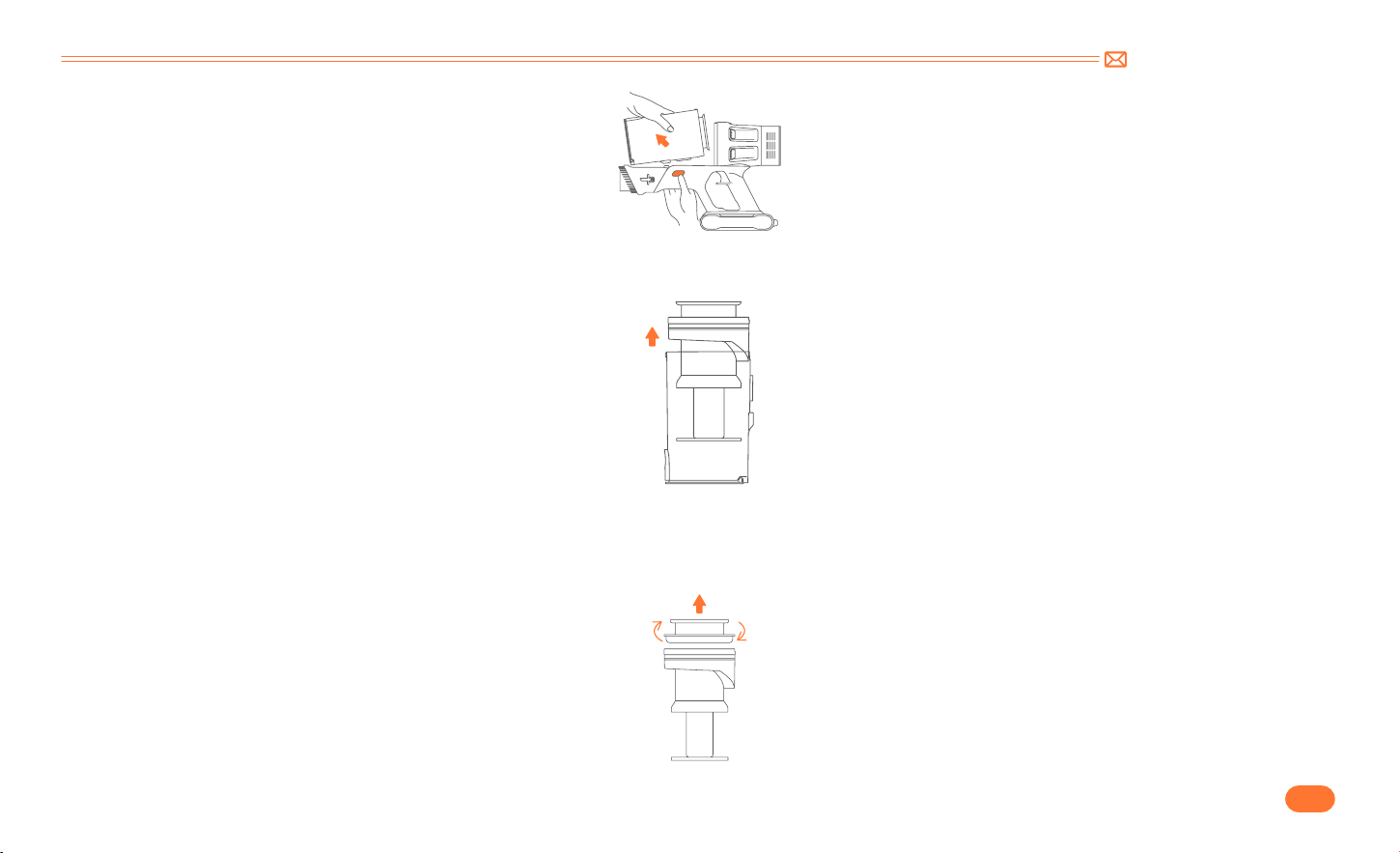
Press the dust cup release button on the main body, then get the dust cup released from the main body.
Warning: Do not use the Cordless Vacuum cleaner without the removable filter or dust bin in position.
6.3 Wash Dust Cup and Filters
MAX
MAX
support@inteture.com
EN
15.
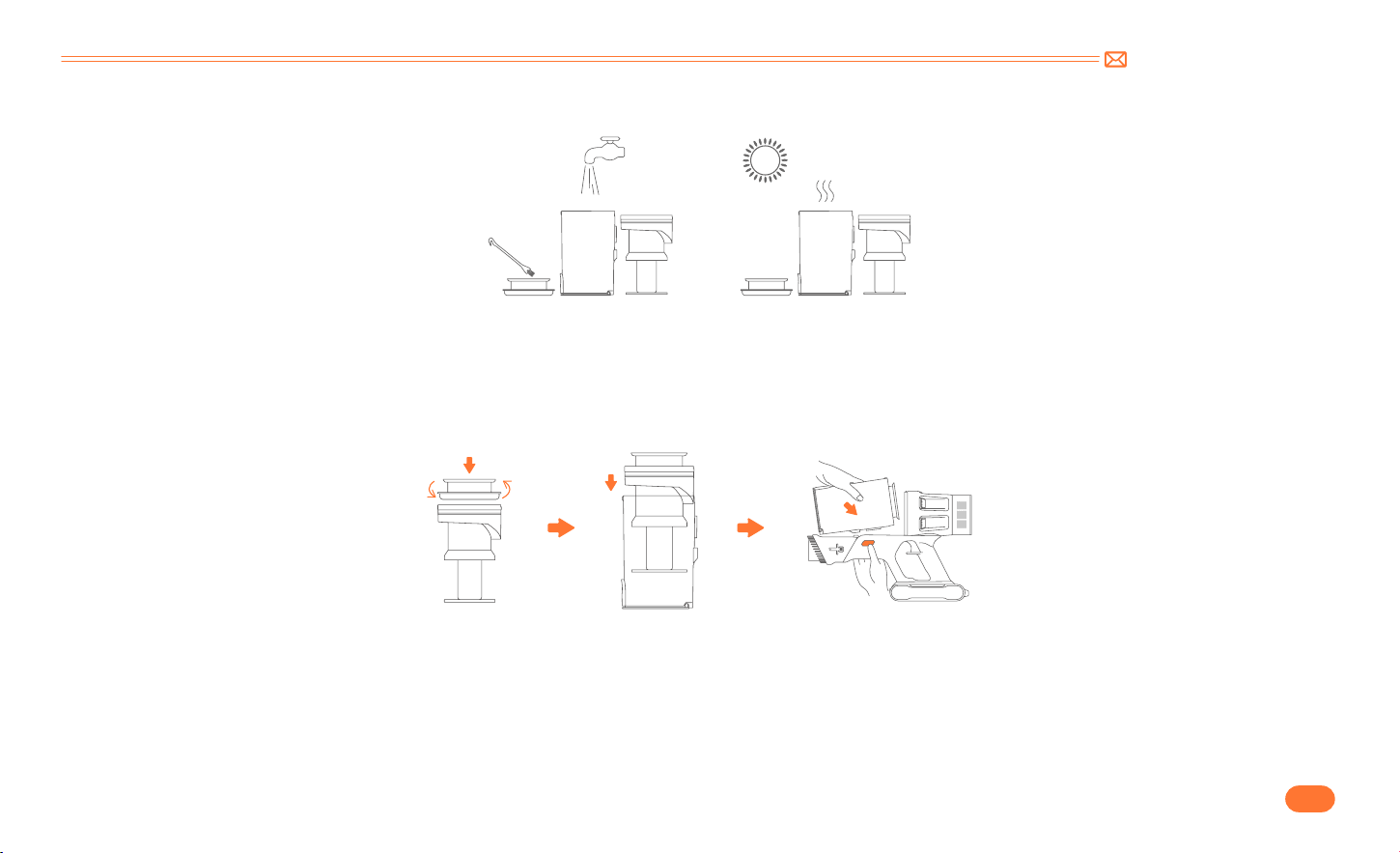
•
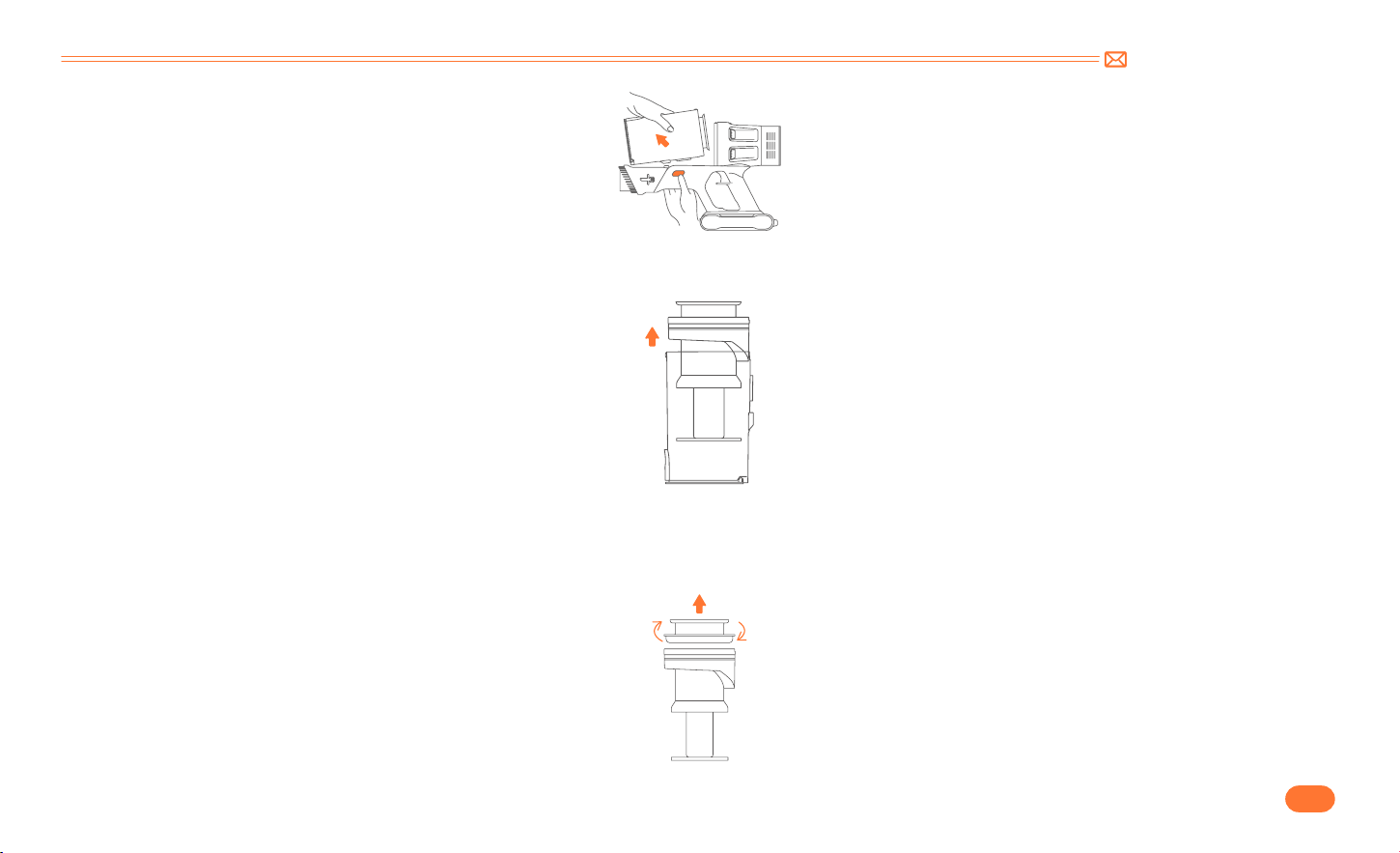
Remove filters from dust cup.
•
Remove the stainless steel filter from dust cup.
Take out the HEPA filter upwards.
Take out the stainless steel filter upwards
.
support@inteture.com
EN
16.
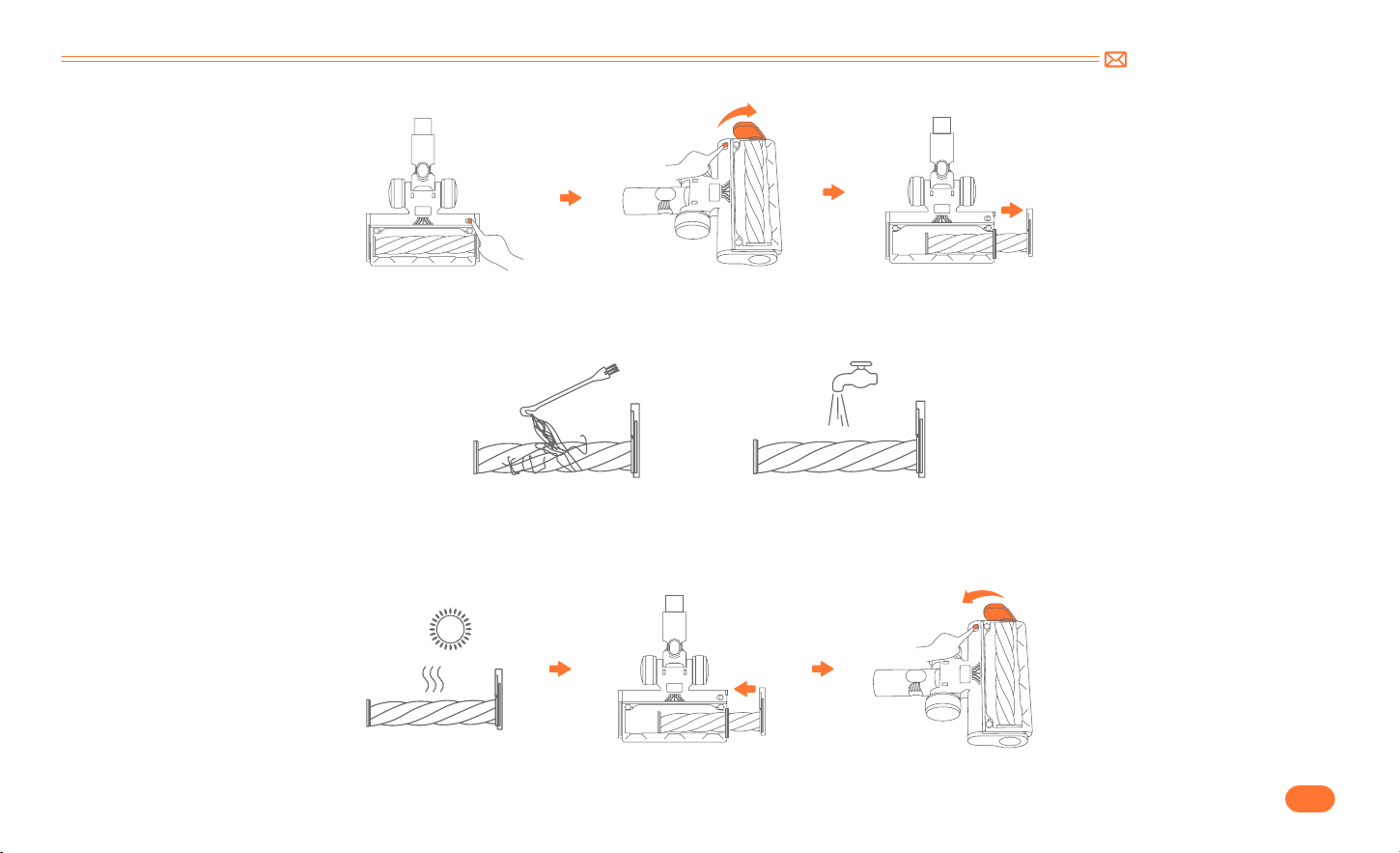
•
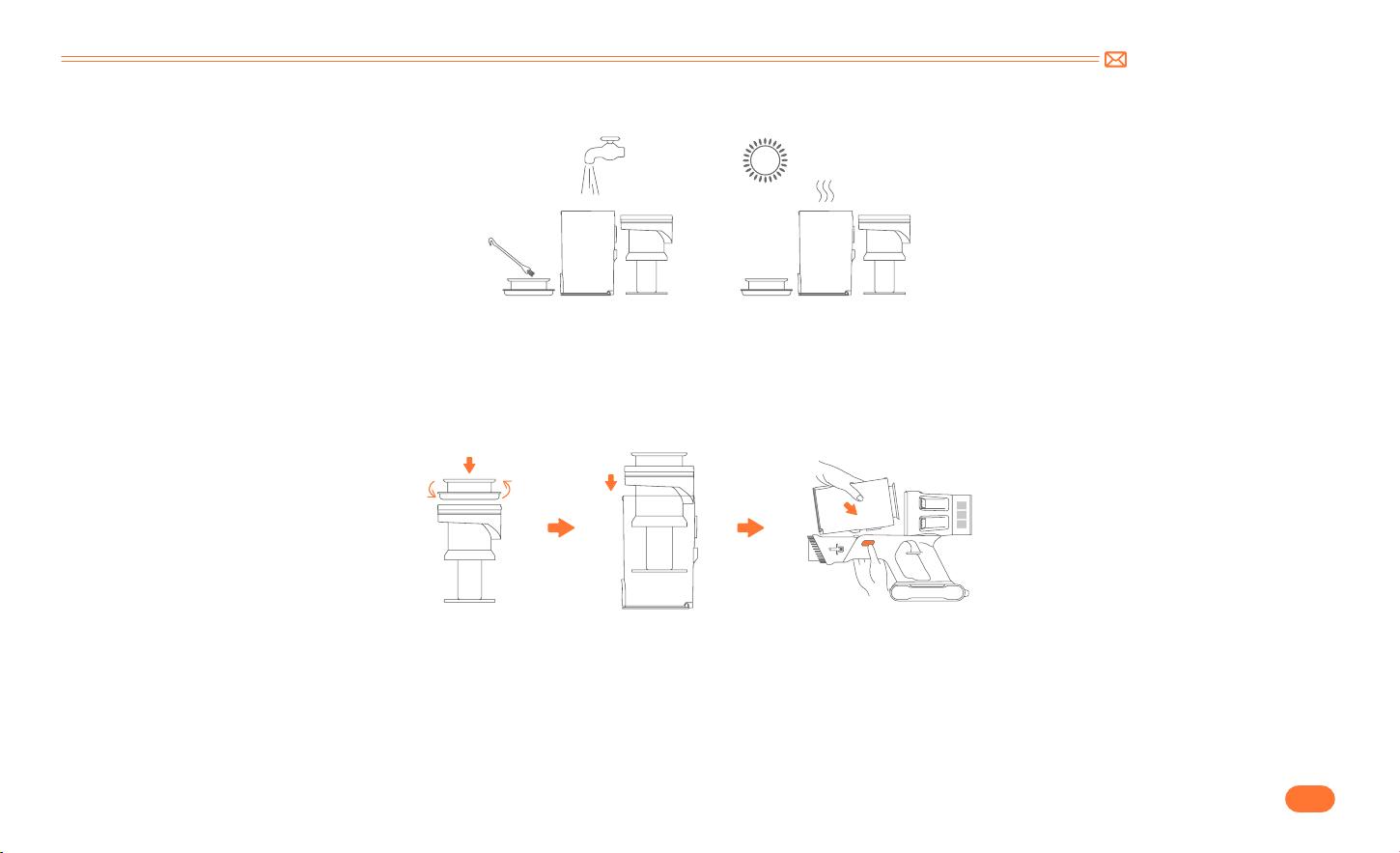
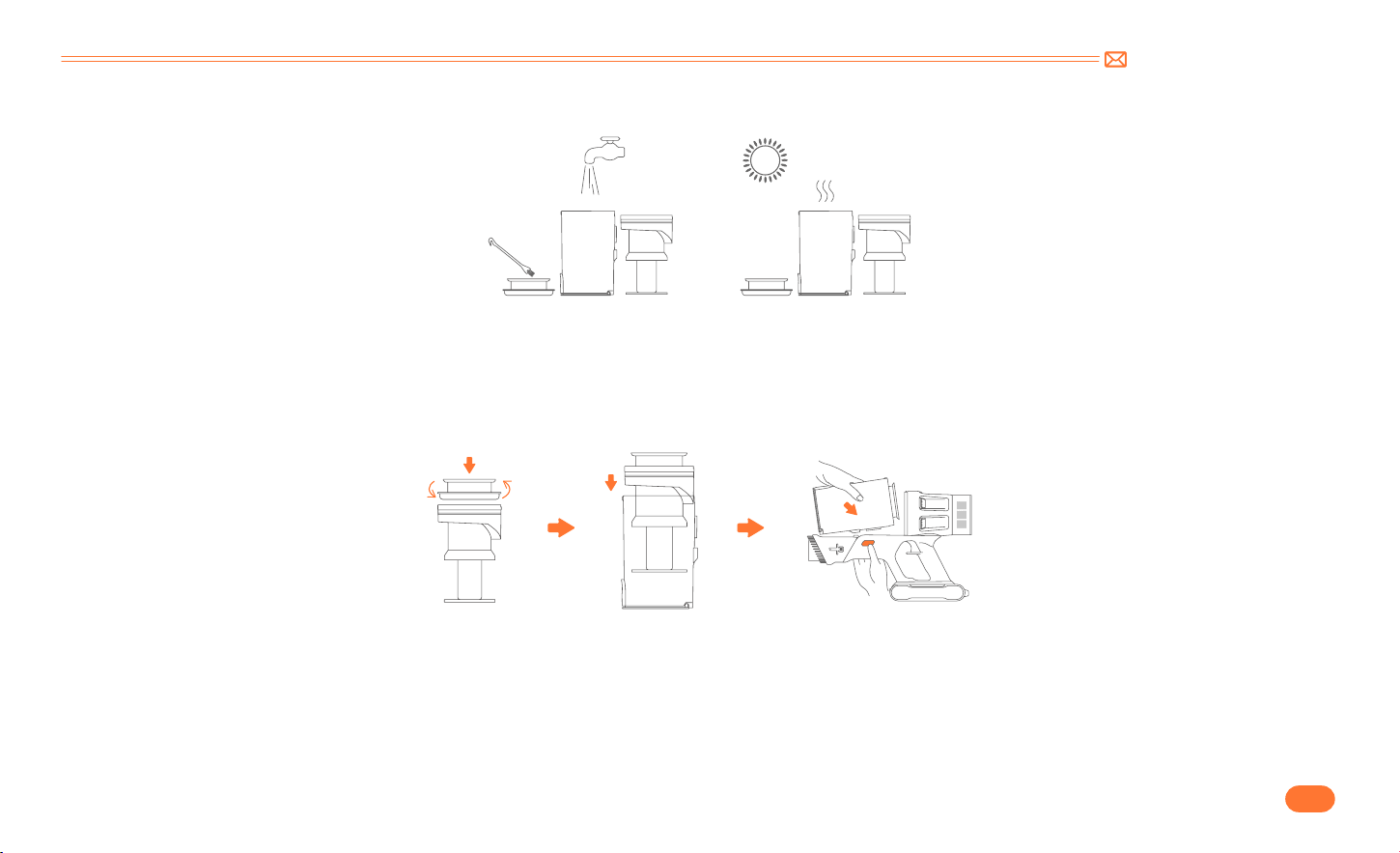
Clean dust cup and filters with water. Make sure that the dust cup and filters have dried before use.
•
Installation steps
•
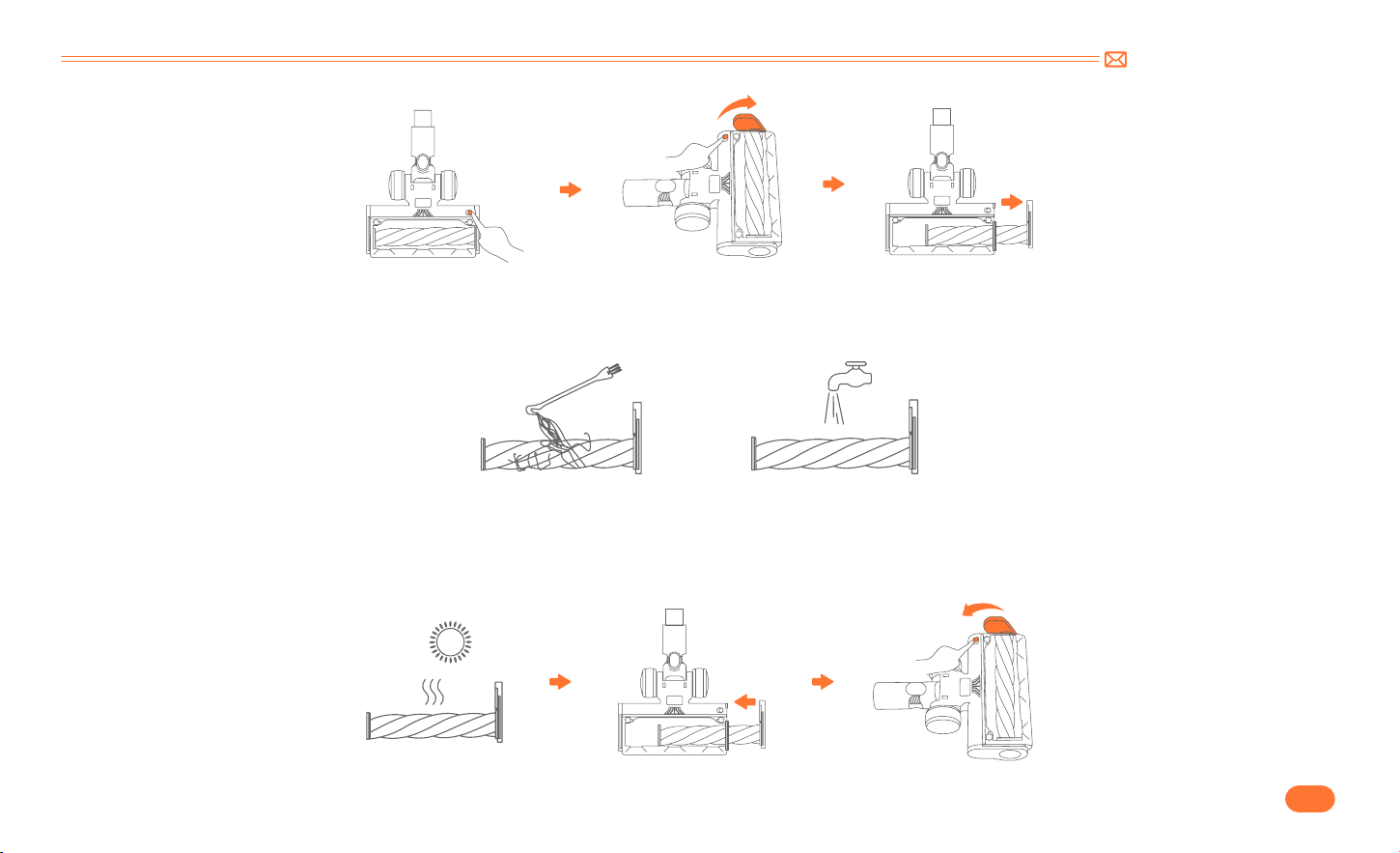
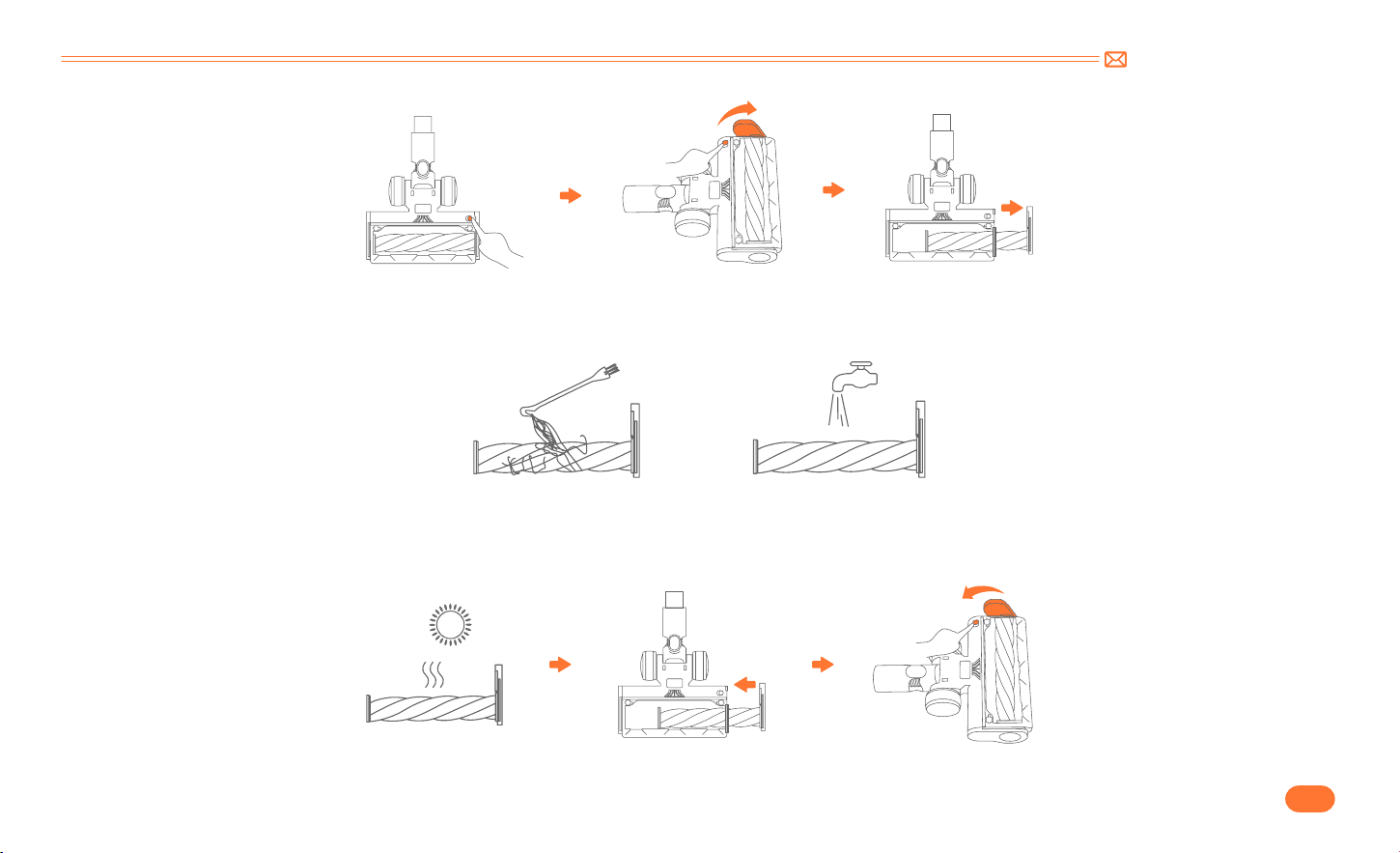
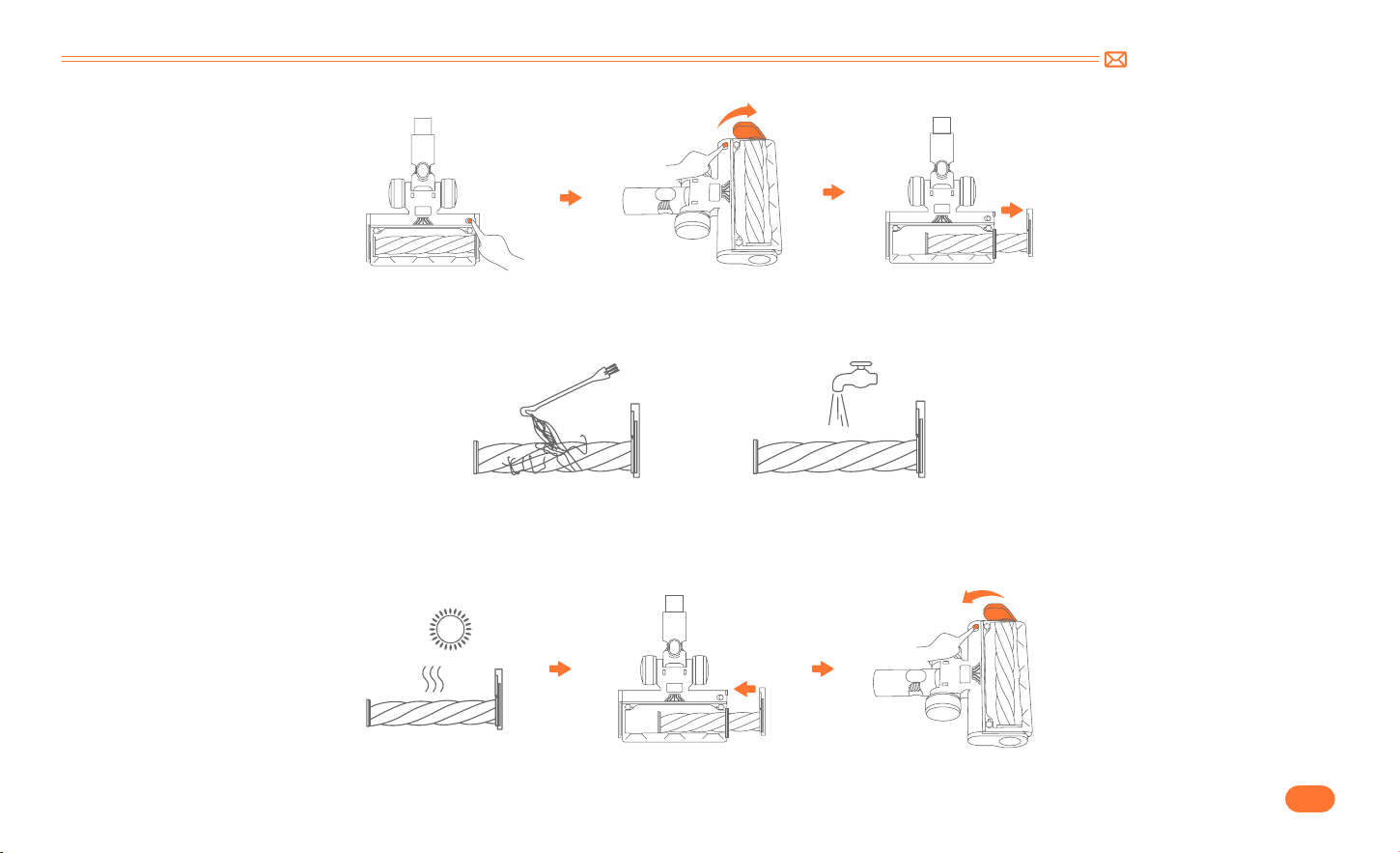
Open the brush bottom fixed device. Turn the brush to unlock position.(pictured)
Tip: After long periods of use, the bristle may be jammed by hair or similar build up. It’s recommended to clean the brush roller periodically to ensure
efficient operation and maintain suction.
6.4 Brush Roller Cleaning
①
Align the stainless steel filter with the gap and install it into the dust cup.
②
Put the HEPA filter on the top.
③
Get the dust cup connected to the main body.
support@inteture.com
EN
17.
•
Remove the debris wrapped around the roller with the mini cleaning brush, then flush the roller with water.
•
Push the roller brush to the bottom and then rotate it to install it.

support@inteture.com
EN
18.
7. SPECIFICATION
8. TROUBLESHOOTING
Product Cordless Vacuum Cleaner
Model BP20
Rated Voltage DC 29.6V
Suction level Mid Max Min
Charge time 4 5H
ISSUE CAUSE SOLUTION
Vacuum cleaner not work
•
Out of power.
•
Battery pack not installed in place or has failed.
•
Motor has failed.
•
Full charge the vacuum cleaner.
•
Battery pack installed in place.
•
Contact INTETURE Team via email for replacing the battery or
motor.
Weak suction
•
Dust cup is full of garbage.
•
Motorized floor brush, tube or filters is clogged with
garbage.
•
Low battery power.
•
Dust cup or filter are not installed correctly.
•
Empty the dust cup.
•
Clear out any garbage that is blocking the motorized floor brush,
tube or filters.
•
Full charge the vacuum cleaner.
•
Install the multi cone filter, HEPA filter and dust cup according to
the instruction correctly.

support@inteture.com
EN
19.
ISSUE CAUSE SOLUTION
Charging is not normal
•
Charger is not correctly connected.
•
Battery pack or charger has failed.
•
Charger is not original.
•
Make sure the charger are fully plugged in socket.
•
Contact INTETURE Team via email for replacing the battery or
charger.
•
Use the original charger provided by INTETURE only.
Insufficient use time after charging
•
Insufficient charging time.
•
Motorized floor brush, dust cup, tube or filters is
clogged with garbage.
•
Battery aging.
•
Full charge the vacuum cleaner.
•
Clear out any garbage that is blocking the motorized floor brush,
dust cup, tube or filters.
•
Contact INTETURE Team via email for replacing the battery.
Motorized floor brush stops with four
indicators on the battery pack flashing
•
Motorized floor brush is clogged with garbage.
•
Clear out any garbage that is blocking the Electrical floor brush.
9. WARRANTY
9.1 The 2 Year Warranty
•
Our INTETURE machine has a 2 year warranty against original defects in material and workmanship, when used for private household purposes in
accordance with the INTETURE Instruction Manual.
•
This warranty provides, at no extra cost to you, all labor and parts necessary to ensure your machine is in proper operating condition during the warranty
period.

support@inteture.com
EN
20.
9.3 How to claim?
Please keep your proof of purchase. To make a claim under our warranty, you need to provide your original purchase receipt with the purchase date and
order number on it.
If your machine is not functioning properly, or you still have any questions after reading this manual carefully, please feel free to contact
us, we will reply to you in 24 hours and try our best to provide you with a satisfactory solution.
Email Our Customer Service : support@inteture.com
9.2 What is covered?
Only applies to purchases made from authorized retailers of INTETURE.
This warranty will only be valid if the machine is used in the country in which it was sold.

support@inteture.com
DE
21.
1. WARNUNG 22
2. PAKETLISTE 23
3. KENNEN SIE DAS PRODUKT 24
3.1 Produktdetails 24
3.2 Touch Display 25
3.3 Zubehör Funktion 25
4. PRODUKTMONTAGE 26
4.1 Staubsauger installieren 26
4.2 Wandhalterung installieren 27
5. WIE IST ES ZU VERWENDEN 28
5.1 Laden 28
5.2 Bedienung 29
6. WARTUNG 33
6.1 Reinigen des Hauptgehäuses 33
6.2 Staubbehälter/Filter reinigen 34
6.3 Staubbehälter und Filter waschen 34
6.4 Reinigung der Bürstenwalze 36
7. SPEZIFIKATION 38
8. FEHLERSUCHE 38
9. GARANTIE 39
INHALT

support@inteture.com
DE
22.
1. WARNUNG
Vielen Dank für den Kauf des kabellosen Staubsaugers INTETURE BP20. Lesen Sie vor der Verwendung dieses Geräts bitte zuerst die folgenden
Sicherheitshinweise und treffen Sie Sicherheitsvorkehrungen, um Fehlfunktionen durch unsachgemäßen Betrieb zu vermeiden.
Hinweis: Der Staubsauger verfügt über eine Wärmeschutztechnologie zum Schutz vor Überhitzung und stellt den Betrieb ein, wenn das Gerät überhitzt.
①
Dieses INTETURE Gerät ist nur für den Hausgebrauch bestimmt. Verwenden Sie es wie in dieser Bedienungsanleitung beschrieben.
②
Überprüfen Sie vor der Inbetriebnahme des Geräts, ob die Netzspannung mit der auf dem Typenschild angegebenen Spannung übereinstimmt.
③
Verwenden Sie das Gerät nicht zum Aufsaugen der folgenden Dinge:
•
Wasser und andere Flüssigkeiten
•
Brennender Müll, heiße Asche und andere brennbare Dinge
•
Scharfe Gegenstände
•
Holzstücke, Gips, Zement, Kalkstein und andere kleine Körnchen
④
Halten Sie den Staubsauger von Öfen und wärmeabgebenden Geräten fern. Hitze kann die Kunststoffteile des Geräts verformen und verfärben.
⑤
Ziehen Sie immer den Stecker aus der Steckdose, wenn das Gerät nicht aufgeladen wird.
⑥
Verwenden Sie zum Reinigen des Geräts niemals Spiritus oder andere Lösungsmittel.
⑦
Lassen Sie das Gerät niemals unbeaufsichtigt, wenn es eingeschaltet ist. Bewahren Sie das Gerät außerhalb der Reichweite von Kindern oder
pflegebedürftigen Personen auf.
⑧
Verwenden Sie kein beschädigtes Kabel oder keinen beschädigten Stecker. Wenn das Gerät oder Ladegerät nicht richtig funktioniert, herunterfällt,
beschädigt ist, fehlt oder ins Wasser fällt, wenden Sie sich bitte an support@inteture.com, das INTETURE Kundendienstteam, um Unterstützung zu erhalten.
⑨
Vor der Verschrottung des Gerätes muss die Batterie ausgebaut werden.
⑩
Die Batterie ist sicher zu entsorgen.
⑪
Beim Ausbau der Batterie muss das Gerät vom Stromnetz getrennt werden.
⑫
Es darf nur der vom Hersteller mitgelieferte Adapter verwendet werden.
⑬
Dieses Gerät kann von Kindern ab 8 Jahren und von Personen mit eingeschränkten physischen, sensorischen oder geistigen Fähigkeiten oder Mangel an
Erfahrung und Wissen verwendet werden, wenn sie beaufsichtigt werden oder Anweisungen zur sicheren Verwendung des Geräts erhalten haben und die
damit verbundenen Gefahren verstehen.Nicht zum Aufnehmen von harten Gegenständen wie Glasschlacke, Nadeln, Nageln usw. Verwenden. keine Teile
des Steckers oder des Geräts mit nassen Händen an. Lagern Sie das Gerät an einem trockenen Ort in Innenräumen.
support@inteture.com
DE
23.
2. PAKETLISTE
Bitte überprüfen und bestätigen Sie Zubehör und Teile vor der Verwendung gemäß folgendem Blatt.
Hauptkörper & Integrierte Bürste Verstellbares Verlängerungsrohr Elektrische Bodenbürste
Lange Fugendüse Akku Extra Hepa-Filter Ladegerät
Aufladbare Wandhalterung Nagel*4 Mini-Reinigungsbürste Kurzanleitung
support@inteture.com
DE
24.
3. KENNEN SIE DAS PRODUKT
3.1 Produktdetails
Luftauslass
Digitaler Touchscreen
Akku Entriegelungstaste
Staubbehälter Entriegelungstaste
Integrierte Bürsteneinstellungstaste
Schaltertaste
LED Licht
Staubbehälter
Staubentleerungstaste
Rohrfreigabeknopf
Teleskoprohr
Knopf zur Längeneinstellung
Elektrische Bodenbürste
Entriegelungstaste für elektrische Bodenbürste
support@inteture.com
DE
25.
3.2 Touch Display
3.3 Zubehör Funktion
Batterieladeanzeige
Anzeige für sauberen Staubbehälter
Saugkraft Einstellknopf
Saugstärken Kontrollleuchte
Blockierungsanzeige
Integrierte Bürste
Lange Fugendüse
Drücken Sie die Einstelltaste, um den
Bürstenkopf auszustrecken. So können
Sie Staub und Haare auf dem Sofa/
Schreibtisch entfernen.
Entfernen Sie Staub an schwer
erreichbaren Stellen wie Fenstern,
Bettfüßen, Zwischenräumen zwischen
Sofas usw.
Wiederaufladbare Wandhalterung
Befestigen Sie den Staubsauger und das
Zubehör zur einfachen Aufbewahrung
an der Wandhalterung. Der Ladevorgang
erfolgt automatisch.
Multifunktionale Rollbürste
Entfernt Staub, Schmutz und Haare von
allen Arten von Böden, Teppichen und
Samt.
Mini Reinigungsbürste
Entfernt Haare, Schmutz und Mikrostaub
von Zubehör oder Filtern.
support@inteture.com
DE
26.
4. PRODUKTMONTAGE
4.1 Staubsauger installieren
•
Reinigungszubehör direkt installieren
•
Verlängerungsrohr und Reinigungszubehör installieren
Klicken
Klicken
support@inteture.com
DE
27.
4.2 Wandhalterung installieren
•
Bitte stellen Sie sicher, dass sich hinter dem Montagebereich keine Gas , Wasser oder Elektrokabel und
leitungen befinden.
•
Um ein Herunterfallen der Dockingstation zu vermeiden, achten Sie bitte darauf, dass sie fest installiert ist.
•
Lagern Sie das Gerät an einem trockenen Ort im Haus. Setzen Sie das Gerät nicht dem Sonnenlicht oder
Minustemperaturen aus.
•
Empfohlener Temperaturbereich: 4 °C bis 40 °C.
Awarnung
support@inteture.com
DE
28.
5. WIE IST ES ZU VERWENDEN
5.1 Laden
•
Lademethoden
①
Schließen Sie das Hauptgerät zum Laden an.
②
Laden am StänderLaden am Ständer.
•
Wenn Sie einen neuen Akku verwenden oder ihn zum ersten Mal nach längerer Lagerung
verwenden, laden Sie den Akku bitte zuerst vollständig auf.
•
Wenn Sie den Staubsauger längere Zeit lagern und nicht benutzen, achten Sie darauf, dass er
mindestens alle drei Monate aufgeladen und entladen wird.
Tipp:
Grünes Licht blinkt: Lädt
Grünes Licht: Vollständig geladen oder während der Verwendung
support@inteture.com
DE
29.
5.2 Bedienung
•
Anfangen zu arbeiten
•
Stellen Sie vor dem ersten Gebrauch sicher, dass der Staubsauger 4
Stunden lang aufgeladen wurde.
•
Der Staubbehälter und die Filter sind gereinigt und an ihrem Platz befestigt.
Stellen Sie vor jedem Gebrauch Folgendes sicher
Drücken Sie den Schalterknopf, um es einzuschalten, und es startet.
support@inteture.com
DE
30.
•
Reinigungsmodus auswählen
•
Siphonfunktion
Beim Einschalten ist die Saugleistung standardmäßig mittel. Berühren Sie die Schaltfläche „ “, um die Saugleistung umzuschalten. Wenn der Saugmodus
angepasst wird, ändert sich der rote Teil der Sauganzeigeleuchte und die Saugstufen sind MID MAX MIN.
Beim Ausschalten aus der niedrigsten Stufe pulsiert der Staubsauger 3 Sekunden lang und sorgt so für eine gründliche Müllbeseitigung. Danach schaltet
sich der Staubsauger automatisch ab.
MID
MAX
MIN
support@inteture.com
DE
31.
•
Abnormaler Indikator
①
Wenn die Bodenbürste große Fremdkörper einsaugt oder zu viele Haare verfängt, blinkt die Anzeige „ “.
•
Entfernen Sie die Bodenbürste und entfernen Sie die Fremdkörper, die sich um die Walze gewickelt haben. Stellen Sie sicher, dass der Bürstenkopf vom
Hauptgerät abgenommen wurde, um ein versehentliches Starten der Maschine und damit verbundene Verletzungen zu verhindern.
②
Wenn der Luftdurchgang oder der Staubbehälter verstopft ist, blinkt die Anzeige „ “.
•
Reinigen Sie das Aluminiumrohr und die Filter im Staubbehälter gründlich.
③
Wenn auf dem Bildschirm „E1“ angezeigt wird: Dies weist auf eine Fehlfunktion des Motors oder eine anhaltende Blockierung hin, die zu hohen
Temperaturen führt.
•
Entfernen Sie den Staubbehälter und lassen Sie ihn mit einem einzelnen Host laufen. Wenn die Anomalie weiterhin besteht, wenden Sie sich an das
INTETURE Team, um den Host auszutauschen. Wenn das Problem verschwindet, reinigen Sie den Staubbehälter und die Bodenbürste.
support@inteture.com
DE
32.
④
Wenn auf dem Bildschirm „E2“ angezeigt wird: Batterietemperaturschutz.
•
Stellen Sie das Gerät bei Raumtemperatur auf und lassen Sie es 10–20 Minuten stehen. Wenn die Anomalie verschwindet, kann der Normalzustand
wiederhergestellt werden. Wenn sie weiterhin besteht, wenden Sie sich an das INTETURE Team, um den Akku auszutauschen.
⑤
Wenn auf dem Bildschirm „E3“ angezeigt wird: Verwendung des falschen Adapters.
•
Bitte verwenden Sie den Originaladapter (Ausgangsspezifikation ist 36 V).
support@inteture.com
DE
33.
⑥
Wenn auf dem Bildschirm „E4“ angezeigt wird: Kurzschluss der Bodenbürste und Kurzschlussschutz des Rohrs.
•
Entfernen Sie das Teleskoprohr und führen Sie es direkt mit der Bodenbürste und dem Host aus. Wenn die Anomalie verschwindet, wenden Sie sich an
das INTETURE Team, um das Rohr auszutauschen. Wenn sie verschwindet, muss die Bodenbürste ausgetauscht werden.
6. WARTUNG
Tipp: Um die Lebensdauer des Staubsaugers zu verlängern, reinigen Sie ihn bitte regelmäßig.
•
Schalten Sie das Gerät aus, bevor Sie das Gehäuse reinigen.
•
Verwenden Sie ein neutrales Reinigungsmittel und wischen Sie das Gehäuse
mit einem halbfeuchten Tuch ab.
•
Vermeiden Sie Sonneneinstrahlung und lagern Sie das Gerät an einem
kühlen und trockenen Ort.
6.1 Reinigen des Hauptgehäuses
support@inteture.com
DE
34.
6.2 Staubbehälter/Filter reinigen
•
Staubbehälter leeren
Wenn während des Gebrauchs der Staubbehälter mehr als die Markierung MAX enthält, leeren Sie ihn bitte rechtzeitig.
•
Drücken Sie die Staub Entleerungstaste, um den Staub zu entleeren.
•
Entfernen Sie den Staubbehälter vom Hauptkörper.
Drücken Sie den Staubbehälter Entriegelungsknopf am Hauptkörper und lösen Sie dann den Staubbehälter vom Hauptkörper.
Warnung: Verwenden Sie den kabellosen Staubsauger nicht ohne den abnehmbaren Filter oder den nicht eingesetzten Staubbehälter.
6.3 Staubbehälter und Filter waschen
MAX
MAX
support@inteture.com
DE
35.
•
Filter aus Staubbehälter entfernen.
•
Entfernen Sie den Edelstahlfilter aus dem Staubbehälter.
HEPA Filter nach oben herausnehmen.
Den Edelstahlfilter nach oben herausnehmen.
support@inteture.com
DE
36.
•
Reinigen Sie Staubbehälter und Filter mit Wasser. Stellen Sie sicher, dass Staubbehälter und Filter vor der Verwendung getrocknet sind.
•
Dust cup
•
Öffnen Sie die Bürstenbodenbefestigung. Drehen Sie die Bürstenbodenschraube in die Entriegelungsposition (siehe Abbildung).
Tipp: Nach längerem Gebrauch können die Borsten durch Haare oder ähnliche Ablagerungen verstopft sein. Es wird empfohlen, die Bürstenwalze
regelmäßig zu reinigen, um einen effizienten Betrieb und eine gleichbleibende Saugkraft zu gewährleisten.
6.4 Reinigung der Bürstenwalze
①
Richten Sie den Edelstahlfilter an der Lücke aus und installieren Sie ihn im Staubbehälter.
②
Setzen Sie den HEPA Filter oben ein.
③
Verbinden Sie den Staubbehälter mit dem Hauptkörper.
support@inteture.com
DE
37.
•
Entfernen Sie mit der Mini Reinigungsbürste den Schmutz, der sich um die Walze gewickelt hat, und spülen Sie die Walze anschließend mit Wasser durch.
•
Drücken Sie die Bürstenrolle nach unten und drehen Sie sie dann, um sie zu installieren.

support@inteture.com
DE
38.
7. SPEZIFIKATION
8. FEHLERSUCHE
Produkt Kabelloser Staubsauger
Modell BP20
Nennspannung DC 29,6 V
Saugmodus Mittel Max Min
Aufladezeit 4 5 Std.
PROBLEM URSACHE LÖSUNG
Staubsauger funktioniert nicht
•
Kein Strom mehr.
•
Akkupack nicht richtig eingesetzt oder defekt.
•
Motor defekt.
•
Den Staubsauger vollständig aufladen.
•
Akkupack an Ort und Stelle installiert.
•
Kontaktieren Sie das INTETURE Team per E Mail, um den Akku oder
den Motor auszutauschen.
Schwache Saugkraft
•
Staubbehälter ist voller Abfall.
•
Elektrische Bodenbürste, Rohr oder Filter sind mit
Abfall verstopft.
•
Schwache Batterieleistung.
•
Staubbehälter oder Filter sind nicht richtig installiert
•
Leeren Sie den Staubbehälter.
•
Entfernen Sie jeglichen Müll, der die elektrische Bodenbürste, das
Rohr oder die Filter verstopft.
•
Laden Sie den Staubsauger vollständig auf.
•
Installieren Sie den Mehrkegelfilter, den HEPA Filter und den
Staubbehälter gemäß der Anleitung richtig.

support@inteture.com
DE
39.
PROBLEM URSACHE LÖSUNG
Ladevorgang ist nicht normal
•
Ladegerät ist nicht richtig angeschlossen.
•
Akkupack oder Ladegerät ist defekt.
•
Ladegerät ist nicht original.
•
Stellen Sie sicher, dass das Ladegerät vollständig in der Steckdose
steckt.
•
Kontaktieren Sie das INTETURE-Team per E-Mail, um den Akku oder
das Ladegerät auszutauschen.
•
Verwenden Sie nur das von INTETURE bereitgestellte
Originalladegerät.
Unzureichende Nutzungsdauer nach
dem Laden
•
Unzureichende Ladezeit.
•
Elektrische Bodenbürste, Staubbehälter, Rohr oder
Filter sind mit Schmutz verstopft.
•
Alterung der Batterie.
•
Staubbehälter, -rohr oder -filter.
•
Entfernen Sie jeglichen Müll, der die elektrische Bodenbürste
blockiert.
•
Kontaktieren Sie das INTETURE-Team per E-Mail, um die Batterie
auszutauschen.
Elektrische Bodenbürste stoppt und
vier Anzeigen am Akkupack blinken
•
Die elektrische Bodenbürste ist mit Schmutz
verstopft.
•
Entfernen Sie sämtlichen Müll, der die elektrische Bodenbürste
blockiert.
9. GARANTIE
9.1 Die 2 Jahres Garantie
•
Für unsere INTETURE Maschine gilt eine 2 jährige Garantie auf Material und Verarbeitungsfehler bei Verwendung im privaten Haushalt gemäß der
INTETURE Bedienungsanleitung.
•
Diese Garantie umfasst ohne zusätzliche Kosten für Sie alle Arbeits und Ersatzteilleistungen, die erforderlich sind, um sicherzustellen, dass Ihre Maschine
während der Garantiezeit in ordnungsgemäßem Betriebszustand ist.

support@inteture.com
DE
40.
9.3 Wie können Sie Ansprüche geltend machen?
Bitte bewahren Sie Ihren Kaufbeleg auf. Zur Geltendmachung unserer Garantieansprüche benötigen wir Ihren Originalkaufbeleg mit Kaufdatum und
Bestellnummer.
Wenn Ihre Maschine nicht ordnungsgemäß funktioniert oder Sie nach sorgfältigem Lesen dieses Handbuchs noch Fragen haben,
können Sie sich gerne an uns wenden. Wir werden Ihnen innerhalb von 24 Stunden antworten und unser Bestes tun, um Ihnen eine
zufriedenstellende Lösung zu bieten.
Senden Sie eine E-Mail an unseren Kundenservice: support@inteture.com
9.2 Was Abgedeckt Ist?
Gilt nur für Käufe bei autorisierten Händlern von INTETURE.
Diese Garantie ist nur gültig, wenn die Maschine in dem Land verwendet wird, in dem sie verkauft wurde.

support@inteture.com
FR
41.
1. AVERTISSEMENT 42
2. LISTE DES PAQUETS 43
3. CONNAÎTRE VOTRE PRODUIT 44
3.1 Détails du produit 44
3.2 Écran tactile numérique 45
3.3 Accessories Function 45
4. ASSEMBLAGE DU PRODUIT 46
4.1 Installer l'aspirateur 46
4.2 Installer le support mural 47
5. MODE D'EMPLOI 48
5.1 Chargement 48
5.2 Fonctionnement 49
6. ENTRETIEN 53
6.1 Nettoyage du corps principal 53
6.2 Coupe de poussière vide 54
6.3 Laver la coupe à poussière et les filtres 54
6.4 Nettoyage des rouleaux de brosse 56
7. SPÉCIFICATION 58
8. DÉPANNAGE 58
9. GARANTIE 59
CONTENU

support@inteture.com
FR
42.
1. AVERTISSEMENT
Nous vous remercions d'avoir acheté l'aspirateur sans fil INTETURE BP20. Avant d'utiliser cet appareil, veuillez d'abord lire l'avertissement de sécurité suivant
et prendre des mesures de protection pour éviter les dysfonctionnements causés par une mauvaise utilisation.
Remarque: l'aspirateur a adopté une technologie de protection thermique pour éviter la surchauffe et cessera de fonctionner lorsque l'article est
surchauffé.
①
Cet appareil INTETURE est destiné à un usage domestique uniquement. Utiliser comme décrit dans ce livret d’instructions.
②
Avant d'utiliser cet appareil, vérifiez que la tension du secteur correspond à la tension indiquée sur la plaque signalétique.
③
N'utilisez pas l'appareil pour aspirer toutes ces dernières choses :
•
Eau et autres liquides
•
Bout allumé, cendres chaudes et autres objets combustibles
•
Matière tranchante
•
Morceaux de bois, gesso, ciment, calcimine et autres minuscules granulés
④
Gardez l'aspirateur loin des cuisinières et des appareils émettant de la chaleur. La chaleur peut déformer et décolorer les pièces en plastique de l'appareil.
⑤
Retirez toujours la fiche de la prise de courant lorsque l'appareil n'est pas en charge.
⑥
N'utilisez jamais d'alcool ou d'autres solvants pour nettoyer l'appareil.
⑦
Ne laissez jamais l'appareil sans surveillance lorsqu'il est allumé. Gardez l'appareil hors de portée des enfants ou des personnes faibles.
⑧
N'utilisez pas de câble ou de fiche endommagés.
⑨
Si l'appareil ou le chargeur ne fonctionne pas correctement, s'il est tombé, endommagé, manqué ou tombé dans l'eau, veuillez contacter support@
inteture.com, l'équipe après vente INTETURE pour obtenir de l'aide.
⑩
La batterie doit être retirée de l'appareil avant sa mise au rebut.
⑪
La batterie doit être éliminée en toute sécurité.
⑫
L'appareil doit être débranché de l'alimentation électrique lors du retrait de la batterie.
⑬
Seul l'adaptateur fourni par le fabricant peut être utilisé.
⑭
Cet appareil peut être utilisé par des enfants âgés de 8 ans et plus et des personnes ayant des capacités physiques, sensorielles ou mentales réduites
ou un manque d'expérience et de connaissances s'ils ont reçu une surveillance ou des instructions concernant l'utilisation de l'appareil en toute sécurité et
comprennent les dangers impliqués.
support@inteture.com
FR
43.
2. LISTE DES PAQUETS
Veuillez vérifier et confirmer les accessoires et les pièces selon la fiche suivante avant de les utiliser.
Corps principal & Brosse intégrée Tube télescopique réglable Brosse de sol électrique
Buse Longue Crevasse Batterie Filtre Hepa Supplémentaire Chargeur
Support Mural Clou*4 Mini-brosse de Nettoyage Guide rapide de l'utilisateu
support@inteture.com
FR
44.
3. CONNAÎTRE VOTRE PRODUIT
3.1 Détails du produit
Sortie D'air
Écran Tactile Numérique
Bouton D'ouverture de la Batterie
Bouton de Commutation
Bouton D'ouverture de la Coupelle à Poussière
Bouton de réglage de la brosse intégré
Lumière LED
Coupe de Poussière
Bouton de Vidage de la Poussière
Bouton de Libération du Tube Télescopique
Tube D'extension Réglable
Bouton de Réglage de la Longueur
Brosse à Sol Électrique
Bouton de Déclenchement Motorisé
de la Brosse à Plancher
support@inteture.com
FR
45.
3.2 Écran tactile numérique
3.3 Accessories Function
Indicateur de Charge Restante de la Batterie
Bouton de Réglage de L'aspiration
Indicateur de Nettoyage du Godet à Poussière
Indicateur de Niveau D'aspiration
Indicateur de Blocage
Brosse intégrée
Support MuralBuse Longue Crevasse
Appuyez sur le bouton de réglage pour
étirer la tête de brosse, cela peut vous
aider à éliminer la poussière et les cheveux
sur le canapé/bureau.
Fixez l'aspirateur et les accessoires sur le
support mural pour un rangement facile,
et il se chargera automatiquement.
Enlevez la poussière sur les zones difficiles
d'accès comme les fenêtres, les pieds de
lit, les espaces entre les canapés, etc.
Brosse roulante multi fonctions
Enlève la poussière, les débris et les
cheveux de tous les types de sols, de tapis
et de velours.
Mini brosse de Nettoyage
Enlève les cheveux, les détritus et les
micro poussières sur les accessoires ou les
filtres.
support@inteture.com
FR
46.
4. ASSEMBLAGE DU PRODUIT
4.1 Installer l'aspirateur
•
Accessoires de nettoyage à installation directe
•
Installer le tube d'extension et les accessoires de nettoyage
Click
Click
support@inteture.com
FR
47.
4.2 Installer le support mural
•
Veuillez vous assurer qu’aucun câble ou fil de gaz, d’eau ou d’électricité ne se trouve derrière la zone de
montage.
•
Afin d’éviter que la station d’accueil ne tombe, veillez à ce qu’elle soit installée fermement.
•
Stockez l’appareil correctement à l’intérieur, dans un endroit sec. N’exposez pas l’appareil à la lumière
directe du soleil ou à des températures négatives. Plage de température recommandée: 39,2°F (4°C) 104°F
(40°C).
AVERTISSEMENT
support@inteture.com
FR
48.
5. MODE D'EMPLOI
5.1 Chargement
•
Méthode de chargement
①
Connectez avec le corps principal pour charger.
②
Accrochez le au support mural pour le charger.
•
Si vous utilisez une nouvelle batterie ou si vous l’utilisez pour la première fois après un stockage
prolongé, veuillez d’abord charger complètement la batterie.
•
Lorsque vous stockez l’aspirateur et que vous ne l’utilisez pas pendant une longue période, veillez
à ce qu’il soit chargé et déchargé au moins une fois tous les trois mois.
Astuce :
Lumière Verte Clignotante : Chargement
Lumière Verte : Entièrement Chargée Ou En Cours D'utilisation
support@inteture.com
FR
49.
5.2 Fonctionnement
•
Commencez à travailler
•
La batterie est complètement chargée et fixée en place.
•
Le coupe de poussière et les filtres sont nettoyés, et fixés en
place.
Avant chaque utilisation, assurez vous que
Appuyez sur le bouton interrupteur et il démarrera.
support@inteture.com
FR
50.
•
Sélection du mode de nettoyage
•
Fonction siphon
Lorsqu'elle est allumée, l'aspiration par défaut est moyenne. Appuyez sur le bouton " " pour changer le niveau d'aspiration. Au fur et à mesure que le mode
d'aspiration est ajusté, la partie rouge du voyant d'aspiration change et les engrenages d'aspiration sont respectivement MID MAX MIN.
Lors de la désactivation du mode le plus bas, le vide augmente pendant 3 secondes, garantissant ainsi une élimination complète des déchets. Et puis
l'aspirateur s'éteint automatiquement.
MID
MAX
MIN
support@inteture.com
FR
51.
•
Indicateur d'anomalie
①
Si la brosse à sol inhale de gros corps étrangers ou emmêle trop de cheveux, l'indicateur " " clignote..
•
Retirez la brosse à sol et nettoyez les corps étrangers enroulés autour du rouleau. Veuillez vous assurer que la tête de brosse a été détachée de l'unité
principale pour éviter un démarrage accidentel de la machine et provoquer des blessures.
②
Lorsque le passage d'air ou le bac à poussière est bloqué, l'indicateur " " clignote.
•
Nettoyez soigneusement le tube en aluminium et les filtres dans le bac à poussière.
③
Si l'écran affiche “E1" : cela indique un dysfonctionnement du moteur ou un blocage continu provoquant une température élevée
.
•
Retirez la tasse à poussière et exécutez la sur un seul hôte. Si l'anomalie persiste, contactez l'équipe inteture pour changer d'hôte. S'il disparaît, nettoyez
les tasses à poussière et les brosses à sol.
support@inteture.com
FR
52.
④
Si l'écran affiche “E2" : protection contre la température de la batterie.
•
Placez la machine à température ambiante et laissez la reposer pendant 10 à 20 minutes. Si l’anomalie disparaît, elle peut redevenir normale. Si cela
persiste, contactez l'équipe INTETURE pour remplacer la batterie.
⑤
Si l'écran affiche “E3": Utilisation du mauvais adaptateur.
•
Veuillez utiliser l'adaptateur d'origine (la spécification de sortie est de 36 V).
support@inteture.com
FR
53.
⑥
Si l'écran affiche “E4" : court circuit de la brosse de sol et protection contre les courts circuits du tube.
•
Retirez le tube télescopique et allumez le simplement avec la brosse à sol et le moteur principal. Si l'anomalie disparaît, contactez l'équipe INTETURE
pour remplacer le tube ; Si l'anomalie persiste, la brosse à sol doit être remplacée.
6. ENTRETIEN
Conseil: Veuillez nettoyer l'aspirateur régulièrement pour prolonger sa durée de vie.
•
Éteignez l’appareil avant de le nettoyer.
•
Veuillez utiliser un détergent neutre et essuyer le corps avec un chiffon à
moitié humide.
•
Évitez l’exposition au soleil et stockez dans un endroit frais et sec.
6.1 Nettoyage du corps principal
support@inteture.com
FR
54.
6.2 Coupe de poussière vide
•
Nettoyer le bac à Poussière/Filtres
Lors de l'utilisation, si les déchets dans le bac à poussière dépassent la ligne MAX, veuillez les vider à temps.
•
Appuyez sur le bouton de vidange de la poussière pour vider la poussière.
•
Retirez le coupe de poussière du corps principal.
Appuyez d'abord de la main gauche sur le bouton de libération de la coupe à poussière situé de chaque côté du corps principal, puis soulevez le coupe de
poussière de la main droite.
AVERTISSEMENT: N'utilisez pas l'aspirateur sans fil sans le filtre amovible ou le bac à poussière en place.
6.3 Laver la coupe à poussière et les filtres
MAX
MAX
support@inteture.com
FR
55.
•
Retirez les filtres du coupe de poussière.
•
Retirez le filtre en acier inoxydable du bac à poussière.
Retirez le filtre HEPA vers le haut.
Sortez le filtre inox vers le haut.
support@inteture.com
FR
56.
•
Nettoyez le coupe de poussière et les filtres avec de l’eau. Assurez vous que le coupe de poussière et les filtres ont séché avant de les utiliser.
•
Étapes d'installation
•
Ouvrez le dispositif fixe inférieur de la brosse.Tournez la brosse pour déverrouiller la position. (photo)
Conseil: Après de longues périodes d'utilisation, les poils peuvent être bloqués par des cheveux ou des accumulations similaires. Il est recommandé de
nettoyer périodiquement le rouleau brosse pour assurer un fonctionnement efficace et maintenir l'aspiration.
6.4 Nettoyage des rouleaux de brosse
①
Alignez le filtre en acier inoxydable avec l'espace et installez le dans le coupe de poussière.
②
Placez le filtre HEPA sur le dessus.
③
Connectez le coupe de poussière au corps principal.
support@inteture.com
FR
57.
•
Enlevez les débris enroulés autour du rouleau avec la mini brosse de nettoyage, puis rincez le rouleau avec de l’eau
•
Poussez la brosse rotative vers le bas, puis faites la pivoter pour l'installer.

support@inteture.com
FR
58.
7. SPÉCIFICATION
8. DÉPANNAGE
Product Aspirateur Balai Sans Fil
Modèle BP20
Tension nominale DC 29.6 V
Niveau d'aspiration Min Mid Max
Temps de charge 4 5H
Problème Cause Solution
L'aspirateur ne fonctionne pas
•
La batterie est morte.
•
La batterie n'est pas en place ou est défectueuse.
•
Le moteur est en panne.
•
Chargez complètement l'aspirateur.
•
Pack batterie installé en place.
•
Contactez l'équipe INTETURE par e mail pour remplacer la batterie
ou le moteur.
Faible aspiration
•
La coupe de poussière est pleine d'ordures.
•
La brosse à plancher motorisée, le tube ou les filtres
sont obstrués par des déchets.
•
Batterie faible.
•
Le godet à poussière ou le filtre n'est pas installé
correctement.
•
Videz le coupe de poussière.
•
Retirez tous les déchets qui bloquent la brosse de sol électrique,
letube ou les filtres.
•
Chargez complètement l'aspirateur.
•
Installez correctement le filtre multicône, le filtre HEPA et la
coupelle à poussière en suivant les instructions.

support@inteture.com
FR
59.
ISSUE CAUSE SOLUTION
La charge n'est pas normale
•
Le chargeur n'est pas correctement connecté.
•
Batterie ou chargeur endommagé.
•
Le chargeur n'est pas d'origine.
•
Assurez-vous que le chargeur est complètement branché dans la
prise.
•
Contactez l'équipe INTETURE par e-mail pour remplacer la batterie
ou le chargeur.
•
Utilisez le chargeur original fourni par INTETURE.
Temps d'utilisation insuffisant après la
charge
•
Temps de charge insuffisant.
•
La brosse à plancher motorisée, le coupe de
poussière, le tube ou les filtres sont obstrués par des
déchets.
•
Vieillissement de la batterie.
•
Chargez complètement l'aspirateur.
•
Retirez tous les déchets qui bloquent la brosse à plancher motorisée,
le coupe de poussière, le tube ou les filtres.
•
Contactez l'équipe INTETURE par e-mail pour remplacer la batterie.
La brosse à plancher motorisée s'arrête
avec quatre indicateurs sur le bloc-
piles qui clignotent.
•
La brosse à plancher motorisée est obstruée par des
déchets.
•
Retirez les déchets qui bloquent la brosse à plancher motorisée.
9. GARANTIE
9.1 La garantie de 2 ans
•
Notre machine INTETURE bénéficie d'une garantie de 2 ans contre les défauts d'origine de matériaux et de fabrication, lorsqu'elle est utilisée à des fins
domestiques privées conformément au manuel d'instructions INTETURE.
•
Cette garantie fournit, sans frais supplémentaires pour vous, toute la main d'œuvre et les pièces nécessaires pour garantir que votre machine est en bon
état de fonctionnement pendant la période de garantie.

support@inteture.com
FR
60.
9.3 Comment faire une réclamation
Veuillez conserver votre preuve d'achat. Pour faire une réclamation au titre de notre garantie, vous devez fournir l'original de votre reçu d'achat sur lequel
figurent la date d'achat et le numéro de commande.
Si votre machine ne fonctionne pas correctement, ou si vous avez encore des questions après avoir lu attentivement ce manuel, n'hésitez
pas à nous contacter, nous vous répondrons dans les 24 heures et ferons de notre mieux pour vous fournir une solution satisfaisante.
Envoyez Un Courriel À Notre Service Clientèle: support@inteture.com
9.2 Qu'est ce qui est couvert
S'applique uniquement aux achats effectués auprès de détaillants agréés de INTETURE.
Cette garantie ne sera valable que si la machine est utilisée dans le pays dans lequel elle a été vendue.

support@inteture.com
ES
61.
1. ADVERTENCIA 62
2. LISTA DE PAQUETES 63
3. CONOZCA SU PRODUCTO 64
3.1 Detalles del producto 64
3.2 Pantalla de Visualización Digital 65
3.3 Accessories Function 65
4. MONTAJE DEL PRODUCTO 66
4.1 Instale la aspiradora 66
4.2 Instalar el soporte de pared 67
5. CÓMO UTILIZAR 68
5.1 Carga 68
5.2 Operando 69
6. MANTENIMIENTO 73
6.1 Limpieza del cuerpo principal 73
6.2 Limpie el recipiente para el polvo / filtros 74
6.3 Lavar el recipiente para polvo y los filtros 74
6.4 Limpieza del rodillo del cepillo 76
7. ESPECIFICACIÓN 78
8. SOLUCIÓN DE PROBLEMAS 78
9. GARANTÍA 79
CONTENIDO

support@inteture.com
ES
62.
1. ADVERTENCIA
Gracias por comprar la aspiradora sin cable INTETURE BP20. Antes de usar esta unidad, lea las siguientes advertencias de seguridad y tómelas
Medidas de protección de seguridad para evitar fallos causados por un funcionamiento incorrecto.
Nota: La aspiradora utiliza tecnología de protección térmica para evitar el sobrecalentamiento y dejará de funcionar cuando el artículo se sobrecaliente.
①
Esta aspiradora es solo para uso doméstico. Utilícelo como se describe en este manual.
②
Antes de utilizar este aparato, compruebe que la tensión de red corresponde a la tensión indicada en la placa de características.
③
Se prohíben las siguientes situaciones:
•
Agua y otros líquidos
•
Tronco encendido, cenizas calientes y otras cosas combustibles
•
Materia afilada
•
Trozos de madera, yeso, cemento, calcimina y otros gránulos diminutos
④
Mantenga la aspiradora alejada de estufas y aparatos emisores de calor. El calor puede deformar y decolorar las piezas de plástico de la unidad.
⑤
Retire siempre el enchufe de la toma de corriente cuando el aparato no se esté cargando.
⑥
Nunca use alcohol u otros solventes para limpiar el aparato.
⑦
Nunca deje el aparato desatendido cuando esté encendido. Mantenga el aparato fuera del alcance de los niños o de los enfermos.
⑧
No utilice un cable o enchufe dañado. Si el dispositivo o el cargador no funcionan correctamente, se caen, se dañan, se pierden o se caen al agua,
comuníquese con support@inteture.com, equipo de posventa de INTETURE para obtener ayuda.
⑨
La batería debe retirarse del aparato antes de desecharla.
⑩
La batería debe desecharse de forma segura.
⑪
El aparato debe desconectarse de la alimentación al retirar la batería.
⑫
Solo se puede utilizar el adaptador suministrado por el fabricante.
⑬
Este aparato puede ser utilizado por niños a partir de 8 años y personas con capacidades físicas, sensoriales o mentales reducidas o falta de experiencia
y conocimientos si han recibido supervisión o instrucciones sobre el uso del aparato de forma segura y comprenden los peligros que conlleva.
support@inteture.com
ES
63.
2. LISTA DE PAQUETES
Verifique y confirme los accesorios y piezas de acuerdo con la siguiente hoja antes de usar.
Cuerpo principal y cepillo integrado Tubo de extensión ajustable Cepillo eléctrico para suelos
Cepillo para hendiduras Batería Filtro de HEPA Adicional Cargador
Soporte de pared recargable El clavo*4 Mini Cepillo de Limpieza Guía rápida del usuario
support@inteture.com
ES
64.
3. CONOZCA SU PRODUCTO
3.1 Detalles del producto
Salida de Aire
Pantalla Táctil Digital
Botón de Liberación de la Batería
Botón ON/OFF
Dust Cup Release Button
Botón de ajuste del cepillo
Luz LED
Copa de Polvo
Botón de vaciado de polvo
Botón de Liberación del Tubo
Telescópico
Tubo de Extensión Ajustable
Botón de Ajuste de la Longitud
Cepillo Eléctrico Para Suelos
Botón Eléctrico de Liberación Del
Cepillo De Suelo
support@inteture.com
ES
65.
3.2 Pantalla de Visualización Digital
3.3 Accessories Function
Indicador de Batería
Indicador de Limpieza Copa de Polvo
Botón de Ajuste de la Succión
Luz Indicadora de Nivel de Succión
Indicador de Bloqueado
Cepillo de polvo 2 en 1
Estación de carga en paredBoquilla de hendidura larga
Presione el botón de ajuste para estirar
el cabezal del cepillo, puede ayudarlo a
eliminar el polvo y el cabello en el sofá/
escritorio.
Fije la aspiradora y los accesorios en el colgador
de pared para un fácil almacenamiento y
se cargará automáticamente.
Quite el polvo en las áreas de difícil acceso
como ventanas, pies de cama, espacios
entre el sofá, etc.
Cepillo giratorio multifunción
Elimine el polvo, los desechos y el cabello
de todo tipo de pisos, alfombras y terciopelo.
Mini cepillo de limpieza
Retire el pelo, la basura y el micropolvo de
los accesorios o filtros.
support@inteture.com
ES
66.
4. MONTAJE DEL PRODUCTO
4.1 Instale la aspiradora
•
Instale accesorios de limpieza directamente
•
Instale el tubo de extensión y los accesorios de limpieza
Click
Click
support@inteture.com
ES
67.
4.2 Instalar el soporte de pared
WARNING
•
Asegúrese de que no haya cables de gas, agua o eléctricos detrás del área de montaje.
•
Para evitar que la base se caiga, asegúrese de que esté instalada firmemente.Almacene adecuadamente
en interiores en un lugar seco. No exponga la máquina a la luz solar ni a temperaturas bajo cero. Rango de
temperatura recomendado: 39.2°F (4°C) 104°F(40°C)
support@inteture.com
ES
68.
5. CÓMO UTILIZAR
5.1 Carga
•
Métodos de carga
•
Cuando utilice una batería nueva o la utilice por primera vez después de un almacenamiento
prolongado, primero cargue la batería por completo.
•
Cuando guarde y no utilice la aspiradora durante mucho tiempo, asegúrese de que esté cargada
y descargada al menos una vez cada tres meses.
①
Carga la batería directamente.
②
Estación de carga de pared.
Consejo:
Luz verde intermitente: Cargando
Luz verde: Totalmente cargada o durante el uso
Warning: No utilice ningún otro adaptador de corriente que no sea el suministrado, ya que el uso de uno alternativo aumentará el riesgo de lesiones y/o daños al
producto principal.
support@inteture.com
ES
69.
5.2 Operando
•
Empezar a trabajar
•
La batería está completamente cargada y fija en su lugar.
•
El recipiente para el polvo y los filtros se limpian y se fijan en su
lugar.
Antes de cada uso, asegúrese de que
Pulsa el botón del interruptor para encenderlo y se pondrá en marcha.
support@inteture.com
ES
70.
•
Seleccionar el modo de limpieza
•
Evita que la basura vuelva al suelo
①
Cuando está encendido, la succión predeterminada es media. Toque el botón " " para cambiar el nivel de succión. A medida que se ajusta el modo de
succión, la parte roja de la luz indicadora de succión cambiará, y las marchas de succión serán MID MAX MIN respectivamente.
Cuando se apaga desde el modo más bajo, la aspiradora se dispara durante 3 segundos, lo que garantiza la eliminación completa de la basura. A
continuación, el aspirador se apaga automáticamente.
MID
MAX
MIN
support@inteture.com
ES
71.
•
Indicador anormal
①
Si el cepillo para suelos aspira cuerpos extraños grandes o enreda demasiado pelo, el indicador " " parpadeará.
•
Retire el cepillo para suelos y limpie los cuerpos extraños enredados y el rodillo. Asegúrese de que el cabezal del cepillo se ha separado de la unidad
principal para evitar que la máquina se ponga en marcha accidentalmente y provoque lesiones personales.
②
Cuando el paso de aire o el recipiente para el polvo están bloqueados, el indicador " " parpadeará.
•
Limpie a fondo el tubo de aluminio y los filtros del recipiente para el polvo.
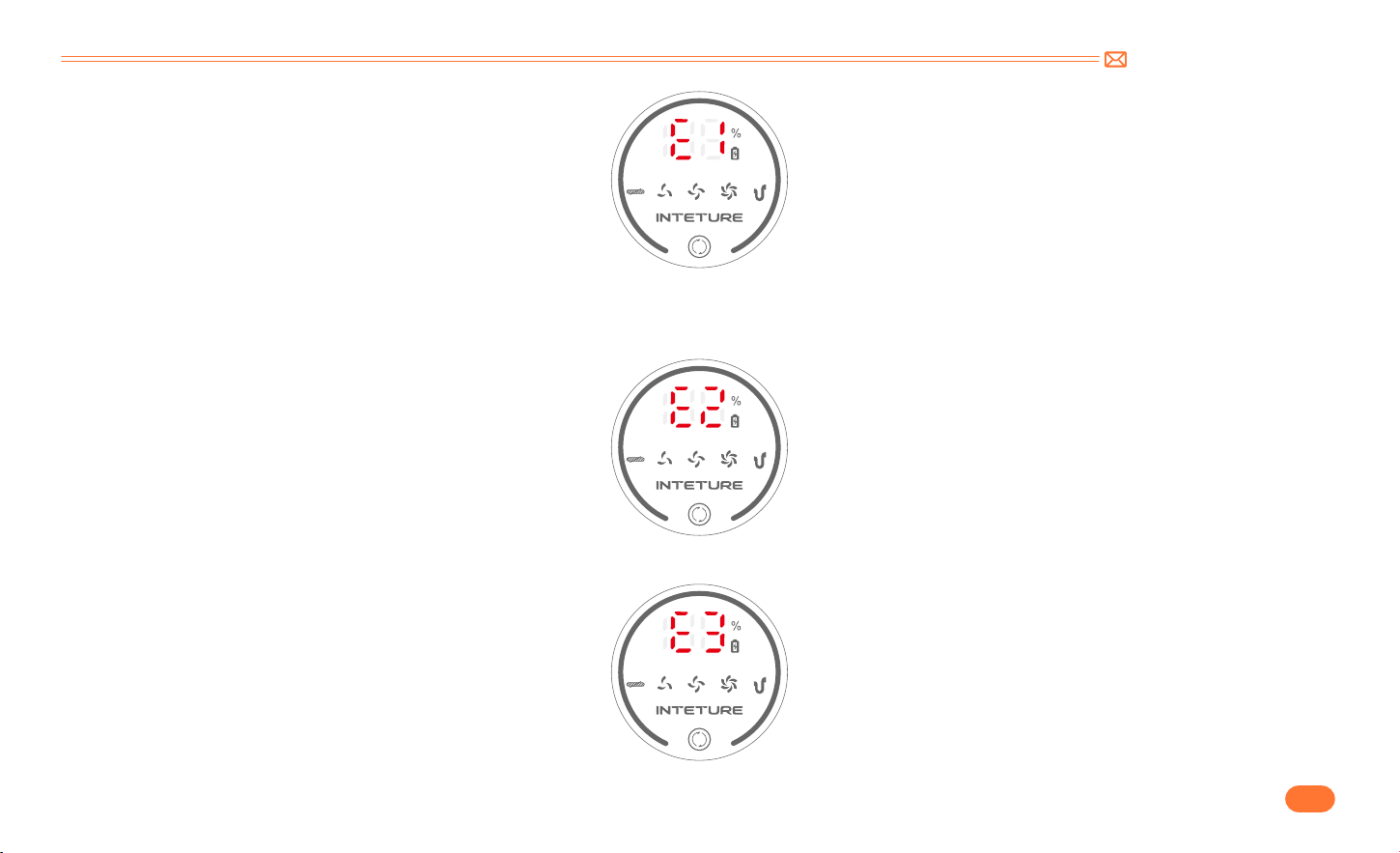
③
Si la pantalla muestra "E1": indica un mal funcionamiento del motor o un bloqueo continuo que causa alta temperatura
.
•
Retire el recipiente para el polvo y ejecútelo en un solo host. Si la anomalía persiste, póngase en contacto con el equipo de INTETURE para reemplazar el
host. Si desaparece, limpie el recipiente para el polvo y el cepillo para pisos.
support@inteture.com
ES
72.
④
Si la pantalla muestra "E2": protección de la temperatura de la batería.
•
Coloque la máquina a temperatura ambiente y déjela reposar durante 10 20 minutos. Si la anomalía desaparece, se puede restaurar a la normalidad. Si
persiste, póngase en contacto con el equipo de INTETURE para reemplazar el paquete de baterías.
⑤
Si la pantalla muestra "E3": Uso del adaptador incorrecto.
•
Utilice el adaptador original. (la especificación de salida es de 36 V)
support@inteture.com
ES
73.
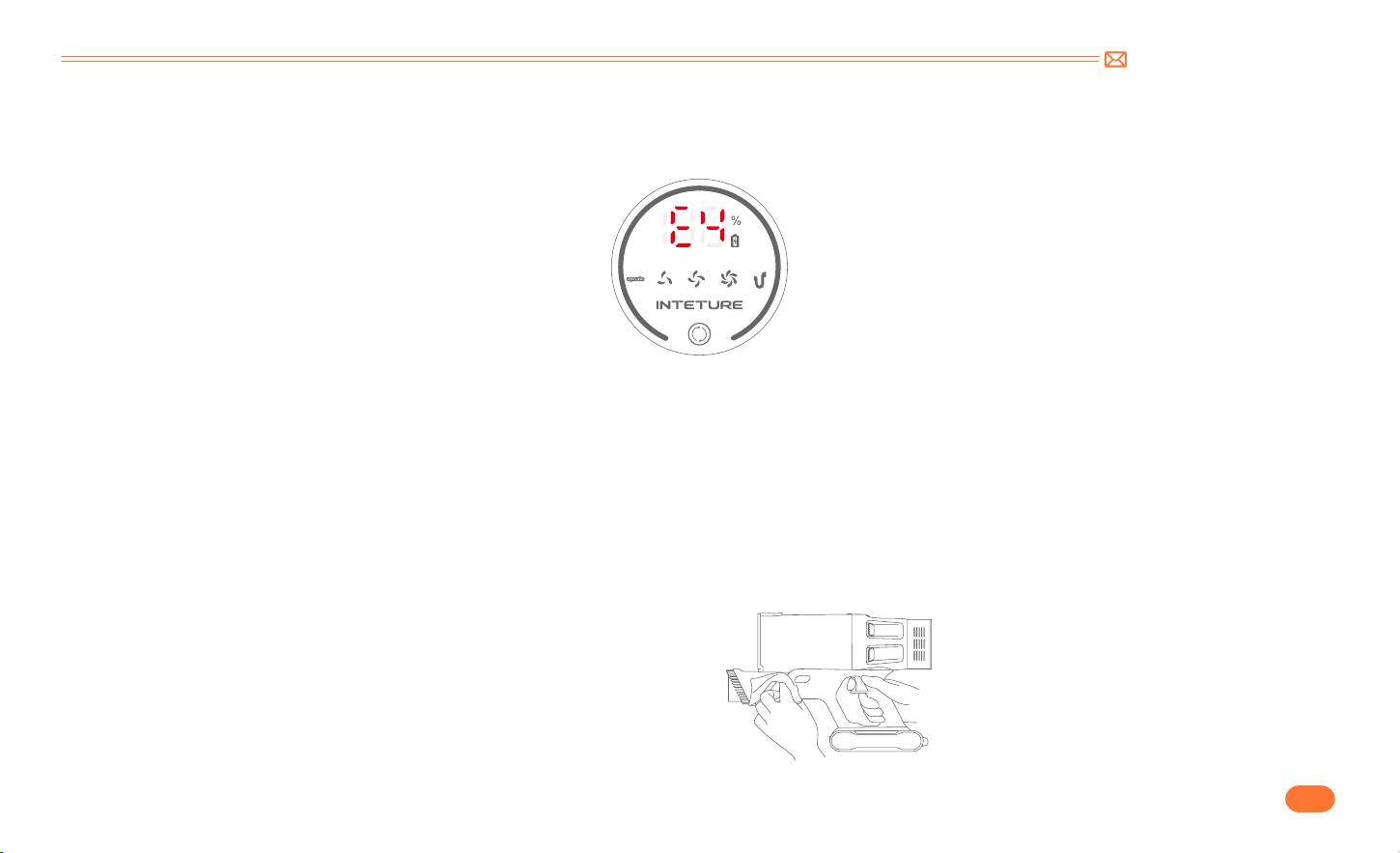
⑥
Si la pantalla muestra "E4": cortocircuito del cepillo del piso y protección contra cortocircuito del tubo.
•
Retire el tubo telescópico y páselo directamente con el cepillo para suelos y el host. Si la anomalía desaparece, póngase en contacto con el equipo de
INTETURE para reemplazar el tubo; Si desaparece, es necesario reemplazar el cepillo para pisos.
6. MANTENIMIENTO
Tip: Please clean the vacuum cleaner regularly to extend its lifespan.
•
Apague la energía antes de limpiar el cuerpo.
•
Utilice un detergente neutro, limpie el cuerpo con un paño medio mojado.
•
Evite la exposición al sol y guárdelo en un lugar fresco y seco.
6.1 Limpieza del cuerpo principal
support@inteture.com
ES
74.
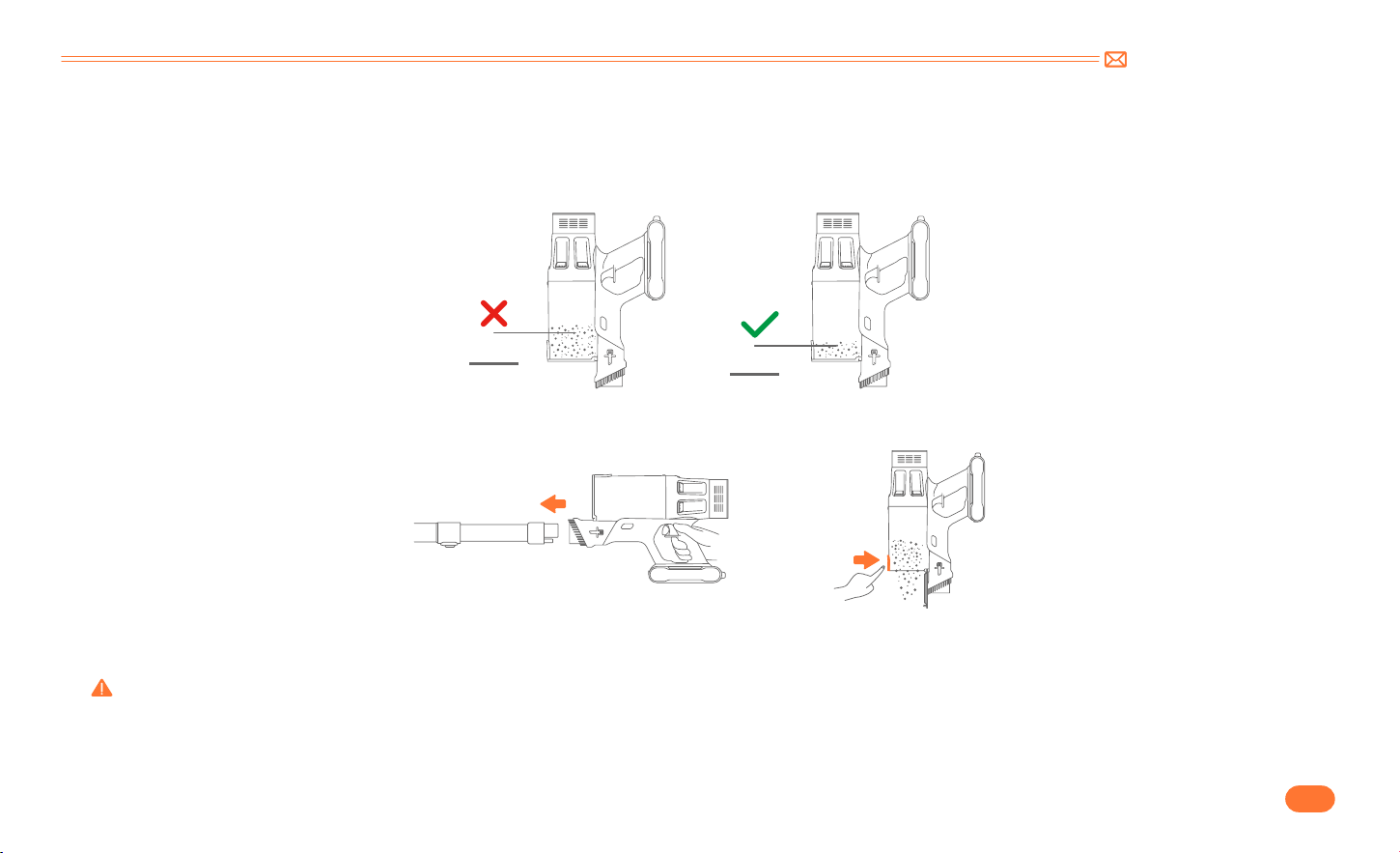
6.2 Limpie el recipiente para el polvo / filtros
•
Taza de polvo vacía
Cuando lo use, si la basura en la taza de polvo excede la línea MAX, vacíelo a tiempo.
•
Presione el botón de vaciado de polvo para vaciar el polvo.
•
Retire el depósito de polvo del cuerpo principal.
Presione el botón de vaciado de polvo para vaciar el polvo.
Warning: No utilice la aspiradora cuando la caja de polvo y el filtro no estén instalados correctamente.
6.3 Lavar el recipiente para polvo y los filtros
MAX
MAX
support@inteture.com
ES
75.
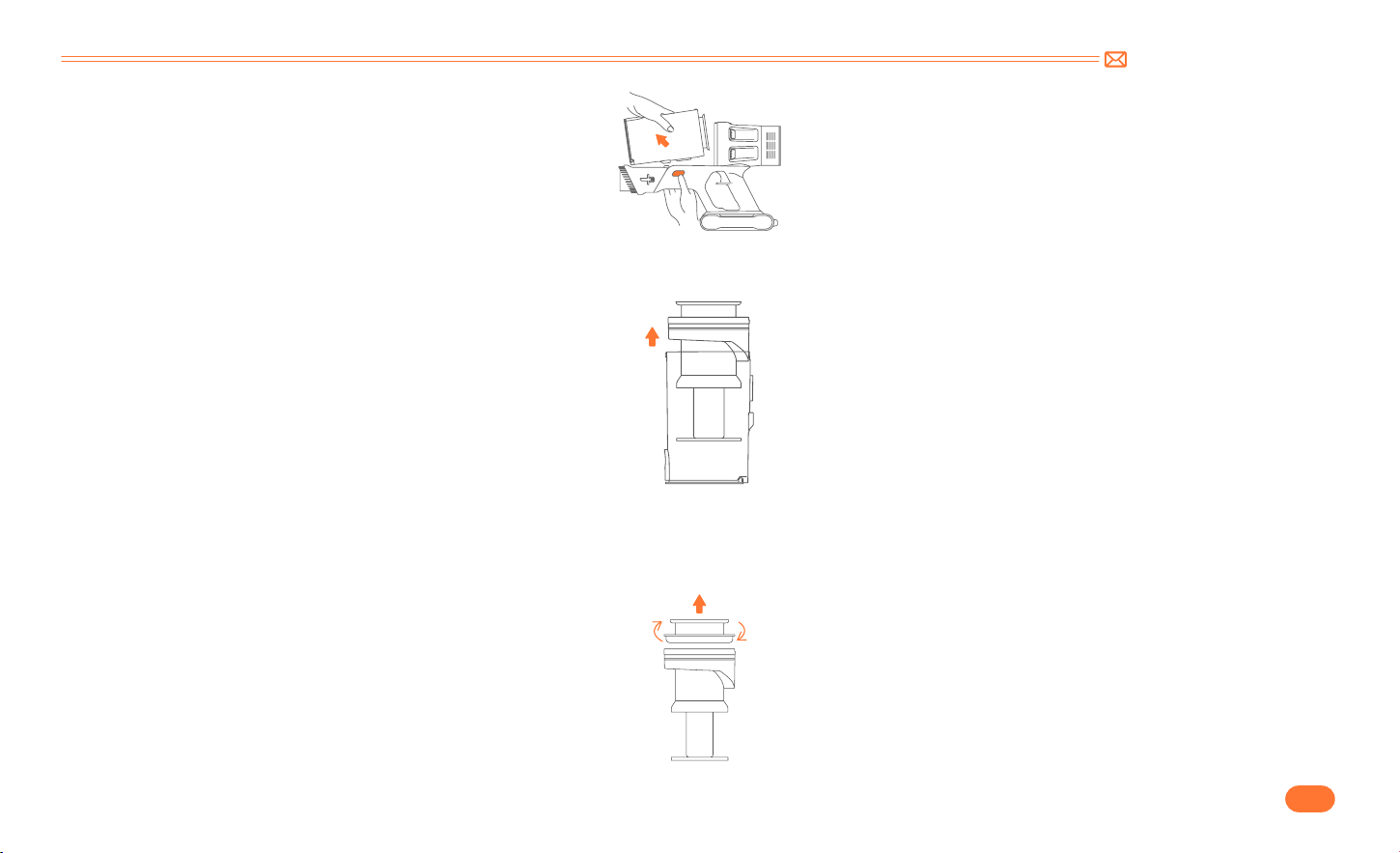
•
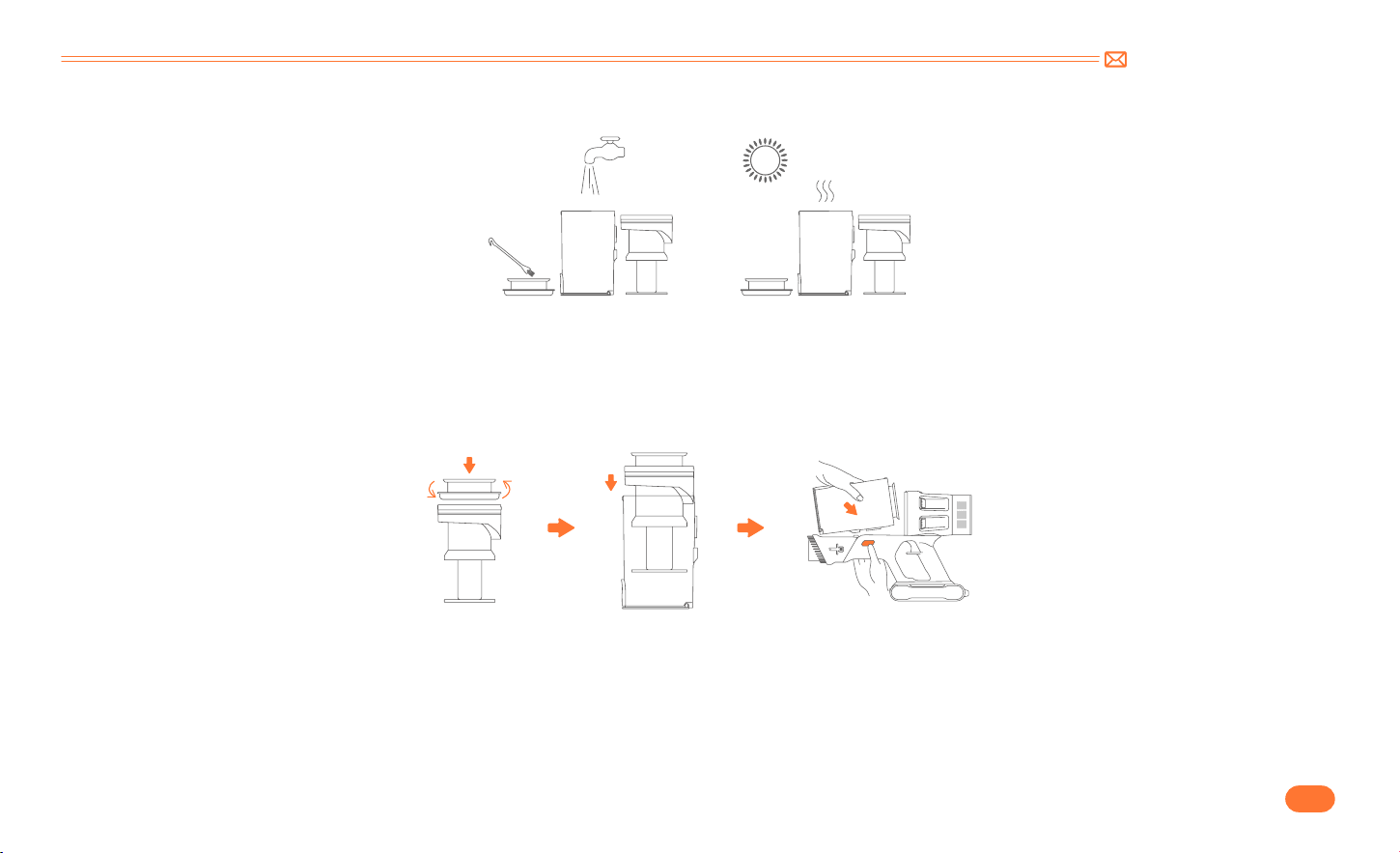
Retire los filtros del recipiente para polvo.
•
Retire el filtro de acero inoxidable del depósito de polvo.
Saque el filtro HEPA hacia arriba.
Sacar el filtro de acero inoxidable hacia arriba .
support@inteture.com
ES
76.
•
Limpie el recipiente para el polvo y los filtro con agua. Asegúrese de que el depósito de polvo y los filtros se hayan secado antes de utilizarlos.
•
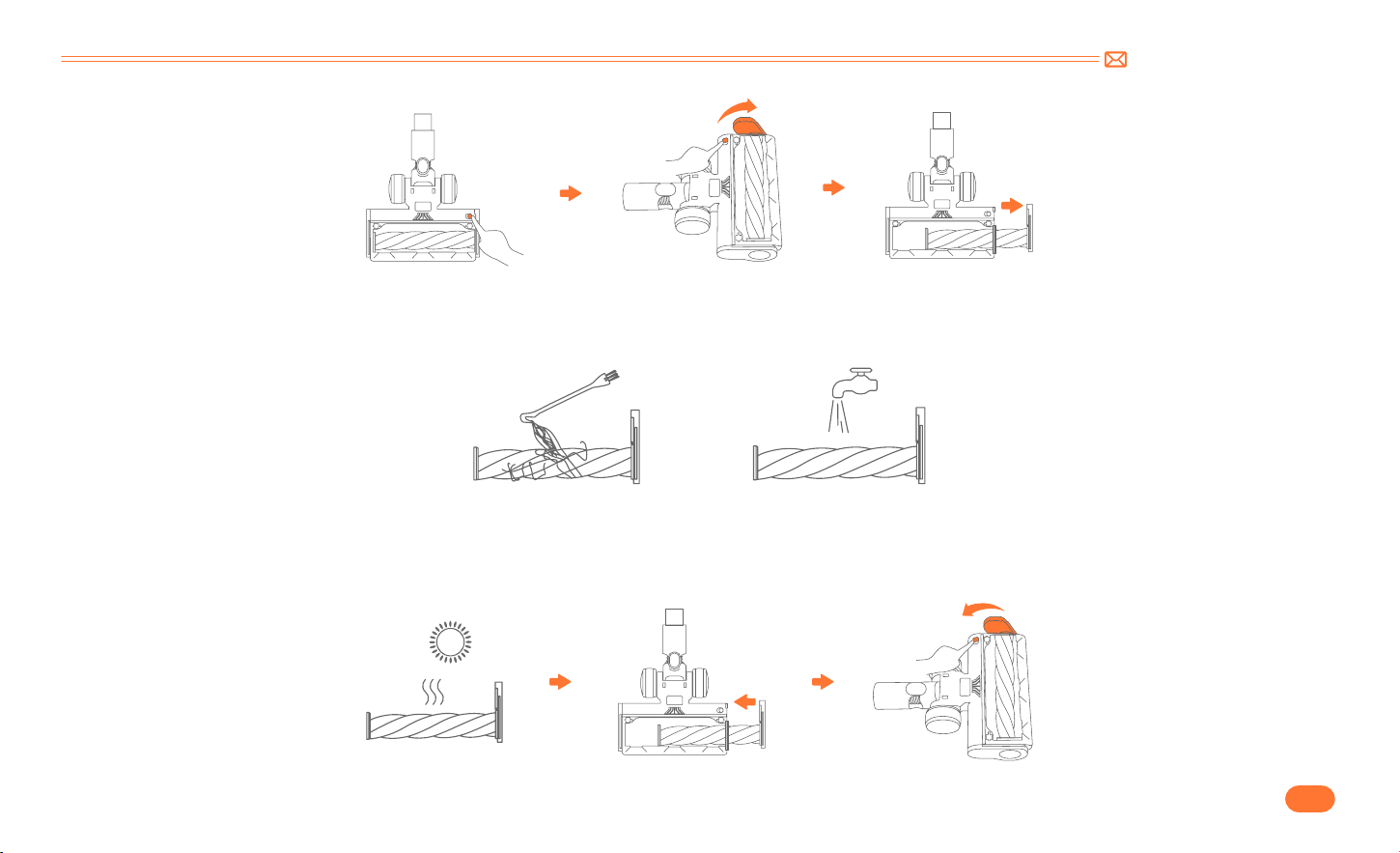
Pasos de la instalación
•
Abra el dispositivo fijo del fondo del cepillo. Gire el tornillo del fondo del cepillo a la posición de desbloqueo.(en la imagen).
Nota: Después de largos períodos de uso, las cerdas pueden atascarse con pelo o una acumulación similar. Se recomienda limpiar el rodillo del cepillo
periódicamente para asegurar un funcionamiento eficiente y mantener la succión.
6.4 Limpieza del rodillo del cepillo
①
Alinee el filtro de acero inoxidable con el hueco e instálelo en el depósito de polvo.
②
Ponga el filtro HEPA en la parte superior.
③
Conecte el depósito de polvo al cuerpo principal.
support@inteture.com
ES
77.
•
Retire los residuos que envuelven el rodillo con el mini cepillo de limpieza y, a continuación, enjuague el rodillo con agua.
•
Empuje el cepillo del rodillo hasta el fondo y luego gírelo para instalarlo.

support@inteture.com
ES
78.
7. ESPECIFICACIÓN
8. SOLUCIÓN DE PROBLEMAS
Producto Aspiradora sin cable
Modelo BP20
Voltaje nominal DC 29.6V
Nivel de succión Mid Max Min
Tiempo de carga 4 5H
ISSUEL PORQUE SOLUCIÓN
La aspiradora no funciona
•
Fuera de energía.
•
El paquete de baterías no está instalado en su lugar
o ha fallado.
•
El motor ha fallado.
•
Cargue completamente la aspiradora.
•
Paquete de baterías instalado en su lugar.
•
Comuníquese con el equipo de INTETURE por correo electrónico
para reemplazar la batería o el motor.
Succión débil
•
El recipiente para el polvo está lleno de basura.
•
El cepillo, el tubo o los filtros motorizados para
pisos están obstruidos con basura.
•
Baja batería.
•
Vacíe el recipiente para el polvo.
•
Elimine cualquier basura que esté bloqueando el cepillo, el tubo o
los filtros motorizados para pisos.
•
Cargue completamente la aspiradora.

support@inteture.com
ES
79.
ISSUEL PORQUE SOLUCIÓN
La carga no es normal
•
El cargador no está conectado correctamente.
•
La batería o el cargador han fallado.
•
El cargador no es original.
•
Asegúrese de que el cargador esté completamente enchufado en el
enchufe.
•
Comuníquese con el equipo de INTETURE por correo electrónico
para reemplazar la batería o el cargador.
•
Utilice el cargador provisto por INTETURE.
Tiempo de uso insuficiente después
de la carga
•
Tiempo de carga insuficiente.
•
Cepillo para piso, recipiente para polvo, tubo o filtros
motorizados están obstruidos con basura.
•
Envejecimiento de la batería.
•
Cargue completamente la aspiradora.
•
Elimine cualquier basura que esté bloqueando el cepillo motorizado
para pisos, el recipiente para polvo, el tubo o los filtros.
•
Comuníquese con el equipo de INTETURE por correo electrónico
para reemplazar la batería.
El cepillo motorizado para pisos se
detiene con cuatro indicadores en el
paquete de baterías que parpadean
•
El cepillo motorizado para pisos está obstruido con
basura.
•
Elimina tutti i rifiuti che bloccano la spazzola per pavimenti
motorizzata.
9. GARANTÍA
9.1 La garantía de 2 años
•
Nuestra máquina INTETURE tiene una garantía de 2 años contra defectos originales de material y fabricación, siempre que se utilice para fines
domésticos privados de acuerdo con el manual de instrucciones de INTETURE.
•
Esta garantía proporciona, sin coste adicional para usted, toda la mano de obra y las piezas necesarias para garantizar que su máquina esté en
condiciones de funcionamiento adecuadas durante el periodo de garantía.

support@inteture.com
ES
80.
9.3 ¿Cómo reclamar?
Conserve su comprobante de compra. Para hacer un reclamo bajo nuestra garantía, debe proporcionar su recibo de compra original con la fecha de
compra y el número de pedido.
Si su máquina no funciona correctamente, o si aún tiene alguna pregunta después de leer este manual detenidamente, no dude en
contactarnos, le responderemos en 24 horas y haremos todo lo posible para brindarle una solución satisfactoria.
Contacte con el servicio posventa: support@inteture.com
9.2 ¿Qué cubre?
Sólo se aplica a las compras realizadas en distribuidores autorizados de INTETURE.
Esta garantía sólo será válida si la máquina se utiliza en el país en el que se vendió.

support@inteture.com
IT
81.
1. AVVERTIMENTO 82
2. lISTA DI IMBALLAGGIO 83
3. CONOSCI IL TUO PRODOTTO 84
3.1 Dettagli del Prodotto 84
3.2 Schermo di Visualizzazione Digitale 85
3.3 Introduzione alle Funzioni degli Accessori 85
4. ASSEMBLAGGIO DEL PRODOTTO 86
4.1 Installare l'aspirapolvere 86
4.2 Installa il supporto a parete 87
5. COME USARE 88
5.1 Ricarica 88
5.2 Operativo 89
6. MANUTENZIONE 93
6.1 Pulizia del corpo principale 93
6.2 Svuota la Tazza della Polvere 94
6.3 Lavare la coppa della polvere e i filtri 94
6.4 Pulizia della Spazzola Rotant 96
7. SPECIFICHE 98
8. RISOLUZIONE DEI PROBLEMI 98
9. GARANZIA 99
CONTENUTO

support@inteture.com
IT
82.
1. AVVERTIMENTO
Grazie per aver acquistato l'aspirapolvere senza fili INTETURE BP20. Prima di utilizzare questa macchina, leggere prima il seguente avviso di sicurezza e
adottare misure di protezione per evitare malfunzionamenti causati da un funzionamento improprio.
Nota: l'aspirapolvere ha adottato la tecnologia di protezione termica per prevenire il surriscaldamento e smetterà di funzionare quando l'oggetto è
surriscaldato.
①
Questo apparecchio INTURE è destinato esclusivamente all'uso domestico. Utilizzare come descritto in questo libretto di istruzioni.
②
Prima di utilizzare questo apparecchio, verificare che la tensione di rete corrisponda alla tensione indicata sulla targhetta matricola.
③
Non utilizzare l'apparecchio per aspirare tutte queste ultime cose:
•
Acqua e altri liquidi
•
Mozziconi accesi, ceneri calde e altre cose combustibili
•
Materia tagliente
•
Pezzetti di legno, gesso, cemento, calcimina ed altri granuli minuscoli
④
Tenere l'aspirapolvere lontano da stufe e apparecchi che emettono calore. Il calore può deformare e scolorire le parti in plastica dell'unità.
⑤
Rimuovere sempre la spina dalla presa di corrente quando l'apparecchio non è in carica.
⑥
Non utilizzare mai alcolici o altri solventi per pulire l'apparecchio.
⑦
Non lasciare mai l'apparecchio incustodito quando è acceso. Tenere l'apparecchio fuori dalla portata dei bambini o degli infermi.
⑧
Non utilizzare un cavo o una spina danneggiati. Se il dispositivo o il caricabatterie non funziona correttamente, cade, viene danneggiato, manca o cade
in acqua, contattare support@inteture.com, il team post vendita INTETURE per supporto.
⑨
La batteria deve essere rimossa dall'apparecchio prima di essere rottamata.
⑩
La batteria deve essere smaltita in modo sicuro.
⑪
Quando si rimuove la batteria l'apparecchio deve essere scollegato dalla rete elettrica.
⑫
È possibile utilizzare solo l'adattatore fornito dal produttore.
⑬
Questo apparecchio può essere utilizzato da bambini di età pari o superiore a 8 anni e da persone con ridotte capacità fisiche, sensoriali o mentali o
con mancanza di esperienza e conoscenza se hanno ricevuto supervisione o istruzioni relative all'uso dell'apparecchio in modo sicuro e ne comprendono
le rischi coinvolti.
support@inteture.com
IT
83.
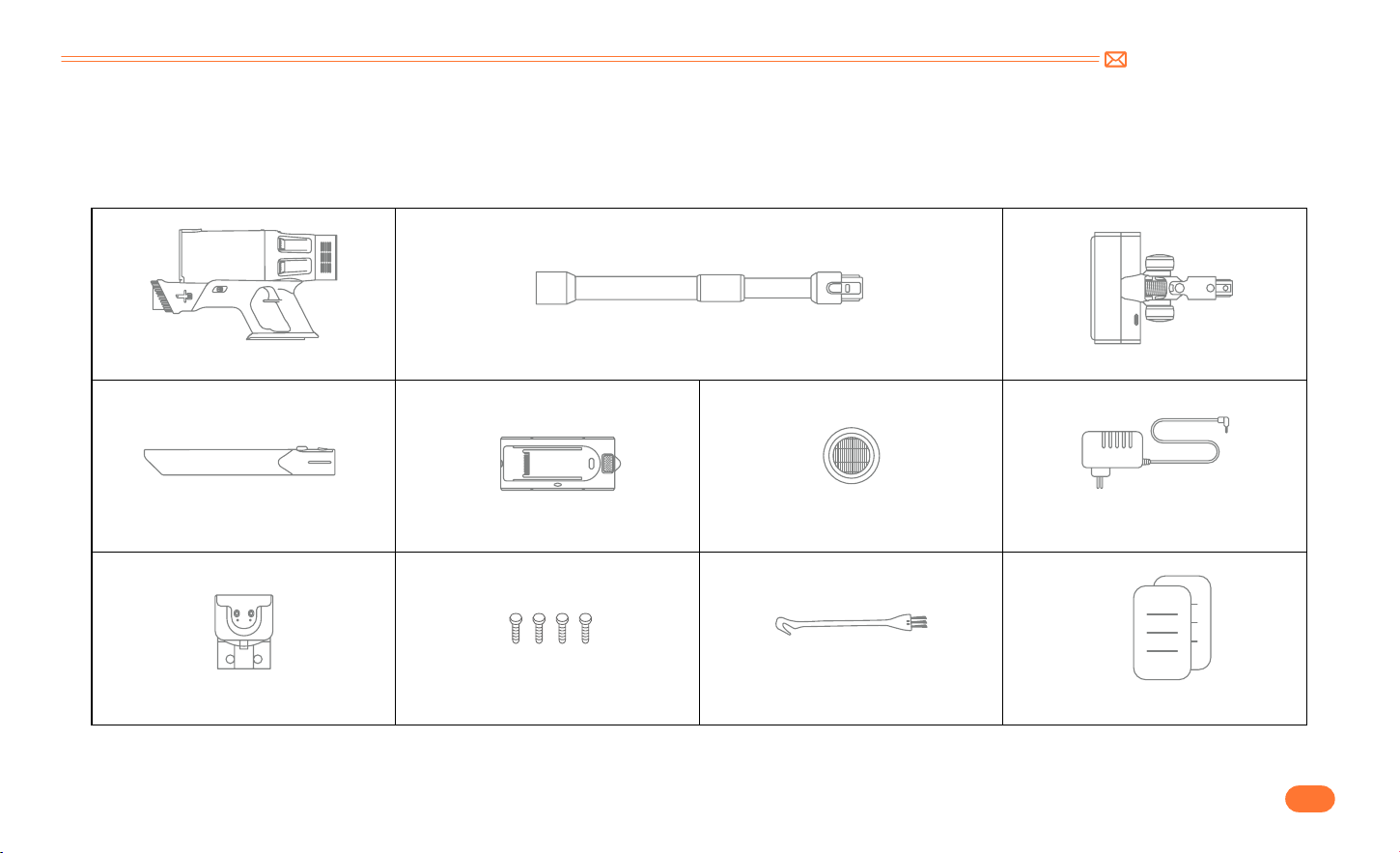
2. lISTA DI IMBALLAGGIO
Si prega di controllare e confermare gli accessori e le parti secondo il foglio seguente prima dell'uso.
Corpo principale & Spazzola integrata Tubo di Prolunga regolabile Spazzola elettrica per pavimenti
Ugello per Fessure Lunghe Batteria Filtro Hepa Extra Caricatore
Supporto a muro ricaricabile Chiodo*4 Mini Spazzola per la Pulizia Guida rapida per l'utente
support@inteture.com
IT
84.
3. CONOSCI IL TUO PRODOTTO
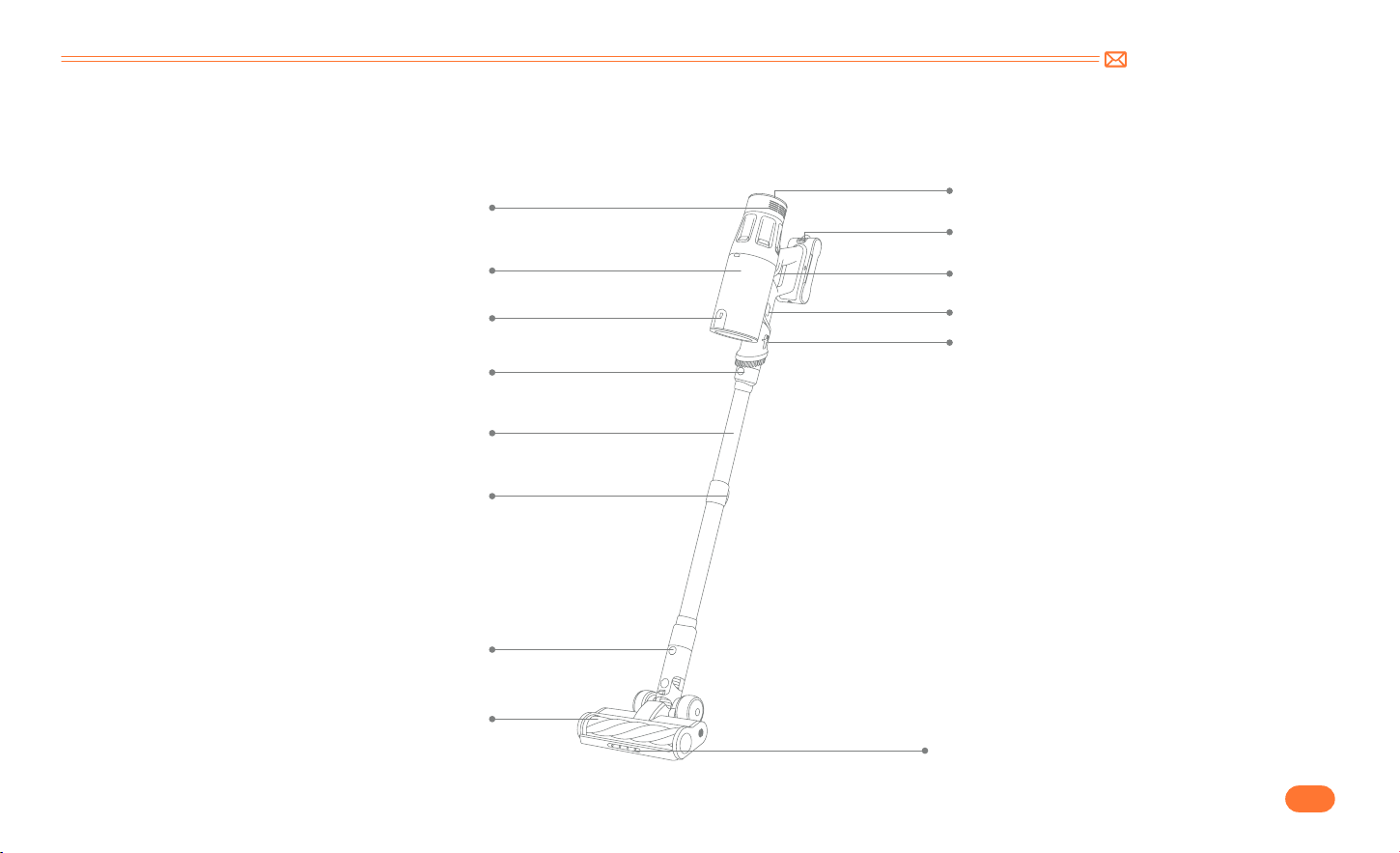
3.1 Dettagli del Prodotto
Presa D'aria
Schermo Digitale
Pulsante di Rilascio della Batteria
Tasto ON/OFF
Pulsante di Rilascio della Razza Antipolvere
Pulsante di regolazione della spazzola
Luce a LED
Tazza per la Polvere
Pulsante di Rilascio della Polvere
Pulsante di Rilascio del Tubo Telescopico
Tubo di Estensione Regolabile
Pulsante di Regolazione della Lunghezza
Spazzola elettrica per pavimenti
Pulsante sgancio spazzola elettrica
support@inteture.com
IT
85.
3.2 Schermo di Visualizzazione Digitale
3.3 Introduzione alle Funzioni degli Accessori
Indicatore della batteria
Pulsante di Regolazione dell'aspirazione
Indicatore della Tazza di Polvere Pulita
Indicatore del Livello di Aspirazione
Indicatore Blocco Spazzole
Spazzola per tappezzeria 2 in 1
Supporto a muro ricaricabileUgello per fessure lunghe
Premere il pulsante di regolazione
per allungare la testina, può aiutarti a
rimuovere polvere e capelli dal divano/
scrivania.
Mini spazzola per la pulizia Spazzola rotante multifunzione
Rimuovere capelli, spazzatura e
micropolvere dagli accessori o dai filtri.
Rimuovi polvere, detriti e capelli da tutti i
tipi di pavimenti, tappeti e velluto.
Fissa l'aspirapolvere e gli accessori al
gancio a muro per riporli facilmente e si
caricheranno automaticamente.
Rimuovere la polvere dalle aree difficili
da raggiungere come finestre, piedini del
letto, spazi tra il divano, ecc.
support@inteture.com
IT
86.
4. ASSEMBLAGGIO DEL PRODOTTO
4.1 Installare l'aspirapolvere
•
Installare direttamente gli accessori per la pulizia
•
Installare il Tubo di Prolunga e gli Accessori per la Pulizia
Click
Click
support@inteture.com
IT
87.
4.2 Installa il supporto a parete
•
Si prega di assicurarsi che non ci siano gas, acqua o cavi e fili elettrici dietro l’area di montaggio.
•
Per evitare che il dock cada, assicurarsi che sia installato saldamente.
•
Conservare adeguatamente al chiuso in un luogo asciutto. Non esporre la macchina alla luce solare oa
temperature gelide. Intervallo di temperatura consigliato: 39.2°F (4°C) 104°F (40°C).
AVVERTIMENTO
support@inteture.com
IT
88.
5. COME USARE
5.1 Ricarica
•
Metodi di Ricarica
•
Quando si utilizza una nuova batteria o la si utilizza per la prima volta dopo un lungo periodo di
conservazione, caricare prima completamente la batteria.
•
Quando si ripone e non si utilizza l’aspirapolvere per un lungo periodo, assicurarsi che venga
caricato e scaricato almeno una volta ogni tre mesi.
①
Connettiti con il corpo principale per caricare.
②
Ricarica sullo stand.
Mancia:
Luce verde lampeggiante: in carica
Luce verde: completamente carica o durante l'uso
Avvertenza: non utilizzare un adattatore di alimentazione diverso da quello fornito, poiché l’utilizzo di un’alternativa aumenterà il rischio di lesio-
ni e/o danni al prodotto principale.
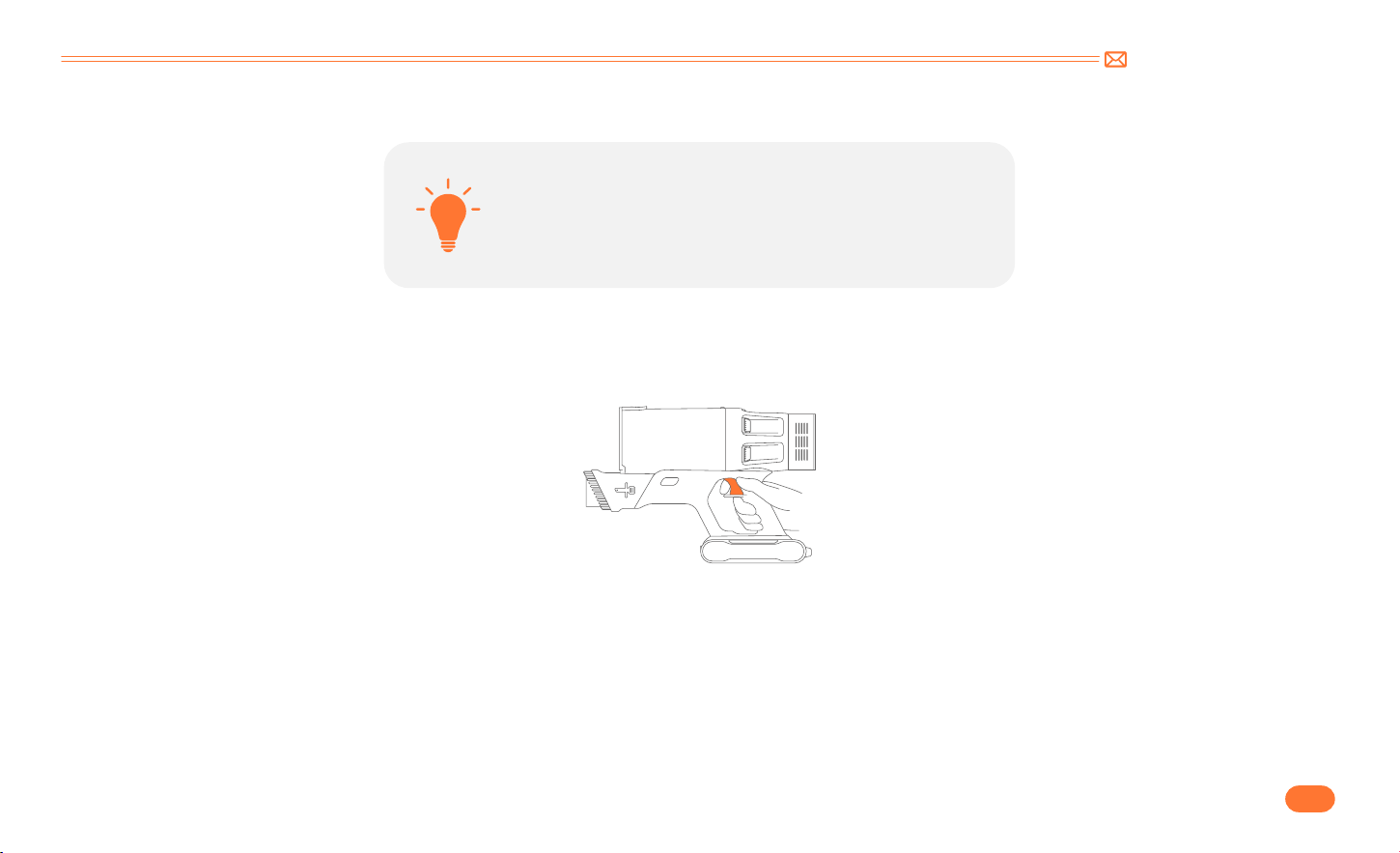
support@inteture.com
IT
89.
5.2 Operativo
•
Iniziare a Lavorare
•
La batteria è completamente carica e fissata in posizione.
•
La coppa della polvere e i filtri vengono puliti e fissati in
posizione.
Prima di ogni utilizzo, assicurarsi che
Premere il pulsante dell'interruttore per accenderlo e si avvierà.
support@inteture.com
IT
90.
•
Selezionare la modalità di pulizia
•
Funzione sifone
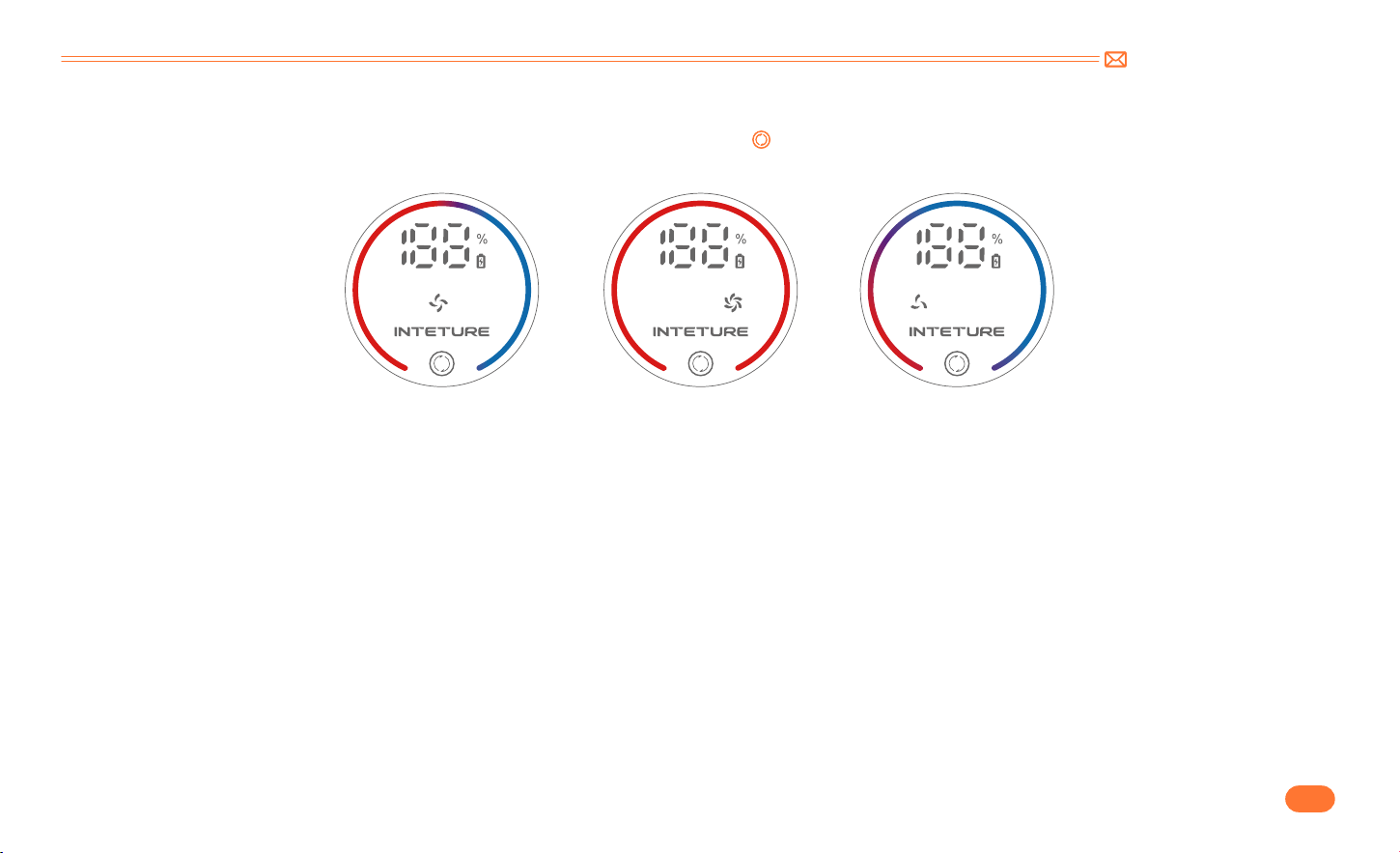
Quando è accesa, la potenza di aspirazione predefinita è media. Toccare il pulsante " " per cambiare il livello di aspirazione.Man mano che la modalità di
aspirazione viene regolata, la parte rossa della spia di aspirazione cambierà e gli ingranaggi di aspirazione saranno rispettivamente MID MAX MIN.
Quando si spegne dalla modalità più bassa, l'aspirazione aumenta per 3 secondi, garantendo un'accurata rimozione dei rifiuti. E poi l'aspirapolvere si
spegne automaticamente.
MID
MAX
MIN
support@inteture.com
IT
91.
•
Indicatore anomalo
①
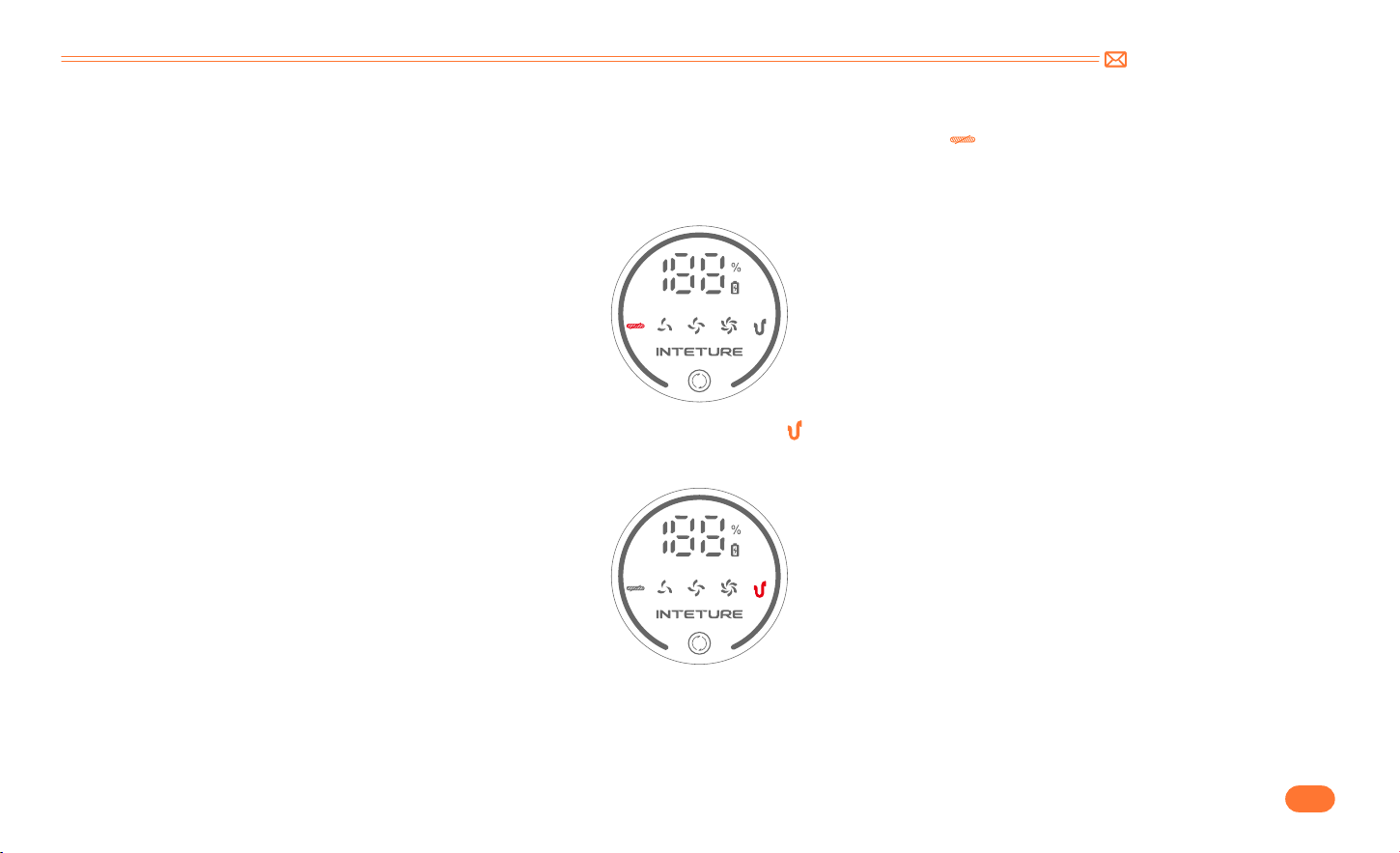
Se la spazzola per pavimenti inala corpi estranei di grandi dimensioni o impiglia troppi capelli, l'indicatore " " lampeggerà.
•
Rimuovere la spazzola per pavimenti e pulire i corpi estranei avvolti attorno al rullo. Assicurarsi che la testina sia stata staccata dall'unità principale per
evitare l'avvio accidentale della macchina e causare lesioni personali.
②
Quando il passaggio dell'aria o il contenitore della polvere sono bloccati, l'indicatore " " lampeggerà.
•
Pulire accuratamente il tubo in alluminio ed i filtri nel contenitore raccoglipolvere.
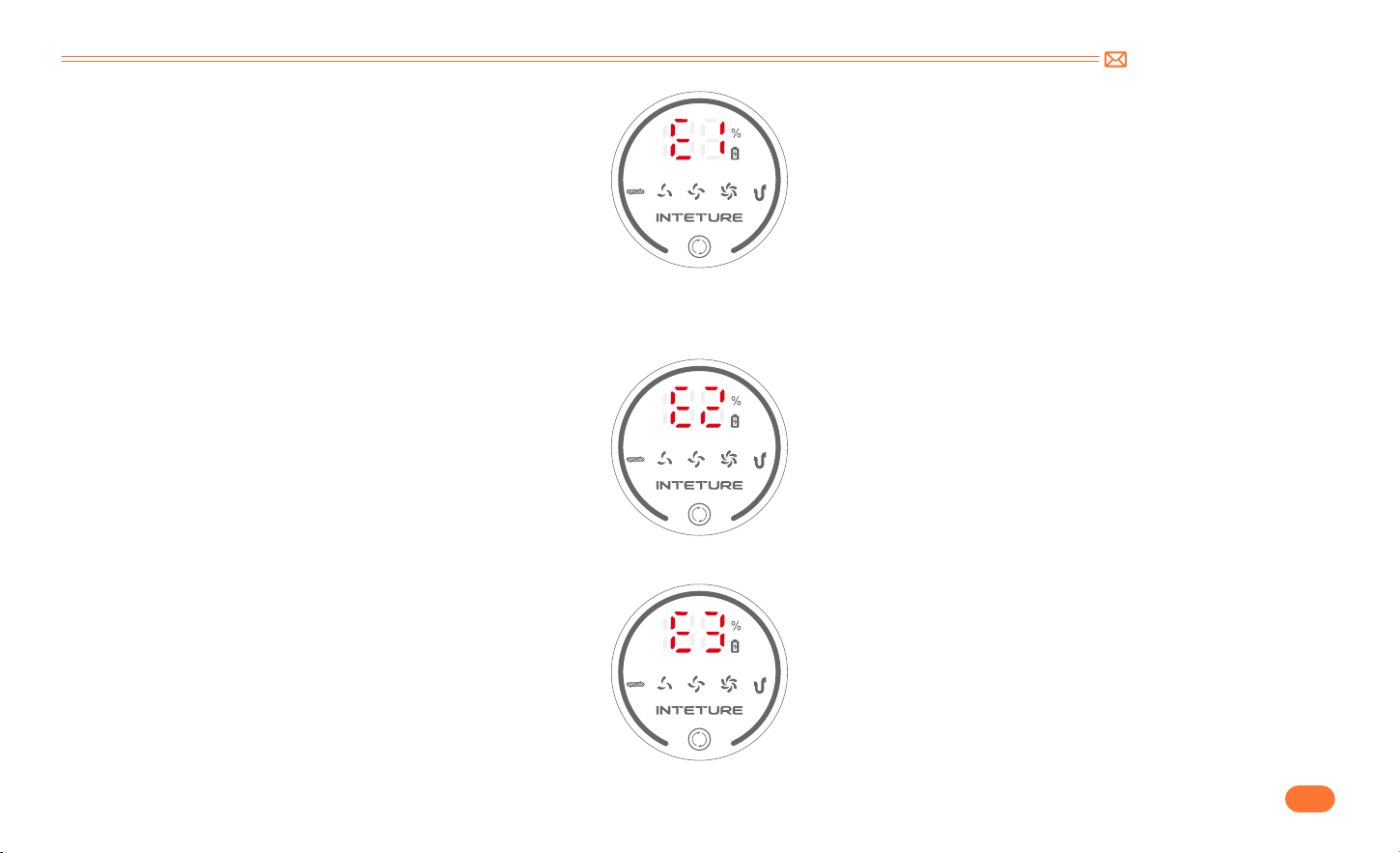
③
Se sullo schermo viene visualizzato "E1": indica un malfunzionamento del motore o un blocco continuo che causa alta temperatura
.
•
Rimuovere il contenitore antipolvere ed eseguirlo su un singolo host. Se l'anomalia persiste, contattare il Team INTETURE per sostituire l'host. Se scompare,
pulire il contenitore della polvere e la spazzola per pavimenti.
support@inteture.com
IT
92.
④
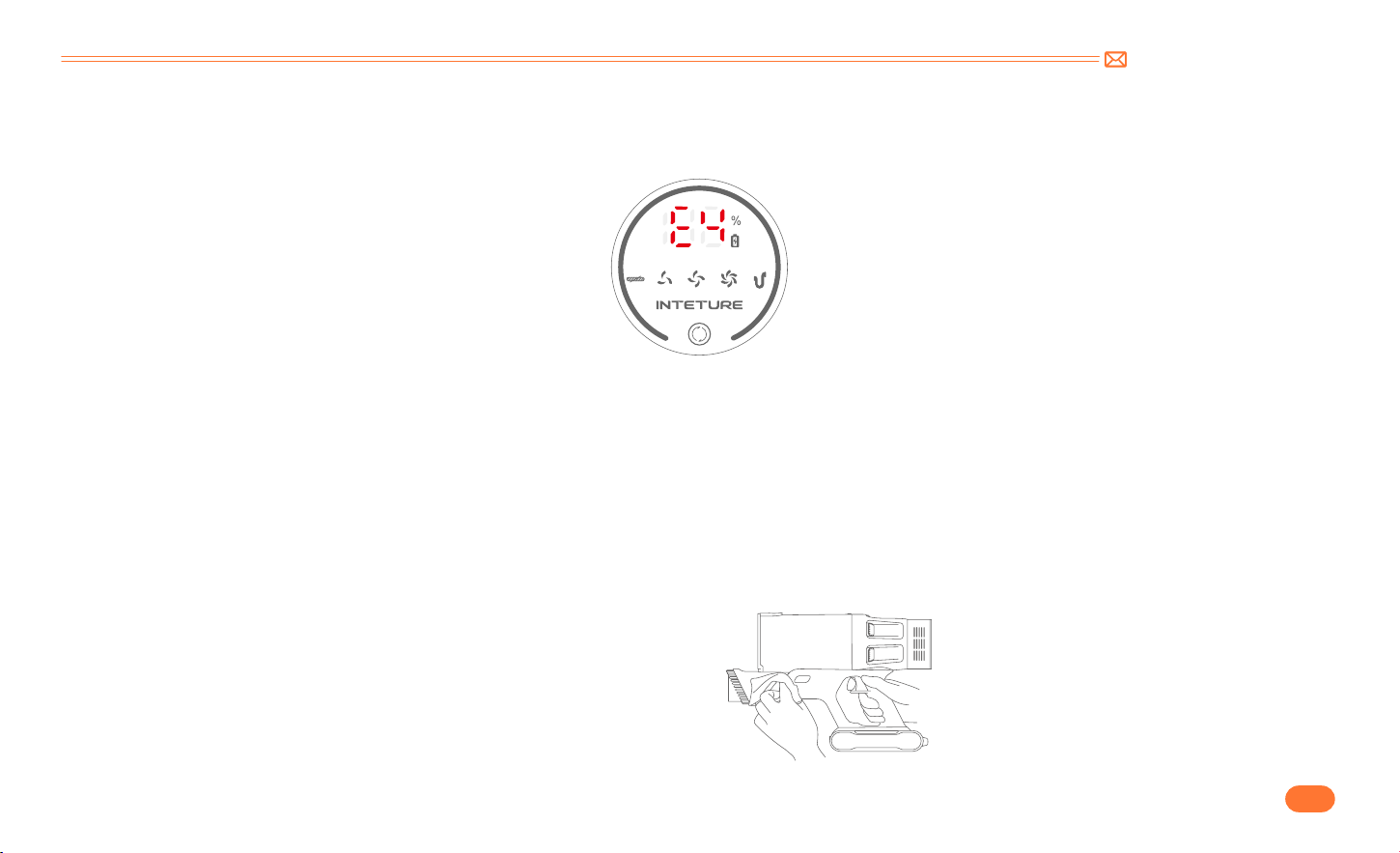
Se sullo schermo viene visualizzato "E2": protezione della temperatura della batteria.
•
Posizionare la macchina a temperatura ambiente e lasciarla riposare per 10 20 minuti. Se l'anomalia scompare, può essere ripristinata alla normalità. Se il
problema persiste, contattare il team INTETURE per sostituire la batteria.
⑤
Se sullo schermo viene visualizzato "E3": utilizzo dell'adattatore sbagliato.
•
Utilizzare l'adattatore originale. (la specifica di uscita è 36V)
support@inteture.com
IT
93.
⑥
Se sullo schermo viene visualizzato "E4": cortocircuito spazzola di terra, protezione da cortocircuito tubo telescopico.
•
Rimuovere il tubo telescopico e utilizzare la spazzola per pavimenti e l'unità principale per azionare direttamente.Se l'anomalia scompare contattare il
team INTETURE per la sostituzione del tubo telescopico; Se l'anomalia persiste è necessario sostituire la spazzola pavimenti.
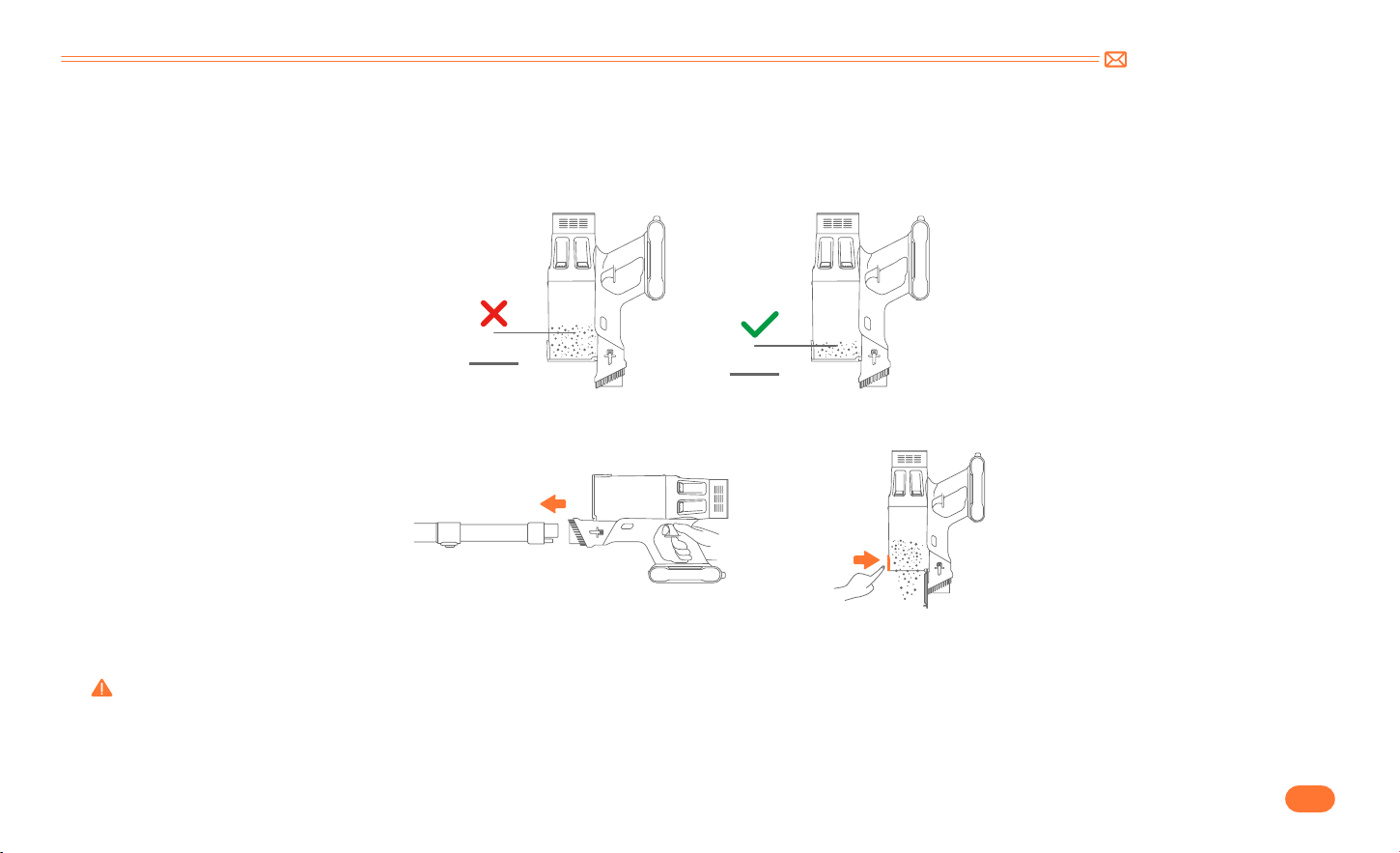
6. MANUTENZIONE
Consiglio: Si prega di pulirlo regolarmente per prolungare la durata dell'aspirapolvere.
•
Spegnere l’alimentazione prima di pulire il corpo.
•
Utilizzare un detergente neutro, pulire il corpo con un panno mezzo umido.
•
Si prega di evitare l’esposizione al sole e conservare in un luogo fresco e
asciutto.
6.1 Pulizia del corpo principale
support@inteture.com
IT
94.
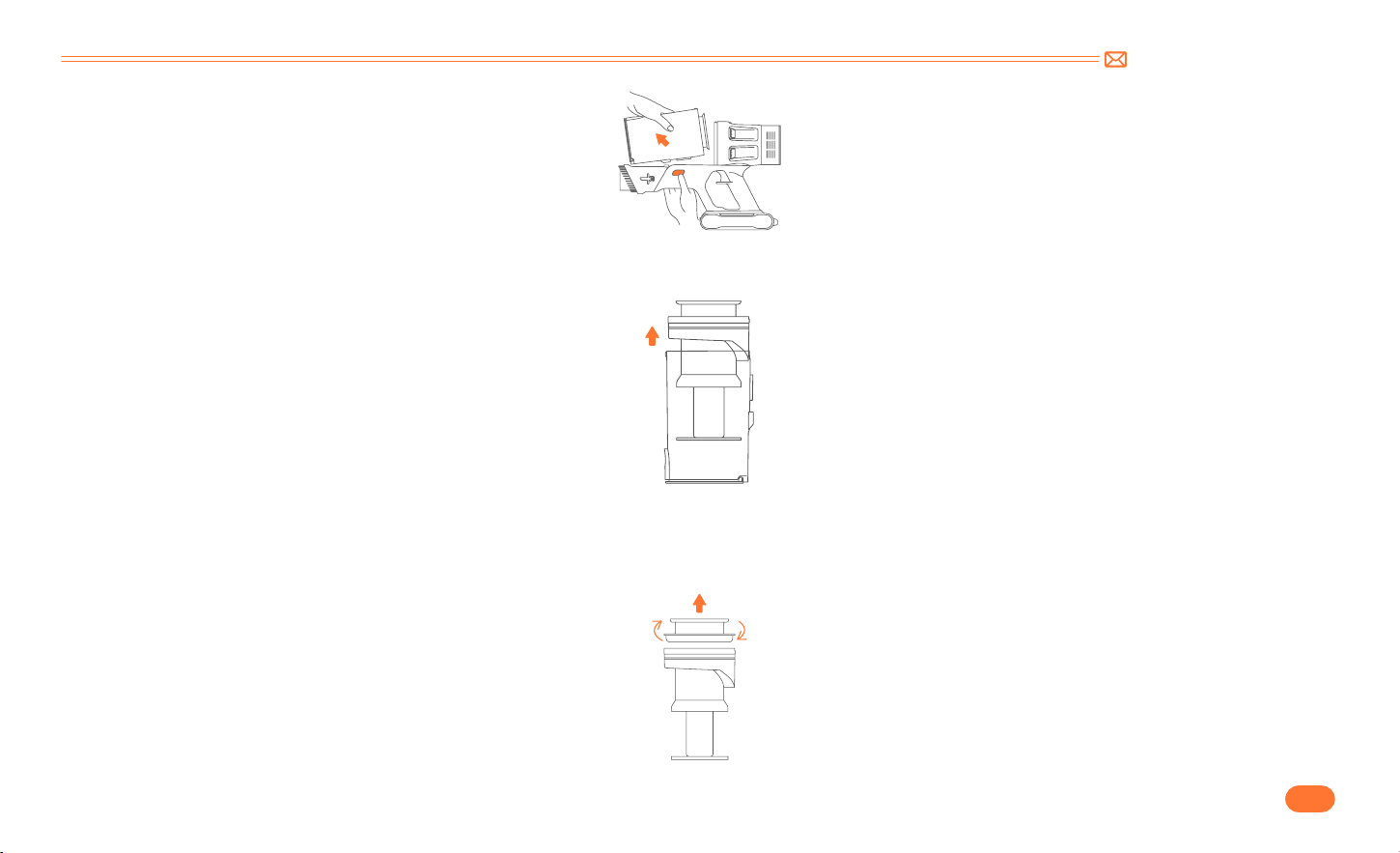
6.2 Svuota la Tazza della Polvere
•
Pulire la Tazza Antipolvere/Filtri
Durante l’uso, se la spazzatura nella tazza della polvere supera la linea MAX, svuotarla in tempo.
•
Premere il pulsante di rilascio della polvere per svuotare la polvere.
•
Rimuovere il contenitore della polvere dal corpo principale.
Premere il pulsante di rilascio del contenitore della polvere sul corpo principale, quindi rilasciare il contenitore della polvere dal corpo principale.
Avvertenza: non utilizzare l'aspirapolvere senza filo senza il filtro rimovibile o il contenitore della polvere in posizione.
6.3 Lavare la coppa della polvere e i filtri
MAX
MAX
support@inteture.com
IT
95.
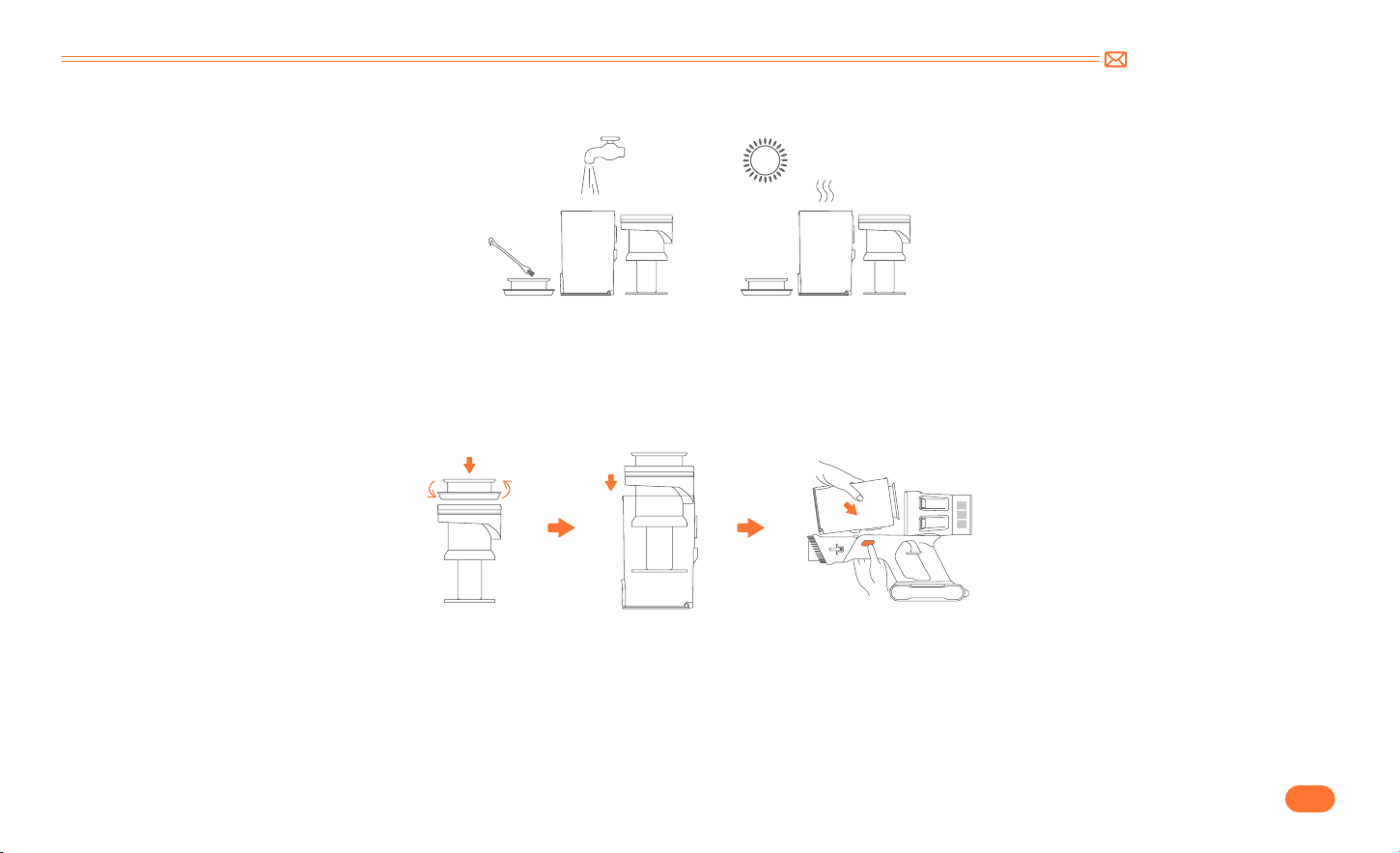
•
Rimuovere i filtri dal contenitore della polvere.
•
Rimuovere il filtro in acciaio inossidabile dal contenitore della polvere.
Estrarre il filtro HEPA verso l'alto.
Estrarre il filtro in acciaio inox verso l'alto.
support@inteture.com
IT
96.
•
Pulire la coppa della polvere e i filtri con acqua. Assicurarsi che il contenitore della polvere e i filtri si siano asciugati prima dell’uso.
•
Passaggi di installazione
•
Aprire il dispositivo fisso fondo spazzola. Ruotare la vite inferiore della spazzola per sbloccare la posizione. (nella foto)
Suggerimento: dopo lunghi periodi di utilizzo, le setole possono essere bloccate da capelli o accumuli simili. Si consiglia di pulire periodicamente il rullo
della spazzola per garantire un funzionamento efficiente e mantenere l'aspirazione.
6.4 Pulizia della Spazzola Rotant
①
Allineare il filtro in acciaio inossidabile allo spazio vuoto e installarlo nel contenitore della polvere.
②
Posizionare il filtro HEPA in alto.
③
Collegare il contenitore della polvere al corpo principale.
support@inteture.com
IT
97.
•
Rimuovere i detriti avvolti attorno al rullo con la mini spazzola per la pulizia, quindi sciacquare il rullo con acqua.
•
Spingere la spazzola a rullo verso il basso e quindi ruotarla per installarla.

support@inteture.com
IT
98.
7. SPECIFICHE
8. RISOLUZIONE DEI PROBLEMI
Prodotto Aspirapolvere Senza Fili
Modello BP20
Voltaggio DC 29.6V
Livello di aspirazione Mid Max Min
Tempo di ricarica 4 5H
PROBLEMA CAUSA SOLUZIONE
L'aspirapolvere non funziona
•
Senza alimentazione.
•
Batteria non installata in posizione
•
Il motore è guasto.
•
Carica completamente l'aspirapolvere.
•
Batteria installata in posizione.
•
Contatta INTETURE Team via e-mail per la sostituzione della batteria
o del motore.
Aspirazione debole
•
Il contenitore per la polvere è pieno di spazzatura.
•
La spazzola per pavimenti motorizzata, il tubo oi filtri
sono ostruiti dalla spazzatura.
•
Bassa potenza.
•
Svuotare il contenitore della polvere.
•
Elimina tutti i rifiuti che bloccano la spazzola per pavimenti
motorizzata, il tubo o i filtri.
•
Carica completamente l'aspirapolvere.

support@inteture.com
IT
99.
PROBLEMA CAUSA SOLUZIONE
La ricarica non è normale
•
Il caricabatterie non è collegato correttamente.
•
La batteria o il caricabatterie sono guasti.
•
Il caricabatterie non è originale.
•
Assicurarsi che il caricabatterie sia completamente inserito nella
presa.
•
Contattare il team INTETURE via e-mail per la sostituzione della
batteria o del caricabatterie.
•
Utilizzare solo il caricabatterie originale fornito da INTETURE.
Tempo di funzionamento insufficiente
dopo la ricarica
•
Tempo di ricarica insufficiente.
•
La spazzola per pavimenti motorizzata, la tazza della
polvere, il tubo o i filtri sono ostruiti dalla spazzatura.
•
Invecchiamento della batteria.
•
Aspirapolvere completamente carico.
•
Elimina tutti i rifiuti che bloccano la spazzola per pavimenti
motorizzata, la tazza della polvere, il tubo o i filtri.
•
Contatta INTETURE Team via e-mail per la sostituzione della batteria.
La spazzola per pavimenti motorizzata
si ferma con quattro spie sul pacco
batterie lampeggianti
•
MotoLa spazzola per pavimenti motorizzata è
intasata di spazzatura.
•
Elimina tutti i rifiuti che bloccano la spazzola per pavimenti
motorizzata.
9. GARANZIA
9.1 La garanzia limitata di 2 anni
•
La nostra macchina INTURE ha una garanzia di 2 anni contro difetti originali di materiale e lavorazione, se utilizzata per scopi domestici privati in
conformità al manuale di istruzioni INTEGRE.
•
Questa garanzia fornisce, senza costi aggiuntivi, tutta la manodopera e le parti necessarie per garantire che la macchina sia in condizioni operative
adeguate durante il periodo di garanzia.

support@inteture.com
IT
100.
9.3 Come rivendicare?
Si prega di conservare la prova d'acquisto. Per presentare un reclamo ai sensi della nostra Garanzia limitata, è necessario fornire la ricevuta di acquisto
originale con la data di acquisto e il numero dell'ordine.
Se la tua macchina non funziona correttamente o hai ancora domande dopo aver letto attentamente questo manuale, non esitare a
contattarci, faremo del nostro meglio per fornirti una soluzione soddisfacente.
Invia un'e-mail al nostro servizio clienti: support@inteture.com
9.2 Cosa è coperto?
Si applica solo agli acquisti effettuati presso i rivenditori autorizzati INTETURE.
Questa garanzia sarà valida solo se la macchina viene utilizzata nel paese in cui è stata venduta.

support@inteture.com
JP
101.
1.
注意事項
102
2. パッケージ内容 103
3. 製品のご紹介 104
3.1 製品の詳細- - - - - - - - - - - - - - - - - - - - - - - - - - - - - - - - - - - - - - - - - - - - - - - - - - - - - - - - - - - 104
3.2 タッチスクリーン - - - - - - - - - - - - - - - - - - - - - - - - - - - - - - - - - - - - - - - - - - - - - - - - - - - - - - - 105
3.3 付属品の用途 - - - - - - - - - - - - - - - - - - - - - - - - - - - - - - - - - - - - - - - - - - - - - - - - - - - - - - - - - 105
4. 組み立て 106
4.1 掃除機の取り付け - - - - - - - - - - - - - - - - - - - - - - - - - - - - - - - - - - - - - - - - - - - - - - - - - - - - - - - 106
4.2 壁掛け充電マウントの取り付け - - - - - - - - - - - - - - - - - - - - - - - - - - - - - - - - - - - - - - - - - - - - - - - - 107
5. 使い方 108
5.1 充電 - - - - - - - - - - - - - - - - - - - - - - - - - - - - - - - - - - - - - - - - - - - - - - - - - - - - - - - - - - - - - - 108
5.2 操作方法 - - - - - - - - - - - - - - - - - - - - - - - - - - - - - - - - - - - - - - - - - - - - - - - - - - - - - - - - - - - - 109
6. お手入れ 113
6.1 本体の掃除- - - - - - - - - - - - - - - - - - - - - - - - - - - - - - - - - - - - - - - - - - - - - - - - - - - - - - - - - - - 113
6.2 ダストカップ
・
フィルターの掃除 - - - - - - - - - - - - - - - - - - - - - - - - - - - - - - - - - - - - - - - - - - - - - - - 114
6.3 ダストカップとフィルターの洗い - - - - - - - - - - - - - - - - - - - - - - - - - - - - - - - - - - - - - - - - - - - - - - - 114
6.4 回転ブラシの掃除 - - - - - - - - - - - - - - - - - - - - - - - - - - - - - - - - - - - - - - - - - - - - - - - - - - - - - - - 116
7. 仕様 118
8. トラブルシューティング 118
9. 保証 119
9.1 2年保証 - - - - - - - - - - - - - - - - - - - - - - - - - - - - - - - - - - - - - - - - - - - - - - - - - - - - - - - - - - - - 119
9.2 保証の対象範囲 - - - - - - - - - - - - - - - - - - - - - - - - - - - - - - - - - - - - - - - - - - - - - - - - - - - - - - - - 120
9.3 保証サービスの申請方法- - - - - - - - - - - - - - - - - - - - - - - - - - - - - - - - - - - - - - - - - - - - - - - - - - - - 120
目次

support@inteture.com
JP
102.
1. 注意事項
このたびは、INTETURE BP20 コードレス掃除機をお買い上げいただきまして、誠にありがとうございます。事故や故障防止のため、本機をご使用になる前に、
次の安全に関する注意事項をよくお読みのうえ、正しく安全にお使いください。
ご注意:本機は過熱保護機能があり、内部温度が高すぎる場合は自動的に停止されます。
①
本機は家庭用です。必ず本取扱説明書に記載されている通りにご使用ください。
②
本機をご使用になる前に、電圧が銘板に記載されている電圧と一致していることを確認してください。
③
下記のものを吸い込まないでください。
•
水および他の液体
•
燃え殻、火がついたたばこの吸殻、その他の可燃物
•
鋭利なもの
•
木片、ジェッソ、セメント、カルシミン、その他の細かいゴミ
④
本機や充電器を火気や強い熱を発するものに近づけないでください。熱により変形、変色することがあります。
⑤
充電しない時は、必ず充電器をソケットから抜いてください。
⑥
掃除機を掃除する時、アルコールや他の溶剤を絶対使用しないでください。
⑦
電源が入っている間は絶対に本機のそばを離れないでください。お子様や体の弱い人の手の届く場所に置かないようにしてください。
⑧
⑨
本製品を廃棄する際は、バッテリーを必ず取り外してください。
⑩
バッテリーを安全に処分してください。
⑪
バッテリーを取り外す時は、必ず本機の電源を切ってください。
⑫
付属の充電器で充電してください。非純正の充電器を使用しないでください。
⑬
8 歳以上のお子様、身体
・
知覚
・
思考能力が低下している方や知識
・
経験が不足している方がご使用の際は安全に使用できる環境で、安全な使用方法と危
険性を理解している保護者か介護者の方がサポートしてください。
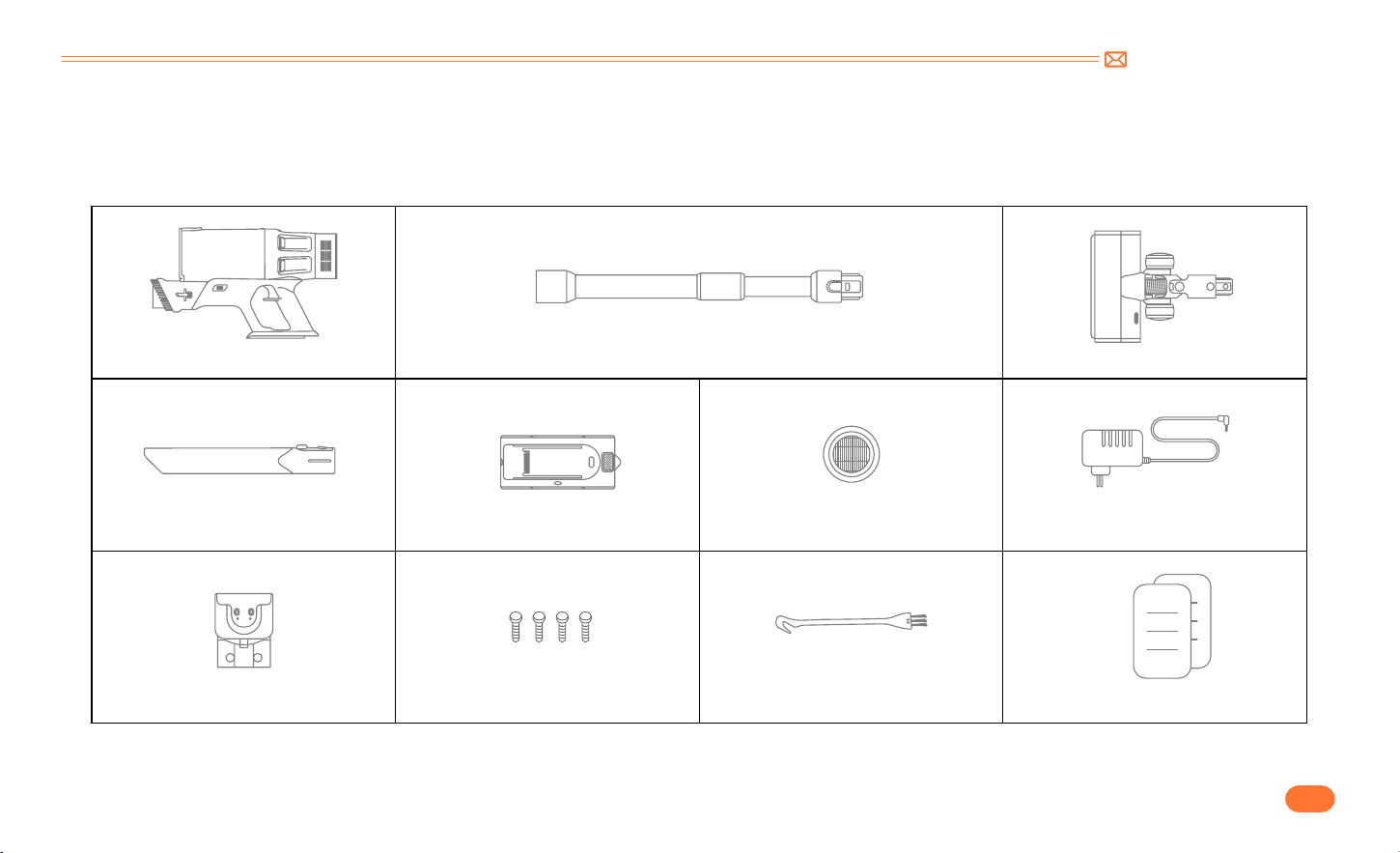
support@inteture.com
JP
103.
2. パッケージ内容
ご使用前に下記の付属品
・
部品をご確認ください。
本体
・
一体型ブラシ 伸縮パイプ ブラシヘッド
隙間ノズル バッテリー 予備用 HEPA フィルター 充電器
壁掛け充電マウント くぎ *4 ミニクリーニングブラシ 取扱説明書
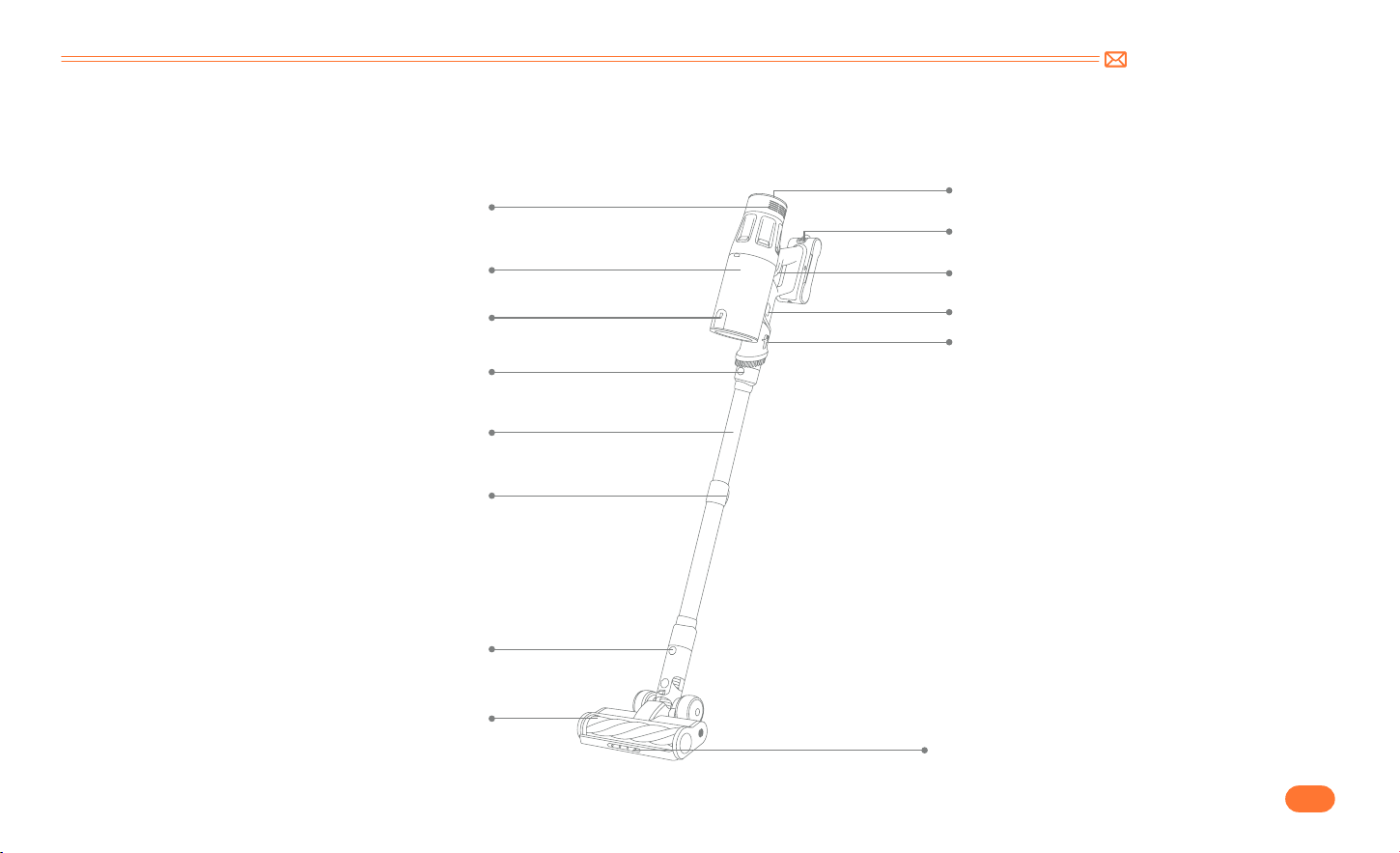
support@inteture.com
JP
104.
3. 製品のご紹介
3.1 製品の詳細
排気口
タッチスクリーン
電源ボタン
バッテリー取り外しボタン
ダストカップ取り外しボタン
一体型ブラシ調整ボタン
LED ランプ
ダストカップ
ゴミ捨てボタン
伸縮パイプ取り外しボタン
伸縮パイプ
長さ調整ボタン
ブラシヘッド
ブラシヘッド取り外しボタン
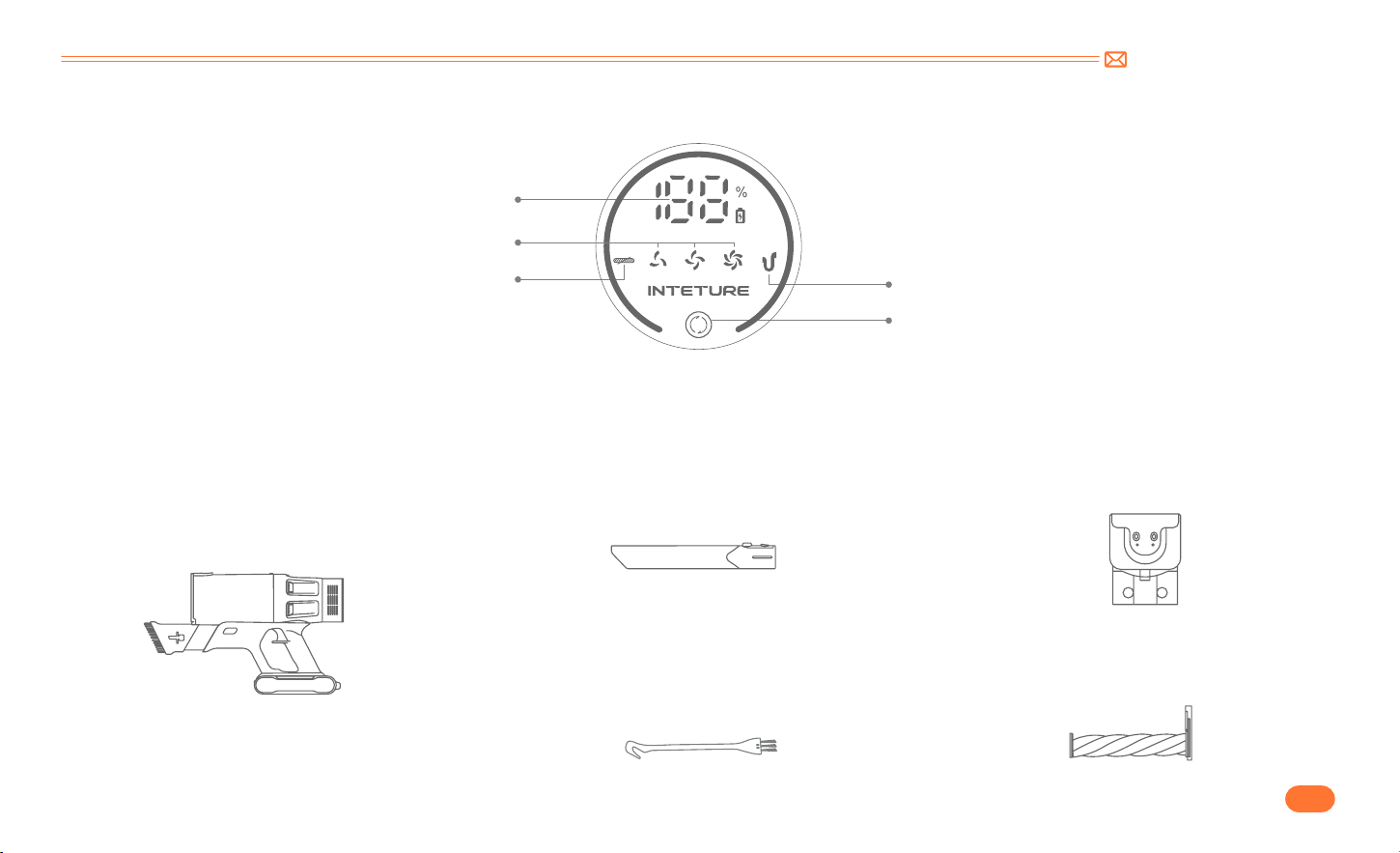
support@inteture.com
JP
105.
3.2 タッチスクリーン
3.3 付属品の用途
バッテリー残量表示
吸引力調節ボタン
ダストカップ詰まり提示
モード表示
回転ブラシ詰まり提示
一体型ブラシ
壁掛け充電マウント隙間ノズル
一体型ブラシ調整ボタンを押して、一体型ブラシ
を伸ばすと、ソファーや机についたホコリや髪の
毛などを取り除くことができます。
掃除機とノズル部品の収納に便利です。また、掃
除機を置くだけで自動的に充電することも可能で
す。
窓、ベッドの脚やソファの隙間などの手の届きに
くいところのホコリを取り除くことができます。
ミニクリーニングブラシ
ノズル部品やフィルターについた髪の毛、ゴミ、
微細なホコリなどを掃除することができます。
回転ブラシ
あらゆる種類の床材、カーペット、絨毯などから
ほこり、ゴミや髪の毛を取り除くことができます。
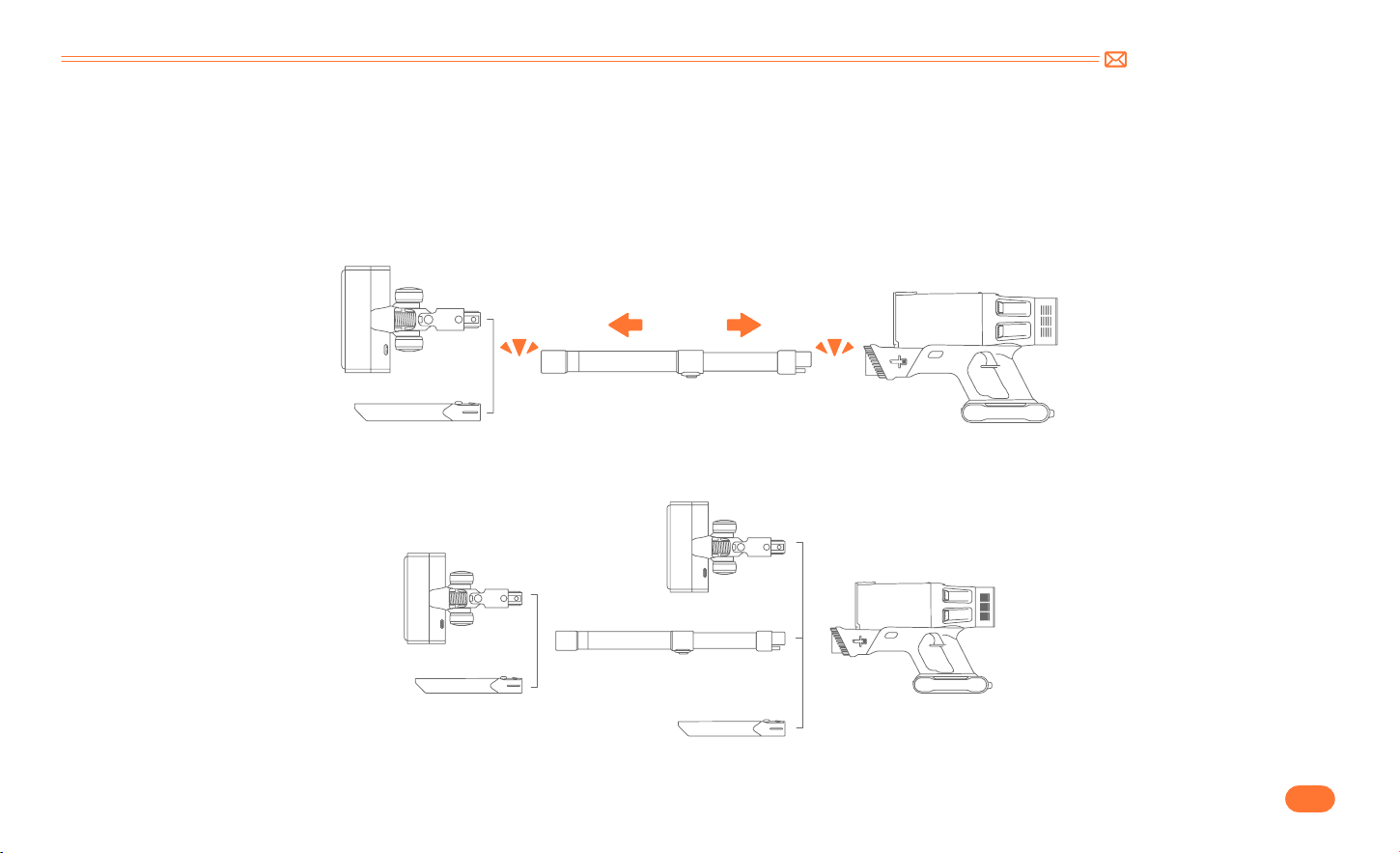
support@inteture.com
JP
106.
4. 組み立て
4.1 掃除機の取り付け
•
ノズル部品を直接に取付
•
伸縮パイプ
・
ノズル部品を取付
Click
Click
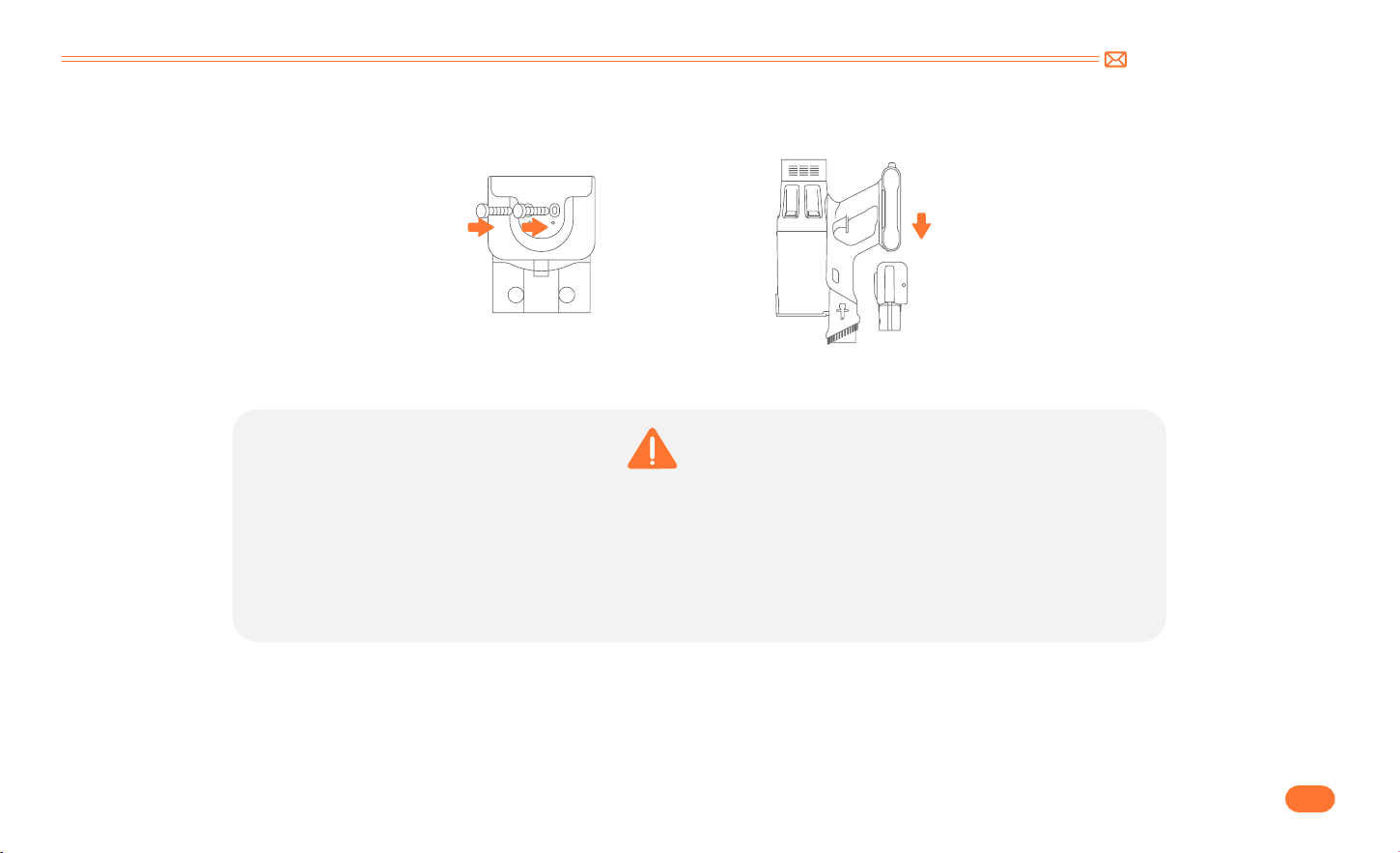
support@inteture.com
JP
107.
4.2 壁掛け充電マウントの取り付け
•
本機の置く場所にガス、水道、電気のケーブルや配線がないことを確認してください。
•
壁掛けマウントが落下しないように、しっかりと固定してください。
•
室内の乾燥した場所で保管してください。日光や氷点下の温度にさらされないようにしてください。推奨温
度範囲:4℃ (39.2 ℉ ) ~ 40℃ (104 ℉ ).
警告
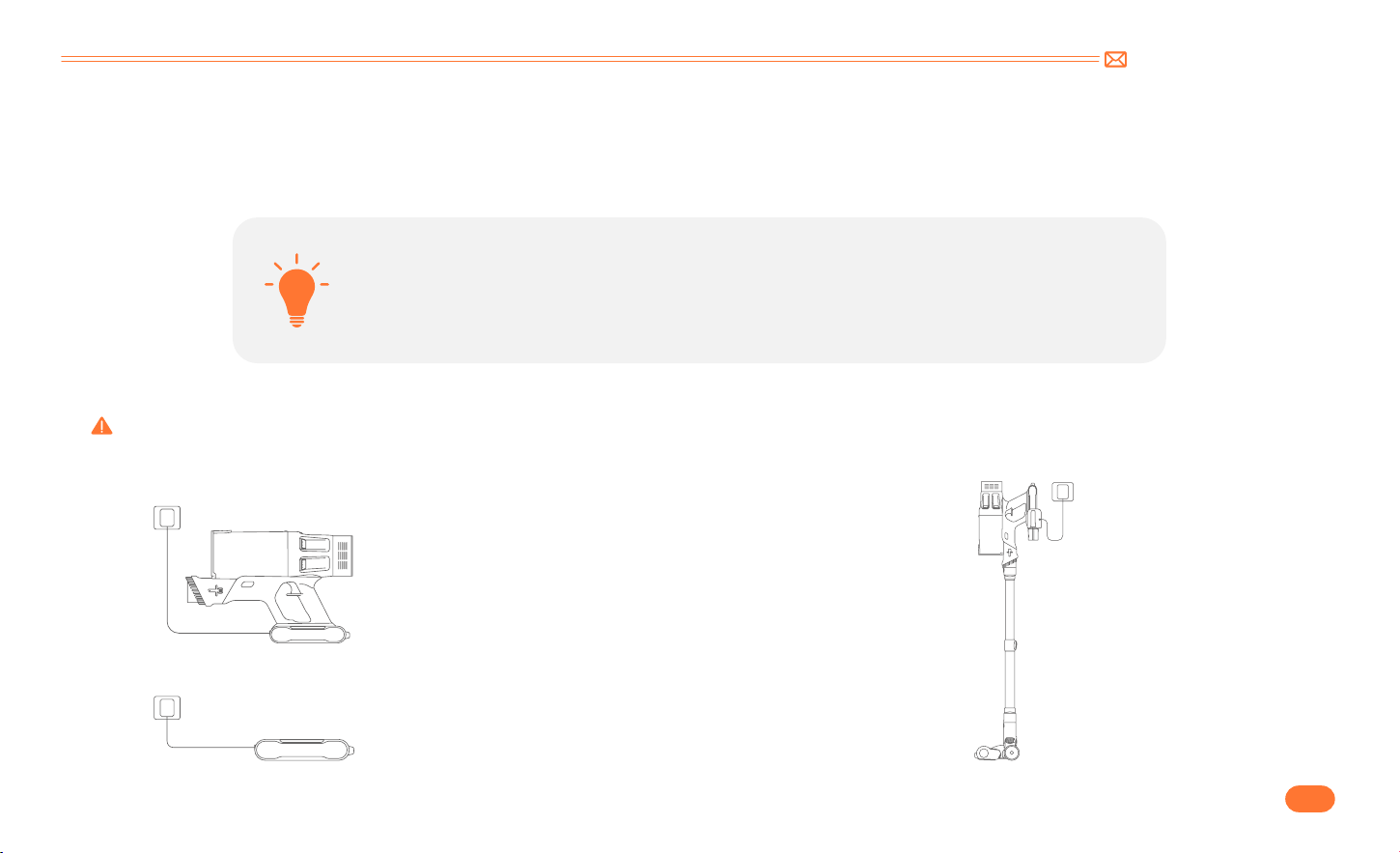
support@inteture.com
JP
108.
5. 使い方
5.1 充電
•
充電方法 :
•
新品バッテリーを使用する場合、または長期放置後再び使用する場合は、バッテリーを完全に充電
してください。
•
掃除機を長期間使用しない場合は、少なくとも 3 ヶ月に 1 回は必ず充放電してください。
①
本体に取り付けたまま充電します。
②
壁掛け充電マウントに置いて充電します。
ご注意:
ライトが緑色に点滅:充電中
ライトが緑色に点灯:フル充電 / 使用中
ご注意:付属の充電器で充電してください。付属品以外の充電器で充電すると、怪我や製品を損傷するリスクが高まります。
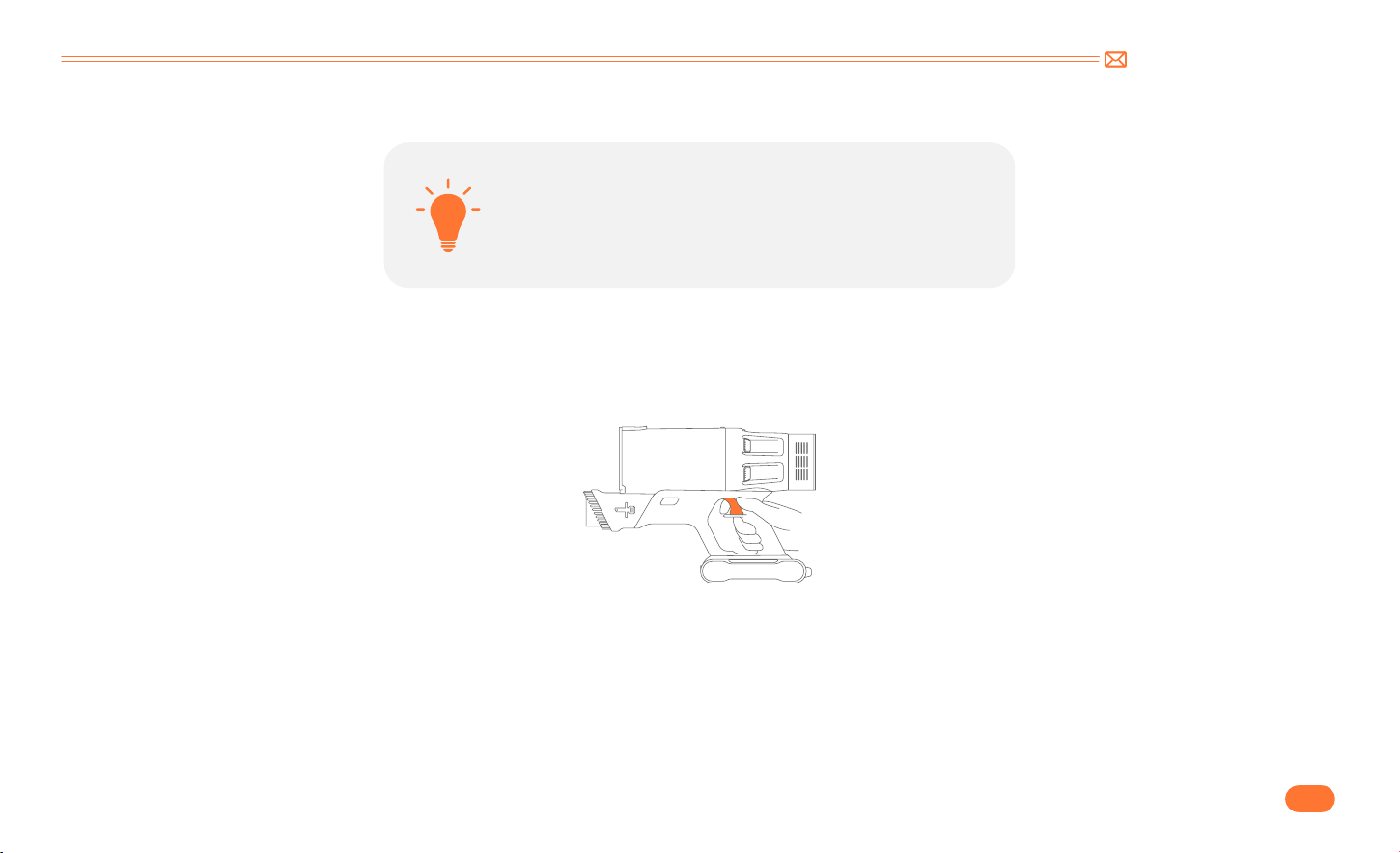
support@inteture.com
JP
109.
5.2 操作方法
•
掃除を始める
•
バッテリーは完全に充電され、固定されています。
•
ダストカップとフィルターは綺麗な状態で、所定の位置に固定さ
れます。
毎回使用する前に、次のことを確認してください
電源ボタンを押して電源を入れます。
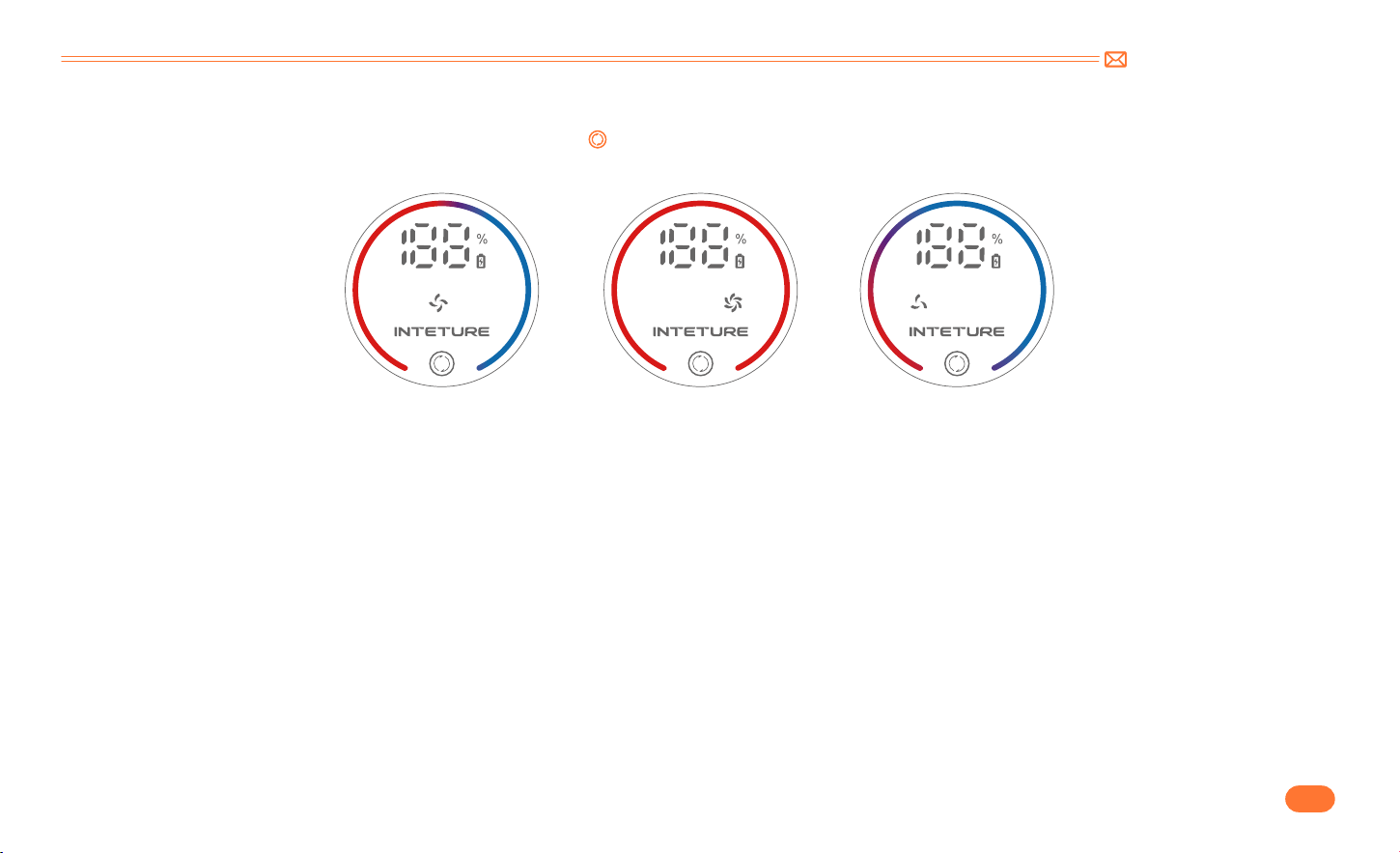
support@inteture.com
JP
110.
•
モードの調整
•
サイフォン機能
電源を入れると、デフォルトの吸引力は中モードになります。「 」ボタンをタッチすると、吸引モードは調整されます。吸引モードを調整するとともに、
吸引モード表示灯の赤い部分が変わり、吸引モードはそれぞれ中 / 強 / 弱になります。
弱モードの状態で電源を切ると、真空度が 3 秒間大幅に上がり、ゴミを徹底的に吸い込みます。そして、電源は自動的に切れます。
MID
MAX
MIN
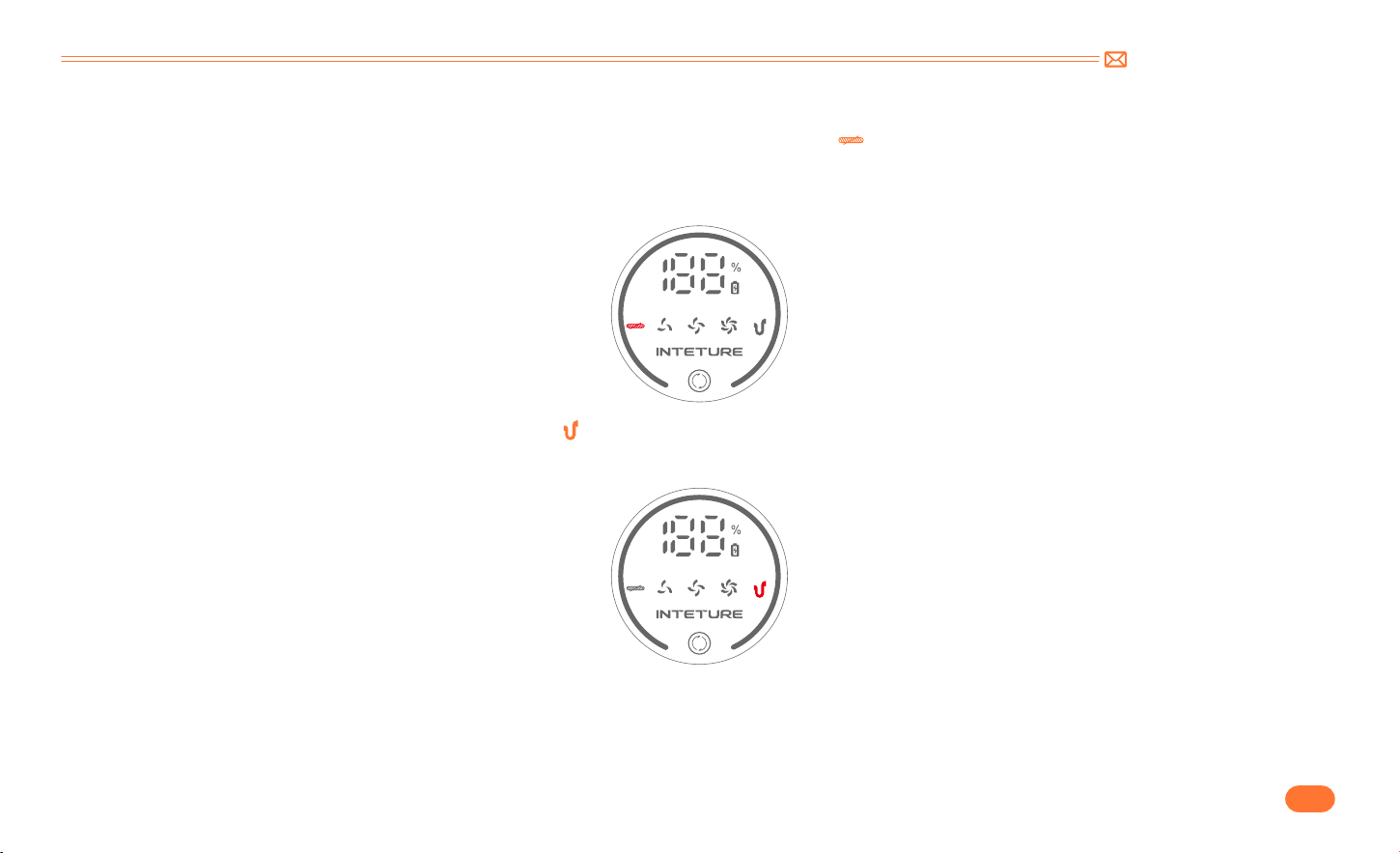
support@inteture.com
JP
111.
•
異常インジケーター
①
ブラシヘッドに大きな異物を吸い込んだり、髪の毛を絡めすぎたりすると、インジケーター「 」が点滅します。
•
ブラシヘッドを取り外し、回転ブラシや回転ブラシに巻き付いた異物を掃除してください。不意の起動による事故防止のため、ブラシヘッドを掃除する前に
ブラシヘッドが本体から取り外されていることをご確認してください。
②
伸縮パイプとダストカップが詰まると、インジケーター「 」が点滅します。
•
伸縮パイプとダストカップ内のフィルターをよく掃除してください。
③
タッチスクリーンに「E1」が表示された:モーターの故障または詰まりにより高温が発生していることを示します。
•
ダストカップを取り外し、本体だけの状態で起動します。本体だけの状態で「E1」が表示されない場合は、ダストカップとブラシヘッドを掃除してください。
本体だけの状態でも異常が続く場合は、本体に不具合がある可能性が高いです。INTETURE サポートチームにご連絡ください。
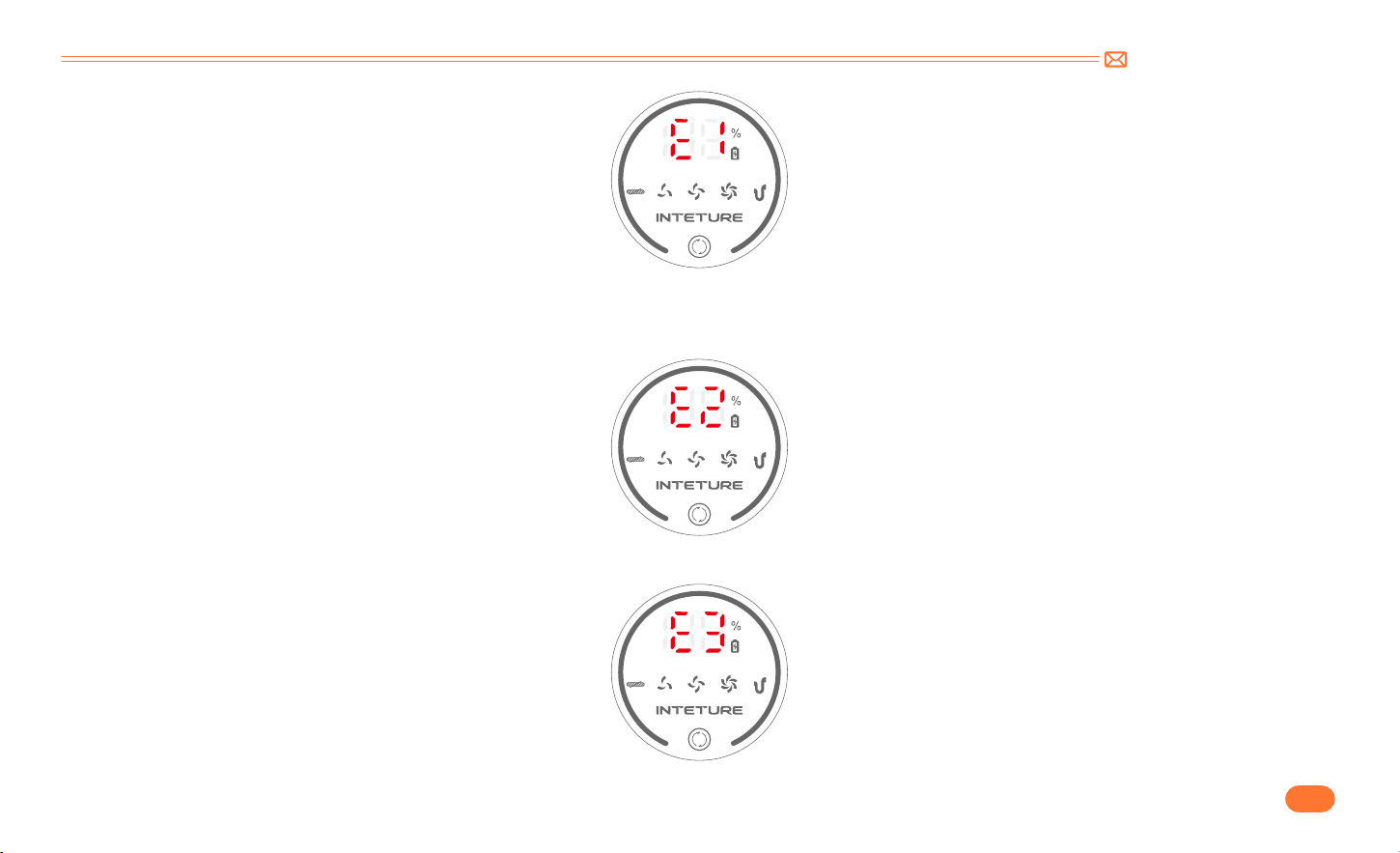
support@inteture.com
JP
112.
④
タッチスクリーンに「E2」と表示された:バッテリー温度保護。
•
掃除機を室温のところに置き、10
~
20 分間放置します。「E2」が消えたら通常に使用可能です。「E2」が消えない場合は、バッテリーに不具合がある可能
性が高いです。INTETURE サポートチームにご連絡ください。
⑤
タッチスクリーンに「E3」と表示された:付属の充電器ではない充電器で充電します。
•
付属の充電器で充電します。(出力仕様は 36V)
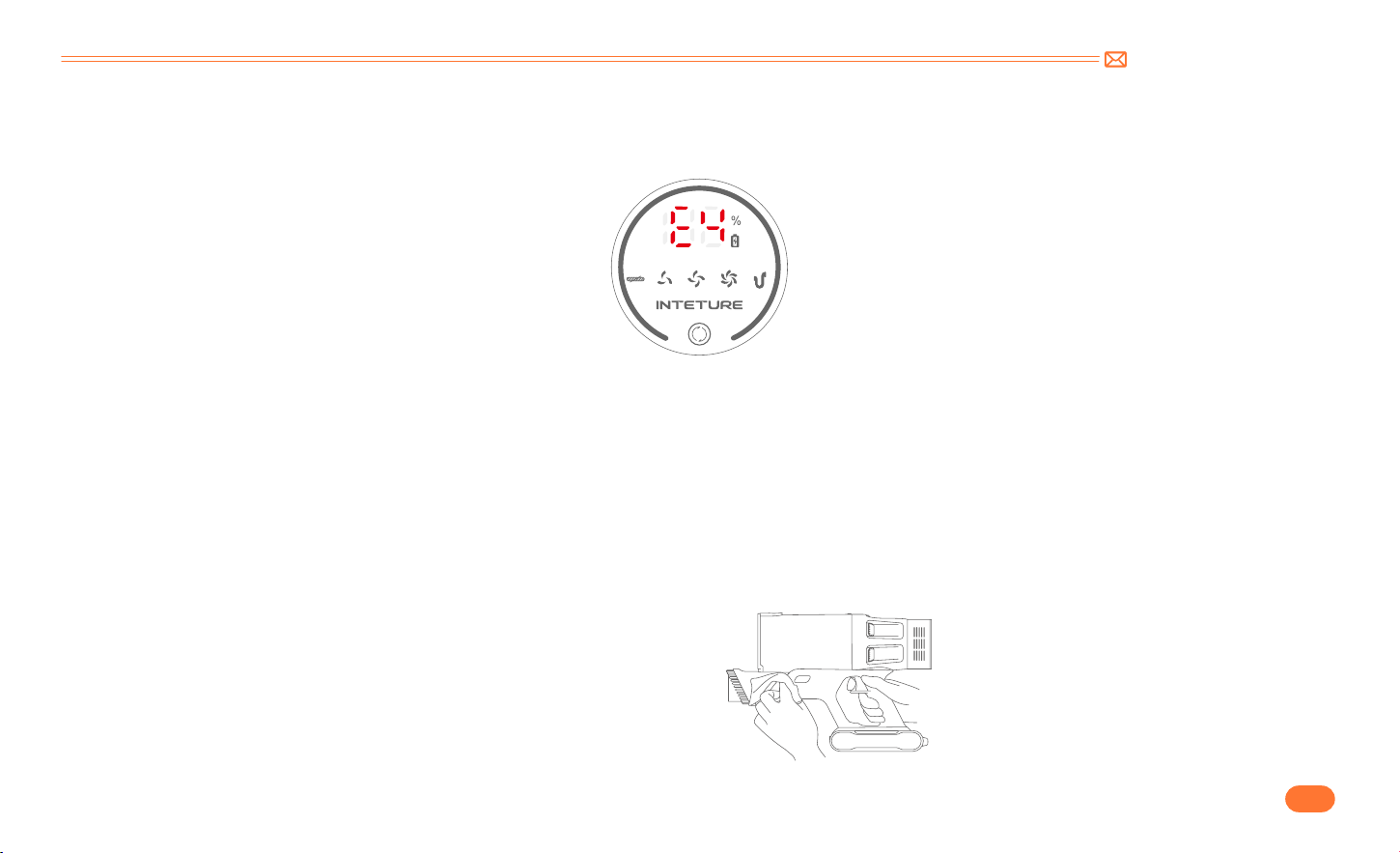
support@inteture.com
JP
113.
⑥
タッチスクリーンに「E4」が表示された:ブラシヘッド / 伸縮パイプ短絡保護。
•
伸縮パイプを取り外しして、ブラシヘッドを本体に取り付けて起動します。「E4」が消えた場合は、伸縮パイプを交換する必要があります。「E4」が消え
ない場合は、ブラシヘッドを交換する必要があります。
6. お手入れ
ご注意:掃除機の寿命を伸ばすために、掃除機を定期的に掃除してください。
•
本体を掃除する前には電源を切ってください。
•
中性洗剤を使用し、少し濡れた状態の布で拭いてください。
•
直射日光を避けて涼しく乾燥した場所に放置してください。
6.1 本体の掃除
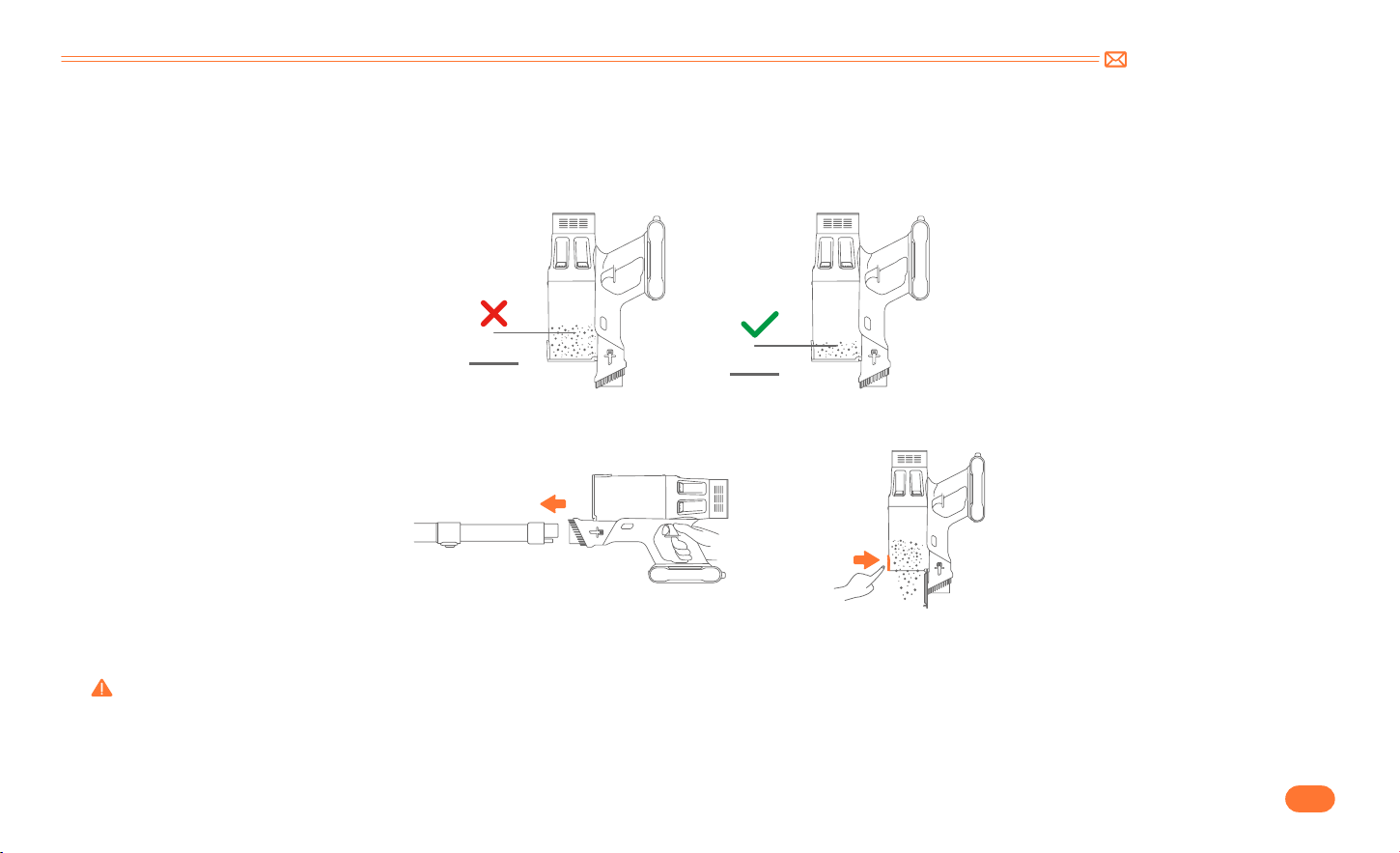
support@inteture.com
JP
114.
6.2 ダストカップ
・
フィルターの掃除
•
ゴミ捨て
使用中にダストカップ内のゴミが MAX ラインを超えた場合は、お早めにゴミを捨ててください。
•
ゴミ捨てボタンを押してゴミを捨てます。
•
ダストカップを本体から取り外します。
本体のダストカップ取り外しボタンを押し、ダストカップを本体から取り外します。
フィルターとダストカップが所定の位置に取り付けない場合は使用しないでください。
6.3 ダストカップとフィルターの洗い
MAX
MAX
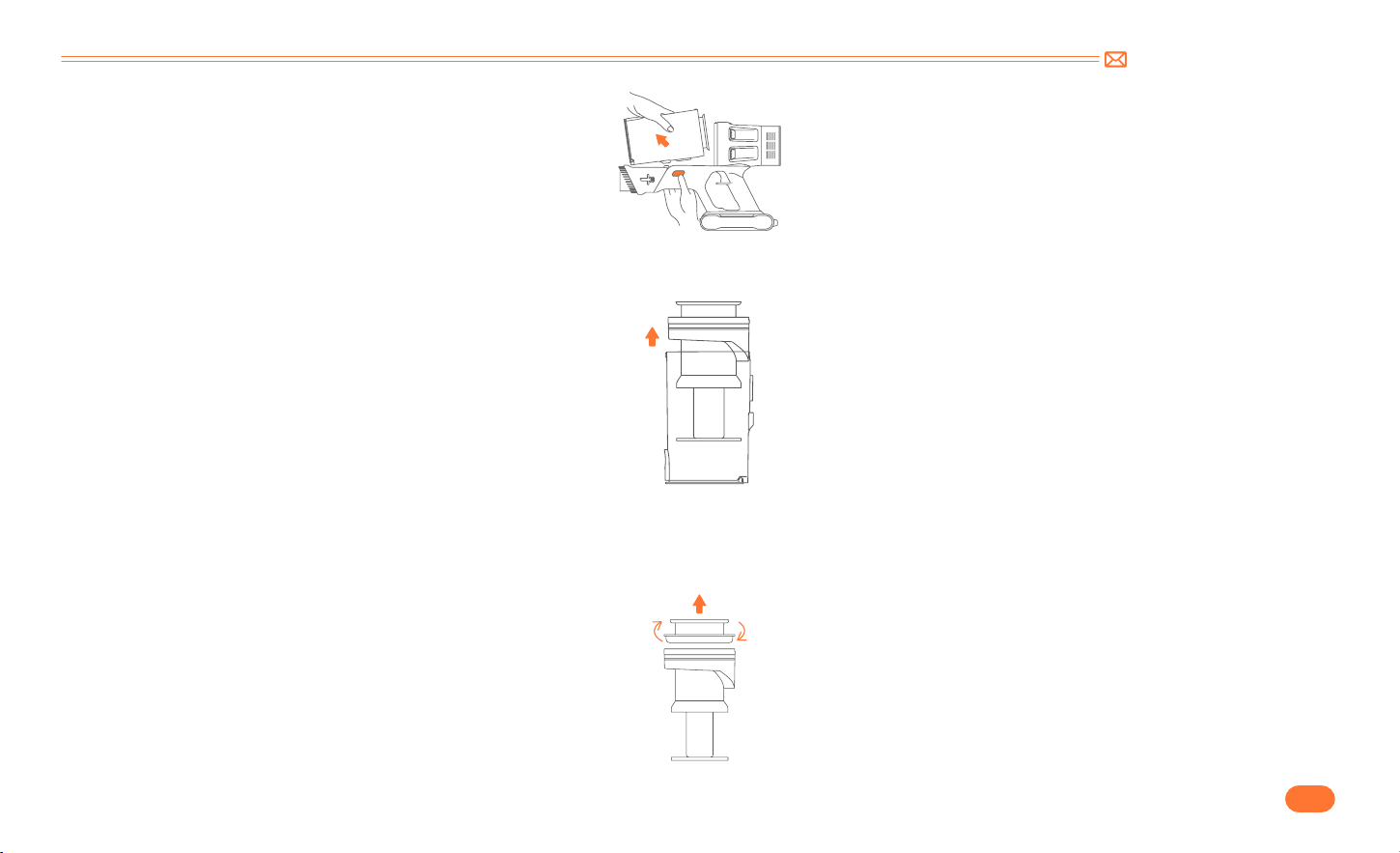
support@inteture.com
JP
115.
•
HEPA フィルターをダストカップから取り外します。
•
ステンレスフィルターをダストカップから取り外します。
HEPA フィルターを上向きに取り出します。
ステンレスフィルターを上向きに取り出します。
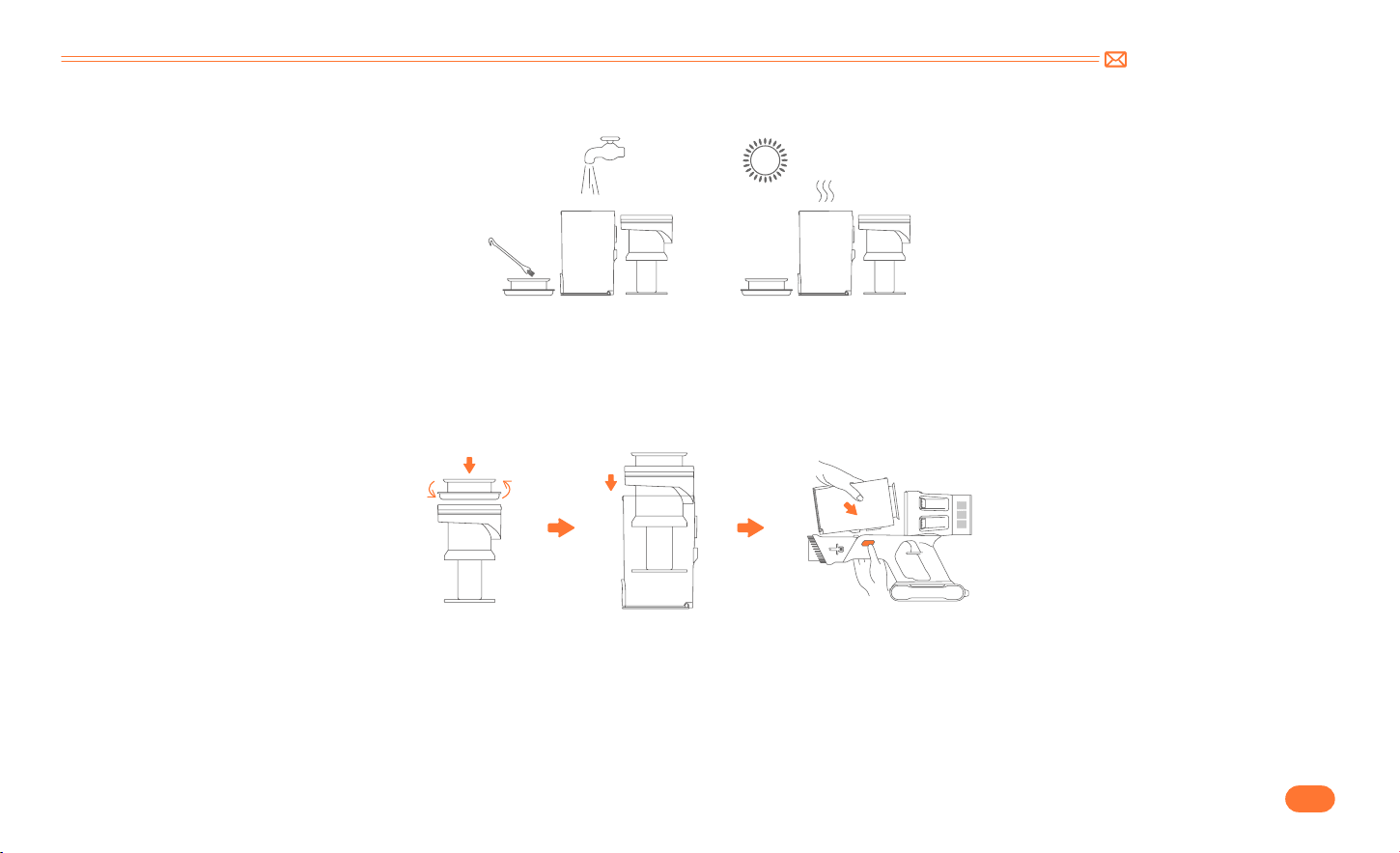
support@inteture.com
JP
116.
•
ダストカップとフィルターを水で洗ってください。ご使用する前にダストカップとフィルターが完全に乾いていることを確認してください。
•
取付方法
•
ブラシヘッドの底部の固定装置を開きます。ブラシヘッドの底部のネジを回してロックを解除します。(図示)
ご注意:長時間使用した後、毛などのゴミが回転ブラシに詰まる可能性が高いです。効率的な稼働と吸引力を維持するために、回転ブラシを定期的に清掃す
ることをお勧めします。
6.4 回転ブラシの掃除
① ステンレスフィルターを隙間に合わせるようにダストカップに取り付けます。
② HEPA フィルターを上に置きます。
③ ダストカップを本体に接続します。
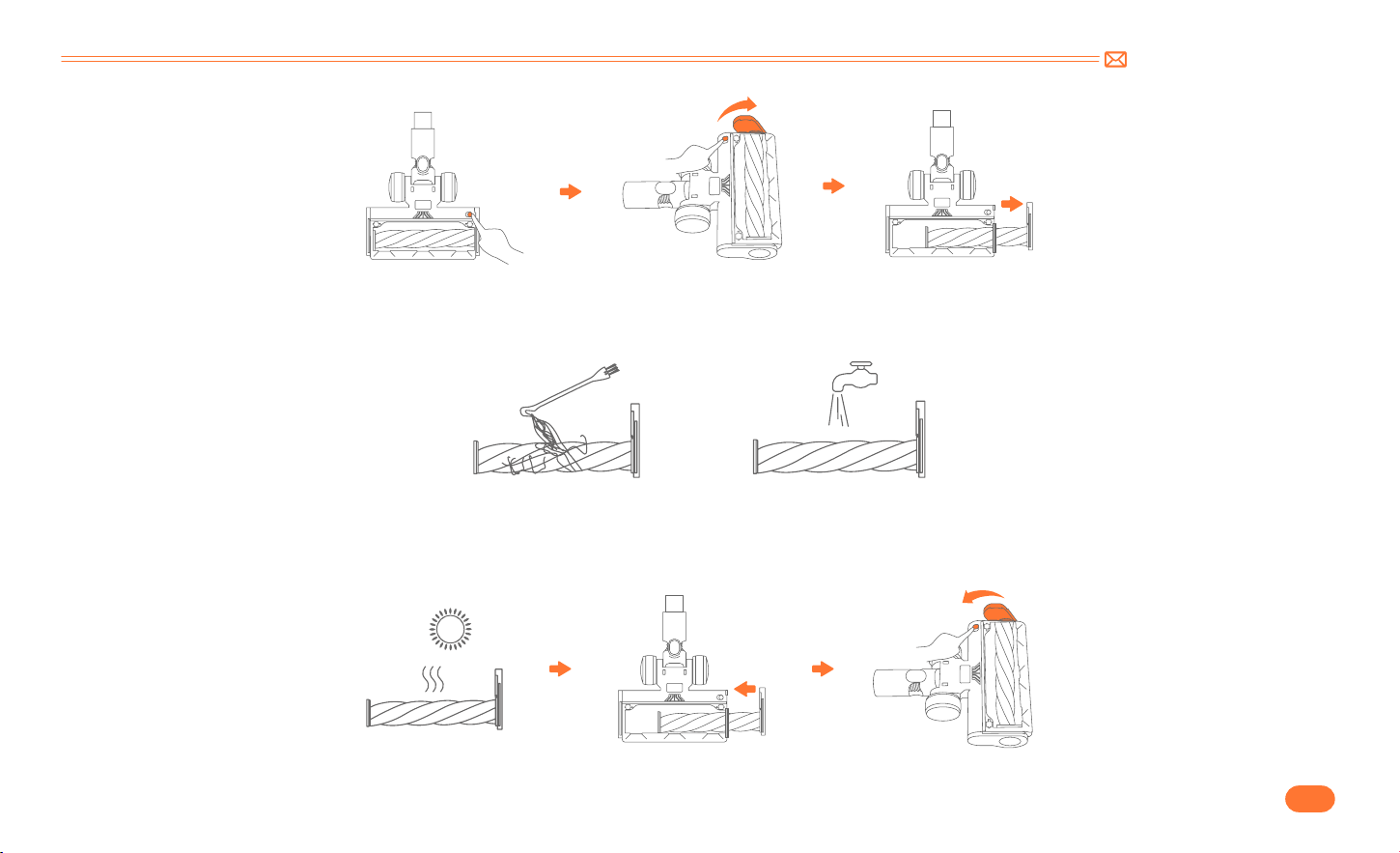
support@inteture.com
JP
117.
•
回転ブラシに巻き付いたゴミをミニクリーニングブラシで掃除してから、回転ブラシを水で洗ってください。
•
回転ブラシを下に押し込み、回転させて取り付けます。

support@inteture.com
JP
118.
7. 仕様
8. トラブルシューティング
製品 コードレス掃除機
モデル BP20
定格電圧 DC 29.6V
吸引モード 中-強-弱
充電時間 4-5H
症状 原因 解決方法
掃除機が稼働できない
•
電源が切れている
•
バッテリーが所定の位置に取り付けられていない、
または故障
•
モーターが故障
•
掃除機をフル充電します。
•
バッテリーが所定の位置に取り付けます。
•
INTETURE サポートチームに連絡して、バッテリーまたは本体を交換
します。
吸引力が弱い
•
ダストカップにゴミが詰まっている
•
ブラシヘッド、伸縮パイプとフィルターにゴミが詰
まっている
•
バッテリー残量が低下
•
ダストカップまたはフィルターが正しく取り付けら
れていない
•
ダストカップ内のゴミを捨てます。
•
ブラシヘッド、ダストカップ、伸縮パイプ、フィルターに詰まったゴ
ミを取り除きます。
•
掃除機をフル充電します。
•
マルチコーンフィルター、HEPA フィルターとダストカップを説明書
に従って正しく取り付けます。

support@inteture.com
JP
119.
症状 原因 解決方法
充電に異常がある
•
充電器が正しく接続されていない
•
バッテリーまたは充電器が故障
•
充電器が純正品ではない
•
充電器がソケットに完全に差し込まれていることを確認してくださ
い。
•
INTETURE チームに連絡して、バッテリーまたは充電器を交換します。
•
付属の純正の充電器のみで充電します。
充電後の使用時間が短い
•
充電時間が足りない
•
ブラシヘッド、ダストカップ、伸縮パイプ、フィルタ
ーにゴミが詰まっている
•
バッテリーの劣化
•
掃除機をフル充電します。
•
ブラシヘッド、ダストカップ、伸縮パイプ、フィルターに詰まったゴ
ミを取り除きます。
•
INTETURE サポートチームに連絡して、バッテリーを交換します。
ブラシヘッドの作動が停止し、4 つの
バッテリーインジケーターが点滅する
ブラシヘッドにゴミが詰まっている ブラシヘッドに詰まったゴミを取り除きます。
9. 保証
9.1 2年保証
•
当社の INTETURE 掃除機は、家庭での通常使用のもとで、取扱説明書に従って正しく使用された場合、材料および製造上の欠陥に対して、2 年間の保証があります。
•
本保証サービスは、保証期間内で保証の対象範囲であれば、正常の稼働状態を保つための部品を無料でご提供いたします。

support@inteture.com
JP
120.
9.3 保証サービスの申請方法
ご購入日とご注文番号をお知らせいただき、故障内容と通常のご使用方法について詳細にご説明ください。状況に応じて、写真や動画の提供が必要となる場
合がございます。
本機に異常が発生した場合、または本取扱説明書をよく読んだ後でもご質問がある場合は、お気軽にお問い合わせください。1 営業日以内に対応
さ せ ていた だ きます。
下記までご連絡ください : [email protected]
9.2 保証の対象範囲
当社 INTETURE の正規販売店からご購入の場合のみ適用されます。
購入された国内のみに限り保証サービスを対応いたします。
家庭での通常使用、取扱説明書に従って正しく使用された場合の故障のみが対象範囲です。一般家庭用以外での使用や不当な取扱い及び機器以外の要因で不具
合を発生した場合については保証対象外となります。

Federal Communication Commission Interference Statement
Correct Disposal of this product
NOTE: This equipment has been tested and found to comply with the limits for a Class B digital device, pursuant to part 15 of the FCC Rules. These limits are
designed to provide reasonable protection against harmful interference in a residential installation. This equipment generates, uses and can radiate radio
frequency energy and, if not installed and used in accordance with the instructions,may cause harmful interference to radio communications. However,
there is no guarantee that interference will not occur in a particular installation. If this equipment does cause harmful interference to radio or television
reception, which can be determined by turning the equipment off and on, the user is encouraged to try to correct the interference by one or more of the
following measures:
• Reorient or relocate the receiving antenna.
• Increase the separation between the equipment and receiver.
• Connect the equipment into an outlet on a circuit different from that to which the receiver is connected.
• Consult the dealer or an experienced radio/TV technician for help.
Caution: Changes or modifications not expressly approved by the party responsible for compliance could void the user’s authority to operate this
equipment.
This device complies with part 15 of the FCC Rules. Operation is subject to the
following two conditions:
( 1 ) This device may not cause harmful interference, and
( 2) This device must accept any interference received, including interference that may cause undesired operation.
This marking indicates that this product should not be disposed with other household wastes throughout the EU. To prevent possible harm
to the environment or human health from uncontrolled waste disposal, recycle it responsibly to promote the sustainable reuse of material
resources. To return your used device, please use the return and collection systems or contact the retailer where the product was purchased.
They can take this product for environmental safe recycling.

Declaration of Conformity
We (Manufacturer is responsible for this declaration)
Ekoo Electronic Co.,Ltd.
(Company name)
B09,block B,f2,bldg.b,runfeng Pioneer Park,no.973, minzhi Avenue, Minzhi St., Longhua, Shenzhen, CN.(Company address)
Declare under our sole responsibility that the product
Trade name:INTETURE
Equipment: Vacuum Cleaner
Model No. : BP20
To which this declaration relates is in conformity with the essential requirement set out in the Council Directive on the Approximation of the laws of the
Member States relating to LVD Directive(2014/35/EU) & EMC Directive(2014/30/EU) & RoHS(2011/65/EU) product is responsible to affix CE marking, the
following standards were applied:
EN 60335 2 2:2010+A11:2012+A1:2013
EN 60335 1:2012+A11:2014+A13:2017+A1:2019+A14:2019+A2:2019
EN 62233:2008
EN 55014 1:2021
EN 55014 2:2021
EN IEC 61000 3 2:2019+A1:2021
IEC62321 3 1:2013
IEC62321 4:2013
IEC62321 5:2013
IEC62321 6:2015
IEC62321 7 1:2015
IEC62321 7 2:2017
IEC62321 8:2017
Full Name: George.wang Position: Approbation Manager
Signature: George.wang Place/Date: Shenzhen,China/Jun.27 2022

Intelligent Future Starts Here
support@inteture.com
