Knee Massager
User Manual
CF-5703
2
PLEASE NOTE !
• DO NOT wet,DO NOT use pins, never remove cover.
• This items is NOT A TOY. Close supervision is necessary when this appliance is
used by , on, or near children or disabled persons.
• Any possible repairs may only be carried out by authorized expert staff.
and lead to loss of warranty.
• Never touch the power plug with wet hands.
• Please avoid contact of the device with water, high temperatures and direct
sunlight.
• DO NOT use any damaged cables, plugs or loose sockets.
• If plugs or cords are damaged, they must be replaced by the manufacturer, a
• Misuse or incorrect use excludes any liability for damage.
• DO NOT use if you have skin disorders, open wounds,or swollen or inflamed
areas.
• Each massage – even a hand massage – must be refrained from during
pregnancy or if one or more of the following complaints are present in the
and swellings, and cancer. It is recommended to consult a doctor before having
a massage for the treatment of ailments and illnesses.
• If you are dependent on electrical aids e.g. pacemakers, please be sure to
consult your doctor for medical advice before taking a massage.
• The packaging material supplied should not be used as a toy.
• Do not use while you sleep.
• Do not use with infants,a helpless person or a person insensive to heat.
• Overlong application can result in skin burns.
• Do not use this product for medical treatment.
•
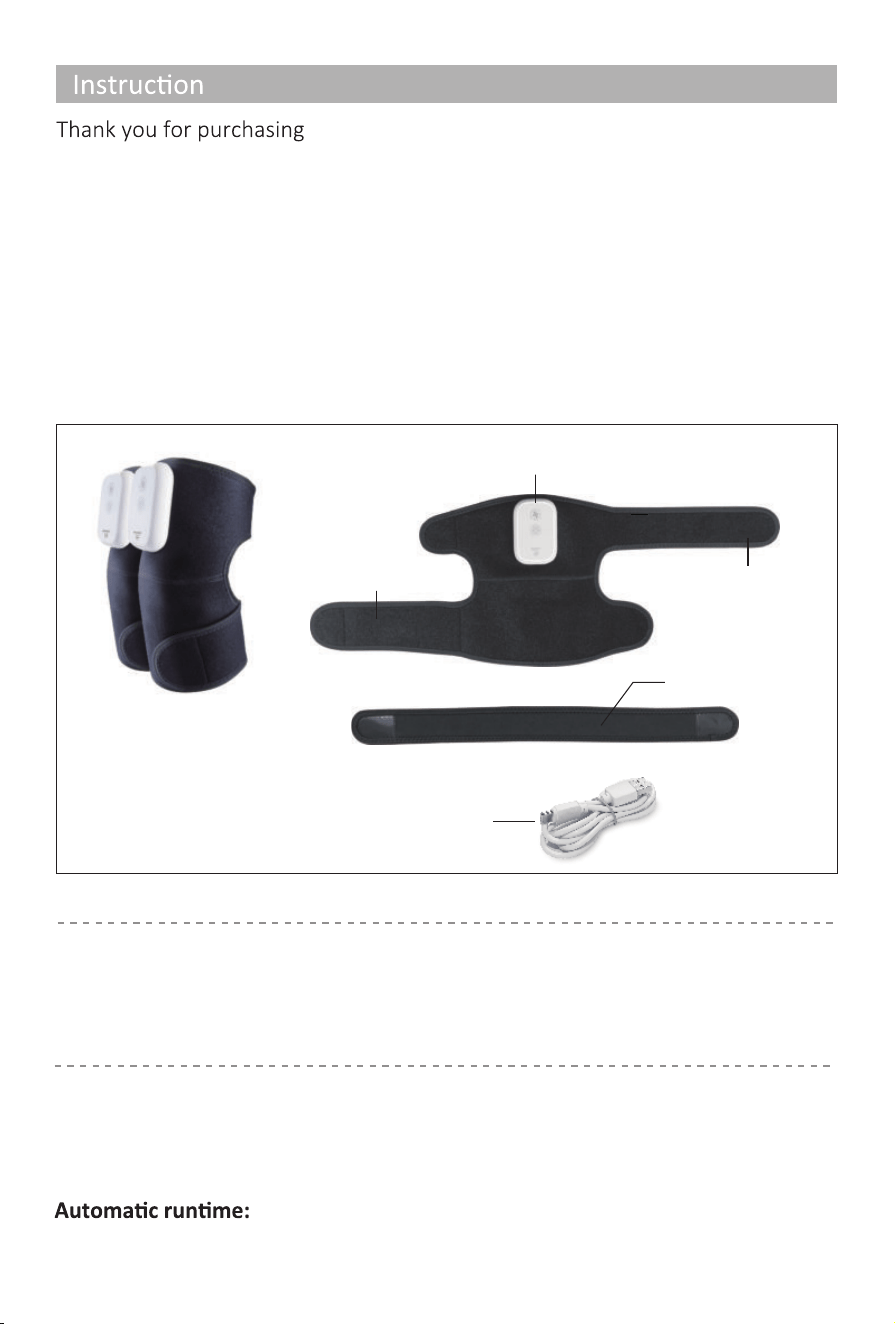
• Type-c charging cable x 2pcs
•
Extension strap x 2pcs
• Knee Massage x 2pcs
3
CONTENTS
With normal care and proper treatment
Comfier Knee massager
, it will provide
years of reliable service.
Please read all instructons carefully before use this product.
Please retain this manual for future reference.
Measurements:
Weight:
Rated Voltage:
Rated Power:
9X10.2 inches(Folded)
0.66 lbs(one piece)
5.0VDC 2.0A
30 minutes
7W
TECHNICAL DATA
FEATURES
Control panel
Velcro
Velcro
Extension strap
Type-c
charging line
• Soothing Hea�ng with 3 heat levels
• Vibra�on massage with 3 levels of intensity
• Adjustable wrap around design
• A �mer of 30 minutes to automa�cally shut off
• Easy to operate the control panel
Ba�ery Capacity:
5000mAh
4
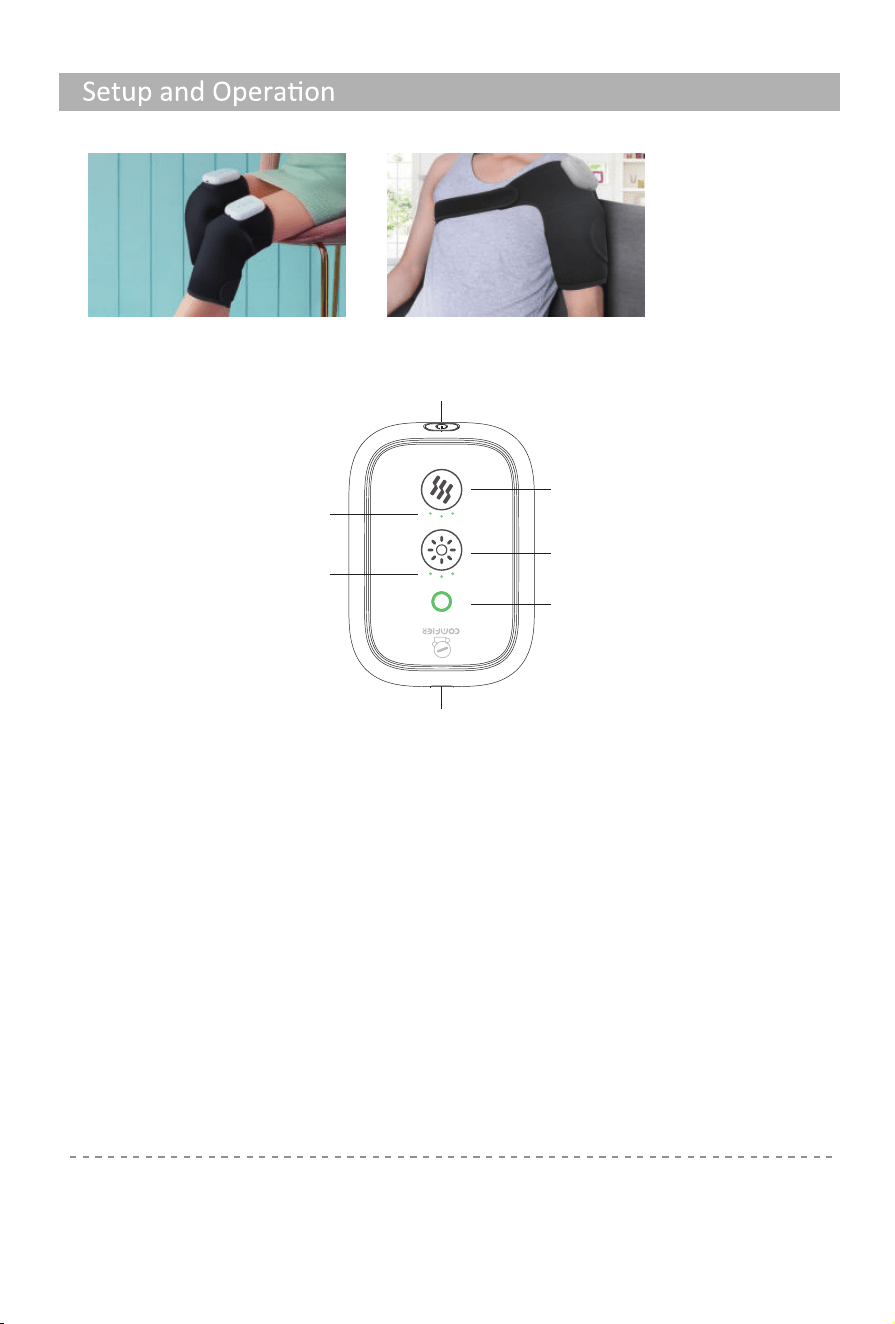
1. Please use the device in the manner shown below:
Note:
•
• Do not setup or use the device in a bathroom or similary wet/damp areas.
The device will automa�cally switch off a�er 30-minute �mer runs out.
• Ensure the device is not exposed to direct sunlight or placed near sources of heat.
The maximum temperature: approx 140F.
This product produces a warming heat. Please allow a few minutes to reach maximum
temperature.
Vibra�on bu�on
Hea�ng bu�on
Power indicator light
Charging port
Power bu�on/ Lock bu�on
Vibra�on
indicator light
Hea�ng
indicator light
Power bu�on/Lock bu�on:
Long press to turn on the device, and ac�vate vibra�on at low intensity and hea�ng
func�on at high level. When the device is on, short press this bu�on to lock the screen to
avoid touching the bu�on by accident, short press again to unlock the screen.
When the screen is locked, the power indicator light will turn red.
Vibra�on bu�on:
Touch the bu�on to turn on the vibra�on func�on, and cycle low,medium,high intensity
or off se�ng, the corresponding vibra�on indicator will light on
Hea�ng bu�on:
Touch the bu�on to turn on the hea�ng func�on, and cycle high, medium, low of hea�ng
level or off se�ng, the corresponding hea�ng indicator will light on.
Opt.1 Knee massager Opt.2 Shoulder Massager(With extension strap)
2. Controlle panel:
5
Ba�ery Charging
3. When charging, the indicator light will turn into a breathing light effect.
4. When full charge, the green indicator will be always on.
5. Normally it takes about 3-4 hours to fully charge.
6. Machine will be turned off automa�cally when charging.
7. A�er full charged,the device can work con�nuously for around 2-3 hours
Note: beforing using this product for the first �me, please fully charge it.
If the device is not in use for a long �me, the product should be charged once a month to
pretect the ba�ery life from shortening.
Ba�ery Disposal Warning:
The unit contains a Lithium Ion ba�ery.
Please contact your local recycling center to find out
how to properly dispose of the product.
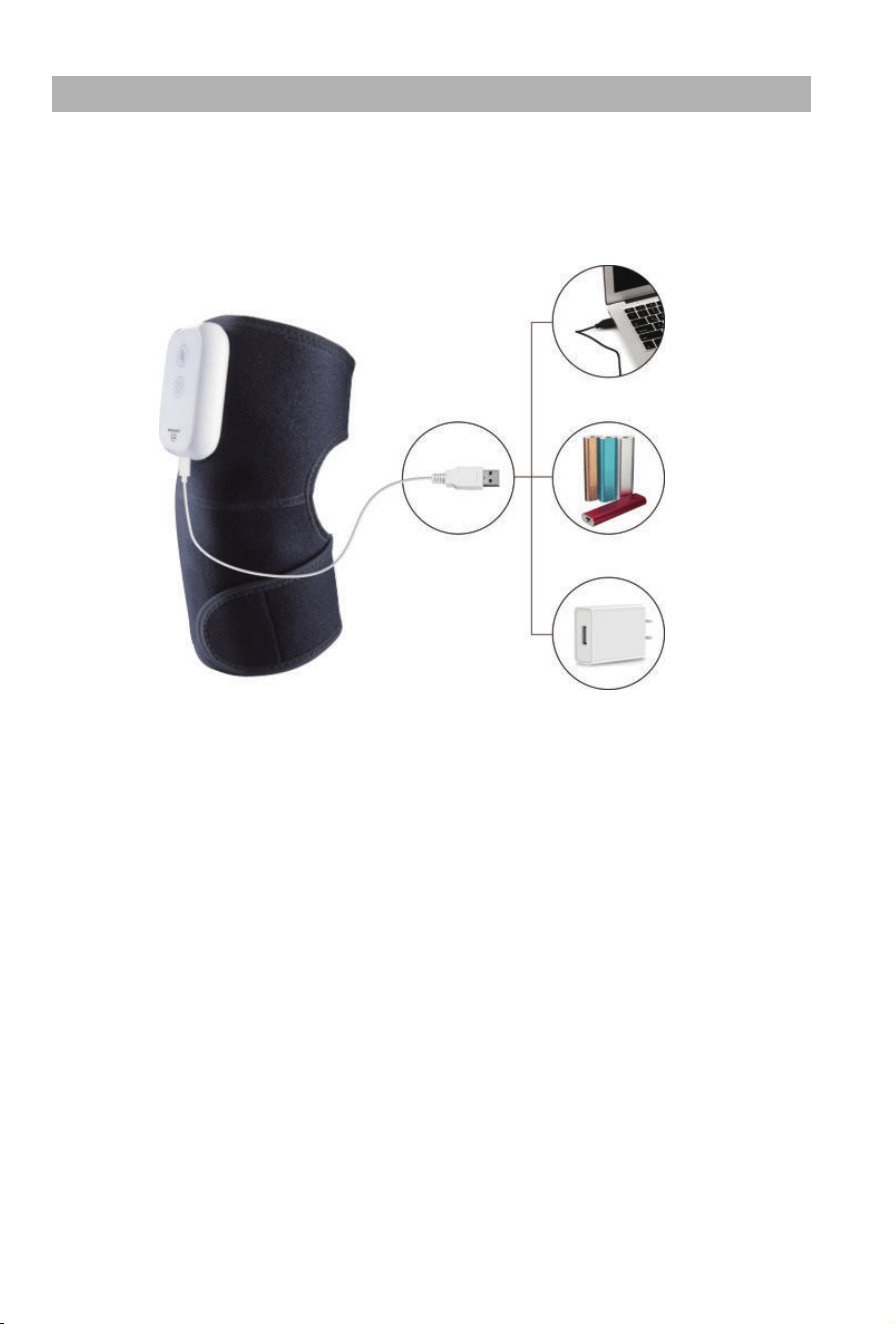
1. When the ba�ery is low, the green indicator will start flashing.
2. Connect the USB cable to any USB charger, it can be plugged in the portable power
bank, mobile phone ba�ery chargers, laptop and any USB port.
Laptop
Power bank
Provided adapter
Fault Solutions
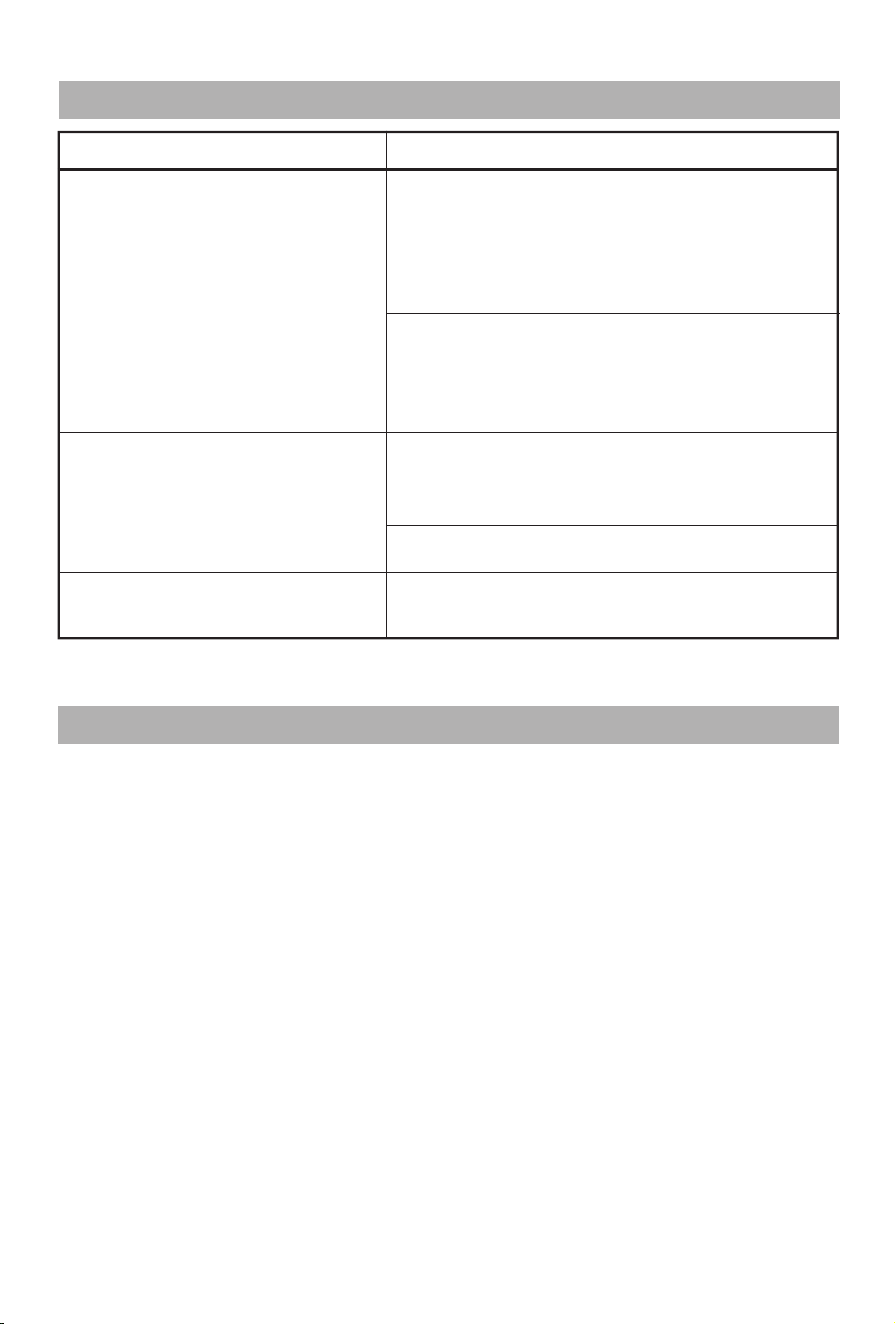
Device switches off suddenly
Device stoped abnormally
Ba�ery runs out off power, charge the
ba�ery, self-�med 30 mins is out, restart the
product.
The device has an overheatng protec�on
system be ac�vated, device is switched off
for your safety. Please rest device for
15-30mins before restar�ng.
The device will switch off when the �mer
runs out. Con�nue using by pressing the
‘Power’ bu�on. If the device has run for 30
mins,turn back on a�er res�ng the unit for
15 mins.
Ba�ery Low, please charge it before using
It is nomal working noise of the interal
mechanism
6
Device slight noise
Troubleshooting
Care and maintenance
Care and cleaning instruc�ons
1. Always unplug the unit before cleaning it.
2. Before cleaning, allow unit to cool.
3. Dampen a cloth in water or a 3%–5% mild detergent solu�on.
4. Wipe the dirty areas with the wet cloth.
5. Do not use sharp brush, sharp tool, gasoline and diesel to clean it.
6. Do not use wet cloth clean control panel, lest cause failure, only use dry
cloth to wipe the control panel.
7. Never submerge any part of the unit in liquid.
8. Wait for the unit to become fully dry before use.
Maintenance
1. Please keep it into a box and keep in a safe, dry and cool place.
2. Do not keep it in any place with high temperature, near fire or direct
sunlight,or it may faded or damaged
3. Do not contact benzene, dilient or any other corrosive liquid.
7
Warranty
30 days uncondi�onally Return
Comfier product can be returned to receive a full refund for any reason within 30 days.
Please contact our customers service (supportus@comfier.com), our staff will contact
you within 24 hours.
90 days refund/replace
Comfier product can be returned / replaced within 90 days if the product break down
in the period of proper use.
12 months Warranty
If the product break down within 12 months in the period of proper use, customers can
enjoy the relevant warranty to get them replaced.
A�en�on!
No warranty will be given to any force majeure and man-made causes to a defec�ve
product, such as improper care, personal tear down and willful damage,etc.
If you have any issue about the product, please feel free to contact us by sending
email to supportus@comfier.com We will strive to provide the best service
possible within 24 hours.
Tel: (248) 819-2623
Monday-Friday 9:00AM-4:30PM
Email: supportus@comfier.com
Extend Warranty for Free
1) Enter the following URL or scan the QR code below to find COMFIER facebook
page and like it, enter“Warranty” to messenger to extend your warranty from
1 year to 3 years.
h�ps://www.facebook.com/comfiermassager
OR 2) Send message“Warranty” and email us supportus@comfier.com to extend your
warranty from 1 year to 3 years.
Have queson ?
NOTE: This equipment has been tested and found to comply with the limits for a
Class B digital device, pursuant to Part 15 of the FCC Rules. These limits are designed
to provide reasonable protec�on against harmful interference in a residen�al
installa�on. This equipment generates, uses and can radiate radio frequency energy
and, if not installed and used in accordance with the instruc�ons, may cause harmful
interference to radio communica�ons.However, there is no guarantee that
interference will not occur in a par�cular installa�on. If this equipment does cause
harmful interference to radio or television recep�on, which can be determined by
turning the equipment off and on, the user is encouraged to try to correct the
interference by one or more of the following measures:
• Reorient or relocate the receiving antenna.
• Increase the separa�on between the equipment and receiver.
• Connect the equipment into an outlet on a circuit different from that to which the
receiver is connected.
• Consult the dealer or an experienced radio / TV technician for help.
This device complies with Part 15 of the FCC Rules. Opera�on is subject to the following
two condi�ons: (1) this device may not cause harmful interference, and (2) this device
must accept any interference received, including interference that may cause undesired
opera�on.
WARNING: Changes or modifica�ons to this unit is not expressly approved by the party
responsible for compliance could void the user's authority to operate the equipment.
FCC STATEMENT

