User Manual
CF-2209
Neck Back Massager with Heat, Shiatsu,Compression
2
• The massage device conforms to recognized technical principles and the latest safety
one or more of the following complaints are present in the massage area: recent injuries,
Tel:
3
Measurements:
Weight:
Voltage:
Nominal Power:
31.9x15.0x22.4 inches
3 vibra�on modes
3 levels of compression intensity
3 levels of shiatsu intensity
Soothing heat
Full back shiatsu massage
17.6 lbs
Input: 100-240V ~50/60Hz
Output: DC12V 3.5A
42Wa�
Massager
User manual
Home adapter
Thank you for purchasing Comfier Massager.
With normal care and proper treatment, it will provide years of reliable service.
1. Place the device on a chair or sofa, or place it on other support.
2. Connect the adapter cable to the corresponding cable on the device.
Device side
Adapter side
3. Plug the home adapter into an outlet between 100-240V.
4. Turn on the device by opera�ng the hand controller( instruc�ons as below).
5. You also may so�en the massage pressure by placing a blanket or towel between you and
the device.
15 minutes �mer
4
This device will switch off automa�cally a�er the set �mer runs out.
Do not set up or use the device in a bathroom or similarly wet / damp areas.
Do not use this device while driving.
For your own safety, we equip the device with protec�on against over-hea�ng.
Heat is created in the motors when they are placed under great stress and excessive pressure.
Before this could create any risk and a�er the set �mer runs out, the device will switch off
automa�cally and will only allow switching on again a�er an appropriate down�me.
Likewise, you should allow your body some rest periods. To avoid straining your muscles too
much, we recommend not exceeding a con�nuous massage of 15 minutes.
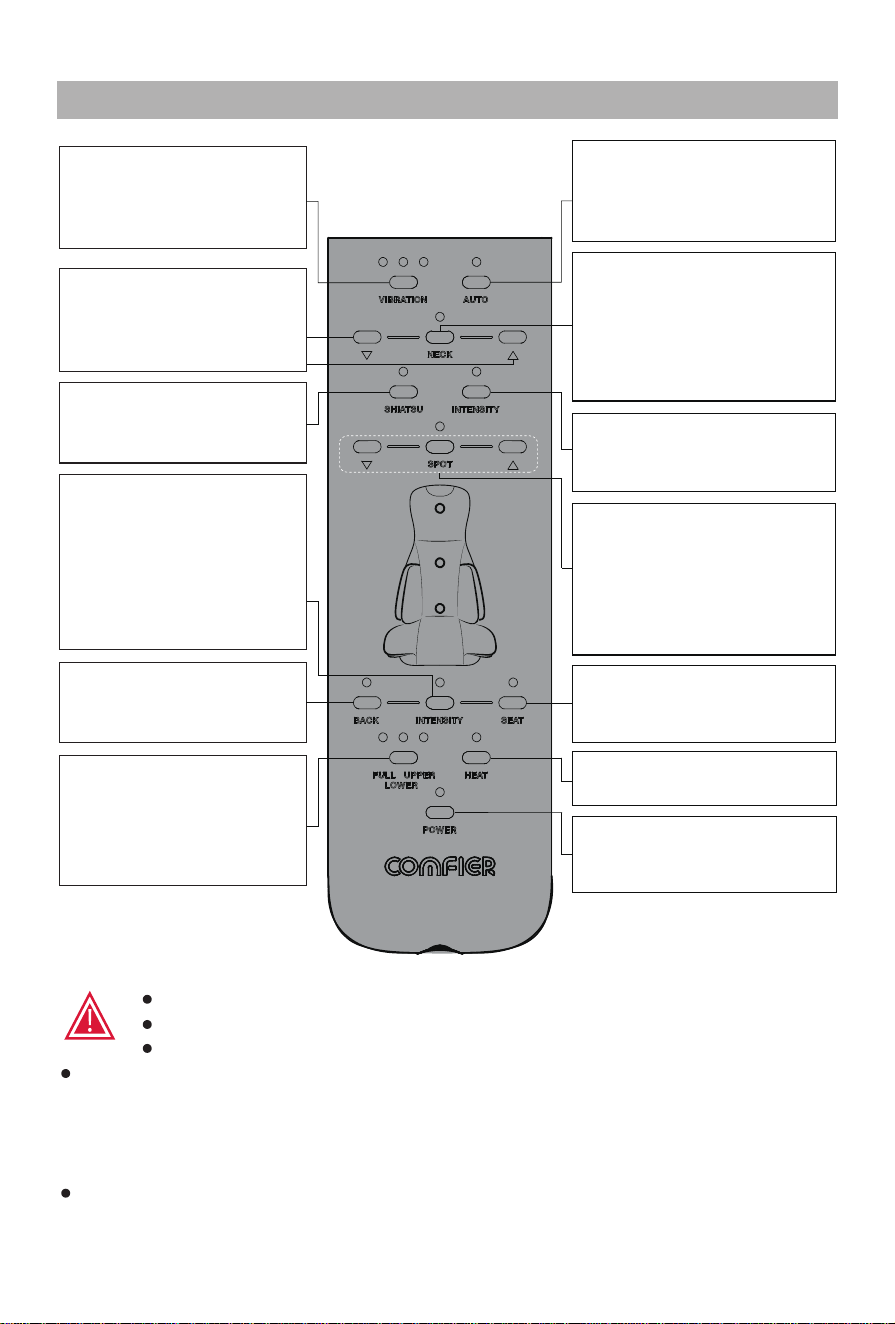
Controller Instruc�on
Press to cycle through M1/
M2/M3/Off se�ng of
vibra�on.
Vibra�on Mode:
In the powered-on state, press
to turn on automa�c massage
mode.
Auto:
Press to turn on neck shiatsu
massage.Press again to shi�
rota�on direc�on.Press once
again to turn off shiatsu
massage.
Neck Shiatsu:
Press to cycle High/Medium/
Low level of shiatsu intensity.
Back Shiatsu Intensity:
Press SPOT to switch between
full back massage and spot
massage. In spot mode,
press & hold arrow bu�ons to
adjust posi�on up or down.
Press & hold arrow bu�ons
to adjust the neck shiatsu
nodes posi�on up or down.
∧/∨:
Press to turn on or off the
back shiatsu func�on .
Back Shiatsu:
Press to cycle through Low/
Medium/High level of
intensity.Press INTENSITY to
cycle through Low/Medium/
High for both back and seat
compression.
Compression Intensity:
Press to select Full, Upper
or Lower back to designate
the area covered by the
shiatsu massage.
Shiatsu Area:
Spot/∧/∨:
Press to turn on or off
compression on the seat.
Seat Compression:
Press to turn on or off hea�ng.
Back Heat:
Press to turn on or off the
device.
Power:
Press to turn on or off
compression on the back.
Back Compression:
5
dry hands.
wipe the product with alcohol or harsh chemicals such as thinner or bleach.
of a direct force in excess of 110 Ibs. may damage your device and invalidate your
warranty. Refrain from over usage of the device.
6. Store the device in a cool, dry place out of reach of children.
cover of device.
Massage heads rotate at
reduced speed.
Device switches off suddenly.
Device fails to start.
Jerky mo�on of massage heads/
Vibra�ons from device.
Infra-red lights are on but no
mo�on from massage heads.
The load on the massage heads is excessive.
Reduce load and try again.
Excessive pressure may have been applied onto
the device.Reduce the load and try again.
Device may be jammed.Remove pressure/load from
the device and press the “Power” bu�on to try again.
The device will switch off when the �mer runs out.
lf the device has run for 15 mins.,turn back on a�er
res�ng the unit for 15 mins.
Over-heat protec�on func�on ac�vated.Device is
switched off for your safety, Please rest device for
15-30 mins before restar�ng.
Check if device has been used for more than 15 mins.
If so, let device rest for 15 mins before con�nuing
Device may require longer �me to cool in warmer
environments.
Check if adapter is plugged into socket and adapter
output is connected to device power inlet wire.
6
Valid Proof of Purchase Under this Warranty:
Comfier
Comfier
Comfier
Comfier
Comfier
Comfier
Comfier
Comfier
Comfier
Comfier
Comfier

7
h�p://support.comfier.com
CF-2209_V25.6.1.0

