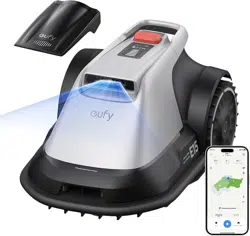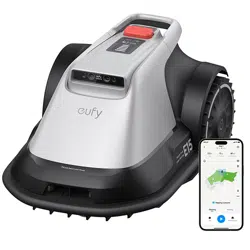

Welcome
1. Safety First
IMPORTANT
1.1 Before Mowing
1.2 When Mowing
1.3 Safe Usage
1.4 Symbols and Decals
1.5 Environmental Protection
2. About Your eufy Robot Lawn Mower
2.1 What's in the Box
2.2 Overview
2.3 How eufy Robot Lawn Mower Works
2.4 Specifications
3. Getting Started
3.1 Connect the App
3.2 Start Your First Mowing
3.3 Work Zone Settings
4. Daily Use
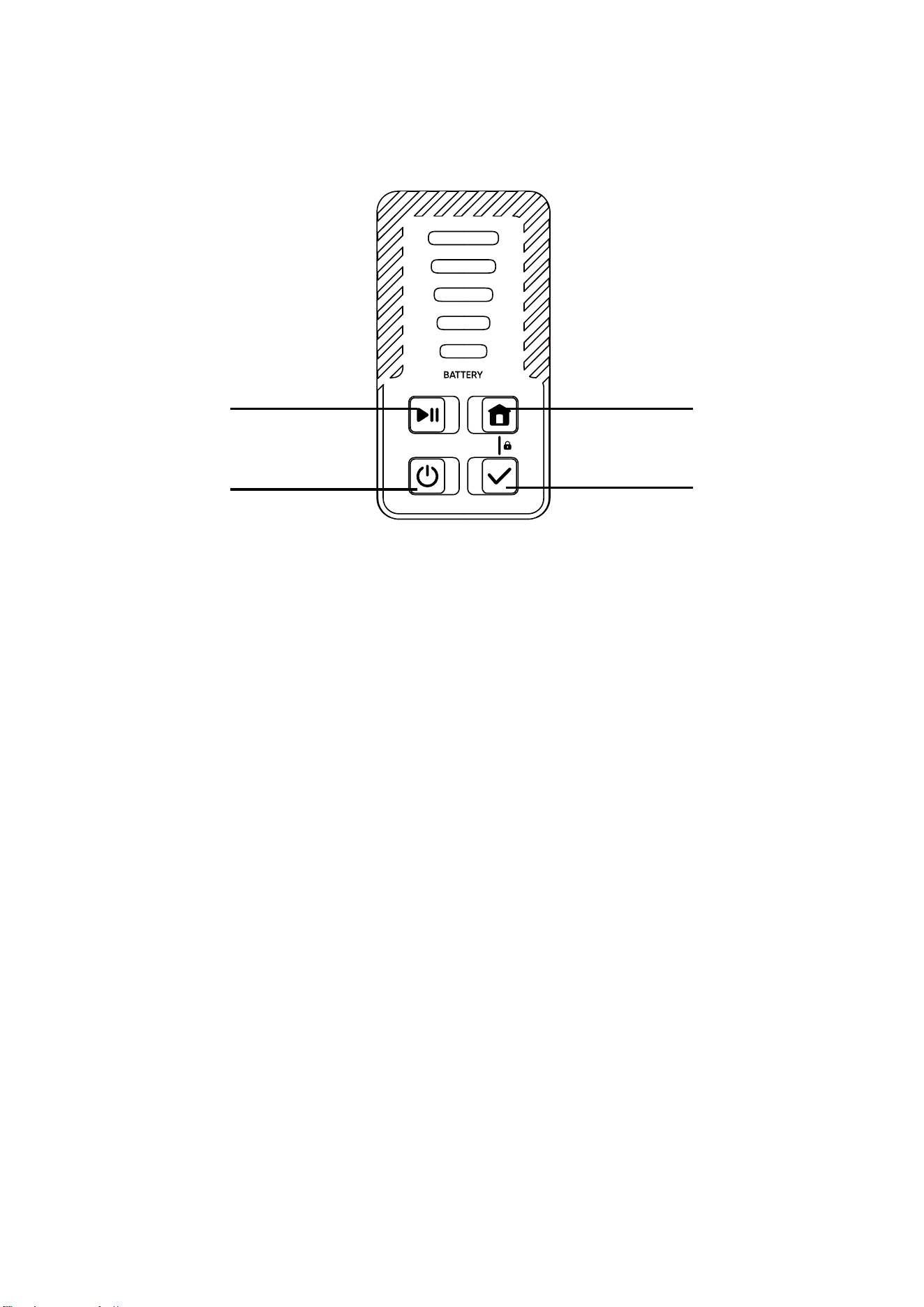
4.1 Panel Operations
4.2 Light Indicators
4.3 Mow
5. Maintenance
5.1 Keep It Clean
5.2 Replace Cutting Blades
5.3 Transportation
5.4 Battery
5.5 Power Supply
5.6 Storage
5.7 Recycling and EOL Disposal


Welcome
Thank you for choosing eufy as your garden care lawn mower!
eufy robot lawn mower is ready to go with a simple one-step setup. Say goodbye to perimeter wires,
intricate RTK setup and diicult-to-operate manual lawn mapping.
eufy mows as smartly as a human, thanks to its cutting-edge AI vision system eufy V-FSD.
This user manual will help you learn and operate eufy robot lawn mower. Please enjoy the fun of care-
free mowing and a peectly maintained lawn!
Intended use
This product is strictly intended for domestic lawn mowing only. Using the mower for any other purpose
is prohibited and may lead to serious injury. It is essential to read and understand all warnings and
precautions in this manual to reduce risks. While following the instructions can lower the chance
of accidents, some risks are inherent and cannot be completely eliminated. The operator or user is
responsible for any incidents involving others on their property while operating the mower.
1. Safety First
IMPORTANT
READ CAREFULLY BEFORE USE - KEEP FOR FUTURE REFERENCE
Your safety is our priority. Before using the product, please read the following important safety
guidelines to ensure a safe and enjoyable experience.
The safety rules aim to draw your attention to potential dangers. The safety symbols, and their
explanations, require your careful attention and understanding. The safety warnings do not, by
themselves, eliminate any danger. The instructions or warnings they provide are not substitutes for
proper accident prevention measures.
WARNING: Read all safety warnings and instructions. Make sure you understand the instructions and
are familiar with the controls and proper use of the appliance. Failure to follow the warnings and
instructions may result in electric shock, fire and/or serious injury. Carefully read the instructions for the
safe operation of the appliance. Save all warnings and instructions for future reference.
WARNING: Failure to obey a safety warning can result in serious injury to yourself or others. Always
follow safety precautions to reduce the risk of fire, electric shock and personal injury. Save the owner's
manual and review it frequently to continue safe operation and instruct others who may use this tool.
WARNING: This machine produces an electromagnetic field during operation. This field may under
some circumstances inteere with active or passive medical implants. To reduce the risk of serious or
fatal injury, we recommend that persons with medical implants consult their physician and the medical
implant manufacturer before operating this machine.
NOTE: The term "appliance" encompasses the mower, the base station, and all components,
accessories, and equipment related to this product.
• Read the instructions carefully. Be familiar with the controls and the proper use of the appliance.
• This appliance is not intended for use by persons (including children) with reduced physical,
sensory or mental capabilities, or lack of experience and knowledge, unless they have been given
supervision or instruction concerning the use of the appliance by a person responsible for their
safety.
• Users should be between the ages of 18 and 70. Local regulations may restrict the operator’s age.
Children should be supervised to ensure they do not play with the appliance.
• Make sure to set up and use the mower and the base station according to the guidelines. For the full
User Manual and up-to-date information, please visit eufy.com.
• This appliance is not intended for use by persons (including children) with reduced physical,
sensory or mental capabilities, or lack of experience and knowledge, unless they have been given
supervision or instruction concerning the use of the appliance by a person responsible for their

safety.
• Using the appliance for purposes other than mowing can cause serious injury. To avoid injuries,
please read and understand all the warnings and cautions. You can reduce the risk by following the
instructions and warnings in this manual, but you cannot eliminate all risks. The operator or user is
responsible for accidents or hazards occurring to other people on their property.
• The mower has many built-in safety sensors; however, safety risks still exist. Set a mowing time when
no people or pets on the lawn. Inform the neighbors about the risks of accidents or hazards. When
using the mower on a public lawn, or when your lawn is open to your neighbor or street, protect or
fence the lawn, or put up a warning sign around the working area that says: WARNING! Automatic
lawn mower! Keep away from the machine! Supervise children!
• DO NOT attempt to modify this appliance on your own. Alterations could disrupt its functions,
leading to serious injuries and/or damage, or invalidate the Limited Warranty.
• Only use parts and accessories approved by eufy's manufacturer.
• Please ensure you receive the proper training before using the appliance. Never let individuals who
are not familiar with this appliance, or children operate it. Ensure only those who understand how
mower works and behaves are allowed to use it.
• The mower contains batteries that can only be replaced by the manufacturer or authorized service
personnel.
• To recharge the mower, only use the base station.
• Seek medical advice immediately if any cell of this appliance has been swallowed.
• To prevent potential damage, ensure the mower operates at least 1 meter (3') away from sprinkler
heads. Do not use the mower and sprinklers at the same time. Schedule the mower to operate at a
dierent time from the sprinklers.
• Be careful when adjusting the machine to prevent fingers from entangling moving blades and fixed
parts of the machine.
• Replace worn or damaged parts for safety; Use only genuine replacement parts and accessories.
Where parts are consumable, the spare part shall be clearly identified, e.g. by using a part number
or other means.
1.1 Before Mowing
• Ensure the correct installation of the automatic perimeter delineation system as instructed.
• On multi-spindle appliances, take care as rotating one blade can cause other blades to rotate.
• Avoid operating the equipment in wet grass, where feasible.
• Do not operate the appliance or its peripherals if guards or shields are damaged, or if the cord is
frayed or worn out.
• Do not use the mower if the blade disc, body, blades, screws, nuts, or cables are damaged.
• Be careful with sharp objects in this product, like screws and stakes. Do not point them towards
people or animals.
• For optimal mowing peormance, we recommend mowing in dry conditions. Mowing in the rain can
cause grass to clump on the mower, and the mower may slip. Avoid mowing in adverse weather
conditions, including heavy rain, thunderstorms, or snow.
• Regularly check that all parts of the mower are working properly.
• Regularly check to ensure the blades, blade screws, and the cutting assembly are not worn or damaged. If
they are, replace the blades and screws in sets to maintain balance. Be cautious with multi-spindle models,
as turning one blade may cause others to rotate as well.
• Thoroughly inspect the area where the equipment is to be used and remove all objects which can
be thrown by the machine.
• Regularly check the area where the mower will be used and clear away stones, sticks, wires, bones,
and other foreign objects. The Limited Warranty does not cover damage caused by objects le on

the lawn.
1.2 When Mowing
• Children should not be allowed to be near or play with the machine when it is operating.
• Start the mower as directed in the manual. When powering on, ensure your hands and feet are clear
of the rotating blades. Avoid placing hands or feet near or under any moving parts and blades.
Always stay away from the discharge opening. Never position your hands or feet close to or under
the mower when it is running.
• Never pick up or carry the mower when the motor is running. Avoid lifting the mower during
operation. Sitting or riding on the mower or the base station is strictly prohibited. Additionally, do not
place any objects on top of the mower or the base station.
• Switch o the mower:
- Before removing a blockage.
- Before inspecting, cleaning, or peorming maintenance on the mower.
• Always switch o the mower when it is not in use. The mower can only be started when its power is
switched on.
• Do not touch moving parts until they have completely stopped.
• Do not let the mower operate unsupervised if you are aware of pets, children, or people nearby.
• Be cautious of flying objects! Maintain a safe distance from the mower when it is operating.
• Avoid overreaching. Always keep your balance and make sure your footing is secure on slopes.
Walk—do not run—while using the mower or its accessories. Do not mow on slopes that are steeper
than the maximum incline specified for the operating area, including the boundary.
• If the mower emits an unusual sound or triggers an alarm, immediately press the STOP button.
• If the machine starts to vibrate abnormally, check for damage before restarting.
• Should you experience unusual vibrations, switch o the mower, place it on flat ground for about
30 seconds, and then restart it. If the problem continues, reach out to the authorized after-sales
service.
1.3 Safe Usage
• Do not use the mower outside the temperature range of 5°C to 45°C (41°F to 113°F). Operating it in low
or high temperatures can reduce its peormance and may cause accidents.
Maintenance and storage
WARNING: Always switch o the power when the mower is flipped upside down. The power should also
be switched off when performing any maintenance on the mower's underside, including cleaning or
changing blades.
• It is recommended that an adult perform regular maintenance on the mower (please refer to “
5.
Maintenance”).
• Regularly inspect the warning devices to ensure their effectiveness. These include the buzzer, the
LED light on the base station, and the mower’s ambient light.
• Keep all nuts, bolts, and screws tightly secured to ensure the appliance is in a safe working
condition.
• Check the mower each week for worn or damaged parts and replace them as necessary for safety.
• Pay close attention to the blades and blade disc to ensure they are not damaged. If necessary,
replace all blades and screws simultaneously to maintain balance in the rotating parts.
• Follow the manufacturer's instructions for appliance maintenance.
• Wear protective gloves when replacing blades to prevent injuries.
Charging and Battery Safety
• If under extreme conditions, any electrolyte should escape from the battery, avoiding contact with
skin. If the electrolyte does come into contact with your skin, rinse it o with water and consult a

doctor. In the event of electrolyte contact with your eyes, it's essential to consult a doctor.
• Keep moisture, rain, or splashed water away from the charging location.
• The ambient temperature must not exceed 45°C (113°F). Never expose the device to direct insulation.
• Batteries that are defective or damaged or can no longer be recharged, must be disposed of as
hazardous waste. Hand them over at a special collection point. Never harm our environment. Do not
dispose of unusable batteries in domestic waste, fire, or water.
• Only use the battery produced by the original manufacturer.
• Do not throw Li-ion batteries into water or fire, risk of explosion!
• Protect the battery from impacts, and do not open it.
• Never discharge the battery completely and recharge occasionally if not used for a prolonged
period. If the battery has not been used for over 6 months, it is advisable to recharge it.
• Do not repair or peorm any manipulation the battery pack. These actions should only be carried
out by aer-sales or manufacturer-appointed technicians.
• Never discharge the battery completely and recharge occasionally if not used for a prolonged
period. If the battery has not been used for over 6 months, it is advisable to recharge it.
• Do not repair or peorm any manipulation the battery pack. These actions should only be carried
out by aer-sales or technicians designated by the manufacturer.
• Incorrect charging may lead to electric shock, overheating, or leakage of corrosive liquid.
• If the cord of the power supply or the extension cable is damaged or entangled, disconnect the
power supply from the socket and then untangle it. For safety, always pull from the plug body, not
the cord, when disconnecting from the socket. If the cord is damaged, contact aer-sales service
for professional repair or replacement.
• Connect the base station and/or its peripherals only to a supply circuit that is protected by a
Residual Current Device (RCD) with a tripping current not exceeding 30 mA.
• During the charge process, the current used should correspond to the current of the battery charger.
• Do not dismantle, open, or shred battery cells. Avoid short-circuiting the battery as it may cause
burns or a fire. Do not expose the battery to mechanical shock.
• Always follow the instructions and use the correct charging process. The battery should not be
charged independently and must only be charged when installed in the eufy mower. Use only the
eufy base station and the provided adapter for charging. Incorrect use can lead to electric shock,
overheated, or battery leakage.
Safe Transport
• For transportation over long distances, use the original packaging for the base station and the
mower.
• To safely move the appliance:
- Press the STOP button to stop the mower.
- Always turn the mower o before liing or carrying it
- Li the mower by grabbing its handle.
- When carrying the mower, keep the blade disc pointed away from your body.
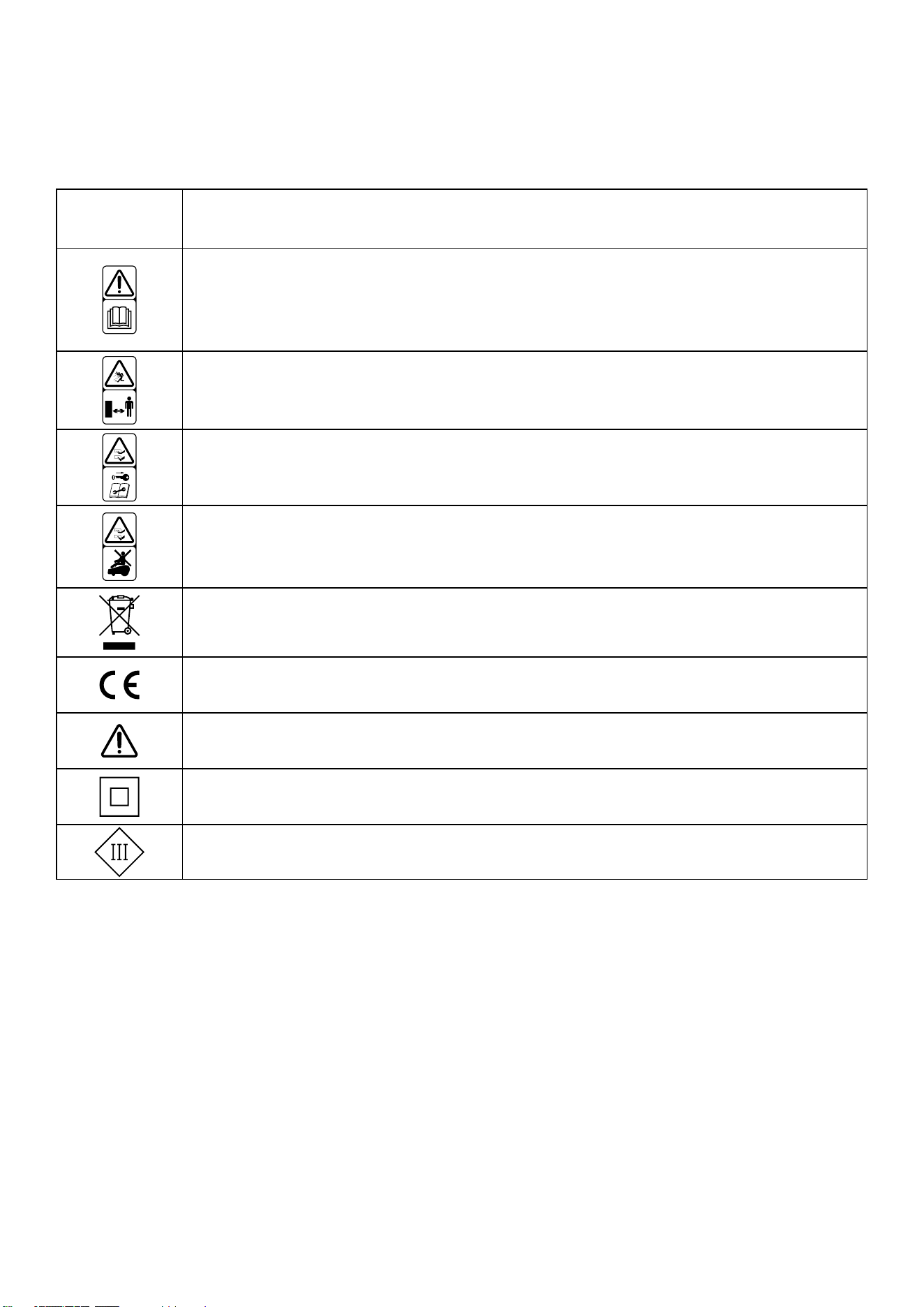
1.4 Symbols and Decals
Symbols and Decals
Symbol Description
WARNING - Read user instructions before operating the machine
WARNING - Keep a safe distance from the machine when operating
WARNING - Operate the disabling device before working on or liing the machine
WARNING - Do not ride on the machine
WARNING - It is not permitted to dispose of this product as normal household waste.
Ensure that the product is recycled in accordance with local legal requirements
This product conforms to the applicable EC Directives
Warning
Class Il appliance
Class Ill appliance
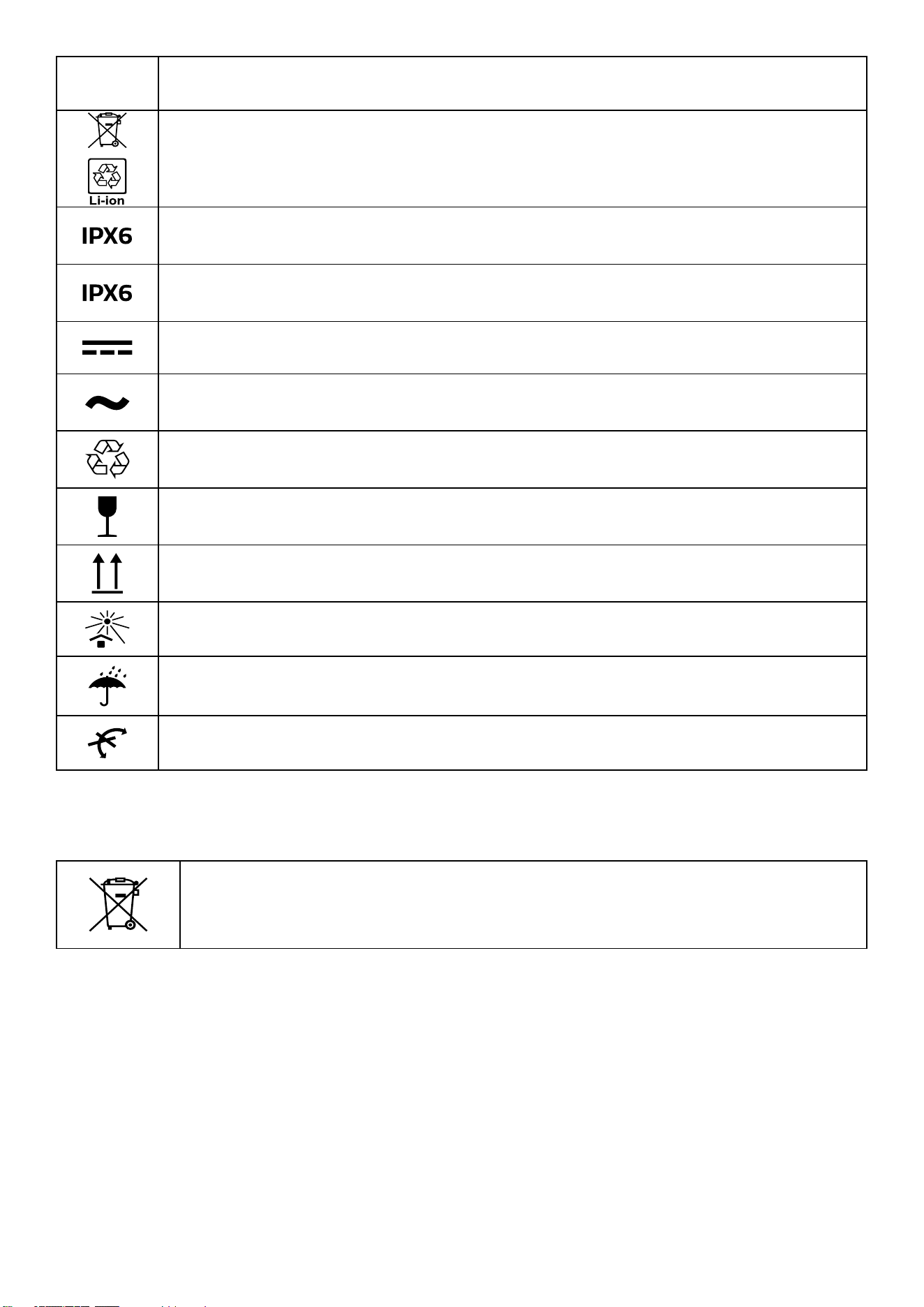
Symbol Description
Li-lon battery. This product has been marked with a symbol relating to 'separate
collection' for all battery packs and battery pack. It will then be recycled or dismantled in
order to reduce the impact on the environment. Battery packs can be hazardous for the
environment and for human health since they contain hazardous substances
IPX6 for base station
IPX6 for robotic lawn mower
Direct current
Alternating current
This item can be recycled
This product is fragile
This way up
Keep away from sunlight
Keep the pack of this product dry
Do not roll
1.5 Environmental Protection
Do not dispose of electrical products with household trash. Please recycle where
possible. Contact your local waste authority or the place of purchase for recycling
guidance.
2. About Your eufy Robot Lawn Mower
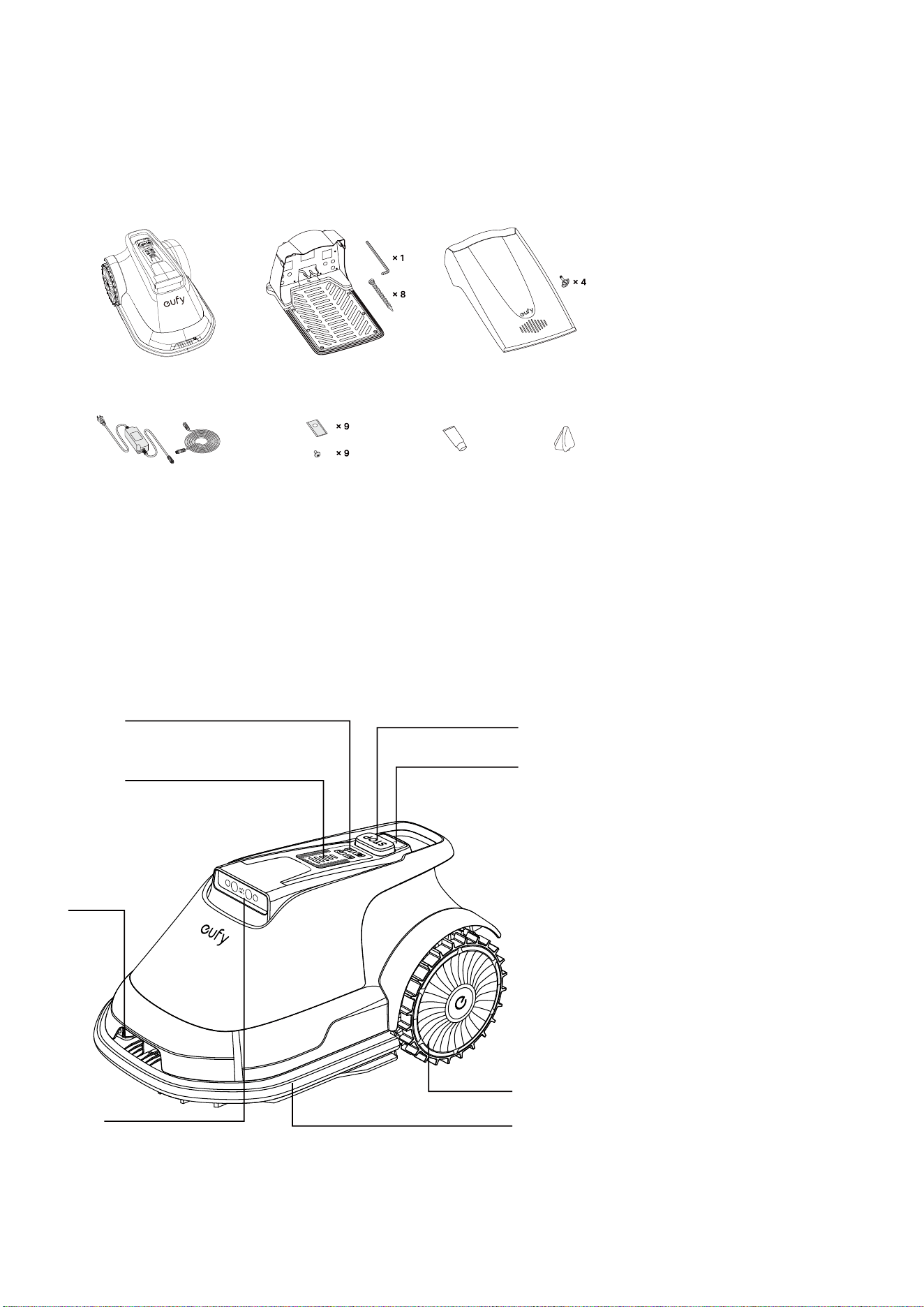
2.1 What's in the Box
Lawn Mower Base Station Garage
Power Adapter & Cable Blade Kit Grease Lens Cloth
2.2 Overview
Top View
The picture is for reference only.
Control Panel
Light Panel
V-FSD
Perceive the environmetial
information around the mower,
assist in map building, location
and navigation
Bumper
Charging Pins
STOP Button
Rain Sensor
Detect whether it
is raining,and help
decide whether to
continue mowing
Driving Wheel
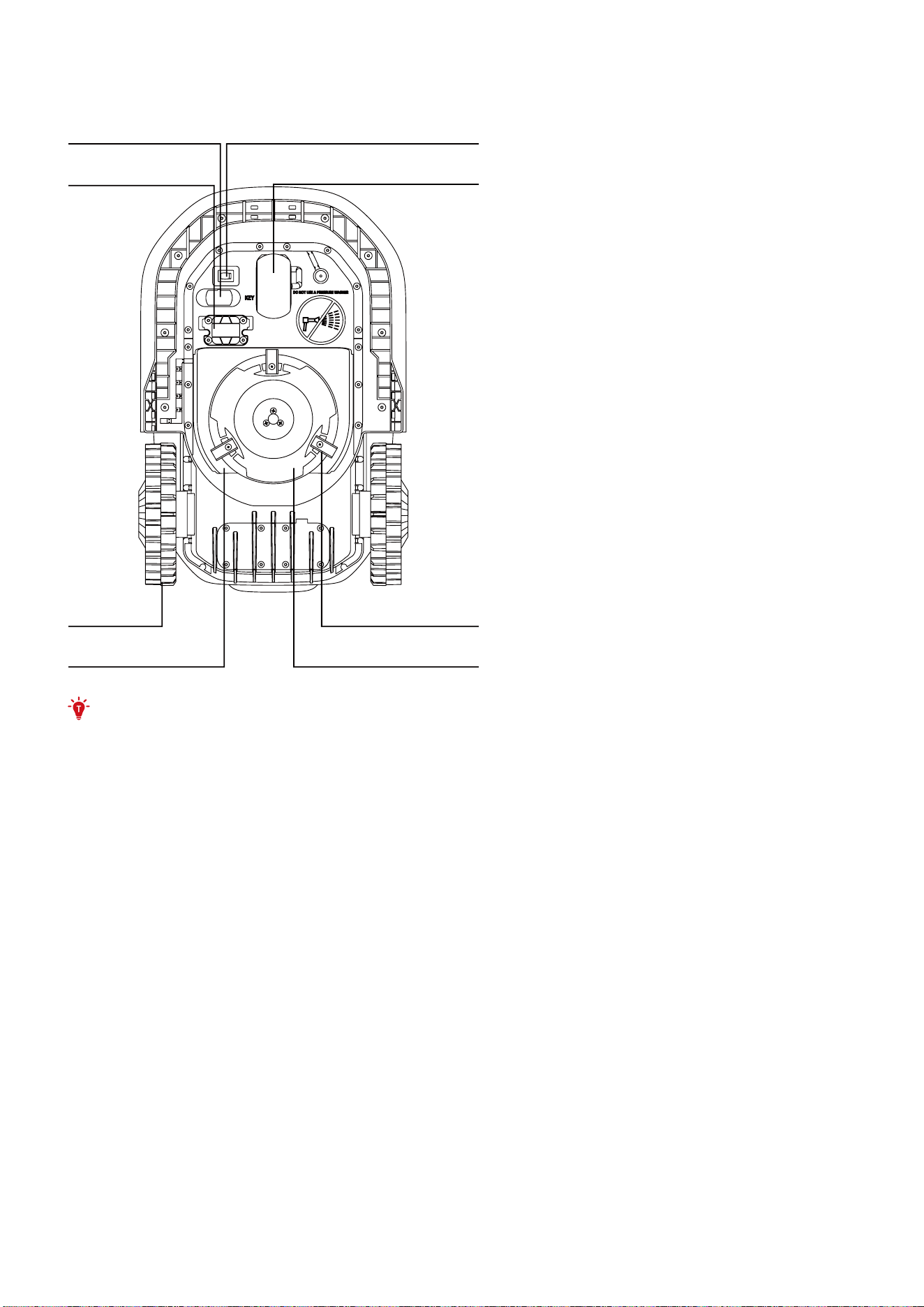
Bottom View
The picture is for reference only.
Safety Key Main Switch
AirTag Compatibility
Omni-Wheel
With li sensor
Driving Wheel Blade
Blade Disc Shield Blade Disc
• This slot is solely for placing an AirTag (sold separately). The eufy App does not work with
AirTags. For real-time location information of your mower, we also recommend you subscribe to
our data plans. Contact eufy Support for details.
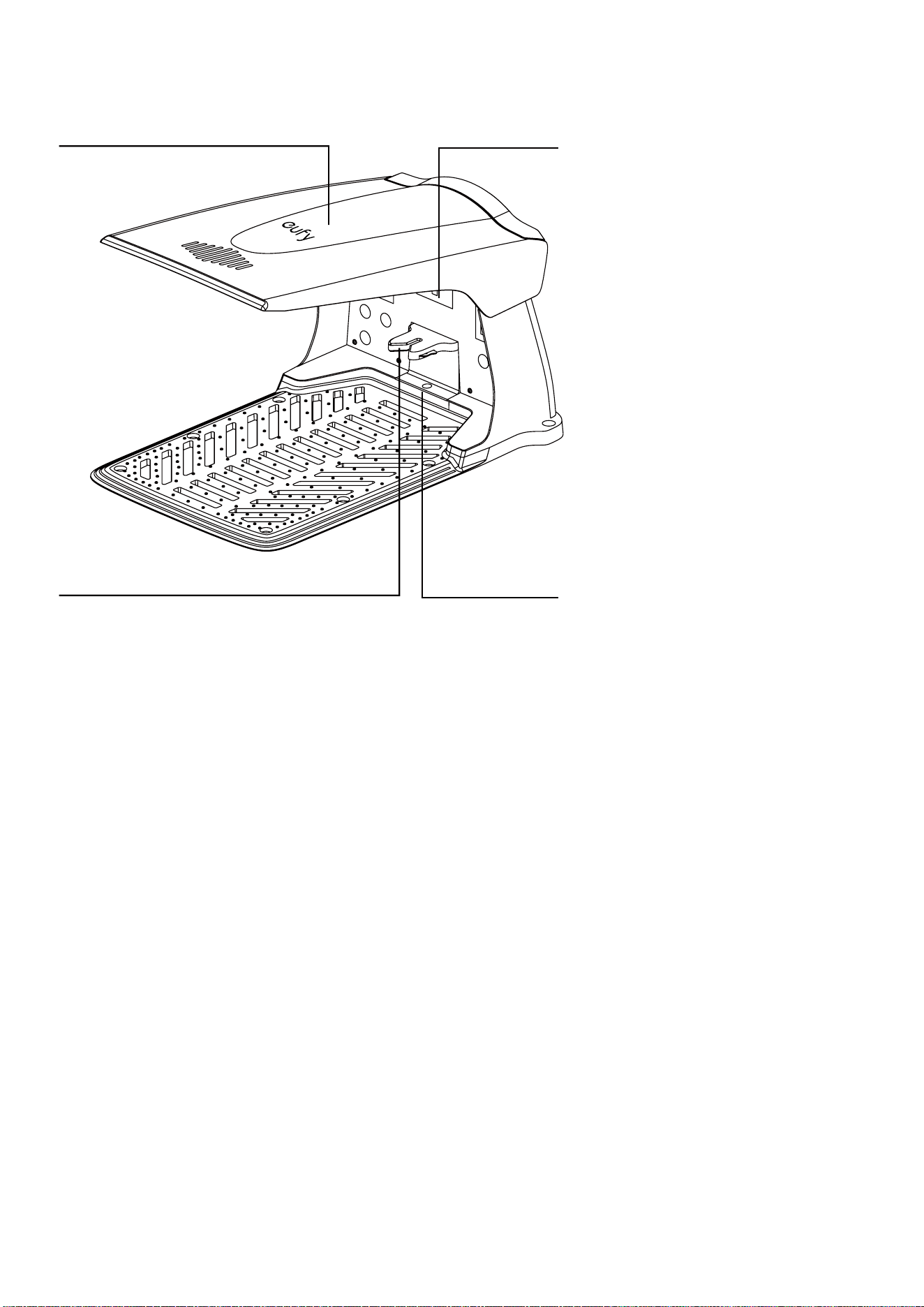
Base Station
The picture is for reference only.
Main Switch
Garage
Charging Pins Indicator Light
Marker
2.3 How eufy Robot Lawn Mower Works
eufy robot lawn mower comes with our V-FSD 1.0 visual perception system that empowers it to operate
autonomously.
This system can distinguish between grass-covered areas and other suaces to ensure that the robot
does not stray beyond the boundaries of the lawn.
This system utilizes visual positioning technology, enabling functions such as robot navigation,
systematic cutting, and returning to the base station.
Functions
Boundary management
No perimeter wire or RTK reference station installation, no manual guided mapping. With V-FSD visual
perception technology eufy knows where the boundary is.
Systematic Cutting
eufy robot lawn mower, equipped with an advanced visual positioning system, achieves back-and-
forth systematic cutting. The mower's cutting path is seamlessly displayed on the accompanying App,
allowing users to monitor the progress visually. With a single job initiation, eufy can complete a full
coverage cut.
Obstacle Avoidance
eufy detects objects ahead in real time using its stereo vision technology and image segmentation
technology. Non-grass obstacles, such as tree stumps, balls, pets, and child's toys will be avoided
without collision.
Cutting Height
Before using your eufy robot lawn mower for the first time, please make sure that the grass height on

your lawn is no more than 9 cm (3.5 in). If you want to drastically shorten the height of your grass, it is
recommended that you do so gradually over time, cutting no more than one-third of the grass length at
one time, by adjusting the cutting height in steps. You can adjust the cutting height through the App.
Charging the Mower
When the battery of your mower needs to be recharged, it will stop mowing and navigate back to the
base station. Once charging is completed, the mower will automatically return to the exact spot where
mowing was interrupted before recharging, and then resume mowing.
Multi-base Mode
If you have a separate lawn larger than 120 square meters (0.03 acre) that the robot cannot reach
from its existing base station, you can utilize the Multi-base Mode. As each eufy base station has a
unique ID, to use Multi-base Mode, you will need to purchase an additional eufy base station. Once the
new base station is set up on the second lawn and the mower is placed inside the base station, it will
automatically recognize the new base station*. Upon starting the mower, it will create another new map
for that lawn. When the mower is moved to a dierent base station, it will load the corresponding map
and any No-go Zone configurations.
Schedule
You can set your mowing schedule through the App. This feature allows you to set a unique mowing
schedule for each day of the week.
Rain Sensor and Rain Delay
eufy robot lawn mower is designed to be weather-resistant. But mowing wet grass may not yield
optimal results. The mower is equipped with a rain sensor which detects rain and prompts the mower to
stop mowing and go back to its base station. When the grass is dry, the mower resumes mowing.
Cellular Data
The cellular data provides support for information transmission when the Wi-Fi signal is weak.
Additionally, cellular network is required for the anti-the function—while the mower is powered on, it
can send out GPS location information. Dierent cellular data plans (sold separately)* are available in
the app. Contact eufy Support for details.
*If you need to purchase data plan or additional base station, contact eufy Support for details.
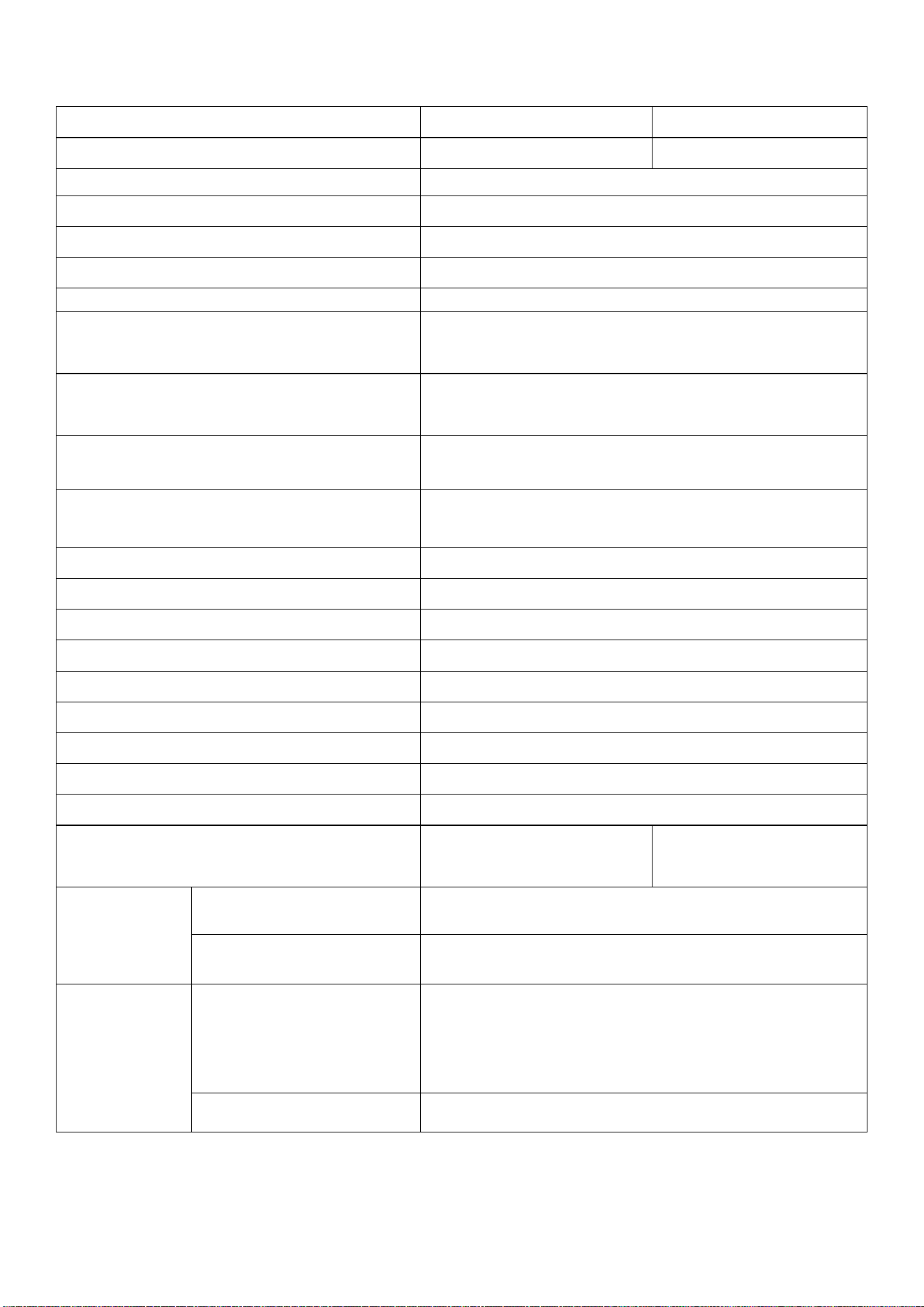
2.4 Specifications
E18 (T2801) E15 (T2880)
Recommended Mowing Area 1200 m
2
(0.3 Acre) 800 m
2
(0.2 Acre)
Cutting Height 25 to 75 mm (1 to 3 in)
Cutting Width 203 mm (8 in)
Maximum Slope 18° (40%)
Over-the-air Update (OTA) App, Firmware
Noise < 55 dB
Robot Mower Dimensions
Length × Width × Height
60.3 × 39.4 × 31.8 cm (23.7 × 15.5 × 12.5 in)
Base Station Dimensions
Length × Width × Height
72.7 × 48 × 45.2 cm (28.6 × 18.9 × 17.8 in)
Without Garage Height: 39.8 cm (15.7 in)
Weight
Robot Mower: 12.5 kg (27 lbs)
Base Station: 6.5 kg (14 lbs)
Waterproof (IP rating)
Robot Mower: IPX6
Base Station: IPX6
Working Voltage 24 Vdc
Capacity of Battery 93.24 Wh
Charging Time 90 to 110 min
Mowing Time on One Full Charge 90 to 110 min
Recommended Operating Temperature 0 to 45 °C (32°F to 113°F)
Measured Sound Power Level LWA 66.30 dB
Sound Power Uncertainties KWA 3 dB
Sound pressure Level LpA 56.0 dB
Sound pressure Uncertainties KpA 3 dB
GPS Module Accuracy For Anti-The Tracking 2 to 5 m (6.5 to 16.4 )
20 to 30 m (65.6 to
98.4 )
IoT Connectivity
Wi-Fi 2400.0 - 2483.5 MHz / 5150 - 5250 MHz / 5735 - 5835 MHz
Cellular Network
LTE-FDD: B1/B2/B3/B4/B5/B7/B8/B12/B13/B20/B25/B26/B28/
B66 LTE-TDD: B38/B40/B41
Power Adapter &
Battery Pack
Power Adapter
Model: RKPO-UL322000 (US); RKPO-DE3002000CD-6 (EU);
RKPO-AU3002000CD-6 (AU); RKPO-UK3002000CD-6 (UK).
Input: 100-240Vac, 1.3A ,50/60Hz; Output: 30Vdc, 2A
Battery Pack Model: C0914K8; Rating: 22.2Vdc, 4200mAh
3. Getting Started
3.1 Connect the App
To enjoy all the available features, it is recommended to control your lawn mower via the eufy app.
Before you start, make sure:
• Your smartphone is running iOS 11.0 (or above) or Android 8.0 (or above).
• The 2.4GHz band wireless signal is enabled on your wireless router.
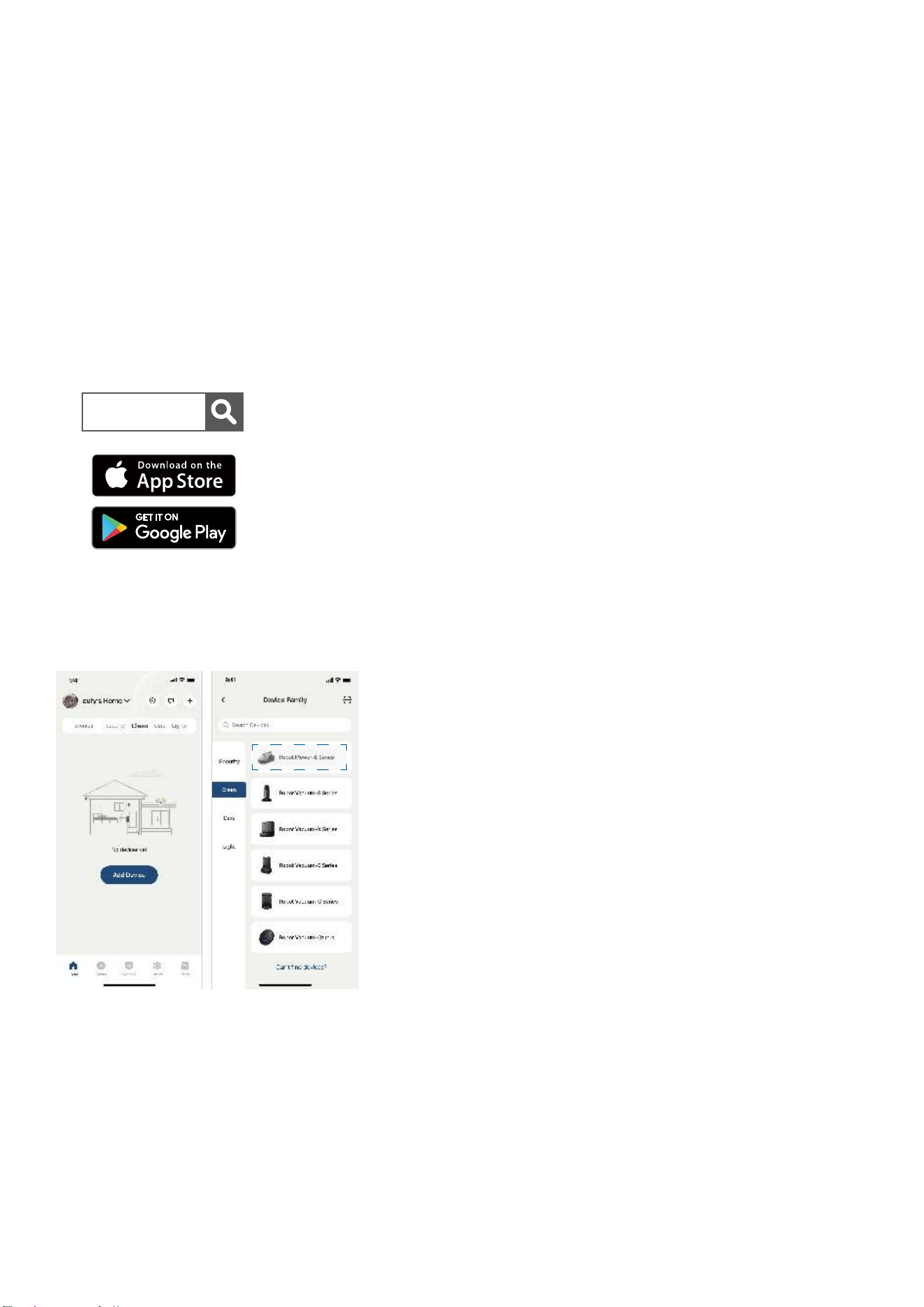
1. Download and install the eufy app from the App Store (iOS devices) or Google Play (Android devices).
eufy
2. Open the app and create an account.
3. Tap Add Device on the main screen of the app, and select Lawn Mower to connect the mower.
4. Follow the in-app instructions to complete the setup.
- Aer connecting successfully, you can control the lawn mower via the app.
- With the app, you can start / pause mowing, schedule mowing, view the operation status, receive
notifications, set up "No-Go" zones, and access additional features. For detailed instructions, please
refer to the in-app operation guide.

3.2 Start Your First Mowing
Place the mower on the base station. Make sure the green light on its panel is on.
To begin mowing, press
and then on the panel.
When using the mower for the first time, the robot lawn mower will initially peorm an auto-mapping
task, which may take several hours depending on the environment and the size of the lawn. If the
battery runs low during the mapping process, the mower will automatically return to the base station
to recharge and will resume mapping once fully charged. For multiple non-adjacent lawn areas, follow
the instructions in the "Work Zone Setting" section for "Multi-Zone" in the app aer the mower completes
mapping the first area. Use the app to remotely guide the mower to the next lawn area, where it will
continue the mapping process automatically.
3.3 Work Zone Settings
No-go Zone
During auto mapping before first use, please set the No-go Zone and Virtual Fence in the app to prevent
the mower from entering a certain area. The following scenarios require you to set this:
• Water edges, such as fishponds and swimming pools, especially with no clear boundary between
the lawn and the water.
• Step or cli that is more than 3 cm (1.1 in) high.
• Small obstacles, e.g. clotheslines, tent ropes, water pipes.
• Low flowerbeds, especially those close to or less than 20cm (7.8 in) high, where the robot can walk.
• Plants of economic value, or your beloved crops.
• Areas where you do not want your mower to go.
• Areas where the mowing work would cause danger or damage.
• Areas where the mower is diicult to pass through or oen get stuck.
• Transparent objects, e.g. mosquito nets, glass doors.
• Rope, e.g. tent line.
• Irrigation equipment, e.g. water hoses, sprinkler.
• Electrical wires or devices.
• Pet houses.
Multi-Zone
If there are multiple non-adjacent lawns, please follow the app's instructions to establish a cross-zone
pathway.
4. Daily Use
4.1 Panel Operations
Start Button Home Button
Power Button OK Button
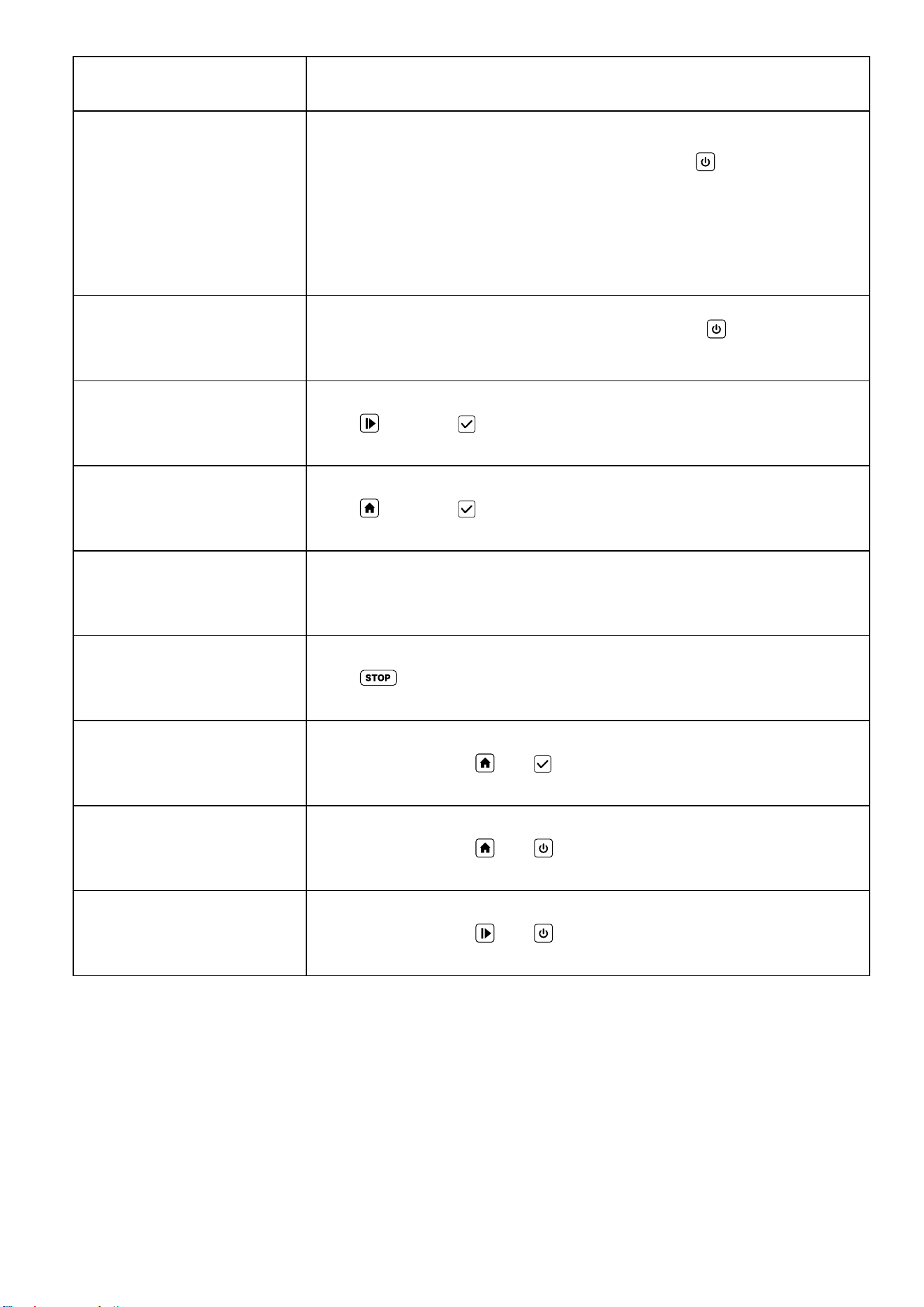
Operation
Step Description
Power o
When the mower is powered on, press and hold
for 2 seconds. The
mower will provide a voice prompt then shut down, and the indicator
lights on the panel will turn o.
Please note that the robot cannot be turned o while it is docked on
the base station.
Power on
When the mower is powered o, press and hold
for 3 seconds to
turn it on.
Start mowing Press
and then to confirm.
Auto-recharge Press
and then to confirm.
Pause Press any button while the mower is operating.
Stop Press
on the mower.
Activate/deactivate the
child lock
Press and hold both
and for 2 seconds.
Reset the Wi-Fi connection Press and hold both
and for 2 seconds.
Restore factory settings Press and hold both
and for 5 seconds.
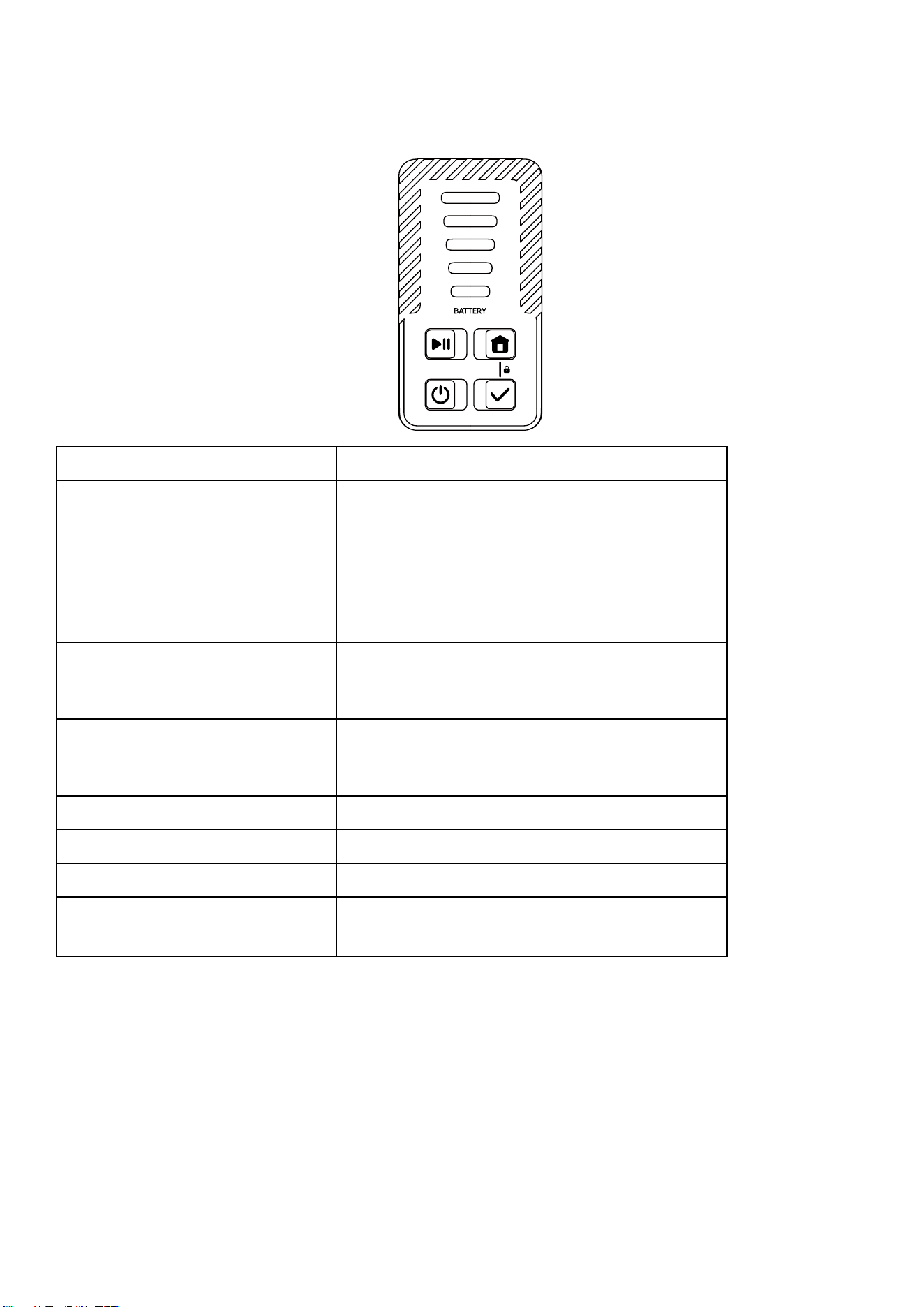
4.2 Light Indicators
The mower is equipped with an LED light panel that contains five indicator lights. The diverse statuses
of these lights inform you of the current status of the mower.
Light State
Displays battery levels in white,
turns yellow below 20%.
• Standby.
• Paused.
• Mowing.
• Remote Control.
• Mapping.
• Processing data.
Displays battery levels in white
breathing, turns yellow breathing
below 20%.
• Returning to the base station.
• Returning to the starting position.
Displays battery levels in white
slow flashing, turns yellow slow
flashing below 20%.
• Waiting for Wi-Fi connection.
Red • Error.
Red flashes 3 times. • An error occurs.
Green • Charging.
White flashes fast for 1 second. • Child lock activated/deactivated.
• Saving map, please wait before proceeding.
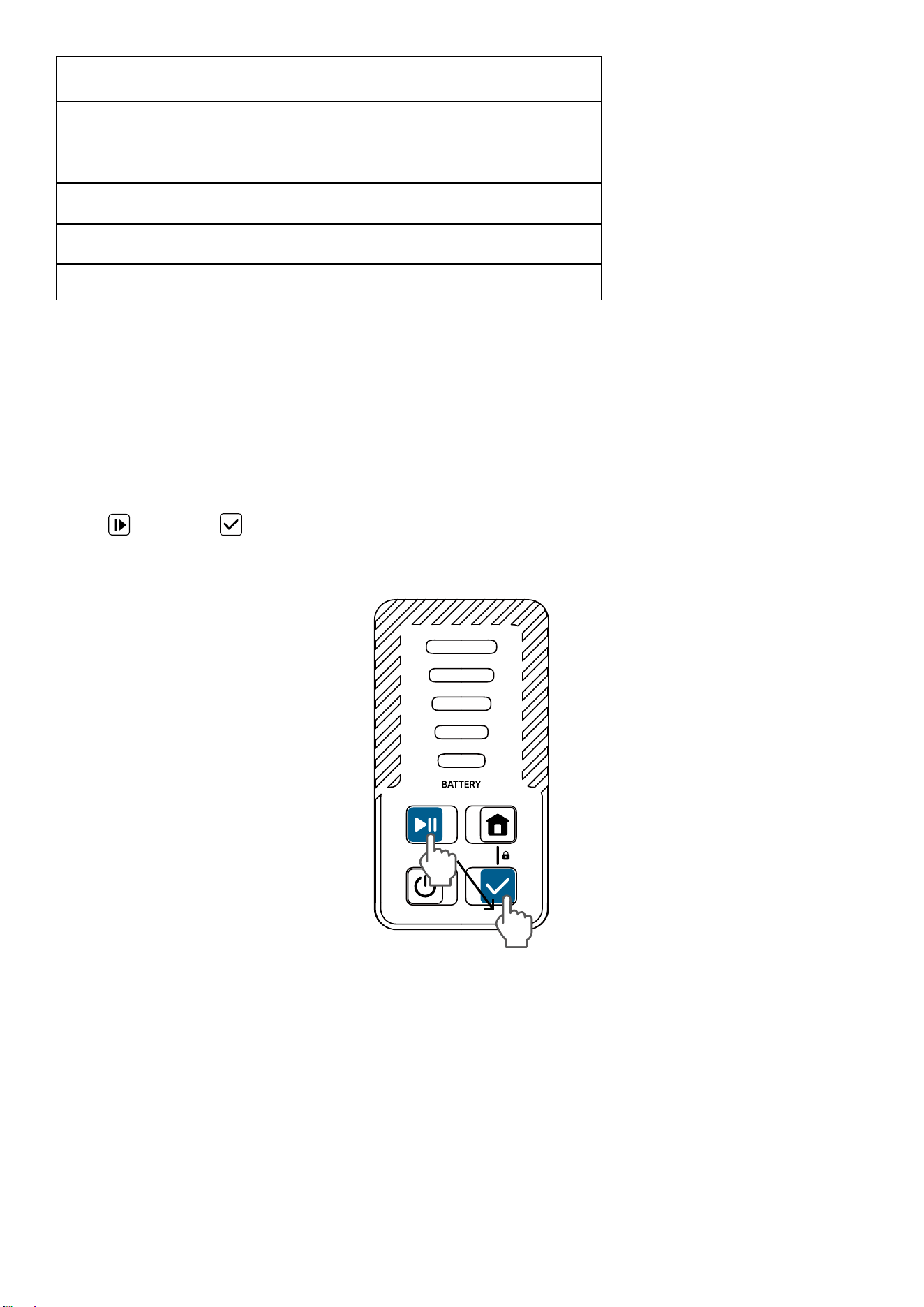
Battery Level LED Numbers
81%-100% 5
61%-80% 4
41%-60% 3
21%-40% 2
0%-20% 1
4.3 Mow
Start Mowing
Before starting, ensure your lawn is prepared and the base station is correctly installed. Position
the mower on the base station to verify it's charging, as shown by a green light on the panel. After
confirming, proceed to mow using one of the following three methods:
•
Start mapping and mowing through the app.
•
Press
then press to start mapping and mowing.
•
Set up a mowing schedule through the App. The mower will automatically start mowing when the
scheduled time is reached.
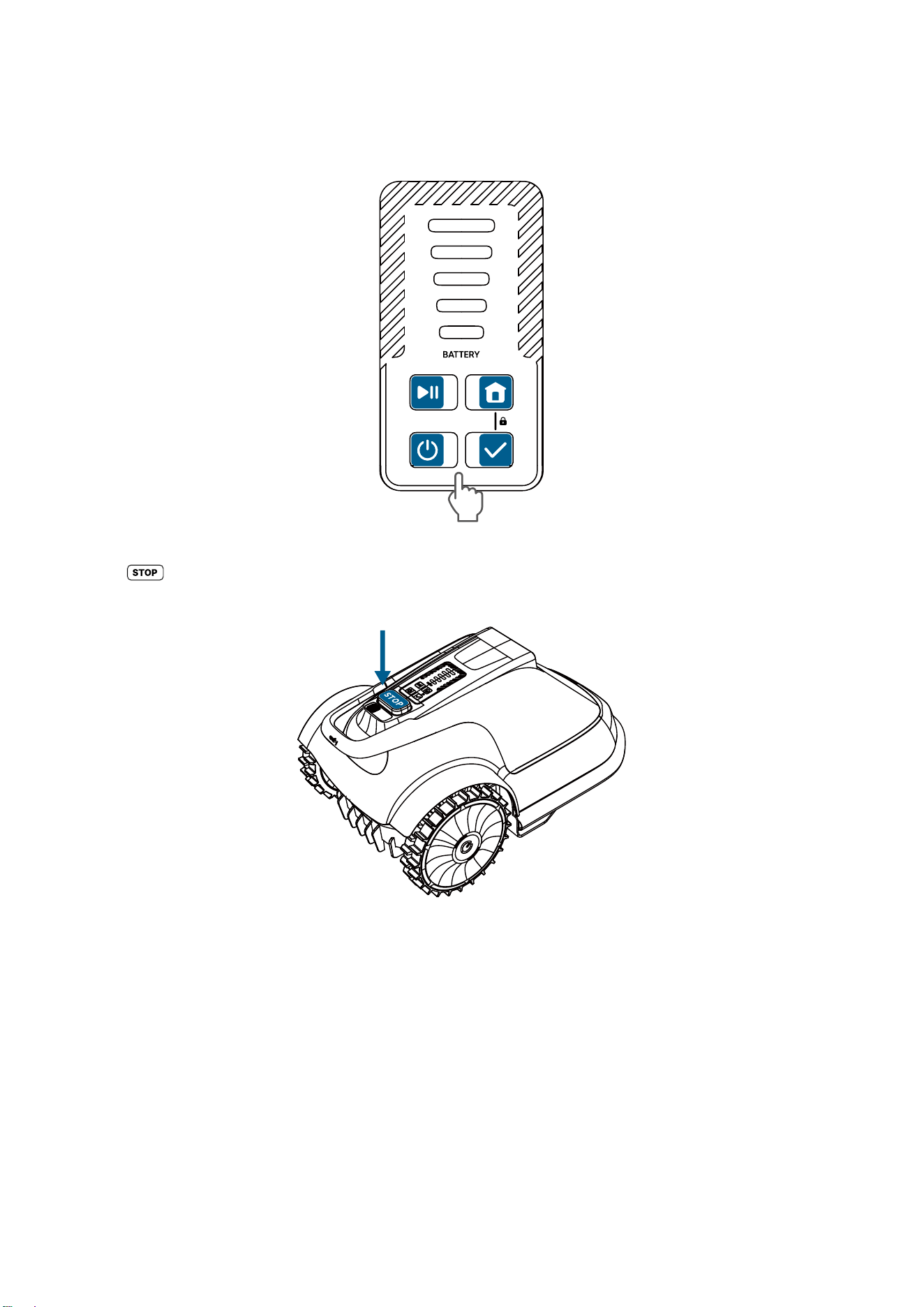
Pause
To pause the mower while it's in operation, you can do so in one of the following three methods:
• Press any button on the panel.
• Press on the mower.
• Pause the mower's operation through the app.
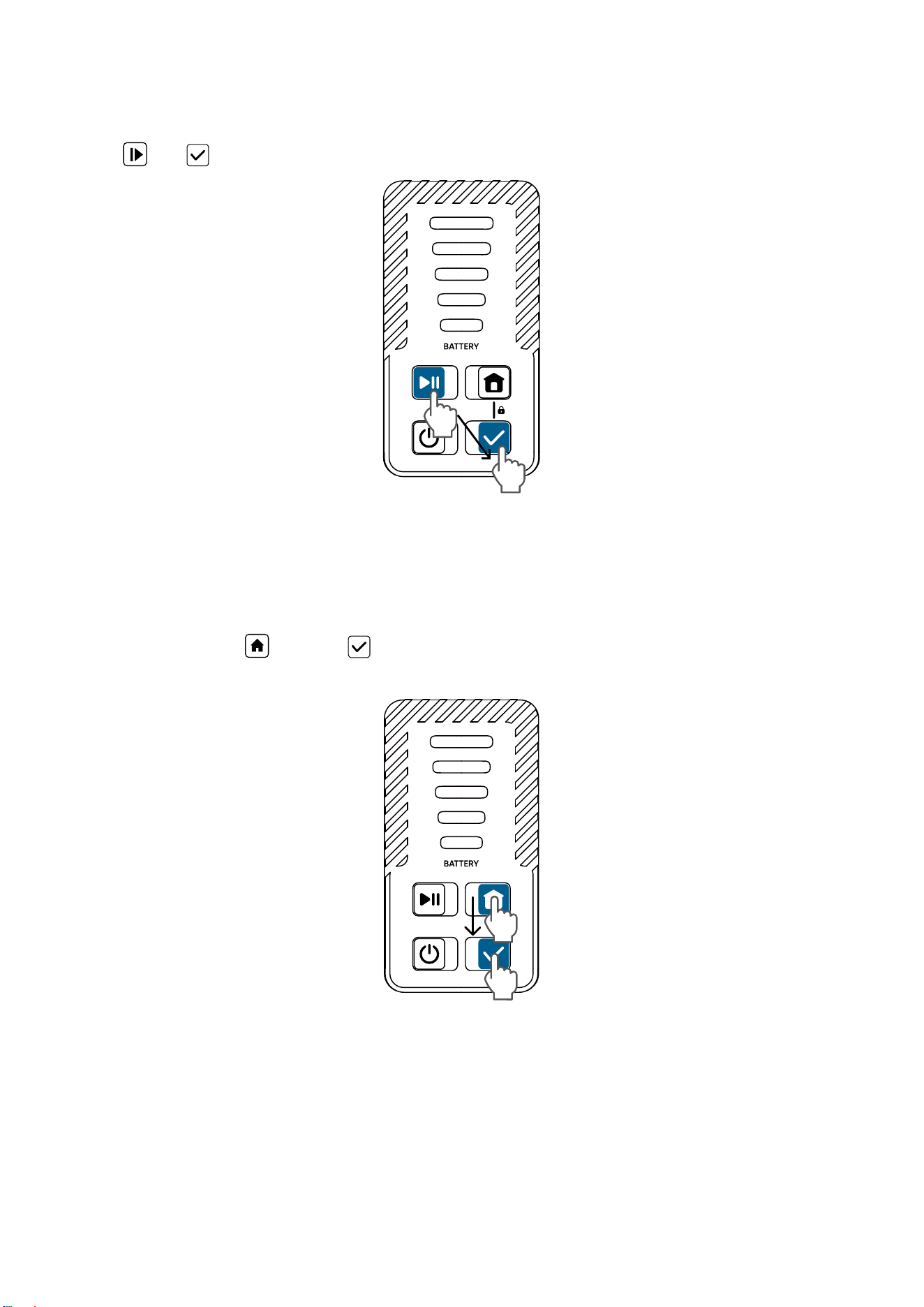
Resume mowing
To resume mowing when the mower is in a paused state, you can do so in one of the following two
methods:
• Press
then to continue working.
• Resume the mower's operation through the App.
Recharging the Mower
To recharge the mower, initiate the auto-recharge function for the robot. You can do so in one of the
following two methods:
• On the mower, press
and then , and the mower will return to the base station to start charging.
• Start the auto-recharge process through the App.
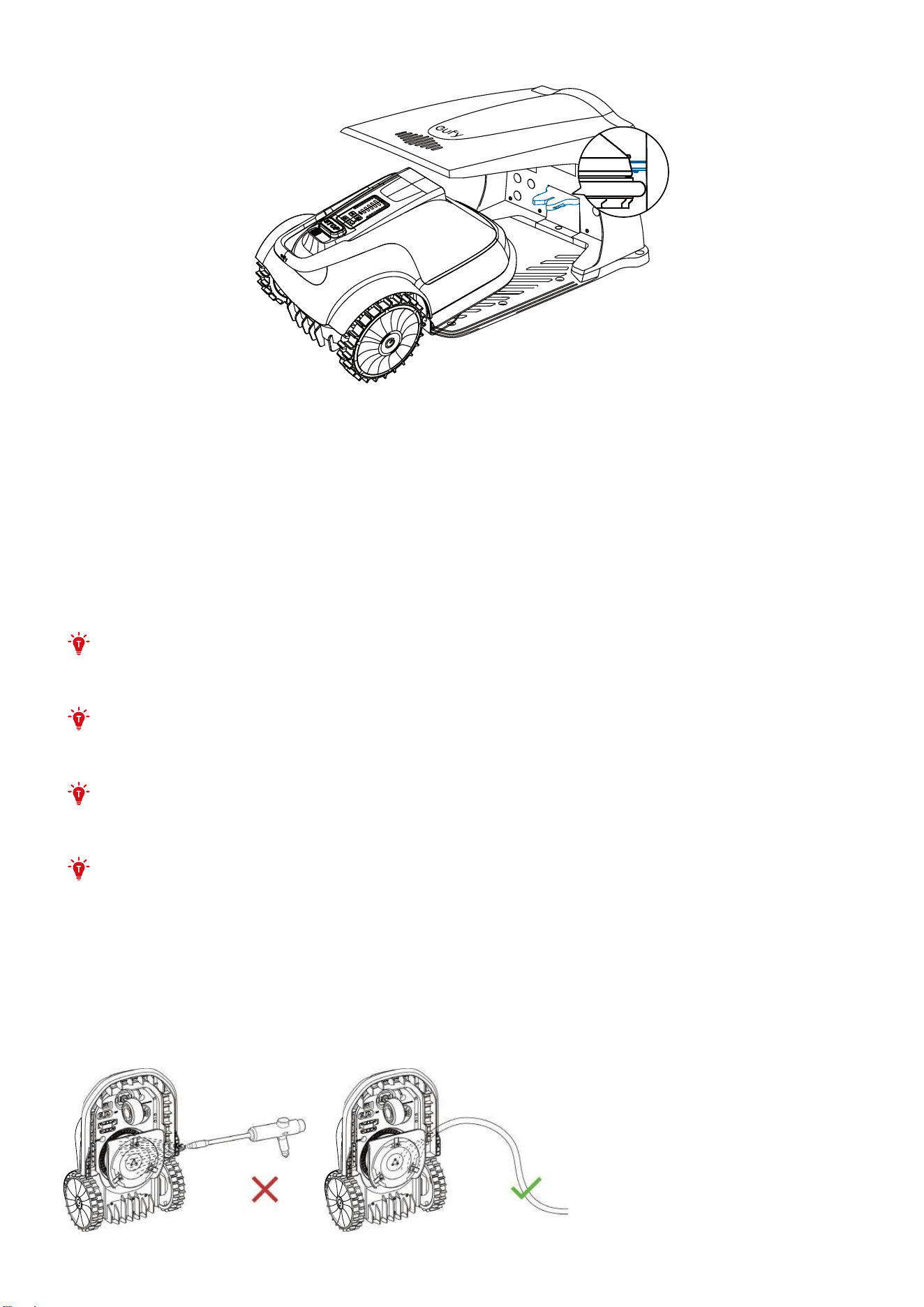
You can also end the current mowing session by manually carrying the mower back to the base station.
If you want the robot to end the current task, you can also do so by using the "Stop" function in the app.
5. Maintenance
For better operation and lifetime of your mower, clean the mower regularly and replace any worn parts.
Please use a soft brush or cloth to clean the exterior of the mower thoroughly. Do NOT clean with
alcohol, gasoline, acetone, or other corrosive/volatile solvents. These substances may damage the
appearance and internal structure of the mower.
WARNING: Before maintenance, please ensure that the mower is powered o.
WARNING: Wear protective gloves when handling or working near the blades.
WARNING: Always wear long trousers and work shoes when servicing the mower.
WARNING: The mower can only be maintained by adults.
5.1 Keep It Clean
Regularly clean the mower to remove dust, debris, and accumulated grass clippings.
Please DO NOT use a high-pressure washer to avoid damaging electronic or mechanical components.
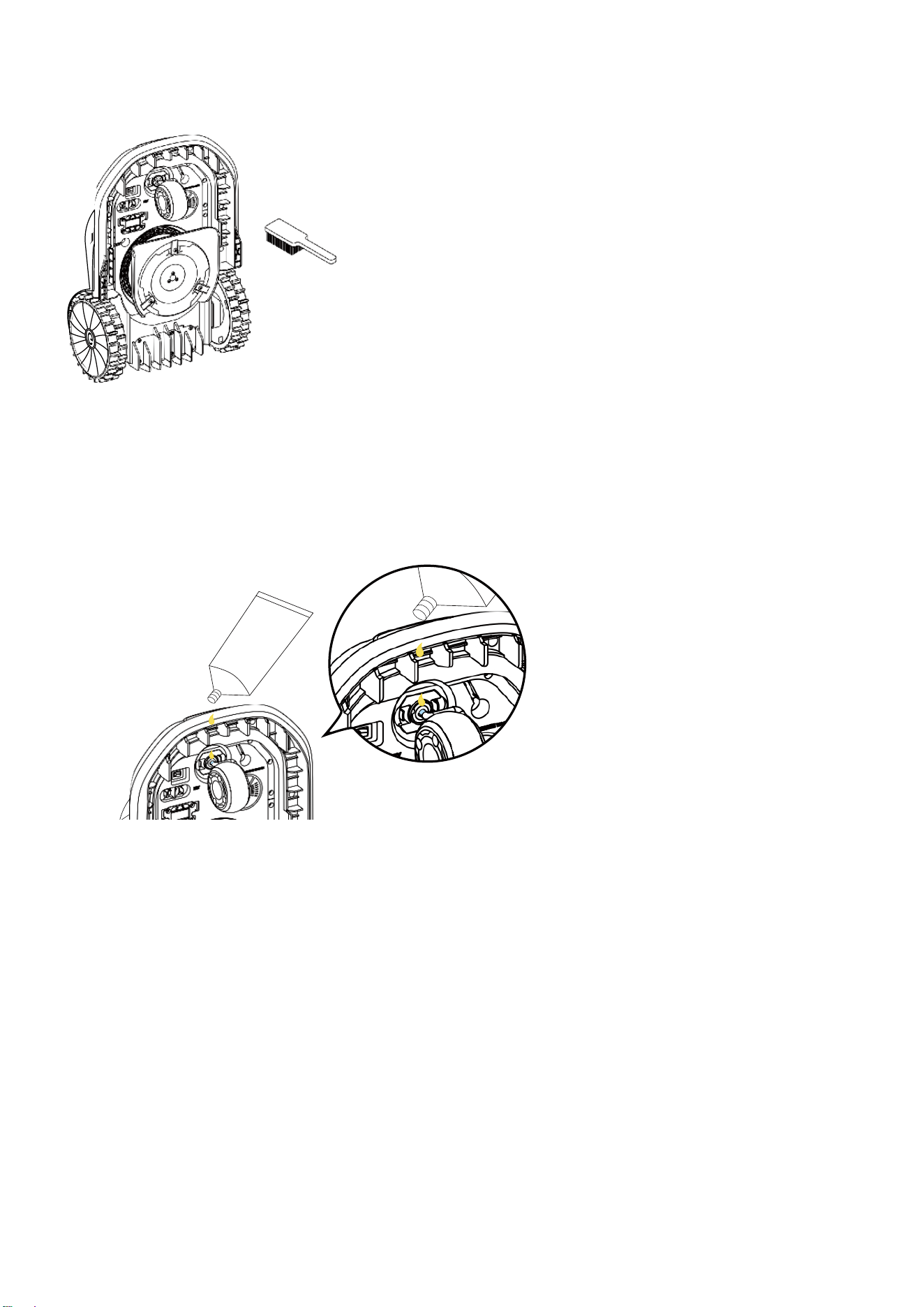
Chassis and Blade Disc
If the chassis or the blade disc are dirty, use a brush or a water hose to clean. Please remove any stuck
debris so that it does not cause a crack in the blade disc.
Driving Wheels
Remove mud or debris from the wheels for better traction.
Omni Wheel
Inspect and clean universal wheels regularly. If the wheels are stuck, clean o the debris.
Apply the provided grease to the support of the omni-wheel aer cleaning and every month.
Rain Sensor
Check the rain sensor regularly and make sure the rain sensor is not covered by mud, grass clippings
or other objects. You can either wash it or clean it with a so brush. Aer cleaning, dry the rain sensor
area.
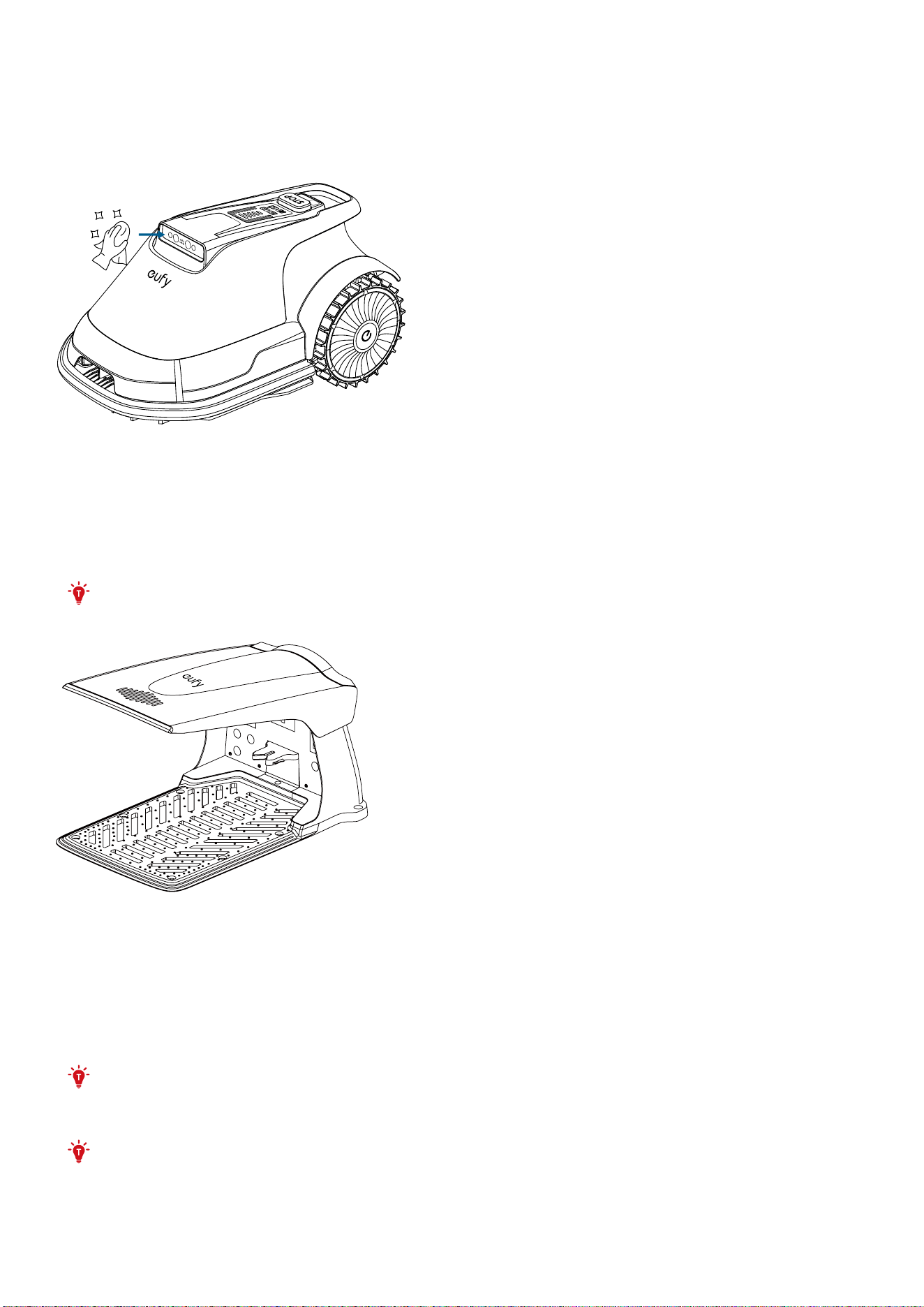
V-FSD 1.0 Cam Sensor
If the V-FSD 1.0 Cam sensors are covered with dirt, please use the provided lens cloth to gently wipe the
sensor.
WARNING: V-FSD 1.0 is equipped with a precision camera. To avoid scratching, do not use any sharp or
hard materials, such as a brush, to clean the sensor.
Base Station
To ensure proper docking, regularly inspect and clean the base station to remove any debris or mud.
Make sure all connecting parts of the base station, the extension cable, and the power supply are not
blocked.
Please use a clean cloth to wipe the base station marker regularly.
WARNING: To avoid scratching, do not use any sharp or hard materials, such as a brush, to clean
the base station marker.
5.2 Replace Cutting Blades
To ensure safe operation, replace worn or damaged blades. Additionally, regularly changing the blades
helps achieve satisfactory mowing results and eicient energy use.
For regular users, you're recommended to replace the blades and screws every 1–2 months for safety and
optimal mowing peormance.
WARNING: Always wear protective gloves when replacing the blades.
WARNING: Use only the specified screws and blades approved by the manufacturer.
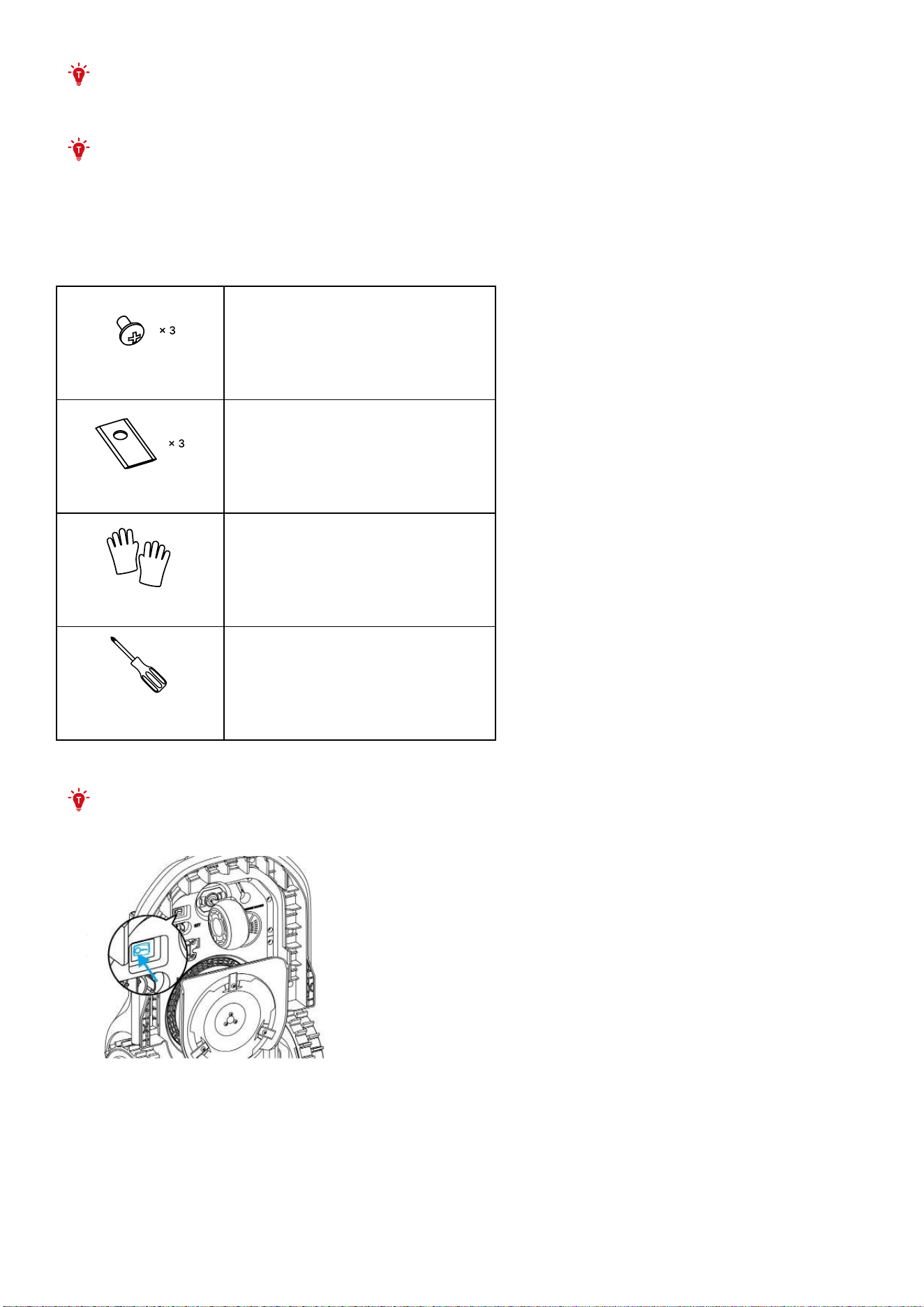
WARNING: DO NOT reuse screws. Used screws may wear out quickly, causing the blade to loosen,
which can lead to serious injuries.
WARNING: To maintain a balanced cutting system, replace all 3 blades and screws
simultaneously.
How to Replace the Blades
1. Gather the following items before starting.
Screws
3 screws
Blades
3 blades (eufy SK5)
Gloves
Gloves
Cross-tip
screwdriver
Cross-tip screwdriver (PH2)
2. Turn o the main switch.
WARNING: Remember to power o the mower before operation.
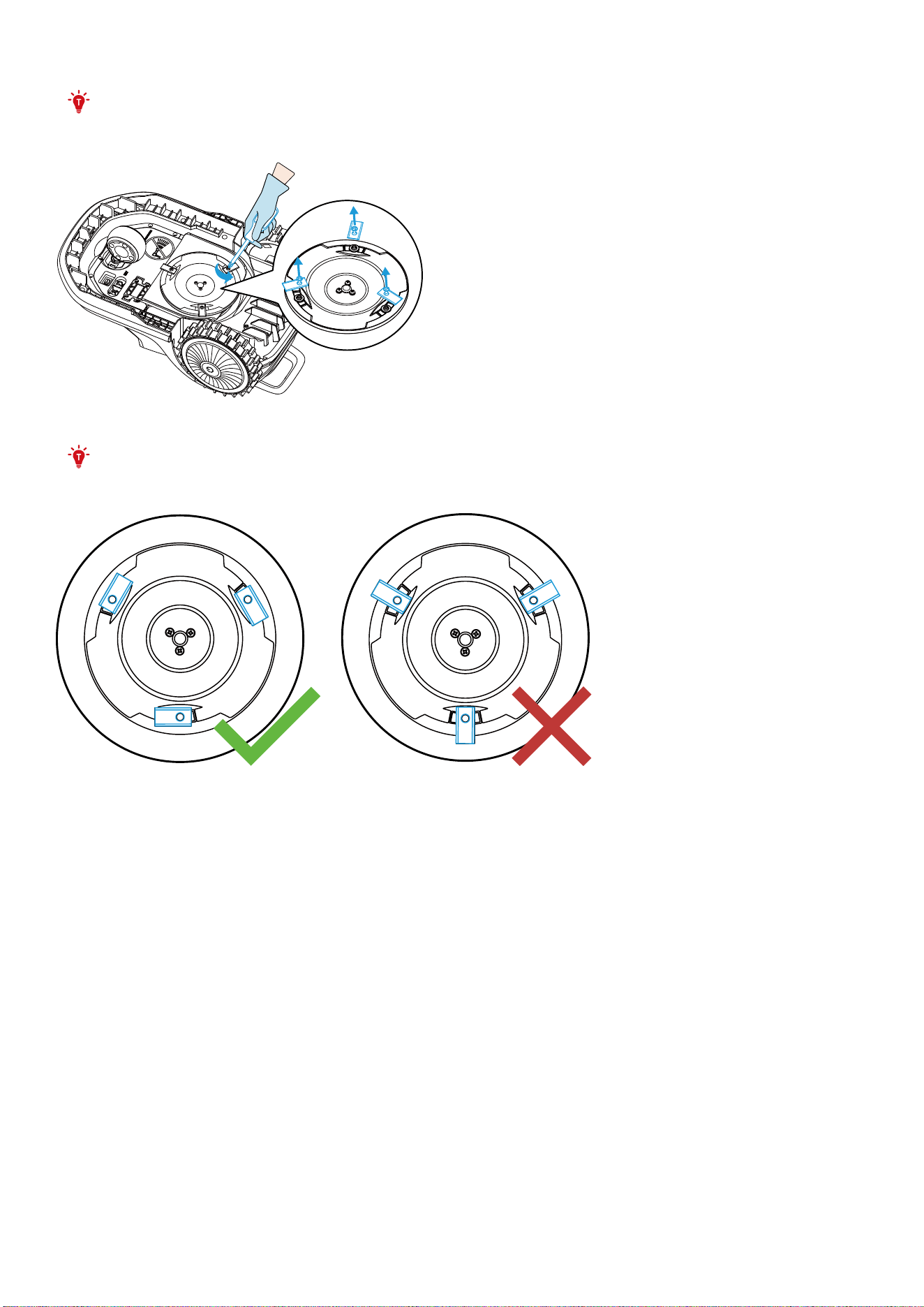
3. Gently turn the mower over on a so suace, then remove the screws and blades.
NOTE: Be careful not to scratch the V-FSD Cam Sensor.
4. Install and ensure the new blades and screws are securely fastened (Torque: 1 N·m).
NOTE: Before installing the new screws, it is recommended to position the blades as shown in the
following figure on the le, to make the later installation step easier.
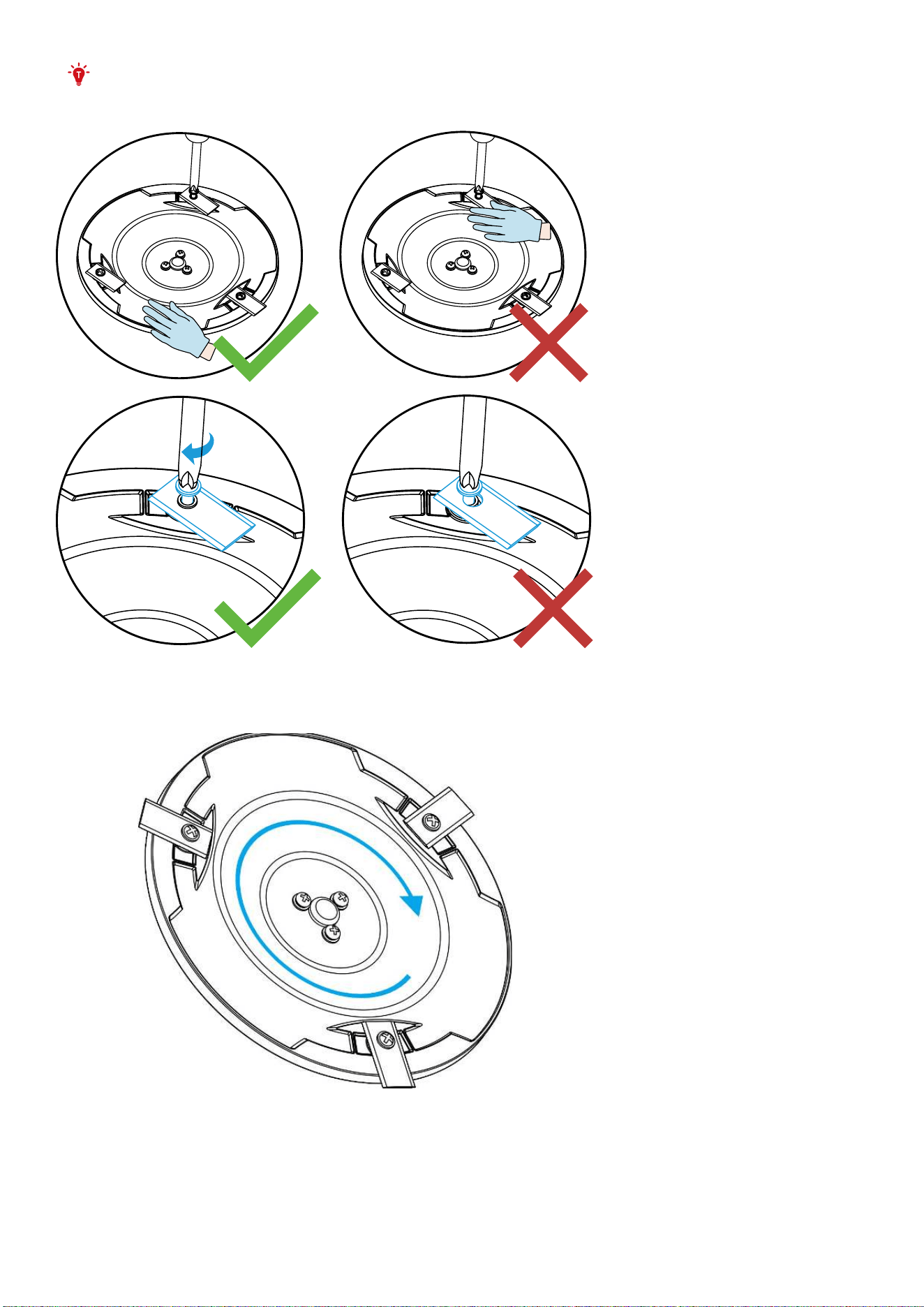
WARNING : Do not hang the blade on the screw.
5. Check that the blades pivot freely. If not, please loosen the corresponding screws and tighten them
again.
5.3 Transportation
To safeguard your mower, please use its original packaging for long-distance transport.
Always turn o the device before liing, moving, or transporting it. Handle it gently to avoid damage
from rough handling, such as throwing or applying excessive pressure.
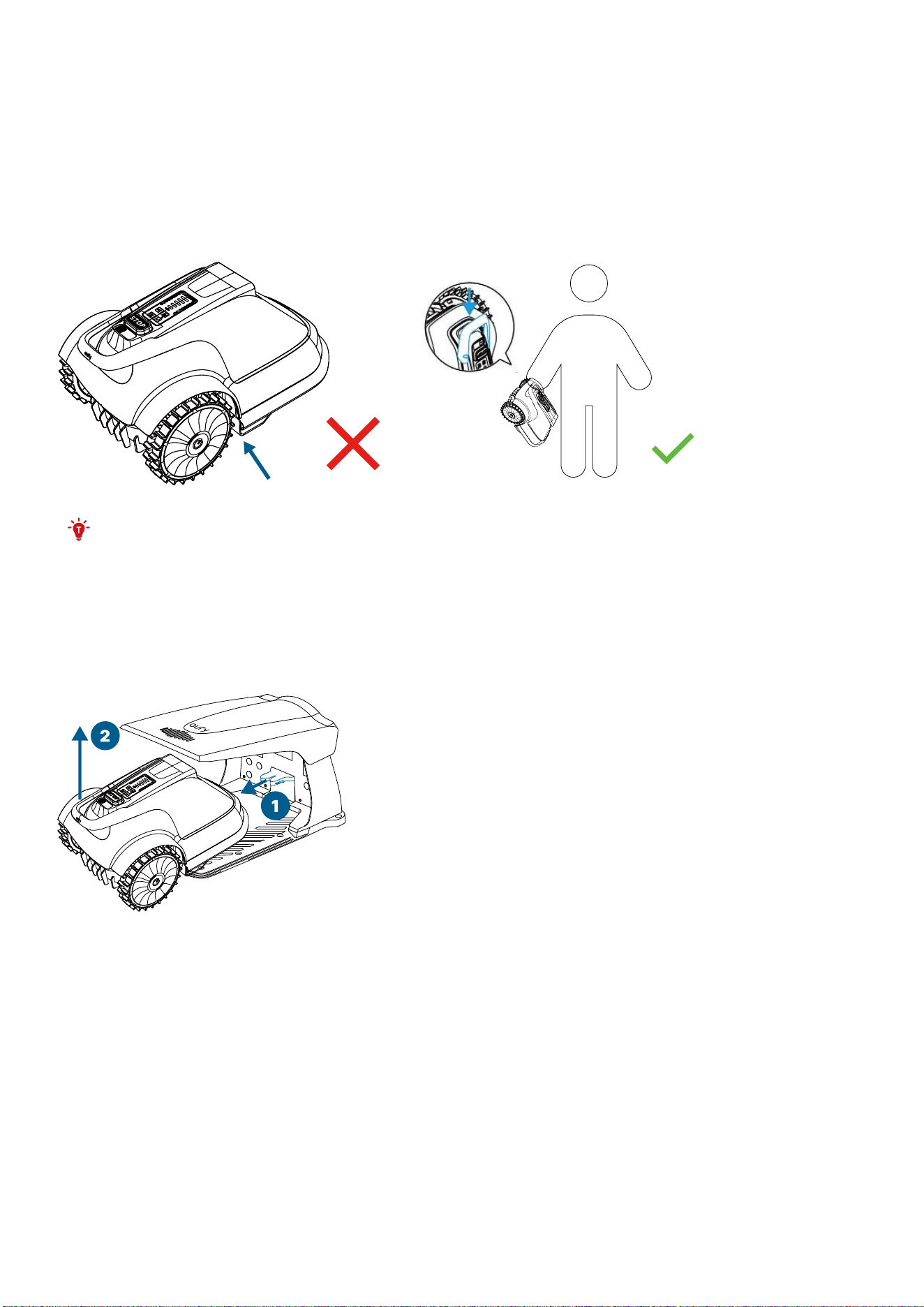
Proper Liing and Moving
Li the mower using the handle, ensuring the blade disc is facing away from your body.
WARNING : Never li or carry the mower while its motor is operating or rotating.
To prevent damage to the mower and/or the base station, please DO NOT li the mower by the handle
directly while it is docked at the base station. Always remove the mower from the base station before
liing.
5.4 Battery
• Before storing, power off the mower and charge its battery to 85% or higher to prevent over-
discharge and potential damage to the electrical components. For long-term storage, recharge the
mower every 120 days (about 4 months).
• Battery damage caused by over-discharge will not be covered by the Limited Warranty.
• To maintain battery health, avoid extreme temperatures: do not use or store the battery below -20°
C (-4° F) or above 50° C (122° F).
• The mower may experience significantly increased charging time and potentially shut down during
mowing if the battery temperature is above 40°C (104°F) or below 5°C (41°F).
The battery life depends on how often the product is used and the total working hours. When the
operation time is significantly shorter than usual per full charge or the lawn is not well-cut, consider
contacting with the aer-sales or replacing the battery.

WARNING :
• Only use the battery produced by the original manufacturer. Each mower contains one battery
pack.
• Do not use non-rechargeable batteries.
• Do not dismantle or puncture the battery casing. Keep away from metal objects to prevent
short circuits. Keep away from fire, heat and direct sunlight.
• For information about battery and electrical waste, please contact your household waste
disposal service, your local or regional waste management oice, or your point-of-sale.
• The battery compartments is not supported to be opened regularly. Only open the battery
compartment when you need to change the battery.
• The battery pack contains electrolytes. If the electrolyte leakage comes into contact with your
skin, wash o with soap and water immediately. Get medical help in case of eye contact and
immediately flush the eyes with plenty of water for at least 15 minutes without rubbing.
5.5 Power Supply
Disconnect the power supply:
• Before clearing a blockage.
• Before checking, cleaning or working on the mower.
• Aer striking a foreign object to inspect the mower for damage.
• Regularly examine the cord, plug, enclosure, and other parts. If any damage or signs of aging are
found, stop using it immediately.
WARNING :
• Do not use a damaged power supply: Operate your equipment only with a fully intact power
supply. If the power cord or plug is damaged, it must be replaced by the manufacturer, a
service agent or the aer-seller. This is crucial to prevent hazards. If the extension cord is found
to be defective, replace it with a manufacturer-approved 10-meter cable.
• Avoid connecting or touching damaged cords: Never plug in a damaged cord or extension to
the power outlet. Avoid touching a damaged cord or extension cable until it's safely unplugged
from the socket. Damaged cords could expose you to live electrical parts, posing a danger.
• Use only with the intended devices: You must not use the power supply with any device or
battery other than those specified by the manufacturer. Using it with other products can pose
risks of injury, fires, or electric shocks. Only the original batteries are assured to be safe for use.
• Do not charge a leaking battery: Never attempt to charge your device if the battery is leaking.
Doing so risks harm and equipment damage.
• Keep the extension cable away from moving hazardous parts to avoid damage to the cords
which can lead to contact with live parts.
• During a thunderstorm threat, unplug the power supply from the outlet. Disconnect all cables
and wires linked to the base station. Reconnect everything once the risk of thunder has passed.

WARNING: Connect the the mower and/or its peripherals only to a supply circuit protected by a
residual current device (RCD) with a tripping current of not more than 30 mA.
5.6 Storage
• Before storing, ensure the mower is powered off and its battery is charged to at least 85%. This
prevents over-discharge that can lead to permanent damage.
• Store the mower in a cool, dry place indoors. Keeping it away from sunlight and extreme
temperatures will help prevent the premature aging of components and potential battery damage.
• Keep the mower, the base station, and the power supply away from any heat sources like stoves or
radiators, as well as chemicals. Ensure the power supply is protected from moisture and placed in a
well-ventilated area.
5.7 Recycling and EOL Disposal
DO NOT treat the mower as domestic waste. For recycling information, contact your domestic waste
service, your municipality, or point of sale.
WARNING : DO NOT dispose of the mower in a landfill, by incineration, or by mixing with household
trash. Danger or serious injury can occur because of the electrical components.
5.8 Other
• The mower is always being improved and new software versions are made available for free.
Remember to keep your eufy soware updated.
• Cellular data is used to send commands to the robot lawn mower in areas without WiFi coverage
and to transmit its location if the robot lawn mower is stolen. Upon first use of the lawn mower, you
will receive free trial data. To continue using cellular data, please recharge it within one month of
the initial use. Additionally, you will need to recharge when the data is exhausted or the time period
expires. Recharging can be done through the app.
6. Limited Warranty
Thank you for choosing eufy. Below are the details of limited warranty service. Please read these terms
carefully and register your product to enjoy full warranty benefits.
Anker Innovations Limited (hereinafter referred to as "Anker") guarantees that during the warranty
period, this product will be repaired or replaced free of charge for any defects in materials or
crasmanship under normal usage, as long as the guidelines and instructions provided in our oicial
documentation are followed. The oicial documentation includes, but is not limited to, the user manual,
quick start guide, maintenance instructions, product specifications, disclaimers, and notifications
within our app. This documentation may be available in multiple languages. In the event of any conflict,
the latest English version on the oicial website shall prevail and control.
The following measures will be chosen by Anker for the warranty service:
• Replacement or repair of the defective parts, components or products. Replacement parts,
components or products may not be new but will be in good working condition and carry the
remaining warranty period of the original product. If the parts, components or products cannot be
repaired under the conditions of no stock, o production or any other reasons, Anker would replace
the product with functionally equivalent model.
• Any parts, components, or products replaced during service or under warranty become the property
of Anker.
• The warranty does not constitute additional claim rights.
Please be prepared to provide your original purchase receipt and the product's serial number, and
make sure to upload your log files. If you wish to send your product for further diagnosis to a local
service center or the Anker factory, you must arrange the shipping yourself. Should the issue be covered
by the warranty, Anker will repair or replace the product and return it to you at no additional charge. If
the problem is not covered by the warranty, Anker or the designated service center reserves the right to
charge a fee for the service provided.
The limited warranty period varies for different products and components, as detailed in the table
below:
Component Limited Warranty Period
Robot lawn mower 2 years
Base station 2 years
Power adapter 2 years
Battery pack 2 years
Decoration / Appearance No warranty
Cutting blade kit No warranty
Other accessories No warranty
Warranty Period Start Date
• The warranty period for the product starts from the date when the product is delivered.
• If you are unable to present an invoice or other acceptable proof of the purchase delivery date,
Anker will first determine whether the first usage date recorded by the mower, such as the first
mowing or first connection to Wi-Fi, can be used as the start date of the warranty period.
• If the first usage date is not accepted, the warranty will begin 90 days aer the production date.
• This warranty period applies unless a different arrangement has been made between you and
Anker.
Limited Warranty Eligibility
• Your product must be purchased from an authorized Anker dealer.
• You must provide the original purchase receipt.
• The serial number on your product must be legible, unobscured, untampered, and unmodified.
• All tamper-resistant seals must be intact, in place, and unmodified.
Limited Warranty Exclusions
The warranty does not cover the following:
• Claims made by third parties against you for damages.
• Products that have been modified without authorization.
• Damage caused by failure to follow the guidelines and instructions provided in our official
documentation.
• Damage resulting from the use of improper attachments or parts not intended for the design.
• Damage caused by personal actions, foreign objects, or accidents.
• Damage caused by acts of nature or natural disasters, such as fire, flood, earthquake, lightning,
typhoons and other natural disasters.
• Dissatisfaction on the product other than its quality, e.g. product color, outlook, shape.
• When configuring the parameters or behavior of the robot for the lawn perimeter and edges

(including setting the edge cutting distance and pathways between lawns), the operation of the
robot must be supervised. Please note that any damage to the robot caused by such settings,
as well as any damage caused by the robot to people, furniture, pipes, wires, or other equipment
during its operation, is beyond the scope of the warranty. Additional losses will not be compensated.
• Special, incidental, punitive, indirect, or consequential damages. This includes, but is not limited to,
loss of profits, business revenue, goodwill, or anticipated savings. Loss, damage, or disclosure of
your data.
• The warranty on the Cellular data module and its SIM card will not be valid under the following
conditions:
- The cellular network is not activated within 6 months of receiving the product.
- The cellular data is not recharged within 6 months aer the traic or time is expired.
In any event, the total liability of Anker, its ailiates, suppliers, resellers, or service providers for damages
from any cause is limited to the amount of actual direct damages, up to a maximum of the amount
paid for the product.
Additional information
The warranty policy is subject to and governed by the latest English version available on the oicial
website.
In case of any dispute, Anker Innovations Limited reserves the rights for any final decision.

7. Important Information
7.1 Trademark And Legal Statement
eufy is a registered trademark of Anker Innovations Limited, Android and Google Play are trademarks of
Google LLC, and App Store is a service mark of Apple Inc. All trademarks mentioned in this manual are
the property of their respective owners, retaining their trademark rights.
We have made every eort to include descriptions and instructions for all features of eufy robot lawn
mower E15/E18 in this printed material. However, due to ongoing product improvements and design
changes, your eufy robot lawn mower E15/E18 may dier slightly from what is displayed in this document.
Please visit the Apple App Store (iOS) or Google Play Store (Android) to download and install the latest
version of the eufy application.
Please note that eufy robot lawn mower E15/E18 comes in multiple models with varying features, and
some features mentioned in this document may not apply to your device. The manufacturer reserves
the right to change the design and functionality of eufy products and documents without prior notice.
© 2024 Anker Innovations Limited. All rights reserved.
eufy Legal Disclaimer
IMPORTANT: Users are required to agree to read the entire user manual and fully understand its
contents (especially the sections related to safety warnings) before using this product, and comply with
the instructions herein.
All damages resulting from misuse or failure to follow the user manual, including but not limited to the
following circumstances, are the responsibility of the user:
1. Claims against you by third parties for injuries caused;
2. Damage to your product, loss, damage, or disclosure of data;
3. Special, incidental, punitive, indirect, or consequential damages, including but not limited to loss
of profits, business revenue, goodwill, or anticipated savings.
Anker and its ailiates will not be liable for any related claims, liabilities, or losses.
In no event shall Anker, its ailiates, suppliers, distributors, or service providers be liable for damages
from any cause exceeding the amount of actual direct damages, not to exceed the amount paid for
the product.
1. eufy robot lawn mower is an electric household product equipped with blades, which may pose
risks to users, others, and nearby property. Users are required to thoroughly read the user manual
and understand its contents, assuming all risks and losses associated with the product (especially
those related to violations of safety warning instructions). Such risks include but are not limited to
injuries, bodily harm, and/or property damage. If these consequences arise from the user assuming
risks, Anker and its ailiated companies will not be held responsible for any related claims, liabilities,
or losses.
2. This device is not suitable for individuals with weakened physical, sensory, or intellectual abilities
(which may affect their ability to safely operate the product), or for those lacking experience
and knowledge, including children, unless they have been supervised or instructed by a person
responsible for their safety, and understand the instructions for using the equipment.
3. This device is designed for mowing lawns in open and level areas. Please use only equipment
recommended by the manufacturer. Any other type of usage constitutes improper use.
4. Please review and comply with the laws or regulations governing this product in your local
area. Users are responsible for ensuring that their use and/or disposal of the product within their
jurisdiction complies with legal requirements.
5. Consumers should immediately inspect the product and its accessories upon receipt to ensure
they are in good condition.

6. All individual components and parts of eufy robot lawn mower must be installed correctly
according to the user manual. Improper installation may lead to accidents. The mower may contain
movable components and small parts. Please keep them out of reach of children to avoid choking
hazards.
7. Please pay attention to the safety warnings listed in the user manual, including but not limited to:
WARNING: Incorrect usage of the product may pose hazards.
WARNING: Do not use the product when people, especially children or animals, are present in the
working area.
WARNING: Keep hands and feet away from rotating blades. Never place hands or feet near or under
the product when it is in operation.
WARNING: Seek medical assistance in case of injury or accident.
WARNING: Non-compliance with instructions in the user manual may result in injury or death to
operators or bystanders.
WARNING: Failure to comply with instructions in the user manual may lead to product, material, or
adjacent area damage.
WARNING: Always keep the mower within 6 meters of your position during operation, and avoid
exceeding your line of sight.
WARNING: Do not mow while wearing open-toe sandals or barefoot.
WARNING: Do not attempt to charge the mower, power unit, base station, or power outlet if they are
wet.
WARNING: Do not connect the power supply if the power cord or plug is damaged.
WARNING: Keep away from flammable or combustible materials while charging.
WARNING: Immediately stop charging and contact customer service upon detecting unusual odors,
sounds, or light indications.
WARNING: Do not ride the mower or the base station.
WARNING: Do not touch rotating blades.
WARNING: Do not dispose of the product in a landfill, burn it, or mix it with household waste.
Electronic components and batteries may pose serious hazards/injuries. For information on battery
and electronic waste, please contact your household waste disposal service, local or regional waste
management oice, or your point of purchase.
8. This product contains battery components. Please adhere to the following safety handling and
usage guidelines:
• Only use the battery produced by the original manufacturer. These batteries are essential for the
device's operation and should not be tampered with.
• Maintain battery in a clean and dry condition. Avoid exposure to moisture or contaminants that
may aect their peormance.
• Avoid exposing battery to heat sources or flames. Prolonged exposure to high temperatures can lead to
damage or malfunction. Store battery away from direct sunlight.
• Prevent short-circuiting of battery packs. Store them securely and avoid contact with conductive
materials that could cause unintended connections.
• Do not dismantle or modify battery packs. Alterations may result in hazardous situations or
damage to the product.
• Handle battery with care to prevent mechanical shock. Rough handling can lead to internal
damage or leakage.
• In case of leakage, avoid skin or eye contact with battery fluids. Rinse aected areas thoroughly
with water and seek medical attention if necessary.
• Seek immediate medical advice if battery are swallowed. Ingestion can lead to serious health
complications.
• Use only designated battery recommended for this device. Incompatible batteries may pose
safety risks or damage the equipment.
• Keep battery out of reach of children. Store them in a secure location inaccessible to young
children.
• Dispose of battery properly in accordance with local regulations. Do not dispose of battery in
regular household waste.
By adhering to these guidelines, you ensure safe usage and prolong the lifespan of your device. For any
inquiries or assistance, please contact our customer support.
9. Users are not permitted to use any non-genuine accessories, and unauthorized disassembly or
modification of the product is prohibited. You shall bear sole responsibility and risk for any damages,
injuries, and property losses resulting from this. Anker shall not be liable for any claims, liabilities, and
losses (or potential liabilities) arising from any harm, damage, or legal disputes caused by violations
of the above terms, user inexperience, or failure to comply with the instructions in this manual.
10. Anker reserves the right to make changes to the product, release firmware updates, and update
this manual at any time. Due to printing errors, inaccuracies in current information, or improvements
to procedures and/or equipment necessary for the improvement of this user manual, Anker may
make changes at any time without further notice. Such changes will be incorporated into new
versions of this user manual. All illustrations are for reference only and may inaccurately depict
actual equipment. Actual products and features may vary. Due to product updates, there may be
some discrepancies in color, appearance, and other aspects between the products listed in this
manual and the products you actually purchase. Please refer to the actual product.
11. This document should be considered a permanent part of the product and should be provided to
the user along with the product at all times. Once again, thank you for choosing eufy!
7.2 Notice
Information on Disposal for Users of Waste Electrical and Electronic Equipment
This symbol on the product or on its packaging indicates that used electrical and electronic products
should not be mixed with unsorted municipal waste. For proper treatment, it is your responsibility to
dispose of your waste equipment by arranging to return it to designated collection points.
Disposing of this product correctly will help save valuable resources and prevent any potential negative
eects on human health and the environment, which could otherwise arise from inappropriate waste
handling.
To return your used device, please use the return and collection systems or contact the retailer where
the product was purchased, which is free of charge, please contact your local authority for further
details of your nearest designated collection point.
Penalties may be applicable for incorrect disposal of this waste, in accordance with your national
legislation.
FCC COMPLIANCE NOTICE
This equipment must be installed and operated in accordance with provided instructions and the
antenna(s) used for this transmitter must be installed to provide a separation distance of at least
20cm from all persons and must not be co-located or operating in conjunction with any other antenna
or transmitter. End-users and installers must be provided with antenna installation instructions and
transmitter operating conditions for satisfying RF exposure compliance.

This device complies with Part 15 of the FCC Rules. Operation is subject to the following two conditions:
1. This device may not cause harmful inteerence, and
2. This device must accept any inteerence received, including inteerence that may cause undesired
operation.
Any changes or modifications not expressly approved by the party responsible for compliance could
void the user’s authority to operate the equipment.
This equipment has been tested and found to comply with the limits for a Class B digital device,
pursuant to part 15 of the FCC Rules. These limits are designed to provide reasonable protection against
harmful inteerence in a residential installation. This equipment generates, uses, and can radiate radio
frequency energy and, if not installed and used in accordance with the instructions, may cause harmful
inteerence to radio communications. However, there is no guarantee that inteerence will not occur
in a particular installation. If this equipment does cause harmful interference to radio or television
reception, which can be determined by turning the equipment o and on, the user is encouraged to try
to correct the inteerence by one or more of the following measures:
• Reorient or relocate the receiving antenna.
• Increase the separation between the equipment and receiver.
• Connect the equipment to an outlet on a circuit different from that to which the receiver is
connected.
• Consult the dealer or an experienced radio/TV technician for help.
IC RSS WARNING
This device complies with Industry Canada license-exempt RSS standard(s). Operation is subject to the
following two conditions: (1) this device may not cause inteerence, and (2) this device must accept any
inteerence, including inteerence that may cause undesired operation of the device.
IC RADIATION EXPOSURE STATEMENT
This equipment complies with IC RSS-102 radiation exposure limits set forth for an uncontrolled
environment. This equipment should be installed and operated with a minimum distance of 20cm
between the radiator & your body.
EU DECLARATION OF CONFORMITY
This product complies with the radio inteerence requirements of the European Community.
Hereby, Anker Innovations Limited declares that the radio equipmenttype T2801/T2880 is in compliance
with all the related European Directives. The full text of the EU Declaration of Conformity is available at
the following website: https://support.eufylife.com/s/articleRecommend?type=DownLoad.
UK PSTI STATEMENT
Hereby, Anker Innovations Limited declares that this device is in compliance with The Product Security
and Telecommunications Infrastructure (Security Requirements for Relevant Connectable Products)
Regulations 2023. For the Statement of Compliance, visit the website https://www.eufy.com/uk/psti-
related.