Im Cam
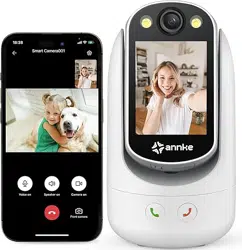
Video Calling Camera
User Manual
Appearance
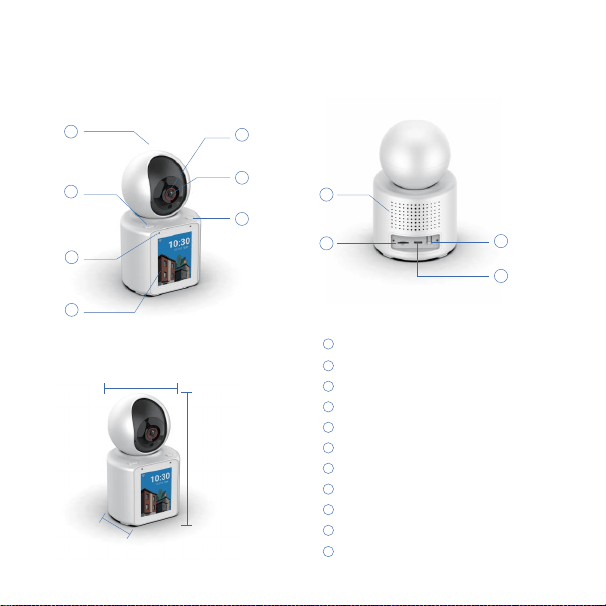
Call button
Dual MIC
2.8 inch IPS HD screen
Infrared night vision 8 meters
1080P
Call button(2)
speaker
SD card max 128GB
Reset button
PTZ350°
1
5
6
7
8
9
10
TypeC power supply
11
2
3
4
92.1mm
153mm
79.1mm
1
5
6
7
2
3
4
8
9
10
11
1.
Power on
2.
Im Cam app installation
User Manual
Please scan the QR code on the right side, or search
for "Im Cam" on the App Store or Google Play and
download and install it.
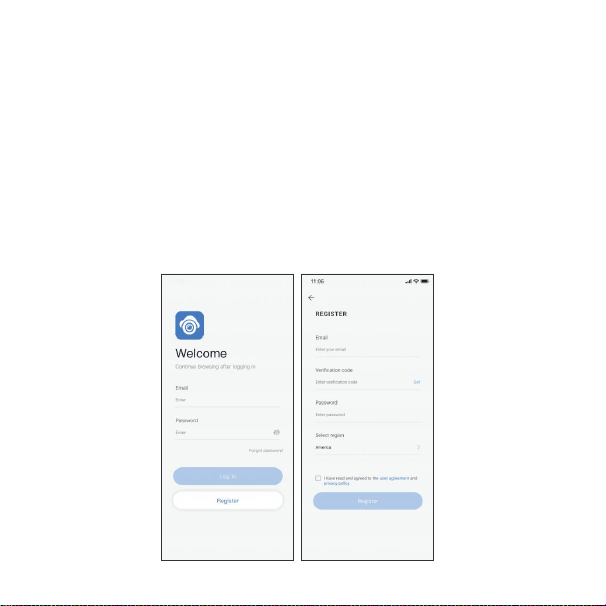
3. Registration and login
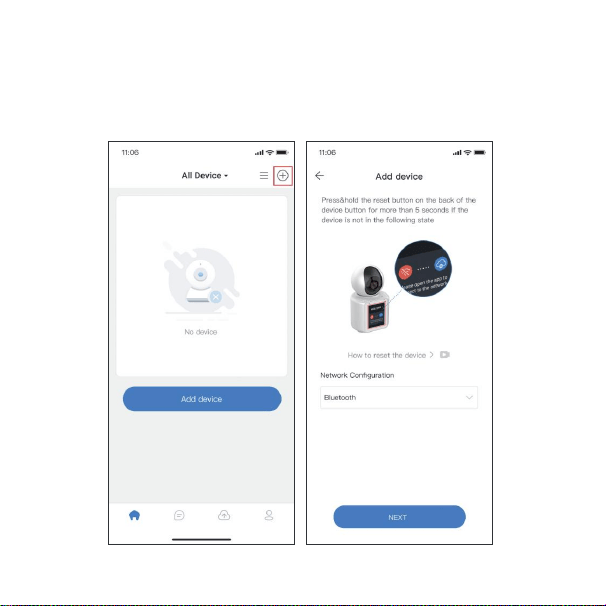
4. Add device
a) After entering the home page, click the "+" button to enter the add device
page.
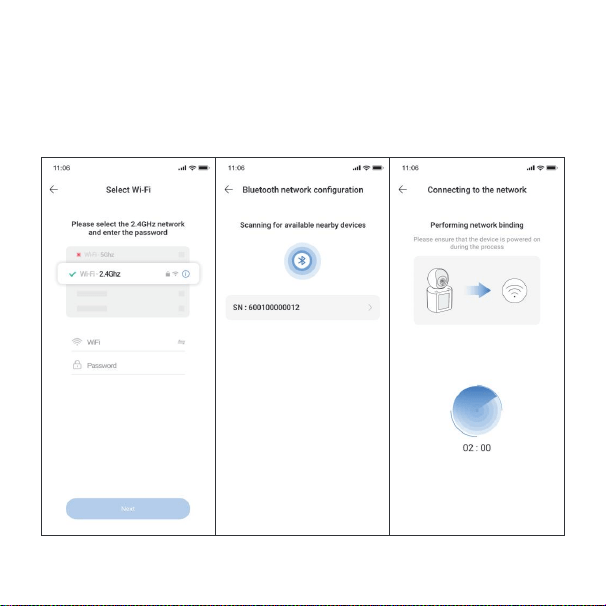
b) According to the prompts on the page, make sure the device is in the network
pairing state, and then select the pairing method (Please select bluetooth mode) to
proceed with the network binding in accordance with the steps.
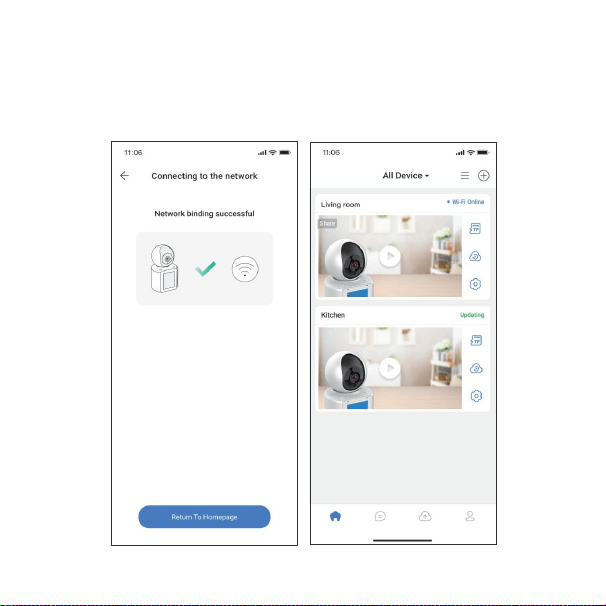
c) After the binding is successful, return to the device list. You will be able to
see the device that was just bound.
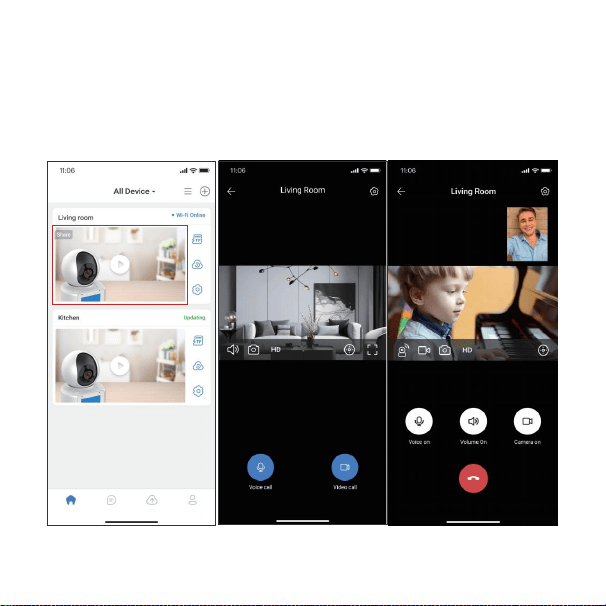
5. Start video call
a) Click on the device image to enter the live video page for the device.
b) After clicking "Video Call", you can start making video calls with the device.
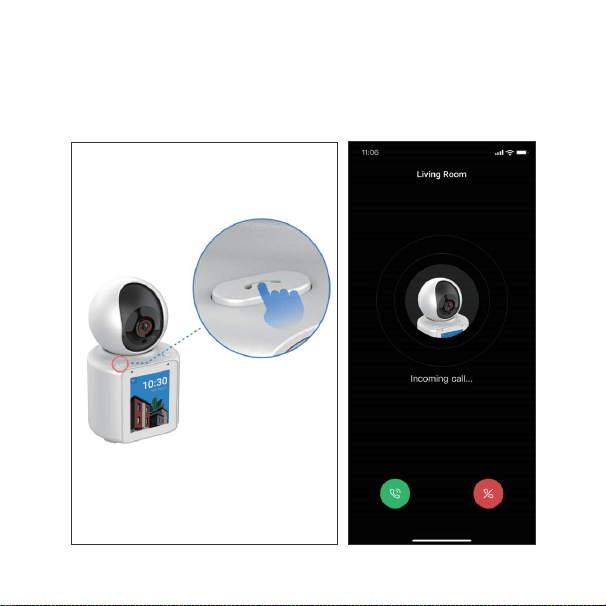
c) You can also call the phone by pressing the call button above the device.
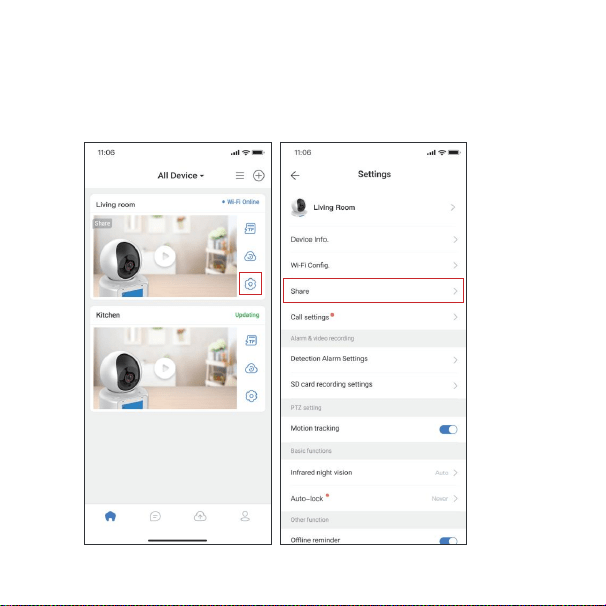
6. Call other accounts using your device
a) Click 'Settings' to enter the device's settings page.
b) Click on 'Share with other users' to enter the sharing page.
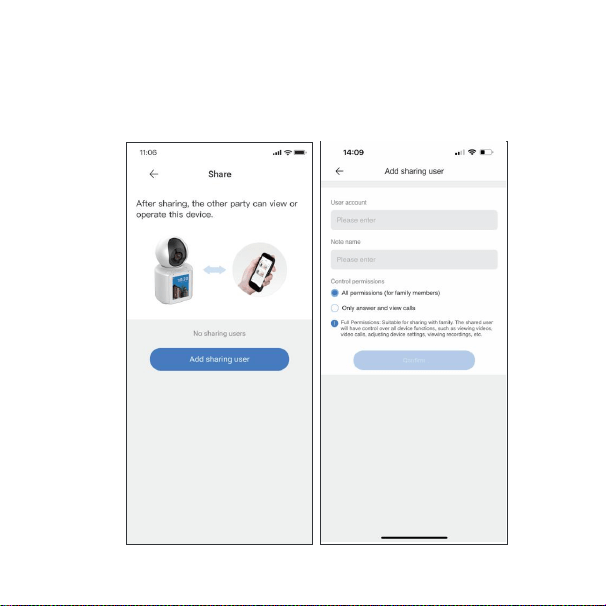
c) Add the accounts you need to call.
d)
Press the second call button (located at the bottom right corner of the
lens) on the device to make a call to the account you just shared.
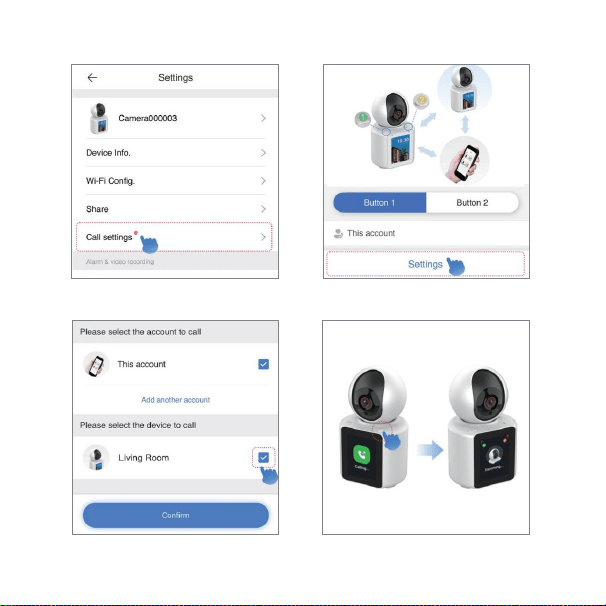
7. Device-to-Device video calling user guide
a) Click the 'Call Settings' b) Select the button you want to set
and click'Settings'
c) Chose the device you want to call and
click 'Confirm'
d) One-click call to the bound device
Specifications
1. How to fix it on the wall?
a) Drill holes and fix the base on the wall with screws, buckle the camera to the base.
b) Stick the base to glass, tiles or other smooth things with double-side tap or 3M glue.
FAQ
2. What is the lowest bandwidth when viewing the real-time video?
a) To ensure the fluency of video, it is advised that bandwidth isn’t lower than 512kbps.
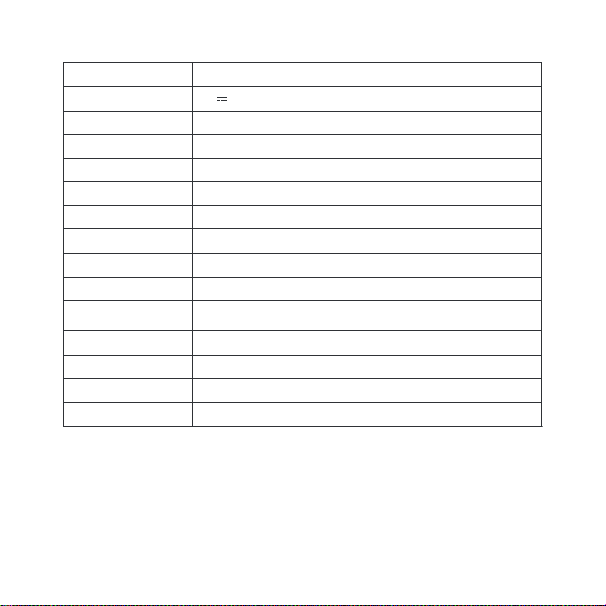
CPU
Model No.
LCD
Video Resolution
Lens
Night Vision Distance
PTZ Rotation
Audio
Network
AI
Intelligent Alarm
TF Card Slot
Certification
Product Size
350 degrees horizontally, 60 degrees vertically
Dual digital MIC array, pickup distance: 4M
Supports human detection, motion detection, and crying
detection
2.4GHz Wi-Fi
Message push, area alert
Support TF card (max 128GB)
CE,FCC,ROHS,GB4943
79.1(L)*92.1(W)*153(H)MM
Dual core processor
C31
Power Specifications 5V 2A
IPS 2.8”, 240x320
1920x1080 HD
120° Wide-View
8M

b) The flow consumption of video is 2MB/min, and will increase to 0.4MB/min.
3. Why can’t I store videos and read videos properly when I insert
the Micro SD(TF) card?
To ensure normal operation of the camera, please insert the following recommended
Micro SD(TF) card:
Kingston 16G/32G/64G/128G
SanDisk 16G/32G/64G/128G
PNY 16G/32G/64G/128G
1. Return Service
2. Replacement Service
To guarantee your interests, please read the content as follows carefully!
Within 7 days since the receipt of goods, we provide a service of refunding or replacement for the
quality problem tested and confirmed by sale service engineer.
Within 30 days since the receipt of goods, we provide a service of replacement and
maintenance for the quality problem tested and confirmed by sale service engineer.
After-sales Services
Warranty Service
3. Maintenance Service
Within 1 year since the receipt of goods, our company will provide free maintenance for the
stoppage according to the warranty clauses.
4. Timed commitment
Since the day our company received the product, we will repair or replace in 5 days.
(the shipping time will be not included)

1. Before you send the device to us, please contact our after-sale service engineers to
confirm product failures.
2.
Please fill in the product after-sales service card before mailing the user stub.
Support and Service
Warranty Scope
Warranty service only apply to the product itself, but the packages and accessories are not
included.
Within 30 days, the performance issue of device should be tested by our company, once
confirmed, our company will send you another same model product or repaired good ones.
And the defective parts will belong to our company.
Please take your invoice and after sale card if you need after sale service, and if you
can not provide above certification, the warranty time will be calculated from the date of
manufacture.
The repaired products will add another 30 days warranty time. If you pay for the techni-
cal support, to the same performance issue, we will provide you three months warranty
service for free since the day it has been repaired, please ask for maintenance certification and
keep it.
The delivery cost of the repaired products should be paid by the sender.
The promises beyond the after-sale service which made by the dealers, our company take no
responsibility.
The Following situations need to be compensated maintenance during warranty period, please
be attention.
Special Statement
Malfunctions or injure caused by abnormal installment, operation and maintenance.

Without authorization, tear up the barcode.
The product model and system in the warranty service card are different from the
information the product itself.
Beyond the period of replacement and warranty.
Malfunctions or injure caused by teardown and repair without company’s authorization.
Malfunctions or injure caused by force majeure, such as earthquake, fire, flood and
thunderstrike.
Malfunctions or injure caused by accidents or man-made.
Malfunctions or injure which are not caused by the technology, design, manufacturing and
quality.
Please contact the original seller for after-sales service. After purchasing the product,
in case the product has problems confirmed by the after-sales service engineer, you
can select free services and repairs, goods return and exchange. Relevant warranty
period and back freight attribution are as follows: (since the equipment activation date)
Product Repair Way
Time
Return
guarantee
Back freight
paid by
Within 7 days
Exchange Warranty Warranty Warranty Paid maintenance
Seller Seller AA Buyer Buyer
7 days-
1 month
With
3 months
1 year under
warranty
After warranty
Commitment deadline: The Company will repair or replace the corresponding products
or accessories within 5 days from the receipt day. (Not including posting time)
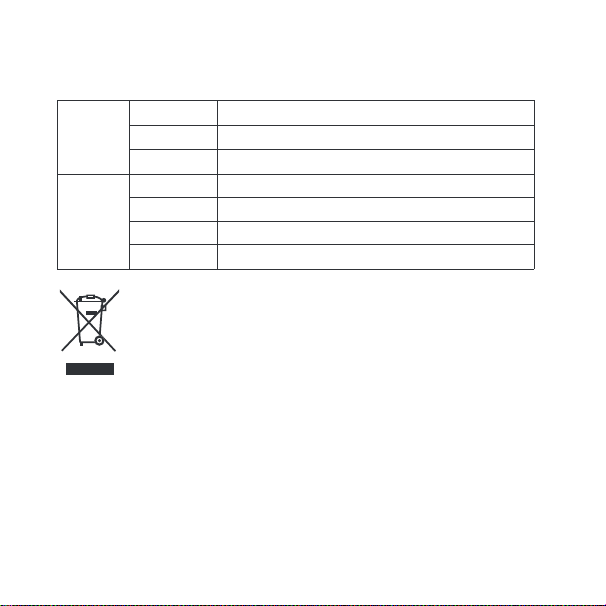
Product
Information
User
Information
Address
CID
Product Name
Purchase Date
Name
Phone Number
Email
To guarantee your interests, please fill in the stub carefully!
User Stub
Correc Disposal of this product. This making indicates that this product
should not be disposed with other household wastes throughout the EU.
To prevent possible harm to the environment or human health from
uncontrolled waste disposal, recycle it responsibly to promote the
sustainable reuse of material resources. To return your used device,
please use the return and collection systems or contact the retailer
where the product was purchased. They can take this product for
environmental safe recycling.
