
Hi
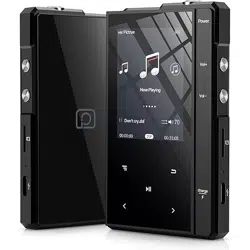
-This is Phinistec Audio Player-
Z6 Pro
www.phinistec.com
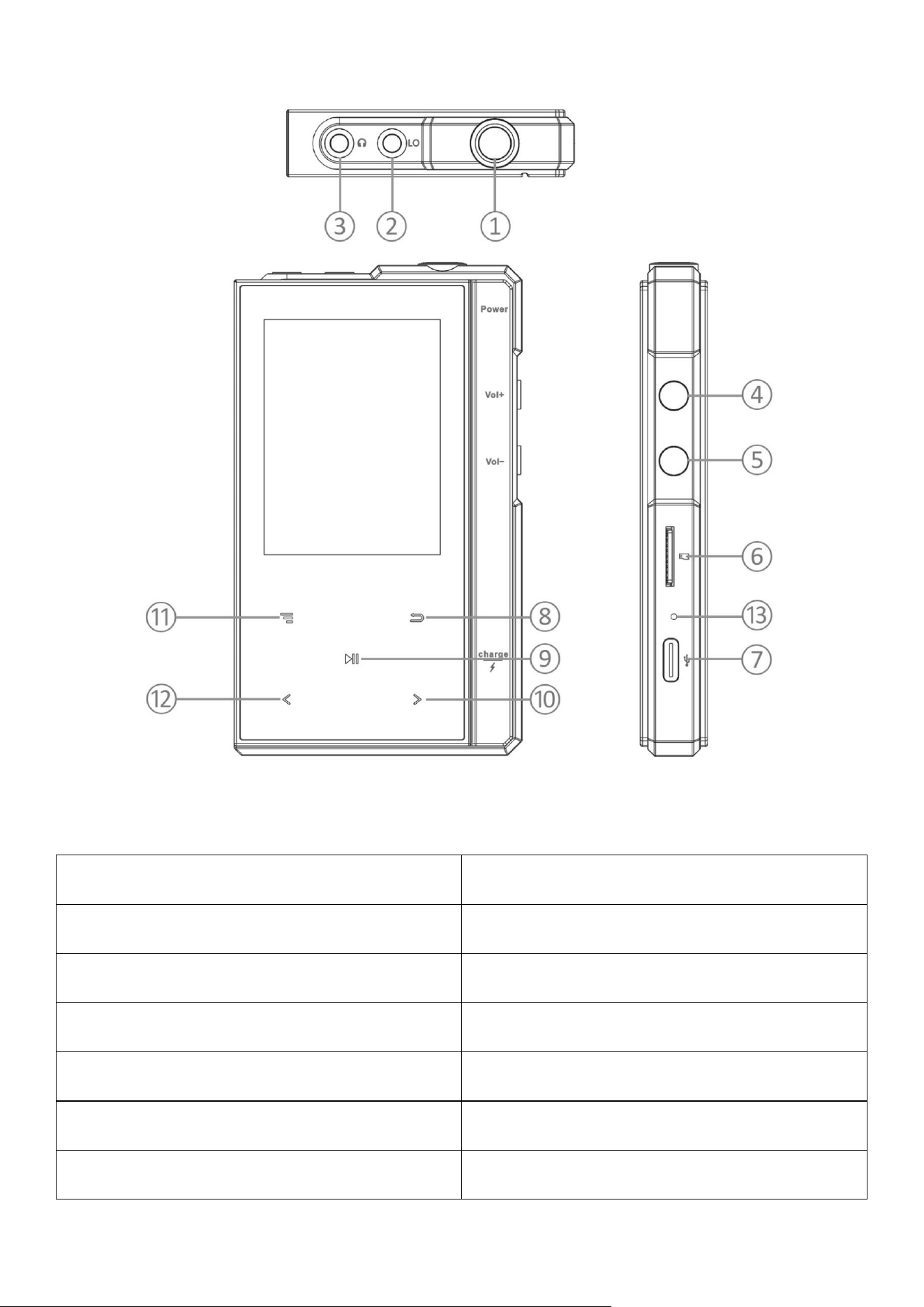
♪ Button and Control
① Power button
② Line out port
③ Earphone port
④ Volume up
⑤ Volume down
⑥ Micro SD card slot
⑦ USB-C port
⑧ Back
⑨ Play/Pause/Confirm
⑩ Next/Fast forward
⑪ Menu key
⑫ Previous/Rewind
⑬ Reset button

♪ Basic Operation
Power on: In shutdown state, long press the power button and hold for 3
seconds to turn on.
Power off: In the boot state, long press for 3 seconds to shutdown.
♪ Main Interface
There are 6 parts on the main interface: Music, Folder, Music Setting,
System Setting, Now playing, Bluetooth. Click “ ” “ ” to browse the
options, short click“ ”to enter.
♪ Now playing
Shows the now playing informations
short press “ ” “ ” to go to previous/next song.
deep press “ ” “ ” to move fast forward/backward.
short press “ ” to select: player display, equalizer, gain, play mode,
audio out to, hearing mode, audio channel balance, etc.
♪ Music
Music library
Album
Artist
Genre
Recent
Now playing

♪ Folder
Shows all informations of the Micro SD card
♪ Music Setting
Equalizer
Player display
Play mode
Gain
Audio out to
Hearing mode
Audio channel balance
Fast forward or fast rewind
Playback resume mode
Power on volume
Default volume
Re-scan music library
♪ Setting
Language
Screen brightness
Screen saver time
Bluetooth
Idle shut down time
Countdown power off

Show music files only
USB current limit
Playlist repeat select
TF card Spec
Button light auto-off time
Button light brightness
System recovery
Firmware update
About this player
♪ Bluetooth
Can be found ON/OFF
Bluetooth audio codec
Bluetooth Equalizer
♪ USB-C/Line Out Port
USB-C:
1. when player connected to computer, the cable can be used to charge
the player or transfer data.
2. The Z6 Pro audio player supports USB-OTG.
Line Out:
With the line out port, you can connect this player with car stereo, vehicle
audio system and home theater audio system via Auxiliary Audio Cable.
when enjoy hi-res & lossless audio, it’s recommended to use AUX cable
instead of bluetooth for fast data transmission and stable connection, even
though the bluetooth of Z6 Pro has reached aptX standard.
♪ Specifications
Model Name
Z6 Pro
Dimension
10.2× 6.0× 1.4 cm
Weight
175g
Dispaly
2.4-Inch 240*320 IPS
DAC
ESS9218EC
Bluetooth
Qualcomm CSR8811
THD
<0.005% Earphone; <0.002% LO
SNR
120dB/1KHz
DR
>118db
Earphone Impedance
8Ω~300Ω
Audio Format
APE(192K/24bit)FLAC(384K/24bit)WAV(768K/64bit)
AppleLossless24BIT/384KApple AAC, MP3 DTS(5.1)
Hard decording DSD64/128/256
Battery Capacity
1500mAh/3.7V Li-ion
Input / Charging
5V/1A USB-C
Playing Time
About 30 hours (Lab.test)
Expansion Slot
Micro SD / TF Card (up to 512GB)

♪ FAQ
Can’t turn on the Z6 Pro?
please deep press the power button for about 3 seconds, If the display
does not light up,
1. please check if the player has run out of power: connect the player to an
adapter and try again after charging 10 minutes;
2. between micro SD card and USB interface, there is a hole, it’s called reset,
please use a niddle to press it;
Player stuck or freezes?
1. please try to short press reset button to restart the device.
2. please reset the player.
Can't hear music when playing?
1. please check if the volume setting is too low;
2. please check whether the earphone is plugged in properly or whether
earphone is damaged;
3. please check if your music format is supported or not;
4. please reset the player can try again.
Can't transfer music files from computer?
1. if the card storage doesnot appear on computer, please check whether the
Micro SD card is incorrectly inserted or damaged; please check whether
USB-C cable is defective or not.
2. if the files were successfully copied, but disappear when open micro SD
card in the player, please double check if the files’ format is supported by
this player.

What TF card format does this player support?
Both FAT32 and EXFAT format are supported by Z6 Pro.(max.512GB)
Is there a song limit?
No limit in player, but it depends on the sd card memory.
Can I adjust the volume on the device when using Bluetooth?
Yes.
Can this music player work with iTunes? Is it compatible?
No, unfortunately it is NOT compatible with iTunes. it’s designed for off-
line audio files only.
When playing some songs, the player is slow to respond?
1. The playback of high resolution music has higher requirements on the
transmission speed of the TF card itself. please use a CLASS10 TF card or
above.
2. There are too much songs stored in the TF card. please remove some of the
files in the card, leave a certain free space.
3. TF card may be partially damaged.
♪ After-sales service
Email: [email protected]
For more informations or questions about Z6Pro, please feel free to visist us
www.phinistec.com or contact us via the mail above.
