
Hi
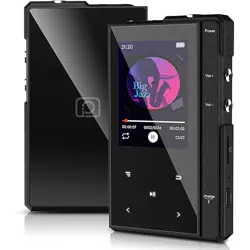
-This is Z6 Music Player-
English / Español / Deutsch / Française / Italiana/
日本語
Thanks for selecting Phinistec Z6 music player, before using this product, please read this
user manual carefully in order to make sure that the best possible performance is obtained.
www.phinistec.com
support@phinistec.com
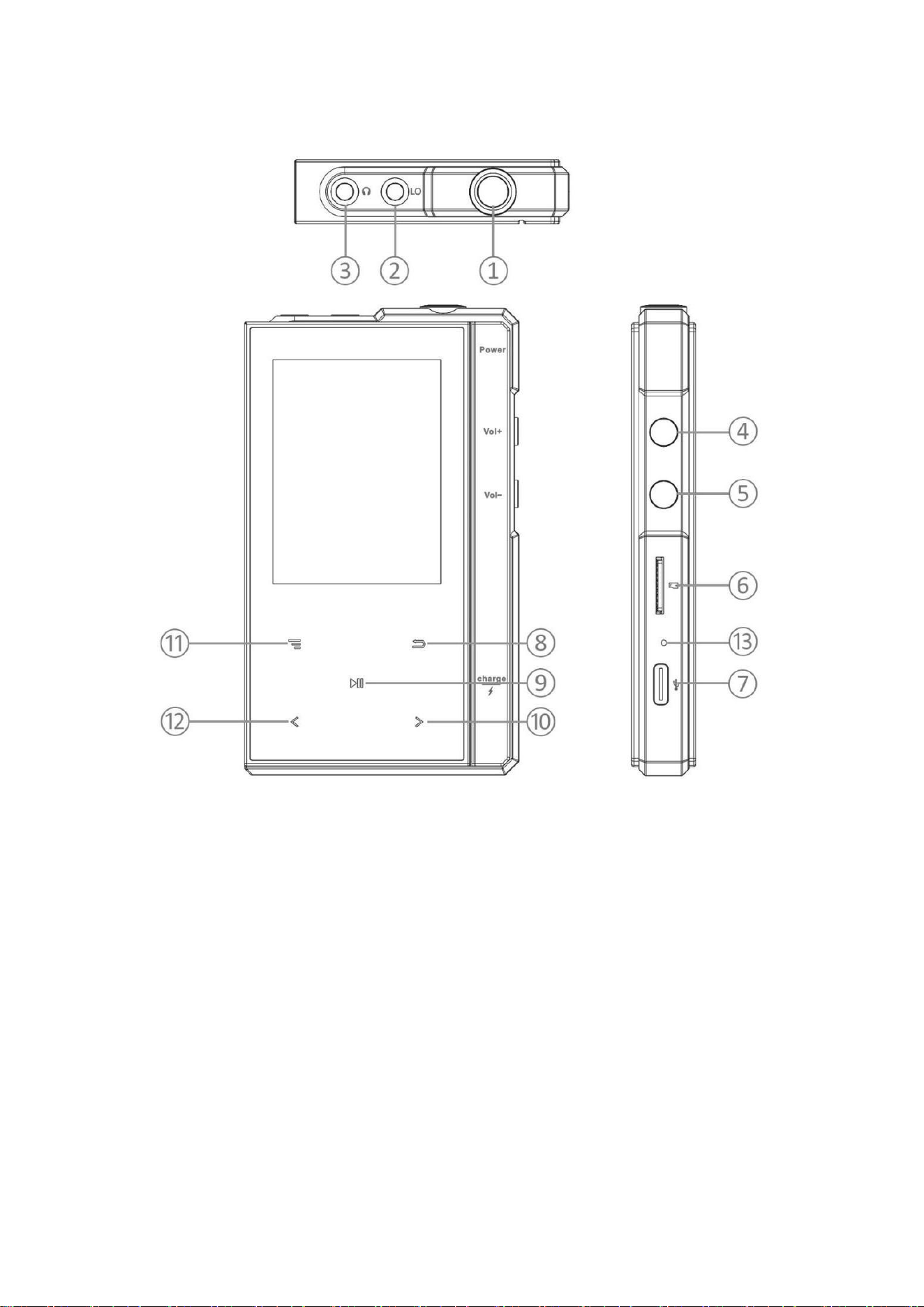
♪ Button and Control
1.
Power button
*
press and hold for 3 seconds to turn on or off
* short press to turn off/on the screen
2.
Line out port
*
supports 3.5mm AUX cable
3.
Earphone port
*
supports 3.5mm output to connect earphones

4.
Volume Up
5.
Volume Down
6.
Micro SD card slot
*
expand
stor
a
ge,
supports
max
.
256
g
TF
/M
icr
o
-
SD
ca
rd
7.
USB-C & OTG Port
8.
Back
9.
Play/Pause
10.
Next/Fast-forward
*
during music playback, short press to switch the next song;
*
Long h
old
t
o
fast
for
ward
.
11.
Toggle/Menu
*
pop-up menu for play settings and other options
12.
Previous/Rewind
*
during music playback, short press to switch the previous song;
*
Long h
old
t
o
fast
b
ackward
.
13.
Reset button
*
sh
ort
press
re
set
but
to
n
to
re
set
wh
en
freez
e
/st
uc
k
.
♪ Main Interface
Th
ere
are
8
par
ts
on
th
e
main
interface:
Mu
s
ic
,
F
older
,
E-
Boo
k
,
F
M
R
adio,
Bl
uet
oo
t
h
,
R
ecorder, Set
ti
n
g
,
Tool
.
Cl
ick
“ ” “ ”
to
browse,
cli
c
k
“
”to
ent
er.

♪ Music
There are 6 parts on Music:
All songs/Artists/Albums/Genres/Playlists/Update Playlist.
On music playback inte
rface, click “ ” to enter music
setting:
Play mode: enter to choose shuffle/repeat all/repeat 1/
repeat off
Sound setting: adjust equalizer and play speed
Add to playlist:add music to your favorite playlist
Remove from playlist:remove music from playlist
Bookmarks: good for playing audio books. Add a bookmark at
the current position and then you can directly return to the
read position next time you play.
Delete: delete the song.
♪
Folder
Lo
cal
Folder
:
Access
th
e
internal
sto
rage
Card
F
older
:
Ac
cess
micro
SD
card
sto
rage
♪
E-Book (only TXT format supported)
I
f
th
e
device
i
n
sert
th
e
TF
car
d,
th
ere
wi
ll
h
a
ve
“Local
folder”
and
“Ca
rd
folder
”
lis
ted
on
th
e
e-bo
ok
menu
.
C
li
ck
“ ”
to
ent
er
folder
to
choose
th
e
book
you
want
to
read
,
then
C
li
ck
“ ”
to
start
readin
g
.
O
n
t
h
e
readin
g
mode
:
C
li
ck
“ ”
wil
l
st
art
automati
c
pag
e-
tu
rnin
g
mod
e
.
C
li
ck
“ ”
to
en
ter
th
e
e-book
settings
menu.
♪ Bluetooth
It will show the previously paired devices and start searching
automatically.
C
li
ck
“ ”
to
con
n
ect
or
can
cel
m
atch
.
Click “
” to enter bluetooth setting.
♪ Recorder
C
li
ck
“ ”
to
start/
pause,
clic
k
“ ”
to
save
recordi
n
g
or
n
o.
♪ FM Radio (supports FM recording)
Cli
ck
“ ” “ ”
to
ch
ange
F
M
st
ati
on
s
.
C
li
ck
“ ”
to
ent
er
F
M
Ra
dio
Sett
ing
.
♪
Setting
C
li
ck
“ ”
to
ent
er
th
e
Sett
in
g
,
in
c
l
udes:
sl
eep
t
imer,
aut
o
s
h
ut
do
wn
,
displ
ay
sett
i
n
g,
date
and
ti
me,
lan
guage,
power
savi
n
g,
k
e
y LED,
in
formati
o
n
(c
h
eck
t
h
e
fir
mware
versi
o
n h
ere
),
f
ormat
device,
f
actory
defa
ul
t,
au
toma
ti
c
upgrade(
for
fir
mware
update).
♪
Tool
Includes: alarm clock, calendar, photo, video (supports AVI and AMV
formats only, please convert the videos before use).
♪
USB-C
When the player connected to computer, the cable can be used to
charge the player or transfer data. And it supports OTG function via
USB-OTG cable (not included).
Specifications
Model Name
Z6
Dimension
10.2×6.0×1.4 cm
W
eigh
t
175g
D
is
paly
2.4
-
I
n
ch 240*3
20
IPS
B
ui
l
t
in
Memory
32GB or 96GB with card
Audio Format
MP3
,
WMA
,
WA
V
,
O
G
G,
FLA
C
,
A
P
E
,
AAC
Video Format
AMV
,
AVI
Recording Format
MP3
,
WA
V
Battery Capacity
1500mA
h
/
3.7V L
i
-polymer
I
n
put
/
C
h
arging
Power
5V/1A USB-C
Expansion Slot
Micro SD Card (up to 256GB)

♪ FAQ
Why my computer can’t recognize my z6?
After connecting the z6 to the computer via a data cable, please do
not touch the screen buttons, otherwise the z6 will automatically
change to charging-only mode, causing it to be unrecognizable.
How to transfer music?
Connect z6 to computer via usb cable ,
t
h
e
i
n
tern
a
l
memor
y
wil
l
sh
ows
w
ith
th
e
n
ame
of
“Z
6”
and micro SD card will be shown as a
removable disk.
Simply drag the music file to internal z6 or sd card is ok.
How to add playlist?
On music playback interface, click “ ” to enter music setting,
choose add to playlist and you can add song to your favorite one, we
have 3 playlist (default playlist, my favorite and recently add).
After plugging in the headphones, z6 and headphones emit sound at the
same time?
Hi, if you meet this issue, please feel free contact customer service for
resolution.

Bluetooth volume too low?
Hello, usually the bluetooth volume is acceptable. If you feel that
the bluetooth volume is too low, you can increase the volume to the
max.
If you still feel it is very low, please contact customer service
for resolution.
Player freezes / Stuck?
please
use
a
pi
n
to
t
ouc
h
t
h
e
r
eset
but
to
n
(
h
o
l
e
).
Can't hear music when playing?
1.
p
lease
ch
eck
i
f
th
e
vol
ume
sett
i
n
g
is t
oo
lo
w
.
2.
please check if the earphone is plugged improperly or damaged.
3.
please check if the bluetooth is connected or not.
Can't transfer music files from computer?
1.
please double check if the player is successfully connected to the
comput
er
.
t
h
e
i
n
tern
a
l
memor
y
wil
l
sh
ows
w
ith
th
e
n
ame
of
“Z
6”
and micro SD card will be shown as a removable disk.
2.
please check if the SD card is damaged or not.
3.
please
ch
eck
if
t
h
e
USB
-
C
ca
ble
i
s
dama
ged
or
not.

SD card cannot be used in the player?
1.
for
th
e
fir
st
ti
m
e
of
us
e
,
p
leas
e
plu
g
th
e
m
icro
SD
card
i
n
to th
e
player,
i
t
will
h
elp to
format
th
e
SD
ca
rd
.
2.
please double check if the SD card is damaged or not.
♪ After-sales service
E
mail
:
support@phinistec.com
phinistec@hgdups.com
1.
We
wil
l
k
eep
updati
n
g
t
h
e
fir
mware
for
th
e musi
c players to
improve
u
sers’
experien
ce,
so
con
tact
us
if
i
t’s
n
ecessary
.
2.
We
wil
l
always
stan
d
behi
n
d o
ur
brand
and
product
s,
n
o
ma
tt
er
wh
at
problem
t
h
ere
be,
ju
st
m
ail
us
to
get
a
p
romi
sed
reply wit
h
in
24 hours.

1.
Botón de encendido
Español
*
mantenga presionado durante 3 segundos para encender o apagar
*
pu
ls
ació
n
cort
a
pa
ra
apa
gar/
enc
ender
l
a
pan
tal
la
2.
Pu
erto
de
sal
ida
de
lj
n
ea
*
admite cable auxiliar de 3,5 mm
3.
Puerto de auriculares
*
admite salida de 3,5 mm para conectar auriculares
4.
Subir volumen
*
presione para aumentar el volumen.
5.
Bajar volumen
* presi
on
e
pa
ra
dismi
nu
ir
el
vo
l
umen
.
6.
Ranura para Micro SD
*
admite máx. Tarjeta TF/MicroSD de 256 g
7.
Puerto USB-C y OTG
*
u
tili
zado
para ca
rgar
y
tran
sferi
r
archivos
8.
Volver
*
h
aga
cli
c
para
vol
ver
a
la
pági
n
a
anteri
o
r.
9.
Reproducir/Pausar
*
i
n
ici
ar/pa
us
ar
la
reprodu
cci
ó
n de
m
ús
ica.
10.
Siguiente/Avance rápido
*
durante la reproducción de música, presione brevemente para
cambiar la siguiente canción
*
mantén presionado para avanzar rápido.
11.
A
lt
ern
ar/Me
nú
*
mientras se reproduce música, presione para alternar la
visualización de letras o la portada del álbum
*
menú emergente para la configuración de juego y otras opciones
12.
Anterior/Rebobinar
*
durante la reproducción de música, presione brevemente para
cambiar la canción anterior,
*
manténgalo pulsado para retroceder rápidamente.
13.
Botón de reinicio
*
Presione brevemente el botón de reinicio para reiniciar cuando se
congela/atasca.
E
specifi
cacion
e
s
:
Nombre del modelo
Z6
Dimensión
10.2×6.0×1.4 cm
Peso
175g
Exhibición
2.4
-
I
n
ch 240*3
20
IPS
Memoria incorporada
32GB or 96GB with card
Formato de audio
MP3
,
WMA
,
WA
V
,
O
GG
,
FLA
C
,
A
P
E
,
AAC
Formato de video
AMV
,
AVI
Formato de grabación
MP3
,
WA
V
Capacidad de la baterja
1500mA
h
/
3.7V L
i
-polymer
I
Pot
enc
ia
de
en
tr
ada/carga
5V/1A USB-C
Ranura de expansión
Micro SD Card (max. 256GB)

1.
Netzschalter
Deutsch
*
3
Seku
nden
la
n
g
ged
rü
ck
t
h
al
ten
,
um
ei
n
- oder
auszus
c
h
alt
e
n
*
Ku
rz
drü
c
k
en,
um
den B
il
dsc
h
i
rm
aus
-
/ei
n
zu
s
ch
alt
e
n
2.
Li
n
e-
Ou
t
-
An
sch
lu
ss
*
unterstützt 3,5mm AUX-Kabel
3.
Kopfhöreranschluss
*
un
terstützt
3,
5
-
mm
-
Ausgang
zu
m
A
n
sch
l
ie
ßen von
Kopfh
örern
4.
Lauter
*
drück
e
n
,
um
die
L
aut
stär
k
e
z
u
erh
öh
e
n
.
5.
Lautstärke verringern
*
drü
ck
e
n
,
um
die
L
aut
stär
k
e
z
u
verr
i
n
gern
.
6.
Micro-SD-Kartensteckplatz
*
Speich
er
erwe
it
ern
,
un
te
rst
ü
tzt
ma
x.
256
g
TF/
Mi
cro
-
SD
-
Kart
e
7.
USB
-
C
-
un
d
OT
G
-Ansc
h
l
us
s
*
Wird zum Aufladen und zur Dateiübertragung verwendet
8.
Zurück
*
Kl
ic
k
en
Si
e
h
ie
r,
u
m
zur
vor
h
e
ri
gen
Seit
e zu
rü
ck
zukeh
re
n
.
9.
Wiedergabe/Pause
* St
art/
Pa
us
e
der
Musikwieder
gabe
.
10.
Weiter/Vorspulen
*
währe
n
d
der
Mu
si
k
wiederg
abe
k
ur
z
drück
en,
um
zu
m
n
ächsten
Lied zu wechseln
*
h
al
te
n
,
um
vo
rzu
spu
len
.
11.
Umschalten/Menü
*
Drücke
n
Sie
währ
end
der
Mu
si
k
wiederga
be,
um
zwi
sc
h
en
der
Liedtextanzeige oder dem Albumcover umzuschalten
*
Popup-Menü für Spieleinstellungen und andere Optionen
12.
Zurück/Zurückspulen
*
währ
end
der
Mu
si
k
wiederga
be
k
ur
z
drück
e
n
,
um
zu
m
vorh
eri
gen
Li
ed
zu
wech
sel
n
;
*
h
alt
e
n
,
um
sc
hn
el
l
z
ur
ückzu
s
pul
en.
13.
Reset-Taste
*
Drücken Sie kurz die Reset-Taste, um das Gerät zurückzusetzen,
wenn es eingefroren / festgefahren ist.
Spezifi
k
at
ion
e
n
:
Modellname
Z6
Abmessungen
10.2×6.0×1.4 cm
Gewicht
175g
Anzeige
2.4
-
I
n
ch 240*3
20
IPS
Eingebauter Speicher
32GB or 96GB with card
Audio Format
MP3
,
WMA
,
WA
V
,
O
GG
,
FLA
C
,
A
P
E
,
AAC
Video Format
AMV
,
AVI
Aufnahmeformat
MP3
,
WA
V
Batteriekapazität
1500mA
h
/
3.7V L
i
-polymer
Eingangs-/Ladeleistung
5V/1A USB-C
Erweiterungssteckplatz
Micro SD Card (max. 256GB)

1.
Bou
ton
d'
al
i
ment
ati
o
n
Française
*
appuyez
et
main
ten
ez
pen
dant
3
secon
d
es
pour
al
lu
m
er
ou
éteindre
*
appui court pour éteindre/allumer l'écran
2.
Port
de
sorti
e
de
li
gne
*
Prend en charge le câble AUX de 3,5 mm
3.
Port pour écouteurs
*
Prend en charge la sortie 3,5 mm pour connecter des écouteurs
4.
Augmenter
l
e
volu
me
*
appuyez pour augmenter le volume.
5.
Diminuer le volume
*
appuyez pour diminuer le volume.
6.
Fente pour micro SD
* ét
endre
l
e
sto
ck
age,
prend
en
ch
arge
m
ax.
T
F
/M
icr
o
SD
256g
7.
Port USB-C et OTG
*
u
tili
sé
po
ur
le
ch
argemen
t
et
le
tr
ansfert
de
f
i
ch
ier
s
8.
Retour
*
cliquez pour revenir à la page précédente.
9.
Lecture/Pause
*
démarrer/mettre en pause la musique en cours de lecture.
10.
Suivant/Avance rapide
*
pendan
t
l
a
lec
tu
re
de
m
usique
,
appuyez
briè
vement
pour
p
asser
à
la chanson suivante
*
main
ten
e
z
en
f
on
cé
pour avan
cer
rapidement
.
11.
Bascu
ler
/
M
enu
*
pendan
t
la le
ctu
re
de
la
mu
si
que,
appuyez pour
bascul
er
ent
re
l'affich
age
des
pa
rol
es
ou
l
a
c
ouv
ertu
re
de
l'a
lbu
m
*
menu contextuel pour les paramètres de lecture et d'autres options
12.
Précédent/Rembobiner
*
pen
dant
la
lec
tu
re
de
m
usique
,
appuyez brièvemen
t
pou
r
cha
n
ger
la chanson précédente ;
*
maintenez pour reculer rapidement.
13.
Bou
ton
de
r
éin
i
ti
al
is
ati
o
n
*
Ap
puyez
bri
èvement
su
r
l
e bout
on
de
réi
n
i
ti
al
is
ati
o
n
pour
réi
n
i
ti
a
li
ser
en
cas
de
gel/
blocage.
Caractéri
st
iqu
es
:
Nom du modèle
Z6
Dimension
10.2×6.0×1.4 cm
Lester
175g
Affichage
2.4
-
I
n
ch 240*3
20
IPS
Mémoire intégrée
32GB or 96GB with card
Format audio
MP3
,
WMA
,
WA
V
,
O
GG
,
FLA
C
,
A
P
E
,
AAC
Format vidéo
AMV
,
AVI
Format d'enregistrement
MP3
,
WA
V
Capacité de la batterie
1500mA
h
/
3.7V L
i
-polymer
Puissance d'entrée / de charge
5V/1A USB-C
Fente d'extension
Micro SD Card (max. 256GB)

1.
Pulsante di accensione
Italiana
*
tenere premuto per 3 secondi per accendere o spegnere
*
premere brevemente per spegnere/accendere lo schermo
2.
Port
a
di
usc
ita
li
n
ea
*
supporta cavo AUX da 3,5 mm
3.
Porta per auricolari
*
supporta
l
'us
c
it
a
da
3,5
mm
per
coll
egare
g
li
auricolar
i
4.
Volume +
*
premere
per
aument
are
il
vo
l
ume.
5.
Volume -
*
premere
per dimin
u
ir
e
il
vo
l
ume.
6.
Slot per Micro SD
*
espan
dere
la
mem
oria,
support
a
ma
x.
TF/Micro
SD
da
256
g
7.
Porta USB-C e OTG
*
u
tili
zz
ato per
l
a
ricari
ca
e
il
t
ra
sferi
ment
o
di
fi
l
e
8.
Indietro
* clicca per tornare alla pagina precedente.
9.
Riproduci/Pausa
* avvi
are/mett
e
re
in
pausa
la
m
us
ica in
ri
prod
u
zi
on
e.
10.
Successi
vo/
Ava
n
ti
veloce
*
duran
te
la
ri
pr
oduz
ion
e
mu
s
ic
ale,
premere brevemente
per passare
al brano successivo
*
tieni premuto per avanzare velocemente.
11.
Commuta/Menu
*
durante la riproduzione della musica, premere per alternare la
vi
su
al
iz
zaz
ion
e
dei
test
i
o
la
copert
in
a
de
l
l'alb
um
*
men
u
per
l
e
i
mposta
zi
on
i
di
ri
produzion
e e
alt
re
opzi
o
n
i
12.
Precedente/Riavvolgi
*
durante la riproduzione musicale, premere brevemente per passare
al brano precedente;
*
t
ieni
premut
o
per
tornare
i
n
di
etro
vel
ocemen
te.
13.
Pu
ls
an
te
di
ri
pri
s
ti
n
o
*
premere brevemente
il
pu
l
sa
n
te
di
ri
pr
ist
in
o
per
ri
prist
in
are
quan
do
si
blocca/
s
i
bl
oc
ca.
Specifi
che
:
Nom
e
del
mod
ell
o
Z6
Dimensione
10.2×6.0×1.4 cm
Peso
175g
Visualizzazione
2.4
-
I
n
ch 240*3
20
IPS
Memoria integrata
32GB or 96GB with card
Formato audio
MP3
,
WMA
,
WA
V
,
O
GG
,
FLA
C
,
A
P
E
,
AAC
Formato video
AMV
,
AVI
Formato di registrazione
MP3
,
WA
V
Capacità della batteria
1500mA
h
/
3.7V L
i
-polymer
Potenza di ingresso / ricarica
5V/1A USB-C
Slot di espansione
Micro SD Card (max. 256GB)

日本語
1.
電源ボタン
*3秒長押しで電源オン/オフ
*短いプレスはスクリーンを消すか、またはつけるために
2.
ラインアウトポート
*3.5mmAUXケーブル対応
3.
イヤホンポート
*イヤホンを接続するための3.5mm出力をサポート
4.ボリュームアップ
*
を押すと音量が上がります。
5.
ボリュームダウン
*
を押すと音量が下がります。 6.
マイクロSDカードスロット
*最大256gのTF/MicroSDカードに対応し、ストレージを拡張できま
す。256g TF/Micro-SD カード
7. USB-C&OTGポート
*充電やファイル転送に使用
8.戻る
*クリックすると、前のページに戻ります。
9.再生/一時停止
*再生中の音楽を開始/一時停止します。
10.次へ/早送り
*音楽再生中、短く押すと次の曲に切り替わります。
*早送りするために握る。
11.トグル/メニュー
*音楽再生中に押すと、歌詞表示やアルバムカバーが切り替わります。
*再生設定やその他のオプションのためのポップアップメニュー
12.前/巻き戻し
*音楽再生中、短く押すと前の曲に切り替わります;
*早送りするために握って下さい。
13.リセットボタン
*フリーズ/スタック時にリセットするための*短いプレスリセッボタ
ンです。
仕様
モデル名
Z6
寸法
10.2×6.0×1.4 cm
重量
175g
画面
2.4-Inch 240*320 IPS
メモリ内蔵
32GBまたは96GB(カード付き)
オーディオフォーマット
MP3, WMA, WAV, OGG, FLAC, APE,
AAC
ビデオフォーマット
AMV, AVI
録音フォーマット
MP3, WAV
バッテリー容量
1500mAh / 3.7V リチウムポリマー
入力/充電電源
5V/1A USB-C
拡張スロット
マイクロSDカード(最大256GB)
