Shiatsu Neck & Back Massager with Heat
User Manual
CF-2113B-APP

2
Safety Instruc�ons
Please read the following instruc�ons carefully before pu�ng your
massage device into use to ensure trouble-free opera�on and op�mum
efficiency. Please retain these opera�ng instruc�ons for further use!
Tel: (248) 819-2623
Monday-Friday 9:00AM-4:30PM
Email: supportus@comfier.com
Have queson ?
• The massage device conforms to recognized technical principles and the latest safety
regula�ons.
• Do not get wet,do not use pins, never remove cover.
• This items is NOT A TOY. Close supervision is necessary when this appliance is used by , on,
or near children or disabled persons.
• This appliance should never be le� una�ended when plugged in.
• Never use any power sources other than the home adapter provided as original equipment
with this unit.
• Any possible repairs may only be carried out by authorized expert staff. Improper use and
unauthorized repairs are not permi�ed for safety reasons and lead to loss of warranty.
• Never touch the power plug with wet hands.
• Please avoid contact of the device with water, high temperatures and direct sunlight.
• Do not use any damaged cables, plugs or loose sockets.
• Never operate under blankets where the air openingmay be blocked.
• If plugs or cords are damaged, they must be replaced by the manufacturer, a service
representa�ve or by qualified personnel.
• In case of malfunc�on, disconnect immediately from the mains.
• Do not use if you have skin disorders, open wounds,or swollen or inflamed areas.
• Misuse or incorrect use excludes any liability for damage.
• Do not use this device while driving.
• Do not use while you sleep.
• In order to avoid excessive s�mula�on of the muscles and nerves, the recommended
massage �me should not be exceeded 15 minutes at a �me.
• We equip the massager with a protec�on against over-hea�ng for safe use.
• Each massage – even a hand massage – must be refrained from during pregnancy or if
one or more of the following complaints are present in the massage area: recent injuries,
thrombo�c diseases, all kinds of in flamma�ons and swellings, or cancer. It is
recommended to consult a doctor before having a massage for the treatment of ailments
and illnesses.
• If you are dependent on electrical aids e.g. pacemakers, please be sure to consult your
doctor for medical advice before taking a massage.
• The packaging material supplied should not be used as a toy.
• Do not use this product for medical treatment.
Failure to observe the above instruc�ons may cons�tute misuse of the product
and can cause serious injury or burns.
3
Instruc�on
CONTENTS
TECHNICAL DATA
Measurements:
Weight:
Voltage:
Nominal Power:
Default Automa�c run�me:
30.3x17 inches (Back) 14.2x18 inches (Seat)
11.4lbs
Input: AC 100-240V ~50/60Hz
Output:12VDC 3.5A
max. 42Wa�
15 minutes
FEATURES
- Electrically height-adjustable Shiatsu neck massage
Selectable direc�on: clockwise/an�clockwise
- Shiatsu back massage
- Customizable SPOT massage
- Soothing rolling massage
- With op�onal heat func�on
- Massage areas can be selected (upper, lower, full back)
- Vibra�on massage on lumbar and seat
- Op�cs PU leather and breathable mesh
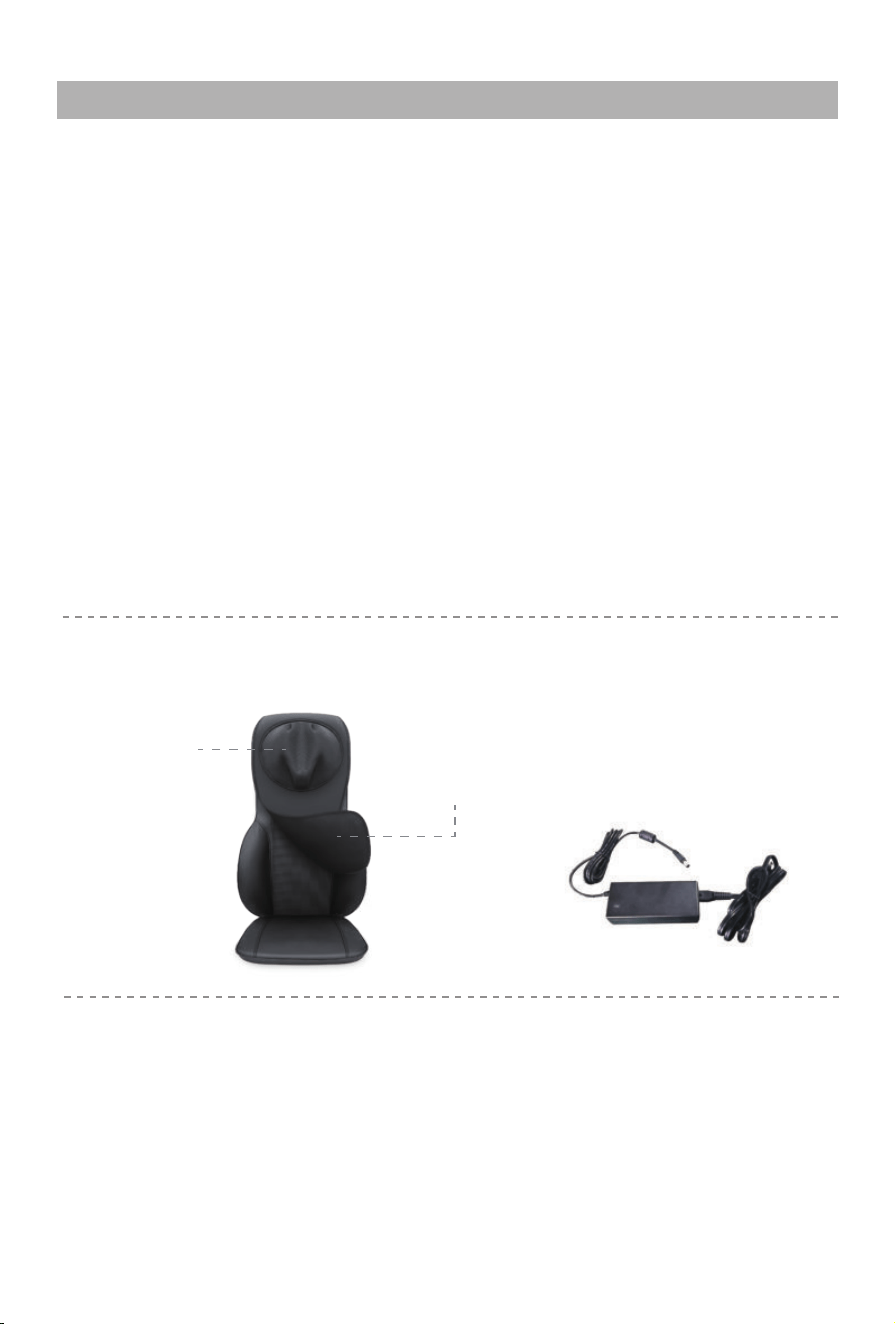
Detachable intensity
control flap
Removeable
& Washable cover
Thank you for purchasing Shiatsu Neck & Back massager with heat by COMFIER
Corpora�on. With normal care and proper treatment, it will provide years of reliable
service. Please read all instruc�ons carefully before using this product.
Please retain this manual for future reference.
• Shiatsu Neck & Back Massager with Heat
• 12V home adpater
4
Setup and Opera�on
1. A�ach the massager to a chair with elas�c straps or place it on other support.
2. Connect the adapter cable to the corresponding cable on the cushion.
3. Plug the home adapter into an outlet.
4. Turn on the device using the controller ( instruc�ons on page 5 ).
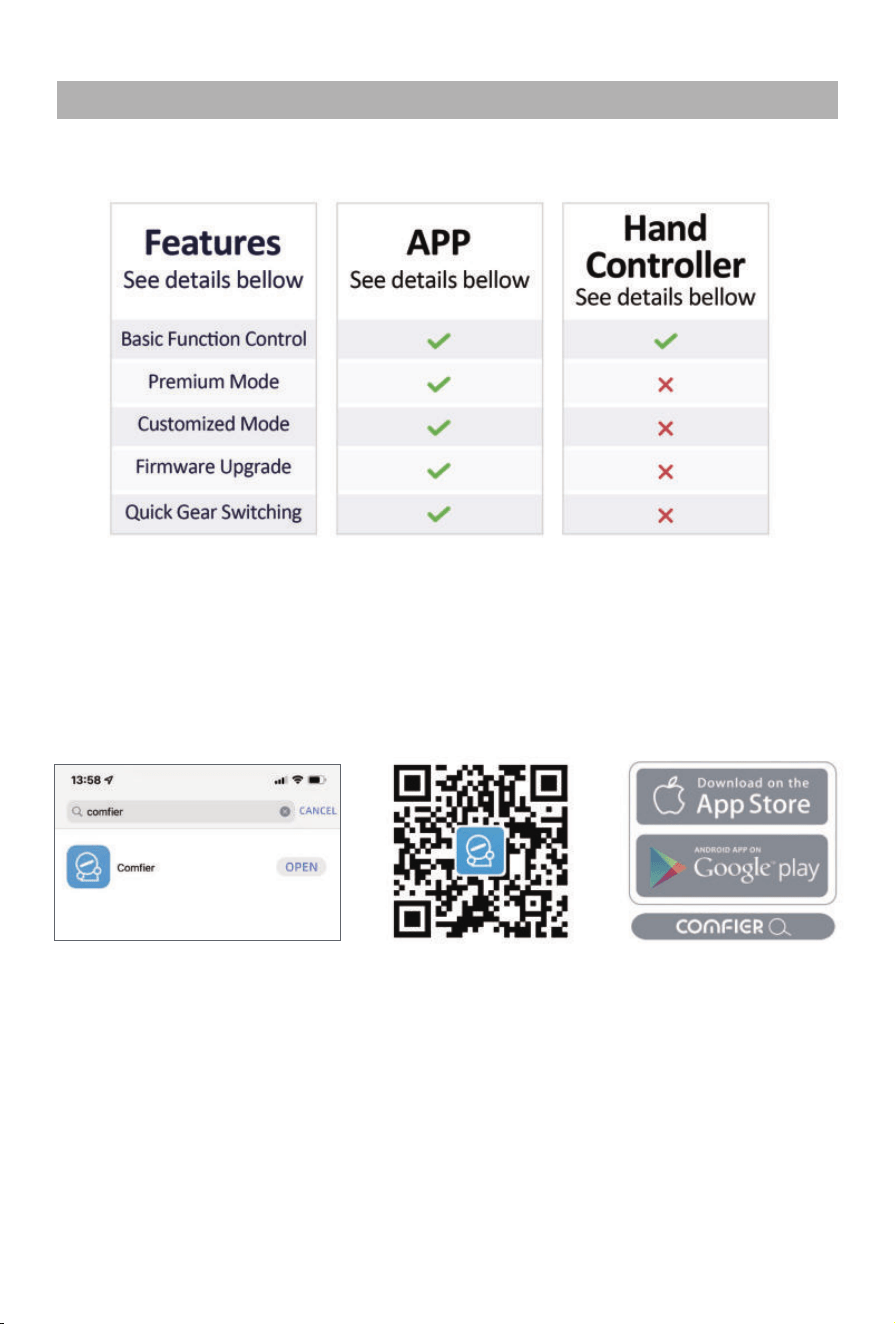
5. Customize func�on se�ngs by opera�ng hand controller or through smart APP.
6. When finished place the controller in the pouch at the side of the cushion.
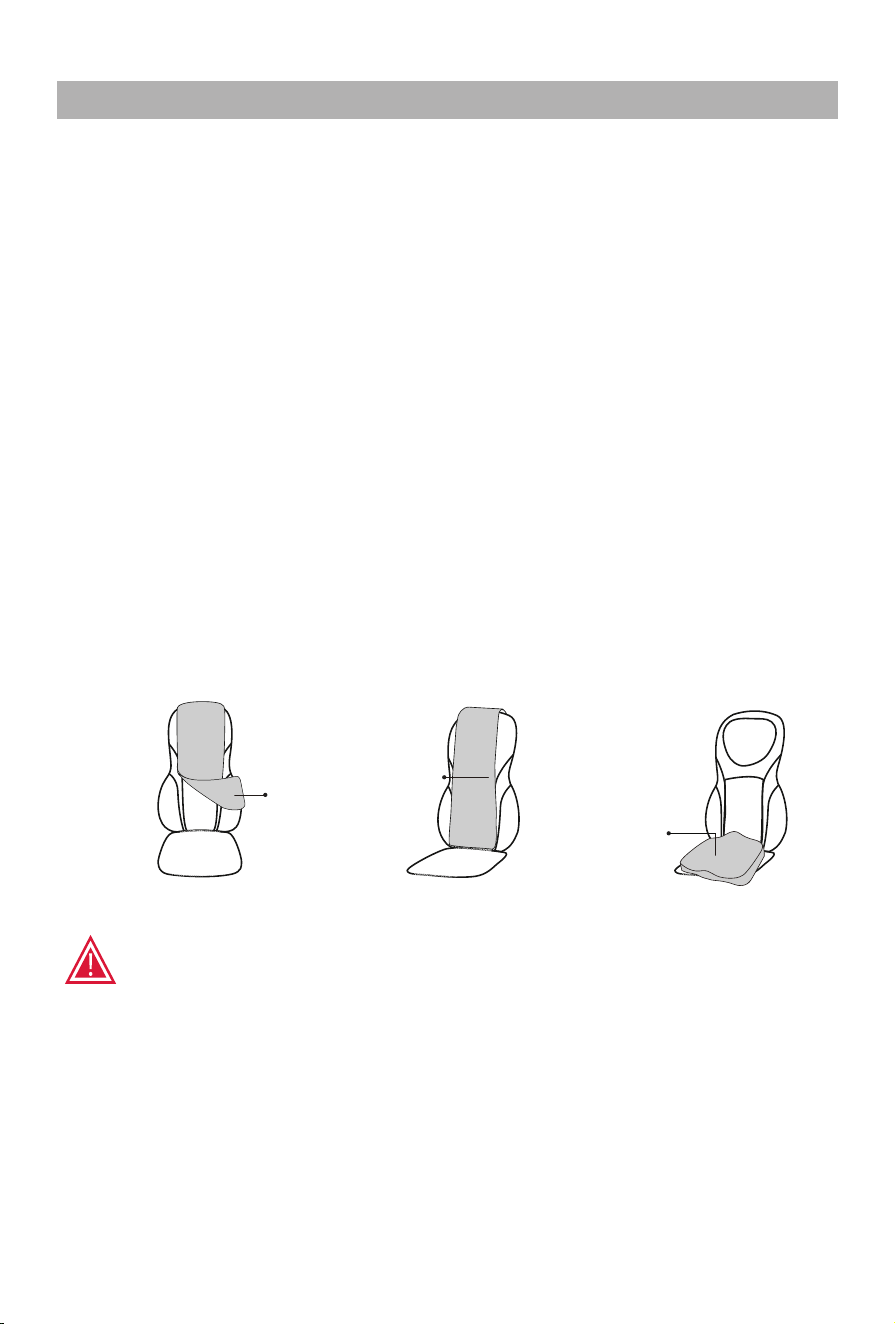
7. Detachable intensity control flap for back lets you choose a so�er or more intense massage.
8. Detachable cover for neck lets you choose a so�er or more intense massage.
• You should allow your body some rest periods. To avoid straining your muscles
too much, we recommend to Not exceed a con�nuous massage of 15 Minutes
per �me and Not exceed 3 �mes use one day.
• The device will automa�cally switch off a�er 15 minutes �mer run out.
• Remove the adapter from the outlet when not in use.
• Do not setup or use the massager in a bathroom or similary wet / damp areas.
• Do not use this device while driving.
!A�en�on
Blanket
/Towel
① Install the flap onto the cushion to get a so�er massage.
①
②
③
② Place a blanket or towel between you and the massager to achieve a far
so�er massage intensity if you s�ll feel too strong shiatsu a�er installing
the flap onto the cushion.
③ If you want to massage your neck, shoulder, lower back, but the shiatsu nodes can not
reach the area in need, you may adjust the height of your back when si�ng, by placing
a seat cushion or a pillow on the si�ng part.
! A�en�on
If the shiatsu can’t reach your neck,shoulder or lower back area
If the Shiatsu is too strong,
Seat cushion
Removable
flap
TIMER
HEAT
NECK
SHIATSU ROLLING
SPOT
FULL
BACK
VIBRATION
UPPER
BACK
LOWER
BACK
HEAT
5
Controller Instruc�ons
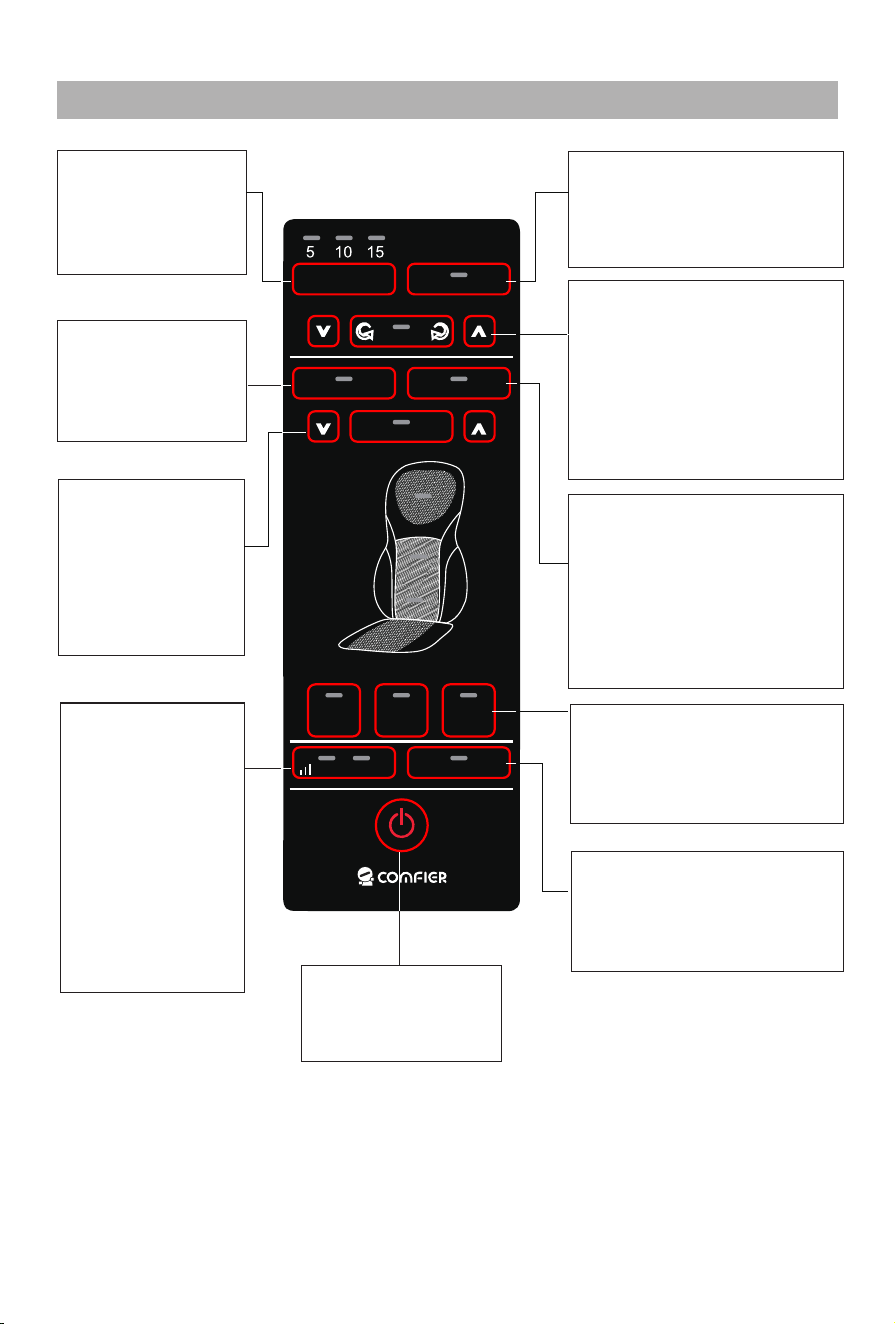
Timer Buon:
Press to set
massage �me at
5, 10 or 15
minutes
Press arrow bu�ons to
adjust the roller posi�on
up or down
Back Shiatsu
Buon:
Press to turn on
or off shiatsu
func�on on back
Spot Buon:
Press to keep
shiatsu func�on
in one area. Use
the arrow
bu�ons to adjust
the roller posi�on
up or down.
Vibraon Buon:
Press to ac�vate
the seat and
lumbar vibra�on.
You may cycle
through Mode 1
(the le� light
illuminate ),
Mode 2 (the right
lamp illuminate),
Mode 3 (two
lamps illuminate)
or off se�ngs.
Power Buon:
Press to turn on or
off the device
Neck Heat Buon:
Press to turn on or off
Heat. The heat can’t be
ac�vated if massage
func�on is not turned on
Back Heat Buon:
Press to turn on or off
Heat. The heat can’t be
ac�vated if massage
func�on is not turned on
Neck Shiatsu Buon:
Press to turn on Shiatsu
massage Press again to
shi� rota�on direc�on.
Press once again to turn
off neck massage.
Rolling Buon:
press to ac�vate Rolling
func�on, the massage
heads travel up & down
across the muscle gently.
Con�nue pressing the
bu�on to adjust the width
of the massage heads to
custom fit the body.
Shiatsu Area Buon:
Select Full ,Upper or Lower
Back, to designate the area
covered by the shiatsu
massage
6
Comfier App Guide
STEP 1
1.Download and Install free COMFIER App onto your smart phone.
Search COMFIER in the Apple App store or Google play store,
or Scan below QR code
2. Open the App and follow set-up pairing instruc�ons:
2.1 Register your account in the COMFIER App using your email.
2.2 Enable bluetooth on your smart phone.
(For IOS:Please ensure that the mobile phone OS version is 12.0 or later )
For iOS users, please ensure that the iOS version is 12.0 or later,
iOS 13 requires Bluetooth permissions:
a. Go to se�ngs
b. Scroll down to find the COMFIER App,
c. Switch on the Bluetooth permissions for the COMFIER App.
For Android users,ensure loca�onal data is turned ON.
Through APP, you can easily operate massage device to get a wonderful
massage in a smart way.
7
Comfier App Guide
STEP 2
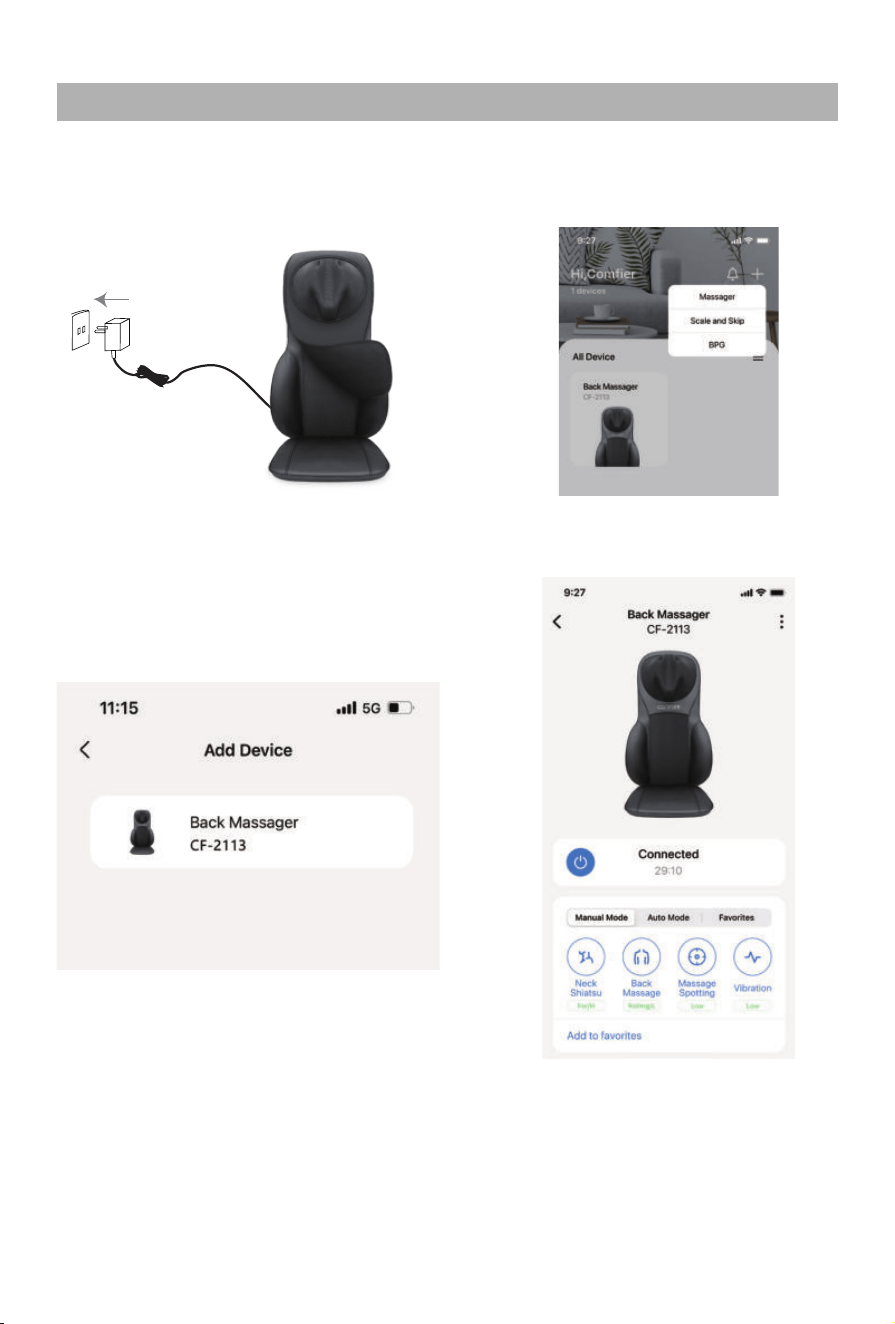
b.Tap+ and Choose“Massager”
on the App page.
a.Connect the adapter cable
to the back massager,then
open the COMFIER App
c.Tap the device name on the
pairing page.
d.Pairing is successful when
'connected' shows on the
App page.
Pairing the COMFIER Massager with your smart phone.
Now you can use the App on your smartphone to control your
massager as you wish!
Care and Cleaning Instruc�ons
TROUBLESHOOTING GUIDE
1. Do not wash in washing machine or immerse the product or the adapter in water.
2. Always switch off before cleaning and remove the adapter from the socket with clean,
dry hands.
3. The massager should be wiped with a slightly moist cloth and dried thoroughly. Do
not wipe the
product with alcohol or harsh chemicals such as thinner or bleach.
4.
The Cover for neck is detachable and washable.
5. Do not overstretch the elas�c back straps.
6. Keep away from heat, fire or exposure to direct sunlight.
7. Do not apply excessive pressure or impact onto massager/massage heads. Applica�on
of a direct force in excess of 110 lbs. may damage your massager and invalidate your
warranty. Refrain from
over usage of the device.
8. Store the massager in a cool, dry place out of reach of children.
9. Avoid contact with sharp edges or pointed objects which might cut or puncture
the cover of massager.
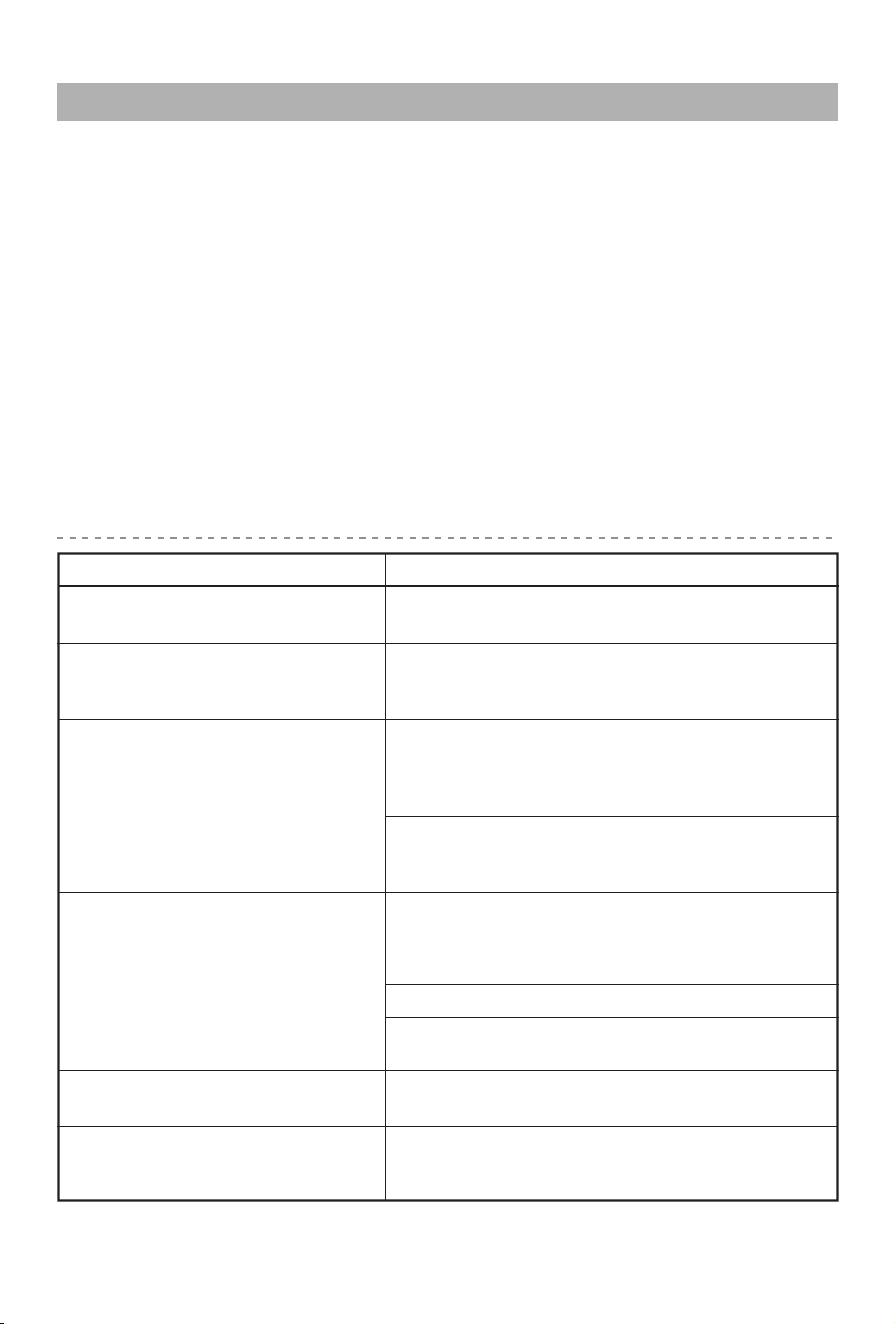
Massage heads rota�ng at
reduced speed.
Massage heads only rotate in
the upper or lower region.
Device switches off suddenly
Jerky mo�on of massage
heads / Vibra�ons from device
Excessive pressure may have been applied
onto the device. Reduce the load and try again.
Device may be jammed. Remove pressure /
load from the device and press the 'Full Back'
bu�on to try again.
Infra-red lights are on but no
mo�on from massage heads
Fault Solutions
The load on the massage heads is excessive.
Reduce load and try again.
The massage has been ac�vated for the upper
or lower back region. Press the 'Full Back'
bu�on for the massage to cover both regions.
Device may have been in use for 15mins.
Auto-shut-off func�on ac�vated. Con�nue
using by pressing the ‘power’ bu�on a�er
res�ng the unit for 15mins.
Over-heat protec�on func�on ac�vated.
Device is switched off for your safety. Please
rest device for 15-30mins before restar�ng.
Check if adapter is plugged into socket.
Check if adapter output is connected to
device power inlet wire.
Check if device has been used for more than
15mins. If so, let device rest for 15mins before
con�nuing. Device may require longer �me to
cool in warmer environments.
Device fail to start
8

9
Warranty
If the product(s) is damaged or defec�ve within a reasonable �me, COMFIER offers the
warranty as below.
Valid proof of purchase under this Warranty:
Order numbers from online purchases made through Comfier official store (www.comfier.com)
or Comfier's direct-authorized resellers, currently only at Amazon/eBay/Walmart. For product(s)
obtained from other Channels, please contact the customer service of the Channel directly for
appropriate solu�on.
Warranty Claim Procedures:
1. Any product the customer believes is defec�ve and seeks for warranty, the customer must
provide to Customer Support:
2. If the warranty claim is jus�fied by Comfier Customer Support, customer(s) will obtain from
Comfier a Warranty/Return Authoriza�on Number (RMA Number)
3. Comfier reserves the right to specify that items be returned to the designated warehouse for
inspec�on or be inspected by our representa�ve in the field or be retained by customer.
4. Any claim for defec�ve merchandise returns must be packed in original packaging
5. The item(s) will be repaired or replaced or a refund credit will be issued once the item(s)
are delivered. When returning items with RMA# and a prepaid shipping label provided by
Comfier, Comfier takes responsibility for any damage or loss incurred in transit.
a) Valid proof of purchase (see below the defini�on of valid proof of purchase);
b) Pictures and/or descrip�on are required to claim defec�ve merchandise;
c) Model number and Series Number label a�ached to each product
Period
Within 30 Days
31- 90 Days
91 Days - 1 Year
1 Year - 3 Years
Return for refund
Yes
Yes a�er being jus�fied
No
No
Return for replacement
Yes if undamaged
Yes a�er being jus�fied
Yes a�er being jus�fied
Who paid shipping?
Comfier
Comfier
Buyer
Only to buyers who have
received extended warranty
Buyer
Comfier warrants the product to be free from defects in workmanship and materials, under
normal use, for a period of 12 months from the original invoice date, except as noted below.
Comfier products can be repaired or replaced within warranty period or returned for refund
within 90 days if the products break down in the period of proper use.
The warranty extends only to consumers, NOT to any retailers or resellers. This warranty is
effec�ve only if the product is purchased and operated in the country in which the product is
purchased. Warranty claims for product defects, unless extended warranty is registered,
expire 12 months from the purchase day. Warranty claims CANNOT be processed for items
that have exceeded the warranty period. The warranty does NOT cover the replaced,
refurbished product. The warranty does have other limita�ons as below “Warranty
Limita�ons”. To obtain warranty service on Comfier products, follow “Warranty Claim
Procedures” below.
10
Warranty
1) Enter the following URL or scan the QR code below to find COMFIER facebook
page and like it, enter“Warranty” to messenger to extend your warranty from
1 year to 3 years.
h�ps://www.facebook.com/comfiermassager
OR 2) Send message“Warranty” and email us supportus@comfier.com to extend your
warranty from 1 year to 3 years.
Extend Warranty for Free
Warranty Limita�ons(this warranty does not include):
Refund Procedures:
(Refer to h�ps://www.comfier.com/pages/return-policy)
Warranty Disclaimer
THE WARRANTY PROVIDED HEREIN SHALL BE THE SOLE AND EXCLUSIVE WARRANTY. COMFIER
SHALL HAVE NO LIABILITY FOR, AND EXPRESSLY DISCLAIMS ANY WARRANTY OR AFFIRMATION
OF FACT, EXPRESS OR IMPLIED, OTHER THAN AS SET FORTH IN THIS WARRANTY STATEMENT,
INCLUDING, WITHOUT LIMITATION
(1) THE IMPLIED WARRANTIES OF MERCHANTABILITY AND FITNESS FOR A PARTICULAR PURPOSE;
(2) ANY WARRANTY OR AFFIRMATION OF FACT RELATED TO MISUSE, IMPROPER SELECTION,
RECOMMENDATION, OR MISAPPLICATION OF ANY PRODUCT; AND
(3) ANY WARRANTY OR AFFIRMATION OF FACT THAT THE CATALOGS, LITERATURE AND
WEBSITES IT PROVIDES ACCURATELY ILLUSTRATE AND DESCRIBE PRODUCTS.
Comfier reserves all the right for final interpreta�on of these Terms of Warranty and Return
Policy above and the aright to change, modify, add or remove por�ons of these terms at any
�me without prior no�fica�on.
Normal wear and tear; Any condi�on resul�ng from other than ordinary residen�al wear or
any use for which the product was not intended, such as use in rental or contract trade or
commercial use; Any condi�on resul�ng from incorrect or inadequate maintenance or care;
Damage resul�ng from misuse, abuse, negligence, accidents or shipping damage, exposed to
environmental condi�ons temperatures, water, improper opera�on,improper installa�on,
improper use of electrical supply; transporta�on damage; the�,vandalism or;Damage
resul�ng from the a�achment or modifica�on of any unauthorized accessories;Fail to show
the valid proof of purchase;Lost or stolen products;Items that have expired their warranty
period; No quality-related issues (a�er 30 days of purchase);Free product/ Gi� offer by Comfier;
unauthorized repairs or modifica�on; Replaced or refurbished product.Dissa�sfac�on due to
buyer’s remorse (a�er 30 days of purchase).


NOTE: This equipment has been tested and found to comply with the limits for a Class B
digital device, pursuant to Part 15 of the FCC Rules. These limits are designed to provide
reasonable protec�on against harmful interference in a residen�al installa�on. This equipment
generates, uses and can radiate radio frequency energy and, if not installed and used in
accordance with the instruc�ons, may cause harmful interference to radio communica�ons.
However, there is no guarantee that interference will not occur in a par�cular installa�on.
If this equipment does cause harmful interference to radio or television recep�on, which can
be determined by turning the equipment off and on, the user is encouraged to try to correct
the interference by one or more of the following measures:
• Reorient or relocate the receiving antenna.
• Increase the separa�on between the equipment and receiver.
• Connect the equipment into an outlet on a circuit different from that to which the receiver
is connected.
• Consult the dealer or an experienced radio / TV technician for help.
This device complies with Part 15 of the FCC Rules. Opera�on is subject to the following two
condi�ons:
(1) this device may not cause harmful interference, and (2) this device must accept any
interference received, including interference that may cause undesired opera�on.
WARNING: Changes or modifica�ons to this unit is not expressly approved by the party
responsible for compliance could void the user's authority to operate the equipment.
FCC STATEMENT
*Please provide your order number before contac�ng customer support
Know more about Comfier
COMFIER TECHNOLOGY CO.,LTD
Address: 573 BELLEVUE RD NEWARK, DE 19713 USA
Tel: (248) 819-2623 (Monday-Friday 9:00AM-4:30PM)
Facebook: www.facebook.com/comfiermassager
Email: supportus@comfier.com
Web: www.comfier.com

