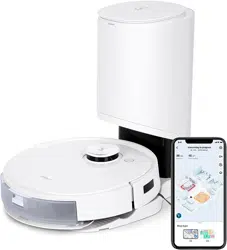

Instruction Manual

Instruction Manual �������������������������������������������������������������������������������������������EN I P03
Manuel d’instructions ������������������������������������������������������������������������������� FR-CA I P37
Manual de instrucciones���������������������������������������������������������������������������� ES-LA I P71

3 EN
Important Safety Instructions
IMPORTANT SAFETY INSTRUCTIONS
READ ALL INSTRUCTIONS BEFORE
USING THIS APPLIANCE.
When using an electrical appliance, basic precautions
should always be followed, including the following:
WARNING:
Read all safety warnings and instructions�
Failure to follow the warnings and instructions may result in
electric shock, fire or serious injury�
1� Do not allow to be used as a toy� Close attention
is necessary when used by or near children�
2� Clear the area to be cleaned� Remove power
cords and small objects from the oor that
could entangle the Appliance� Tuck rug fringe
under the rug base, and lift items such as
curtains and tablecloths off the oor�
3� If there is a drop off in the cleaning area due
to a step or stairs, you should operate the
Appliance to ensure that it can detect the step
without falling over the edge� It may become
necessary to place a physical barrier at the
edge to keep the unit from falling� Make sure
the physical barrier is not a trip hazard�
4� Only use as described in this manual� Only
use attachments recommended or sold by the
manufacturer�
5� Do not handle plug or appliance with wet hands�
6� Non-rechargeable batteries are prohibited�
7� Do not use without dust bin and/or lters in
place�
8� Do not operate the vacuum in an area where
there are lit candles or fragile objects on the
oor to be cleaned�
9� Do not use and store in extremely hot or
cold environments (below -5˚C /23˚F or
above 40˚C/104˚F)� Please charge the robot
in temperature above 0°C/32°F and below
40°C/104°F�
10� Keep hair, loose clothing, ngers, and all parts
of body away from any openings and moving
parts�
11� Do not operate the Appliance in a room where
an infant or child is sleeping�
12� For INDOOR use ONLY� Do not use the
Appliance in outdoor, commercial or industrial
environments� Do not use Appliance on wet
surfaces or surfaces with standing water�

4EN
13� Do not allow the Appliance to pick up large
objects like stones, large pieces of paper or
any item that may clog the Appliance�
14� Do not use to pick up ammable or
combustible materials such as gasoline,
printer or copier toner, or use in areas where
they may be present�
15� Do not pick up anything that is burning or
smoking, such as cigarettes, matches, hot
ashes, or anything that could cause a re�
16� Do not put any object into openings� Do not use
with any opening blocked; keep free of dust,
lint, hair, and anything that may reduce air ow�
17� Take care not to damage the power cord� Do
not pull on or carry the Appliance or Docking
Station by the power cord, use the power
cord as a handle, close a door on the power
cord, or pull power cord around sharp edges
or corners� Do not run Appliance and Docking
station over the power cord� Keep power cord
away from hot surfaces� Do not unplug by
pulling on cord� To unplug, grasp the plug, not
the cord�
18� If the power cord is damaged, it must be
replaced by the manufacturer or its service
agent in order to avoid a hazard�
19� Do not use with a damaged power cord or
plug� Do not use the Appliance or Docking
Station if it is not working properly, has been
dropped, damaged, left outdoors, or come in
contact with water� It must be repaired by the
manufacturer or its service agent in order to
avoid a hazard�
20� Turn OFF the power switch before cleaning or
maintaining the Appliance� Turn off all controls
before unplugging� Always turn off this
appliance before connecting or disconnecting
motorized nozzle�
21� Remove the Appliance from the Docking
Station, and turn OFF the power switch to
the Appliance before removing the battery for
disposal of the Appliance�
22� The battery must be removed and discarded
according to local laws and regulations before
disposal of the Appliance�
23� Please dispose of used batteries according to
local laws and regulations�
24� Do not incinerate the Appliance even if it is
severely damaged� The batteries can explode
in a re�

5 EN
25� When not using the Docking Station, unplug
from outlet when not in use and before
servicing�
26� The Appliance must be used in accordance
with the directions in this Instruction Manual�
ECOVACS HOME SERVICE ROBOTICS
cannot be held liable or responsible for any
damages or injuries caused by improper use�
27� Prevent unintentional starting� Ensure the
switch is in the off position before connecting
to battery pack, picking up or carrying the
appliance�
28� When battery pack is not in use, keep it away
from other metal objects, like paper clips,
coins, keys, nails, screws or other small metal
objects, that can make a connection from
one terminal to another� Shorting the battery
terminals together may cause burns or a re�
29� Under abusive conditions, liquid may be
ejected from the battery; avoid contact� If
contact accidentally occurs, ush with water�
If liquid contacts eyes, additionally seek
medical help� Liquid ejected from the battery
may cause irritation or burns�
30� Do not use a battery pack or appliance that is
damaged or modied� Damaged or modied
batteries may exhibit unpredictable behavior
resulting in re, explosion or risk of injury�
31� Do not expose a battery pack or appliance
to re or excessive temperature� Exposure to
re or temperature above 130°C may cause
explosion� The temperature of 130°C can be
replaced by the temperature of 265°F�
32� Follow all charging instructions and do
not charge the battery pack or appliance
outside of the temperature range specied
in the instructions� Charging improperly or at
temperatures outside of the specied range
may damage the battery and increase the risk
of re�
33� Have servicing performed by a qualied repair
person using only identical replacement parts�
This will ensure that the safety of the product
is maintained�
34� Do not modify or attempt to repair the
appliance or the battery pack (as applicable)
except as indicated in the instructions for use
and care�
35� Place the cords from other appliances out of
the area to be cleaned�

6EN
36� Do not operate the vacuum in a room that has
lit candles on furniture that the vacuum may
accidentally hit or bump into�
37� Do not allow children to sit on the vacuum�
38� Use only as described in this manual�
Use only manufacturer’s recommended
attachments�
39� Recharge only with the charger specied by
the manufacturer� A charger that is suitable for
one type of battery pack may create a risk of
re when used with another battery pack�
40� Use appliances only with specically
designated battery packs� Use of any other
battery packs may create a risk of injury and
re�
41� The robot contains batteries that are only
replaceable by skilled persons� To replace
the robot’s battery, please contact Customer
Service�
42� If the robot will not be used for a long time,
fully charge the robot and power OFF for
storage and unplug the Docking Station�
43� To Reduce The Risk Of Electric Shock – Do
not use on wet surfaces� Do not expose to
rain� Store indoors�
44� To Reduce The Risk Of Injury From Moving
Parts – Unplug Before Servicing�
45� Risk Of Injury� Brush May Start Unexpectedly�
Unplug Before Cleaning or Servicing�
46� To reduce the risk of injury, user must read
instruction manual�
47� To Reduce The Risk Of Electric Shock – Do
not use outdoors or on wet surfaces�
48� Please make sure your power supply voltage
matches the power voltage marked on the
Docking Station�
49� Do not use the Docking Station if it is
damaged�
50� The plug must be removed from the
receptacle before cleaning or maintaining the
Docking Station�
51� Connect to a properly grounded outlet only�
See Grounding Instructions�
52� Power Switch: “I”=ON, “O”=OFF�
7 EN
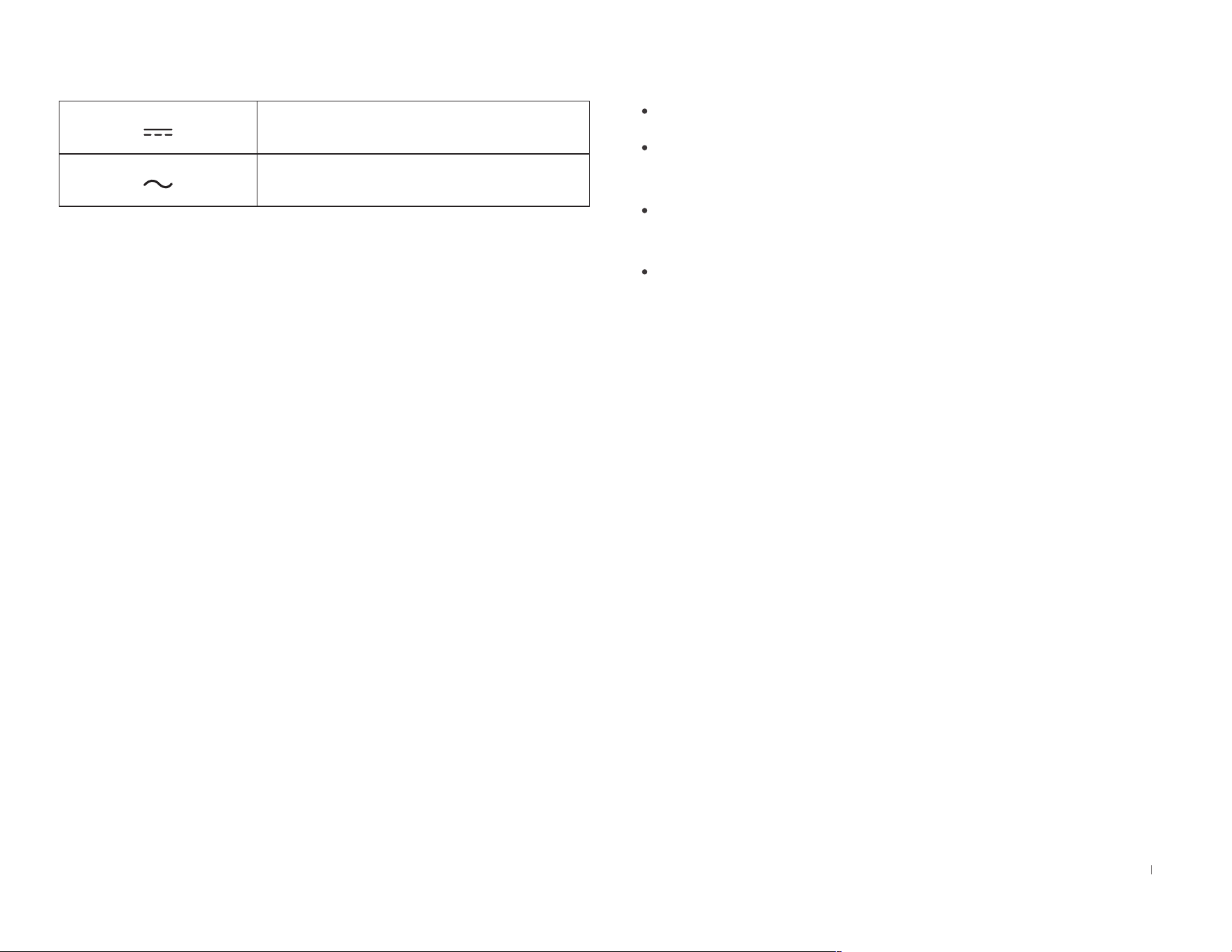
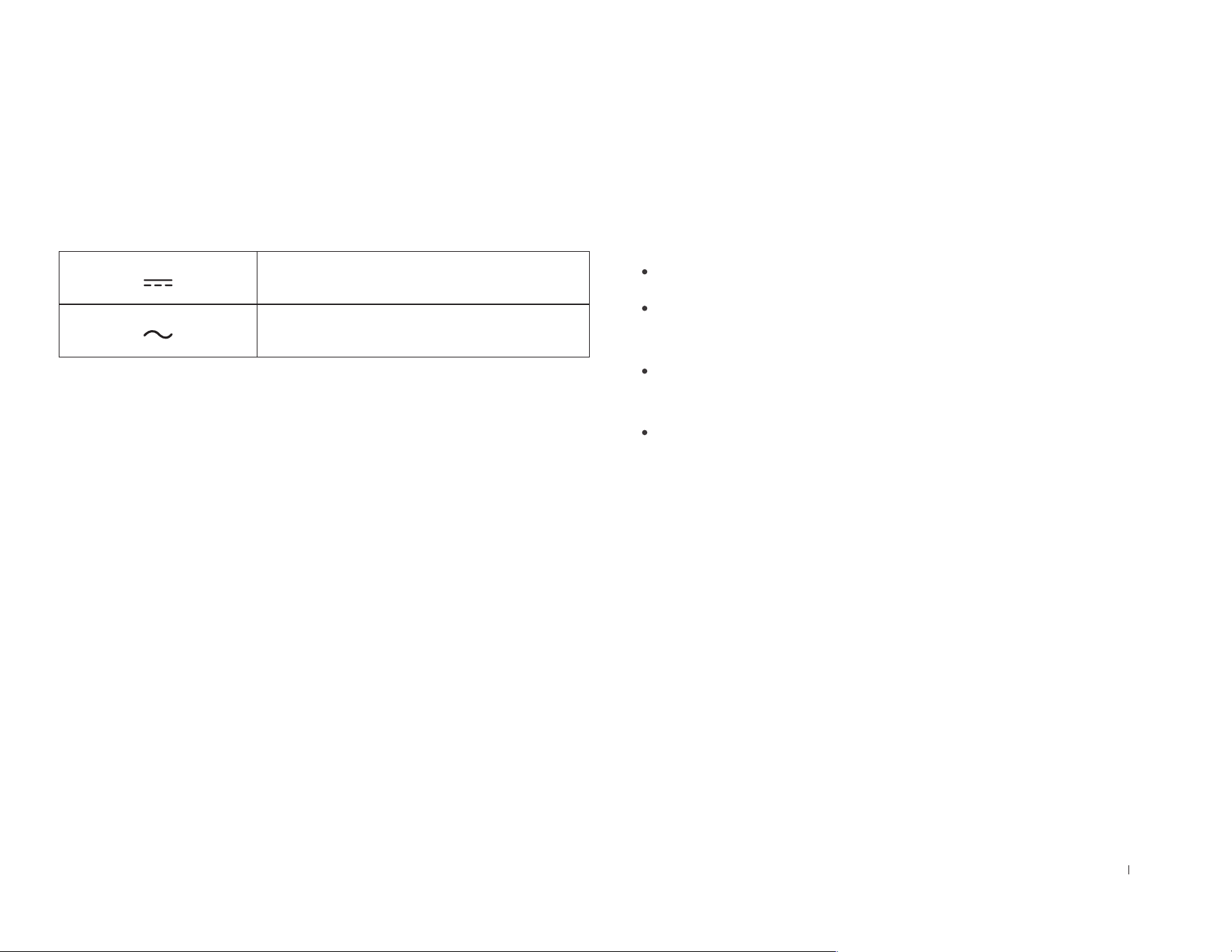
Direct current
Alternating current
This Device Complies with DHHS Radiation Rules,
21CFR Chapter 1, Subchapter J�
Federal Communications Commission (FCC)
Interference Statement
NOTE: This equipment has been tested and found to
comply with the limits for a Class B digital device, pursuant
to Part 15 of the FCC Rules�
These limits are designed to provide reasonable protection
against harmful interference in a residential installation� This
equipment generates, uses and can radiate radio frequency
energy and, if not installed and used in accordance with
the instructions, may cause harmful interference to radio
communications�
However, there is no guarantee that interference will
not occur in a particular installation� If this equipment
does cause harmful interference to radio or television
reception, which can be determined by turning the
equipment off and on, the user is encouraged to try to
correct the interference by one or more of the following
measures:
Reorient or relocate the receiving antenna�
Increase the separation between the equipment and
receiver�
Connect the equipment into an outlet on a circuit
different from that to which the receiver is connected�
Consult the dealer or an experienced radio/TV
technician for help�
This device complies with Part 15 of the FCC Rules�
Operation is subject to the following two conditions:
(1) This device may not cause harmful interference, and
(2) this device must accept any interference received,
including interference that may cause undesired
operation�
Caution: Changes or modifications to this unit not
expressly approved by the party responsible for
compliance could void the user's authority to operate the
equipment�
This device contains licence-exempt transmitter(s)/
receiver(s) that comply with Innovation, Science and
Economic Development Canada’s licence-exempt RSS(s)�
Operation is subject to the following two conditions:
(1) This device may not cause interference�
(2)
This device must accept any interference, including
interference that may cause undesired operation of the device�
8EN
RF exposure warning
This equipment complies with FCC radiation exposure
limits set forth for an uncontrolled environment�
This equipment must be installed and operated in
accordance with provided instructions and the antenna(s)
used for this transmitter must be installed to provide a
separation distance of at least 20 cm from all persons
and must not be collocated or operating in conjunction
with any other antenna or transmitter�
MPE caution (for mobile device under Part 15�247 &
15�407 device)
To satisfy FCC&ICRF exposure requirements, a separation
distance of 20cm or moreshould be maintained between the
antenna of this device and persons during device operation�
To ensure compliance, operations at closer than this
distance is not recommended�
To disable Wi-Fi module on DEEBOT, power the robot
ON� Place the robot on the OMNI Station making sure
the Charging Contacts on DEEBOT and the Station Pins
make a connection� And press and hold the AUTO Mode
Button on the robot for 30 seconds�
To enable Wi-Fi module on DEEBOT, power the robot OFF
and then power ON� And unplug the Station and plug it again�
Press and hold the Button on the Station for 30
seconds to shut down Light Strip� If you want to turn on
Light Strip, please short press the Button�
SAVE THESE INSTRUCTIONS
GROUNDING INSTRUCTIONS
This appliance must be grounded� If it should malfunction
or breakdown, grounding provides a path of least resistance
for electric current to reduce the risk of electric shock� This
appliance is equipped with a cord having an equipment-
grounding conductor and grounding plug� The plug must be
inserted into an appropriate outlet that is properly installed and
grounded in accordance with all local codes and ordinances�
WARNING – Improper connection of the equipment-grounding
conductor can result in a risk of electric shock� Check with a
qualified electrician or service person if you are in doubt as
to whether the outlet is properly grounded� Do not modify the
plug provided with the appliance – if it will not fit the outlet,
have a proper outlet installed by a qualified electrician�
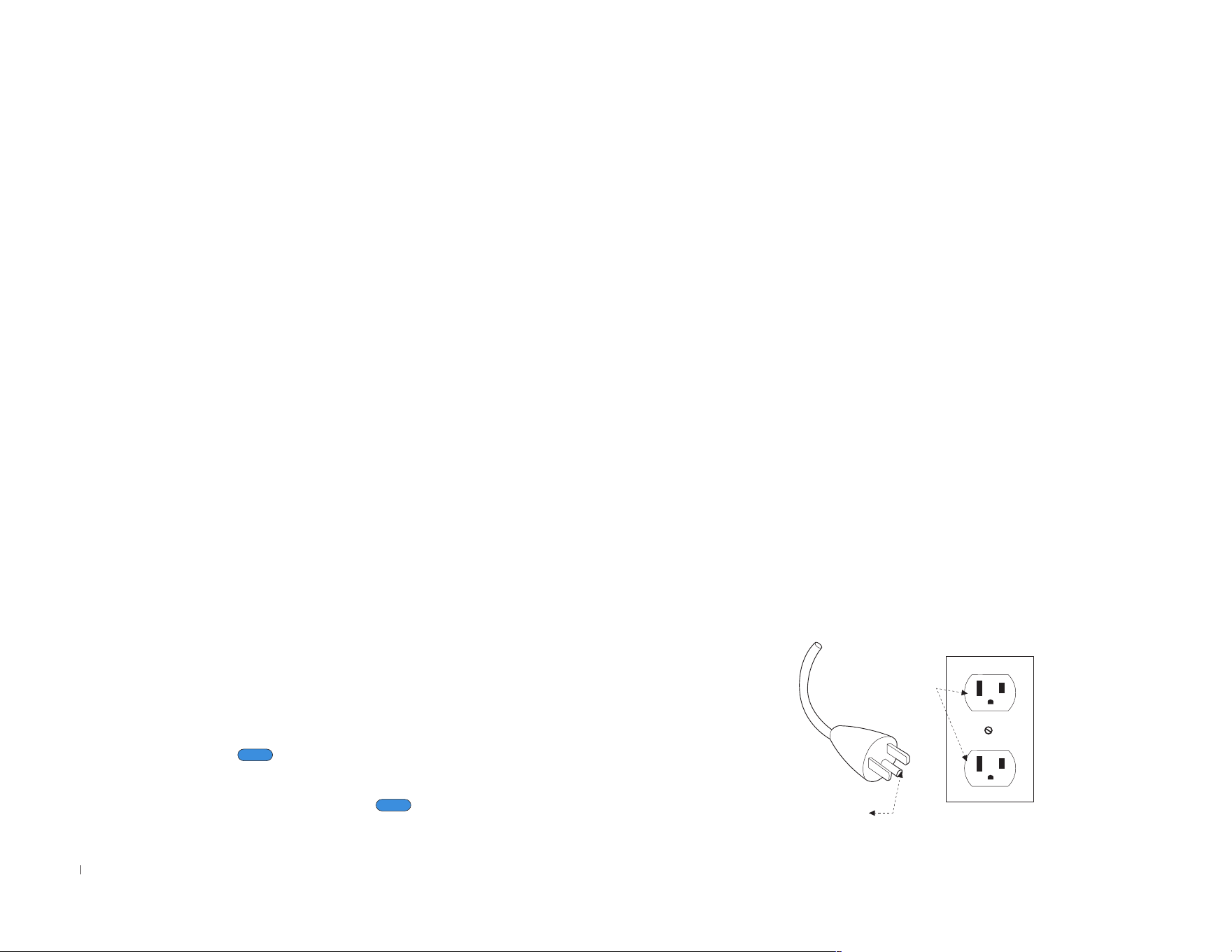
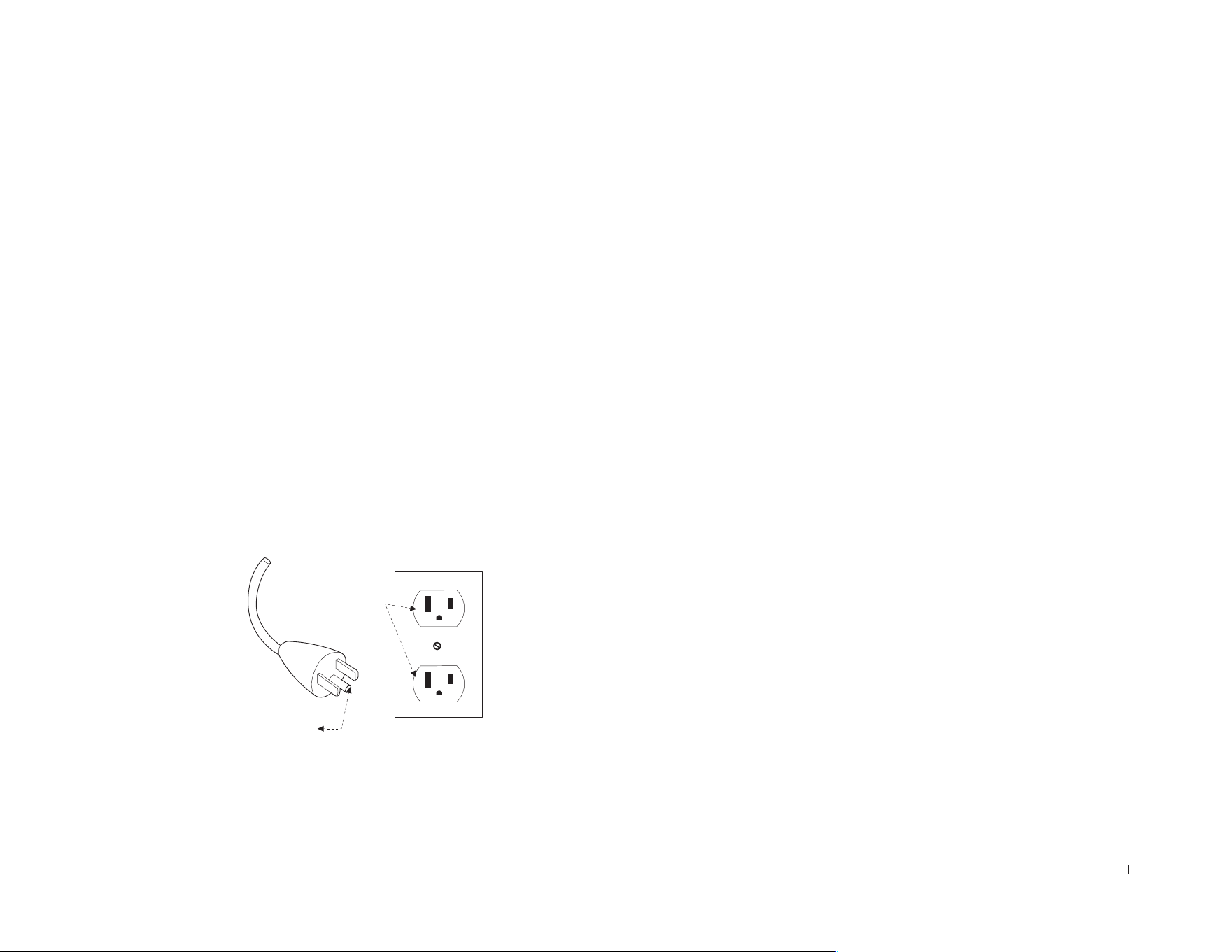
This appliance is for use on a nominal 120-V circuit and has a
grounding attachment plug that looks like the plug illustrated
as the following photo� Make sure that the appliance is
connected to an outlet having the same configuration as the
plug� No adaptor should be used with this appliance�
GROUNDING PIN
GROUNDED
OUTLET

9 EN
For INDOOR household use ONLY�
This device contains licence-exempt transmitter(s)/
receiver(s) that comply with Innovation, Science and
Economic Development Canada’s licence-exempt RSS(s)�
Operation is subject to the following two conditions:
(1) This device may not cause interference�
(2) This device must accept any interference, including
interference that may cause undesired operation of the
device�
To satisfy FCC&ICRF exposure requirements, a separation
distance of 20cm or more should be maintained between
the antenna of this device and persons during device
operation�
To ensure compliance, operations at closer than this
distance is not recommended�
Device Update
Typically, some devices are updated bi-monthly, but not
always so specific�
Some devices, especially those that went on sale more
than three years ago, will only be updated if a critical
vulnerability is found and fixed�
10EN
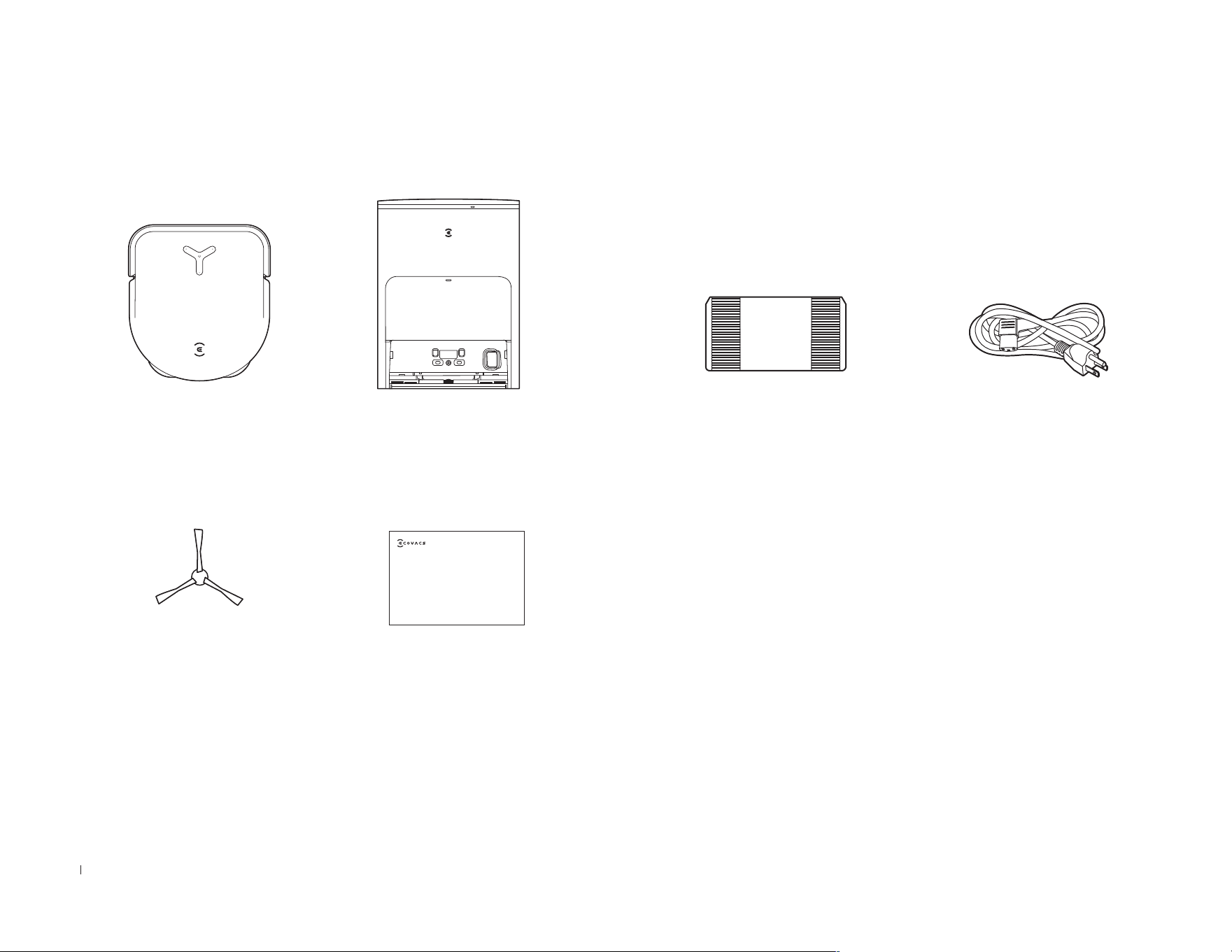
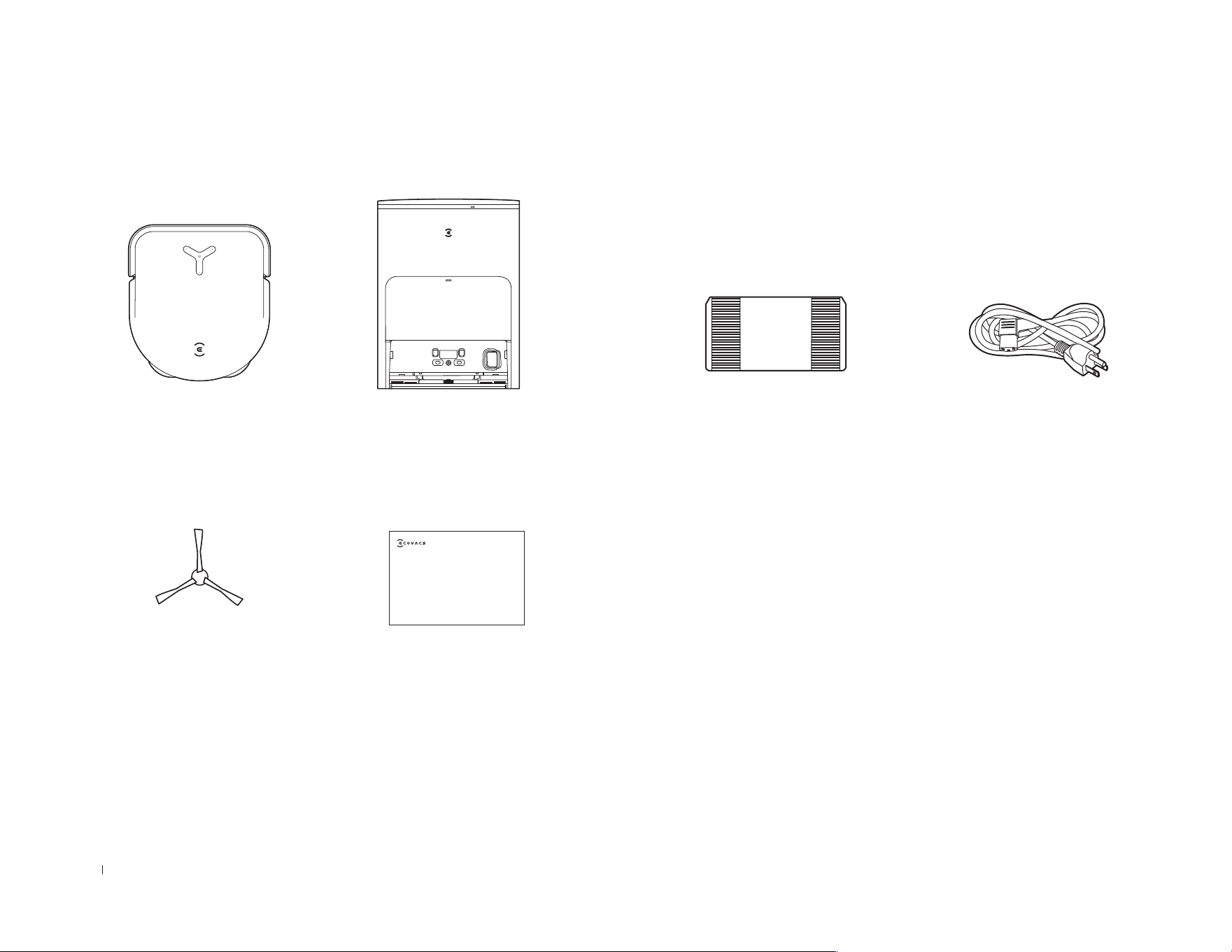
Package Contents
Robot
OMNI Station
Base
Instruction Manual
Side Brush
Power Cord
Instruction Manual
Note:
•
Figures and illustrations are for reference only and may differ from actual product appearance�
Product design and specifications are subject to changes without notice�
11 EN
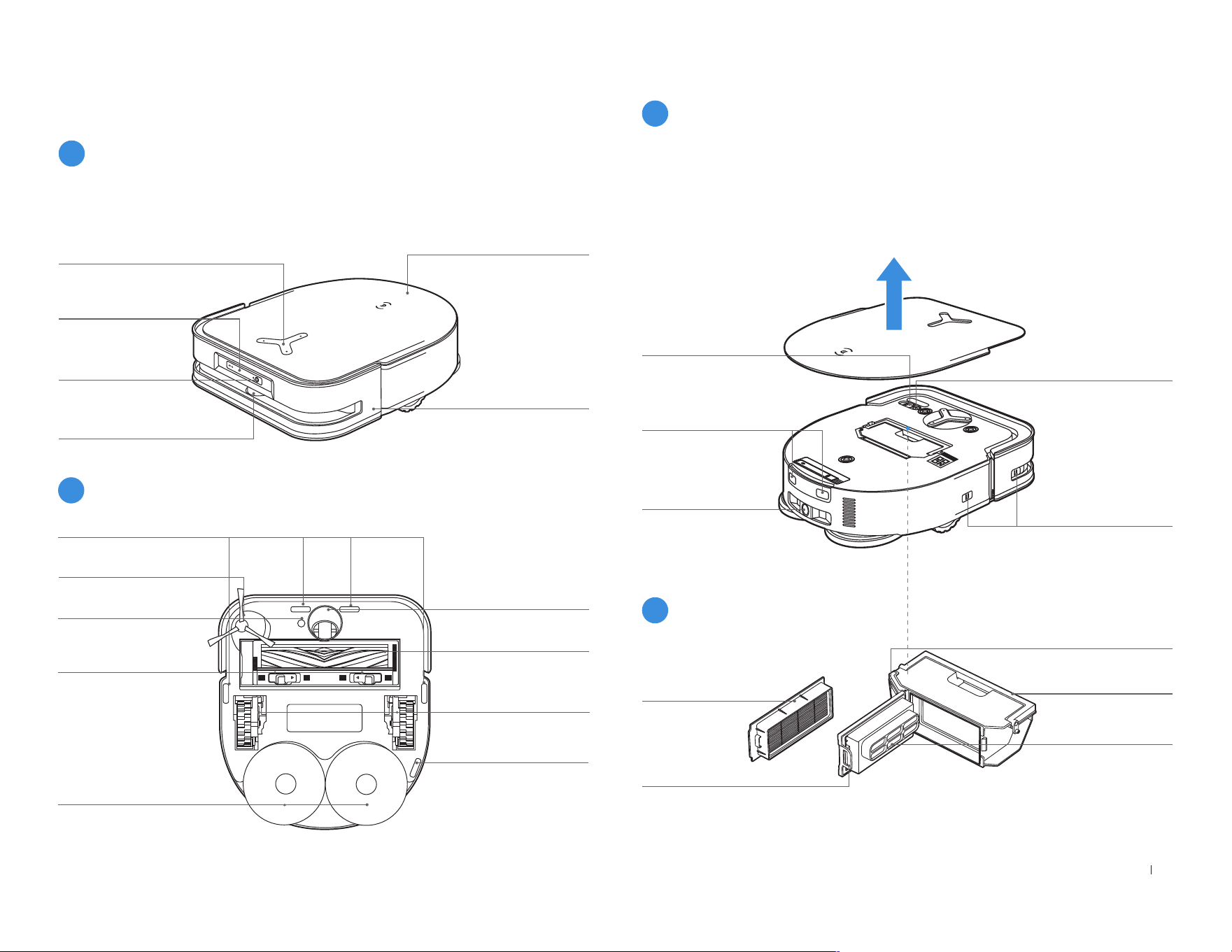
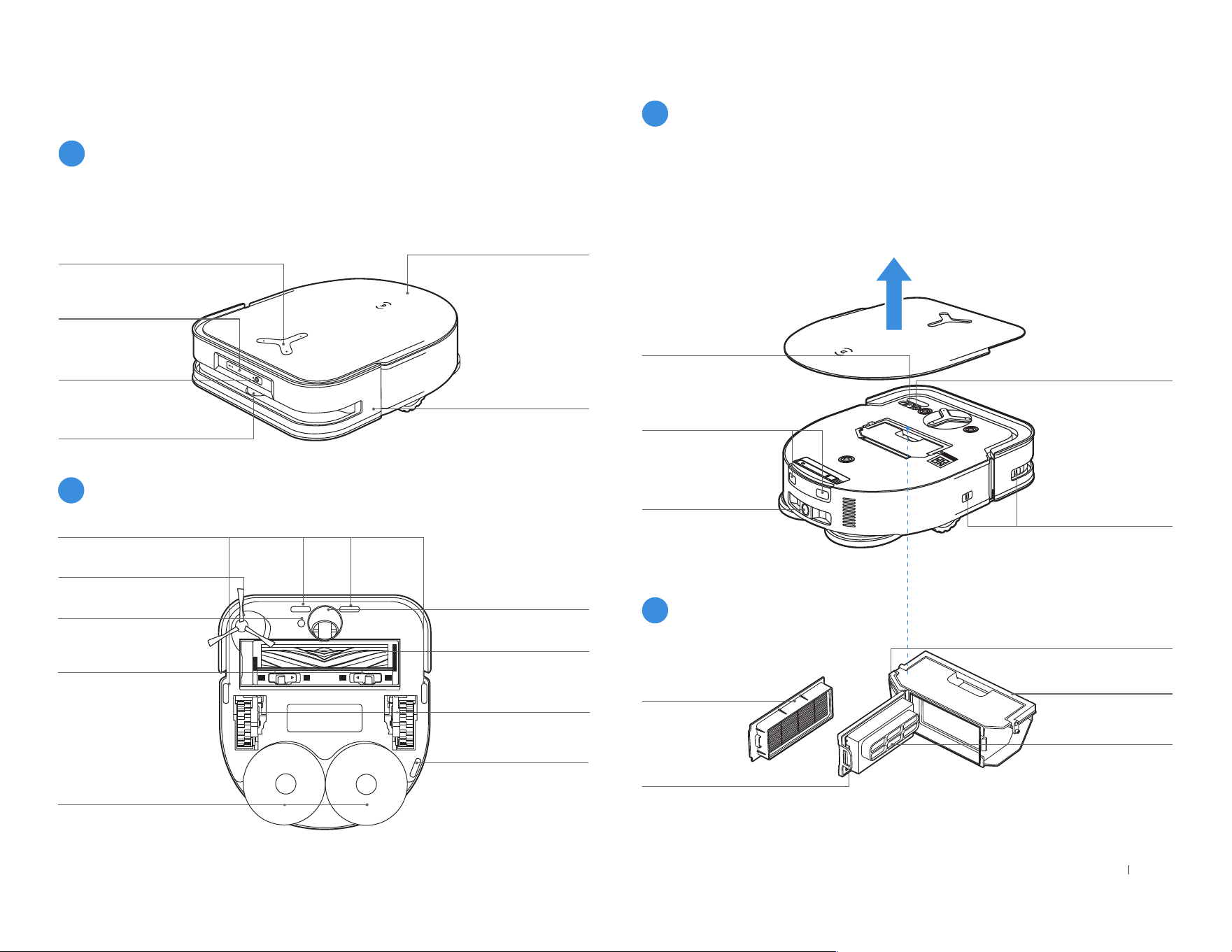
TrueDetect 3D
Sensor
Top Cover
Button on DEEBOT
Short Press: Start/Pause
Long Press for 3 s: Return to
charge
Anti-collision
Sensors and
Bumper
d-ToF Laser Module
Power Switch
"I"=ON
"O"=OFF
Press the Reset Button, the YIKO Assistant will guide you to connect
DEEBOT to your phone�
Restore to default settings: Press and hold RESET Button for 5
seconds� After you hear the voice prompt, the startup music will be
played and the robot will be restored to default settings�
Wi-Fi Status
Indicator/Reset
Button
Filter
Dust Disposal Port
Filter Net
Dust Bin Handle
Release Button
Charging Contacts
Water Filling Port
Edge Sensor
Driving Wheels
Universal Wheel
Side Brush
Carpet Detection
Sensor
Main Brush
Anti-Drop Sensors
Anti-Drop Sensors
Brush Release
Button
Washable Mopping
Pads
AIVI Camera
Product Diagram
1
Robot
2
Bottom View
3
RESET Button
4
Dust Bin
12EN
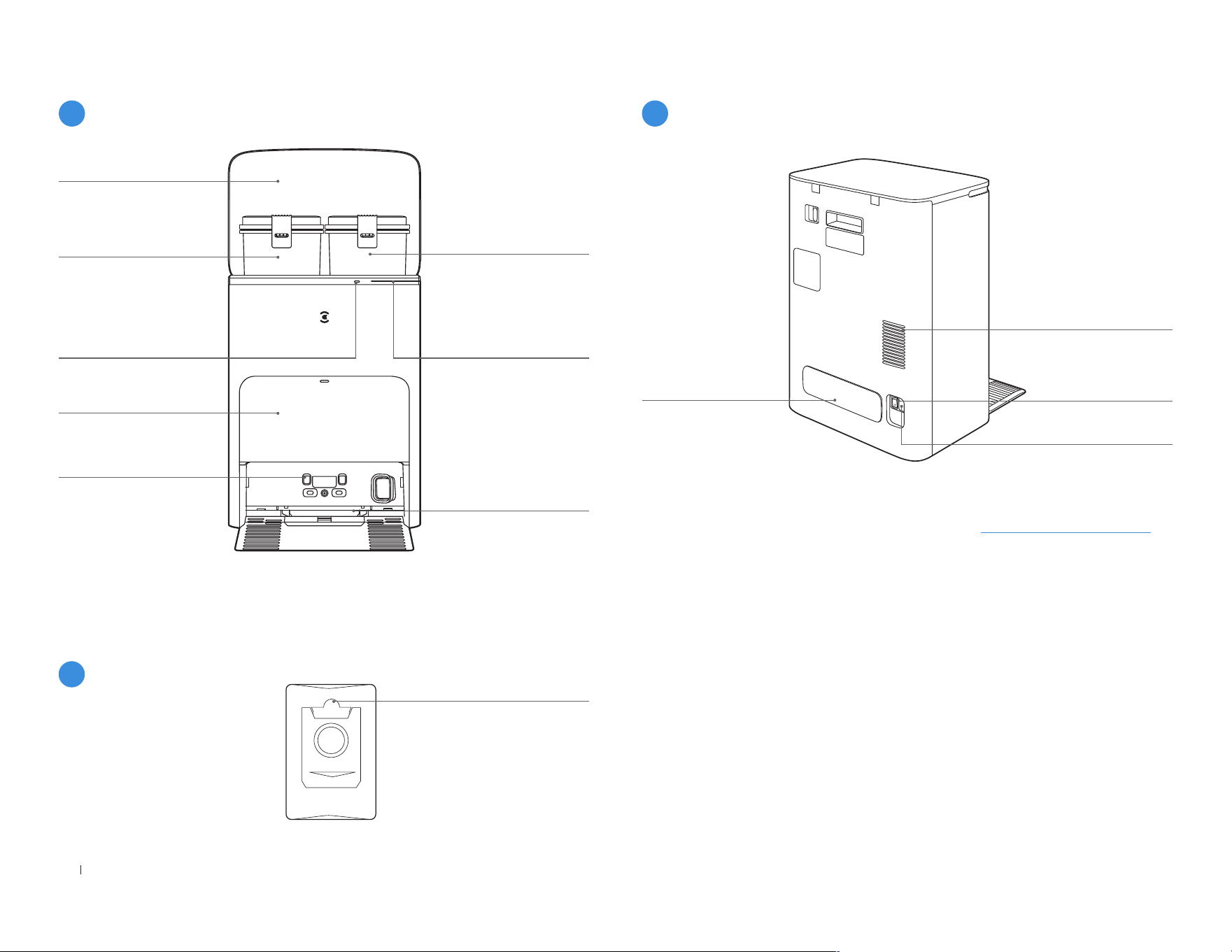
Dirty Water Tank
Dust Collection Cabin
Note:
Dust Bag Handle
Top Cover
Indicator Light
Solid Blue: Standby/
Running
Flashing Red: Malfunction
Light Goes out: Power
Outage/ Deep Sleep Mode
Button on Station
Short Press: Start/Pause
(DEEBOT in the Station)
Long Press for 3 s: Self-
clean
Mop Washing Tray
Clean Water Tank
Charging Contacts on
Station
• If the Indicator Light ashes red, check ECOVACS HOME App for details about
the malfunction�
• Wipe the charging contacts of the OMNI Station with a dry cloth if robot is
unable to get charged�
5
Station (Front)
6
Dust Bag
7
Station (Back)
Note:
• Compatible with the ECOVACS Automatic Water Refill/Drain Module� If you wish
to purchase it, please visit ECOVACS HOME App or https://www�ecovacs�com�
Cable Trunking
Air Vent
"I"=ON "O"=OFF
Rocker Switch
Power Socket

13 EN
Name Functional Description
d-ToF Laser
Module
With Laser Ranging-measuring the distance between DEEBOT and surroundings through the time difference of reection, it can map according to the
objects around while DEEBOT is moving� Detection of 10 m�
TrueDetect 3D
Sensor
The sensor emits infrared rays and receives the light reected from obstacles in front of it� With Infrared Ranging-measuring the distance between
DEEBOT and surroundings by using the Similar Triangle Method, it can identify and avoid the obstacles nearby� Detection of 0�8 m�
Anti-drop
Sensor
With Infrared Ranging-detecting the distance between the bottom of DEEBOT and ground by Infrared Sensor at the bottom, DEEBOT will not move
forward when there are stairs in front (For example: White ground height greater than 55mm� Black ground height greater than 30mm�) or the identied
distance exceeds the present one, realizing the Anti-drop�
Carpet Detec-
tion Sensor
The ultrasound probe can emit ultrasonic waves with a frequency of 300KHZ� The energy of the ultrasonic waves is absorbed by the carpet� If the
reected energy is below the threshold, the DEEBOT recognizes the presence of the carpet�
Anti-collision
Sensor
When the transmitted signal is blocked by an obstacle, the signal receiver will not be able to receive the signal� With this principle, DEEBOT will avoid
obstacles when colliding with them�
Edge Sensor
With infrared distance measurement, DEEBOT can detect the distance between itself and objects on its right side� When there is a wall or obstacle on
the right side, DEEBOT will perform edge cleaning to avoid missing spots or collisions�
AIVI Camera
With AI Camera’s surrounding image collection, it can make video recordings� Through interaction with the MIC, it can realize the Remote Voice Call�
FOV: Vertical 109�29°, Horizontal 155�7°�
Microphone
Vibrating the diaphragm through air by human voice, it can realize Voice Recording and ask DEEBOT to complete the assigned work by Voice Control�
Effective wake of 5m�
Sensors
14EN
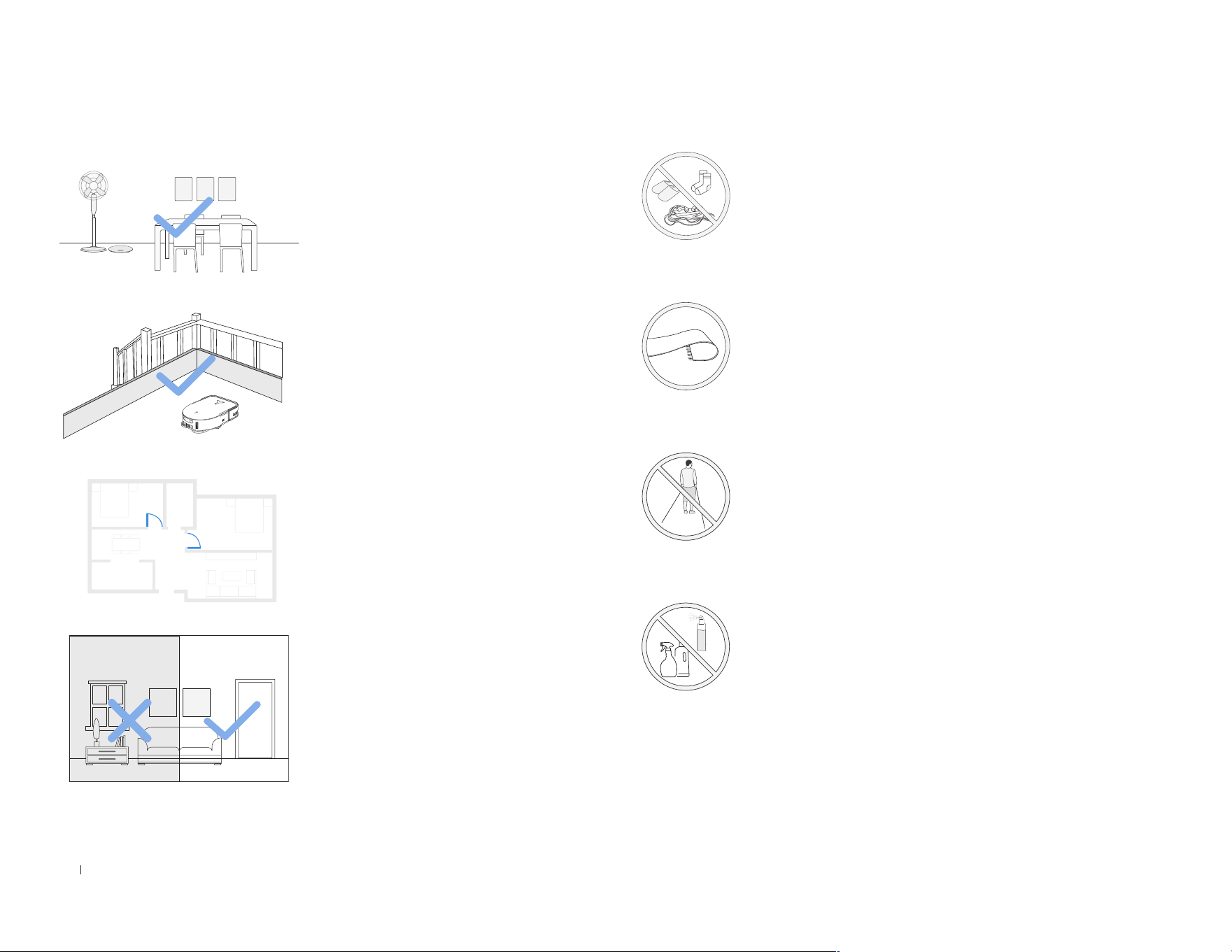
Notes before Cleaning
Tidy up the area to be cleaned by
putting furniture, such as chairs, in
their proper place�
During the rst use, make sure each
room door is open to help DEEBOT
fully explore your house�
It may be necessary to place a
physical barrier at the edge of a
drop to stop the unit from falling
over the edge�
Put away objects including cables, cloths and slippers,
etc� on the oor to improve the cleaning efciency�
Before using the product on a rug with tasseled edges,
please fold the rug edges under�
Please do not stand in narrow spaces, such as hallways,
and make sure not to block the d-ToF sensor�
Make sure areas to be cleaned are
well illuminated so AIVI Camera
works properly� Remove power
cords and small objects from the
oor to ensure cleaning efciency�
Clean the AIVI Camera and TrueMapping Distance
Sensor with a clean cloth, and avoid using any detergent
or cleaning spray�
15 EN
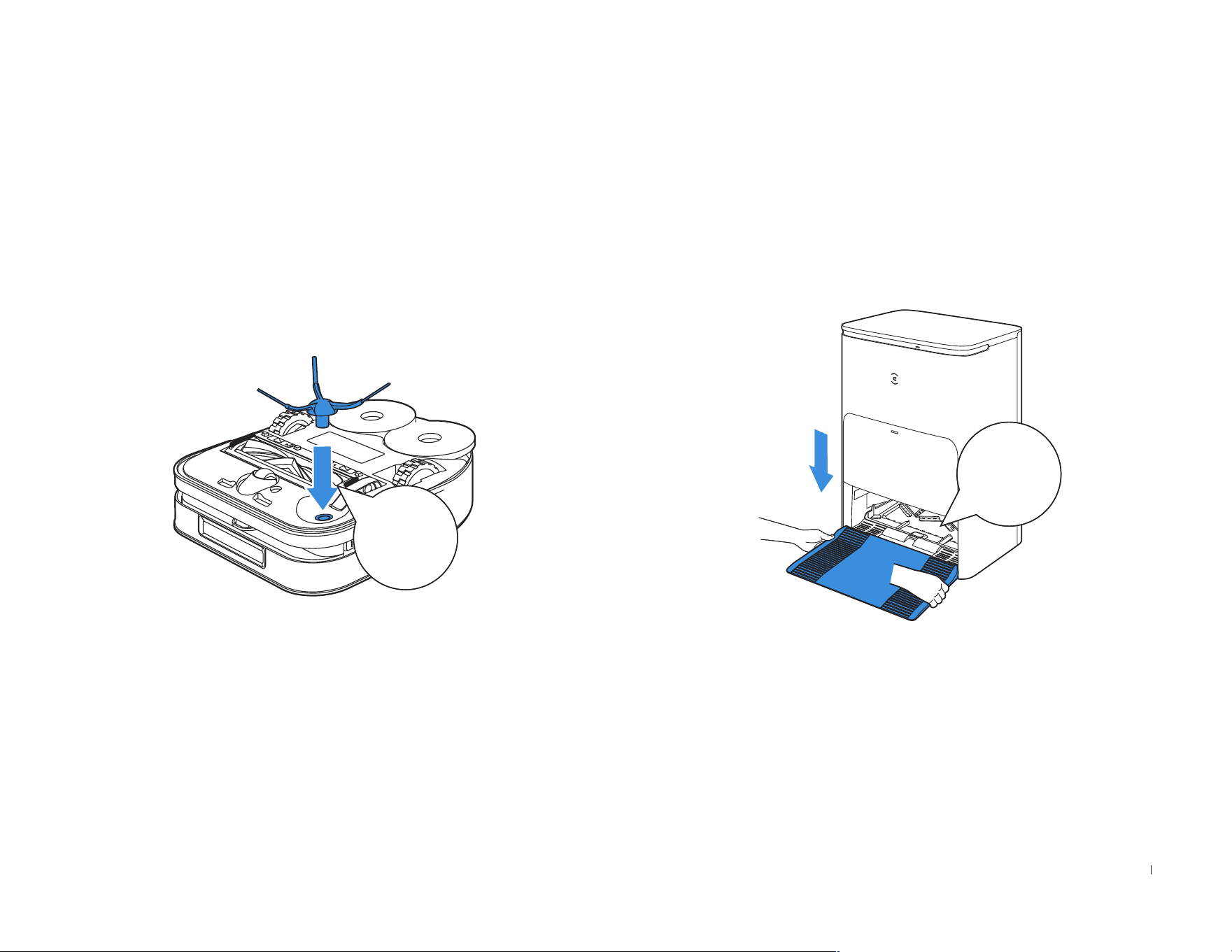
Installation
Before using, please remove all protective materials�
The sound of Click indicates proper installation�
QUICK START
Click
Click
16EN
Wi-Fi Indicator Light
Breathing White Disconnected to Wi-Fi
Solid White Connected to Wi-Fi
1. Via Bluetooth: Turn on the DEEBOT and mobile phone Bluetooth�
Allow the App to obtain mobile phone Bluetooth permission� Tap or
in the App� The App will automatically pop up a nearby robot�
Or scan the QR code to enter Bluetooth distribution mode�
2. Via Wi-Fi: You can also choose to connect DEEBOT with the App
through other methods according to the prompts on the App's page�
Note: Please connect via Bluetooth for a better experience�
Wi-Fi Network Requirements:
• You are using a 2�4GHz or 2�4/5 GHz mixed network�
• Your router supports 802�11b/g/n and IPv4 protocol�
• Do not use a VPN (Virtual Private Network) or Proxy Server�
• Do not use a hidden network�
• WPA and WPA2 using TKIP, PSK, AES/CCMP encryption�
• WEP EAP (Enterprise Authentication Protocol) is not supported�
• Use Wi-Fi channels 1-11 in North America and channels 1-13 outside
North America (refer to local regulatory agency)�
• If you are using a network extender/repeater, the network name (SSID)
and password are the same as your primary network�
• Please enable the WPA2 on your router�
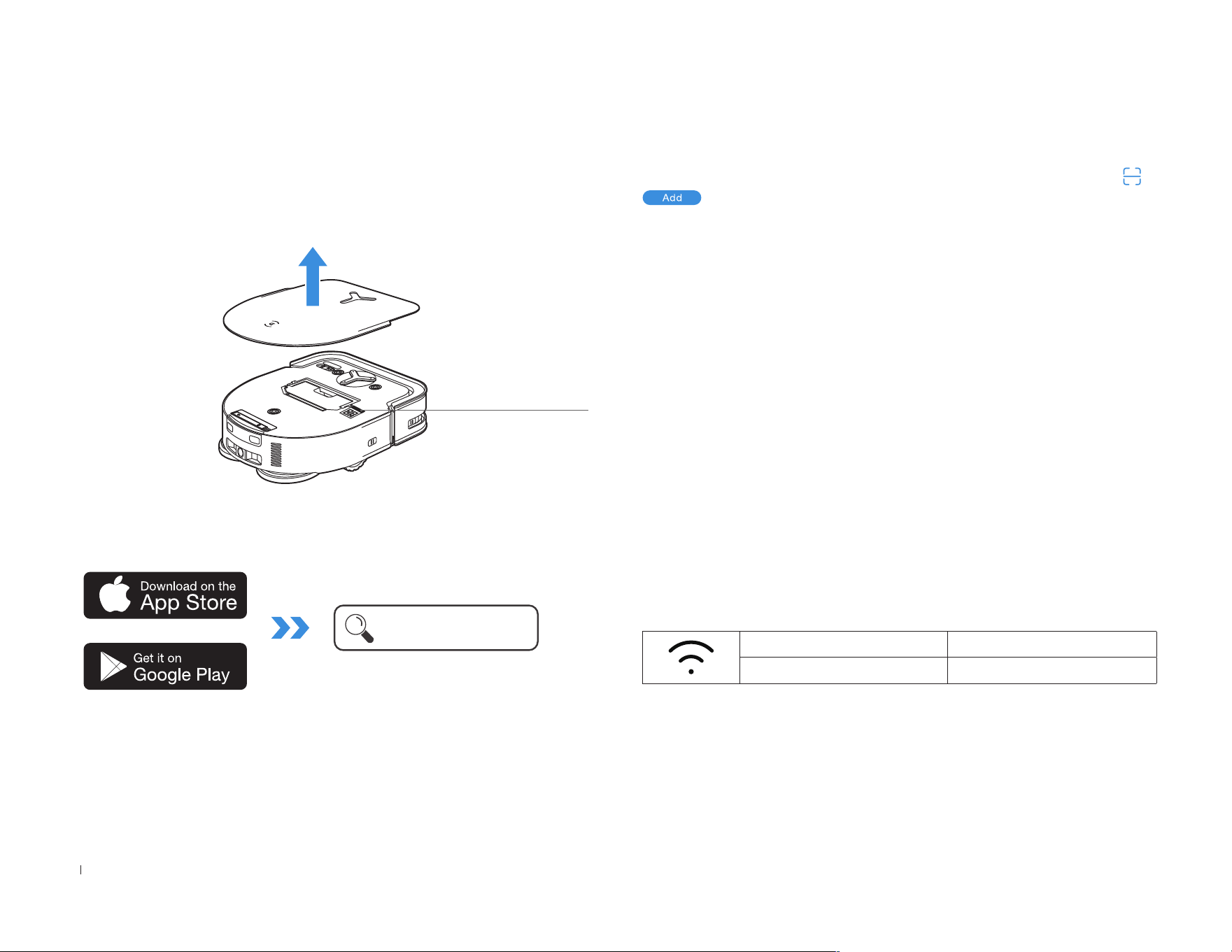
2� Search the ECOVACS HOME to download the App�
ECOVACS HOME
1� Scan the QR Code under the Top Cover to download the App�
Under the Top Cover
Download the ECOVACS HOME App
To enjoy all available features, it is recommended to control your
DEEBOT via the ECOVACS HOME App.
Connect DEEBOT with App
17 EN
Please be aware that the realization of intelligent functions such as
remote startup, voice interaction, 2D/3D map display and control
settings, and personalized cleaning (depending on different products)
requires users to download and use ECOVACS HOME App, which
is constantly updated� You need to agree to our Privacy Policy and
User Agreement before we can process some of your basic and
necessary information and enable you to operate the product� If you
do not agree with our Privacy Policy and User Agreement, some of
the aforementioned intelligent functions cannot be realized through
ECOVACS HOME App, but you can still use the basic functions of this
product for manual operation�
Under the Top Cover
Scan the QR Code under the Top Cover�
Get the Full Version of Instruction
Manual
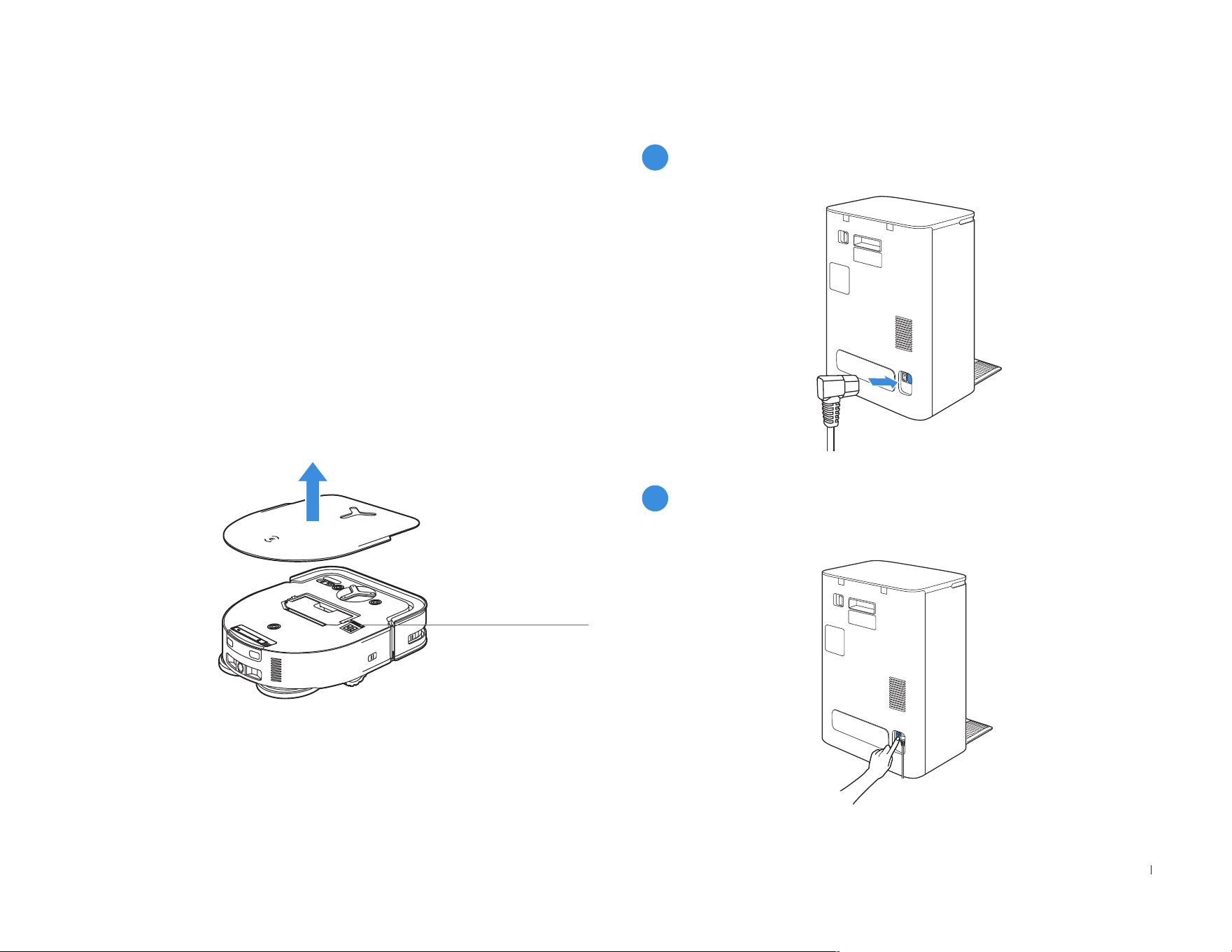
Charge DEEBOT
1
Assemble the Station
2
Turn on the Rocker Switch
"I"=ON "O"=OFF
DEEBOT cannot be charged when the Rocker Switch is OFF�
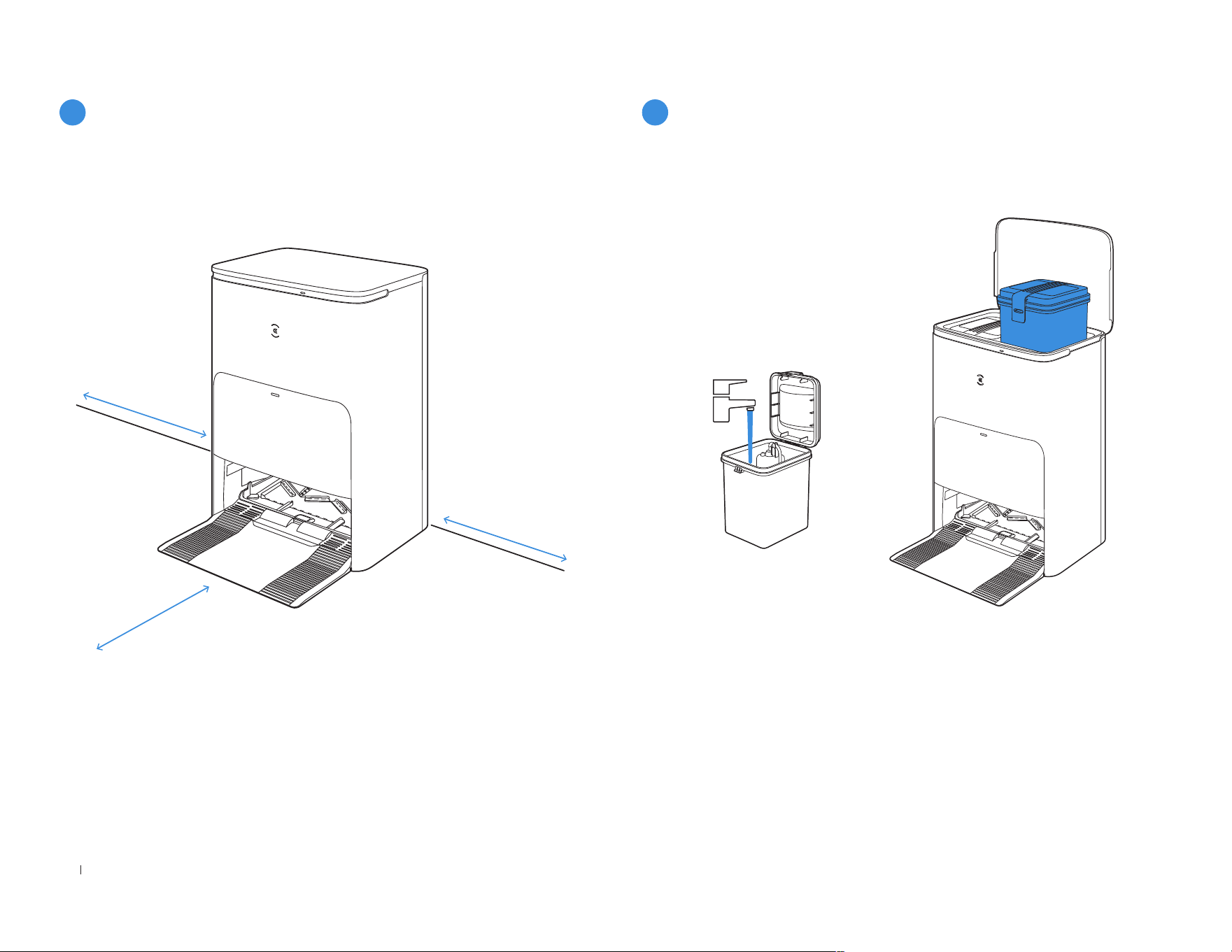
18EN
≥
0�05m (0�16’)
≥
0�05m (0�16’)
≥
0�8m (2�62’)
Keep the area around the Station clear of objects especially objects
with reective surfaces�
3
Place the Station
4
Use Water Tanks
Note: It is recommended to use ECOVACS DEEBOT Cleaning Solution
(sold separately)� Using other cleaning solution may cause DEEBOT
slipping, water tank block and other problems�
• If there are reective objects such as mirrors and reective skirting
lines near the Station, the bottom 14 cm of that should be covered�
• Do not place the Station under direct sunlight�
• Place Station in a location with a strong Wi-Fi signal�
19 EN
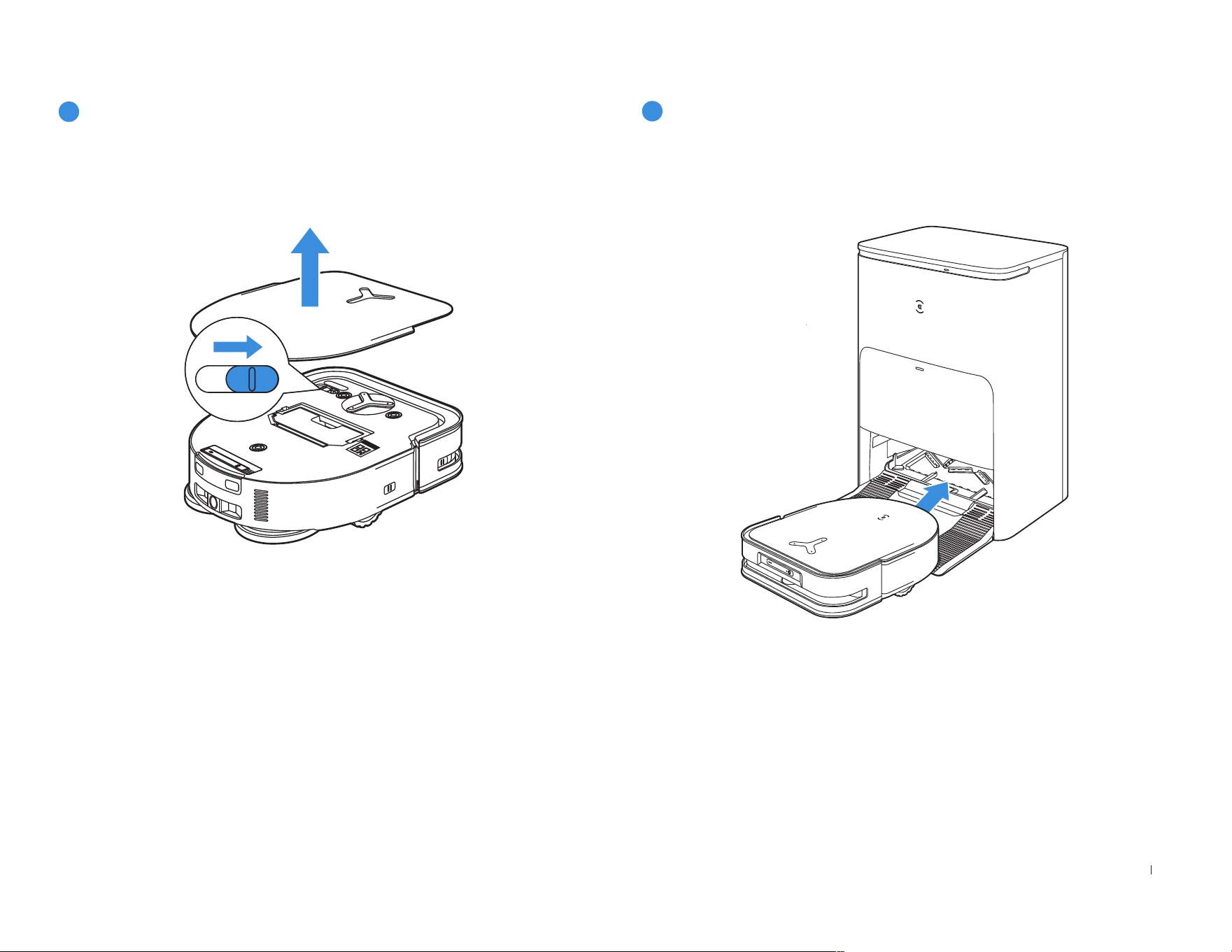
Make sure the Station is connected to the power supply� Use the
ECOVACS HOME App or voice to recall DEEBOT to enter the Station
to charge it up�
• It is recommended that DEEBOT start cleaning from the Station� Do
not move the Station while cleaning�
5
Power On
"I" = ON, "O"= OFF.
• DEEBOT can't be charged when the power is turned off�
• When DEEBOT is not working, it is recommended to keep it powered
ON and charging�
6
Charge DEEBOT
20EN
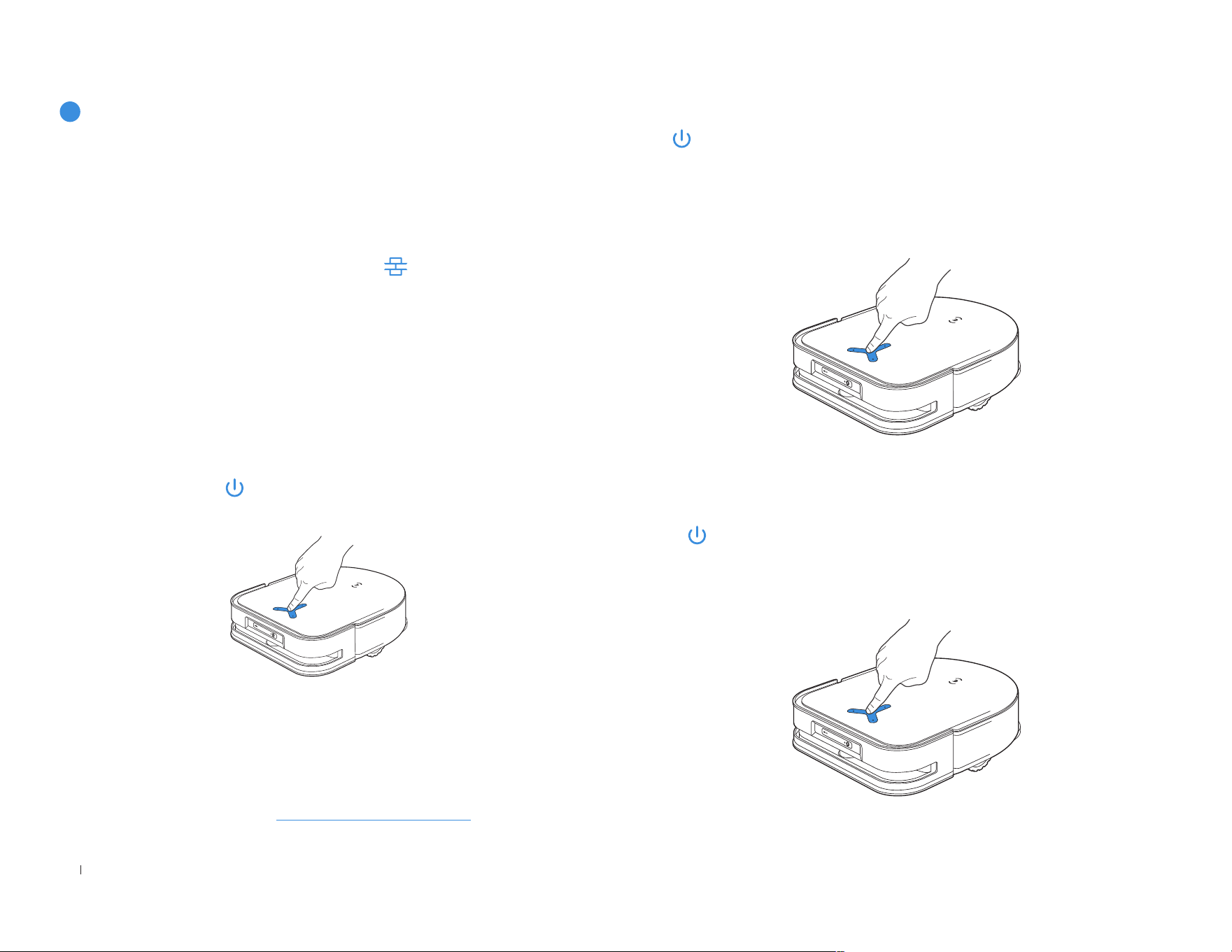
Tap on DEEBOT to pause during vacuuming� You can also use the
ECOVACS HOME App or YIKO voice command to pause DEEBOT�
3. Pause
The indicator light will go out after DEEBOT is paused for a few minutes�
Press on DEEBOT to wake it up� After stopping working for about 1
hour, DEEBOT may enter standby mode�
4. Wake up
Before rst vacuuming, please make sure the DEEBOT is in the Station
and fully charged� Tap on DEEBOT to start� You can also use the
ECOVACS HOME App or YIKO voice command to start DEEBOT�
2. Start vacuum
1. Create a map
When creating a map for the first time, please follow DEEBOT to help
eliminate some minor issues�
When mapping, DEEBOT will explore the house environment
automatically� The exploration path may be different from cleaning path�
Set up Virtual Boundary via the App: Map > > Virtual Boundary�
Order the DEEBOT to map by ECOVACS HOME App or voice�
• When mopping, DEEBOT will recognize oor types� DEEBOT is able
to lift mops automatically when encountering carpet� Please don't use
the DEEBOT on shaggy rugs or carpets with bres longer than 10mm�
It is recommended to fold up the shaggy rugs with bres longer than
10mm during the cleaning process, or set the shaggy carpeted area as
a No-Entry Zone by setting Virtual Boundary in the ECOVACS HOME
App�
Note:
• Do not frequently remove washable mopping pads�
• Do not use a rag or any other object to scratch the Moping Pad
Plates�
• When the ECOVACS HOME App prompts that the mops need to be
replaced, please replace them in time� Explore more accessories at
ECOVACS HOME App or at https://www�ecovacs�com�
7
Operate DEEBOT
21 EN
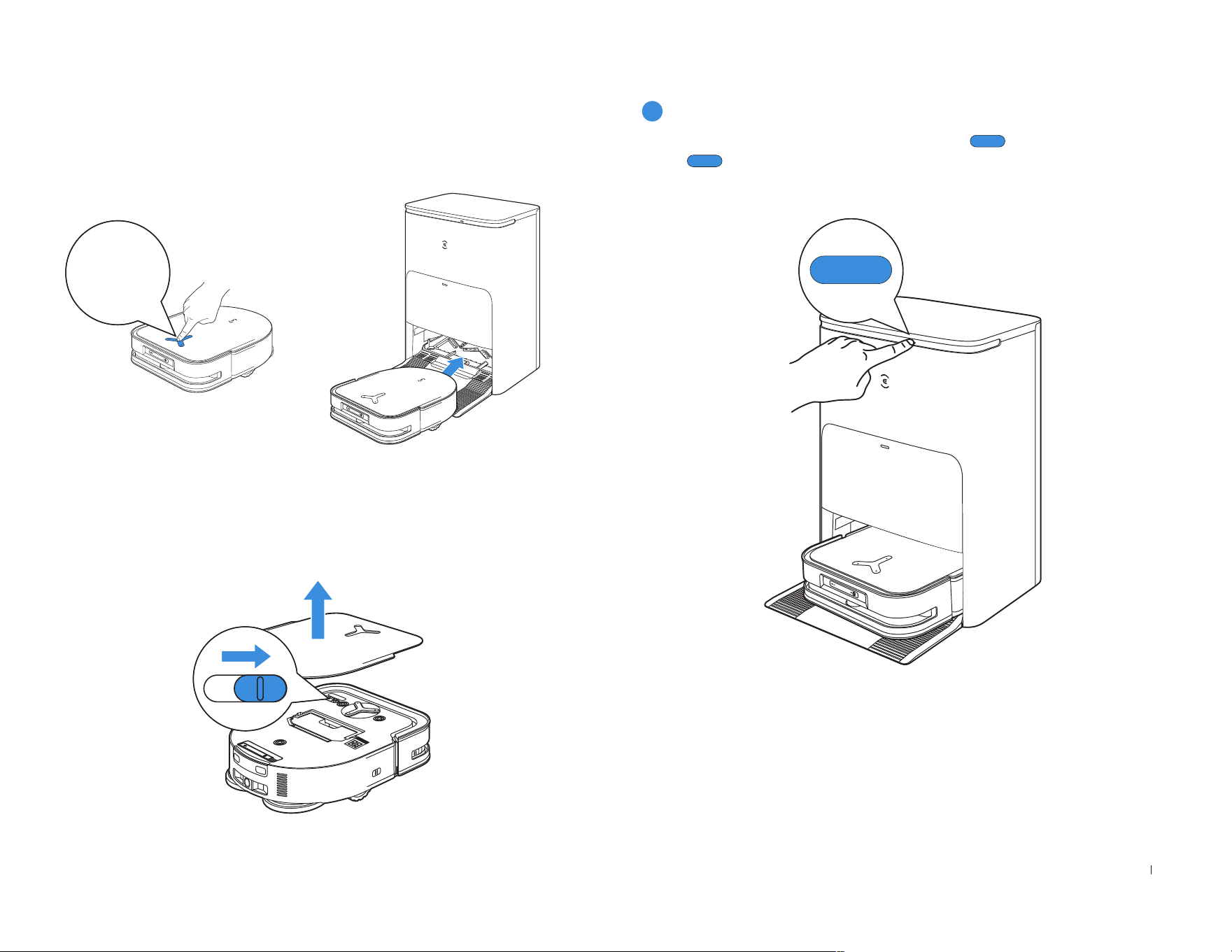
Use the ECOVACS HOME App or voice to recall DEEBOT to enter the
Station to charge it up� Long press the button for 3 s on the DEEBOT
can also recall it�
5. Back to Station
3 s
DEEBOT will enter deep sleep mode to protect the battery if the
DEEBOT stays outside the Station for about 5 h� Please switch OFF
and ON to wake up the DEEBOT�
6. Deep Sleep Mode
When DEEBOT is in the Station, short press to start/pause� Long
press to self-clean the Station�
8
Station

22EN
Regular Maintenance
To keep DEEBOT running at peak performance, perform maintenance tasks and replace parts at the following frequencies:
Robot Part Maintenance Frequency Replacement Frequency
Washable Mopping Pad / Every 1-2 months
Dust Bag / Every 2-3 months
Side Brush Once every 2 weeks Every 3-6 months
Main Brush Once per week Every 6-12 months
Filter Once per week Every 3-6 months
TrueDetect 3D Sensor
Universal Wheel
Anti-Drop Sensors
Anti-collision Sensors and Bumper
Charging Contacts on DEEBOT
Charging Contacts on Station
d-ToF Laser Module
About 1 month /
Mop Washing Tray About 150 days /
Clean Water Tank Every 3 months /
Dirty Water Tank Once per month /
Dust Collection Cabin Once per month /
OMNI Station Once per month /
Note: Explore more accessories at ECOVACS HOME App or at https://www�ecovacs�com�
23 EN
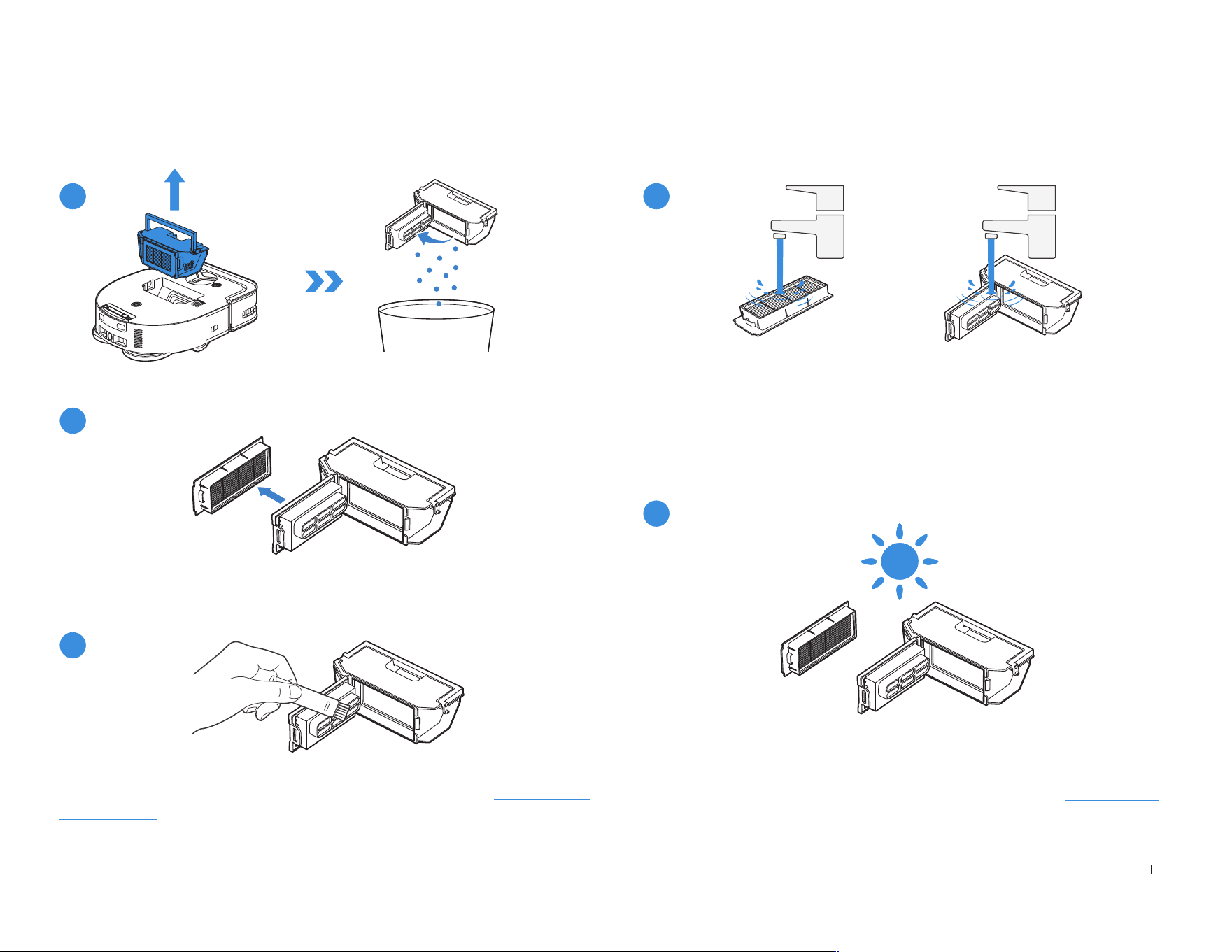
Maintain Dust Bin and Filter
1
2
3
• Explore more accessories at ECOVACS HOME App or at https://www�
ecovacs�com�
4
5
Note:
• Please rinse the filter with water as shown above�
• Do not use finger or brush to clean the Filter�
Note: Completely dry the filter before use.
Explore more accessories at ECOVACS HOME App or at https://www�
ecovacs�com�
24EN
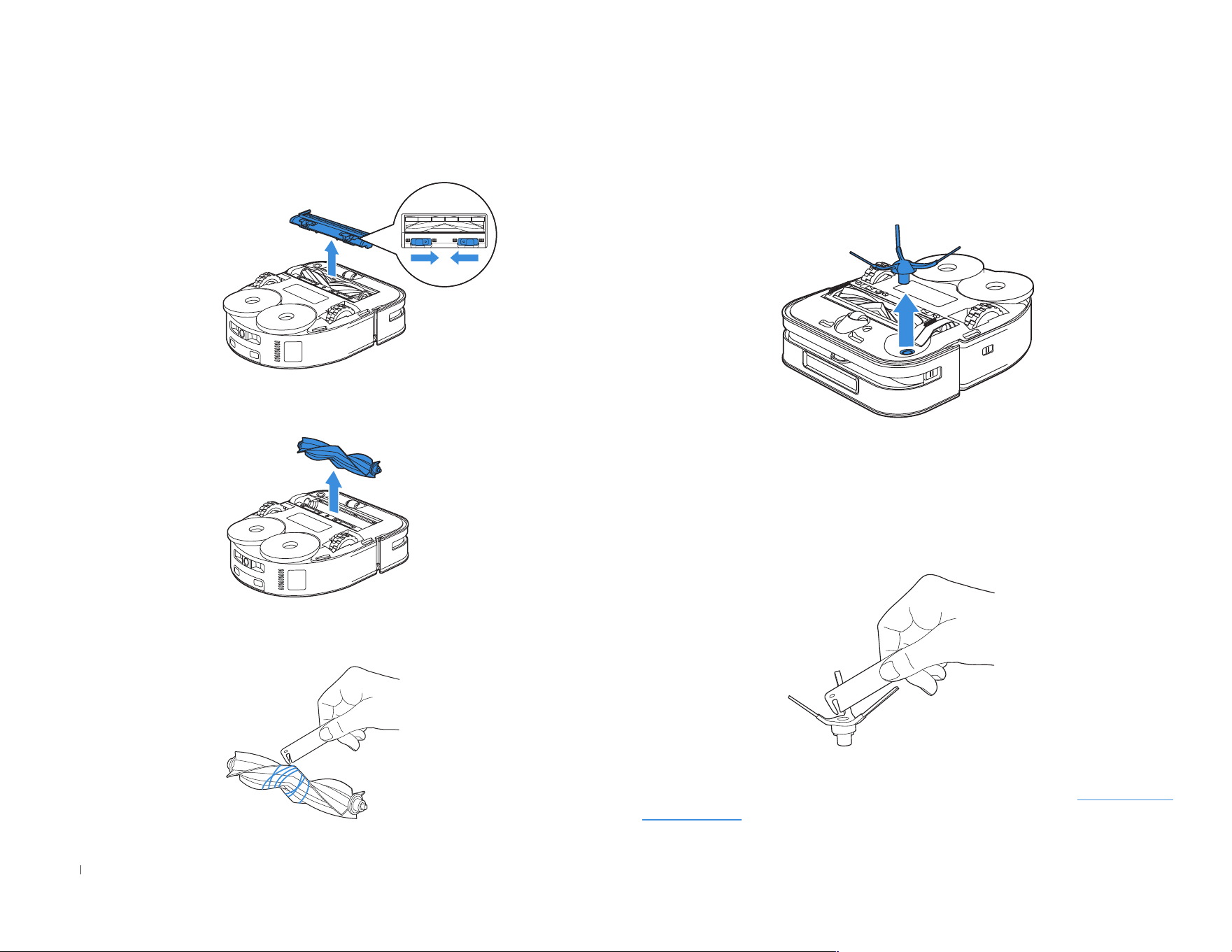
Maintain Brush and Side Brush
Brush Side Brush
• Explore more accessories at ECOVACS HOME App or at https://www�
ecovacs�com�
25 EN
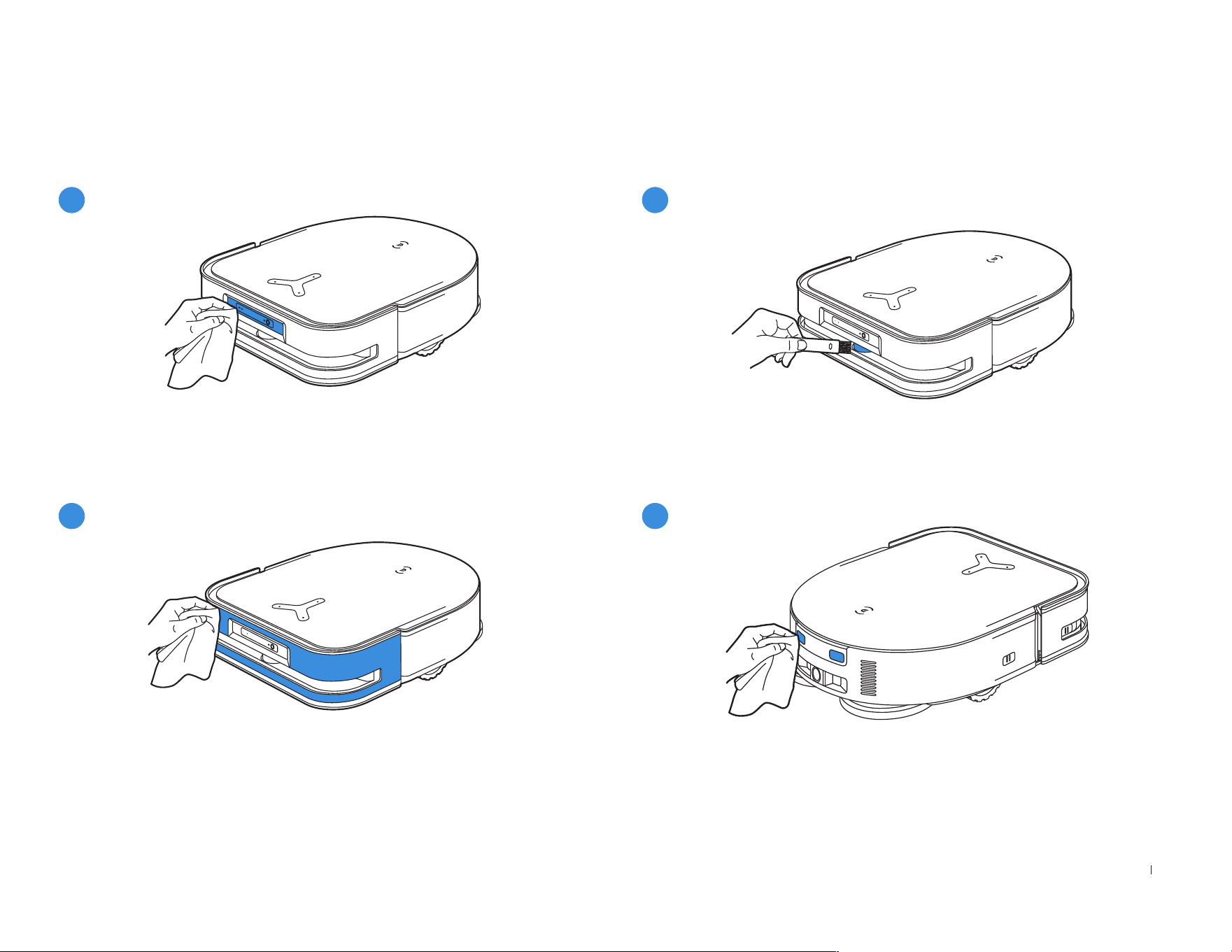
• Wipe the components with a clean, dry cloth� Avoid using cleaning
sprays or detergents�
• Rotate the Module to clean the lens gently�
Maintain Other Components
1
2
3
4
26EN
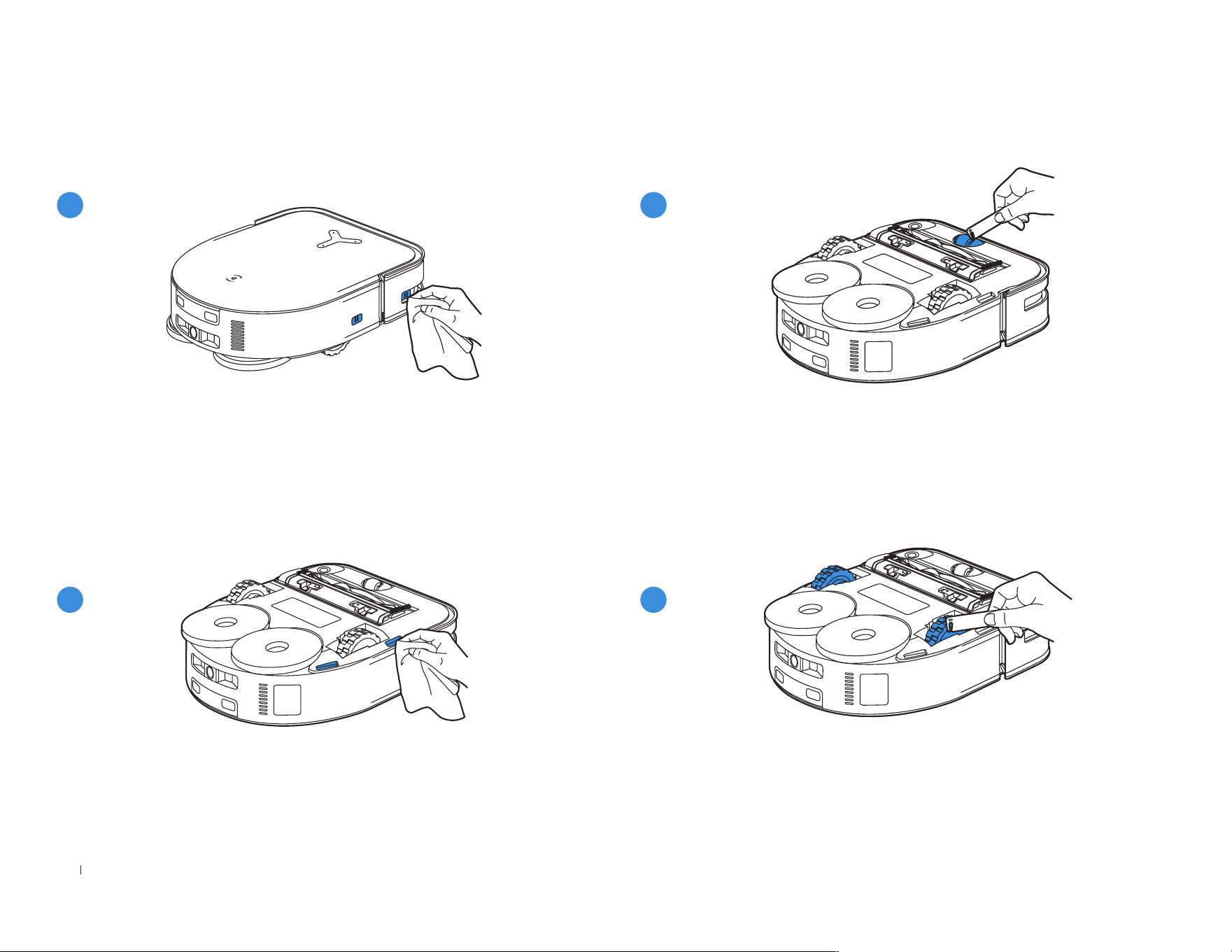
• Wipe the components with a clean, dry cloth� Avoid using cleaning
sprays or detergents�
5
6
8
7
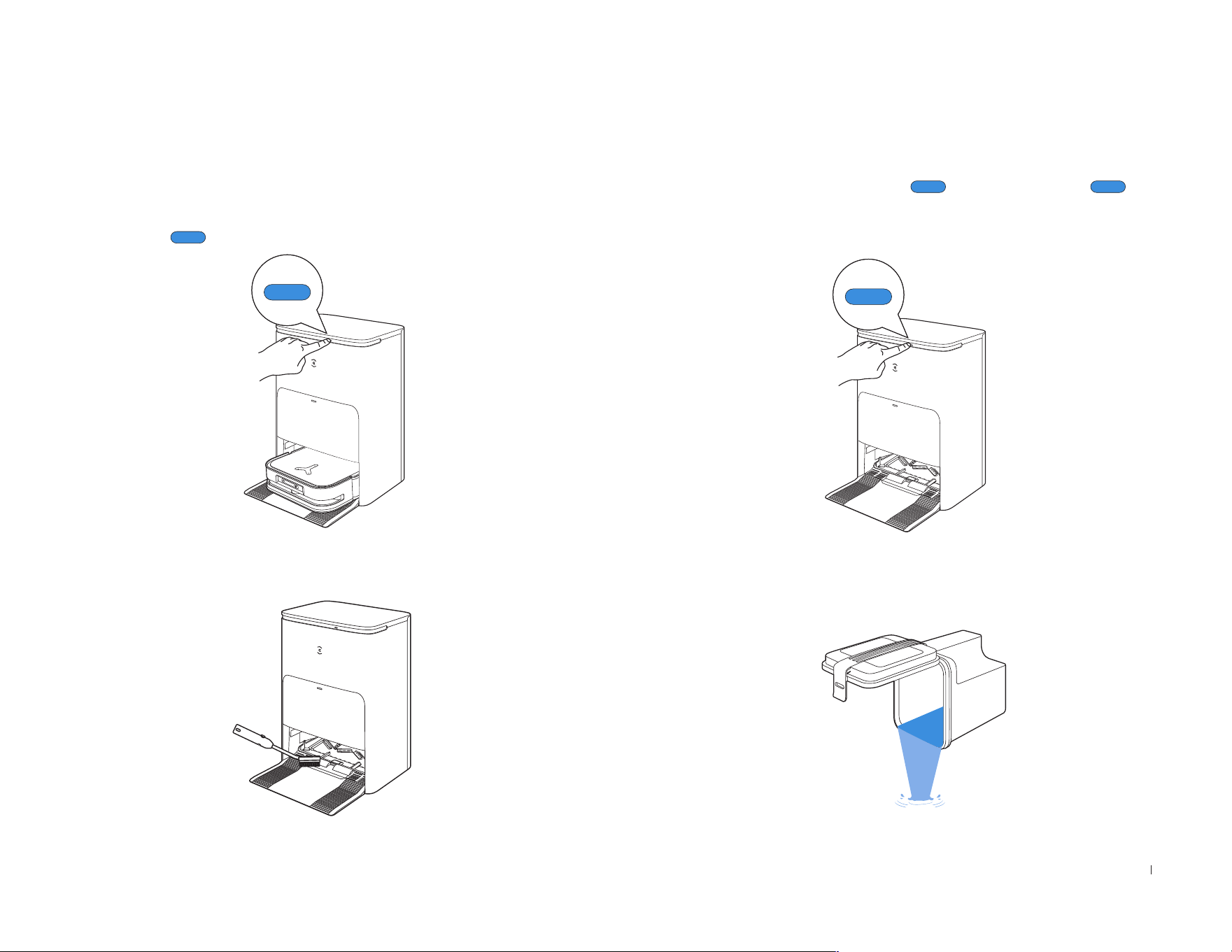
27 EN
Note:
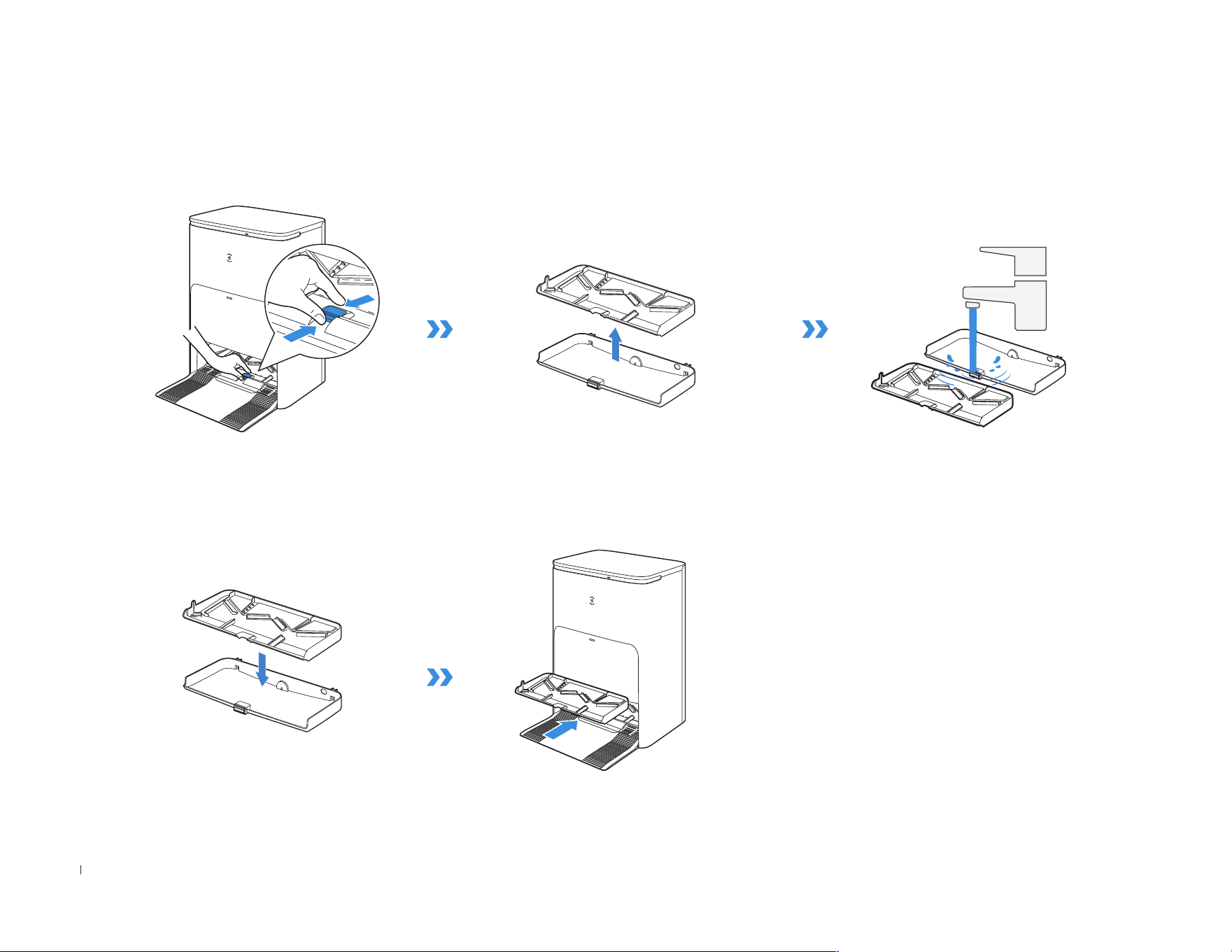
• Please don't enable self-clean when DEEBOT is working�
• If there is remaining dirty water in the Mop Washing Tray, the Station will drain the water rst after a long press on � Please long press to
start self-clean�
1. Long Press for 3 s to start self-clean.
2. Clean the Mop Washing Tray. 4. Empty the Dirty Water Tank.
3. The Station will drain the water out of the Tray automatically.
OMNI Station
28EN
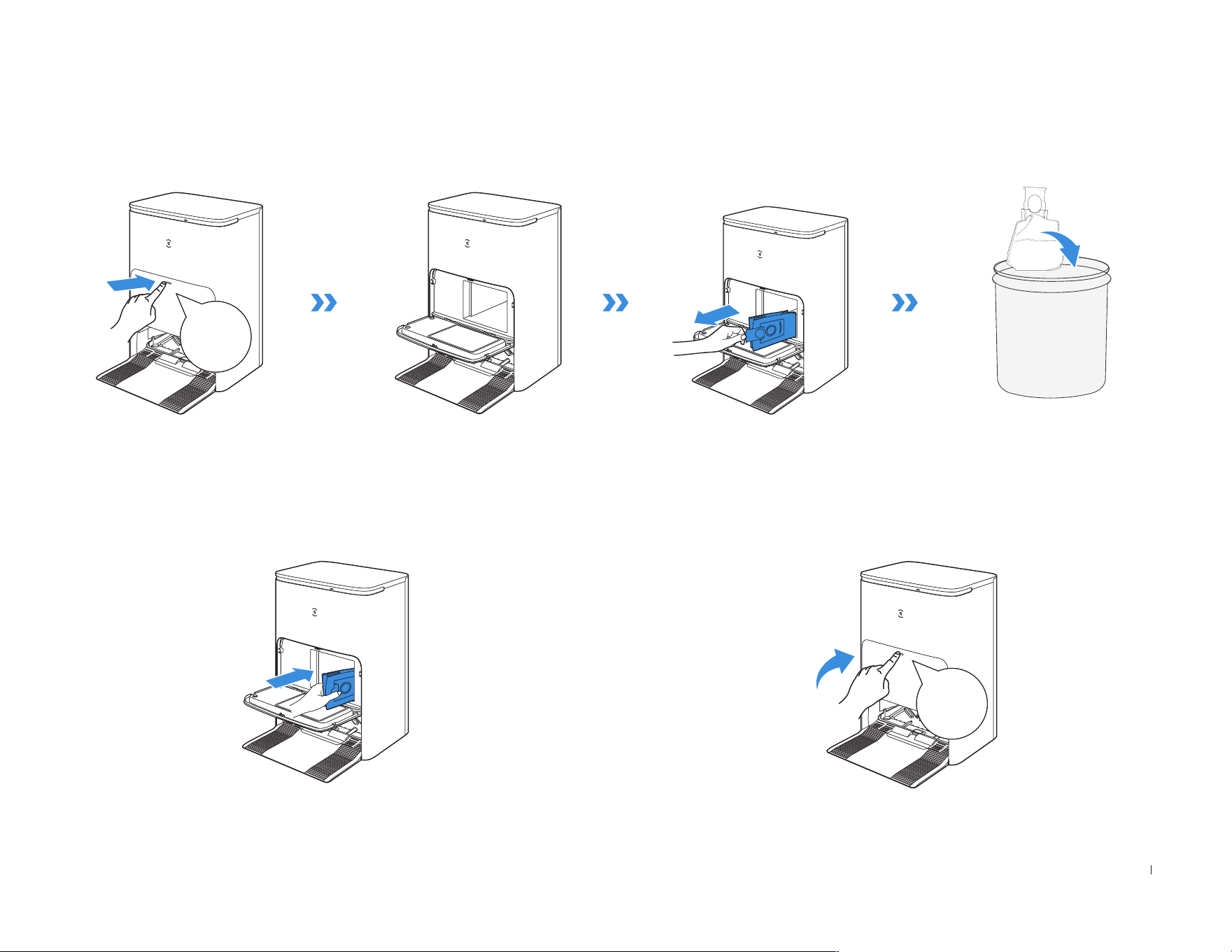
2. Install.
1. Take the Detachable Tray and Base Filter out for washing.
Note: Please install Mop Washing Tray properly to prevent malfunction�
Maintain Mop Washing Tray
29 EN
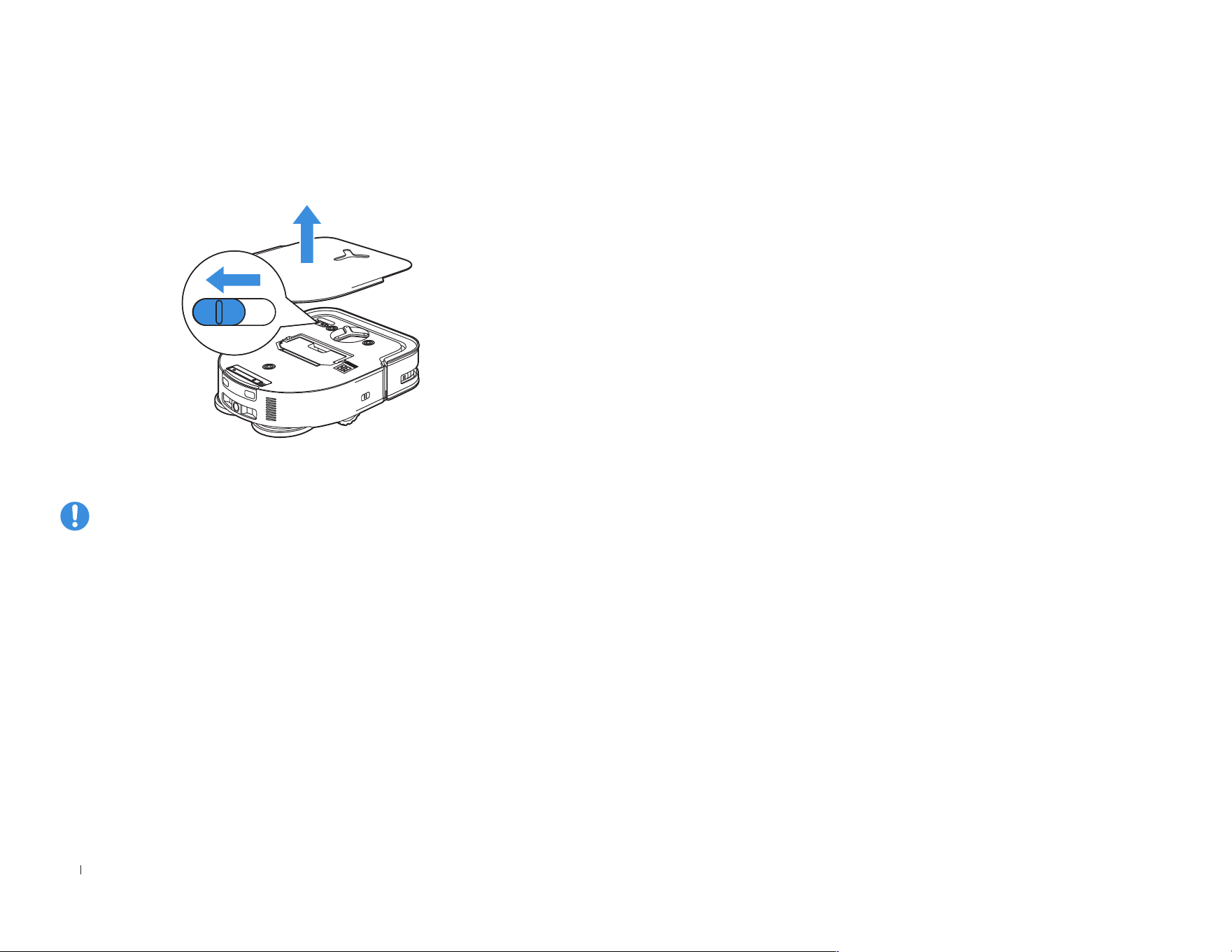
1. Discard the Dust Bag.
Hold the Handle to lift out the Dust
Bag, which can effectively prevent
dust leakage�
2. Clean the Dust Collection Cabin with a Dry Cloth and Put a New
Dust Bag in.
3. Close the Dust Collection Cabin.
Click
Click
Maintain Dust Bag
30EN
Please fully charge and switch OFF the DEEBOT before storage� Please
recharge it every 1�5 months to prevent the battery from over-discharge�
STORAGE
Note: • DEEBOT can't be charged when the power is turned off�
• When DEEBOT is not working, it is recommended to keep it powered
ON and charging�
• If the battery is over-discharged or not used for a long time, the
DEEBOT may not be charged� Please contact ECOVACS for help� Do
not disassemble battery by yourself�

31 EN
No. Malfunction Possible Causes Solutions
1
DEEBOT is not able to
connect to ECOVACS HOME
App�
Incorrect home Wi-Fi username or password entered� Enter the correct home Wi-Fi username and password�
DEEBOT is not within range of your home Wi-Fi signal�
Make sure DEEBOT is within range of your home Wi-Fi signal� Try to
stay as close to the Wi-Fi signal as possible�
DEEBOT is not in the conguration state�
Press the Reset Button to connect DEEBOT to your phone by Bluetooth�
If failed, please press the Reset Button and to connect via
ECOVACS HOME App�
There is no home Wi-Fi on the Wi-Fi list�
1� Check if the Wi-Fi name contains special characters� Please do not
use special characters like !
@#&¥%/\
�
2� Do not use a 5Ghz network�
Incorrect App installed� Please download and install ECOVACS HOME App�
2 The map is lost�
The map might be lost if you move DEEBOT when
cleaning�
Move DEEBOT to the front of the Station to retrieve the map�
Find the restored map in the Map Management and tap “Use This Map”
to retrieve it� You can lock the map in the ECOVACS HOME App�
If this problem persists after trying the above solutions, please restart
mapping�
3
Unable to create furniture
map on App�
Move DEEBOT when cleaning might cause the map to
be lost�
During cleaning, do not move DEEBOT�
Auto cleaning is not nished� Make sure DEEBOT automatically return to the Station after cleaning�
4
DEEBOT Side Brush drops
out of place during use�
The Side Brush is not properly installed� Make sure the Side Brush clicks into place�
5
No signal found� Unable to
return to the Station�
The Station is incorrectly placed�
Please place the Station correctly according to the instructions in the
[Charging DEEBOT] section�
The Station is out of power or manually moved�
Check whether the Station is connected to power supply� Do not
manually move the Station�
DEEBOT does not start cleaning from the Station� It is recommended that DEEBOT start cleaning from the Station�
The charging route is blocked� For example, the door of
the room with the Station is closed�
Keep the charging route clear�
Troubleshooting

32EN
No. Malfunction Possible Causes Solutions
6
DEEBOT returns to the
Station before it has nished
cleaning�
The room is so large that DEEBOT needs to return to
recharge�
Please enable Continuous Cleaning� For more details, please follow
the App instructions�
DEEBOT is unable to reach certain areas blocked by furni-
ture or barriers�
Tidy up the area to be cleaned by putting furniture and small objects
in their proper place�
7
DEEBOT is unable to
charge�
DEEBOT is not switched ON� Switch ON DEEBOT�
DEEBOT’s Charging Contacts are not connected to the
Station's Charging Contacts
Make sure that the robot’s Charging Contacts have connected to
the Station's Charging Contacts and
flashes� Check whether
DEEBOT’s and Station's Charging Contacts are dirty� Please clean
these parts according to the instructions in the [Maintenance]
section�
The Station is not connected to the power supply� Make sure the Station is connected to the power�
8
Running is very loud during
cleaning�
Side brush and oating rubber brush are entangled� Dust
bin and lter are blocked�
It is recommended to clean the side brush, oating rubber brush,
dust bin, lter, etc� regularly�
DEEBOT is in Max Mode� Switch to Standard Mode�
9
DEEBOT gets stuck while
working and stops�
DEEBOT is tangled with something on the oor (electrical
wires, curtains, carpet fringing, etc�)
DEEBOT will try various ways to free itself� If it is unsuccessful,
manually remove the obstacles and restart�
DEEBOT might be stuck under furniture with an entrance of
similar height�
Please set a physical barrier, or set a Virtual Boundary via the
ECOVACS HOME App�
DEEBOT is stuck in a narrow area�
Tidy up the house� Or set a physical barrier� Or set a Virtual
Boundary via the ECOVACS HOME App�

33 EN
No. Malfunction Possible Causes Solutions
10
The following problems appear
when DEEBOT is working:
disordered cleaning route,
deviation from the cleaning route,
repeated cleaning, or missing
of small areas to be cleaned�
(If there is a large area that has
not been cleaned temporarily,
DEEBOT will automatically clean
the missed area� Sometimes
DEEBOT will re-enter a cleaned
room, which may not be a
repeated cleaning, but DEEBOT
finding any missed area�)
Objects such as wires and slippers placed on the
ground block the DEEBOT�
Please tidy up the scattered objects on the ground such as wires,
slippers before cleaning� If there are any missed areas, DEEBOT
will clean them by itself, please do not interfere (such as moving
DEEBOT or blocking the route)�
It may be that the Driving Wheels slip on the ground
when DEEBOT climbs steps, thresholds and door
bars, thus affecting its judgment of the whole house
environment�
It is recommended to close the door of this area and clean the
area separately� After cleaning, DEEBOT will return to the starting
location�Please rest assured to use�
Work on freshly waxed and polished oors or smooth
tiles, resulting in less friction between the Driving
Wheels and the oor�
Please wait for wax to dry before cleaning�
Due to different home environments, some areas
cannot be cleaned�
Tidy up the home environment to ensure that DEEBOT can enter
for cleaning�
11 Delay in remote control�
The Wi-Fi signal is poor, causing the video loading to
be slow�
Use DEEBOT in areas with good Wi-Fi signal�
12
After returning to the Station,
DEEBOT does not empty the Dust
Bin�
The Auto-Empty function has not been turned on in
the ECOVACS HOME App�
Turn on the Auto-Empty function in the ECOVACS HOME App�
Dust Bag is not installed in the Station� Install the Dust Bag, and close the Dust Collection Cabin�
Manually moving DEEBOT back to the Station might
not trigger Auto-Empty function�
It is recommended to let DEEBOT return to the Station on its own�
Please do not manually move it�
In Do Not Disturb mode, DEEBOT will not empty the
dust after returning back to the Station�
Turn off Do Not Disturb mode in ECOVACS HOME App or
manually start dust-emptying�
The Station detects a decrease in empty efciency�
Replace the Dust Bag according to the [Maintenance] section and
close the Dust Collection Cabin� If the Dust Bag is not full when
ECOVACS HOME App prompts, you can put it back again�
If the above possible causes have been ruled out,
components of the Station may be abnormal�
Please contact Customer Support for help�

34EN
No. Malfunction Possible Causes Solutions
13 Fail to empty the Dust Bin�
The Station detects a decrease in empty efciency�
Replace the Dust Bag according to the [Maintenance] section and
close the Dust Collection Cabin� If the Dust Bag is not full when
ECOVACS HOME App prompts, you can put it back again�
The outlet of Dust Bin is blocked by foreign objects� Remove the Dust Bin and clean the foreign objects on the outlet�
14
The inner side of Dust Collection
Cabin is dirty�
Fine particles are absorbed in the inner side of Dust
Collection Cabin through the Dust Bag�
Clean the inner side of Dust Collection Cabin�
The Dust Bag is broken�
Check the Dust Bag� Replace it�
15
Dust leakage occurs during work-
ing�
The outlet of Dust Bin is blocked by foreign objects� Remove the Dust Bin and clean the foreign objects on the outlet�
16 Mopping Pad Plate cannot rotate�
Mopping Pad Plate is not correctly installed�
Please install Mopping Pad Plate correctly� A sound of Click means
properly installation
The Mopping Pad Plate is blocked by foreign objects� Clean the foreign objects�
17
DEEBOT does not respond to the
Station instruction�
DEEBOT is not in the Station� Please make sure DEEBOT is in the Station�
18 Driving wheels are blocked� Driving wheels are blocked by foreign objects�
Please rotate and press the driving wheels to check whether there
is any foreign object wrapped or stuck� If there is any foreign
object, please clean it in time� If this problem persists, please
contact Customer Support for help�

35 EN
No. Malfunction Possible Causes Solutions
19
When Cleaning Sink is full
of water and water cannot
be drained out, the voice
reports that the Cleaning
Sink is full�
The Dirty Water Tank is not properly installed� Tap down on the Dirty Water Tank to ensure it is properly installed�
The sealing plugs in the Dirty Water Tank is not installed
properly�
Make sure that the sealing plugs are properly installed�
The Station cannot drain water normally�
Long press to see whether the Station can properly draw
the water� If the water is successfully drawn, wipe dry the Water
Overow Sensor of the Cleaning Sink� If the Station fails to draw
the water, check between the Dirty Water Tank and the Station for
foreign object and clean it�
The suction port of the Cleaning Sink is blocked by foreign
object�
Ensure that there is no foreign object in the suction port of the
Cleaning Sink�
The voice prompt still exists after trying the above
solutions�
Power cycle the Station� If this problem persists, please contact
Customer Support for help�
The Cleaning Sink and Base Filter are dirty Wash the Cleaning Sink and Base Filter with clean water�

36EN
Technical Specifications
Model DDX39
Rated Input 20V 2A
Charging Time 5 h
Station Model CH2413
Rated Input 110-120V
~
50-60Hz
Rated Output 20V 2A
Rated Input Current
(Charging)
1A
Power (Emptying) 7A
Power (Hot Water
Washing Mop)
12A
Frequency band of
operation
2400-2483�5MHz
The Max Effective
Isotropic Radiated
Power
Bluetooth LE: 7dBm
2�4GHz Wi-Fi: 18dBm
Note:
Technical and design specifications may be changed for
continuous product improvement� Explore more accessories at https://
www�ecovacs�com�

37 FR-CA
Instructions de sécurité importantes
INSTRUCTIONS IMPORTANTES DE
SÉCURITÉ
LIRE TOUTES LES INSTRUCTIONS
AVANT D’UTILISER L’APPAREIL.
Lors de l’utilisation d’un appareil électrique, les
précautions de base suivantes doivent toujours
être suivies:
AVERTISSEMENT:
Lisez tous les
avertissements et toutes les instructions de
sécurité� Le non-respect des avertissements et
des instructions peut entraîner une décharge
électrique, un incendie ou des blessures graves�
1� L’appareil ne doit pas être utilisé comme un jouet�
Une attention particulière est nécessaire lorsqu’il
est utilisé par des enfants ou près d’eux�
2� Rangez la zone à nettoyer� Retirez les cordons
d’alimentation et les petits objets sur le plancher
qui pourraient s’enchevêtrer dans l’appareil� Glissez
les franges sous le tapis et relevez les bouts des
rideaux et des nappes pour dégager le plancher�
3� En cas de présence d’un point de chute dans
la zone de nettoyage à cause d’une marche ou
d’un escalier, vous devriez utiliser l’appareil an
de vous assurer qu’il est en mesure de détecter
la marche sans tomber� Il pourrait être nécessaire
de placer une barrière physique au bord du point
de chute pour empêcher l’appareil de tomber�
Assurez-vous que la barrière ne présente pas un
risque de trébuchement�
4� Utilisez l’appareil seulement de la manière
décrite dans ce manuel� Utilisez seulement les
accessoires recommandés ou vendus par le
fabricant�
5� Ne manipulez pas la che électrique ou l’appareil
avec des mains mouillées�
6� Les batteries non rechargeables sont interdites�
7� N’utilisez pas l’appareil si le bac à poussière ou
les ltres ne sont pas en place�
8� N’utilisez pas l’aspirateur dans un endroit où il y a
des chandelles allumées ou des objets fragiles sur
le plancher à nettoyer�
9� N’utilisez pas et ne rangez pas l’appareil dans
un environnement extrêmement chaud ou froid
(température inférieure à -5°C/23°F ou supérieure
à 40°C/104°F)� Veuillez charger le robot à une
température supérieure à 0°C/32°F et inférieure à
40°C/104°F�
10� Gardez les vêtements amples, les cheveux, les
doigts et toutes les autres parties du corps à
l’écart de toute ouverture et de toute pièce mobile�

38FR-CA
11� N’utilisez pas l’appareil dans une pièce où dort un
nourrisson ou un enfant�
12� Pour utilisation À L’INTÉRIEUR SEULEMENT�
N’utilisez pas l’appareil à l’extérieur ou à des
ns commerciales ou industrielles� N’utilisez pas
l’appareil sur des surfaces mouillées ou contenant
de l’eau stagnante�
13� Ne laissez pas l’appareil ramasser de gros objets,
comme des pierres, de grandes feuilles de papier
ou tout autre objet pouvant le boucher�
14� N’utilisez pas l’appareil pour ramasser des
produits inammables ou combustibles comme
de l’essence, ou de l’encre pour imprimante ou
photocopieur, et ne l’utilisez pas dans des endroits
où ces produits peuvent être présents�
15� N’utilisez pas l’appareil pour ramasser des objets
qui brûlent ou qui émettent de la fumée, comme des
cigarettes, des allumettes, des cendres chaudes, ou
tout autre objet pouvant causer un incendie�
16� Ne placez pas d’objets dans les ouvertures�
N’utilisez pas l’appareil si une ouverture est
bouchée; gardez-le exempt de poussière, de
peluches, de cheveux et de tout ce qui peut
réduire l’écoulement d’air�
17� Veillez à ne pas endommager le cordon
d’alimentation� Ne tirez pas et ne transportez
pas l’appareil ou la station d’accueil par le
cordon d’alimentation, n’utilisez pas le cordon
d’alimentation comme une poignée, ne refermez
pas une porte sur le cordon d’alimentation et
ne tirez pas le cordon d’alimentation autour
de rebords ou de coins coupants� Ne faites
pas passer l’appareil ni la station d’accueil sur
le cordon d’alimentation� Gardez le cordon
d’alimentation à l’écart de toute surface chaude�
Ne débranchez pas l’appareil en tirant sur le
cordon� Pour débrancher l’appareil, saisissez la
che électrique, et non le cordon�
18� Si le cordon d’alimentation est endommagé, il doit
être remplacé par le fabricant ou par son agent du
service à la clientèle pour éviter tout danger�
19� N’utilisez pas un appareil avec une che électrique
endommagée ou un cordon d’alimentation
endommagé� N’utilisez pas l’appareil ou la station
d’accueil s’ils ne fonctionnent pas correctement,
s’ils ont été échappés, endommagés, laissés à
l’extérieur, ou s’ils sont entrés en contact avec un
liquide� Si une réparation est nécessaire, elle doit
être effectuée par le fabricant ou par son agent du
service à la clientèle pour éviter tout danger�
20� Avant de nettoyer l’appareil ou d’en faire
l’entretien, mettez-le HORS TENSION en utilisant
l’interrupteur d’alimentation� Fermez toutes les
commandes avant de le débrancher� Éteignez
toujours l’appareil avant de brancher ou de
débrancher la buse motorisée�

39 FR-CA
21� Retirez l’appareil de la station d’accueil et
mettez l’appareil HORS TENSION en utilisant
son interrupteur d’alimentation avant de retirer la
batterie pour la mise au rebut de l’appareil�
22� La batterie doit être retirée et mise au rebut
conformément aux lois et aux réglementations
locales avant la mise au rebut de l’appareil�
23� Veuillez mettre les batteries usagées au rebut
conformément aux lois et aux réglementations locales�
24� N’incinérez pas l’appareil, même s’il est gravement
endommagé� Les batteries peuvent exploser si
elles sont exposées au feu�
25� Lorsque vous n’utilisez pas la station d’accueil et
avant d’en faire l’entretien, débranchez-la de la prise�
26� L’appareil doit être utilisé conformément aux
instructions du présent manuel d’instructions�
ECOVACS HOME SERVICE ROBOTICS ne
saurait être tenue responsable des blessures ou
dommages causés par une utilisation incorrecte�
27� Prévenez tout démarrage accidentel� Assurez-
vous que l’interrupteur est à la position de mise
hors tension avant de connecter l’appareil au
bloc-batterie, de le ramasser ou de le transporter�
28� Lorsque le bloc-batterie n’est pas utilisé, gardez-
le à l’écart d’autres objets métalliques comme des
trombones, des pièces de monnaie, des clés, des
vis, des clous ou d’autres petits objets métalliques
qui peuvent établir une connexion d’une borne à
l’autre� Un court-circuit des bornes de la batterie
peut causer des brûlures ou un incendie�
29� Dans des conditions abusives, du liquide peut
être éjecté de la batterie; évitez tout contact avec
ce liquide� En cas de contact accidentel, rincez
immédiatement les parties atteintes avec de
l’eau� Si du liquide entre en contact avec les yeux,
consultez également un professionnel de la santé�
Le liquide éjecté de la batterie peut causer des
irritations ou des brûlures�
30� N’utilisez pas un bloc-batterie ou un appareil
qui est endommagé ou modié� Les batteries
endommagées ou modiées peuvent avoir un
comportement imprévisible susceptible de causer
un incendie, une explosion ou des blessures�
31� N’exposez pas un bloc-batterie ou un appareil
au feu ou à une température excessive� Une
exposition au feu ou à une température supérieure
à 130°C peut causer une explosion� La
température de 130°C est équivalente à 265°F�
32� Suivez toutes les instructions de recharge et ne
rechargez pas le bloc-batterie ou l’appareil si la
température est en dehors de la plage spéciée
dans les instructions� Une recharge incorrecte ou
à une température en dehors de la plage spéciée
peut endommager la batterie et augmenter le
risque d’incendie�

40FR-CA
33� Faites effectuer l’entretien par un réparateur
qualié, uniquement avec des pièces de rechange
identiques� Vous vous assurerez ainsi de maintenir
la sécurité du produit�
34� Ne modiez pas ou n’essayez pas de réparer
l’appareil ou le bloc-batterie (le cas échéant),
sauf de la manière indiquée dans les instructions
d’utilisation et d’entretien�
35� Enlevez les cordons des autres appareils dans la
zone à nettoyer�
36� N’utilisez pas l’aspirateur dans une pièce où il y
a des chandelles allumées sur des meubles que
l’aspirateur pourrait accidentellement heurter�
37� Ne laissez pas les enfants s’asseoir sur l’aspirateur�
38� Utilisez l’appareil seulement de la manière
décrite dans ce manuel� Utilisez seulement les
accessoires recommandés par le fabricant�
39� Ne rechargez l’appareil qu’avec le chargeur spécié
par le fabricant� Un chargeur qui est adapté pour
un type de bloc-batterie peut créer un risque
d’incendie s’il est utilisé avec un autre bloc-batterie�
40� Utilisez les appareils uniquement avec les blocs-
batteries désignés à cette n� L’utilisation de
tout autre bloc-batterie peut créer un risque de
blessure et d’incendie�
41� Le robot contient des batteries qui ne doivent être
remplacées que par des personnes qualiées�
Pour faire remplacer la batterie du robot, veuillez
communiquer avec le service à la clientèle�
42� Si le robot ne sera pas utilisé pendant une période
prolongée, rechargez-le complètement, mettez-le
HORS TENSION pour l’entreposer et débranchez
la station d’accueil�
43� Pour réduire le risque de décharge électrique,
n’utilisez pas cet appareil sur des surfaces
mouillées� Ne l’exposez pas à la pluie� Entreposez-
le à l’intérieur�
44� Pour réduire le risque de blessure lié aux pièces
mobiles, débranchez l’appareil avant tout entretien�
45� Risque de blessure� La brosse peut démarrer de
manière inattendue� Débranchez l’appareil avant
de procéder à son nettoyage ou à son entretien�
46� Pour réduire le risque de blessure, l’utilisateur doit
lire le manuel d’instructions�
47� Pour réduire le risque de décharge électrique,
n’utilisez pas cet appareil à l’extérieur ou sur des
surfaces mouillées�
48� Veuillez vous assurer que la tension d’alimentation
de la prise correspond à la tension d’alimentation
indiquée sur la station d’accueil�
49� N’utilisez pas la station d’accueil si elle est
endommagée�
50� Retirez la che électrique de la prise avant d’effectuer
le nettoyage ou l’entretien de la station d’accueil�
41 FR-CA
Courant continu
Courant alternatif
Cet appareil est conforme aux règlements sur les
radiations du DHHS, 21CFR chapitre 1, sous-chapitre J�
Déclaration sur les interférences de la
Federal Communications Commission(FCC)
REMARQUE: Cet équipement a été testé et jugé
conforme aux limites pour appareils numériques de
classeB, conformément à la section15 des règlements
de laFCC�
Ces limites sont destinées à assurer une protection
raisonnable contre les interférences nuisibles dans une
installation résidentielle� Cet équipement génère, utilise
et peut émettre de l’énergie radioélectrique et peut,
en cas d’installation ou d’utilisation non conforme aux
instructions, engendrer des interférences nuisibles aux
communications radio�
Cependant, on ne peut pas garantir que des interférences
ne se produiront pas dans certaines installations� Si cet
appareil cause des interférences nuisibles à la réception
des signaux de radio ou de télévision, qui peut être
déterminé en allumant et en éteignant l’appareil, nous
conseillons à l’utilisateur d’essayer de corriger ces
interférences par un ou plusieurs des moyens suivants:
Réorienter ou repositionner l’antenne de réception�
Augmenter la distance séparant l’équipement du
récepteur�
Brancher l’appareil dans une prise d’un circuit différent
de celui du récepteur�
Consulter le revendeur ou un technicien qualifié
spécialisé en radio/télévision pour obtenir de l’aide�
Cet appareil est conforme à la section15 des
règlements de la FCC� L’utilisation est sous réserve des
deuxconditions suivantes:
(1)cet appareil ne doit pas engendrer des interférences
nuisibles et(2), cet appareil doit accepter toute
interférence reçue, y compris les interférences pouvant
entraîner un fonctionnement indésirable�
Avertissement: Toutes les transformations ou
modifications de cet appareil non expressément
autorisées par la partie responsable de la conformité
pourraient annuler le droit de l’utilisateur à utiliser
l’équipement�
1� Branchez l’appareil uniquement dans une prise
correctement mise à la terre� Consultez les
instructions de mise à la terre�
2� Interrupteur d’alimentation: « I » = SOUS
TENSION, « O » = HORS TENSION

42FR-CA
Cet appareil contient des émetteurs/récepteurs
exempts de licence qui sont conformes aux
normesRSS d’Innovation, Sciences et Développement
économique Canada� L’utilisation est sous réserve des
deuxconditions suivantes:
(1) Cet appareil ne doit pas causer d’interférences�
(2) Cet appareil doit accepter toute interférence, y
compris les interférences pouvant provoquer un
fonctionnement indésirable de l’appareil�
Avertissement relatif à l’exposition aux
radiofréquences
Cet équipement est conforme aux limites d’exposition
aux radiations définies par la FCC pour un environnement
non contrôlé�
Cet équipement doit être installé et utilisé conformément
aux instructions fournies, et la ou les antennes utilisées
pour cet émetteur doivent être installées de manière à
fournir une distance de séparation d’au moins 20cm de
toute personne et ne doivent pas être colocalisées ni
fonctionner en combinaison avec une autre antenne ou
un autre émetteur�
Avertissement MPE (pour les appareils mobiles des
sections15�247)
Afin de satisfaire aux exigences de sécurité de la FCC
et en matière d’exposition aux radiofréquences et aux
circuits intégrés, une distance d’au moins 20cm doit être
maintenue entre cet appareil et toute personne durant
l’utilisation de l’appareil�
À des fins de conformité, l’utilisation à une distance
moindre que celle-ci n’est pas recommandée�
Pour désactiver le moduleWi-Fi de robot, mettez le robot
SOUS TENSION� Placez le robot sur la stationOMNI en
vous assurant que les contacts de recharge de robot et
les broches de la station se touchent� Ensuite, appuyez
sur le bouton du mode AUTO sur le robot et maintenez-le
enfoncé pendant 30secondes�
Pour activer le moduleWi-Fi de robot, mettez le robot
HORS TENSION, puis remettez-le SOUS TENSION�
Ensuite, débranchez la station et rebranchez-la�
Appuyez sur le bouton de la station et maintenez-
le enfoncé pendant 30secondes pour éteindre la bande
lumineuse� Si vous souhaitez activer la bande lumineuse,
appuyez brièvement sur le bouton �
CONSERVEZ CES INSTRUCTIONS
INSTRUCTIONS DE MISE À LA TERRE
Cet appareil doit être mis à la terre� En cas de mauvais
fonctionnement ou de panne, la mise à la terre fournit un
chemin de moindre résistance pour le courant électrique
afin de réduire le risque de décharge électrique� Cet appareil
est équipé d’un cordon doté d’un conducteur de mise à la
terre et d’une fiche de mise à la terre de l’équipement� La
43 FR-CA
fiche doit être insérée dans une prise appropriée qui est
correctement installée et mise à la terre conformément à
toutes les ordonnances et à tous les codes locaux�
AVERTISSEMENT– Un branchement inapproprié du
conducteur de mise à la terre de l’équipement peut
entraîner un risque de décharge électrique� En cas de
doute sur le caractère adéquat de la mise à la terre de la
prise, consultez un électricien qualifié ou un technicien�
Ne modifiez pas la fiche fournie avec l’appareil� Si elle
ne convient pas à la prise, faites installer une prise
appropriée par un électricien qualifié�
Cet appareil doit être utilisé sur un circuit d’une tension
nominale de 120V et est équipé d’une fiche de mise
à la terre qui ressemble à la fiche illustrée sur la photo
suivante� Assurez-vous que l’appareil est branché dans
une prise ayant la même configuration que la fiche�
Aucun adaptateur ne doit être utilisé avec cet appareil�
BROCHE DE MISE À LA TERRE
PRISE MISE
À LA TERRE
Pour utilisation résidentielle À L’INTÉRIEUR SEULEMENT�
Cet appareil contient des émetteurs/récepteurs
exempts de licence qui sont conformes aux
normesRSS d’Innovation, Sciences et Développement
économique Canada� L’utilisation est sous réserve des
deuxconditions suivantes:
(1) Cet appareil ne doit pas causer d’interférences�
(2) Cet appareil doit accepter toute interférence, y
compris les interférences pouvant provoquer un
fonctionnement indésirable de l’appareil�
Afin de satisfaire aux exigences de sécurité de la FCC
et en matière d’exposition aux radiofréquences et aux
circuits intégrés, une distance d’au moins 20cm doit être
maintenue entre cet appareil et toute personne durant
l’utilisation de l’appareil�
À des fins de conformité, l’utilisation à une distance
moindre que celle-ci n’est pas recommandée�
Mise à jour de l’appareil
En général, certains appareils sont mis à jour deuxfois
par mois, mais ce n’est pas toujours le cas�
Certains appareils, surtout ceux qui ont été mis en vente
il y a plus de troisans, ne seront mis à jour que si une
vulnérabilité critique est trouvée et corrigée�
44FR-CA
Contenu du colis
Robot
Station OMNI
Base
Manuel d’utilisation
Brosse latérale
Cordon d'alimentation
Instruction Manual
Remarque:
•
Les chiffres et illustrations sont fournis à titre indicatif uniquement et peuvent différer de l’apparence réelle du produit�
La conception et les spécifications du produit sont susceptibles d'être modifiées sans préavis�
45 FR-CA
Capteur 3D
TrueDetect
Couverture supérieure
Bouton sur DEEBOT
Appui bref: Démarrer/Pause
Pression longue pendant 3s:
retour à la charge
Capteurs
anti-collision et
pare-chocs
Module laser d-ToF
Interrupteur
d’alimentation
«I» = MARCHE
«O» = ARRÊT
Appuyez sur le bouton Réinitialiser, l’assistant YIKO vous guidera pour connecter
DEEBOT à votre téléphone�
Restaurer les paramètres par défaut: appuyez sur le bouton RÉINITIALISER et
maintenez-le enfoncé pendant 5secondes� Après avoir entendu l’invite vocale, la
musique de démarrage joue et le robot est réinitialisé aux paramètres par défaut�
Indicateur d’état
Wi-Fi/Bouton
Réinitialiser
Filtre
Port d'élimination
de la poussière
Filet ltrant
Poignée du bac
à poussière
Bouton de déverrouillage
Contacts de charge
Port de remplis-
sage d’eau
Capteur de bord
Roues motrices
Roue universelle
Brosse latérale
Capteur de détec-
tion de tapis
Brosse principale
Capteur anti-chute
Capteur anti-chute
Bouton de libéra-
tion de la brosse
Tampons de va-
drouille lavables
Caméra AIVI
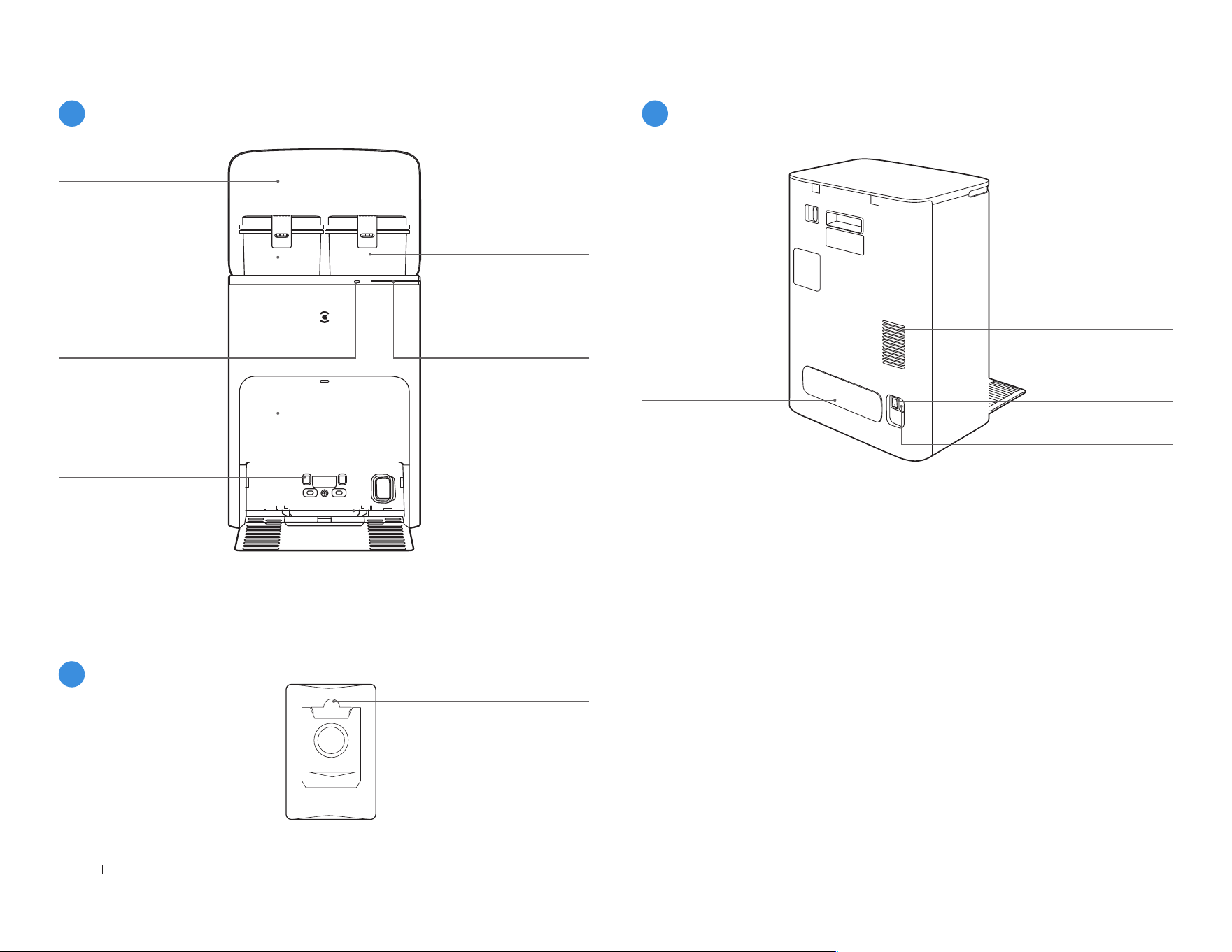
Diagramme de produit
1
Robot
2
Vue de dessous
3
Bouton RÉINITIALISER
4
Bac à poussière
46FR-CA
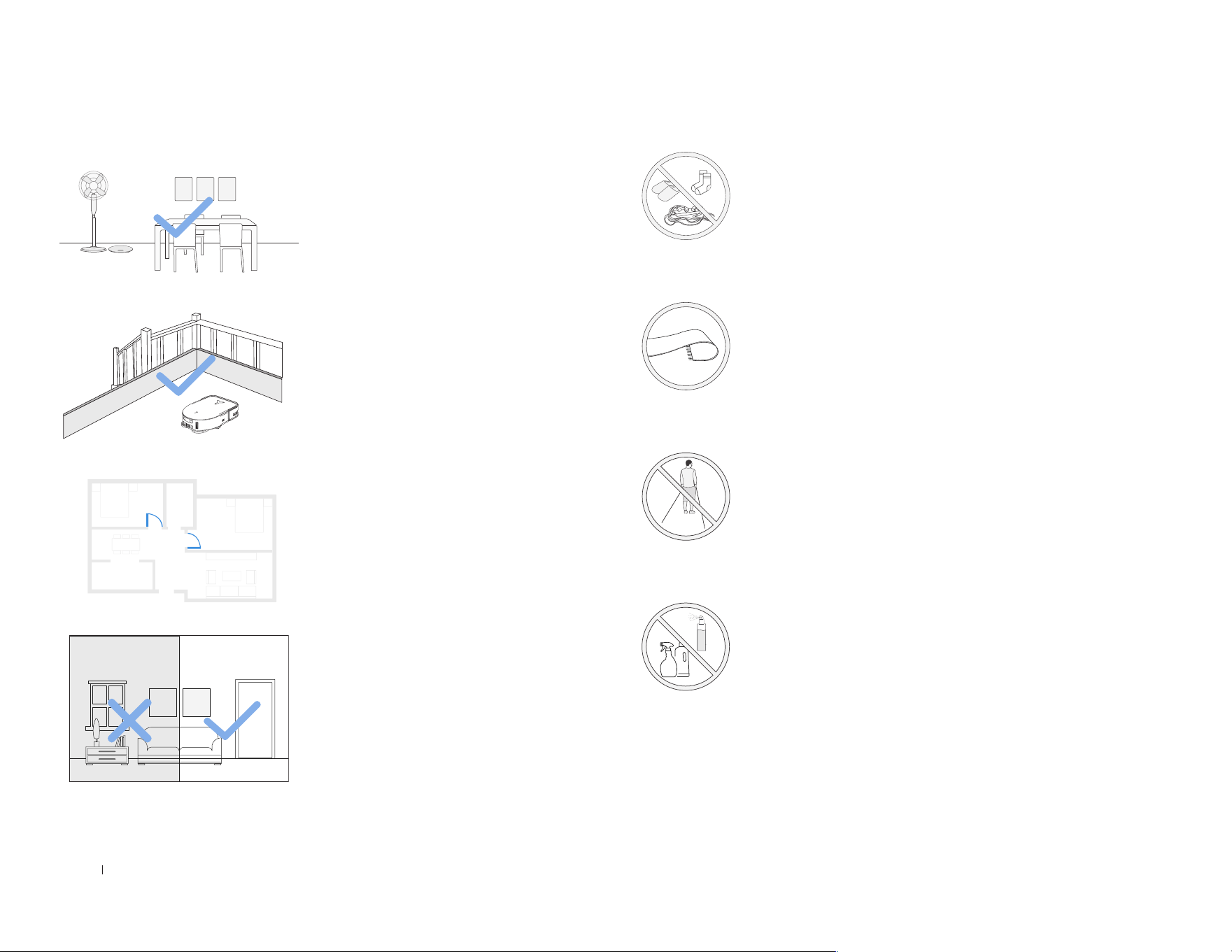
Réservoir
d’eau sale
Cabine de
dépoussiérage
Remarque:
Poignée du sac à poussière
Couverture
supérieure
Témoin lumineux
Bleu fixe: veille/en marche
Rouge clignotant: panne
Voyant éteint: panne
de courant/mode Veille
profonde
Bouton sur la station
Appui bref: Démarrer/Pause
(DEEBOT dans la station)
Pression longue pendant
3s: Nettoyage automatique
Bac de lavage
de la vadrouille
Réservoir
d’eau propre
Contacts de charge
sur la station
• Si le témoin lumineux clignote en rouge, consultez l’application ECOVACS
HOME pour plus de détails sur le dysfonctionnement�
• Essuyez les contacts de charge de la station OMNI avec un chiffon sec si le
robot ne parvient pas à se charger�
5
Station (Avant)
6
Sac à poussière
7
Station (arrière)
Remarque:
• Compatible avec le module de remplissage/vidange automatique d’eau
ECOVACS� Si vous souhaitez l’acheter, veuillez visiter l’application ECOVACS
HOME ou https://www�ecovacs�com�
Goulotte
de câbles
Grille d’aération
«I» = MARCHE
«O» = ARRÊT
Interrupteur basculant
Prise de courant

47 FR-CA
Nom Description fonctionnelle
Module laser
d-ToF
Grâce à la télémétrie laser, qui mesure la distance entre DEEBOT et son environnement grâce à la différence de temps de réflexion, il peut
cartographier en fonction des objets environnants pendant que DEEBOT se déplace� Détection de 10m�
Capteur 3D
TrueDetect
Le capteur émet des rayons infrarouges et reçoit la lumière réfléchie par les obstacles devant lui� Grâce à la télémétrie infrarouge, qui mesure la
distance entre DEEBOT et son environnement en utilisant la méthode du triangle similaire, il peut identifier et éviter les obstacles à proximité� Détection
de 0,8m�
Capteur anti-
chute
Avec la télémétrie infrarouge détectant la distance entre le bas du DEEBOT et le sol par le capteur infrarouge situé en bas, le DEEBOT n’avance pas
lorsqu’il y a des escaliers devant (par exemple: Hauteur du sol blanc supérieure à 55mm� Hauteur du sol noir supérieure à 30mm�) ou la distance
identifiée dépasse celle actuelle, ce qui déclenche le dispositif anti-chute�
Capteur de
détection de
tapis
La sonde à ultrasons peut émettre des ondes ultrasonores avec une fréquence de 300KHz� L’énergie des ondes ultrasonores est absorbée par le
tapis� Si l’énergie réfléchie est inférieure au seuil, le DEEBOT reconnaît la présence du tapis�
Capteur anti-
collision
Lorsque le signal transmis est bloqué par un obstacle, le récepteur du signal ne pourra pas recevoir le signal� Avec ce principe, le DEEBOT évite les
obstacles en cas de collision avec eux�
Capteur de bord
Grâce à la mesure de distance infrarouge, le DEEBOT peut détecter la distance entre lui-même et les objets situés sur son côté droit� Lorsqu’il y a un
mur ou un obstacle sur le côté droit, le DEEBOT effectue un nettoyage des bords pour éviter les zones manquantes ou les collisions�
Caméra AIVI
Grâce à la collection d’images environnantes de la caméra AI, elle peut réaliser des enregistrements vidéo� Grâce à l’interaction avec le MIC, il peut
réaliser l’appel vocal à distance� Champ de vision: verticale 109,29°, horizontale 155,7°�
Microphone
En faisant vibrer le diaphragme à travers l’air par la voix humaine, il peut réaliser un enregistrement vocal et demander à DEEBOT de terminer le travail
assigné par commande vocale� Sillage effectif de 5m�
Capteurs
48FR-CA
Remarques à prendre en compte avant le nettoyage
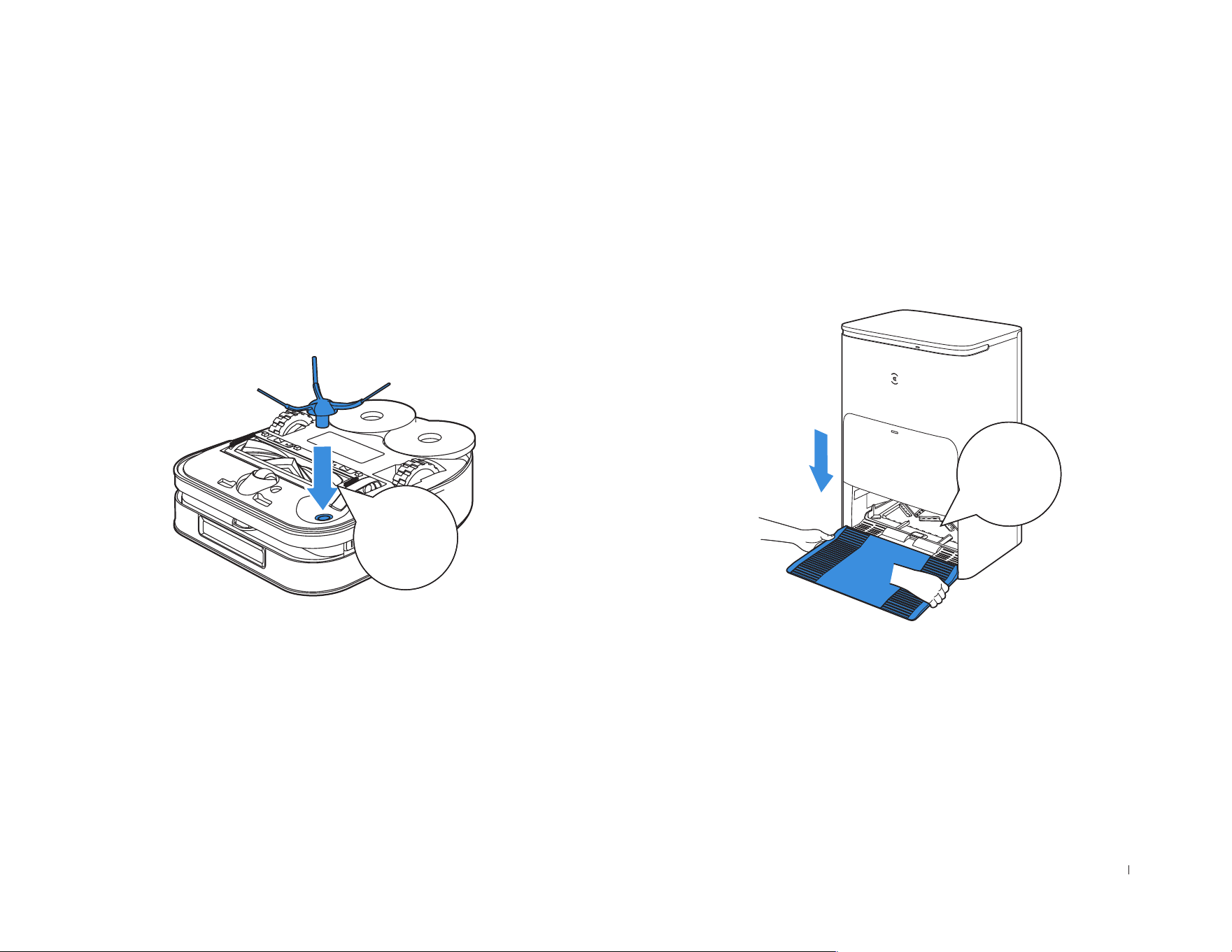
Rangez la zone à nettoyer en
remettant les meubles, comme les
chaises, à leur place�
Lors de la première utilisation,
assurez-vous que la porte de
chaque pièce est ouverte pour
aid e r le DE E BO T à expl o r er
complètement votre maison�
Il peut être nécessaire de placer
une barrière physique au bord
d’une chute pour empêcher le
robot de tomber par-dessus bord�
Rangez les objets comme les câbles, les chiffons, les
pantoufles, etc� sur le sol pour améliorer l'efficacité du
nettoyage�
Avant d'utiliser le produit sur un tapis à bords à
pompons, veuillez replier les bords du tapis en dessous�
Veuillez ne pas vous tenir dans des espaces étroits,
comme les couloirs, et veillez à ne pas bloquer le
capteur d-ToF�
Assurez-vous que les zones à
nettoyer sont bien éclairées pour
que la caméra AIVI fonctionne
correctement� Retirez les cordons
d’alimentation et les petits objets
du sol pour garantir l’efficacité du
nettoyage�
Nettoyez la caméra AIVI et le capteur de distance
TrueMapping avec un chiffon propre et évitez d’utiliser
un détergent ou un spray nettoyant�
49 FR-CA
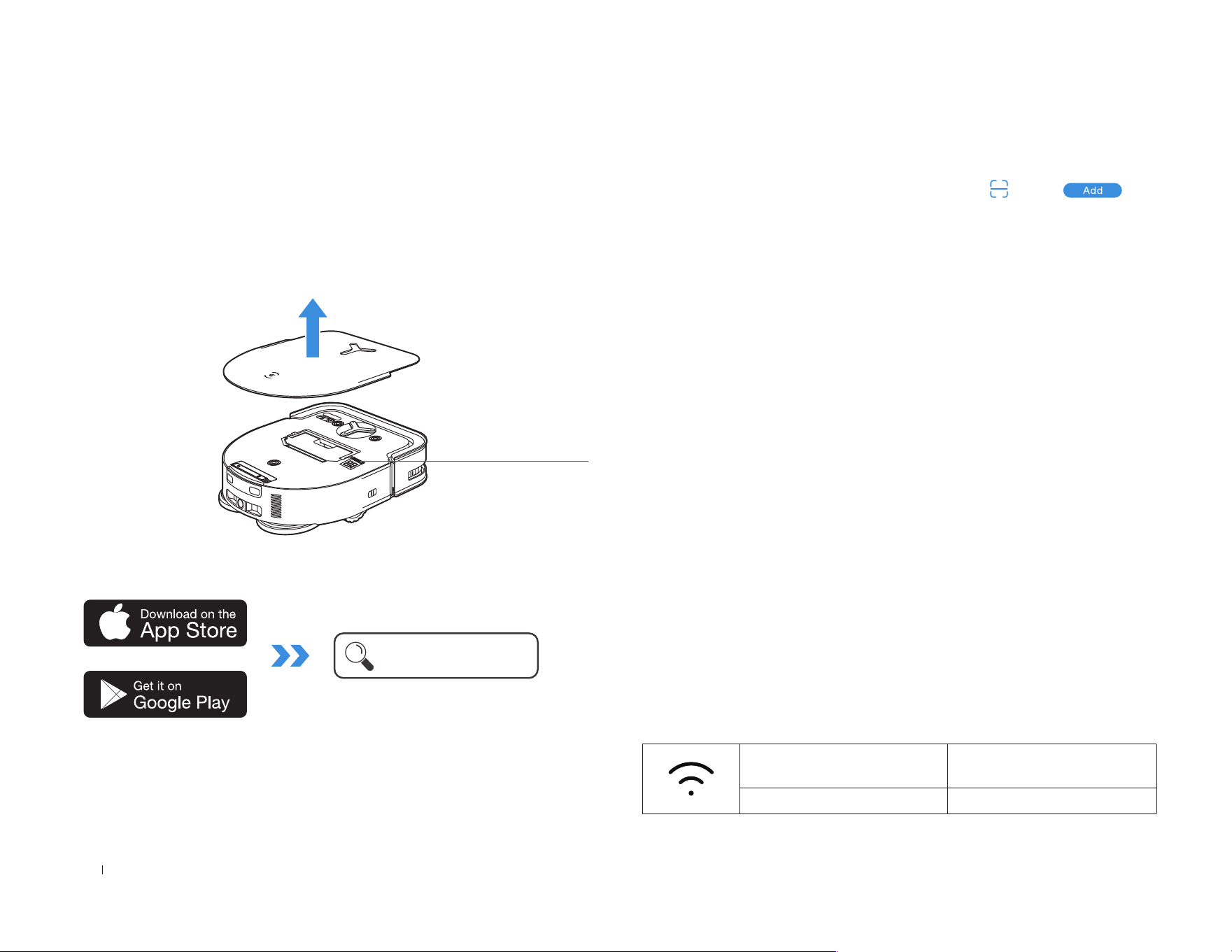
Installation
Avant utilisation, veuillez retirer tous les matériaux de protection�
Le son du clic indique une installation correcte�
DÉMARRAGE RAPIDE
Cliquer
Cliquer
50FR-CA
Témoin lumineux Wi-Fi
Blanc avec effet de
respiration
Déconnecté du Wi-Fi
Blanc fixe Connecté au Wi-Fi
1. Par Bluetooth: mettez en marche le DEEBOT et activez le Bluetooth
du téléphone portable� Autorisez l’application à obtenir l’autorisation
du Bluetooth du téléphone mobile� Cliquez sur ou sur dans
l’application� L’application fait automatiquement apparaître un robot à
proximité� Ou scannez le code QR pour entrer en mode de distribution
Bluetooth�
2. Par Wi-Fi: vous pouvez également choisir de connecter DEEBOT
à l’application par d’autres méthodes selon les invites sur la page de
l’application�
Remarque: Veuillez vous connecter via Bluetooth pour une meilleure
expérience�
Configuration requise pour le réseau Wi-Fi:
• Vous utilisez un réseau 2,4GHz ou 2,4/5GHz mixte�
• Votre routeur prend en charge les protocoles 802�11b/g/n et IPv4�
• N'utilisez pas de VPN (réseau privé virtuel) ou de serveur proxy�
• N'utilisez pas de réseau caché�
• WPA et WPA2 utilisant le cryptage TKIP, PSK, AES/CCMP�
• WEP EAP (Enterprise Authentication Protocol) n'est pas pris en
charge�
• Utilisez les canaux Wi-Fi 1 à 11 en Amérique du Nord et les canaux
1 à 13 en dehors de l’Amérique du Nord (consultez l’organisme de
réglementation local)�
• Si vous utilisez un prolongateur/répéteur de réseau, le nom du réseau
(SSID) et le mot de passe sont les mêmes que ceux de votre réseau
principal�
• Veuillez activer le WPA2 sur votre routeur�
2� Recherchez l’application ECOVACS HOME pour la télécharger�
ECOVACS HOME
1� Scannez le code QR sous le capot supérieur pour télécharger
l'application�
Sous le capot
supérieur
Télécharger l’application ECOVACS
HOME
Pour profiter de toutes les fonctionnalités disponibles, il est
recommandé de contrôler votre DEEBOT via l’application
ECOVACS HOME.
Connecter le DEEBOT à l’application
51 FR-CA
Sachez que la réalisation de fonctions intelligentes comme le
démarrage à distance, l’interaction vocale, l’afchage de cartes
en 2D/3D et les paramètres de contrôle, ainsi que le nettoyage
personnalisé (en fonction des différents produits) nécessite que les
utilisateurs téléchargent et utilisent l’application ECOVACS HOME, qui
est constamment mise à jour� Vous devez accepter notre politique de
condentialité et notre accord d'utilisation avant que nous puissions
traiter certaines de vos informations de base et nécessaires, et vous
permettre d'utiliser le produit� Si vous n’êtes pas d’accord avec notre
politique de condentialité et notre accord d’utilisation, certaines des
fonctions intelligentes susmentionnées ne peuvent pas être réalisées
via l’application ECOVACS HOME, mais vous pouvez toujours utiliser
les fonctions de base de ce produit pour un fonctionnement manuel�
Sous le capot
supérieur
Scannez le code QR sous le capot supérieur�
Obtenir la version complète du manuel
d’utilisation
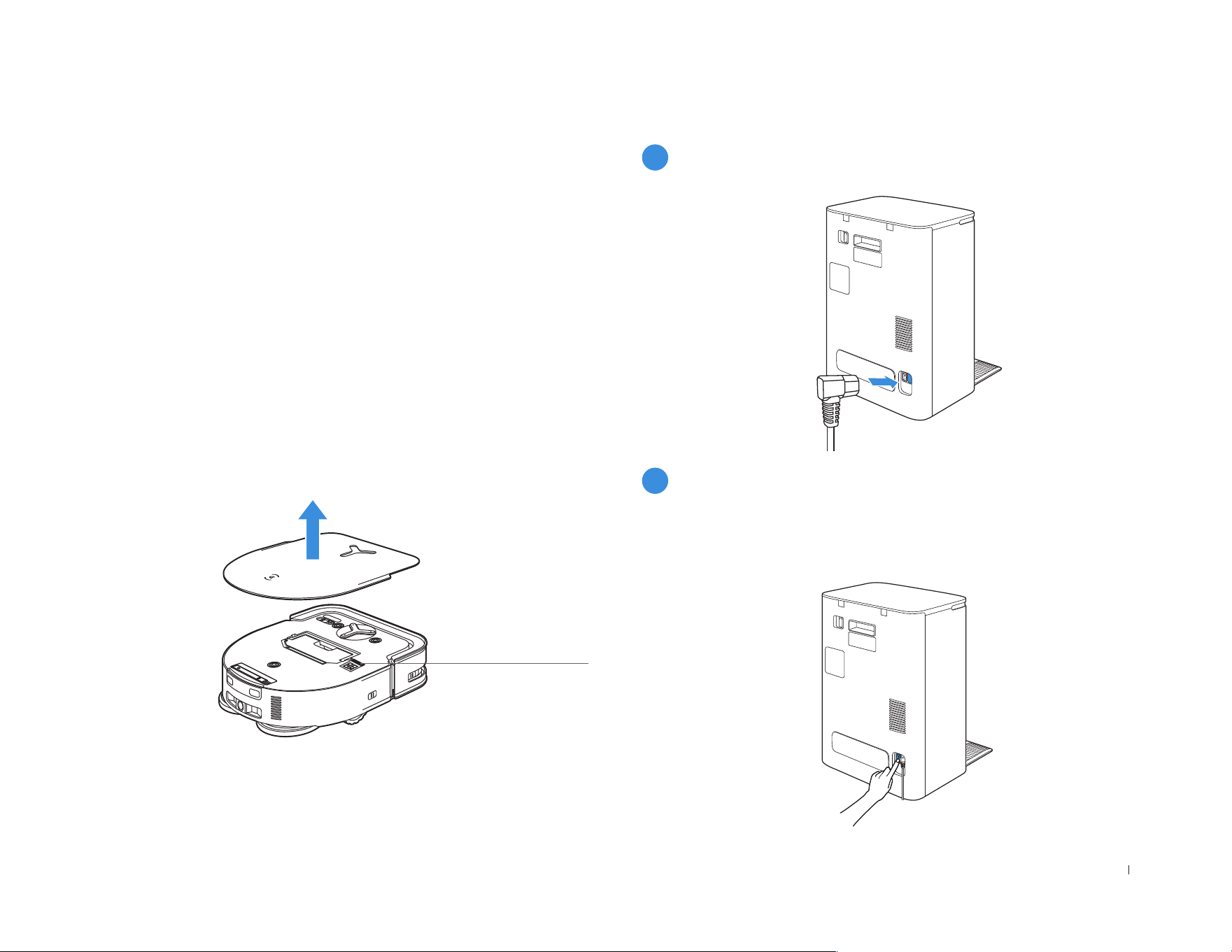
Charger le DEEBOT
1
Assembler la station
2
Allumer l’interrupteur basculant
« I » = MARCHE « O » = ARRÊT
Le DEEBOT ne peut pas être chargé lorsque l’interrupteur basculant est
désactivé�
52FR-CA
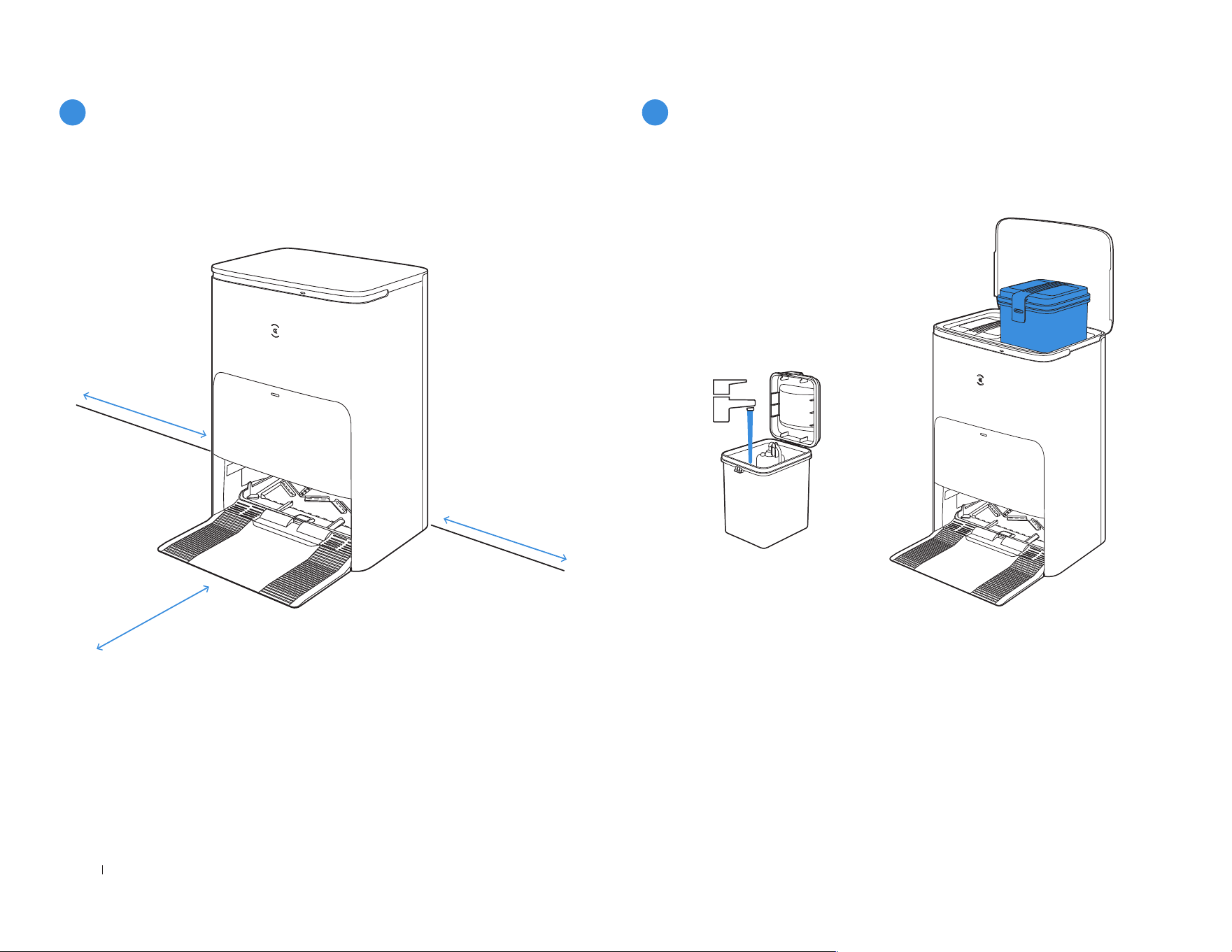
≥
0�05m (0�16’)
≥
0�05m (0�16’)
≥
0�8m (2�62’)
Gardez la zone autour de la station exempte d’objets, en particulier
d’objets avec des surfaces rééchissantes�
3
Positionner la station
4
Utiliser les réservoirs d’eau
Remarque:
Il est recommandé d’utiliser la solution de nettoyage
ECOVACS DEEBOT (vendue séparément)� L’utilisation d’une autre
solution de nettoyage peut entraîner un glissement du DEEBOT, un
blocage du réservoir d’eau et d’autres problèmes�
• S’il y a des objets rééchissants tels que des miroirs et des plinthes
rééchissantes à proximité de la station, les 14cm inférieurs doivent
être recouverts�
• Ne placez pas la station sous la lumière directe du soleil�
• Placez la station dans un endroit avec un signal Wi-Fi puissant�
53 FR-CA
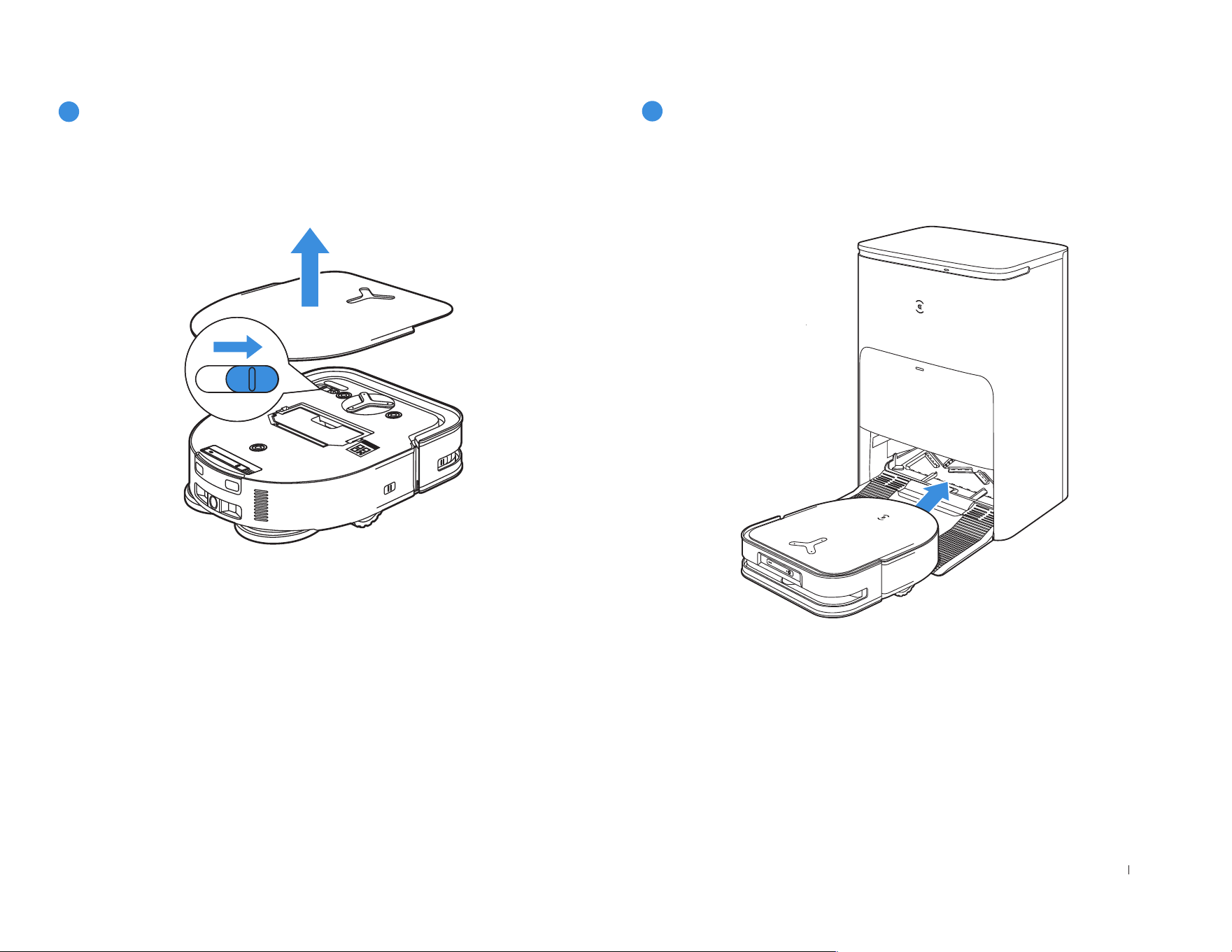
Vériez que la station est branchée à la prise électrique� Utilisez
l’application ECOVACS HOME ou la voix pour rappeler au DEEBOT
d’entrer dans la station pour le charger�
• Il est recommandé que le DEEBOT commence le nettoyage à partir
de la station� Ne déplacez pas la station pendant le nettoyage�
5
Mettre en marche
« I » = MARCHE, « O » = ARRÊT.
• Le DEEBOT ne peut pas être chargé lorsque l’alimentation est
coupée�
• Lorsque DEEBOT ne fonctionne pas, il est recommandé de le laisser
sous tension et en charge�
6
Charger le DEEBOT