
Congratulations!
Dear Customer:
Welcome to the our family. Thank you for purchasing one of our products.
Our goal is to provide you with superior service. If there is anything missing from
or wrong with your order, or if you have any questions about using our product,
PLEASE contact us.
Email: [email protected]
Our team is available 24/7 to address your questions, comments, and concerns.
Your satisfaction is our ultimate goal. We want to make everything right so you'll
share your positive experience with other shoppers.
If you experience any problems, please send an email to
Our mission:
* To be the most trusted appliance brand.
* To create practical, compact appliances that better your life.

Q&A
1.How often do I need to clean my ice maker?
2.How should I clean the machine?
3.Why is my ice cube cloudy?
4.Can I put milk and juice into the water tank to make ice cubes?
5.Why does my ice cube melt easily?
6.Why is my ice so thick and dif�icult to fall from the ice tray?
What should I do?
7.Why does the ice cubes have a plastic smell?
8.Why is there noise in the operation of my machine?
9.Why is water leaking from my machine?
10.Why is there water �lowing but not making ice?
Depending on how frequently you use it, it is recommended that you clean it at least once a week. Failure to clean the
machine will cause scale accumulation, which will eventually block the pump and cause the product to stop working
properly.
It is recommended to use lemon water or weak acid vinegar for cleaning. Drain immediately after cleaning, and then
clean it with pure water.
It is recommended to drain the water at least once every three days (pulling out the small hose on the right side of
the water tank). Draining will not only ensure that the hardness of the water is not too high, but also ensure that
impurities can be discharged well, and it is not easy to produce scale in the water tank.
It means that the water quality is turbid. It is recommended to use drinking water and distilled water. If your water
quality problem is serious, it is recommended that you install a water �ilter kit.
We recommend that you do not do that. Our research has found that the high concentration of milk and beverages
can easily block the pump and reduce the life span of the pump. At the same time, the protein in milk is prone to
calci�ication, which chemically reacts with the PU water pipe inside the machine, which easily breaks it, making the
product unable to continue working.
Since the ice maker is not a refrigerator, it does not have a heat preservation function. The high ambient temperature
in summer will accelerate the melting of ice cubes. You can close the lid of the machine to keep the internal tempera-
ture. Some customers also put electric fans on the side of the machine to blow away the hot air surrounding the
device, thus solving the problem. Feel free to try it yourself. However, if you are not using ice cubes for a long time,
we recommend removing them from the ice basket and storing them in the refrigerator.
It may be that your ice making time is set for too long, or it may be that the temperature of your environment is very
low. You can reduce the time to 0 or -6 by pressing the minus key on the touch panel.
The ice cube itself has no taste. If you feel there is a plastic smell, try to clean the inside of the machine with lemon
water, then run a few cycles, and �inally rinse with distilled water.
There is a faint sound when the machine is running. Closing the lid can reduce the noise. If the water pump makes a
noise during use, it is recommended to turn off the machine �irst, and then turn on the machine after cleaning the
�ilter in the water tank to observe whether or not the noise disappears.
It may be that the PUA tube inside the machine fell off during transportation. You can remove the back cover of the
machine and connect it by yourself. If you don't know how to operate, please contact the support team. We will give
you a professional video to help you solve the problem.
Please provide a video or picture and send it to us. The support team will assist you.

Contents
Tips & Maintenance
15-19
20-21
01
Safety precautions 02-04
Operation & Installation
Speci�ications
05-14
23
Troubleshooting-support
Warranty
22

SAFETY PRECAUTIONS
02
When using electrical appliances, basic safety precautions should be
followed to reduce the risk of �ire, electric shock, and injury to persons
or property. Read all the instructions before using any appliance:
Use this appliance only for its intended purpose as described in this owners' manual.
This ice-maker must be properly installed in accordance with the installation instructions before it is
used.
This unit must be positioned so that the plug is accessible. Do not run the cord over carpeting or other
heat insulators. Do not cover the cord. Keep the cord away from areas with high traf�ic, and do not
submerge in water. No other appliance should be plugged into the same outlet, and be sure that the
plug is fully inserted into the receptacle.
We do not recommend the use of an extension cord as it may overheat and cause a �ire. If you must
use an extension cord, use No.14AWG minimum size and rated no less than 1875 watts.
If the supply cord is damaged, it must be replaced by the manufacturer or its service agent or a
similarly quali�ied person in order to avoid a hazard.
Disconnect the mains plug from the supply socket when not in use for a long term, where supply
connection is via mains plug.
Remove the power plug or disconnect from the mains before cleaning or servicing the appliance.
NOTE: If for any reason this product requires service, we strongly recommend that a certi�ied
technician performs the service.
Never unplug your unit by pulling on the power cord. Always grasp the plug �irmly and pull straight
out from the outlet.
Do not use your unit outdoors. Keep the unit away from direct sunlight and make sure that there is a
space of at least 15 cm between the back of your unit and wall and keep the front free. Keep ventila -
tion opening in the appliance enclosure or in the built-in structure, clear of obstruction.
Do not tip over the unit as it may cause abnormal noisy and make the ice-cube size abnormal. And
seriously, it may cause water leakage from the unit.
If the unit is brought in from outside in the winter season, give it a few hours to warm up to room
temperature before plugging it in.
Do not use other liquid to make the ice-cube other than water.
Do not clean your ice maker with �lammable �luids. The fumes can create a �ire hazard or explosion.
SAFETY PRECAUTIONS
Note:
Risk Of Fire or Explosion- Flammable Refrigerant Used
03
This appliance must be earthed. Use the proper power source according to the nameplate.
Keep all ventilation openings, in the appliance enclosure or in the built-in structure, clear of obstruc -
tion.
Do not damage the refrigerant circuit.
This appliance is not intended for use by persons (including children) with reduced physical, sensory
or mental capabilities, or lack of experience and knowledge, unless they have been given supervision
or instruction concerning use of the appliance by a person responsible for their safety.
Children should be supervised to ensure that they do not play with the appliance.
This appliance must be earthed. And use the 110-120V/60Hz earthed power supply.
Do not store explosive substances such as aerosol cans with a �lammable propellant in this appliance.
Do Not Use Mechanical Devices To Defrost Ice Maker. Do Not Puncture Refrigerant Tubing.
To Be Repaired Only By Trained Service Personnel. Do Not Puncture Refrigerant Tubing.
Consult Repair Manual /Owner's Guide Before Attempting To Install or Service This Product. All
Safety Precautions Must be Followed.
Dispose Of Property In Accordance With Federal Or Local Regulations.
Follow Handling Instructions Carefully.
The ice maker should be installed in accordance with the safety standard for Refrigeration
Systems, ASHRAE15. The ice maker shall not be installed in corridors or hallways of public build -
ings.If the unit needs maintenance, replacing should be done with like components and the servicing
shall be done by factory authorized service personnel, so as to minimize the risk of possible ignition
due to incorrect parts or improper service.
This appliance must be earthed. Use the proper power source according to the nameplate.
Keep ventilation openings, in the appliance enclosure or in the built-in structure, clear of obstruction.
ASSEMBLY AND PARTS
SAFETY PRECAUTIONS
04
Note:
Do not damage the refrigerant circuit.
This appliance is not intended for use by persons (including children) with reduced physical, sensory
or mental capacities, or lack of experience and knowledge, unless they have been given supervision or
instruction concerning the use of the appliance by a person responsible for their safety.
Children should be supervised to ensure that they do not play with the appliance.
This appliance must be earthed. Use a 110-120V/60Hz earthed power supply.
Do not store explosive substances such as aerosol cans with a �lammable propellant in this appliance.
This appliance is intended to be used in household and similar applications such as staff kitchen areas
in shops, of�ices and other working environments, e.g., farmhouses and by clients in hotels, motels
and other residential type environments, e.g., bed and breakfast type environments, such as catering
and similar non-retail applications.
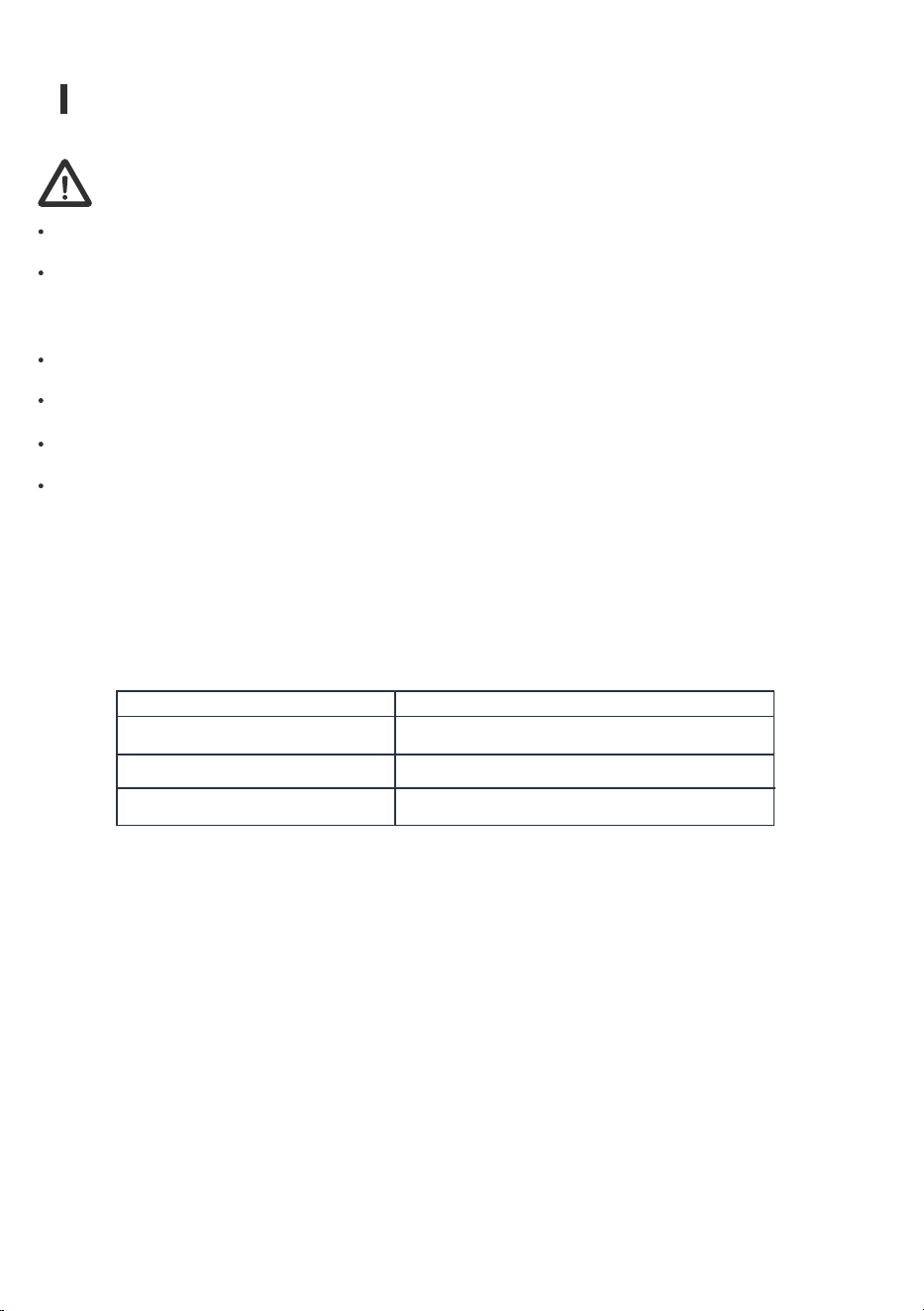
The wires in this mains lead are colored in accordance with the following code:
Green or Green with a strip
To avoid a hazard due to instability of the appliance, it must be placed on an even or �lat surface.
COLOR
WIRING
Yellow
White
Black
Grounding
Neutral
Live
OPERATION & INSTALLATION
MAIN UNIT CONSTRUCTION
ICE-MAKING AND ITS WATER TANK PARTS
05
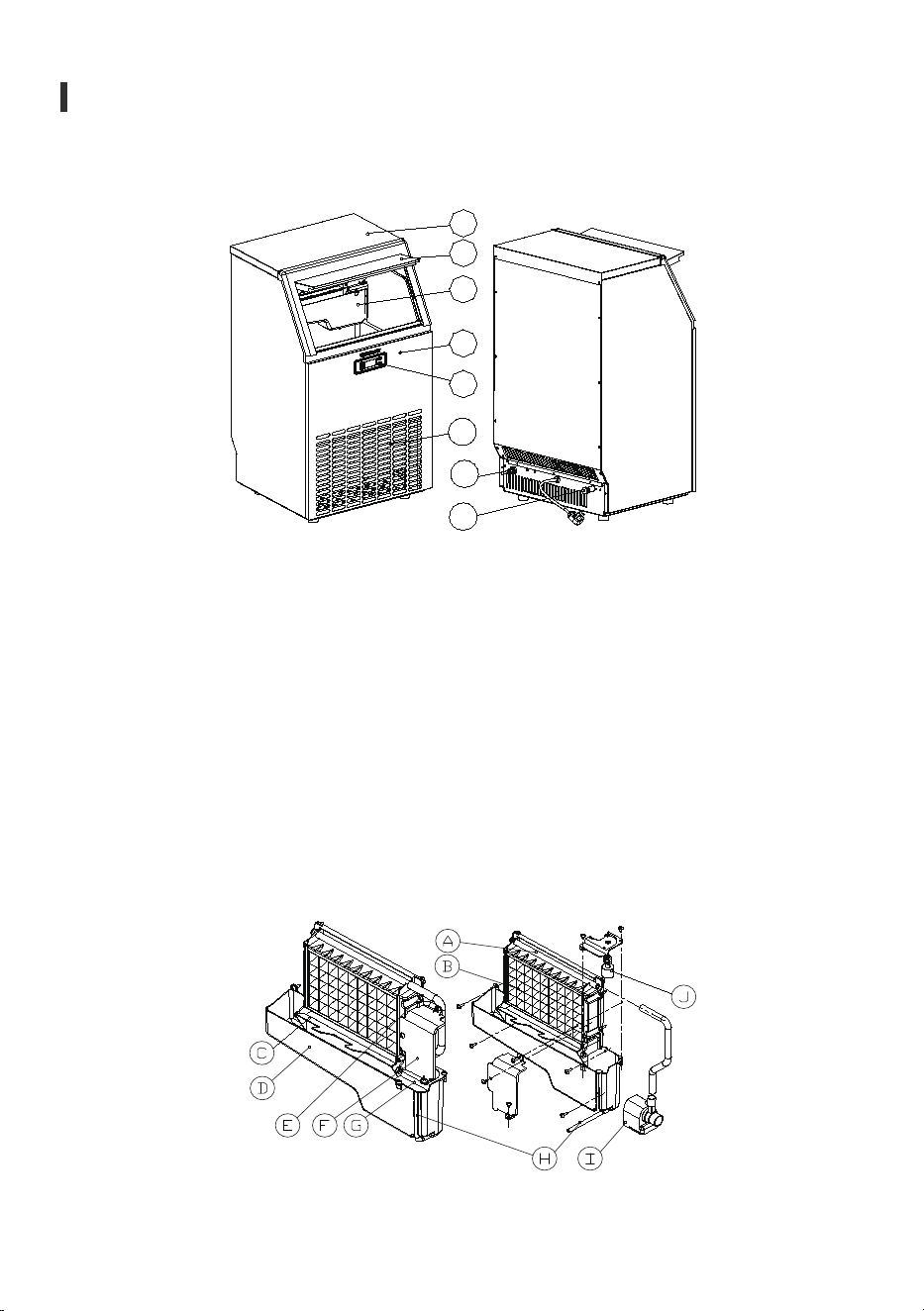
1.Top cover
2.Door for ice taking
3.Ice-making & its water tank assembly: Including ice-making evaporator, water tank, water pump
and some detecting parts
4.Front panel
5.Operation panel
6.Air outlet: Must keep the air circulate smoothly. Hot air will blow out when unit running.
7.Water draining port : Normal plugged with the cap. When the water needs to be drained, unplug the
cap.
And connect the white drain pipe.
8.Water inlet port for water supply: Use to connect the water supply pipe.
Accessory: 2 meters long and white color water drain pipe,
water quick connector of the water faucet,
¢6.35mm diameter and white color water supply pipe(3 meters long)
.
1
2
3
4
5
6
7
8
OPERATION & INSTALLATION
OPERATION PANEL
06
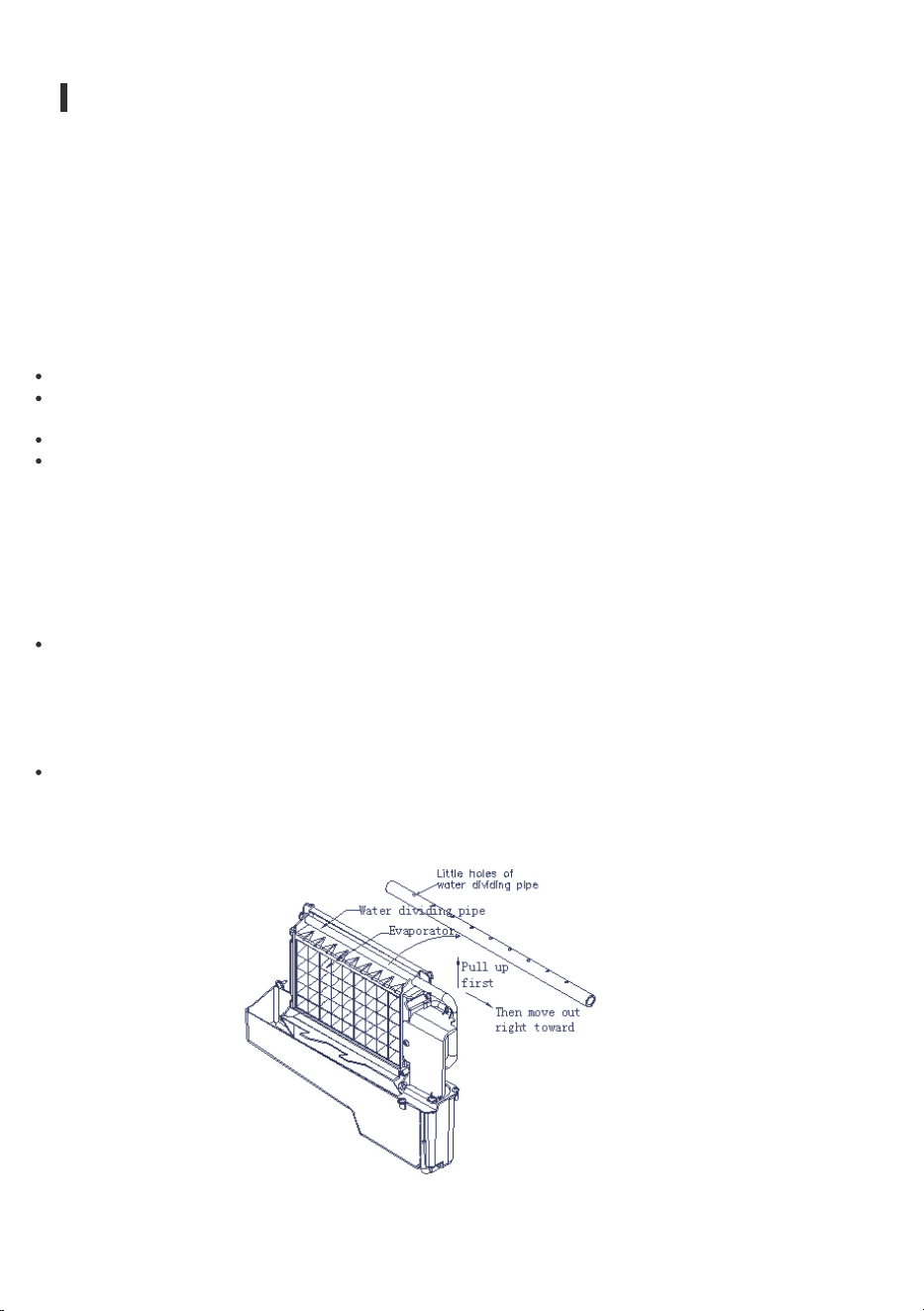
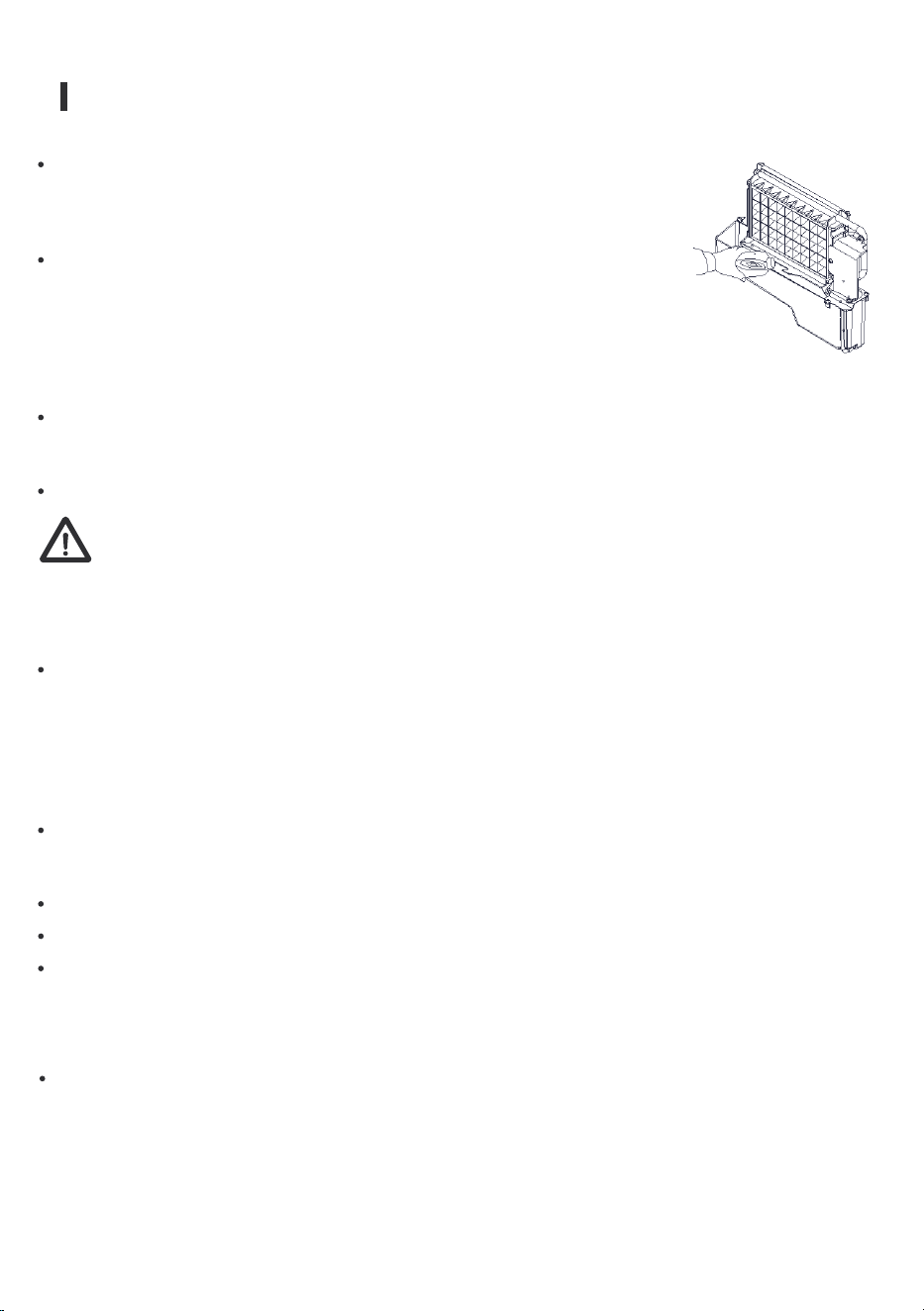
A.Water dividing pipe: with nine little holes, water will �low from these little holes. If no water �lows
out, it can be disassembled and cleaned.
B.Evaporator (ice-making module)
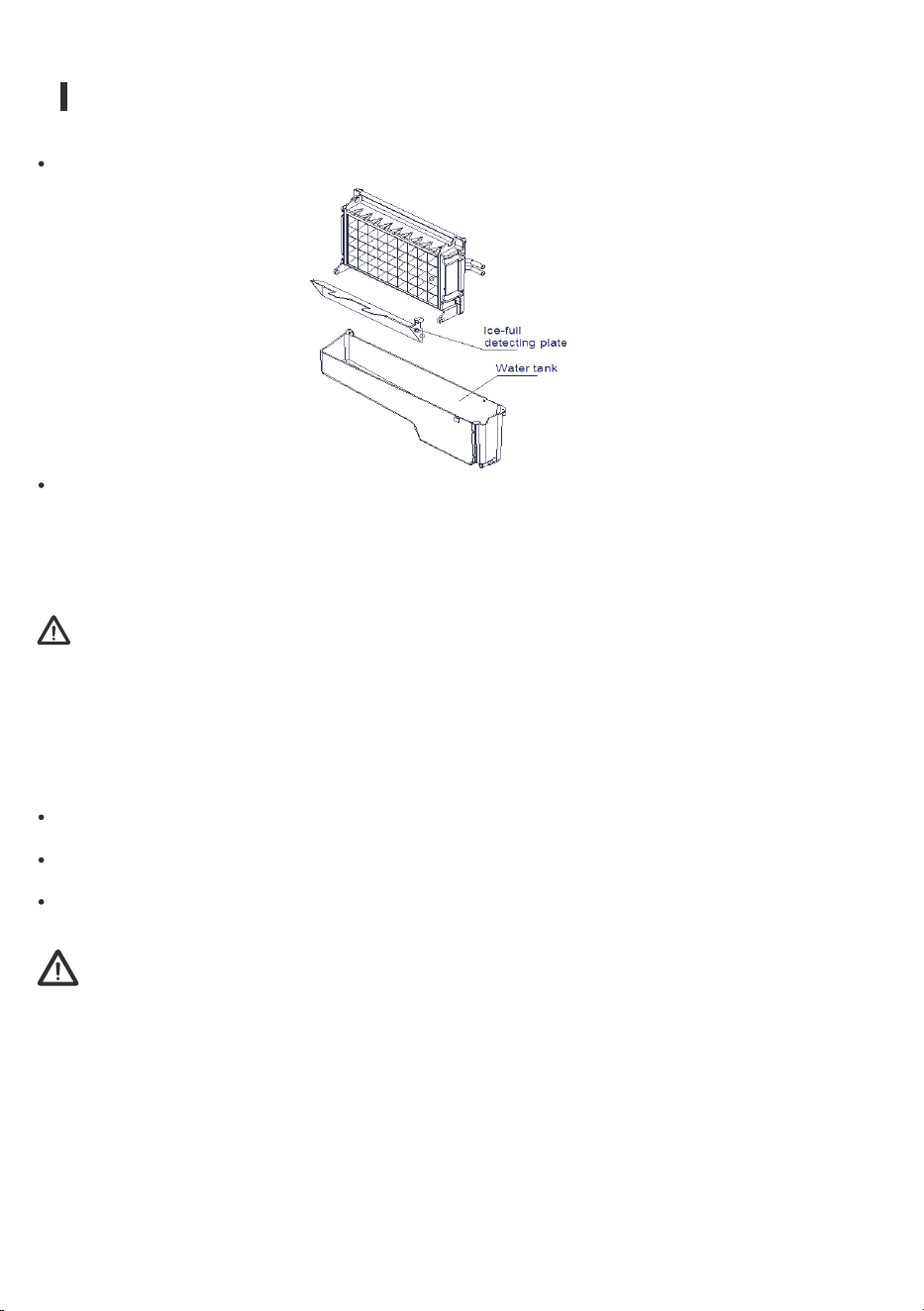
C.Ice full detecting board: Use to detect if the inner cabinet is full of ice or not, and to check the
ice-harvest process is over or not.
D.Water tank:
E.Water supplying pipe:
F.Cover board on the right side of the evaporator
:
G.Water level switch installing plate:
H.Water drainpipe of the water tank
: when the unit is busy making ice, this pipe should be clamped
in the slot of the water tank wall. When draining, this pipe should be pulled out.
I.Water pump:
J.Water level detecting switch.
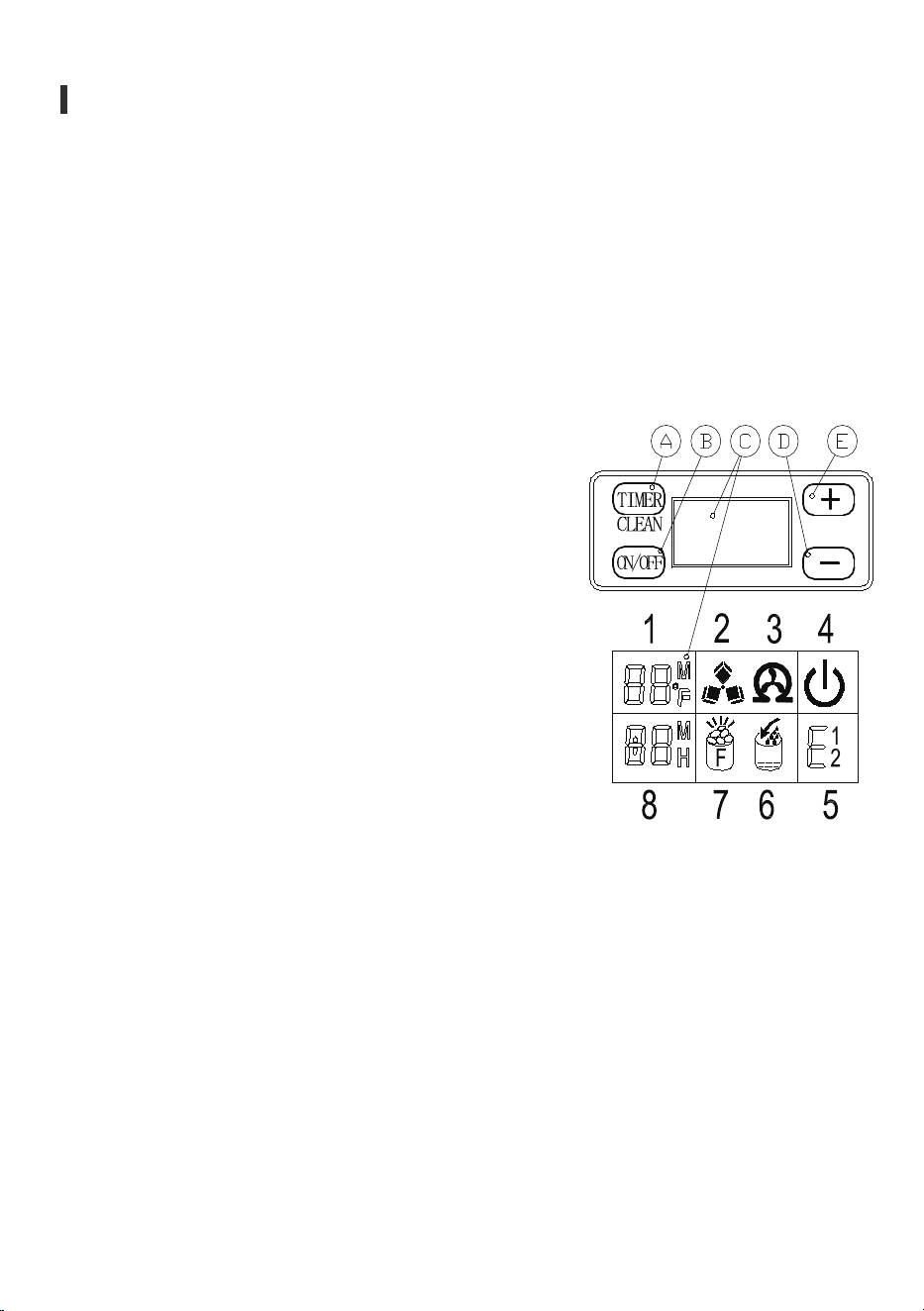
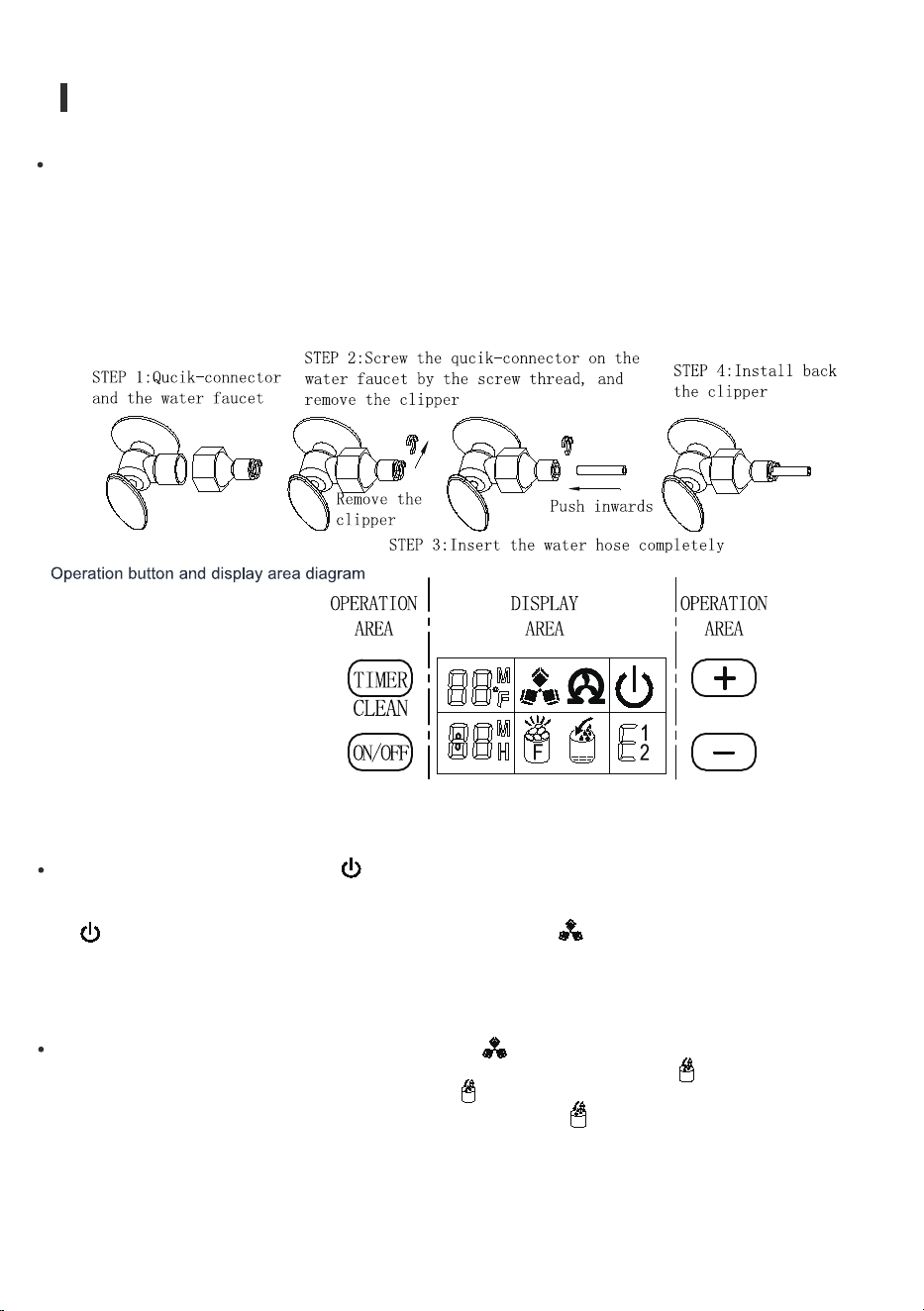
A.“TIMER CLEAN” button:
Quickly press this button once to enter the Timer Setting
program. Press this button for more than 5 seconds to enter the
Cleaning program.
B."ON/OFF” button:
When the unit is off, press this button to turn on the unit. During
the Self-cleaning program, or in normal ice-making state, press
this button to turn off the unit at once; and also if the unit is set
with the Timer, press this button to cancel the Timer setting.
When the unit is making the ice cubes, press this button for more
than 5 seconds and then the unit will switch to ice harvest
process by force.
C.LCD display window
1.Environmental temperature display and ice-making time
countdown display. Display ice-making time countdown with M
as the unit display and display environmental temperature with F
as the unit display.
2.Making ice and deice symbol display - the machine is making ice when the symbol rotates, and the
machine is deice when the symbol �lash.
3.Automatic self-cleaning symbol display.
4.On/off symbol display.
5.Error code display, E1 means the environmental temperature sensor is damaged, E2 means ice making
anomaly or the refrigerant leaked.
6.Water �low in and water shortage display, the arrow �lashing indicates that the machine has water, the
whole symbol is bright to indicate that the machine is short of water.
7.Ice full alarms that the machine will make ice again when you take out the ice.
8.Setting display. Display timing switch machine with the H as unit display; Display ice making time
setting with M as unit display.
"+" ,"-"button :
D.Use to adjust the ice-making process duration period length, the default setting is zero, 1 minute
adding or decreasing per each pressing of "+"or"-" button.
Also to adjust the delay time of the timer, the default setting is zero, 1 hour adding or decreasing per
each pressing of "+"or"-" button.
OPERATION & INSTALLATION
07
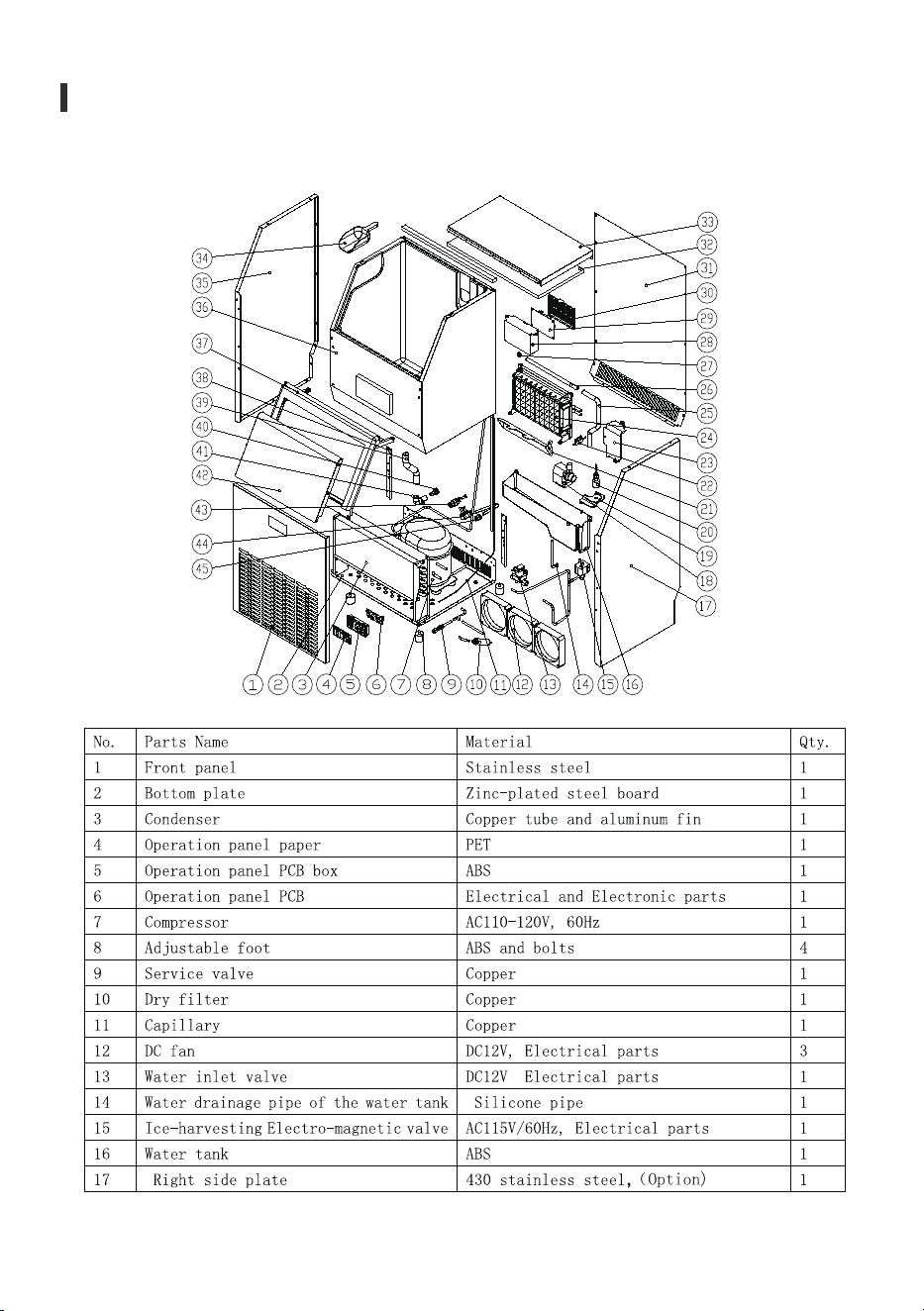
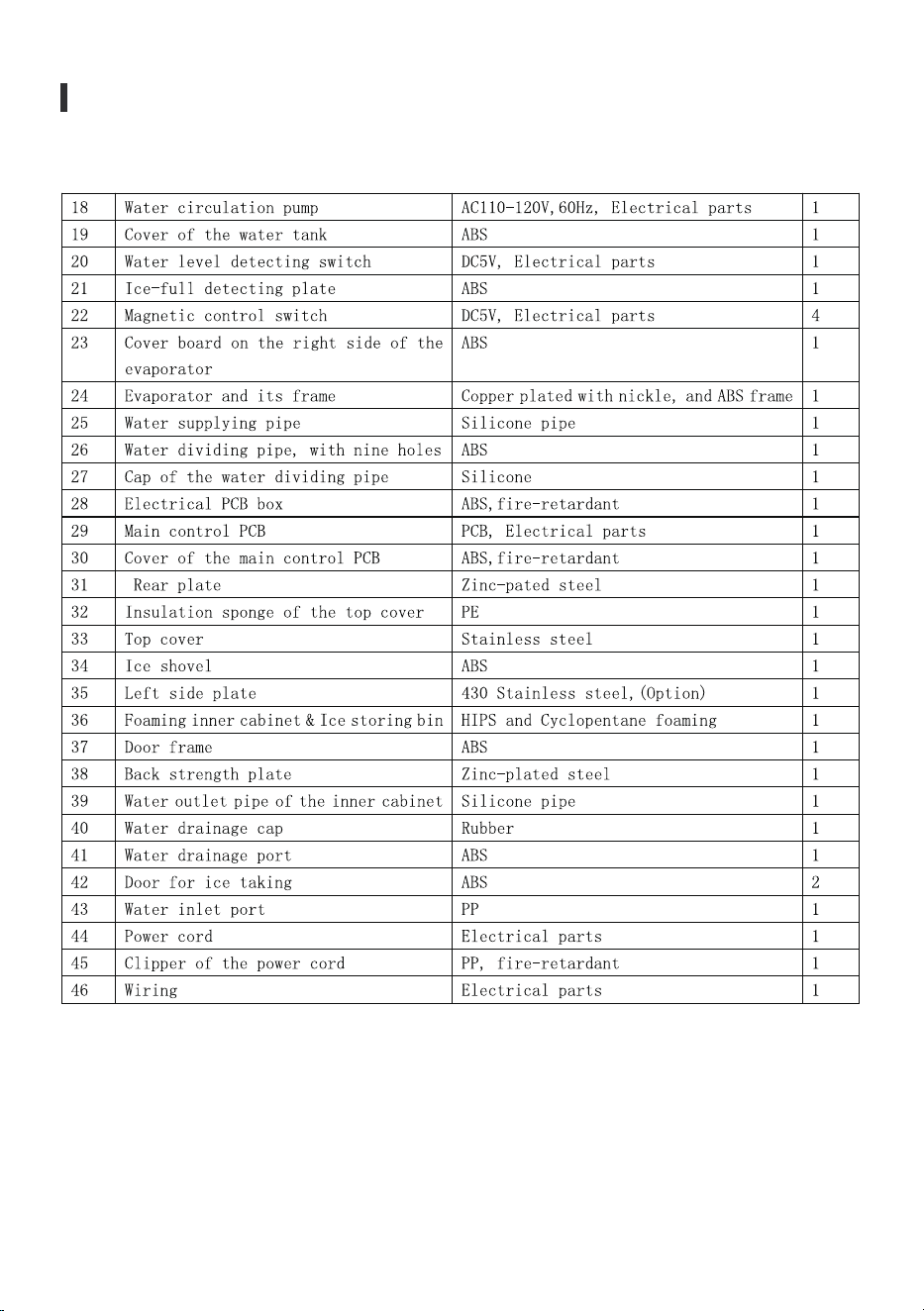
EXPLOSIVE DRAWINGS
OPERATION & INSTALLATION
08
09
OPERATION & INSTALLATION
UNPACKING YOUR ICE MAKER
UNPACKING YOUR ICE MAKER
Remove the exterior and interior packaging. Check if all the accessories, including the instruction
manual, ice scoop, white water inlet pipe, 4 ways to 2 ways water quick connector and the water
draining pipe, etc., are present. If any parts are missing, please contact our customer service.
Remove the tape for �ixing the door and inner cabinet, ice scoop, etc. Roughly clean the inner cabinet
& ice scoop with a wet cloth.
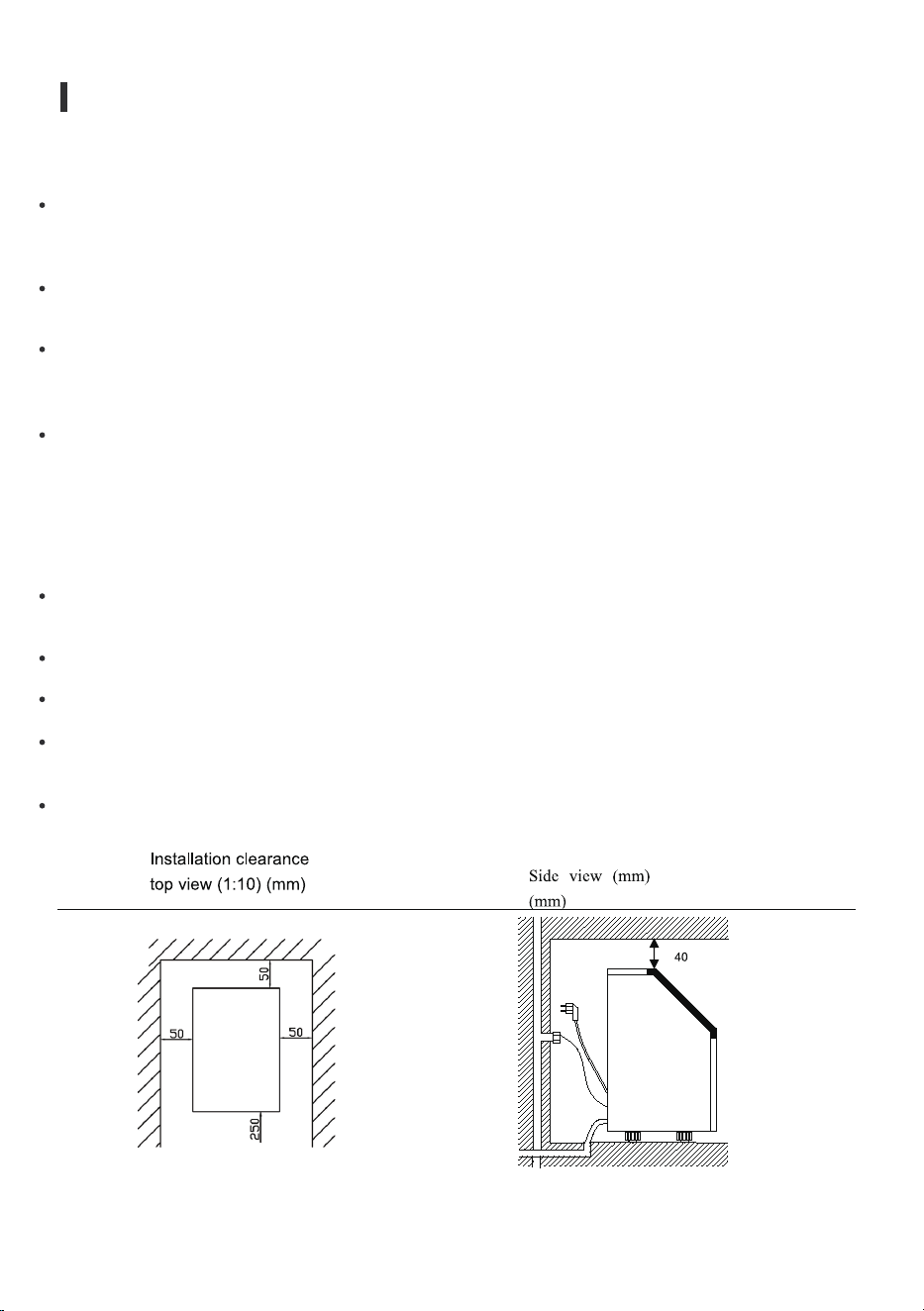
Put the ice maker on a level, �lat surface, far from direct sunlight and other sources of heat (i.e., stove,
furnace, radiator). Make sure that there is at least 20cm gap between the air outlet and the obstacles,
and at least 5 cm between Left/Right side and the wall.
Allow 4 hours for the refrigerant �luid to settle before plugging the ice maker in case the unit tipped
over during shipping or transportation.
The appliance must be positioned so that the plug is accessible.
This unit is not for outdoor use. Keep the proper room temperature and inlet water temperature
according to the above speci�ication table. Otherwise, it will affect the ice making performance.
This unit should not be placed near any heat resource.
The unit should be located on a �irm and level surface at normal countertop height.
There must be at least 5cm clearance at rear side for connection and 25CM clearance in front to open
the door and keep good air circulation.
Do not put anything on the top of the ice maker
WARNING: connect to the potable water supply only. Only use drinking water.
OPERATION & INSTALLATION
10
Note: This unit must be earthed
Note: Recommended grounding method
UNPACKING YOUR ICE MAKER
To ensure proper ventilation for your ice maker, the front of the unit must be completely unobstructed
(at least 20CM free space). Allow at least 50 mm clearance at the back, and 50 mm at the top and sides
for proper air circulation. The installation should allow the ice maker to be pulled forward for servicing if
necessary.
When installing the ice maker under a counter, follow the recommended spacing dimensions as shown
above.
Place electrical and water supplies and drain �ixtures in the recommended locations as directed.
Choose a well-ventilated area with temperatures above 50 Fahrenheit and below 90 Fahrenheit. This
unit MUST be installed in an area protected from elements such as wind, rain, water spray or drips.
The ice maker requires a continuous water supply with a pressure of 1-8 bar as required in above
speci�ication table. The temperature of the water feeding into the ice maker should be between 41
Fahrenheit and 77 Fahrenheit for optimal operation.
Before you move your ice maker into its �inal position, it is important to make sure you have the proper
electrical connection.
It is recommended that a separate circuit, serving only your ice maker, be provided. Use receptacles that
cannot be turned off by a switch or pull chain. If the supply cord or plug needs to be replaced, it should
be done by a quali�ied service engineer.
This appliance requires a standard 110-120Volt, 60Hz electrical outlet with good grounding means.
For your personal safety, this appliance must be properly grounded. This appliance is equipped with a
power supply cord having a grounding plug. To minimize possible shock hazard, the cord must be
plugged into a mating grounding-type wall receptacle, grounded in accordance with the National
Electrical Code and local codes and ordinances. If a mating wall receptacle is not available, it is the
personal responsibility of the customer to have a properly grounding wall receptacle installed by a
quali�ied electrician.
Electrical Shock Hazard
Plug into a grounding wall outlet. Never remove the ground prong. Use separate power supply or
receptacle. Never use an adapter.
Never use an extension cord. Failure to follow these instructions may result in �ire, electrical shock or
even death.
OPERATION & INSTALLATION
Before using your ice maker, it is strongly recommended to clean it thoroughly.
CLEANING YOUR ICE MAKER BEFROE USING FOR
THE FI RST TIME
UNPACKING YOUR ICE MAKER
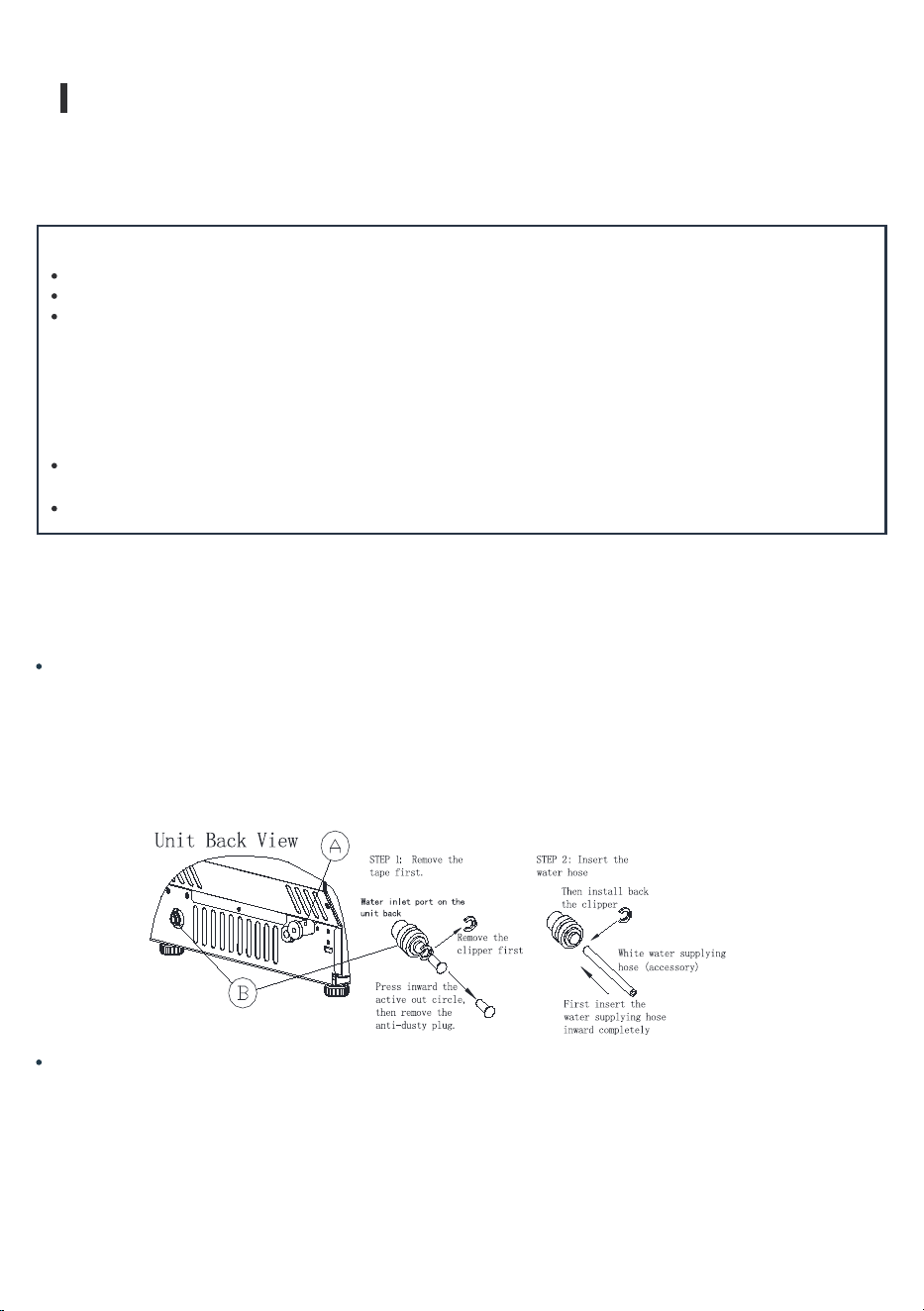
Step 1: First remove the clipper on the water inlet port for water supply (indicated in the following
illustration "B") located at unit back, then pushing inwards the anti-dusty plug. Use your other hand's
�inger to press the out circle to �ix the anti-dusty plug, then take down the anti-dusty plug.
Step 2: Insert the one end of the white-water hose into the water inlet port, and push inward comp
and install back the clipper. Now the water hose connection is completed.
Important: Be sure to use the new hose-sets supplied with the appliance to connect to water mains.
Old hose sets should not be reused
.
Connect the water supplying hose to the unit
Pull out the water drainage cap with black color (indicated A in above illustration), and then connect
the white drainage pipe included in accessory. Connect the other end of this drainage to the main
water drainage pipeline.
Connecting the water drainpipe
Open the ice collecting door.
Clean with diluted detergent, warm water and a soft cloth.
Repeatedly clean the water contacting inner parts, you can pull the Water drainpipe of the water
tank indicating “IT” in above illustration to drain the cleaned water in the water tank. To clean
the inner ice-storing cabinet till all the inner parts are clean, drain out all of the cleaned water
from the water drain port located at unit back indicating "7"in above illustration. Now reinstall
the water drainpipe of the water tank and the cap of the unit water drain port, otherwise the unit
will not make the ice normally. We suggest that you discard the ice-cube made by the �irst ice
making cycle after cleaning.
The outside of the ice maker should be cleaned regularly with a mild detergent solution and
warm water.
Dry the interior and exterior with a clean, soft cloth.
11
OPERATION & INSTALLATION
12
UNPACKING YOUR ICE MAKER
Starting up: Plug in the power plug, the symbol will �lash in the display window, preess the
ON/OFF button on the control panel. The machine will start to make ice when the external pipe adds
water to reach the standard level on the water tank through the electromagnetic water valve. Next,
the symbol will change to light on always in display window and symbol rotate. The ambient
temperature will be displayed in the upper left of the display window, "80F” means the ambient
temperature is 80F. Several minutes later, the �lashing numbers will be displayed in the ambient
tempaerature display area. The �lashing number "10M” means it still needs 10 minutes to �inish this
ice making cycle.
Every ice making cycle �inished, enter deicing process, the symbol �lash, the external pipe can
add water to the water tank through the electromagnetic valve, and the arrow on the symbol will
�lash until the water reach the standard level. Next, the symbol extinguish, the unit enter the next
ice making cycle. When the water cannot reach the standard level, the symbol is always bright,
and the unit will stop working. After water shortage, the unit needs to be restarted, otherwise it will
start up automatically after 15 minutes.
First, install the supplied water quick-connector to the water faucet by screw thread. Second, remove
the clipper from the water quick-connector, insert the other end of the water hose into this
quick-connector port completely, then install back the clipper, also this step is completed. Note: The
water faucet should be supplied by the customer himself.
Important: The water pressure of the main water supply system must be 0.04-0.6 MPa at
least.
Connect the water hose to the water faucet of the water main supply system
OPERATION & INSTALLATION
13
Each ice making cycle is around 11-20minutes. The ice making time will be changed according to
the ambient temperature and the water temperature change. Especially the �irst ice making cycle, the
ice making cycle will be longer because of the high-water temperature in the water tank, but the ice
making cycle will not be longer than 30minute.
Adjust the ice thickness. Press the"+"/" -" button on the control panel to adjust the ice thickness. The
number in the bottom left of the display window is the setting of the ice making time, default is "0".
Press the "+" button once and then the ice making time will add one minute. The ice will also be
thicker ; Press "-" button one time the ice making time will reduce one minutes, and the ice will be
thinner. Restart the machine and it will go back to default "0".
Note: The time currently set only changes the next and subsequent ice making cycle.
Shut down the unit : During the unit making ice, press the “ON/OFF” button on the control panel,
and the unit will shut down and go into standby mode. If you press "ON/OFF" longer than 5 seconds
during ice making, then the unit enters the deicing process directly. This function can help remove the
ice on the ice plate. Press "ON/OFF" button to shut down the machine.
Timing setting : Setting range : 1-24 hours
Time shutdown: When the unit is running, it can set up the timing shutdown.
Time on : When the unit is on standby, you can set the unit with ON-TIMER.
How to set up the timing
Press the TIMER button, the default timing time is "1H" in display window, then press button to
adjust the timing time you need. Every time you press the "+" button, the time add 1 hour; Press
"-"button can reduce the timing time. During the process of time adjustment, the "1H" in the lower
corner of the number will �lash. After 5 seconds �lashing without pressing, the "H" letter will change
from �lashing to always displaying, meaning that the timer program has been completed.
In standby condition display 5H, it means the unit will start automatically after 5 hours. If the ice
making condition displays 5H, it means the machine will shut down automatically after 5 hours. The
"H" in the display screen indicates that the machine currently has timing function, and the number in
front will be smaller and smaller until it becomes zero the timing ends and the machine, enters the
mode you need.
How to cancel timing
When the unit has a timing (the display window will display XX H), press "TIMER” button, and the
timing will be canceled after the number on the screen and "H" are extinguished.
When the unit has a timing, the display area in the lower left comer will display the timing time and
the ice making setting time, and the display content will be switched every 5S.
When the symbol lights up, the machine will stop working. It will work again after you take out
the ice.

Automatic self-cleaning program. The default cleaning time is 20 minutes.
Start the self-cleaning program:
After connecting all the water pipes, plug on the main power
supply plug, then press “TIMER CLEAN" button on control panel for more than 5 seconds, to enter
the self-cleaning program. The symbol rotate on the display screen, and the time counts down
area displays 20M. And the "CLEAN n light will always be on during this period, the digit window will
indicate the left time, the water pump runs for 8 minutes and stops for 3 minutes, always recycle. The
total duration time is 20 minutes for one self-cleaning program. Also, when the water pump stops,
the water will �low to the water tank automatically.
Cancel the self-cleaning program: It takes about 20 minutes to complete a self-cleaning
program. When the program is completed, the system will be in off-state automatically. And you can
press the "ON/OFF" button on control panel to cancel the self-cleaning program by force.
How to switch Fahrenheit (°F) to Celsius (°C)?
Press "+" or button for longer than 5s, and it will automatically switch.
OPERATION & INSTALLATION
14
TIPS & MAINTENANCE
15
Allow all the ice cubes to be ejected from the evaporator of ice maker.
Turn off the unit, and unplug the power cord.
Shut off the water supply at the main water supply.
Disconnect the water supply hose from the water inlet valve.
Pull out the water drainpipe of the water tank indicating "H" in above illustration to drain out the
water in the water tank. When all of the water has been drained out, to reinstall back the water
drainpipe of the water tank.
Then drain out all of the water from the water drain port located at unit back indicating "7" in above
illustration.
Disconnect the water drainpipe to the main drain pipeline or �loor drain, and then plug in the drain cap
again.
Drop the door open to allow for circulation and prevent mold and mildew.
Leave water supply hose and power cord disconnected until ready to reuse.
Dry the interior & wipe the outside of the unit.
Put a plastic bag on the unit to keep out dust and dirt.
PREPARING THE ICE MAKER FOR LONG STORAGE
If the ice maker will not be used for a long time, or if it is to be moved to another place, it will be
necessary to drain out all of the water in the system.
EXTERIOR CLEANING
The door and cabinet may be cleaned with a mild detergent and warm water solution such as 28g of
dish washing liquid mixed with 7.5L of warm water. Do not use solvent-based or abrasive cleaners.
Use a soft sponge and rinse with clean water. Wipe with a soft, clean towel to prevent water spotting.
Stainless steel models can discolor when exposed to chlorine gas and should be cleaned. Clean
stainless steel models with a mild detergent and warm water solution and a damp, soft cloth. Never
use abrasive cleaning agents.
Before carrying out any cleaning or maintenance operations, unplug the ice maker from the main
power supply electricity. (EXCEPTION: ice maker has a self-cleaning program).
Do not use any alcohol or fumes for cleaning/sanitization of the ice maker. It may cause cracks on the
plastic parts.
Ask a trained service person to check and clean the condenser at least once a year, in order to let the
unit work properly.
This appliance must be cleaned by using a water jet.
If the ice maker has been left unused fora long time, it must be thoroughly cleaned before the next
use. Follow carefully any instructions provided for cleaning or use of sanitizing solution.
Do not leave any solution inside the ice maker after cleaning.
Periodic cleaning and proper maintenance will ensure ef�iciency, top performance, hygienic, and
longevity. The maintenance intervals listed are based on normal conditions. You may want to shorten
the intervals if you have pets, or the unit is used outdoors, or there are other special considerations.
What shouldn't be done?
Never keep anything in the ice storage bin that is not ice: objects like wine and beer bottles are not
only unsanitary, but its labels may slip off and obstruct the drainpipe.
INTERIOR CLEANING
TIPS & MAINTENANCE
16
For Ice Storage Bin
The ice storage bin should be sanitized occasionally. Clean the bin before the ice maker is used for the
�irst time and reused after stopping for an extended period of time. It is usually convenient to sanitize
the bin after the ice making system has been cleaned, and the storage bin is empty.
The ice scoop should be washed regularly. Wash it just like any other food container.
ICE MAKING PARTS CLEANING
During the using, periodically to clean these main system of your ice-maker.
NOTICE: Stainless steel models exposed to chlorine gas and moisture, such as in areas with spas or
swimming pools, may have some discoloration of stainless steel. Discoloration from chlorine gas is
normal.
DO NOT use solvent cleaning agents or abrasives on the interior. These cleaners may transmit taste to
the ice cubes, or damage or discolor the interior.
Disconnect power to the unit.
Open the door and with a clean cloth, wipe down the interior with a sanitizing solution made of 28g
of household bleach or chlorine and 7.5L of hot water (95T to 115°F).
Rinse thoroughly with clear water. The wastewater will be drained out through the drainpipe.
Reconnect power to the unit
Repeat the above step to clean the water tank and other inner parts of the unit especially, to the water
dividing pipe on the evaporator, when the compressor and the water pump run normally. However, if
there is no water �lowing out from the water dividing pipe or the water �lowing is very small, please
discharge this water dividing pipe to clean carefully. Clean each little hole on the water dividing pipe
displayed in the following illustration, and make sure each hole is not clogged by something, then
install back to the original location.
When there are ice cubes on the surface of the evaporator, but can’t fall down easily. Never use the
mechanical substance to remove it by force. Only press the "ON/OFF" button for more than 5 seconds
and the unit will enter the ice melting process, after some while, the big ice-cubes will fall down, then
turn off the unit and unplug the power cord to clean the surface of the evaporator.
Ice Making Assembly System Cleaning by Using Nu-Calgon Nickle Safe Ice-machine Cleaner
Minerals that are removed from water during the freezing cycle will eventually form a hard scaly
deposit in the water system. Cleaning the system regularly helps to remove the mineral scale buildup.
How often you need to clean the system all depends upon how hard your water is. With hard water of
4 to 5 grains/liter, you may need to clean the system as often as every 6 months.
TIPS & MAINTENANCE
17
WARNING:
Turn off the ice maker. Keep the ice maker connected to the water supply and drainpipe. But shut off
the water faucet of main water supply.
Open the door and scoop out all of the ice cubes. Either discard them or save them in an ice chest or
cooler.
Preparing the cleaning solution. Please mix the Nu-Calgon Nickle Safe Ice Machine Cleaner with
water to make the cleaning solution.
For the water tank and ice-full detecting plate
After cleaning the interior parts and install back to its respective position, and return machine to
work, discard �irst batch of ice.
Also, the water tank and the ice-full detecting plate is very important to keep your ice cube hygienic.
Put a mixture of neutral cleaner & water into a clean water jet, and then spray to all the inner surface
of tank & the ice detecting plate. Wipe these surfaces with a clean cloth. And then, spray the surfaces
with clean water, wiping with a dry clean cloth. Then drain out the cleaned water in the water tank by
pulling out the water drainpipe of the water tank indicating "H" in above illustration. When all of the
cleaned water has been drained out, reinstall the water drainpipe of the water tank.
Use a plastic or stainless container with more than 4 liters capacity, and mix 300 ml Nu-Calgon Nickle
Safe Ice-machine Cleaner with 2.8 liters warm water about 120T-140T, then divide them for 2
shares equally in 2 cups. It is better to keep the temperature of each cup of the cleaning solution.
Wear rubber gloves and safety goggles (and/or face shield) when handing Ice
Machine Cleaner or sanitizer.
TIPS & MAINTENANCE
18
INTERIOR CLEANING
DAILY CLEANING
The ice shovel, door and the water dividing pipe should be cleaned each day. At the end of every day,
rinse the ice shovel and wipe both sides of the door with a clean cloth.
Check to be sure that the water drainpipe of the water tank has been
installed properly in the slot of the tank wall. Then pour one cup of
Nickel-Safe Ice Maker Cleaning Solution into the water tank. Wait about
for 5 minutes.
Then open the water faucet of the main water supply and let the water �low in the unit. Press the
“TIMER CLEAN” button on control panel for more than 5 seconds to enter the self-cleaning program.
As explained above, the water pump runs for 8 minutes and stops for 3 minutes, completes another
cycle, and then another one. The total duration time is 30 minutes for one self-cleaning program.
During this process, the ”CLEAN" light will always be on during this period, and the digit window will
indicate the left time. Through this process, it will rinse the water dividing pipe, evaporator, water
pump, silicone pipe, and water tank, etc.
When the self-cleaning program is complete, pull out the drainpipe of the water tank, drain the
cleaning solution down to the lower ice storage bin, also shake the unit slightly to drain out all of the
water completely. Then install back the drainpipe to the water tank slot tightly.
Repeat step 8-9 again for 2 times.
Follow the above program to clean the ice storage bin.
When this special cleaning program �inished, you can return to the regular ice making mode. We
suggest that you discard the �irst batch of ice cube.
Turn on the power to the ice maker, and press "TIMER CLEAN” button on
the control panel for more than 5 seconds to enter the self-cleaning
program. As explained above, the water pump runs for 8 minutes and stops
for 3 minutes, completes one cycle, and then another. The total duration
time is 30 minutes for one self-cleaning program.
The "CLEAN” light will always be on during this period, and the digit
window will indicate the remaining time.
After 30 minutes of one self-cleaning program completing, pull out the drainpipe of the water tank,
drain the cleaning solution down to the lower ice storage bin. Shake the unit slightly to drain out all of
the cleaning solution. Then install the drainpipe to the slot of the water tank again.
The ice machine cleaner contains acids.
DO NOT use or mix with any other solvent-based cleaner products.
Use rubber gloves to protect hands. Carefully read the material safety
instructions on the container of the ice machine cleaner.
Repeat steps 4-6 to clean the ice making assembly system again.
WARNING:
TIPS & MAINTENANCE
19
SEMI-MONTHLY CLEANING
The ice shovel, ice bin, water tank, the ice-full detecting plate and the surface of the evaporator are to
be cleaned twice a month according to the interior cleaning program.
This marking indicates that this product should not be disposed with
other household waste throughout the EU. To prevent possible harm
to the environment or human health from uncontrolled waste
disposal, recycle it responsibly to promote the sustainable reuse of
material resources. To return your used device, please use the return
and collection system or contact the retailer where the product was
purchased. They can take this product for environmentally safe
recycling
SEMI-ANNUAL CLEANING
All the components & surfaces exposed to water or ice cubes, like ice storage bin, water tank, door,
evaporator, water pump, silicone tube, water dividing pipe, etc. should be cleaned by Using Nu-Calgon
Nickle Safe Ice-machine Cleaner every 6 months. They should be cleaned by the serviceman according
to ice making assembly system cleaning program.
CORRECT DISPOSAL OF THIS PRODUCT
NOTE *: TESTED AT 70 Fahrenheit ROOM TEMPERATURE AND 50 Fahren -
heit WATER TEMPERATURE.
SKU
POWER SUPPLY VOLTAGE
CLAIMATE CLASS
ELECTRICAL PROTECTION CLASS
ICE MAKING RATING (Amps)
ICE HARVEST RATING (Amps)
ICE MAKING CAPACITY (KG/24H)
REFRIGERANT CHARGE
VESICANT
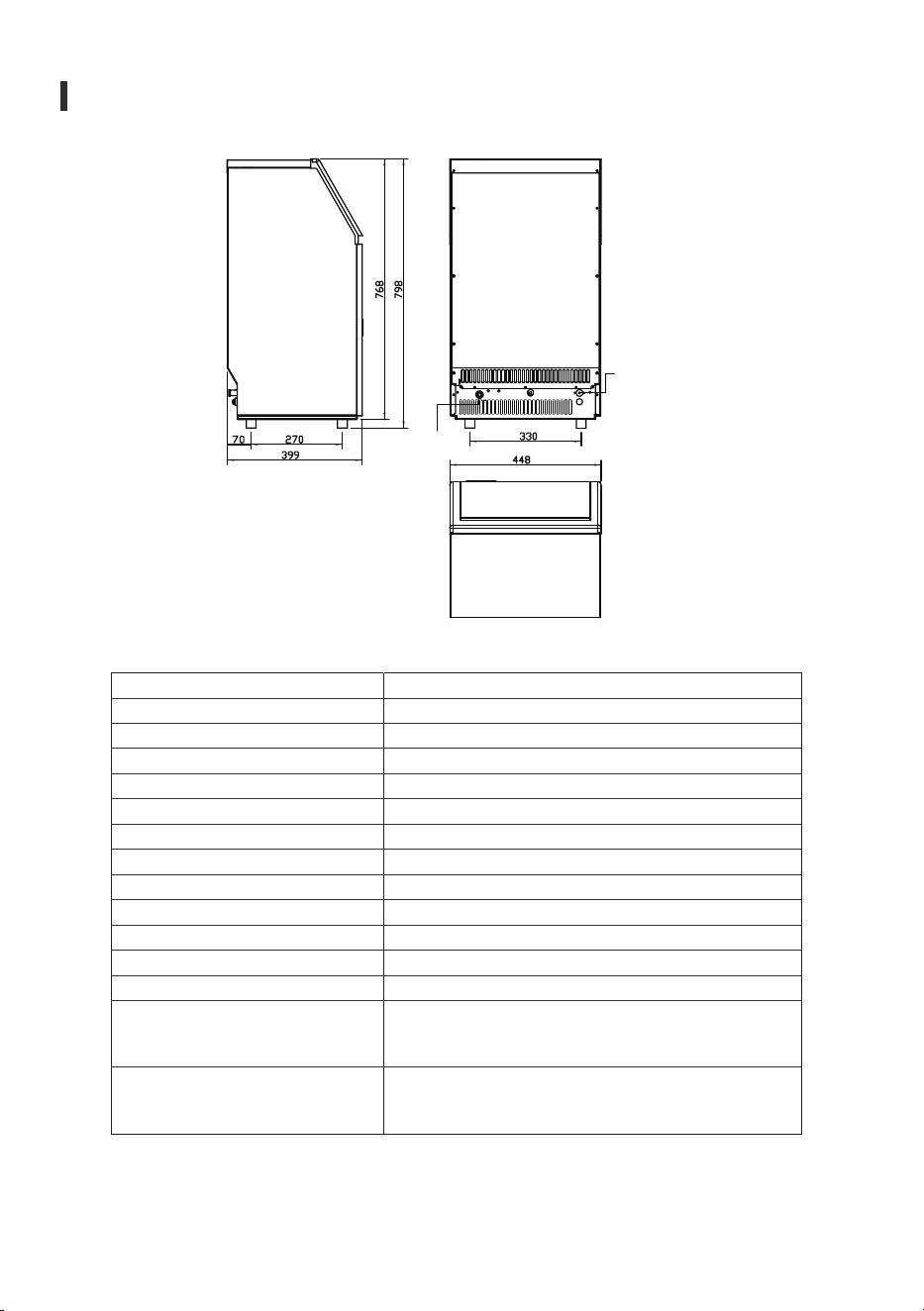
UNIT DIMENSIONS (W X D X H)
WATER CONSUMPTION(M24H)
MAX ICE STORAGE CARACITY(KG)
ACCESSORIES
CONNECTION
RUNNING CONDITIONS
IM-02/ZX-IM-02-WM-HM
1 Phase, 110-120/60HZ
104TC
I
2.2Amp
2.5Amp
45kg/24Hour*
R290 3.35Oz/95g
CsHio
448x400x798
50L
15Kg
SHOVEL, INSTALLATION KITS
POWER CORD-—18AWG
WATER SUPPLY—6.35mm diameter
DRAIN016 SYLPHON BELLOWSS(REAR)
ROOM TEMP 50-110 Fahrenheit
WATER SUPPLY TEMP 41-95 Fahrenheit
WATER SUPPLY PRESSURE 0.04-0.6 MPa
SPECIFICATIONS
20
CORRECT DISPOSAL OF THIS PRODUCT
Water
Drainage Port
Water In let
Port
SPECIFICATIONS
WIRING DIAGRAM
21
NORMAL SOUNDS
Your new ice maker may make sounds that are not familiar to you. Most of the new sounds are
normal. Hard surfaces like the �loor, walls and cabinets can make the sounds seem louder than they
actually are. The following describes the kind of sounds that might be new to you and what may be
causing them.
You will hear a swooshing sound when the water valve opens to �ill the water tank for each cycle.
Rattling noises may come from the �low of the refrigerant or the water line. Items stored on top of
the ice maker can also make noises.
The high-ef�iciency compressor may make a pulsating or high-pitched sound.
Water running from the water tank to the evaporator plate may make a splashing sound.
Water running from the evaporator to the water tank may make a splashing sound.
As each cycle ends, you may hear a gurgling sound due to the refrigerant �lowing in your ice maker.
You may hear air being forced over the condenser by the condenser fan. During the harvest cycle, you
may hear the sound of ice cubes falling into the ice storage bin.
When you �irst start the ice maker, you may hear water running continuously. The ice maker is
programmed to run a rinse cycle before it begins to make ice.

WARRANTY
22
Our warranty covers all costs related to restoring the proven defective product through repair
or replacement of any defective part and necessary labor so that it conforms to its original speci�ica -
tions. A replacement product may be provided instead of repairing a defective product. Our
exclusive obligation under this warranty is limited to such repair or replacement. A receipt indicating the
purchase date is required for any claim, so please keep all receipts in a safe place. Although greatly
appreciated, the product registration is not required to activate any warranty and product registration
does not eliminate the need for the original proof of purchase. The warranty becomes void if attempts at
repair are made by non-authorized third parties and/or if spare parts, other than those provided by
us.
You may also arrange for service after the warranty expires at an additional cost. These are our general
terms for warranty service, but we always urge our customers to reach out to us with any issue,
regardless of warranty terms. If you have an issue with our products, please contact us
(
[email protected]), and we will do our best to resolve it for you.
We offer a limited 1-year warranty (“warranty period") on all of our products purchased new and
unused from the company, with an original proof of purchase and where a defect has arisen, wholly
or substantially, as a result of faulty manufacture, parts or workmanship during the warranty period. The
warranty does not apply where damage is caused by other factors, including without limitation:
(a)normal wear and tear;
(b)abuse, mishandling, accident, or failure to follow operating instructions;
(c)exposure to liquid or in�iltration of foreign particles;
(d)servicing or modi�ications of the product;
(e)commercial or non-household use.
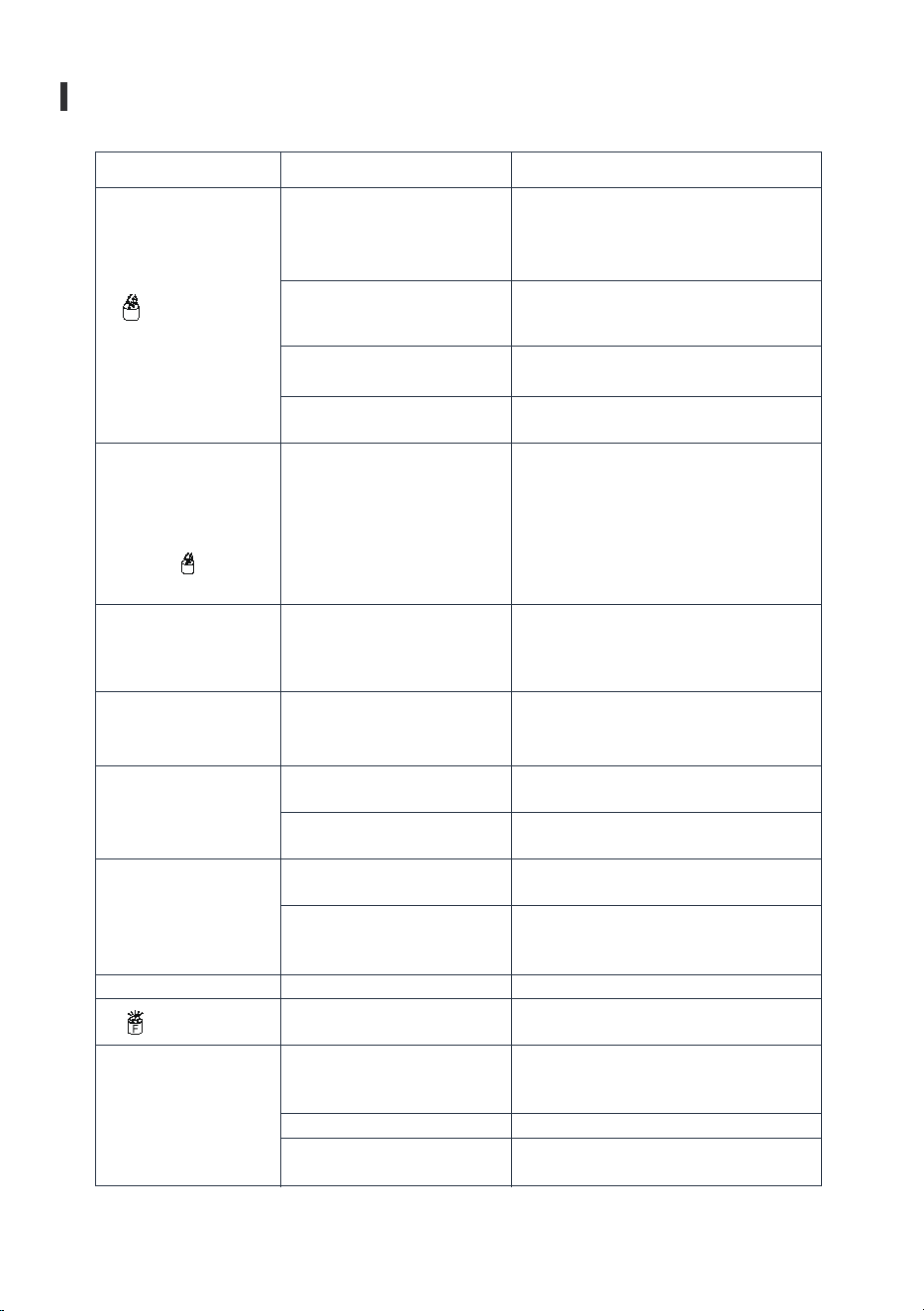
" " indicator is on.
The unit start to enter
the ice making
process, but no water
�lowing in the unit,
and the " "
indicator �lashes.
Water pump is
working, but no water
�low out from the
water dividing pipe.
No water supply.
Floating ball of the water level
detecting switch is blocked,
can't be raised up.
Water �lows out from the
water tank.
Water �lows out from the water
drainpipe of the water tank.
Water supplying hose
breakdown, or water �lows in
very slowly.
Clean the water tank and the water level
detecting switch.
Check the main water supply pressure or
check the water supply hose is blocked or
not, adding the water pressure or cleaning
the hose necessary.
Place the unit on the level position, not on
the slope.
Pull out the pipe and install back to the slot
of the water tank properly.
Check the main water supply pressure or
check the water supply hose is blocked or
not, adding the water pressure or cleaning
the hose necessary.
The little holes on the water
dividing pipe is blocked.
Clean these little holes.
The transparency of
the ice cube is not
very good.
Ice cube shape is
irregular.
Ice cube is very thin.
Ice cube is too thick.
Ice making cycle is
normal, but there is
no ice cube produced.
" " indicator is on.
Water quality is bad.
Water quality is not good, or the
water tank is very dirty.
The little holes on the water
dividing pipe is some blocked.
Ambient temperature is too high.
Air circulation around the unit is
not good.
Ambient temperature is too low
.
The ice storage bin is full of ice
cubes.
The temperature of Ambient, or
water in water tank is too high.
Refrigerant leakage.
Cooling system tube is clogged.
Reduce the time of each ice making cycle.
Take out some ice cubes.
Move to the place with temperature lower
than 90 Fahrenheit, centigrade, and
change to the low temperature water.
Need the technical serviceman to maintain.
Needs a technical service person for
maintenance.
Water supplying hose breakdown, or water
�lows in very slowly.
The little holes on the water
dividing pipe is blocked.
Water quality is bad.
Water quality is bad.
Change the water supply, or use the water
�ilter to soften or �ilter the water.
TROUBLESHOOTING-SUPPORT
23
Problem
Possible Cause
Solution
