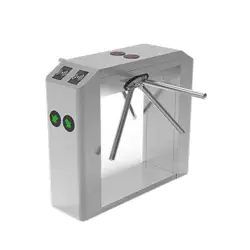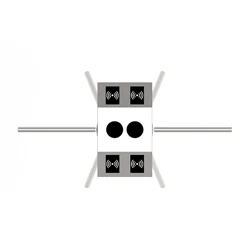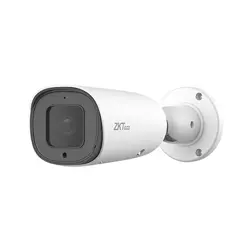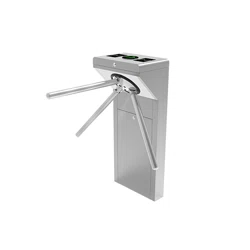

mTS1000 Series Tripod Turnstile User Manual
Page | 1 Copyright © 2025 ZKTECO CO., LTD. All Rights Reserved.
Thank you for choosing our product. Please read the instructions carefully
before operation. Follow these instructions to ensure that the product is
functioning properly. The images shown in this manual are for illustrative
purposes only.
For further details, please visit our Company’s website
www.zkteco.com
.
User Manual
TS1000 Plus/TS2000 Plus series
Date: January 2025
Doc Version: 1.0
English

TS1000 Plus/TS2000 Plus series User Manual
Page | 2 Copyright © 2025 ZKTECO CO., LTD. All Rights Reserved.
Copyright © 2025 ZKTECO CO., LTD. All rights reserved.
Without the prior written consent of ZKTeco, no portion of this manual can be copied or forwarded in any
way or form. All parts of this manual belong to ZKTeco and its subsidiaries (hereinafter the "Company" or
"ZKTeco").
Trademark
is a registered trademark of ZKTeco. Other trademarks involved in this manual are owned by
their respective owners.
Disclaimer
This manual contains information on the operation and maintenance of the ZKTeco equipment. The
copyright in all the documents, drawings, etc. in relation to the ZKTeco supplied equipment vests in and is
the property of ZKTeco. The contents hereof should not be used or shared by the receiver with any third
party without express written permission of ZKTeco.
The contents of this manual must be read as a whole before starting the operation and maintenance of the
supplied equipment. If any of the content(s) of the manual seems unclear or incomplete, please contact
ZKTeco before starting the operation and maintenance of the said equipment.
It is an essential pre-requisite for the satisfactory operation and maintenance that the operating and
maintenance personnel are fully familiar with the design and that the said personnel have received
thorough training in operating and maintaining the machine/unit/equipment. It is further essential for the
safe operation of the machine/unit/equipment that personnel has read, understood and followed the
safety instructions contained in the manual.
In case of any conflict between terms and conditions of this manual and the contract specifications,
drawings, instruction sheets or any other contract-related documents, the contract conditions/documents
shall prevail. The contract specific conditions/documents shall apply in priority.
ZKTeco offers no warranty, guarantee or representation regarding the completeness of any information
contained in this manual or any of the amendments made thereto. ZKTeco does not extend the warranty
of any kind, including, without limitation, any warranty of design, merchantability or fitness for a particular
purpose.
ZKTeco does not assume responsibility for any errors or omissions in the information or documents which
are referenced by or linked to this manual. The entire risk as to the results and performance obtained from
using the information is assumed by the user.
ZKTeco in no event shall be liable to the user or any third party for any incidental, consequential, indirect,
special, or exemplary damages, including, without limitation, loss of business, loss of profits, business
interruption, loss of business information or any pecuniary loss, arising out of, in connection with, or

TS1000 Plus/TS2000 Plus series User Manual
Page | 3 Copyright © 2025 ZKTECO CO., LTD. All Rights Reserved.
relating to the use of the information contained in or referenced by this manual, even if ZKTeco has been
advised of the possibility of such damages.
This manual and the information contained therein may include technical, other inaccuracies or
typographical errors. ZKTeco periodically changes the information herein which will be incorporated into
new additions/amendments to the manual. ZKTeco reserves the right to add, delete, amend or modify the
information contained in the manual from time to time in the form of circulars, letters, notes, etc. for better
operation and safety of the machine/unit/equipment. The said additions or amendments are meant for
improvement /better operations of the machine/unit/equipment and such amendments shall not give any
right to claim any compensation or damages under any circumstances.
ZKTeco shall in no way be responsible (I) in case the machine/unit/equipment malfunctions due to any
non-compliance of the instructions contained in this manual (ii) in case of operation of the
machine/unit/equipment beyond the rate limits (iii) in case of operation of the machine and equipment in
conditions different from the prescribed conditions of the manual.
The product will be updated from time to time without prior notice. The latest operation procedures and
relevant documents are available on http://www.zkteco.com
If there is any issue related to the product, please contact us.
ZKTeco Headquarters
Address ZKTeco Industrial Park, No. 32, Industrial Road,
Tangxia Town, Dongguan, China.
Phone +86 769 - 82109991
Fax +86 755 - 89602394
For business-related queries, please write to us at: [email protected]m
.
To know more about our global branches, visit www.zkteco.com.

TS1000 Plus/TS2000 Plus series User Manual
Page | 4 Copyright © 2025 ZKTECO CO., LTD. All Rights Reserved.
About the Company
ZKTeco is one of the world’s largest manufacturer of RFID and Biometric (Fingerprint, Facial, Finger-vein)
readers. Product offerings include Access Control readers and panels, Near & Far-range Facial Recognition
Cameras, Elevator/floor access controllers, Turnstiles, License Plate Recognition (LPR) gate controllers and
Consumer products including battery-operated fingerprint and face-reader Door Locks. Our security
solutions are multi-lingual and localized in over 18 different languages. At the ZKTeco state-of-the-art
700,000 square foot ISO9001-certified manufacturing facility, we control manufacturing, product design,
component assembly, and logistics/shipping, all under one roof.
The founders of ZKTeco have been determined for independent research and development of biometric
verification procedures and the productization of biometric verification SDK, which was initially widely
applied in PC security and identity authentication fields. With the continuous enhancement of the
development and plenty of market applications, the team has gradually constructed an identity
authentication ecosystem and smart security ecosystem, which are based on biometric verification
techniques. With years of experience in the industrialization of biometric verifications, ZKTeco was
officially established in 2007 and now has been one of the globally leading enterprises in the biometric
verification industry owning various patents and being selected as the National High-tech Enterprise for 6
consecutive years. Its products are protected by intellectual property rights.
About the Manual
This manual introduces the operations of TS1000 Plus/TS2000 Plus series Tripod Turnstile.
All figures displayed are for illustration purposes only. Figures in this manual may not be exactly consistent
with the actual products.
Features and parameters with ★ are not available in all devices.

TS1000 Plus/TS2000 Plus series User Manual
Page | 5 Copyright © 2025 ZKTECO CO., LTD. All Rights Reserved.
Document Conventions
Conventions used in this manual are listed below:
GUI Conventions
For Software
Convention Description
Bold font Used to identify software interface names e.g. OK, Confirm, Cancel.
>
Multi-level menus are separated by these brackets. For example, File > Create >
Folder.
For Device
Convention Description
< >
Button or key names for devices. For example, press <OK>.
[ ]
Window names, menu items, data table, and field names are inside square
brackets. For example, pop up the [New User] window.
/
Multi-
level menus are separated by forwarding slashes. For example,
[File/Create/Folder].
Symbols
Convention Description
This represents a note that needs to pay more attention to.
The general information which helps in performing the operations faster.
The information which is significant.
Care taken to avoid danger or mistakes.
The statement or event that warns of something or that serves as a cautionary
example.

TS1000 Plus/TS2000 Plus series User Manual
Page | 6 Copyright © 2025 ZKTECO CO., LTD. All Rights Reserved.
Table of Contents
1 OVERVIEW ............................................................................................................................................ 8
FEATURES ........................................................................................................................................................ 8 1.1
APPEARANCE AND SYSTEM COMPONENTS ........................................................................................................ 9 1.2
1.2.1
APPEARANCE .............................................................................................................................................................................................. 9
1.2.2 SYSTEM COMPONENTS ........................................................................................................................................................................ 9
MECHANICAL SYSTEM .................................................................................................................................... 10 1.3
ELECTRONIC CONTROL SYSTEM ...................................................................................................................... 10 1.4
POWER-ON SELF-TEST ................................................................................................................................... 11 1.5
STATUS OF TRAFFIC INDICATOR ...................................................................................................................... 11 1.6
WORKING PRINCIPLE ...................................................................................................................................... 12 1.7
TECHNICAL SPECIFICATIONS ........................................................................................................................... 13 1.8
2
FUNCTION INTRODUCTION .............................................................................................................. 15
CARD AUTHENTICATION ................................................................................................................................. 15 2.1
FACE TEMPLATE AUTHENTICATION★ ............................................................................................................. 16 2.2
3
CONTROL SYSTEM INTRODUCTION ................................................................................................. 18
WIRING DIAGRAM .......................................................................................................................................... 18 3.1
ACCESS CONTROL BOARD .............................................................................................................................. 19 3.2
3.2.1
DIAL CODE DESCRIPTION ................................................................................................................................................................. 20
TURNSTILE CONTROL BOARD ......................................................................................................................... 22 3.3
4
TROUBLESHOOTING.......................................................................................................................... 25
5 PRECAUTION ...................................................................................................................................... 26
6 MAINTENANCE .................................................................................................................................. 28
CHASSIS MAINTENANCE ................................................................................................................................. 28 6.1
MOVEMENT MAINTENANCE ............................................................................................................................ 28 6.2
POWER SUPPLY MAINTENANCE ...................................................................................................................... 28 6.3
7
PACKING LIST .................................................................................................................................... 29

TS1000 Plus/TS2000 Plus series User Manual
Page | 7 Copyright © 2025 ZKTECO CO., LTD. All Rights Reserved.
Revision History
Revision Date Author Reviewer Description
V1.0 01/08/2024 Yang Kaijin Original Document
TS1000 Plus/TS2000 Plus series User Manual
Page | 8 Copyright © 2025 ZKTECO CO., LTD. All Rights Reserved.
1 Overview
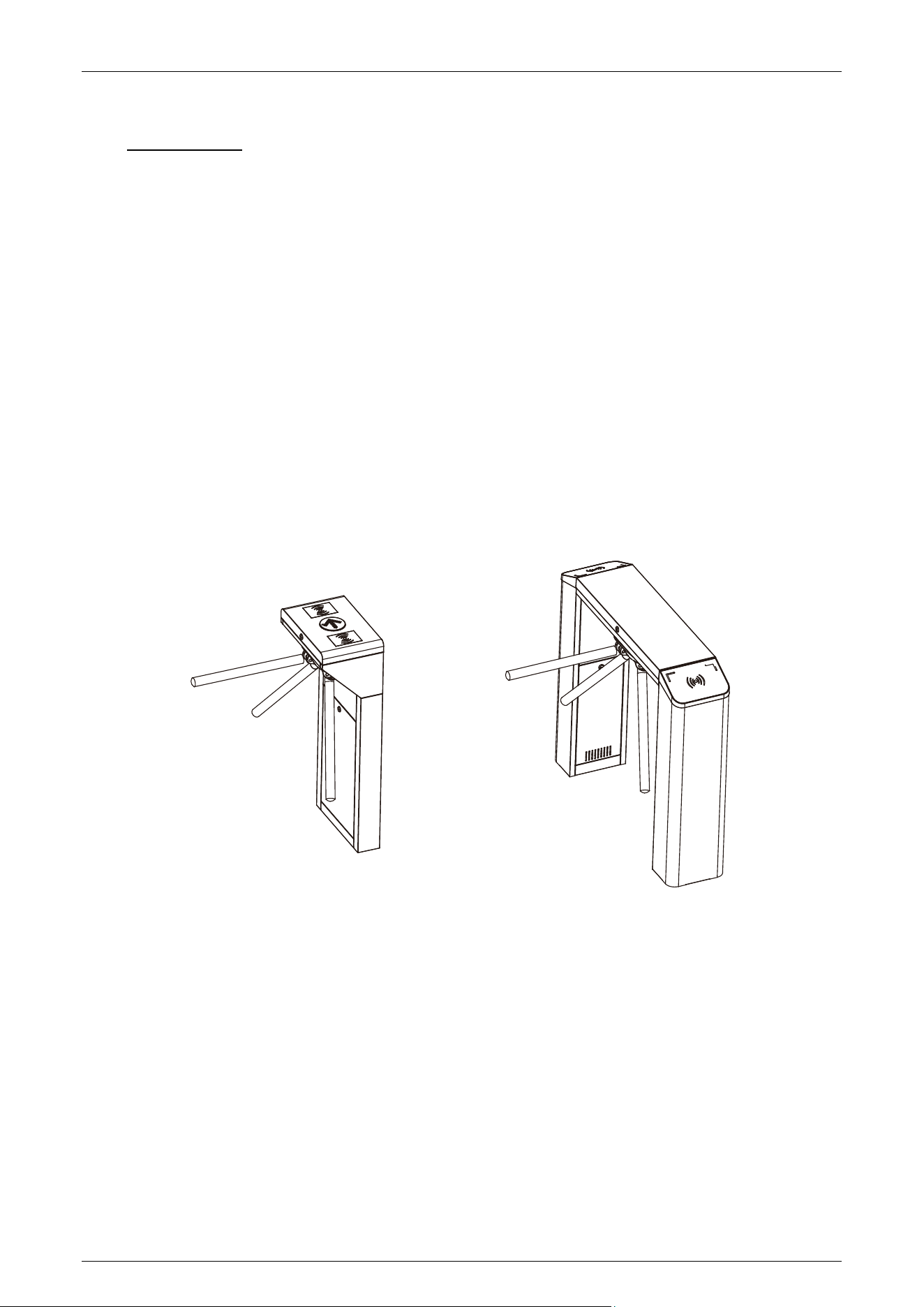
The TS1000 Plus/TS2000 Plus series tripod turnstile is part of ZKTeco's innovative semi-automatic
series. Crafted from SUS304 stainless steel, it features a sleek design that seamlessly integrates with
common access control systems. The device boasts a beautiful, clean appearance, is rust-proof, and
operates smoothly and quietly. Additionally, it is energy-efficient with low power consumption.
The TS1000 Plus/TS2000 Plus series tripod turnstile offers the flexibility to choose between normally
open and normally closed modes, supporting two-way traffic. In the normally closed mode, a variety
of authentication methods are available, allowing authorized personnel legal access while
restricting illegal entry. Upon detecting a valid card, the arm automatically unlocks and rotates with
a simple push.
During emergencies or power outages, the turnstile's arm lever automatically drops, enabling the
channel to open swiftly for rapid evacuation. This ensures a quick and unimpeded safe evacuation
for users. When energized, the arm can be manually raised to create a safe passageway.
Features 1.1
Long Service Life: The gate can open and close over 2 million times with regular maintenance.
Anti-Collision Function: The disk wheel automatically locks when no signal is received to open
the gate.
Automatic Reset: After a valid card is read, if the pedestrian doesn't pass within the specified
time, the system cancels their pass authority automatically.
Anti-Tailgating: Only one person can pass at a time.
Unified External Interface: Connects to various card readers and allows remote control and
management through a management computer.
TS1000 Plus/TS2000 Plus series User Manual
Page | 9 Copyright © 2025 ZKTECO CO., LTD. All Rights Reserved.
Emergency Mode: Automatically drops the arm to allow passage during power failures or fire
signals.
Pass Status Indicator: Provides visual indication of pass status.
Strong Anti-Interference: Limits abnormal gate operation caused by external factors like
electromagnetic interference.
Appearance and System Components 1.2
1.2.1 Appearance
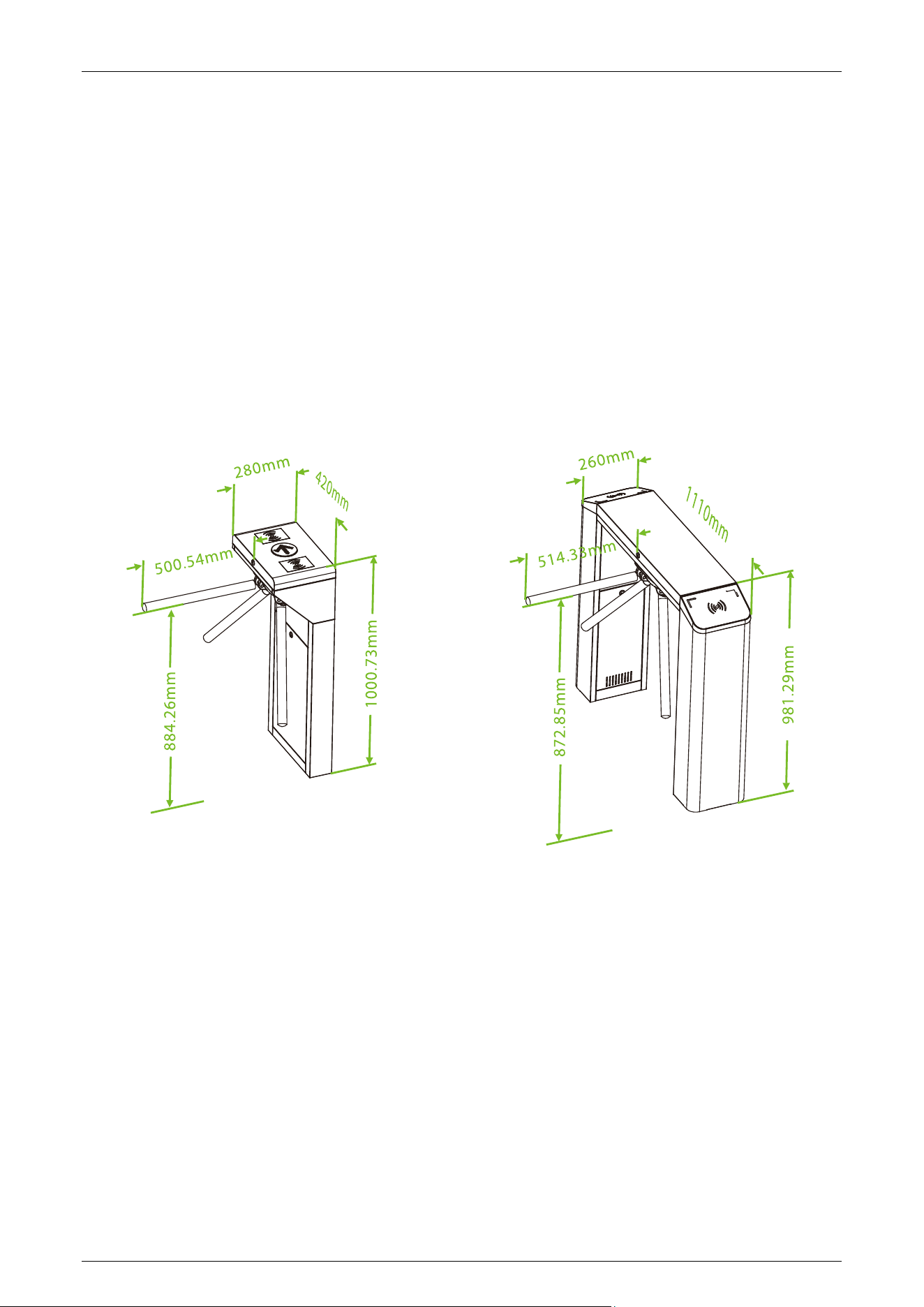
The figure below illustrates the appearance and dimensions of the TS1000 Plus/TS2000 Plus:
1.2.2 System Components
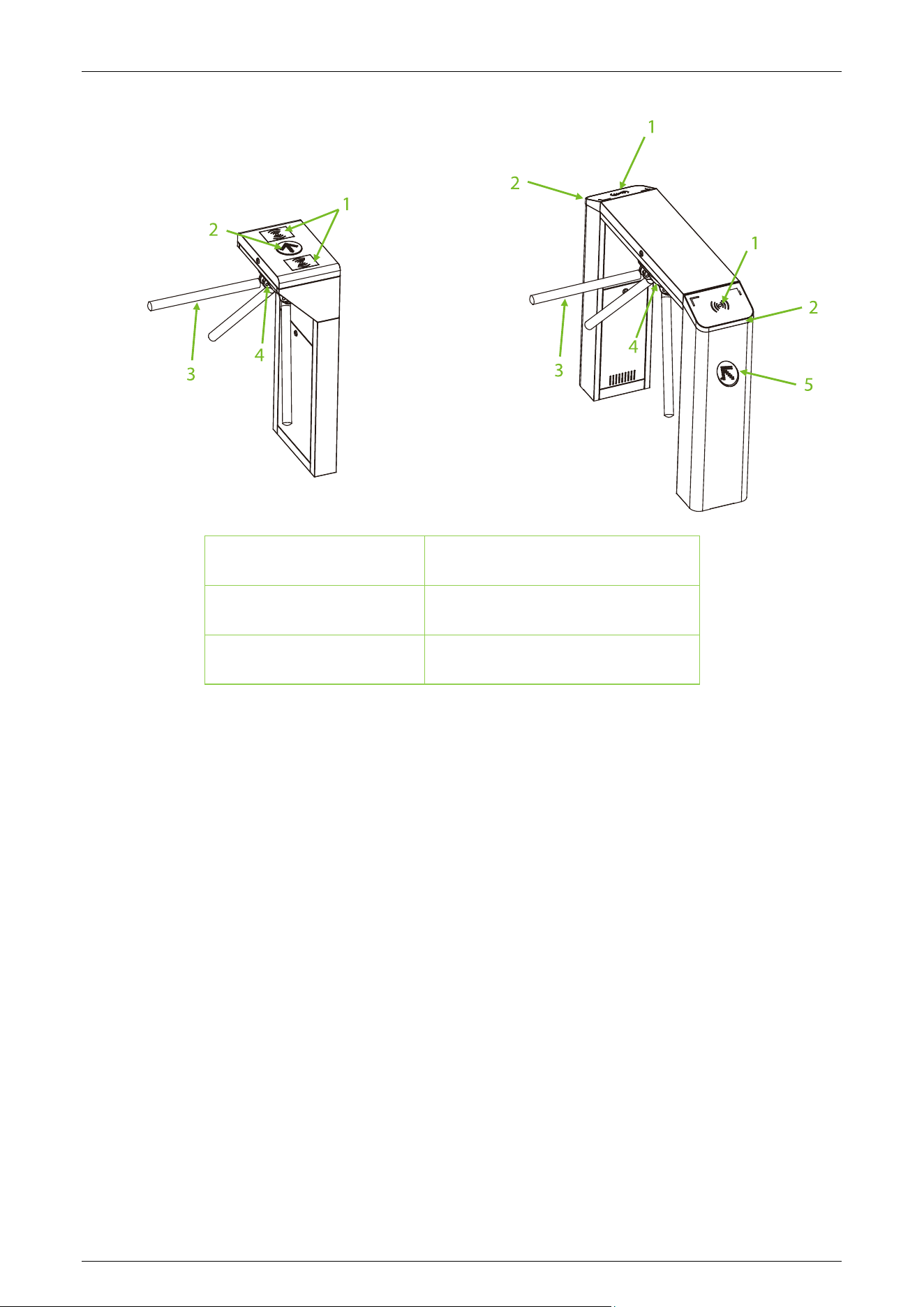
The following figure displays the system components of the TS1000 Plus/TS2000 Plus:
TS1000 Plus/TS2000 Plus series User Manual
Page | 10 Copyright © 2025 ZKTECO CO., LTD. All Rights Reserved.
1. Authentication 2. Traffic Indicator
3. Arm 4. Disk Wheel
5. Channel Mode Light
Mechanical System 1.3
The mechanical system of the tripod turnstile includes the chassis and the core component. The
chassis serves as a carrier for the Indicator, Reader, and a basic Controller. The core components
primarily include the Motor, Frame, Bearing, Arm, and other essential elements.
Electronic Control System 1.4
The electronic control system of a tripod turnstile mainly consists of the Card Reader, Turnstile
Control Board, Access Controller, Alarm, Limit Switch and traffic Indicator.
Card Reader: The reader reads the data on the card and transmits it to the Access Controller.
Turnstile Control Board: The turnstile control board serves as the control center of the system,
receiving signals from the access controller and photoelectric switch; and it makes logical
judgments and processes these signals, then subsequently sends executive commands to the traffic
indicator, motor, and alarm.
Access Controller: This component enhances convenience for authorized personnel by facilitating
entry while simultaneously restricting access for unauthorized individuals.
TS1000 Plus/TS2000 Plus series User Manual
Page | 11 Copyright © 2025 ZKTECO CO., LTD. All Rights Reserved.
Traffic Indicator: Displays the current passage status of the channel and guiding pedestrians to
pass through the channel in a safe and orderly manner.
Alarm: This system issues an alarm alert when the system detects unauthorized entry or illegal
access by pedestrians.
Limit Switch: Controls the position of the gate rotation.
Power-On Self-Test 1.5
1. Connect the tripod turnstile's power adapter to a 220V mains power source. Important: Ensure
that the tripod turnstile is properly grounded.
2. Power on the tripod turnstile and wait 30s to complete the self-check program.
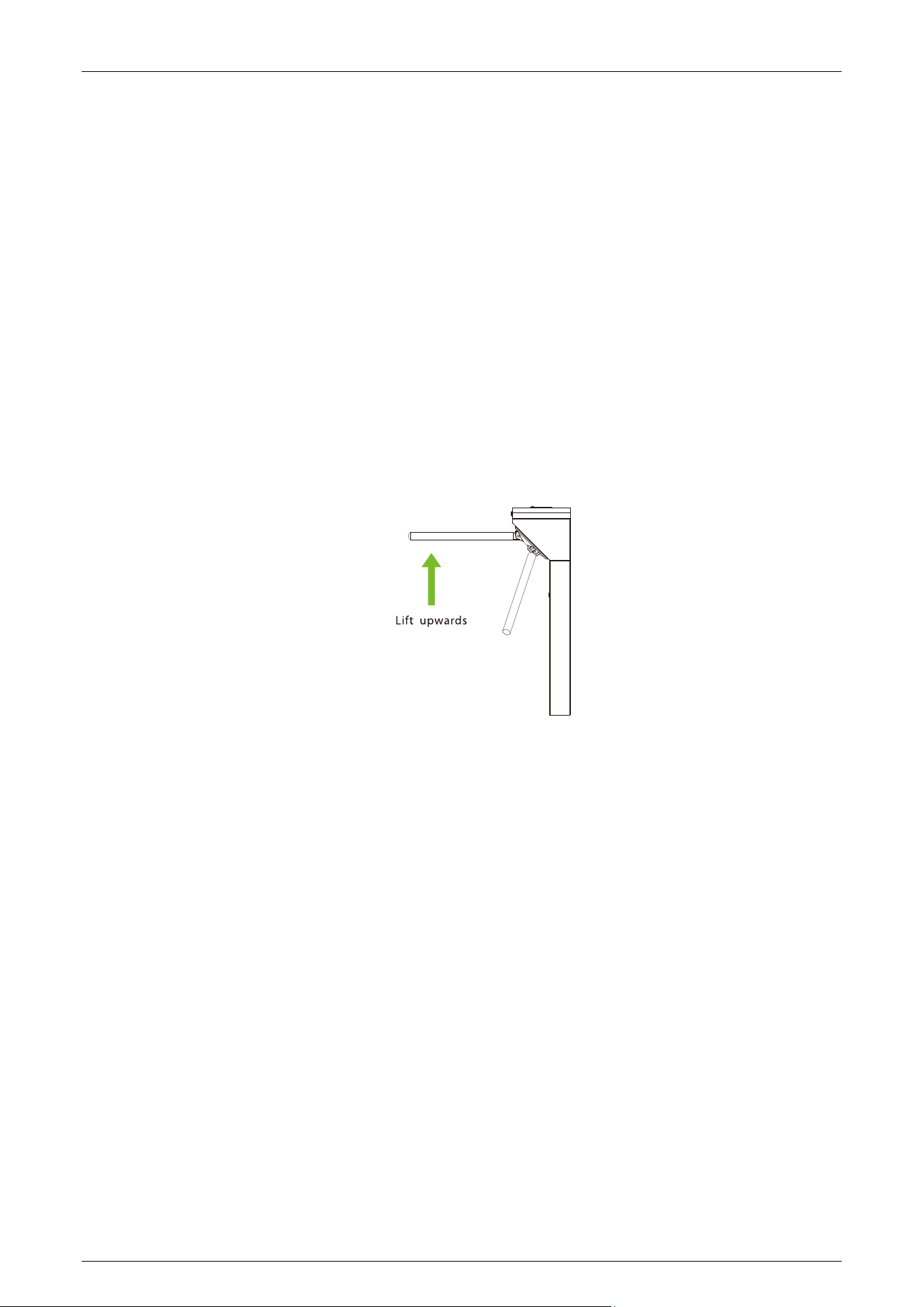
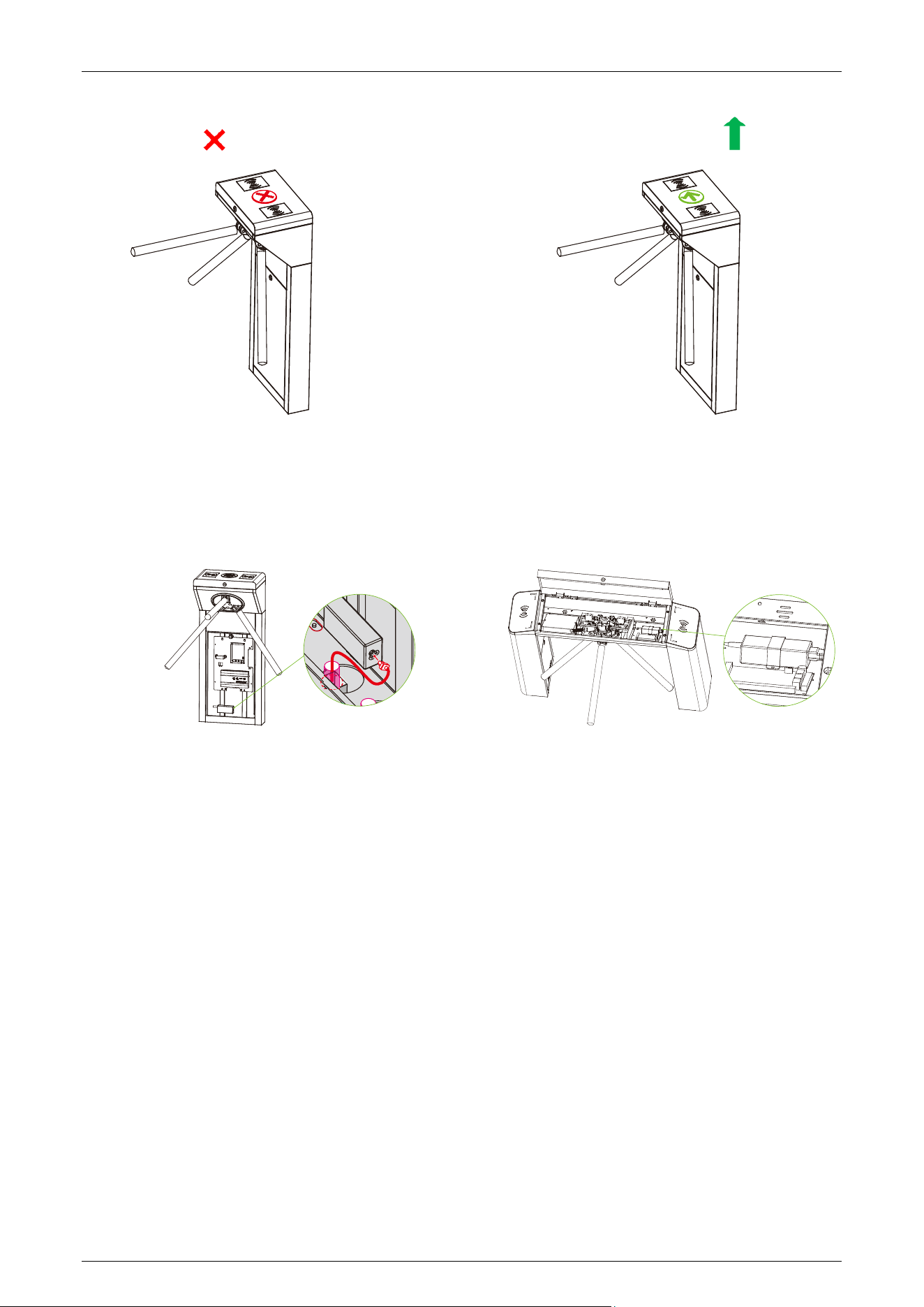
3. Lift the arms manually, as shown in the diagram below:
4. Use a two-way switch to test the proper functioning of the tripod turnstile, and ensure to check
that the traffic indicators are working correctly. In case of any issues, please contact the supplier
for assistance.
Status of Traffic Indicator 1.6
The tripod turnstile is in working state after power-on self-test. The traffic indicators provide
pedestrians with the appropriate passage indications. The following is an example of the TS1000
Plus:
TS1000 Plus/TS2000 Plus series User Manual
Page | 12 Copyright © 2025 ZKTECO CO., LTD. All Rights Reserved.
Standby: Pass-through (In/Out):
Working Principle 1.7
1. When connected to power, the tripod turnstile undergoes a Power-On Self-Test. If no issues are
detected during this process, the turnstile will operate normally.
2. When the card reader successfully reads a valid card, the peak buzzer emits a pleasant sound,
signalling to pedestrians that the card reading is successful. Simultaneously, the system
processes the information from the card, sending a signal to the turnstile control board to
request passage.
3. The turnstile control board receives the signal from the card reader, processes it
comprehensively, and sends an effective control signal to the indicator and motor. The traffic
indicator turns green, and the control board activates the electromagnet to open the gate.
Pedestrians can gently push the unlocked arm, and it will automatically rotate, allowing them
to pass through the channel following the guidance of the traffic indicator.
4. If a pedestrian enters the passage without successfully verifying their identification or with an
invalid card, the system will not grant passage. Only when a valid card is successfully confirmed
will the pedestrian be allowed to pass through the passage.
Note: Make sure the ground wire of the system is securely connected to avoid personal injuries or
other accidents.

TS1000 Plus/TS2000 Plus series User Manual
Page | 13 Copyright © 2025 ZKTECO CO., LTD. All Rights Reserved.
Technical Specifications 1.8
Feature Specification
Communication
TCP/IP, RS485
Input Voltage
AC110V/240V, 50/60Hz
Input Control Signal
Relay Signal
Output Voltage
DC 12V
Protection Level
IPX4
Operating Humidity
5% to 85% (non-condensing)
Operating Temperature
-20°C to 70°C
Flow Rate
RFID: 25 passengers per minute
Fingerprint: 20 passengers per minute
Drive Unit
Semi-automatic movement
Visual Indicator
Steady green = normal use
Steady red = door closed
Application Environment
Indoor and outdoor
Dimension (mm) (L*W*H)
TS1000 Plus 280 x 420 x 1000.73
TS2000 Plus 260 x 1110 x 981.29
Weight
TS1000 Plus 36kg
(±5kg)
TS2000 Plus 42kg (±5kg)
Noise
<65dB

TS1000 Plus/TS2000 Plus series User Manual
Page | 14 Copyright © 2025 ZKTECO CO., LTD. All Rights Reserved.
MCBF
2 million
Certifications
CE, FCC, UKCA, ISO9001
TS1000 Plus/TS2000 Plus series User Manual
Page | 15 Copyright © 2025 ZKTECO CO., LTD. All Rights Reserved.
2 Function Introduction
Card Authentication 2.1
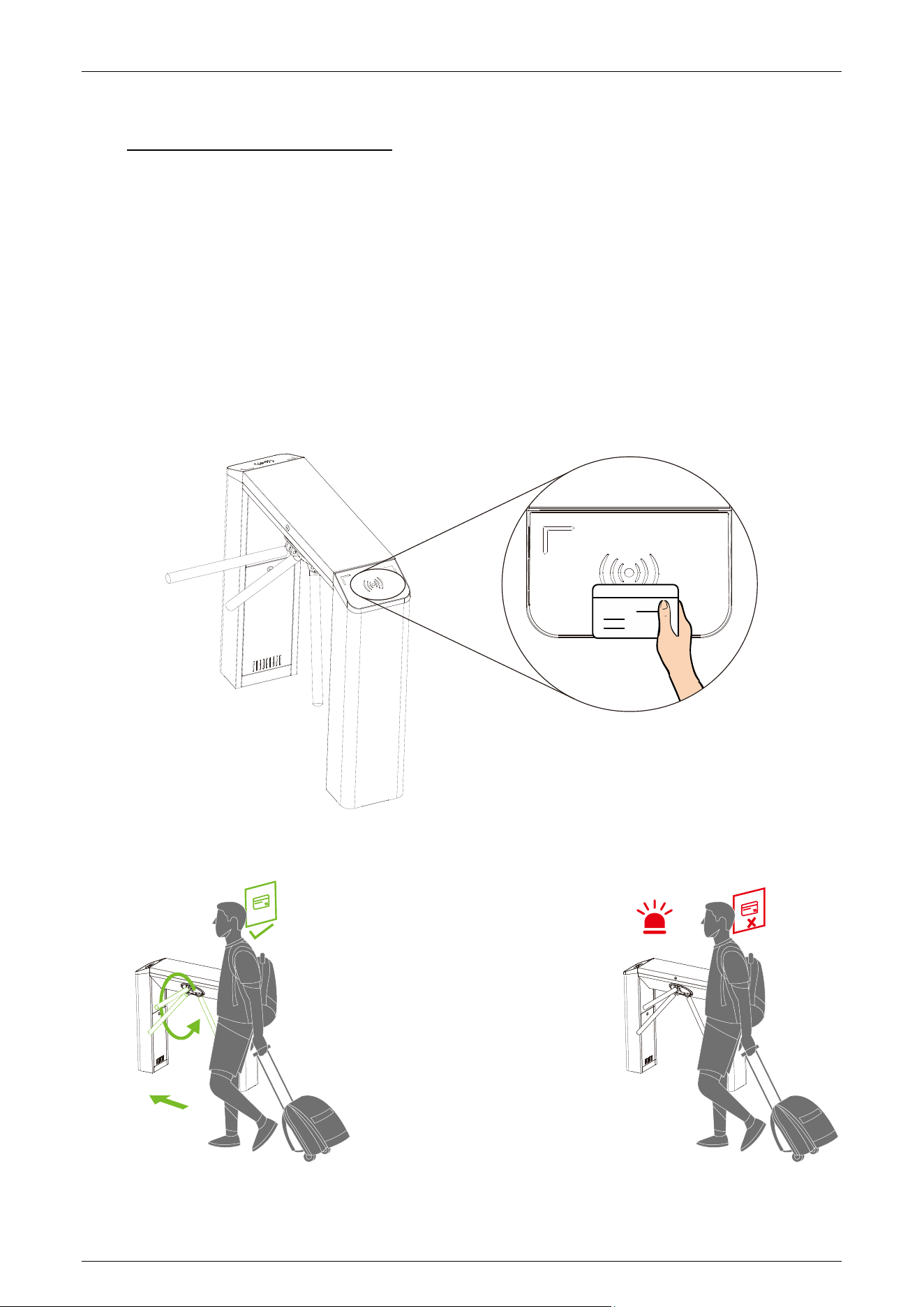
In card authentication mode, the device compares the card number in the card induction area with
all the card number data registered in the device and sends it to the access controller. When the user
brings the card close to the card reading area, the device enters the card authentication mode.
When the validation is successful, the traffic indicator of the device turns green, the arm can be
pushed, and passage is allowed. In case of validation failure, the traffic indicator turns red,
preventing the arm from being pushed, and at the same time, an alarm sounds, and passage is
prohibited. The following is an example of TS2000 Plus:

TS1000 Plus/TS2000 Plus series User Manual
Page | 16 Copyright © 2025 ZKTECO CO., LTD. All Rights Reserved.
Face Template Authentication
★
2.2
In facial authentication mode, the device compares the facial template captured by the camera with
all the facial data registered in the device and sends it to the access controller. When the
authentication is successful, he traffic indicator of the device turns green, the arm can be pushed,
allowing passage; In case of authentication failure, the traffic indicator turns red, preventing the arm
from being pushed and an alarm sounds, prohibiting passage. The following is an example of
TS2000 Plus:
During the authentication process, please try to center your face on the screen. When registering
facial information, please make sure your face is facing the camera and remain still.
Recommended Standing Posture and Facial Expression:
Note: Maintain a natural facial expression and standing posture during both enrollment and
authentication processes.
TS1000 Plus/TS2000 Plus series User Manual
Page | 17 Copyright © 2025 ZKTECO CO., LTD. All Rights Reserved.
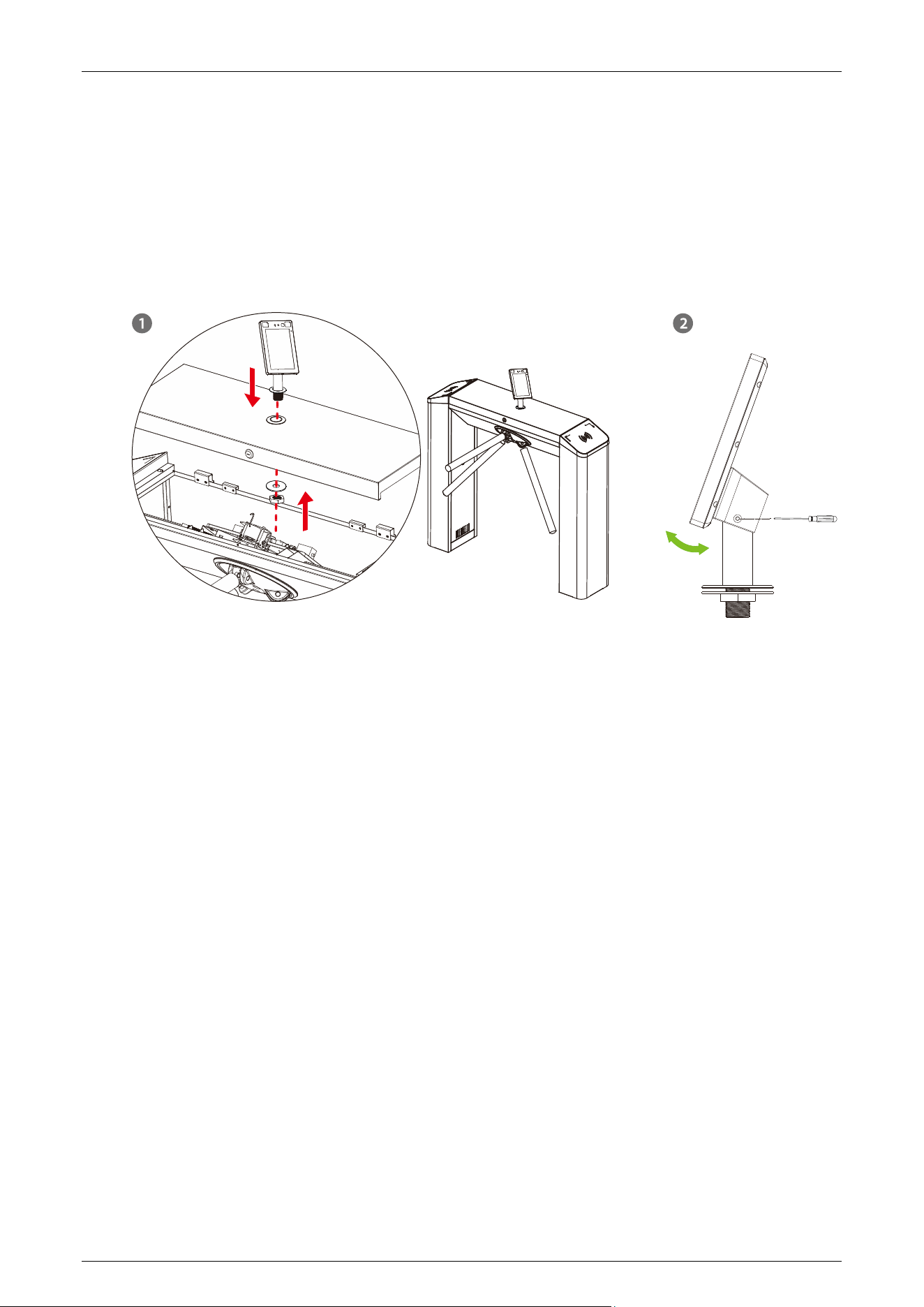
Installation on the tripod turnstile:
a) Before installation, insert the wire through the bracket.
b) At the top center of the tripod turnstile, punch a 34mm diameter mounting hole.
c) Insert the bracket into the hole and fix it with a nut.
d) Adjust the angle of the device.
TS1000 Plus/TS2000 Plus series User Manual
Page | 18 Copyright © 2025 ZKTECO CO., LTD. All Rights Reserved.
3 Control System Introduction
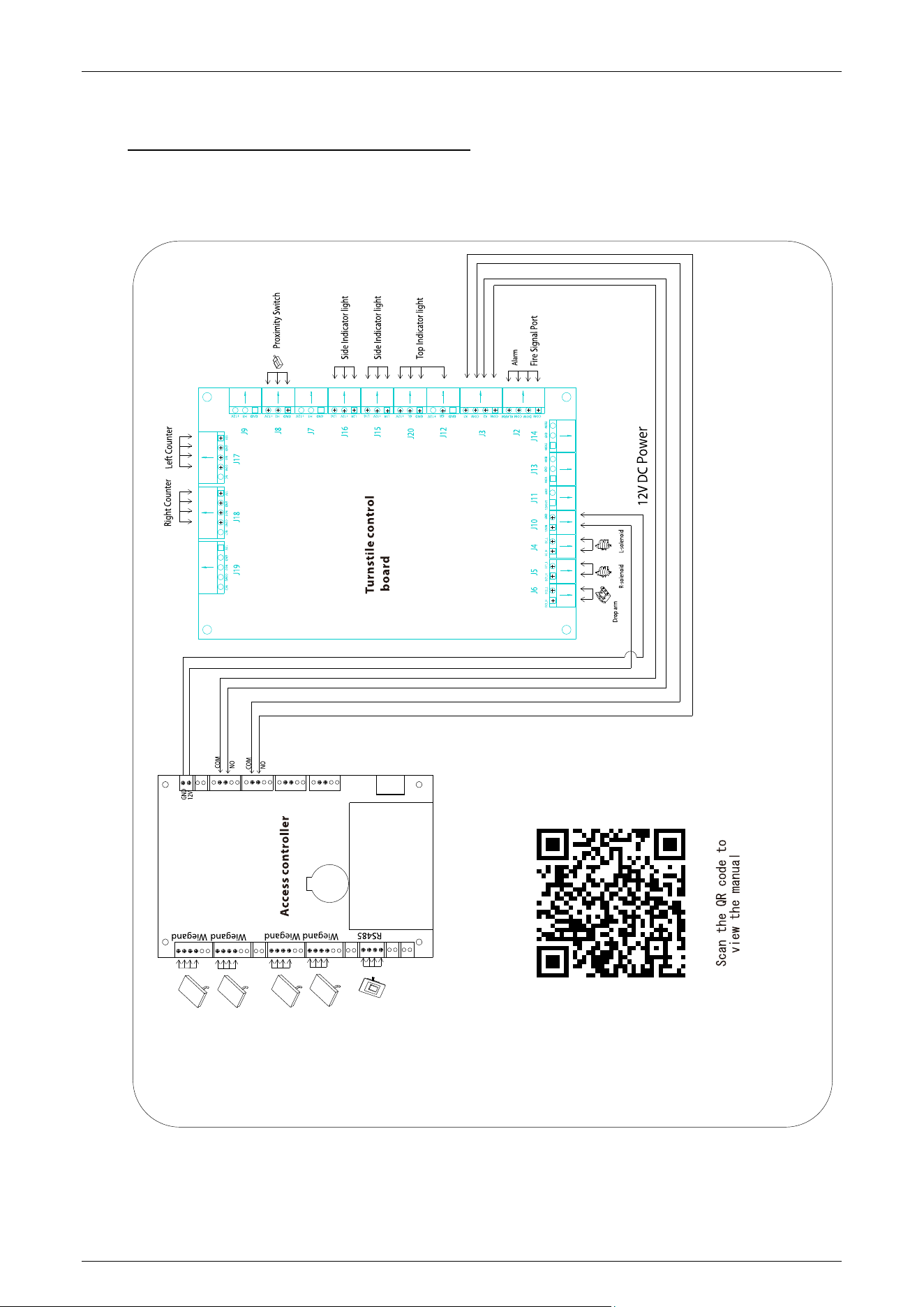
Wiring Diagram 3.1
TS1000 Plus/TS2000 Plus series User Manual
Page | 19 Copyright © 2025 ZKTECO CO., LTD. All Rights Reserved.
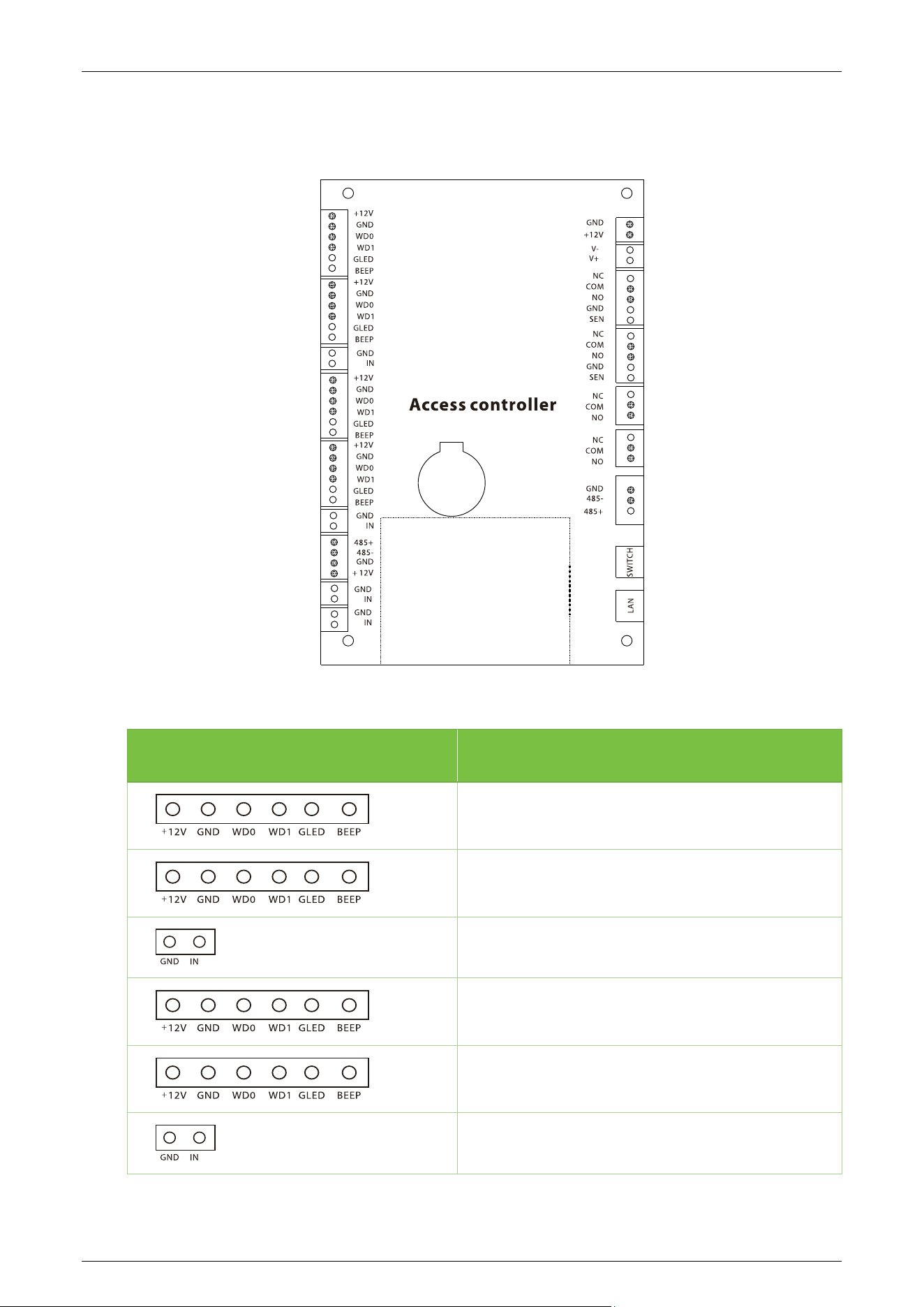
Access Control Board 3.2
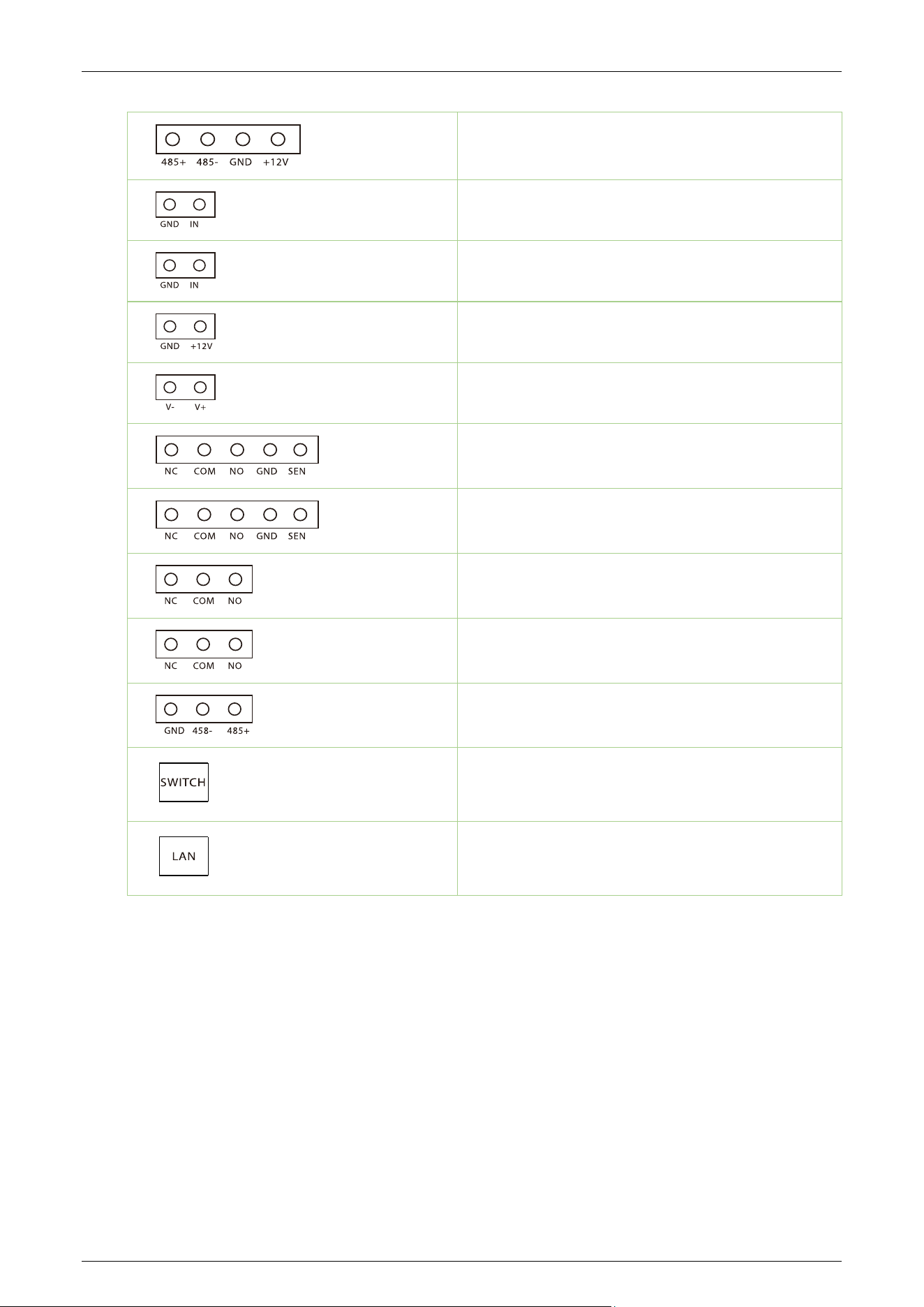
Terminal Description
Reader
Reader
Reserve
Reader
Reader
Reserve
TS1000 Plus/TS2000 Plus series User Manual
Page | 20 Copyright © 2025 ZKTECO CO., LTD. All Rights Reserved.
RS485
Reserve
Reserve
Power In
Lock
Lock
Lock
Auxiliary Output
Auxiliary Output
485 Connections
Switch
Ethernet
3.2.1 Dial Code Description
The DIP switch is divided in eight dial codes from KE-1 to KE-8. Move the switch Up to turn ON and
down to turn OFF.
Description of Function Setting:
Dial 0 to turn OFF.
Dial 1 to turn ON.

TS1000 Plus/TS2000 Plus series User Manual
Page | 21 Copyright © 2025 ZKTECO CO., LTD. All Rights Reserved.
Dial Code Function Item:
Unmanned passage time (KE-1, KE-2, KE-3):
Switch Status Time Period
000 (OFF OFF OFF)
5s (Default)
001 (OFF OFF ON)
10s
010 (OFF ON OFF)
15s
011 (OFF ON ON)
20s
100 (ON OFF OFF)
30s
101 (ON OFF ON)
40s
110 (ON OFF ON)
50s
111 (ON ON ON)
60s
Memory Swipe Mode (KE-6):
Dial 1 (ON) to turn on.
Dial 0 (OFF) to turn off.
Turn on Alarm Mode (KE-8):
Dial 1 (ON) to turn on.
Dial 0 (OFF) to turn off.
TS1000 Plus/TS2000 Plus series User Manual
Page | 22 Copyright © 2025 ZKTECO CO., LTD. All Rights Reserved.
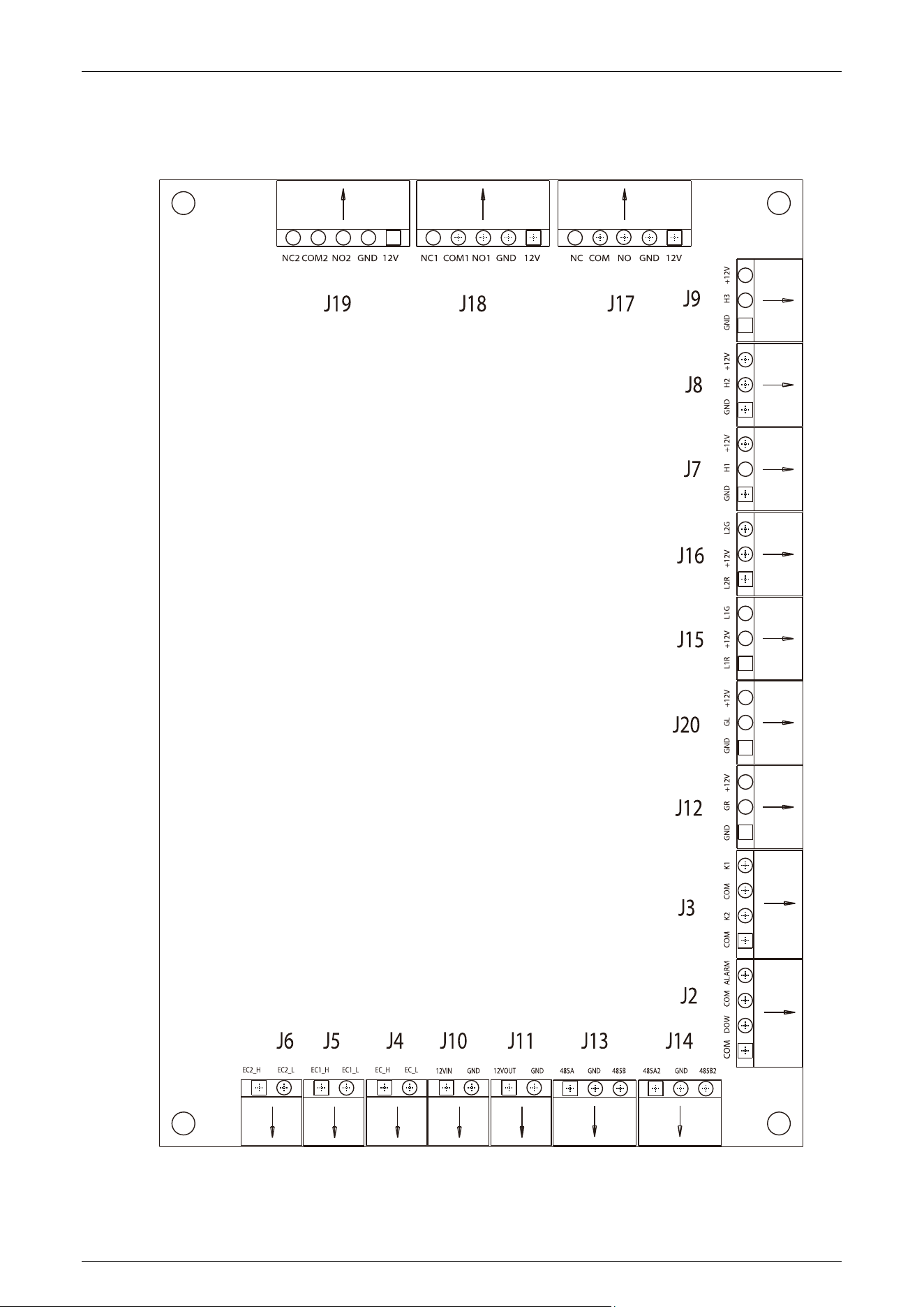
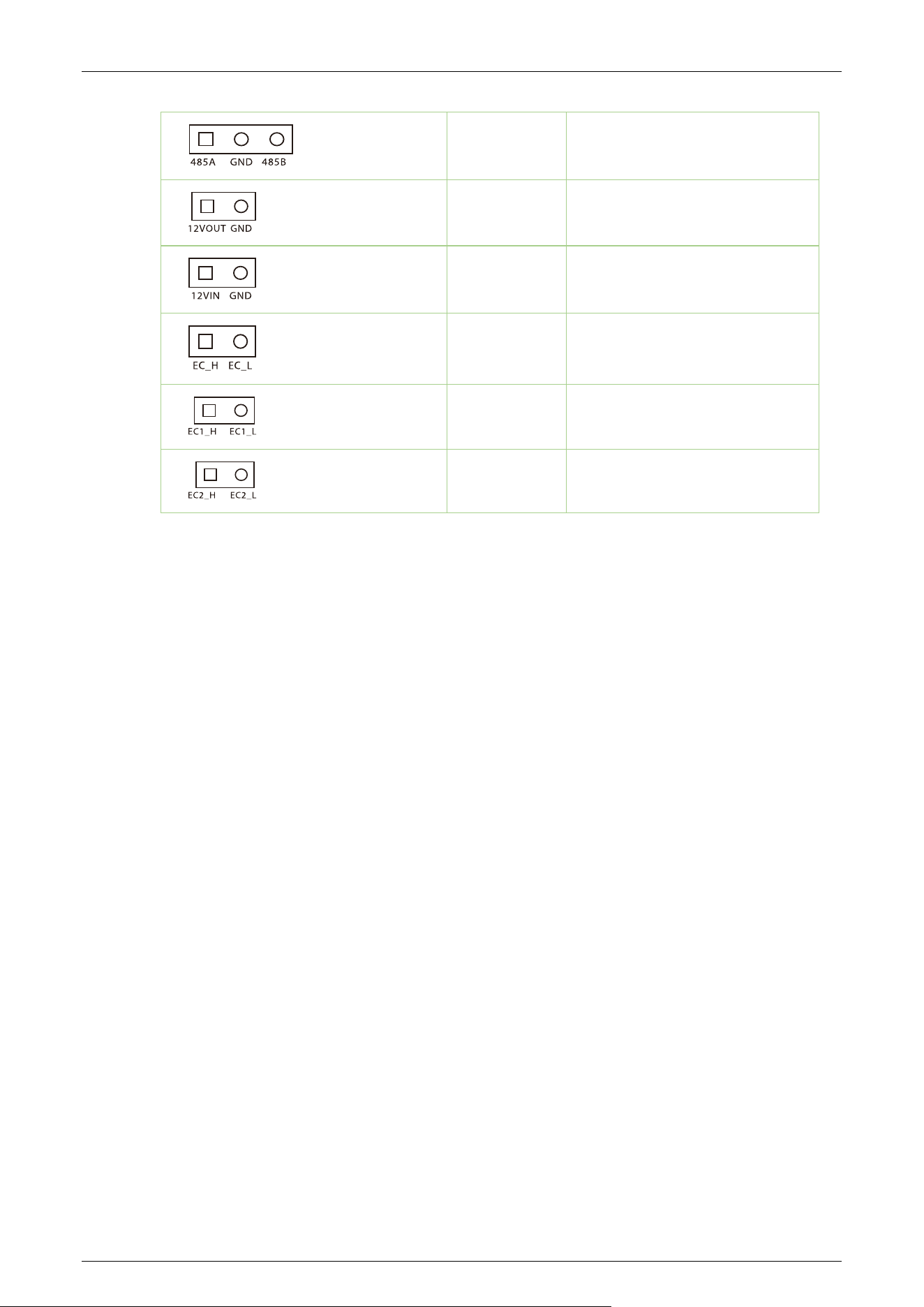
Turnstile Control Board 3.3
TS1000 Plus/TS2000 Plus series User Manual
Page | 23 Copyright © 2025 ZKTECO CO., LTD. All Rights Reserved.
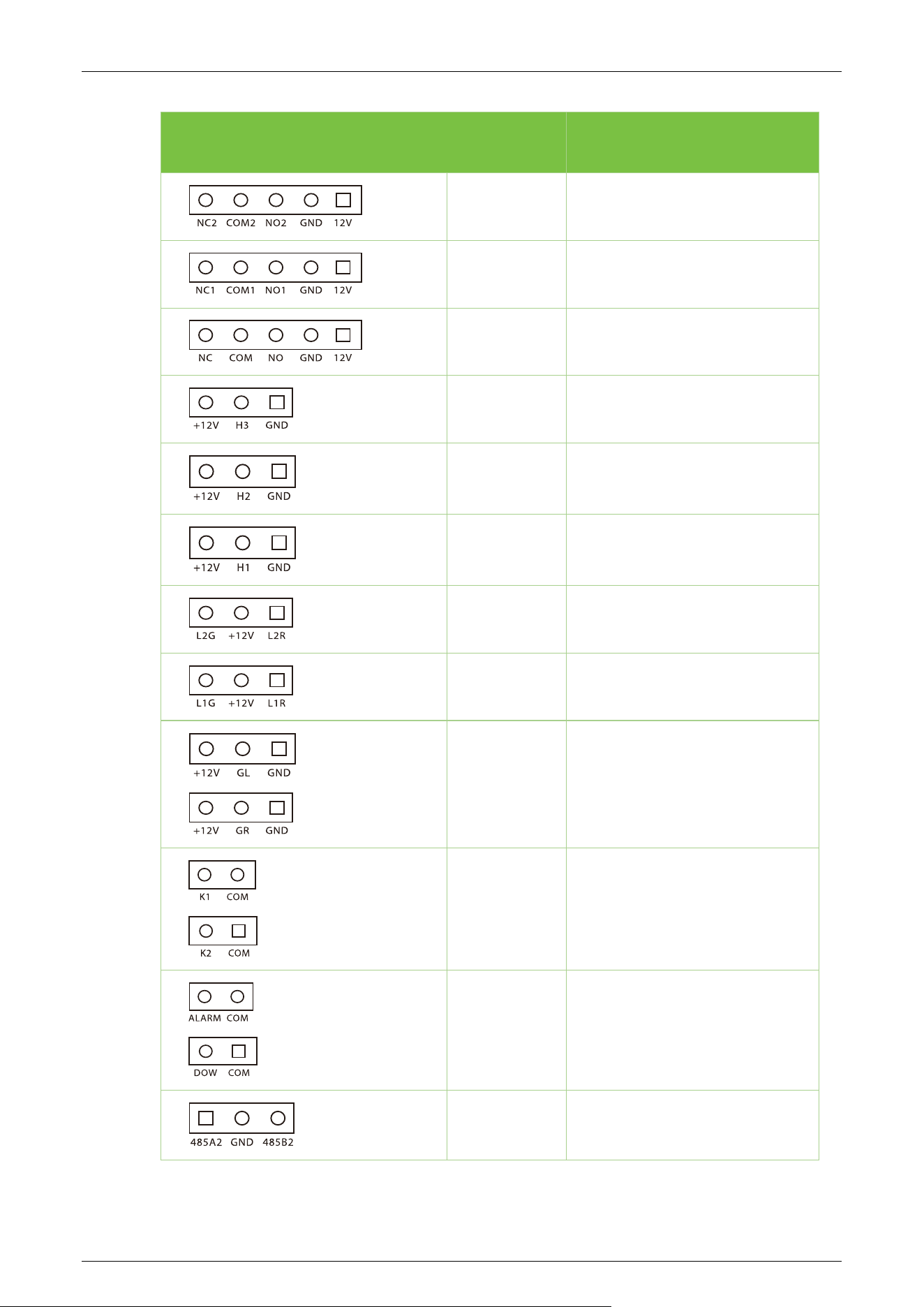
Terminal Description
J19
Reserved
J18
Right Counter
J17
Left Counter
J9
Reserved
J8
Proximity Switch
J7
Reserved
J16
Side Indicator light
J15
Side Indicator light
J20 / J12
Top Indicator light
J3
Right Open / Left Open
(In / Out)
J2
Alarm / Fire Signal Interface
J14
RS485
TS1000 Plus/TS2000 Plus series User Manual
Page | 24 Copyright © 2025 ZKTECO CO., LTD. All Rights Reserved.
J13
RS485
J11
12V Power Supply Output
J10
12V Power Supply Input
J4
L-solenoid
J5
R-solenoid
J6
Drop Arm

TS1000 Plus/TS2000 Plus series User Manual
Page | 25 Copyright © 2025 ZKTECO CO., LTD. All Rights Reserved.
4 Troubleshooting
Failure Description Solution
The light indicator doesn't
illuminate when the
equipment is turned on
Check for power supply or circuit issues. Examine the connection
and power cables for damage or loose wiring
The device arm can't be
manually lifted after
powering on
Check whether the limit seat is properly aligned with the disk
wheel when lifting the arm.
Check whether the arm drop magnet is working properly,
open the upper cover of the
chassis, open the movement
cover with a hexagonal screwdriver and check the working
status of the electromagnet.
No gate opening after
authentication
Verify user permissions.
Refer to the 3.1 wiring diagram to check the wiring.
After opening the gate, the
passage is not smooth, and
there's high resistance in the
push rod, making rotation
difficult
Adjust the tension spring by tweaking the live joint bolt at the
tension spring
Dropping the arm during
use
Check if the limit seat is correctly aligned or if there is a gap.
Ensure the arm drop magnet is fully engaged; if not, power off
for 2 minutes and then power on.
Continuous single-sided
passage during use without
locking the lever.
Inspect the gate opening magnet by opening the top cover
and movement cover with a hexagonal screwdriver.
Check for any sticking or disconnection in the gate opening
magnet or shrapnel.
TS1000 Plus/TS2000 Plus series User Manual
Page | 26 Copyright © 2025 ZKTECO CO., LTD. All Rights Reserved.
5 Precaution
1. It is recommended to purchase optional accessories to use in outdoor environment.
a) Install optional cooling fans if the working temperature frequently exceeds 50°C.
b) Proper installation makes it equivalent to IPX4 waterproof, but it cannot withstand regions
prone to typhoons.
c) For temperatures below -30°C, consider installing a heating plate. Allow time for automatic
self-checking during power-on in extreme cold conditions.
d) Note that using the equipment in coastal areas or regions with acid rain may reduce its
service life.
2. When power and signal cables are correctly connected, the equipment can be submerged up
to a depth of 250 mm in water. Do not power on the equipment when submerged in water to
prevent operational issues.
3. It is highly recommended to set up a card swiping warning line to prompt passers-by to swipe
cards properly. Establish a reasonable passage width to prevent illegal squeezing by passers-by.
4. It is recommended to place a warning sign at a conspicuous position. The sign should prompt:
"Please swipe your card outside the warning line and pass in order. Thank you!”
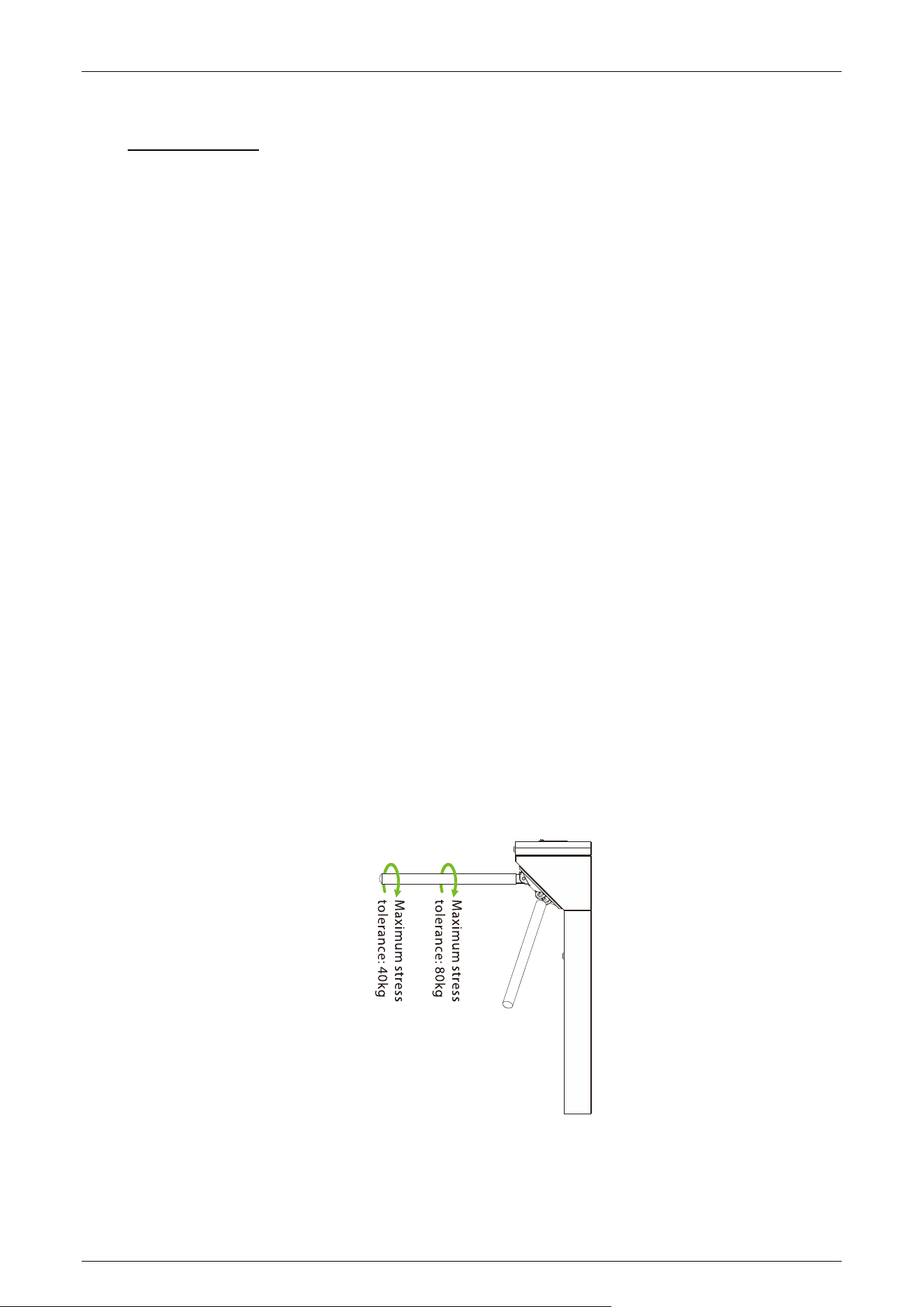
The maximum tolerance of the tripod turnstile's arms
Note that the maximum stress tolerance at the center of the arm is 80kg, while at the ends of the
arm, it is 40kg. In the event of an impact force reaching the designed limit on the tripod turnstile, the
arms will break down first. This is a safety feature to prevent damage to the entire equipment and
ensure the safety of passers-by.

TS1000 Plus/TS2000 Plus series User Manual
Page | 27 Copyright © 2025 ZKTECO CO., LTD. All Rights Reserved.
In case of emergencies
The equipment is designed to automatically lower the arms during a power failure, enabling open
passage for the public. Furthermore, the turnstile control board offers an interface to connect an
emergency switch (Drop Arm), maintaining the tripod turnstile in an open position during
emergencies. It's crucial to note that after power is restored, waiting for more than 6 seconds is
important before manually lifting the arms.

TS1000 Plus/TS2000 Plus series User Manual
Page | 28 Copyright © 2025 ZKTECO CO., LTD. All Rights Reserved.
6 Maintenance
Chassis Maintenance 6.1
The chassis is made of SUS304 stainless steel or cold rolled sheet steel. If it has been used for a long
time, the surface may develop rust stains. It is recommended to clean the surface regularly with a
clean cloth. Additionally, apply a coat of anti-rut oil to the surface, ensuring not to cover the infrared
sensor.
Movement Maintenance 6.2
Before performing maintenance, ensure the power is turned off. Open the door, wipe away surface
dust, and apply lubricant for smooth movement.
Power Supply Maintenance 6.3
Switch off the power supply before conducting maintenance.
Check the power plug connection; if loose, securely fix it..
Do not change any connection position randomly.
Periodically check the insulation of the external power supply.
Conduct regular checks for any potential leakage.
Check if the technical parameters of interface are normal.
Check the service life of the electronic components and replace accordingly.
Caution: All maintenance procedures for the swing barrier mentioned above should be carried out
by a professional technician, especially when handling movement and electric control components.
To guarantee operational safety, it is crucial to switch off the power supply when the barrier is not in
use.
TS1000 Plus/TS2000 Plus series User Manual
Page | 29 Copyright © 2025 ZKTECO CO., LTD. All Rights Reserved.
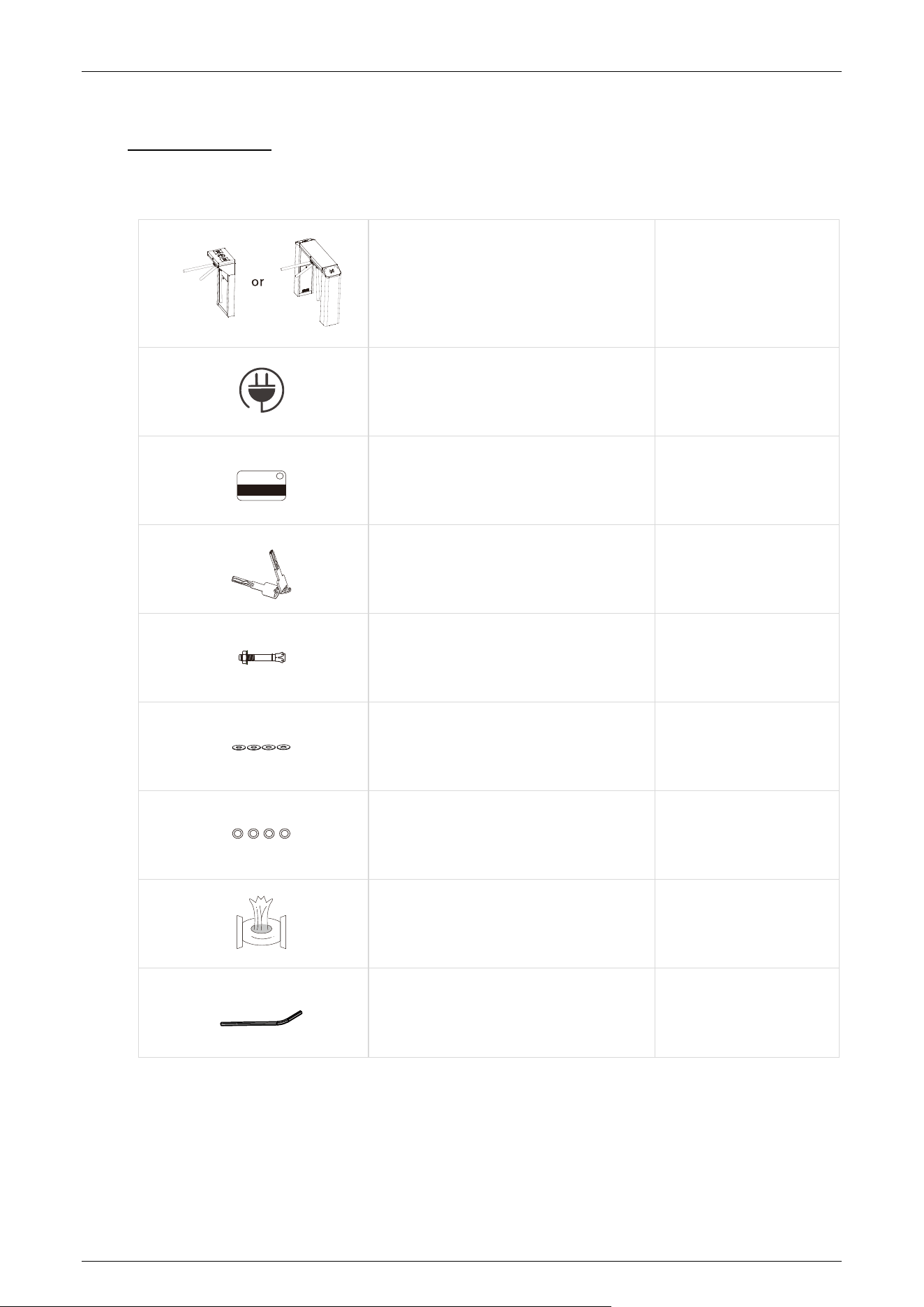
7 Packing List
The package consists of the following items:
TS1000 Plus/TS2000 Plus 1
Power Cable
1
Card
1
Keys
2
Expansion Screw M12*100
4
Washer
4
Expansion Screw Washers
4
Stainless Steel Maintenance Wipes
1
Hex Wrench
1

Page | 30 Copyright © 2025 ZKTECO CO., LTD. All Rights Reserved.
ZKTeco Industrial Park, No. 32, Industrial Road,
Tangxia Town, Dongguan, China.
Phone : +86 769 - 82109991
Fax : +86 755 - 89602394
www.zkteco.com
Copyright © 2025 ZKTECO CO., LTD. All Rights Reserved.