EPA Est.NO.98581-CHN-1
Made In China
1309 Coffeen Avenue STE 4304
Sheridan,Wyoming 82801
Jafanda LLC.
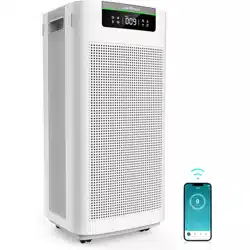
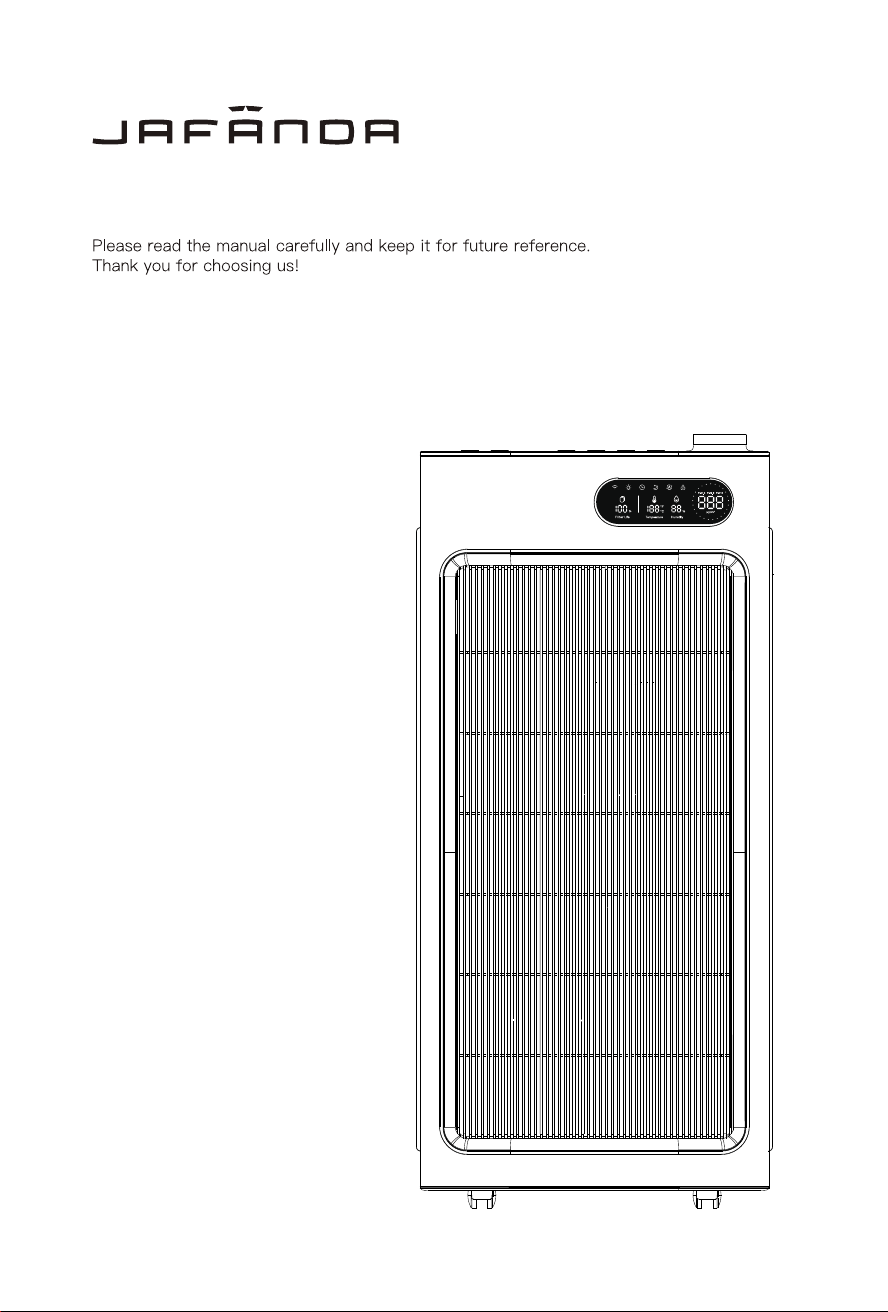
JF1500 Air Purifier User Manual
JAFANDA US
THANK YOU FOR YOUR PURCHASE!
Contact our support team by Email:
Join the jafanda Community on Social Media
Packing Contents
Specifications
Safety Instructions
Know Your Air Purifier
Control Panel
Operating Instructions
Product Features
PM Sensor Replacement
TABLE OF CONTENTS
Troubleshoot Guide
Cleaning and Maintenance
1
1
2
3
4
8
5
Using Your Air Purifier
6-7
9
12
Warranty & Support
12
Returns & Refunds
12
10
Filter Replacement
11

JAFANDA US
THANK YOU FOR YOUR PURCHASE!
Contact our support team by Email:
Join the jafanda Community on Social Media
Packing Contents
Specifications
Safety Instructions
Know Your Air Purifier
Control Panel
Operating Instructions
Product Features
PM Sensor Replacement
TABLE OF CONTENTS
Troubleshoot Guide
Cleaning and Maintenance
1
1
2
3
4
8
5
Using Your Air Purifier
6-7
9
12
Warranty & Support
12
Returns & Refunds
12
10
Filter Replacement
11
1
2
Packing Contents
Specifications
Packing Contents
JF1500 Air purifier 1 set
Composite filter 2 pieces (Preinstalled)
Power Cord 1 (in the accessories box)
User Manual 1 (in the accessories box)
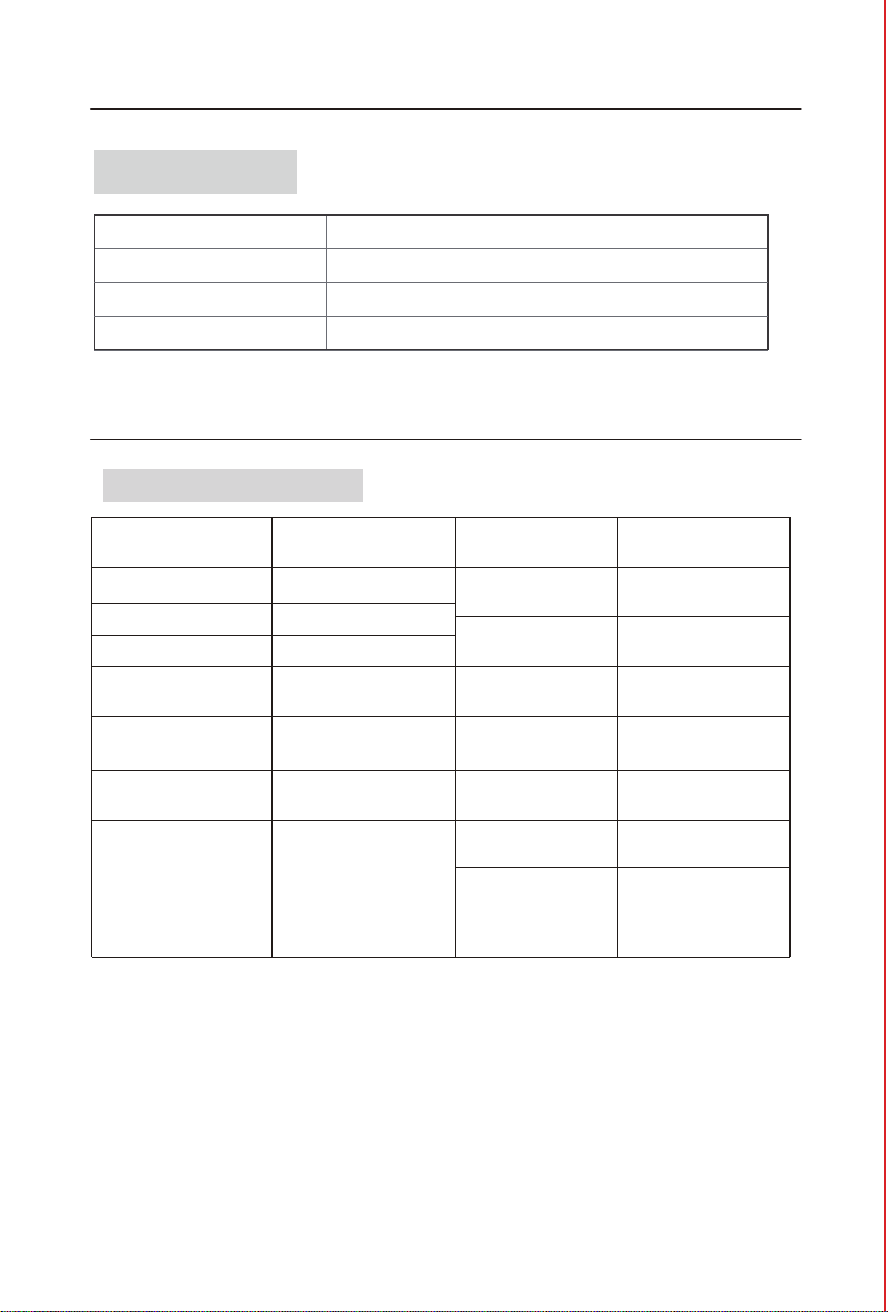
Product specifications
Product Name
Rated Voltage
Rated Current
Rated Frequency
Model JF1500
Rated Power
CADR
(Clean Air Delivery Rate)
Standby Power
Air Purifier
Filter Life
Product Size
N.W
52.9lb/24.0kg
G.W
61.3lb/27.8kg
16.0 x 15.83x 34.76 in
/40.7x 40.2 x88.3cm
Package Size
19.9 x 19.49x 38.58 in
/50.5x 49.5 x98.8cm
3000H
150W
882CFM(1500m³/h)
Noise Level
22-58dB
Recommended
Room Size
Operating
Conditions
Humidity
Temperature:
14℉-104℉/-10℃-40℃
:
20%-95% RH
1372ft (5 Times/h )
2
3432ft (2 Times/h )
2
6862ft (1 Times/h )
2
< 2W
120V~
1.9A
60Hz
Safety Instruction
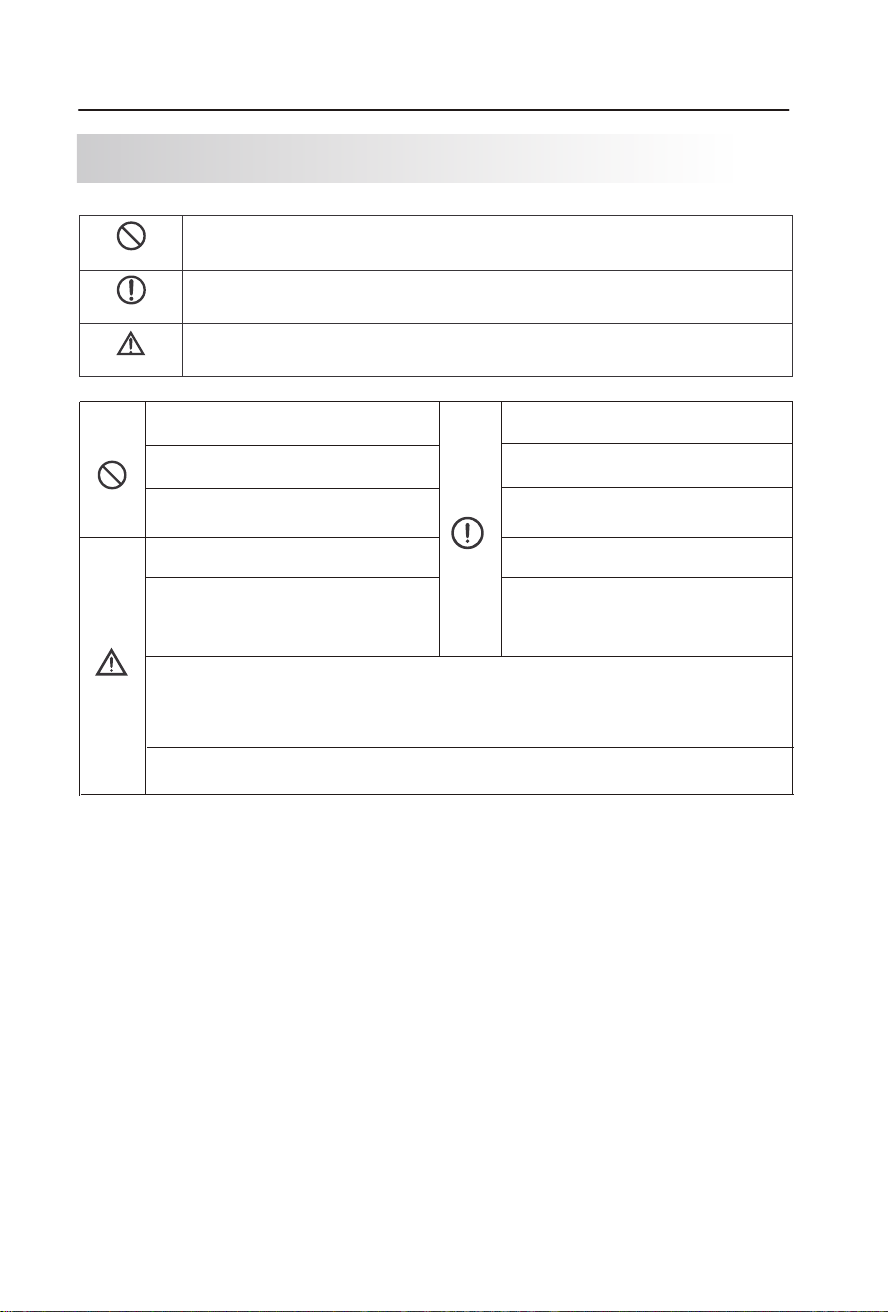
Prohibitory sign
Warning sign
Attention sign
The behaviors with this sign must be prohibited, otherwise it may cause product damage or endanger
the user’s personal safety.
The behaviors with this sign must be operated in strict accordance with the requirements, otherwise it
may cause product damage or endanger the user’s personal safety.
The behaviors with this sign must be paid attention to, otherwise it may cause product damage or other
losses due to improper operation.
Please do not block the air inlet/outlet.
Please do not use the machine in any place with
much oil fume or high humidity.
Please regularly clean the machine and power
plug.
Please do not touch the power plug with wet
hands.
Please do not rinse the high-efficiency composite
filter with water.
Only the 120V power sockets are 120V power
sockets.
Please do not put it close to or on any heat
source (such as a fireplace, stove or a place
with flammable gases).
Please be careful when cleaning the air purifier,
as corrosive detergents may damage the surface.
Please do not unplug the power cord from the
power socket when cleaning the air purifier or
leaving it unused. Otherwise, it may cause
electric shock due to poor insulation or fire due
to short circuit.
The following safety precautions and instructions must be read carefully and
observed when the product is used!
This machine shall not be used by people with
disabilities, perceptual disturbance or dysgnosia
or children alone, unless they use it under the
supervision and guidance of safety director on
the site.
Contains FCC ID: 2ANDL-WBR3
This device complies with part 15 of the FCC Rules. Operation is subject to the following two conditions:
(1) This device may not cause harmful interference,
(2) this device must accept any interference received, including interference that may cause undesired
operation.
This air purifier is suitable for floor standing. With caster wheels, it's easy to move in-house.
Do not place the air purifier closer than 10cm/4” to wall or another object..
1
2
Packing Contents
Specifications
Packing Contents
JF1500 Air purifier 1 set
Composite filter 2 pieces (Preinstalled)
Power Cord 1 (in the accessories box)
User Manual 1 (in the accessories box)
Product specifications
Product Name
Rated Voltage
Rated Current
Rated Frequency
Model JF1500
Rated Power
CADR
(Clean Air Delivery Rate)
Standby Power
Air Purifier
Filter Life
Product Size
N.W
52.9lb/24.0kg
G.W
61.3lb/27.8kg
16.0 x 15.83x 34.76 in
/40.7x 40.2 x88.3cm
Package Size
19.9 x 19.49x 38.58 in
/50.5x 49.5 x98.8cm
3000H
150W
882CFM(1500m³/h)
Noise Level
22-58dB
Recommended
Room Size
Operating
Conditions
Humidity
Temperature:
14℉-104℉/-10℃-40℃
:
20%-95% RH
1372ft (5 Times/h )
2
3432ft (2 Times/h )
2
6862ft (1 Times/h )
2
< 2W
120V~
1.9A
60Hz
Safety Instruction
Prohibitory sign
Warning sign
Attention sign
The behaviors with this sign must be prohibited, otherwise it may cause product damage or endanger
the user’s personal safety.
The behaviors with this sign must be operated in strict accordance with the requirements, otherwise it
may cause product damage or endanger the user’s personal safety.
The behaviors with this sign must be paid attention to, otherwise it may cause product damage or other
losses due to improper operation.
Please do not block the air inlet/outlet.
Please do not use the machine in any place with
much oil fume or high humidity.
Please regularly clean the machine and power
plug.
Please do not touch the power plug with wet
hands.
Please do not rinse the high-efficiency composite
filter with water.
Only the 120V power sockets are 120V power
sockets.
Please do not put it close to or on any heat
source (such as a fireplace, stove or a place
with flammable gases).
Please be careful when cleaning the air purifier,
as corrosive detergents may damage the surface.
Please do not unplug the power cord from the
power socket when cleaning the air purifier or
leaving it unused. Otherwise, it may cause
electric shock due to poor insulation or fire due
to short circuit.
The following safety precautions and instructions must be read carefully and
observed when the product is used!
This machine shall not be used by people with
disabilities, perceptual disturbance or dysgnosia
or children alone, unless they use it under the
supervision and guidance of safety director on
the site.
Contains FCC ID: 2ANDL-WBR3
This device complies with part 15 of the FCC Rules. Operation is subject to the following two conditions:
(1) This device may not cause harmful interference,
(2) this device must accept any interference received, including interference that may cause undesired
operation.
This air purifier is suitable for floor standing. With caster wheels, it's easy to move in-house.
Do not place the air purifier closer than 10cm/4” to wall or another object..
3
4
Air sensing
indicator light
WIFI
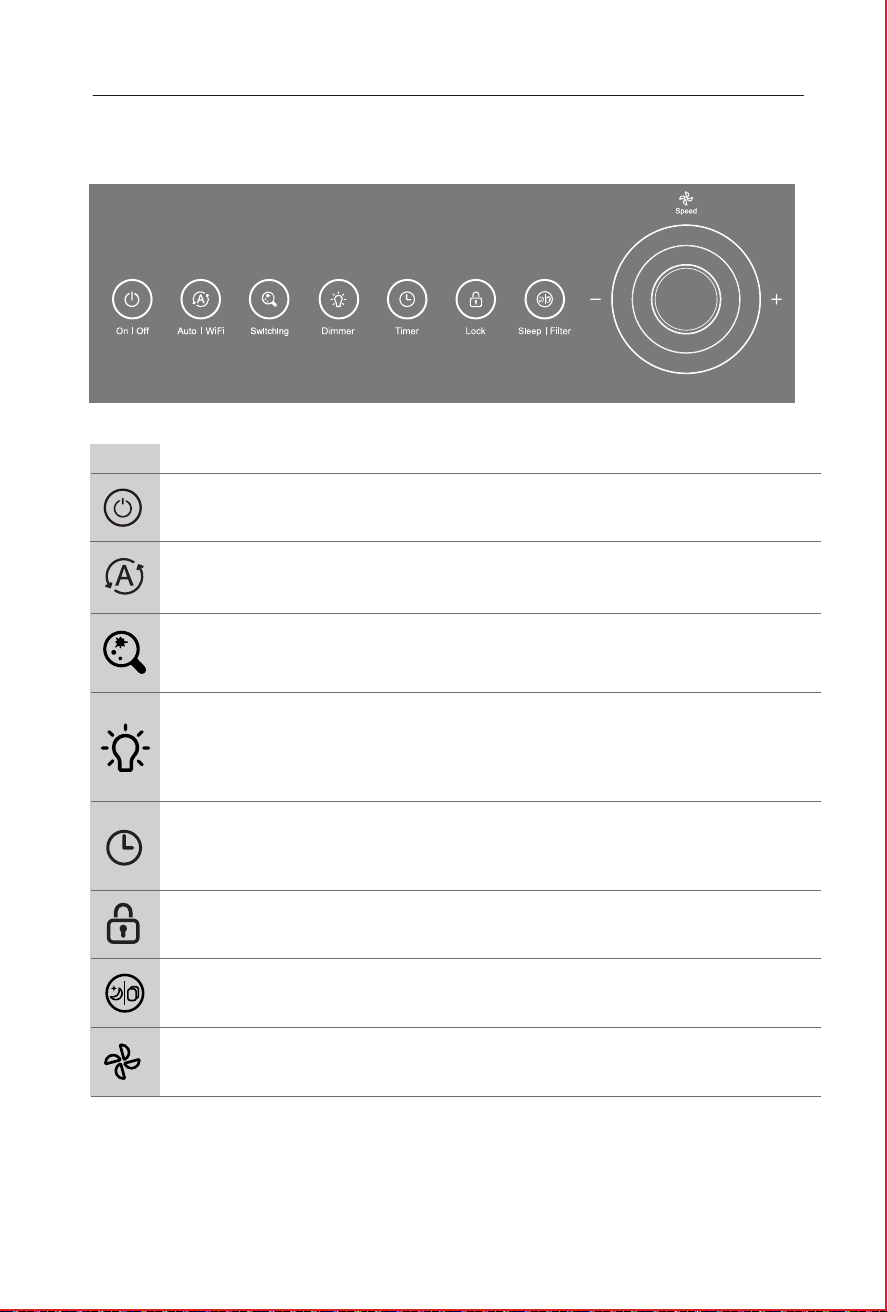
Turns The Air Purifier ON or OFF.
Adjust fan speed(1-5).
In Auto mode, fan speed will be adjusted automatically
based on the real-time PM2.5 density,The fan gear
changes between 1st and 4th gears.
FanSpeed
FilterChange
Sleep/
Auto
Switch
In working mode, press and hold the child lock button to
enter the child lock open/close function.
Timer
ChildLock
On/Off
Icons
Icons Name
Introduction
Press this button to realize automatic switching on/off.
Press the SLEEP button to enter the sleep mode when the
Sleep | Filter purifier is working; If the icon becomes red,
replace the filter.
3
4 5
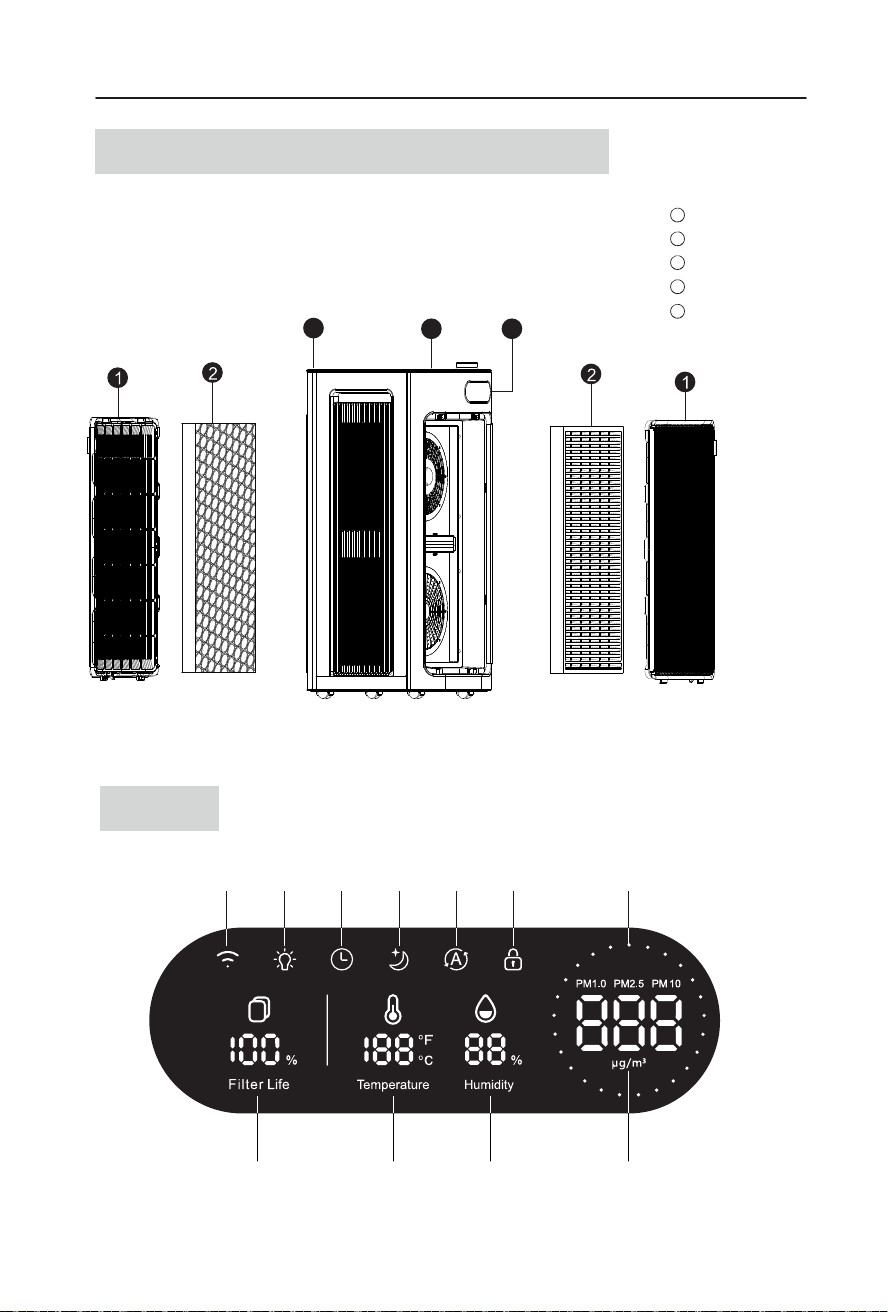
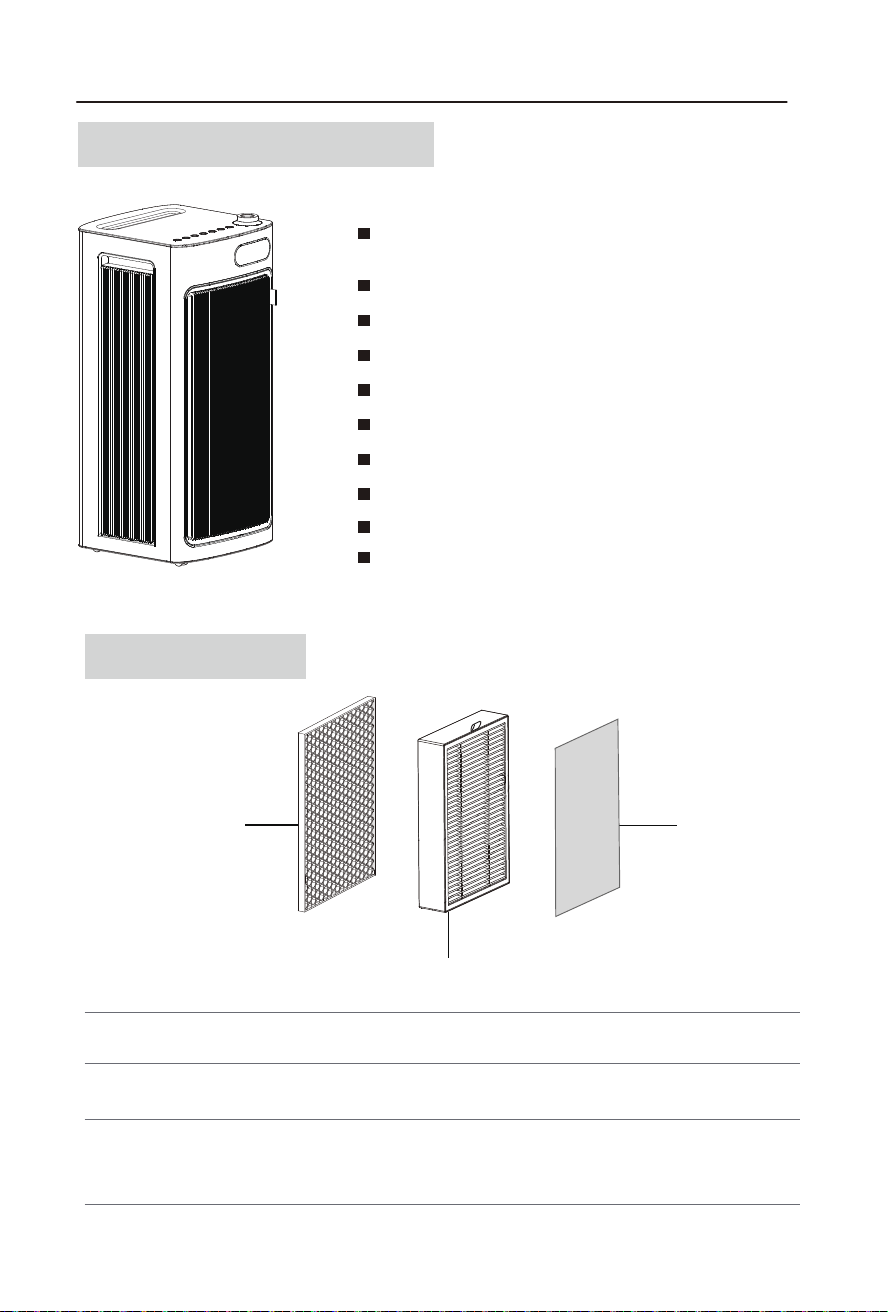
Filter cover
Composite filter
Main unit
1
2
3
Control Panel
4
Display 5
KNOW YOUR AIR PURIFIER
Structure and Name of Product Components
If the picture is inconsistent with the actual product, the latter shall prevail.
Display
Control Panel
Adjust the ambient light mode.
Long press the button to switch the temperature display
between Fahrenheit and Celsius.
Short press the button to switch the PM2.5/PM1.0/PM10
value display(The default value of PM2.5 is displayed.)
Light
Sleep
Temperature
Humidity
Child lock
Light
Timer
Filter life
Auto
PM1.0/2.5/10 display
3
4
Air sensing
indicator light
WIFI
Turns The Air Purifier ON or OFF.
Adjust fan speed(1-5).
In Auto mode, fan speed will be adjusted automatically
based on the real-time PM2.5 density,The fan gear
changes between 1st and 4th gears.
FanSpeed
FilterChange
Sleep/
Auto
Switch
In working mode, press and hold the child lock button to
enter the child lock open/close function.
Timer
ChildLock
On/Off
Icons
Icons Name
Introduction
Press this button to realize automatic switching on/off.
Press the SLEEP button to enter the sleep mode when the
Sleep | Filter purifier is working; If the icon becomes red,
replace the filter.
3
4 5
Filter cover
Composite filter
Main unit
1
2
3
Control Panel
4
Display 5
KNOW YOUR AIR PURIFIER
Structure and Name of Product Components
If the picture is inconsistent with the actual product, the latter shall prevail.
Display
Control Panel
Adjust the ambient light mode.
Long press the button to switch the temperature display
between Fahrenheit and Celsius.
Short press the button to switch the PM2.5/PM1.0/PM10
value display(The default value of PM2.5 is displayed.)
Light
Sleep
Temperature
Humidity
Child lock
Light
Timer
Filter life
Auto
PM1.0/2.5/10 display
5
6
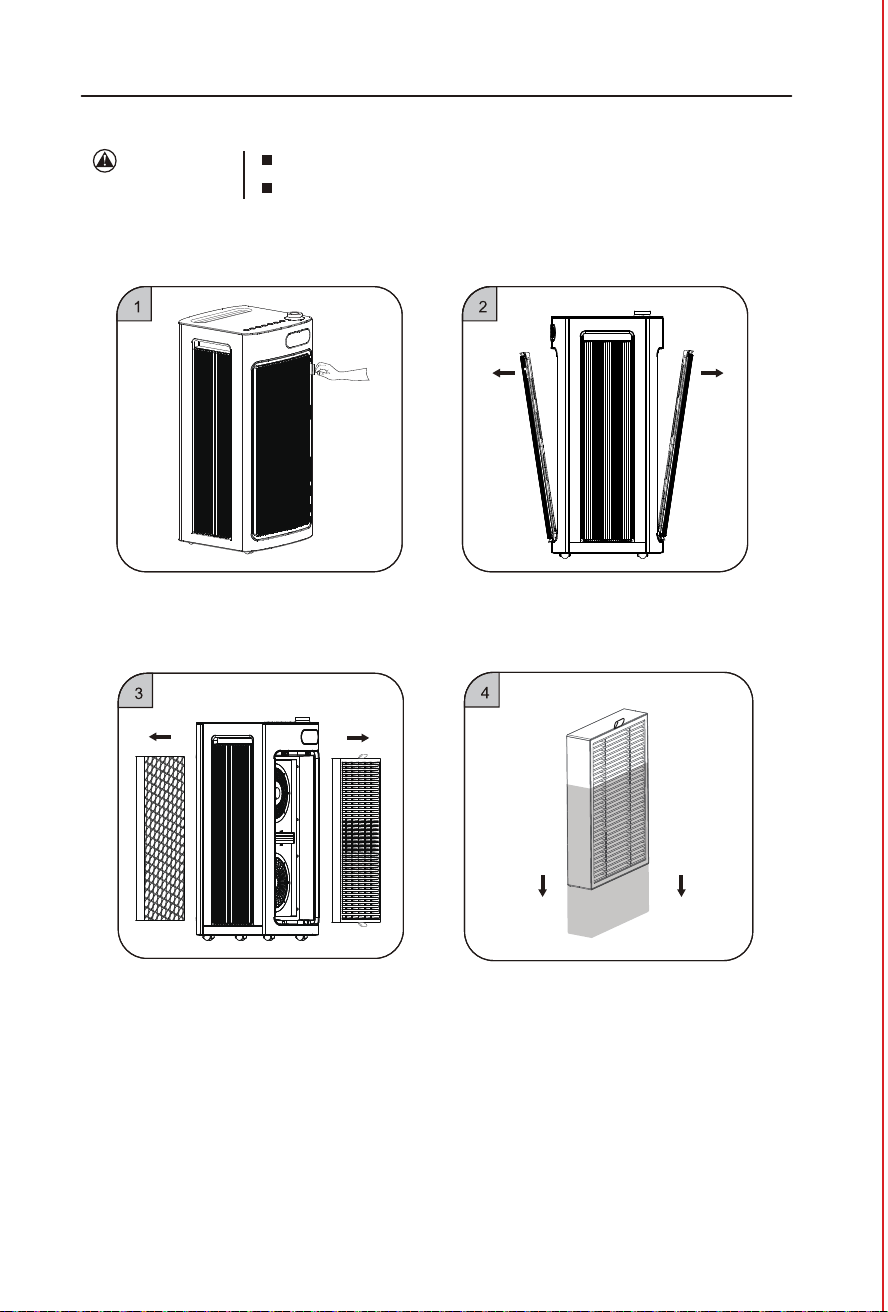
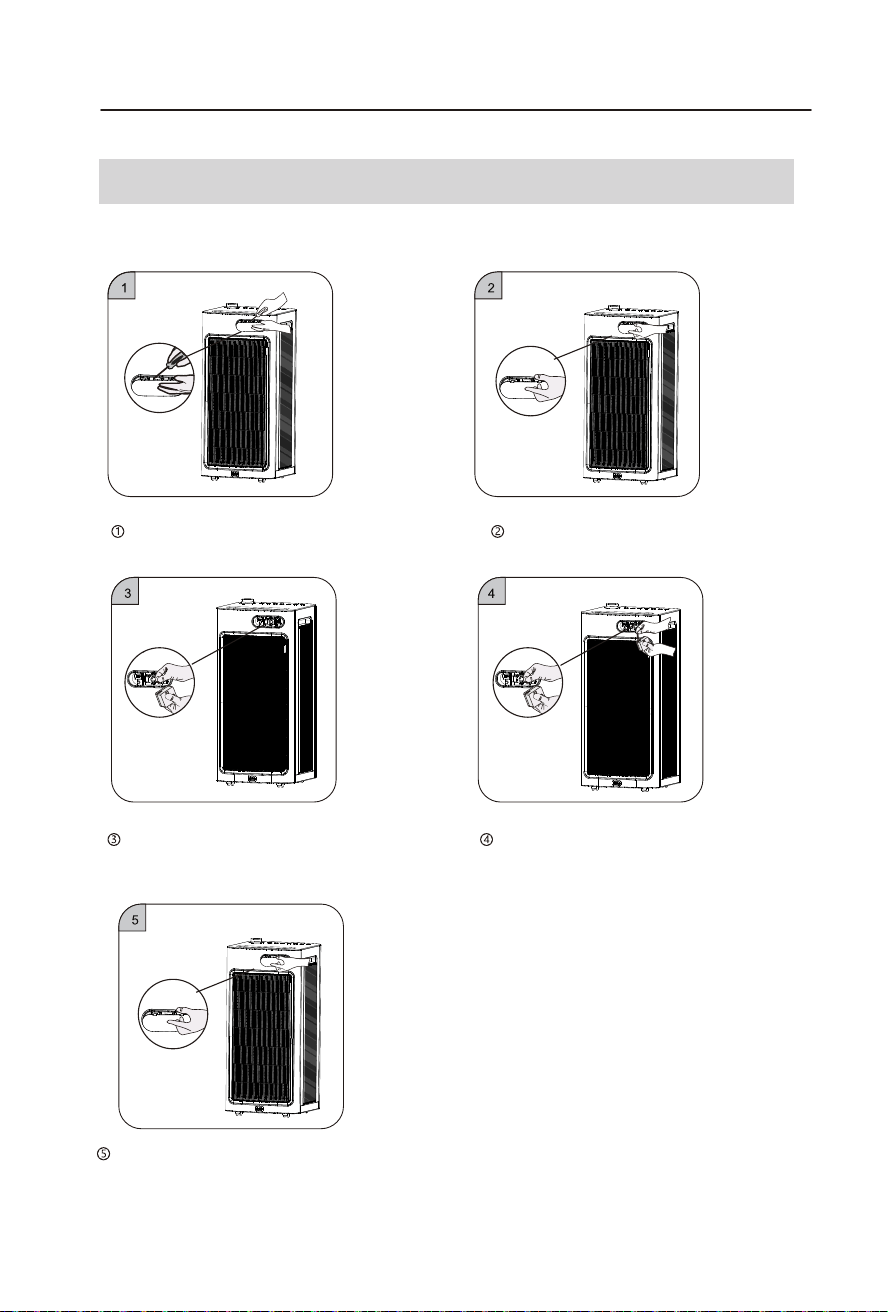
① Place your hand on the handle of the filter
cover,and gently pull it outward.
Product Features
Integration of Multiple Functions
3重净化技术3-Stage Filtration
Pre-filter
Pre-filter
Activated
carbon filter
activated
carbon filter
HEPA filter
HEPA filter
[Note] The activated carbon filter, HEPA filter and Pre-filter are combined in the same filter .
Captures and filters airborne contaminants down to 0.01 microns in size, such
as PM2.5, dust, smoke particles, mold spores, plant spores, and pollen
Captures larger particles such as human hair, fibers, pet fur, and dust particles;
Protects th HEPA filter and extends its life.
Absorbs and eliminates fumes and volatile organic compounds in the air.
Efficiently purify PM2.5, smoke, pollen, dust and other
particulate pollutants
5 fan speeds
Timer (0-12H)
Filter replacement indicator
Manual, Auto, Sleep and other operating modes
Real-time monitoring of indoor temperature and humidity
Child lock
Real-time value display of PM2.5/PM1.0/PM10
WiFi control
Brightness control function
Using Your Air Purifier
Precautions
for Use
All filters are attached in the air purifier.
Please ensure that the filter is installed correctly before use.
③ Take out the new filter with plastic film of
the machine inside.
④ Remove the plastic film on the filter.
② Take out the filter cover.
5
6
① Place your hand on the handle of the filter
cover,and gently pull it outward.
Product Features
Integration of Multiple Functions
3重净化技术3-Stage Filtration
Pre-filter
Pre-filter
Activated
carbon filter
activated
carbon filter
HEPA filter
HEPA filter
[Note] The activated carbon filter, HEPA filter and Pre-filter are combined in the same filter .
Captures and filters airborne contaminants down to 0.01 microns in size, such
as PM2.5, dust, smoke particles, mold spores, plant spores, and pollen
Captures larger particles such as human hair, fibers, pet fur, and dust particles;
Protects th HEPA filter and extends its life.
Absorbs and eliminates fumes and volatile organic compounds in the air.
Efficiently purify PM2.5, smoke, pollen, dust and other
particulate pollutants
5 fan speeds
Timer (0-12H)
Filter replacement indicator
Manual, Auto, Sleep and other operating modes
Real-time monitoring of indoor temperature and humidity
Child lock
Real-time value display of PM2.5/PM1.0/PM10
WiFi control
Brightness control function
Using Your Air Purifier
Precautions
for Use
All filters are attached in the air purifier.
Please ensure that the filter is installed correctly before use.
③ Take out the new filter with plastic film of
the machine inside.
④ Remove the plastic film on the filter.
② Take out the filter cover.
7
8
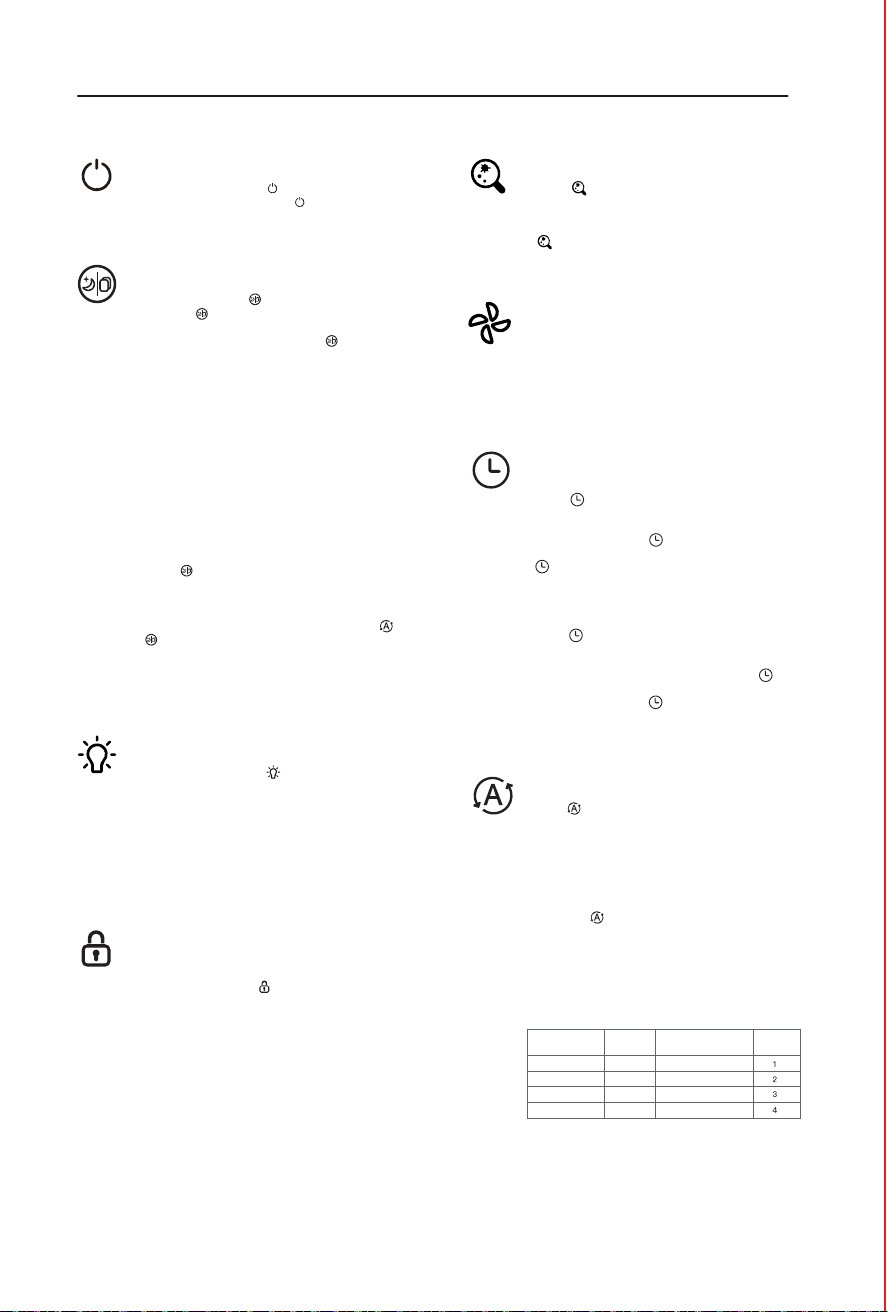
In standby mode, touch " " toenter the working
mode. In working mode ,touch " " to enter standby
mode. The power button indicator light is red in standby
mode, and white in working mode.
Rotate the fan speed adjustment knob to enter manual
fan speed adjustment mode. The display screen switches
to fan speed adjustment status, and the PM2.5 numerical
display area displays the wind speed gear. When rotating
clockwise, the gear increases,while when rotating
counterclockwise, the gear decreases. When rotating
continuously, thegear cycles between 1-5-1. After stopping
the rotation for 3 seconds, exit the gear display.
Touch " " in working mode, the button will light up
when you press it everytime.The display screen will switch
to display the values of PM2.5/PM1.0/PM10. When
powered on, the default display is PM2.5.Long touch
" " for 5 seconds to switch the temperature display
between Fahrenheit and Celsius.
This feature is designed to prevent misuse or accidental
manipulation by pets or children. In working mode, Long
press the child lock button " " (Over 3seconds)Switch
the child lock on/off status, the child lock function is enabled,
the child lock key indicator light is on, and the child lock
icon on the display screen is on. When the child lock
function is turned on, touching other function keys is invalid.
The child lock function is turned off, and the child lock key
indicator light is off.
In working state, touch " " button, Enter sleep mode.
Sleep mode " " indicator light is in white light state,
All other indicator lights and icons are off,fan speed
running in first gear. After 10 seconds, " " Indicator
light is off. In sleep mode, touch sleep button once to
wake up the sleep button, and the sleep button
indicator light will light up.Touch sleep button
again to exit sleep mode.
The service life of the filter is defined as 3000 hours (the
4th fan speed), displayed as the percentage of the filter
life, and displayed as100% at full service life.
Filter life reset operation:
When the service life of the filter is less than 5%, and the
filter button flashes red. Remind users to replace the filter
screen. When the filter life is more then5%, long touch
the filter life reset button cannot reset the filter life,only
the"ding"sound is emitted.
When the service life of the filter isl ess than 5%, touch
and hold " " (more than 3 seconds) to reset the service
life of the filter, and the service life of the filter will be
displaying100%.
Forcedfilterlifereset:
Within 30 seconds of powering on, press and hold " "
+ " " button simultaneously in standby mode(Aboove
3s, Reset the lifespan of the filter and emit a "ding"sound,
the screen flashing (0.5 seconds/time) 6 times, indicating
the completion of the filter resetaction, touch the filter
button, and the screen lifespan is restored to 100%.
1
2
0-12
PM2.5 value
Wind speed
gear
Air quality
Excellent Green
Blue
Yellow
Red
Good
Severe
Poor
PM2.5 air quality
indicator
13-35
36-55
>55
Timed shutdown:
Touch " " when turned on, and the timer button will
light up,Enter the timed shutdown setting state, and the
comprehensive display area displays the timed setting
time. For each touch of " ", the timed time is increased
by 1,The timing time is between 0~1~12H, stop touching
" " for more than 3 seconds, the timed shutdown
setting is completed, and the set shutdown time starts
counting down. The display screen returns to the PM2.5
display status.
Timed startup:
Touch " " in standby mode, and the timer button will
light up,Entering the timed startup setting state, the timer
button icon on the display screen lights up,and the screen
displays the timed time,Every time you touch " " , the
timing time is increased by 1. The timing time is between
0-12H. Stop touching " " for more than 3 seconds,
and the timed startup setting is completed. The set startup
time starts counting down. When the timing time is 0,the
timing is automatically cancelled.
Touch " " in working mode to enter intelligent mode.
The intelligent keys are all on, and the machine's wind
speed changes according to the PM2.5 concentration
value. The wind speed gear automatically switches between
gears 1 and 4, and the color of the air quality indicator
light changes according to the PM2.5 concentration value
(the corresponding relationship is shown inthe following
figure).
Long touch " " for morethan 3seconds, the WIFI icon
on the display screen will start flashing, and the machine
will be connected to the phone for network distribution
(please refer to theAPP operation manual for detailed
steps). After successful network distribution, the WIFI icon
will stop flashing and remain on for a long time. The
distribution network was unsuccessful, and after 10 minutes,
the WIFI icon went out
In working state,touching " " , Adjust the brightness
of the display screen, and the brightness changes in the
order of full light -->half light -->off. After the display screen
goes out, all machine lights are turned off and the fan runs
at the current speed. The dimming button indicator light
will turn off after 3 seconds. In the resting state, touch any
button to turn onthe dimming button, and then touch any
button to exit the dimming mode, and the display screen
will return to full brightness.
Power On/Off
Sleep
Filter Change
Auto
Timer
Light
ChildLock
Fan Speed
PM1.0/PM2.5/PM10 AQI
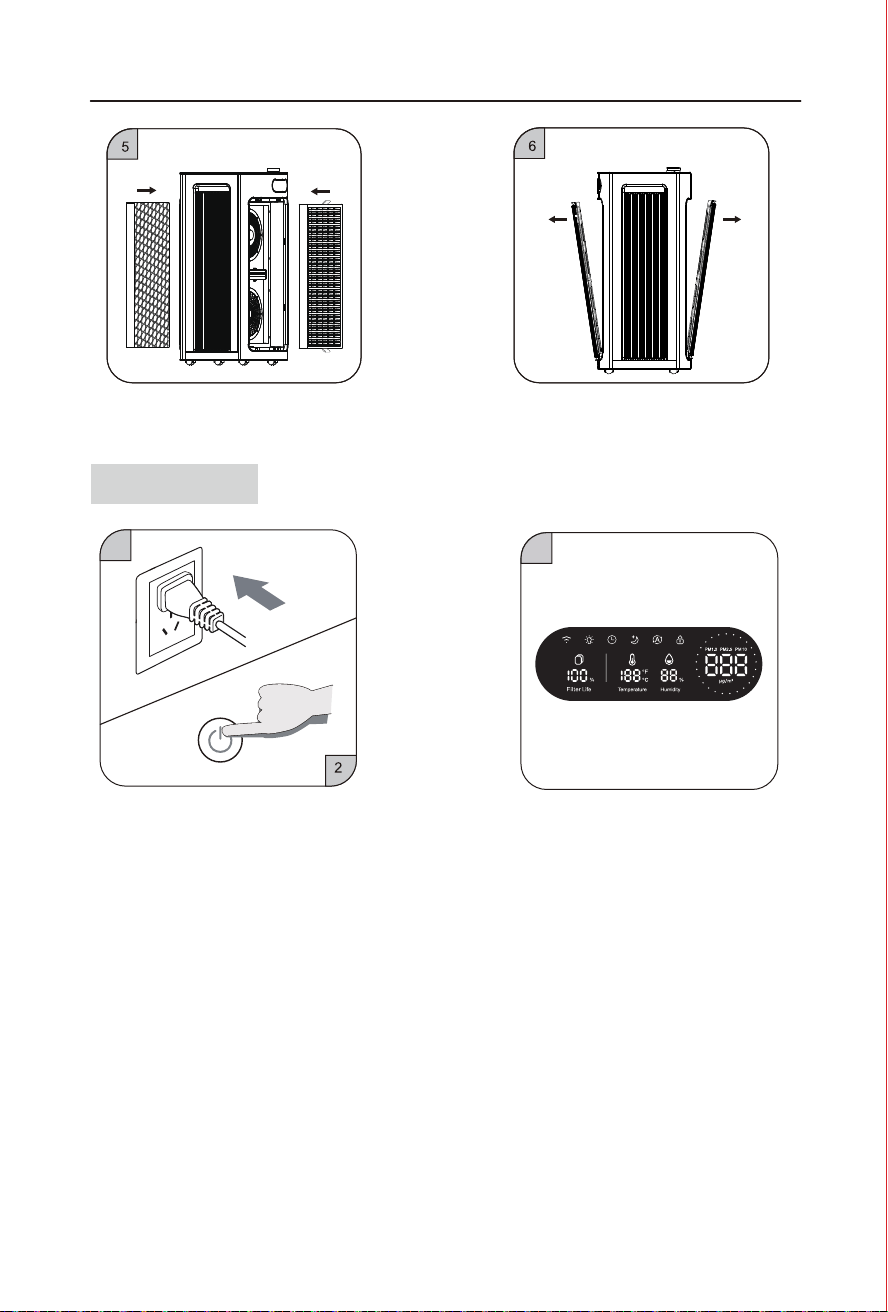
⑤ Put the filter without plastic film back into
the machine.
⑥ Put the filter mesh cover back.
Getting Started
③ The display screen lights up and touch a relevant
function button to enter the working state.
① Insert the power plug to make the machine powered
on, and the buzzer makes a “ding” sound.
② Power on by touching the power key.
Using Your Air Purifier
Operating Instruction
7
8
In standby mode, touch " " toenter the working
mode. In working mode ,touch " " to enter standby
mode. The power button indicator light is red in standby
mode, and white in working mode.
Rotate the fan speed adjustment knob to enter manual
fan speed adjustment mode. The display screen switches
to fan speed adjustment status, and the PM2.5 numerical
display area displays the wind speed gear. When rotating
clockwise, the gear increases,while when rotating
counterclockwise, the gear decreases. When rotating
continuously, thegear cycles between 1-5-1. After stopping
the rotation for 3 seconds, exit the gear display.
Touch " " in working mode, the button will light up
when you press it everytime.The display screen will switch
to display the values of PM2.5/PM1.0/PM10. When
powered on, the default display is PM2.5.Long touch
" " for 5 seconds to switch the temperature display
between Fahrenheit and Celsius.
This feature is designed to prevent misuse or accidental
manipulation by pets or children. In working mode, Long
press the child lock button " " (Over 3seconds)Switch
the child lock on/off status, the child lock function is enabled,
the child lock key indicator light is on, and the child lock
icon on the display screen is on. When the child lock
function is turned on, touching other function keys is invalid.
The child lock function is turned off, and the child lock key
indicator light is off.
In working state, touch " " button, Enter sleep mode.
Sleep mode " " indicator light is in white light state,
All other indicator lights and icons are off,fan speed
running in first gear. After 10 seconds, " " Indicator
light is off. In sleep mode, touch sleep button once to
wake up the sleep button, and the sleep button
indicator light will light up.Touch sleep button
again to exit sleep mode.
The service life of the filter is defined as 3000 hours (the
4th fan speed), displayed as the percentage of the filter
life, and displayed as100% at full service life.
Filter life reset operation:
When the service life of the filter is less than 5%, and the
filter button flashes red. Remind users to replace the filter
screen. When the filter life is more then5%, long touch
the filter life reset button cannot reset the filter life,only
the"ding"sound is emitted.
When the service life of the filter isl ess than 5%, touch
and hold " " (more than 3 seconds) to reset the service
life of the filter, and the service life of the filter will be
displaying100%.
Forcedfilterlifereset:
Within 30 seconds of powering on, press and hold " "
+ " " button simultaneously in standby mode(Aboove
3s, Reset the lifespan of the filter and emit a "ding"sound,
the screen flashing (0.5 seconds/time) 6 times, indicating
the completion of the filter resetaction, touch the filter
button, and the screen lifespan is restored to 100%.
1
2
0-12
PM2.5 value
Wind speed
gear
Air quality
Excellent Green
Blue
Yellow
Red
Good
Severe
Poor
PM2.5 air quality
indicator
13-35
36-55
>55
Timed shutdown:
Touch " " when turned on, and the timer button will
light up,Enter the timed shutdown setting state, and the
comprehensive display area displays the timed setting
time. For each touch of " ", the timed time is increased
by 1,The timing time is between 0~1~12H, stop touching
" " for more than 3 seconds, the timed shutdown
setting is completed, and the set shutdown time starts
counting down. The display screen returns to the PM2.5
display status.
Timed startup:
Touch " " in standby mode, and the timer button will
light up,Entering the timed startup setting state, the timer
button icon on the display screen lights up,and the screen
displays the timed time,Every time you touch " " , the
timing time is increased by 1. The timing time is between
0-12H. Stop touching " " for more than 3 seconds,
and the timed startup setting is completed. The set startup
time starts counting down. When the timing time is 0,the
timing is automatically cancelled.
Touch " " in working mode to enter intelligent mode.
The intelligent keys are all on, and the machine's wind
speed changes according to the PM2.5 concentration
value. The wind speed gear automatically switches between
gears 1 and 4, and the color of the air quality indicator
light changes according to the PM2.5 concentration value
(the corresponding relationship is shown inthe following
figure).
Long touch " " for morethan 3seconds, the WIFI icon
on the display screen will start flashing, and the machine
will be connected to the phone for network distribution
(please refer to theAPP operation manual for detailed
steps). After successful network distribution, the WIFI icon
will stop flashing and remain on for a long time. The
distribution network was unsuccessful, and after 10 minutes,
the WIFI icon went out
In working state,touching " " , Adjust the brightness
of the display screen, and the brightness changes in the
order of full light -->half light -->off. After the display screen
goes out, all machine lights are turned off and the fan runs
at the current speed. The dimming button indicator light
will turn off after 3 seconds. In the resting state, touch any
button to turn onthe dimming button, and then touch any
button to exit the dimming mode, and the display screen
will return to full brightness.
Power On/Off
Sleep
Filter Change
Auto
Timer
Light
ChildLock
Fan Speed
PM1.0/PM2.5/PM10 AQI
⑤ Put the filter without plastic film back into
the machine.
⑥ Put the filter mesh cover back.
Getting Started
③ The display screen lights up and touch a relevant
function button to enter the working state.
① Insert the power plug to make the machine powered
on, and the buzzer makes a “ding” sound.
② Power on by touching the power key.
Using Your Air Purifier
Operating Instruction
9
10
Cleaning and Maintenance
Cleaning and Maintenance
Please unplug the power plug from the adapter before machine maintenance.
1、Clean the machine body (cleaning once a month is recommended):
1)Wipe off stains with a soft rag.
2)Wipe off stubborn stains with a soft rag dipped with proper amount of neutral detergent.
Note: Please avoid scratching the machine shell with any hard object during maintenance. Please operate
according to the manual and avoid damaging any machine part during base disassembly.
2、Clean and change the filter (once operation every 3-6 months is recommended):
1)The replacement of filter will be reminded by the built-in program. The filter can also be replaced
according to the service life prompt of filter . It can also be replaced in real time through the filter
life reset function.
2)The vacuum cleaner can be used to clean the deposited dust on the surface of the composite filter mesh to
prolong the service life of filter mesh (it is recommended to clean it once every other month and do not wash
with water).
*The service life of filter mesh may vary with different environments for using the machine. For example, it will be
shortened in smoking areas and areas with pets. Please replace the filter mesh in time when the purification effect
becomes worse.
*Please dispose the used waste filter mesh according to the relevant regulations on solid waste.
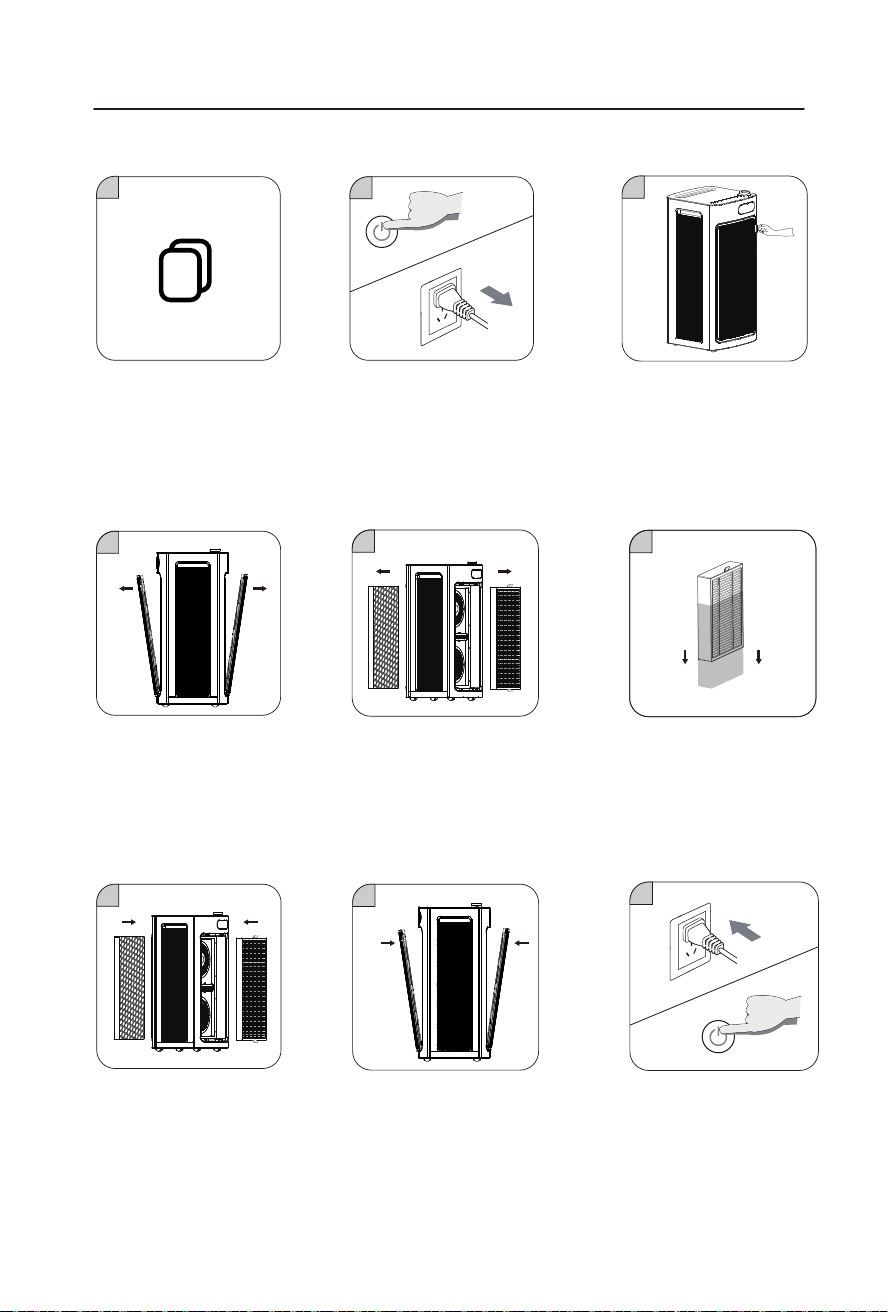
PM2.5 Sensor Replacement
Replacement of Sensors (Please do not operate by yourself because the sensors must
be replaced by professional maintenance personnel)
Open the sensor cover with a
straight screwdriver.
Remove the sensor cover.
Unplug the terminal block from
the old sensor module and replace
it into a new sensor module.
Hold on the hardware handle and
pull out the sensor module.
Put back the sensor module and
close the sensor cover.

9
10
Cleaning and Maintenance
Cleaning and Maintenance
Please unplug the power plug from the adapter before machine maintenance.
1、Clean the machine body (cleaning once a month is recommended):
1)Wipe off stains with a soft rag.
2)Wipe off stubborn stains with a soft rag dipped with proper amount of neutral detergent.
Note: Please avoid scratching the machine shell with any hard object during maintenance. Please operate
according to the manual and avoid damaging any machine part during base disassembly.
2、Clean and change the filter (once operation every 3-6 months is recommended):
1)The replacement of filter will be reminded by the built-in program. The filter can also be replaced
according to the service life prompt of filter . It can also be replaced in real time through the filter
life reset function.
2)The vacuum cleaner can be used to clean the deposited dust on the surface of the composite filter mesh to
prolong the service life of filter mesh (it is recommended to clean it once every other month and do not wash
with water).
*The service life of filter mesh may vary with different environments for using the machine. For example, it will be
shortened in smoking areas and areas with pets. Please replace the filter mesh in time when the purification effect
becomes worse.
*Please dispose the used waste filter mesh according to the relevant regulations on solid waste.
PM2.5 Sensor Replacement
Replacement of Sensors (Please do not operate by yourself because the sensors must
be replaced by professional maintenance personnel)
Open the sensor cover with a
straight screwdriver.
Remove the sensor cover.
Unplug the terminal block from
the old sensor module and replace
it into a new sensor module.
Hold on the hardware handle and
pull out the sensor module.
Put back the sensor module and
close the sensor cover.
11 12
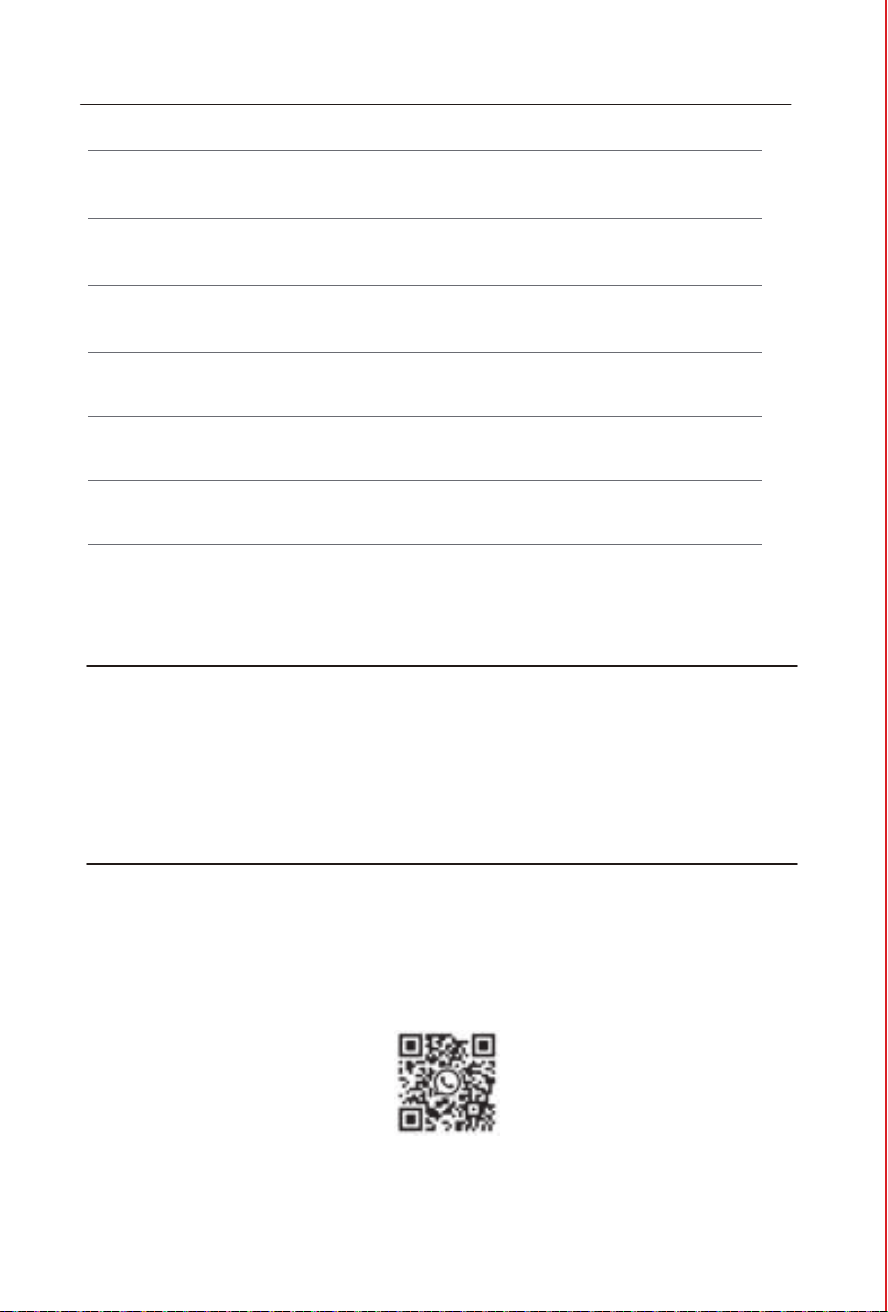
3. Place your hand on the handle of
the filter cover,and gently pull it
outward.
1
2
3
4
5
6
7
8
9
Warranty
Email: [email protected]
Warranty & Support
Returns & Refunds
Jafanda products have a One Year warranty from the date of purchase and a Free Extended
One -Year warranty after registering your product with your order and purchase date via
www.jafanda.com/pages/warranty.
Jafanda always takes responsibility for all our products.
Jafanda always pays high importance to the customer's purchase experience and satisfaction.
If for any reason you are not fully satisfied with your purchase experience within 30 days, we
are happy to help with a replacement or refund.
For more detail, please visit our after-sales website page:
www.jafanda.com/pages/returns-refunds
Or scan below QR code using WhatsApp to join us After-sales Live Chat Service;
Troubleshoot Guide
Failures Possible Causes Solutions
The product cannot
function normally
The air cannot be ducted
smoothly from the air
outlet
The machine makes noise
while functioning
The indicator light for filter
change is still flashing after
change.
The wind speed seems to
decrease
The air purifier gives out
odor
1.There are problems in connection.
2.The filter cover is not properly
installed.
1.The plastic package of the new
filter is not removed.
2.The air outlet of purifier is blocked
by foreign matters.
1.Check if the plug is plugged into the
socket and if the power button is turned
on.
2.Reinstall the filter cover.
1.The inlet or outlet is blocked by
foreign matters.
2.There are foreign matters in the
air flue of machine.
1.Please remove the plastic package
at first.
2.Clean up the foreign matters.
1.Please remove the obstructive
matters first.
2.Clean up the foreign matters.
The most frequently asked questions of this product are listed here. If you cannot find the solution to your question, please
contact our after-sales service department.
1.The filter reset button has not been
pressed.
1.Press and hold the filter button for
more than 3 seconds, and complete
the filter reset after hearing a prompt
tone “ding”.
1. The filter life has expired, or the
filter is blocked by hair.
1.Clean the dust and hair on the
surface with a vacuum cleaner;
change the failed filter.
1.The pollutant concentration may be
too high, and the filter may reach a
saturated state in advance.
1.The filter needs to be changed to
avoid secondary pollution.
Filter replacement
2.Touch the on-off button to power
off, and unplug the machine.
1. When the filter button lights up in
red and the filter lifespan on the
display screen is less than 5%, it
indicates that the filter needs to be
replaced.
4.Take out the filter cover. 5.Take out the failed filter in the
machine.
6.Remove the plastic film from
the new filter.
7. Reinstall the new filter in
the machine.
8.Put the filter cover back
9.Plug in and touch the on-off
button .
11 12
3. Place your hand on the handle of
the filter cover,and gently pull it
outward.
1
2
3
4
5
6
7
8
9
Warranty
Email: [email protected]
Warranty & Support
Returns & Refunds
Jafanda products have a One Year warranty from the date of purchase and a Free Extended
One -Year warranty after registering your product with your order and purchase date via
www.jafanda.com/pages/warranty.
Jafanda always takes responsibility for all our products.
Jafanda always pays high importance to the customer's purchase experience and satisfaction.
If for any reason you are not fully satisfied with your purchase experience within 30 days, we
are happy to help with a replacement or refund.
For more detail, please visit our after-sales website page:
www.jafanda.com/pages/returns-refunds
Or scan below QR code using WhatsApp to join us After-sales Live Chat Service;
Troubleshoot Guide
Failures Possible Causes Solutions
The product cannot
function normally
The air cannot be ducted
smoothly from the air
outlet
The machine makes noise
while functioning
The indicator light for filter
change is still flashing after
change.
The wind speed seems to
decrease
The air purifier gives out
odor
1.There are problems in connection.
2.The filter cover is not properly
installed.
1.The plastic package of the new
filter is not removed.
2.The air outlet of purifier is blocked
by foreign matters.
1.Check if the plug is plugged into the
socket and if the power button is turned
on.
2.Reinstall the filter cover.
1.The inlet or outlet is blocked by
foreign matters.
2.There are foreign matters in the
air flue of machine.
1.Please remove the plastic package
at first.
2.Clean up the foreign matters.
1.Please remove the obstructive
matters first.
2.Clean up the foreign matters.
The most frequently asked questions of this product are listed here. If you cannot find the solution to your question, please
contact our after-sales service department.
1.The filter reset button has not been
pressed.
1.Press and hold the filter button for
more than 3 seconds, and complete
the filter reset after hearing a prompt
tone “ding”.
1. The filter life has expired, or the
filter is blocked by hair.
1.Clean the dust and hair on the
surface with a vacuum cleaner;
change the failed filter.
1.The pollutant concentration may be
too high, and the filter may reach a
saturated state in advance.
1.The filter needs to be changed to
avoid secondary pollution.
Filter replacement
2.Touch the on-off button to power
off, and unplug the machine.
1. When the filter button lights up in
red and the filter lifespan on the
display screen is less than 5%, it
indicates that the filter needs to be
replaced.
4.Take out the filter cover. 5.Take out the failed filter in the
machine.
6.Remove the plastic film from
the new filter.
7. Reinstall the new filter in
the machine.
8.Put the filter cover back
9.Plug in and touch the on-off
button .
EPA Est.NO.98581-CHN-1
Made In China
1309 Coffeen Avenue STE 4304
Sheridan,Wyoming 82801
Jafanda LLC.
JF1500 Air Purifier User Manual