EPA Est.NO.98581-CHN-1
Made In China
1309 Coffeen Avenue STE 4304
Sheridan,Wyoming 82801
support@jafanda.com
Jafanda LLC.
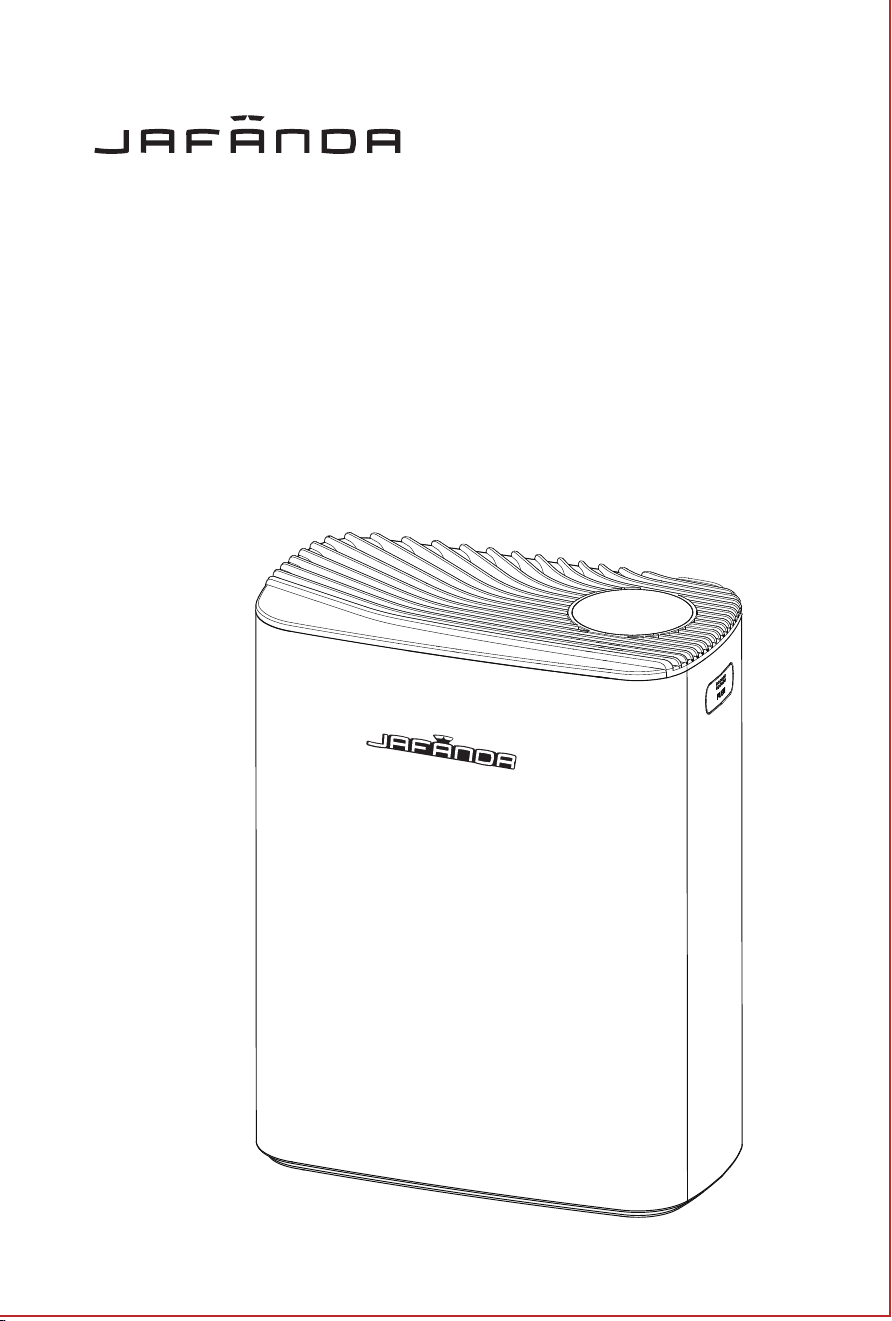
JF239 Air Purifier User Manual
READ AND SAVE THESE INSTRUCTIONS
JAFANDA US
THANK YOU FOR YOUR PURCHASE!
Contact our support team by Email:
Join the jafanda Community on Social Media

1
TABLE OF CONTENTS
Package content
Specifications
Safety information
Getting to know your air purifier
Product features
Operating instructions
Using your air purifier
Care & Maintenance
Replacement filters
Troubleshooting
Warranty & Support
1
1
2
3
4
5
7
8
9
10
11
Returns & Refunds 11
JF239 Air Purifier 1 pcs
Ture HEPA Filter 1 pcs (assembled in the appliance)
AC Power Adapter 1 pcs (DC 24V)
User Manual
Aroma Pad
1 pcs
4 pcs
Package content
Package content
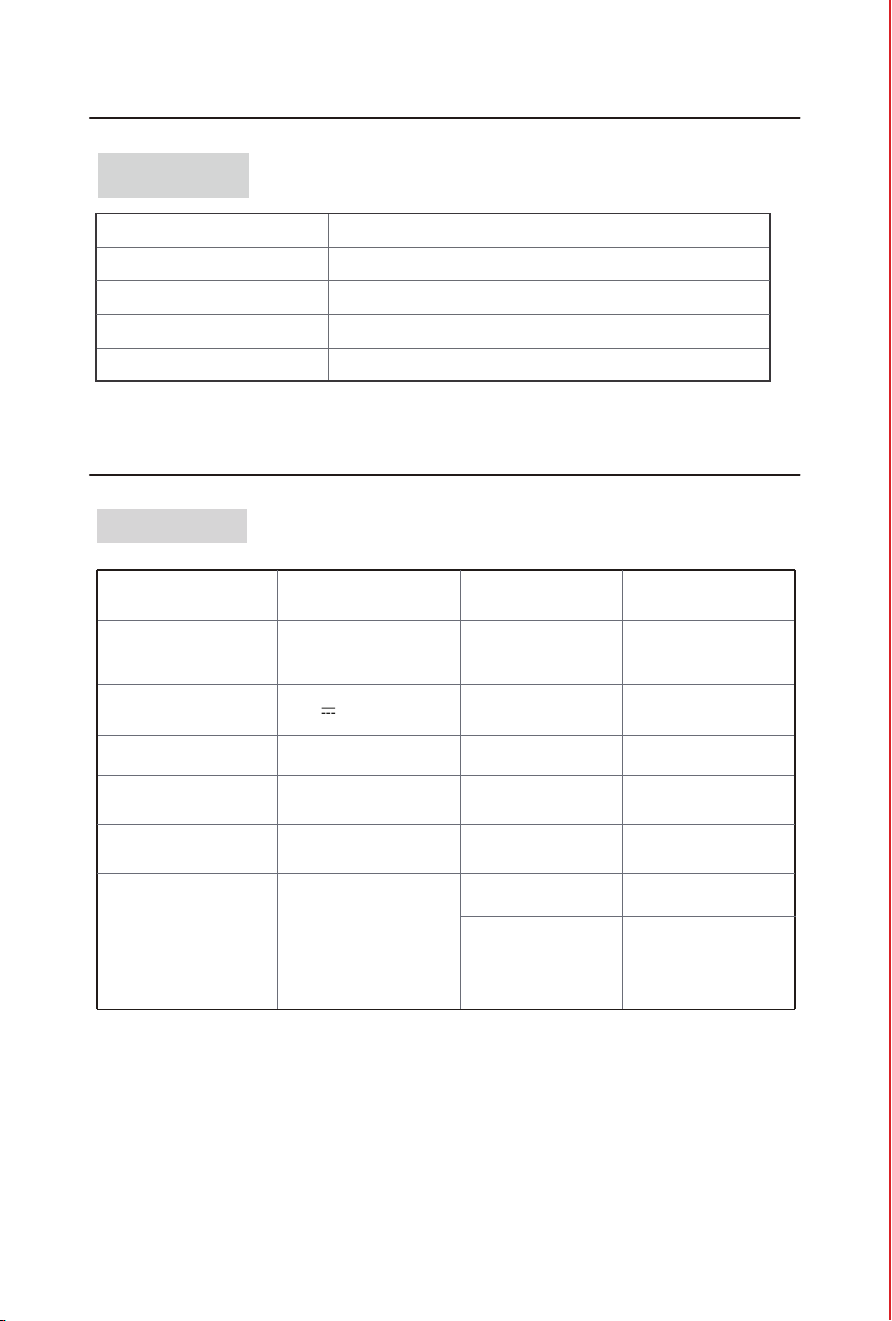
Specifications
Product name Model JF239
Rated Power
CADR
(Clean Air Delivery Rate)
Standby Power
Power Adapter
(Input)
Power Adapter
(Output)
Air Purifier
Product size
N.W.
G.W.
7.05lb/3.2kg
8.82lb/4.0kg
11.73x 6.22 x 14.76 in
29.8 x 15.8 x 37.5 cm
Package Size
13.11 x 7.48 x 17.64 in
33.3 x 19.0 x 44.8 cm
35W
141CFM (239m³/h)
Noise Level
Low Speed:20dB
High Speed:52dB
Operating
Conditions
Humidity:
Temperature:
14℉-104 ℉/-10 ℃-40 ℃
20%-95% RH
220
2
ft (5 Times/h)
550
2
ft (2 Times/h)
1100
2
ft (1 Times/h)
< 2W
100-240V~ 50/60Hz
24V 1.5A
Room Area
Served
Filter life
3000H
PRODUCT TECHNICAL
1
TABLE OF CONTENTS
Package content
Specifications
Safety information
Getting to know your air purifier
Product features
Operating instructions
Using your air purifier
Care & Maintenance
Replacement filters
Troubleshooting
Warranty & Support
1
1
2
3
4
5
7
8
9
10
11
Returns & Refunds 11
JF239 Air Purifier 1 pcs
Ture HEPA Filter 1 pcs (assembled in the appliance)
AC Power Adapter 1 pcs (DC 24V)
User Manual
Aroma Pad
1 pcs
4 pcs
Package content
Package content
Specifications
Product name Model JF239
Rated Power
CADR
(Clean Air Delivery Rate)
Standby Power
Power Adapter
(Input)
Power Adapter
(Output)
Air Purifier
Product size
N.W.
G.W.
7.05lb/3.2kg
8.82lb/4.0kg
11.73x 6.22 x 14.76 in
29.8 x 15.8 x 37.5 cm
Package Size
13.11 x 7.48 x 17.64 in
33.3 x 19.0 x 44.8 cm
35W
141CFM (239m³/h)
Noise Level
Low Speed:20dB
High Speed:52dB
Operating
Conditions
Humidity:
Temperature:
14℉-104 ℉/-10 ℃-40 ℃
20%-95% RH
220
2
ft (5 Times/h)
550
2
ft (2 Times/h)
1100
2
ft (1 Times/h)
< 2W
100-240V~ 50/60Hz
24V 1.5A
Room Area
Served
Filter life
3000H
PRODUCT TECHNICAL
2
3
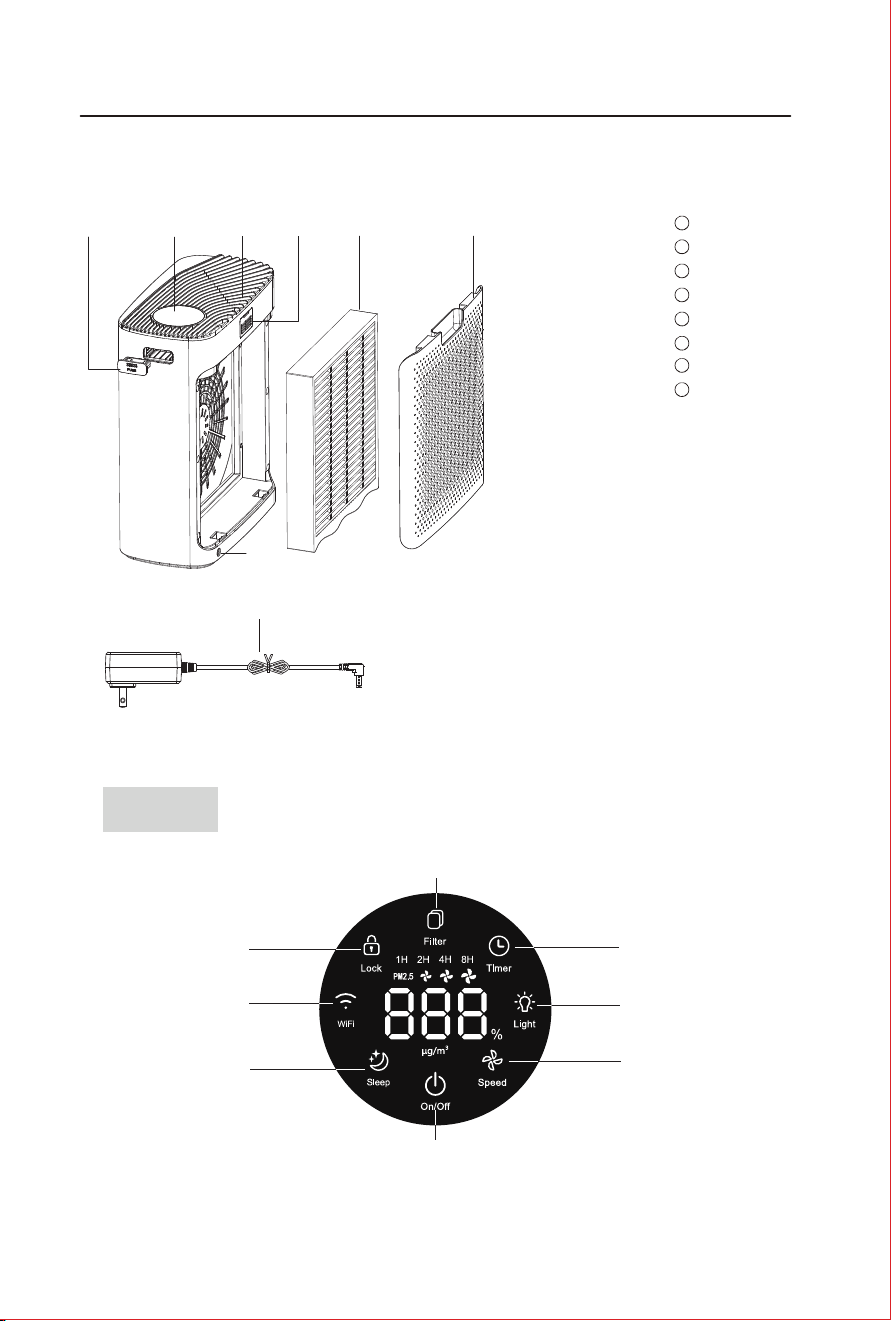
PM2.5 sensor
Fragrance Box
Filters
1
2
Air outlet Grid
3
4
5
6
Supply Hub
7
8
AC Power Adapter
In case of a discrepancy between the product picture and real
product, the real product will prevail.
Getting to know your air purifier
Display
Filter cover
8
1
5
4
7
23
6
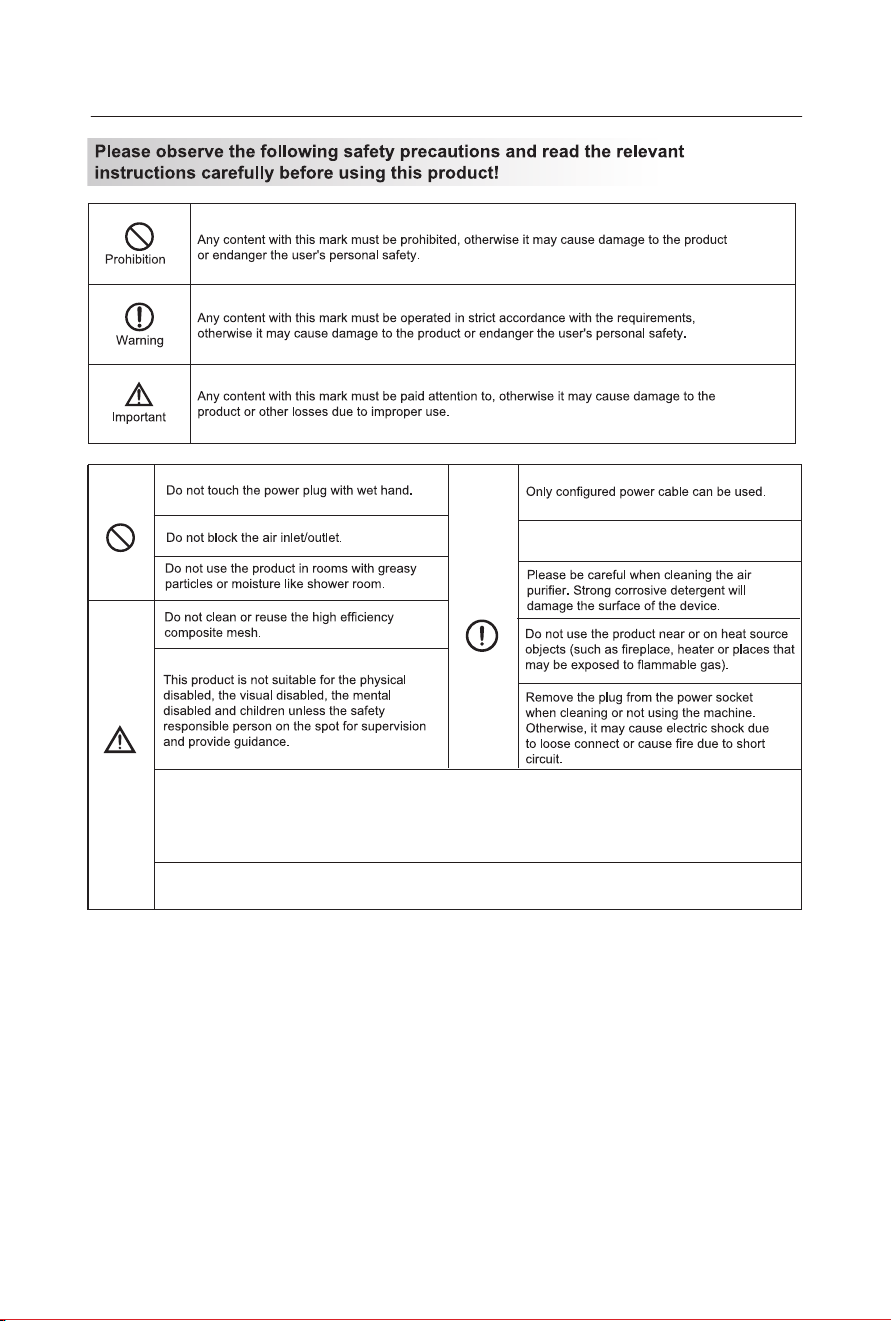
Safety information
Please remove dust from the product body
and power plugs periodically.
Contains FCC ID: 2ANDL-WBR3
This device complies with part 15 of the FCC Rules. Operation is subject to the following two conditions:
(1) This device may not cause harmful interference,
(2) this device must accept any interference received, including interference that may cause undesired
operation.
This air purifier is suitable for floor standing. With caster wheels, it's easy to move in-house.
Do not place the air purifier closer than 10cm/4” to wall or another object..
Display
WiFi
Sleep
Lock
Filter
Timer
Light
Speed
On/Off
2
3
PM2.5 sensor
Fragrance Box
Filters
1
2
Air outlet Grid
3
4
5
6
Supply Hub
7
8
AC Power Adapter
In case of a discrepancy between the product picture and real
product, the real product will prevail.
Getting to know your air purifier
Display
Filter cover
8
1
5
4
7
23
6
Safety information
Please remove dust from the product body
and power plugs periodically.
Contains FCC ID: 2ANDL-WBR3
This device complies with part 15 of the FCC Rules. Operation is subject to the following two conditions:
(1) This device may not cause harmful interference,
(2) this device must accept any interference received, including interference that may cause undesired
operation.
This air purifier is suitable for floor standing. With caster wheels, it's easy to move in-house.
Do not place the air purifier closer than 10cm/4” to wall or another object..
Display
WiFi
Sleep
Lock
Filter
Timer
Light
Speed
On/Off
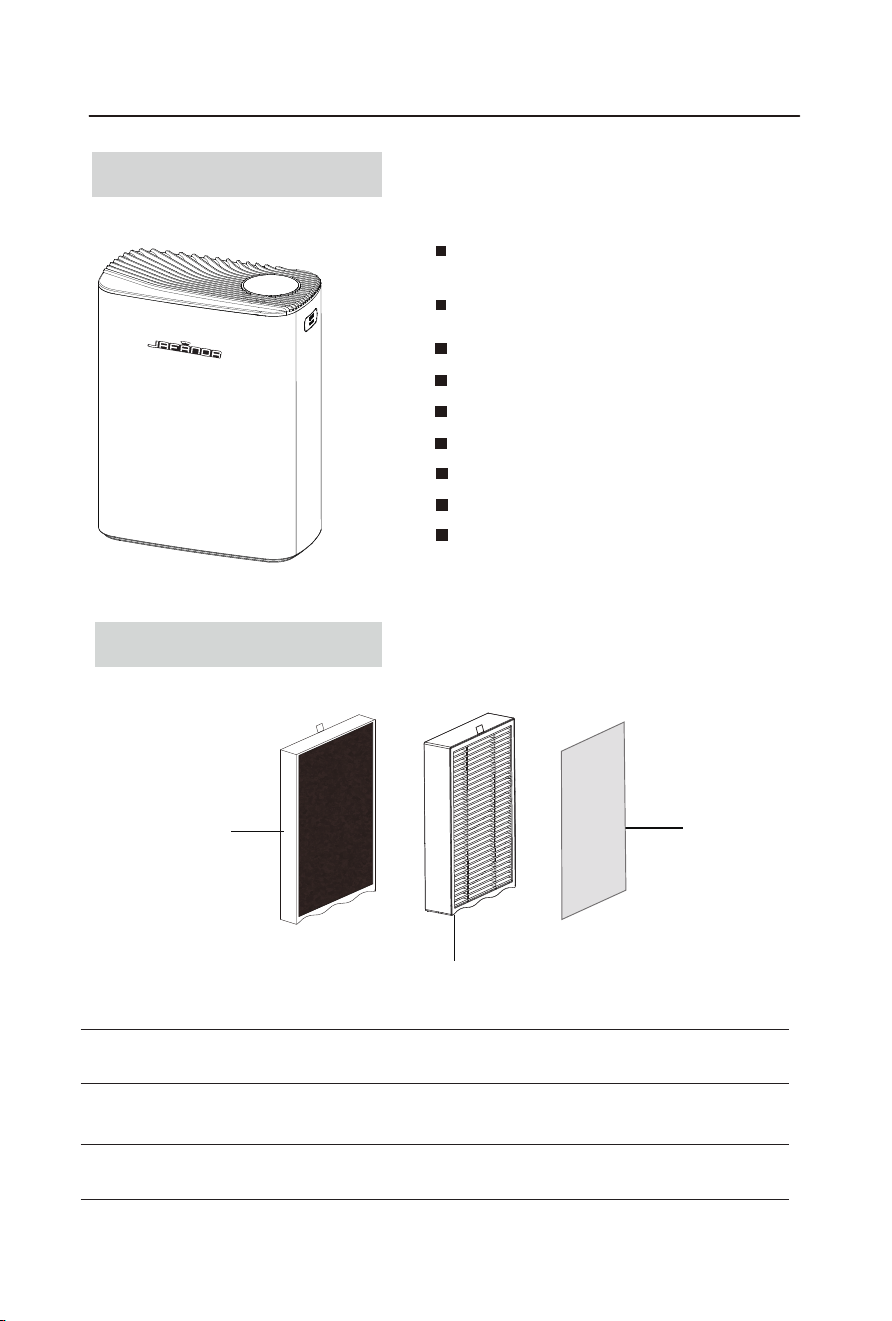
Absorb and eliminate fumes and volatile organic compounds in the air.
Carbon Filter
4
5
Combine Multiple Functions
High-Efficiency Purification: Remove PM 2.5, smog,
pollen and other particulate pollutants.
Built-in essential oil box and aroma pad, add
essential oil to freshen the air continuously
Product features
3 fan speeds
Timer (1-8H)
Filter replacement indicator
Manual, Auto, Sleep, and other operating modes
Child lock
Real-time value display of PM2.5
WiFi control
3重净化技术
3-Stages Filtration System
HEPA Filter
HEPA Filter
Intercepts hair, dander, fibers, and particles of visible large size. Can be vacuumed
regularly.
H13 HEPA filter for high-efficiency filtration of particles as small as 0.3 micron, such
as PM2.5, smoke, pollen, dust, and other pollutants.
Pre-Filter
Pre-Filter
Note: Carbon Fiter, HEPA Filter and Pre-Filters are compounded in the same filter.
Operating instructions
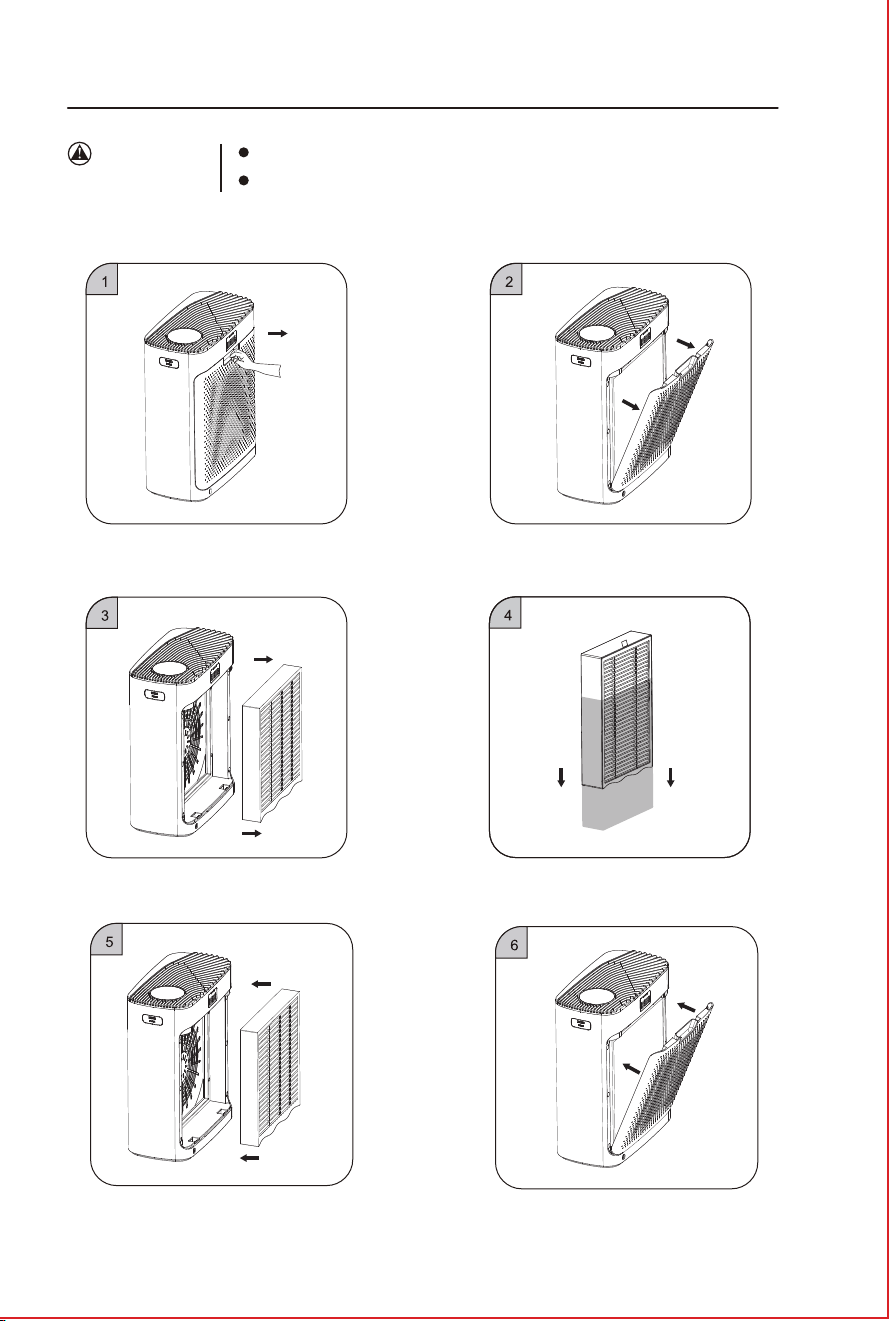
All filters are included inside the air purifier.
Before use, make sure the plastic bag outside the filter is
removed and installed properly.
Precautions
for use
2. Lift the filter cover from the air purifier.
3. Take out the new filters with plastic packaging.
1. Press down down the button on rear cover plate
and pull it out slightly, then take out Filter.
4. Remove the protective film on the filter
before use.
5. Put into New Filter without protective
film.
6. Close the rear cover plate,then it is done.
Carbon Filter
Absorb and eliminate fumes and volatile organic compounds in the air.
Carbon Filter
4
5
Combine Multiple Functions
High-Efficiency Purification: Remove PM 2.5, smog,
pollen and other particulate pollutants.
Built-in essential oil box and aroma pad, add
essential oil to freshen the air continuously
Product features
3 fan speeds
Timer (1-8H)
Filter replacement indicator
Manual, Auto, Sleep, and other operating modes
Child lock
Real-time value display of PM2.5
WiFi control
3重净化技术
3-Stages Filtration System
HEPA Filter
HEPA Filter
Intercepts hair, dander, fibers, and particles of visible large size. Can be vacuumed
regularly.
H13 HEPA filter for high-efficiency filtration of particles as small as 0.3 micron, such
as PM2.5, smoke, pollen, dust, and other pollutants.
Pre-Filter
Pre-Filter
Note: Carbon Fiter, HEPA Filter and Pre-Filters are compounded in the same filter.
Operating instructions
All filters are included inside the air purifier.
Before use, make sure the plastic bag outside the filter is
removed and installed properly.
Precautions
for use
2. Lift the filter cover from the air purifier.
3. Take out the new filters with plastic packaging.
1. Press down down the button on rear cover plate
and pull it out slightly, then take out Filter.
4. Remove the protective film on the filter
before use.
5. Put into New Filter without protective
film.
6. Close the rear cover plate,then it is done.
Carbon Filter
6
7
7
8
9
10
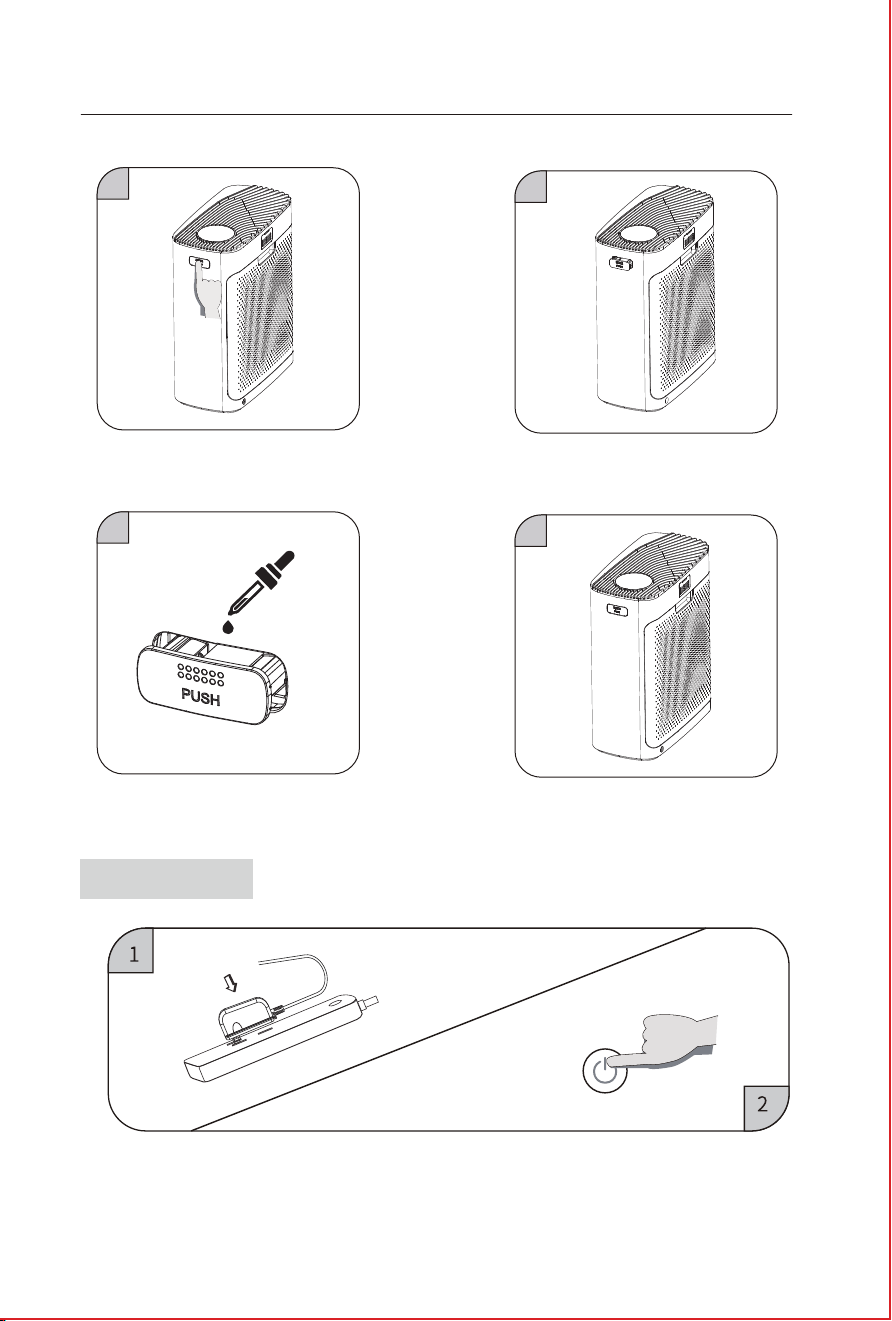
② Touch the POWER switch key to start the purifier.
Operating instructions
7. Press the essential oil box and the box will
pops up.
8. Take out the essential oil box.
9. Add an appropriate amount of essential oil to
the aroma pad inside the essential oil box(Be
careful not to overflow).
10. Put the essential oil box in and buckle it
up in place.
Getting Started
① When it’s powered on, there is a “DING” sound.
Using your air purifier
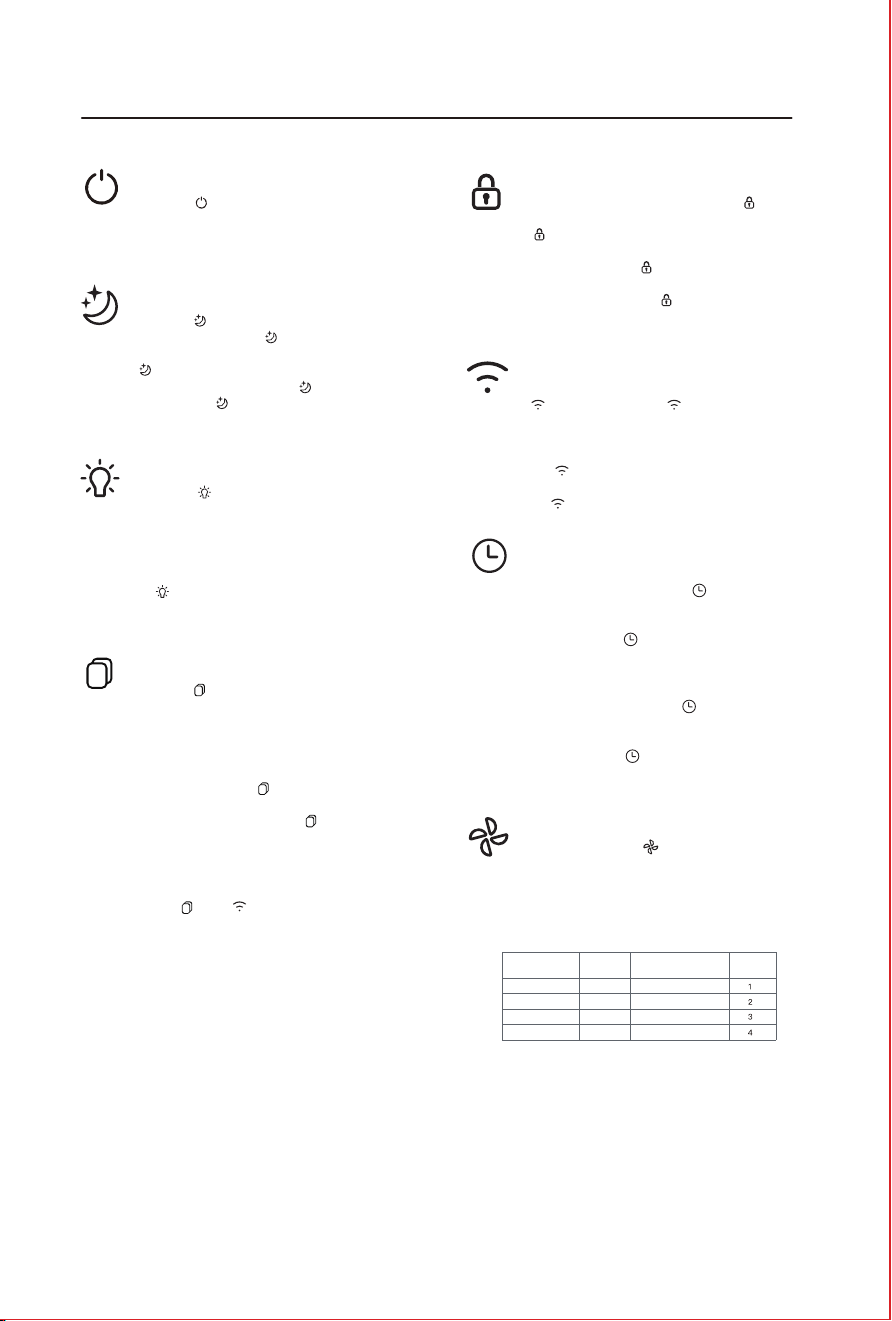
Press the “ ” to turn the device on or off.
White light indicates power on.
Red light indicates standby state.
With the device powered on, press and hold the
“ ” for 3 seconds. The “ ” will start flashing,
indicating the device is ready for network connection.
Follow the app instructions to complete the network
setup.
The “ ” will stay lit if the network configuration
is successful. If unsuccessful after 10 minutes,
the “ ” will be half-lit.
In working mode, press and hold the “ ” for
more than 3 seconds to activate child lock. The
“ ” will be fully lit, and all other buttons will be
disabled.
Press and hold the “ ” again for more than 3
seconds to deactivate child lock and restore other
button functions. The “ ” light will return to
half-lit.
Press the “ ” while on to enter sleep mode.
In sleep mode, only the “ ” is lit, other lights
are off, wind speed is at gear 1, and the
“ ” turns off after 10 seconds.
Touch any button to turn the “ ” light back
on. Press the “ ” within 10 seconds to exit
sleep mode and return to the previous settings.
Press the “ ” to display the remaining filter
life percentage. The PM2.5 number changes
to show the filter life with a percentage symbol,
then resumes after 3 seconds.
A flashing red light on the”button” indicates the
filter life is below 5%.
Press and hold the “ ” for more than 3
seconds to reset the filter life. A "ding" sound
will confirm the reset, and the “ ” light will
return to half-lit white.
Forced Filter Life Reset:
While unplugged, plug the device back in within
30 seconds. In standby mode, press and hold
both the " " and " " for more than 3 seconds.
A "ding" sound will confirm the reset, the screen
will flash for 3 seconds and then turn off,
indicating successful forced reset and filter life
restored to 100%.
Timer Shutdown:
With the device on, press the “ ” repeatedly
to cycle through shut-off timer options: 1 hour,
2 hours, 4 hours, and 8 hours.
Stop pressing the “ ” for more than 3 seconds
to confirm the timer setting and start the
countdown.
Scheduled Power-On:
In standby mode, press the “ ” repeatedly to
cycle through power-on timer options: 1 hour,
2 hours, 4 hours, and 8 hours.
Stop pressing the “ ” for more than 3 seconds
to confirm the timer setting and start the
countdown.
Press the “ ” to adjust the ambient light
brightness: full bright, half bright, off.In the off
state, the screen and light button turn off after
10 seconds. Wind speed remains at the current
setting.
Touch any button to turn the light back on. Press
the “ ” again within 10 seconds to light up the
display and exit the screen-off mode.
Power Button
Sleep Button
Timer Button
Light Button
Child Lock Button
Wi-Fi Button
While on, press the “ ” repeatedly to cycle
through: smart mode, gear 1, gear 2, and gear
3. The current gear is displayed on the screen.
In smart mode, the wind speed and air quality
indicator light color adjust automatically based
on the PM2.5 concentration.
Wind Speed Button
Filter Life Button
0-12
PM2.5 value
Wind speed
gear
Air quality
Excellent Green
Blue
Yellow
Red
Good
Severe
Poor
PM2.5 air quality
indicator
13-35
36-55
>55
6
7
7
8
9
10
② Touch the POWER switch key to start the purifier.
Operating instructions
7. Press the essential oil box and the box will
pops up.
8. Take out the essential oil box.
9. Add an appropriate amount of essential oil to
the aroma pad inside the essential oil box(Be
careful not to overflow).
10. Put the essential oil box in and buckle it
up in place.
Getting Started
① When it’s powered on, there is a “DING” sound.
Using your air purifier
Press the “ ” to turn the device on or off.
White light indicates power on.
Red light indicates standby state.
With the device powered on, press and hold the
“ ” for 3 seconds. The “ ” will start flashing,
indicating the device is ready for network connection.
Follow the app instructions to complete the network
setup.
The “ ” will stay lit if the network configuration
is successful. If unsuccessful after 10 minutes,
the “ ” will be half-lit.
In working mode, press and hold the “ ” for
more than 3 seconds to activate child lock. The
“ ” will be fully lit, and all other buttons will be
disabled.
Press and hold the “ ” again for more than 3
seconds to deactivate child lock and restore other
button functions. The “ ” light will return to
half-lit.
Press the “ ” while on to enter sleep mode.
In sleep mode, only the “ ” is lit, other lights
are off, wind speed is at gear 1, and the
“ ” turns off after 10 seconds.
Touch any button to turn the “ ” light back
on. Press the “ ” within 10 seconds to exit
sleep mode and return to the previous settings.
Press the “ ” to display the remaining filter
life percentage. The PM2.5 number changes
to show the filter life with a percentage symbol,
then resumes after 3 seconds.
A flashing red light on the”button” indicates the
filter life is below 5%.
Press and hold the “ ” for more than 3
seconds to reset the filter life. A "ding" sound
will confirm the reset, and the “ ” light will
return to half-lit white.
Forced Filter Life Reset:
While unplugged, plug the device back in within
30 seconds. In standby mode, press and hold
both the " " and " " for more than 3 seconds.
A "ding" sound will confirm the reset, the screen
will flash for 3 seconds and then turn off,
indicating successful forced reset and filter life
restored to 100%.
Timer Shutdown:
With the device on, press the “ ” repeatedly
to cycle through shut-off timer options: 1 hour,
2 hours, 4 hours, and 8 hours.
Stop pressing the “ ” for more than 3 seconds
to confirm the timer setting and start the
countdown.
Scheduled Power-On:
In standby mode, press the “ ” repeatedly to
cycle through power-on timer options: 1 hour,
2 hours, 4 hours, and 8 hours.
Stop pressing the “ ” for more than 3 seconds
to confirm the timer setting and start the
countdown.
Press the “ ” to adjust the ambient light
brightness: full bright, half bright, off.In the off
state, the screen and light button turn off after
10 seconds. Wind speed remains at the current
setting.
Touch any button to turn the light back on. Press
the “ ” again within 10 seconds to light up the
display and exit the screen-off mode.
Power Button
Sleep Button
Timer Button
Light Button
Child Lock Button
Wi-Fi Button
While on, press the “ ” repeatedly to cycle
through: smart mode, gear 1, gear 2, and gear
3. The current gear is displayed on the screen.
In smart mode, the wind speed and air quality
indicator light color adjust automatically based
on the PM2.5 concentration.
Wind Speed Button
Filter Life Button
0-12
PM2.5 value
Wind speed
gear
Air quality
Excellent Green
Blue
Yellow
Red
Good
Severe
Poor
PM2.5 air quality
indicator
13-35
36-55
>55

8
9
1
2
3
4
5
6
7
8
9
THE ADAPTER MUST BE UNPLUGGED BEFORE ANY MACHINE MAINTENANCE OPERATION.
1. CLEANING THE BODY OF THE DEVICE (RECOMMENDED ONCE A MONTH):
1) Use a soft cloth to remove stains.
2) Stubborn stains that are not easy to clean can be wiped off with a soft cloth dipped in an
appropriate amount of neutral detergent.
Note: do not use hard objects to scratch the machine shell. When removing the base,
follow the instructions to avoid damaging machine parts.
2. FILTER CLEANING AND REPLACEMENT :
1) Filter replacement will be reminded by the built-in program, which can be replaced
according to the service life of the machine, or can be replaced in real-time by the
filter‘s mandatory service life reset function.
2) when dust accumulates on the surface of the composite filter, you can use a vacuum
cleaner to clean the surface dust, to extend the service life of the filter (it is
recommended to clean once a month. Do not wash).
* Depending on the machine’s environment, the filter’s life will be different. For example, in
places where people smoke and pets are present, the life of the screen is shorter. When the
purification effect is not good, replace the filter in time.
* Please dispose of the used waste filters according to the relevant regulations of solid waste.
Care & Maintenance
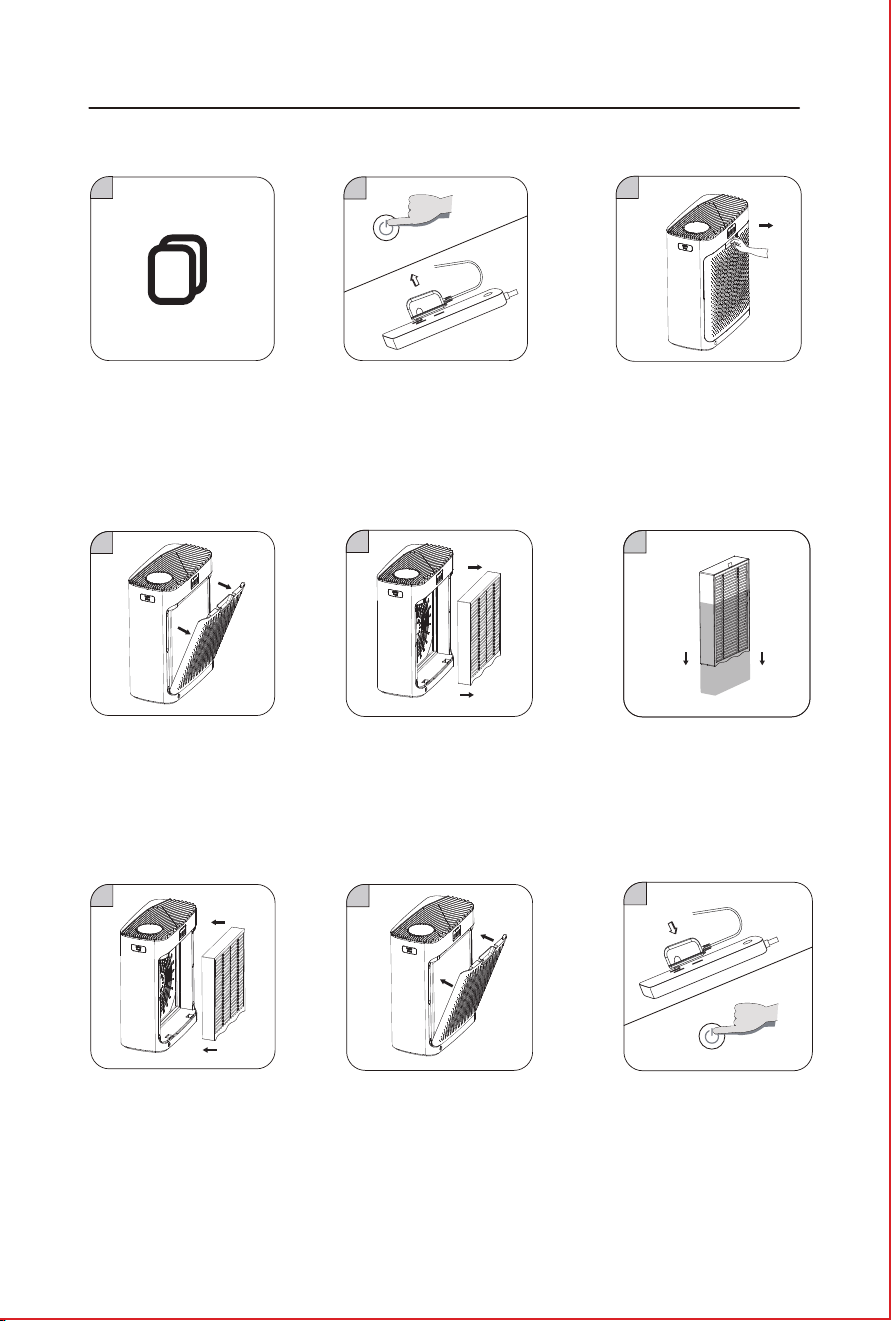
2. Touch the POWER button to
turn off the machine and unplug
the adapter.
4. Lift the filter cover off from
the air purifier
5. Take out the old filter from
the machine
5. Plug in the adapter and touch the
POWER button to restart it.
3. Press down down the button on
rear cover plate and pull it out slightly,
then take out Filter.
6. Remove the protective film on the
filter before use.
7. Put into New Filter without
protective film.
8. Close the rear cover plate,then it
is done.
1. When the filter reset button
lights red, it prompts the user
to replace the filter
Replacement filters
8
9
1
2
3
4
5
6
7
8
9
THE ADAPTER MUST BE UNPLUGGED BEFORE ANY MACHINE MAINTENANCE OPERATION.
1. CLEANING THE BODY OF THE DEVICE (RECOMMENDED ONCE A MONTH):
1) Use a soft cloth to remove stains.
2) Stubborn stains that are not easy to clean can be wiped off with a soft cloth dipped in an
appropriate amount of neutral detergent.
Note: do not use hard objects to scratch the machine shell. When removing the base,
follow the instructions to avoid damaging machine parts.
2. FILTER CLEANING AND REPLACEMENT :
1) Filter replacement will be reminded by the built-in program, which can be replaced
according to the service life of the machine, or can be replaced in real-time by the
filter‘s mandatory service life reset function.
2) when dust accumulates on the surface of the composite filter, you can use a vacuum
cleaner to clean the surface dust, to extend the service life of the filter (it is
recommended to clean once a month. Do not wash).
* Depending on the machine’s environment, the filter’s life will be different. For example, in
places where people smoke and pets are present, the life of the screen is shorter. When the
purification effect is not good, replace the filter in time.
* Please dispose of the used waste filters according to the relevant regulations of solid waste.
Care & Maintenance
2. Touch the POWER button to
turn off the machine and unplug
the adapter.
4. Lift the filter cover off from
the air purifier
5. Take out the old filter from
the machine
5. Plug in the adapter and touch the
POWER button to restart it.
3. Press down down the button on
rear cover plate and pull it out slightly,
then take out Filter.
6. Remove the protective film on the
filter before use.
7. Put into New Filter without
protective film.
8. Close the rear cover plate,then it
is done.
1. When the filter reset button
lights red, it prompts the user
to replace the filter
Replacement filters
10
11
PROBLEM POSSIBLE CAUSE POSSIBLE SOLUTION
The product is not working
properly
1. The connection is faulty. 1. Check whether the plug is inserted
into the socket and whether the
POWER ON/OFF button is turned on.
Fresh air doesn’t flow
smoothly out of the
outlet
1. The plastic package of the new
air filter has not been removed.
2. The air outlet of the purifier is
blocked by foreign objects.
1. Remove the packing plastic
bag first.
2. Remove foreign bodies.
The machine makes an
abnormal sound during
the operation
1. The air intake vent or air exhaust
vent is blocked by foreign bodies.
2. Foreign objects fall into the air
duct of the machine.
1. Please move the obstructing
object.
2. Remove the foreign body.
Feel the wind weakening 1. The life of the filter has expired,
or the filter is blocked by hair.
1. Use a vacuum cleaner to clean dust
and hair on the surface of the filter;
Replace the expired filter screen.
The air purifier gives off
a bad smell
1. The concentration of
environmental pollutants may be
too high, and the filter screen may
suffer early saturation.
1. The filter needs to be replaced
to avoid secondary pollution.
The most Frequently Asked Questions about this product are listed here.
If you cannot find the answer to your question, please contact our
after-sales service department.
Troubleshooting
2.The filter cover is not properly
installed.
2.Reinstall the filter cover.
Warranty
Warranty & Support
Returns & Refunds
Jafanda products have a One Year warranty from the date of purchase and a Free Extended
One -Year warranty after registering your product with your order and purchase date via
www.jafanda.com/pages/warranty.
Jafanda always takes responsibility for all our products.
Jafanda always pays high importance to the customer's purchase experience and satisfaction.
If for any reason you are not fully satisfied with your purchase experience within 30 days, we
are happy to help with a replacement or refund.
For more detail, please visit our after-sales website page:
www.jafanda.com/pages/returns-refunds
Or scan below QR code using WhatsApp to join us After-sales Live Chat Service;
10
11
PROBLEM POSSIBLE CAUSE POSSIBLE SOLUTION
The product is not working
properly
1. The connection is faulty. 1. Check whether the plug is inserted
into the socket and whether the
POWER ON/OFF button is turned on.
Fresh air doesn’t flow
smoothly out of the
outlet
1. The plastic package of the new
air filter has not been removed.
2. The air outlet of the purifier is
blocked by foreign objects.
1. Remove the packing plastic
bag first.
2. Remove foreign bodies.
The machine makes an
abnormal sound during
the operation
1. The air intake vent or air exhaust
vent is blocked by foreign bodies.
2. Foreign objects fall into the air
duct of the machine.
1. Please move the obstructing
object.
2. Remove the foreign body.
Feel the wind weakening 1. The life of the filter has expired,
or the filter is blocked by hair.
1. Use a vacuum cleaner to clean dust
and hair on the surface of the filter;
Replace the expired filter screen.
The air purifier gives off
a bad smell
1. The concentration of
environmental pollutants may be
too high, and the filter screen may
suffer early saturation.
1. The filter needs to be replaced
to avoid secondary pollution.
The most Frequently Asked Questions about this product are listed here.
If you cannot find the answer to your question, please contact our
after-sales service department.
Troubleshooting
2.The filter cover is not properly
installed.
2.Reinstall the filter cover.
Warranty
Warranty & Support
Returns & Refunds
Jafanda products have a One Year warranty from the date of purchase and a Free Extended
One -Year warranty after registering your product with your order and purchase date via
www.jafanda.com/pages/warranty.
Jafanda always takes responsibility for all our products.
Jafanda always pays high importance to the customer's purchase experience and satisfaction.
If for any reason you are not fully satisfied with your purchase experience within 30 days, we
are happy to help with a replacement or refund.
For more detail, please visit our after-sales website page:
www.jafanda.com/pages/returns-refunds
Or scan below QR code using WhatsApp to join us After-sales Live Chat Service;
EPA Est.NO.98581-CHN-1
Made In China
1309 Coffeen Avenue STE 4304
Sheridan,Wyoming 82801
support@jafanda.com
Jafanda LLC.
JF239 Air Purifier User Manual
READ AND SAVE THESE INSTRUCTIONS