JAFANDA US
Product name
Rated Power
Noise Level
Standby Power
Power Adapter
(Input)
Power Adapter
(Output)
Air Purifier
Filter life time
Operating
Conditions
Humidity:
20%-95% RH
F F
Dimensions
Weight
3.3lb/1.5kg
7.95 x 7.95 x 15.15 in
/20 x 20 x38 cm
6 months(standard
environment)
10
23–43dB
< 0.5W
100-240V~ 50/60Hz
12V 1A
9
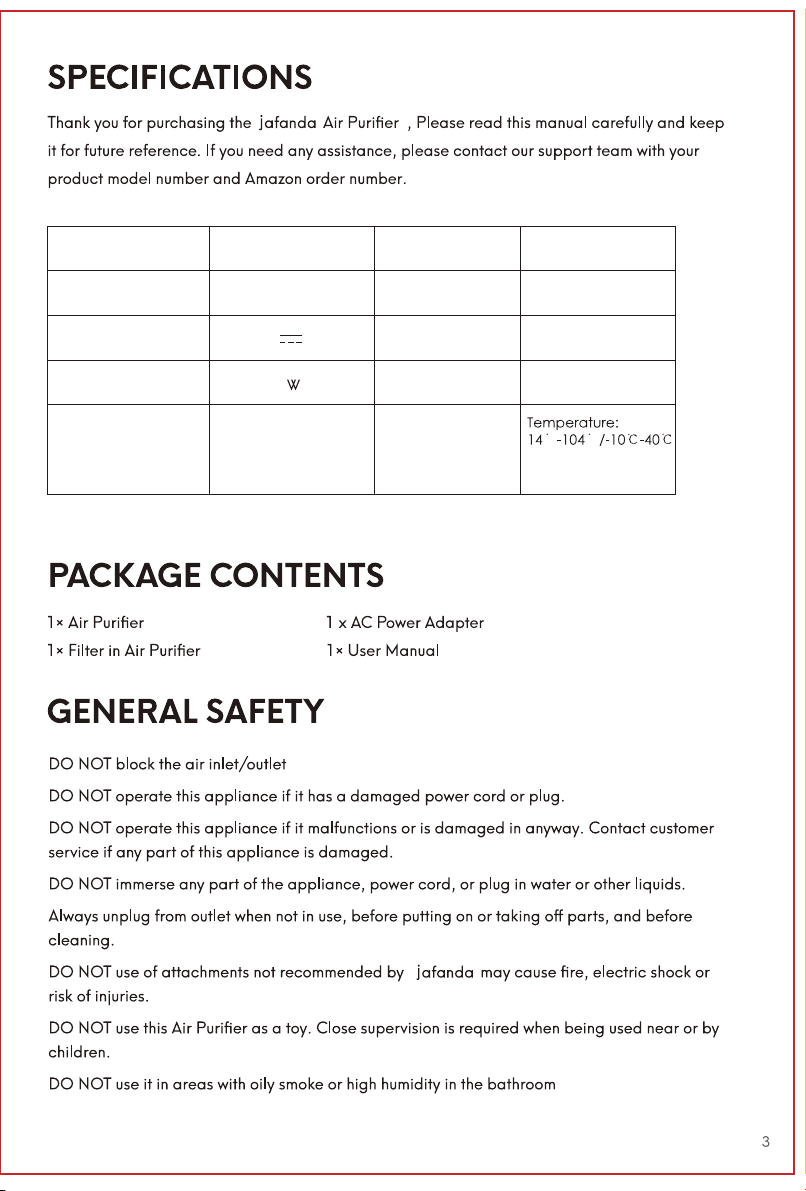
Product name
Rated Power
Noise Level
Standby Power
Power Adapter
(Input)
Power Adapter
(Output)
Air Purifier
Filter life time
Operating
Conditions
Humidity:
20%-95% RH
F F
Dimensions
Weight
3.3lb/1.5kg
7.95 x 7.95 x 15.15 in
/20 x 20 x38 cm
6 months(standard
environment)
10
23–43dB
< 0.5W
100-240V~ 50/60Hz
12V 1A
9
Touch “ ” to turn on, the button icon lights become all white,
and the airflow defaults to the first gear operation.In the working
state, touch “ ”again and the machine enters the standby state,
the power button and timer button icon lights will be half-lit, the rest
icon lights will be off.
Touch “ ” to increase and decrease the airflow speed from
Lv1 ,Lv2 and Lv3.
Your appliance will automatically turn OFF/ON after the selected
time. In the standby state, touch “ ” to active automatic turn on,
In the working state, touch “ ” to active automatic turn off.
To set time: touch “ ” 4 times to select (2h/4h/8h/cancel t
iming) respectively.
The ambient light at the bottom of the machine will turn on slowly and
then go out every time you reconnect the adapter and then power
on.
In the working state, touch the “ ” to adjust brightness.
When it goes into standby state, the previous light settings will be
memorized, and the next time you turn it on, it will directly enter the
previous light mode.
5 light modes in turn: ①25%-②50%-③100%-④icon lights and ambient
light OFF-⑤icon lights ON and ambient light OFF
The filter lifespan is 2000 hours, when the remaining time of the filter
life is less than 150 hours, the filter icon light flashes orange, prompting
the user to replace the filter. After replacement, you need to long-press
“ ” for 5+ seconds, the light turns white and the filter time will be
cleared and retime. If not, the filter icon light will flash orange every
time the device is turned on. It is not allowed to reset when the filter
life is > 150 hours.
Mandatory filter life reset method:
In the standby state long press “ ” + “ ” for 5+ seconds, all the
button icon lights flash 6 times and then go out to indicate that the
filter life reset is complete
To prevent accidental touch by children and pets.
Long-press “ ” for 3+ seconds to lock, during which all button
icons are off and the control panel cannot be operated by touch,
only the safety lock stays lit.
Long-press “ ”for 3+ seconds to unlock, other button icons
resume to light up.
In Night mode, your appliance will continue to purify the air, but
only runs on its quietest setting and with its LCD screen dimmed.
In the working state, touch “ ” to enter sleep mode, and touch
it again to wake up the machine.When the icon lights are all off,
you need to touch any key to lit the sleep button and then
touch “ ” to wake up the machine.
Power button
Fan speed
Sleep mode
Satety lock
Timer switch
Ambient light
Filter reset
button
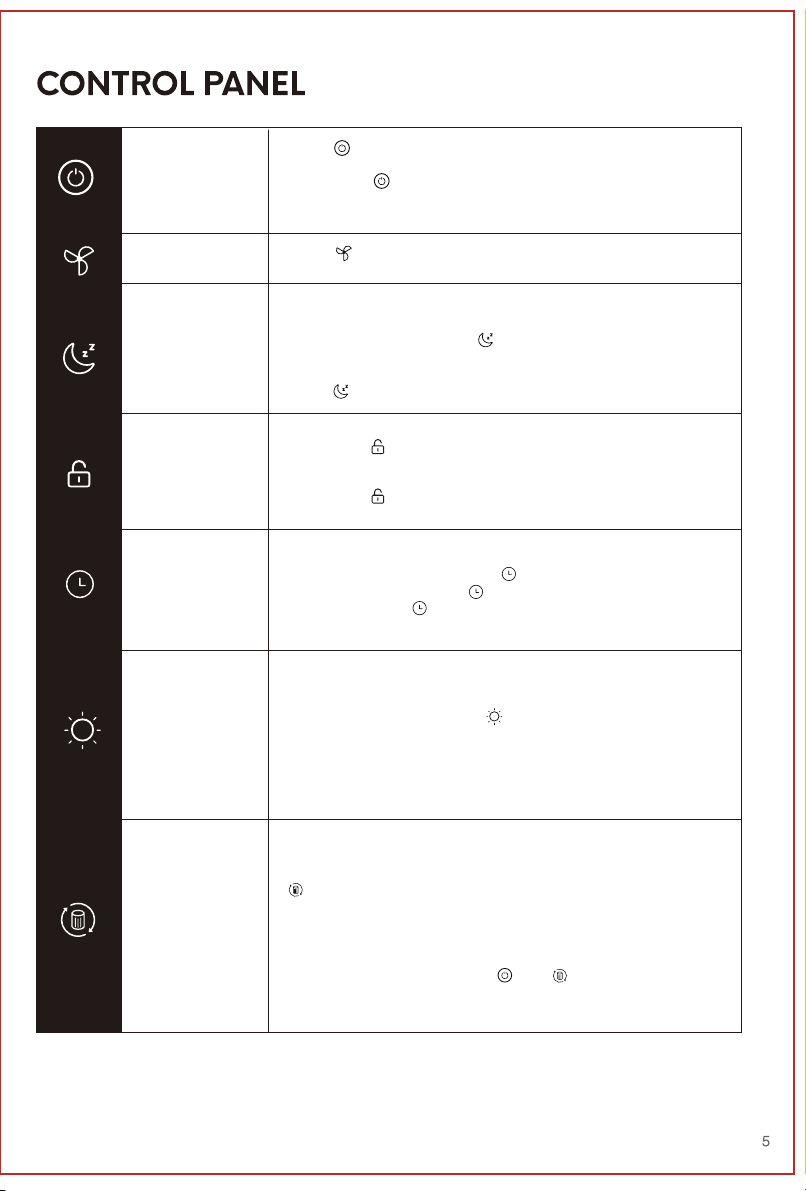
Touch “ ” to turn on, the button icon lights become all white,
and the airflow defaults to the first gear operation.In the working
state, touch “ ”again and the machine enters the standby state,
the power button and timer button icon lights will be half-lit, the rest
icon lights will be off.
Touch “ ” to increase and decrease the airflow speed from
Lv1 ,Lv2 and Lv3.
Your appliance will automatically turn OFF/ON after the selected
time. In the standby state, touch “ ” to active automatic turn on,
In the working state, touch “ ” to active automatic turn off.
To set time: touch “ ” 4 times to select (2h/4h/8h/cancel t
iming) respectively.
The ambient light at the bottom of the machine will turn on slowly and
then go out every time you reconnect the adapter and then power
on.
In the working state, touch the “ ” to adjust brightness.
When it goes into standby state, the previous light settings will be
memorized, and the next time you turn it on, it will directly enter the
previous light mode.
5 light modes in turn: ①25%-②50%-③100%-④icon lights and ambient
light OFF-⑤icon lights ON and ambient light OFF
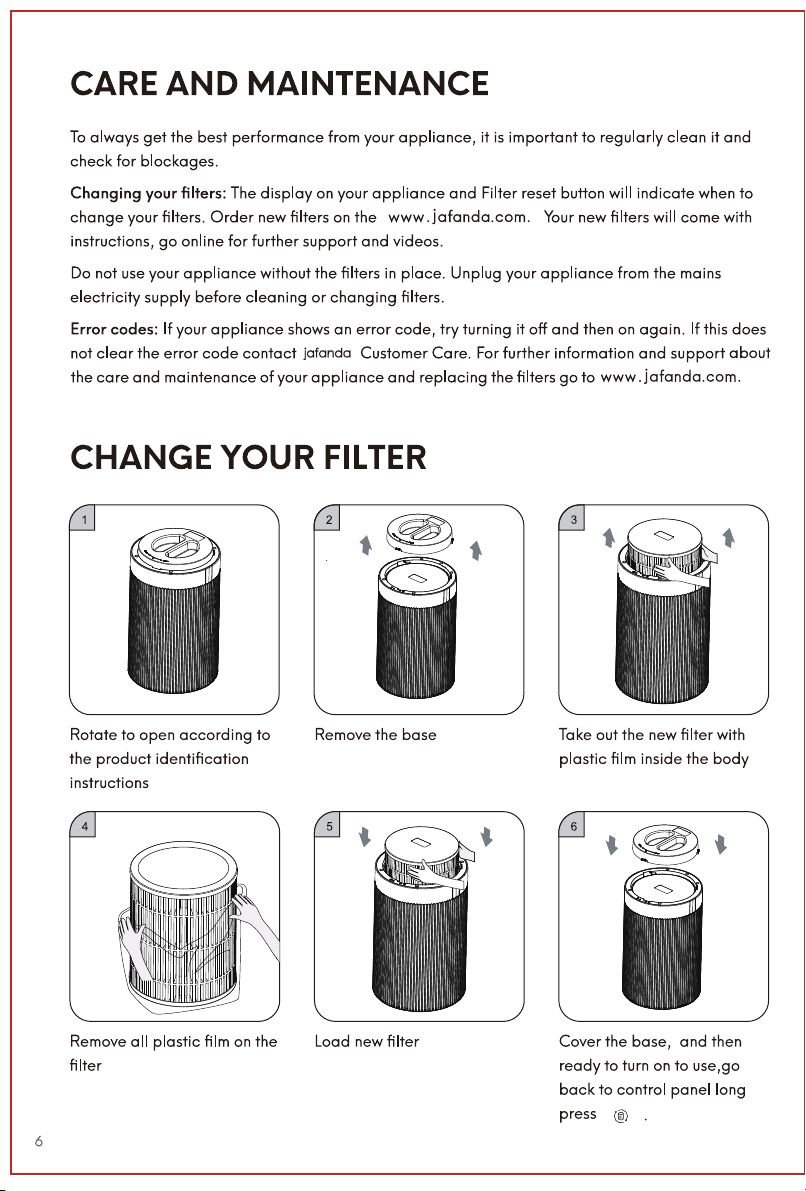
The filter lifespan is 2000 hours, when the remaining time of the filter
life is less than 150 hours, the filter icon light flashes orange, prompting
the user to replace the filter. After replacement, you need to long-press
“ ” for 5+ seconds, the light turns white and the filter time will be
cleared and retime. If not, the filter icon light will flash orange every
time the device is turned on. It is not allowed to reset when the filter
life is > 150 hours.
Mandatory filter life reset method:
In the standby state long press “ ” + “ ” for 5+ seconds, all the
button icon lights flash 6 times and then go out to indicate that the
filter life reset is complete
To prevent accidental touch by children and pets.
Long-press “ ” for 3+ seconds to lock, during which all button
icons are off and the control panel cannot be operated by touch,
only the safety lock stays lit.
Long-press “ ”for 3+ seconds to unlock, other button icons
resume to light up.
In Night mode, your appliance will continue to purify the air, but
only runs on its quietest setting and with its LCD screen dimmed.
In the working state, touch “ ” to enter sleep mode, and touch
it again to wake up the machine.When the icon lights are all off,
you need to touch any key to lit the sleep button and then
touch “ ” to wake up the machine.
Power button
Fan speed
Sleep mode
Satety lock
Timer switch
Ambient light
Filter reset
button
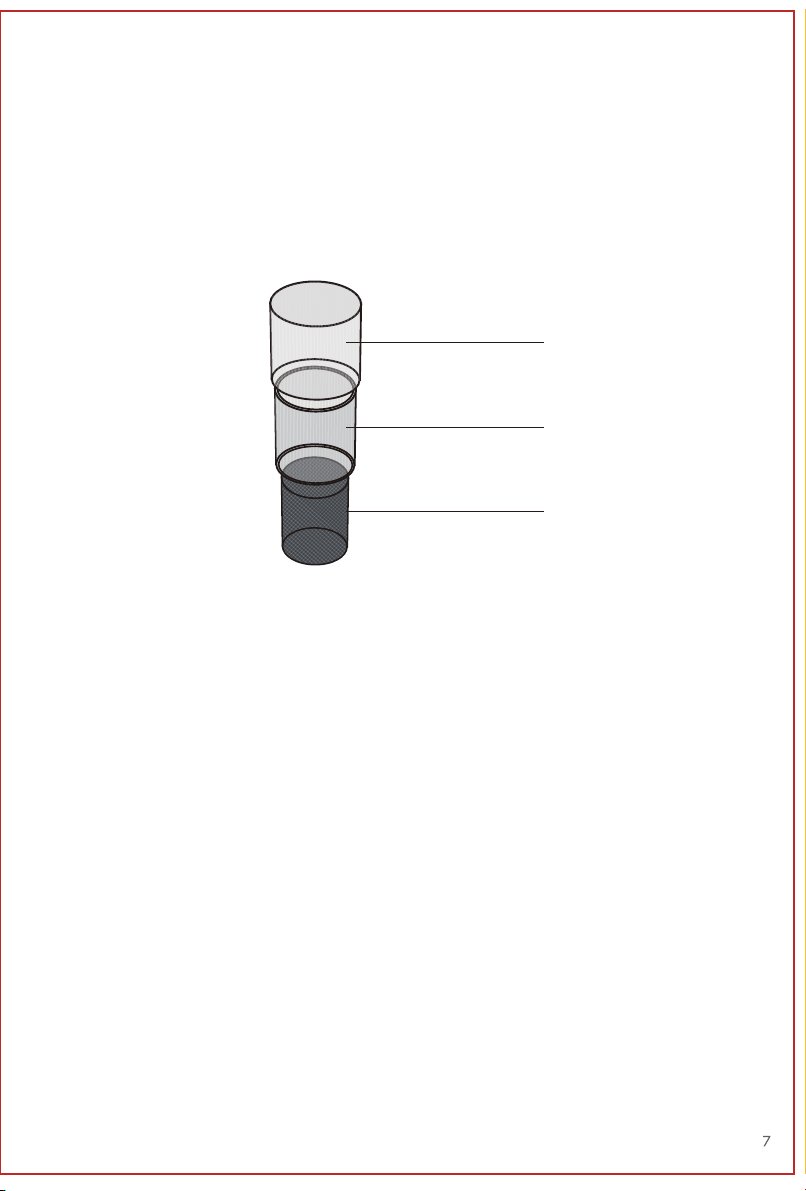
ABOUT THE FILTER
A. Pre-Filter
A
B
C
The air purifier uses a 3-stage filtrationsystem to purify air
• Captures large particles such as lint, fibers, hair, and pet fur.
• Maximizes the filter’s life by protecting it.
B. True H13 HEPA Original Filter
• Removes at least 99.97% of airborne particles 0.3 micrometers (µm) in diameter.
• Filters small particles such as mold spores, tiny dust particles, parts of smoke, and
allergens such as pollen, dander, and mites.
C. High-Efficiency Sponge Carbon Filter
• Physically adsorbs smoke, odors, and fumes.
“ ”
ABOUT THE FILTER
A. Pre-Filter
A
B
C
The air purifier uses a 3-stage filtrationsystem to purify air
• Captures large particles such as lint, fibers, hair, and pet fur.
• Maximizes the filter’s life by protecting it.
B. True H13 HEPA Original Filter
• Removes at least 99.97% of airborne particles 0.3 micrometers (µm) in diameter.
• Filters small particles such as mold spores, tiny dust particles, parts of smoke, and
allergens such as pollen, dander, and mites.
C. High-Efficiency Sponge Carbon Filter
• Physically adsorbs smoke, odors, and fumes.
“ ”
9
Extend Your Warranty by 1 Year
Register your product at www.jafanda.com/pages/warranty to extend your 1-year warranty
by an additional year. Please fill out all required fields and include your order ID, place of purchase,
and purchase date, if applicable.
9
Extend Your Warranty by 1 Year
Register your product at www.jafanda.com/pages/warranty to extend your 1-year warranty
by an additional year. Please fill out all required fields and include your order ID, place of purchase,
and purchase date, if applicable.