What's in the Box
Overview
Using the Battery Connection Cable
Powering Your Devices
Storage and Maintenance
Speci
fi
cations
What's in the Box
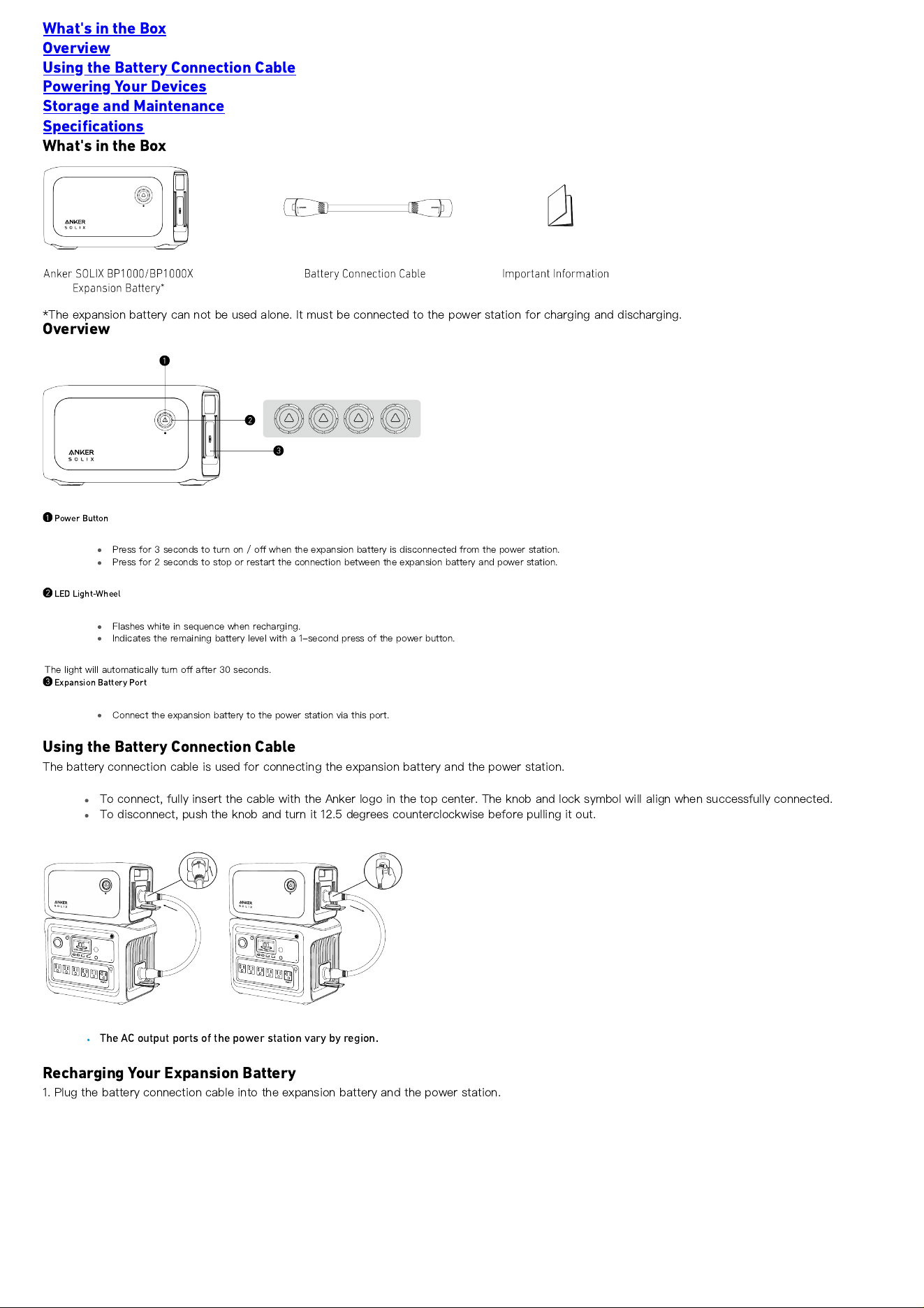
*The expansion battery can not be used alone. It must be connected to the power station for charging and discharging.
Overview
Power Button
Press for 3 seconds to turn on / o
ff
when the expansion battery is disconnected from the power station.
Press for 2 seconds to stop or restart the connection between the expansion battery and power station.
LED Light-Wheel
Flashes white in sequence when recharging.
Indicates the remaining battery level with a 1-second press of the power button.
The light will automatically turn o
ff
after 30 seconds.
Expansion Battery Port
Connect the expansion battery to the power station via this port.
Using the Battery Connection Cable
The battery connection cable is used for connecting the expansion battery and the power station.
To connect, fully insert the cable with the Anker logo in the top center. The knob and lock symbol will align when successfully connected.
To disconnect, push the knob and turn it 12.5 degrees counterclockwise before pulling it out.
The AC output ports of the power station vary by region.
Recharging Your Expansion Battery
1. Plug the battery connection cable into the expansion battery and the power station.
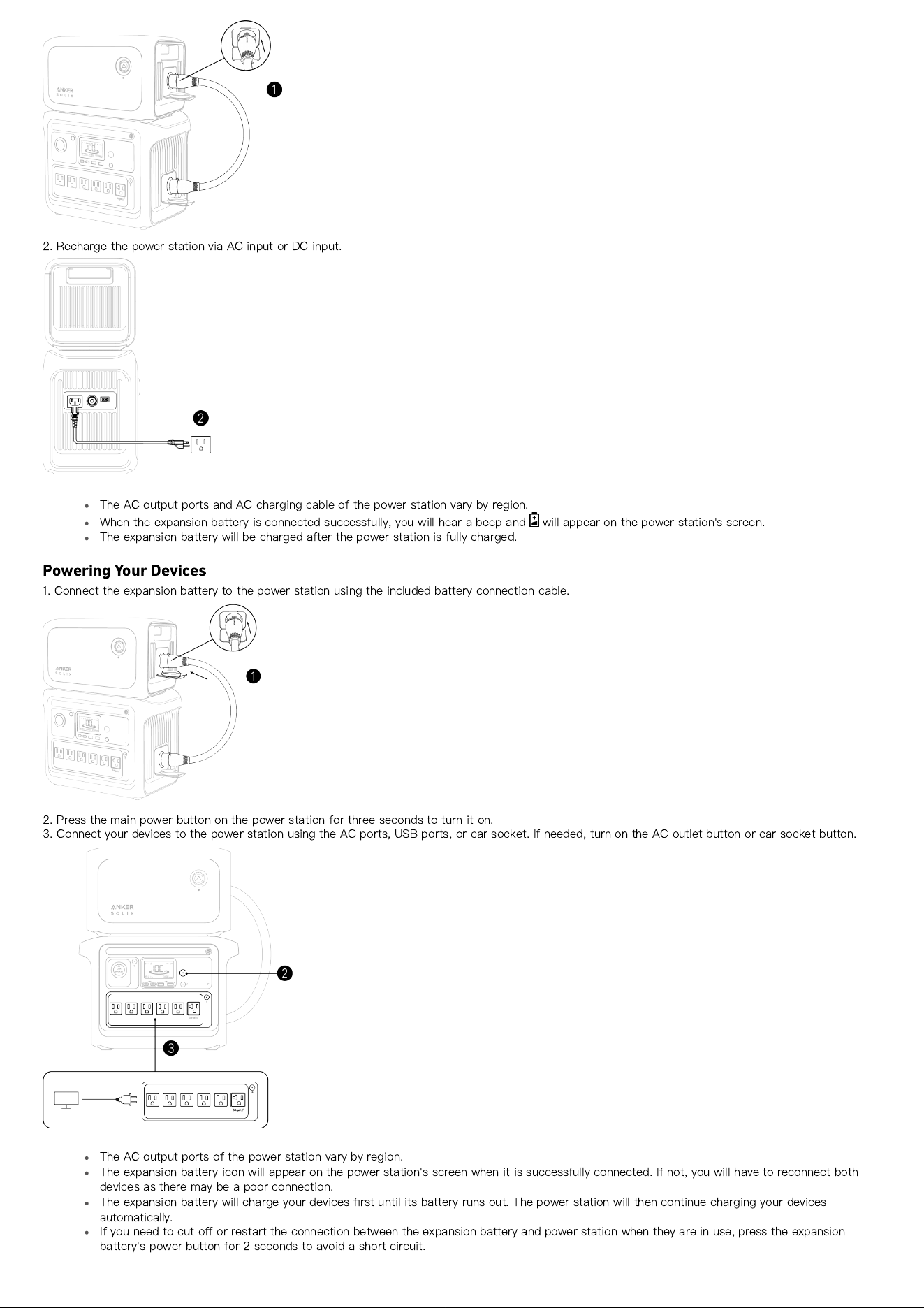
2. Recharge the power station via AC input or DC input.
The AC output ports and AC charging cable of the power station vary by region.
When the expansion battery is connected successfully, you will hear a beep and will appear on the power station's screen.
The expansion battery will be charged after the power station is fully charged.
Powering Your Devices
1. Connect the expansion battery to the power station using the included battery connection cable.
2. Press the main power button on the power station for three seconds to turn it on.
3. Connect your devices to the power station using the AC ports, USB ports, or car socket. If needed, turn on the AC outlet button or car socket button.
The AC output ports of the power station vary by region.
The expansion battery icon will appear on the power station's screen when it is successfully connected. If not, you will have to reconnect both
devices as there may be a poor connection.
The expansion battery will charge your devices
fi
rst until its battery runs out. The power station will then continue charging your devices
automatically.
If you need to cut o
ff
or restart the connection between the expansion battery and power station when they are in use, press the expansion
battery's power button for 2 seconds to avoid a short circuit.

Storage and Maintenance
If the expansion battery is stored at a low capacity for a long time, lithium batteries will self-consume power which may lead to a quick discharge. This
often leads to poor conductivity and a reduced battery lifespan that causes the battery not to work.
When storing your expansion battery, make sure that you:
1. Turn o
ff
all the outputs.
2. Keep the expansion battery in a dry and cool environment.
3. Check the remaining battery capacity each week. If the battery level is below 30% (only two indicators are on), please charge the expansion battery to
full. Remember to charge it to 100% once every 3 months.
Speci
fi
cations
Speci
fi
cations are subject to change without notice.
Capacity 1056Wh
Expansion Battery Port Input 36A
Expansion Battery Port Output 65A
Discharging Temperature -4
°
F - 104
°
F / -20
°
C - 40
°
C
Charging Temperature 32
°
F - 104
°
F / 0
°
C - 40
°
C
Size 12.72
×
0.64
×
7.83 in / 32.3
×
19.5
×
19.9 cm
Net Weight 9.06 kg / 19.97 lb