www.comfortzoneproducts.com
Save These Instructions
Features:
• 5 Fan Speeds
• Three Fan Modes - Normal, Nature,
and Sleep
• Wide Area Oscillation
• Smart WiFi Functionality
• Remote Control Included
• 12 Hour Countdown Timer Function
• Optional 6 in. Height Base Extension
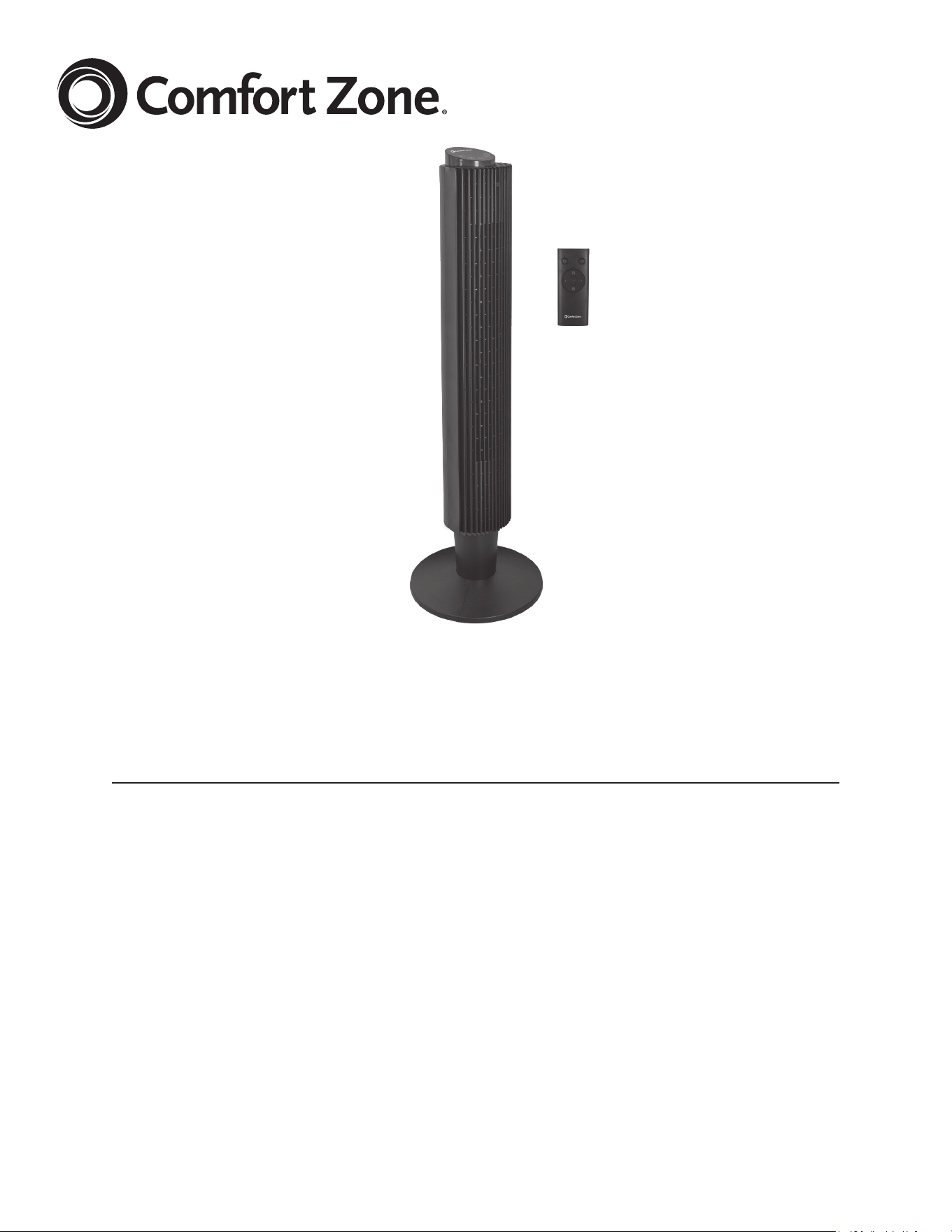
CZ12398-EC Series
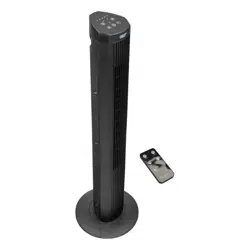
42" WiFi Tower Fan
with Remote
2
2
www.comfortzoneproducts.com
INTENDED USE:
This product is intended for indoor residential and office use only,
not for industrial or other commercial applications. Use only with
electrical wiring that is in good working order and that meets
applicable codes and ordinances. If you have any questions
whether your wiring is adequate, consult a qualified electrician.
While using your fan, you should follow the IMPORTANT
INSTRUCTIONS listed below. As part of those instructions, we
have used the word “WARNING” to indicate the level of hazard:
WARNING indicates a hazard which, if not avoided, could result
in injury or death.
FCC WARNING:
This equipment may generate or use radio frequency energy.
Changes or modifications not expressly approved by the
manufacturer (World and Main, LLC) could void the user's
authority to operate this device.
NOTE:
This equipment has been tested and found to comply with the
limits for a Class B Digital Device, pursuant to Part 15 of the FCC
Rules. These limits are designed to provide reasonable protection
against harmful interference in a residential installation. This
equipment generates, uses and can radiate radio frequency
energy and, if not installed and used in accordance with the
instructions, may cause harmful interference to radio
communications. However, there is no guarantee that
interference will not occur in a particular installation. If this
equipment does cause harmful interference to radio or television
reception, which can be determined by turning the equipment off
and on, the user is encouraged to try to correct the interference
by one or more of the following measures:
• Reorient or relocate the receiving antenna.
• Increase the separation between the equipment and receiver.
• Connect the equipment into an outlet on a circuit different from
that to which the receiver is connected.
• Consult the dealer or an experienced radio/TV technician for help.
FCC STATEMENT:
This device complies with part 15 of the FCC Rules. Operation is
subject to the following two conditions:
(1) This device may not cause harmful interference, and
(2) This device must accept any interference received, including
interference that may cause undesired operation.
IMPORTANT INSTRUCTIONS:
As with all electrical appliances, basic safety precautions should
always be followed to reduce the risk of electric shock, fire, or
injury to persons, including the following precautions:
• Read all the instructions before using this fan.
• Use this fan only as described in this manual. Any other use not
recommended by the manufacturer may cause electrical shock,
fire or injury to persons.
• Do not operate the fan with a damaged power cord or after the
fan malfunctions or has been dropped in any manner.
• Use of extreme caution is necessary when any fan is used by or
near children, disabled persons or pets and whenever the fan is
left operating unattended.
• Do not place the fan on a small, unlevel, uneven or any surface
which might allow fan to tip or fall.
• For proper operation, fan should be placed on a smooth,
non‑combustible, level surface.
• Always unplug fan when not in use, when moving from place to
place, when assembling or disassembling parts, and before cleaning.
• The use of attachments, not recommended or sold by the
manufacturer, may cause hazards.
• Do not use outdoors.
READ & SAVE THESE INSTRUCTIONS
WARNING: SHOCK HAZARD
Use your fan only in dry environments. This fan is not intended
for use in a bathroom, laundry area, or similar locations, or near
sinks, washing machines, swimming pools or other sources of
water. Never locate fan where it may fall into a bathtub or other
water receptacle. Do not use in damp environments such as
flooded basements.
WARNING: HOT SURFACES
Do not touch fan motor when in use. This motor is hot when in
use, to avoid burns, do not let bare skin touch hot surfaces.
WARNING: FIRE HAZARD
Fans have arcing or sparking parts inside. Do not use near
combustible materials or flammable gases or sources of heat.
Do not use in areas where gasoline, paint or flammable materials
are used or stored. To prevent a possible fire, do not block air
intakes or exhaust in any manner. Do not insert or allow foreign
objects to enter any ventilation or exhaust opening as this may
cause an electric shock, fire, or damage the fan.
WARNING: ELECTRICAL SHOCK HAZARD
Do not use with damaged cord or plug. Use with adequate
electrical system that is up to code. Do not use this product with
any solid‑state speed control device.
This appliance has a polarized plug (one blade is wider than the
other). To reduce the risk of electric shock, this plug is intended
to fit in a polarized outlet only one way. If the plug does not fit
fully in the outlet, reverse the plug. If it still does not fit, contact
a qualified electrician. DO NOT attempt to defeat this safety
feature.
WARNING: TO REDUCE THE RISK OF FIRE OR ELECTRIC SHOCK
Do not operate any fan with a damaged cord or plug or after fan
malfunctions, has been dropped or damaged in any manner. Do
not operate fan with a broken blade, safety cage or any visual
imperfections. Disconnect power before servicing. For repairs
covered under warranty, see warranty statement. For all other
repairs contact World and Main Customer Service by telephone
or mail for information and assistance.
Do not run power cord under carpeting. Do not cover cord with
throw rugs, runners or the like. Arrange cord away from traffic
area where it will not be tripped over. Avoid the use of extension
cords due to risk of fire. If an extension cord must be used, the
cord must be minimum 14 AWG and rated not less then 1875
watts. Do not use an extension cord unless the plug can be
completely inserted into its receptacle. Unplug the fan when not
in use. Do not operate fan with its ventilation obstructed.
• Do not use fan in window. Rain may cause electrical hazard
(for non‑window models).
• Do not operate the fan with blade guards or any safety device
removed.
• Avoid the use of extension cords due to risk of fire. If an
extension cord must be used, the cord must be minimum
14 AWG and rated not less then 1875 watts.
• Do not run power cord under carpeting. Do not cover cord with
throw rugs, runners or the like. Arrange cord away from traffic
area where it will not be tripped over.
• Do not insert or allow any object to enter any openings on the
fan. Doing so may cause electric shock and/or fire hazard. Avoid
contact with moving parts.
• This appliance is not intended for use by persons (including
children) with reduced physical, sensory or mental capabilities
or lack of experience and knowledge, unless they have been
given supervision or instruction concerning use of the appliance
by a person responsible for their safety.
• Children should be supervised to ensure they do not play with
the appliance.
3
3
www.comfortzoneproducts.com
Tower fan
without
extension
column.
Tower fan
with
extension
column
36"
42"
Fig. 4
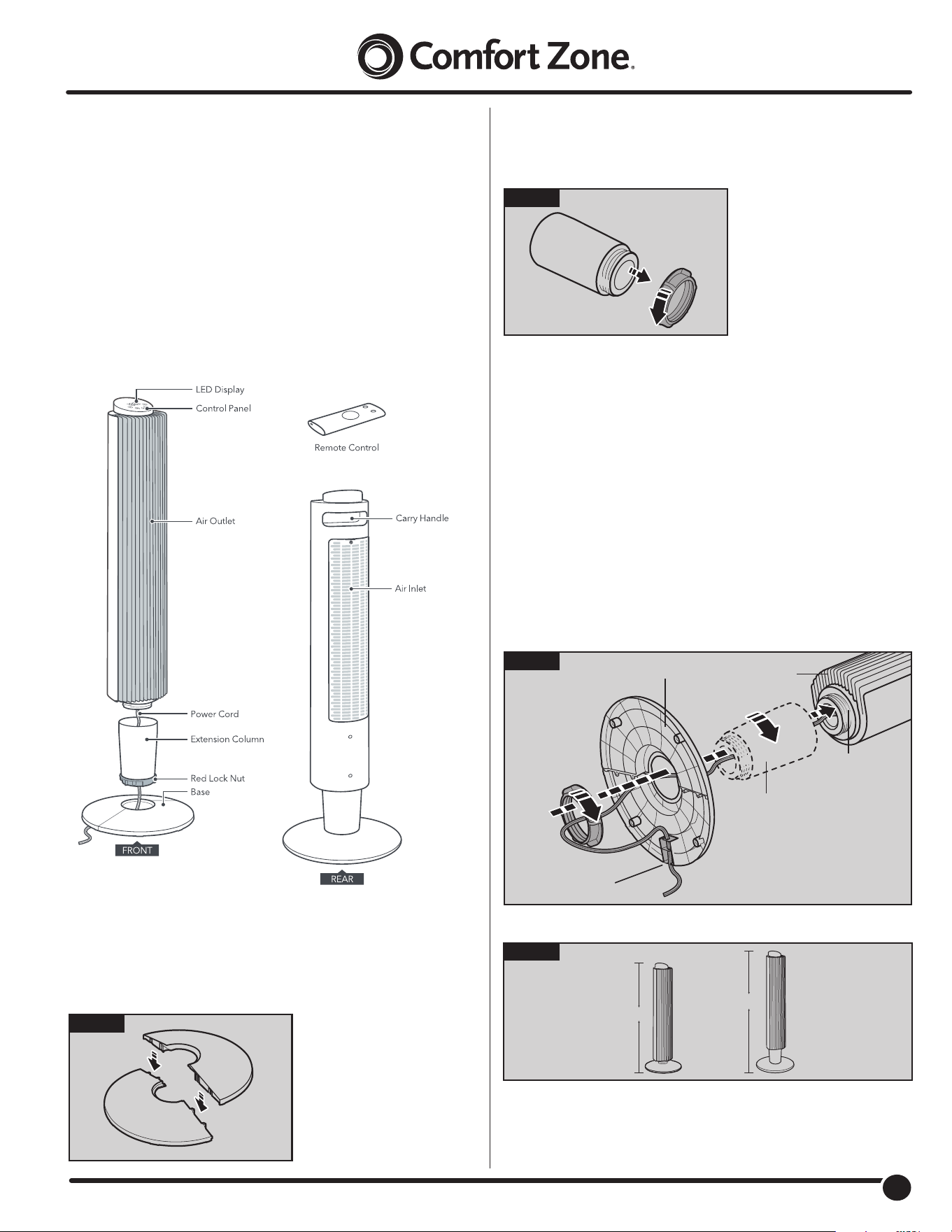
FAN ASSEMBLY:
Simple assembly is required to use this fan.
Step 3
1. Run the power cord through the optional extension column,
the base, and the red lock nut. See Fig. 3
2. Screw the optional
extension column on to
the main body, then
place the base on to the
extension column (be sure
indicator
arrow on base match the indicator arrow on threaded shaft).
To make fan shorter, remove the extension column an
continue assembly. See Fig. 4
3. Screw the red lock nut to tighten and secure base to
main body.
4. Place the power cord through the 3 wire guides on the bottom
of the base to ensure the base sits upright on level ground.
Fig. 1
Step 1
Connect the front and rear base parts by pushing the
plastic pegs on one half into the corresponding slots on the
other half. See Fig. 1
Fig. 2
Step 2
Loosen the red lock nut on the extension column in
counter-clockwise direction. See Fig. 2
Main Body
Base
Rear
Front
Wire Guides
Optional
Extension
Column
Threaded
Shaft
Fig. 3
WARNING: LITHIUM BATTERY COIN CELL SAFETY
Keep lithium coin batteries out of the reach of small children;
coin cell batteries can be accidentally ingested. If ingested, these
batteries may leak harmful contents causing chemical burns,
perforation of soft tissue, and in severe cases may cause death.
Lithium coin batteries must be removed immediately if swallowed.
Seek medical attention immediately.
If you or your doctor suspects that a battery has been ingested
for assistance in the US call the NATIONAL BATTERY INGESTION
HOTLINE any time at (202) 625-3333: in Canada call 416-813-5900
.
4
4
www.comfortzoneproducts.com
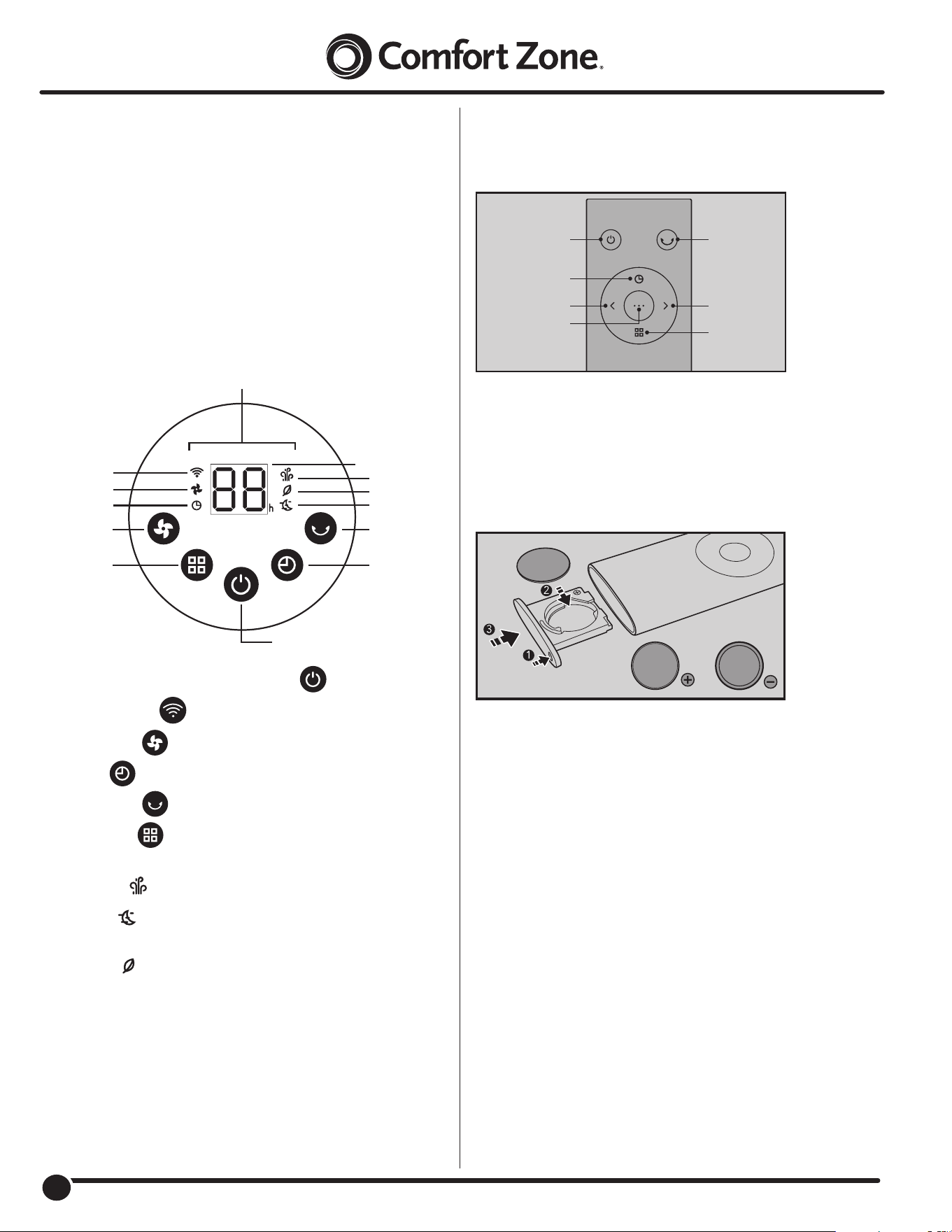
Remote Control:
Remote control functions match control panel.
The remote control requires
CR2025 Lithium Battery to operate
.
Replacement of Batteries:
1. Press the locking button to pop up the battery holder.
2. Replace the battery with the same type (CR2025, 3V) making
sure the (+) side is facing up.
3. Push in the holder until securely locked into place.
CONTROL PANEL:
Power On/Off: Turn on/off standby mode .
WiFi Connect: Tap to connect to WiFi.
Fan Speed: Tap to increase fan speed.
Timer: Tap to set timer for turning on/off the fan (0-12h).
Oscillation: Tap to start/stop oscillating.
Fan Mode: Tap to Select Normal / Sleep /Nature mode.
Long press to mute/unmute while working.
Normal Mode : Runs with selected constant speed.
Sleep Mode : Fan speed is reduced by 1 every 30 minutes
until reaching lowest setting, then remains there.
Nature Mode : Fan speed cyclically changes to mimic
natural wind.
Scr
een turns off after 1 minute. Touch any button to activate.
Additional Features:
Memory Function: Fan defaults to last setting (except timer setting)
when powered on.
Auto Display: When powered on, display turns off after one minute
if no action is taken. Press any button to reactivate display.
WiFi Connect
Oscillation
Normal Mode
Fan Speed
Timer
Nature Mode
Timer
Sleep Mode
Power On/Off
Fan Speed/Timer
Error Code
LED Display
Fan Speed
Fan Mode
USAGE:
Fan Operation: Always operate the fan in the upright position
following all instructions and recommendations listed in this
manual.
Fan Location: Place the fan in the area of the room that will
provide proper fan cooling.
Fan Connection: Plug fan directly into 120 volt A.C., 60 Hz wall
outlet. Be sure plug ts tightly in outlet. A loose connection may
cause overheating and damage to the plug or fan.
Note: To prevent overloading a circuit, do not plug fan into a
circuit that is servicing other electrical needs.
OscillationPower ON/OFF
Fan Speed+
Timer Settings
Fan Mode
Fan Speed
WiFi Connect
5
5
www.comfortzoneproducts.com
CARE AND MAINTENANCE:
Cleaning: CAUTION-Before cleaning the fan be sure to
disconnect power cord from the plug. Clean the grille
surface with a clean damp cloth. Do not use harsh chemical
or abrasive cleaners. DO NOT IMMERSE THE FAN OR ANY
WIRES IN WATER. Allow fan to dry completely before use.
Periodic grille cleaning with a vacuum will prevent dust build
up. The motor is sealed and does not require any interior
maintenance, cleaning or lubrication.
Maintenance: The Internal motor bearings are permanently
lubricated at the factory and do not require any additional
lubrication.
Repair: DO NOT OPERATE THE FAN WITHOUT THE GRILLE IN
PLACE. DO NOT USE THE FAN IF IT HAS MALFUNCTIONED OR
BECOME DAMAGED IN ANY WAY.
Storage: Keep original carton for storage of the fan. Coil and tie
the power cord to avoid damage during storage.
Note: Some models come with a plug where you can replace a
fuse. If your model has this, please read and follow the below
instructions to replace the fuse.
This product employs overload protection (fuse). A blown fuse
indicates an overload or short-circuit situation. If the fuse blows,
unplug the product from the outlet. Replace the fuse as per
the user servicing instructions (follow product marking for
proper fuse rating) and check the product. If the replacement
fuse blows, a short-circuit may be present and the product
should be discarded or returned to an authorized service facility
for examination and/or repair.
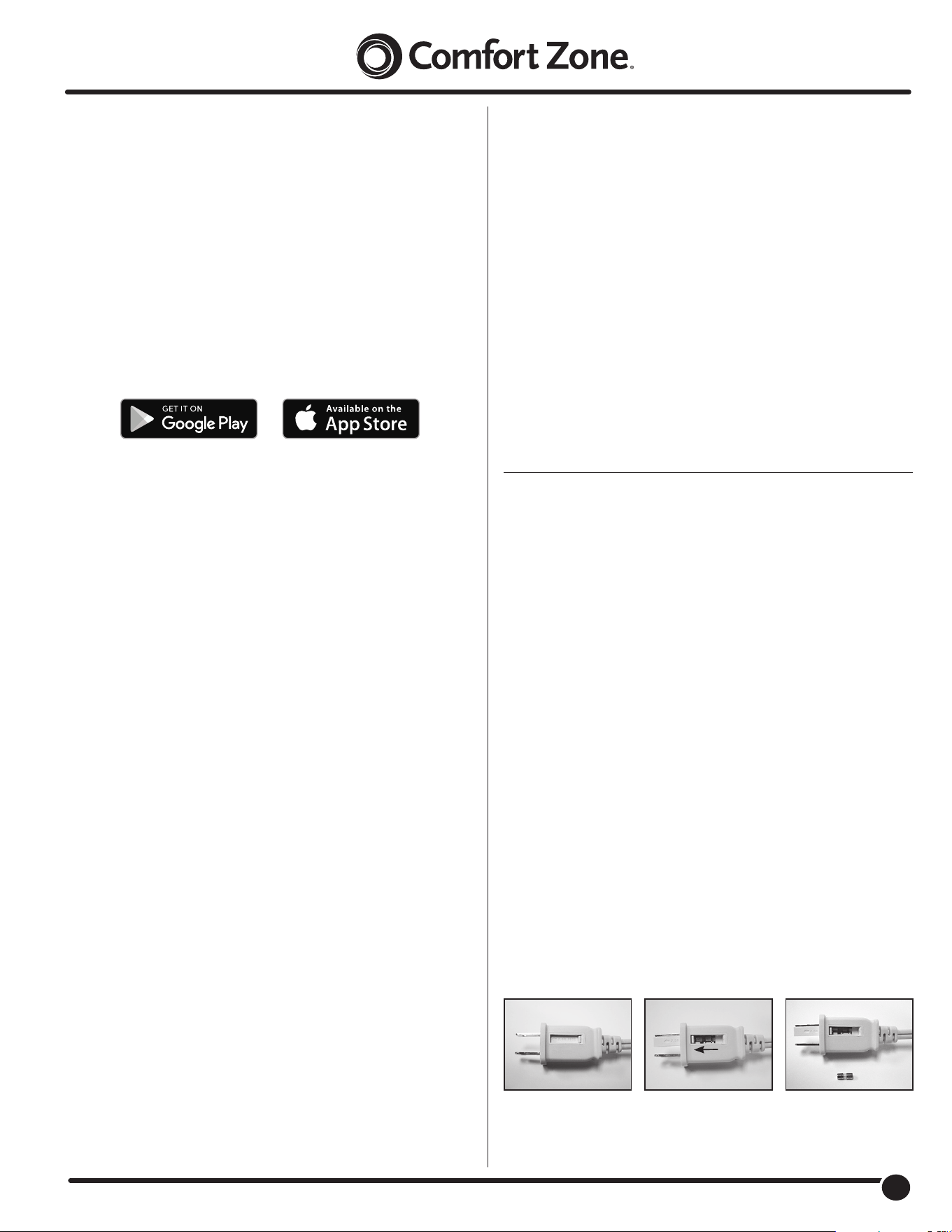
Fuse Replacement:
1. Grasp plug and remove from the receptacle or other outlet
device. Do not unplug by pulling on cord.
2. Open fuse cover by sliding open fuse access cover on top of
attachment plug towards blades. See Fig. 2.
3. Remove fuse carefully. Use a small tool to pry the end of the
fuse from holder cavity. Be careful not to break glass window.
4. Replace fuse. WARNING: Risk of re. Replace fuse only with
identical 2.5 or 5.0 Amp, 125 Volt fuse (3.6mm x 10mm).
Be sure fuse is properly seated within its cavity.
5. Close fuse cover by sliding it back to its original closed
position.
Fig 1 Fig 2 Fig 3
Slide Cover to Open
WIFI FUNCTION:
NOTE: Before set-up, please ensure your device is connected to
2.4 GHz WiFi. The App does not support 5GHz WiFi connections.
Plug the fan into a power outlet. The WiFi indicator light will ash
on the control panel for three minutes. While the WiFi indicator
light is ashing, the fan is in pairing mode and you can connect it
to the Comfort Zone app.
To put the fan back into pairing mode, hold the On/Off button on
the control panel for three seconds. The WiFi indicator light will
begin to ash.
INSTALLING THE APP:
1. The Comfort Zone App is compatible with both iOS and
Android operating systems.
Go to either the App Store or Google Play to download the
App (App name: CCC Comfort Zone). Once installed on your
Smart device, check to make sure that your WiFi and Bluetooth
features are enabled and follow the in-app instructions to
set-up the App and link it to your device. After the fan is
paired to the App, you can control the fan with the App.
2. You can now use your fan with the Comfort Zone App or
through the control panel.
Below is the list of functions you will be able to operate
through the App:
1. On and Off
2. Change Fan Speeds
3. Oscillation
4. Schedule Fan to Turn On or Off Automatically using the timer
5. Use with Voice Assistants
Amazon Alexa:
• POWER:
– Alexa, turn <device_name> ON (or OFF)
• FAN SPEED:
– Alexa, set <device_name> fan speed to ON
(or TWO or THREE)
– Alexa, turn <device_name> fan speed UP (or DOWN)
• OSCILLATION:
– Alexa, turn <device_name> horizontal swing ON
(or OFF)
Google Assistant:
• POWER:
– Ok Google, turn <device_name> ON (or OFF)
– Ok Google, is <device_name> ON?
• FAN SPEED:
– Ok Google, set <device_name> to LOW (or MEDIU
or HIGH)
– Ok Google, set <device_name> speed to ONE
(or TWO or THREE)
– Ok Google, what speed is <device_name>?
For further information on how to use our App go to the tutorials
directly in the App.
6
6
www.comfortzoneproducts.com
LIMITED WARRANTY
This unit is guaranteed to the original retail purchaser against defects in quality or workmanship for a period
of one year from the date of original purchase. If this unit fails because of a manufacturing defect within 30
days of purchase, return the unit, with your receipt, to the retailer. After 30 days, but within the warranty
period, if the unit was purchased within the continental United States, return it, to Mr. Brands LLC for repair
or replacement. If the unit was purchased outside the continental United States, return the unit to the place
of purchase. This warranty does not cover damage caused by misuse, abuse, overheating or alteration.
Repairs made by anyone other than Mr. Brands LLC are not covered in this warranty. Mr. Brands LLC will
not be held liable for any losses due to neglectful operation. All implied warranties, including the warranties
of merchantability and of fitness of purpose, if applicable, are hereby limited in duration to the period of one
year from the date of original retail purchase. Some states do not allow limitations on how long an implied
warranty lasts, so the above limitations may not apply to you. Incidental or consequential damages arising
from a breach of either express or implied warranties are hereby disclaimed and excluded. Some states do
not allow the exclusion of limitation of incidental or consequential damages, so this limitation or exclusion
may not apply to you. Upon the expiration of this warranty all such liability will terminate. No other
warranties are expressed or implied.
This warranty gives you specific legal rights, and you may also have other rights which vary from state to
state. No informal dispute settlement mechanisms are available. This limited warranty is given in lieu of all
other warranties.
Mr. Brands LLC
113 Fillmore St
Bristol, PA 19007
1-877-420-7555
www.mrbrands.com
www.comfortzoneproducts.com
Rev. 08/29/2023