Owner’s Manual
Please Save These Instructions
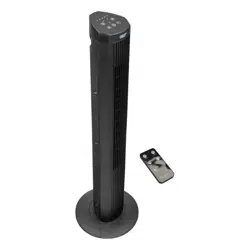
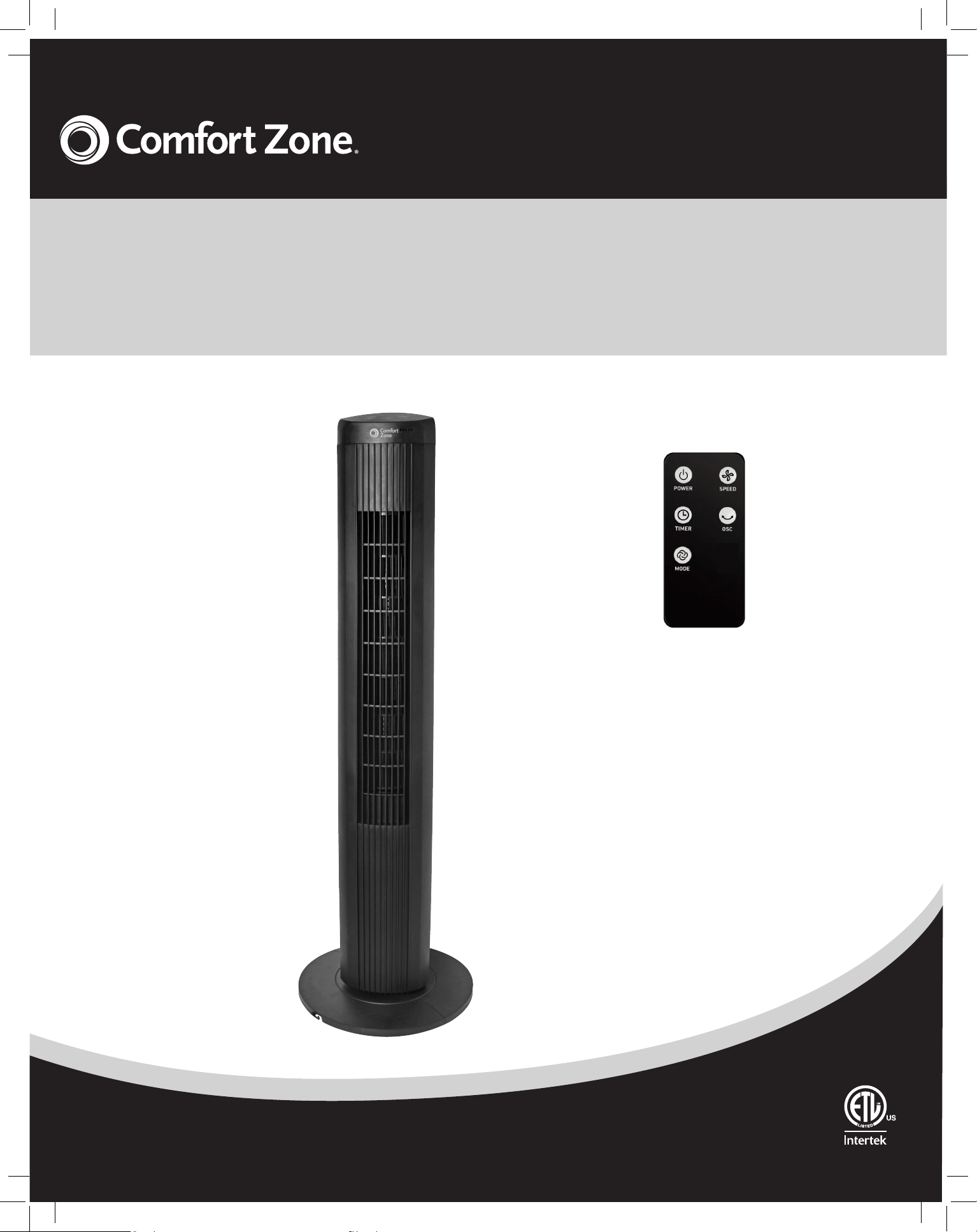
40" Digital Tower Fan
with Remote Control
Features:
• Digital Control Panel for
Easy Operation
• Remote Control Function
• 4 Modes Selection,Regular,
Sleep,Breeze,Power Breeze
• Up to 15 Hours and Auto
Shut-off Timer
• Wide Angle Oscillation
www.comfortzoneproducts.com
CZ12394-EC
2
2
Intended Use:
This product is intended for indoor residential and office use only,
not for industrial or other commercial applications. Use only with
electrical wiring that is in good working order and that meets
applicable codes and ordinances. If you have any questions
whether your wiring is adequate, consult a qualified electrician.
While using your fan, you should follow the IMPORTANT
INSTRUCTIONS listed below. As part of those instructions, we
have used the word "WARNING" to indicate the level of hazard:
WARNING indicates a hazard which, if not avoided, could result
in injury or death.
IMPORTANT INSTRUCTIONS
As with all electrical appliances, basic safety precautions should
always be followed to reduce the risk of electric shock, fire, or
injury to persons, including the following precautions:
• Read all the instructions before using this fan.
• Use this fan only as described in this manual. Any other use not
recommended by the manufacturer may cause electrical shock,
fire or injury to persons.
• Do not operate the fan with a damaged power cord or after the
fan malfunctions or has been dropped in any manner.
• Use of extreme caution is necessary when any fan is used by or
near children, disabled persons or pets and whenever the fan is
left operating unattended.
• Do not place the fan on a small, unlevel, uneven or any surface
which might allow fan to tip or fall.
• For proper operation, fan should be placed on a smooth,
non-combustible, level surface.
• Always unplug fan when not in use, when moving from place
to place, when assembling or disassembling parts, and before
cleaning.
• The use of attachments, not recommended or sold by the
manufacturer, may cause hazards.
• Do not use outdoors.
• Do not use fan in window. Rain may cause electrical hazard
(for non-window models).
• Do not operate the fan with blade guards or any safety device
removed.
• Avoid the use of extension cords due to risk of fire. If an
extension cord must be used, the cord must be minimum
14 AWG and rated not less then 1875 watts.
• Do not run power cord under carpeting. Do not cover cord with
throw rugs, runners or the like. Arrange cord away from traffic
area where it will not be tripped over.
• Do not insert or allow any object to enter any openings on the
fan. Doing so may cause electric shock and/or fire hazard.
Avoid contact with moving parts.
• This appliance is not intended for use by persons (including
children) with reduced physical, sensory or mental capabilities
or lack of experience and knowledge, unless they have
been given supervision or instruction concerning use of the
appliance by a person responsible for their safety.
• Children should be supervised to ensure they do not play with
the appliance.
READ & SAVE THESE
INSTRUCTIONS
m WARNING: Shock Hazard
Use your fan only in dry environments. This fan is not intended
for use in a bathroom, laundry area, or similar locations, or near
sinks, washing machines, swimming pools or other sources of
water. Never locate fan where it may fall into a bathtub or other
water receptacle. Do not use in damp envir
onments such as
flooded basements.
m WARNING: Hot Surfaces
Do not touch fan motor when in use. This motor is hot when in
use, to avoid burns, do not let bare skin touch hot surfaces.
m WARNING: Fire Hazard
Fans have arcing or sparking parts inside. Do not use near
combustible materials or flammable gases or sources of heat.
DO NOT USE in areas where gasoline, paint or flammable
materials are used or stored. To prevent a possible fire, do not
block air intakes or exhaust in any manner. Do not insert or allow
foreign objects to enter any ventilation or exhaust opening as this
may cause an electric shock, fire, or damage the fan.
m WARNING: Electrical Shock Hazard
Do not use with damaged cord or plug. Use with adequate
electrical system that is up to code.
m CAUTION: to Prevent Electric Shock, this product
has a polarized two prong plug (one blade is wider than the
other) that must be fully inserted in to a matching properly
grounded outlet. This plug is designed to fit a polarized outlet
only one way. If the plug does not fit fully into the outlet,
reverse the plug. If the plug still does not fit, contact a qualified
electrician. Do not attempt to defeat this safety feature.
m WARNING: to Reduce the Risk of Fire or Electric
Shock, do not use this product with any solid-state speed
control device.
DO NOT operate any fan with a damaged cord or plug or after
fan malfunctions, has been dropped or damaged in any manner.
Do not operate fan with a broken blade, safety cage or any visual
imperfections. Disconnect power before servicing.
DO NOT run power cord under carpeting. DO NOT cover cord
with throw rugs, runners or the like. Arrange cord away from
traffic area where it will not be tripped over. Avoid the use of
extension cords due to risk of fire. If an extension cord must
be used, the cord must be minimum 14 AWG and rated not
less then 1875 watts. Do not use an extension cord unless the
plug can be completely inserted into its receptacle. Unplug
the fan when not in use. Do not operate fan with its ventilation
obstructed.
www.comfortzoneproducts.com
3
3
NOTE:MAKE SURE YOU REMOVE ALL CONTENTS FROM
THE PACKAGE.PLEASE CHECK PACKAGING MATERIALS FOR
PARTS THAT COULD BE REQUIRED TO
OPERATE YOUR FAN.
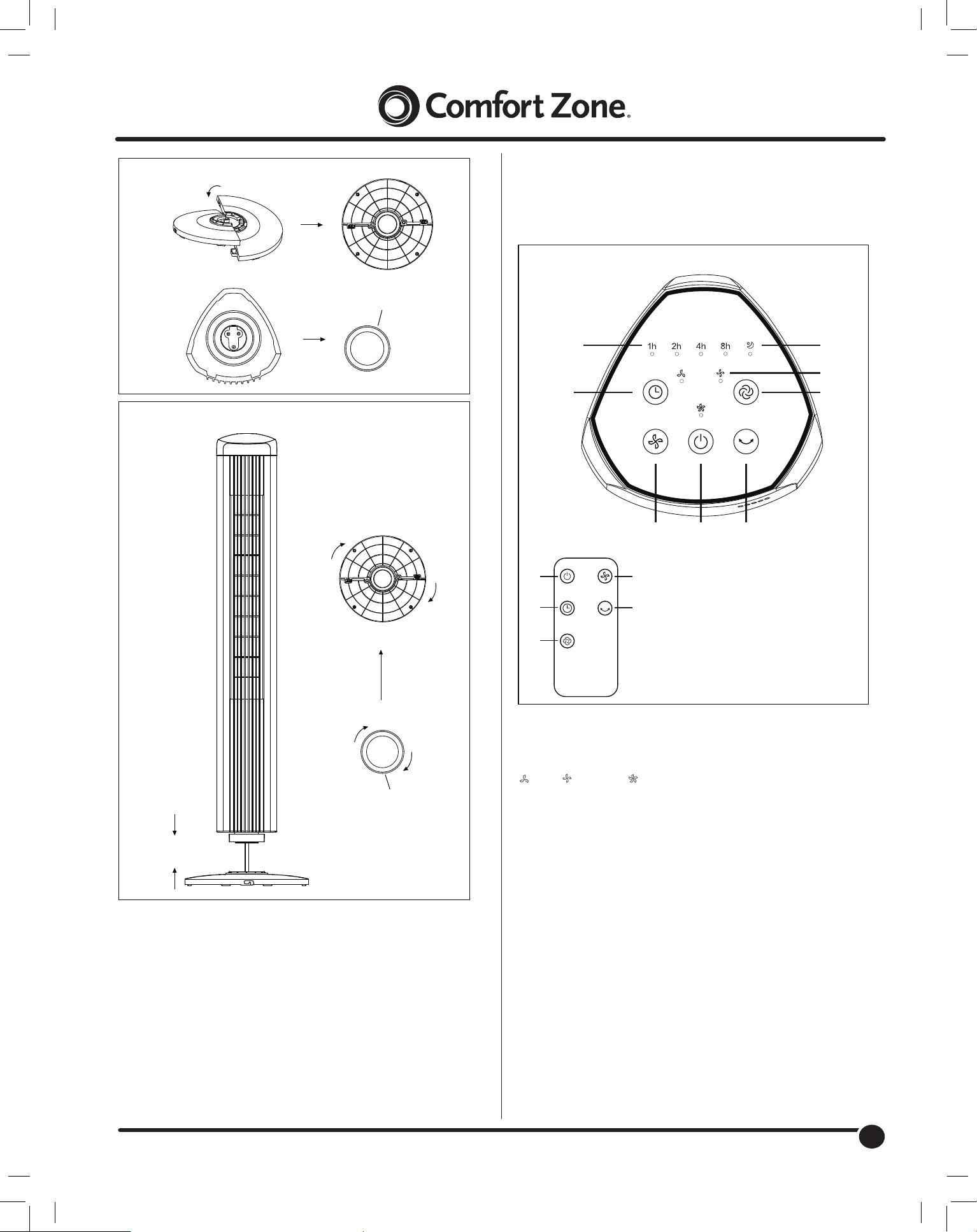
1. Align and press together the base halves (figure 1).
2. Remove the lock nut from the fan housing byrotating
counterclockwise (Figure 1,
2).
3. Place the base onto the bottom of the fan housingand rotate
to secure.
4. Place the lock nut onto the bottom of the base androtate
clockwise to tighten (Figure 2).
5. Place fan upright on a dry, level surface.
Figure 1
Figure 2
ASSEMBLY
A. Power Button
B. Oscillation
C. Speed Button
D. Mode Button
E. Timer Button
F. Speed Setting Indicator Lights
G. Timer Indicator Lights
H. Mode Indicator Lights
OPERATING INSTRUCTIONS (Figure 3
)
Figure 3
E
H
F
D
C BA
G
E
C
B
A
D
1. Plug the cord into a standard 120 Volt AC outlet.
2. To turn the fan ON, press the POWER button (A)
located on
the control panel or remote control.The fan will start running in
the lowest setting "I"(LOW).
Lock Nut
Lock Nut
www.comfortzoneproducts.com
3. Press the SPEED button (C) to cycle through the 3 speed
settings in sequence.
The corresponding indicator light will illuminate toconfirm the
selection:
-Low -Medium -High
4. To turn OSCILLATION ON and OFF, press theOscillation (B)
button.
5. To set automatic shutoff, press the TIMER button (E).When
set, the fan will run and automatically shut offafter the set
duration of time (1-15 hours) has expired.
Note: To set the timer for 15 hours, press the timer button until
all four lights (1H, 2H, 4H, 8H) areilluminated.
6. To activate SLEEP mode, press the MODE button (D). This
function circulates the speed from High
,Medium to Low.
REMOTE CONTROL
NOTE: THIS UNIT INCLUDES ONE LITHIUM BATTERY,
CR2025/3V.PLEASE REMOVE THE PROTECTIVE PLASTIC
FROM THE REMOTE CONTROL BATTERY BEFORE
OPERATION.
To operate the fan with the remote control,aim it towards the
control panel on top of the fan tower. The remote control can
operate from a distance up to approximately 16 feet from the fan
body and at an angle variation of 15-20 degrees.
Avoid exposing the display panel to direct sunlight, as it may
interfere with signal transmission.
4
4
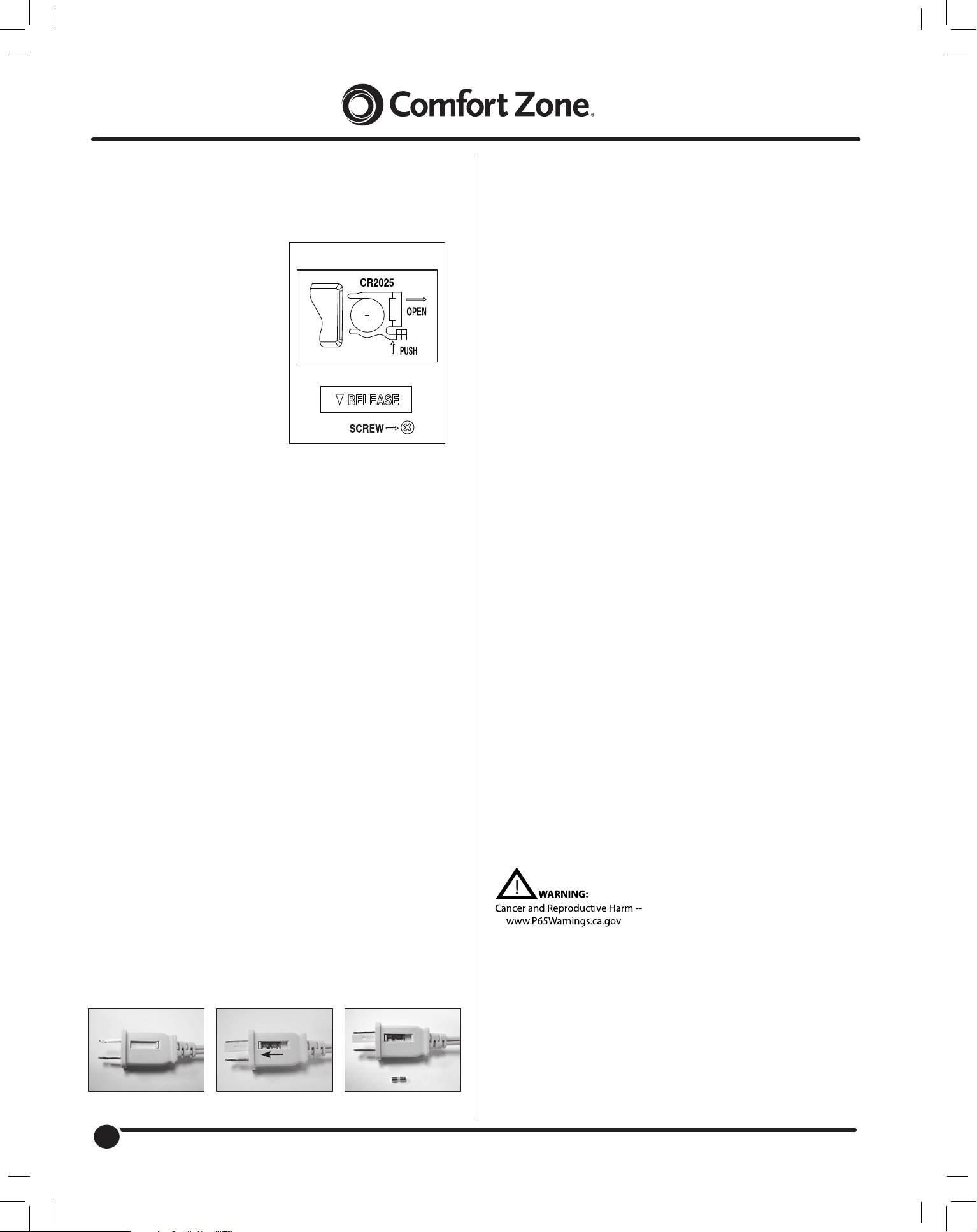
Replacing the Remote Control Battery (Figure 4)
The cells should be disposed of properly, including keeping them
away from children. Even used cells may cause injury.
1.
Locate the battery compartment on the back of the remote
control handset. Loosen the screw on the back. Press tab
and pull out battery.
2. Remove old battery.
battery compartment.
3. Place new battery into
battery compartment.
4. Slide battery
compartment into the
remote control handset.
NOTES:
1.
Remove the battery
from the remote when it
is not in use for an
extended period.
2.
Remove the battery
pefore discarding the remote at the end of its useful product life.
3.
Do not discard used batteries into household trash
containers. Contact your local government for disposal or
recycling practices in your area.
Figure 4
www.comfortzoneproducts.com
Limited Warranty
This unit is guaranteed to the original retail purchaser
against defects in quality or workmanship for a period of
one year from the date of original purchase. If this unit
fails because of a manufacturing defect within 30 days of
purchase, return the unit, with your receipt, to the retailer.
After 30 days, but within the warranty period, if the unit
was purchased within the continental United States, return
it, to Mr. Brands LLC for repair or replacement. If the unit
was purchased outside the continental United States,
return the unit to the place of purchase. This warranty
does not cover damage caused by misuse, abuse,
overheating or alteration. Repairs made by anyone other
than Mr. Brands LLC are not covered in this warranty. Mr.
Brands LLC will not be held liable for any losses due to
neglectful operation. All implied warranties, including the
warranties of merchantability and of fitness of purpose, if
applicable, are hereby limited in duration to the period of
one year from the date of original retail purchase. Some
states do not allow limitations on how long an implied
warranty lasts, so the above limitations may not apply to
you. Incidental or consequential damages arising from a
breach of either express or implied warranties are hereby
disclaimed and excluded. Some states do not allow the
exclusion of limitation of incidental or consequential
damages, so this limitation or exclusion may not apply to
you. Upon the expiration of this warranty all such liability
will terminate. No other warranties are expressed or
implied.
This warranty gives you specific legal rights, and you may also
have other rights which vary from state to state. No informal
dispute settlement mechanisms are available. This limited
warranty is given in lieu of all other warranties.
Mr. Brands LLC
113 Fillmore St
Bristol, PA 19007
1-877-420-7555
www.mrbrands.com
www.comfortzoneproducts.com
Rev. 09/25/23
Note: Some models come with a plug where you can replace
a fuse. If your model has this, please read and follow the below
instructions to replace the fuse.
This product employs overload protection (fuse). A blown fuse
indicates an overload or short‑circuit situation. If the fuse blows,
unplug the product from the outlet. Replace the fuse as per the
user servicing instructions (follow product marking for proper
fuse rating) and check the product. If the replacement fuse
blows, a short‑circuit may be present and the product should
be discarded or returned to an authorized service facility for
examination and/or repair.
Fuse Replacement:
1. Grasp plug and remove from the receptacle or other
outlet device. Do not unplug by pulling on cord.
2. Open fuse cover by sliding open fuse access cover on
top of attachment plug towards blades. See Fig. 2
3. Remove fuse carefully. Use a small tool to pry the end
of the fuse from holder cavity. Be careful not to break
glass window.
4. Replace fuse.
WARNING: Risk of re. Replace fuse only with identical
2.5 or 5.0 Amp, 125 Volt fuse (3.6mm x 10mm). Be sure
fuse is properly seated within its cavity.
5. Close fuse cover by sliding it back to its original closed
position.
Fig 1 Fig 2 Fig 3
Slide Cover to Open