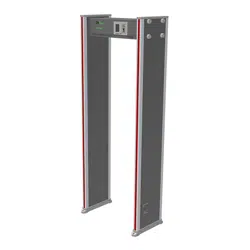

ZK-D1065/2180 User Manual
Contents 1
User Manual
Walk Through Metal Detector
ZK-D1065/2180
Date: April 2025
Doc Version: 1.4
English
Thank you for choosing our product. Please read the instructions
carefully before operation. Follow these instructions to ensure that the
product is functioning properly. The images shown in this manual are for
illustrative purposes only.
For further details, please visit our Company’s website
www.zkteco.com
.

ZK-D1065/2180 User Manual
Copyright©2025 ZKTECO CO., LTD. All rights reserved.
Page | 1
Copyright © 2025 ZKTECO CO., LTD. All rights reserved.
Without the prior written consent of ZKTeco, no portion of this manual can be
copied or forwarded in any way or form. All parts of this manual belong to ZKTeco
and its subsidiaries (hereinafter the "Company" or "ZKTeco").
Trademark
is a registered trademark of ZKTeco. Other trademarks involved in this
manual are owned by their respective owners.
Disclaimer
This manual contains information on the operation and maintenance of the ZKTeco
equipment. The copyright in all the documents, drawings, etc. in relation to the
ZKTeco supplied equipment vests in and is the property of ZKTeco. The contents
hereof should not be used or shared by the receiver with any third party without
express written permission of ZKTeco.
The contents of this manual must be read as a whole before starting the operation
and maintenance of the supplied equipment. If any of the content(s) of the manual
seems unclear or incomplete, please contact ZKTeco before starting the operation
and maintenance of the said equipment.
It is an essential pre-requisite for the satisfactory operation and maintenance that
the operating and maintenance personnel are fully familiar with the design and
that the said personnel have received thorough training in operating and
maintaining the machine/unit/equipment. It is further essential for the safe
operation of the machine/unit/equipment that personnel has read, understood and
followed the safety instructions contained in the manual.
In case of any conflict between terms and conditions of this manual and the
contract specifications, drawings, instruction sheets or any other contract-related

ZK-D1065/2180 User Manual
Copyright©2025 ZKTECO CO., LTD. All rights reserved.
Page | 2
documents, the contract conditions/documents shall prevail. The contract specific
conditions/documents shall apply in priority.
ZKTeco offers no warranty, guarantee or representation regarding the
completeness of any information contained in this manual or any of the
amendments made thereto. ZKTeco does not extend the warranty of any kind,
including, without limitation, any warranty of design, merchantability or fitness for
a particular purpose.
ZKTeco does not assume responsibility for any errors or omissions in the
information or documents which are referenced by or linked to this manual. The
entire risk as to the results and performance obtained from using the information is
assumed by the user.
ZKTeco in no event shall be liable to the user or any third party for any incidental,
consequential, indirect, special, or exemplary damages, including, without
limitation, loss of business, loss of profits, business interruption, loss of business
information or any pecuniary loss, arising out of, in connection with, or relating to
the use of the information contained in or referenced by this manual, even if
ZKTeco has been advised of the possibility of such damages.
This manual and the information contained therein may include technical, other
inaccuracies or typographical errors. ZKTeco periodically changes the information
herein which will be incorporated into new additions/amendments to the manual.
ZKTeco reserves the right to add, delete, amend or modify the information
contained in the manual from time to time in the form of circulars, letters, notes, etc.
for better operation and safety of the machine/unit/equipment. The said additions
or amendments are meant for improvement /better operations of the
machine/unit/equipment and such amendments shall not give any right to claim
any compensation or damages under any circumstances.

ZK-D1065/2180 User Manual
Copyright©2025 ZKTECO CO., LTD. All rights reserved.
Page | 3
ZKTeco shall in no way be responsible (i) in case the machine/unit/equipment
malfunctions due to any non-compliance of the instructions contained in this
manual (ii) in case of operation of the machine/unit/equipment beyond the rate
limits (iii) in case of operation of the machine and equipment in conditions different
from the prescribed conditions of the manual.
The product will be updated from time to time without prior notice. The latest
operation procedures and relevant documents are available on
http://www.zkteco.com
If there is any issue related to the product, please contact us.
ZKTeco Headquarters
Address ZKTeco Industrial Park, No. 32, Industrial Road,
Tangxia Town, Dongguan, China.
Phone +86 769 - 82109991
Fax +86 755 - 89602394
For business-related queries, please write to us at sales@zkteco.com
.
To know more about our global branches, visit www.zkteco.com.

ZK-D1065/2180 User Manual
Copyright©2025 ZKTECO CO., LTD. All rights reserved.
Page | 4
About the Company
ZKTeco is one of the world’s largest manufacturer of RFID and Biometric
(Fingerprint, Facial, Finger-vein) readers. Product offerings include Access Control
readers and panels, Near & Far-range Facial Recognition Cameras, Elevator/floor
access controllers, Turnstiles, License Plate Recognition (LPR) gate controllers and
Consumer products including battery-operated fingerprint and face-reader Door
Locks. Our security solutions are multi-lingual and localized in over 18 different
languages. At the ZKTeco state-of-the-art 700,000 square foot ISO9001-certified
manufacturing facility, we control manufacturing, product design, component
assembly, and logistics/shipping, all under one roof.
The founders of ZKTeco have been determined for independent research and
development of biometric verification procedures and the productization of
biometric verification SDK, which was initially widely applied in PC security and
identity authentication fields. With the continuous enhancement of the
development and plenty of market applications, the team has gradually
constructed an identity authentication ecosystem and smart security ecosystem,
which are based on biometric verification techniques. With years of experience in
the industrialization of biometric verifications, ZKTeco was officially established in
2007 and now has been one of the globally leading enterprises in the biometric
verification industry owning various patents and being selected as the National
High-tech Enterprise for 6 consecutive years. Its products are protected by
intellectual property rights.
About the Manual
This manual introduces the operations of the ZK-D1065/2180 Walk-through Metal
Detector.
All figures displayed are for illustration purposes only. Figures in this manual may
not be exactly consistent with the actual products.

ZK-D1065/2180 User Manual
Copyright©2025 ZKTECO CO., LTD. All rights reserved.
Page | 5
Table of Contents
1 OVERVIEW ....................................................................................................... 7
1.1 Introduction ....................................................................................................... 7
1.2 Appearance ........................................................................................................ 7
1.3 Components ....................................................................................................... 8
2 PRODUCT SPECIFICATIONS ............................................................................ 9
2.1 Dimensions ......................................................................................................... 9
2.2 Technical Specifications .................................................................................11
3 INSTALLATION SETUP ................................................................................... 12
3.1 Safety Precautions ..........................................................................................12
3.2 Instructions to Pedestrians ............................................................................12
3.3 Installation Site ................................................................................................13
3.3.1 Stationary Metallic Items ................................................................................................................. 13
3.3.2 Portable Metallic Items ..................................................................................................................... 13
3.3.3 Floor Vibration......................................................................................................................................... 13
3.3.4 Electromagnetic Radiation and Interference .................................................................... 13
3.3.5 Parallel Installation ............................................................................................................................... 14
3.4 Installation Steps .............................................................................................14
4 PERFORMANCE AND TECHNICAL FEATURES ............................................... 16
5 CONTROL PANEL ........................................................................................... 17
6 DETECTION ZONES ........................................................................................ 18

ZK-D1065/2180 User Manual
Copyright©2025 ZKTECO CO., LTD. All rights reserved.
Page | 6
6.1 Adjustment of Detection Zone’s Sensitivity ...............................................19
7 OPERATIONAL PROCEDURE.......................................................................... 20
7.1 Sensitivity Adjustment ...................................................................................21
7.2 Channel Settings .............................................................................................23
7.3 Alarm Settings .................................................................................................23
7.4 Relay Settings ..................................................................................................25
7.5 Application Area ..............................................................................................26
7.6 Random Alarm .................................................................................................27
7.7 Network Settings .............................................................................................28
7.8 Record ...............................................................................................................29
7.9 System ...............................................................................................................30
7.10 About .................................................................................................................32
7.11 Default Parameters .........................................................................................33
TROUBLESHOOTING ............................................................................................. 34
PACKING LIST......................................................................................................... 35
WARRANTY CARD .................................................................................................. 36
ZK-D1065/2180 User Manual
Copyright©2025 ZKTECO CO., LTD. All rights reserved.
Page | 7
1 Overview
1.1 Introduction
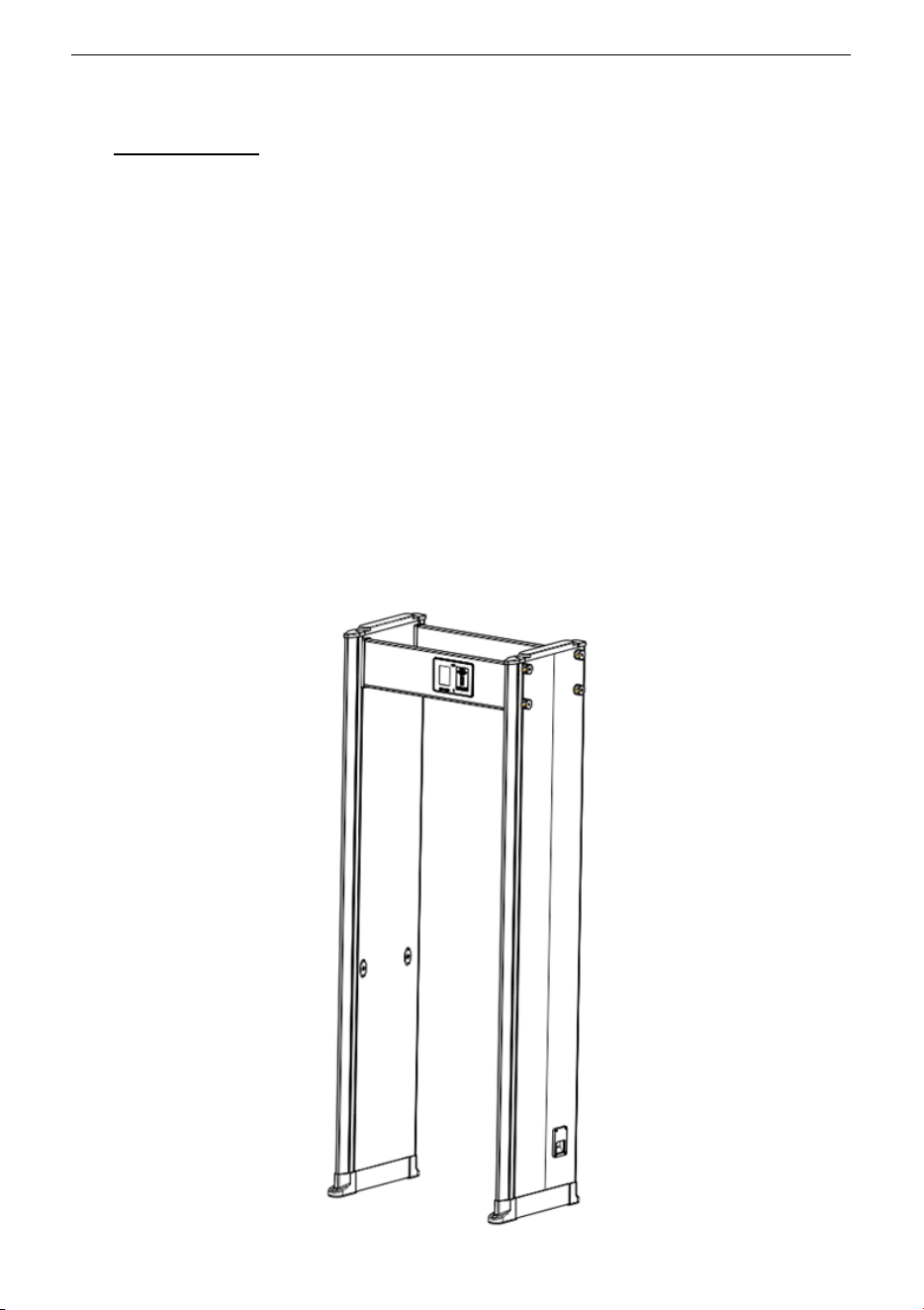
ZK-D1065/2180 metal-detector is a walk-through metal-detector that is used for
security screening at access points in the prisons, courthouses, and train stations.
Metal-detectors are highly sensitive to magnetic metals and have a high detection
capability, with less ability to detect non-magnetic metals. They are used to detect
the concealed metal weapons on a person’s body. It offers high-speed detection
capability. It can detect large metal objects like knives and guns. Its screening
capacity is very large when compared to hand-held metal detectors.
1.2 Appearance
ZK-D1065/2180 User Manual
Copyright©2025 ZKTECO CO., LTD. All rights reserved.
Page | 8
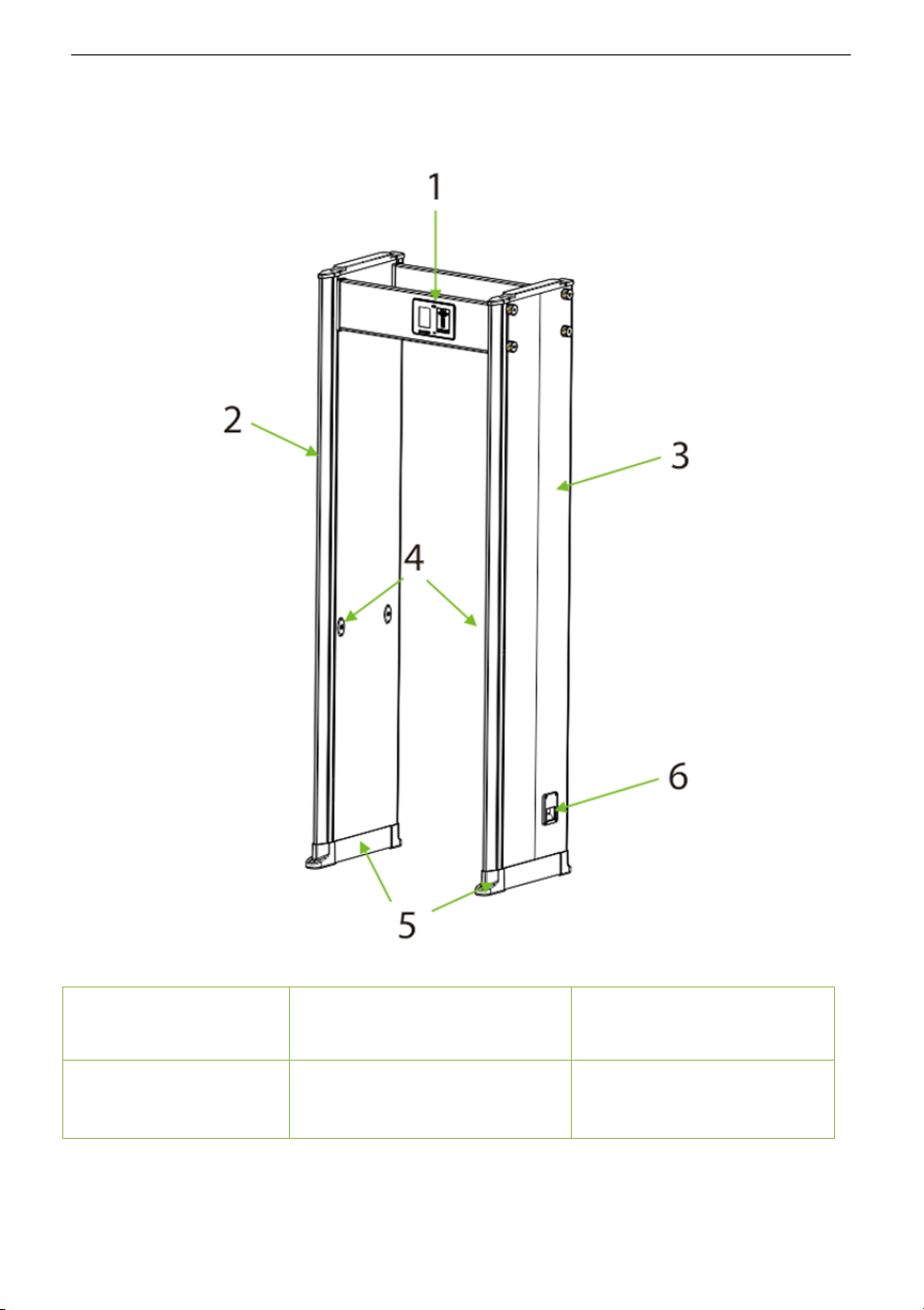
1.3 Components
1. Beam 2. LED Alarm Zones 3. Built-in Probe
4. Infrared Sensors 5. Waterproof Foot Cover 6. Power-line Interface
ZK-D1065/2180 User Manual
Copyright©2025 ZKTECO CO., LTD. All rights reserved.
Page | 9
2 Product Specifications
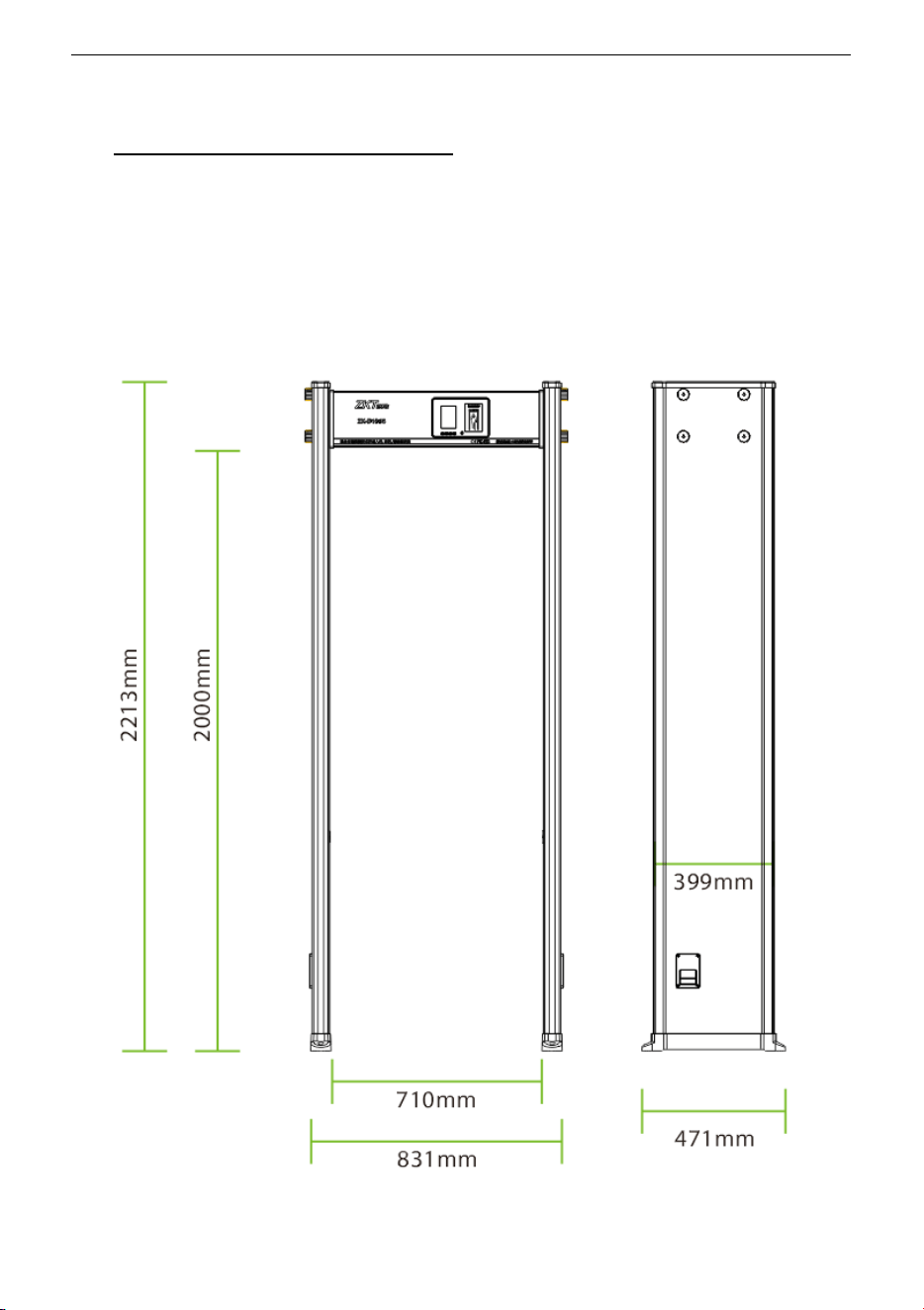
2.1 Dimensions
ZK-D1065
ZK-D1065/2180 User Manual
Copyright©2025 ZKTECO CO., LTD. All rights reserved.
Page | 10
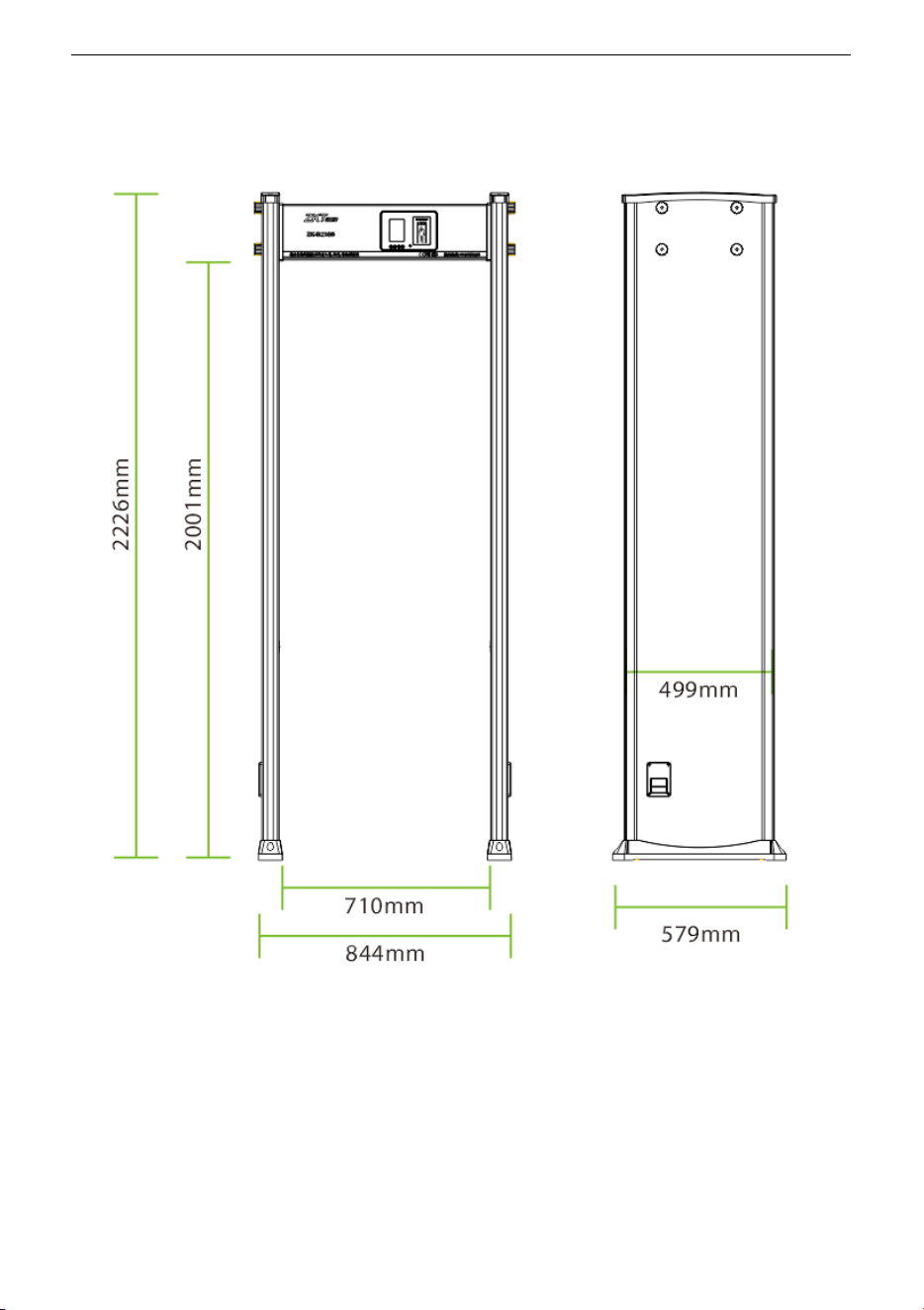
ZK-D2180

ZK-D1065/2180 User Manual
Copyright©2025 ZKTECO CO., LTD. All rights reserved.
Page | 11
2.2 Technical Specifications
Feature Specifications
Power 100V to 240V
Operating Temperature -20°C to 55°C
Operating Frequency 5.7KHz to 9.6KHz
Dimensions
External
ZK-D1065: 2213(H)x831(W)x471(D)mm
ZK-D2180: 2226(H)x844(W)x579(D)mm
Channel
ZK-D1065: 2000(H)x710(W)x399(D)mm
ZK-D2180: 2001(H)x710(W)x499(D)mm
Weight
ZK-D1065: 35kg
ZK-D2180: 45kg

ZK-D1065/2180 User Manual
Copyright©2025 ZKTECO CO., LTD. All rights reserved.
Page | 12
3 Installation Setup
3.1 Safety Precautions
• Install the detector in a stable and smooth area. Make sure that the
detector is installed firmly in the selected area.
• It can be used for both indoor and outdoor purposes. If used outdoor,
cover it with a canopy to protect against rain.
• Before installation, make sure the left and right door panels are placed at
the corresponding location. Avoid high temperatures and wet
environments.
• Wait for 1 minute for the self-diagnosis of the detector when it starts. Do
not touch the detector during a security check to avoid false alarm.
• Install the detector away from radio-frequency devices to avoid
interference. Make sure that there is no large metal object or strong
magnetic field around the detector for at least 2 meters.
• Do not hit the detector hardly, as it may cause false alarms.
• Do not disassemble the unit without the guidance of a professional
technician.
• Each device has a warranty card, with which users can have their devices
maintained or repaired free of charge within the warranty period.
3.2 Instructions to Pedestrians
• A line must be drawn at 50cm away from the detector. The pedestrians
must pass through the detector one-by-one.
• Pedestrians should line up one-by-one to ensure the smooth operation of
the detector.
• Pedestrians should walk at a normal speed. They must not intentionally
form a crowd, rush, walk slowly, or crush the door panel.

ZK-D1065/2180 User Manual
Copyright©2025 ZKTECO CO., LTD. All rights reserved.
Page | 13
• Before passing through the metal detector, the pedestrians must remove
all the carried metal objects (such as keys, mobile phone, watch, coins, etc.),
and place it on the security chute or a table, and pick it up after the security
check.
• If the detector alarms when someone passes through, that means there
is/are some metal object(s) hidden in the body. The security guard can use
a hand-held metal detector to accurately detect the hidden position
according to the alarm zones.
3.3 Installation Site
The following section describes the requirements of the installation environment.
3.3.1 Stationary Metallic Items
The detector must be installed away at 50cm from the stationary metallic items
such as aluminum alloy/stainless-steel windows, doors, etc. to prevent false alarms
and affecting the sensitivity of the detector.
3.3.2 Portable Metallic Items
The portable metallic objects must be kept away at 2 meters from the detector to
avoid false alarms.
3.3.3 Floor Vibration
The installation floor must be flat and fixed to avoid false alarm from the movement
of the people walking through the detector.
3.3.4 Electromagnetic Radiation and Interference
Since the detector uses Bilateral receiver technology, the detector must be installed
away at a distance of at least 1 meter from the sources of electromagnetic radiation
or electromagnetic interference. The parameters that define the distance are
determined by the installation environment and the parameters vary for different
installation environments.

ZK-D1065/2180 User Manual
Copyright©2025 ZKTECO CO., LTD. All rights reserved.
Page | 14
The sources of electromagnetic radiation and electromagnetic interference are
given below:
Electrical Control Box, Radiofrequency equipment, Interphone, High Power Motor,
Power Transformer, Ac Power Lines, Thyristor Control Circuit (High Power Switching
Power Supply, Inverter Welder), Engine, Motor, etc.
3.3.5 Parallel Installation
When two detectors are installed parallel to each other, the distance between two
detectors must be greater than 50cm. When three detectors are installed parallel to
each other, the distance between each detector must be greater than 80cm. They
must operate at a different frequency to avoid interference. The distance varies
according to the actual working environment, it is not recommended to mount
three detectors in parallel, the frequency can be adjusted according to the
environment.
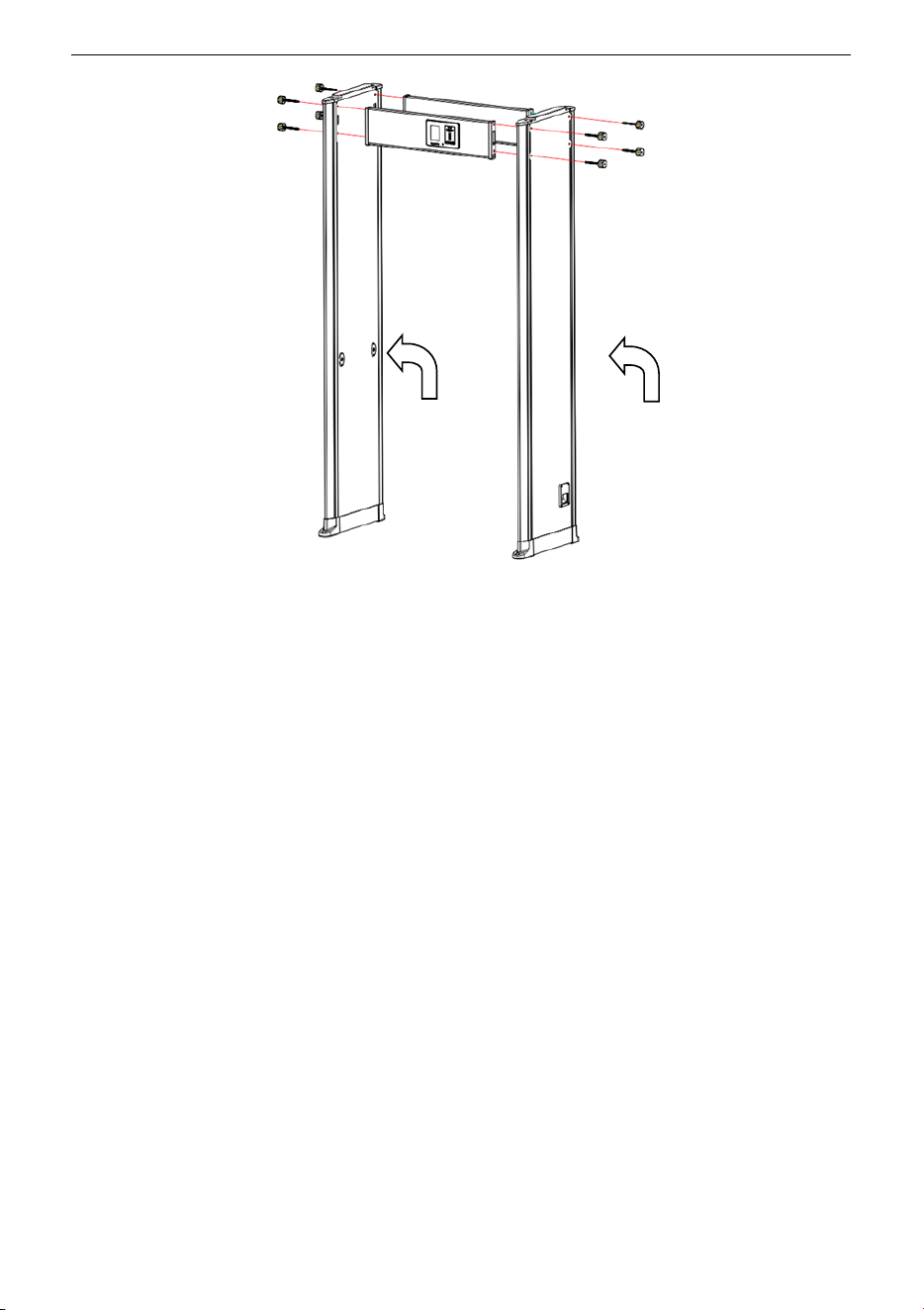
3.4 Installation Steps
Make sure that the device is installed as per the following installation instructions. If
you want to open the chassis, you should contact the agent for permission.
Otherwise, you will bear any consequence resulting from your actions.
ZK-D1065/2180 User Manual
Copyright©2025 ZKTECO CO., LTD. All rights reserved.
Page | 15
1. Open the Control unit and Door panel package.
2. Install the control unit and the door panels as shown in the above diagram.
Connect the door panels to the control unit with bolts and nuts and tighten the
screws.
3. Insert the probe-lines of the left and right door panels to the corresponding
sockets on the mainboard.
4. Then lift the Walk-through metal detector vertically and place it in the required
area.
5. Finally, plug in the power cable to start working.
Left Door Panel
Right Door Panel

ZK-D1065/2180 User Manual
Copyright©2025 ZKTECO CO., LTD. All rights reserved.
Page | 16
4 Performance and Technical Features
Accurate Positioning: There are 18 overlapping detection zones with bilateral
transmit and receive technology. The detection zones can accurately detect the
objects with an intuitive display of the target location.
Micro Processor Technology: The Microprocessor Control Unit generates the
electromagnetic waves for scanning and the scanning rate can be precisely
controlled.
Adjustable Sensitivity: ZK-D1065/2180 detection zones have 500 sensitivity levels
(1 to 500). You can preset the metal size, by excluding the false alarm of coins, keys,
jewelry, belt buckle, etc.
Digital Pulse Technology: Digital signal processing and filtering system in the
detector has excellent anti-interference ability.
Count Statistics: The detector displays the number of pedestrians passed and Alarm
count accurately.
Harmless: The detector is harmless to heart pacemakers, pregnant women,
magnetic floppy disks, recording tapes, etc.
Waterproof Foot Cover: The waterproof foot cover not only can fix the device firmly
but also protect the device against water.
Safety: The Control Unit case and the panels are waterproof. The cover is made of
PVC synthetic material which makes the detector waterproof, fireproof, and
shockproof.
Easy to install: The detector has an integrated design and it can be effortlessly
installed or disassembled in 15 minutes.
ZK-D1065/2180 User Manual
Copyright©2025 ZKTECO CO., LTD. All rights reserved.
Page | 17
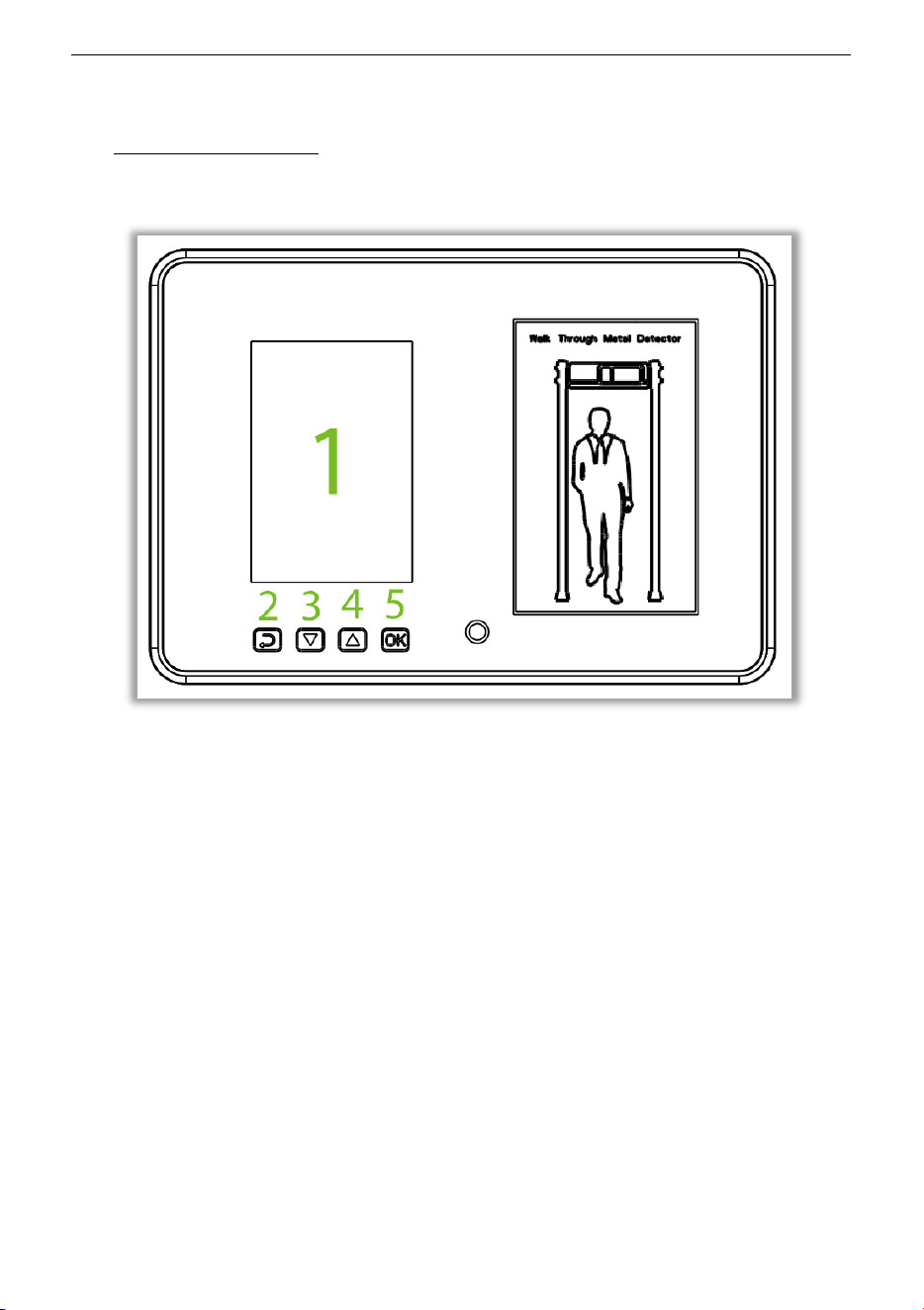
5 Control Panel
The components of the Control Panel are given below:
1. LCD: Displays the Pass count, Alarm count, Password settings, and other
information.
2. ESC: Press to discard the settings and exit the menu.
3. ▽: Adjustment (decrement) key to decrease the parameter values.
4. △: Adjustment (increment) key to increase the parameter values.
5. OK: Opens the Menu interface, saves the settings, and exits the menu.
Note: There is a network interface on the back of ZK-D2180.
ZK-D1065/2180 User Manual
Copyright©2025 ZKTECO CO., LTD. All rights reserved.
Page | 18
6 Detection Zones
The ZK-D1065/2180 detectors can detect a wide range of threat objects/weapons
composed of magnetic, non-magnetic metals and alloys.
Chassis panel: The screen shows the number of people passing the detector and
the number of alarms.
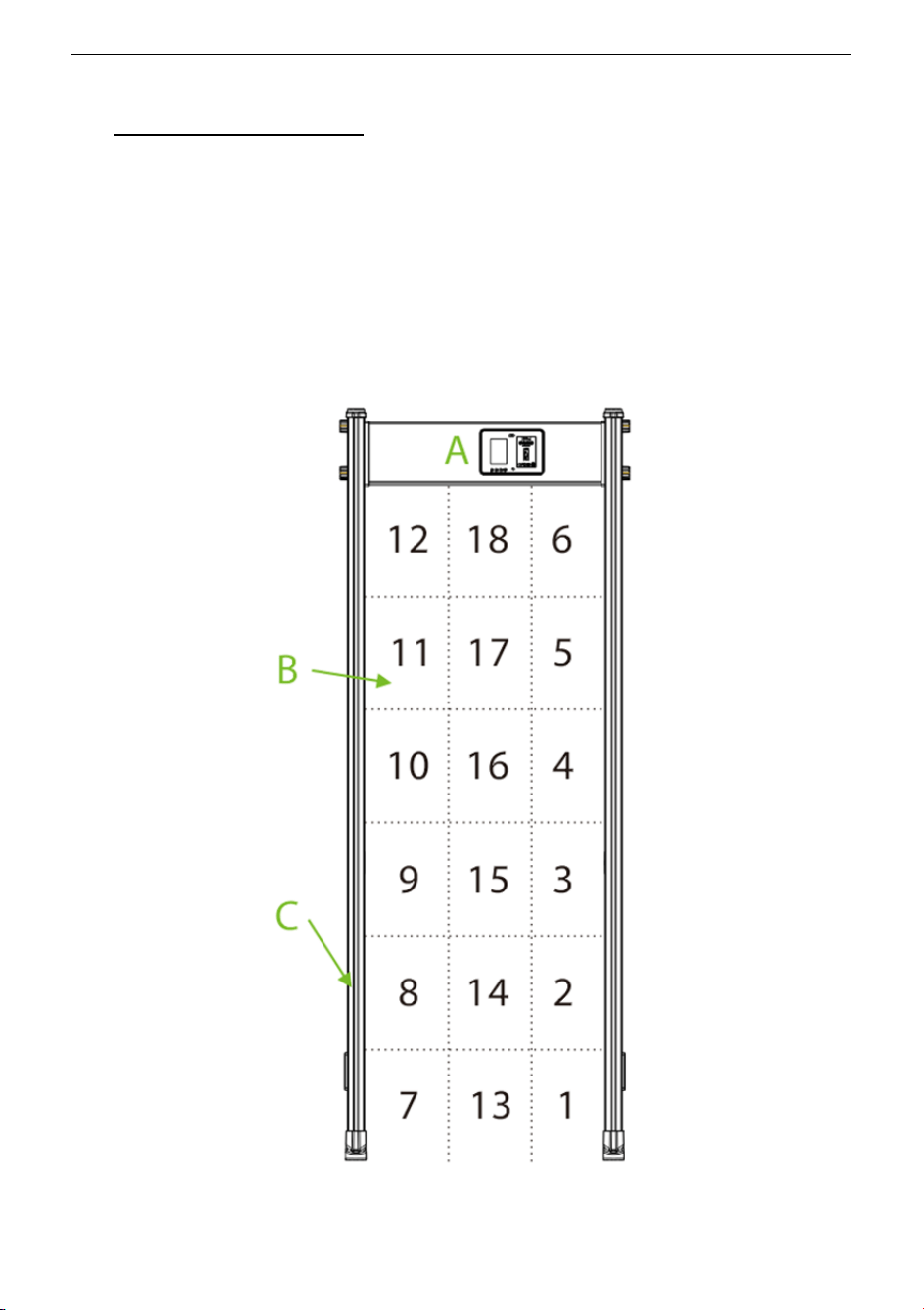
Alarm zones:
The zones are classified as 1 to 18 from bottom to top.

ZK-D1065/2180 User Manual
Copyright©2025 ZKTECO CO., LTD. All rights reserved.
Page | 19
There are six unique sets of precise positioning LED’s evenly distributed on the door
panels, which means 18 detection zones. If the metal composition reaches or
exceeds the preset value, the red LED glows and an alarm will be triggered. If there
are multiple alarm targets, the LED of each target location will glow with alarm.
Infrared Sensor
After connecting the power supply, the metal detector starts to work. When there is
no person or object passes through the detector, the infrared sensors can
effectively stop alarming to avoid false alarms. It also helps to maintain an accurate
count of pedestrians and alarms.
6.1 Adjustment of Detection Zone’s Sensitivity
1. The device must be in a stable position to achieve the best detection effect
(refer Installation Site
). To check whether the device is in a stable state,
perform the following steps:
a) Power on the detector and check whether it is not shaking after one
minute.
b) The device should not alarm when the testing person did not carry any
metal items while walking through the detector.
2. You can exclude the small portable metal objects such as rings, key, belt
buckle, shoes, and so on, by following the steps given below:
a) Choose a small metal as a sample. Increase the sensitivity, so that when
the testing person carries the sample and pass through the detector, and
it would alarm.
b) Decrease the sensitivity a little, carry the sample, and pass through the
detector again. If it still alarms, once again reduce the sensitivity, until the
device does not alarm when the sample is passed through.
Note: If you want to decrease the sensitivity in a certain zone, you must only adjust
the sensitivity of the relative zone. After implementing the above adjustments, the
metal which smaller than the sample will not alarm, but the metal objects bigger
than the sample can be detected accurately.
ZK-D1065/2180 User Manual
Copyright©2025 ZKTECO CO., LTD. All rights reserved.
Page | 20
7 Operational Procedure
Connect the power supply to the detector. After 2 seconds of initialization, the
following standby interface is displayed.
CH:30 Normal 12:00
IN
00000
OUT
00000
ALARM
00000
The standby interface displays the following content: Working Channel, Time, In
Count, Out count, and Alarm Count.
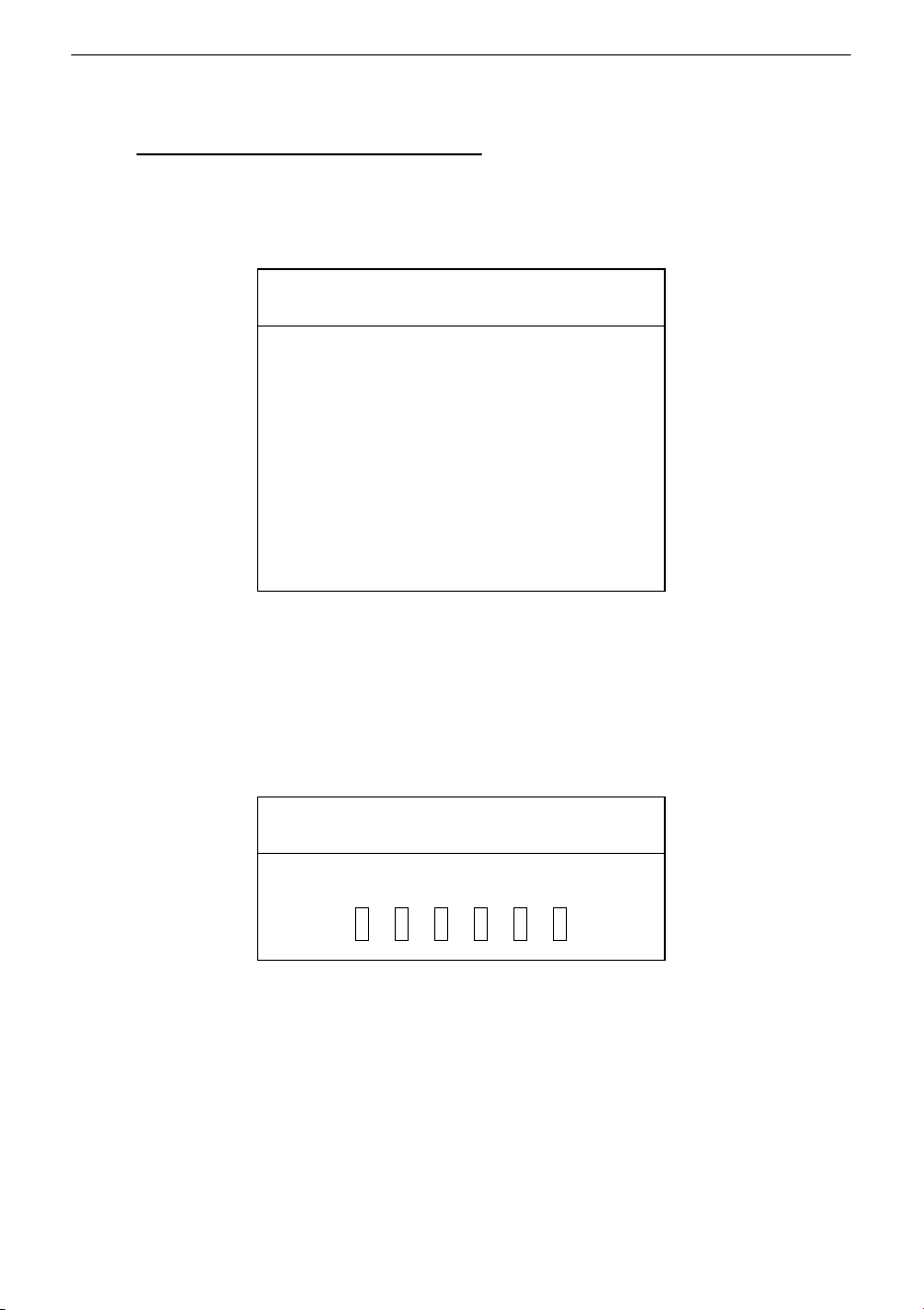
Press the OK button on the Control panel and enter the login password
(default:100000) to enter the main menu.
Login
Password
* * * * * *

ZK-D1065/2180 User Manual
Copyright©2025 ZKTECO CO., LTD. All rights reserved.
Page | 21
7.1 Sensitivity Adjustment
On the main menu, select Sensitivity to enter the Sensitivity interface.
Sensitivity
Manual Setting
Auto Setting
Sens Range
Select Manual Setting and press OK to set the sensitivity level of each detection
zone. Press “
▽” and “△” to select the detection zone and then press OK to confirm.
Then press “
▽” and “△” to change the sensitivity values. The larger the sensitivity
value, the higher the sensitivity. Then press OK to save the settings.
MENU (ZK-D1065) MENU (ZK-D2180)
Sensitivity
Channel
Alarm
Application
RandomAlarm
Record
System
About
Sensitivity
Channel
Alarm
Relay
Application
RandomAlarm
Network
Record
System
About

ZK-D1065/2180 User Manual
Copyright©2025 ZKTECO CO., LTD. All rights reserved.
Page | 22
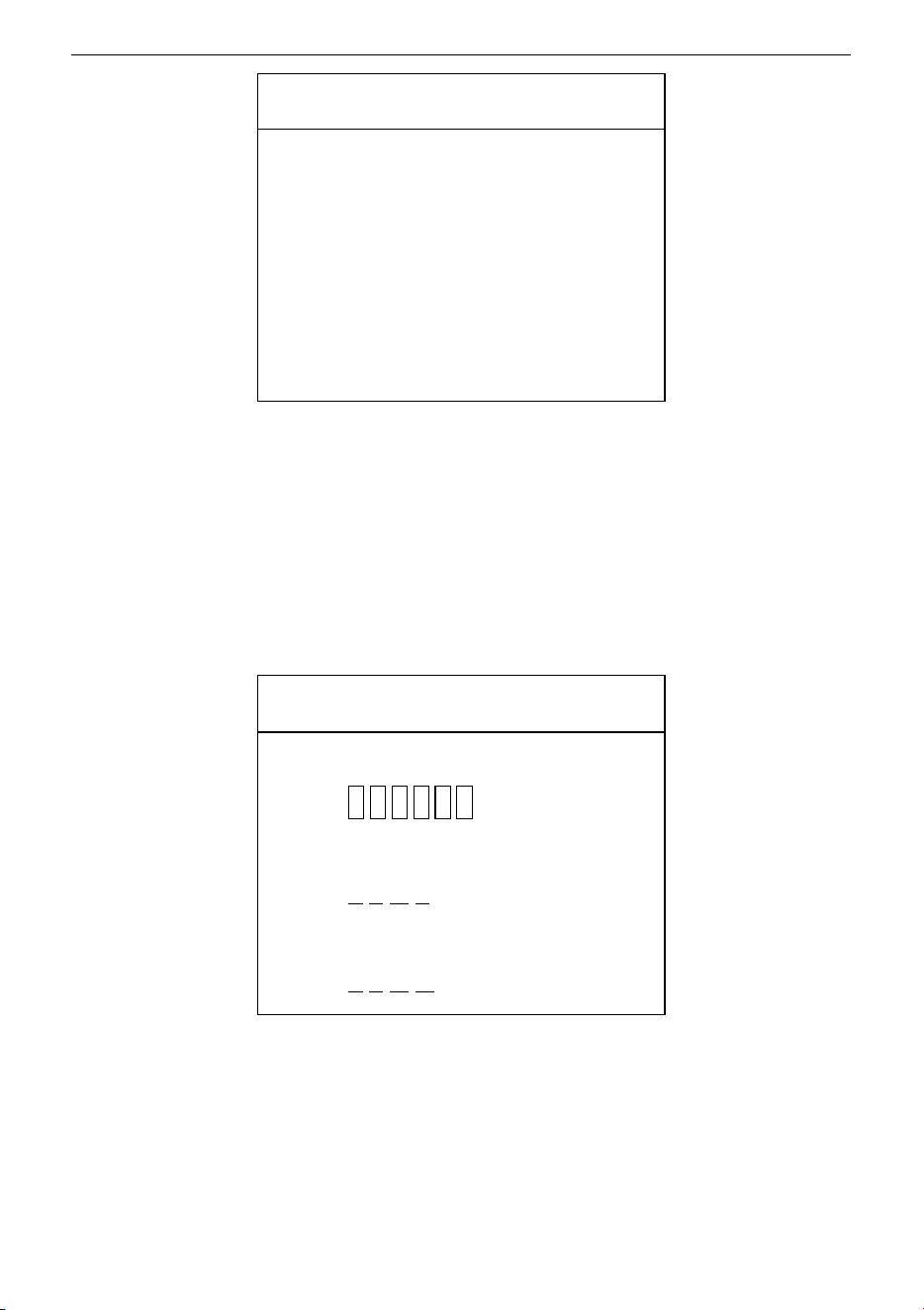
Sensitivity
Overall: 186
ZoneALL
:
451
Zone 12
:
451
Zone 11
:
451
Zone 10
:
451
Zone 9
:
451
Zone 8
:
451
Zone 7
:
451
Zone 6
:
451
Zone 5
:
451
Zone 4
:
451
Zone 3
:
451
Zone 2
:
451
Zone 1
:
451
Note: 13-18 are Virtual zones, which can't be shown in the zone setting as those
zone settings are by defult.
Select Auto Setting and press OK to set the sensitivity automatically. It will be set
up in a few seconds.
Select Sens Range and then press OK to set the intensity of the sensitivity levels.
Press “
△” and “▽” to select the sensitivity settings for all the zones. Press OK to save
the settings.

ZK-D1065/2180 User Manual
Copyright©2025 ZKTECO CO., LTD. All rights reserved.
Page | 23
Sens Range
High
Medium
Low
7.2 Channel Settings
In the main menu, select Channel to enter the Channel interface.
Channel
Manual Setting
Auto Setting
Select Manual Setting and then press OK. The channel range is from 1 to 100. The
default value is 30. Press “
△” and “▽” to set the value and then press OK to save
the settings.
Channel
001——100
Select Auto Setting and press OK to set the channel automatically. It will be set up
in a few seconds.
7.3 Alarm Settings
In the main menu, select Alarm to enter the Alarm interface.

ZK-D1065/2180 User Manual
Copyright©2025 ZKTECO CO., LTD. All rights reserved.
Page | 24
Alarm
Buzzer
Alarm Time
Tone
Volume
Select Buzzer and then press OK to confirm. Press “△” and “▽” to select whether
to turn on or off the buzzer and press OK to save the settings.
Buzzer
OFF
ON
Select Alarm Time and then press OK to confirm. The default alarm time is 1 second.
Press “
▽” and “△” to select the alarm time as per your requirements and press OK to
save the settings.
Alarm
0.5s
1.0s
1.5s
2.0s
…
10.0s
Select Tone and then press OK to confirm. Press “▽” and “△” to select the tone and
press OK to save the settings.

ZK-D1065/2180 User Manual
Copyright©2025 ZKTECO CO., LTD. All rights reserved.
Page | 25
Tone
1
2
3
4
5
6
Select Volume and then press OK to confirm. Press “▽” and “△” to set the alarm
volume and press OK to save the settings.
Volume
1
2
3
4
5
6
7.4 Relay Settings
In the main menu, select Relay to enter the relay interface. (This function is only
available for ZK-D2180).
Relay
Relay Setting
Relay Time

ZK-D1065/2180 User Manual
Copyright©2025 ZKTECO CO., LTD. All rights reserved.
Page | 26
Select Relay Setting and then press OK to confirm. Use the “▽” and “▽” to select
the required function. When “Close” is selected, the relay function will be disabled.
When “No Metal” is selected, the detector will send a signal to the relay when the
person does not carry any metal during detection. When “With Metal” is selected,
the detector will send a signal to the relay when the person carries any metal during
detection. Then press OK to save the changes.
Relay
Close
No Metal
With Metal
Select Relay Time and then press OK to confirm. Press “▽” an d “△” to set the
duration of the relay and press OK to save the settings.
Relay Time
00——99
7.5 Application Area
In the main menu, select Application and then press OK to confirm. Press “△” and
“
▽” to adjust the real-time application area. Press OK after setting the application
area. (There are a total of 72 applications to choose from.)
Application
Airport
Customs
Port
Prison
Detention Center

ZK-D1065/2180 User Manual
Copyright©2025 ZKTECO CO., LTD. All rights reserved.
Page | 27
Police Station
Train Station
…
Cartridge Industry
7.6 Random Alarm
In the main menu, select RandomAlarm to enter the random alarm setting
interface.
Random
Setting
Tone
Select Setting and then press OK to confirm. Press “▽” and “△” to set the value and
press OK to save the settings.
Under normal circumstances, the alarm is generated when the amount of metal
signal reaches the set sensitivity threshold, while it can pass normally when it is less
than the threshold. When a random alarm value is set, there will be a n% probability
that a normal pass without alarm will be turned into an alarm, so that it can be
checked and confirmed again manually.
Random Alarm
00——50%
Select Tone and then press OK to confirm. Press “▽” and “△” to select the tone and
press OK to save the settings.
ZK-D1065/2180 User Manual
Copyright©2025 ZKTECO CO., LTD. All rights reserved.
Page | 28
Tone
1
2
3
4
5
6
7.7 Network Settings
In the main menu, select Network to open the network setting interface. Use the
“
▽” and “△” buttons to select the Device Name, IP Address, and Gateway Address.
Press OK enter the next digit or ESC set back the previous digit. After the last digit is
modified, press OK to save the settings. (This function is only available for
ZK-D2180)
Network
Name
F 0 0 0 0 1
IP
0.0. 0.0
GWIP
0.0. 0. 0
Note:
The Factory Default IP is shown in the figure. If the DHCP function is turned on in
that default IP, the server will automatically assign IP to the Walk-Through Metal
Detector. The connection will be completed without setting the Walk-Through
Metal Detector IP. If the server does not have the DHCP function, you need to set

ZK-D1065/2180 User Manual
Copyright©2025 ZKTECO CO., LTD. All rights reserved.
Page | 29
the Walk-Through Metal Detector IP and the server IP in the same gateway for the
connection.
7.8 Record
In the main menu, select Record to enter the Record interface.
Record
Record Query
Storage
Select Record Query and then press OK to confirm. Press “▽” a nd “△” to set the
start time and end time and press OK to search the corresponding records.
Start Time
2021-01-29
00:00
End Time
2021-01-29
23:59
Record Query
In:00 Out:06
ALARM:05
2021-01-29 14:52:23
2021-01-29 14:52:25
2021-01-29 14:52:25
2021-01-29 14:52:27

ZK-D1065/2180 User Manual
Copyright©2025 ZKTECO CO., LTD. All rights reserved.
Page | 30
2021-01-29 14:52:29
Select Storage and then press OK to confirm. Press “▽” and “△” to select whether to
save the data or not. You can also delete the pedestrian count and Alarm count.
Press the OK to save the settings.
Storage
Save
Don’t Save
Clear Pass (Clear Pedestrian Count)
Clear Alarm (Clear Alarm Count)
7.9 System
In the main menu, select System to enter the system setting interface.
System
Date & Time
Work Mode
Password
Model
Restore
Select Date & Time and then press OK to confirm. Press “△” and “▽” to adjust the
time then press OK to save the changes.
Date & Time
2021-01-29
17:44
Select Work Mode and then press OK to confirm. Press “△” and “▽” to select the
ZK-D1065/2180 User Manual
Copyright©2025 ZKTECO CO., LTD. All rights reserved.
Page | 31
zone mode then press OK to save the changes.
WorkMode
Zone 6
Zone 12
Zone 18
Select Password and then press OK to confirm. Press “△” and “▽” to set the
password, and press ESC to clear the entered value. Press OK to save the settings.
Password
New Password
* * * * * *
Select Model and then press OK to confirm. Press “△” and “▽” to set the model
name, then press OK to save the changes.
Model
Z K D 2 1 8 0
Select Restore and then press OK to confirm. Press “△” and “▽” to choose whether
to restore factory settings. Select " Ye s " and press OK to restore the original factory
settings. Select "Cancel" or press ESC to cancel the operation..
Restore
Cancel
Yes

ZK-D1065/2180 User Manual
Copyright©2025 ZKTECO CO., LTD. All rights reserved.
Page | 32
7.10 About
Show firmware version number and Walk-Through Metal Detector IP.
About
Ver: EN-18-N-2.0.3
Model:ZKD2180
Name: F00001
IP: 0.0.0.0
GWIP: 0.0.0.0
MASK: 0.0.0.0

ZK-D1065/2180 User Manual
Copyright©2025 ZKTECO CO., LTD. All rights reserved.
Page | 33
7.11 Default Parameters
Parameter
Default Value
Sensitivity
Overall: 186
ZK-D1065/2180: 451
Channel
30
Buzzer
ON
Alarm Time
1.0 s
Application Area
Train Station
Data Saving
Save
System Password
100000
Relay Settings
(ZK-D2180)
Close
Network Settings
(ZK-D2180)
Name: F00001
IP: 0.0.0.0
GWIP: 0.0.0.0

ZK-D1065/2180 User Manual
Copyright©2025 ZKTECO CO., LTD. All rights reserved.
Page | 34
Troubleshooting
What to do if the Sensor could not count?
a) Check whether the probe cables are connected firmly with the door panels.
b) Check whether there is any infrared interference beside the device, such as
infrared surveillance system, infrared remote control, outdoor sunlight, etc.
c) If both a and b are OK, replace the infrared sensor.
What to do if the detector gives a false alarm?
a) If the device gives false alarms frequently after installation, perform the
following steps:
• Firstly, check the installation environment. Make sure there are no movable
or stationary large metal objects around 1.5 meters from the detector. If
there is any metal object, try to place the device away from the large metal
objects.
• Make sure that the installation location is stable and free from physical
movements.
b) If the false alarm is not caused by the environment, reduce the sensitivity level
of all zones.
c) Change the frequency.
d) Change the installation location.

ZK-D1065/2180 User Manual
Copyright©2025 ZKTECO CO., LTD. All rights reserved.
Page | 35
Packing List
The package consists of the following items:
No Component Quantity
1
Power Adapter 1 set
2
Power Cable 1 set
3
Hexagon Socket Set Screw 8 pcs
4
Inner Hexagon 1 pc
5
User Manual 1
6
Front Beam 1 pc
7
Rear Beam 1 pc
8
Panel 2 sets
11
Infrared remote control
(ZK-D1065: Optional
ZK-D2180: Standard)
1 pc

ZK-D1065/2180 User Manual
Copyright©2025 ZKTECO CO., LTD. All rights reserved.
Page | 36
Warranty Card
1. Please keep this card safe and produce the same during maintenance.
2. This card will be invalid without the signature or stamp of the designated
dealer.
3. This card will be regarded as invalid if the details are not filled in three
guarantees column and the acknowledgment of the receipt. Please confirm
whether the data filled in the three guarantees column and acknowledgment
of receipt is correct or not when purchasing it, and then hand it over to the
dealer.
4. This card will not be issued again if it is lost.
Model Number
ID
Date of Acquisition
User
Post Code
Address
User’s Phone Number
Fax

ZK-D1065/2180 User Manual
Copyright©2025 ZKTECO CO., LTD. All rights reserved.
Page | 37
Date of Maintenance Record of Maintenance Technician

Copyright@2025 ZKTECO CO., LTD. All rights reserved.
ZKTeco Industrial Park, No. 32, Industrial Road,
Tangxia Town, Dongguan, China.
Phone : +86 769 - 82109991
Fax : +86 755 - 89602394
www.zkteco.com