1.1 General safety instructions
• Never allow children, persons with reduced physical, sensory, or mental capabilities,
individuals lacking experience and knowledge, or people unfamiliar with these
instructions to use the machine. Local regulations may restrict the age of the operator.
• Children shall not play with the appliance.
• Cleaning and user maintenance shall not be made by children without supervision.
• The product must only be used with the equipment recommended. All other types of
use are incorrect.
• Do not use the product when persons, especially children, or animals are in the work
area.
• Do not use the product in areas where persons are not aware of the product.
• To prevent damage to the product and accidents to vehicles and persons, do not install
work areas and path across public pathways.
• Warning signs must be put around the work area of the product if it operates in public
areas. The signs must have the text that follows: Warning! Automatic lawn mower! Keep
away from the machine! Supervise children!
• Do not run when you operate the product manually with the app. Always walk, be sure
on footing on slopes and make sure to have a balance at all times.
• Always wear sturdy footwear and long trousers when you operate the product.
• Do not touch any moving hazardous parts, such as the blade disc, before it has come to
a complete stop.
• Shut down before you clear a blockage, do maintenance or examine the product, and if
the product starts to vibrate abnormally. Examine the product for damage before you
start the product again. Do not use defective products.
• If an injury or accident occur, get medical aid.
• Keep extension cables away from moving hazardous parts to avoid damage to the
cables which can lead to contact with live parts.
• Do not connect a damaged cable or plug, or touch a damaged cable, before it is
disconnected from the power outlet. Disconnect the plug from the power outlet if the
cable becomes damaged while in operation. A worn or damaged cable increases the
risk of electrical shock. A damaged cable must be replaced by service personnel.
• The supply cord cannot be replaced. If the cord is damaged the appliance should be
scrapped.
• The battery charger must only be plugged into an earthed socket-outlet.
Contents
Part 1 Safety and Regulations / 01
1.1 General safety instructions
1.2 Safety instructions for operation
1.3 Safety instructions for maintenance
Part 2 Introduction / 03
2.1 System description
2.2 Product description
2.3 APP
2.4 Packing list
2.5 Product overview
2.5.1 Robotic mower overview
2.5.2 Lora gateway overview
2.5.3 Reference station overview
2.5.4 Charging station overview
2.6 Symbols
Part 3 Installation and Use / 07
3.1 App installation
3.2 Preparation for installation
Part 4 Specifications / 07
Part 5 Maintenance / 08
5.1 Cleaning
5.2 Replacement of the blades
5.3 Transportation
5.4 Battery
5.5 Power supply
5.6 Storage
5.7 Disposal
Part 6 Warranty / 10
01
Part 1 Safety and Regulations
IMPORTANT: READ CAREFULLY BEFORE USE
KEEP FOR FUTURE REFERENCE
02
• Only charge the product in the charging station we provided. Incorrect use may result in
electric shock, overheating or leaking of corrosive liquid from the battery. In the event of
leakage of electrolyte, flush with water / neutralizing agent. Get medical aid if corrosive
liquid comes in your eyes.
• Use only original batteries recommended by UBHOME. Product safety cannot be
guaranteed with non-original batteries.
• If there is a risk of thunderstorm, it is recommended that the power supply to the
charging station and the reference station are disconnected to decrease the risk of
damage to electrical components. Connect the power supply again if there is no longer
a risk of thunderstorm.
• Follow the maintenance instructions and if necessary use UBHOME original spare parts.
• The operator is responsible for accidents or dangers that occurs to other persons or
properties.
• The product must only be operated, maintained and repaired by persons that are fully
conversant with its special characteristics and safety regulations.
• It is not permitted to change the initial design of the product.
• Obey national regulations about electrical safety.
• It is not permitted to dispose of this product as normal household waste. Ensure that
the product is recycled in accordance with local legal requirements.
• UBHOME does not guarantee full compatibility between the product and other types of
wireless systems such as remote controls, radio transmitters or equivalent.
• The built-in alarm is loud. Be careful, especially if the product is handled indoors.
• Operation temperature is -10-50 °C / 14-122 °F. Temperature range for charging is 5-45
°C / 45-113 °F. Too high or too low temperatures might cause damage to the product.
• For the best mowing results, it is recommended mowing in dry weather. Mowing in the
rain can make the grass stick on the product and the mower may slip. DO NOT mow in
bad weather, such as heavy rain, thunderstorm or snow.
1.2 Safety instructions for operation
• Read the part 3 installation carefully, correctly installed equipment improves mowing
accuracy.
• Mow only during daylight hours or in good artificial light.
• Avoid operating the machine on wet grass.
• Use extreme caution when reversing the machine toward you.
• Do not install the charging station in an area where there is a risk that persons trip on it
or a risk of standing water.
• Keep your hands and feet away from the rotating blades. Do not put your hands or feet
near or below the product when the power is on.
• Stop or shut the product down when persons, especially children or animals are in the
work area. UBHOME recommends setting the product to operate when the work area
has no activity.
• Make sure that there are no objects such as stones, branches, tools or toys on the lawn.
The blades can be damaged if it hits an object.
• Do not lift the product or move it when its power is on.
• Lift the product by the handle to keep the blade disc away from your body.
• Do not lift the product when it is parked in the charging station. It can cause damage to
the charging station or the product.
• Do not let the product collide with persons or animals. If a person or animal comes in the
way of the product, stop the product immediately.
• Do not put objects on top of the product, the charging station or the reference station.
• Do not use the product if the STOP button does not work.
• Always shut the product down when it is not in operation.
• Do not use the product at the same time as a pop-up sprinkler. Use the schedule
function so the product and pop-up sprinkler does not operate at the same time.
• Do not set any path where pop-up sprinklers are installed.
• Do not let the product operate when there is standing water in the work area. For
example when heavy rain forms standing water. You can set a no-go zone for the
standing water.
1.3 Safety instructions for maintenance
• Keep all nuts , bolts , and screws tight to be sure the machine is in safe working
condition.
• Shut the product down when you do maintenance on the product.
• Do not use solvents to clean the product.
• Disconnect the plug to the charging station before you clean or do maintenance of the
charging station.
• Regularly check the warning devices to ensure they are effective. These devices include
the buzzer and the screen on the robotic mower, the indicator light on the charging
station, the reference station and the Lora gateway.
03
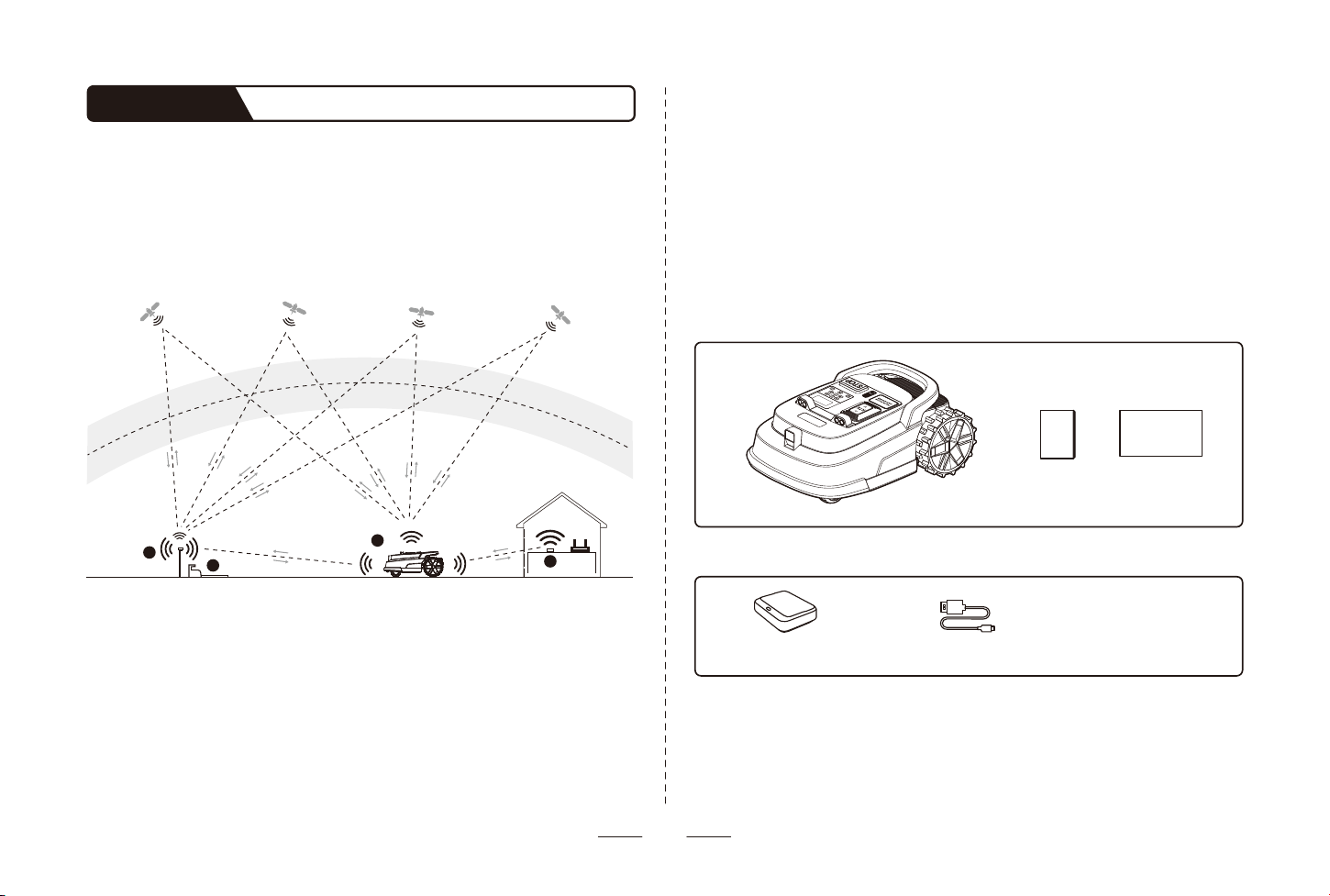
Robotic Mower
(Lora gateway)
Lora Gateway Installation Kit
(USB cable for
lora gateway)
2.4 Packing list
User manual Quick start guide
2.1 System description
The system includes a robotic mower, a charging station, a Lora gateway and a reference
station. The robotic mower and the reference station use the technology with satellite
signals to position the robotic mower correctly, that means a virtual boundary can be
made. The reference station is stationary and sends correct data to the robotic mower to
get an accurate position of the robotic mower. The virtual work area for the product is
made with the APP.
Part 2 Introduction
Robotic mower Lora gatewayReference station &
Charging station
Satellite
Ionosphere
Troposphere
1
3
4
2
2.2 Product description
The robotic mower is powered by a lithium battery and can automatically cut grass in a
defined work area. The work area can be remotely defined through the APP according to
your demand. When mowing, the robotic mower's driving path is automatically planned
by the algorithm according to the shape of the work area to achieve the highest mowing
efficiency. If the entire lawn cannot be completed at one time, the robotic mower will
automatically return to the charging station to charge. When the power is sufficient, the
mowing resumes from the position where it stopped.
2.3 APP
The app is an important part of the system. You can follow the interactive guidance shown
via the app to complete the system installation and set up the work area. You can also use
the app to adjust the settings of the robotic mower, manage the work area, review the
work status of the robotic mower, control the robotic mower remotely, etc. You can also
get the latest and most comprehensive official Help and Support content through the
APP.
04
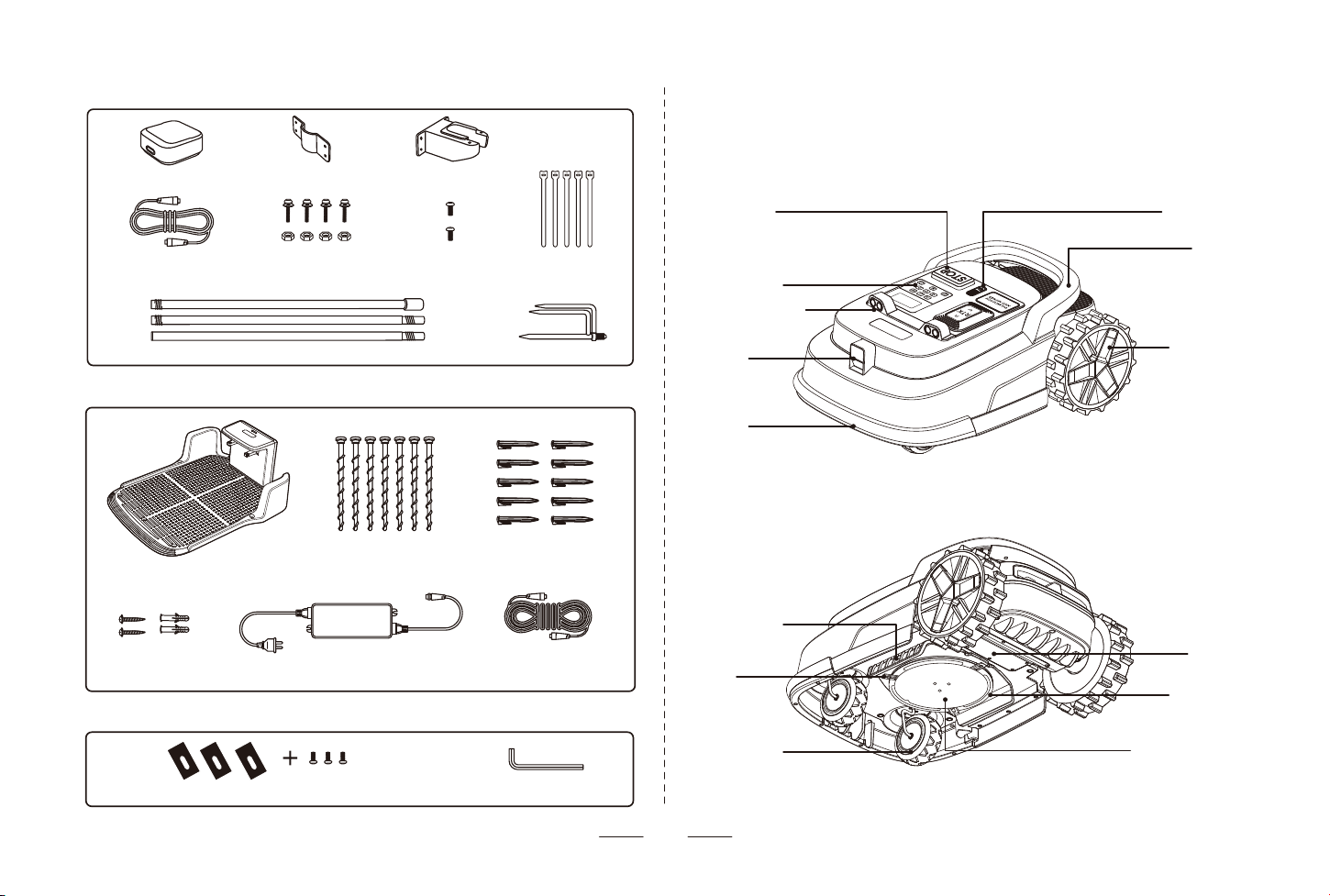
(Adapter for
charging station)
(10m extension cable
for charging station)
(2m Cable for
reference station)
(Charging station)
(Metal clip) (Plastic bracket)
(Support poles) (Ground fork)
(Reference station )
Reference Station Installation Kit
Charging Station Installation Kit
Others
(Nails for fixing
charging station)
(Screws for fixing
adapter)
(Screws for fixing
metal clip)
(Pegs to secure
extension cable)
(Screws for
plastic bracket)
(Replacement blades and screws for spare use) (Allen wrench)
(Velcro for
fixing cable)
2.5 Product overview
2.5.1 Robotic Mower overview
Stop button Rain sensor
Handle
Rear wheel
Blade disc
GlideGuard Plate
Battery
compartment
Control panel
Ultrasonic sensor
Camera
Bumper
Front wheel
Blade
Blade fender
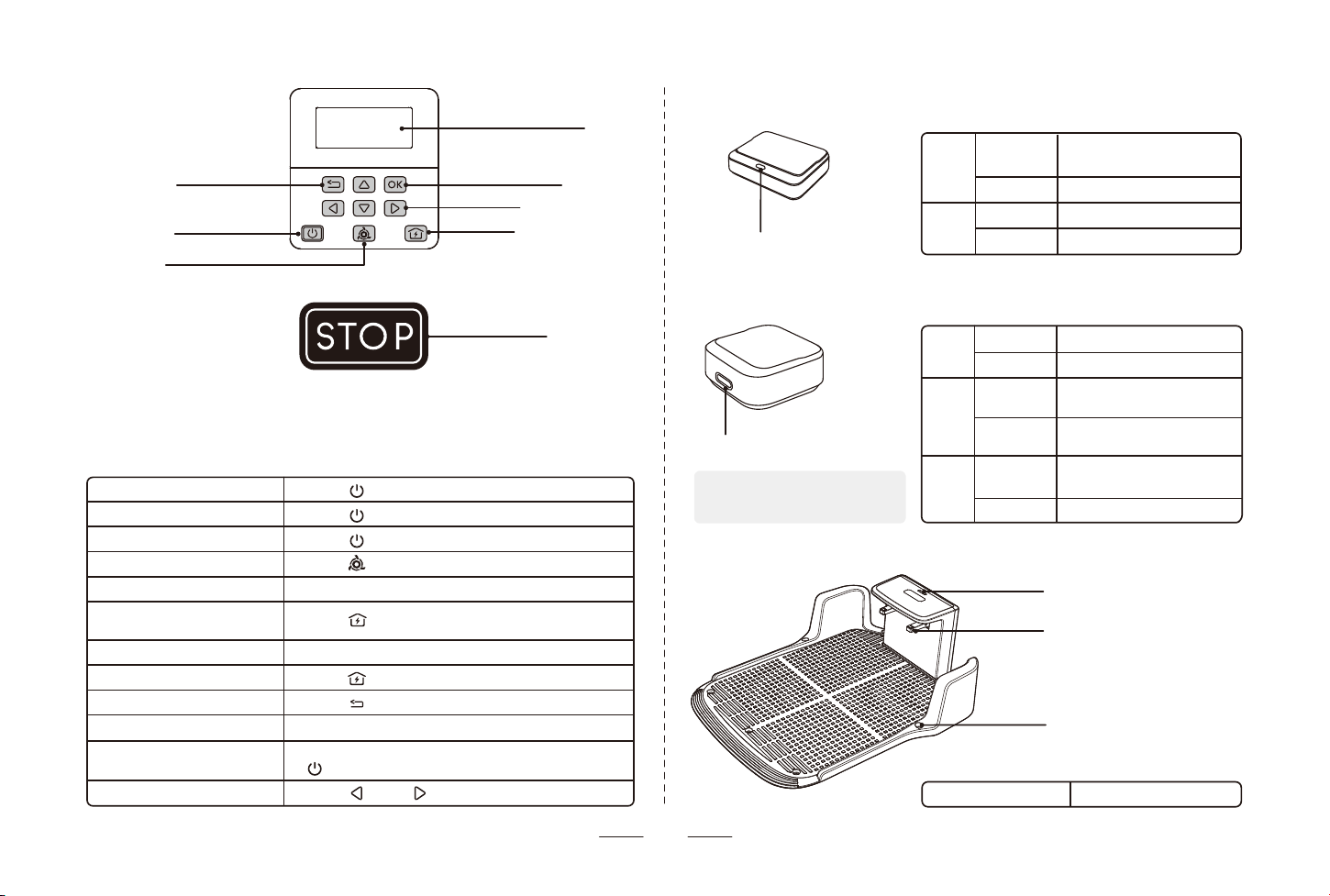
2.5.3 Reference station overview
2.5.4 Charging station overview
2.5.2 Lora gateway overview
Charging strip
Indicator light
Mounting holes for nails
Indicator light
• Indicator light
Solid green Power on
Blue
Red
Solid
Flashing
Solid
Flashing
Network is connected;
Ready for use or working
Setting up WiFi
No network
Error
• Indicator light
Blue
Green
Red
Solid
Flashing
Solid
Flashing
Solid
Flashing
Paired but not positioning
Pairing mode
Good satellite signal, ready
for use or working
Positioning;
Location selecting
Pairing failed;
Positioning failed
Error
• Indicator light
Indicator light
Screen
OK button
Direction buttons
Return to charging
station button
Return button
Power button
Mow button
• Basic operations for control panel
Power on
Power off
Restart
Start / Pause mowing
Stop mower operation
Return to charging station
/ Cancel return
Enter the PIN code
Set up network
Return to previous step
Confirm action
Lock buttons
Restore factory settings
Press 【 】 for 3s
Press 【 】 for 3s
Press 【 】 for 8s until the screen turns off
Press 【 】
Press 【STOP】
Press 【 】
Press direction buttons, then press【OK】
Press 【 】 for 3s
Press 【 】
Press 【OK】
Press 【OK】for 3s (Enter PIN to unlock),
【 】 & 【STOP】buttons will not be locked.
Press 【 】 & 【 】 for 5s
STOP button
05
Note: the power supply of the
reference station will not exceed
100W.
06
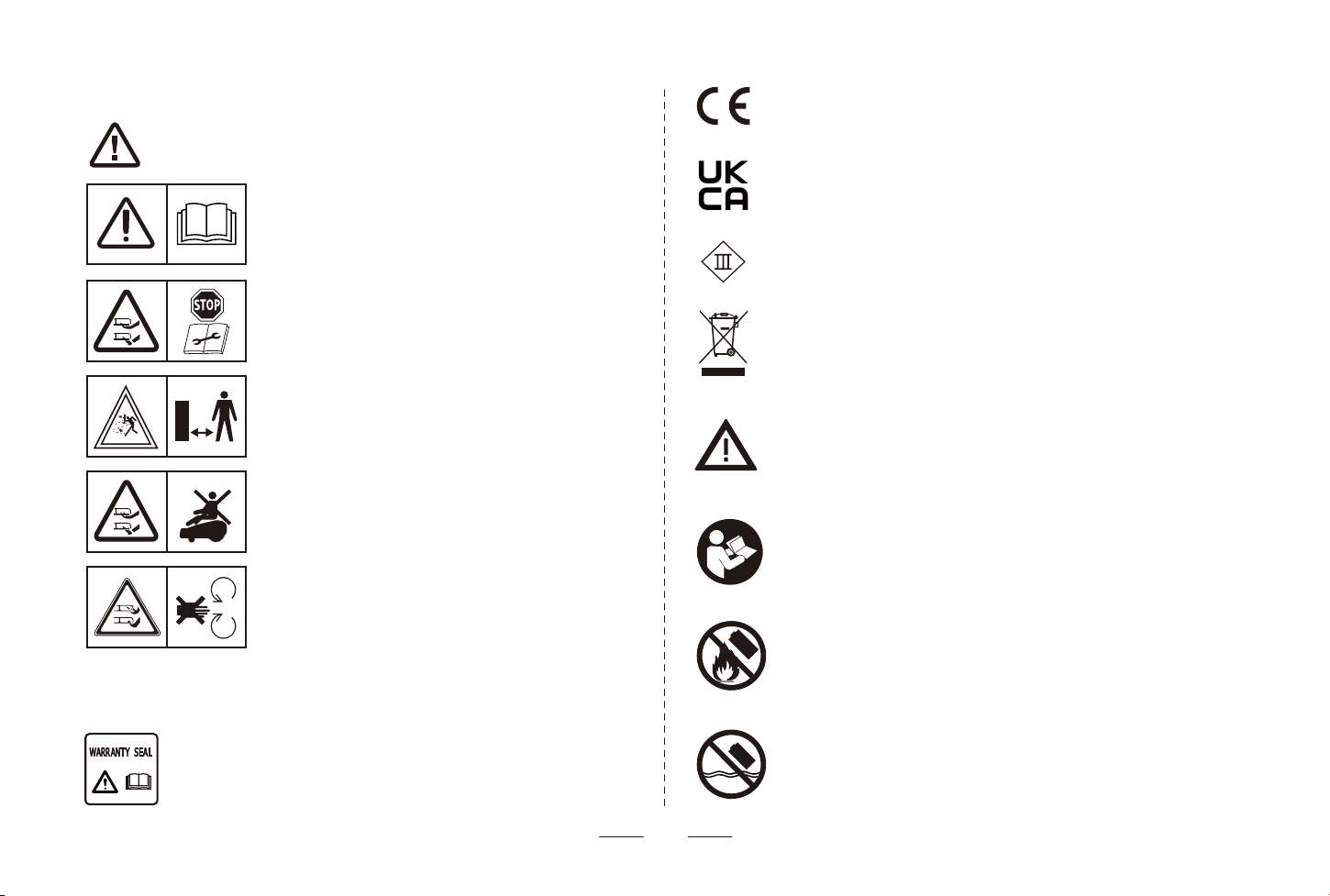
Learn these symbols carefully.
2.6 Symbols
WARNING: Read the user manual before operating the
product.
WARNING: Disable the product before working on or lifting
the product.
WARNING: Keep a safe distance from the product when
operating. Keep your hands and feet away from the rotating
blades.
WARNING: Do not ride on the product. Do not put your
hands or feet close to or under the product.
WARNING: Do not touch rotating blade.
The chassis must also be resealed in a professional manner. For these
reasons the chassis shall only be opened by authorized service technicians.
A broken seal can result in the entire or parts of the guarantee no longer
being valid.
This product is manufactured in China.
MADE IN CHINA
This product complies with the applicable EU Directives.
This product complies with the applicable UK Directives.
Class III appliance.
It is not permitted to dispose this product as normal household waste.
Ensure that the product is recycled in accordance with local legal
requirements.
WARNING: Lithium-ion batteries can explode or cause fire if disassem-
bled, short-circuited or handled roughly. Do not expose the battery to
water, fire or high temperature.
Read the user instructions.
Do not discard the battery into fire and do not expose the battery to a
heat source.
Do not immerse the battery into water.
charger rating
07
3.1 App installation
Please scan the QR code to download the APP, follow the steps to register and login
the account.
Check the device detailed installation steps, settings and operations information on the
APP. You can also find more information, such as device status, etc.
3.2 Preparation for installation
Part 3 Installation & Use
NOTE:
During use, please enable Bluetooth, GPS location, 2.4GHz WiFi, and other access
permissions to ensure smooth operation of the APP.
Please scan QR code above for step-by-step videos and start to set up Robotic Mower.
If you have problems during installation, Please feel free to contact the Customer Support
at aftersales@ubtrobot.com.
• Read and understand the safety chapter before installing the
product.
• Use original spare parts and installation materials.
• The illustrations/screens used in the document are for reference
only. Please refer to the actual products.
• Holes with water in the lawn may cause damage to the product.
• Remove debris, piles of leaves, toys, wires, stones and other
obstacles in the lawn.
• Fill in holes in the lawn to make it level.
• Make sure children and pets are not on the lawn.
• Before the first time mowing, please cut your lawn to a height of no
more than 6 cm.
WARNING
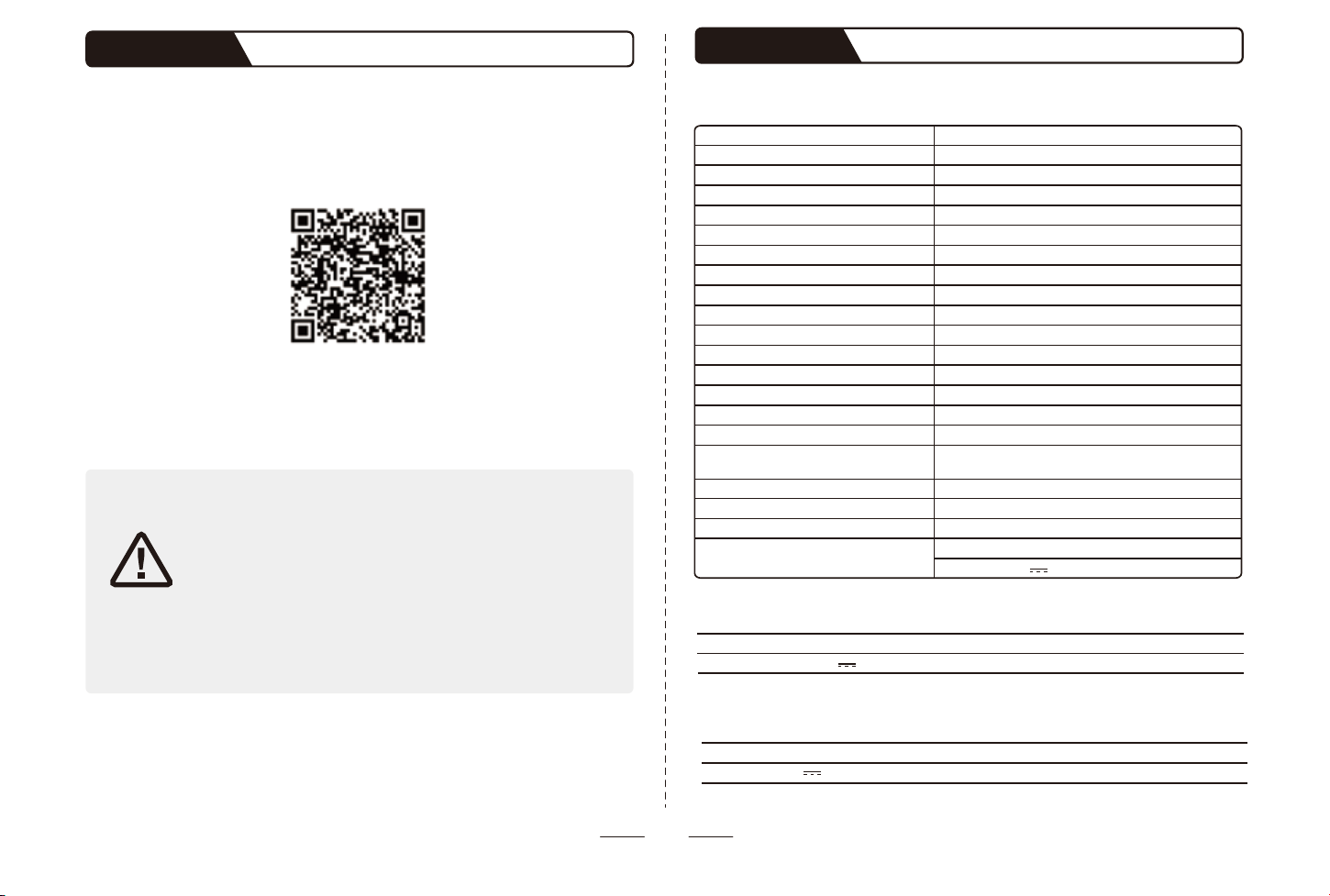
Part 4 Specifications
Robotic Mower
M10
602mm x 416mm x 255mm
appr. 12.6kg
Mower frame: PP; Cover: ASA
5.2Ah
1.5h
2.5h
1000㎡
23cm(9.06 in)
30–60 mm for EU/AU/UK,40–60 mm for US
0.2-0.6 m/s
<60dB
-10~50℃(14~122℉)
5~45℃(41~113℉)
-20~60℃ (-4~140℉)
Robotic mower IPX6; Charging station &
Reference station IPX5
55%
10%
Wi-Fi/BT/Lora
Input: 100-240V ~ 50/60Hz 2.5A
Output: 30.0V 2.5A; 75.0W
Product name
Model
Length × Width × Height
Net weight (battery included)
Material
Battery capacity
Average mowing time per full charge
Average charging time
Average mowing capacity per day
Cutting width
Cutting height
Driving speed
Measured sound power level LWA
Working temperature
Charging temperature
Storage temperature
IP rating
Max. Incline Inside working area
Max. Incline at boundary
Connectivity
Lora gateway
Reference station
Reference Station
RS-M10
Product name
Model
Lora gateway
LG-M10
Product name
Model
Rated Input: 12-30.0V 1A
Rated Input: 5V
1A
Robotic Mower
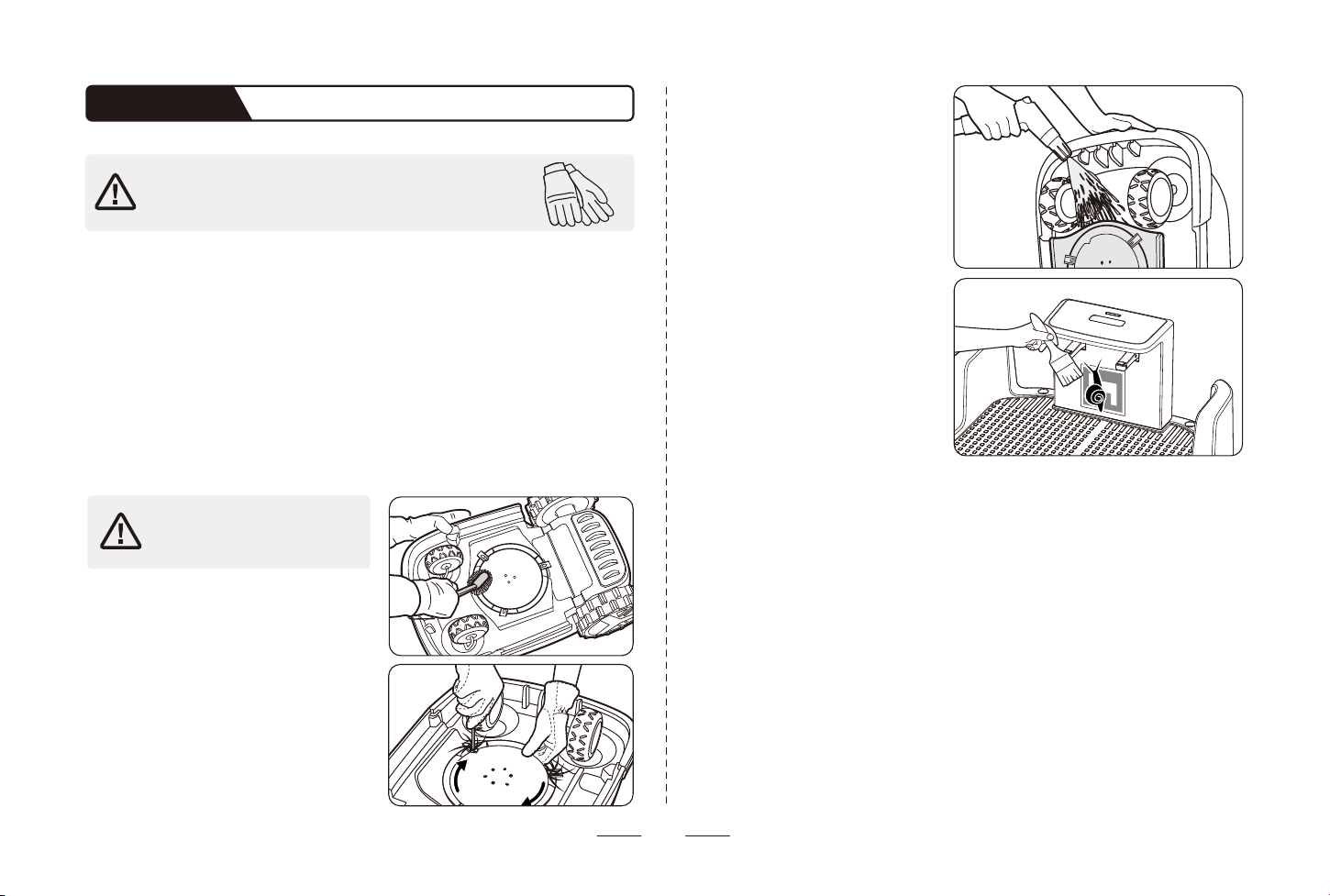
• Chassis and blade disc
If the chassis and blade disc are dirty, please use a brush or a water hose to clean foreign
objects or grass clippings, do not knock the mower with your feet or other objects. At the
same time, make sure that the blade disc rotates freely and the blades can pivot freely.
• Blade fender
Check the blade fender regularly. If mud, grass clippings or other objects gather on the
blade fender, remove them with a dry brush or scraper.
• Wheels
Grass on the wheels can affect how the mower performs when climbing slopes. Remove
mud or other objects stuck in to ensure strong grip.
• Front wheels (universal wheels)
Inspect and clean universal wheels regularly. If the wheels are stuck, clean off the debris
and lubricate the wheels.
• Rain sensor
Check the rain sensor regularly and make sure the rain sensor is not covered by mud,
grass clippings or other objects. You can either wash it or clean it with a soft brush. After
cleaning, dry the sensor area.
08
• Before cleaning, make sure the mower is powered off. When
the mower is upside down, it must be powered off.
• Please wear the protective gloves.
5.1 Cleaning
Part 5 Maintenance
For better operation and lifetime of the product, make sure to clean the product regularly
and replace worn parts. When the product is new, examine the blade discs and blades
every week. If the wear is slow, you can increase the interval for the next time you examine
the blade discs and blades. Examine the blade discs and the blades more regularly if there
is much wear.
It is important that the blade disc rotates easily and that the edges of the blades are not
damaged. The conditions that follow can increase or decrease the lifetime of the blades:
• Operation time and dimension of the work area.
• Length and thickness of the grass.
• Soil, sand and use of fertilizers.
• Objects such as cones, tools, stones and roots in the work area.
For proper charging, periodically
inspect and clean the charging station
from debris and mud, make sure there
is no object blocking the QR code of
the charging station.
Make sure all connecting parts of the
charging station, the low-voltage cable,
and the power supply are not blocked.
Remove the blade screws to clean the
tangled grass so the blades can spin freely.
After mowing, use a hose to flush away
any accumulated grass on the back of
the fender so that blade disc can be
raised and lowered without obstruction.
Do not touch any moving
hazardous parts, such as the
blade disc, before it has come
to a complete stop.
Use a soft brush or a water hose to clean the
exterior of the mower thoroughly.
DO NOT clean with alcohol, gasoline, acetone,
or other corrosive/volatile solvents. These
substances may damage the appearance and
internal structure of your mower.
09
5.2 Replacement of the blades
• If regularly use the mower, it is recommended to replace the blades and
screws every 1–2 months to ensure safety and better mowing results.
Replace three blades and their screws at the same time for a safe cutting
system.
• Only original blades and screws can be used.
• Wear the protective gloves when inspect or replace the blades.
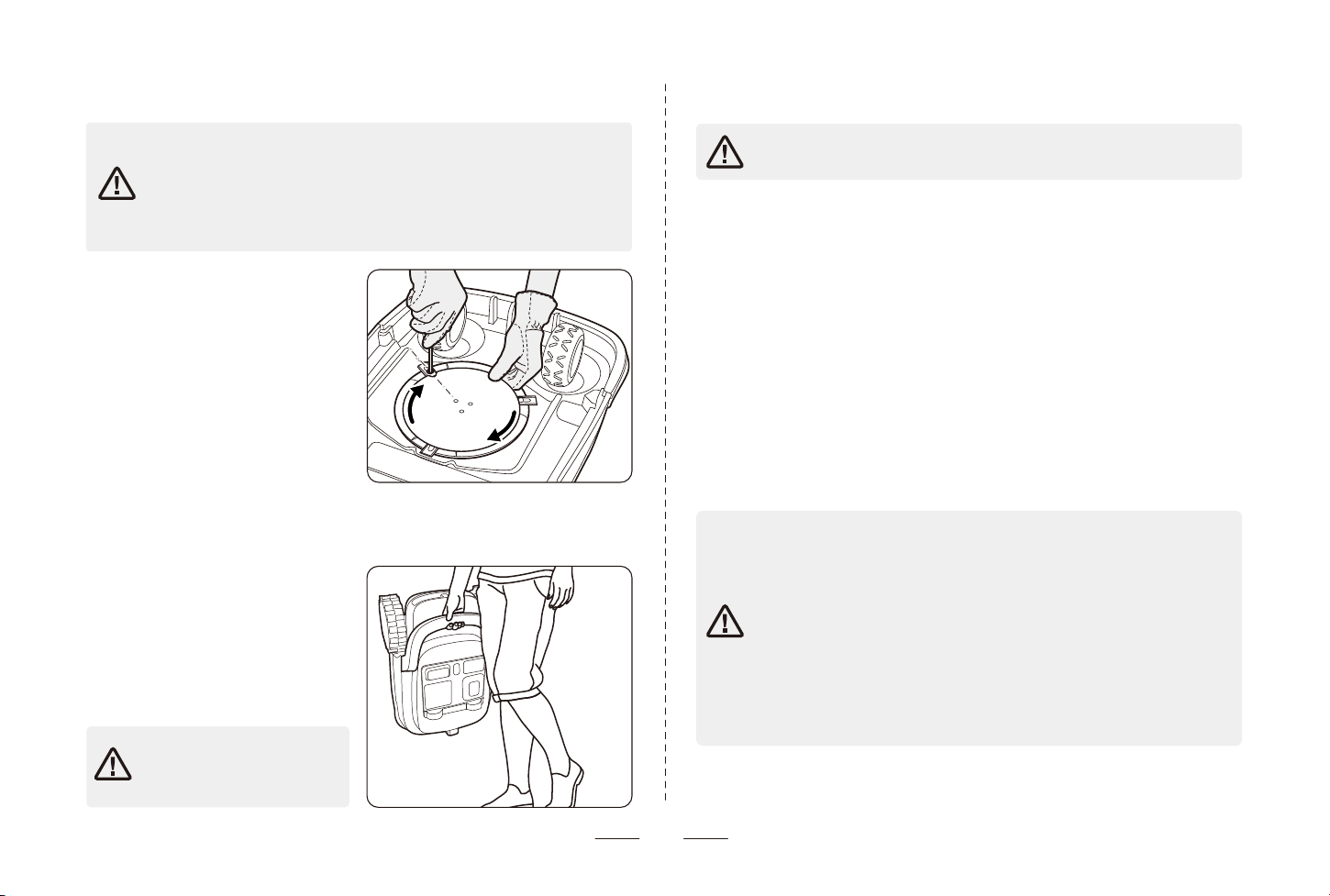
Steps to replace the blades:
1. Turn off the mower.
2. To avoid scratching, place the mower on a
soft and clean surface in an upside-down
position.
3. Rotate the skid plate until its holes align
with the screws for blade.
4. Remove the 3 screws with a screwdriver.
5. Remove the blades that should be
replaced.
6. Replace with new blades and fix them
with 3 new screws.
7. Make sure that the blades can pivot freely.
5.3 Transportation
5.4 Battery
To avoid damage to the mower
or the charging station, DO NOT
lift the product when it’s parked
in the charging station.
Charge the battery enough or at least 50% to avoid over-discharge before you
put the product into storage.
To protect the mower, use the original
package for long-distance transportation.
Before lifting, moving, or transporting the
product, turn it off. Handle with care and
avoid violent force, such as throwing and
heavy pressure. Never pick up or carry the
mower while the motor is running. Carry
the mower by the handle, with the blade
disc facing away from your body.
5.5 Power supply
If the operating time is obviously shorter than usual between charges, this means that the
battery is at the end of its life cycle. Replace the battery to extend the operating time.
Note: The battery life is related to the length of the season and how many hours a day the
product operates. A long season or many hours of operation a day means that the battery
must be replaced more regularly, Please contact the customer support to replace the
battery.
Disconnect the power supply:
• Before clearing the blockage
• Before checking, cleaning or working on the machine
• After striking a foreign object to inspect the machine for damage.
Regularly examine the cord, plug, enclosure and other parts. If any damage or signs of
aging are found, stop using immediately.
• DO NOT operate a damaged power supply. If the supply cord is damaged, it
must be replaced by the manufacturer or its service agent in order to avoid
a hazard. If the extension cable is defective, please replace it with the
approved 10-meter cable.
• DO NOT connect a damaged cord to the power supply or touch a damaged
cord or extension cable before it is disconnected from the power socket.
Damaged cords can lead to contact with live parts.
• DO NOT use the power supply with any other product or battery, otherwise
there will be risks of personal injury, fire or electrical shock. Product safety
cannot be guaranteed with other than original batteries.
• DO NOT charge when the battery is leaking. Keep the extension cable away
from moving hazardous parts to avoid damage to the cords which can lead
to contact with live parts.
Recommendation
Connect the mower or its peripherals only to a supply circuit protected by a residual
current device with a tripping current of not more than 30 mA.
10
When there is a risk of a thunderstorm, unplug the power supply from the
power outlet. Disconnect all cables and wires connecting to the charging
station, the reference station. Reconnect when there is no longer a risk of
thunder.
DO NOT dispose of this product in a landfill, by incineration, or by mixing with
household trash. Danger or serious injury can occur because of the electrical
components.
5.6 Storage
Before storage, power off the mower and charge its battery at least 50% to avoid
over-discharge, which will cause permanent damage.
Store in a cool and dry place indoors. Exposure to sunlight and temperature extremes
(both hot and cold) will accelerate the aging process of the components and may
permanently damage the battery.
Keep the mower, charging station and power supply away from heat sources (such as
stoves, radiators, etc.) or chemicals. Protect the power supply from moisture and keep it
in a well-ventilated place.
Do not stack items on top of the mower to prevent damage to the screen buttons, etc.
5.7 Disposal
DO NOT treat this product as domestic waste. For recycling information, contact your
domestic waste service, your municipality, or point of sale.
• The robotic mower
Clean the mower thoroughly before storage. Check the components subject to wear such
as the blades. Repair or replace them if they are in poor condition. Store the mower in a
dry and frost-free place, while standing on all wheels, preferably in the original package.
• The charging station and the reference station
Unplug the power supply from the power outlet and disconnect it from the charging
station. Make sure the reference is powered off.
Part 6 Warranty
UBHOME provides a straightforward warranty that is processed in the most hassle- free
way possible. This policy should be regarded as a standard service policy covering
products that have been authorized for sale dealer.
Kindly contact us at aftersales@ubtrobot.com with your order receipt or other proof of
purchase for confirmation.
Item
Main unit
Accessories
Consumables
Warranty Content
Main unit (including the built-in lithium battery)
Reference Station, Charging Station and Lora
Gateway
Blades\Pegs\Nails
Warranty Period
2 year
2 year
/
Note: Consumables delivered with the product have no warranty.
Warranty protections are in addition to rights provided under local consumer laws and may
vary among countries/regions.
30 days Day Money-Back Guarantee for Any Reason:
Undamaged products may be returned for a full refund for any reason within 30 days of
the date the item was delivered to the designated shipping address.
• Returns must include all accessories.
• Items must include the original package.
• For non-quality related warranty claims, buyer is responsible for shipping costs.
• For non-quality related warranty claims, UBHOME refunds the cost of the product itself.
• Returns may be rejected if product does not meet above requirements.
It is not possible to process a request for a refund for non-quality issues for items that have
expired this 30-day window. For purchases not made directly through online stores, please
contact retailers for refunds. For quality-related issues, please see below.
Warranty Claims for Quality-Related Issues:
All quality-related defects on items sold directly by online stores or UBHOME’s authorized
resellers are covered by an extensive warranty, starting from the date of purchase.
UBHOME’s limited warranty is restricted to the country of purchase. The limited warranty is
void on items taken outside the country they were originally bought in or shipped to
directly from an authorized online purchase.
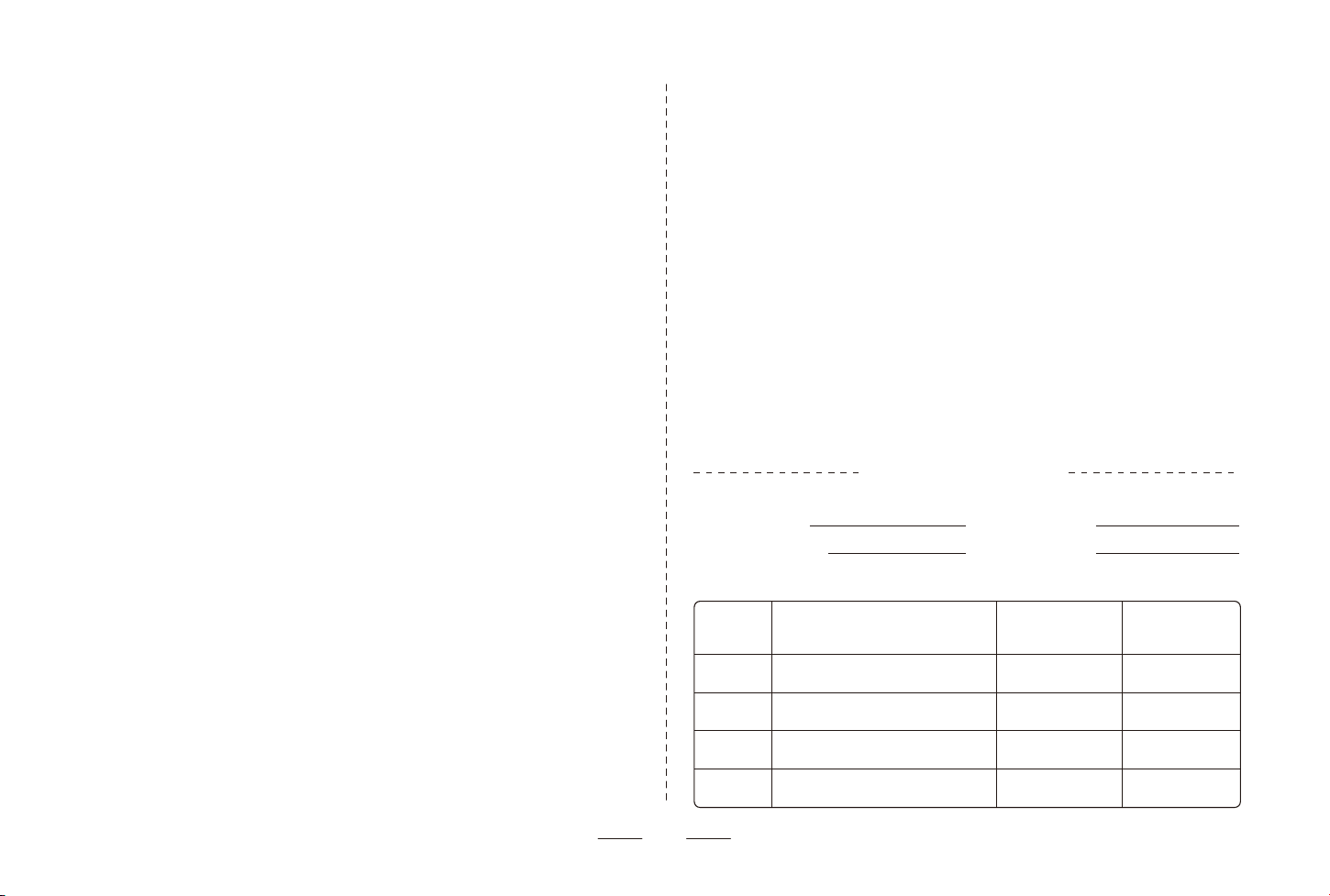
Warranty Record
Warranty
Date
Faults and Troubleshooting
Completion
Date
User’s
Signature
User Information
Product Model:
Date of Purchase:
Product No.:
User Name:
Warranty Card
11
Warranties on all replacements follow the same warranty time frame of the original
defective item, or 3 months after being replaced, whichever is longer.
Warranties on products are void after having been fully refunded.
Process:
• Buyer must provide sufficient proof of purchase.
• UBHOME must document what happens when buyers troubleshoot the product.
• The defective item’s serial number and/or visible proof depicting the defect are required.
• It may be necessary to return the item for quality inspection.
Valid proof of purchase:
• Order number from online purchases made through online stores or UBHOME’s
authorized resellers.
• Sales invoice.
• Dated sales receipt from an authorized UBHOME reseller that shows a description of the
product along with its price.
Please note more than one type of proof of purchase may be required to process a
warranty claim (such as receipt of money transfer and confirmation of address item was
originally shipped to).
Shipping costs must be covered by buyer in the following
situations:
• Returning products for any reason other than a proven defect.
• Warranty claims on items taken outside the original country of purchase.
• Buyer’s accidental returns.
• Returning personal items.
• Returning items claimed to have defects but found by UBHOME quality control to be in
working condition.
• Returning defective items in international shipping.
• Costs associated with unauthorized returns (any returns made outside of the approved
warranty process).
Not Covered Under Warranty:
• Products without sufficient proof of purchase
• Lost or stolen products
• Items that have expired their warranty period
• Non quality-related issues (after 30 days of purchase)
• Free products
• Repairs through the 3rd parties
• Damage from outside sources
• Damage from misuse of products (including, but not limited to: falls, extreme
temperatures, water, operating devices improperly)
• Purchases from unauthorized resellers UBHOME is not liable for:
• Loss of data incurred from use of UBHOME products
• Returning personal items sent to UBHOME
When returning items with a prepaid shipping label provided by UBHOME, UBHOME takes
responsibility for any damage or loss incurred in transit. When returning items for
non-quality issues, buyer assumes responsibility for any damage or loss incurred in transit.
UBHOME does not provide refunds for items damaged in transit for non- quality related
warranty claims.

more of the following measures:
the equipment off and on, the user is encouraged to try to correct the interference by one or
cause harmful interference to radio or television reception, which can be determined by turning
no guarantee that interference will not occur in a particular installation. If this equipment does
the instructions, may cause harmful interference to radio communications. However, there is
uses and can radiate radio frequency energy and, if not installed and used in accordance with
protection against harmful interference in a residential installation. This equipment generates,
This device complies with part 15 of the FCC Rules. Operation is subject to the following
two conditions: (1) This device may not cause harmful interference, and (2) this device
must accept any interference received, including interference that may cause undesired
operation.
Any changes or modifications not expressly approved by the party responsible for
compliance could void the user's authority to operate the equipment.
This equipment has been tested and found to comply with the limits for a Class B digital
device,
—Reorient or relocate the receiving antenna.
—Increase the separation between the equipment and receiver.
—Connect the equipment into an outlet on a circuit different from that to which the
receiver is connected.
—Consult the dealer or an experienced radio/TV technician for help.
FCC Radiation Exposure Statement
This equipment complies with FCC radiation exposure limits set forth for an uncontrolled
environment .
This transmitter must not be co‐located or operating in conjunction with any other
antenna or transmitter.
This equipment should be installed and operated with minimum distance 20cm between
the radiator& your body.
pursuant to part 15 of the FCC Rules. These limits are designed to provide reasonable

UBTECH ROBOTICS CORP LTD
Room 2201, Building C1 Nanshan Smart Park No. 1001 Xueyuan Avenue Changyuan Community Taoyuan Street
Nanshan District Shenzhen PRC
E-mail: aftersales@ubtrobot.com
MADE IN CHINA