User manual
Contents
In the box
Getting started
Charging your machine
Emptying your bin
Cleaning your bin
Clearing blockages
Washing filter A
Washing filter B
Clearing blockages from your
Mini motorized tool
Cleaning your tools
Looking after your machine
Car and boat logo
Dyson logo
8969112 12.20.24 ©2024 DYSON
In the box
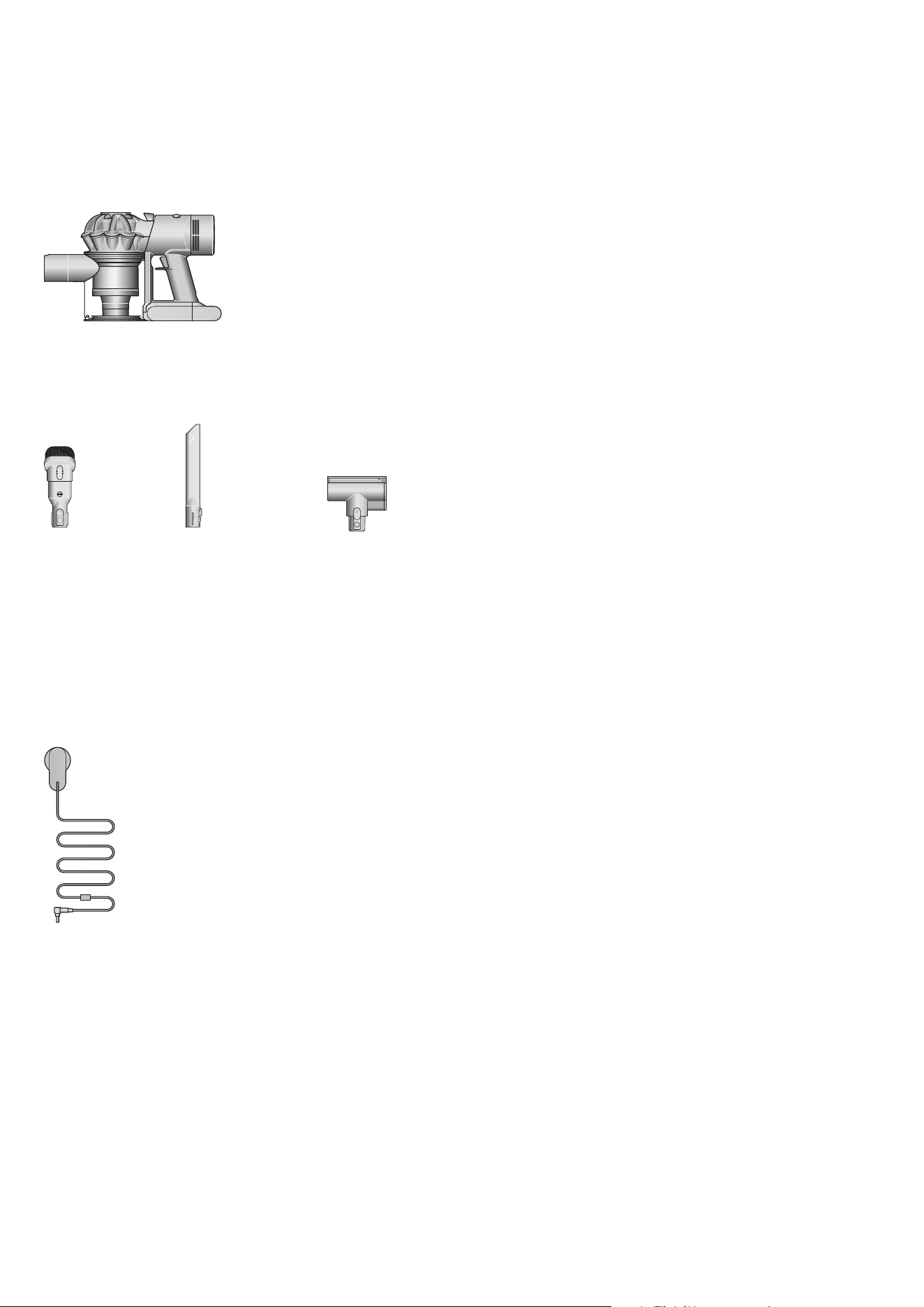
Your machine will come with these tools.
Vacuum cleaner
Charger
Charges your vacuum.
Crevice tool
Engineered for precise
cleaning around
tricky edges and into
hard-to-reach narrow
spaces.
Combination tool
Two tools in one –
wide nozzle and brush,
for quick switching
between cleaning and
dusting tasks around
your home or car.
Mini motorized tool
Motorized brush bar,
concentrated in a
smaller head to remove
stubborn dirt from
mattresses, upholstery
and stairs.
Main body
showing the
handle and
bin attached.
The charger is a one
piece unit with the plug,
connector end and cable.
This tool has a
combination
of brush head
and crevice tool
together in one
unit. The brush
head slides down
the crevice tool
when needed.
A long tool
with an
angled end.
A small cleaner head
with a body housing the
motor and an electrical
connector to attach
directly to the machine.
clik
Getting started
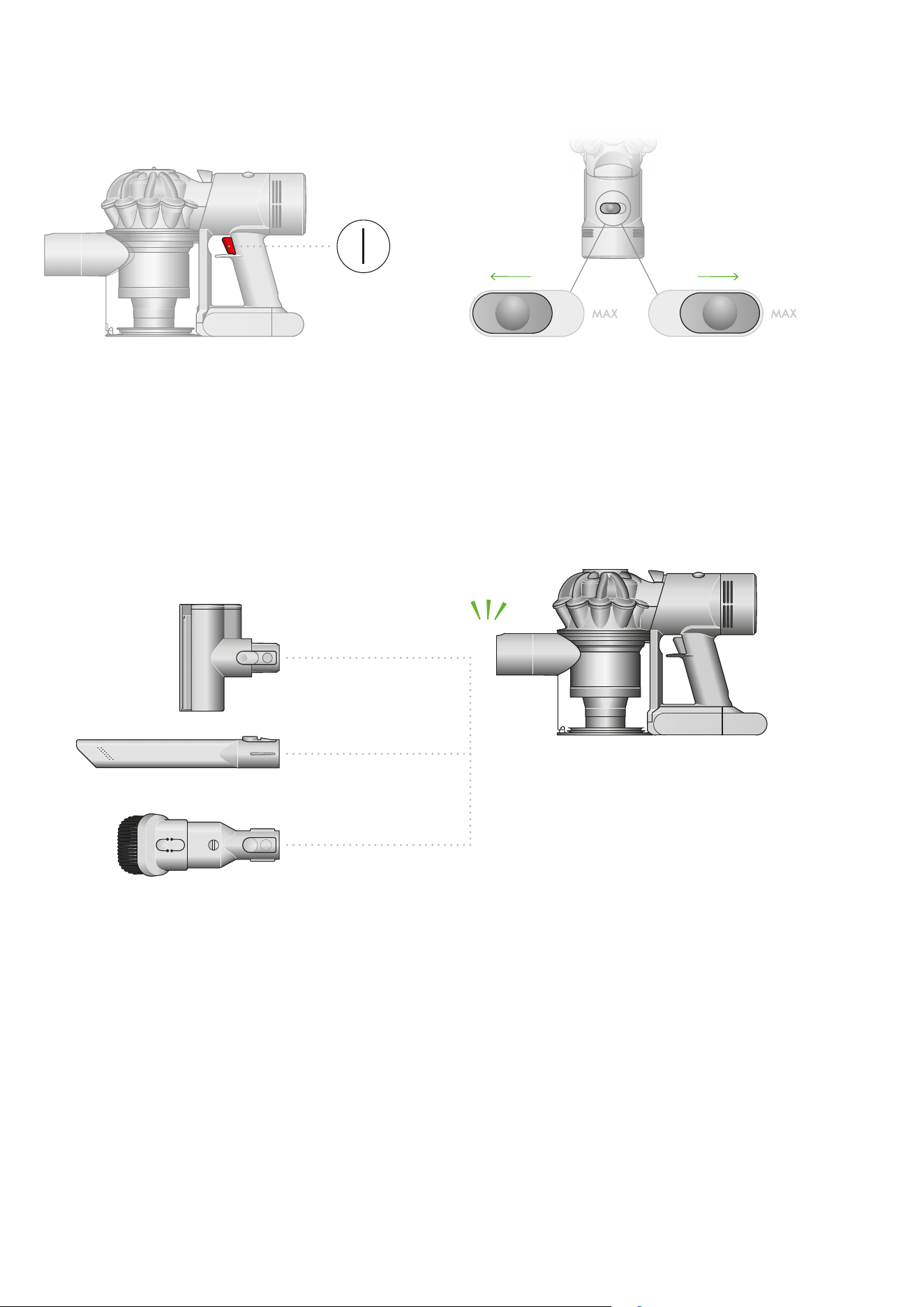
Pull trigger to start cleaning Two power modes
Toggle between Powerful mode – for
longer suction – and MAX mode, for
stronger suction. Just hold down the
trigger and slide the control back
and forth.
Switch accessories quickly
The quick-release tools click into
place, and release in moments by
simply depressing the release switch.
Pointers to demonstrate
that the tools can be
connected directly to the
main body.
The power mode button is located
on the top of the machine between
the bin and filter. Slide to the left for
powerful cleaning and to the right
for max mode.
The trigger is located at
the top of the handle of
the machine. Depress
the trigger to activate the
motor and start cleaning.
Battery LEDs
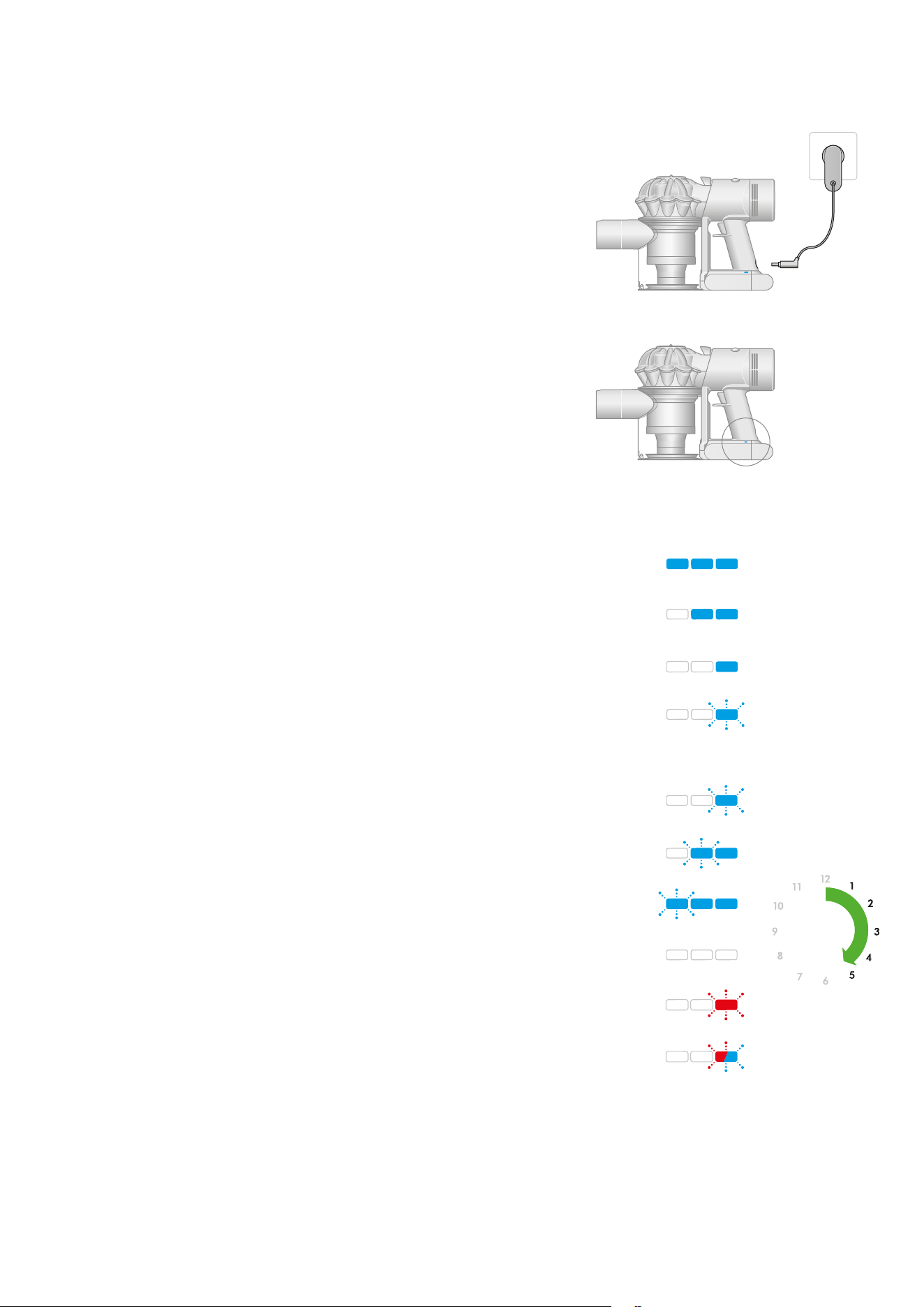
Charging LEDs
During use, high charge.
Charging, low charge.
Charging, medium charge.
Charging, nearly full.
Fully charged.
Battery fault.
Charger fault.
During use, medium charge.
During use, low charge.
Empty.
4.5 hrs4.5 hrs
Charging your machine
Connect your machine to the charger and fully charge before first use.
A full charge will take approximately 4.5 hours. While your battery
is charging, the LEDs will flash with the current level of charge.
These lights will turn off once your machine is fully charged.
One light flashing
alternately red and blue.
Two flashing blue lights on
the side of the battery.
No lights illuminated on
the side of the battery.
Three flashing blue lights
on the side of the battery.
One flashing blue light on
the side of the battery.
One flashing red LED.
All LEDs lit with a
solid blue light
Two LEDs lit with a
solid blue light
One LED lit with a
solid blue light
One blue LED flashing.
The LED lights
are located on
the side of the
battery unit.
Insert the charging cable into the charging point at the back of
the vacuum, at the bottom of the handle. Plug the cable into a
wall socket to begin charging.
Emptying your bin
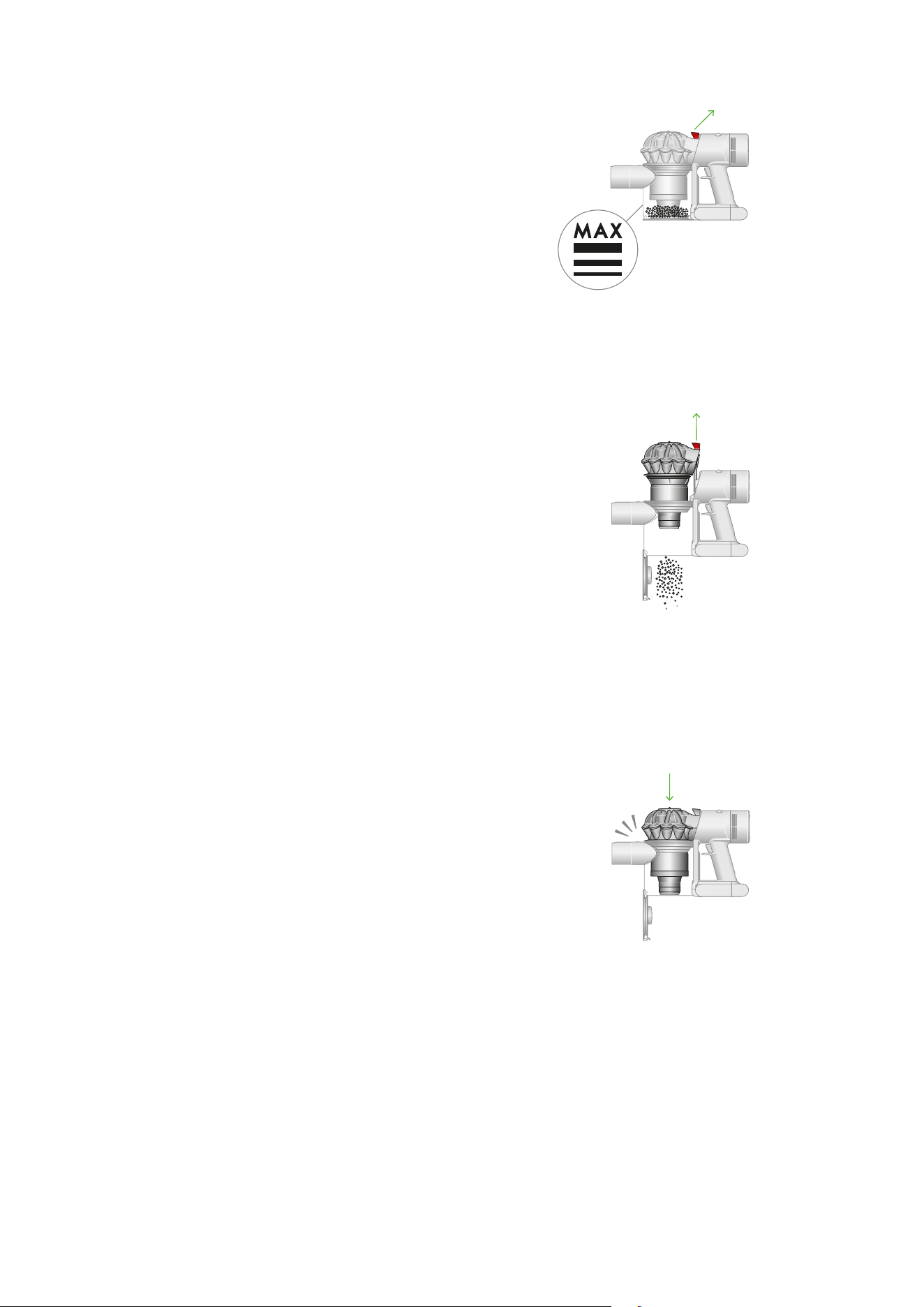
Empty as soon as the dirt reaches the MAX level – don’t overfill. Using your
machine when the dirt is above the MAX line may affect the performance
and require more frequent filter washing.
Close the bin
Push down on the cyclone until it slides into position.
Push the bin base upwards until it closes securely.
Release the dirt
Hold your machine over the trash can and pull the bin release catch upwards.
The cyclone will slide up and the bin base will open.
Minimize dust contact
Cover your bin tightly in a dustproof bag while you empty.
Remove the bin carefully, seal the bag tightly and dispose.
clik
The bin release catch
is located on the top
of the cyclone where it
joins the main body of
your machine.
The MAX mark on the bin
of the machine, showing
that the dirt should not be
filled over the Max mark
when the machine is at
the angle of normal use.
1
Empty your bin as soon as the dirt reaches the MAX mark.
You may need to clean the filter more often if you use your machine
with a full bin.
Cleaning your bin
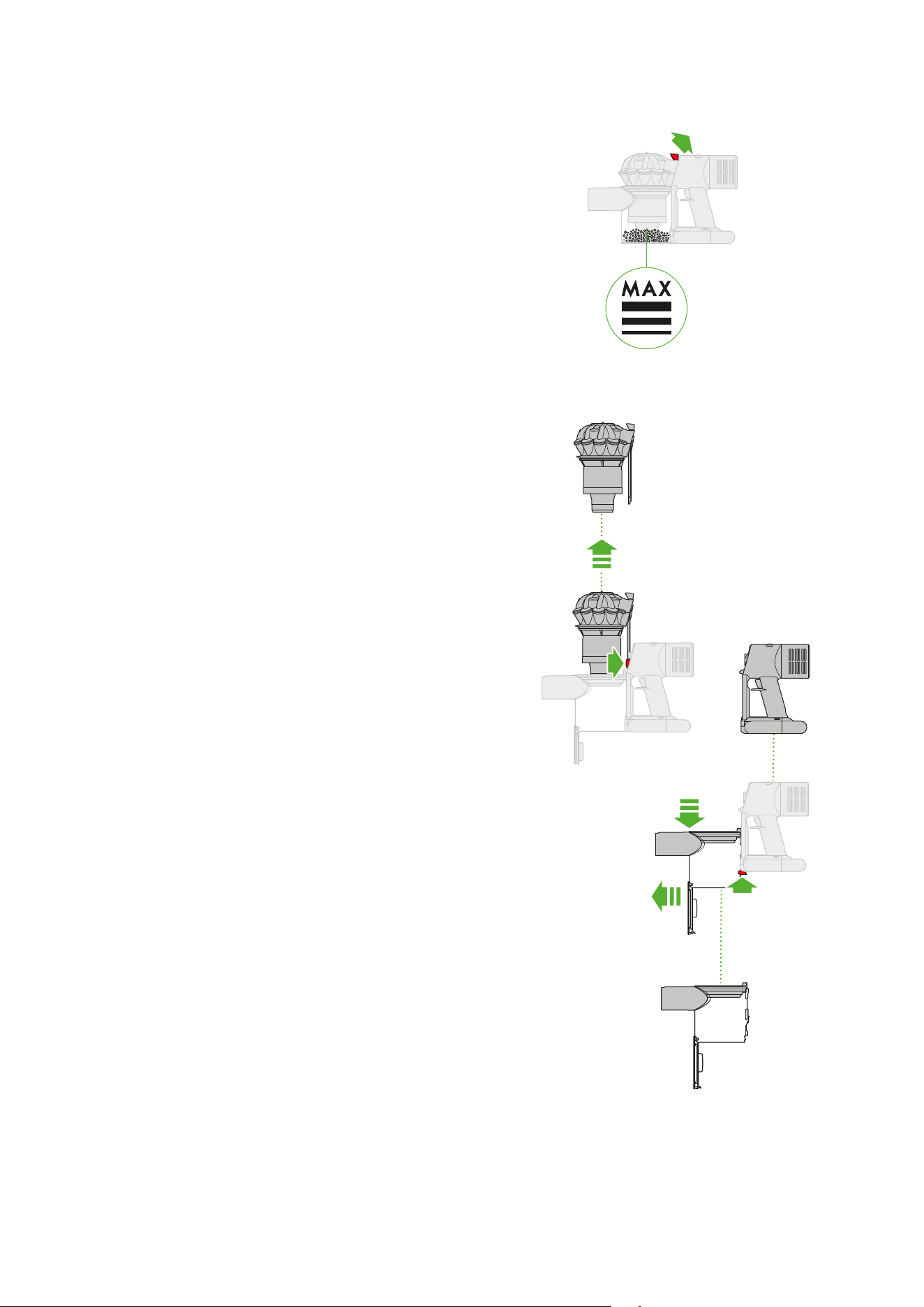
Empty your bin
Remove any tools from your machine.
Hold your machine over a trash can and pull the bin release catch upwards.
The cyclone will slide up and the bin base will open.
Remove the cyclone
Pull the bin release catch upwards. The cyclone will slide up and the bin base
will open.
Locate the cyclone release button behind the cyclone and push to remove the
cyclone from your machine.
Remove the bin
Pull back on the red catch located on the base, slide the bin down and pull it
off your machine.
Clean the bin
Wipe your bin with a damp, lint-free cloth. Don’t put the bin in a dishwasher
or use detergents, polishes or air fresheners.
Make sure the bin is completely dry before replacing.
Replace the bin
Align the tabs on the bin with the grooves on the main body and slide it
upwards until it clicks into place.
Replace the cyclone
Slide the cyclone into the grooves of the main body and push down until it is
in position.
Push the bin base up until it clicks firmly shut.
1
2
2
1
3
The cyclone release
button is located on
the main body and is
visible once the bin
release button has
been activated.
The button to remove
the bin is located on the
bottom of the handle.
The bin release
catch is located
on the top of the
cyclone where
it joins the main
body of your
machine.
Clearing blockages
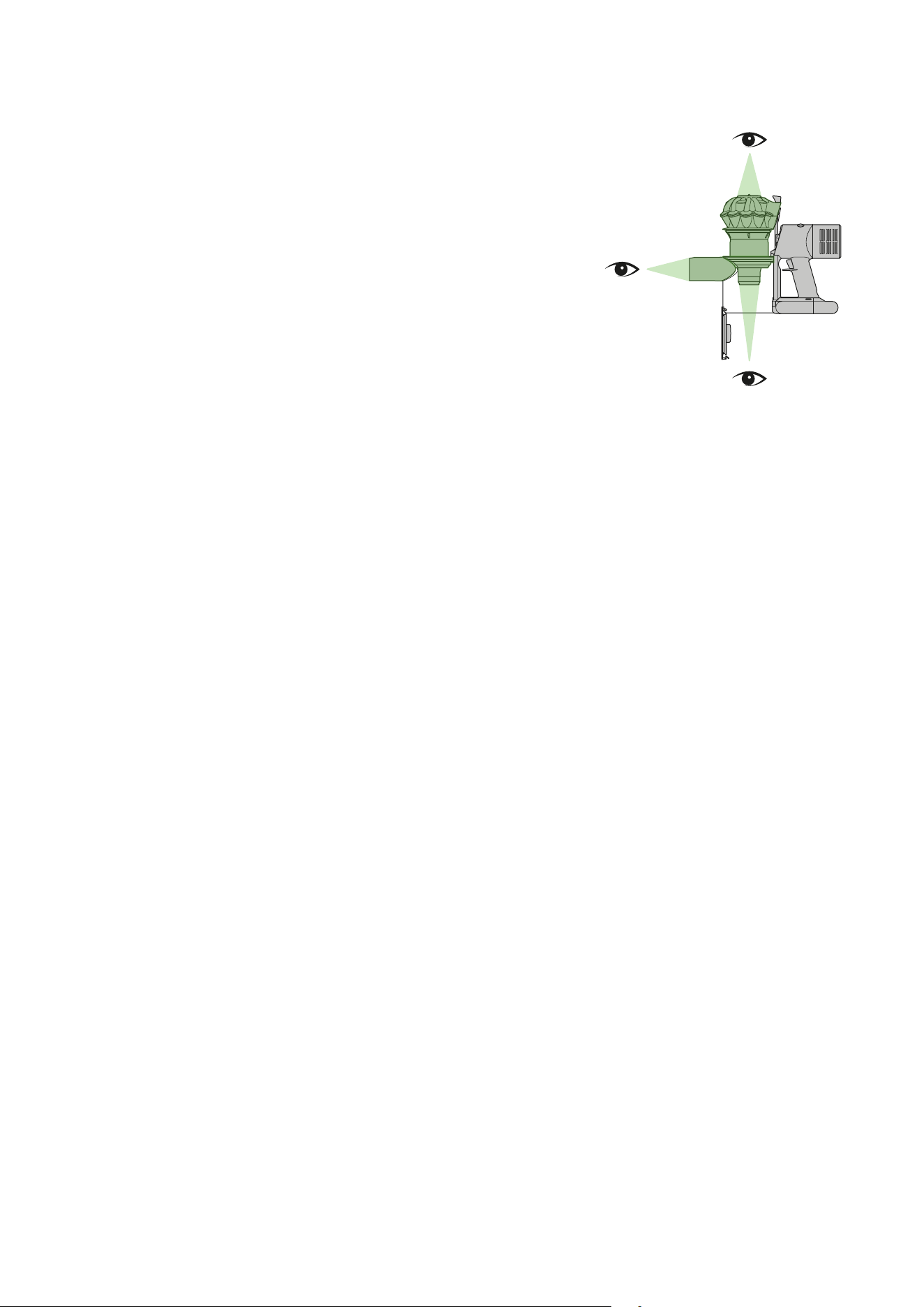
Disconnect your machine from the charger before looking for blockages.
Be careful not to touch the trigger and be aware of sharp objects.
Leave your machine to cool down before looking for blockages.
Don’t use your machine when looking for blockages as this could cause injury.
Your machine is fitted with an automatic cut-out. If any part
of it is blocked, your machine’s motor will pulse and won’t
function until the blockage has been cleared.
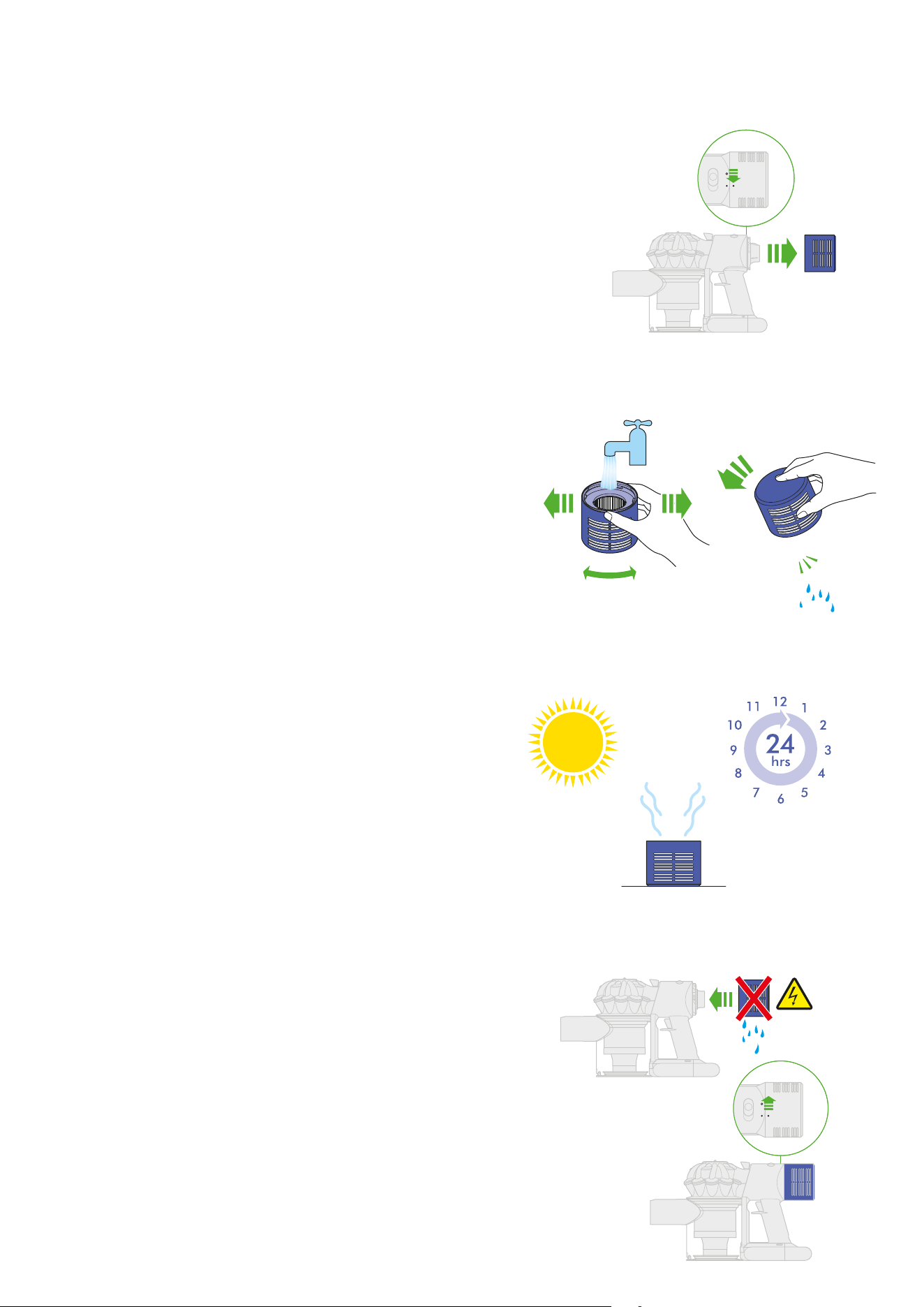
Washing filter A
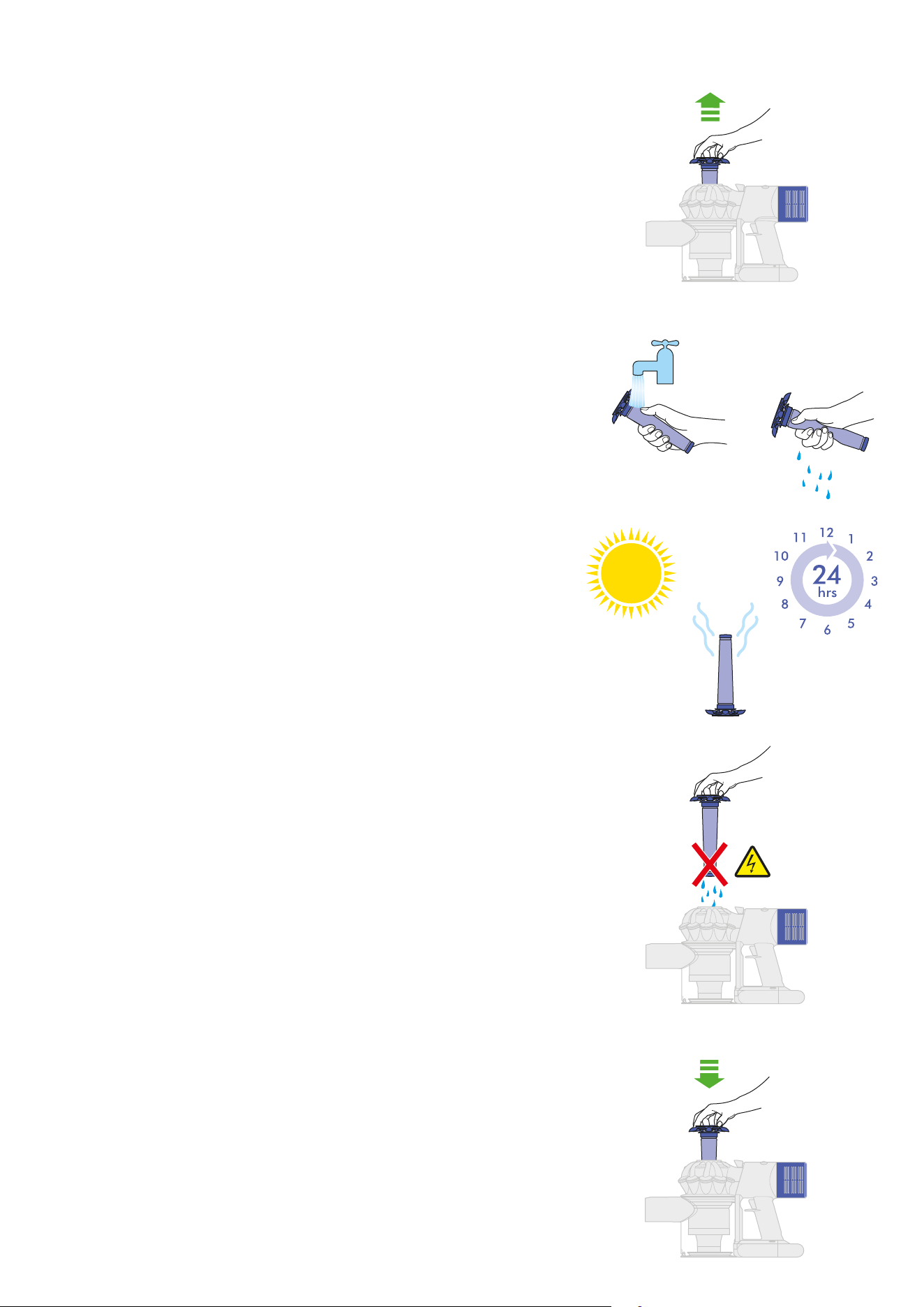
Wash your filter
Hold the filter under a running tap, until the water runs clear.
Tap the filter to remove excess water.
Squeeze and twist with both hands to make sure the excess water is removed.
Dry your filter
Leave your filter to dry completely, for at least 24 hours in a well-ventilated,
warm place.
Do not dry your filter in a tumble-dryer or near a naked flame.
Important: your filter must be completely dry before you put it back into the
machine. Your machine could be damaged if used with a damp filter.
Refit your filter
Align the arrow on the top of the filter with the bin release button.
Push down to fit securely in place.
Remove your filter
Lift the filter out of the top of the cyclone.
Tap to remove excess dust and debris.
The filter has a top with
five arms that fit onto
the cyclone body
The filter will only fit
correctly if the arms
are aligned and the
arrow on the top is
pointing towards
the main body of
the machine.
Twist off your filter
Twist your filter counterclockwise and pull it away from your machine.
Wash your filter
Wash the inside of the filter under cold, running water, rotating the filter
to make sure all the inside is clean.
Repeat until the water runs clear.
Shake out the water
Empty the filter and shake firmly to remove excess water.
Keep shaking it until there’s no water coming from the filter.
Washing filter B
Dry your filter
Place your filter, with the open end facing up, to dry.
Leave your filter to dry completely, for at least 24 hours in a well-ventilated,
warm place.
Do not dry your filter in a tumble-dryer or near a naked flame.
Important: your filter must be completely dry before you put it back into the
machine. Your machine could be damaged if used with a damp filter.
Replace your filter
Place your filter on your machine, aligned in the open position.
Twist clockwise until it clicks securely into position.
The filter is placed
under the tap with the
water flowing into the
open end of the filter
Filter B is located
at the rear of the
machine and
twists off.
The filter twists back
into place on the rear
of the machine.
Replace your brush bar
Push the end cap back on to your brush bar and slide it back into the
cleaner head.
Turn the end cap into the locked position.
Your cleaner head isn’t washable and should only be wiped over with a
damp lint-free cloth.
Look for obstructions
Clear any debris from your brush bar.
Check inside the cleaner head and remove any debris or blockages.
Your Mini motorized tool and brush bar aren’t washable. Wipe over with
a damp lint-free cloth and ensure completely dry before refitting.
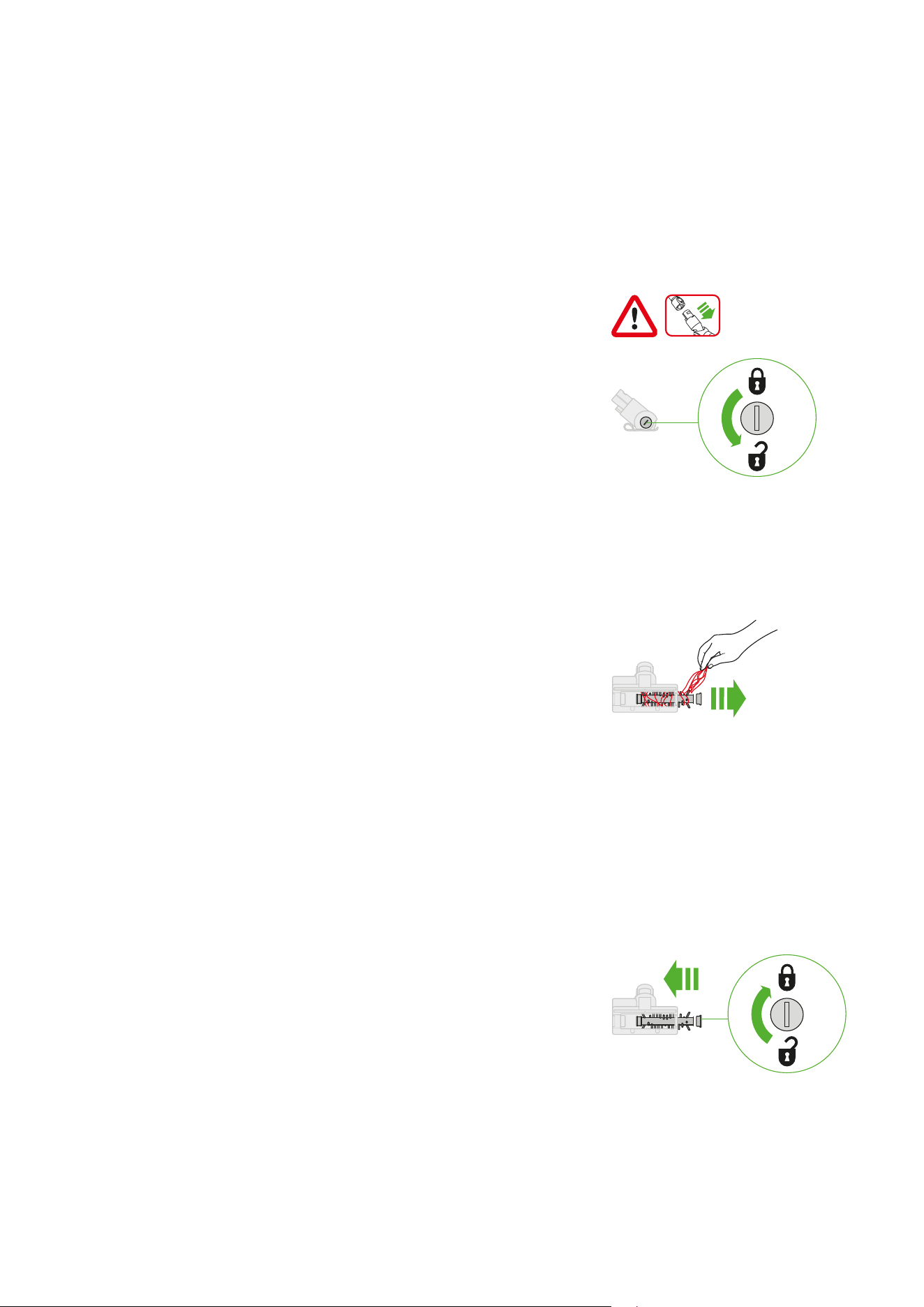
Remove your brush bar
Don’t put any part of your machine in a dishwasher or use detergents,
polishes or air fresheners.
Use a coin to unlock the end cap.
Twist the end cap and remove it from your brush bar. Don’t wash the
end cap.
Slide your brush bar out of the cleaner head.
3
Clearing blockages from your
Mini motorized tool
1
Your Mini motorized tool doesn’t have a washable brush bar.
To maintain optimum performance, check your brush bar regularly
and clear any obstructions.
Make sure your machine is disconnected from the charger and take
care not to touch the trigger.
The removal of the brush bars
showing the lock in a horizontal
position and the unlock symbol
at 90° counterclockwise and lock
symbol at 90° clockwise.
Remove any hair or
fibers that have been
wrapped around the
brush bar.
The brush bar reinserted into the
cleaner head and the end cap
rotated to the locked position.
Cleaning your tools
Don’t put any part of your machine in a dishwasher or use detergents,
polishes or air fresheners.
Wipe with a damp, lint-free cloth, without touching the connector end.
Make sure your tools are completely dry before using.
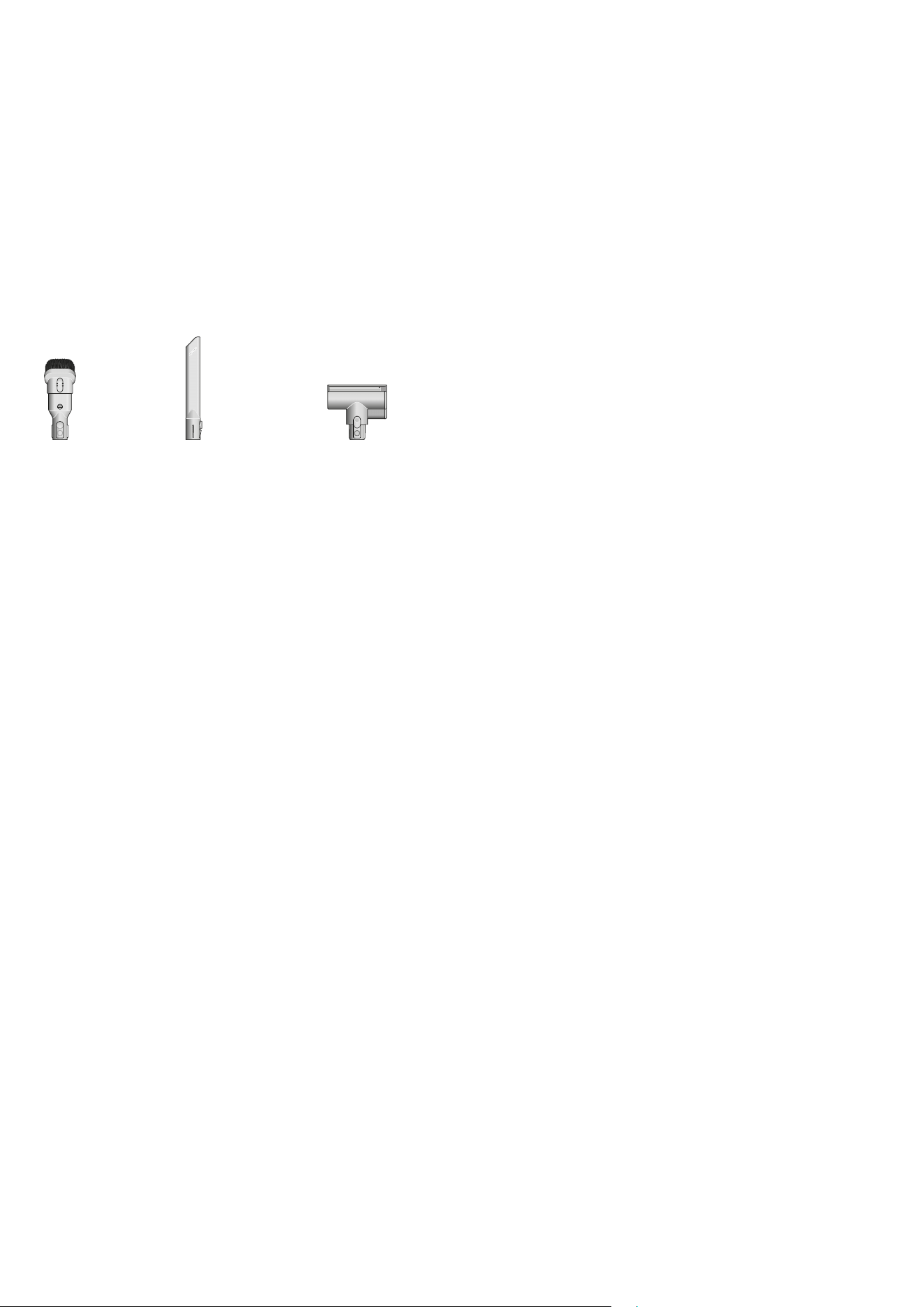
Crevice toolCombination tool
Mini motorized tool

Looking after your machine
To always get the best performance from your machine, it’s important to
clean it regularly and check for blockages.
Look after your machine
If your machine is dusty, wipe with a damp lint-free cloth.
Check for blockages in the cleaner head, tools and main body
of your machine.
Wash your filter regularly and leave to dry completely.
Don’t use detergents or polishes to clean your machine.
Look after your battery
To get the best performance and life from your battery, use Powerful
suction mode.
Your machine won’t operate or charge if the ambient temperature is below
5°C (41°F). This is designed to protect both the motor and battery.
Your serial numbers
You can register your machine using the serial number found on the bottom
of your machine.
You can find your serial numbers on your machine, battery and charger.
Use your serial number to register.
