User manual
9011503 06.02.25 ©2025 DYSON
In the box
Getting started
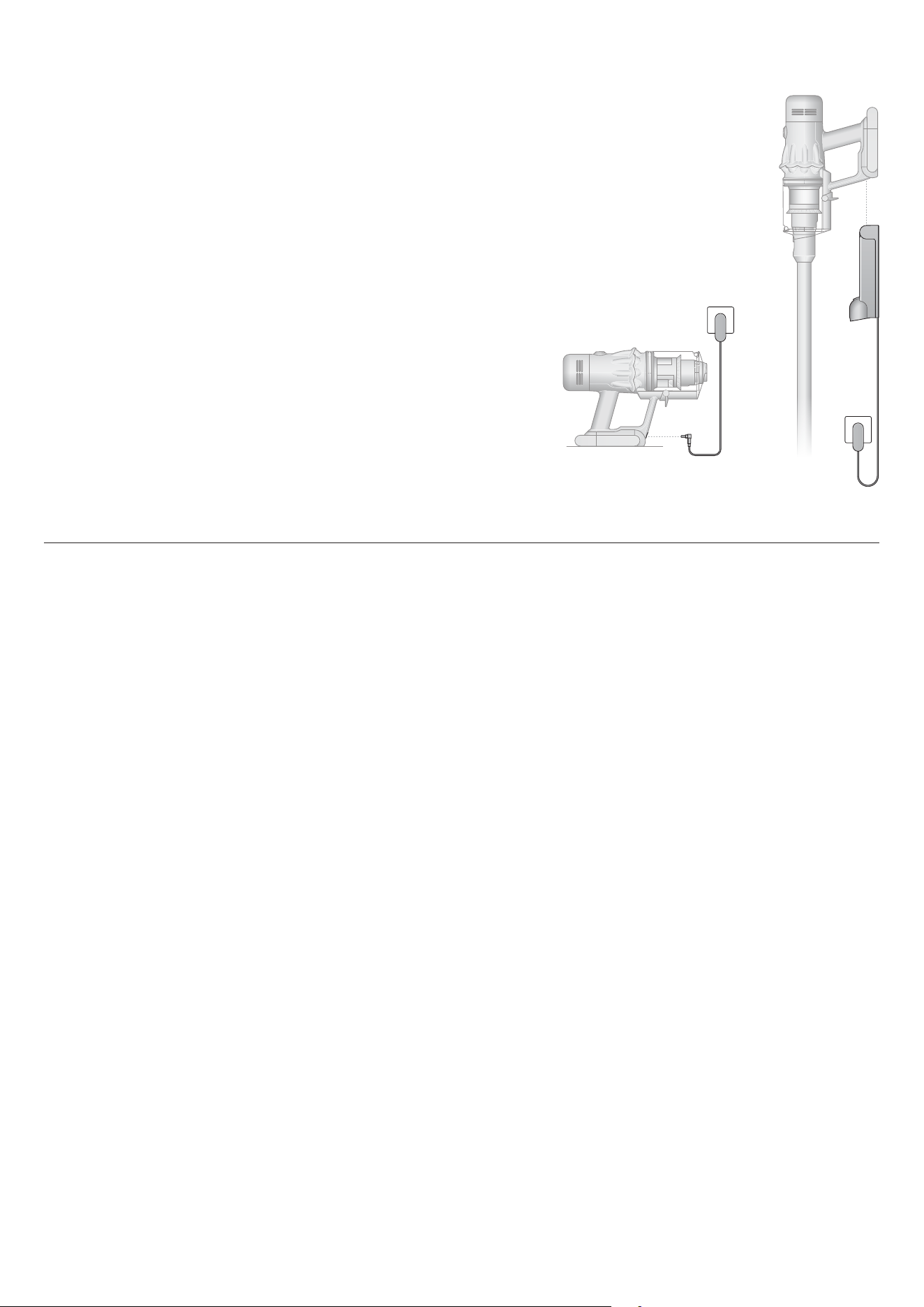
Charging your machine
Caring for your floors
The LCD screen
Emptying your bin
Cleaning your bin
Clearing blockages
Clearing obstructions from your
Motorbar™ cleaner head
Clearing blockages from your
Hair screw tool
Washing your filter
Cleaning your tools
Looking after your machine
Contents
Dyson logo
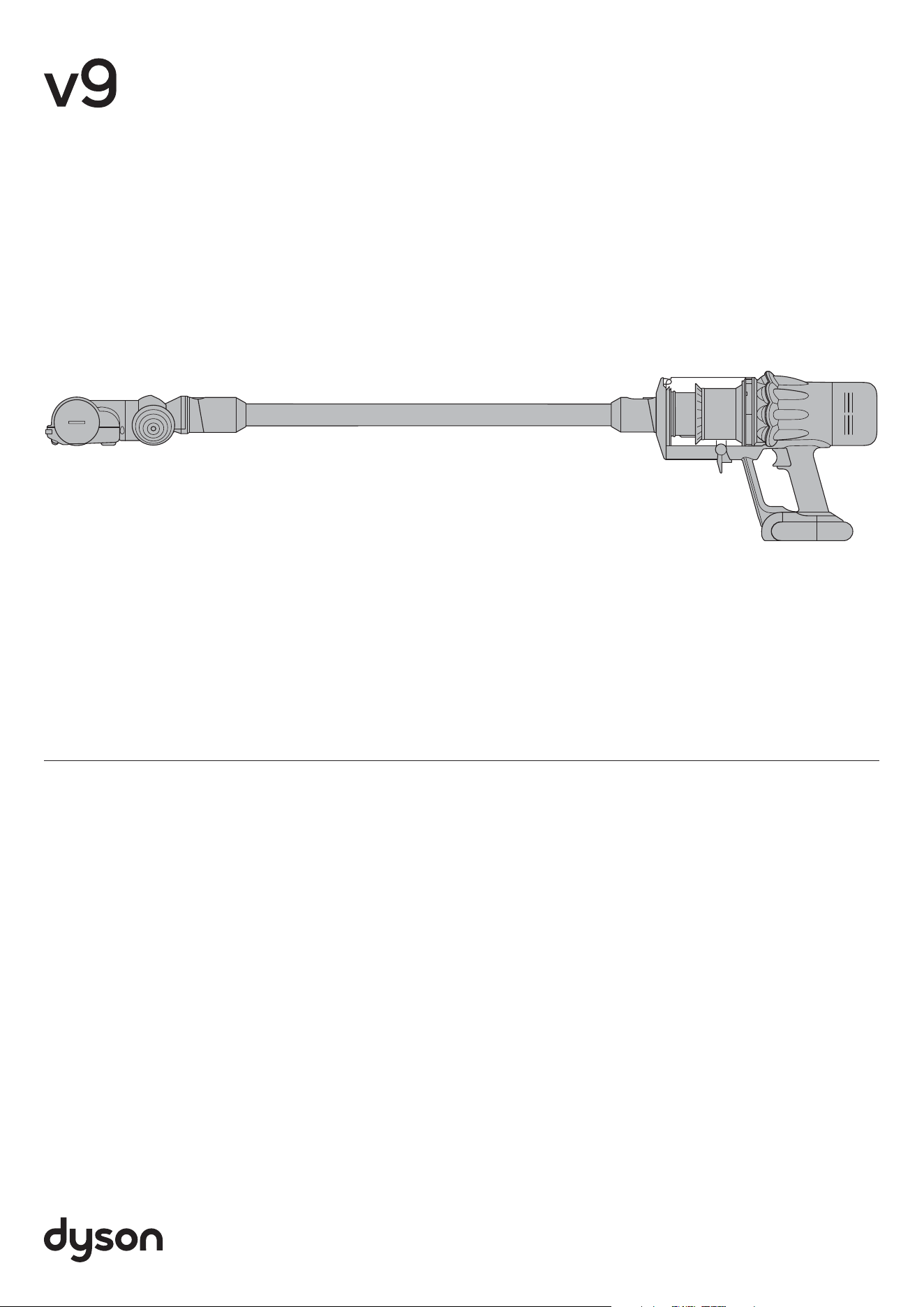
The Dyson cordless
vacuum cleaner in a
horizontal position with
the wand and cleaner
head attached.
Dyson V9
In the box
Wand
Wand clip
Hair screw tool
Anti-tangle conical
brush bar spirals hair
off and into the bin.
Motor-driven cleaning
for smaller spaces.
Combination tool
Two tools in one – wide
nozzle and brush, for quick
switching between cleaning
and dusting tasks around
your home or car.
Crevice tool
Engineered for precise
cleaning around tricky
edges and into hard-to-
reach narrow spaces.
Motorbar™
cleaner head
Detangling vanes
automatically clear
wrapped hair from the
brush bar as you clean.
Soft dusting brush
Enclosed in a skirt
of soft nylon bristles
for gentle, vacuum-
assisted dusting of
delicate objects
and surfaces.
Mattress tool
Removes dust and
dirt from mattresses
and upholstery.
Up-top adaptor
Twists into different
positions and angles
for easy high-reach
cleaning.
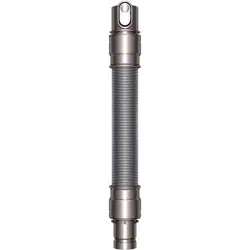
Extension hose
Adds up to 24 inches
of flexible reach to
any tool attachment,
to clean up high or
down low in your
home or car.
Low-reach adaptor
Bends to comfortably
reach down low.
Engineered to clean
further under low
furniture by adjusting
the wand angle up
to 90°.
Mini motorized tool
Motorized brush bar,
concentrated in a
smaller head to remove
stubborn dirt from
mattresses, upholstery
and stairs.
Stubborn dirt brush
Stiff nylon bristles
dislodge ground-in dirt
from coarse carpets,
high traffic areas and
car interiors.
Flexi crevice tool
Extends and bends.
For hard-to-reach
places around your
home and car.
Light pipe crevice tool
Crevice tool with LED
lights lets you reach
into dark, narrow
spaces and see where
you’re cleaning.
Awkward gap tool
Long and narrow, with
a 22° twist to clean car
storage compartments,
tight gaps and hard-to-
reach places.
Scratch-free
dusting brush
Gentle on delicate
surfaces. Self-cleaning –
a rotating cuff keeps the
soft bristles clear of dust.
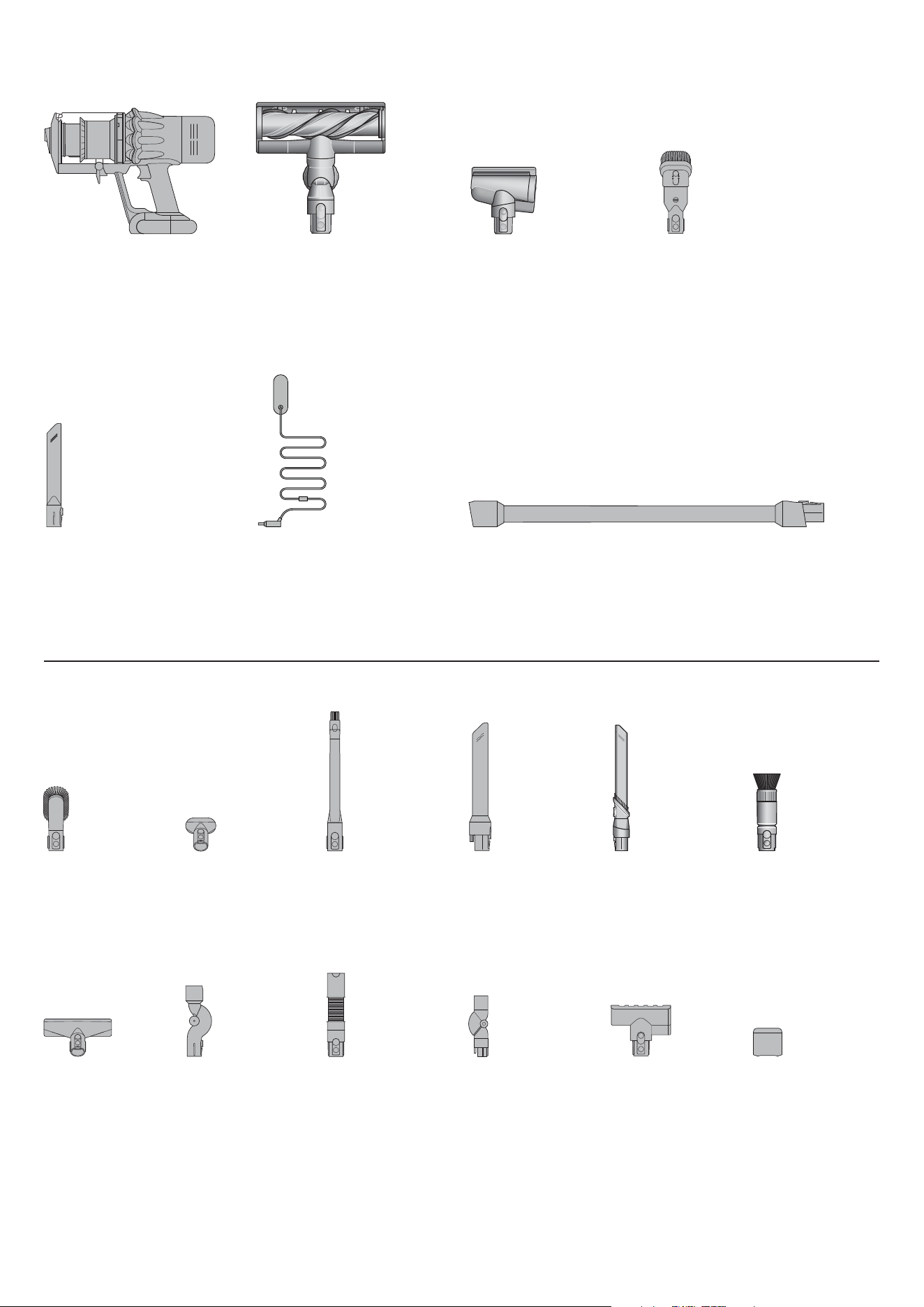
Vacuum cleaner
Some tools may not be included.
You can buy additional tools at www.dyson.com.
Charger
Charges your vacuum
with or without a dock.
A flexible hose
engineered from
tough wire and
durable plastic.
A long tool with
an angled end
with the addition
of an extendable
flexible section,
extended using
the button locat-
ed at the brush
end of the tool.
A long tool with
an angled end
and electrical
connector end
that powers
LED lights when
connected to
the machine.
A jointed connector
that creates a flexible
joint between the
machine and the
tool. It must be used
in conjunction with a
tool or cleaner head.
A long tool with
an angled end.
This tool has a combination
of brush head and crevice tool
together in one unit. The brush
head slides down the crevice
tool when needed.
A small cleaner head with a body
housing the motor and an elec-
trical connector to attach to the
wand or directly to the machine.
A wide mouth tool
with a lint edge.
Stiff bristles on
a wide head.
Pliable bristles
and felt bumper
strip on a narrow,
tapered tool.
A flexible joint
between the
machine and the
tool. It must be
used in conjunc-
tion with a tool or
cleaner head.
Main body showing the
handle and bin attached.
The charger is a one
piece unit with the
plug, connector end
and cable.
The Scratch-free
dusting brush
has a head made
of soft bristles for
cleaning delicate
surfaces.
The Awkward
gap tool is long
and slim, with a
22 degree twist,
for cleaning
tight gaps and
hard-to-reach
places.
A small cleaner head with an
angled body housing the motor
and an electrical connector to
attach directly to the machine.
A brush bar located inside
the cleaner head and
a suction control slider
located on the front.
Getting started
Auto
Boost
Eco
Auto Med
100%
5%
English
Ελληνικά
Espanol
Čeština
中文
한국어
English EnglishEnglish
Eco
Boost
Eco
Auto
Med
100%
English
Espanol
English English
selected
4:50 Auto
Low
run time
Exit
Off
On
Auto
Boost
Eco
Auto Med
100%
5%
English
Ελληνικά
Espanol
Čeština
中文
한국어
English EnglishEnglish
Eco
Fully charge your machine before using for the first time.
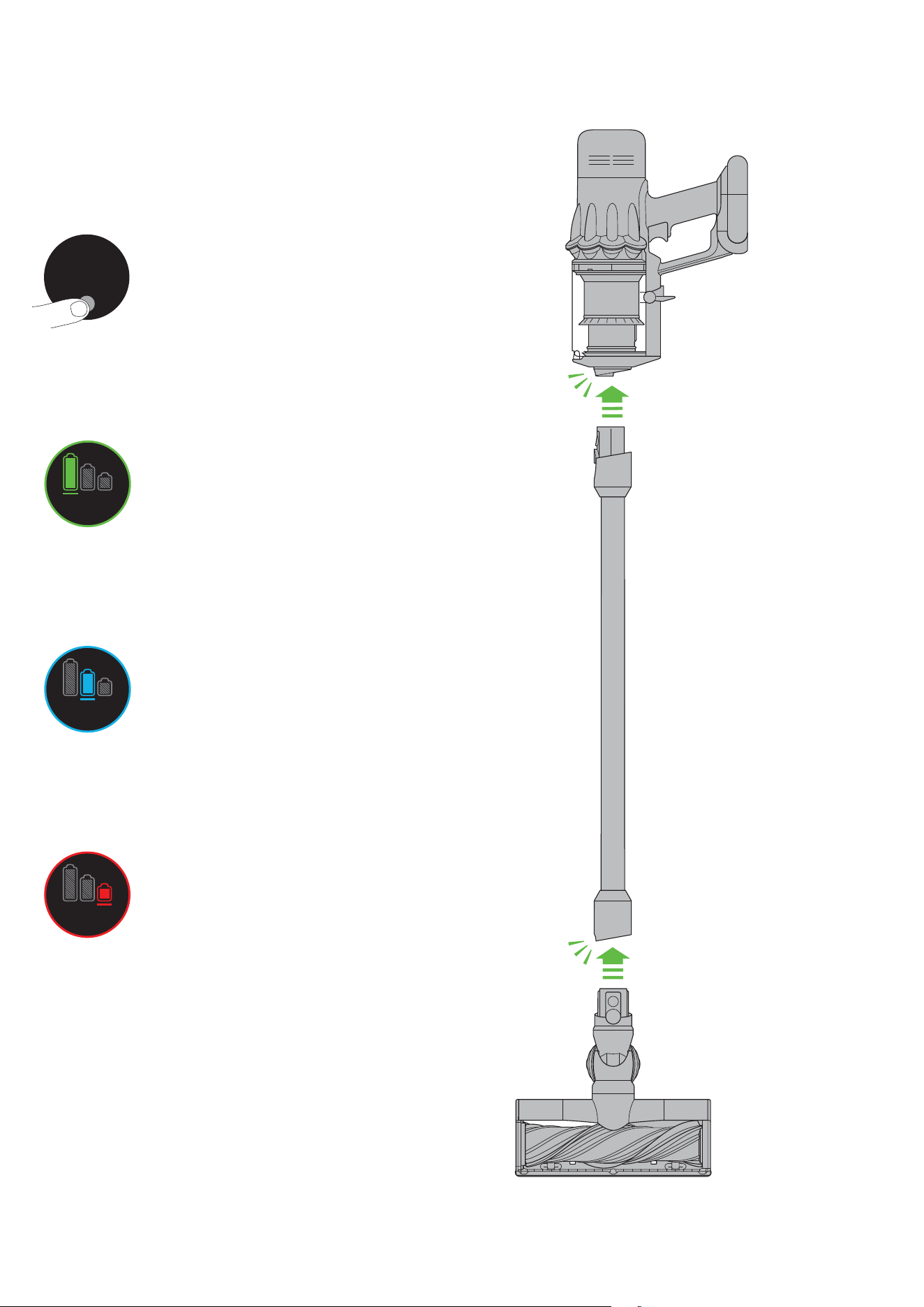
Power modes
Your machine has three power modes for
different tasks. Change power modes quickly
using a single button.
Eco mode
Maximum run time for longer cleans
all around your home.
Med mode
The optimum balance of power
and run time.
Boost mode
Designed for intensive spot
cleaning of ground-in dirt.
Slim Fluffy™ cleaner head
Engineered for hard floors. Sucks up fine
dust and large debris simultaneously.
clik
clik
Arrow showing the
end of the wand
connecting to the
cleaner head.
The screen showing the
machine set to Boost
mode with a red battery to
show that this will give the
shortest battery life of the
three modes.
The screen showing the
machine set to Eco mode
with a full battery in green
to show that this will give the
longest battery life of the
three modes.
Location of the Selection
button on the screen on the
filter end of the machine.
Diagram showing the
connection of the wand
onto the main body,
with the wand release
button aligned with the
top of the main body.
The screen shows the
machine set to Med
mode with a blue
battery showing that
this will give a medium
length of battery life.
Charging your machine
Caring for your floors
9,927,641
1.1M
450K
1.6K
10m 60 180 500
45:37
9,927,641
1.1M
450K
1.6K
10m 60 180 500
45:37
It’s important to fully charge your new machine before using it for the first
time, and after every clean. This is because the battery and monitoring
system’s algorithm ‘learns’ over time, and fully charging your machine helps
it to more accurately calculate and display remaining run time.
Connect to charger either directly or in the dock.
The blue LEDs on either side of the battery will flash during charging.
When the battery is fully charged, both LEDs will light for five seconds.
Your battery is fully charged when the display shows 100%.
Your machine won’t operate or charge if the ambient temperature is below
5°C (41°F). This is designed to protect both the motor and battery.
You can help prolong the battery life by leaving your machine to cool down
before recharging.
Check that the underside of the cleaner head or tool is clean and free from
any objects that may cause damage.
Before vacuuming your flooring, rugs, and carpets, check the manufacturer’s
recommended cleaning instructions.
The brush bar on your machine can damage certain carpet types and floors.
Some carpets will fuzz if a rotating brush bar is used when vacuuming. If this
happens, we recommend vacuuming without the motorized floor tool and
consulting with your flooring manufacturer.
The charger connected from
the power supply directly into
the front of the battery.
The charger connected
from the power supply
using the wall dock.
The LCD screen
Boost
Eco
Auto Med
100%
English
Espanol
English English
selected
4:50 Auto
Low
run time
Exit
Off
On
Boost
Eco
Auto Med
100%
English
Espanol
English
English
selected
4:50 Auto
Low
run time
Exit
Off
On
Boost
Eco
Auto Med
100%
English
Espanol
English English
selected
4:50 Auto
Low
run time
Exit
Off
On
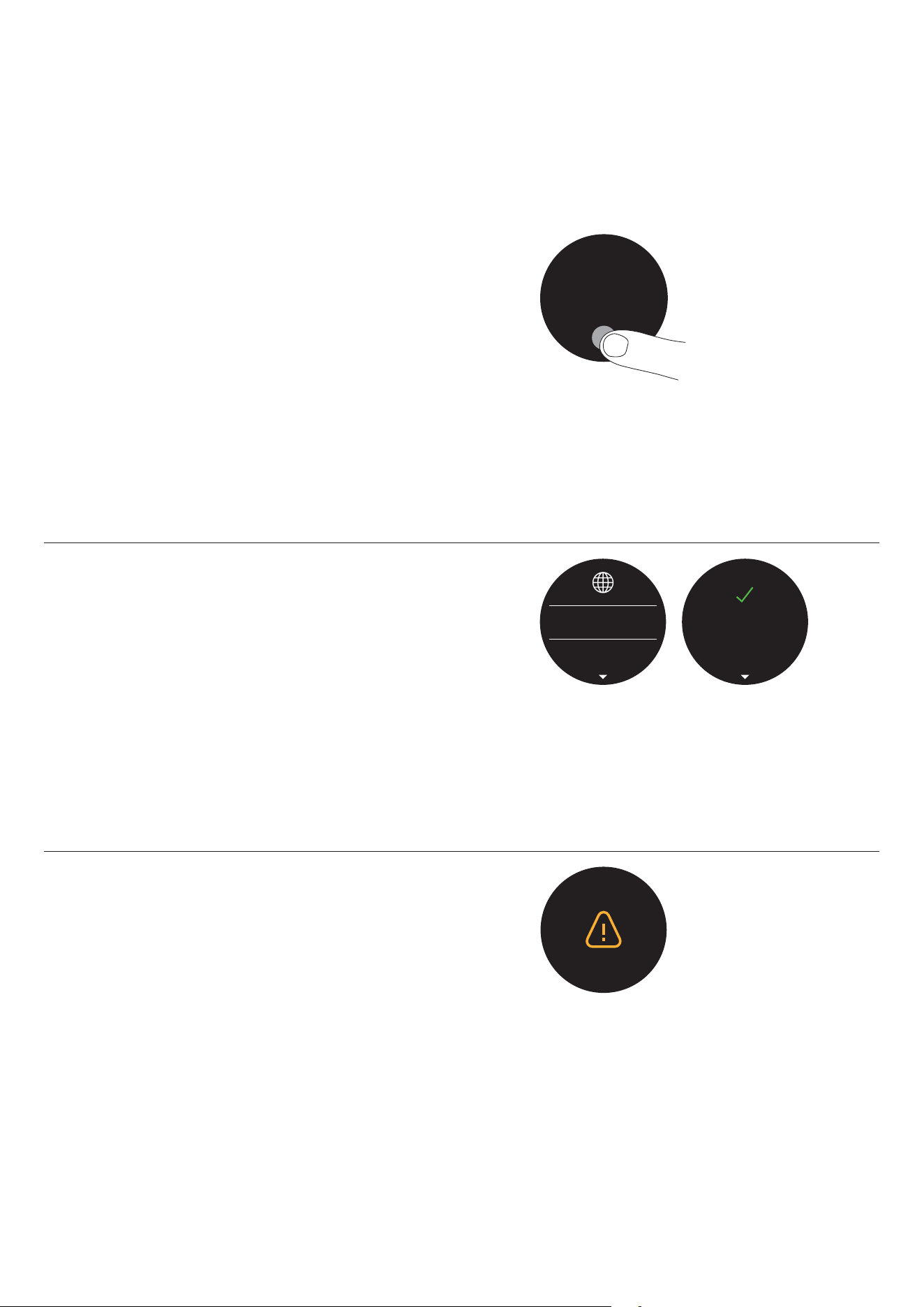
The LCD screen shows current performance, including selected cleaning
mode, remaining run time, filter maintenance and blockage reports.
Settings menu
Control the settings on your machine using the button.
To enter the settings menu, press and hold the button until the menu
screen appears. Tap to scroll through the options available.
For more information and support for your machine go online:
www.dyson.com/support
Change language
To change the language on your screen, press the button and hold until the
language list appears. Release the button.
Tap the button to scroll through the language list to your preferred language.
Press and hold the button until the countdown ends.
A green tick will appear on the screen to show your language selection
is complete.
To cancel your selection, release the button during the countdown.
Change alert settings
You can turn the alert motor pulse off. Your motor will no longer pulse but
run time alert information will continue to be displayed on the LCD screen
when your machine needs your attention.
Turning off alerts will not turn off the blockage alert pulsing. This is to ensure
you clear any blockages, preventing damage to your machine.
Tap to scroll through the settings menu. Select the ‘Alerts’ option.
Scroll to select on or off. Hold the button until the countdown ends and a tick
appears on the screen. To cancel your selection, release the button during
the countdown
The Selection button on
the screen being pressed.
Two screens, the first with
the language list and then
the tick screen to show that
the language has been
successfully changed.
The screen with an amber
warning triangle to
demonstrate an alert.
Boost
Eco
Auto Med
100%
English
Espanol
English English
selected
4:50 Auto
Low
run time
Exit
Off
On
Boost
Eco
Auto Med
100%
English
Espanol
English English
selected
4:50
Auto
Low
run time
Exit
Off
On
Boost
Eco
Auto Med
100%
English
Espanol
English English
selected
4:50 Auto
Low
run time
Exit
Off
On
Run time countdown
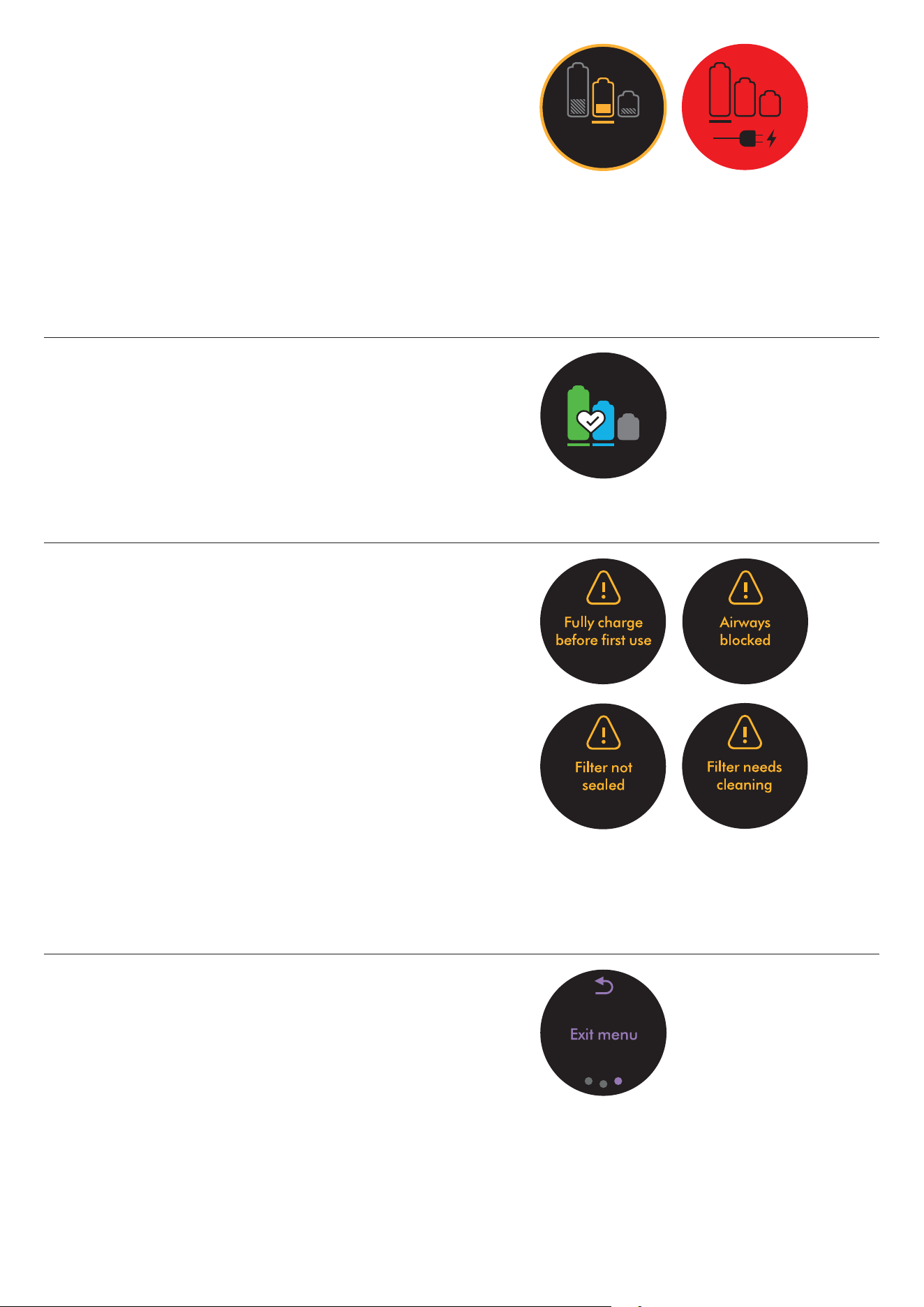
When the battery needs charging, your machine will pulse three times and a
low run time icon will appear on the screen.
When your battery is empty, a red warning icon will appear on the screen.
Battery health
To get the best performance and life from your battery,
use Eco or Med mode.
Alerts
The alerts you might see are:
Filter – the filter isn’t fitted correctly, or needs cleaning.
Blockage – your machine has a blockage that needs removing.
Exit settings menu
To exit the settings menu. Tap to scroll through the selection menu.
Select “Exit menu.”
Screen with Exit menu
wording and return icon.
Alert icon with
“Fully charge
before first
use” wording.
Alert
icon with
“Filter needs
cleaning”
wording.
Alert
icon with
“Airways
blocked”
wording.
Alert icon
with “Filter
not sealed”
wording.
The battery health is
shown on the batteries
on the screen.
A red screen with an
icon with a plug being
connected to the power
supply. This demonstrates
the battery is empty and
needs charging.
The screen with a
battery time remaining
shown as a number
and as a half filled
battery.
Emptying your bin
Cleaning your bin
9,927,641
1.1M
450K
1.6K
10m 60 180 500
45:37
9,927,641
1.1M
450K
1.6K
10m 60 180 500
45:37
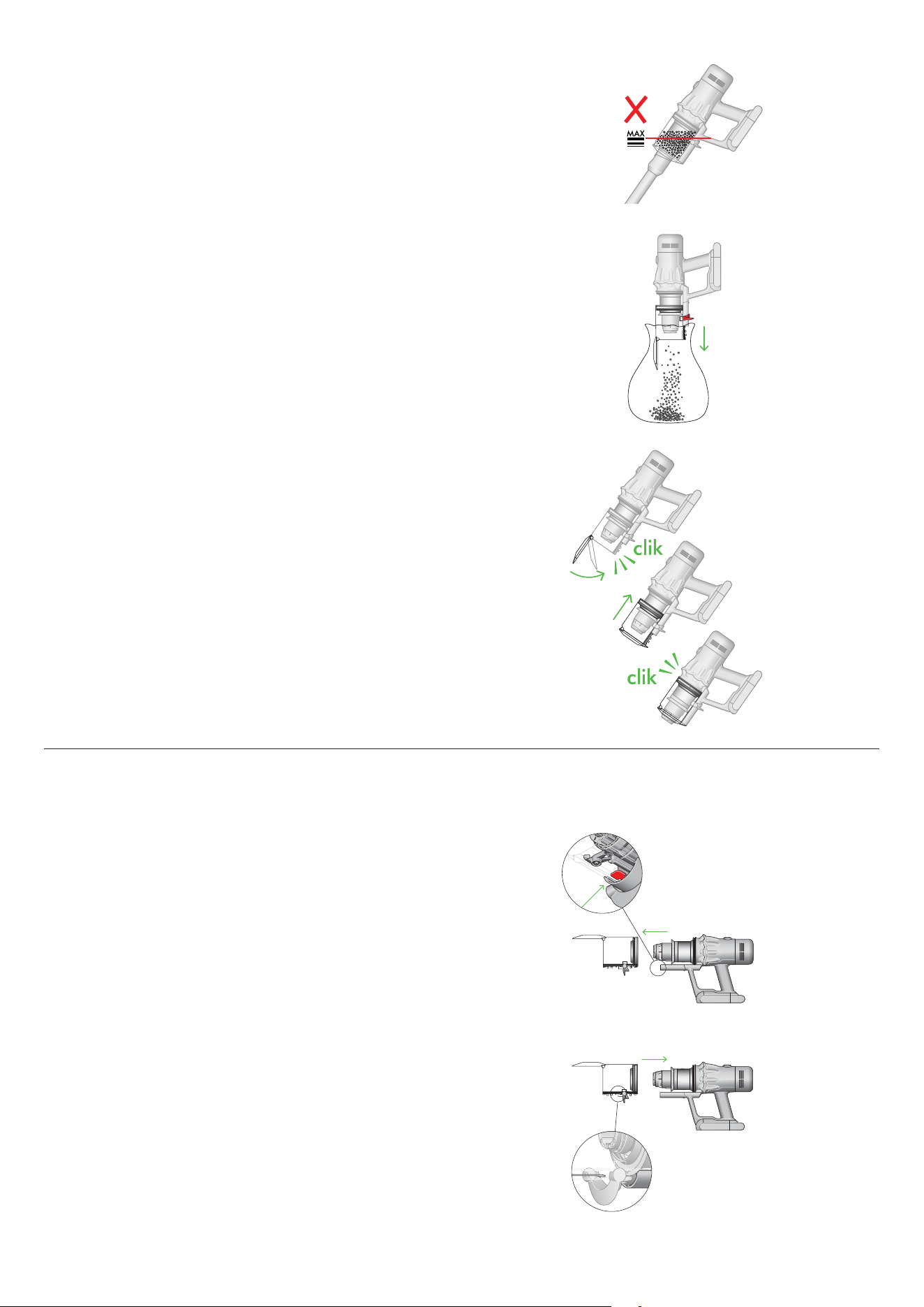
Empty as soon as the dirt reaches the MAX level – don’t overfill. Using your
machine when the dirt is above the MAX line may affect the performance
and require more frequent filter washing.
Remove your wand
Press the red wand release button, on the top of the wand, and pull the wand
away from the bin.
Release the dirt
Hold the machine over the bin, pointing downwards.
Firmly push the red bin release button. The bin will slide down, cleaning the
shroud as it goes, and the bin base will open.
The bin base won’t open if the red bin release button isn’t pushed down all
the way.
Minimize dust contact
Cover your bin tightly in a dust proof bag while you empty. Remove the bin
carefully, seal the bag tightly and dispose.
Close your bin
Push the bin base upwards until the bin and bin base click into place.
Remove your bin
If it is necessary to clean your bin, empty it as shown in the “Emptying your
bin” section.
Press the red button located on the bin runner to release the bin and slide
your bin off the runner.
Only clean your bin with a damp cloth.
Make sure that the bin and seals are completely dry before replacing.
Refit your bin
Insert the spine on to the bin runner.
Close your bin by pushing the bin base upwards until the bin and bin base
click into place.
Your bin isn’t dishwasher safe and the use of detergents, polishes or
air fresheners to clean your bin isn’t recommended, as it may damage
your machine.
The bin lid closing with
an audible click and the
bin being pushed up-
wards with another click
once it is fully in place.
Illustration of the bin being
emptied into a bag with
images demonstrating to take
care not to press the trigger
when emptying the bin.
Two images of the bin with
arrows showing the bin lid
closing and a click symbol
and the bin being pushed
upwards with another click
symbol.
The bin being removed
and the location of the
bin release lever on
the underside of the
bin runner.
The bin being pushed
back into position on
the bin runner.
The MAX mark on the bin
of the machine, showing
that the dirt should not be
filled over the MAX mark
when the machine is at the
angle of normal use.
clik
clik
Clearing blockages
clik
2
1
clik
2
1
clik
2
1
clik
2
1
clik
2
1
clik
2
1
clik
2
1
clik
2
1
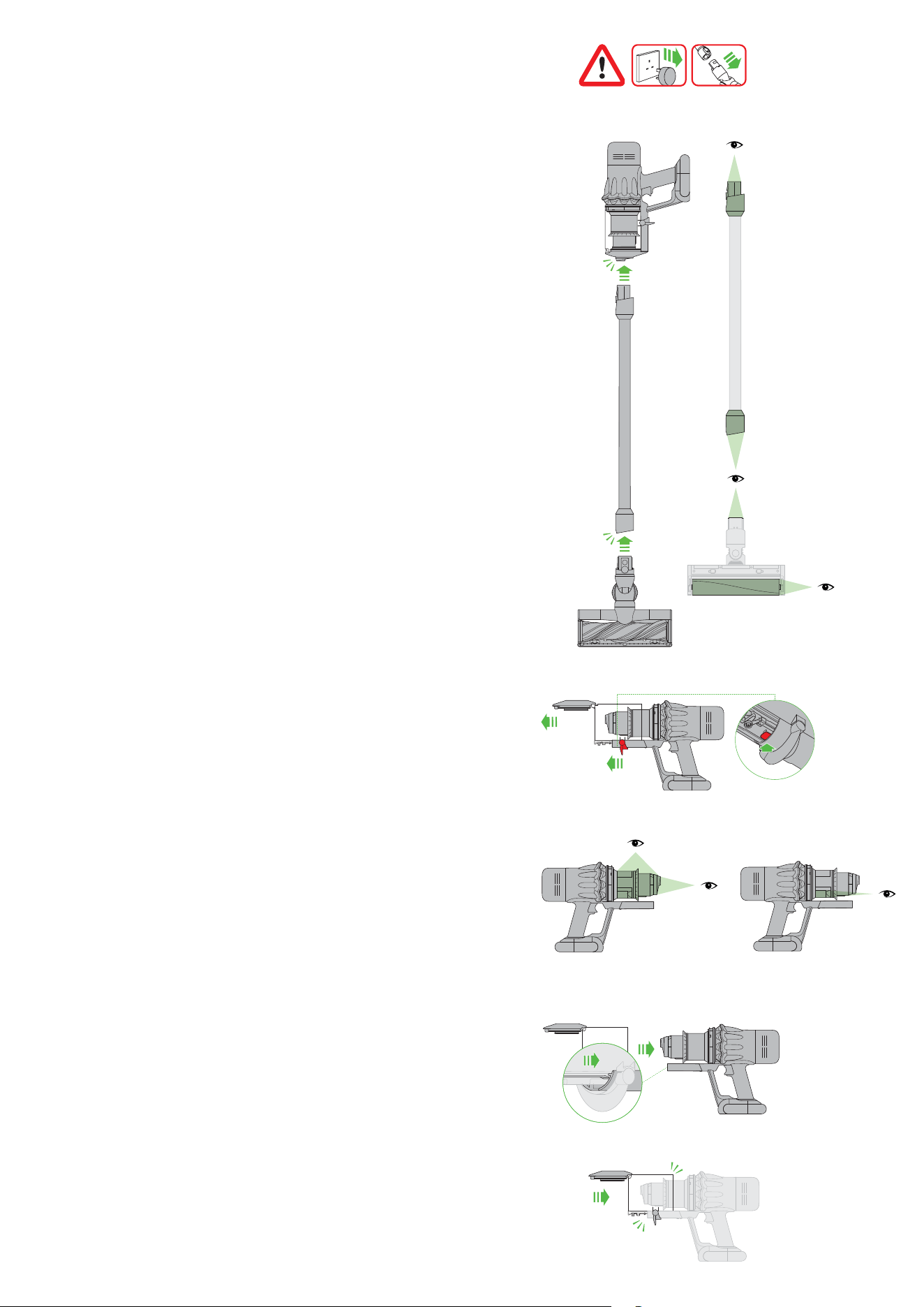
Disconnect your machine from the charger before looking for blockages.
Be careful not to touch the trigger and be aware of sharp objects.
Leave your machine to cool down before looking for blockages.
Don’t use your machine when looking for blockages as this could
cause injury.
If your machine detects a blockage, the motor will pulse six times. You won’t
be able to use your machine until the blockage has been cleared.
If you try to use your machine when the motor is pulsing, it will automatically
cut out.
Leave your machine to cool down before looking for blockages and, for your
safety, take care not to touch the trigger.
Turn the cleaner
head over to check
for obstructions on
the brush bar and
air inlet.
With the wand
removed from the
machine, check for
blockages at both
ends of the wand.
With the bin removed,
check for blockages,
paying particular
attention to the air
inlet, located at on the
right-hand side of the
machine just below
the point where the bin
joins the main body of
the machine.
Check for blockages in
the filter end and bin
ends of the machine.
Remove any obstructions
from the brush bar.
The bin being removed
and the location of the
bin release lever on the
underside of the bin
runner.
Clearing obstructions from your
Motorbar™ cleaner head
1
2 3
4
5 6
7
8 9
3
1
1
2
1
2
2
1 2 3
1
2
1
3 4 5
2
2
1
1
2 3
1
2 3
4
5 6
7
8 9
3
1
1
2
1
2
2
1 2 3
1
2
1
3 4 5
2
2
1
1
2 3
1
2 3
4
5 6
7
8 9
3
1
1
2
1
2
2
1 2 3
1
2
1
3 4 5
2
2
1
1
2 3
1
2 3
4
5 6
7
8 9
3
1
1
2
1
2
2
1 2 3
1
2
1
3 4 5
2
2
1
1
2 3
Your Motorbar™ cleaner head doesn’t have a washable brush bar.
To maintain optimum performance, check your brush bar regularly
and clear any obstructions.
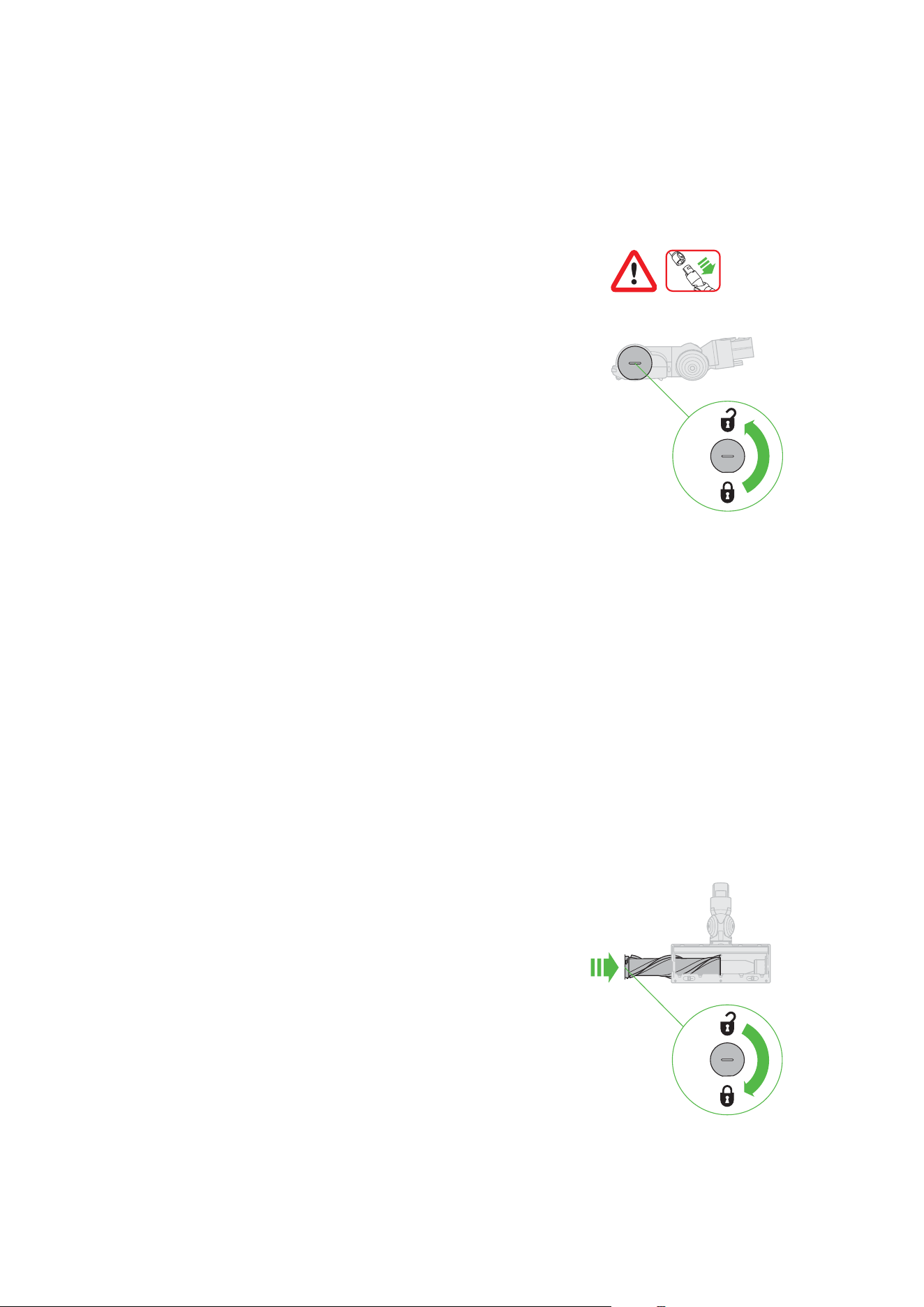
Make sure your machine is disconnected from the charger and take
care not to touch the trigger.
Remove your brush bar
Don’t put any part of your machine in a dishwasher or use detergents,
polishes or air fresheners.
Press the cleaner head release button on the end of the wand.
Place the cleaner head upside down.
Use a coin to unlock the end cap.
Twist the end cap and remove it from your brush bar.
Don’t wash the end cap.
Slide your brush bar out of the cleaner head.
Look for obstructions
Clear any debris from your brush bar.
Check inside the cleaner head and remove any debris or blockages.
Your Motorbar™ cleaner head and brush bar aren’t washable.
Wipe over with a damp lint-free cloth.
Replace your brush bar
Push the end cap back on to your brush bar and slide it back into the
cleaner head.
Turn the end cap clockwise into the locked position.
Your cleaner head isn’t washable and should only be wiped over with a
damp lint-free cloth.
The brush bar reinserted
into the cleaner head and
the end cap rotated to the
locked position.
The removal of the
brush bars showing
the lock in a hori-
zontal position and
the unlock symbol
in the 6 o’clock
position and the lock
symbol in the 12
o’clock position.
Clearing blockages from your
Hair screw tool
Your Hair screw tool doesn’t have a washable brush bar. To maintain
optimum performance, check your brush bar regularly and clear any
obstructions.
Make sure your machine is disconnected from the charger and take
care not to touch the trigger.
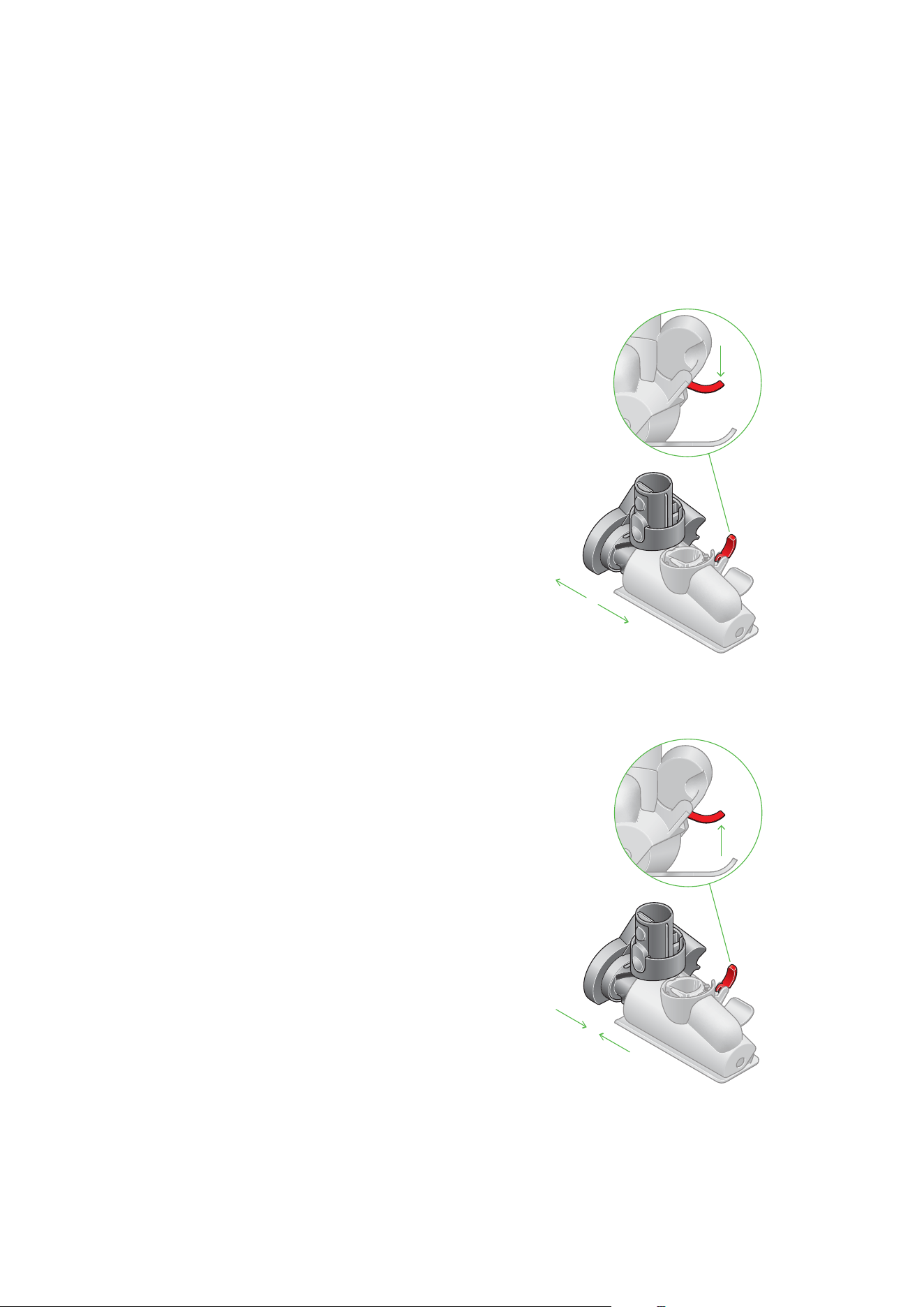
Remove the cover and brush bar
Remove the Hair screw tool from the wand or machine.
Push the base plate open. Press the red lever down to release the
cleaner head cover.
Pull the cleaner head cover off the main body of the tool.
Look for obstructions
Pull your brush bar firmly to remove it from the main body.
Check and remove any obstructions from all three parts of your
Hair screw tool.
Your Hair screw tool isn’t washable. Wipe over with a damp lint-free cloth.
Don’t put any part of your machine in a dishwasher or use detergents,
polishes or air fresheners.
Reassemble Hair screw tool
Put your brush bar back into position and press firmly until it clicks back
into position.
Check the red locking lever is in the unlocked position. Align the cleaner
head cover with the guide on the main body. Push it down until it clicks into
position.
Push the red locking lever up until it clicks into position and push the base
plate back into place.
Location of the lever
to release the brush
bar is located at
the back of the Hair
screw tool.
Slide the housing
back on to the
brush bar and
push the lever on
the back of the
Hair screw tool
upwards to lock.
Washing your filter
For more information and support for your machine go online:
www.dyson.com/support
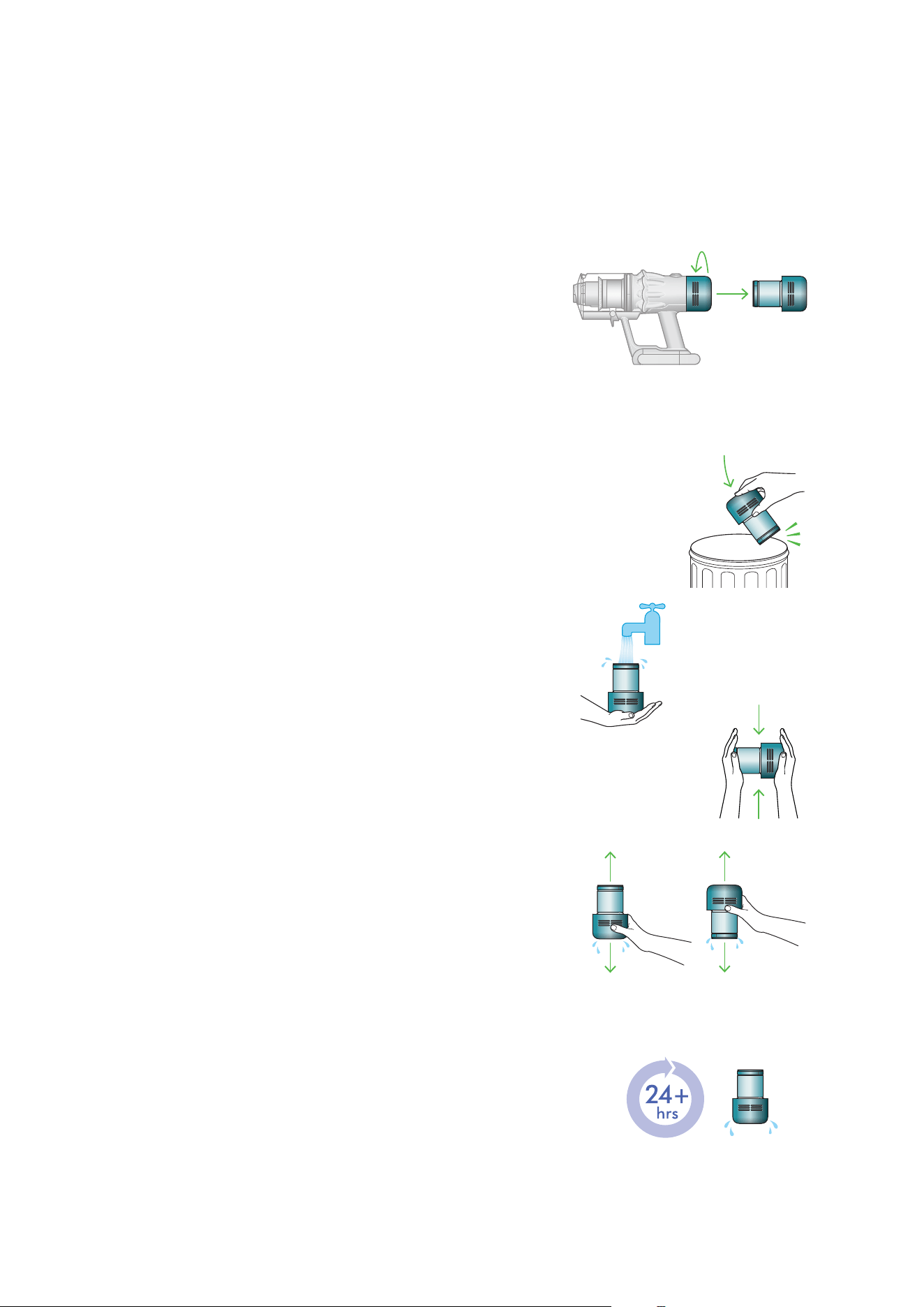
Wash your filter at least once a month to maintain optimum suction power.
Twist off your filter
Twist your filter counter-clockwise and pull it away from your machine.
Tap your filter
Before washing your filter, tap it gently over a bin to remove any loose dust
and debris.
Wash your filter
Wash with warm, running tap water – gently rubbing your filter with your
fingers to remove the dirt.
Fill and shake
Place your hand over one end of your filter.
Fill the filter with warm tap water.
Place your hand over the open end of the filter and shake it firmly to
remove trapped dirt and debris.
Repeat these steps until the water runs clear.
Dry your filter
Leave your filter to dry for at least 24 hours in a well-ventilated, warm place.
Don’t dry your filter in a tumble dryer, microwave or near a naked flame.
Important: your filter must be completely dry before you put it back into
the machine. Your machine could be damaged if used with a damp filter.
Filter with hand over
the open end with
arrows showing a
shaking motion.
The filter is left to dry
with the pleated filter
end facing upwards.
A hand holding the filter with the
narrow end pointing downwards with
droplets of water being shaken from the
filter and again, with the end pointing
downwards shaking water out.
Filter held in upright
position, with the wider
end in the palm of a
hand. Water running
from a tap into the
narrower end.
The filter is located at the
rear of your machine.
Holding the filter
by the hard, plastic
end, tap the other
end over the bin.
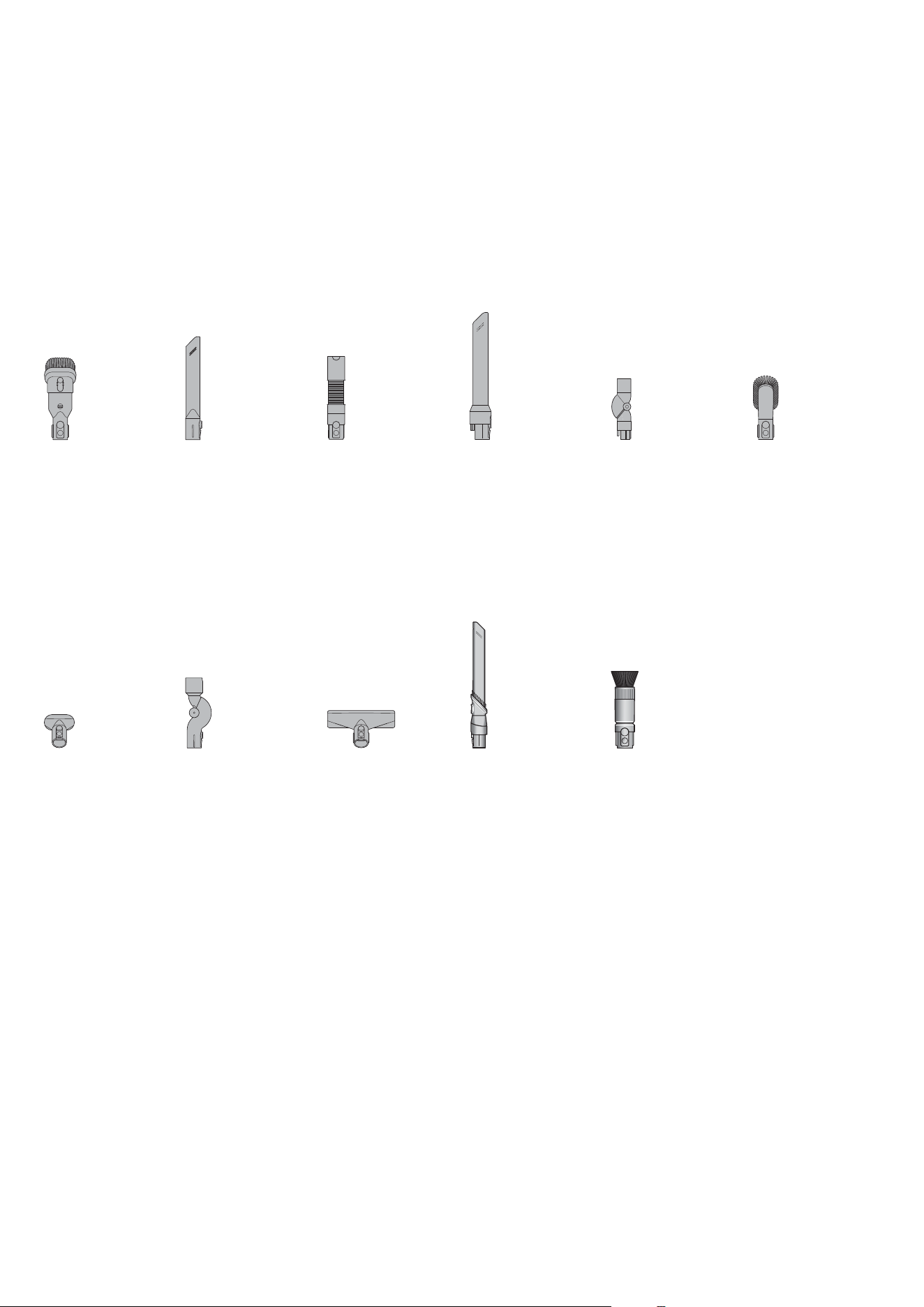
Cleaning your tools
Don’t put any part of your machine in a dishwasher or use detergents,
polishes or air fresheners.
Wipe with a damp, lint-free cloth, without touching the connector end.
Make sure your tools are completely dry before using.
Combination
tool
Stubborn
dirt brush
Up-top
adaptor
Mattress tool Awkward
gap tool
Scratch-free
dusting brush
Crevice
tool
Extension
hose
Light pipe
crevice tool
Low-reach
adaptor
Soft dusting
brush
A long tool with
an angled end.
This tool has a
combination
of brush head
and crevice tool
together in one
unit. The brush
head slides down
the crevice tool
when needed.
A flexible hose
engineered from
tough wire and
durable plastic.
A long tool with
an angled end
and electrical
connector end
that powers
LED lights when
connected to the
machine.
A jointed
connector that
creates a flexible
joint between the
machine and the
tool. It must be
used in conjunc-
tion with a tool or
cleaner head.
Pliable bristles
and felt bumper
strip on a narrow,
tapered tool.
Stiff bristles on a
wide head.
A flexible joint
between the
machine and the
tool. It must be
used in conjunc-
tion with a tool or
cleaner head.
A wide mouth tool
with a lint edge.
The Scratch-free
dusting brush has a
head made of soft
bristles for cleaning
delicate surfaces.
The Awkward gap
tool is long and slim,
with a 22 degree
twist, for cleaning
tight gaps and hard-
to-reach places.

Looking after your machine
To always get the best performance from your machine, it’s important to
clean it regularly and check for blockages.
Look after your machine
If your machine is dusty, wipe with a damp lint-free cloth.
Check for blockages in the cleaner head, tools and main body
of your machine.
Wash your filter regularly and leave to dry completely.
Don’t use detergents or polishes to clean your machine.
Look after your battery
To get the best performance and life from your battery,
use Eco or Med mode.
Your machine won’t operate or charge if the ambient temperature
is below 5°C (41°F).
This is designed to protect both the motor and battery.
Look after your battery
To get the best performance and life from your battery,
use Eco or Med mode.
Your machine won’t operate or charge if the ambient temperature
is below 5°C (41°F).
This is designed to protect both the motor and battery.
Your serial numbers
The serial number is printed on the back of the battery pack at the base
of the handle. Remove the battery to reveal the serial number inside the
machine’s handle.
You can register your machine using the serial number found on the
bottom of your machine.