SV12 JN.00000 PN.000000-00-00
00.00.00 VERSION NO.01
Contents
In the box
Activating i.d. curl™ sequence
Getting to know your device
Intelligent attachments
Pause detect
Bluetooth
®
wireless technology
Styling attachments
Using your attachments
Pre-styling
Curling
Shaping
Smoothing
Volumising
Regular filter maintenance
User manual
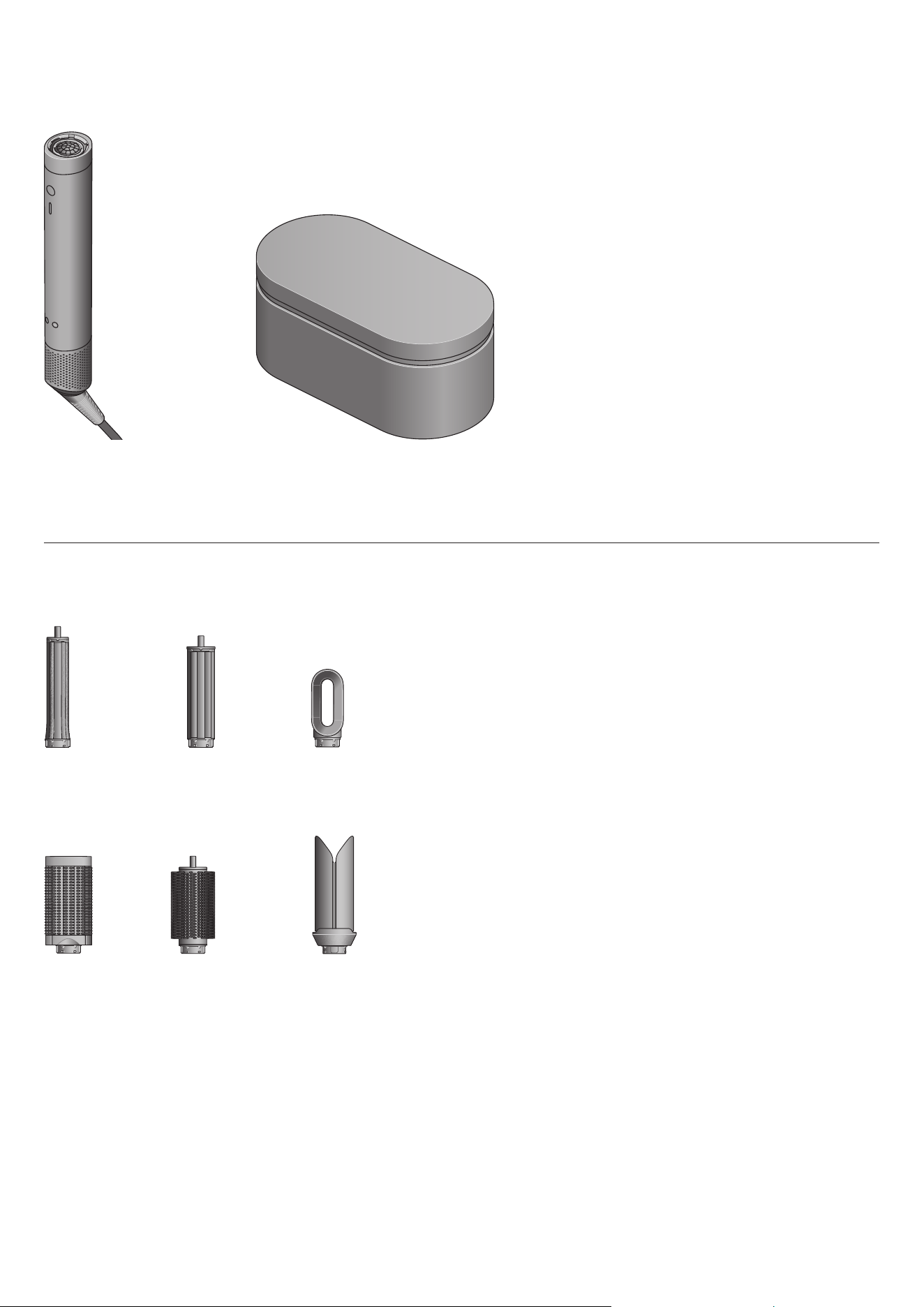
In the box
Your device may not include all attachments shown below.
You can buy additional attachments at www.dyson.com.au/hair-care/accessories or dyson.co.nz/hair-care/accessories
Dyson Airwrap
Co-anda2x™
multi-styler and
dryer main body
30mm
Co-anda2x™
curling barrel
40mm
Co-anda2x™
curling barrel
Round
volumising
brush 2x
Anti-snag
loop brush 2x
Fast dryer 2x
Airsmooth2x™
Presentation case
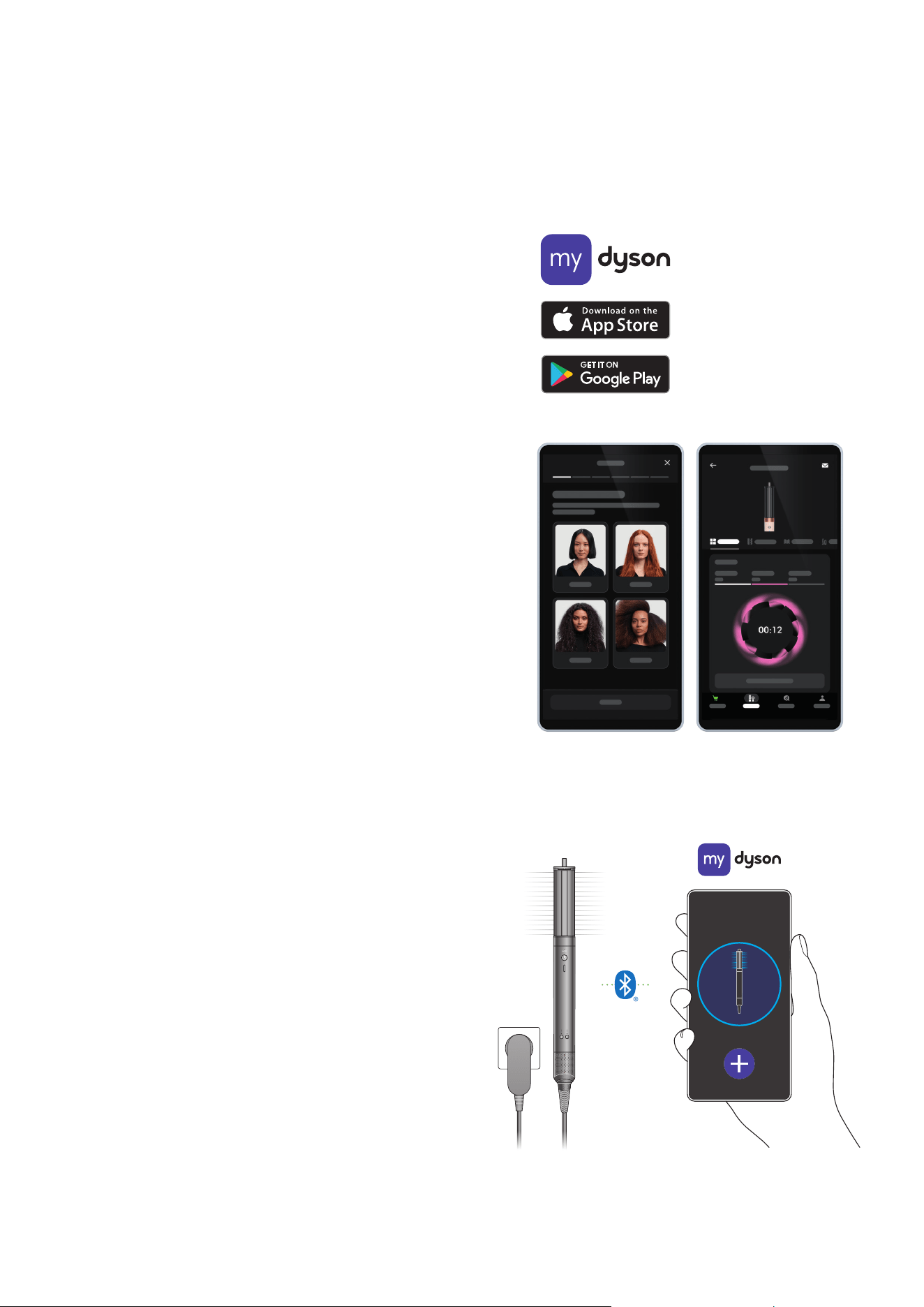
Activate easier curling when you enable your
i.d. curl™ sequence in the MyDyson™ app
Setting up your personalised curl sequence is quick and easy.
It takes under two minutes.
Apple, the Apple logo and Siri are trademarks of Apple Inc., registered in the U.S. and other
countries. App Store is a service mark of the Apple Inc., registered in the U.S. and other countries.
Google Play, the Google Play logo, Google Assistant are trademarks of Google Inc. The Bluetooth
®
word mark and logos are registered trademarks owned by Bluetooth SIG, Inc. and any use of such
marks by Dyson is under license.
Step 1
Download the MyDyson™ app.
MyDy son™ app connectivity
App functionality may vary per market. Requires internet connection.
Operating system and mobile device requirements for the MyDyson™ app
can be found on the App Store or Google Play.
Step 2
Set up your hair profile and enable i.d. curl™ personalised curling
sequence in the MyDyson™ app.
Step 3
Attach a curling barrel to your device. Press the Power button
to activate the sequence.
Your Dyson Airwrap Co-anda2x™ multi-styler and dryer will then wrap,
style, set and release consistent curls, automatically adjusting
heat and airflow based on the best settings for your hair.
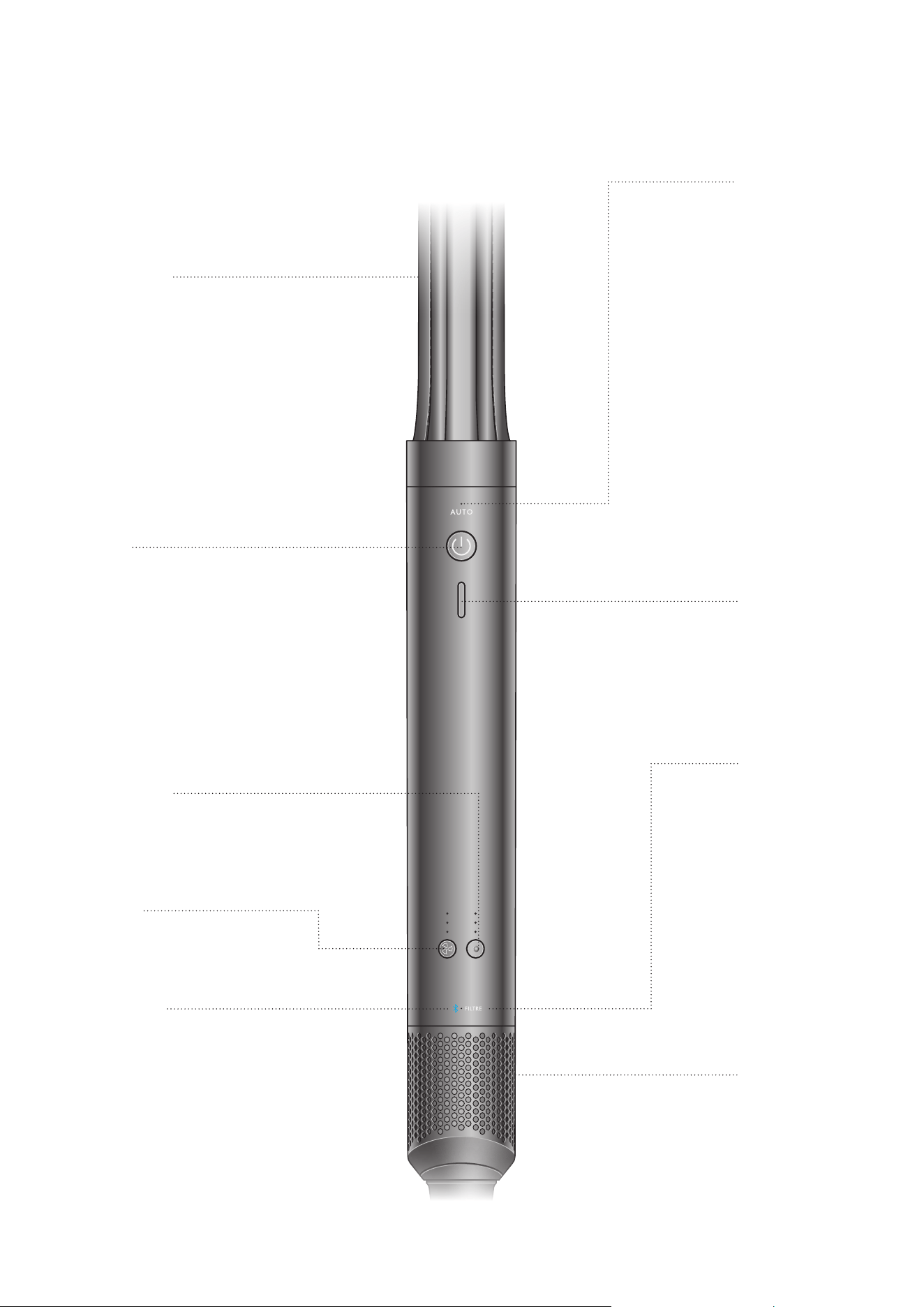
Getting to know your Dyson Airwrap
Co-anda2x™ multi-styler and dryer
Temperature control
Four heat settings,
including constant cold.
Auto LED
Indicates an
attachment with
automated features
is attached, and the
automated feature is
enabled (Curling barrel
and A irS mo oth™ onl y).
With airflow off, you
can disable automated
features by holding the
Power button for five
seconds – until the Auto
LED lights up. Hold
again to re-enable.
Power button
Activates airflow for
all attachments and
initiates automatic
features. (Curling
barrel and
AirS mooth™ only).
Bluetooth
®
wireless
technology LED
Indicates the device
is connected to the
M yDy so n™ a p p.
Flashing blue – connecting.
Constant blue – connected.
Attachment learning
On first use, your
device will default to
the best temperature
and airflow settings
recommended for
each attachment.
You can change these
as you style, and your
device will remember
your go-to styling
preferences.
Cold shot
Shaped for easy
recognition. Hold to
deactivate the heating
element to set
your style.
Airflow control
Three airflow speeds –
high, medium and low.
Filter LED
Flashing white –
no filter detected
Amber – filter
cleaning needed.
If the LED continues to
flash amber after the
filter has been cleaned,
contact the Dyson
Helpline.
Removable filter
Easy to remove for
cleaning (see the
‘Regular filter
maintenance’
section for details).
Intelligent attachments
Pause detect
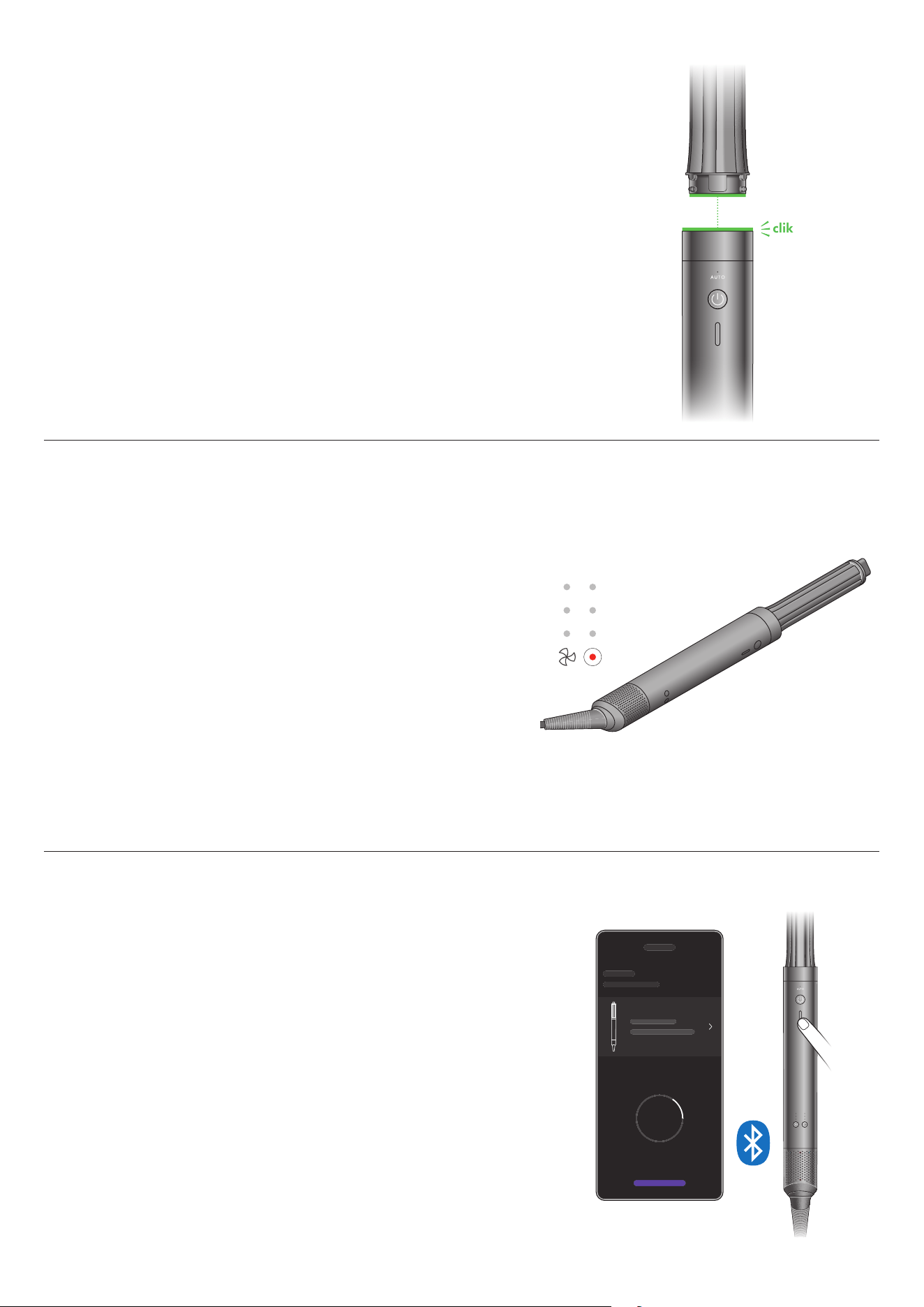
Your device will only work when an Intelligent attachment is clicked
into place.
RFID chips within each attachment communicate with your Dyson Airwrap
Co-anda2x™ multi-styler and dryer, to instantly adapt to the best temperature
and airflow settings recommended for each attachment.
You can change these as you style, and your device will remember your go-to
styling preferences.
Pause detect uses a motion-sensing accelerometer to know when the device
stops moving – automatically deactivating heat and airflow, reducing
unnecessary noise.
Bluetooth
®
wireless technology to
connect to the MyDyson™ app
Connect your Dyson Airwrap Co-anda2x™ multi-styler and dryer to
the MyDyson™ app to get the best from your device.
clik
A hair profile tailored to you
Answer a few simple questions about your hair type, length and style,
for personalised tips and advice.
Faster, easier, more consistent curls.
1
Uses your hair profile to automatically adjust heat and airflow for each
stage of your styling sequence. For consistent curls, at the touch of a button.
1. vs. original Dyson Airwrap™ multi-styler and dryer.
Styling attachments
All attachments easily click into place. When removing an attachment,
we recommend holding the cooler edges of the Anti-snag loop brush 2x,
tips of the AirSmooth2x™ attachment, or coloured cool tips of the attachments.
1. vs. Dyson Airwrap i.d.™ multi-styler and dryer. 2. vs.untreated / naturally dried hair. 3. vs. styling with the Anti-snag loop brush 2x. 4. vs. Dyson Airwrap™ Wide-tooth comb.
Yes
Works with
Auto feature
Heat and
airflow presets
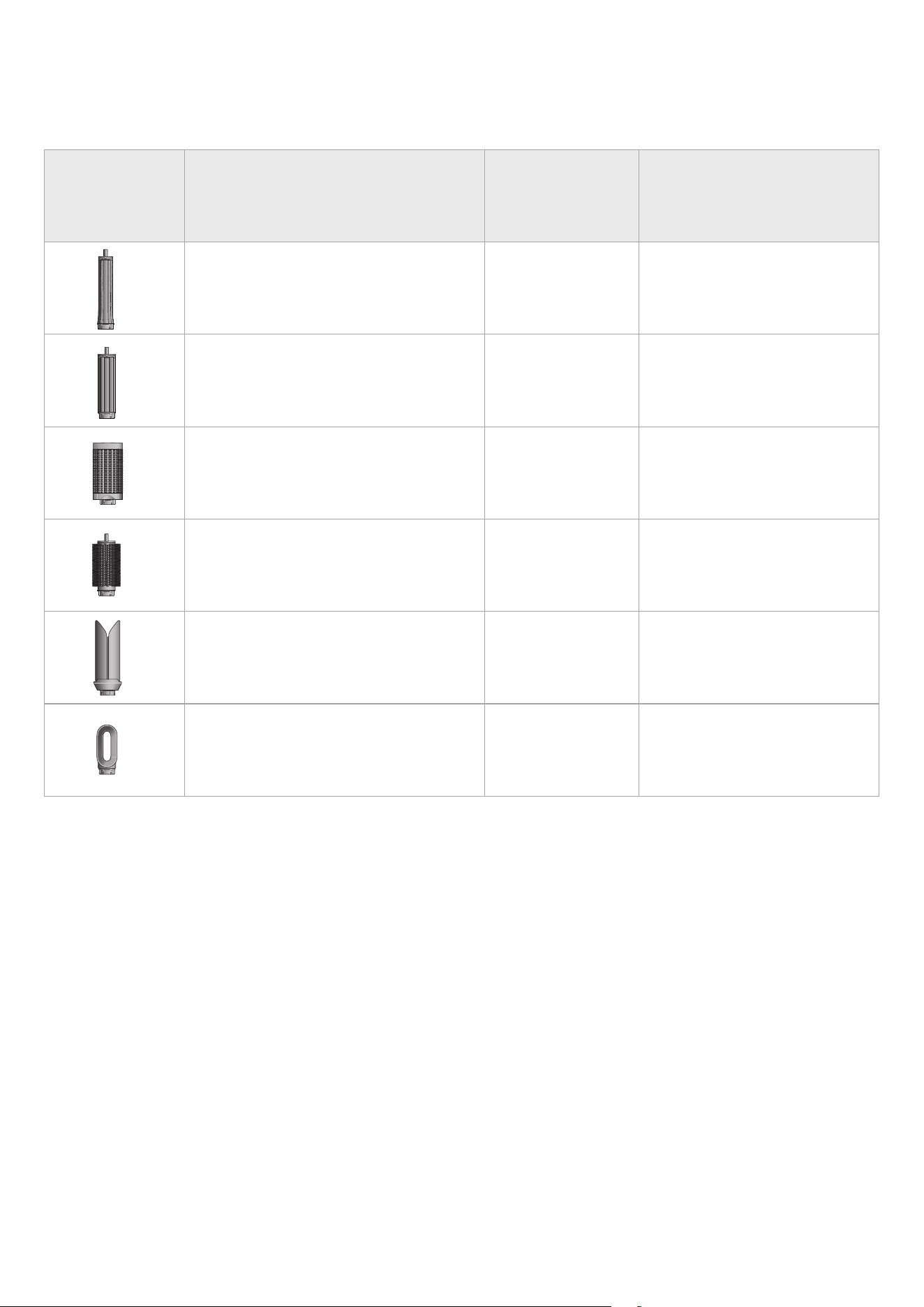
Styling attachment
Your device may not include all attachments listed.
Round volumising brush 2x
Creates voluminous styles with reduced frizz.
2
Controlled airflow and tapered bristles allow you
to style a section at a time, without disturbing
surrounding hair.
Anti-snag loop brush 2x
Gives a smoother, more aligned finish.
2
Designed for
all hair types. New loop bristles reduce snagging
while improving comfort on the scalp.
40mm Co-anda2x™ curling barrel
Create loose curls and waves in both directions
with one barrel. Increased Coanda airflow wraps
hair faster for easier styling.
1
AirSmooth2x™ attachment
Uses high velocity airflow to deliver the
tension needed to create straighter styles.
3
Use as a finishing attachment on dry hair.
Fast dryer 2x
Controls higher velocity airflow for faster drying.
1
Take hair from wet to dry or pre-dry for
further styling.
30mm Co-anda2x™ curling barrel
Create voluminous curls and waves in both
directions with one barrel. Increased Coanda
airflow wraps hair faster for easier styling.
1
Yes
No
No
Yes
No
High heat
High flow
High heat
High flow
High heat
High flow
High heat
High flow
High heat
Low flow
High heat
High flow
Using your attachments
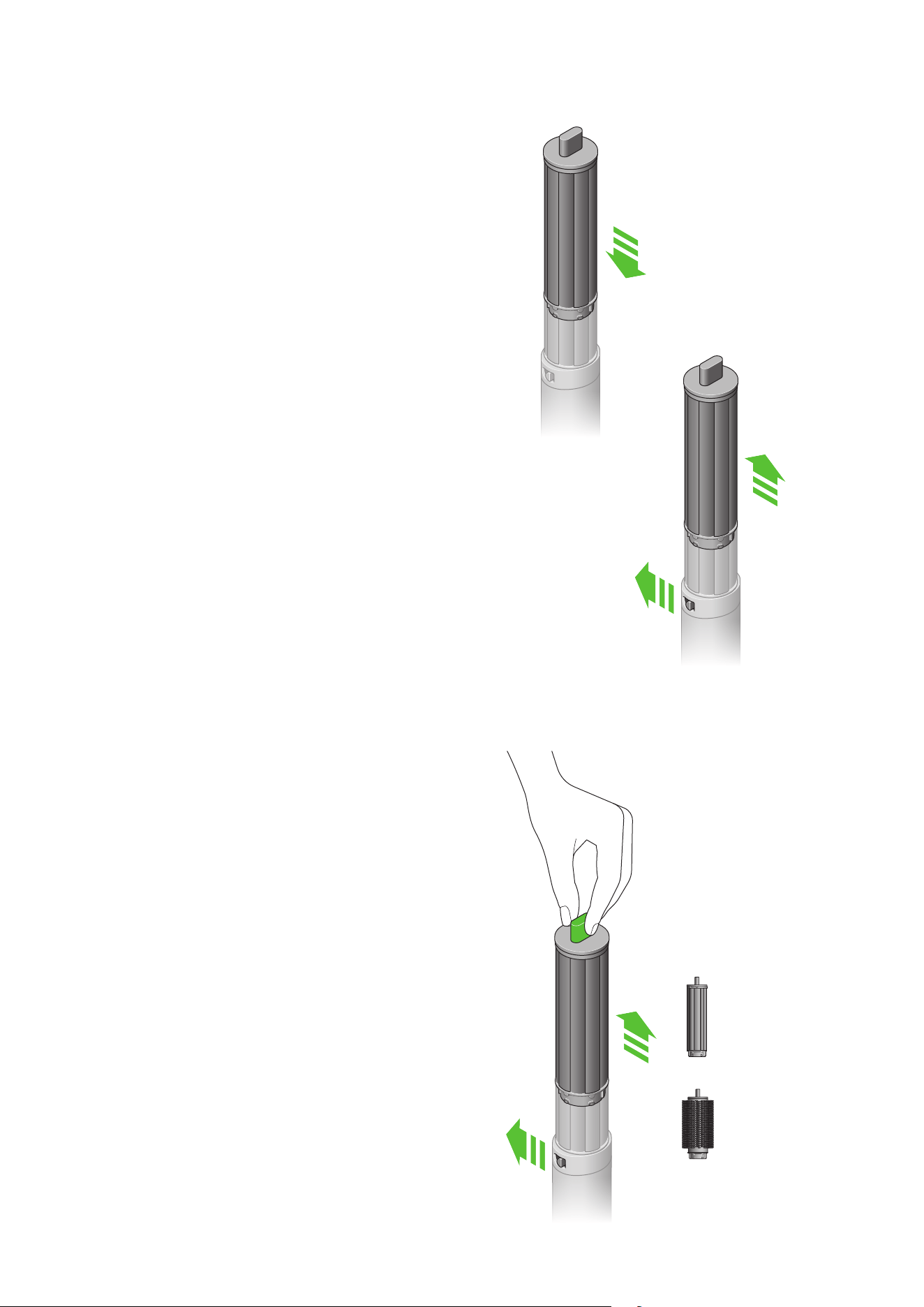
Connecting the attachment
Click attachment into the main body until it fits securely.
Changing attachments
To change attachment, slide the Release button
and remove using the cool tip or edge.
Cool touch tip
During use, the curling barrels and round brushes will get hot.
To change to another attachment, hold the tip. If the attachment
doesn’t have a tip, hold the cool edge.
Take care when handling hot attachments
Hold the attachment only in the area indicated.
40mm Co-anda2x™
curling barrel
Round volumising
brush 2x
clik
Pre-styling
Curling Barrels
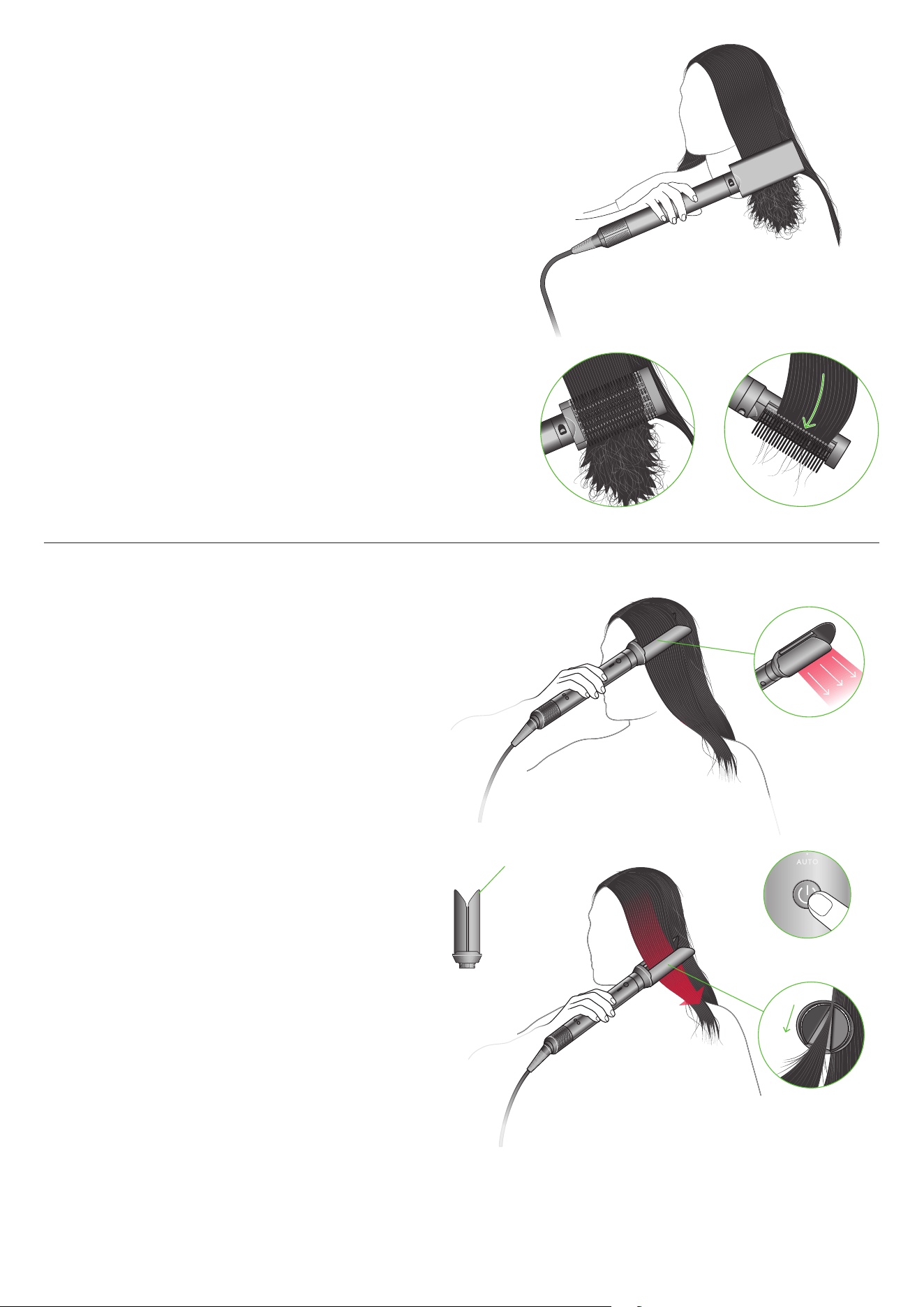
Step 1
Press the Power button, then take a section of hair and bring
the curling barrel towards tips. Hair will start to wrap around
the barrel.
Using i.d. curl™ personalised curling sequence
The Dyson Airwrap Co-anda2x™ multi-styler and dryer remembers
your personalised sequence. This tailors wrapping and styling
times to your personal hair profile, using the MyDyson™ app.
First, set up i.d. curl™ personalised curling sequence in the
My D ys on™ app.
Step 2
Move styler towards head, no need to twist. Your personalised
i.d. curl™ sequence will start.
Step 3
Cold shot will automatically activate to set the curl.
Airflow will automatically turn off when sequence
is complete.
Move device downwards to release.
To change curl direction, rotate the barrel’s cool tip.
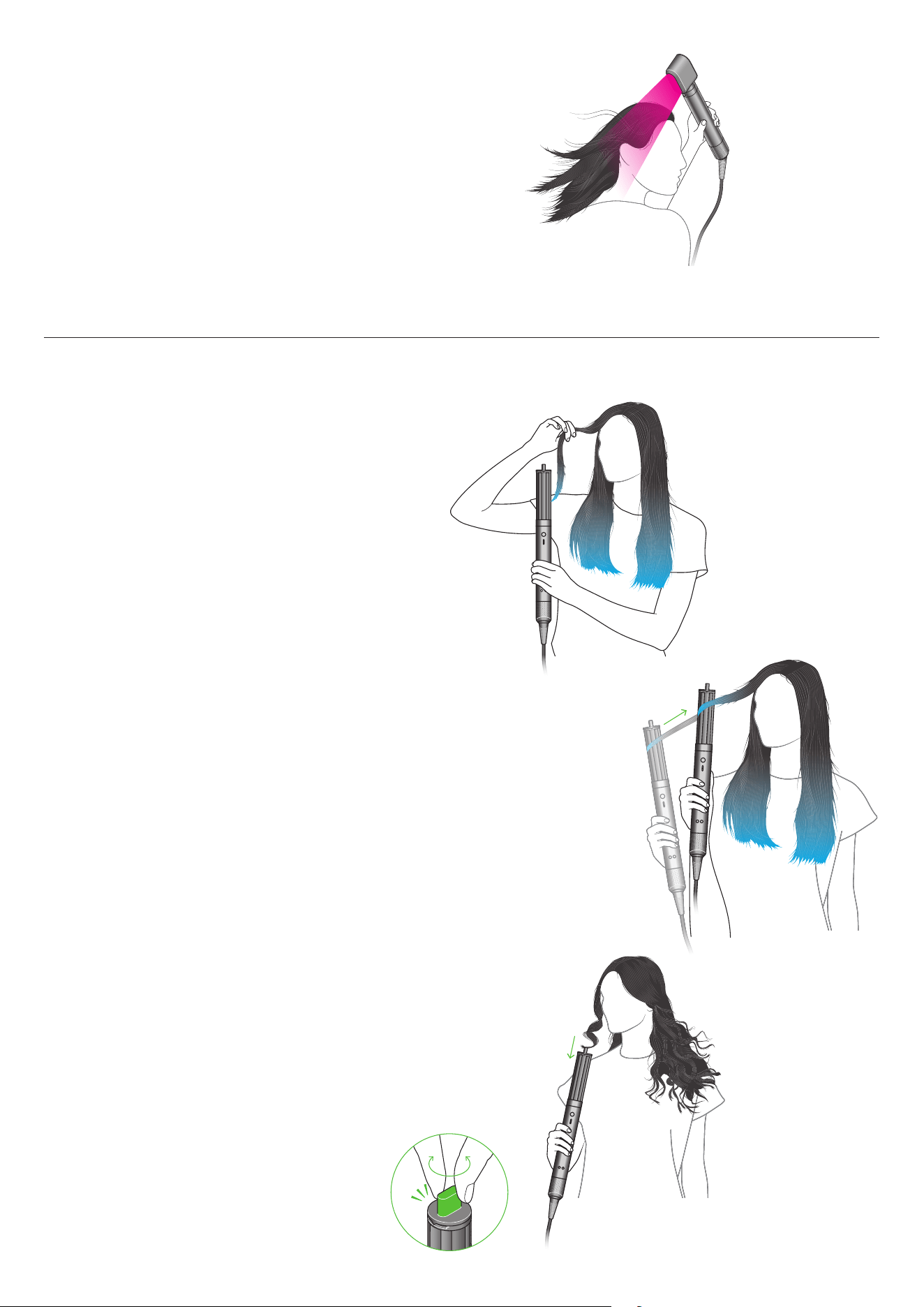
For straight and wavy hair, use a dryer attachment –
Fast dryer 2x.
Hair should look dry but feel cold to the touch before
curling with barrels.
For curly and coily hair, use the Anti-snag loop brush 2x.
Brush hair downwards in small sections, starting from the ends
and working towards the roots, until slightly damp to touch.
Curling
Tip
Slowly move the AirSmooth2x™ attachment through a small section
of hair. If the movement is too slow, the device may think you’ve
finished your pass – resulting in the arms opening too soon.
Shaping
Anti-snag loop brush 2x
Use Anti-snag loop brush to brush from root to tip.
Tip:
To create shape, turn brush inwards at the ends.
To maintain volume, face bristles outwards.
Smoothing
AirSmooth2x™ attachment
Use on dry hair after styling with the Anti-snag loop brush 2x.
Take a section of hair and place it between the attachment’s arms.
Press the Power button to clamp arms, and slowly move down the hair.
When Auto mode is enabled, the device will detect when you’ve
completed a full pass, and automatically unclamp to release the hair.
Volumising
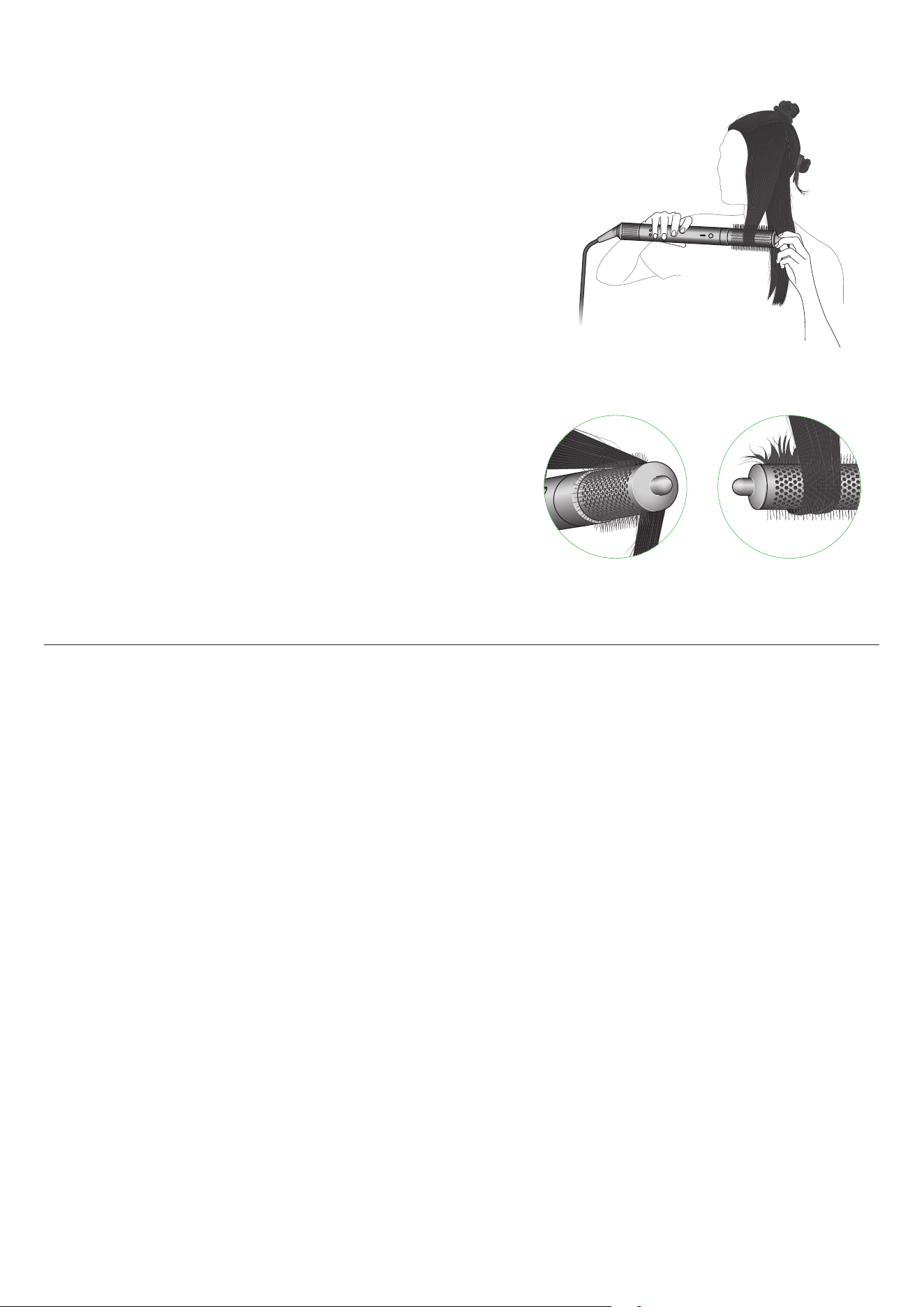
Round volumising brush 2x
The Round volumising brush 2x diffuses airflow evenly down the length of the
brush, for more controlled styling with less frizz.
1
The tapered bristles pivot to
release hair easily as you style.
Tip
Lift sections upwards as you dry to add volume. Wrap hair around and under
the brush to shape the ends.
1. vs. untreated/naturally dried hair.
Regular filter maintenance
Filter cleaning is overdue when the Amber LED starts flashing
Ensure that you unplug your device from the mains electricity supply and
allow to cool down before cleaning your filter.
Dyson Airwrap Co-anda2x™ multi-styler and dryer has highly tuned
technology to give outstanding performance.
This technology needs to be kept free from dust and hair
product residue.
Maintenance is required to maintain performance.
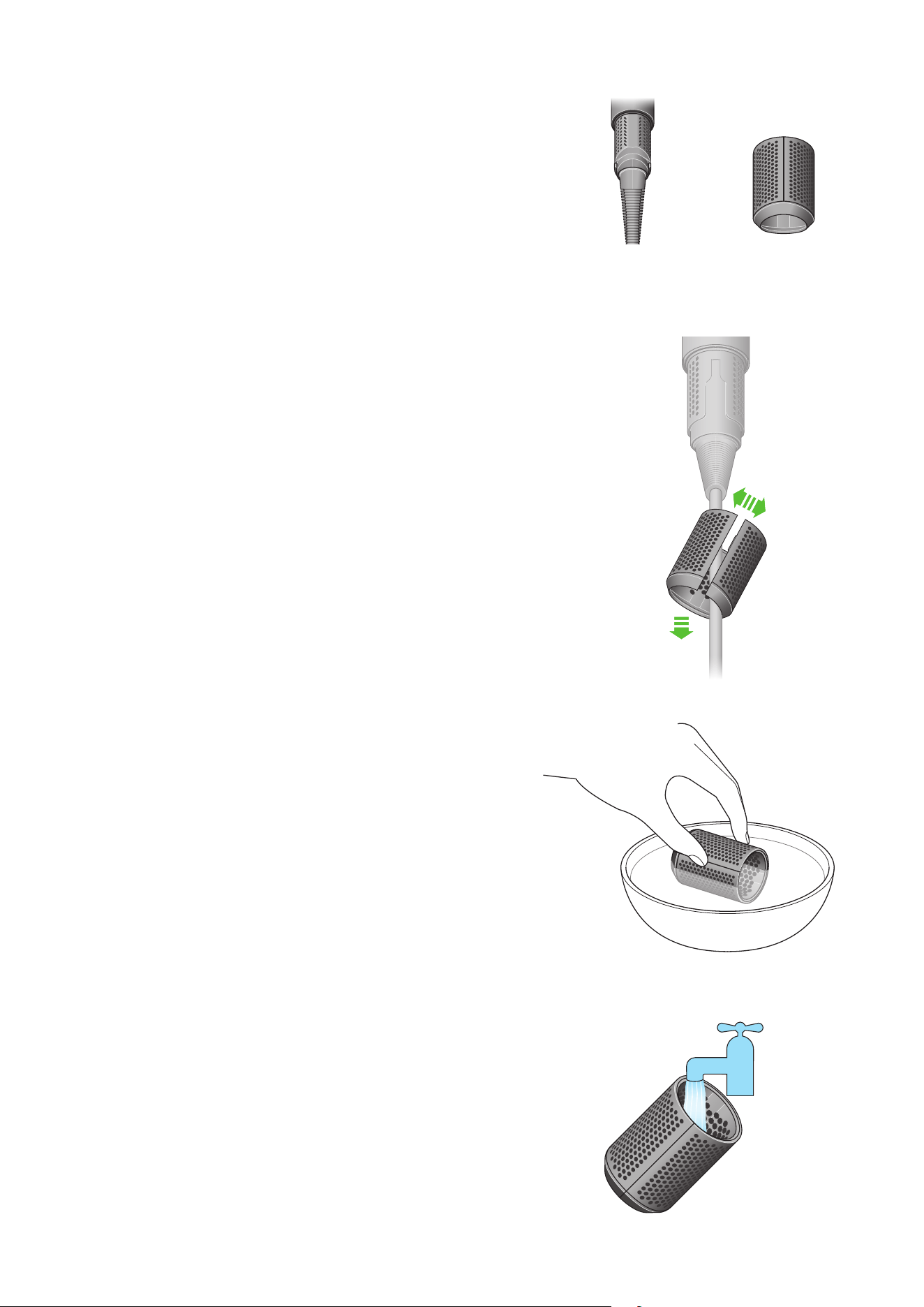
Step 1
Remove the filter by sliding it down the power cord and
opening at the split line.
Step 2
Soak the filter in a bowl of water.
Step 3
Wash the filter cage under a warm, running tap.
Filter mesh Filter cage
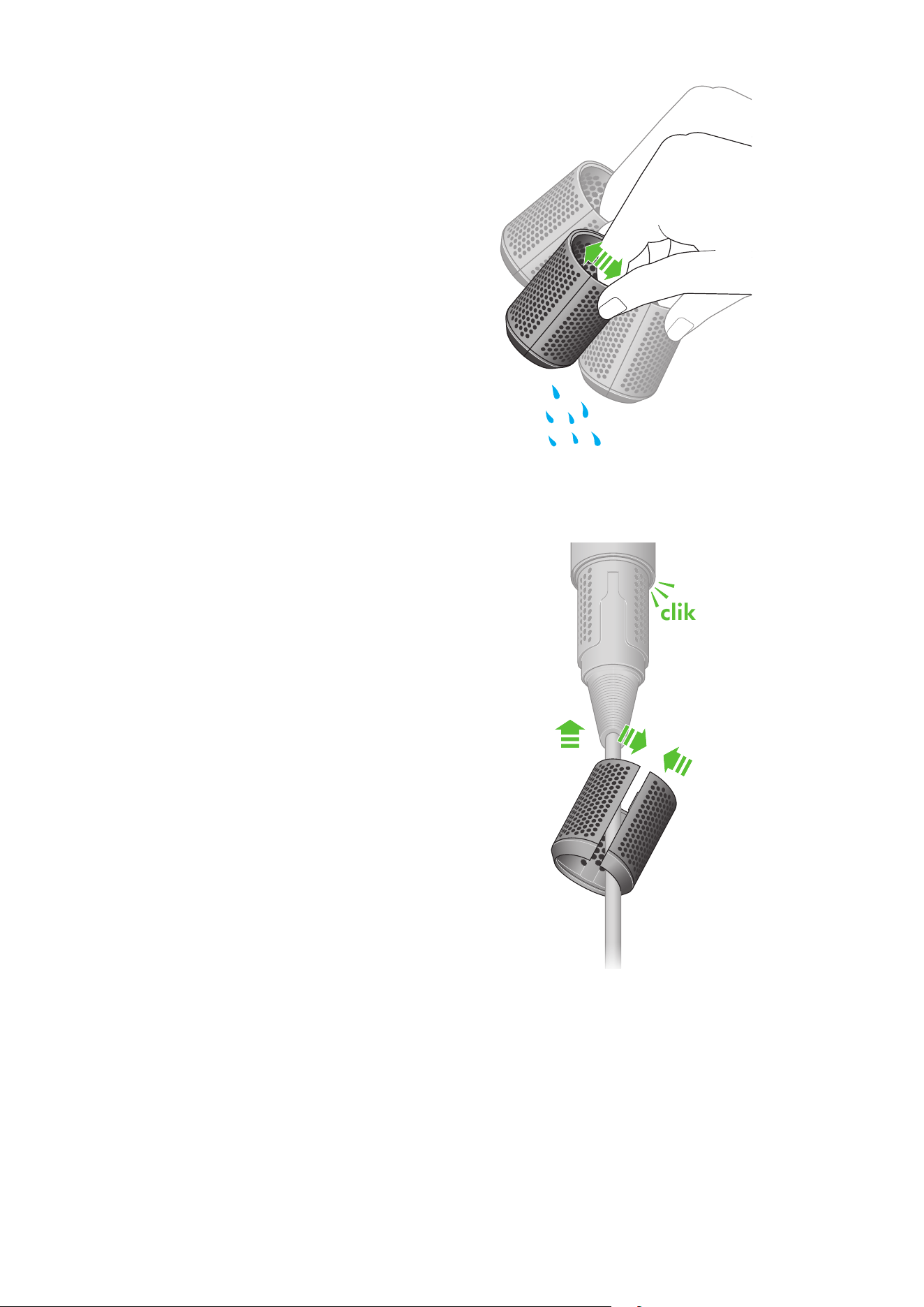
Step 4
Shake the filter cage to remove the majority of the excess water,
then leave to dry completely.
Step 5
Open the filter cage at the split line and replace back on to the device.
Click into place.
clik