
8930970 08.23.24 ©2024 DYSON
In the box
Getting started
Connecting to the MyDyson™ app
Using your attachments
Pre-styling
Curling
Shaping
Volumizing
Smoothing
Diffusing
Stretching
Regular filter maintenance
User manual
Dyson logo
Dyson Airwrap i.d logo
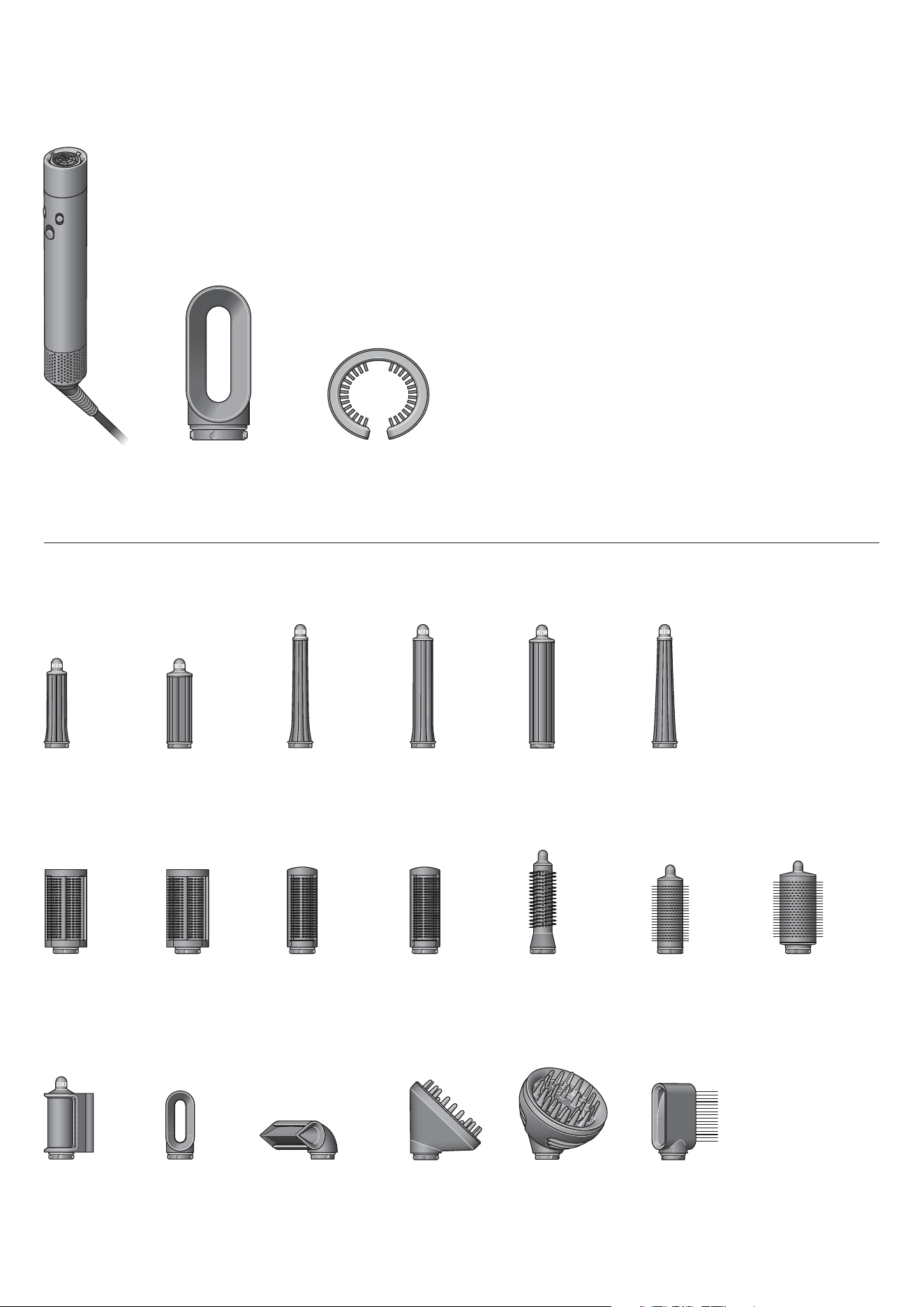
In the box
You can buy additional attachments at www.dyson.com/hair-care/accessories
Dyson Airwrap i.d.™
multi-styler and
dryer main body
Filter cleaning brushFast dryer
1.2"
Airwrap™
barrel
0.8"
Airwrap™
barrel
1.2"
Airwrap™
long barrel
1.6"
Airwrap™
long barrel
Conical
Airwrap™
barrel
1.6"
Airwrap™
barrel
Firm
smoothing
brush
Small soft
smoothing
brush
Small firm
smoothing
brush
Round
volumizing
brush
Small round
volumizing
brush
Soft
smoothing
brush
Large
volumizing
round brush
Fast dryer Blade
concentrator
Dryer+
Flyaway
smoother
Wave+Curl
diffuser
Diffuser Wide-tooth
comb
The main body
of the machine
without any
attachments.
A cylindrical tool that fits on
to the filter at bottom of the
Dyson Airwrap multi-styler
for cleaning.
The Fast dryer
attachment.
Getting started
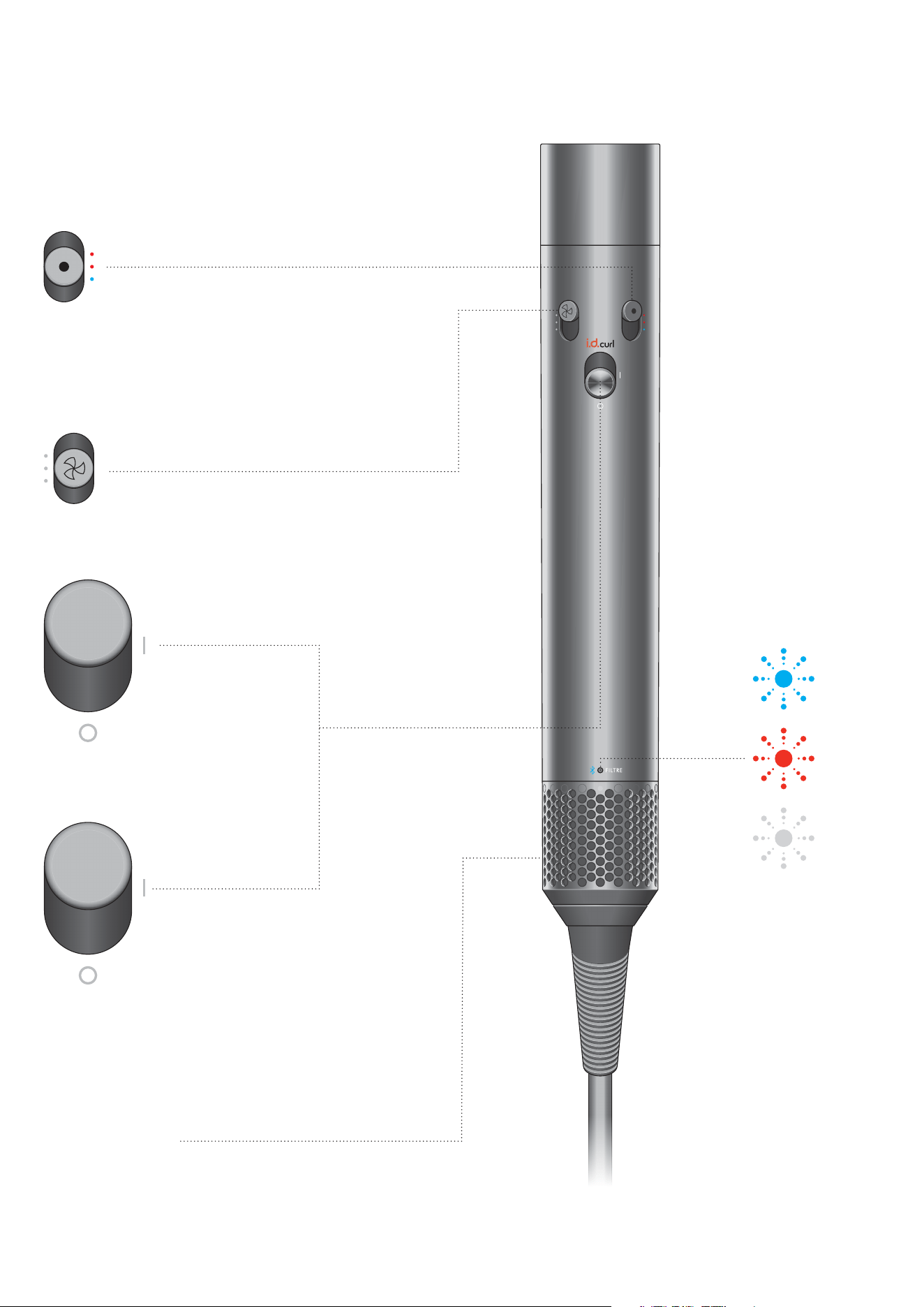
Power on/off
Sliding switch
LED
Flashing blue –
ready to connect.
Constant blue –
connected.
Clean the filter.
See the ‘Regular filter
maintenance’
section for details.
If the red LED lights,
and the filter has already
been cleaned, contact
the Dyson Helpline.
Removable filter cage
Easy to remove for cleaning
(see the ‘Regular filter
maintenance’ section
for details).
i.d. cu rl ™ per so nali ze d
curling sequence
Complete the tutorial in
the MyDyson™ app to
unlock this feature. Slide
up and release to activate.
Airflow control
3 airflow speeds.
Temperature control
Three temperature
settings including
constant cold.
The LED lights are
located at the bottom
of the handle above the
filter cage.
The filter cage
is located at the
bottom of the
handle.
The temperature control
button is located on the
front, right hand side of the handle.
The power button is
located in the middle of
the handle. It is a slider
button that pushes
upwards and
downwards.
The airflow control button is located
on the front, left hand side of the
handle. It is a slider button that
pushes upwards and downwards.
Unlock i.d. curl™ personalized
curling sequence by connecting
to the MyDyson™ app
Download on the App Store. Get it on Google Play.
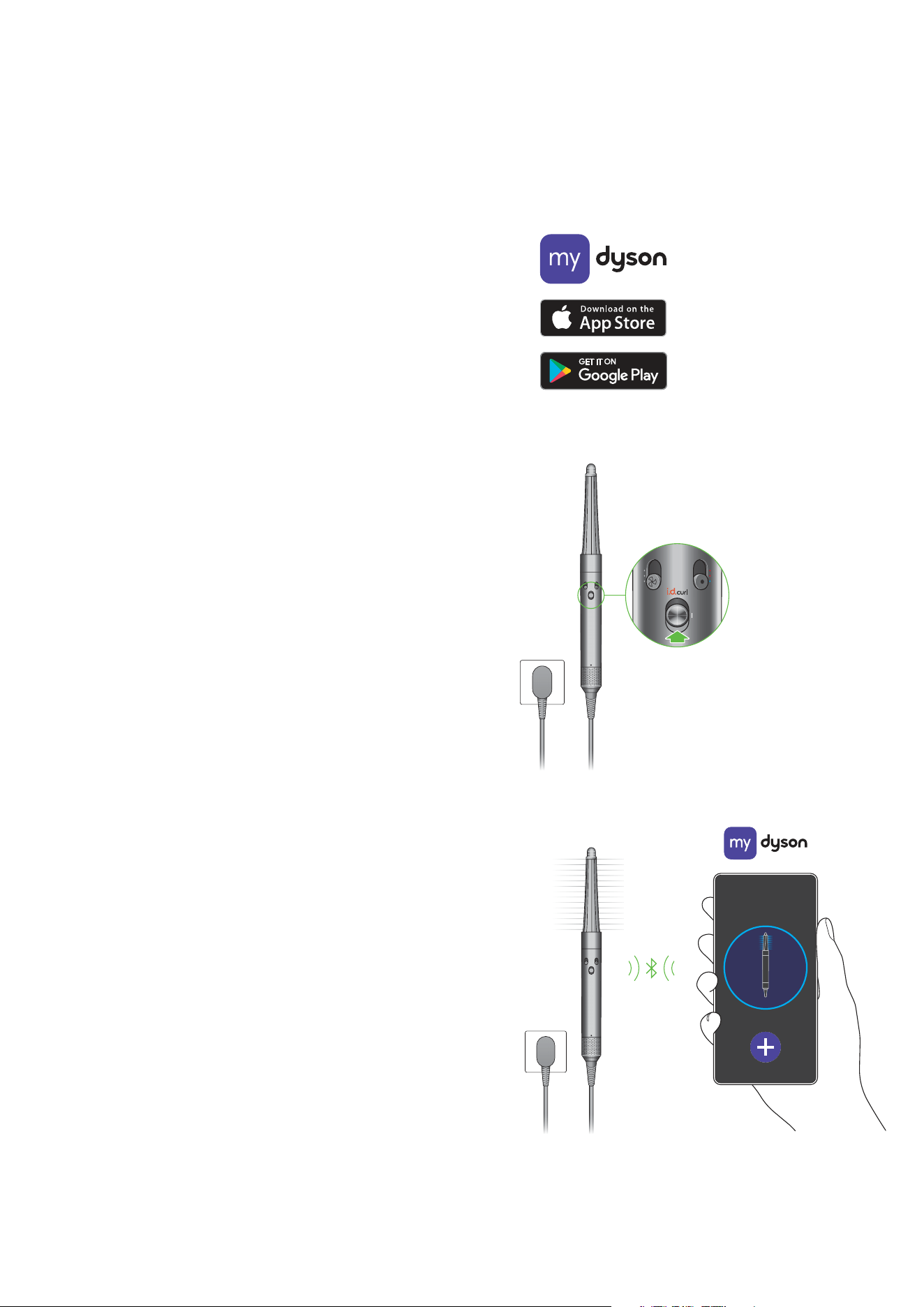
Step 1
Download the MyDyson™ app and create your account.
If you already have an account, log in.
Step 2
Power on your Dyson Airwrap i.d.™ multi-styler and dryer
and add machine to the app.
Bluetooth
®
wireless technology must be enabled on your mobile device.
Step 3
Follow the steps to pair your Airwrap i.d.™.
Airflow will be active during this time.
Step 4
Once paired, power off your Airwrap i.d.™.
Continue set-up in the app to enable features such as the i.d. curl™
personalized curling sequence.
Apple, the Apple logo and Siri are trademarks of Apple Inc., registered in the U.S. and other
countries. App Store is a service mark of the Apple Inc., registered in the U.S. and other countries.
Google Play, the Google Play logo, Google Assistant are trademarks of Google Inc.
MyDy son™ app connec tivity
App functionality may vary per market. Requires internet connection.
Operating system and mobile device requirements for the MyDyson™ app
can be found on the App Store or Google Play.
The Bluetooth
®
word mark and logos are registered trademarks owned by
Bluetooth SIG, Inc. and any use of such marks by Dyson is under license.
Hold Airwrap
i.d.™ close to
smartphone to
connect.
Once set up, slide the
power button up and
release to activate i.d.
curl™ personalized curling
sequence.
Logos of MyDyson app,
App store and Google Play.
Using your attachments
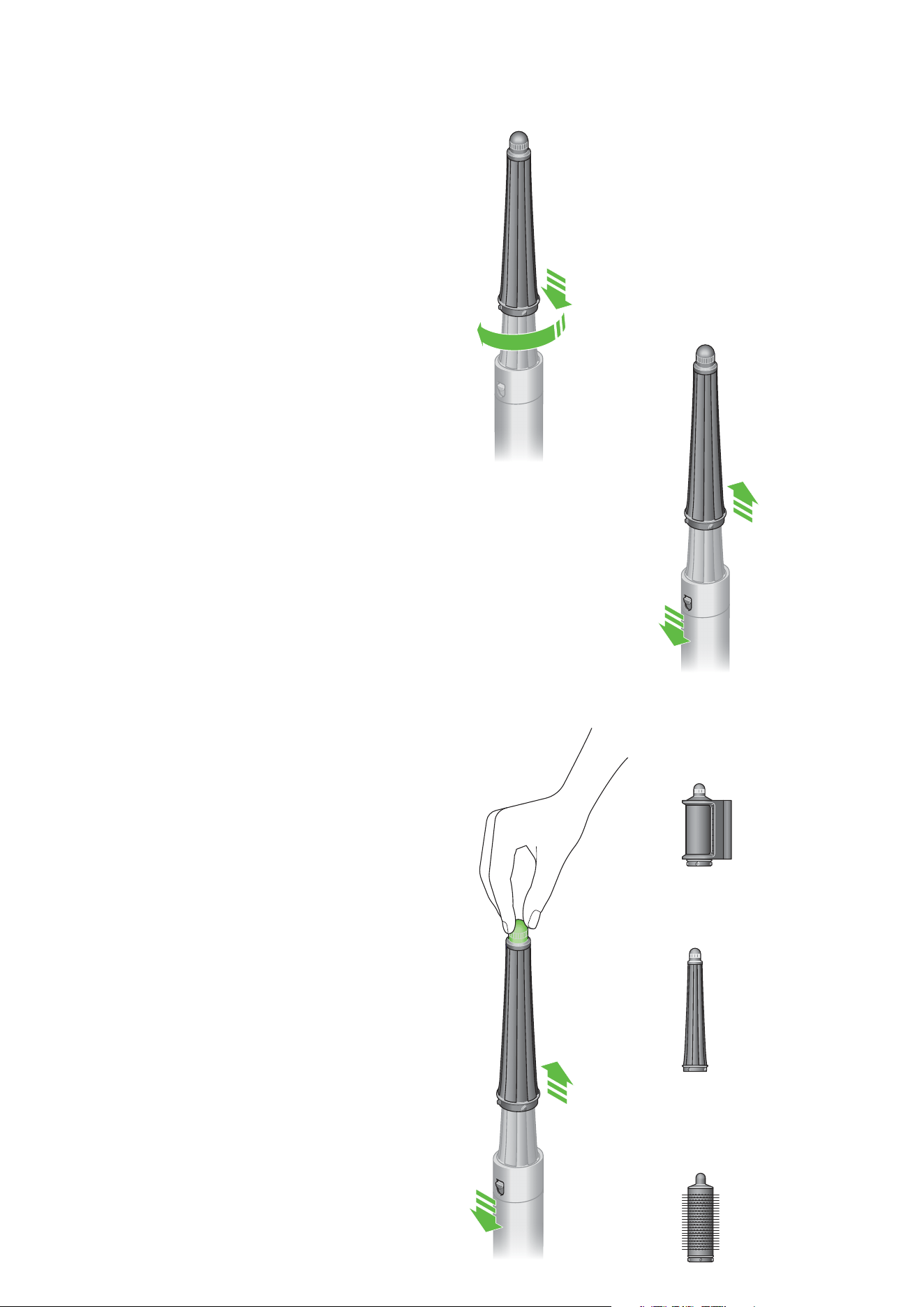
Connecting the attachment
Turn attachment into the main body until it fits securely.
Changing attachments
To change attachment, pull down on the switch to release.
Cool touch tip
During use, the Dyson Airwrap™ barrels, round brushes and
Dryer+Flyaway smoother will get hot. To change to another
attachment, hold the tip.
Take care when handling hot attachments
Hold the attachment only in the area indicated.
Some attachments may need occasional cleaning.
For more information, go to
www.dyson.com/hair-care/accessories
Dryer+Flyaway
smoother
Conical Airwrap™
barrel
Round volumizing
brush
Lower the attachment
onto the multi-styler’s
main body and turn
gently clockwise until it
locks into place.
Pull down on the
release switch located
at the head of the main
body and lift the current
attachment away.
Lower the new
attachment onto the
multi-styler’s main
body and turn gently
clockwise until it
locks into place.
Hold onto the rotating
cool tip at the top end of
the attachment, pull down
on the release switch and
lift the attachment away.
Pre-styling
Barrels
Step 1
Take a section of hair and bring barrel towards tips.
Hair will start to wrap around barrel.
Using i.d. curl™ sequence
The Dyson Airwrap i.d.™ multi-styler and dryer remembers your
personalized i.d. curl™ sequence. This tailors wrapping and styling
times to your personal hair profile, using the MyDyson™ app.
Slide up and release the power switch to activate i.d. curl™
sequence, following initial app set-up.
Step 2
Move styler towards head, no need to twist.
Your personalized i.d. curl™ sequence will run.
Step 3
Cold shot will automatically activate to set the curl.
Airflow will automatically reduce when sequence is complete.
Move device downwards to release.
To change curl direction, rotate the barrel’s cool tip.
For straight and wavy hair, use a dryer attachment –
Fast dryer or Dryer+Flyaway smoother.
The Dryer+Flyaway smoother has two modes (i) drying and
(ii) smoothing. Use the cool tip to switch between the modes.
Hair should look dry but feel cold to the touch before
curling with barrels.
For curly and coily hair, use the Firm smoothing brush.
Brush hair downwards in small sections, starting from the ends
and working towards the roots, until slightly damp to touch.
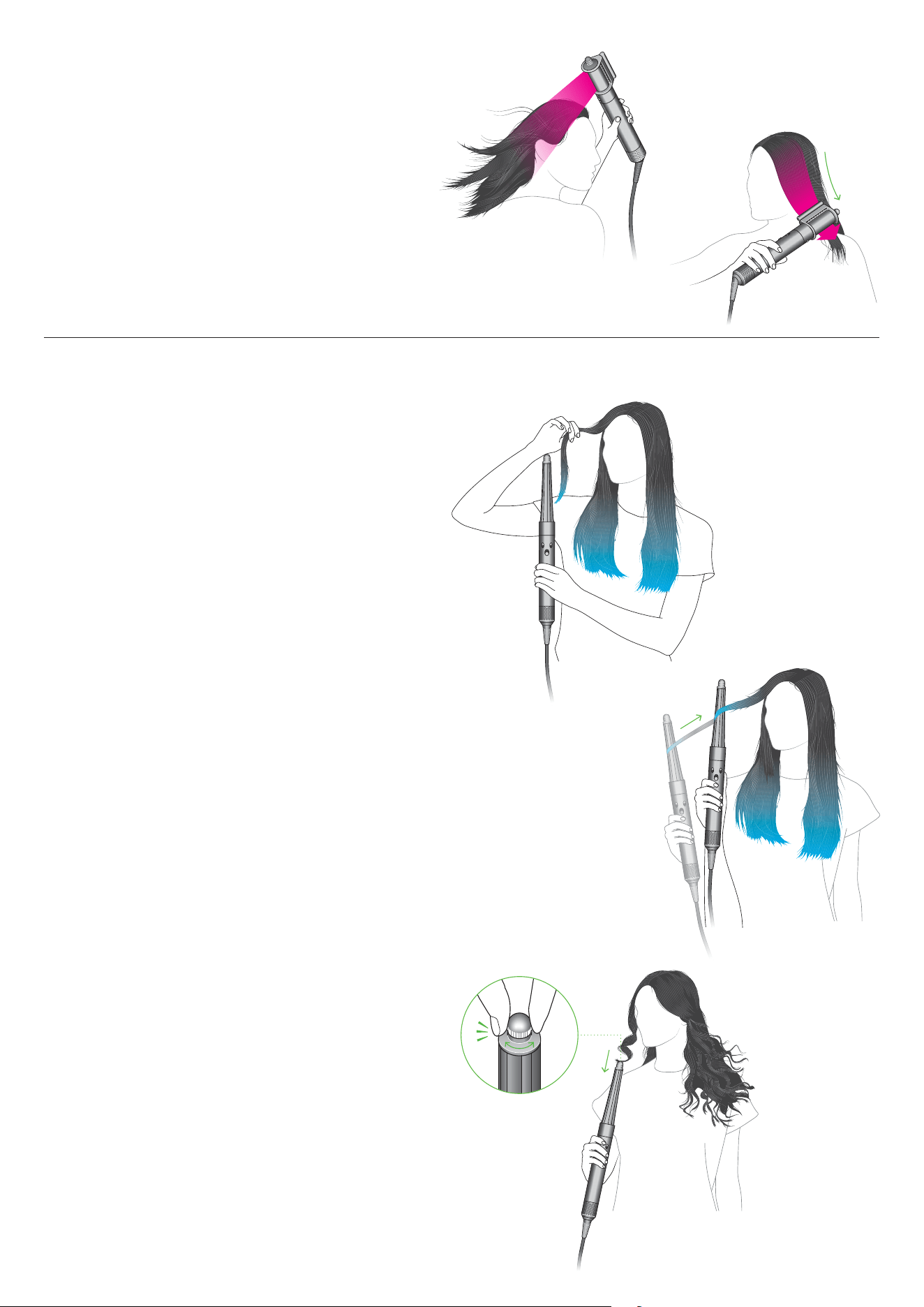
Curling
clik
A person holding a section of
hair, bringing it towards the
barrel until it starts to wrap,
whilst holding the Dyson
device vertically.
A person moving the
device towards their head,
allowing more hair to wrap
and hold around the barrel.
Twist the rotating
cool tip to change
curl direction.
A person holding the device with the
Coanda smoothing dryer attachment
above their head, with airflow blowing
their long, straight hair.
A person moving the device with the
Coanda smoothing dryer attachment
down their hair to hide flyaways.
Shaping
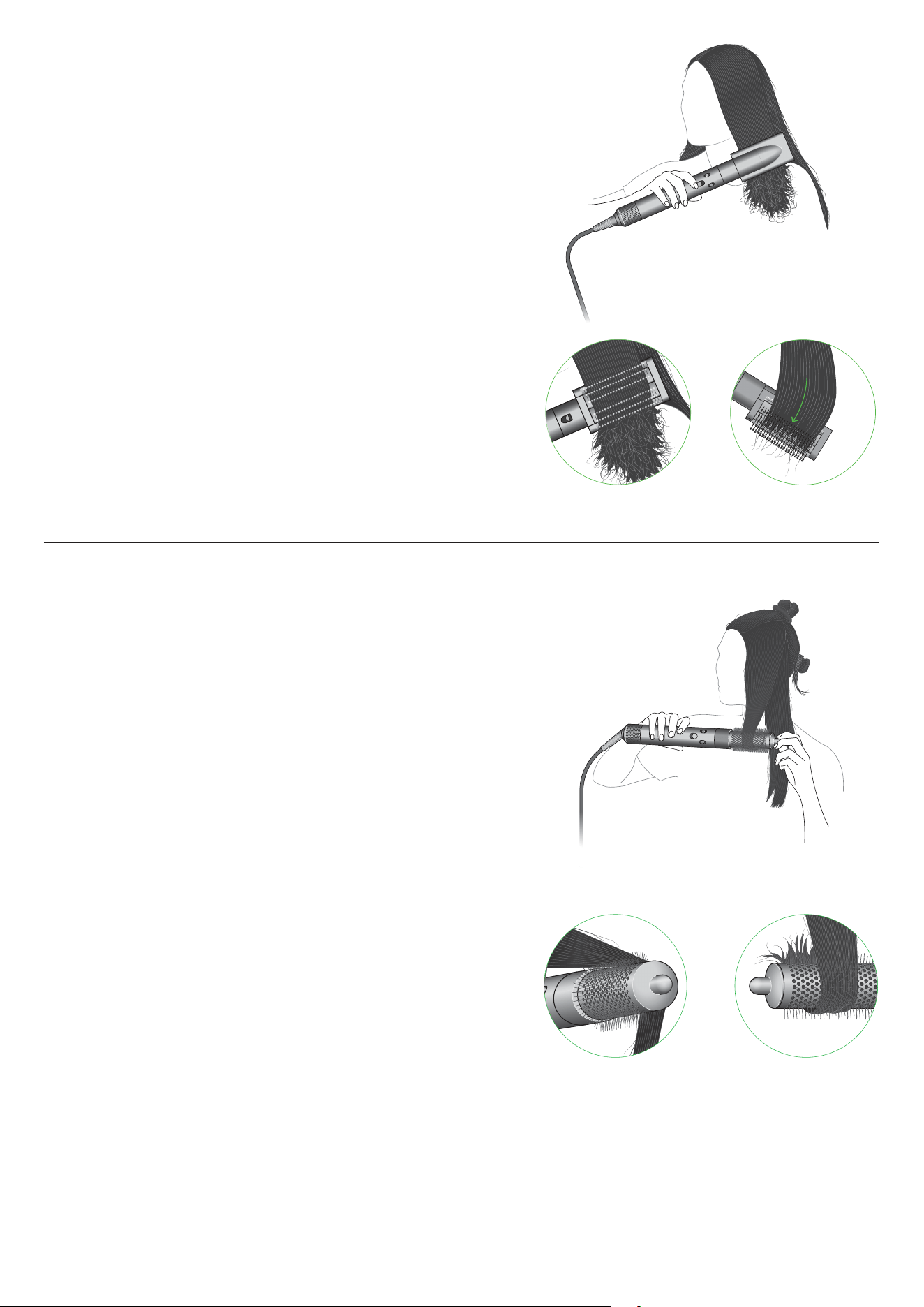
Volumizing
Smoothing brushes
Use Smoothing brush to brush from root to tip.
Tip:
For volume, face bristles outwards.
Turn brush inwards at the ends to create shape.
Round volumizing brush
The Round volumizing brush has long fine bristles
to direct air into the hair whilst giving body,
creating tension to shape the hair as it dries.
Tip
Lift sections upwards as you dry to add volume.
Wrap hair around and under the brush to shape the ends
A person using the Smoothing
brush attachment with bristles
facing inwards and running
along the length of rough-
dried hair.
The Smoothing brush
with bristles facing
outwards combing hair
near the tips. As the
brush reaches the hair
tips, the attachment is
turned inwards to help
create shape.
A person with long hair using both
hands to curl and shape a section
of hair using the Round volumizing
brush attachment.
The Round volumizing brush
with a length of hair over the
top of it and to an angle as it
brushes from root to tip.
The Round volumizing brush
showing the hair curled
around shaping the ends.
360
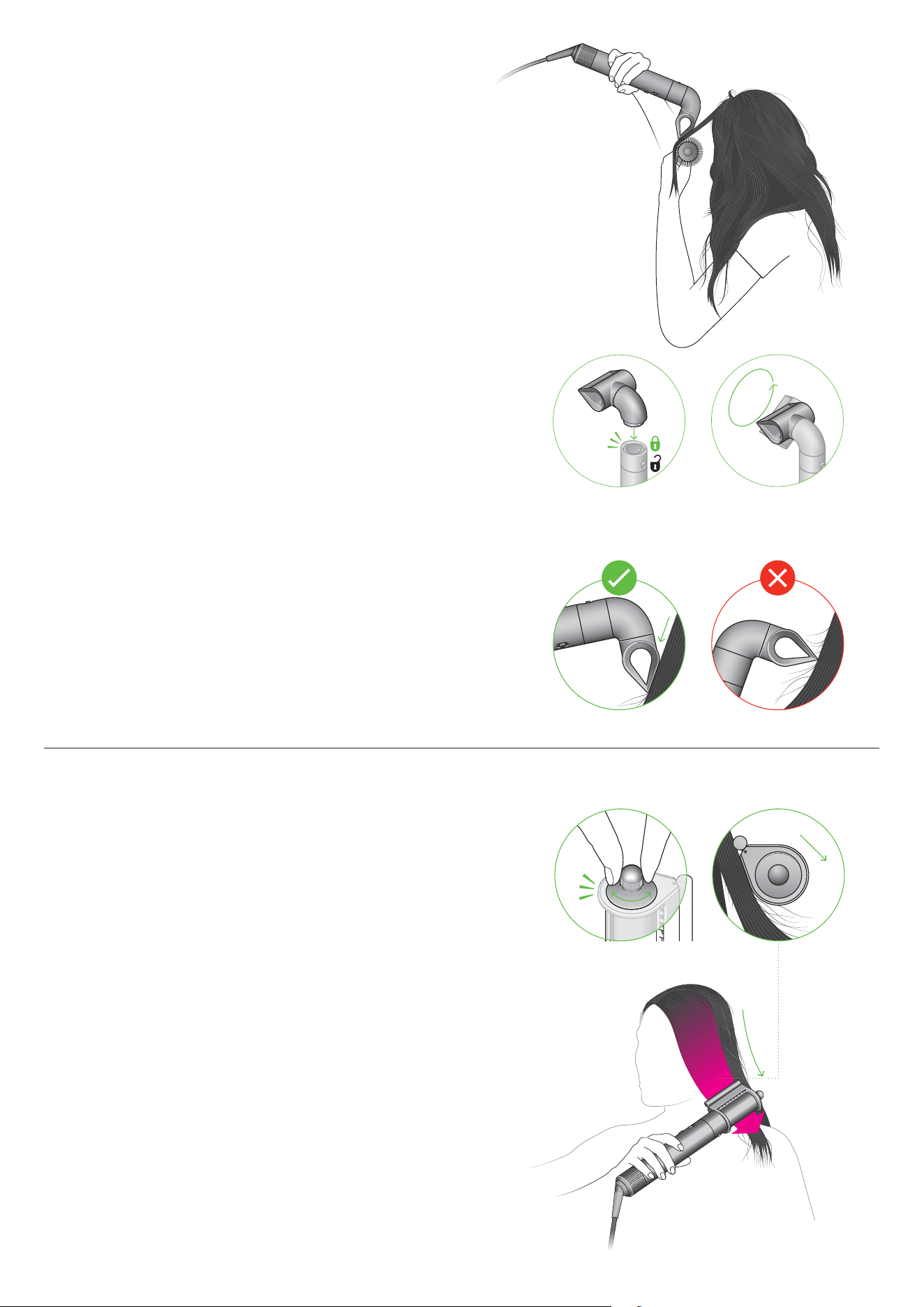
The Blade concentrator
To create a smooth style.
Dry with a high-velocity blade of air for precision styling.
Focused airflow to create bends and flicks with a brush.
Once secured, the Blade concentrator can be
rotated 360 degrees for ease when styling.
Tip
Angle attachment down the hair tress to avoid
disruption and to create a smooth, aligned finish.
Smoothing
Dryer+Flyaway smoother
Rotate cool tip to select Smoothing mode.
Press against hair to switch airflow direction.
How to use the contact bar
Position contact bar against the head until you hear a click
and hair attracts. Run from root to tip to hide flyaways.
Use on dry hair to hide flyaways.
Position against hair until it attracts then slowly run down to tips.
For use on dry and straight hair.
clik
On the side of the
Dryer+Flyaway smoother,
twist the rotating cool tip to
select Smoothing mode.
Run the attachment
downwards to the hair tips.
A person using the Dryer
and Flyaway smoother on
dry, straight hair, moving
the attachment along roots
to tips of hair.
A person styling their
hair using the Blade
concentrator.
The easy unlocking
functionality and 360
degrees maneuverability
highlighted on the Blade
concentrator attachment.
One image showing
the Blade concentrator
correctly angled down
a section of hair, and
another angled incorrectly
at a perpendicular angle.
Stretching
Wide-tooth comb
Comb hair downwards in small sections.
Starting from the ends and working upwards
towards the roots, until desired result is achieved.
Diffusing
Diffuse mode
Detachable prongs disperse airflow to the roots
for textured, voluminous curls and coils.
Wave+Curl diffuser
Dome mode
Airflow is drawn into the dome to help enhance
and smooth natural waves or curls.
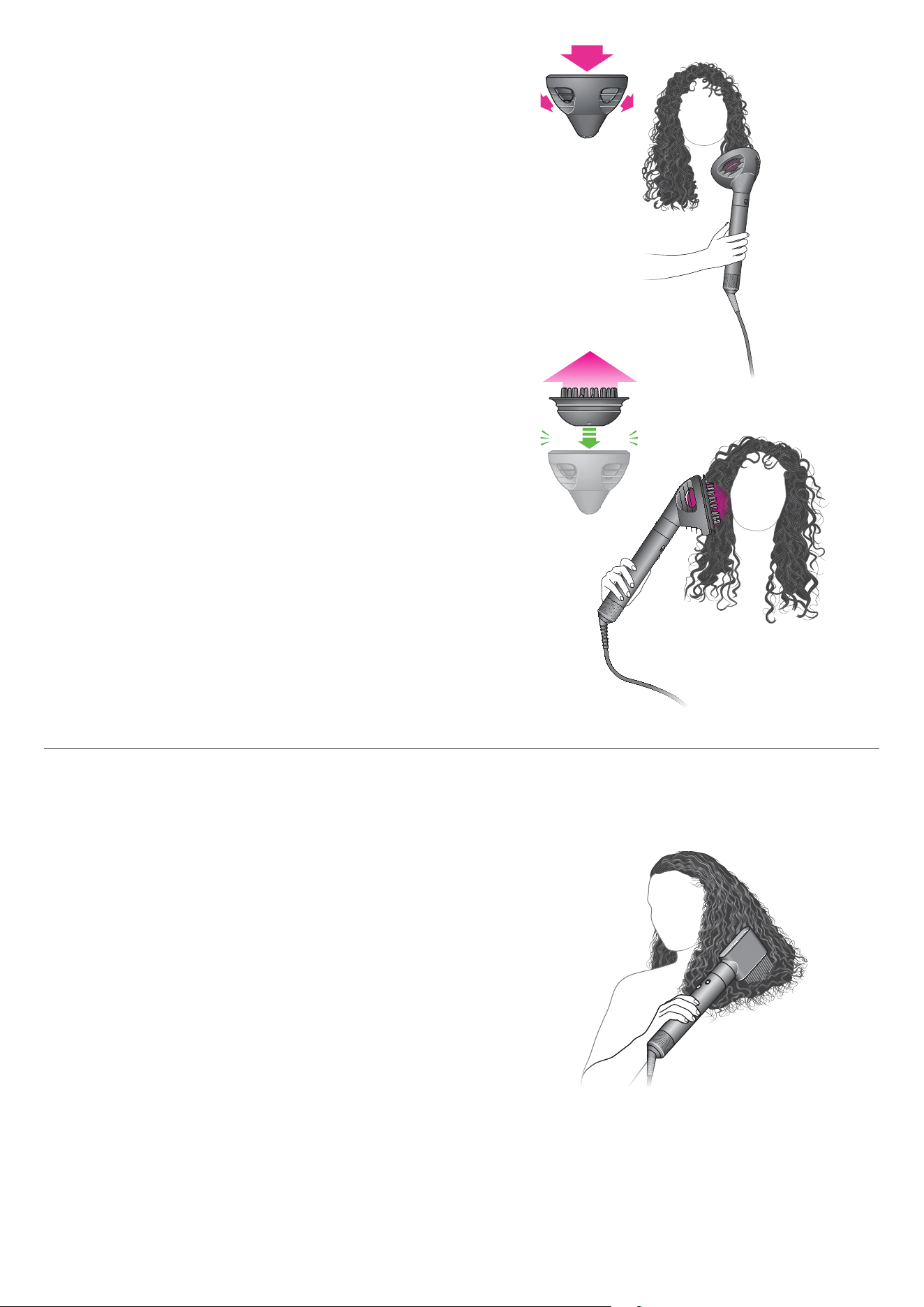
A person with coily
hair holding the device
with Wide-tooth comb
attachment combing
hair downwards near
the hair tips.
Illustration of person with long
curly hair using the Wave and
Curl diffuser in Dome mode.
Prong bed being lifted from
the center of the Wave and
Curl diffuser to change
between Dome mode and
Diffuser mode.
Illustration of person with long
curly hair using the Wave and
Curl diffuser in Diffuse mode.
Regular filter maintenance
Filter cleaning is overdue when the white LED starts flashing.
Ensure that you unplug your appliance from the mains electricity
supply and allow to cool down before cleaning your filter.
The Dyson Airwrap i.d.™ multi-styler and dryer has highly tuned
technology to give outstanding performance.
This technology needs to be kept free from dust and hair product
residue. Maintenance is required to maintain performance.
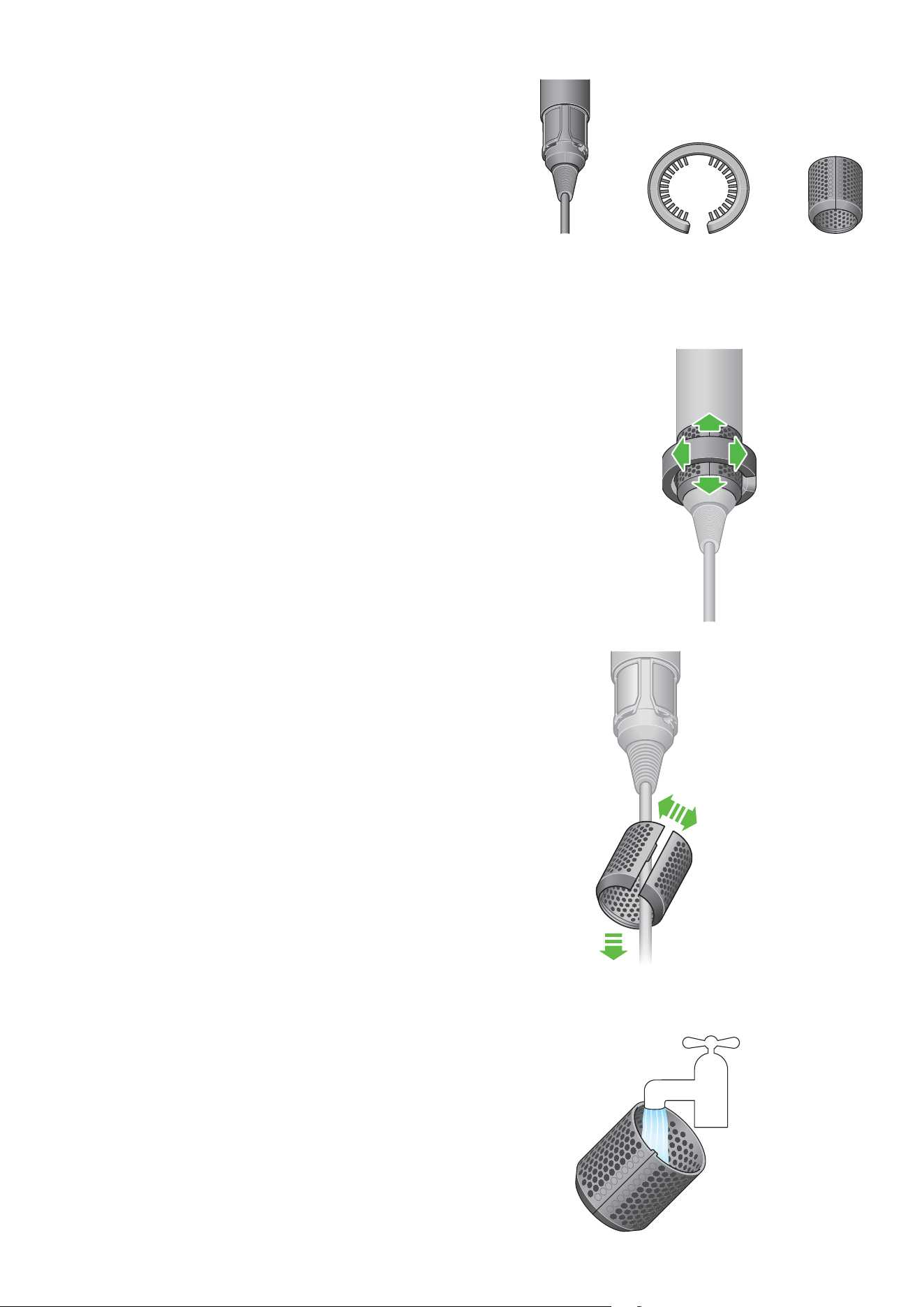
Step 1
Slide the filter cleaning brush over the cable
and onto the filter cage.
Using a rotating action, clean the filter cage thoroughly.
Remove the filter cleaning brush.
Step 2
Hold the handle of your appliance and pull the
filter cage downwards, onto the cable.
Gently pull open the filter cage and slide it off the cable.
Filter mesh Filter cleaning
brush
Filter cage
Step 3
Wash the filter cage under a warm, running tap.
Gently pull the filter
cage downwards
towards the cable.
Open the filter cage
and remove.
Wash the filter cage
under the tap.
Slide the filter brush
onto the filter cage
and rotate from side to
side and upwards and
downwards to clean the
filter cage.
Step 4
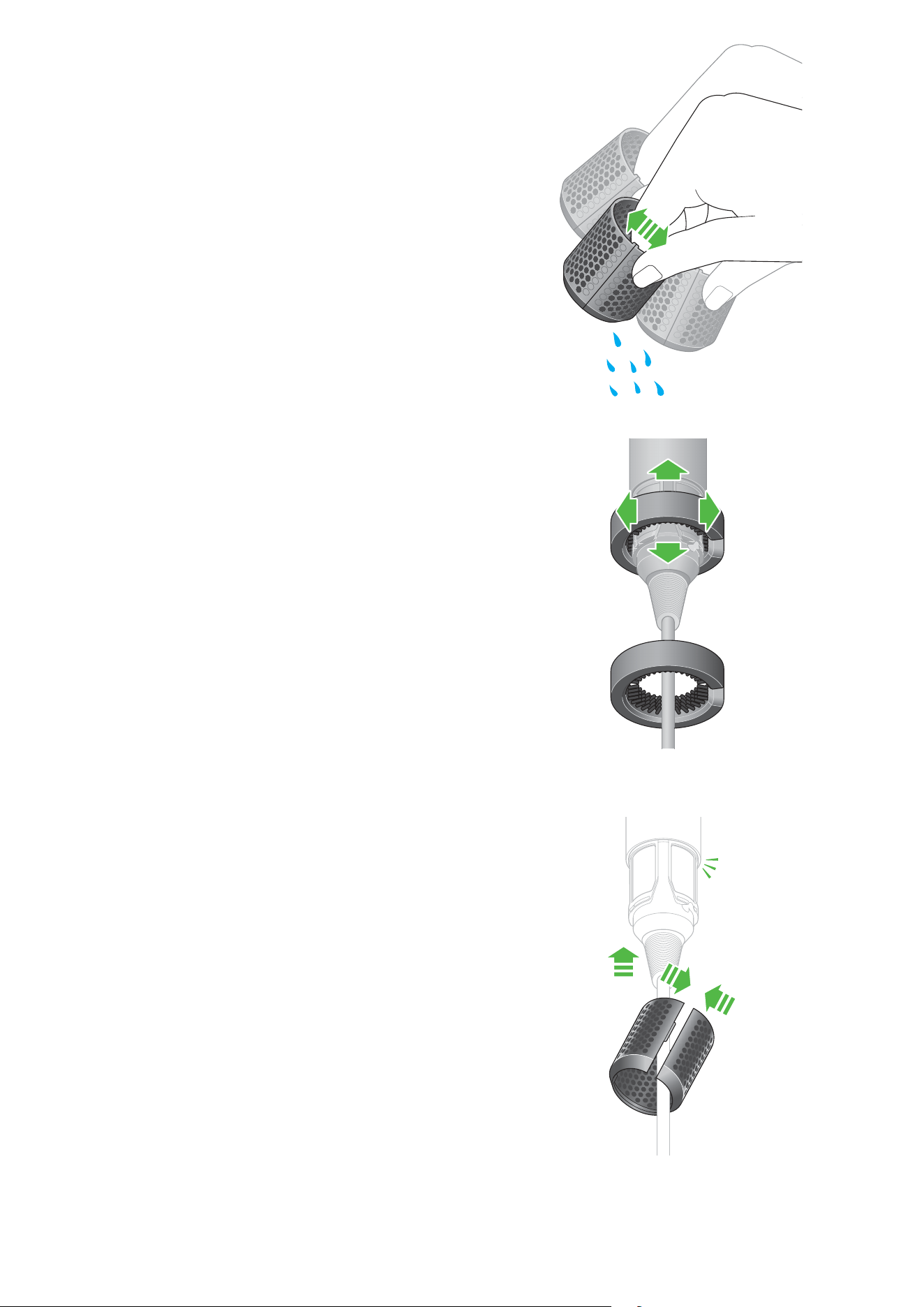
Shake the filter cage to remove the majority of the excess water,
then leave to dry naturally.
Step 5
Using a rotating and up and down action, clean the filter mesh
with the filter cleaning brush until all the debris has been removed.
Do not use water or chemicals to clean the filter mesh.
Step 6
Gently pull the filter cage open and slide it onto the cable.
Slide the filter cage towards the handle and twist
until it snaps into place.
clik
Gently open the filter cage
and slide the cage towards
the handle, twist until it
snaps into place.
Rotate the filter brush from
side to side and upwards
and downwards around
filter mesh to clean.
A person shaking the
excess water from the
filter cage.
Slide the filter brush
towards the filter.
