Please read the User Manual carefully before
using the product and keep it properly.
V1.0-2023.01
USER MANUAL
AIRSALON
MAX

PRODUCT LIST
01
-3-
RETURN TO
CONTENT
*Note: In order to provide a better user experience, we will
be implementing periodic product enhancements. Product
images shown for illustration purpose only. Actual product
may vary from the image shown. For any discrepancies,
please refer to the actual product.
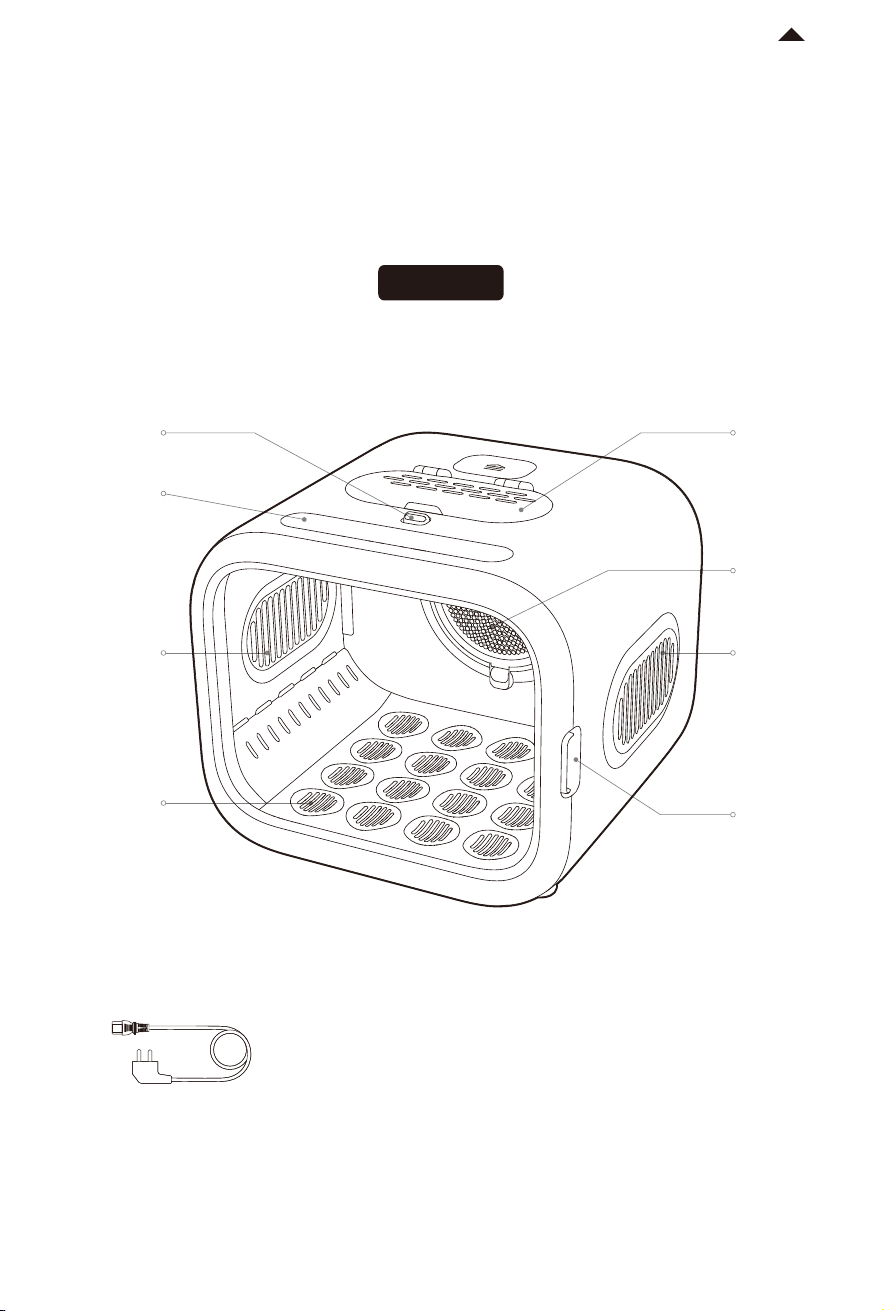
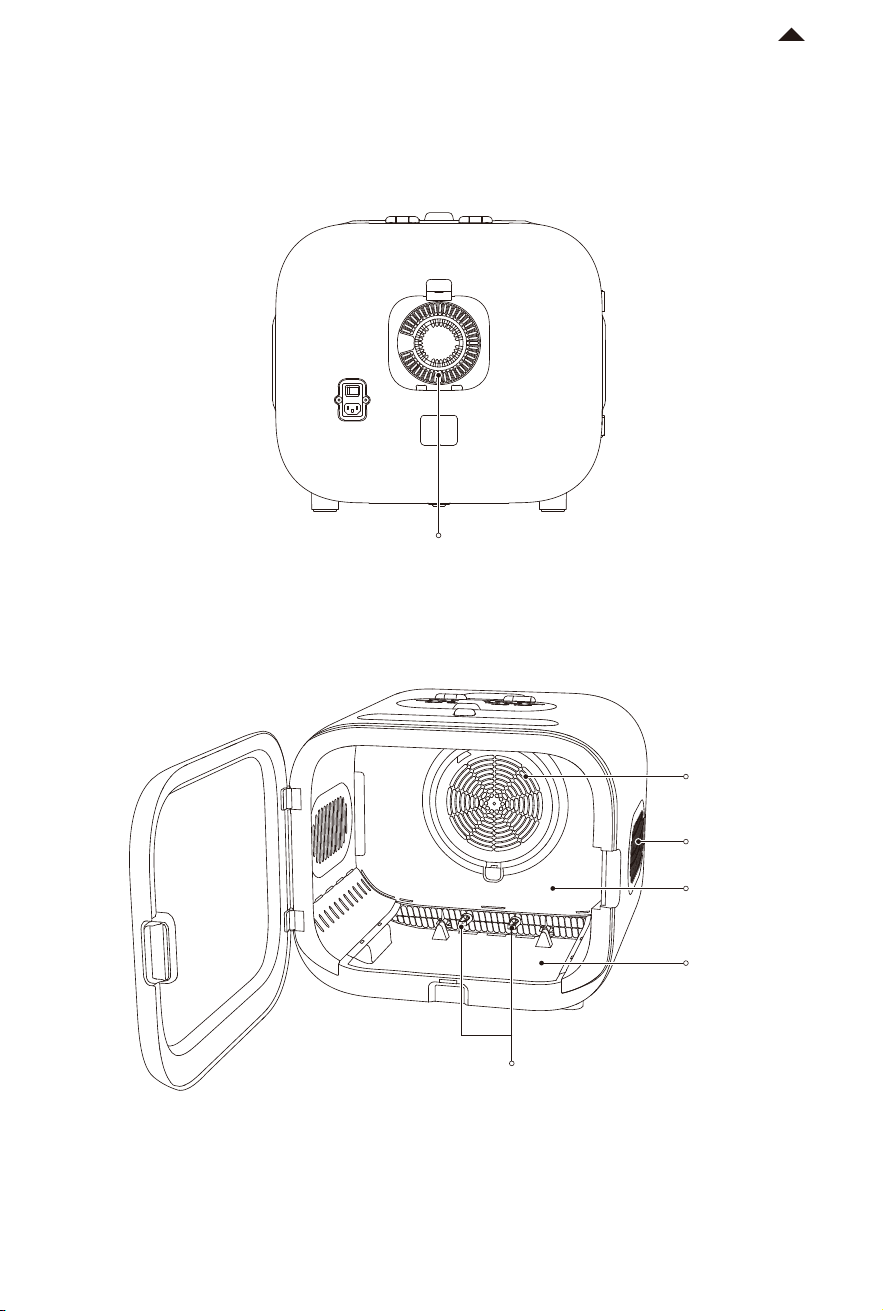
Petting
Door lock
LED control
panel
Air outlet
Removable
air outlet
base plate
Removable
air filter
Air outlet
Door
handle
Openable
Petting Door
Power cord *1
Front view
DEVICE ACTIVATION
02
③
②
①
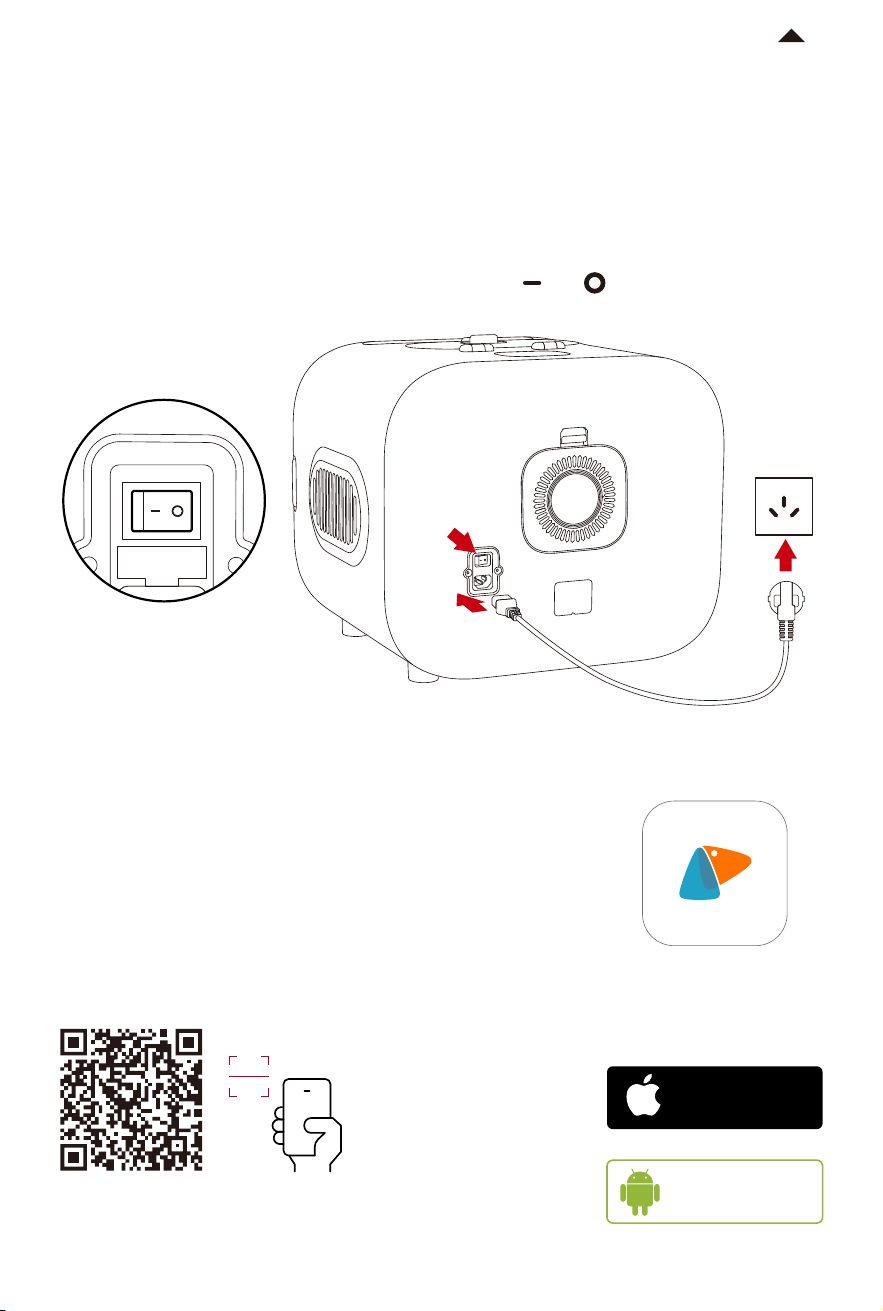
2. Download the PETKIT Pet App
In order to ensure pet safety and correct product use,
the AIRSALON MAX is inactivated when it leaves the
factory. Aer turning on the device the screen will flash
continuously, the PETKIT App must be downloaded
and installed, and aer completing a series of safety
operation instructions the device can be bound. Aer
activation , use the device according to the product
instructions
Download PETKIT App from the Apple
App Store or Android App Market
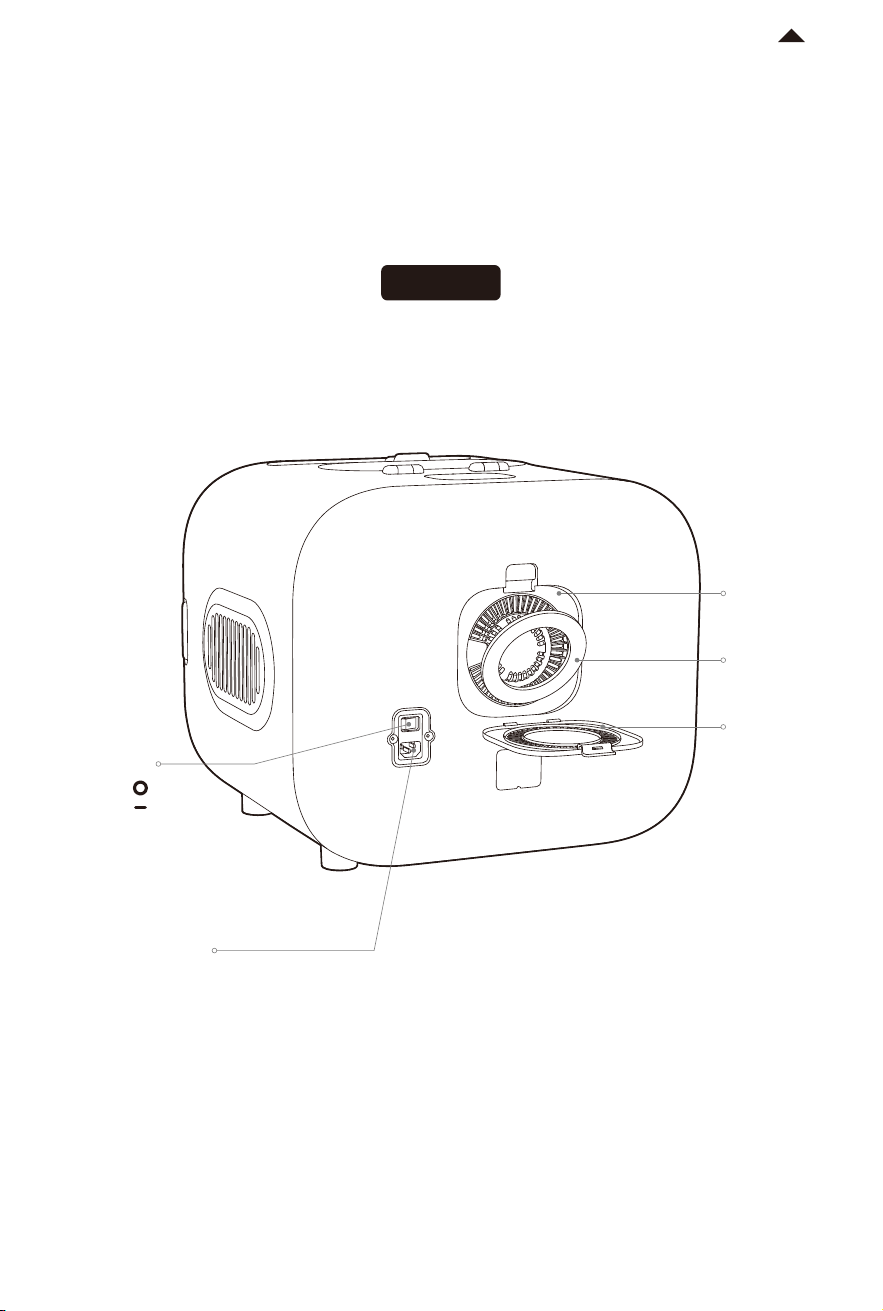
1. Connect power supply
① Plug the power cord into the power socket on the back of the device.
② Then insert the power plug into an indoor power socket;
③ Turn on the power switch on the back of the device.( ON ; OFF )
-5-
Available on
Android
stores
TM
Download on the
App Store
RETURN TO
CONTENT
Power switch
Power
socket
Device
电量:100%
0h 8h 16h 24h
小佩智能猫牌
进食次数
5
下次出粮时间:19:30
智能双子星喂食
器
0h 8h 16h 24h
9:41
Hello, PETKIT
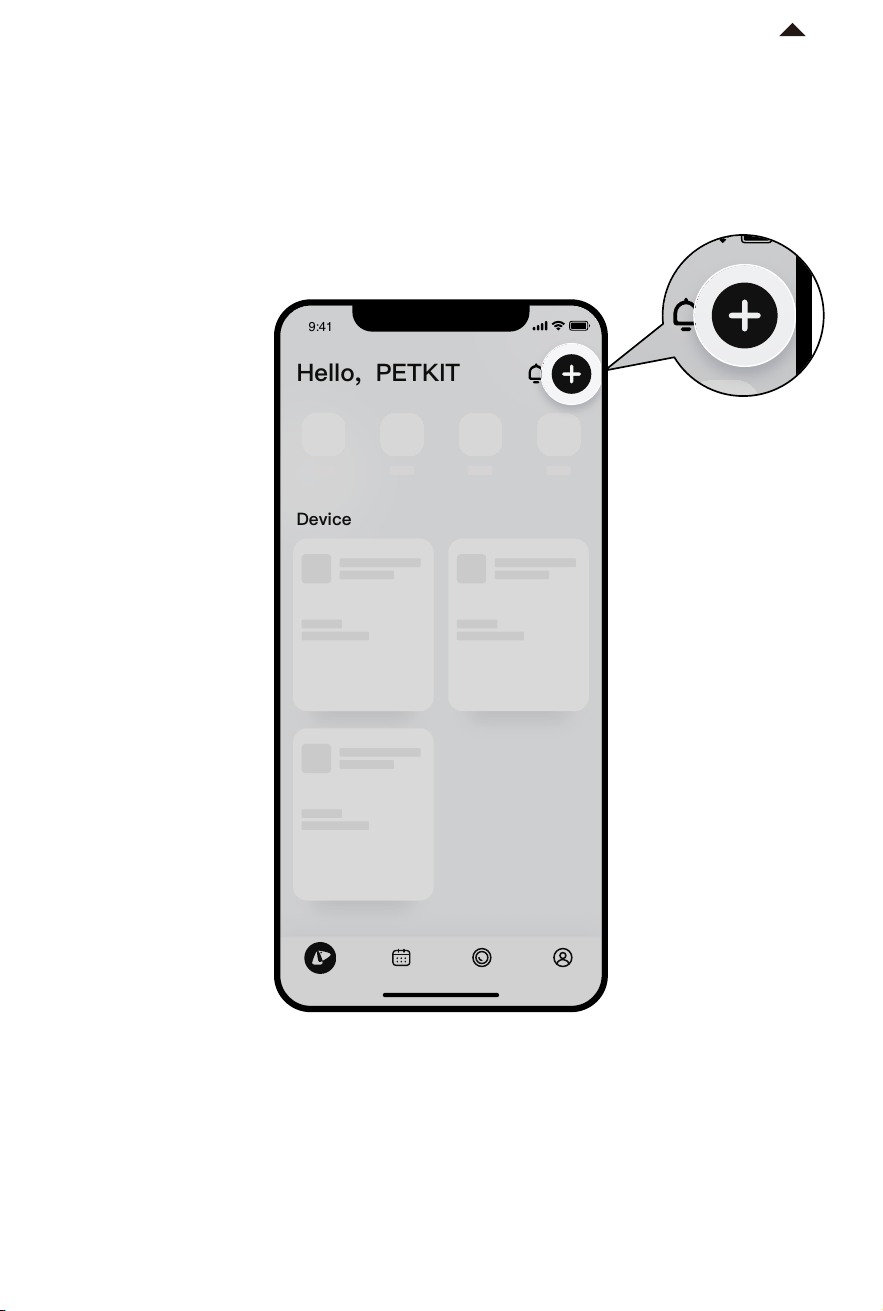
3. Add Device
① Download the PETKIT App and enter the home page
② Click “+” located in the top right corner of the page
③ Select "PETKIT AIRSALON MAX”
-6-
Device
电量:100%
0h 8h 16h 24h
小佩智能猫牌
进食次数
5
下次出粮时间:19:30
智能双子星喂食
器
0h 8h 16h 24h
9:41
Hello, PETKIT
*Note: In order to provide better products, we will
regularly update and improve the App.
If there are dierences with APP pictures,
please refer to the actual product.
RETURN TO
CONTENT
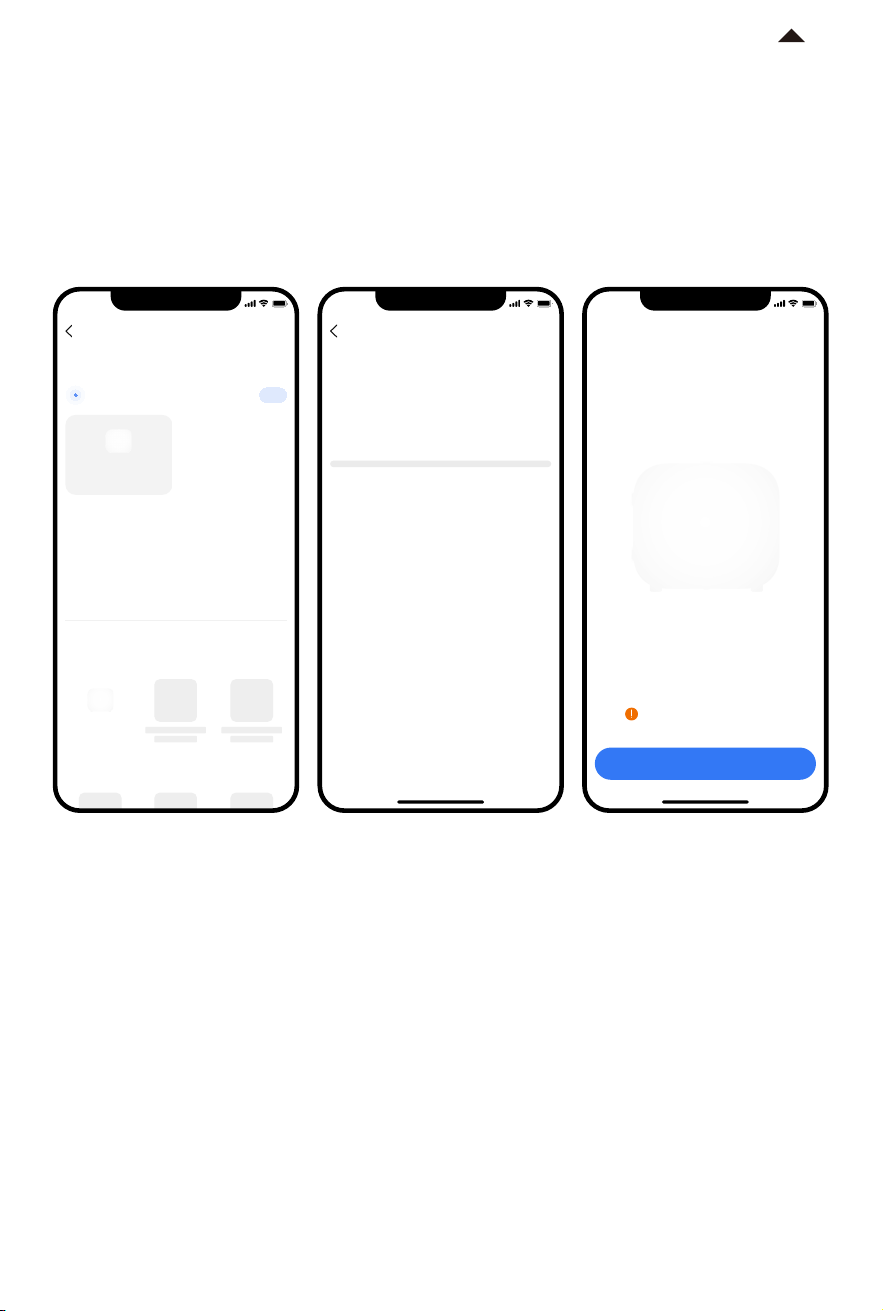
4. Start connection
① Scan and click "PETKIT AIRSALON MAX”, or manually select "PETKIT AIRSALON MAX ”
from the list and start connection.
② The App will attempt to connect to the device, please wait until “Connected” is displayed.
9:41
Add a device
Add manually
Nearby devices
Cleaning
PETKIT AIRSALON
MAX
Food Dispenser
Searching for FIT nearby
1
PETKIT AIRSALON
MAX
-7-
*Note: In order to provide better products, we will
regularly update and improve the App.
If there are dierences with APP pictures,
please refer to the actual product.
9:41
Connectdevice
Connecting…
9:41
Read the instruction
Connected
Super large space to bring you a new
experience of smart drying care
For your pet's safety, please read
the instruction carefully
RETURN TO
CONTENT
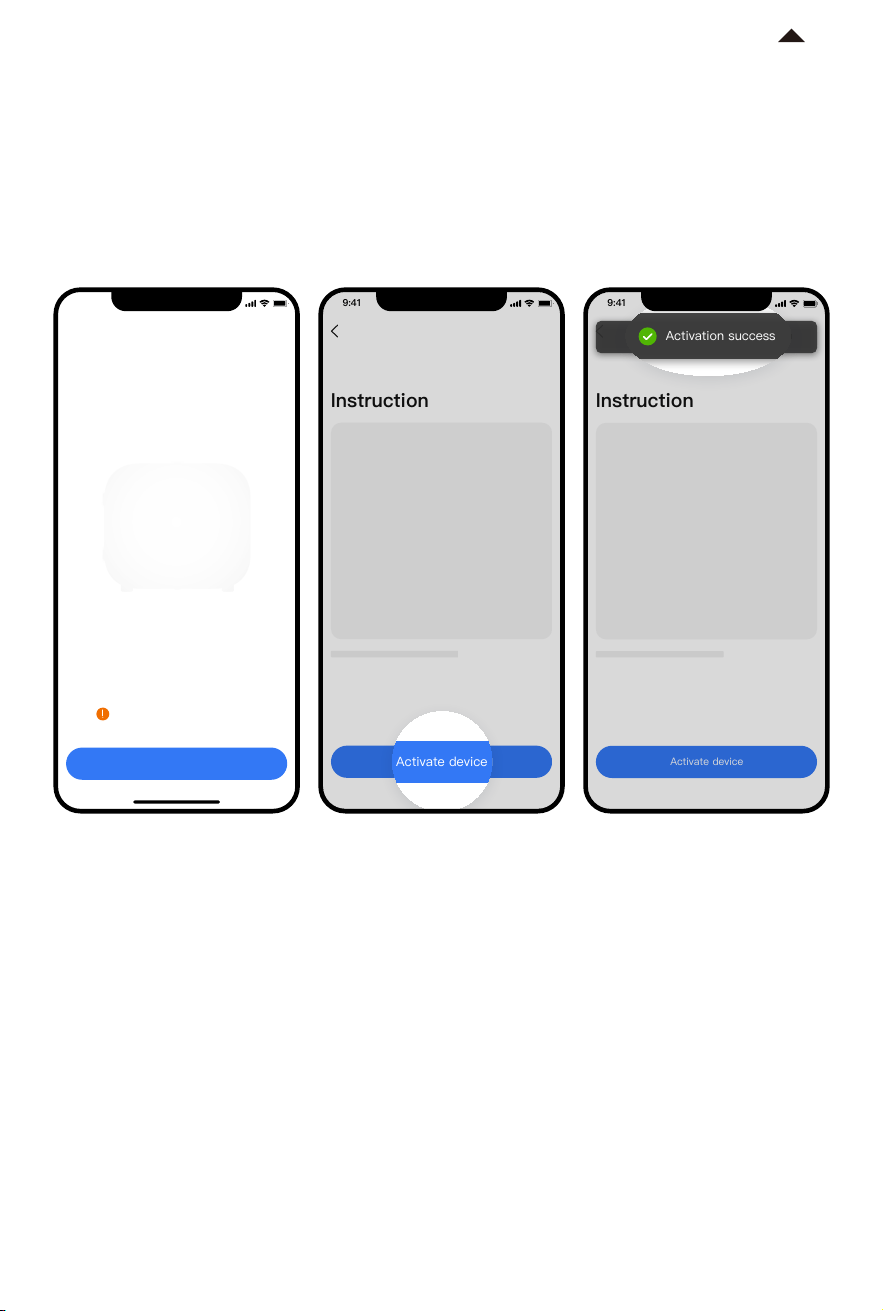
5. Activate device
In order to ensure pet safety and correct product use, aer the first successful device
connection, carefully read product use instructions and activate, aer successful activation,
use this product according to the product instruction.
-8-
*Note: In order to provide better products, we will
regularly update and improve the App.
If there are dierences with APP pictures,
please refer to the actual product.
9:41
激活设备
Instruction
5/5
Activate device
9:41
Activate device
Instruction
5/5
激活成功
Activation success
RETURN TO
CONTENT
9:41
Read the instruction
Connected
Super large space to bring you a new
experience of smart drying care
For your pet's safety, please read
the instruction carefully
PRODUCT USE
03
Set the temperature, wind and time according to the actual situation.
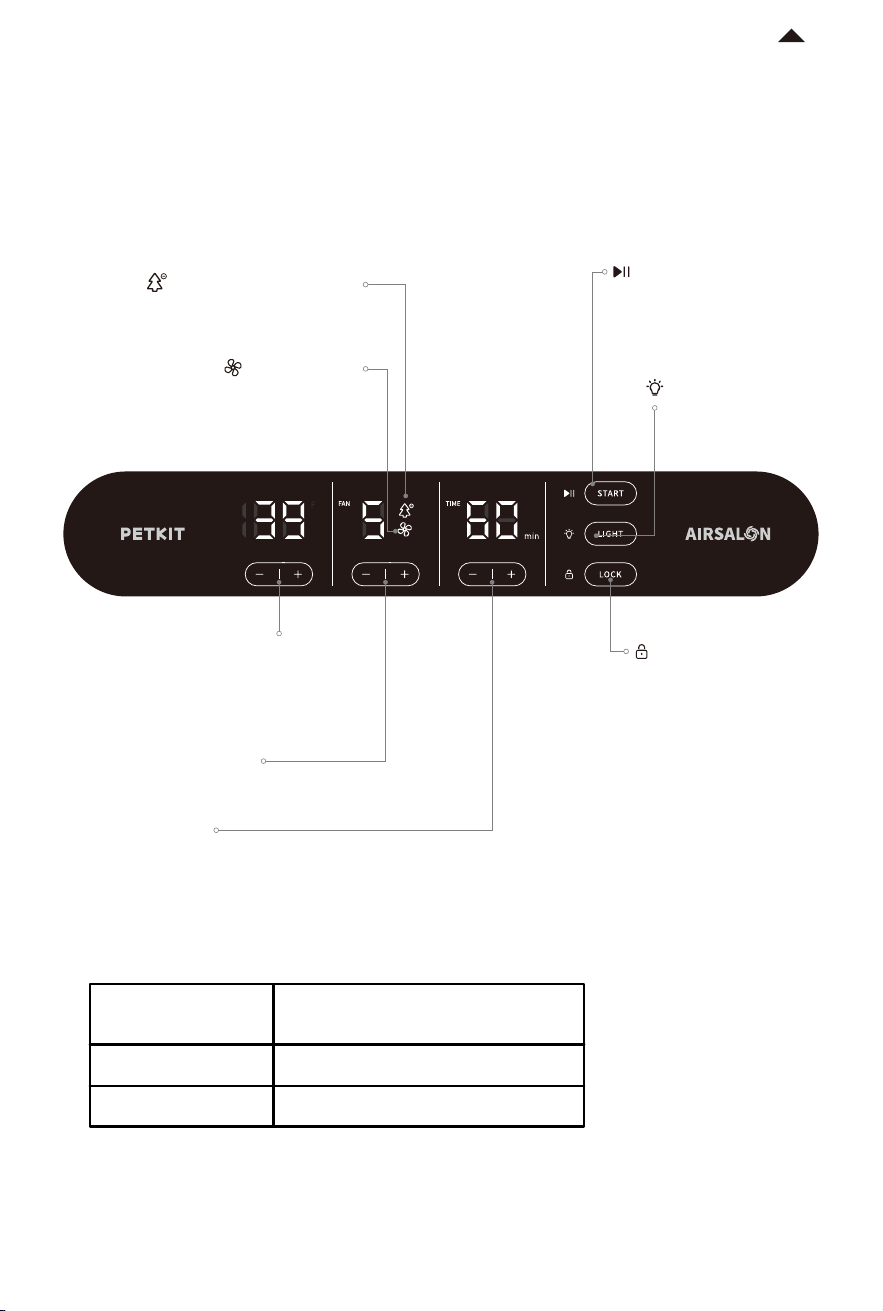
1. LED Control Panel
-9-
2. Drying Temperature Recommendation
* Above is the recommended temperature. Please select the temperature according to
the actual situation.
* When drying short nosed pets (Garfield, Pug, etc.), pay attention to lowering the t
emperature.
36°C~38°C
38°C~40°C
Room temperature above 24°C
Room temperature below 24°C
Recommended
temperature
Applicable condition
RETURN TO
CONTENT
Negative Ion Indicator
Light on: Activated
Light o: Not-activated
Start
Short press:
On (Green light lon)
Pause (White light on)
Long press: Stop Drying
(White light on)
Light
Single click:
On (Light on)
O (Light o)
Screen Lock
Double click:
Lock (Light on)
Unlock (Light o)
Temperature Setting
Single click +/-: Temperature between
36°C to 40°C (Please use PETKIT APP
to convert from Celsius to Fahrenheit
(°C to °F)
Fan speed Setting
Single click +/-: Adjust among 6 levels
Time Setting
Single click +/-: Increase/decrease 1 minute each time
Keep pressing +/-: Continuously increase/decrease the time in 5-minute increments.
Fan Indicator
Light on: Activated
Light o: Not-activated
4. Drying
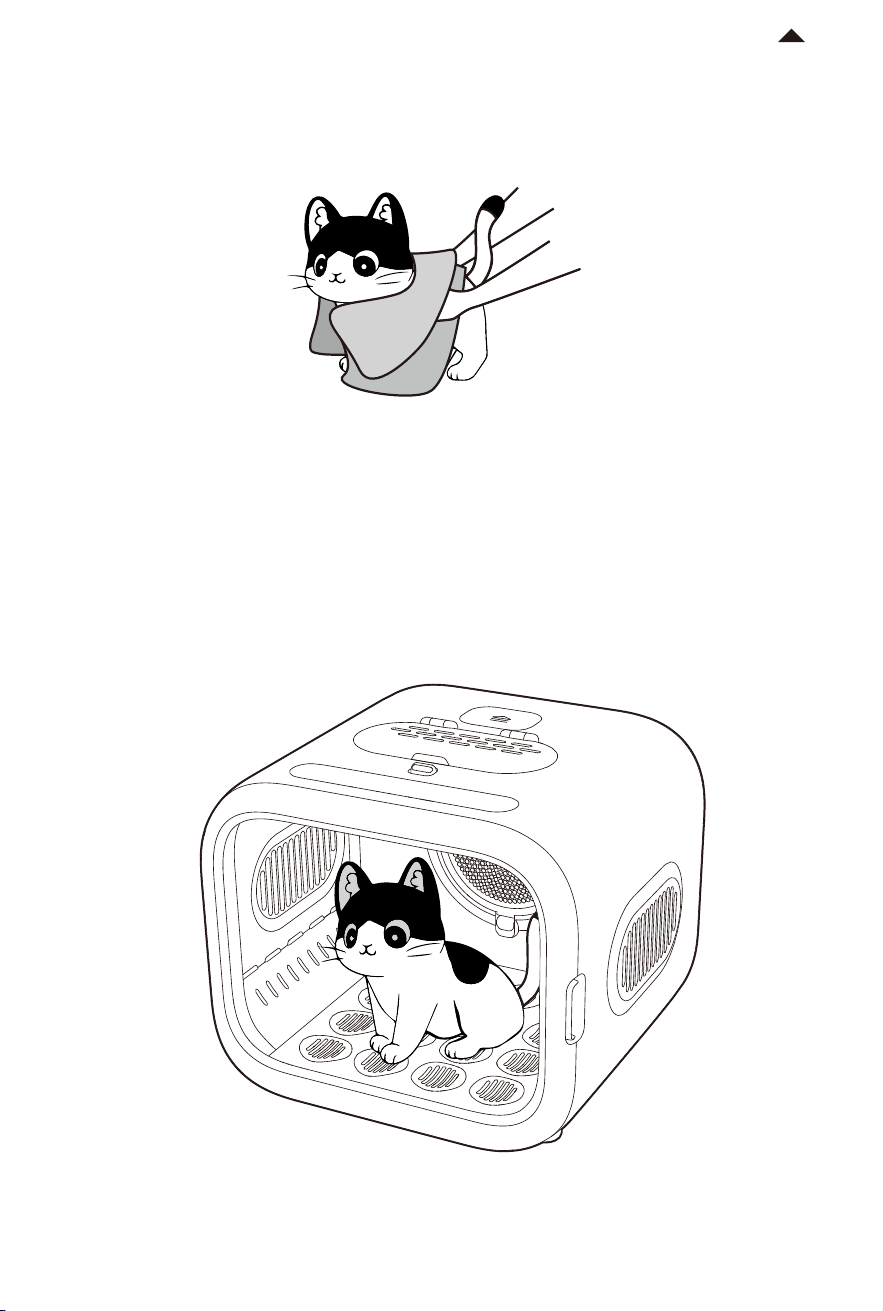
① Place the pet into the drying box and close the door.
( Note: Do not put towels, cushions, etc. into the device, so as not to block the air inlet. )
-10-
3. Drying pet with towel
Use a towel to dry your pets hair.(wipe as much moisture o the hair, this will greatly reduce
drying time)
RETURN TO
CONTENT
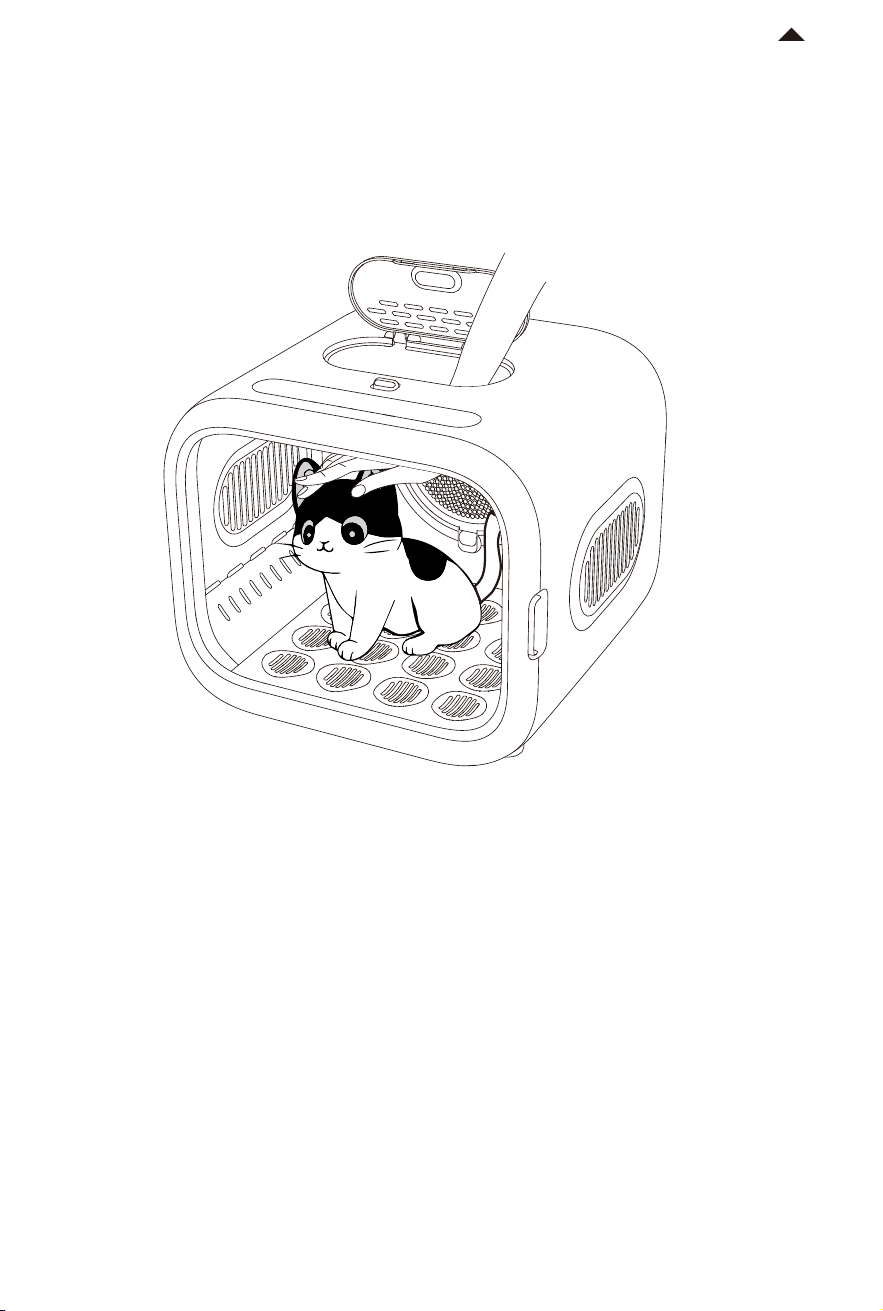
② If your pet is uncomfortable, the openable petting door can be opened to stroke and
comfort your pet.
* Please accompany and keep close watch of your pet, until the device
emits a “dee, dee” sounds which shows the drying is complete.
( for pets with long hair, it is recommended to brush their hair during drying)
-11-
RETURN TO
CONTENT
App FUNCTION
04
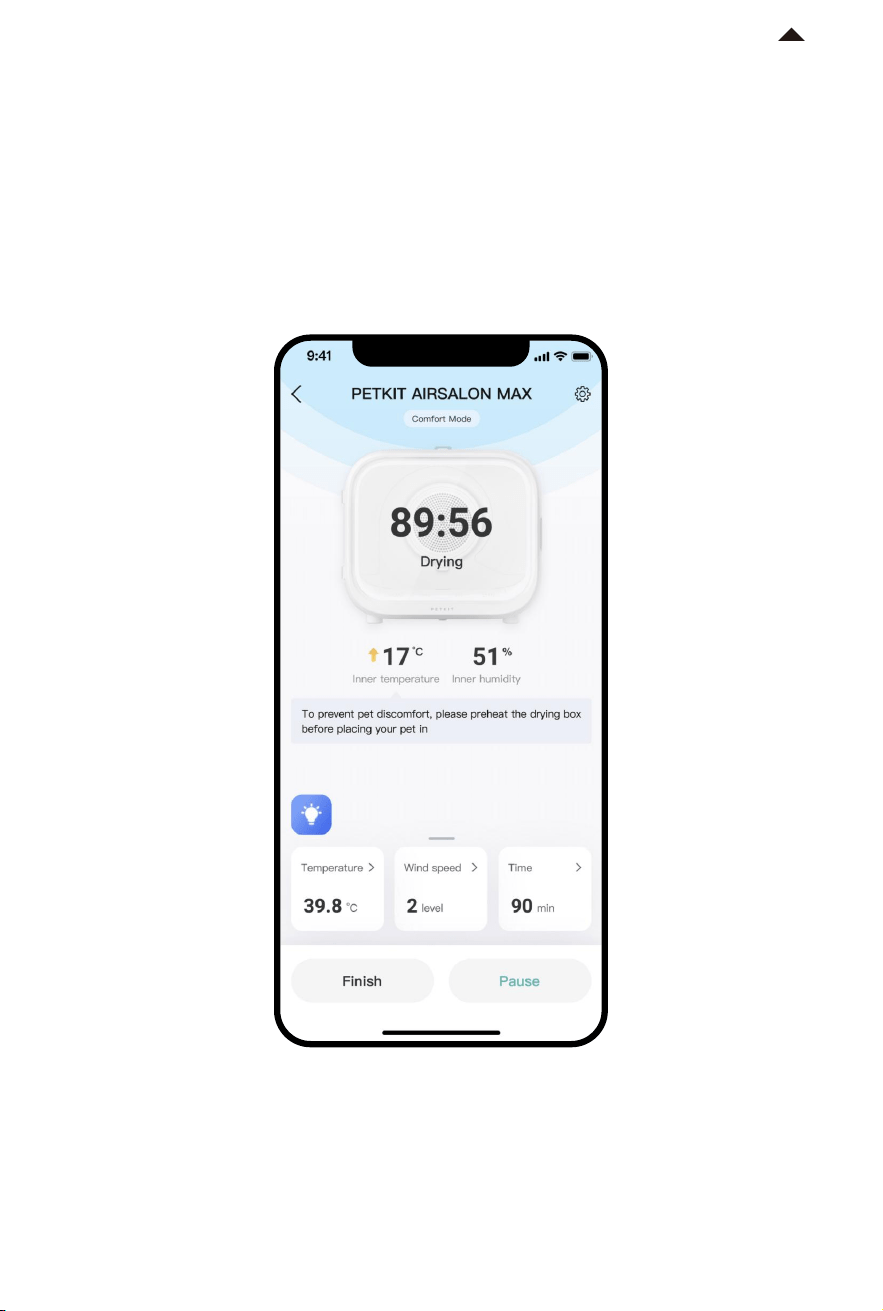
1. Check device status
Click the AIRSALON MAX from the device list on the home page, enter to view the device
working status, the remaining drying time, the temperature and humidity inside; The
temperature, wind strength and duration can be adjusted on the home page.
-12-
*Note: In order to provide better products, we will
regularly update and improve the App.
If there are dierences with APP pictures,
please refer to the actual product.
RETURN TO
CONTENT
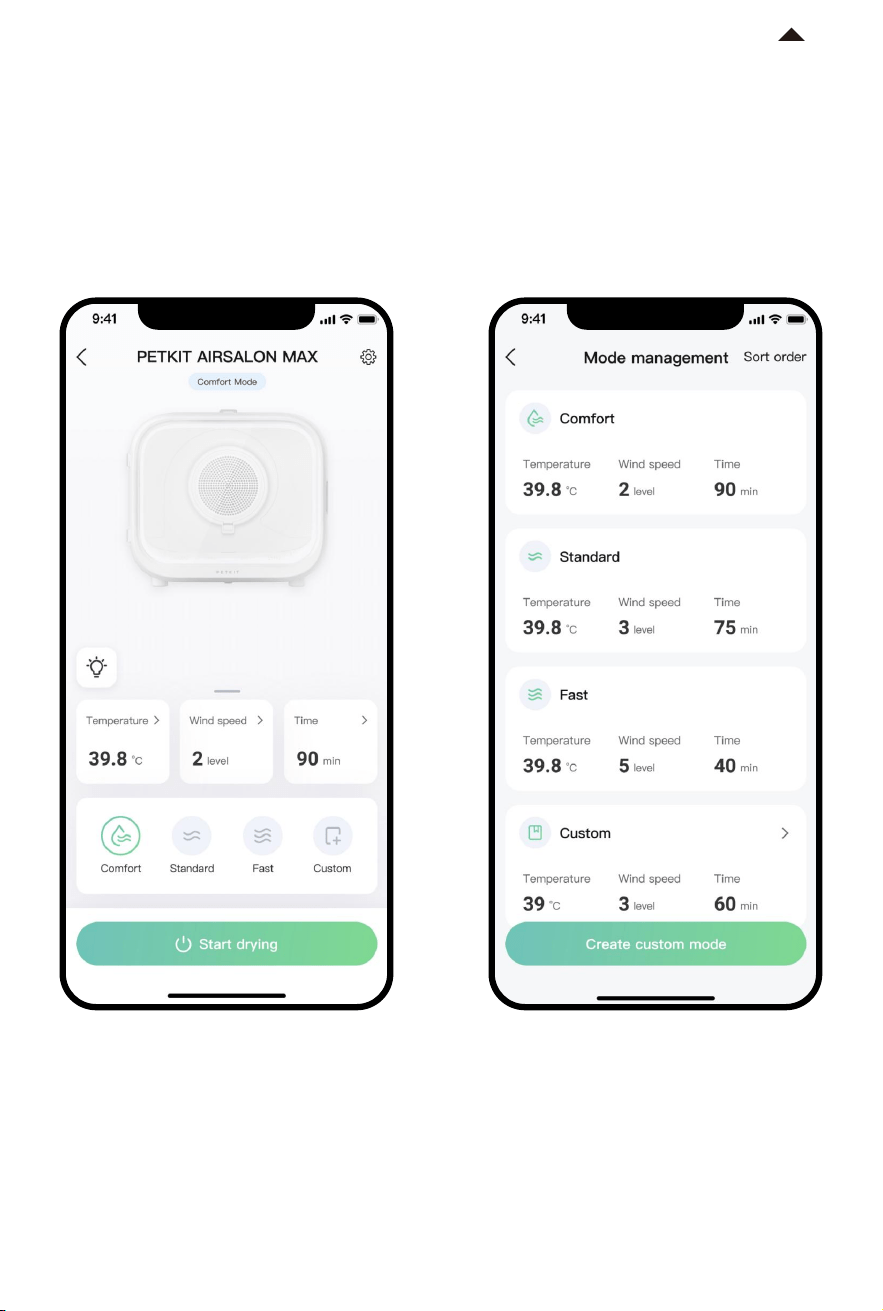
2. Default drying mode
The AIRSALON MAX has three modes:
Comfort mode, Normal mode and Fast
mode
3. Custom drying mode
You can adjust the temperature, wind
strength and duration according to
your pets drying needs, and then save
these parameters as a new mode
-13-
*Note: In order to provide better products, we will
regularly update and improve the App.
If there are dierences with APP pictures,
please refer to the actual product.
RETURN TO
CONTENT
CLEANING & MAINTENANCE
05
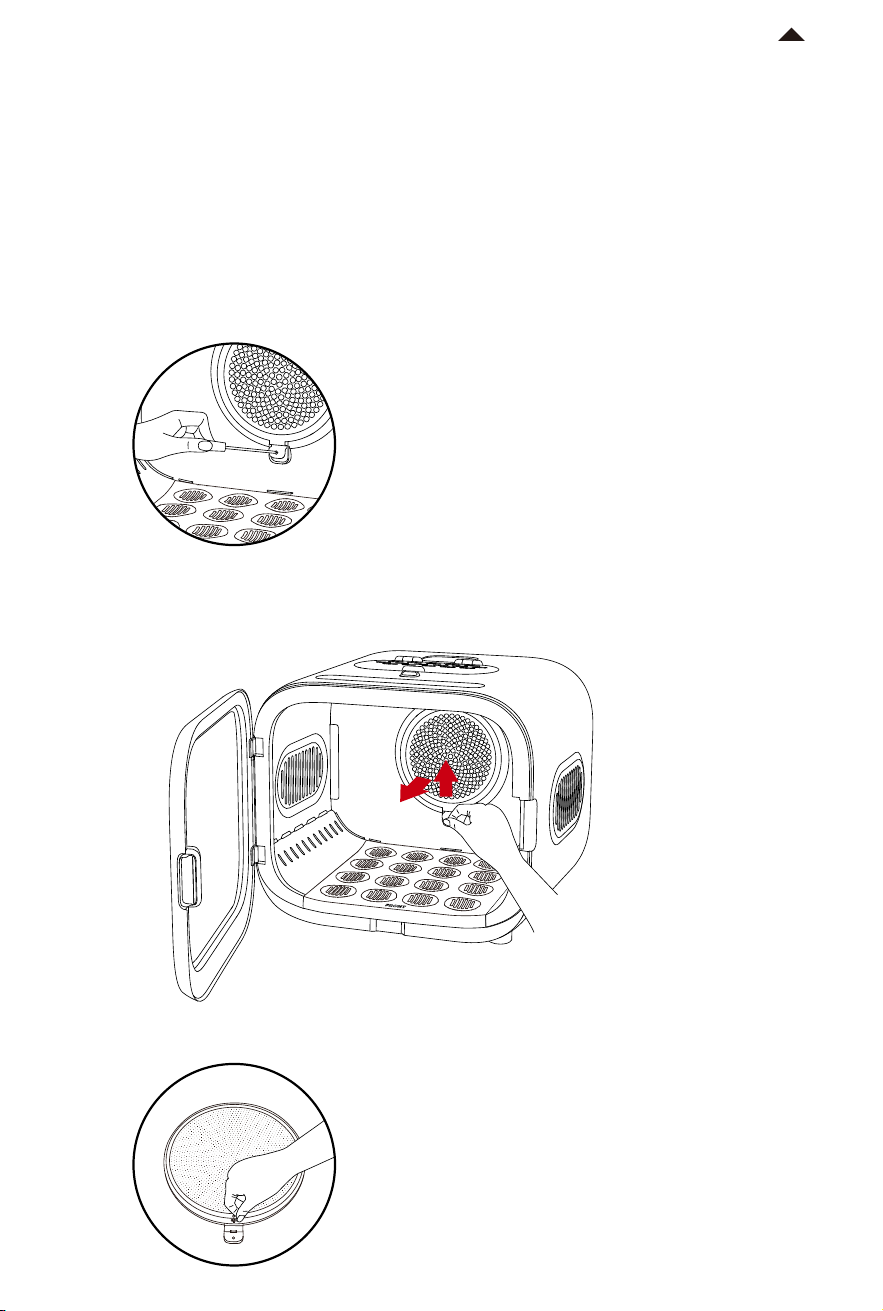
1. DISMANTLING PARTS
It is recommended to regularly remove the inner wall of the device, the removeable air
outlet base plate and the air inlet filter plate for cleaning and wiping aer drying.
-14-
① Remove the air inlet filter plate and filter screen:
Step 1: Use a screwdriver to unscrew the screw on the handle of the air intake filter plate.
Second step, use your fingers to buckle the bottom of the filter plate (as shown in the
picture),pull out the air inlet filter plate while liing it upwards.
Third step is to pull out the filter screen with your fingers from the back of the air intake
filter plate.
RETURN TO
CONTENT
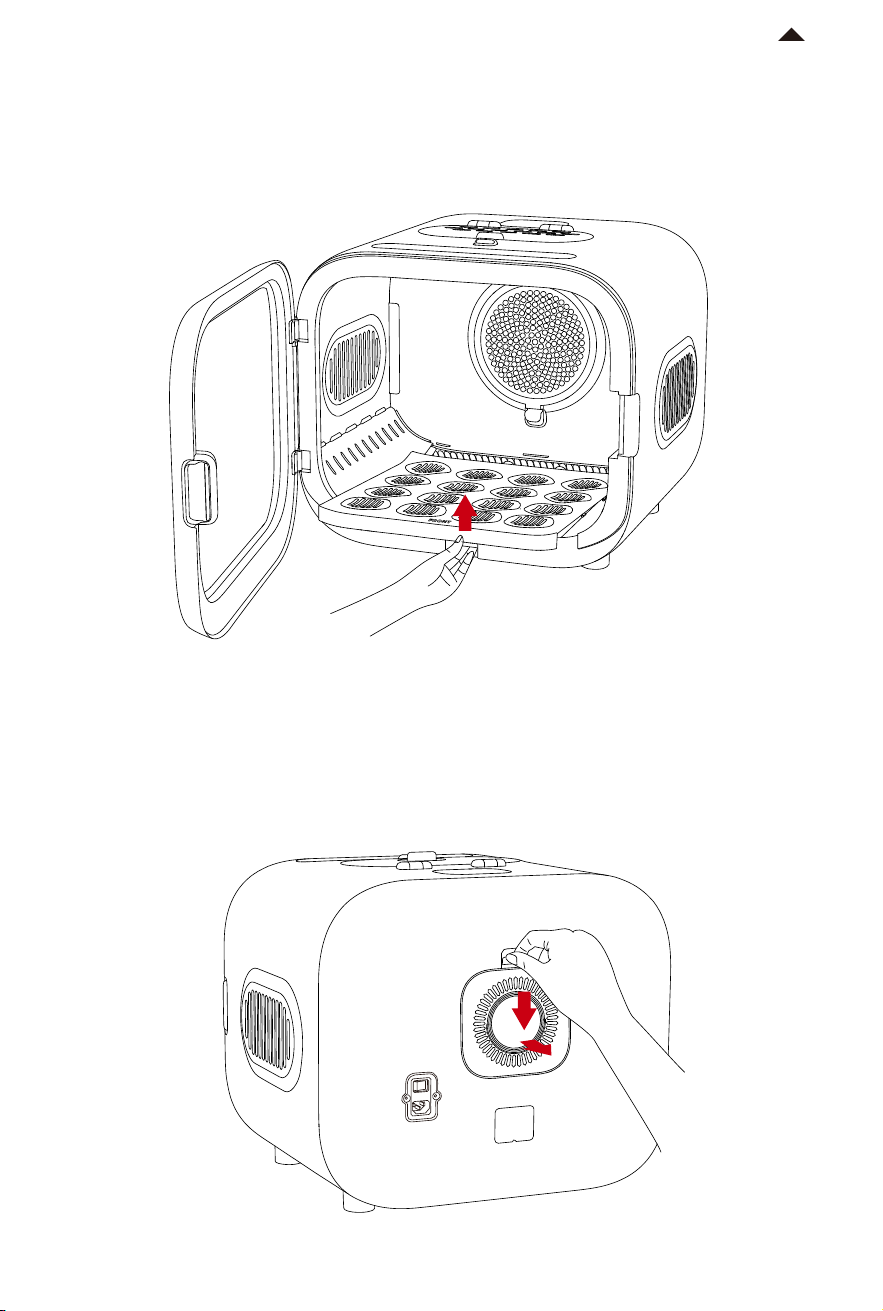
② Remove the air outlet bottom plate:
Put your finger on the grip position under the removeable air outlet base plate and li it up
(as shown in the picture),the air outlet base plate can be removed.
-15-
③ Remove the air inlet cover and filter cotton:
Use your fingers to pinch the handle on the top of the air inlet cover (as shown in the picture),
pull out the air inlet cover while pressing down; remove the filter cotton.
RETURN TO
CONTENT
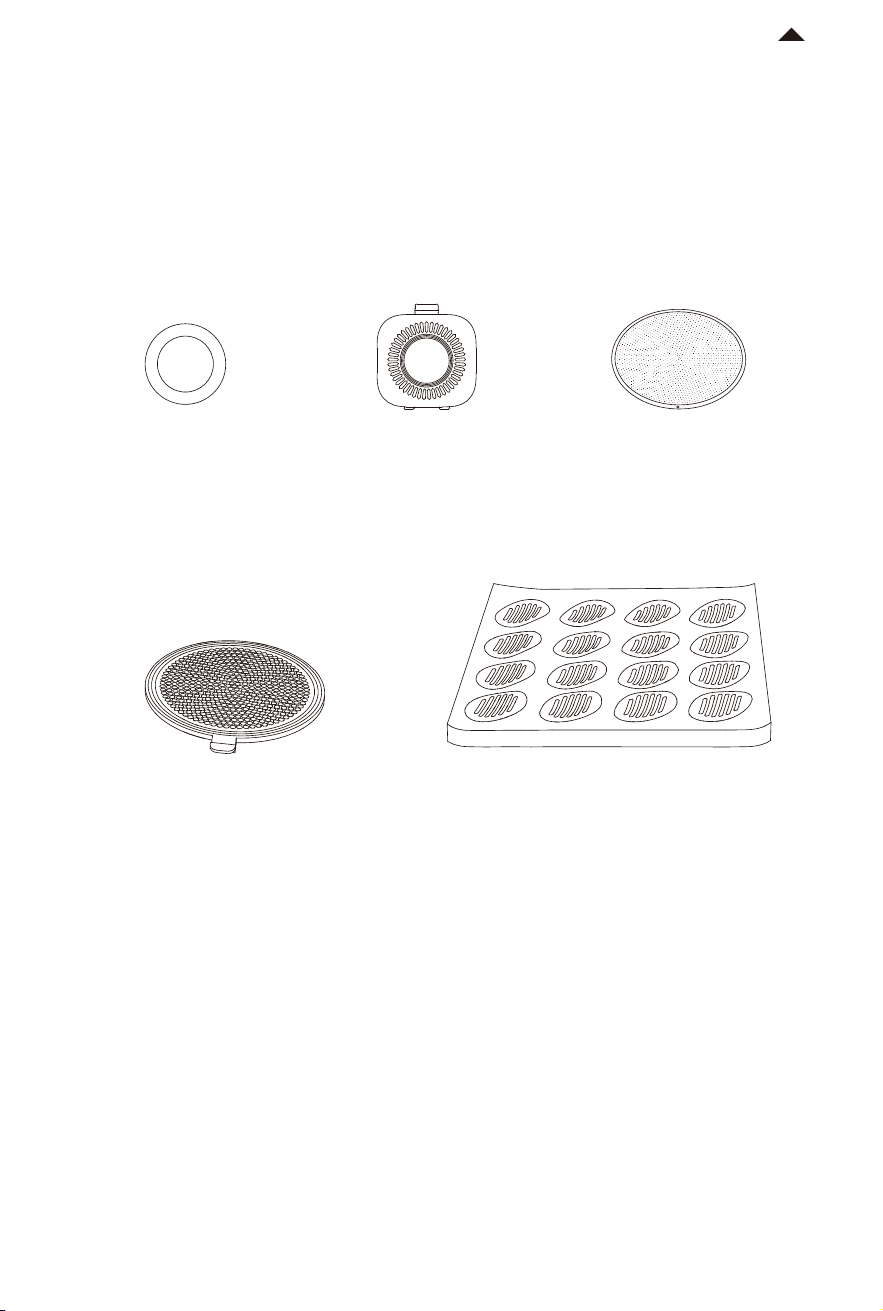
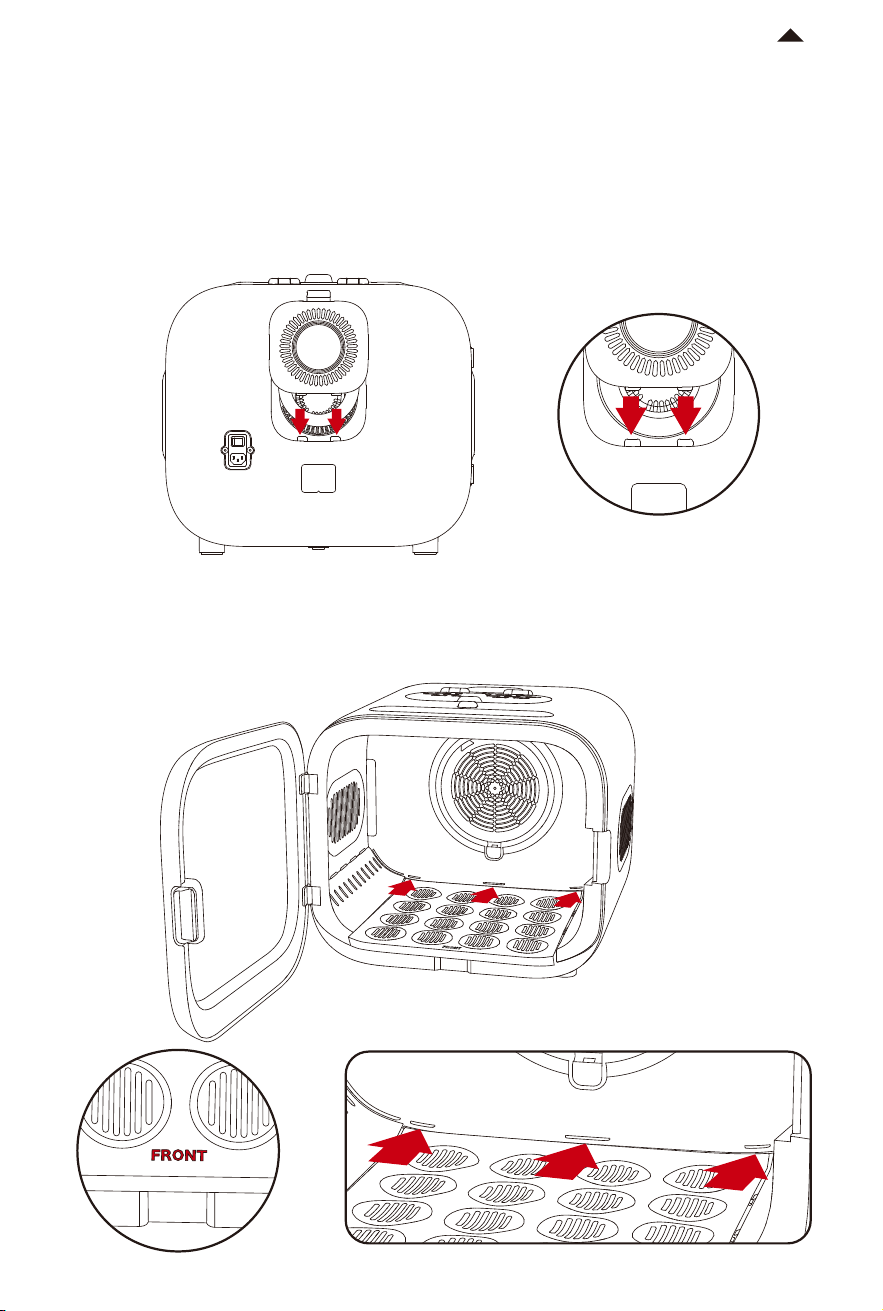
4. Parts installation
① nstall the air inlet cover and filter cotton: Put the filter cotton into the air inlet groove (filter
cotton needs to be kept dry when putting back), then put the two protrusions under the air
inlet cover, align the two slots a and b on the drying box and insert them (as shown in the
picture),press the handle of the air inlet cover until hear a "snap" sound to confirm the instal
lation.
a b
a b
② Install the air outlet base plate: Put the front of the air outlet base plate forward (with
FRONT text facing forward)Align the bottom of the e, f, and g points on the inner wall of the
drying box, and secure tightly.
f
e
g
f
e
g
-18-
RETURN TO
CONTENT
-19-
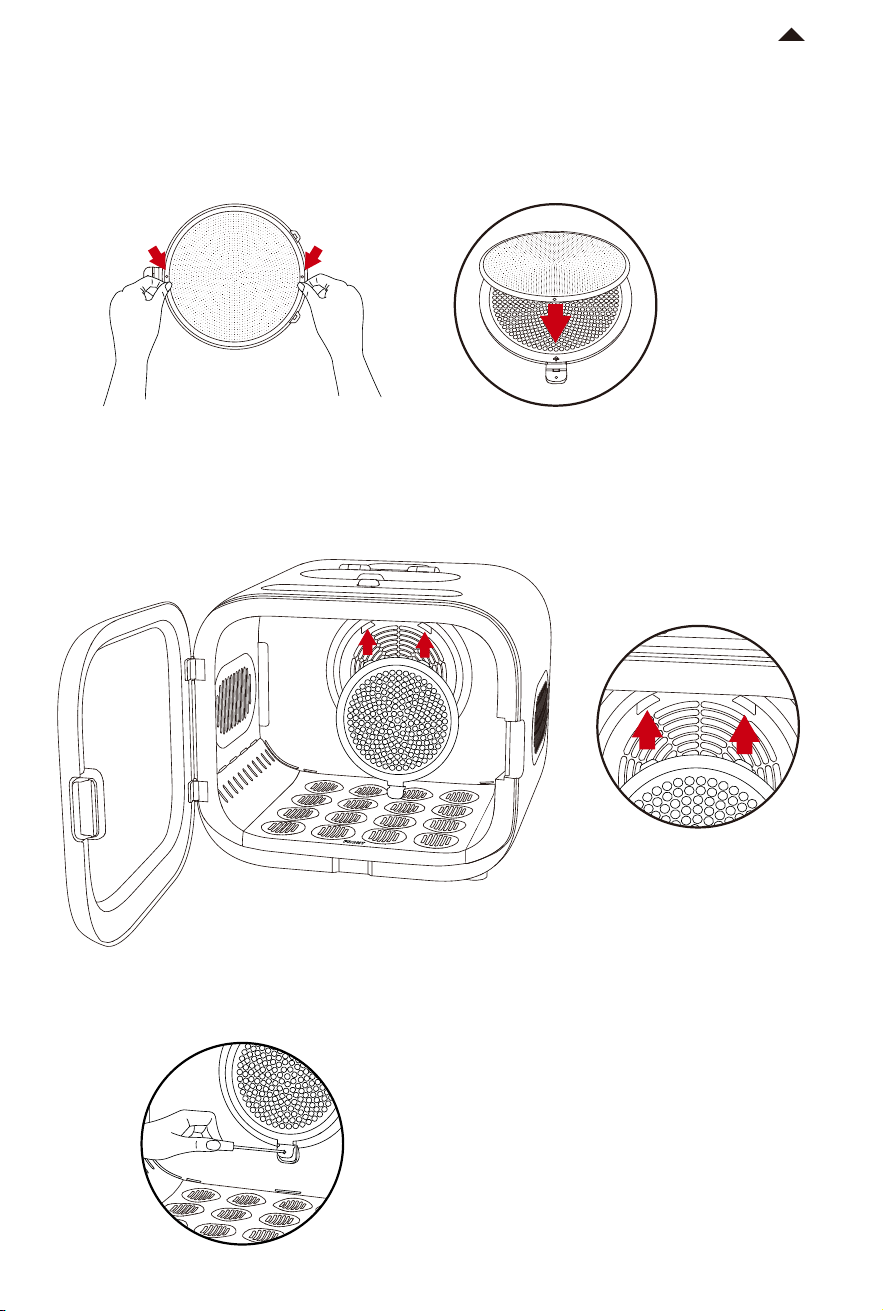
③ Install the filter screen and air inlet filter plate:
First step, install the filter screen on the back of the air inlet filter plate and press with hand,
make sure that the cylinders on both sides are embedded in the round holes;
Second step, place the two protrusions above the air inlet filter plate, align the two slots c and
d on the air outlet (as shown in the picture), press the handle of the air inlet filter plate until a
"snap" sound is heard to confirm the installation;
Third step, use a screwdriver to tighten the air inlet filter plate screws.
c
d
c
d
RETURN TO
CONTENT

BASIC SPECIFICATIONS
06
-20-
Product name
Product model
Product size
Scope of application
PETKIT AIRSALON MAX
PD10
500 *473 *447mm
cats and small dogs aged 6 months and above
Product material ABS, Tempered Glass
Product weight
about 9.7kg
Wireless connection Bluetooth
RETURN TO
CONTENT
A MESSAGE TO OUT VALUED
CUSTOMERS
07
· Thank you for purchasing PETKIT AIRSALON MAX Smart Pet Dryer. We at PETKIT have done
our best to make life easier for you and your pets with technology.
· Please carefully read the User Manual before using the product. By setting up and using this
product, you are acknowledged that you have already read and accepted the safety guidelines
listed below.
· We are not liable and will not accept responsibility for any accidents or injuries that result
from improper use of this product.
· PETKIT reserves the rights of interpretation and revision.

INSTRUCTIONS FOR SAFE USE
08
* Failure to follow the safety guides outlined below can result in product malfunction or other
unforeseen mishaps.
·
Pet owner must be present when the pet is using this product.
·
This equipment is strictly for indoor use in a dry environment. Do not use it on wet ground.
·
Aer each drying, please clean the hair in the dryer and the air inlet immediately, and power
o when cleaning.
·
Do not place towels, mats and other items in the equipment to avoid blocking the air outlet
and causing abnormal temperature or fan speed.
·
Please place the equipment on a hard and flat horizontal surface, and do not place it on a
so and uneven object to prevent the equipment from falling.
·
This equipment is only applicable to pet cats and small dogs 6 months old and above.
·
Minors are prohibited from using this device.
·
If the pet has special circumstances caused by its own reasons, such as being too old, having
diiculty moving, suering from physiological diseases, etc., please consult a professional
veterinarian and use this equipment under guidance.
·
In case of abnormal heating or abnormal internal noise of the equipment, please do not
disassemble the equipment without permission. Be sure to repair it under the guidance
of professional personnel to avoid various accidental injury.
·
When using this device, if the pet feels uncomfortable, it can be comforted by pushing the
Cat Patting Window on the top or adjust the wind force to reduce irritation. If the pet still
feels uncomfortable, please stop use immediately.
·
When the pet stays in the equipment, do not move the equipment to prevent the pet from
falling.
·
Although the device is in low voltage mode, please use it correctly in order to avoid electricity
leakage caused by pets biting wires.
·
For prolonged storage, please switch o the power first and then unplug the power cord.
·
Please do not place it in direct sunlight and keep it away from ignition sources.
·
Do not soak this product in water.
·
It is prohibited to stack articles on the top of the equipment to prevent aecting the normal
operation.
·
Please use the produced power cord, otherwise it will damage the equipment or cause
potential safety hazards.
·
Please reserve 10cm space when placing the equipment beside the wall.
·
The product must be used below the altitude of 2000 meters.
·
If you encounter any problems while using this product, please contact us immediately.
-21-
RETURN TO
CONTENT

PRECAUTIONS
09
1. Please ensure that the mobile phone is within 3 meters of the
device when performing all App settings. The device will change
settings according to App, when there is a "beep" sound, the
setting is successful.
2. The parameters adjusted when the device is in operation will
not be synchronized when the device is started next time. Each
time the device starts drying, it will automatically use the
parameters set before the previous drying. If a set mode or
parameters are to be used, please set the parameters before
the device starts drying.
3. Aer drying completed, if the AIRSALON MAX is not to be used
again, please turn o the power switch on the back.
01V1.0
-22-
RETURN TO
CONTENT
