Moxi
TM
V-RS
Hearing aid guide
A Sonova brand
Powered by Vivante
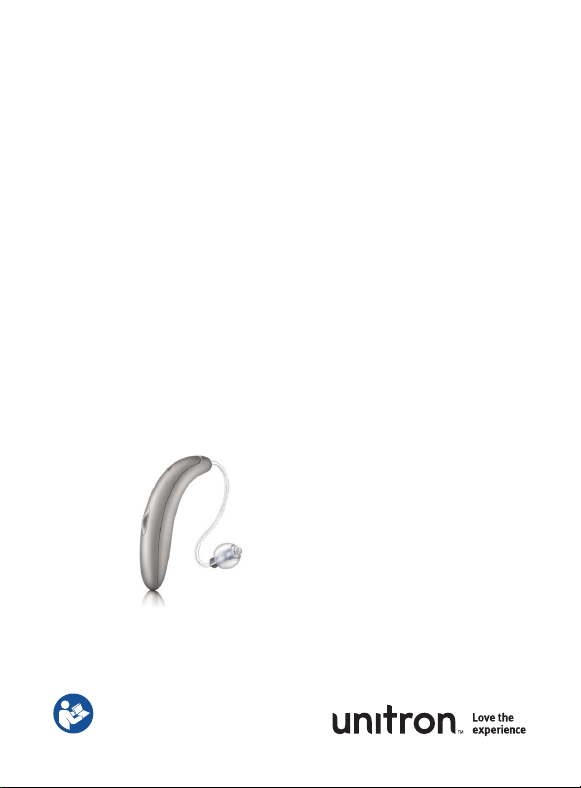
Unitron Moxi V-RS
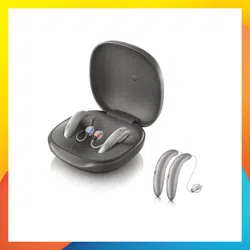
Unitron Moxi V-RS FLEX:TRIAL
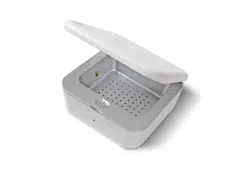
Unitron Moxi RS charger
This user guide applies to the following models:
Hearing aids
Moxi
™
V9-RS Le
Moxi
V7-RS Left
Moxi
V5-RS Left
Moxi
V3-RS Left
Moxi
V-RS FLEX:TRIAL
™
Le
Moxi
™
V9-RS Right
Moxi
V7-RS Right
Moxi
V5-RS Right
Moxi
V3-RS Right
Moxi
V-RS FLEX:TRIAL
™
Right
Non wireless charging accessory
Unitron Moxi RS charger
Hearing aid models Earpieces
c Moxi V-RS (9/7/5/3)(Le/Right) c Dome
c Moxi V-RS FLEX:TRIAL(Le/Right) c SlimTip
Charging accessory
c Unitron Moxi RS charger
If no box is checked and you do not know the
model of your hearing aid or charging
accessories, please ask your hearing care
professional.
The hearing aids described in this user guide
contain a built-in and non-removable
rechargeable lithium-ion battery.
Please also read safety information regarding
handling rechargeable hearing aids
(chapter 24).
Your hearing aid & charger details

Thank you
Thank you for choosing these hearing aids.
Unitron is a hearing solution company that believes
people should feel really good about the entire
hearing care experience, start to nish. Our ingenious
products, technologies, services and programs oer
a level of personalization you can’t get anywhere else.
Get ready to Love the experience.
™
Please read the User guide carefully to make sure that
you understand and get the best out of your hearing
aids. Training is not required for handling of this
device. A hearing care professional will help set up
the hearing aids to your individual preferences during
the tting / sales consultation.
For more information regarding features, benets,
setup, use and maintenance or repairs of your
hearing aid and accessories – contact your hearing
care professional or manufacturer representative.
Additional information can be found in the
specication sheet of your product.
www.unitron.com
Table of contents
1. Quick guide ............................................................................. 2
2. Parts of the hearing aid and charger ...................................... 4
3. Preparing the charger ............................................................8
4. Charging the hearing aids .................................................... 10
5. Le and right hearing aid markings ......................................13
6. Putting your hearing aids on your ears ..................................14
7. Removing the hearing aid from your ear ................................15
8. Multi-function button........................................................... 16
9. On/O .................................................................................. 20
10. Tap control ...........................................................................21
11. Connectivity overview ......................................................... 22
12. Unitron Remote Plus app overview ..................................... 23
13. Pairing your hearing aids to a device .................................. 24
14. Phone calls ........................................................................ 26
15. Flight mode .........................................................................31
16. Rebooting your hearing aid ................................................ 33
17. Operating, transport and storage conditions ..................... 34
18. Caring and maintenance ..................................................... 36
19. Exchanging the earwax protection ..................................... 40
20. Service and warranty ......................................................... 44
21. Compliance information .....................................................46
22. Information and explanation of symbols ........................... 50
23. Troubleshooting guide ....................................................... 54
24. Important safety information ............................................. 59
Tinnitus masker ................................................................80
2 3
1. Quick guide
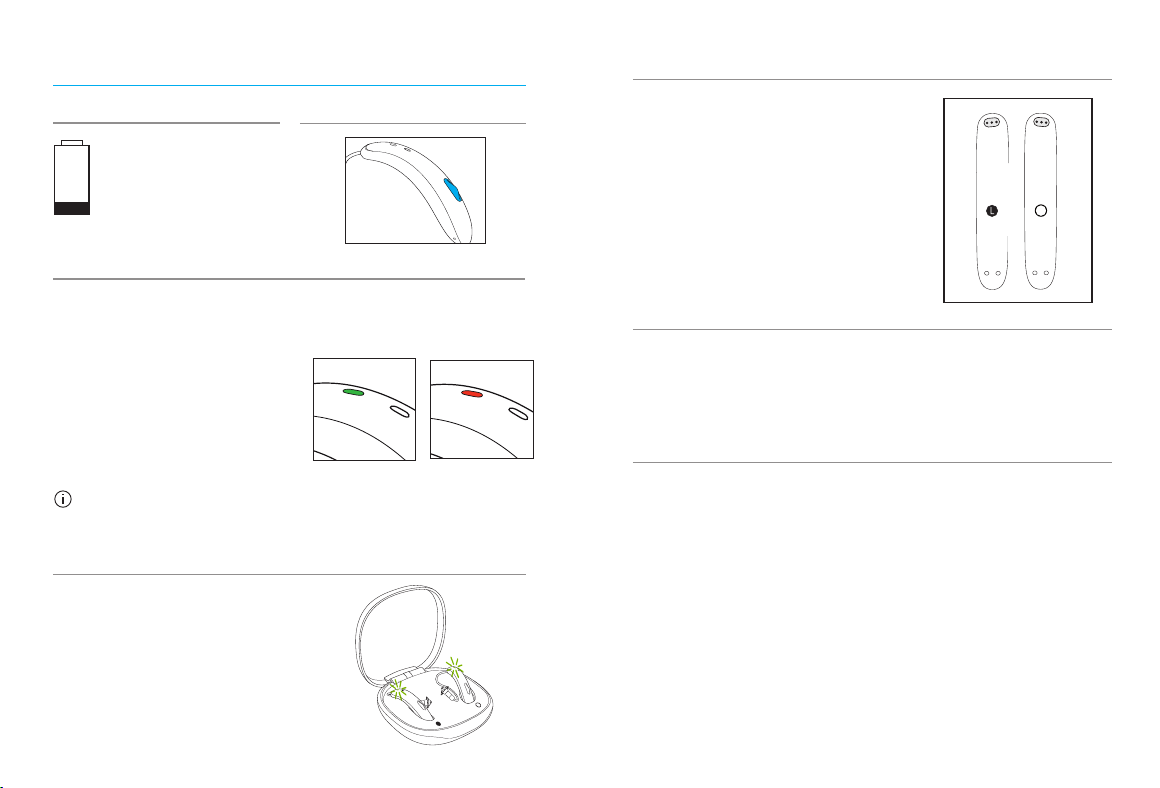
2 beeps every
30 minutes
Low battery warning
Turning hearing aids on/o
Press and hold the button on each hearing aid for 3 seconds
until the indicator lights change. The hearing aid is
congured to switch on automatically when removed from
the charger.
On: Indicator light is
temporarily solid green
O: Indicator light is
temporarily solid red
Before using your hearing aids for the rst time,
it is recommended to charge them for 3 hours.
Multi-function button
Charging your hearing aids
Place the hearing aids in the
charger.
Charging: Slow blinking
indicator light
Fully charged: Solid green
indicator light
On
O
Le & right hearing aid markings
L marking for le hearing aid.
R marking for right hearing aid
Enter flight mode
When the device is o, keep pressing the button for
7 seconds. The indicator light will rst blink green
and then turn to solid orange indicating that the
flight mode has been activated.
Tap Control
If paired with a Bluetooth enabled device, multiple
functions can be accessed using tap control, please
refer to chapter 10. To use tap control tap the top of your
ear twice.
R
4 5
2. Parts of the hearing aid and charger
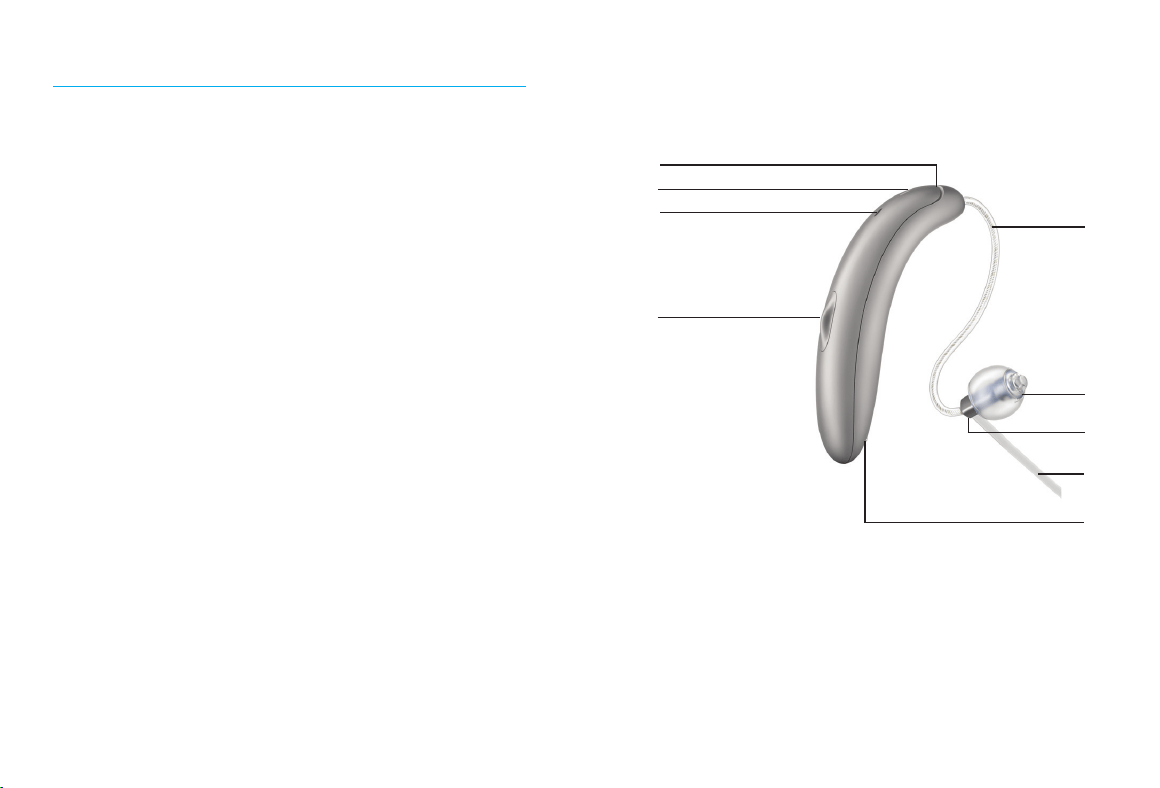
1 Indicator light - shows the charging state of the
battery and when hearing aid switching on / o
2 Microphones - sound enters your hearingaids
through the microphones
3 Multi-function button - functions as an on/o
switch, switches between listening programs,
changes the volume level, and accepts or
rejects mobile phone calls depending on your
customized tting
4 Wire - connects the speaker unit to your
hearingaids
5 Dome - holds the speaker unit in place in your
ear canal
6 Speaker unit - amplies the sound and sends it
directly into the ear canal
7 Retention piece - helps prevent the dome and
speaker unit from moving out of the ear canal
8 Charging contacts
Moxi V-RS hearing aids
2
1
3
4
5
8
6
7
2
6 7
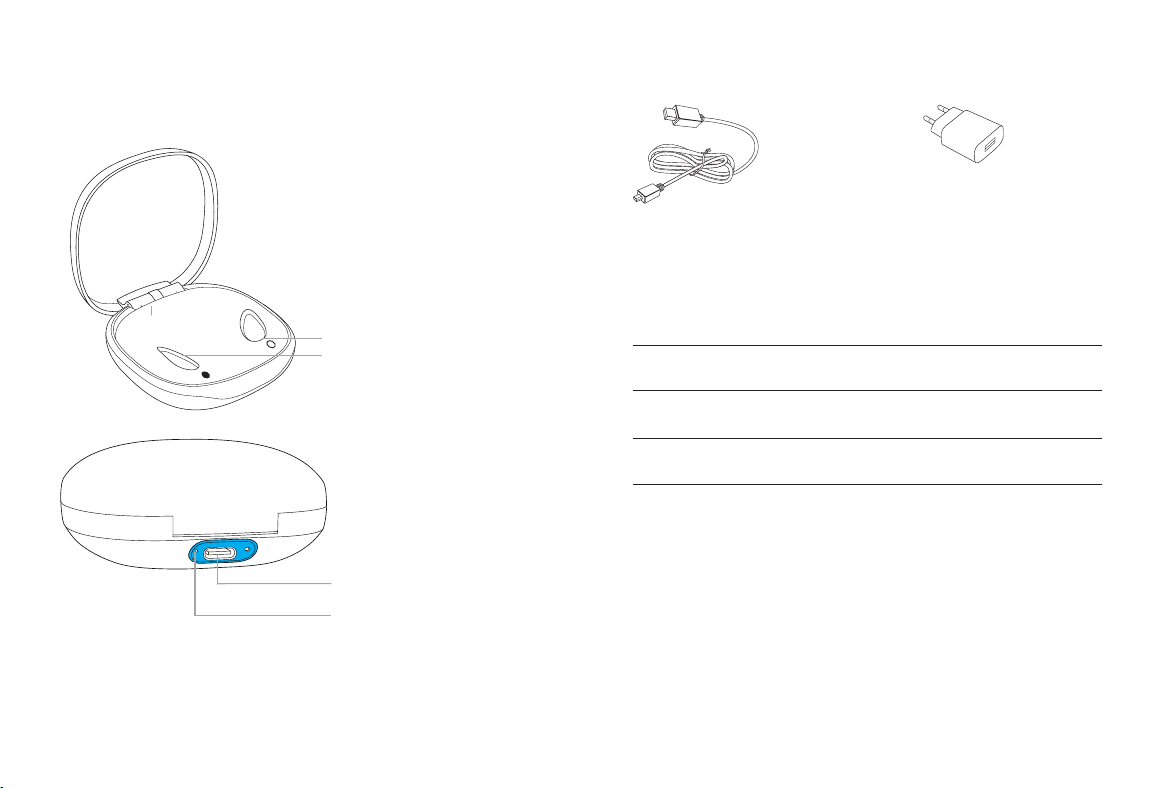
Unitron Moxi RS charger
USB-C connection
to external power supply
Indicator light for power
Hearing aid charging inserts
with le/right indicators
USB cable (< 3 m) Power supply*
External power supply
Power supply specication
Power supply input voltage
100-240 VAC, 50/60 Hz,
current 0.25 A
Power supply output
voltage
5 VDC +/-10%,
current 1 A
Charger input voltage
5 VDC +/-10%,
current 500 mA
USB cable specications
5 V min. 1 A, USB-A to
USB-C, maximum
length 3 m
*Power plug may not be provided with this product. Any power
supply with the below specications may be used.
8 9
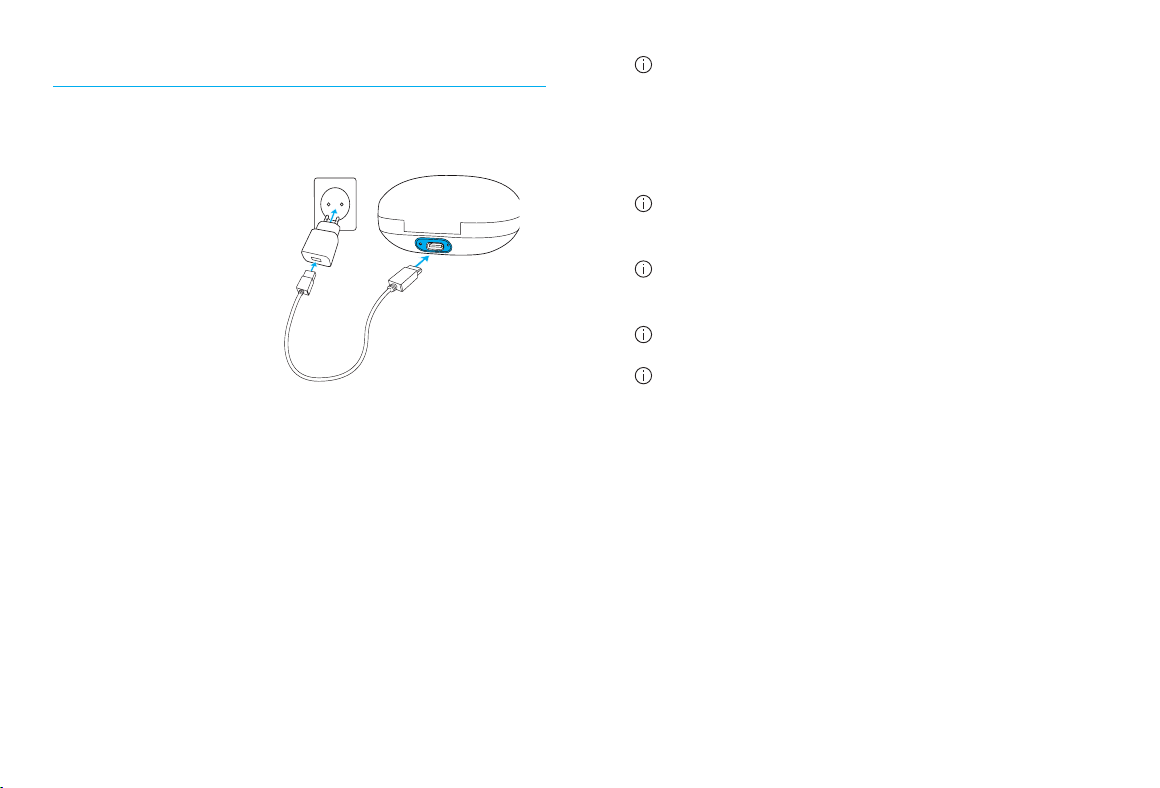
a) Plug the larger end
of the charging cable
into the power
supply.
b) Plug the smaller end
into the USB port on
the charger.
c) Plug the power
supply into a power
outlet.
d) The indicator light is
green when the
charger is connected
to the power outlet.
3. Preparing the charger
Connecting the power supply
a
b
d
c
The Moxi RS charger may be used with an exter-
nal power supply that fullls the specications in
the table on previous page (page 7).
Low power: You will hear two beeps when the
battery is low. You will have approximately
60 minutes before you have to charge the
hearing aids (this can vary, depending on the
hearing aid settings).
The hearing aid contains a built-in and non-
removable rechargeable lithium-ion battery.
Before using your hearing aid for the rst time,
it is recommended to charge it for 3 hours.
The hearing aid must be dry before charging.
Please ensure to charge and use the hearing aid
within operating temperature range: +5° to +40°
Celsius (41° to 104° Fahrenheit).
10 11
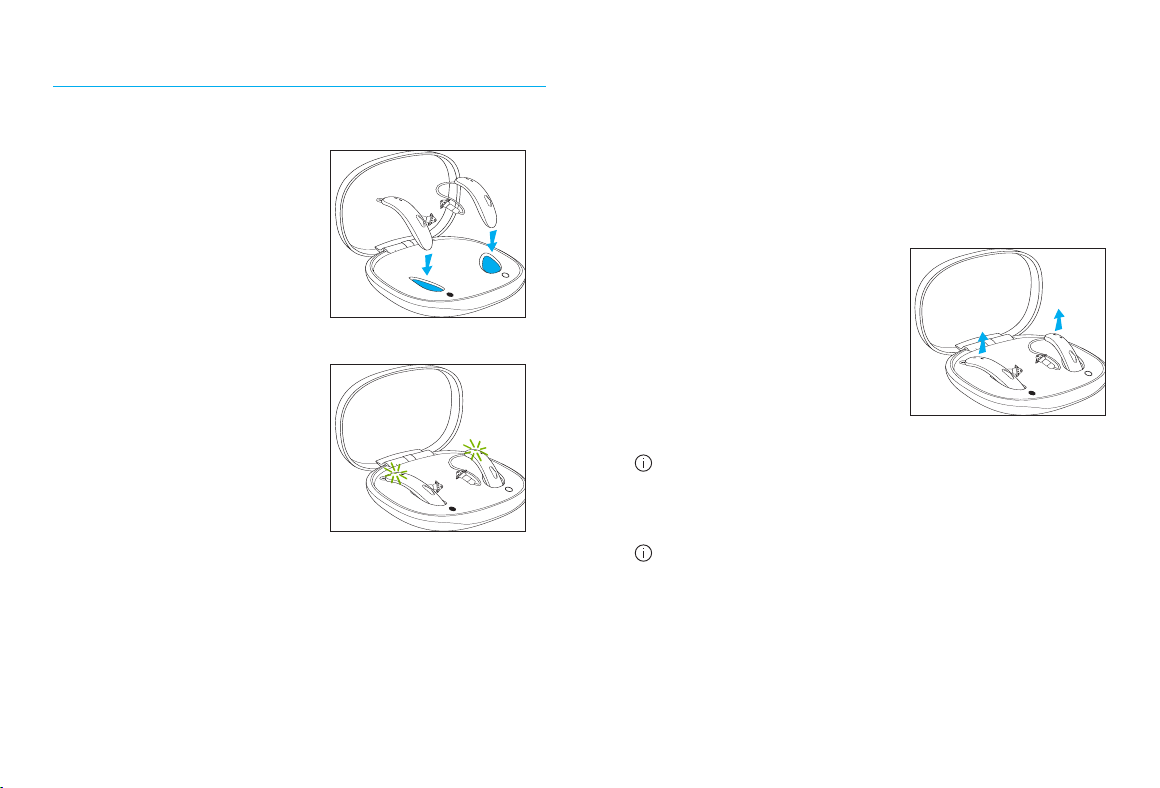
1. Insert the hearing
aids into the charging
inserts. Make sure the
le and right hearing
aid markings match the
indicators next to the
charging inserts.
2. The hearing aid’s
indicator light will
show the charging
state of the battery
until the hearing aid
is fully charged. When
fully charged the
indicator light will
remain on, i.e. solid
green light.
1.
2.
4. Charging the hearing aids
Using the charger
The charging process will automatically stop
when the batteries are fully charged, so the
hearing aids can be safely le in the charger. It
can take up to 3 hours to charge the hearing
aids. The charger cover can be closed while
charging.
3. Remove the hearing
aids from the charging
inserts by simply
liing them out of the
charger.
Do not hold the wires to remove the hearing
aids from the charger as this can damage the
wires.
Turn o your hearing aid before inserting it
in the disconnected charger to store it.
3.
12 13
The hearing aid switches on automatically when
removed from the charger. The indicator light
starts blinking.
The solid green light indicates the hearing aid is
ready for use.
If you unplug the charger while the hearing aid
is charging inside, please make sure to turn o
the hearing aid to prevent discharge.
To switch o the charger, remove the power
supply from the power outlet.
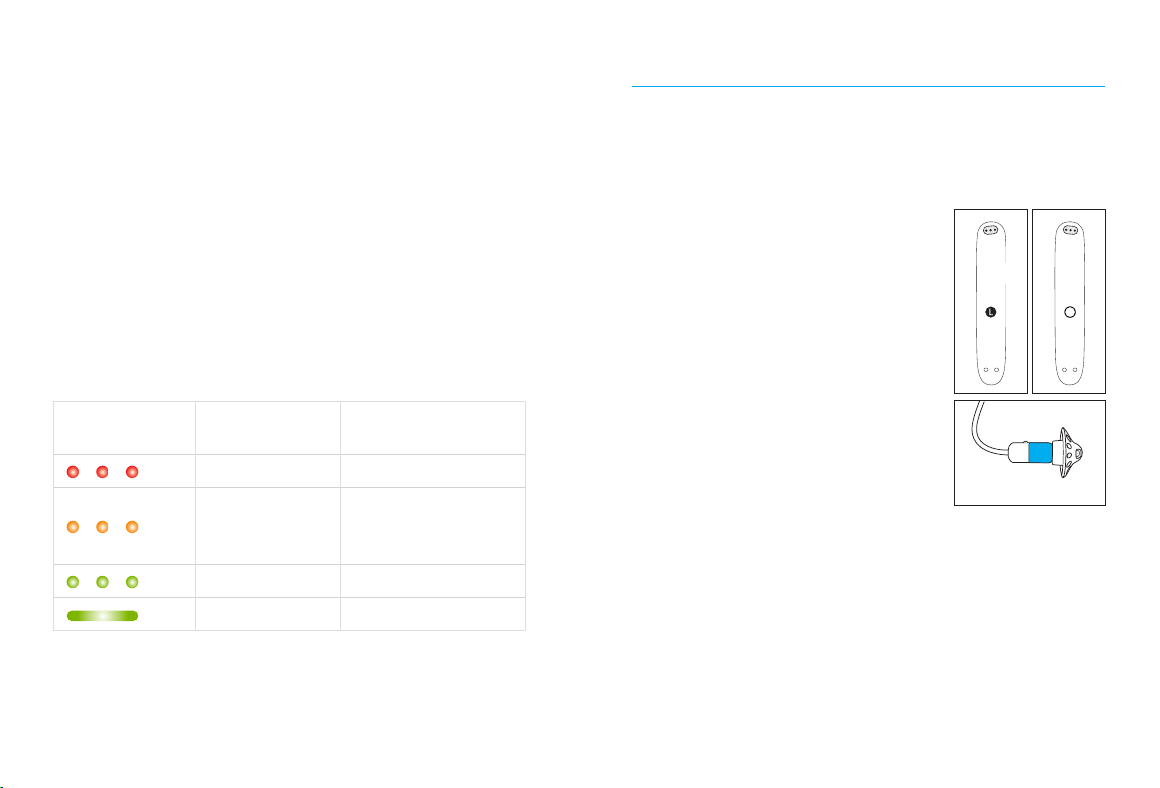
Indicator light Charging state
Approximate
charging times
0 – 10%
11 – 80%
30 min (25%)
60 min (50%)
90 min (75%)
81 – 99%
100% 3 h
5. Le and right hearing aid markings
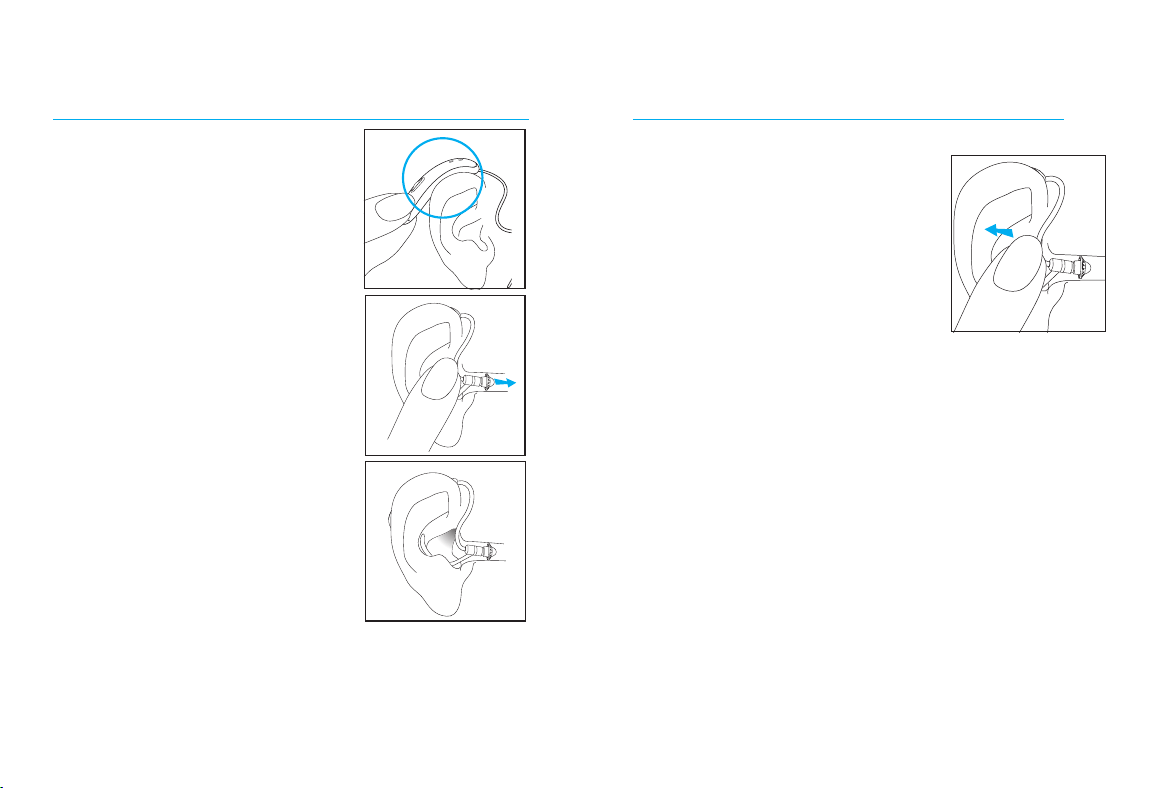
There is a L / R marking on the bottom of the
hearing aid and a red or blue marking on the
speaker. This will tell you if it is a le or a right
hearing aid.
• L/Blue marking
for le hearing
aid.
• R/Red marking
for right hearing
aid.
Labeling
The serial number and year of manufacture are
located on the back of the device. It is laser
marked on the shell body.
R
14 15
6. Putting your hearing aids on your
ears
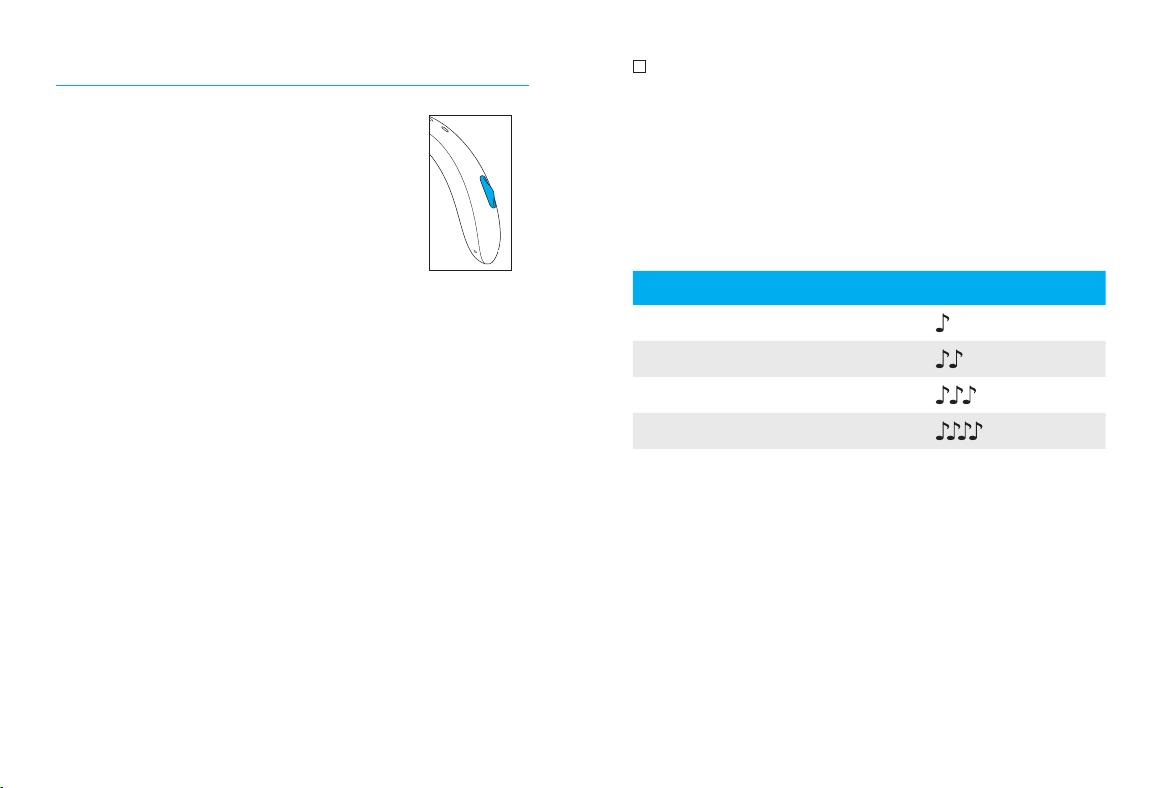
1. Place the hearing aid
behind your ear.
2. Hold the wire where it
attaches to the dome and
gently push the dome into
your ear canal. The wire
should lie flush against
your head and not stick out.
3. If there is a retention piece,
place it in your ear so it
rests at the bottom of the
opening of your ear canal.
2.
3.
1.
7. Removing the hearing aid from
your ear
1. Pull on the bend of the
wire and remove the
hearing aid from behind
the ear.
1.
16 17
8. Multi-function button
The multi-function button has
several functions. It functions
as an on/o switch, a volume
control and/or a program change
depending on the hearing aid
programming.
If the hearing aid is paired with a Bluetooth®
enabled phone, a short press on the button will
accept an incoming call and a long press will
reject an incoming call.
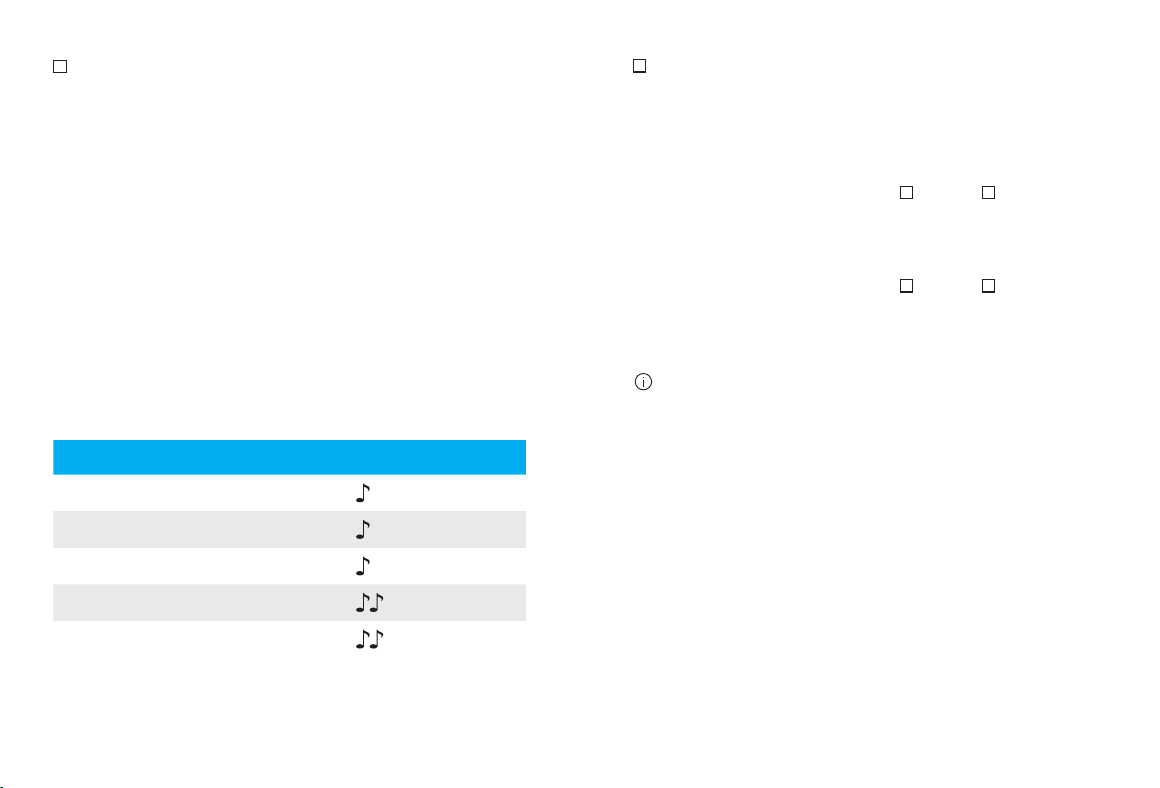
Program control
If your multi-function button is a program
control, each time you push the button on either
hearing aid for longer than 2 seconds, you will
move to the next hearing aid program.
Your hearing aids beep to indicate which
program you are in.
Program setting Beeps
Program 1 (e.g. automatic program) 1 beep
Program 2 (e.g. speech in noise) 2 beeps
Program 3 (e.g. telephone) 3 beeps
Program 4 (e.g. music) 4 beeps
18 19
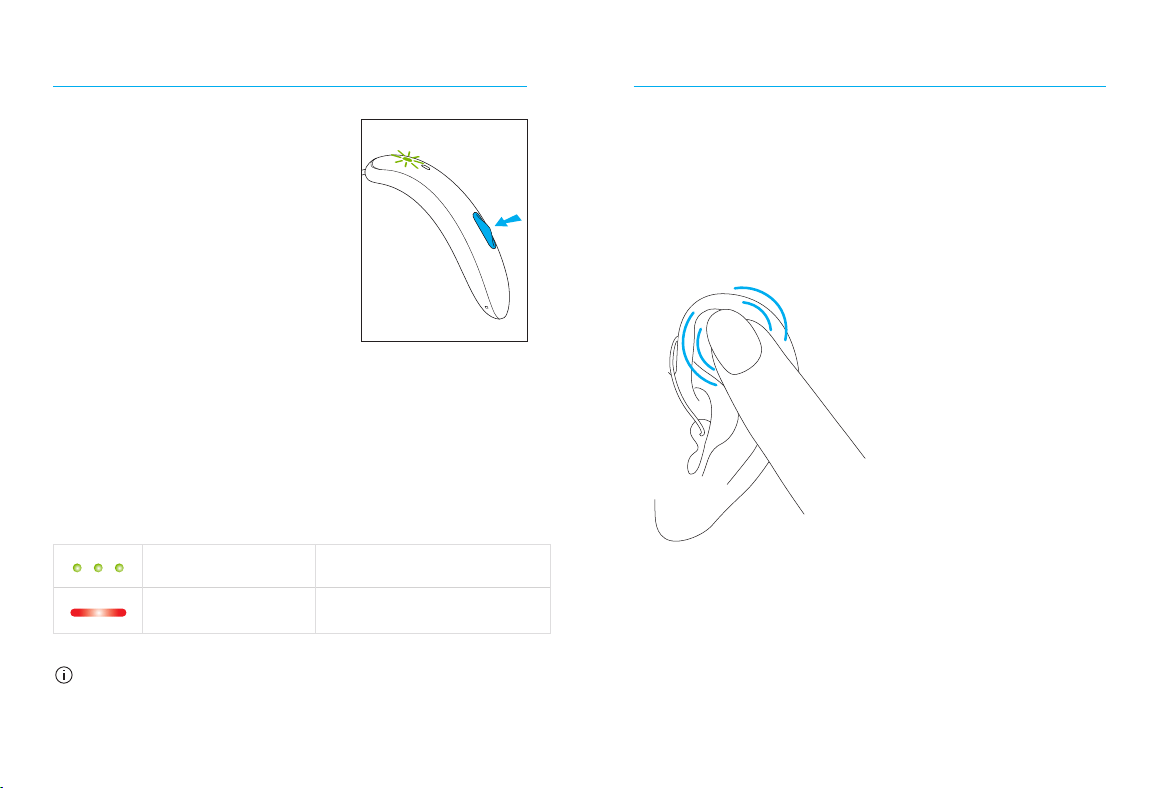
Volume control
If your multi-function button has been
congured as a volume control, either:
• Push the button on your right hearing aid to
increase the volume, and
• Push the button on your le hearing aid to
decrease the volume
or:
• Push the button to step through your volume
levels
As you change the volume, your hearing aids
will beep.
Volume setting Beeps
Suggested volume level 1 beep
Turning volume up short beep
Turning volume down short beep
Maximum volume level 2 beeps
Minimum volume level 2 beeps
Program/volume control push button
If your hearing care professional has congured
one hearing aid to be a program control and the
other hearing aid to be a volume control:
• Push the button on your right / le
hearing aid to access your dierent programs,
and
• Push the button on your right / le
hearing aid to step through your volume levels
These instructions describe the default
multi-function button or tap control
settings. Your hearing care professional
may change the functionality. See your
hearing care professional for more
information.
20 21
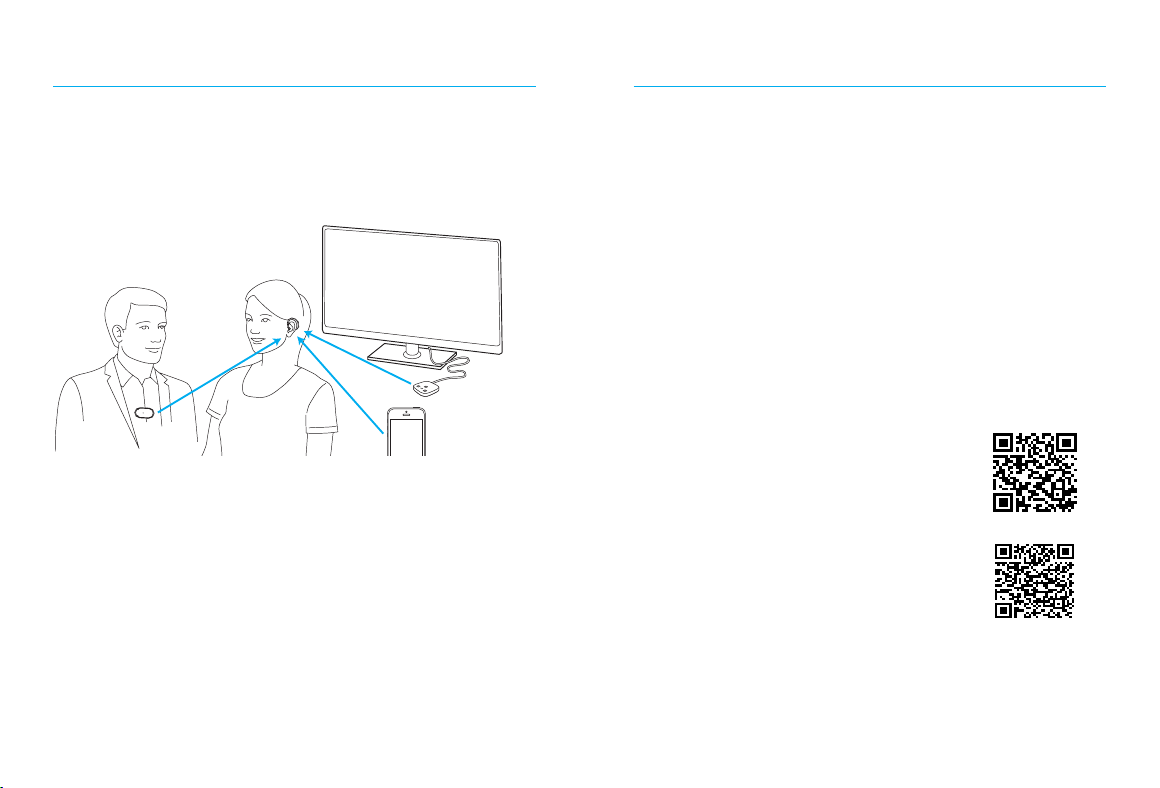
9. On/O
Switch on hearing aid
The hearing aid can be set
to switch on automatically
when removed from the
charger. If this function is
not congured, rmly press
and hold the button until the
indicator light blinks. Wait
until the solid green light
indicates the hearing aid is ready.
Switch o hearing aid
Press and hold the button until the indicator light
turns solid red, signifying that the hearing aid is
switching o.
Blinking green Hearing aid is switching on
Solid red Hearing aid is switching o
When you turn your hearing aids on you
may hear a start-up melody.
10. Tap control
If paired with a Bluetooth enabled device,
multiple functions can be accessed using tap
control e.g. accept/end phone call, pause/
resume streaming, start/stop voice assistant.
To use tap control tap the top of your ear twice.
22 23
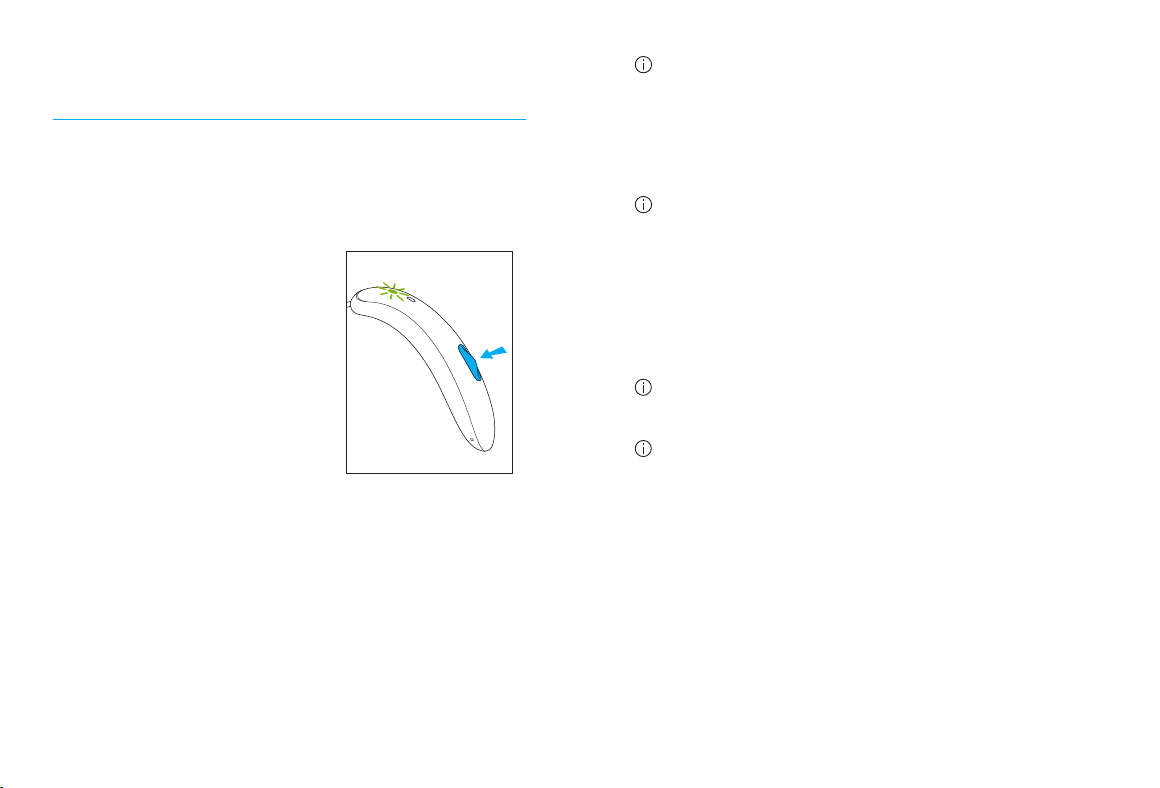
11. Connectivity overview
The illustration below shows some of the
connectivity options available for your hearing
aids.
Mobile phone
TV Connector
connected
to TV*
PartnerMic
Please see the user guide that came with your
accessory for more information. Please contact
your hearing care professional to get a TV
Connector, Remote Control, PartnerMic or Roger
accessories.
* The TV Connector can be connected to any audio source such as a TV, PC or hi- system.
12. Unitron Remote Plus app overview
Compatibility information
The Unitron Remote Plus app can be used on phones
with Bluetooth Low Energy (LE) capability. Please nd
phone compatibility details on:
https://www.unitron.com/global/en_us/help-and-
support/bluetooth-support/phone-compatibility.
html
Please nd the instruction for use on https://www.
unitron.com/global/en_us/products.html#app
Install Unitron Remote Plus app for
iPhone users, please scan the code:
Install Unitron Remote Plus app for
Android OS users, please scan the code:
iPhone® is a trademark of Apple Inc., registered in the U.S. and other countries.
IOS® is a registered trademark or trademark of Cisco Systems, Inc. and/or its
aliates in the United States and certain other countries.
Android™ is a trademark of Google LLC.
24 25
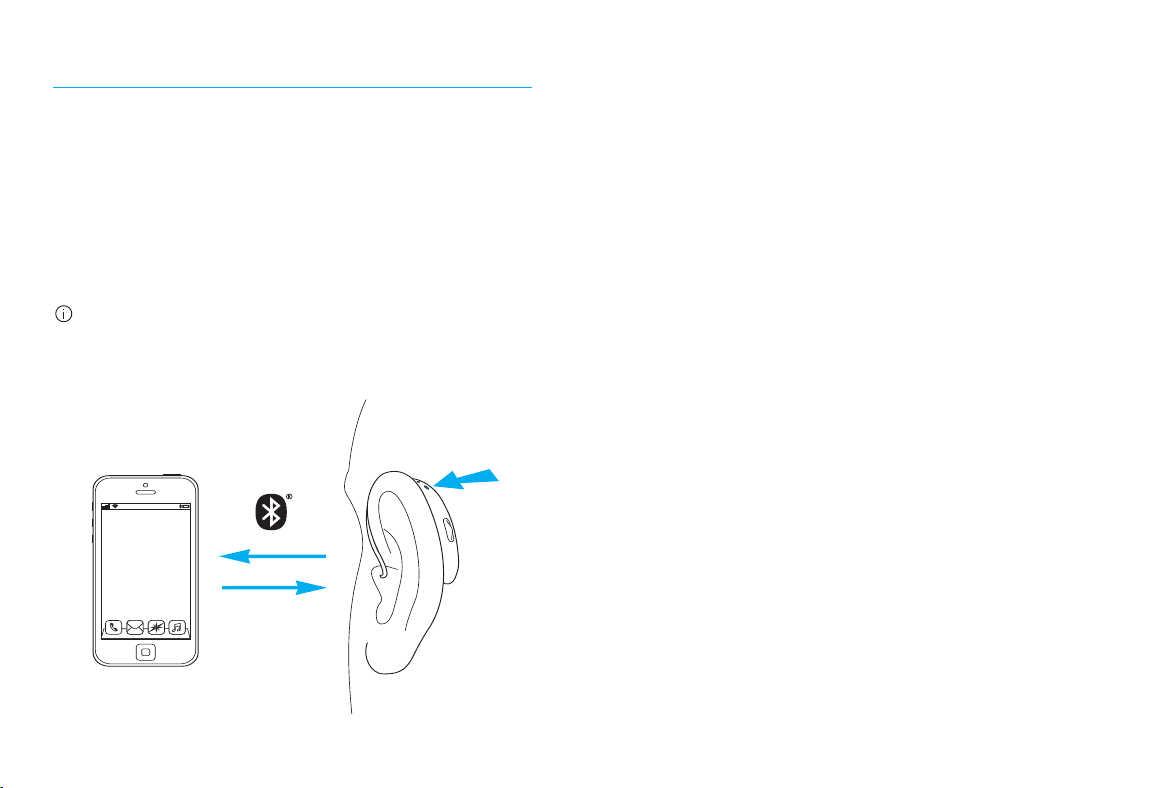
13. Pairing your hearing aids to a
device
Initial pairing to a Bluetooth
®
enabled device
1. On your device (i.e. phone) go to your
settings menu to ensure Bluetooth is on and
search for Bluetooth enabled devices.
2. Switch on both hearing
aids. Your hearing aids
will remain in pairing
mode for 3 minutes.
3. Your device shows a list
of Bluetooth enabled
devices. Select the
hearing aid from the list
to simultaneously pair both hearing aids. A
beep conrms successful pairing.
Bluetooth
®
is a registered trademark owned by the Bluetooth SIG, Inc.
and used under license by Unitron.
It is only necessary to perform the pairing
procedure once with each Bluetooth enabled
phone. Aer the initial pairing, your hearing
aids will connect automatically to the device.
Initial pairing can take up to 2 minutes.
Consult your phone user guide for instructions
on pairing a Bluetooth device with your phone.
Connecting to the device
Aer your hearing aids have been paired to your
device, they will automatically connect again
when switched on.
The connection will be maintained as long as the
phone remains ON and within range.
Your hearing aids can be connected to up to two
devices and paired to up to eight devices.
26 27
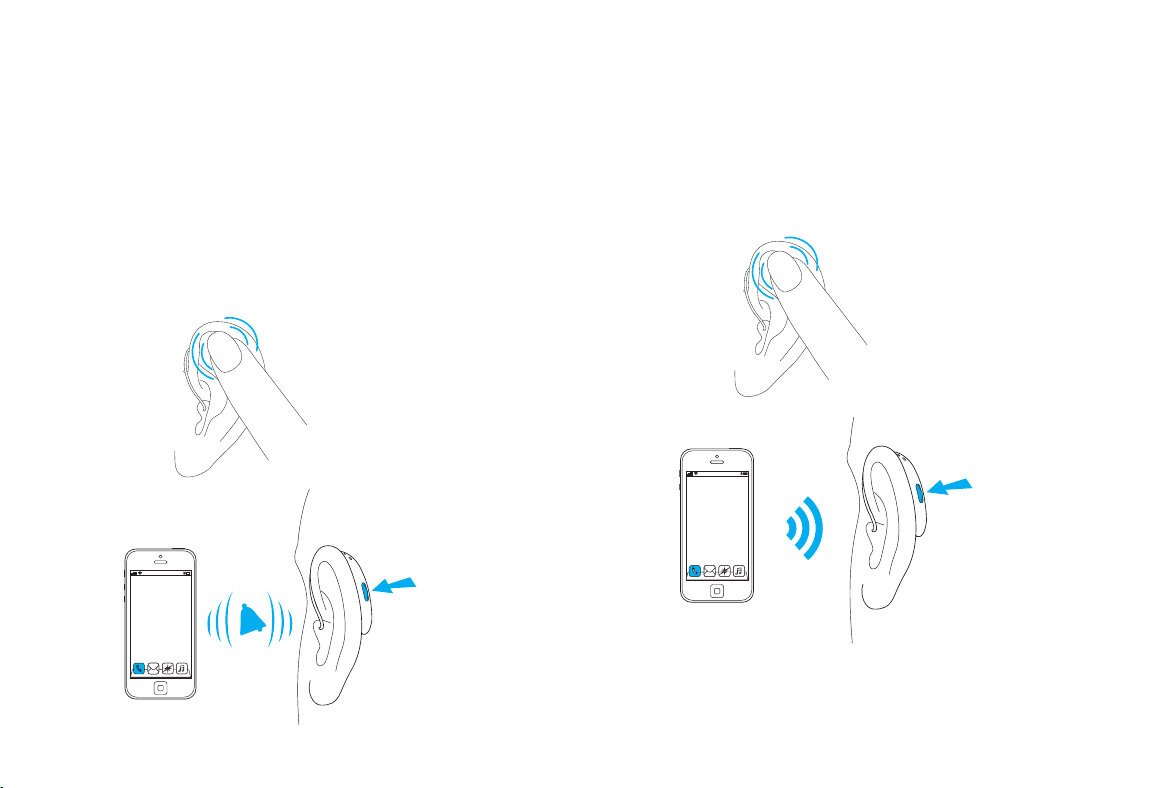
14. Phone calls
Your hearing aids allow direct communication
with Bluetooth enabled devices. When paired
and connected to a phone, you will hear
notications, incoming call notication and the
caller’s voice directly in your hearing aids. Your
hearing aids pick up your voice through their own
microphones.
You do not need to hold your mobile phone close
to your mouth, your voice is transmitted through
the hearing aids to your mobile phone.
Caller’s voice
Your voice
Making a phone call
Start a call on your paired mobile phone as you
normally would. Enter the phone number and
press the dial button. You will hear the dial tone
and audio through your hearing aids. Your voice
is picked up by the hearing aid microphones and
transmitted to the phone.
28 29
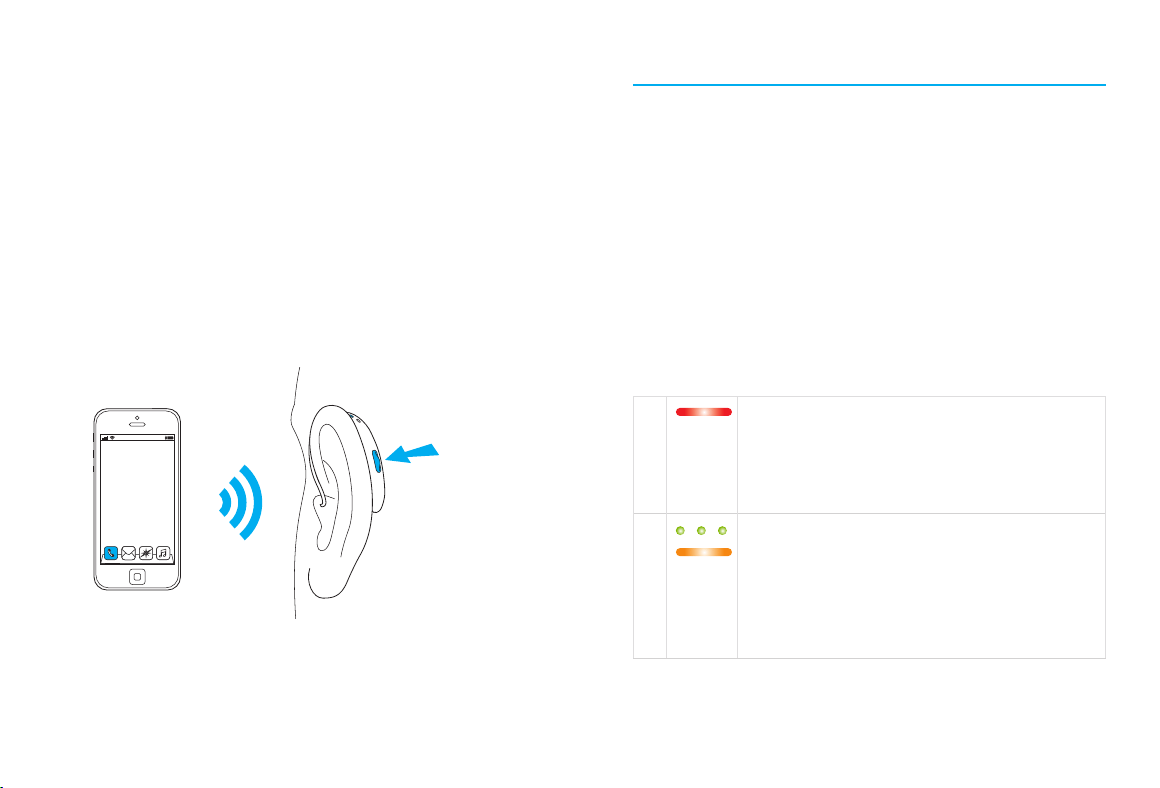
Accepting a mobile phone call
When receiving a call, an incoming call
notication will be heard in the hearing aids.
The call can be accepted by tapping the top of
your ear twice, or with a short push of less than
2 seconds on the multi-function button on either
hearing aid. Alternatively, accept the call on
your phone as you normally would.
short push
< 2 sec
tap ear
twice
or
Ending a call
A call can be ended by tapping the top of your
ear twice, a long press of more than 2 seconds
on the multi-function button on the hearing aid,
or directly on your phone.
long push
> 2 sec
tap ear
twice
or
30 31
Rejecting a phone call
An incoming call can be rejected by a long press
on the multi-function button on either hearing
aid for more than 2 seconds. Alternatively, reject
the call directly on your phone.
long push
> 2 sec
15. Flight mode
Your hearing aids operate in the frequency
range of 2.4 GHz–2.48 GHz. When flying, some
operators require all devices to be switched
into flight mode. Entering flight mode will not
disable normal hearing aid functionality, only
the Bluetooth connectivity functions.
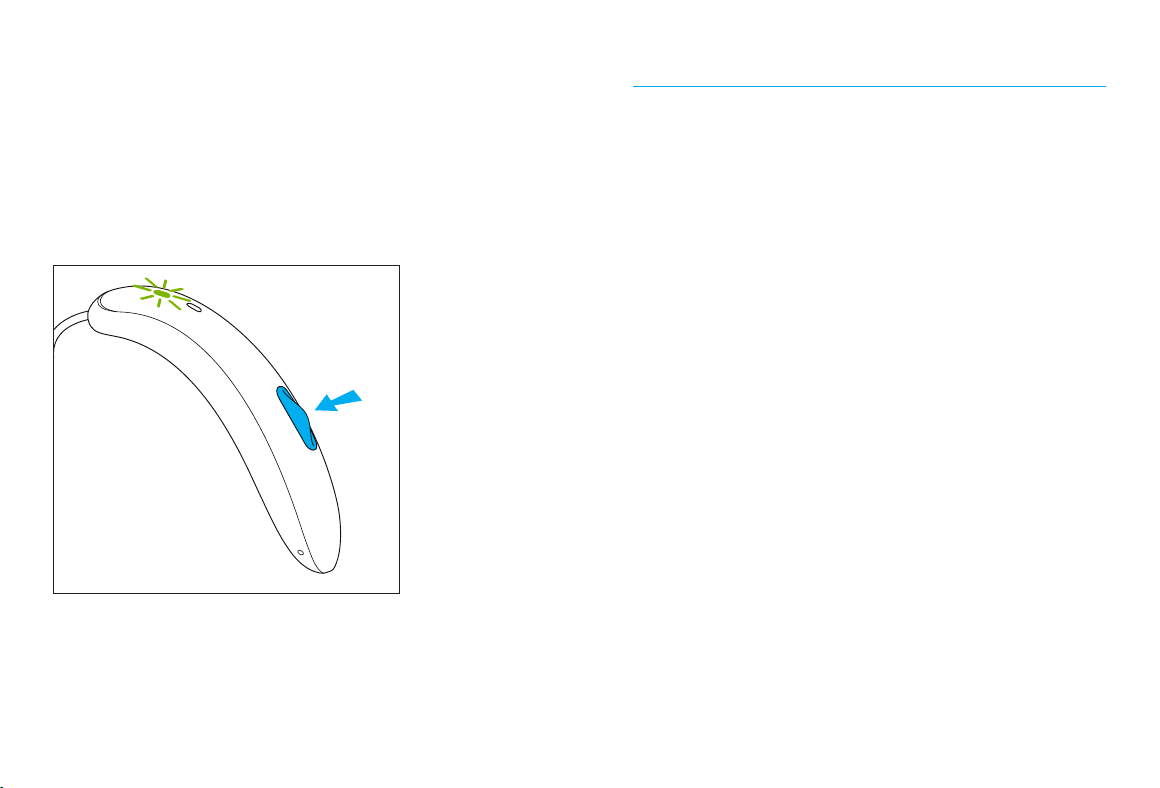
Entering flight mode
To enter flight mode, follow these steps for both
hearing aids seperately:
1. If the hearing aid is turned o, proceed to
Step 2. If the hearing aid is on, turn it o by
pressing and holding the button until the
indicator light turns solid red, signifying that
the hearing aid is switching o.
2. Keep pressing the button for 7 seconds. The
indicator light will rst blink green and then
turn to solid orange indicating that the flight
mode has been activated.
32 33
In flight mode, your hearing aids cannot connect
directly to your phone.
Exiting flight mode
To enable the Bluetooth wireless function and to
exit flight mode:
Switch the hearing aid o and then on again.
16. Rebooting your hearing aid
Use this technique if your hearing aid is in an
error state. This will not remove or delete any
program or settings.
1. Press the button for at least 15 seconds.
It does not matter if the hearing aid is
switched on or o before you start pressing
the button. There is no light or acoustic
notication at the end of the 15 seconds.
2. Place the hearing aid in the power-connected
charger and wait until the indicator light blinks
green. This can take up to 30 seconds. The
hearing aid is now ready to use.

34 35
17. Operating, transport and storage
conditions
The product is designed such that it functions
without problems or restrictions if used as
intended, unless otherwise noted in these user
guides.
Please ensure to use, charge, transport and
store the hearing aids according to the following
conditions:
Use Charging Transport Storage
Temperature
Maximum
range
Recommended
range
+5° to +40°C
(41° to 104°F)
+5° to +40°C
(41° to 104°F)
-20° to +60°C
(-4° to 140°F
-20° to +60°C
(-4° to 140°F)
+5° to +40°C
(41° to 104°F)
+7° to +32°C
(45° to 90°F)
0° to +20°C
(32° to 68°F)
0° to +20°C
(32° to 68°F)
Humidity
Maximum
range
Recommended
range
0% to 85% (non
condensing)
0% to 85% (non
condensing)
0% to 70% 0% to 70%
0% to 60% (non
condensing)
0% to 60% (non
condensing)
0% to 60% 0% to 60%
Atmospheric
pressure
500 hPa to 1060
hPa
500 hPa to 1060
hPa
500 hPa to 1060
hPa
500 hPa to
1060 hPa
Please ensure to charge the hearing aids
regularly during long-term storage.
These hearing aids are classied as IP68. This
means that they are water and dust resistant
and designed to withstand daily life situations.
They can be worn in the rain but should not be
fully submerged in water or used when taking
a shower, swimming or other water activities.
These hearing aids should never be exposed
to chlorinated water, soap, salt water or other
liquids with a chemical content.
If the device has been subject to storage
and transportation conditions outside of the
recommended use conditions, wait 15 minutes
before starting the device.

36 37
18. Caring and maintenance
Protecting your hearing aids
Expected service life:
The hearing aids and the compatible charger
have the expected service life of ve years. The
devices are expected to remain safe for use for
this duration.
Commercial service period:
Routine and diligent care of your hearing aids
and charger will contribute to the outstanding
performance for the duration of the expected
service life of your devices.
Sonova AG will provide a minimum of a ve
year repair service period aer the respective
hearing aid, charger and essential components
have been phased out of the product portfolio.
Before using hair spray or applying cosmetics,
you should remove your hearing aid from your ear,
because these products may damage it.
• Your hearing aids are resistant to water and
dust under the following conditions:
• Aer exposure to water or dust, the
hearing aid is cleaned and dried.
• The hearing aid is used and maintained as
described in this user guide.
Always make sure that the hearing aids and
charger are dry and clean before charging.
38 39
Daily
Hearing aid:
Inspect the dome for earwax and moisture
deposit and clean the surfaces with a
lint-free cloth. Never use cleaning agents
such as household detergents, soap, etc.
for cleaning your hearing aid. It is not
recommended to rinse with water. If you
need to clean your hearing aid intensively,
ask your hearing care professional for advice
and information on lters or drying capsules.
Charger:
Make sure that charger inserts are clean.
Never use cleaning agents such as household
detergents, soap, etc. for cleaning your charger.
Weekly
Hearing aid:
Clean the dome with a so, damp cloth or with
a special cleaning cloth for hearing aids. For
more in-depth maintenance instructions or
for more than basic cleaning, please see your
hearing care professional. Clean the charging
contacts on the hearing aid with a so, damp
cloth.
Charger:
Remove dust or dirt from the charger inserts.
Always make sure that the charger is
disconnected from the power mains before
cleaning.
40 41
19. Exchanging the earwax protection
Your hearing aid is equipped with an earwax
protection to protect the speaker from earwax
damage.
Please check the earwax protector regularly
and exchange it if it looks dirty or if the hearing
aid volume or sound quality is reduced. The
earwax protection should be replaced every
four to eight weeks on a regular speaker.
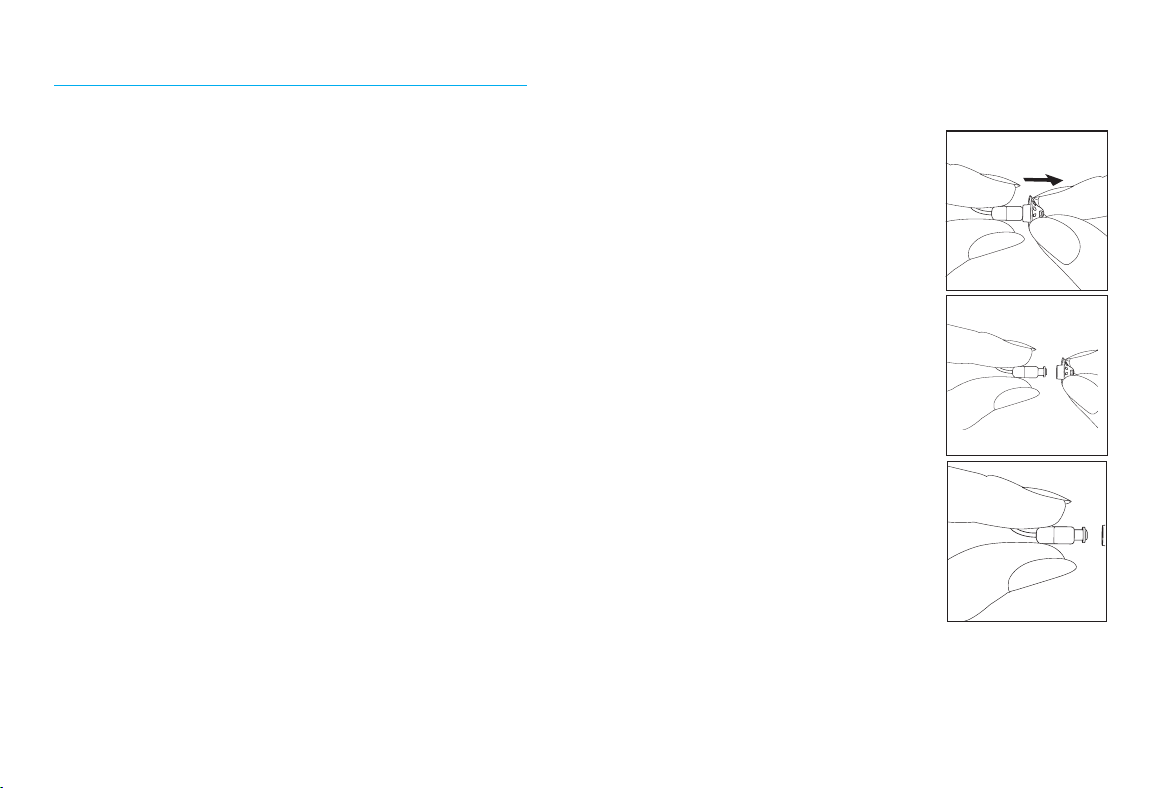
1. Remove the dome from
the speaker by holding the
speaker in one hand and the
dome in the other.
2. Gently pull o the dome
to remove.
3. Clean the speaker with a
lint-free cloth.
2.
3.
1.
Speaker with dome
Removing the dome from the speaker
42 43
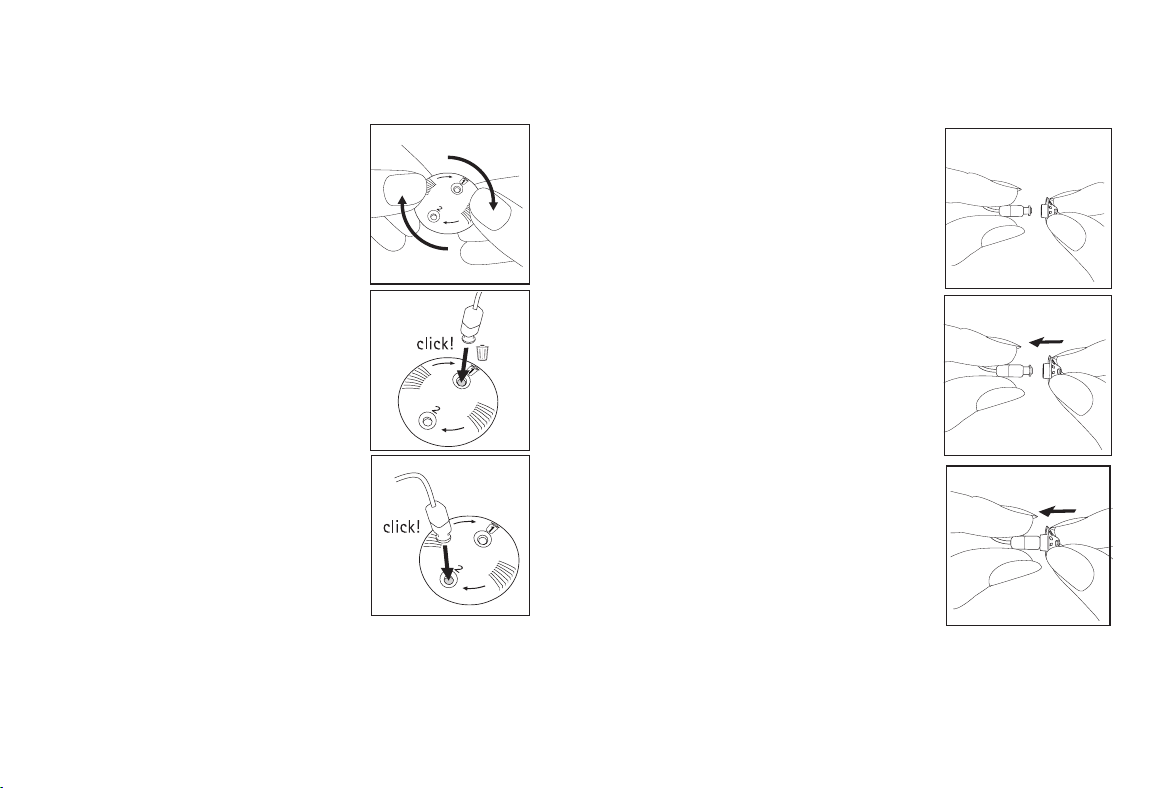
1. Gently rotate the CeruShield
Disk in the direction indicated
by the arrows until a free
opening appears under the
bin icon.
2. To remove a used earwax
protector carefully insert the
speaker into the free opening
(under bin icon) until it clicks.
Aer the click you will see the
used earwax protector in the
opening below the bin icon.
Exchanging the earwax protection with
CeruShield
™
Disk
3. To insert a new earwax
protector carefully insert the
speaker into the opening
where the new earwax
protector is visible (opposite
the bin icon) until it clicks.
Aer the click you will see the opening below
is empty and the new earwax protector is now
inside the speaker.
1. Hold the speaker in one hand
and the dome in the other.
2. Slide the dome over the
speaker sound outlet.
3. The speaker and the dome
should t perfectly together.
2.
1.
3.
Attaching the dome to the speaker
1.
2.
3.
44 45
20. Service and warranty
Local warranty
Please ask the hearing care professional where
you purchased your hearing aids and chargers
about the terms of the local warranty.
International warranty
Sonova AG oers a one year limited international
warranty, valid from the date of purchase. This
limited warranty covers manufacturing and
material defects in the hearing aid and chargers
respectively, but not accessories such as tubes,
earpieces, or external speaker. The warranty only
comes into force if a proof of purchase is shown.
The international warranty does not aect any
legal rights that you might have under applicable
national legislation governing sale of consumer
goods.
Warranty limitation
This warranty does not cover damage from
improper handling or care, exposure to
chemicals or undue stress. Damage caused by
third parties or non-authorized service centers
renders the warranty null and void. This warranty
does not include any services performed by a
hearing care professional in their oce.
Serial numbers
Hearing aid le side:
Hearing aid right side:
Charger:
Date of purchase:
Authorized hearing care professional (stamp/
signature):

46 47
21. Compliance information
Declaration of conformity for the hearing aids
Hereby, Sonova AG declares that this product meets the
requirements of the Medical Devices Regulation MDR2017/745
and complies with Radio Equipment Directive 2014/53/EU.
The full text of the EU Declaration of Conformity can be obtained
from the manufacturer via the following web address:
www.sonova.com/en/certicates.
Australia/New Zealand:
Indicates a device’s compliance with applicable Radio
Spectrum Management’s (RSM) and Australian
Communications and Media Authority (ACMA) regulatory
arrangements for the legal sale in New Zealand and
Australia. The compliance label R-NZ is for radio products
supplied in the New Zealand market under conformity
level A1.
The hearing aid described in this user guide is certied under:
Standard hearing system
USA - FCC ID: Canada - IC:
Moxi V-RS KWC-SLR 2262A-SLR
Notice 1
This device complies with Part 15 of the FCC Rules and with RSS-
210 of Industry Canada. Operation is subject to the following two
conditions:
1) this device may not cause harmful interference, and
2) this device must accept any interference received, including
interference that may cause undesirable operation.
Notice 2
Changes or modications made to this device not expressly
approved by Sonova AG may void the FCC authorization to operate
this device.
Notice 3
This device has been tested and found to comply with the limits
for a Class B digital device, pursuant to Part 15 of the FCC Rules
and ICES-003 of Industry Canada. These limits are designed to
provide reasonable protection against harmful interference in
a residential installation. This device generates, uses and can
radiate radio frequency energy and, if not installed and used in
accordance with the instructions, may cause harmful interference
to radio communications. However, there is no guarantee that
interference will not occur in a particular installation. If this device
does cause harmful interference to radio or television reception,
which can be determined by turning the equipment o and on, the
user is encouraged to try to correct the interference by one or more
of the following measures:
• Reorient or relocate the receiving antenna
• Increase the separation between the equipment and receiver
• Connect the device into an outlet on a circuit dierent from
that to which the receiver is connected
• Consult the dealer or an experienced radio/TV technician for
help
Charger
Please keep at least 20 cm separation distance between the
charger and the human body during operation.
48 49
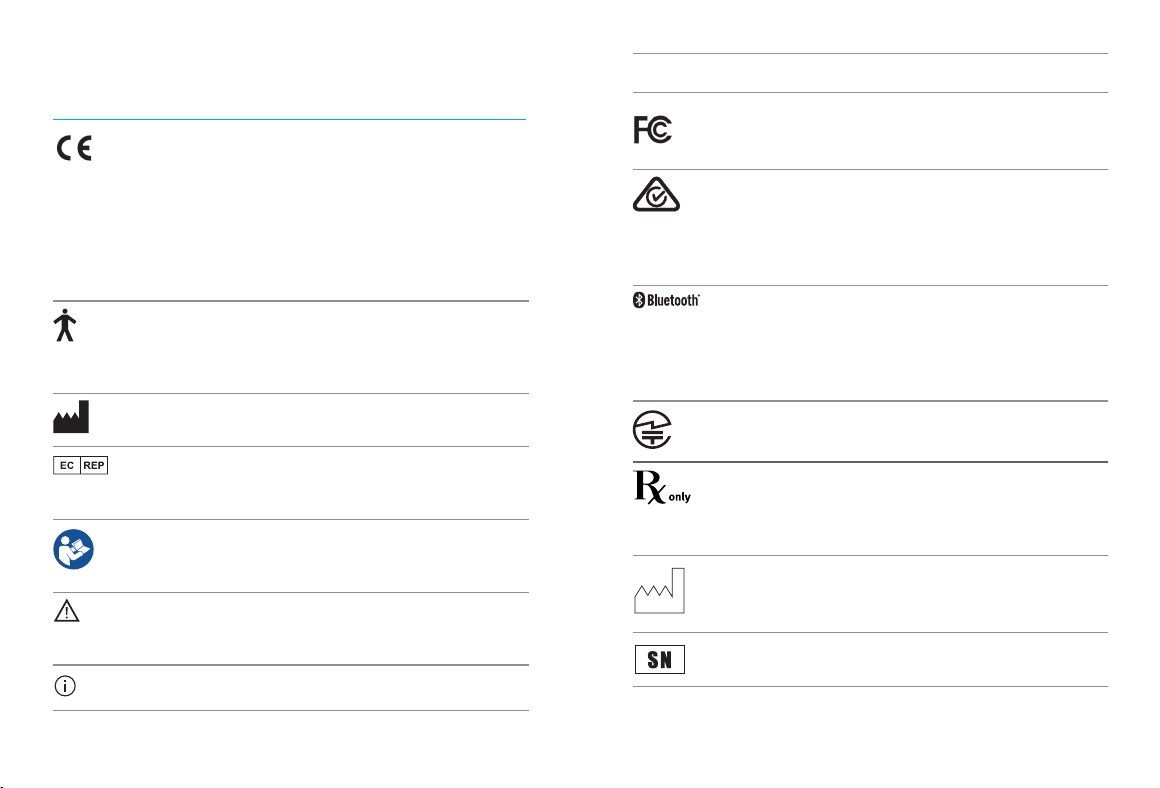
Radio information of your wireless hearing aid
Antenna type Linear Dipole Antenna
Operation frequency 2.4 GHz – 2.48 GHz
Modulation GFSK, Pi/4 DQPSK, GMSK
Radiated power < 2.5mW
Bluetooth
®
Range ~1m
Bluetooth 4.2 Dual-Mode
Proles supported HFP (Hands-free prole), A2DP
Compliance with emission and immunity standards
Emission standards EN 60601-1-2
IEC 60601-1-2
Immunity standards EN 60601-1-2
IEC 60601-1-2
Emissions
Test
Compliance Electromagnetic environment
guidance
RF emissions
CISPR 11
Group 2
Class B
The medical device uses RF energy only
for its internal function. Therefore, its RF
emission are very low and are not likely
to cause any interferences in nearby
electronic equipment
Harmonic
emissions
Complies
Voltage
fluctuations /
flicker
emissions
Complies
50 51
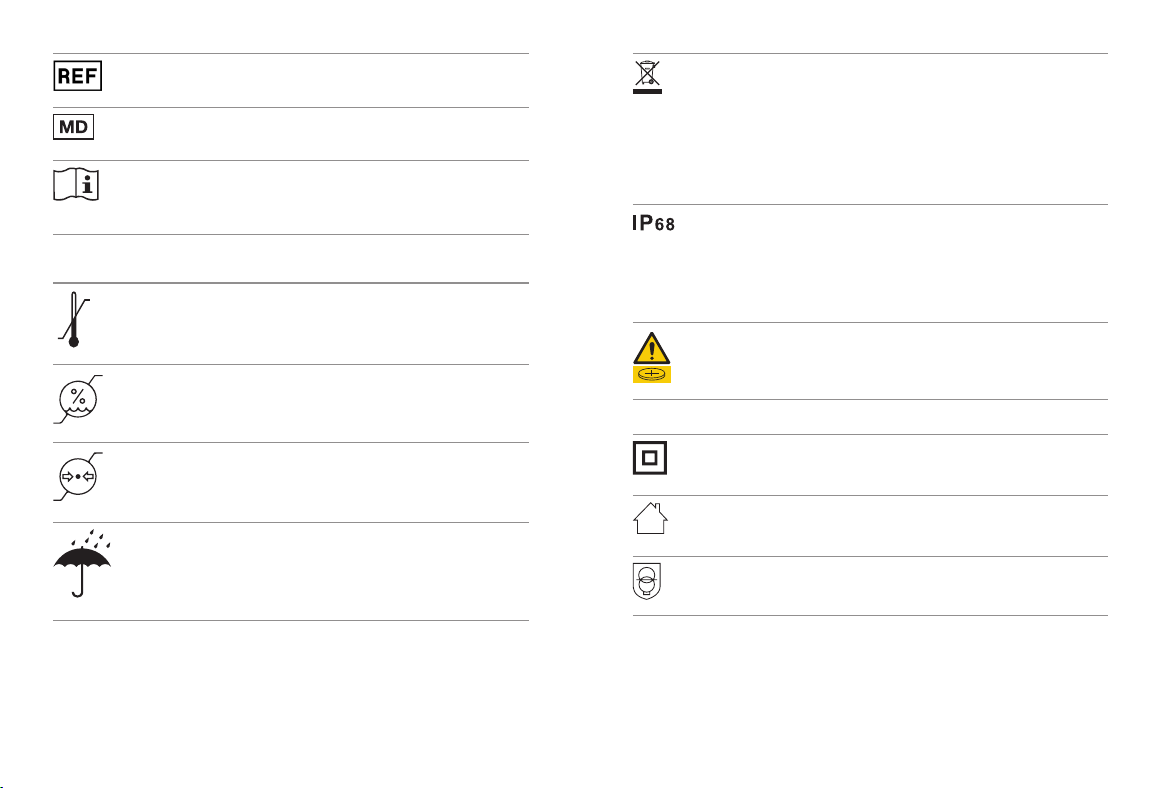
22. Information and explanation of
symbols
xxxx
With the CE symbol, Sonova AG conrms that
this product – including accessories – meets the
requirements of the Medical Devices Regulation
(EU) 2017/745 as well as the Radio Equipment
Directive 2014/53/EU. The numbers aer the
CE symbol correspond to the code of certied
institutions that were consulted under the above-
mentioned regulation and directive.
This symbol indicates that the products described in
these user instructions adhere to the requirements for
an applied part of Type B of EN 60601-1. The surface of
the hearing aid is specied as applied part of Type B.
Indicates the medical device manufacturer, as
dened in Medical Devices Regulation (EU) 2017/745
Indicates the Authorized representative in the
European Community. The EC REP is also the importer
to the European Union.
This symbol indicates that it is important for the user to
read and take into account the relevant information in
these user guides.
This symbol indicates that it is important for the user to
pay attention to the relevant warning notices in this user
guide.
Important information for handling and product safety.
©
Copyright symbol
This symbol confers that the electromagnetic
interference from the device is under limits approved
by the US Federal Communications Commission.
Indicates a device’s compliance with applicable
Radio Spectrum Management’s (RSM) and Australian
Communications and Media Authority (ACMA)
regulatory arrangements for the legal sale in New
Zealand and Australia.
The Bluetooth
®
word mark and logos are registered
trademarks owned by Bluetooth SIG, Inc. and any
use of such marks by Sonova is under license. Other
trademarks and trade names are those of their
respective owners.
Japanese mark for certied radio equipment
This symbol indicates that this is a Prescription Device.
CAUTION: U.S. Federal law restricts this device to
sale by or on the order of a physician or hearing care
professional (for US only).
Indicates the date when the medical device was
manufactured
Indicates the manufacturer’s serial number so that a
specic medical device can be identied.
52 53
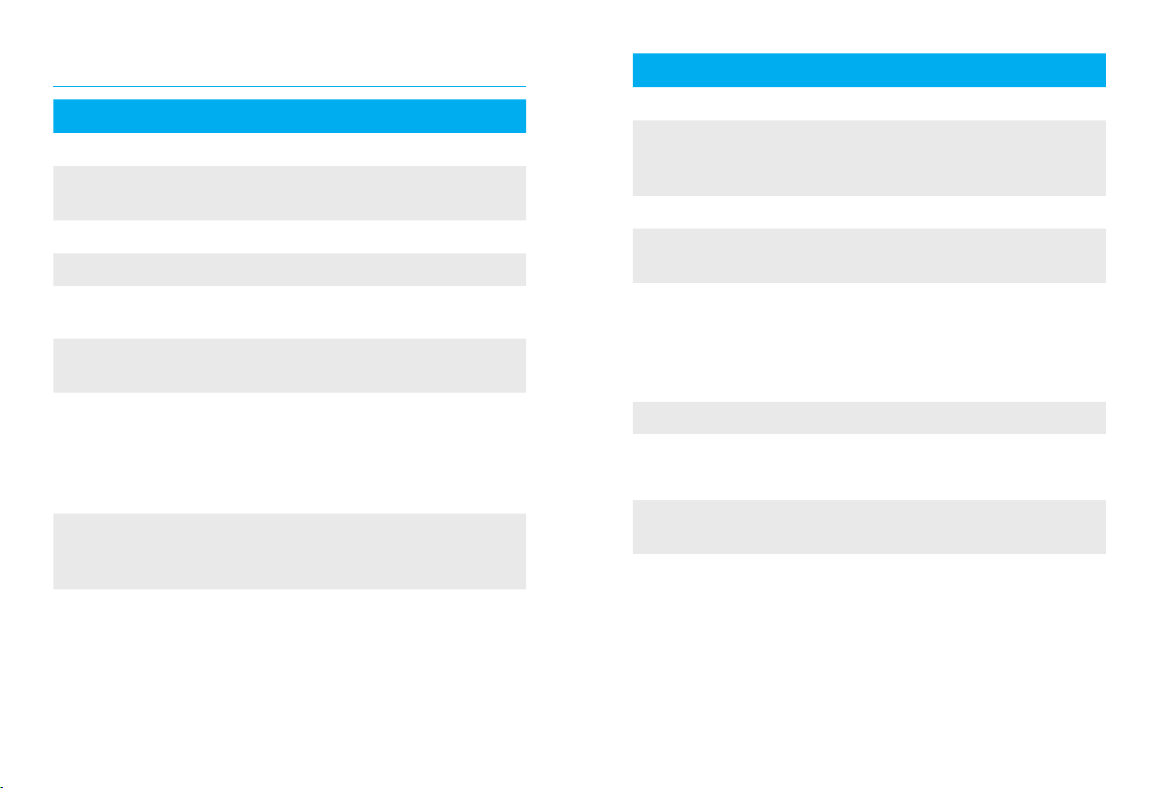
Indicates the manufacturer’s catalogue number so that
the medical device can be identied
Indicates that the device is a medical device.
This symbol indicates that it is important for the user to
read and take into account the relevant information in
this user guide.
Moxi Moxi is a trademark of Sonova.
Temperature during transportation
and storage
Humidity during transportation and storage
Atmospheric pressure during transportation and
storage
During transportation keep dry.
The symbol with the crossed-out garbage bin is to make
you aware that this device as well as chargers may not
be thrown away as normal household waste. Please
dispose of old or unused devices, at waste disposal
sites intended for electronic waste, or give your device
to your hearing care professional for disposal. Proper
disposal protects the environment and health.
IP Rating = Ingress Protection Rating. IP68 rating indi-
cates that the hearing aid is water and dust resistant.
It survived continuous immersion in 1 meter of fresh
water for 60 minutes and 8 hours in a dust chamber
as per the IEC60529 standard.
This symbol indicates that it is important for the user to
pay attention to the relevant warning notices related to
batteries in these user guides.
Symbols applicable to the European power supply only
Power supply with double isolation
Device designed for indoor use only.
Safety isolating transformer, short circuit
proof
54 55
Cause Possible remedy
Issue: Hearing aid not functioning
Speaker/dome blocked Clean speaker opening/
dome
Hearing aid switched o Press multi-function button
Battery dead Charge hearing aid
Issue: Hearing aid whistles
Hearing aid not inserted
correctly into ear
Insert hearing aid correctly
(see Chapter 6)
Cerumen in ear canal Contact your ENT/GP or
hearing care professional
Issue: Hearing aid too loud
Volume too loud Decrease volume if volume
control available (see
Chapter 8)
23. Troubleshooting guide
Cause Possible remedy
Issue: Hearing aid not loud enough or distorted
Volume too low Increase volume if volume
control available (see
Chapter 8)
Low battery Charge hearing aid
Speaker/earpiece
blocked
Clean speaker opening/
earpiece
Hearing has changed
Contact you hearing care
professional
Issue: Hearing aid plays two beeps
Indication for low battery Charge hearing aid
Issue: Hearing aid will not switch on
Battery discharged /
dead
Charge hearing aid
Button was inadvertently
deactivated by pressing
the button longer than 15
seconds
Perform step 2 of the
rebooting process
(Chapter 16)
56 57
Cause Possible remedy
Issue: Indicator light on hearing aid does not light up
when hearing aid placed in charging inserts
Hearing aid not inserted
correctly into charger
Insert hearing aid correctly
into charger
Charger not connected to
power source
Connect charger to external
power supply
Battery discharged /
dead
Wait three hours aer
placing hearing aid in
charger, regardless of LED
behavior
Issue: Indicator light on hearing aid is solid red while
hearing aid is in the charger
Dirty charging contacts Clean the contacts of the
hearing aid and the charger
Hearing aid is out of its
operating temperature
range
Warm hearing aid up.
Operating temperature range
is +5° to +40° Celsius (+41°
to +104° Fahrenheit)
Faulty battery
Contact your hearing care
professional
Cause Possible remedy
Issue: Indicator light on hearing aid switches o when
hearing aid is removed from charger
“Auto On” feature is
disabled
Switch on the hearing aid
Issue: Indicator light on hearing aid remains solid
green aer removal from charger
Indicator light on hearing
aid was red when
hearing aid was placed
into the charger
Reboot the hearing aid
(Chapter 16)
Issue: Battery does not last the whole day
Shortened battery life Contact your hearing care
professional. A battery
replacement may
be required
Issue: Phone call function does not work
Hearing aid is in flight
mode
Switch hearing aid o and
then on again
Hearing aid not paired to
the phone
Pair hearing aid to the phone
(Chapter 13)
58 59
Cause Possible remedy
Issue: Charging does not start while charger
connected to power supply
Hearing aid not inserted
correctly into charger
Insert hearing aid correctly
into charger
Charger not properly
connected to power
supply
Adjust the charger and check
connection to power supply
If the problem persists, contact your hearing care
professional for assistance.
24. Important safety information
Please read the relevant safety information and
limitations-of-use information on the following
pages before using your hearing aid.
Intended use
The intended use of hearing aids is to amplify
and transmit sound to the ears and hereby
compensate for impaired hearing.
The tinnitus feature is intended for use by people
with tinnitus who also desire amplication. It
provides supplementary noise stimulation which
can help defocus the user’s attention from their
tinnitus.
The chargers are intended to charge the battery
of the rechargeable hearing aid.
Intended patient population:
Hearing aids: This device is intended for patients
with unilateral and bilateral, mild to severe
hearing loss from 8 years of age. The tinnitus
soware feature is intended for patients with
chronic tinnitus from 18 years of age.

60 61
Charger: The intended patient population is the
user of the compatible hearing aids.
Intended user:
Hearing aids: Intended for people with hearing
loss using a hearing aid and their caregivers.
A hearing care professional is responsible for
adjusting the hearing aid.
Charger: Intended for people with hearing loss
using the compatible rechargeable hearing aid
and their caregivers, or hearing care professional.
Indications:
General clinical indications for the use of
hearing aids and tinnitus feature are:
• Presence of hearing loss
• Uni- or bilateral hearing loss
• Conductive, sensorineural or mixed hearing
loss
• Mild to profound hearing loss
• Presence of a chronic tinnitus (only
applicable for devices which provide the
Tinnitus feature)
Contraindications
General clinical contraindications for the use of
hearing aids and tinnitus soware are:
• Hearing loss is not in the tting range
of the hearing aid (i.e. gain, frequency
response)
• Acute tinnitus
• Deformity of the ear (i.e. closed ear canal;
absence of the auricle)
• Neural hearing loss (retro-cochlear
pathologies such as absent/non-viable
auditory nerve)
Charger: Please note, contraindications are
not derived from the charger, but from the
compatible hearing aids.
The primary criteria for the referral of a patient
for a medical or other specialist opinion and / or
treatment are as follows:
• Visible congenital or traumatic deformity
of the ear;
• History of active drainage from the ear in
the previous 90 days;

62 63
• History of sudden or rapidly progressive
hearing loss in one or both ears within the
previous 90 days;
• Acute or chronic dizziness;
• Audiometric air-bone gap equal to or
greater than 15 dB at 500 Hz, 1000 Hz and
2000 Hz;
• Visible evidence of signicant cerumen
accumulation or a foreign body in the ear
canal;
• Pain or discomfort in the ear;
• Abnormal appearance of the eardrum and
ear canal such as:
- Inflammation of the external auditory
canal;
- Perforated eardrum;
- Other abnormalities which the HCP
believes are of medical concern
The hearing care professional may decide that a
referral is not appropriate or in the best interest
of the patient when the following applies:
• When there is sucient evidence that
the condition has been fully investigated
by a medical specialist and any possible
treatment has been provided;
• The condition has not worsened or
changed signicantly since the previous
investigation and / or treatment.
If the patient has given their informed and
competent decision not to accept advice to seek
a medical opinion, it is permissible to proceed
to recommend appropriate hearing aid systems
subject to the following considerations:
• The recommendation will not have any
adverse eects on the patients health or
general well being;
• The records conrm that all necessary
considerations about the patient’s best
interests have been made.
If legally required, the patient has signed a
disclaimer to conrm that the referral advice
has not been accepted and that it is an informed
decision.

64 65
Clinical benet
Hearing aid: Improvement of speech
understanding.
Tinnitus feature: tinnitus feature provides
supplementary noise stimulation which can
help defocus the user's attention from their
tinnitus.
Charger: The charger itself does not provide
a direct clinical benet. An indirect clinical
benet is provided by enabling the parent
device (rechargeable hearing aids) to achieve
their intended purpose.
Side eects
Physiological side-eects of hearing aids like
tinnitus, dizziness, wax build up, too much
pressure, sweating or moisture, blisters, itching
and/or rashes, plugged or fullness and their
consequences like headache and/ or ear pain,
may be resolved or reduced by your hearing
care professional. Conventional hearing aids
have the potential to expose patients to higher
levels of sound exposure, which might result in
threshold shis in the frequency range aected
by acoustic trauma.
Charger: Please note, side eects are not
derived from the charger, but from the
compatible hearing aids.
The hearing aid is suitable for the home
healthcare environment and due to their
portability it may happen that it is used in
professional healthcare facility environment
like physician oces, dental oces etc.
A hearing aid will not restore normal hearing
and will not prevent or improve a hearing
impairment resulting from organic conditions.
Infrequent use of a hearing aid does not permit
a user to attain full benet from it. The use of a
hearing aid is only part of hearing habilitation
and may need to be supplemented by auditory
training and instruction in lipreading.
Feedback, poor sound quality, too loud or too
so sounds, inadequate tting or problems
when chewing or swallowing, can be resolved
or improved during the ne-tuning process
66 67
at the tting procedure by your hearing care
professional.
Any serious incident that has occurred in
relation to the device should be reported to the
manufacturer representative and the competent
authority of the state of residence. The serious
incident is described as any incident that
directly or indirectly led, might have led or
might lead to any of the following:
• the death of a patient, user or other
person
• the temporary or permanent serious
deterioration of a patient’s, user’s or other
person’s state of health
• a serious public health threat
To report an unexpected operation or
event, please contact the manufacturer or a
representative.
Hazard warnings
WARNING: The hearing aids use a Pincell lithium
ion battery. These batteries are hazardous and
can cause severe or fatal injuries in 2 hours or
less if they are swallowed or placed inside any
part of the body, whether the battery is used or
new! Keep out of the reach of children, individuals
with cognitive impairment, or pets. If you suspect
that a battery was swallowed or placed inside
any part of the body, immediately consult your
physician without any delay!
The rechargeable hearing aids contain lithium-
ion batteries and the charger contains a lithium-
polymer battery that can be taken onto airplanes
as carry-on luggage. The hearing aids cannot be
placed in the checked-in baggage and can only
be placed in the carry-on luggage..
Your hearing aids operate between 2.4 GHz -2.48
GHz frequency range. When flying please check if
flight operator requires devices to be switched
into flight mode, see chapter 15.
68 69
The hearing aids (specially programmed for each
hearing loss) must only be used by the intended
person. They should not be used by any other
person as they could damage hearing.
Changes or modications to the hearing aid that
were not explicitly approved by Sonova AG are
not permitted. Such changes may damage your
ear or the hearing aid.
Do not use the hearing aids and charging
accessories in explosive areas (mines or
industrial areas with danger of explosions,
oxygen rich environments or areas where
flammable anesthetics are handled). The device
is not ATEX certied.
If you feel pain in or behind your ear, if it is
inflamed or if skin irritation and accelerated
accumulations of earwax occur, please check
with your hearing care professional or physician.
In very rare cases, the dome can remain in your
ear canal when removing the hearing tube
from the ear. In the unlikely case that the dome
does get stuck in your ear canal, it is strongly
recommended to see a physician for safe
removal. To prevent pushing the dome towards
the eardrum, never try to re-insert the speaker
into the ear canal.
Hearing programs in the directional microphone
mode reduce background noises. Please be
aware that warning signals or noises coming
from behind, e. g. cars, are partially or entirely
suppressed.
This hearing aid is not for children below 36
months. The usage of this device by children and
individuals with cognitive impairment should be
supervised at all times to ensure their safety. The
hearing aid is a small device and contains small
parts. Do not leave children and individuals with
cognitive impairment unsupervised with this
hearing aid. If swallowed, consult a physician
or hospital immediately as the hearing aid or its
parts can cause choking!
The following is only applicable for persons
with active implantable medical devices (i.e.
pacemakers, debrillators, etc.):
70 71
• Keep the wireless hearing aid and charger at
least 15 cm (6 inches) away from the active
implant. If you experience any interference,
do not use the wireless hearing aids and
contact the manufacturer of the active
implant. Please note that interference can
also be caused by power lines, electrostatic
discharge, airport metal detectors, etc.
• Keep magnets (e.g. battery handling
tool,etc.) at least 15 cm (6 inches) away from
the active implant.
Patients implanted with magnetic externally
programmable CSF shunt valves may have a
risk of experiencing an
unintended change
in their valve setting when exposed to strong
magnetic elds.
The receiver (loudspeaker)
of hearing aids contain static magnets. Keep
a distance of 2 inches (approx. 5 cm) or more
between the magnets and the site of the
implanted shunt valve.
Use of this equipment adjacent to or stacked
with other equipment should be avoided
because it could result in improper operation.
If such use is necessary, this equipment and
the other equipment should be observed to
verify that they are operating normally.
Use of accessories, transducers and cables
other than those specied or provided by the
manufacturer of this equipment could result
in increased electromagnetic emissions or
decreased electromagnetic immunity of this
equipment and result in improper operation.
Portable RF communications equipment
(including peripherals such as antenna cables
and external antennas) should be used no
closer than 30 cm (12 inches) to any part of the
hearing aids, including cables specied by the
manufacturer. Otherwise, degradation of the
performance of this equipment could result.
For charger, use only IEC 60950-1 *, IEC 62368-1
or IEC 60601-1 certied equipment with an output
rating of 5 VDC. Min. 500 mA.
* Note: this standard may not be valid anymore in your country, please refer
to IEC 62368-1
72 73
Hearing aids should not be tted with domes /
wax protection systems when used by clients
with perforated eardrums, inflamed ear canals
or otherwise exposed middle ear cavities. In
these cases, we recommend the use of a custom
earpiece. In the unlikely case that any part of
this product should remain in the ear canal, it
is strongly recommended to see a medical
specialist for safe removal.
Do not touch the contacts of the charger when
powered
Avoid strong physical impacts to the ear when
wearing a hearing aid with customized earpiece.
The stability of customized earpieces is designed
for normal use. A strong physical impact to
the ear (e.g. during sports) may cause the
customized earpiece to break. This may lead to
perforation of the ear canal or eardrum.
Aer mechanical stress or shock to the
customized earpiece, please ensure that it is
intact before placing it in the ear.
The majority of hearing aid users have a hearing
loss for which a deterioration in hearing is not to
be expected with regular use of a hearing aid in
everyday situations. Only a small group of hearing
aid wearers with hearing loss, may be at risk of
deterioration in hearing aer a long period of use.
Do not use your hearing aid and charger in areas
where electronic equipment is prohibited.
The hearing aids have to be dry before charging.
Otherwise the charging reliability cannot be
guaranteed.
Only use approved chargers described in this user
guide for charging your hearing aids, otherwise
the devices may be damaged.
Your hearing aid(s) contain a lithium-ion battery
with a Watt hour rating <20 Wh which have been
tested according to UN 38.3 of the “UN Manual
of Tests and Criteria” and should be shipped in
accordance with all the rules and regulations on
the safe shipment of lithium-ion batteries.
Do not remove receiver cables from the hearing
instruments. If removal or exchange is required
it is recommended to contact the hearing care
professional.
74 75
Do not cover the whole charger cases while
charging, e.g. with a cloth etc.
Only authorized personnel are allowed to open
the charging accessory due to possible electrical
hazard.
Cables and cords wrapped around the neck may
cause strangulation. Do not leave the device
and its components unattended with children,
individuals with cognitive impairment or pets.
Product safety
These hearing aids are water resistant and not
waterproof. They are designed to withstand
normal activities and occasional accidental
exposure to extreme conditions. Never immerse
your hearing aid in water! These hearing aids are
not specically designed for extended periods
of water submersion on a continual basis, that is
worn in activities such as swimming or bathing.
Always remove your hearing aid before these
activities, as the hearing aid contains sensitive
electronic parts.
Never wash the microphone inputs. Doing
so could cause it to lose its special acoustic
features.
Protect your hearing aid and charging
accessories from heat and sunlight (never
leave near a window or in the car). Never use a
microwave or other heating devices to dry your
hearing aid or charging accessories (due to
risk of re or explosion). Ask your hearing care
professional about suitable drying methods.

76 77
Do not place the charging accessories close
to an induction cooking surface. Conductive
structures inside the charging accessories could
absorb inductive energy resulting in thermal
destruction.
The dome should be changed every three
months or when it becomes sti or brittle. This
is to prevent the dome from detaching from the
tube spout during insertion into or removal from
the ear.
Do not drop your hearing aid or charging
accessories! Dropping onto a hard surface
can damage your hearing aid or charging
accessories.
Charger and power supply must be protected
against shocks. If the charger or power supply is
damaged aer a shock, the devices must not be
used anymore.
If you are not using your hearing aid for a long
period of time, store it in a box with a drying
capsule or in a well ventilated location. This
allows moisture to evaporate from your hearing
aid and prevents a potential impact on its
performance.
Make sure that you always completely dry your
hearing aid aer use. Store the hearing aid in a
safe, dry and clean place.
Special medical or dental examination including
radiation described below, may adversely aect
the correct functioning of your hearing aids.
Remove and keep them outside the examination
room/area before undergoing:
• Medical or dental examination with X-ray (also
CT scan).
• Medical examinations with MRI/NMRI scans,
generating magnetic elds.
Hearing aids don’t need to be removed when
passing security gates (airports etc.). If X-ray is
used at all, it will be in very low doses, and will
not aect the hearing aids.

78 79
Mobile phone compatibility rating
Some hearing aid users have reported a
buzzing sound in their hearing aids when they
are using cell phones. According to the ANSI
63.19 (American National Standard Methods
of Measurement of Compatibility between
Wireless Communications Devices and Hearing
Instruments) standard, the compatibility of a
particular hearing aid and cell phone can be
predicted by adding the rating for the hearing
aid immunity to the rating for the cell phone
emissions. The sum of the hearing aid rating
(e.g. M2/T2=2) and the telephone rating (e.g.
M3/T3=3) is 5, and any combination that equals
5 will provide “normal use”; a sum of 6 or
greater would indicate “excellent performance”.
The equipment performance measurements,
categories and system classications are based
upon the best information available but cannot
guarantee that all users will be satised. The
immunity of this hearing aid is at least M2/T2.
The performance of individual hearing aids
may vary with individual cell phones. Therefore,
please try the hearing aid with your cell phone
or, if you are purchasing a new phone, be sure
to try it with your hearing aid prior to purchase.
For additional guidance, please ask your
hearing care professional.

80 81
Tinnitus masker
Tinnitus masker uses broadband noise to
provide temporary relief of tinnitus.
Important notice for Tinnitus masker users
The Tinnitus masker is a broadband sound
generator. It provides a means of sound
enrichment therapy that can be used as part of
a personalized tinnitus management program
to provide temporary relief from Tinnitus.
The underlying principle of sound enrichment
is to provide supplementary noise stimulation
which can help defocus your attention from
your tinnitus and avoid negative reactions.
Sound enrichment, coupled with instructional
counseling, is an established approach to
managing Tinnitus.
Good health practice requires that a person
reporting tinnitus have a medical evaluation by
a licensed ear physician before using a sound
generator. The purpose of such an evaluation
is to ensure that medically treatable conditions,
which may be causing Tinnitus, are identied
and treated prior to using a sound generator.
Should you develop any side eects while
using the tinnitus masker, such as headaches,
nausea, dizziness or heart palpitations or
experience a decrease in auditory function such
as decreased loudness tolerance, worsening
of tinnitus, or speech not as clear, you should
discontinue use of the device and seek medical
attention.
According to OSHA (Occupational Safety &
Health Administration, U.S. Department of
Labor) regulations, the volume of the tinnitus
masker can be set to a level which could lead
to permanent hearing damage when used
for a prolonged period of time. Should the
tinnitus masker be set to such a level in your
hearing aids, your hearing care professional
will advise you of the maximum amount of time
per day you should use the Tinnitus masker.
The Tinnitus masker should never be used at
uncomfortable levels.
82
Your feedback
Record your specic needs or concerns and bring to
your rst oce visit aer getting your hearing aids.
This will help your hearing care professional to
address your needs.
________________________________________
________________________________________
________________________________________
________________________________________
________________________________________
________________________________________
________________________________________
________________________________________
________________________________________
________________________________________
Australian Sponsor :
Sonova Australia Pty Ltd.
12 Inglewood Place,
Norwest NSW 2153
Australia
And importer for European Union :
Sonova Deutschland GmbH
Max-Eyth-Str. 20
70736 Fellbach-Oengen, Germany
Pat. www.sonova.com/en/intellectualproperty
For a listing of Unitron group
companies, please visit
www.unitron.com
Distributor
unitron.com
029-6724-02/V2.0/2023-11/TM © 2021 Sonova AG. All rights reserved.
Manufacturer:
Sonova AG
Laubisrütistrasse 28
CH-8712 Stäfa
Switzerland
7
613389 628050